



Nearly 750,000 Android Wear devices were shipped last year

In June 2014, Google launched Android Wear as a platform capable of taking the strengths of Android to wearable devices. The LG G Watch and Samsung Gear Live were first to the market launching that same month. The Motorola Moto 360, ASUS ZenWatch, and Sony SmartWatch 3 to support the growth of Android Wear since then. Those devices, all released in 2014, have accumulated for sales that did not cross break 1 million units shipped.
Market research firm Canalys found that Android Wear accounted for more than 720,000 devices of the 4.6 million wearables shipped in 2014. That means less than 750,000 units shipped in seven months of availability. Even though the figure is not too impressive, remember that Android Wear is an entirely new product for Google and its hardware partners. It is safe to say that the amount of shipped devices will increase in time, especially considering the incoming competition from Apple.
Source: Canalys
Come comment on this article: Nearly 750,000 Android Wear devices were shipped last year
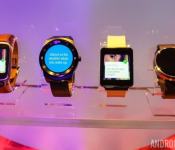
Failure to launch: a few reasons why smartwatches haven’t caught on

My first encounter with a smartwatch was about 25 years ago. It was 1990 and I was in a crowded movie theater watching the movie Dick Tracy with my family. Set in the 1930s, the film’s title character, portrayed by Warren Beatty, was a no-nonsense detective who fought crime while sporting a high-tech wristwatch equipped with a two-way radio. As an impressionable kid with a budding love for technology, it was one of the coolest things I had ever seen.
Fast-forward to the present, where Hollywood’s movie magic is pretty much a reality. Smartwatches are now widely available to consumers, but despite my fascination with futuristic timepieces as a child, I’ve yet to purchase one. And I’m definitely not alone. Recently, smartwatch maker Pebble announced that it had sold over 1 million units, which is definitely an impressive feat, however this milestone is over the course of two years. When you compare this figure to the millions of smartphones sold each month, it’s almost laughable.
My first encounter with a smartwatch was about 25 years ago. It was 1990 and I was in a crowded movie theater watching the movie Dick Tracy with my family.
Arguably the most recognizable smartwatch producer on the planet, Pebble’s lackluster start hasn’t stopped other companies from jumping on the wearable bandwagon. Tech superpowers like Samsung, LG, Sony and Motorola have been cranking out smartwatches faster than they can sell them. So why aren’t consumers biting? Here’s my take.
Smartwatches Aren’t Really a Standalone Product

Unlike Dick Tracy’s telephone-esque timepiece, the majority of smartwatches are not capable of placing voice calls on their own. In fact, most of them need to be tethered to an Internet-connected smartphone in order to operate at full capacity. This may not be a complete deal breaker for everyone, however some people aren’t too keen on this setup.
Add in the fact that most smartwatches are currently priced from $200 to $300, and this watered down extension of a smartphone experience really starts to become a tough sell.
I mean think about it. Have we as people really gotten so lazy that our smartphones need a butler? In a sense that’s what modern smartwatches are. Fans of these luxury items will argue otherwise and say they’re about convenience. “I get so many emails and text messages!” But is pulling your phone out of your pocket really that much of a chore?
Have we as people really gotten so lazy that our smartphones need a butler?
This is my biggest gripe about smartwatches as a whole. They don’t really bring much to the table. Yes, they’re cool in theory and maybe even in demonstration, but what can you really do with one that can’t be done better with a smartphone? People most likely recognize this and simply want more.
Not that fashionable

Another thing stifling the smartwatch’s growth is its appearance. If you’re looking for an attractive intelligent timepiece your choices are very limited. Most of these devices are very masculine in appearance, so if you’re a lady seeking something softer, things are even worse. Is it just me or do most smartwatches look like exercise gear? I’d say the Moto 360, LG G Watch R and Pebble Steel are the best looking hardware from the lot, but they still lack the crossover appeal that a traditional watch has to offer.
A Few Ideas That Might Help

Smartwatches aren’t necessarily on the brink of extinction, but they’ll need to evolve in order to endure the years ahead. One of the changes I’d like to see going forward are more self-sufficient devices that don’t require a smartphone for complete use. Yes, there are already products on the market like the Samsung Gear S, but I’m talking about devices with advanced network capabilities (mainly LTE) and possibly even the ability to place voice calls via a Bluetooth headset. While this sounds a bit silly, it may be a viable option for people who like to travel light.
Additionally, the smartwatch market needs watches that look more like… watches. The LG G Watch R is my personal favorite design so far, but some people may prefer something with more of a sleek build.
Smartwatches aren’t necessarily on the brink of extinction, but they’ll need to evolve in order to endure the years ahead.
Another challenge holding smartwatches back is how much they cost. Most devices are priced on a par with high-end on-contract smartphones, but they only offer a fraction of the functionality. The majority of casual consumers are just starting to wrap their heads around the concept of paying a few hundred bucks for a powerful smartphone or tablet. If these wearables are to catch on with the masses, manufacturers will need to find a sweet spot. I’d say that $100 to $150 is a reasonable price range. Last year, Pebble announced permanent price cuts for its product line, making its entry-level watch only $100. Hopefully some of the Kickstarter-created company’s competitors will soon follow suit.
Another possible springboard for smartwaches would be a device made by Google. The company already has a history of producing its own flagship hardware, so a Nexus watch would be an ideal showpiece to market Android Wear’s capabilities. While some people are gearing up for Apple’s first foray into the world of smartwatches, a timepiece directly from Mountain View almost seems imminent.
Final Thoughts

Modern smartwatches are still in their early days. Software platforms like Android Wear, Pebble OS and Tizen will only get better with time, but early adopters are going to encounter growing pains along the way. This may not discourage hardcore tech fans seeking the next big thing, however average consumers will definitely be a bit more hesitant to part with their hard-earned cash.
In their present form, smartwatches are still unpolished, unproven and ultimately unnecessary. Toss in the fact that most devices are poorly marketed and it becomes pretty clear why they’re not flying off the shelves. And until hardware smartwatch producers can come up with a clear-cut reason why these devices are actually needed, 1 million units sold every two years might be a slow death knell ringing loud and clearly.
What do you think, consider smartwatches a useful luxury at this point, or a niche item not worthy of your hard-earned dollars? Share your thoughts in the comments.
Wear Mini Launcher update brings a refreshed companion app and some new features

Google’s goal with Android Wear is to let you navigate through the OS with your voice, without the need to rely on touch navigation. However, sometimes its difficult to use voice navigation in certain situations. And because Google would like you to rely on your voice, it makes launching apps or performing simple tasks more difficult than it should be. Wear Mini Launcher is an app that aims to help with that problem. In fact, the app is receiving an update to version 3.0 that brings a few new features to the third party Android Wear launcher.
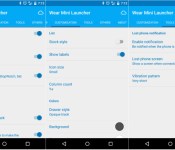
The biggest change in the update is the companion app, which now has its fix of Material Design. The app sports an all-around lighter color scheme, new toggles and many more enhancements. It doesn’t have a navigation drawer, so you’ll need to rely on swiping between the different tabs for navigation.
The companion app wasn’t the only thing to get an update. The developer has also added a few key changes to the launcher itself including double tap on an app to for ‘sticky’ mode, long tap an app to manage it, plus a few others. Take a look at the full changelog below:
- Material design for the phone’s app
- Double tap an app for sticky mode
- Long tap an app to manage it
- New tool: disconnection notification
- New Quick Setting to lock screen on
- New translations
Speaking from personal experience, I’d have a tough time using Android Wear without Wear Mini Launcher. If you have a Wear device, you should definitely check this out. And if you already have it, head to the Play Store link below to grab your update.
Download Wear Mini Launcher from the Play Store
Swatch to enter smartwatch game

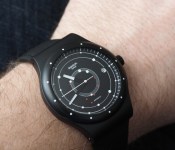
Now that we are in the smartwatch era, traditional watch makers are starting to feel threatened just a tad. Companies like Fossil, Citizen, Bulova, Rolex, and others will have to decide if they want to change their strategy. One such company isn’t waiting around. Swatch has already announced their intention to offer a smartwatch to compete with the likes of Apple and Google.
Chief Executive Officer Nick Hayek said, “Swatch will launch a new generation of its smart Swatch in the next two to three months.” Since smartwatches could slow sales of Swatch’s entry-level brand by as much as 10% and midrange brands (Tissot and Mido) by as much as 5%, this can’t be a surprise.
Now it’s unlikely to run Android Wear, but it appears Swatch won’t just offer something simple. The plan is for it to even include such things as mobile payments. It’s expected to be compatible with not only Android, but Windows too. I will be surprised if it isn’t compatible with iOS as well.
Swatch is waking up because of Apple. At first, they didn’t think much of Samsung’s Gear offerings or even Android Wear, but once Apple made it official, they started feeling the threat.
Would you be interested in a Swatch smartwatch?
source: WSJ
Come comment on this article: Swatch to enter smartwatch game

Apple’s HealthKit takes the early lead over Google Fit in U.S. Hospitals

Apple and Google might battle for supremacy when it comes to smartphones and tablets, but the healthcare sector is going to be another big battleground. It’s still early in the game, but Apple is already winning.
Reuters contacted 23 top U.S. hospitals and 14 of them are conducting a pilot program using Apple’s HealthKit. Google offers Google Fit, which isn’t as advanced at HealthKit, but they have started discussions with a few hospitals. Another player is Samsung, but just like Google, they barely have a foot in the door.
Hospitals hope to use these services to help physicians monitor patients for chronic conditions like diabetes and hypertension. They could provide the information necessary to prevent repeat admissions or to prevent more acute issues.
Probably the biggest reason HealthKit is kicking ass is because there are over 600 developers working with it. Google Fit only has a handful. HealtKit can already detect glucose measurements as well as monitor blood pressure. This is on top of the exercise-tracking apps that both Samsung and Google offer. The Apple Watch will bring even more data to both users and health professionals.
It seems like Apple will always have the edge when it comes to development. Developers flock to their products first. Is this early lead an indication of the future or will Google make a comeback? Once a hospital chooses one service, it’s unlikely to switch that easily.
source: Reuters
Come comment on this article: Apple’s HealthKit takes the early lead over Google Fit in U.S. Hospitals
Deal: LG G Watch R on sale for $249.99 at Daily Red Tags

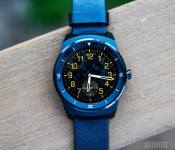
While the verdict on Android Wear vs Samsung Gear might still be up for individual interpretation, one thing is a bit more certain: the LG G Watch R is a fantastic piece of kit. Featuring a plastic OLED screen with a fully complete circular display (something Motorola came up a bit flat in attempting), and fantastic battery life, the smartwatch was a major upgrade from the original LG G Watch released last summer. Unfortunately, top tech is often price prohibitive, and at $300 the G Watch R is a bit steep for some.
Thanks to shopping site Daily Red Tags however, it’s now available for $50 off, bringing the price down to just $249.99. The model in question is the International (European) model and thus for customers living in North America or Asia, the AC Adapter will inevitably not fit in your charging socket, but there are easy ways to get around that. It’s worth mentioning that this is the largest sale we’ve seen for the product, with only Amazon selling it at $10 below retail price at $289.
For all those who missed our coverage on the round wonder, take a gander at our review and see for yourself if the LG G Watch R might be right for you.
How to hide unwanted watch faces from showing on your Android Wear smartwatch

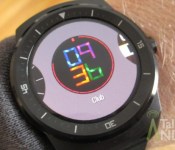
One of the coolest things about Android Wear is the ability to load just about any watch face imaginable. However, sometimes you don’t want a bunch of faces showing up on the watch because it’s kind of a pain swiping through all of them. The pre-installed ones are generally the ones that you are most likely to never use so it would be cool if you can simply hide them from your watch making it a lot easier to find your favorite faces. Well there is a way, and you won’t believe how simple it is to do.
1) Open the Android Wear app on your phone.
2) You will notice that the three most recently used watch faces are showing on the main page of the app. Tap the More button to show you all the watch faces that are pre-installed and that you downloaded from Google Play.


3) To hide any of them, just tap on the three dot menu at the top right of any of the watch face cards and select Hide on watch.

4) You will now notice that watch face is grayed out and it will no longer appear on your smartwatch. You can do this to as many watch faces as you want.


5) If you want to bring back any watch faces that you previous hid, just tap on the same three dot menu and select Show on watch.
I bet you didn’t think it was going to be that simple, did you? I hope this guide helped you, and be sure to check out all our Android Wear Guides for more tips and tricks.
Come comment on this article: How to hide unwanted watch faces from showing on your Android Wear smartwatch
WeatherPro updated with support for Android Wear

MeteoGroup has just updated its official WeatherPro app in the Play Store. Unfortunately, the upgrade doesn’t transport much by way of new functionality, but it does bring support for Android Wear, in addition to a multitude of new bug fixes and stability improvements.
The release notes for the V4.1 update can be seen below:
- View the weather on your smartwatch! The new watch face gives you the latest WeatherPro data in this convenient way, so you can check the weather whatever you’re doing!
- Adjustments to the start screen mean you can hide the map preview by closing the app when the map isn’t visible. Just scroll up to have a full overview again.
To install the update, simply open up the Play Store on your device, toggle the hamburger menu by swiping in from the left-hand side of the screen, select ‘My Apps’ and click on ‘WeatherPro’. Next, hit the update button, and the application will instantly start to download and install the upgrade from the Google Play servers. Alternatively, you can scan the QR code below to initiate the procedure.
Come comment on this article: WeatherPro updated with support for Android Wear

[New Android Wear App] SWApp Launcher Wear controls watch and phone settings

Another launcher available on Android Wear devices has debuted in the Play Store. SWApp Launcher Wear makes it possible for users to launch apps on their watch, from their watch, and perform actions with both. There are a fair amount of actions that can be done with SWApp Launcher Wear on either the watch or the phone. From the watch, users can select to keep the display on or choose a flashlight mode that transitions it to white. The phone actions include toggling WiFi, WiFi hotspot, and sound. It also includes a FindMyPhone feature.
SWApp Launcher Wear is available for free and works with any Android Wear device.
Hit the break for the gallery and download links.


Come comment on this article: [New Android Wear App] SWApp Launcher Wear controls watch and phone settings

Wear Messenger app now supports FlickKey keyboard

The Wear Messenger app for your Android Wear smartwatch has now received support for the FlickKey keyboard, which allows you to type on your wearable using gestures.
The same mechanism has been used on Flick Calc as well as the FlickKey IME, and it has received generally favorable reviews. Use of a standard keyboard on a device as small as a smartwatch is just not feasible. So having something like FlickKey makes lives a little easier for the users.

Sure, it won’t replace your conventional typing experience, but will certainly let you type faster compared to conventional QWERTY keyboards. The Wear Messenger app is still paid and will set you back by $1.99, so nothing’s different in that regard.

If you have already bought the app, you can expect an update notification to pop up sometime soon, which should contain all these features on board.
Come comment on this article: Wear Messenger app now supports FlickKey keyboard
 AIVAnet
