


Manual Camera gives you manual control over your picture, and it’s great

After Google opened up the APIs that allowed certain Android devices to snap full RAW photos, many have been looking for the right app to control the functions. Along came Manual Camera, which, as advertised, provides full manual control of the camera on your Android phone.
The fine art of photography has been somewhat diluted as the capabilities and automatic nature of mobile cameras have increased. We are, admittedly, at the point where a high-end Android phone can capture impressive images, I’d even venture to say photos of professional quality, but the ability to take these stunning photos is usually not a credit to the photographer’s ability to manipulate the settings. For those that are accustomed to taking manual control of their cameras, a fully automatic camera app can be a major headache and let down.

The introduction of RAW image support on Android has been very welcome for professionals looking to play with their Android devices a little bit, and Manual Camera offers the software that you can use to take it to the next level.
For our time testing Manual Camera, we found that almost every aspect of your camera, from shutter speed, ISO, white balance and more can be manually controlled. Each available setting defaults to automatic, eliminating the barrier to entry for new users, which also makes this great for those wanting to self-educate on how these typical (D)SLR caliber tools operate. Now all we need is optical zoom.
Manual Camera will run you $1.99 in the Google Play Store and will install on your Android 5.0 Lollipop and up devices.
Do you think that full manual control of your Android camera will make a huge difference in your mobile photography efforts?
VLC teases Android TV app, preview build available for download

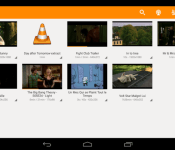
With Google TV officially closing down and Android TV becoming Google’s vision for the living room, more and more companies appear to be embracing the possibilities of what it could mean for how consumers view media. VLC, the makers of the beloved VLC media player (which sadly still hasn’t received Chromecast support), are hitting the ground running in 2015 when it comes to Android TV, and have released a preview build of their Android TV app to give consumers an early taste of how VLC could potentially fit in your living room.
The application is still is obviously a very early release that is sure to have some bugs, and there are also features that aren’t quite working yet. That being said, voice search, audio playback, album art, loading subtitles, adjusting playback speed and aspect ratio are currently up and running. You will need to make sure that the media you wish to play is located directly on the Android TV device or on a wired hard disk, as loading from a network attached drive isn’t functional just yet.
If you want to have a peek at the user interface, you can have a look at the preview build of the app via this video, courtesy of the GigaOm YouTube channel:
Again, it’s important to remember that this is nowhere near a final build of the application, and should be treated as as a preview/alpha build. If you can’t stand waiting and want to give the app a try, you can download the APK directly from this link.
What are your impressions of Android TV so far? Let us know what you think about it in the comments below.
Samsung Tizen-powered Z1 smartphone will have access to many Android apps

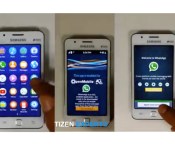
If you ask Microsoft, they can tell you that smartphone applications can make or break a new entry into the smart device ecosystem. With the imminent launch of Samsung’s Z1—a Tizen-powered smartphone—in India possibly as early as today, Samsung will instantly feel the pressure of consumers needing apps for their device.
Samsung has promised that many of our favorite Android apps will appear in the Tizen store in a native Tizen OS format, but if the Samsung Galaxy Apps Store is any indication of what one might expect from the Korean tech behemoth, the Tizen store could have quite a rocky start. Enter Open Mobile’s emulator app: Application Compatibility Layer (ACL), which harbors a sizable database of thousands of Android apps.
Open Mobile’s ACL app functions very similar to Linux operating systems’ emulators, so if you’re familiar with running programs of that sort, then you may have an idea of how this app functions. The ACL emulator will create an Android-like environment for Open Mobile’s featured Android apps to run in, all layered on top of the Tizen OS.
As you can see in a video provided by Tizen Experts, there does not appear to be a significant source of lag when running an app inside of ACL. The cost to battery life, on the other hand, is not seen.
Click here to view the embedded video.
ACL will be available on the Tizen store from day 1, but no word has been given as to whether or not the app is supported or endorsed by Samsung.
If you’re curious about what we might see in the Samsung Z1 spec-wise once it’s released, you can click here to read an article by Talk Android’s Valerie Richardson, which ran last month.
Source: Tizen Experts
Come comment on this article: Samsung Tizen-powered Z1 smartphone will have access to many Android apps

30 best Android apps of 2014
<!–
By use of this code snippet, I agree to the Brightcove Publisher T and C
found at https://accounts.brightcove.com/en/terms-and-conditions/.
–>
<!–
This script tag will cause the Brightcove Players defined above it to be created as soon
as the line is read by the browser. If you wish to have the player instantiated only after
the rest of the HTML is processed and the page load is complete, remove the line.
–>
brightcove.createExperiences();
The year 2014 was full of fun and amazing apps. There were old apps redefining themselves and new apps that stormed into the Play Store with something to say. In this roundup, we’ll take a look at the best Android apps released in 2014.
 Action Launcher 3
[Price: Free / $4.99 (donate option for $9.99)]
Action Launcher 3 was a complete step forward from Action Launcher 2. It was completely rewritten from scratch and included so many redesigns and fixes that it was released as a brand new app as opposed to an update. It features some unique functionality like the quickdrawer and shutters and we have it on good authority that some old favorites from Action Launcher 2 will resurface. It’s free to try and $4.99 to unlock the full version.

 AllCast
[Price: $4.99]
AllCast is an app that lets your Android device communicate with a number of things like the Chromecast, Apple TV, Amazon Fire TV, Roku, Xbox, and many others. It lets you stream your personal content like photos and videos to those devices. There is a free version to try it out but the paid version removes the restrictions and gives you the full experience. It made its mark when it was the only Chromecast app that was capable of doing what it does and remains one of the only apps that can do what it does to so many different devices.
 Camera51
[Price: Free]
Camera51 is one of the more interesting camera apps to be released in 2014. What it does is analyze faces and surroundings to help you determine the best spot to take a photo. This works for things like selfies and portrait shots of other people but it can also help scenery and other sorts of camera shots. It doesn’t have the advanced features that wannabe-DSLR apps have but if you’re terrible at taking photos (and have a high end device), this is a great option.
 Commandr for Google Now
[Price: Free with in app purchases]
Commandr is an application that aims to make Google Now more useful from a practical standpoint. It works offline and allows you to do some more basic things like turn on/off things like Bluetooth, WiFi, flashlight, and others as well as setting volume, access Google Play Music playlists, and others. If you have root access you can even reboot into recovery and clear notifications. It’s a unique app and if you ever plan on getting more into Google Now, this should be an app you’re using.
 djay 2
[Price: $0.99]
One of the many iOS apps that Android users long pined for was djay 2. This is an app that emulates a DJ turntable and allows you to mix and mess around with music. It comes with Spotify integration as well as your personal library integration, automix, looping and cue points, mixer, tempo, pitch-bending, audio FX, and many, many more features. Whether or not it is good enough for a professional setting is up for personal interpretation but there is no better app on Android that does what this does.
 Disney Movies Anywhere
[Price: Free]
Disney Movies Anywhere was released earlier this year and it brought with it a unique concept. With this app, you can buy and stream pretty much any Disney movie as well as Pixar movies. There is also access to exclusive Disney content. The app is cross platform so you can download it on other devices like your computer and tablet. It’s true that most of their titles are available on Netflix and services like Google Play and iTunes, but it shows that it’s possible for a movie studio to go out and do it on their own and do it in a desirable way.
 Google Camera
[Price: Free]
Google Camera came out over the summer and a lot of people loved it. It gave many people access to Google-only features like Photosphere for the first time and it has fun new things like Lens Blur mode. It’s meant to be the official camera app of Nexus devices so some things like HDR only work on those, but it was really cool of Google to give access to these other previously exclusive features to the public.
 Google Docs, Sheets, Slides
[Price: Free]
Google decided to break their Google Drive office suite up into multiple apps with the intent of adding more features and functionality to each piece. Thus, Google Docs, Google Slides, and Google Sheets were born and Google Drive fell back into being only for cloud storage. As it turns out, this was a good move because it allowed Google to add new features to each on a fairly regular basis and the three apps combined create one very competent office suite.

 Google Fit
[Price: Free]
One of the big announcements at Google I/O 2014 was Google Fit. Its biggest selling point is that it’s integrated natively with Android Wear and it’s slowly but steadily gaining more and more features and integration with other fitness hardware. You can use it to track and analyze your fitness and help you reach those all important fitness goals. It’s a tad basic right now compared to other heavy hitters in the fitness market but Google is behind it so it’ll get to where it needs to be.

 Google Now Launcher
[Price: Free]
Google Now Launcher was released earlier this year and has become the way people can get a stock Android feel on their devices without all the root and ROM stuff that many don’t feel comfortable doing. It comes with built-in Google Now support, a solid set of features, and it’s much lighter than OEM skin launchers and most third party launchers. It is very Google-centric but people who use this know that and use it for that reason. It’s also totally free which a lot of launcher aren’t.
 Ghostery Browser
[Price: Free]
Most browsers focus on things like speed or features but Ghostery focused on something else entirely: privacy. The app allows you to visually see what trackers are looking at you and give you the options to turn those trackers off. You can also do things like change the search engine and enter into the Ghostrank feature which helps Ghostery find new trackers. It’s a great and polished browser for the security minded and fans of the browser extension should have it.
 HERE Maps: Offline Maps
[Price: Free]
Nokia had a big year since they distanced themselves from hardware and started focusing on software. One of the more recent additions to their software line up is HERE Maps. It contains a great design, offline mode, and many of the same features as Google Maps such as the ability to explore things nearby, turn by turn directions, and maps available in more than 100 countries. Despite being in beta, HERE Maps already has more than half a million downloads and rocks a 4.5 out of 5 rating in the Play Store. It’s a phenomenal start and that was a pleasant surprise.
 Horizon Camera
[Price: Free with in app purchases]
Horizon is another camera app that aimed to do things from a different perspective. Horizon allows you to shoot video as a full horizon shot no matter how you hold your phone. That means you can hold it portrait, landscape, or anything between and the video/picture comes out as though you were holding it landscape. Given the general distaste for portrait videos and images, Horizon corrects a problem that many people don’t know they have and does so in a unique and inoffensive way.
 IFTTT
IFTTT
[Price: Free]
IFTTT stands for “If This Then That” and what it does is create connections between apps so that when you do something in one, it makes the other app do something. A popular example is the ability to save a picture from Instagram and upload it to Google Drive automatically. The options are virtually limitless and it can save you a lot of time and effort. You can even find lists of recipes (the term used for a connection created in IFTTT) to get you started.

 Inbox by Gmail
[Price: Free]
Despite the often frustrating invite system to get into this app, Inbox by Gmail is an innovative app that helps further integrate Google services into Google Now. It allows you to hyper-organize your emails so you can keep track of what’s what and there is built in integration with Google Now’s reminder system. It’s a little messy when you’re first getting started and that’s turned some people off to it but if you put in the effort to make the migration, this is a great email app.
 Link Bubble
[Price: Free/$3.99]
Link Bubble is a unique browser that works amazingly well for fans of social media. The entire browser is housed in a floating notification and opens links in the background. This means you can continue to browse social media or whatever you’re reading and open as many links as you need to. Then you can come back and open those links and see what they’re all about. There are some customization features and the app has gotten progressively better throughout the year. It’s definitely worth checking out.
 Maps.Me Offline Maps
[Price: Free]
Maps.Me made their mark on the navigation world by offering offline maps for a number of regions around the world. You can do things like plan routes, and bookmark places that you like but the big draw are the highly detailed maps and the fact that it works totally offline once you download the maps to your device. This makes navigation easier in areas where there is no data connection and fans of having offline maps should definitely check this one out.

 Muzei Live Wallpaper
[Price: Free]
Muzei Live Wallpaper was one of the most unique live wallpaper releases of the year. Its claim to fame is its seemingly never ending supply of classic art pieces from legendary artists from times past. It also has a few other features like the ability to use your own gallery along with the classic art. Perhaps its biggest feature is the API it provides developers. That allows other devs to integrate Muzei into their app. It’s unique and popular, especially if you love old art.
 MyStocks
[Price: Free with in app purchases]
MyStocks is a Holo-inspired stocks app that came out earlier this year without a lot of fanfare. It allows you to track your portfolio, see news regarding the stock market and your stocks, set alerts for stocks, and deep analysis of stocks complete with charts and graphics. It is capable of housing a lot of information and does so gracefully with a solid design. It may not match every stock app feature for feature, but anyone who is busy in the stock market on a consumer level should give it a try.
 Nokia Z Launcher
[Price: Free]
Nokia Z Launcher is the other huge release out of Nokia this year and it was a good one. It simplifies the Android experience into one home screen, one app drawer, and a scrollable clock/weather widget. Its claim to fame is the ability to search for apps, contacts, and Google by drawing letters on the screen. There are some small things as well like apps that show up on the home screen based on the time of day and your GPS location. It’s still in beta but it’s free to use and it’s something a little different.
 Peek
Peek
[Price: Free/$1.77]
When the Moto X came out, one of its most sought after features what the active display. Peek allows non Moto phones to emulate the active display feature by allowing you to see your notifications on your lock screens automatically without you pressing any buttons. It’s a unique experience and you can even interact with the notifications and open the needed apps to deal with them. It’s inexpensive but beware because it can drain your battery based on your settings.
 Stack Exchange
[Price: Free]
Stack Exchange has helped an untold number of people in an untold number of ways across many, many topics. Their official Android apps takes the positive force that is Stack Exchange and makes it mobile. If you’re curious about pretty much anything then this is an app you should have on your Android device. It’s a great community that is run by the community and they do a pretty good job of it.

 TapPath Browser Helper
[Price: $0.99]
TapPath is another unique app that helps you deal with links that you find on social media or websites. Here’s how it works. You can configure what a single tap, double tap, and triple tap on links do. That means you can single click to open in a browser, but a double click will drop it in Pocket, and a triple click will send it to your computer using Pushbullet. This is an app designed for people who browser pretty heavily which means it’s not for everyone but it can be very helpful if you engage with links a lot.
 Themer Launcher
[Price: Free with in app purchases]
Themer Launcher was in beta for a good long time but this year saw the first official, stable release. Themer is unique because it is a launcher like Nova and Action but the themes you can choose for your home screens are highly varied and quite enjoyable. All the themes are fully customizable, the themes are done by a talented community, and has integration with Zooper Widget. If you want something truly different for a launcher, give this a try.
 Udemy
Udemy
[Price: Free with in app purchases]
Udemy is a video-driven educational app that allows you to purchase and take courses in various skills that you may need. You can find stuff from cooking tips to dancing, Java programming to speaking different languages. The classes can be quite expensive but there are cheaper ones and free ones you can grab to check out the platform. The app itself is free and lets you view the courses on your smartphone so you can use it for study.
 Unclouded
[Price: Free with in app purchases]
Thanks to the small storage sizes on smartphones, many people have taken to cloud storage to keep the majority of their content. Unclouded is an app that allows you to manage your cloud storage across multiple sites to help organize all that stuff that just gets randomly uploaded. One of the best reasons to get this is to find duplicates of items you may have uploaded twice such as your camera roll which may have been uploaded to multiple cloud storage sites automatically. Cloud storage users should definitely try this out.
 VLC
VLC
[Price: Free]
After a long road of fixing bugs and adding features, VLC for Android has finally exited beta with version 1.0 released early in December. The beta version was already popular but it should be even more so now that it’s not in beta. It plays video and audio files along with a number of more unique features that you’ll find with VLC. Those in the market for a new media player should check it out.
 Wally
Wally
[Price: Free]
Wally made headlines back when Material Design was brand new and not many apps showed off the new Android design guidelines. On top of being a highly functional wallpaper app, the app successfully showed how Material Design can take a usually boring app and make it look and act much better. It went down for a short time in late 2014 when the site that hosted the wallpapers went down but it was revived and functions as it always has.

 WeMail
[Price: Free]
WeMail, like Inbox, has been working to change how people use email on mobile. Unlike Inbox, WeMail took a more mainstream approach that most people will be familiar with. They turned emails into threaded discussions that are organized by sender rather than chronologically. There are some other nifty features like voice emails and improved search and organization of attachments. IT’s also totally free.
 Yahoo Aviate Launcher
[Price: Free]
Last up is the curious case of Yahoo’s Aviate Launcher. It was originally done by an app development start up and was purchased by Yahoo for quite a bit of money. It features a redesigned home screen set up with categories to better find apps, contextual features based on what time it is and your location, and a unique look and feel. Purists didn’t like it but people looking for something different have enjoyed it quite a bit and it’s free to use.
Wrap up
If we missed any amazing Android apps from 2014, let us know in the comments below!
Franco Kernel makes its way to the Nexus 6

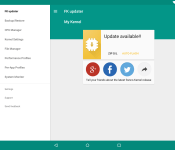
A well-known Android programmer and kernel hacker, Francisco Franco has updated his Material Designed Franco Kernel to support the Nexus 6.
Before using the app, you must root your device. Franco notes that he does not accept refunds if you fail to do this, which probably means the device will brick if it is not rooted.
The only devices that are currently supported are the Galaxy Nexus, the Nexus 4, the Nexus 5, the Nexus 6, the Nexus 7 2012, the Nexus 7 2013, the Nexus 10, and the One Plus One. The Franco Kernel will work as long as these devices are running at least JellyBean 4.1.
The kernel hack includes such functions as auto flashing kernels, an interface to change CPU clocks, governor parameters, and other interfaces, color and sound control, and a System Monitor designed by developer Christian Göllner.
The Franco Kernel is easy to use in that the user can “Backup & Restore Kernels on the fly without any “geek” knowledge.” If you have one of the supported devices rooted, then it should be worth checking out, especially since it’s 30% off in the Play Store.
Source: Google Play
FEATURED POSTS


The post Franco Kernel makes its way to the Nexus 6 appeared first on AndroidGuys.

10 of the hottest new Android apps this week (November 15)

Welcome back to the regular series aimed at helping Android users get more from their devices. If you’re looking for some new Android apps or games check out we have a handful of popular new titles to get you started. What you’ll find below are some of the hottest trending apps of the last seven days. We’re certain you will find something fun to play with this weekend. Let’s get to it!
NOTE: THIS ARTICLE IS SPLIT INTO TO PAGES.
 Messenger (by Google)

Play Store Description: “Stay in touch with friends and family. Messenger from Google is a communications app that helps you send and receive SMS and MMS messages to any phone. You can also send group texts as well as your favorite pictures, videos and even audio messages to your contacts.”
We say: Google has had a lot going on these past few weeks, between the release of Android Lollipop, updating all their apps to Material Design, and even some new apps uploaded on the Play Store. This week, it’s the new Messenger app on Lollipop, and it is available for download on the Play Store. Mostly a bare-bones SMS app, it brings basic SMS features in a simplistic format. It is also filled with Material Design. If that’s your thing, check it out with the widget below.
 Appdicted – Apps tracker

Play Store Description: “••Are you a smartphone addict?••
Appdicted track how many time you spend with your smartphone each day, and how many times you check it.
Facebook, Twitter, Instagram, Google +, Appdicted lets you know how much time you spend on social networks or the like instant messaging apps like Whatsapp,Messenger, Viber or Telegram.”
We say: This is a new app that doesn’t really do anything productive, but is a fun way to see how you use you’re phone. It tells you how often you check your phone, what apps you use the most, and more. Have your friends download it and it’s likely a fun thing to compare how everyone uses their phones.
 HTC Camera

Play Store Description: “Easily switch between main and front cameras with a simple swipe, and capture photos and videos with ease.”
We say: HTC looks to be following the trend set by Google and Motorola of uploading system apps onto the Play Store making it easier to update them without the need of a new firmware update. While the requirements only list Android 4.4 and up, I had no luck downloading the app on my non-HTC device, so it seems you need Sense (a HTC device) in order to use the app. Still, for those phones that don’t come with Eye Experience can download this to gain that feature.
 TwoDots

Play Store Description: “Join two brave dots as they traverse the arctic tundra, navigate fiery jungles, and plunge the ocean depths in the #1 hit game in over 70 countries.”
We say: This is an app that has been on iOS for a few weeks, and is the successor to the popular Dots game. This has an actual storyline however, so if you prefer a storyline this is for you. It’s free but be warned, it has quite a few in-app purchases. Check it out with the widget below.
 Speed Booster – Phone Cleaner

Play Store Description: “Speed up your Phone by up to 60% with the simple touch of a button!”
We say: These sorts of apps are always questionable, and by no means are we suggesting it will work for everyone, however it is new, and is doing fairly well with 4.6 stars and over 100,000 downloads, so try it out.

The post 10 of the hottest new Android apps this week (November 15) appeared first on AndroidGuys.

10 of the hottest new Android apps this week (November 8)
Welcome back to the regular series aimed at helping Android users get more from their devices. If you’re looking for some new Android apps or games check out we have a handful of popular new titles to get you started. What you’ll find below are some of the hottest trending apps of the last seven days. We’re certain you will find something fun to play with this weekend. Let’s get to it!
NOTE: THIS ARTICLE IS SPLIT INTO TO PAGES.
 Call of Duty: Advanced Warfare

Play Store Description: “The Call of Duty®: Advanced Warfare App gives fans the amazing tools they need to create and manage their clan, produce in game player and clan emblems, and participate in Clan Wars on the go from their tablet or mobile device. The new Call of Duty®: Advanced Warfare App takes the Clan experience to a whole new level.”
We say: Call of Duty: Advanced Warfare is the most recently released title from C.O.D. on the major consoles, and it seems they want to take over your phone as well. It seems that the mobile app will interact with your console game, allowing you to win loot and experience without having to be home. It already has over 100,000 downloads with a decent 3.6 stars in the Play Store, so check it out.
 Disney Movies Anywhere

Play Store Description: “With Disney Movies Anywhere, you can enjoy your Disney, Pixar and Marvel movies anywhere you go. It’s free to join — no subscription needed. And when you sign up and connect your digital movie accounts, you get a FREE movie on us! You also get exclusive videos, special offers, and earn reward points for all your eligible digital purchases. And it’s great for kids, with parental controls built right in.”
We say: The popular iOS app has made its way onto the Play Store. I believe you get Wreck-It Ralph as the free movie, which is not bad at all. The great thing about this app is if you buy a Disney movie physically, you can redeem a digital version with a code in the movie’s case. Seems to work well, as it has 4.2 Stars in the Play Store. Next thing I’ll be looking for is Chromecast support.
 Music Maniac – Mp3 Downloader

Play Store Description: “Download Copyleft music legally with Music Maniac – Mp3 Downloader!
The best free and legal way to download music onto your phone. Enjoy royalty free music from royalty free search engines such as Jamendo.”
We say: This app you should use at your own digression. We don’t condone downloading music illegally, just sharing a popular new app. This app claims it only gets royalty free music, which is good. Just be aware of what you’re doing. Anyways, currently has 4.6 stars in the Play Store, so it must work well.
 Music Download Paradise Mp3

Play Store Description: “Music Download Paradise Mp3 is a free music LEGAL downloader
Enjoy Creative Commons and royalty free music for free with the best music downloader for Android.”
We say: Evidently this is the week for free music download apps. The same thing applies to this app as the one before. Use at your own risk. This one doesn’t mention loyalty free music, just says that it’s legal. It also has 4.6 stars in the Play Store.
 HKTV – TV & Shopping platform

Play Store Description: ““Always Something New”
HKTV provides a unique “Shoppertainment” experience for
Hong Kong people to enjoy TV entertainment and online shopping at same time.”
We say: This one goes out to our friends in Hong Kong! I’m going to be perfectly honest here, I’m not sure I understand this one. You can watch TV and shop at the same time. I don’t understand the draw, but it currently has 5 stars in the Play Store, so maybe it’s good. Check it out with the widget below.


The post 10 of the hottest new Android apps this week (November 8) appeared first on AndroidGuys.
Pushbullet updated to send SMS messages from your computer

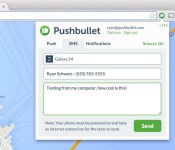
Pushbullet has a lot of great functionality that allows you to view and reply to notifications from your computer without touching your phone. Up until now, you could only reply to SMS messages sent to you through Pushbullet. With an update yesterday, this has changed.
Now you can start SMS messages from your computer with Pushbullet
With this update, you can now start a SMS message from your computer to send to someone. As long as you have the app installed and the browser extension, you can head to the “SMS” tab and get going. Auto-complete for contacts is available, but if you don’t like that you can change this under the settings.
Currently this is only available on Chrome, but it is making its way onto Firefox and Opera.
If you don’t currently have the app and want to try it, hit the widget below.
Do you like this update?
via Android Police
The post Pushbullet updated to send SMS messages from your computer appeared first on AndroidGuys.

10 of the hottest new Android apps this week (November 1)
Welcome back to the regular series aimed at helping Android users get more from their devices. If you’re looking for some new apps or games check out we have a handful of popular new titles to get you started. What you’ll find below are some of the hottest trending apps of the last seven days. We’re certain you will find something fun to play with this weekend. Let’s get to it!

Taco Bell
Play Store Description: Taco Bell® Mobile Ordering is Here.
Customize. Order. Pay. All from the new app. Now you can easily select a local Taco Bell, customize your favorite items and pay for your order. No need to select a pick-up time. We make your food when you arrive because just-prepared food is the best. Then skip the in-store line like you own the place. Plus, reordering your favorites is as easy as a twist of the wrist.
We say: Taco Bell seems to think you don’t get your food fast enough. So, they’ve released this app in the Play Store to help expedite the process. You can now order and pay before you even arrive, and then skip the line, get your food, and leave. People seem to like it, as it already has over 10,000 downloads and 4.6 stars.

djay 2
Play Store Description: djay transforms your Android device into a full–featured DJ system. Seamlessly integrated with Spotify and all the music on your device, djay gives you direct access to mix your favorite songs and playlists instantly. You can perform live, record mixes on–the–go, or enable Automix mode to let djay create a seamless mix for you automatically. Whether you are a professional DJ or a beginner who just loves to play with music, djay offers you the most intuitive yet powerful DJ experience on an Android device.
We say: The popular app from Mac and iOS has finally come over to Android. With Spotify integration, this app allows you to become a DJ without all of the fancy equipment. It will cost you $2.99, but from what I gather its well worth your money. Check out the widget below to download.

Google Fit
Play Store Description:
Effortlessly track your activity:
• Just carry your phone and get access to your walking, running and cycling activity.
Reach your fitness goals:
• Set goals based on either duration or steps and see your progress throughout the day.
• Receive performance-based recommendations for activity goals.
A comprehensive view of your fitness:
• Connect third party devices and apps to Fit and we’ll show you all of your fitness data in one place.
Available everywhere:
• Compatible with all Android Wear devices.
• Also access Google Fit on the web at http://www.google.com/fit and on your tablet.
We say: Google has had a busy month, between announcing the biggest update to Android yet, Android Lollipop, a new round of Nexus devices, and then last week releasing Inbox. Now, they’ve released the long-awaited Google Fit that they announced back at Google I/O. Google Fit works with your other fitness apps to compile all your health information into one place for you to analyze. It works with your phone and your Android Wear, along with other devices. Already has over 100,000 downloads with a 4.2 stars. Check out Google’s latest offering.

Hype Machine
Play Store Description: Discover the most talked-about music from blogs around the world. This is Hype Machine in your pocket.
Every day, thousands of people around the world write about music they love — and it all ends up on Hype Machine. We watch for new posts on over 800 of the most interesting blogs and make it easy to follow this chaotic world.
We say: Some times it’s hard to find new music. There are tons of music apps that help with music discovery, but they all rely on similar sounds and people’s opinions that you don’t see. Hype Machine looks to solve this by compiling information from hundreds of popular music blogs, and tell you what the new music is and what it’s like. It allows you to know what people think exactly, and saves you hours searching on the internet and through blogs. Check it out.

The Wolf Among Us
Play Store Description: The Wolf Among Us is a five-part (Episodes 2-5 can be purchased in-app) from the creators of The Walking Dead, winner of over 90 Game of the Year awards. Fairytale characters are being murdered in this hard-boiled, violent and mature thriller based on the award-winning Fables comic book series (DC Comics/Vertigo) by Bill Willingham. As Bigby Wolf – THE big bad wolf – you will discover that a brutal, bloody murder is just a taste of things to come in a game series where your every decision can have enormous consequences.
We say: The Wolf Among Us has done fairly well with its video game on Xbox and PlayStation, and has been a popular comic book series. Now, they’ve released a new mobile game that seems to look pretty good. It has 4.5 stars, so it must be good. Check it out for yourselves.
The post 10 of the hottest new Android apps this week (November 1) appeared first on AndroidGuys.
Amazon folds Appstore into standard Android app

Amazon is doing everything they can to make their mark in the mobile market. Their unsuccessful Fire Phone most likely showed them they needed a new strategy, and that is provide the content they’ve worked hard to build to other platforms. So they have quietly placed their mobile app store in the Android Amazon app.
App Store within Amazon app
While you’ve always been able to download the Amazon App Store onto Android, it was a harder process of finding the download page, letting Android accept .apk from Unknown Sources, and then installing the Amazon App Store. You still need to allow installation of .apk from Unknown Sources, but the Amazon app makes it a much more seamless experience, taking you directly the page in your settings, and then pressing back and being done with the set up process. After that, you’re all set!
What’s interesting is this was evidently implemented way back on September 9th, with supposedly it being included in their announcement about access to Prime Instant Video. They’ve likely been quiet about it to avoid unnecessary attention from Google. Either way, hit the widget below to download the Amazon app to access the Amazon App Store from the list of “Departments”, in a category called “Apps & Games”.
Will you use the hidden App Store?
Source: TechCrunch
The post Amazon folds Appstore into standard Android app appeared first on AndroidGuys.
 AIVAnet