


AT&T pushing Lollipop to the HTC One (M8) on April 7

Owners of the HTC One (M8) on AT&T finally have something to look forward to. Mo Versi, HTC Vice President of Product Management, announced on Twitter that a software update would begin rolling out on April 7. The software update is, of course, for Android 5.0 Lollipop. Versi says that the company received technical approval for the software and that means an update can occur as soon as possible. An delay will only occur if a bug randomly surfaces.
Let us know in the comments when you receive the software update.
Source: Mo Versi (Twitter)
Come comment on this article: AT&T pushing Lollipop to the HTC One (M8) on April 7
Lollipop update for T-Mobile’s LG G3 is now available via LG’s mobile support tool

If you are the owner of an LG G3 from T-Mobile you’ll be pleasantly surprised to learn that the Android 5.0 Lollipop update has become available for download via LG’s mobile support tool.
The Lollipop update is based on Android 5.0.1 with build number LRX21Y, and is not yet available via OTA (Over-The-Air). If you want to update your G3 you will have to connect your handset to a PC that has LG’s mobile support tool installed and follow the instructions. Besides the normal Lollipop features, the update also enables VOLTE (Voice-Over-LTE) functionality, with settings placed in the menu.
If you’ve already updated your T-Mobile LG G3 to Lollipop let us know if you’re happy with the new firmware and if there are any bugs you’ve noticed.
Source: tmonews
Come comment on this article: Lollipop update for T-Mobile’s LG G3 is now available via LG’s mobile support tool
Sony confirms Android 5.0 Lollipop to Xperia Z3, Z3 Compact and Z3 Tablet Compact
Posted today, Sony announced that their flagships Xperia Z3, Z3 Compact and Xperia Z3 Tablet Compact will be receiving Android Lollipop 5.0 this week. Timing of when you will get the update is dependent based on market and carrier which is usually the case will all Android devices.
Sony has been a bit slower than some of the manufacturers, but nonetheless their devices are still getting the upgrade which is a nice change from Kit Kat 4.4. Now that I have been using Android 5.1, Kit Kat 4.4 seems very dated, so hop on the update as soon as you can.
The post Sony confirms Android 5.0 Lollipop to Xperia Z3, Z3 Compact and Z3 Tablet Compact appeared first on AndroidGuys.
Verizon starts pushing out Lollipop update for the Galaxy S5… Again!

If you cast your mind back to early February, you may remember that Verizon claimed that it was rolling out the much-anticipated Lollipop update for the Galaxy S5. However, it appears the carrier pulled the original upgrade (version number: G900VVRU1BNLC ) with no reason given, and has today started pushing out an identical build of Android 5.0 to the handset, with this new version number: G900VVRU1BOA4.
The two versions seem to be exactly the same, both bringing support for multiple accounts, improved notifications, a smoother multitasking experience, Ambient Display, smarter internet connections and the recently-announced Material Design guidelines.
To start the update, make sure you’re connected to a Wi-Fi network. Then, from the home screen, press the Menu key, followed by Settings. Scroll to the bottom and tap ‘About Device’, followed by ‘Software Update and ‘Update Now’.
Source: Verizon
Via: AndroidPolice
Come comment on this article: Verizon starts pushing out Lollipop update for the Galaxy S5… Again!
Oneplus OxygenOS release has been delayed yet again

If you are a OnePlus One owner and were expecting today’s major decision to be whether or not to carry on using CyanogenMod 12S firmware or to turn to the home-grown OxygenOS, you are going to be a little disappointed. As Justin predicted, the release date has been missed and no new date has yet been announced.
This time the delay is said to be down to the certification process taking longer than anticipated. The OnePlus developer going by the devildv nickname said that he and a colleague were each running a handset running CM12S and OxygenOS respectively as daily drivers and that things would be explained in the coming days. It’s disappointing news, hopefully, OnePlus will announce a new deadline for the OxygenOS release sooner rather than later. Perhaps they would be better off just providing a download link when it is actually ready instead of disappointing its customers and blasting past deadline dates.
I wonder if the OxygenOS firmware will be released before OnePlus announce its GameChanger device next month?
Source: Reddit
Via: PhoneArena
Come comment on this article: Oneplus OxygenOS release has been delayed yet again
Samsung France confirm Lollipop update for Galaxy Note 3 Neo

It seems that every day we are posting stories confirming that this or that handset will be receiving the Android 5.0 (or even 5.1) update, and now it’s the turn of the Samsung Galaxy Note 3 Neo, the budget version of the Note 3. The confirmation comes courtesy of Samsung France who confirmed the update via Twitter.
@badrteffahioff La mise à jour Lollipop sera effectivement déployée sur #GalaxyNote3Neo dans le courant de l’année !
— Samsung FR (@SamsungFR) March 24, 2015

As you can see, the Twitter conversation was in French, but basically the user asked Samsung France why there was no information about the Lollipop update, and could they at least supply confirmation that the Galaxy Note 3 Neo will actually receive the update. To which, Samsung France replied that the Lollipop update will be deployed on the handset later this year.
It’s good news for Galaxy Note 3 Neo owners in that the handset is confirmed to be on the Lollipop update list, the bad news is that 2015 still has a long way to run so there could still be quite the wait.
Source: Twitter
Via: Sammobile
Come comment on this article: Samsung France confirm Lollipop update for Galaxy Note 3 Neo
AT&T Samsung Galaxy Note 4 finally getting Android 5.0 Lollipop
Weighing in at 1.16GB, the update to bring Android 5.0 Lollipop to your Note 4 on AT&T is now rolling out.
It may take a few days for it to trickle out to all devices, but be patient and keep spamming that ‘check for update’ button to see if you can join the Lollipop group.
I’ve had Lollipop on my Note 4 for a while now and it’s absolutely amazing – let us know what you think about it in the comments section below.
The post AT&T Samsung Galaxy Note 4 finally getting Android 5.0 Lollipop appeared first on AndroidGuys.
The Samsung Galaxy Tab S 10.5 receives Android 5.0.2 Lollipop update in France via OTA and Kies

If you are the proud owner of a Galaxy Tab S 10.5 WiFi (SM-T800) tablet and you reside in France, you might want to dig into your settings and start tapping the software update button. Why? Because Samsung is pushing the Lollipop update to your device as we speak.
Update: According to a reader, the lollipop OTA is hitting the Tab S 10.5 WiFi in Canada as well!
The firmware update is based on Android 5.0.2 and has a build date of March 17 with a change list of 4403645. You have three ways of getting the update on your Galaxy Tab S 10.5 T800 (WiFi), the first two of which are the recommended methods to do so. First you can wait for the OTA(Over-The-Air) update to reach your device (look for the notification in your status bar), or you can hook the device up to your computer to install the firmware via Samsung’s Kies software.
Finally, if you know what you are doing, you can always just download the T800XXU1BOCC update from Sammobile via the source link below and manually flash the update via the Odin software. If you choose to install manually, remember that this update is only compatible with the SM-T800 WiFi Tab S 10.5 model.
Source: SamMobile
Come comment on this article: The Samsung Galaxy Tab S 10.5 receives Android 5.0.2 Lollipop update in France via OTA and Kies
The memory bug present in Android 5.1 has been fixed internally

The release of Lollipop 5.0 is a rather touchy subject for many members of the Android community. Whilst it’s the biggest visual and technical overhaul since Ice Cream Sandwich, it carries a handful of extremely irritating bugs that render some smartphones unusable.
Amongst the bugs is one that’s been dubbed the “great memory leak.” This is the result of a handset failing to clear its memory (RAM), which causes almost every application to repeatedly crash and the launcher to regularly redraw — making it almost impossible to use any app or service.
When Lollipop 5.1 was first announced, many hoped that the issue would finally be resolved. Unfortunately, that was not the case. Even though version 5.1 fixed the bug present in 5.0, this latest release brought its own memory leak to the table, which proved to be just as bad.
Thankfully, Google has today announced that the 5.1 memory leak has been “fixed internally”, but it does “not currently have a timeline for public release.”
Source: Google
Come comment on this article: The memory bug present in Android 5.1 has been fixed internally
Android 5.1 Lollipop – Here’s what’s new!
brightcove.createExperiences();
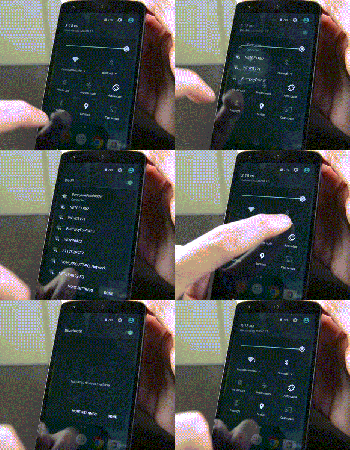
Android 5.1 Lollipop is officially in the wild and it comes with a metric ton of changes. However, most of them are under the hood and the actual interface only saw a few minor tweaks here and there. Let’s take a look at what’s different in 5.1.

Quick Settings tweaks
The Quick Settings in Android 5.1 Lollipop saw a couple of tweaks. They include:
- You can now connect to WiFi and Bluetooth devices without being required to go into the Settings app. Simply click the down arrow and continue from there.
- There is a new animation for the portrait mode toggle (more on that later).

Screen Pinning improvements
Screen Pinning is a feature (under Security in the Settings) that allows you to lock someone into a single application. This is great for kids or if someone is borrowing your phone.
- The verbiage in the Settings has been changed for clarification purposes.
- When you pin an application, Android now shows you which buttons to press in order to leave Screen Pinning mode. Otherwise, the feature works exactly as it did before.

Contacts app improvements
The Contacts app has undergone a couple of minor improvements:
- There is no longer any color overlays on contact pictures.
- Google+ photos are no longer used for contact pictures.
- Other minor tweaks here and there.

System Volume tweaks
The lack of silent mode is a sore spot for many Lollipop users, although HTC and Samsung have managed to (generally) re-add the feature in their skins. With Android 5.1, Google didn’t give us silent mode back but they did make some other tweaks:
- The icons of Priority Mode and No Interruptions Mode now appear in the selection window. This is so people new to the OS understand what the icons mean when they show up in the status bar (shown in the gif above).
- No Interruptions Mode will now still deliver notifications and you’ll still see the notification light blinking. It’s no silent mode, but it works pretty much the same. The only real gripe is that alarms still don’t go off so you’ll still need to create a tweaked Priority Mode (where alarms are okay, but everything else is turned off) in order to get a “truer” silent mode.
- You can now access system volume even while watching video, listening to music, or otherwise engaging in media. Simply click the bell icon on the right side (see video for a demonstration) and the media volume will disappear, replaced by the system volume.
- Other small tweaks are there, including the ability to better manage Priority Mode.

New animations
A few new animations have made their way into Android 5.1.
- The four icons at the top of the Clock app are now animated.
- The Portrait/Landscape toggle in Quick Settings is also now animated.

Other various tweaks
Some of the other highlights from the Android 5.1 update include:
- NuPlayer officially takes over for AwesomePlayer as the default streaming player.
- When you receive a heads-up notification (when they appear at the top and are clickable), you can swipe up to hide the notification but it will remain in the notification drop-down for you to check later. In Android 5.0, swiping up on the heads-up notification dismissed the notification entirely.
- Device Protection mode is now a thing that exists. This nifty new feature keeps your device locked down even if it has been factory reset, preventing thieves from getting around your security. Sadly, this is only available on the Nexus 6 and Nexus 9 as well as, according to Google, all Lollipop devices launched going forward.
- HD Voice Calling is now included. Devices on compatible carrier networks that support HD Voice will be able to use the feature. Reportedly, this only works with the Nexus 6 for right now.
- Dual-SIM support is now baked right into the OS.
- Unless otherwise stated, we believe the memory leak has finally been fixed.
- There were over 14000 additional tweaks, fixes, and other changes that came to Android 5.1 that improved everything from performance to battery. To see them all, here’s the full changelog.

The new “no SIM card” icon.
What we’re still waiting on
While the 5.1 update was huge in its own right, it didn’t bring everything. Here are a few features many people are still waiting on.
- A true silent mode where notifications come in, alarms act as normal, but the device doesn’t vibrate or ring.
- T-Mobile Nexus 6 users are still waiting for WiFi Calling but that should be coming soon.
- There is still no reboot option. When long pressing the power button, you still only have the option to Power Down.

Overall
Overall, the update is a big step forward for Lollipop and dare we say, the Lollipop we probably should have had to begin with. Performance on the Nexus 5 (at least) has been noticeably better and the inclusion of the new features gives a more full and complete feeling to the UI and experience overall. Let us know what you thought of the Android 5.1 Lollipop update. Did Google address all of your concerns or are there still some things you wish they had?
 AIVAnet