


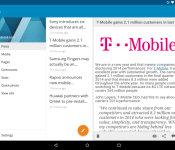
WordPress app revamped with Material Design

The Android application for WordPress has been rebuilt from the ground up. Now, the app’s user interface is based on Material Design for Android 5.0 Lollipop. The entire color scheme of the app is very blue and WordPress debuted new icons. The button to compose a new post (seen above) is identical to what Gmail, Google+, and other stock apps have. Furthermore, WordPress has a new grid layout for the Media section. This means that it is much easier to see all of the saved media on a site. And comments can be auto-completed when typing the name of another user on the site.
Here is what WordPress says is included with the version 3.5 update:
- Material redesign and overall redesign (round avatars, new icons, color scheme update)
- Mentions auto-completion in comments (start typing “@username” for the username of another user on your blog, within a comment area)
- New grid layout for Media Library on tablets
- Fetch blog visibility status on first login
- Bug fixes
Hit the break for download links.
Come comment on this article: WordPress app revamped with Material Design
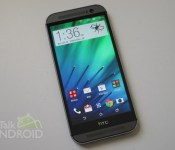
Android 5.0 update for the One M8 will start rolling out in 1-2 weeks

According to LlabTooFeR, who is well in the loop about HTC related information, the One M8 will start receiving its Android 5.0 update within the next two weeks. He mentions that EU and WWE (Worldwide English) regions will be the first to get the update, but there’s still no word on when the American carrier variants of the handset will receive the coveted update.
This is pretty much everything he mentions in his tweet with no word on whether there will be any new additions to the Lollipop ROM. But earlier leaks have given us a good idea of what to expect from the Android 5.0 ROM for HTC flagships, so there are barely any surprises left. While we expect there to be some Material Design elements with the ROM, HTC will maintain its stock theme and make some improvements to the look and feel of the home screen.
We expect to get more word on this new ROM over the coming weeks.
Source: @LlabTooFeR – Twitter
Come comment on this article: Android 5.0 update for the One M8 will start rolling out in 1-2 weeks

Sony announces lollipop update for Xperia Z3

Sony promised to update the Xperia Z3 to Android 5.0 (Lollipop) and it looks like they will keep their word. In their CES 2015 press conference, Sony announced that the rollout should start sometime in the next month. COO of Sony Electronics Michael Fasulo, didn’t get into specifics about the date or schedule, just promised the rollout would begin in the next month. This is definitely great news for those out there that own the Sony Xperia Z3.
Source CES 2015 and Android Central

The post Sony announces lollipop update for Xperia Z3 appeared first on AndroidGuys.

CyanogenMod releases CM12 Nightlies
 The folks over at CyanogenMod have been hard at work on your New Year’s present and finally have something to show for it: nightlies!
The release of the nightlies is accompanied by the news that CM12 is 85% complete, and should be finished up by the end of the month. Some of the features not yet in the nightlies are: Theme Engine, Quick Settings customization and Ribbon Mode, Navigation bar reorganization, Sound panel customization, and Lock-screen quick unlock. Smaller tweaks are also missing, but will probably not be noticeable.
Other than that, these nightlies are the perfect chance for those of you with pioneering spirits to go ahead and check out what CyanogenMod can do with Lollipop. Some new features to be added with CM12 (just to wet your whistle) are ambient display, a new messaging app, and a weather option in the status bar.
As always with a nightly. expect bugs. If you are already running a version of CM11 and your device is on the list, you may be able to flash the update directly from your current ROM without needing to wipe your device. For more instructions, follow the link below.
Source: CyanogenMod
Come comment on this article: CyanogenMod releases CM12 Nightlies
Download: Leaked build of Android 5.0 for Galaxy Note 3 (N9005)

If you’re a Galaxy Note 3 owner who’s hankering for the official Android 5.0 Lollipop over-the-air update to start rolling out, you’re destined for a rather long wait as Samsung is currently focusing its attention on bringing the update to more recent devices first. However, if you can’t wait, your handset carries the model number N9005, and you want to get your hands on it early, you can now download and install a leaked beta build.
This ROM is designed exclusively for the International unlocked variant of the Galaxy Note 3 (SM- N9005) and can be flashed onto the handset using the ODIN tool for PC. We recommend only installing the software if you have some knowledge of sideloading otherwise you could brick your device leaving it rendered useless.
With that being said, if you have a Note 3 and want to try the firmware, you can download it from the XDA Developers forum, where you’ll also find installation instructions.
All the changes you’d expect to find in Lollipop are bundled into this upgrade, including support for multiple accounts, improved notifications, a smoother multitasking experience and the recently-announced Material Design guidelines, in addition to the latest version of Samsung’s TouchWiz user interface.
Source: XDA
Come comment on this article: Download: Leaked build of Android 5.0 for Galaxy Note 3 (N9005)
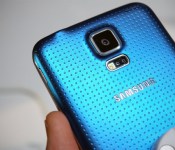
Samsung now rolling out Android 5.0 update for Galaxy S5 in Russia and Malaysia

If you own a Galaxy S5 and live in either Russia or Malaysia, you may want to listen up, as Samsung has just started pushing out the much-anticipated Android 5.0 Lollipop update to all unlocked variants of the handset located in these regions.
All the changes you’d expect to find in Lollipop have been bundled into this upgrade, including support for multiple accounts, improved notifications, a smoother multitasking experience and the recently-announced Material Design guidelines.
The full changelog can be seen below:
Material Design: You will quickly notice a whole new colorful look and feel to your device – from fluid animations to new application and system themes, colors and widgets.
Notifications UI & Priorities: In order to alert you to the most timely and relevant information, the format and behavior of notifications have evolved:
- notifications will appear on the lock screen and are intelligently ranked by type and who sent them.
- you double-tap to open one, swipe left or right to clear one, or clear all notifications from the bottom of the list.
- you can set the priority and privacy of notifications for each application.
- very high priority notifications will pop up briefly over other applications so that you can take action.
- when you dismiss a notification on one device it will be dismissed on your other Android devices, if they are connected to the Internet.
- you can further tailor how notifications behave with the new Downtime and Ambient Display settings (see below).
New Interruptions & Downtime Settings: You can tailor how interruptions behave, choosing to allow all, none, or only priority interruptions. You can personalize what counts as a priority interruption (reminders, events, calls, messages) and even tailor them to be from only contacts you specify. The Downtime setting will allow only priority interruptions during the times and days that you specify. e.g. allow only priority interruptions on the weekend.
Recent Apps (Multi-tasking): The redesigned Overview space (formerly called Recents) will include both applications and separate activities within those applications. For instance, each open tab in Chrome will also appear here along with recent applications; both your Gmail Inbox and a draft email message will appear as separate cards. This provides a consistent way to switch amongst tasks.
Ambient Display: While your phone’s display is off, Ambient Display can show notifications without turning on the full display. This will be triggered when a notification arrives. You will see notifications similar to that shown on the lock screen. You can turn this feature on in the Display menu in Settings, and note that it will increase the power consumption of your device.
Motorola Assist and Downtime: Motorola Assist integrates the new Downtime settings to control when you don’t want to be disturbed. Motorola Assist also now uses the new Interruptions settings so that you can customize exceptions, such as letting only people on your starred contacts list get through.
Flashlight: Lollipop includes a new flashlight option as part of Quick settings (swipe down with two fingers from the status bar to see it).
Share your Device: You can now set up multiple user accounts on your phone. Guest mode is enabled by default. You can give calling and text privileges to other users of your device, or restrict them as you like in the Users menu under Settings. Note that the personalized Motorola experiences (Motorola Assist, Motorola Connect) are for the owner account only. The Motorola Camera, Motorola Gallery, and Motorola FM Radio applications support multiple user accounts.
Pin a view/app: Screen pinning allows you to keep a specific app or screen in view. For example, you can ‘pin’ a game and your child will not be able to navigate anywhere else on your phone.
Battery: The Battery settings panel now shows an estimated projection for how much time you have left while discharging or charging. You can also enable a new battery saver mode that will save power by reducing performance and most background data operations to extend your battery life.
Smarter Internet Connections: With Android Lollipop, your phone will not connect to a Wi-Fi access point unless there is a verified Internet connection. This feature improves hand-offs between Wi-Fi and cellular connections, helping to maintain your video chat or voice-over-IP (VoIP) call as you switch.
Performance: Your phone now uses the new Android Runtime to help optimize application performance. After upgrading to Lollipop, your applications will undergo a one-time optimization process. Note that the optimization for ART requires more space.
Smart Lock (Trusted Devices): Android Lollipop adds native support for allowing trusted devices to keep your phone unlocked (such as your Moto 360, a Bluetooth car kit or headset, etc.). Smart Lock replaces the prior trusted device capability in your Motorola phone. Note that you will need to add your trusted devices back after the transition to Lollipop in the Security settings menu under Smart Lock.
Security: Encryption can now use a stronger 256-bit key to help protect your data. Note that the stronger key willonly be used after you perform a factory reset on Android Lollipop. Otherwise encryption will continue to use 128-bit key. You can turn on encryption in the Security settings menu.
As is customary with all manufacturer updates, the upgrade is being distributed in stages, but if you don’t feel like waiting for a notification to hit your handset confirming that it’s ready for your device, you can search for the update manually.
Come comment on this article: Samsung now rolling out Android 5.0 update for Galaxy S5 in Russia and Malaysia
OnePlus releases alpha build of its own custom ROM

OnePlus’s New Year gift to its users is an Android 5.0 Lollipop based custom ROM, the alpha version of which was released on Wednesday. The custom ROM that has been in development for some time currently provides a stock-Android experience to users, but it will eventually be customizable.
While the Chinese company has not added any extras in the basic features of the AOSP Lollipop, it will continue to improve and stabilize core functionalities on the latest firmware updates.
“As we look towards the official ROM release in the near future, we will keep to our promise and deliver an experience that is customizable, yet bloat-free with stock-Android-like simplicity by default; we would not ask you to settle for anything less. In the meantime, we thought you’d appreciate an early community preview and a progress report,” a post on OnePlus’ website reads.
If you want to flash OnePlus’ ROM on your device, you need to have TWRP recovery installed. You need to be extra careful since this is an alpha build with limited testing. The experience is best when you have GMS (Google Mobile Services) installed. If you have GApps package, you can install it after you flash the ROM to have access to all the google services.
This build does not have a built-in recovery so if you do a clean wipe, you may have to reflash TWRP onto your device.
Some of the issues that you might face with this build include unstable camera and video. While the custom ROM supports 4k video, its quality may not be up to the mark. There are also some issues with the capacitive keys, clock and booting of the device.
Source: OnePlus

The post OnePlus releases alpha build of its own custom ROM appeared first on AndroidGuys.
Looking forward: What will we see from Android in 2015?
2014 was a great year for Android, so 2015 has a lot to live up to. A lot of great new stuff was released last year – like Android Wear and Android 5.0 – that have set the stage for what should be a very exciting year, and we’ve given our top 3 things that […]
The post Looking forward: What will we see from Android in 2015? appeared first on AndroidSPIN.
 AIVAnet