


LG says Android 5.0 Lollipop coming soon to G3
LG G3 users get ready for because your time is almost here; Android 5.0 Lollipop is coming to your device very soon.
The company took to Twitter to greet LG G3 owners with the news that the update will be “coming soon” to their device.
Introducing Lollipop: a sweet treat for your #LGG3. pic.twitter.com/yg0qPqgzjM
— LG USA Mobile (@LGUSAMobile) January 23, 2015
Unfortunately, it doesn’t seem like any sort of timeframe was offered, but soon has to mean soon, right?
The post LG says Android 5.0 Lollipop coming soon to G3 appeared first on AndroidGuys.

HTC One Receives Unofficial Lollipop Update
 There’s been a bit of a delay for the much-awaited Android 5.0 update for the HTC One M7, but if you’re tired of waiting, you can grab the update on the XDA Forums, courtesy of LlabTooFeR. The build is called Maximus HD and includes both Lollipop and Sense 6.0.
Despite the funky-sounding name, the ROM doesn’t bring a plethora of customizations and superfluous features. There are very few additions to the OS, making it extremely similar to the official build.
The update supports the international, Asian, and AT&T/T-Mobile versions of the M7, so those of you using Sprint and Verizon as your carrier will have to keep waiting. The HTC One M8 will be receiving the official update throughout the next week, with the M7 following soon after.
If you want to grab the update, just swing over to XDA Forums and follow the instructions.
Source: XDA Forums
Via: Phone Arena
Come comment on this article: HTC One Receives Unofficial Lollipop Update

HTC One Receives Unofficial Lollipop Update
There’s been a bit of a delay for the much-awaited Android 5.0 update for the HTC One M7, but if you’re tired of waiting, you can grab the update on the XDA Forums, courtesy of LlabTooFeR. The build is called Maximus HD and includes both Lollipop and Sense 6.0.
Despite the funky-sounding name, the ROM doesn’t bring a plethora of customizations and superfluous features. There are very few additions to the OS, making it extremely similar to the official build.
The update supports the international, Asian, and AT&T/T-Mobile versions of the M7, so those of you using Sprint and Verizon as your carrier will have to keep waiting. The HTC One M8 will be receiving the official update throughout the next week, with the M7 following soon after.
If you want to grab the update, just swing over to XDA Forums and follow the instructions.
Source: XDA Forums
Via: Phone Arena
Come comment on this article: HTC One Receives Unofficial Lollipop Update

Reasons to upgrade to Android 5.0 Lollipop
<img src="http://i0.wp.com/www.androidguys.com/wp-content/uploads/2014/07/lollipops4.jpg?resize=640%2C431" class="attachment-medium wp-post-image" alt="lollipops4" style="display: block; margin-bottom: 5px; clear:both;" data-attachment-id="73941" data-orig-file="http://i0.wp.com/www.androidguys.com/wp-content/uploads/2014/07/lollipops4.jpg?resize=640%2C431" data-orig-size="1024,690" data-comments-opened="1" data-image-meta=""aperture":"0","credit":"","camera":"","caption":"","created_timestamp":"0","copyright":"","focal_length":"0","iso":"0","shutter_speed":"0","title":"","orientation":"0"" data-image-title="lollipops4" data-image-description="<p>via https://www.flickr.com/photos/gazeronly/10071699233</p>
” data-medium-file=”http://www.androidguys.com/wp-content/uploads/2014/07/lollipops4.jpg” data-large-file=”http://www.androidguys.com/wp-content/uploads/2014/07/lollipops4.jpg” />
In the world of technological innovation, its course is often defined by the actions of leading brands. In the face of intense market competition and driven by the desire to dominate a specific market sector, companies invest heavily in the development of new technology and improvement that will redefine the consumer experience. Take the smartphone market, for example, where Android responded to the launch of Apple’s successful iOS 8 software by releasing its own upgrade in the form of the Lollipop (Android) 5.0.
Like the iOS 8, Androids’ own Lollipop update includes several targeted enhancements. The first of these is the inclusion of Android RunTime (ART), which improves application performance in terms of speed, responsiveness and consistency. It is also 64-bit compatible, and the initial tests that have been conducted through tests such as Google’s Nexus 9 underline the improved performance that they tool delivers. It is particularly beneficial for business users or freelancers, who may often be required to operate multiple applications simultaneously and in real-time.
Android have also equipped the Android Lollipop upgrade with security features, thanks at least in part to the increased prevalence of virtual retailing and responsive online slots sites. More specifically, users can now ‘pin’ specific screen or applications, locking other users out of these functions while ensuring that the handset remains active. This is great for parents who wish to protect sensitive data without disabling their devices entirely, while it also makes it far easier to maintain battery life and protect your data in the event that your phone is lost or stolen.
In terms of practical usage, the Android 5.0 upgrade also incorporates a detailed usage chart and heightened battery saver mode. This is the brainchild of Google, who are in the midst of a drive to increase processing speeds and ensure that Android applications can run simultaneously without compromising the performance of individual devices. Although this project is its infancy, there are signs of it in the recent upgrade and a clear indication of the direction that future operating system updates will take.
The post Reasons to upgrade to Android 5.0 Lollipop appeared first on AndroidGuys.

LG G2 Gets Sweet News

LG’s hit smartphone of 2013 has finally gotten its turn for a treat. The Korean version of the LG G2 has officially received Lollipop. That means that all of the new, exciting features of Android’s latest version is now available for all users of the fancy device. If you own the Korean version, you should probably go check for the update if you haven’t already. This news, of course, is hardly surprising, considering the video that surfaced a few days back of the LG G2 running an official version of Lollipop.
Here’s to hoping that the new update is bug-free and completely stable!
Source: Twitter
Come comment on this article: LG G2 Gets Sweet News
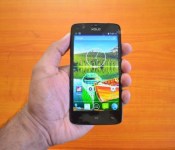
Xolo to push out Lollipop update for the One starting Friday, January 16

Keeping the promise it made back in October and to entice new customers, Xolo announced earlier today that it will begin pushing out the much-anticipated Android 5.0 Lollipop update to all unlocked variants of its first budget-friendly smartphone, the One, starting Friday, January 16.
“Having a dedicated software team is one of the key factors behind rolling out the Lollipop update ahead of other players. We have sold around 2,00,000 units of Xolo One smartphone since its launch in October last year. The acceptance of this device is too high and with the upgrade coming in, there will be more people interested in buying this device. The update will be an advantage with us,” writes Sunil Raina, Head of Business at Xolo.
For those unaware, the Lollipop upgrade brings support for multiple accounts, improved notifications, a smoother multitasking experience and the recently-announced Material Design guidelines.
The full changelog can be seen below:
Material Design: You will quickly notice a whole new colorful look and feel to your device – from fluid animations to new application and system themes, colors and widgets.
Notifications UI & Priorities: In order to alert you to the most timely and relevant information, the format and behavior of notifications have evolved:
- notifications will appear on the lock screen and are intelligently ranked by type and who sent them.
- you double-tap to open one, swipe left or right to clear one, or clear all notifications from the bottom of the list.
- you can set the priority and privacy of notifications for each application.
- very high priority notifications will pop up briefly over other applications so that you can take action.
- when you dismiss a notification on one device it will be dismissed on your other Android devices, if they are connected to the Internet.
- you can further tailor how notifications behave with the new Downtime and Ambient Display settings (see below).
New Interruptions & Downtime Settings: You can tailor how interruptions behave, choosing to allow all, none, or only priority interruptions. You can personalize what counts as a priority interruption (reminders, events, calls, messages) and even tailor them to be from only contacts you specify. The Downtime setting will allow only priority interruptions during the times and days that you specify. e.g. allow only priority interruptions on the weekend.
Recent Apps (Multi-tasking): The redesigned Overview space (formerly called Recents) will include both applications and separate activities within those applications. For instance, each open tab in Chrome will also appear here along with recent applications; both your Gmail Inbox and a draft email message will appear as separate cards. This provides a consistent way to switch amongst tasks.
Ambient Display: While your phone’s display is off, Ambient Display can show notifications without turning on the full display. This will be triggered when a notification arrives. You will see notifications similar to that shown on the lock screen. You can turn this feature on in the Display menu in Settings, and note that it will increase the power consumption of your device.
Motorola Assist and Downtime: Motorola Assist integrates the new Downtime settings to control when you don’t want to be disturbed. Motorola Assist also now uses the new Interruptions settings so that you can customize exceptions, such as letting only people on your starred contacts list get through.
Flashlight: Lollipop includes a new flashlight option as part of Quick settings (swipe down with two fingers from the status bar to see it).
Share your Device: You can now set up multiple user accounts on your phone. Guest mode is enabled by default. You can give calling and text privileges to other users of your device, or restrict them as you like in the Users menu under Settings. Note that the personalized Motorola experiences (Motorola Assist, Motorola Connect) are for the owner account only. The Motorola Camera, Motorola Gallery, and Motorola FM Radio applications support multiple user accounts.
Pin a view/app: Screen pinning allows you to keep a specific app or screen in view. For example, you can ‘pin’ a game and your child will not be able to navigate anywhere else on your phone.
Battery: The Battery settings panel now shows an estimated projection for how much time you have left while discharging or charging. You can also enable a new battery saver mode that will save power by reducing performance and most background data operations to extend your battery life.
Smarter Internet Connections: With Android Lollipop, your phone will not connect to a Wi-Fi access point unless there is a verified Internet connection. This feature improves hand-offs between Wi-Fi and cellular connections, helping to maintain your video chat or voice-over-IP (VoIP) call as you switch.
Performance: Your phone now uses the new Android Runtime to help optimize application performance. After upgrading to Lollipop, your applications will undergo a one-time optimization process. Note that the optimization for ART requires more space.
Smart Lock (Trusted Devices): Android Lollipop adds native support for allowing trusted devices to keep your phone unlocked (such as your Moto 360, a Bluetooth car kit or headset, etc.). Smart Lock replaces the prior trusted device capability in your Motorola phone. Note that you will need to add your trusted devices back after the transition to Lollipop in the Security settings menu under Smart Lock.
Security: Encryption can now use a stronger 256-bit key to help protect your data. Note that the stronger key willonly be used after you perform a factory reset on Android Lollipop. Otherwise encryption will continue to use 128-bit key. You can turn on encryption in the Security settings menu.
Come comment on this article: Xolo to push out Lollipop update for the One starting Friday, January 16
Galaxy S5 Lollipop updates rolling to owners in the UK
Samsung has steadily been pushing OTA updates around the globe for Android 5.0 for their flagship Galaxy S5. We know it went over well in Poland, Russia, Malaysia and Spain. Next on the mega OEM’s list is a roll out that is currently underway in the UK. While the update does bring the device more […]
The post Galaxy S5 Lollipop updates rolling to owners in the UK appeared first on AndroidSPIN.

HTC One (M8) Developer and Unlocked Edition now receiving Lollipop update

HTC’s Vice President of Product Management, Mo Versi, has taken to Twitter to announce that the Taiwanese company has just received approval from Google and is now rolling out the long-awaited Lollipop update to all Developer and Unlocked variants of the One (M8).
We have a full changelog for you after the break.
- Android 5.0 Lollipop update
- Lock screen and notification: New Lollipop UI style with enhanced privacy features
- Recent apps: Supporting multiple pages
- Addition of search function within settings
Versi claims that the update will start rolling out “tonight”, but we’ve already received it on our Unlocked handset, so checking for the update now is definitely worth a try. To do this, head into ‘Settings’, ‘About Device’, then tap ‘Check for Updates’ to manually scan for it.
Source: Twitter
Come comment on this article: HTC One (M8) Developer and Unlocked Edition now receiving Lollipop update
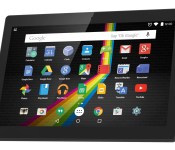
Polaroid L series tablets to run as low as $100

Polaroid last week announced its upcoming budget-friendly “L” line of tablets set for launch this spring. Slated to sell in 7-inch (L7) and 10-inch (L10) sizes, the duo run Android 5.0 Lollipop and feature quad-core processors. The full set of specifications is not yet clear though we can expect Wi-Fi connectivity, front-facing and rear cameras, front facing speakers, and “extended battery life”. Pricing is listed at $99 for the 7-inch model and $149 for the 10-inch model. Look for more details to surface in the coming weeks or months.


The post Polaroid L series tablets to run as low as $100 appeared first on AndroidGuys.
Video surfaces online showcasing Android 5.0 and Sense 6.0 running on HTC One (M7)

In a couple of weeks time, HTC will begin pushing out the eagerly-awaited Lollipop update to all unlocked variants of the One M7 and M8 located in Asia and Europe. However, a lucky user in China called 雷禪 has already received the upgrade on his device and has taken to YouTube to share it with us.
Hit the break for the full video.
Click here to view the embedded video.
Come comment on this article: Video surfaces online showcasing Android 5.0 and Sense 6.0 running on HTC One (M7)
 AIVAnet

