


Amazing things do happen: Verizon Galaxy S 5 now receiving Android 5.0 Lollipop update

Verizon is notorious for being the slowest for releasing updates, but today they are the fastest, at least in the U.S. The Verizon Galaxy S 5 is receiving Android 5.0 Lollipop right now. The software version is LRX21T.G900VVRU1BNLC and will of course get Material Design themes such as notifications on the lock screen and floating action buttons. TouchWiz has a brighter look and feel with bold colors and fluid animation.


Now this isn’t the first time Verizon pulled off a stunt like this. Remember when Verizon was the first to release the Moto X (1st Gen 2013) Lollipop update? That was even before some Nexus devices.
You can see the full change log by clicking on the source link below and let us know if you received the update.
source: Verizon
Come comment on this article: Amazing things do happen: Verizon Galaxy S 5 now receiving Android 5.0 Lollipop update
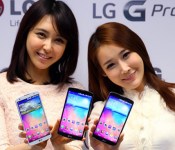
Korean owners of LG G Pro 2 receive Lollipop update

Korean owners of the LG smartphone, the G Pro 2, started receiving the Android 5.0 update a few days ago. The roll-out will be for all three variants of the LG device.
LG gave no indication on what their global release schedule for the G Pro 2 will be.
This is the second LG smartphone to receive the Lollipop update. The first, of course, was LG’s flagship, the G3.
The phablet was released almost a year ago in March 2014. Featuring a full HD display at nearly 6 inches, it was designed as the successor to LG’s popular Optimus G Pro phablet, which had won the Mobile World Congress‘ “Best Smartphone of MWC 2013″ award.
Source: Phone Arena
Come comment on this article: Korean owners of LG G Pro 2 receive Lollipop update

Samsung Gear VR is to blame for the Galaxy Note 4 not having Android 5.0 Lollipop

Owners of the Galaxy Note 4 are probably wondering where the Android 5.0 Lollipop update is. The device is the newest to be released by Samsung and the software launched right around the same time as the Galaxy Note 4. Apparently, Oculus is to blame. The company behind Samsung’s Gear VR is busy adjusting the kernel specifically for the headset.
Source: @Faryaab
Come comment on this article: Samsung Gear VR is to blame for the Galaxy Note 4 not having Android 5.0 Lollipop
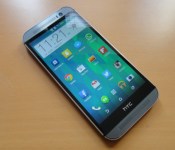
HTC One (M8)’s in Canada now receiving Lollipop upgrade

HTC has now started rolling out the much-anticipated and eagerly-awaited Lollipop update to all Bell, SaskTel and WIND Mobile carrier-branded variants of its flagship smartphone, the One (M8), located in Canada. This upgrade transports the latest build of the Android operating system, together with a multitude of bug fixes and stability improvements.
Hit the break for the full changelog.
System Improvements:
- Radio stability improvement
- Transition improvements
Eye Experience Implementation:
- Split Capture
- Crop-Me-In
- Photo Booth
- Auto Selfie
- Voice Selfie
- Swipe-To-Switch
- Video Face Tracking
- Live Makeup
- Video Screen Sharing
- Application Improvements:
Material Design: You will quickly notice a whole new colorful look and feel to your device – from fluid animations to new application and system themes, colors and widgets.
Notifications UI & Priorities: In order to alert you to the most timely and relevant information, the format and behavior of notifications have evolved:
- notifications will appear on the lock screen and are intelligently ranked by type and who sent them.
- you double-tap to open one, swipe left or right to clear one, or clear all notifications from the bottom of the list.
- you can set the priority and privacy of notifications for each application.
- very high priority notifications will pop up briefly over other applications so that you can take action.
- when you dismiss a notification on one device it will be dismissed on your other Android devices, if they are connected to the Internet.
- you can further tailor how notifications behave with the new Downtime and Ambient Display settings (see below).
New Interruptions & Downtime Settings: You can tailor how interruptions behave, choosing to allow all, none, or only priority interruptions. You can personalize what counts as a priority interruption (reminders, events, calls, messages) and even tailor them to be from only contacts you specify. The Downtime setting will allow only priority interruptions during the times and days that you specify. e.g. allow only priority interruptions on the weekend.
Recent Apps (Multi-tasking): The redesigned Overview space (formerly called Recents) will include both applications and separate activities within those applications. For instance, each open tab in Chrome will also appear here along with recent applications; both your Gmail Inbox and a draft email message will appear as separate cards. This provides a consistent way to switch amongst tasks.
Flashlight: Lollipop includes a new flashlight option as part of Quick settings (swipe down with two fingers from the status bar to see it).
Pin a view/app: Screen pinning allows you to keep a specific app or screen in view. For example, you can ‘pin’ a game and your child will not be able to navigate anywhere else on your phone.
Battery: The Battery settings panel now shows an estimated projection for how much time you have left while discharging or charging. You can also enable a new battery saver mode that will save power by reducing performance and most background data operations to extend your battery life.
Smarter Internet Connections: With Android Lollipop, your phone will not connect to a Wi-Fi access point unless there is a verified Internet connection. This feature improves hand-offs between Wi-Fi and cellular connections, helping to maintain your video chat or voice-over-IP (VoIP) call as you switch.
Performance: Your phone now uses the new Android Runtime to help optimize application performance. After upgrading to Lollipop, your applications will undergo a one-time optimization process. Note that the optimization for ART requires more space.
Security: Encryption can now use a stronger 256-bit key to help protect your data. Note that the stronger key willonly be used after you perform a factory reset on Android Lollipop. Otherwise encryption will continue to use 128-bit key. You can turn on encryption in the Security settings menu.
To see if the update is ready for your device, head into ‘Settings’, ‘About Device’, then tap ‘Check for Updates’.
Come comment on this article: HTC One (M8)’s in Canada now receiving Lollipop upgrade

LG’s Optimus UI vs. Vanilla Android
When I received my first Android smartphone about six years ago, I remember how much I desired stock Android on my HTC Droid Eris. I badly wanted to root my device, but as a young teenager at the time, I thought it would have been better to not risk bricking a phone I wasn’t paying for.
Fast forward to today, and now I’m on my fourth phone, an LG G3. If there is one thing I got the device for, it was the RAM. My last phone, with its 1GB of memory, just got so painfully slow that I couldn’t stand using it after it had been powered on for a few hours. It couldn’t even playback music without it hiccuping constantly.
Of course, this phone could end up the same. I’ve barely owned it for a month, which is not nearly enough time to measure its stamina.
Anyway, I knew right away that I might be dealing with a lackluster skin in the Optimus UI when I bought the G3. I recalled reviews of LG’s previous devices circa 2011 to 2013 where its skin was criticized time after time. Regardless, I just wanted the power the device offered, and at $30 on Verizon at the time, I felt it was calling my name. I’ll just put a launcher on it, I thought.
While it is true that I did put a launcher on it (Google’s Now launcher to be exact, which makes the home screen like the current version of Android), I’d be lying if I said LG’s skin didn’t make improvements on this pseudo-UI of Lollipop and that I didn’t enjoy the interface as a whole.
Before I go on, I should be clear that that my statements of stock Android are based partially on the Google Now Launcher since my phone still has KitKat. Likewise, my descriptions of Optimus UI are based on Android 4.4.
With the Now Launcher, a Google Search widget is located at the top of the screen. For better or worse, it cannot be moved around or removed from the display. I rarely use it, but I do like its minimalist appearance.
Speaking of minimalism, the Now Launcher starts the user off with two home screens, one of which is reserved for Google Now. There’s nothing inherently wrong with this, although I find it surprising that I can’t add a blank home screen manually. In order to add another, there has to be at least one app or widget on it, and if you remove them, the screen deletes itself. I don’t use many displays (Typically, just three), but this seemed a little cramped to me especially with its use of non-re-sizable, large icons.

By the way, LG allows for easy customization of icons by long pressing them until a smaller icon of a paintbrush in the top right appears and tapping them once more in order to enter a menu to resize it or change its appearance. Some will immediately like this idea because while LG’s icons for its apps aren’t ugly in my eyes, the company has used some rather bland colors like for messaging. I can easily see people preferring Material Design’s vivid color palette.

Next, there is the app drawer, which has apps sorted in alphabetical order on an opaque, white background. At first, I found this a bit jarring coming from LG’s UI since that allows the user to group apps into folders and to access widgets. The only way to do that with the Now Launcher (and probably with a stock ROM I’m assuming) is to long press an empty area of the home screen and select the widgets option above the home button. Of course, that becomes more difficult with a screen filled with apps.


Based on what I’ve seen on notifications in Lollipop, I’d say Google’s vision is superior. On the G3’s lock screen, I can see indicators for missed phone calls and text messages but not for emails. In addition, I can’t see a preview of those messages as I could if I was using vanilla Android (Google gives an option to hide those previews as well). Filtering notifications for just the important ones through Priority mode also sounds like a plus to me as is turning off an app’s notifications entirely.

Nonetheless, I still do enjoy LG’s use of the panel. At the top, I can activate toggles for Wi-Fi, Data, Bluetooth, and so on (which can easily be moved around), change the screen brightness (and even turn on or off auto brightness), and control the volume.
I do see how this would be annoying for someone who receives a lot of notifications because almost half of the screen is taken up by these toggles. My Gmail and just one other notification can be seen before I have to start scrolling.

Honestly, I’m not sure about the practicality of the Recents carousel in Lollipop. I think it could be easier to accidentally swipe away or activate apps in this view, but I’m going to reserve judgement until I actually get Lollipop on my G3. Until then, I have no problem using the cards system of the recent apps tray.

LG has added a nice addition of being able to activate dual window mode, which is similar to Samsung’s Multi Window, from this tray. Admittedly, I haven’t used it much, but it was useful for when I wanted to keep listening to a YouTube video while responding to a message.
Both UIs feature battery saving modes. For Lollipop, a device’s battery life can be extended for up to 90 minutes. The estimated time left on the battery can be found in the battery settings, and the OS immediately lets you know when it will be fully charged once it is plugged in.
Optimus UI’s battery saver works starting at 30% of a full charge once it is turned on, but I question why power usage of the phone cannot be scaled back as soon as it comes off the charger. Again, I have not used Lollipop personally yet, but I assume its interface does allow this.
Moving on to security–This might be more of KitKat vs. Lollipop at this point–, Optimus UI gives the options to lock files in Gallery, encrypt the internal storage, encrypt the SD card storage, set up a SIM card lock, install apps from unknown sources, install credential certificates, etc.
I expect Lollipop to also have most of these options especially for encryption, installation, and credential certificates. Additionally, to not be outdone, Google promises that all new devices will be shipped with encryption already turned on. It hopes to increase protection against malware and other vulnerabilities by using SELenforcing for all apps. Lastly, a phone or tablet can be paired to a device the user trusts such as a smartwatch or a car.
Device Sharing is similar as well, except Lollipop can set up multiple users for a single device on top of guest mode.
Android 5.0 supports USB microphones, speakers, amplifiers, mixers, etc., OpenGL ES 3.1 for supposedly desktop- and console-like graphics performance, raw photographic formats like YUV and Bayer RAW, HVEC for UHD 4K video playback, and improved HLS support for streaming.
While KitKat and Optimus UI support 64-bit SoCs and native apps just like Lollipop, Lollipop is built on the ART runtime. This gives the UI four times the performance of stock KitKat and more compact background apps and services, leading to improved memory usage. This is not everything, of course. You can read more these features at the official Android page for Lollipop.
To wrap this up, LG has shown me that with its Optimus UI on the G3 that it has been listening to consumer feedback and has made an interface that is enjoyable for me in many ways. Sure, I may never use the IR remote control or Smart Bulletin, but I just don’t mind because the overall package is that great. Meanwhile, Google has demonstarted that while it has a vision of the OS that it wants the various manufacturers to follow, it has updated it with features that were used in the likes of Samsung and Motorola’s phones.
Ultimately, as someone who has not yet used Lollipop, I can’t make a conclusion about which is better. Although, I will say this. Based on what experiences I’ve had with Android and various UI up until this point, I don’t feel that desire to root and install a ROM of Lollipop. I was quite satisfied that my last device received KitKat a month or two before I retired it and had 4.2 Jelly Bean before that. Perhaps, because KitKat did not do much if anything for my phone that I began to unconsciously think of Android updates as not as significant performance-wise. Hoping for an update for the latest version also has fatigued me for at least five years now.
I’ve been satisfied for well over a year to have a relatively modern version of Android that can fit my needs of occasional browsing and reading, music streaming and native playback, and downloading any app for the Google Play Store. Yes, I’m still excited Lollipop is coming quite soon to my device, but I’ll wait as long as it takes.
FEATURED POSTS


The post LG’s Optimus UI vs. Vanilla Android appeared first on AndroidGuys.
HTC One M8 Android 5.0 Lollipop rolling out to European devices
European HTC One M8’s can rejoice in the fact that they should be receiving Android 5.0 Lollipop imminently.
HTC senior communications manager Jeff Gordon took to Twitter earlier today:
HTC One (M8) owners in Europe, have a sweet tooth this morning? Check your software updates!
— Jeff Gordon (@urbanstrata) January 28, 2015
Hit that update button now to check to see if the Lollipop update is available for you.
The post HTC One M8 Android 5.0 Lollipop rolling out to European devices appeared first on AndroidGuys.
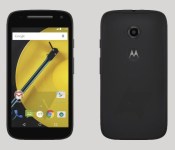
Here’s a possible (probable) look at the second gen Moto E

If Motorola has done one thing since its resurgence, it’s made the budget phone appealing. With OK specs that run Android decently, the Moto E has been an acclaimed phone in the sub-$150 tier. While the Moto E is roughly about nine months old, it appears that Motorola is already readying a sequel and luckily it’s popped up in a press-shot. The device does appear to be similar in builds to that of the Moto X and Moto G.
What we can see the render is a lack of a camera flash, a second noise-cancelling microphone, and a front-facing camera. Also from the render we see the Android 5.0 Lollipop nav buttons so it’s safe to assume that Lollipop will be on-board. Other than that, we don’t know about specs, connectivity, or when it will be released.
That said, the very existence of photos suggests that Motorola is working on the second gen Moto E. We’ll update you when we know more.
source: Android Police
Come comment on this article: Here’s a possible (probable) look at the second gen Moto E
European HTC One M8’s seeing Android 5.0 Lollipop updates
Manufacturers and consumers have a long road ahead of them when it comes to getting Android 5.0 Lollipop on their devices. The process is underway around the world for various devices and now we have word that the HTC One M8 in Europe is starting to see its tasty little treat. The news came from […]
The post European HTC One M8’s seeing Android 5.0 Lollipop updates appeared first on AndroidSPIN.

LG takes to Twitter to tease Lollipop for G3

LG wants you G3 owners to know that soon™, you too will have the latest flavor of Android in your pocket or purse. Or wherever you store it, I don’t judge…
This afternoon, LG posted the above image on its Twitter account, with the message: “Introducing Lollipop: a sweet treat for your #LGG3.”
Source: LG via Twitter
Come comment on this article: LG takes to Twitter to tease Lollipop for G3
US variants of the LG G3 to see Android 5.0 Lollipop updates ‘soon’
The LG USA Mobile Twitter account pushed out a tweet earlier this morning with the image you see above. It is obviously in reference to the LG G3 and a Android 5.0 Lollipop update. Being that the tweet came from the LG USA account, we surmise that this means the US variants are close to seeing the […]
The post US variants of the LG G3 to see Android 5.0 Lollipop updates ‘soon’ appeared first on AndroidSPIN.
 AIVAnet