


Xposed Framework for Android 5.0 Lollipop coming very soon
For those holding onto KitKat to make use of the Xposed Framework and avoiding upgrading to Lollipop will be pleased to learn that the developer has indicated it should be ready very soon.
Over in the XDA thread, the developer has managed to get Xposed running on a Nexus 5 with Android Lollipop.
Soon…
Working very well already.
The reason for the delay is that Xposed was developed on Dalvik runtime, and since Android Lollipop uses ART, it needed to be adapted.
No exact date is set for release, but it shouldn’t be too long.
(function() var script = document.createElement(‘script’);script.src = ‘https://stacksocial.com/widget.js?publisher=androidguys&type=editorial_post_widget_preferences’;script.async = true;var entry = document.getElementsByTagName(‘script’)[0];entry.parentNode.insertBefore(script, entry);)();
http://www.androidguys.com/pubgalaxy/728×90.html
The post Xposed Framework for Android 5.0 Lollipop coming very soon appeared first on AndroidGuys.

T-Mobile HTC One (M8) getting Android 5.0 Lollipop this Monday, February 9

Owners of the HTC One (M8) on T-Mobile have something to get excited about this weekend. Android 5.0 Lollipop will start pushing to the device starting this Monday, February 9th.
This news comes from Mo Versi who Tweeted that the update has received technical approval.
Sprint already started pushing the update to their branded One (M8) today, so we can only assume that AT&T and Verizon won’t be too far behind.
source: @moversi
Come comment on this article: T-Mobile HTC One (M8) getting Android 5.0 Lollipop this Monday, February 9

HTC is now rolling out the Lollipop update for all unlocked and developer models of the One (M7)

HTC has just started rolling out the much-anticipated Lollipop update to all unlocked and developer editions of its former flagship smartphone, the One (M7), situated in Europe. This upgrade transports the latest version of the Android operating system, together with a multitude of new features, bug fixes and stability improvements.
The full changelog can be seen below:
- Android 5.0 Lollipop update
- Lock screen and Notification: New Lollipop UI style with enhanced privacy features
- Recent apps: Support multiple pages
- Addition of search function within settings
To start the upgrade, make sure you’re connected to a Wi-Fi network. Then, from the home screen, press the Menu key, followed by Settings. Scroll to the bottom and tap ‘About Device’, followed by ‘Software Update and ‘Update Now’.
Come comment on this article: HTC is now rolling out the Lollipop update for all unlocked and developer models of the One (M7)
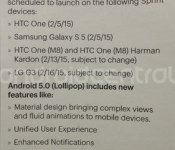
Sprint updating the HTC One (M8) and LG G3 to Android 5.0 Lollipop next week

Sprint is on fire when it comes to updating devices to Lollipop. If the HTC One (M7) and the Galaxy S 5 wasn’t enough, how about the HTC One (M8) and the LG G3? A leaked document shows that the HTC One (M8) will get Android 5.0 Lollipop on February 13 and the LG G3 will get the tasty treat on February 16. If you happen to own the Harman Kardon edition of the One (M8), don’t fret, because it’s included in the update as well.
Of course, it should be noted that “subject to change” is listed so if anything goes wrong with the final testing, Sprint will delay the launch. Let’s keep our fingers crossed.
source: Android Central
Come comment on this article: Sprint updating the HTC One (M8) and LG G3 to Android 5.0 Lollipop next week

Android 5.0 Lollipop soon expected for multiple Sprint devices
This is some great news for Sprint customers out there. A few of HTC, LG, and Samsung’s most popular devices are receiving updates for Android 5.0 Lollipop on the network.
The update for the HTC One M7 was confirmed via Twitter by Mo, the Vice President of Product Management at HTC. Its OTA update started today. He notes that Lollipop is coming to other devices as well.
Android Central said that Lollipop is also coming to the HTC One M8 and One M8 Harmon Kardon edition on February 13th and to the LG G3 on February 16th. Although, this could be subject to change.

You can also see in the image that the Galaxy S5 should have also started receiving the update earlier today. That appears to be true based on confirmation directly from Samsung.
Congrats to all the Sprint owners out there. Hopefully, the other characters will quickly follow with updates for these and other devices.
(function() var script = document.createElement(‘script’);script.src = ‘https://stacksocial.com/widget.js?publisher=androidguys&type=editorial_post_widget_preferences’;script.async = true;var entry = document.getElementsByTagName(‘script’)[0];entry.parentNode.insertBefore(script, entry);)();
http://www.androidguys.com/pubgalaxy/728×90.html
The post Android 5.0 Lollipop soon expected for multiple Sprint devices appeared first on AndroidGuys.

You can go to your local Best Buy store and they will install Lollipop on your Galaxy S 5 even if your carrier hasn’t released it yet

Well here’s some interesting news today for those of you that own a U.S. carrier-branded Galaxy S 5. Assuming your local Best Buy store has a Samsung Experience Shop in it, you can walk in with your Galaxy S 5 and they will install Android 5.0 Lollipop on it. Sprint and Verizon are already pushing the update to their respective S5′s, but even you have an AT&T or any other carrier device, you can still get the update. The only exception would be T-Mobile.
This news comes from a post on Reddit from an actual Samsung Experience Shop rep and it does seem legit. According to him the update is the same for all carriers, but each carrier has to add their own bloatware and conduct testing. How it works is that Samsung issues the update as say 1.0, which is what goes into the SMART system at least a week before they get officially released. Once carriers add their stuff, it might become 1.0att, 1.0vzw, or whatever. By going into the store, you will be getting the unadulterated version with no bloat, but apparently the bloat will still get downloaded to your phone once they are available and your SIM connects to the network.
There is a caveat to this and that is your phone cannot be rooted.
Let us know if you were able to get the Lollipop update on your Galaxy S 5 with this method.
source: Reddit
Come comment on this article: You can go to your local Best Buy store and they will install Lollipop on your Galaxy S 5 even if your carrier hasn’t released it yet
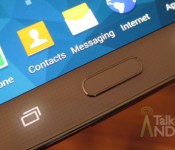
Sprint marks February 5 for Lollipop’s arrival on the Samsung Galaxy S 5

The HTC One (M7) on Sprint is not the carrier’s only device receiving a software update this week. Tomorrow, the Samsung Galaxy S 5 will also receive a software update moving it away from KitKat and into Lollipop. On its own site, Samsung revealed that February 5 would be the start of the software update’s rollout on the Galaxy S 5.
Here is the changelog provided by Samsung:
- Android OS updated to v5.0 Lollipop
- Enhanced VoWiFi UI
- Lumen toolbar removed
Let us know in the comments when you receive the software update.
Source: Samsung
Come comment on this article: Sprint marks February 5 for Lollipop’s arrival on the Samsung Galaxy S 5
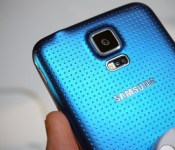
AT&T pushing out Android 4.4.4 update for the Galaxy S5

AT&T has just started pushing out the Android 4.4.4 update to all carrier-branded variants of Samsung’s flagship smartphone, the Galaxy S5, located in the United States. The upgrade transports the latest build of KitKat, in addition to support for VoLTE, as well as a multitude of new features, bug fixes and stability improvements.
Hit the break for the full changelog.
- Android KitKat 4.4.4
- Miscellaneous improvements, bug fixes, and security updates
- HD Voice capability
- AT&T Service additions:
- Mail – ATT Mail (att.net mail)
- AT&T Live
- Uber
- Remote Support
To initiate the upgrade manually, make sure you’re connected to a Wi-Fi network. Then, from the home screen, press the Menu key, followed by Settings. Scroll to the bottom and tap ‘About Device’, followed by ‘Software Update and ‘Update Now’.
Come comment on this article: AT&T pushing out Android 4.4.4 update for the Galaxy S5
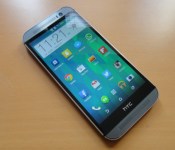
HTC starts rolling out Lollipop update for One (M8) in India

Despite recently announcing it wouldn’t meet its 90-day self-imposed deadline, HTC has just started pushing out the much-anticipated and very eagerly-awaited Lollipop update to all developer and unlocked variants of its flagship smartphone, the One (M8), located in India. In terms of added functionality, this upgrade carries the latest build of the Android operating system, together with a multitude of bug fixes and stability improvements.
Hit the break for the full changelog.
System Improvements:
- Radio stability improvement
- Transition improvements
Eye Experience Implementation:
- Split Capture
- Crop-Me-In
- Photo Booth
- Auto Selfie
- Voice Selfie
- Swipe-To-Switch
- Video Face Tracking
- Live Makeup
- Video Screen Sharing
- Application Improvements:
Material Design: You will quickly notice a whole new colorful look and feel to your device – from fluid animations to new application and system themes, colors and widgets.
Notifications UI & Priorities: In order to alert you to the most timely and relevant information, the format and behavior of notifications have evolved:
- notifications will appear on the lock screen and are intelligently ranked by type and who sent them.
- you double-tap to open one, swipe left or right to clear one, or clear all notifications from the bottom of the list.
- you can set the priority and privacy of notifications for each application.
- very high priority notifications will pop up briefly over other applications so that you can take action.
- when you dismiss a notification on one device it will be dismissed on your other Android devices, if they are connected to the Internet.
- you can further tailor how notifications behave with the new Downtime and Ambient Display settings (see below).
New Interruptions & Downtime Settings: You can tailor how interruptions behave, choosing to allow all, none, or only priority interruptions. You can personalize what counts as a priority interruption (reminders, events, calls, messages) and even tailor them to be from only contacts you specify. The Downtime setting will allow only priority interruptions during the times and days that you specify. e.g. allow only priority interruptions on the weekend.
Recent Apps (Multi-tasking): The redesigned Overview space (formerly called Recents) will include both applications and separate activities within those applications. For instance, each open tab in Chrome will also appear here along with recent applications; both your Gmail Inbox and a draft email message will appear as separate cards. This provides a consistent way to switch amongst tasks.
Flashlight: Lollipop includes a new flashlight option as part of Quick settings (swipe down with two fingers from the status bar to see it).
Pin a view/app: Screen pinning allows you to keep a specific app or screen in view. For example, you can ‘pin’ a game and your child will not be able to navigate anywhere else on your phone.
Battery: The Battery settings panel now shows an estimated projection for how much time you have left while discharging or charging. You can also enable a new battery saver mode that will save power by reducing performance and most background data operations to extend your battery life.
Smarter Internet Connections: With Android Lollipop, your phone will not connect to a Wi-Fi access point unless there is a verified Internet connection. This feature improves hand-offs between Wi-Fi and cellular connections, helping to maintain your video chat or voice-over-IP (VoIP) call as you switch.
Performance: Your phone now uses the new Android Runtime to help optimize application performance. After upgrading to Lollipop, your applications will undergo a one-time optimization process. Note that the optimization for ART requires more space.
Security: Encryption can now use a stronger 256-bit key to help protect your data. Note that the stronger key willonly be used after you perform a factory reset on Android Lollipop. Otherwise encryption will continue to use 128-bit key. You can turn on encryption in the Security settings menu.
To see if the update is ready for your device, head into ‘Settings’, ‘About Device’, then tap ‘Check for Updates’.
Come comment on this article: HTC starts rolling out Lollipop update for One (M8) in India
Paranoid Android is back to taste Lollipop
The Paranoid Android team is back with a post on their Google+ page after a long absence since Android 5.0 was debuted.
Their #WeAreBackBaby Edition is the nickname for their PA 5.0 Alpha 1 build and is a custom ROM based off of Android 5.0.2 and comes with some subtle but helpful changes, including:
– Update the baseline to AOSP Lollipop 5.0.2
– Improvements to Heads Up, such as an option to disable heads up interruptions completely
– Add Quick Unlock
– Extend the power menu
– Animate the volume panel in a more material manner
– Make it possible to skip songs using volume buttons when the device is locked
– Add CM12 Theme Engine
– Fix various small annoyances from AOSP
The PA team says while this is an alpha build, they are confident is it quite stable. Devices ready for this ROM include Nexus 6, Nexus 5, Nexus 9, Nexus 7 (2012 & 2013 WiFi only), OnePlus One, Oppo Find7, Find7s, and Nexus 10. The team confirmed that the Galaxy Nexus will not be getting the Lollipop update as of right now, but might be tweaked in the future under their “Legacy” section of devices.
For those of you who don’t know, Paranoid Android is a custom ROM you can download and install onto your device if it is rooted and unlocked for faster updates and more customization and features.
Check out Paranoid Android’s official website for download information. And of course, stay paranoid.
The post Paranoid Android is back to taste Lollipop appeared first on AndroidGuys.
 AIVAnet