


Samsung Galaxy S6 apps available to install on TouchWiz Android 5.0 devices
Much of the world knows a bit about the latest announcement from Samsung when they showed off the Galaxy S6 and S6 Edge. The new devices bring a premium design to the Galaxy S line with a mix of metal and glass, ditching their plastic backs and parts. They made a number of changes that […]
The post Samsung Galaxy S6 apps available to install on TouchWiz Android 5.0 devices appeared first on AndroidSPIN.

YotaPhone 2 will get new accessories, apps and a white variant in the coming months

The YotaPhone 2 is certainly one of the most unique Android handsets on the market right now, and it’s about to get even more interesting. Yota Devices has just announced that in the coming months, the YotaPhone 2 will be updated to Android 5.0 Lollipop and will also gain some new accessories, including special bumper cases and a wireless power bank. Additionally, a white variant of the phone is in the works, and is set to launch by the end of March.
Yota has also partnered with a few companies in order to bring more apps and services that will integrate with the e-paper display. Here is the full list of services we can expect to see on the handset in the coming months:
- Spritz: The ongoing integration of their focused reading technology will help readers get their email, books and notifications faster, with less effort on the ‘always on’ EPD display.
- Psy(x) Audio: Using a proprietary neural process, the customized “always on” Earprint application is the world’s only universal adaptive audio technology that improves your hearing and reduces listening fatigue from compressed audio up to 192kHz.
- StayTuned: This app concierge will add context awareness to YotaPhone by automatically organizing the user’s apps and displaying the most relevant apps and services, depending on where they are, time and personal habits. The solution learns from the user behavior in different contexts and is able to predict the user needs, providing a real-time personalized mobile experience.
- Graphite Software: Secure Spaces increases choice and security for businesses and users to dedicate each screen for multiple possible environments – work, personal, kids, gaming.
- Everypost: The easiest way to create, customize, schedule and post content to Facebook, Twitter, Google+, LinkedIn and many other social network.
- Emberify: A start-up working on contextual technologies, developing Instant, the most comprehensive Quantified Self platform for tracking app/device usage, fitness & travel.
The phone has been available in select markets for a few months now, and Yota plans to bring the device to both AT&T and T-Mobile via an Indiegogo campaign this Spring. We’d imaging that the accessories listed above will likely be available as extra incentives on the crowdfunding campaign, but that’s just us speculating for now. There’s no official date as to when these accessories and services will come to the device, so we’ll have to wait for an official announcement from the company sometime soon.
T-Mobile pushing out Android 5.0 Lollipop to Samsung Galaxy Note 3
Earlier today Sprint started rolling out Android 5.0 Lollipop to the Samsung Galaxy Note 4. T-Mobile is also in the process of rolling out Lollipop, but interestingly enough it is starting with the Samsung Galaxy Note 3. I am sure that will spark some hate and some love for T-Mobile users with Note 3’s and […]
The post T-Mobile pushing out Android 5.0 Lollipop to Samsung Galaxy Note 3 appeared first on AndroidSPIN.
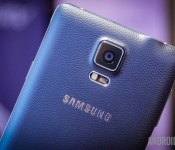
Android 5.0 Lollipop now rolling out to the T-Mobile Galaxy Note 3, Sprint Galaxy Note 4

Samsung is continuing to roll out a steady stream of updates to their current and most recent generation of smartphones. The next two handsets on the list to receive Android 5.0 Lollipop are the T-Mobile Galaxy Note 3 and Sprint Galaxy Note 4, and both carriers have just confirmed that the update is rolling out as we speak.
The Sprint Galaxy Note 4 Lollipop update, carrying build number N910PVPU1BOB7, will include all of the wonderful aesthetic changes we’ve seen from Lollipop in the past. Among others you’ll receive a ton of new security enhancements, notification improvements and many, many more. And just for the Galaxy Note 4, the update will also bring Wifi calling enhancements.
The Lollipop update for the T-Mo Note 3 will feature the build number N900TUVUFOB5, and will receive all of the visual and under the hood changes as the Note 4. Specific to the Galaxy Note 3, here are all of the changes Samsung’s website says you’ll receive in the update:
- OS upgrade to Android 5.0 (Lollipop)
- Wi-Fi calling experience
- Resolved Wi-Fi calling one way audio
- Resolved IPv6 email setup
Be warned, though. According to a few forum members, the OTA update comes in at a hefty 1GB, so be sure you’re on Wifi when you press that update button. If you don’t want to wait for the update to make it to your phone, head to Settings>About device>Software update>Check now to check manually.
Have you gotten the Lollipop update on your Note 3 or Note 4 yet? If so, how are you liking it?
Sprint pushing out Android 5.0 Lollipop to Galaxy Note 4 today
Those of you that own a Samsung Galaxy Note 4 with Sprint are in for a treat. The carrier has started rolling out Android 5.0 Lollipop to the device this morning. The update brings the software version number up to N910PVPU1BOB7. It brings all the Lollipop software goodies we have all been drooling over for some […]
The post Sprint pushing out Android 5.0 Lollipop to Galaxy Note 4 today appeared first on AndroidSPIN.
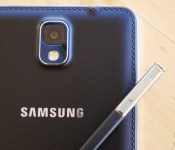
Android Lollipop heading to the Galaxy Note 3 in India

Samsung is continuing to push out its Android 5.0 Lollipop updates to new and last generation handsets alike. An update is now making its way around to Galaxy Note 3 (SM-N900) users in India.
Build number N900XXUEBOB2 includes everything that we have seen from Lollipop updates for different Note 3 variants and other Samsung handsets, including the new UI, software changes and improvements to battery life and general performance.
The Lollipop update is rolling out over the air, or can be grabbed through Samsung’s Kies PC software. To check if an update is available for your handset, click through to Settings > About device > Software update and spam the update button. Alternatively, the more adventurous out there can grab the firmware from SamMobile’s database to manually flash on their Galaxy Note 3, after taking all the usual precautions of course.
Smart Unlock review: Adds Lollipop’s Smart Lock to older devices
Android 5.0 Lollipop brought some key new features, one of which is called Smart Lock. But with Android 5.0 Lollipop adoption still sitting at just 3.3 percent based on the latest ‘Platform Version’ numbers from Google — the Smart Lock feature is one that many hear about but cannot actually use. The feature is actually pretty simple, not to mention convenient. First things first though, just what is Smart Lock.
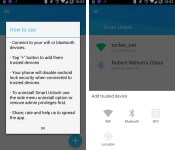
Smart Lock in Lollipop allows you to pair your smartphone with a trusted device and skip the lock screen security. Essentially, Smart Lock will allow you to open your phone directly to your homescreen when you are connected to your trusted device. Well, an app called Smart Unlock adds this functionality to a wide variety of Android devices. Smart Unlock works with devices running Android 4.0 and later.

The app is priced at $1.99, though it does come with a 7-day free trial. I’ve been running the app on a OnePlus One (with Android 4.4.4) for a few months now, and haven’t had any issues. At present the Smart Unlock app allows you to set a Wi-Fi connection or a Bluetooth device as trusted. And for those wondering, you can have more than one trusted device setup using the app. Personally I have mine set with my home Wi-Fi connection and my Google Glass. This means my phone unlocks directly to the homescreen (without any security prompts) when I am at home, or wearing my Google Glass.
Getting up and running is relatively quick and easy. First, you’ll want to visit the settings on your smartphone to make sure you have a lockscreen PIN (or other security method setup). From that point you install the Smart Unlock app from the Play Store, and then set your trusted devices using the “+” icon in the lower right hand corner. Again, the app allows for Wi-Fi and Bluetooth connections to be set as trusted devices. There is also a coming soon mention for NFC and Location, but the developer hasn’t offered any firm timeline as to when those can be expected.

Otherwise, the app has a clean user interface and makes use of a left-hand navigation menu. Aside from setting trusted devices there isn’t a ton of other features or options. But thankfully, the basics such as being able to have the app start on boot, and hiding the status bar icon are available.
What We Liked
- Easy to setup, and easy to use.
- Does not require root, and works with a wide variety of Android devices (4.0 and later).
- Having a secure device, without having to constantly enter a PIN.
Room For Improvement
- App has issues with “most” Samsung devices (according to developer).
- Hoping to see the update with NFC support sooner rather than later.
The Smart Unlock app currently has a 4.0 rating in the Play Store, and there are some complaining comments. But in regards to those comments — I will reiterate that I’ve been using the app for a few months and haven’t had any issues. Not to mention there is the 7-day free trial which should be more than enough to let you see how well the app will run with your particular device/trusted device setup.
Bottom line here — if you aren’t in that 3.3% of Lollipop users and want a secure phone without having to always enter your PIN code you should check out the Smart Unlock app.
The post Smart Unlock review: Adds Lollipop’s Smart Lock to older devices appeared first on AndroidGuys.
Verizon HTC One M8 Android 5.0 Lollipop rolling out
In a perfect world when a manufacturer had a software update ready for a specific device, it would just become available. Unfortunately we don’t live in a perfect world. Simply put, that means highly anticipated updates can sometimes be staggered between carriers by weeks and even months. For those of you on Verizon with a […]
The post Verizon HTC One M8 Android 5.0 Lollipop rolling out appeared first on AndroidSPIN.

Android 5.0 Lollipop update now rolling out to Verizon HTC One M8

Not too long ago, HTC announced that it would fail to update all carrier variants of the One M7 and M8 handsets to Lollipop within the company’s self-imposed 90-day guarantee. We’ve seen the update roll out to most other carrier variants in the US since that announcement, but one carrier that always seems to be the straggler of the bunch is Verizon. We heard a few weeks ago that HTC anticipated the arrival of Lollipop to the Verizon One M8 in early March, and it seems as though they didn’t disappoint. Verizon is now pushing out the update to Android 5.0 Lollipop to HTC One M8 owners.
Just like all the other One M8 variants, your phone will run Sense 6 atop all of the beautiful Material Design enhancements that Android 5.0 Lollipop brings to the table. Among others, you’ll get a slew of new security features, new notification improvements, a redesigned recent apps panel, and many, many more. Specifically for Big Red customers, the Lollipop update brings the addition of Band 4 LTE roaming and enhancements to 3-way calling.
If you don’t want to wait for the update to hit your phone, you can check for it manually by heading to Settings>Software update>Check new. Any Verizon One M8 owners receive the update yet? If so, how are you liking it?

Latest Android distribution numbers have been posted, Lollipop now up to 3.3%

Google has just posted the latest Android distribution numbers, and the biggest change we’re seeing from last month is that Lollipop has now reached 3.3% of all Android devices. Lollipop has struggled to even register on the charts in the past two months or so (only reaching about 1.6% of devices last month) and now it’s continuing to grow ever so slightly.
Jelly Bean has held the top spot for quite some time now, totaling 42.6% of Android devices. KitKat isn’t far behind, though, with 40.9% of devices (up from 39.7% from last month). Next on the list is Gingerbread, totaling 6.9%, down from 7.4% from last month. Ice Cream Sandwich is also on the decline, only being installed on 5.9% of devices, which is down from 6.4% from last month. Lastly, we have Froyo, which hasn’t budged for the past few months, holding a sturdy .4% of the chart.

It’s certainly not encouraging to see any devices run on a version before Jelly Bean, but at least we can say that KitKat and Lollipop are on the rise. Android 5.0 Lollipop has been steadily rolling out to a number of different devices, including the LG G3, HTC One M7 and M8, Samsung Galaxy S5, Samsung Galaxy Note 4 and Edge, Motorola Moto X and G and many more. The update to Lollipop will only continue to make its way to devices from here on out, so we’ll definitely see another spike in the chart in next month’s numbers.
What are your thoughts on the latest distribution numbers? If you’re running an older version of Android, has it been dragging down your overall experience of Android? Let us know your thoughts in the comments.
 AIVAnet