



Amazon’s £79 Fire TV set-top box now available in the UK

Amazon announced the impending arrival of its Fire TV set-top box in the UK last month, and right on cue, it’s now available for £79 through the company’s online store. It’s Amazon’s attempt to steal market share from the likes of Apple, Google and Roku, though the only thing that really differentiates it from competitor products is its second job as an Android mini-console. And for that, you need one or more of the Fire game controllers, which go for £35 a pop. Fire TV also enables you to push content from smartphones and tablets to the big screen, and its remote has a built-in microphone for shouting search criteria into. Otherwise, the set-top box is merely a window to various content streaming apps, with Amazon’s services obviously taking pride of place, potentially making it the best option for loyal patrons of the Prime ecosystem.
Filed under: Home Entertainment, HD, Amazon
Source: Amazon
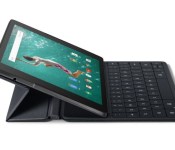
Pre-orders for Nexus 9 cover and keyboard folio hit Amazon

The release of the Nexus 9 is just around the corner, and preorders are already live on the Play Store. Also on the Play Store are pre-orders for the official “Magic Cover” and the very attractive (but over-priced) keyboard case. For those who use Amazon as their retailer of choice, both of these cases can now be pre-ordered from the popular website. Both cases are priced identically as they are on the Play Store ($39.99 for the Magic Cover and $129.99 for the keyboard). If you’ve been waiting for them to hit Amazon, hit the source links below and order today.
Buy: Magic Case | Keyboard Folio
Come comment on this article: Pre-orders for Nexus 9 cover and keyboard folio hit Amazon

Amazon and Simon & Schuster reach a deal on internet book sales

Amazon just found a way to put further pressure on Hachette in its ongoing pricing war: strike a deal with another publisher. The online retailer has forged a new agreement with Simon & Schuster that will keep the book giant’s digital and physical titles on Amazon for multiple years. The full terms of the deal aren’t available, but the Wall Street Journal claims that it reaches a middle ground; Simon & Schuster will normally set prices, while Amazon will have the right to discount books in some situations. However it works, both sides are claiming it as a victory. Amazon argues that it gives the publisher a “financial incentive” to drop prices, while a letter from Simon & Schuster describes the pact as “economically advantageous” for both itself and authors.
While this is good news if you’re shopping for the latest Colm Toibin novel, the deal comes across as an iron fist in a velvet glove — it’s a reminder for Hachette about the consequences of refusing to fall in line. Simon & Schuster is keen to tout “continuous availability” of books as a perk of the deal, and the WSJ adds that Amazon will make sure those titles are “well promoted.” If Hachette doesn’t compromise, it won’t have either the reliable inventory levels or product positioning needed to thrive this holiday shopping season. Hachette hasn’t commented on the Simon & Schuster contract, but the odds are that it isn’t happy about being backed into a corner.
Source: Wall Street Journal, New York Times, Financial Times

Engadget Daily: Kindle Voyage review, Disney’s ‘Big Hero 6’ and more!

If you’re a germophobe, Kindle user or Disney fan, this issue of the Engadget Daily is for you — and really, everyone else is invited too. Read on for all our news highlights from the last 24 hours, including Dyson’s germ-zapping humidifier, Disney’s Big Hero 6, real-life tractor beam technology and more.
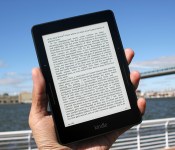
Amazon Kindle Voyage review: The best e-reader is also the priciest

When Amazon introduced an updated version of its flagship Kindle Paperwhite last year, it took the easy way out — after all, tweaked internals, improved software and slightly better lighting do not a thrilling e-reader make. The 2013 Paperwhite wasn’t bad by any stretch, just a bit boring. Now, a year later, Amazon has put together a reader that’s anything but. Say hello to the Kindle Voyage.
On paper, the new Voyage sounds like a home run. Smaller footprint? High-resolution screen? Something akin to physical page-turn buttons? Sign me up! It’s Amazon’s first truly premium Kindle, unless you count the dodo that was the DX, and this time around the company’s catering to die-hard readers. But here’s the real question: Does anyone really need a $199 e-reader (with ads, no less)? In a word, yes.
Hardware

The last time Amazon’s higher-end Kindles got a redesign was two years ago, so it’s no surprise that the Voyage represents the most dramatic overhaul since that time Amazon gave up on physical keyboards. Gone is the Kindle’s longstanding curvy aesthetic: The Voyage borrows considerably from the Kindle Fire’s design language, with a more angular back fashioned out of magnesium and capped with glossy black plastic. The magnesium, as it turns out, was a really good call. After a week of tossing the Voyage in and out of my bag (which is sort of a gadget minefield, to say the least) there weren’t any scuffs or smudges that a few seconds of frenzied rubbing couldn’t take care of. Alas, the Voyage’s matte rear (which is where the power button now lives) is a magnet for your greasy fingerprints, so reading and eating chips is inadvisable if you’re stickler for appearances.
That magnesium chassis makes the Voyage a little lighter, too, which some of you will notice more than others. If (like me!) you’re the sort of person who grips an e-reader in one hand, with a pinky helping to stabilize things, that weight reduction makes a surprisingly significant difference. Oh, you’re a two-hander? You probably won’t be able to tell.

More importantly, the 6-inch E Ink display is finally flush with the rest of the Voyage’s body. This might not sound like the biggest improvement — it’s not like the Paperwhite’s recessed screen and raised bezels were particularly bothersome — but it helps the Voyage feel less like a bunch of components cobbled together and more like a single, cohesive piece of kit. Honestly, though, between the lack of raised bezels and that angled back, the whole thing bears more than a passing resemblance to last year’s Kobo Aura (I can just imagine Kobo’s Japanese overlords chortling with glee).
I’ll be honest: I still yearn for the days when the deep, satisfying click of a physical button punctuated the turn of a page, but those days are clearly over and Amazon’s PagePress is about as worthy a replacement as we could get. (Don’t worry, you can still tap on the screen to change pages.) The whole thing is simple enough: Press the long vertical line on either side of the screen to turn the page, and the dot sitting above it to flip back one. By default, both vibration and sensitivity are set to medium (which is plenty responsive), but you better believe I cranked both options to high in search of a more button-like experience. The end result? It’s still not as tactile as a physical button, but it’s awfully close.
Display and performance

There’s no two ways about it: The Voyage’s screen is downright phenomenal (I fear my pictures don’t do it justice). The 6-inch display manages to squeeze in a full 300 pixels per inch, bringing it closer to actual ink on paper than any other E Ink screen I’ve seen (Kobo’s Aura HD has a bigger screen, so the pixel density there doesn’t quite match the Voyage). I seriously spent the better part of an afternoon just sort of marveling at it, firing up different books, fiddling with typefaces/font sizes/margins and generally trying to find some arcane combination that made the onscreen text look suboptimal. No dice: This thing is a champ, especially when you consider how awful my eyes are.
Traditional e-readers have never been ideal for images, but the Voyage (generally) handles them with gusto. Consider the humble graphic novel: Thumbing through Bryan Lee O’Malley’s Seconds wasn’t bad at all on the Paperwhite, with lovingly crafted images and text boxes coming through clearly. It wasn’t until I put it next to the Voyage that I realized what I was missing — details that were glossed over on the Paperwhite were easy to spot on the Voyage’s high-res display. A menu that appeared smudgy and indistinct on the Paperwhite came through with surprising clarity on the Voyage; I could tell Katie’s restaurant was serving “smoked cornish hen, buttermilk mashed tubers & whipped pork fat and pickled asparagus,” and that was before I zoomed in. Naturally, digital comic die-hards should invest in a good tablet, but the Voyage is no slouch. Some would argue that trying to cram more pixels into an E Ink screen is overkill. Amazon clearly doesn’t buy that argument, and for that I’m very grateful.

Surprisingly, the screen feels a little different too, since Amazon chemically etched the surface to reduce glare. That enhanced glass diffuses light well, but the effect isn’t as pronounced as I’d hoped — the Voyage dispenses with glare only slightly more effectively than the Paperwhite does. Doesn’t sound great, I know, but I’ve never had an issue when too much sunlight threw a wrench into my afternoon reading plans. Speaking of lighting, the Voyage has a new trick up its sleeve: It now has an ambient light sensor so it can adjust backlighting level automatically. It works, albeit a little sluggishly, taking a few seconds to adjust to your surroundings. You might think all these lighting tweaks would have some sort of impact on battery life, but the Voyage seems about as efficient as the rest of its kin. Amazon says you’ll be able to squeeze about six weeks out of a single charge… assuming you’re only reading a half hour a day. My week of testing and reading has been way more rigorous than that, though, and the Voyage is still hanging in there with about 30 percent left.
Since an e-reader’s display is so intrinsically tied to how well it performs overall, let’s dig a little deeper into how the Voyage runs here. Amazon isn’t keen on talking about what kind of processor hums away inside that shell, but overall it’s plenty snappy… especially compared to the older Paperwhite I had on hand. Turning pages, popping back to the home screen and poring through the Kindle Store on the Voyager were generally way faster than on my 2012 Paperwhite, though the occasional full-screen refresh evened the race sometimes. Interestingly enough, some things — like turning the screen on and off — took nearly the same amount of time.

If you’ve never used a touchscreen e-reader, you should know E Ink’s natural slowness means you’ll need to rethink how you interact with devices like the Voyage. You’ll have to resist the temptation to type as fast as you do on a smartphone, for one. It’s a tough habit to shake, but you don’t have a choice. Let’s say you’re trying to peck out “Hard-Boiled Wonderland and the End of the World.” The touchscreen is sensitive enough to register all those taps (you can see the keyboard lighting up as proof), but move too quickly and you’ll wind up with gibberish in your search box. And as much as I enjoy those PagePress controls, the rest of the Voyage lets those little guys down a bit; if you’re in a rush flipping through pages, you’ll notice that not every press/vibration corresponds to a page turn. PagePress aside, these are issues that plague just about all touch-friendly e-readers. We’re still a long way off from the e-reading holy grail — a digital reading experience that’s as immediate as thumbing through a real book — but all things considered, the Voyage is a step in the right direction.
Software

Amazon went a little nuts with the Voyage’s design, but didn’t tweak the software nearly as much. All of the old goodies are present and accounted for. There’s X-Ray to help you keep tabs on characters and track recurring terms that you press and hold on, not to mention Goodreads integration for you book club types. Vocabulary Builder, meanwhile, compiles all the words you look up in the included dictionary. If you’ve used a Kindle over the past two years, you’ll know exactly what you’re getting with the Voyage.
The only really notable new feature is what Amazon calls Page Flow: If you swipe from the bottom of the screen while you’re in the middle of a book, you’ll be able to jump from one chapter to the next or quickly skim through the rest of the text. It sounds like a minor addition, but it’s actually pretty great considering the old way involved either popping into the table of contents or randomly punching in a location number and hoping you spot the passage you’re looking for. For better or worse, some of the biggest stuff is still in the works. Features like Word Wise (which displays tiny definitions right above tricky words), the ability to skim through a book’s images and Kindle library sharing will hit the Voyage, Paperwhite and the new touchscreen basic Kindle later this year.
The competition

There aren’t a ton of players in the high-end e-reader realm, but the Voyage still has a halfway-formidable foe in Kobo’s Aura HD. It has a bigger 6.8-inch screen that’s only slightly less crisp than the Voyage’s (265 ppi vs. 300) and the same 4GB of internal storage. Plus, at $170, it’s cheaper, to boot. We were pretty big fans of the HD when it first came out over a year ago, but honestly, the thing hasn’t aged well. Everything sounds good on paper, but it’s downright chunky compared to the Voyage’s light, sleek body. On the bright side, there’s at least a microSD slot onboard so you can store every book you’ll ever need for the rest of your life. For a great deal of you, though, the Voyage’s biggest competitor is its little brother, the Kindle Paperwhite. As modest as its improvements were, last year’s tweaked Paperwhite is still one of the best e-readers money can buy, and if you’re fine with some mildly obnoxious offers, you can grab one for as low as $119. That’s not an insignificant price gulf, and most people who just want to occasionally curl up with some Nabokov won’t lose out by hanging onto their cash.
Wrap-up

After living with the Kindle Voyage for a full week, two undeniable truths become apparent. First, it’s the best e-reader you can buy right now. Second, it’s also the most expensive, and therein lies the rub. Who exactly does Amazon expect will pay $199 for one of these things? As far as I can tell, the folks in Seattle are gunning for people like me: persnickety purists who want as little compromise as possible. We love books (sometimes to a fault), and we’ll stop at nothing until the line between the screens we carry and the tomes we adore is indistinguishable. Here’s what it boils down to: If you’re an e-reader buff (we exist!) or a bibliophile who yearns for paper in a world that’s rapidly leaving it behind, buy the Kindle Voyage. It doesn’t take much to appreciate what the Voyage brings to the table, but it does take a certain kind of nerd to look at one and decide it’s worth the same amount of money as a perfectly good Paperwhite for yourself and a basic Kindle for mom.
Filed under: Amazon
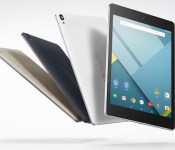
Amazon UK reveals Nexus 9 prices to start from £319

Google may have finally made its latest Nexus devices official, but it’s kept UK pricing for the Nexus 6, Nexus 9 and Nexus Player under wraps. Fortunately for us, Amazon is keen to highlight that it’ll range the 8.9-inch HTC tablet, and has now started taking pre-orders for both black and white variants of the device before they’ve even appeared on Google’s Play Store. The online retail giant has revealed that the 16GB Wi-Fi model will cost £319, with its 32GB counterpart coming in at £399. After the 4G-equipped 32GB Nexus 9? Expect to pay £459 for the privilege. If you decide to take the plunge today, Amazon says it will get it to you by November 3rd. It’s a blow for those hoping Google would keep parity with the US/UK exchange rate, which would have put the 16GB WiFi-only model at around £250. Unfortunately, Amazon nor Google have confirmed UK pricing for either the Nexus 6 or the Nexus Player, but we’ll bring you the very latest as soon as we get it.
Filed under: Tablets, Mobile, HTC, Google, Amazon
Source: Nexus 9 (16GB White), (16GB Black), (32GB White), (32GB Black), (32GB 4G Black)

Nexus 9 available for pre-order on Amazon

Despite the Nexus 9 being available for pre-order today officially through the Google Play Store, Amazon have pulled the trigger early and the Nexus 9 has been available to order since yesterday.
With the Nexus 9 still not actually available for pre-order through the Google Play Store, it seems Amazon is the only place you can put your order in for the new tablet.
The pre-orders from Amazon are showing as a shipping date of 3rd November, which is consistant of that we’d expect from the Google Play Store, so if you want to secure your device you may want to take the plunge with Amazon.
It seems only the US, French, and German stores have the Nexus 9 up for pre-order, but we expect more countries to be added to the list as the day progresses.
 |
The post Nexus 9 available for pre-order on Amazon appeared first on AndroidGuys.

Amazon’s grocery service hits Brooklyn starting today

Lately, Amazon’s been playing a bit of back and forth with its services on either coast. What started with retail locations is now extending to its grocery delivery option, AmazonFresh. Folks living in Brooklyn, New York’s Park Slope neighborhood will have access to the service that debuted in Seattle and California starting today, according to Recode. Naturally, you need a Prime membership to access the same-day (or next-day, depending on when you order), but starting next year a pricier $299 “Prime Fresh” subscription will be required. Not in Park Slope? Don’t fret: the e-commerce juggernaut told Reuters that it will continue to be “thoughtful and methodical” in its expansion. Bezos and Co. failed to mention, however, if and when it’ll be expanding into the likes of Manhattan or other boroughs. Don’t get too excited to use that Dash just yet, greater Gotham.
[Image credit: adpowers/Flickr]
Filed under: Amazon

NBA 2K15 for Android exclusively available from Amazon
 NBA 2K15 launched today for Android, but for now, the only official way to get it on your device is through Amazon’s AppStore. It’s unclear how long it’ll be until the game is also available on Google’s Play Store. The new game has greatly improved graphics, a new MyCareer mode that has players work through a storyline for their custom-made character, and a new Pharrell Williams-curated soundtrack.
You can download the app from the Amazon link below.
Source: Amazon
Come comment on this article: NBA 2K15 for Android exclusively available from Amazon

Amazon UK launches free same-day collection for Prime members

In a bid to deal another blow to bricks-and-mortar stores in the UK, Amazon is branching out into same-day deliveries. It’s teamed up with newspaper distributor Connect Group to launch “Pass My Parcel,” which will ensure packages are sent free to local shops and high street stores across Britain within 12 hours until the end of the year, if you have a Prime subscription (£4.99 for non-members). If you’ve previously used the online retail giant’s “Click & Collect” service, you’ll be familiar with how Pass My Parcel works, but your package will now arrive a whole lot quicker.
Same-day orders made by 7:45pm will be available to collect from your chosen pick-up point by 6:30am the following morning. Order before the daytime cut-off point at 11:45am and your item(s) be ready for you by 4pm. Sundays are included too, but Amazon will only make one delivery on that day. Same-day deliveries initially be available in more than 500 newsagents and other local stores before Christmas, but the company intends to increase the number of pick-up points over the course of the next year. The option is not yet showing in our Amazon checkout, but expect a new same-day delivery selector to appear in due course.
Filed under: Amazon
Source: Amazon
 AIVAnet