


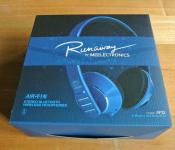
MEElectronics Air-Fi AF32 Bluetooth Wireless Headphones Review: connect to your device and Runaway
 I’ve never been a huge advocate of wireless accessories; being an avid gamer, the idea of a wireless peripheral running out of battery while in the midst of battle is basically the most horrifying thought. However, with the torrents of Bluetooth devices now available, ranging from speakers to smartwatches and even lifeloggers, it’s increasingly hard to ignore the benefits of going wireless. What really changed my mind about wireless accessories, in particular Bluetooth headphones, are the MEElectronics Air-Fi AF32 Bluetooth Wireless Headphones. Let’s check them out.
The headphones
I’ve reviewed a MEElectronics product once before, their M9P earphones (which you can read the review for here), and what stood out to me most about that pair of earphones was the bang for buck you got from what is essentially a budget audio product. The MEElectronics Air-Fi AF32 Bluetooth Wireless Headphones, or simply the ‘Runaway’ headphones, appear to be no different as you will discover as soon as you open its box.
 Inside you will find the headphones themselves, a USB charging cable, a physical 3.5mm-to-3.5mm audio cable, a user manual and a felt carry bag to put everything in. As you can see, the Runaway is collapsible into quite a small package, and while this feature is already a nice plus, I like that MEElectronics has also included a bag to store it in, particuarly as the headphones are quite glossy and potentially susceptible to dirty and damage. Naturally, the bag also serves as a nice place to store the included cables so that you can charge them wherever you can find a USB port.
 While the folding of the headphones is a great travel convenience, I did notice, especially after playing around with it for a few minutes, that the join between the two edges coming together are quite close and often emitted a sharp clicking noise when unfurling the headphones. This was actually caused by the plastic inner layer being pulled back and released, snapping back and causing the sound. Whether or not the headphones can put up with this continued abuse remains to be seen, but the fact that it fits so flush when the headphones are in place does make the Runaway one attractive set of audio equipment.
The Runaway is part of MEElectonics’ Air-Fi line of headphones and is available in six different colours schemes: bubblegum pop pink, hot chart topper red, classic black, classic white, vinyl black and vintage red, and the rhythm & blues blue which we are reviewing here.
 The Runaway comes with just 6 buttons, all located on the right side, including a power button, answer call button, skip forward and back, and volume up and down. It’s pretty much all the buttons you’ll ever need from a mobile headset and setting it up is pretty simple; all it takes is to hold the power button for a few seconds and the pairing can begin. Above the buttons are two LEDs which help indicate things such as charging, Bluetooth connection and searching for pairings. A flashing blue LED is pretty standard issue for most Bluetooth devices, but I felt myself loathing the blue light on the Runaway as it routinely illuminated my room while I listened to music before I slept. It’s not a huge issue, but for people who are pedantic about these things, it can be irritating. Otherwise, the lights are a nice, simple way of indicating the few things that the Runaway does.
 As I mentioned earlier, a 3.5mm-to-3.5mm audio cable is included with the Runaway which will enable you to continue listening to music using the headphones even when the batteries have run flat. It’s a very nice touch to allow passive audio listening when the headphones are unpowered, though the cable is only a stereo cable which means you won’t be able to use the Runaway as a mobile headset while using it in this configuration. I did find it unusual though that the audio cable plugs into the right side of the headphones whereas the majority of wired headphones will have only a wire coming out of the left side; again, just a niggling issue. And yes, the Runaway does actually have a hidden microphone located on the right side which can be used to receive calls when connected via Bluetooth.
The comfort
 It might be difficult to tell from these photos, but the Runaway headphones are insanely light. MEElectronics has really boiled the Runaway down to the bare essentials and it’s resulted in a pair of headphones that weigh almost nothing. As you can expect then, the Runaways are a dream to wear. Since they are so light, the head cushion almost feels like its not there and the ear cushions are fantastically soft.
The Runaway isn’t a tight set of headphones either which makes them probably one of the most comfortable headphones I’ve ever worn, right up there with the Steelseries 5Hv3 (which I reviewed here). Unfortunately, this does affect the sound of the headphones, which we’ll get onto next.
The sound
 The audio quality is sharp and precise. The treble and mid ranges are clear and crisp and the bass is good. The bass could probably stand to be a little beefier, but in this day and age or bass-heavy headphones, the Runaway’s balanced sound is a nice change of pace. That said, if you turn it up, the bass can become incredibly intense, and indeed, the sound of the Runaway doesn’t appear to be phased by the increase in volume. If anything, the only weakness the audio of the Runaway has is the Bluetooth connection itself, which from my experience, has a few too many glitches in it to be enjoyable. Of course, you can always connect to it via audio cable which does away with the problem, but then you have to endure the fact that it’s no longer wireless.
 Returning to the fact that the Runaway is a ‘loose’ set of headphones: while the Runaway does fit quite snugly, there is no active or passive noise cancellation meaning that sound can get in and out of the headphones quite easily. This might not be an issue for most, but those commuters among you who will be listening to music in the hustle and bustle may have to turn it up a little during their travels.
The verdict
Rating: 4/5
 As a travel audio accessory, the Runaway is a pretty good one: able to fold up into a tiny footprint and with a carry bag provided, the Runaway looks like a good option if you’re travelling quite a lot. They’re not terrible big or incredibly heavy which makes them a good fit for the bill.
Furthermore, I think they are a really nice looking set of headphones. Particularly in the rhythm & blues blue, I think the looks of the Runaway rivals that of a set of Beats Solo headphones (gasp). Yeah, I said it. Having said that, I don’t exactly like the look of the buttons on the Runaway; somehow I feel like the straight bumper buttons clash with the whole curved, sleek vibe of the headphones, but that might just be me.
 The Runaway sounds damn good too which makes it an exceptional choice for personal headphones. And at $99.99 USD, it’s right in the sweet spot for a pair of Bluetooth headphones, and the fact they sound amazing is a huge bonus. My only gripe of course is that my Bluetooth experience wasn’t as smooth as it could be, but the benefits of having wireless headphones is significant. Using it as a mobile headset is also practical as the mic is clear and call quality is pretty much the same as if you had the phone to your ear.
All in all, the MEElectronics Air-Fi AF32 Bluetooth Wireless Headphones are a fantastic package for a great price. And as of 20/01/2014, MEElectronics are actually having a sale on their store, cutting the price of the Runaway down to $74.99. If you weren’t convinced that they were great value before, they’re now 25% better. Check out the MEElectronics links down below to jump on the offer or check out some of MEElectronics’ other products.
Gallery of photos


[Review] myCharge Hub 6000 mAh Power Bank
One of the gems I received at CES while visiting the great folks at myCharge was their Hub 6000 mAh Power Bank. Note that this has also been listed simply as the 6000 Power Bank, as it’s called in the instruction manual. No matter what you call it though, the myCharge Hub 6000 mAh Power Bank is an external battery unlike any other.
What You Get
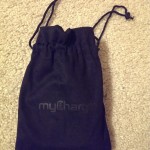
The myCharge Hub 6000 mAh Power Bank has a clean look. Everything is contained in a small rubber-accented, smooth plastic, and lightweight package without any ports or cables exposed. Its dimensions (per Amazon) are 2.5 x 1.1 x 4.5 inches and it weighs 9.3 oz. Mine came with pull-string bag, an instruction manual and a quick start guide (retail versions may be slightly different).


It Transforms
As mentioned earlier, there’s no ports or cables exposed. Quickly though, you’ll notice that you can start pry away the rubber port protectors and cables to reveal what makes this external battery unique. You’ll find a fold-out outlet prong for wall charging, a micro USB Cable (0.5-1A output depending on load), a Lightning Cable (1A output), and a USB port (2.1A output). This can charge on all three ports simultaneously giving a combined 27 extra hours of talk time at a maximum output of 3.6 amps. You can click the power indicator button to see how much power is left in the battery: Green is 71-100%, Yellow is 41-70%, Red is 11-40%, and Flashing red is 0-10%. Note that the cables are short, but are very flexible, so you can charge a single devices and hold the battery right underneath it all in one hand easily.


Performance
The myCharge Hub 6000 mAh Power Bank had an output while charging my One near 1A constantly. It actually charges faster than the wall does; in a charge vs time graph, the myCharge has a steeper slope (meaning it’s charging more in a shorter time) than plugging into a wall charger. This can been shown below, highlighted by my crude blue effects:

First slope is myCharge, second is wall charger
Final Thoughts
Pros:
- $78
- 6,000 mAh capacity, high grade Lithium ion battery (no cheaposshere)
- Fast charging
- No cables required (unless you have a tablet) for charging devices or the unit itself
- Very light
Cons:
- Wider shape doesn’t fit so well in a pocket as other external batteries do
- $78 may be more than anyone is willing to spend on an external battery
The myCharge Hub 6000 mAh Power Bank is my go-to external battery at the moment. I bring it with me wherever I go (or it’s always in my car). I’ve used countless external batteries in the past and I must say that this is probably one of, if not the favorite of mine. If you’re interested in getting a myCharge Hub 6000 mAh Power Bank, check it out below:

Off-Grid: EnerPlex Kickr IV Portable Solar Panel, Jumpr Slate and More
I have been keeping an eye on the solar powering side of mobile tech for a couple of years. I was never impressed enough with price tags and their delivery systems when they first started popping up. As with all technically aspects of our lives, technology improves and implementation gets better. Along with those aspects, the price tag drops from a high-end specialty item to an affordable option for mass consumption. Until more recently, a large majority of the solar options took hours to charge up a built in battery pack that then in turn you used to charge your device. There was a shift to direct charging panels, but their charge times were still way too long and their cost was still pretty high. Towards the middle-ish of last year, and definitely more apparent at CES 2014, I started to see more solar panel options that offered higher watts and amps that were able to charge up phones and tablets in a more reasonable amount of time. Ascent Solar is one of those companies, their brand being EnerPlex, I have been checking in with over the last year and I am happy to report that they have some options that I think it is about time we share.
Enerplex has a number of direct charge panels, battery packs, bags and cases available for you to pick up. Each has its own unique look and charging ability.
In the Kickr line, which is the name of the portable solar panel charging line, there is the Kickr I, which puts out 1.75 Watts Unregulated, 1.5 Watt, / 5 Volt System Regulated at 0.3 Amp Output. Then you have the Then you have the larger Kickr II, which puts out 3.5 Watts Unregulated, 3.0 Watt /5 Volt System Regulated at 0.6 Amp Output. Then we have the big boy, the one we are taking for a run, the Kickr IV. Don’t ask me where the Kickr III went, it isn’t listed.
Meet the Enerplex Kickr IV
 Power:
6.5 Watts Unregulated
6.0 Watt, 5 Volt System regulated
1.2 Amp Output (STC)
Cell Type: Copper Indium Gallium di-Selenide
Open-Circut Voltage: 9V
Conversion Efficiency: 10.5%
Weight: .68lbs / .31kg
Size Folded: 225mm (8.8˝ ) x 185 mm (7.3” ) x 18mm (0.71” ) [images in gallery below]
Size Open: 774mm (30.5˝ ) x 185mm (7.3” ) x 2mm (0.08” ) [images in gallery below]
In the Box:
- The Kickr IV
- Multi tip USB Cable (micro, mini and 30-pin)
- 8 multi-colored LARGE hair ties (best description I have)
- Instruction manual
The weight and the design are exactly what you would notice when you first pull it out of the box. It is extremely lightweight and flexible. You don’t feel like you need to baby it to keep it safe from harm. The outer shell is a plastic/rubber material that is soft to the touch and easy to grip. At one end you have the electronics needed to take the solar rays and convert them through to a standard USB out port.

 The panels themselves are all neatly contained in a fold up fashion. Simply, unfold it to expose the panels to the sun and plug in your cable and start charging. On the top and the bottom they have placed 2 sets of grommets for you to use to hang it from your tent, a tree branch, your backpack or wherever else you see fit to dangle it in front of the sun if you aren’t looking to just toss it on a table or the ground.

 The real question though is does it work. According to their outline, the Kickr IV can fully charge an iPhone 5 in 1.4 hours, a Samsung Galaxy S III in 2.1 hours and a Google Nexus 7 in 4.4 hours.
 Not being part of the testing I can only assume that this was conducted on a 0% battery, most likely while it was turned off. No matter, I did a brief amount of testing myself. It is still January and while I do have a little sun, it probably isn’t the optimal condition for laying it out. I stood it up to face the sun and hooked my Sony Xperia Z to it for about 15 minutes. I set the Battery Monitor Widget app to track the charge every 60 seconds so we had something to go off of. To be fair, I was streaming music from Google Music to a set of Turtle Beach i30 Bluetooth Media headphones for the first 5 minutes of the test, along with a little chatting on Google Hangouts. Surprisingly enough, I got more of a boost than I was expecting. Take a look.

 Battery jumped 9% in 15 minutes. If we go ahead and call it 10% then the math comes to 2.5 hours in the sun to charge the Xperia Z from dead to full. Assuming it is on and I am using it during that time. It is a tricky thing to fully predict. Each phones battery size is different, users use their devices different and the sun is an unpredictable monster. This was only a fraction of a test. As the weather starts to permit, I will be embarking on a much longer and larger solar charging adventure.
Keep in mind though, the Kickr IV isn’t just to charge your phone and tablet. Virtually anything you own that takes a USB cord to charge can be plugged straight in to this panel. Be it a digital camera, MP3 player or even an external battery bank to charge up for evening uses. I would also like to mention that you shouldn’t just think of this a campers gadget. Natural disasters, fires, floods, blackouts, brownouts andy time their isn’t a solid source of power from the wall, a Kickr IV can help. Yes, as long as there is light out.


The next review up from EnerPlex will be their Packr backpack with built in solar panel.More so for the guys on the go in the woods and the streets then for a discrete portable solar panel, but still very cool and useful.
As for what EnerPlex is up to in 2014, well, they have a number of new offerings. They brought out the Surfr series solar cases for the iPhone 4 and 5 lines as well as the Galaxy SIII and S4. They also brought out the big guns with the Jumpr Slate portable battery bank. Easily the slimmest battery pack we have ever seen. Coming in at 6.7mm thick, 2-full size USB ports, cut outs to slip it in the rings of a three ring binder. Comes in either a 10,000 mAh or 5,500 mAh variety. Be on the look out for some coverage on those shortly as well.


 Interested in buying any of the Kickr line? Hit up one of the Amazon links below, they are in backwards order and some have multiple color options.


Real World Experience with the 32GB Leef Pro UHS-1 Micro SD Card
The super techy people know that high speed memory cards make a world of difference. The average consumer might not. While I am techy, I am also just another consumer looking for the best products at the best price possible. I heard it over and over again, “You need a Class 10 micro SD card” “Class 10 is too slow now, now you need a U1 (UHS-1)” Greek to many. If all I am doing is saving saving pictures, videos and the occasional album, why do I need to look beyond the budget class 4 SD cards? Simple answer, because it is worth it.
 Prior to CES 2014 I was able to obtain a Leaf Pro 32GB UHS-1 (Ultra High Speed) micro SD card. It arrived in a nice little orange box and contained the card and a full size SD card adaptor. It is just an SD card so packaging isn’t really all that important to me personally, but the very clear “up to 45MB/s” right on the front is an eye catcher. That little extra is what really seems to set the card apart from the likes of the more popular SanDisk Ultra that makes its way around Amazon.
The specific card details are as follow:
- 16, 32, 64 GB models
- Operating Temps: -25 C to +85 C
- Up to 45 MB/s
- 5-year limited warranty
- Water and Shock Proof
- Optimized for HD videos and Photos
Leef Pro cards use an increased clock speed of 100MHz, four times faster than standard cards. This allows the cards to operate at up to 45MB per second in 4-bit transfer mode, which is found on many new devices.

 Where will an average consumer see the benefits of the card? Easy. If you have one of the higher end Android devices with HD video capabilities and high resolution camera, like the Xperia Z, then the speed difference is pretty apparent when you open your gallery. If you take a lot of videos and photos with such a device and have them set to an SD card that is more standard, then you probably experience some slow loading and lag in thumbnails loading. With the Leef Pro, the gallery and thumbs loaded nearly instantly and just as fast as I could scroll I had images in the windows.
I have also noticed a dramatic improvement in transfer time when copying things to and from my device. While I did shoot quite a bit of video on my phone using the card, I am not expert at noticing where the benefits are at with it. When opening the video to play back though, it starts quicker than I remember. For those that move appstoSD, you will also see much better performance for those apps.
I do have a SanDisk U1 32GB card as well, and bouncing back to that for things really did show the superiority of the Leef Pro card. The gallery still loaded fairly quickly, and much quicker than with a regular class 4, but just wasn’t as seamless as with the Leef Pro. Being that the card can be used in any device that supports a Micro SD, or easily adapted to a full size SD card, having a Leef Pro available for various device use is a good idea. It will cost you a little bit more than a similar size and similar rated card, but the higher clock speed and the higher max transfer speed is worth it. Of course you will varying degrees of speed depending on you are placing the card in and exactly what the PC, camera or phone supports. It performed well in my Xperia Z and plan to keep it there and use the SanDisk else where personally.
So, what ARE you looking at in terms of price. Well, a 16GB Leef Pro will set you back $24.99, 32GB is $44.99 and a 64GB is $84.99.
On a side note, Leef also announced the new Leef Bridge 3.0 Mobile USB at CES. It is a device that bridges the gap between PC and Mobile transferable/portable storage. It is similar to the Imation 2-in-1 I showed you guys earlier. The Leef Bridge 30 is exclusively available at Radio Shack. Go take a look at some of the other products Leef has to offer. Or go ahead and order the Leef Pro through Amazon if you fancy.

Ventev Brings Inovation to the Charging Side of Our Devices
Powering our multitude of devices quickly, efficiently and on the go is probably one of the more important aspects of our lives. Prior to CES we were introduced to a company we had never heard of before, not all that surprising there are millions of them out there. After taking a read through what they had to offer we were definitely interested. We met up with them at CES and had a little pow-wow so to speak and got to really know the guys, and gals, behind the products. Now it is time for us to share them with you guys.
 Ventev has created one of the more unique sides of the charging game. Rather than break each of these five pretty distinctive accessories into separate pieces, we will go over each just a little bit here. Lets start with the WallPort.
The Ventev Wallport r2200
The WallPort is a dual-usb wall charger for charging two devices at the same time. Both plugs are located at the bottom and spaced far enough apart to make plugging in two cables easy. The back is where you find the collapsible power plug, which makes it nice for travel. The finish on the product is a rubberized material that makes it soft to the touch and also makes it look really nice.

 The dual-ports are specifically designed to rapidly charge two devices at the same time. The output on each port is 2.1a 5v 10W. Plugging in two high-end power hungry tablets won’t be an issue nor will it extend your charge up time.
Next we move to the two car chargers.
The Ventev Dashport r2240
The Dashport is your typical straight in cigarette lighter car charger plug. With the exception that it charges two devices at one. Yes, some others do that too. Instead of making it more of a brick though, Ventev kept it slim and put one port on the rear and one port on the side. Giving the passenger, or driver, a straight out no tangle cord crossing way to charge.

 The obvious kicker here is that Ventev is pushing quick charging. On the go and in the car doesn’t always afford an hour of time to plug in. This little dual-port beauty is pushing 5v, 2.4A 12W to each port. In English, you can get a good amount of charge in a short 10 or 15 minute trip.
The Ventev Powerdash r900
The Powerdash r900 is a different breed of car charger all together. It is designed for a single device charging. Great for those that don’t carpool, or don’t like to share. It is more of a lipstick tube shape with the same rubberized grey material coating it for looks and grip.

 The Powerdash has a secret though. While it does pump out a 2.1A amp quick charge that will give you juice fast, it is also a portable battery bank. Cleverly concealed inside is a 900mAh battery. While it it is plugged in it charges. If you get to your destination and still need to juice up some, pull it out and toss it in your pocket. Downside, the output from the battery is only 1A, so it will charge much slower than if it was in your car.
Now to more portable power.
The Ventev Powercell 5000
As the name would suggest, this battery bank, external battery pack, or whatever you call it, is a 5,000 mAh portable power battery. Ventev has done a pretty amazing job at keeping with their use of the grey rubberized material and branding across all their products. So again, this one is soft to the touch and easy to grip onto. It offers up dual-port charging to power up two devices at the same time. A typical 1A (5w) port for phone and such and a 2.1A (10w) output for tablets and higher end phablet devices.

 On the top you find a recessed power button to turn the charger on, along with 4 orange LED lights to indicate remaining power. Each one represents approximately 25% remain.
Finally…
The Ventev cables
Nothing major, but something nice. The charging cables come in a variety of color options to help distinguish who’s is who’s or to show of your style. They are flat band no tangle cables which is a preferred styling for many of us multi-device families. They are rigid with a bit more of a plastic feel, but hold up nice and don’t get jumbled.

 The Wallport came with the grey cable you saw above, and the Powercell came with a standard micro USB cable. The green one, and a blue one, were provided separately.
Overall experience with Ventev:
The team behind the products are extremely nice people. That goes a long way in my book. They were genuinely interested in our thoughts on their products open to feedback for future improvements. We were able to take a look at a few of the upcoming products, like the Utilitychager 2100, which is a dual-port combination wall and car charger and the Powercell 6000, which has a build-in wall plug to charge your devices and charge up the battery bank.
I think Ventev has some great things going for them. Internally they short circuit and temperature protection and adjust output automatically for your device to make them charge as fast as possible without ruining anything. The price points for each are evenly matched to other brands on the market, and in some respects, they look better and perform better too. I would like to see the charging/sync cables coated in the same material as all the physical products. They do seem a little out of place in their look and feel of the line up.
The pricing for each item shown above, is down below. However, you should also go swing by the Ventev site and poke about on your own. They also offer a unique line of cases, screen protectors, earbuds and styluses as well.
Pricing Rundown:
- Wallport r2200 – $29.99 direct
- Dashport r2240 – $29.99 direct
- Powerdash r900 – $39.99 direct
- Powercell 5000 – $54.99 direct
- Flatband no-tangle cables – $14.99 direct (each per color for micro USB version)
Of course you can shave some money off those prices through Amazon. All of which are conveniently placed below.

3G Mobile Broadband Launched by NetZero, Pulls from Sprint
A need for data connection is on the go is an ever growing desire by many. Whether it be for a Chromebook, a tablet or even a Galaxy Zoom, connection is important. While many pay the added fees per month to do so through their current device and carrier, others only need it on a short term or monthly basis. NetZero is stepping into the game to offer a monthly no-contract mobile broadband device that can help keep you connected in a pinch.
 NetZero offers a USB stick for $49.95 and a mobile hotspot device for $99.95. It piggy backs over Sprint‘s 3G network to deliver data to your devices when you need it. As for plans, you have quite a few options. There is a FREE plan that is good for one year and gives you 200 MBs worth of data. Step it up to $9.95 for 500 MBs, $19.95 for 1Gb, $34.95 for 2GBs and $49.95 for 4GBs. The good news is you are disconnected from the connection if you hit the limit you buy. The bad news, it only is 3G, for now. 4G is scheduled for around the 3rd quarter of this year.
Since it does pull of Sprint for the coverage, you might want to check and see if where you are living or going to be traveling has decent Sprint coverage before you think about buying anything.
Source: CNET

Rokform adds Universal Phone and Stroller Mounts to Line Up
Rokform created one of the coolest lines of functional cases and charging docks I have ever personally been able to use and see. Some time ago I did a review on the Rokbed V3 case for the Galaxy S3 and the Rokdock for it as well. Extremely well made products with more than one use. This year Roform took to the CES floor with a more universal approach that should help fill the void for your device, or the love you have for your case.
One of the new products will appeal to the tech savvy moms out there who take their little types on walks and jogs. The new Stroller Mount is a universal and adjustable mounting system that will fit on most all major, and minor, strollers on the market. It wraps right around the handle with a simple rubber strap and locks into place. Making it a great temporary solution that is easily moveable to other strollers or similar ’round’ handles or bars.

 Yes, I know, that is an iPhone. Not our fault. While they are targeting the iPhone toting moms of the world, the actual mount is the same 4 prong connection that is build into all their cases and into the universal adaptor seen below. The Stroller Mount is set at $49.00 and actually includes an iPhone 5/5s case in pink or white.
Of course the Stroller mount won’t do you much good without a way to click your device to it. That is where Rokform went from the usual specific device cases and created a new universal stick on. The stick on universal kit will attach to any flat surface. Add it to your Nexus 7, your Note 3, your Xperia Z or….. Use your imagination. Once it is stuck on, you are done. It isn’t one you reapply. So choose your device and case carefully.


 The universal kit gives you the interlocking rear connection for all of their physical mounting systems. It also has the same wondrous magnet that lets you literally stick your device to any metal surface. It quite the unique approach. The full kit, pictured below, gives you the backplate for attaching to the device, the small magnet to place anywhere you need your phone to literally stick too without it being metal and then a multi directional interlocking hub.
 It really is one heck of a new addition. Best part, the universal kit is only $24. Outfit every device in your house and have places to stick things for everyone. Pretty epic really.
Go check out the entire line up of gear and swag at Rokform.com.
Imation 2-in-1 Micro USB Flash Drive Solves on Device Storage Limits
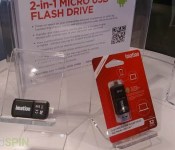
It is no secret that storage still drives our connected devices. Whether you have a device with no SD card support, store everything in the cloud but find yourself without network connection or if you are just looking for a quicker and more portable way to carry/transfer data. The use case scenarios are pretty endless with Imations new 2-in-1 Micro USB Flash Drive.

“The new Imation 2-in-1 Micro USB Flash Drive provides consumers with something extremely valuable: additional storage space, no batteries or internet required,” said Toshi Hokari, executive director, product management and marketing, Imation. “Whether it’s used to transfer photos or videos to a computer or another Android device, or to easily view content on the go, the 2-in-1 Micro USB Flash Drive solves a major headache mobile device users often experience—running out of storage space at critical times.”
The design and functionality of the 2-in-1 device are pretty remarkable. Give it a little pull to reveal the USB plug that is neatly tucked away inside. Plug it into your PC or Laptop and transfer whatever you want to it. Store it conveniently on your keychain for travel. Push the top down to access the Micro USB portion and connect it directly to your Android device and have instant access to your additional media content or files.
Being able to easily transfer files and media between two devices without a PC or waiting for the cloud is certainly another win for many of us. How many times have you been out with friends and wanted a movie they had on their phone, or maybe just a large ROM file? Plug in, copy it over and move on. Or maybe you have hit that dreaded “Storage full, move or delete files” message while you on a trip. Pop in the drive, copy them over and you are set.


 This little guy already made itself useful to us while at CES. A company ran out of press kits but had them all on his laptop. I handed over the Imation Flash Drive and he copied them over and I was on my way. I plugged it into my Xperia Z later that night to read through the files and send them off to some of the team.
The 2-in-1 USB flash drive is scheduled for launch this quarter with some very reasonable price tags included. It will be available in three sizes: 16GB for a suggested MSRP of $29.99, 32GB for a suggested MSRP of $39.99 and 64GB for a suggested MSRP of $64.99. Of course it won’t be compatible with EVERY device on the market. Your Android device does need to support OTG (On-The-Go) connections. If you have no clue if your device will support it, then head over to Imation’s compatibility list and find out. If you are good-to-go, then hit the links to Amazon below to pick up the size you want at a slight discount. They are in order from 16Gb to 64GB

Torso: All-in-One Charging/Sync Cable and Phone Stand for your Pocket
CES 2014 was full of innovation, excitement and great new products. New ideas, products and innovation don’t have to come in large packages or run you $300+ to own. They can be very easily come in a small form factor and serve multiple purposes at a great price. Torso might not be your ultimate connected media device, but it certainly fills a void in the mobile sphere.
 Torso is probably one of the simplest little accessory devices we saw during the show. It is stupid simple and perfect for any Android or tech enthusiast out there. On one side you have your traditional USB plug to slip into your laptop, battery bank or even wall charger. On the other end you have a micro USB connector for your phone.
Not a big deal there, but Torso isn’t done there. On the sides of the cable, are two bendable arms. These arms take this from a basic, small form factor data sync and charging cable into a multi function stand for all your devices. Well, not so much a tablet, but it easily handles a Note 2 with a monster of a case on it.


 If you are an earbud fanatic, then you will appreciate its ability to also triple as an earbud cord wrapper to keep you untangled.
 The Torso is easily one of the coolest little multi purpose must have gadgets we saw on the show floor. It’s versatility and use cases is amazing. The Torso is currently on its last legs of their Kickstarter campaign and are very close to making their goal. They have 83 early bird slots left which will get you the Micro USB version for $15. It goes up from there into $17 once the early birds are filled. You dual wielding users will be looking at $19 for a 30-pin i-Phone version or $23+ for a Lightning version. Shipping in the US is free for every backer, International backers need to add $9.
Feel free to go visit the Torso Kickstarter page and get yours secured now.
Goal Zero Launches Some Serious Power Solutions at CES 2014
Goal Zero might not be a household name across the globe, but it really should be. They make some of the leading outdoor gadgets and gizmos that any camper, nature hiker or outdoor lover who needs some juice when outlets just aren’t possible very happy.
At CES 2014 Goal Zero made two new product announcements. We were privileged enough to meet up with Lisa from Goal Zero to take a closer look and snag a bunch of great photos of the new products, along with some older ones. One of the bigger product announcements and show cases was the new Sherpa 100.


The Sherpa 100 packs in high powered batteries that deliver 8,800 mAh of battery power to any device you own. Unlike traditional battery banks this bad boy integrates in 2 USB ports @ 2.1smps, a 6mm 23v out, a multitip port for laptops and an AC inverter. The Sherpa 100 sucks power in either from a 12 volt car charger (takes about 4 hours to charge), a traditional wall outlet (about 3 hours to charge), or from a solar panel (about 10 hours to charge). The solar charge timeline is based on their Nomad 20 panel.

Next up they brought out the new Rock Out2 Solar. It looks and feels identical to the original Rock Out with the exception of a few minor physical changes and the inclusion of a built-in solar panel to charge the internal battery. This little guy packs in an 800 mAh battery, 2x 40mm 3W drivers and has an average runtime of 20 hours. Inside is a place for your phone and a 3.5mm headphone jack. It does run on Bluetooth as well, so don’t go thinking you HAVE to be plugged into listen.


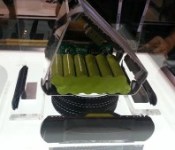
It was built tough too. The rep had no issues about tossing it around in the air and sending it to the showroom floor. As you can see in the images above, the internal cords are placed neatly on the back of the speaker housing and won’t get tangled or in your way. If push comes to shove, it even has a USB plug attached to charge the speaker up as well.
The Sherpa 100 is available for order, but shipping is set for January 22nd. It is listed for a moderately priced $349.99. Might seem high considering we have seen 10,000 mAh and 13,000 mAh battery banks for much less. However, many of them don’t bring the raw power to push the right volts and watts to power up that laptop. The added digital screen to tell you EXACTLY the remaining power remaining is pretty slick too.
The new Rock Out2 Solar speaker isn’t quite ready for you to stash for the summer camping season. It is scheduled to launch early summer of this year is expected to hit at $129.99.
Below you will find plenty more images to sift through. Things like the Lighthouse 250 Lantern, which is super cool with the ability to charge up via solar and a hand crank. Not to mention the impressive line of Yeti Solar Generators that can power a TV, Mini Fridge, Laptops and anything else you can throw at them.


 AIVAnet