


Anker 36W 4-Port VS. 40W 5-Port USB Wall Chargers
I am constantly on the look out for ways to keep my devices charged. Between a phone, two tablets, a set of Bluetooth headphones, Bluetooth speakers and a mired of other device that all charge from a USB cable, it is imperative that I don’t have to stash devices in other parts of my office, or other parts of the house, to charge up. The last multi-port charger that I reviewed was one from Mpow. It offered 4 USB ports, two at 5V2A and two at 5V1A. It worked well enough and for $19.99 it is bargain. If you happen to have more than two power hungry devices that need to be charged in a hurry though, you will find yourself a little disappointed. This sparked me to reach out to one of my personal favorite external battery bank manufacturers, Anker, to check in on the latest product offerings in the multi-port wall charging line. They were kind enough to send over one of their 36w 4-port


What’s in the box:
Anker 36w 4-port
- Wall charging unit
- Instruction manual
- Related documentation
 Anker 40w 5-port
- 5-port charging unit
- 5 foot detachable power cord
- Instruction manual

Anker has been making a lot of strides in product design, functionality and ease of use over the years and it’s pretty apparent in the initial looks of both devices. Since this is dual-review / comparison I am going to start off with the 36w 4-port, then move to the 40w 5-port. I will then follow it up with thoughts and recommendations, like I usually do.
Anker 36w 4-Port Wall Charger Overview
Tech Specs:
- Input – AC 100 – 240v
- Apple Ports – 5v /2.1A max
- Android Ports – 5V/1.5A max
- Total output – 5v/7.2A max
- Power – 36w
- Size – 3.3 x 2.5 x 1 inches ( 83 x 63 x 26 mm)
- Weight – 3.5oz / 100g

The 36w 4-port unit offers two Android and two Apple specific ports. Each is rated for charging your devices accordingly. The outer casing is hardened plastic, with the bulk of the unit being white with the main plug area off white grey-ish color. I didn’t notice any gaps or lack of build quality between the white outer casing and the fitted housing that the plug sits in. It is very solidly built.
How does it perform?
It performs as expected. If you use a Note 2, Note 3 or other larger phablet style device you will want to use the Apple 2.1A out USB port. Yes, you can use the two Apple ports to achieve the speedy charge that you require, but it defeats the purpose of offering up the two varying ports in the first place.
As always, I hooked my T-Mobile Xperia Z to the charger in two 15 minute intervals. Once on the Android side and once to the Apple side. To track the charge rates and speed of charge I used the Battery Monitor Widget and set the readings to pull at every 1% increment. Here are the visual results and corresponding numbers for each,
Android Ports
 Apple Ports
 The results are pretty similar with approximately 11% gain in 15 minutes on the 2330 mAh battery in the Xperia Z. I then reran the same tests with multiple devices plugged in, two Lenovo tables, my wife’s HTC One S and the Xperia Z to see if the charge changed at all. It fluctuated, but not enough to think that there was any sort of issues charging multiple devices at full speeds. Factors such as emails, texts, Bluetooth and Wi-Fi being connected could play a role in the fluctuation. I would hardly say that coming from 4100 mV to 4060 mV constitutes an issue charging multiple devices.
What I like about the 36w 4-port wall charger
The white housing with and grey Anker logo makes it look very clean. Having 4-ports on one wall socket keeps multiple gadgets easily at hand. The price is right and can easily accommodate a multi device home with ease.
What I don’t like about the 36w 4-port wall charger
The charger plugs into the way straight off the back. That means it sticks out 3.3 inches from the wall. This creates quite the over hang. It certainly keeps the second socket plug available, but that could have also been achieved with a flip down plug on the bottom of the unit.
 The only reason I feel that this is a negative design element is because of its weight and orientation of the USB ports. Depending on your wall outlets, it has the potential to fall out. On the flip side though, if you are going to be plugging it in straight down on, say a powerstrip, then this whole thing is negated.
Anker 40w 5-port USB Wall Charger Overview
Tech Specs:
- Input AC 100 – 240V
- Total Max Output – 5V/8A
- Size – 3.6 x 2.3 x 1 Inches ( 91 x 58 x 26mm)
- Weight – 4.580z / 130g
- 5 foot power cable
 The 40w 5-port wall charger is a completely different kind of beast all together. Unlike its predecessor, this one doesn’t have specific USB ports rated for specific devices. Rather all 5 ports use Anker’s PowerIQ universal port technology. This allows max charge speeds on any port for any device that is plugged in. This means that your power hungry Samsung Tablet, your moms iPad, your Nexus 5, your Nexus 7 and your Bluetooth Headphones can all charge as fast as possible in one location.
The 40w unit also has a 5 foot power cord with it. This frees you up to have it plugged in under your desk, behind the bed at the hotel or in that wall socket that is just a little to far away from your favorite chair.
How does it perform

I used the same Battery Monitor Widget app with 1% increment reporting and let it charge for 15 minutes on each port. As you can see in one set of results, the Xperia Z gained 12% during that 15 minute charge. It would have been closer to 13%, but you can see the first few minutes of the charge I had some messages and things pop through and I read and responded. Still, 12% in 15 minutes for the 2330 mAh battery found in the Xperia Z translates to a full charge from 0% in about 1 and a half hours. Your results will vary depending on device, battery size, if it is turned on/off, if you are using it ect. I again hooked up as many device to it as I had available and the results still came in at 12 to 13% gain in 15 minutes.
What I like about the 40w 5-Port USB Wall Charger
It is a little bigger than the 4-port version I talked about earlier, but dramatically smaller than the MPOW 4-port that I reviewed previously.
 If I tried really hard, I could probably fit it inside an empty pack of cigarettes. So, the size is a really winning factor for me. The simple fact that they provide a 5-foot power cord gives you plenty of options and placement, both temporary or more permanent. With all 5 ports utilizing Anker‘s PowerIQ technology I don’t have to worry about what port I “should’ use for what devices. Simply plug it in and get to charging. It also doesn’t have an annoying LED light anywhere on it.
What I didn’t like about the 40w 5-port wall charger
I wasn’t able to find anything that I didn’t like about it.
36w vs. 40w Results
While the 36w wall charger pulled down similar charge rates as compared to the 5-port, the winner between the two in my book is the 40w 5-port unit. All five ports charge at max speeds for any device, alleviating the need to think about what to plug in to what port. It also boosted 1 to 2% charging over the 4-port variant, while not a huge difference, it is enough to be happier with another 5% – 10% battery in an hours time. The 5-foot power cord offers flexibility, portability and usability. You gain one more port for one more device. Let’s be honest, you probably had a tablet and a phone and bought a dual-port charger only to end up with 3 other things that need to be powered up often. The price tag also makes it a no brainer. The 36w 4-port is $19.99, where as you can get the 40w 5-port for $25.99. Only $6 more offers you quite a bit more bang for your buck.
Which one is right for you? That is a question you have to ask yourself and one I can not answer. Take the test results, the looks and think about what you need. Which ever one you choose, you will be certain to be happy with the quality of the products and the charge times you experience. So go ahead, spoil yourself and pick one, or more, up through the amazon links below.
//<![CDATA[
ord = window.ord || Math.floor(Math.random()*1E16);
document.write('’);
//]]>

Amazon Announces the Fire TV Set-Top Box for $99
The rumors and speculation surrounding Amazon and their set-top box are finally coming true today as Amazon announces the Fire TV. I am certainly glad it didn’t turn out to be called the FireTube as a patent file suggested.
 The $99 black box offers a bang for the buck it sounds like. It measures in at 4.5 x 4.5 x 0.7 inches and weighs 9.9 ounces. On the rear you find a power port, HDMI out, Optical Audio, Ethernet and USB. Internally you get a Qualcomm Krait 300 quad-core processor at 1.7Ghz paired with a Qualcomm Adreno 320 GPU. You also have 2GB of LPDDR2 RAM and 8GB of internal storage.
On the connection side of things it offers up Dual-Band, Dual- Antenna Wi-Fi and supports 802.11a/b/g/n. It also offers up Bluetooth 4.0 connection with HID, HFP 1.6 and SPP profiles.
The homescreen is fairly reminiscent of the Kindle Fire look. The Fire TV comes loaded with a number of apps like Netflix, Hulu and Amazon Instant.
 The included remote is a farily simple looking one with minimal buttons. Something rather interesting about the remote though is there is a ‘Voice Search’ button located right at the top.
“Tiny box, huge specs, tons of content, incredible price—people are going to love Fire TV,” said Jeff Bezos, Amazon.com Founder and CEO. “Voice search that actually works means no more typing on an alphabet grid. Our exclusive new ASAP feature predicts the shows you’ll want to watch and gets them ready to stream instantly. And our open approach gives you not just Amazon Instant Video and Prime Instant Video, but also Netflix, Hulu Plus, and more. On Fire TV you can watch Alpha House and House of Cards.”
To top things off, the Fire TV also plays nicely with your Kindle tablet allowing you mirror/cast content from it to the Fire TV box. Not to mention the added option of a gaming controller. Amazon says there will be over 1,000 free titles to get your hand on to play with the Amazon Fire Game Controller (which is $39.99), but they are also going to give you 1,000 Amazon coins to encourage you to buy some too. All the games have been tweaked specifically to be played with the controller through the Fire TV. I think the biggest struggle that will offer end users is the small 8GB of storage, which I can only assume is smaller due to the OS.
 All-in-all it doesn’t sound half bad. The FireTV box is on sale now for you to purchase for $99. If you pick one up you also get a free 30 day trials to Netflix and Amazon Prime.
click here to order your Amazon Fire TV

Click here to buy the Amazon Fire Game Controller

//<![CDATA[
ord = window.ord || Math.floor(Math.random()*1E16);
document.write('’);
//]]>

Snugg Nexus 7 Case Cover and Flip Stand Review: a case with an unsurprisingly snug Fit
 In a world where it’s hard to differentiate one tablet accessory from the next, it’s often hard to make an informed choice about one case in particular. Will it fit properly? Does it provide enough protection? Can I use it as a stand? These are just some of the more standard concerns for shoppers, and hopefully that’s where reviews like this come in handy. Today we’ll be taking a look at the Snugg Nexus 7 Case Cover and Flip Stand, so let’s dive in and see what’s what.
What’s in the box
 There’s not much to the The Snugg‘s packaging: what you see is what you’ll get and you’ll be getting the case, and all the lovely air and packaging on the inside.
The case
 The Snugg case adopts the folio form factor and uses a velcro-secured case to harness the tablet much like the one we’ve seen on roocase’s folio cases. As the name of the brand might suggest, the Nexus 7 does fit extremely comfortably into the allotted space and leaves ample space on all sides and access points.


The case is covered on the inside and out with PU leather, also known as bicast leather, which generally uses a combination of leather and polyurethane to give a slightly glossy appearance that is fairly durable and easy to keep clean. The result is a case that looks like leather, feels great to hold and has just enough grip not to be a drop hazard. The case we are reviewing today is also available in several other colours including Baby Blue, Distressed Brown, Electric Blue (which we have here), Orange, Candy Pink, Red, White and Black.
 You will notice on the inside of the front cover, there is a lack of card holding space which is a bit of a bummer, however in it’s place is something that looks like a strap; we’ll look at the application of this a bit later.
 On the back of the case is the leather stopper that will allow you to turn the Snugg case into a stand. It’s solidly made despite being made from leather, though it is a bit stiff to manipulate at first. Using the stopper, you’ll be able to prop up your tablet in the upright, landscape position, and if you’re so inclined, you would also be able to stand your case in the portrait direction at 90 degrees.
 To hold the case closed, the cases uses two simple magnets, one at the top corner and the other at the bottom corner, which makes for a really tight seal. As you might expect from a folio case, it doesn’t provide particularly heavy duty protection, but would be most comfortable in an office/home setting.
 The Snugg case also has a sneaky inclusion at the bottom of the case which is a pen slot in case you want to store your stylus or pen for safe keeping.

The practicality
 Let’s go back to that strap on the inside of the case’s cover. When the case is in the stand position, the strap can be used as a hand strap which is aided by the fact that the stand acts as quite a good handhold. What this results in is quite an ergonomic way to operate and hold your tablet with one hand without fear of dropping it. I’m not 100% if this is what you’re supposed to use the strap for, but this is definitely the best way I’ve found to use it and I found it really neat.
 As a case overall, I have to say that the Snugg case is overall missing a few features that would make it even more useful, including slots for cards and money. The pen holder is obviously a nice touch, but I can’t say that it’s the most practical seeing as most pens don’t have their clips in the middle of the pen; securing a pen in this pen holder would result in a pen that sticks out when stored. That said, it does exactly what the label says and it is a well-made, high quality product.
The verdict
Rating: 4/5
There’s really nothing particularly revolutionary about the Snugg Nexus 7 Case Cover and Flip Stand; it operates as it’s supposed to and it has a fair list of features. What it does do, however, is does everything it offers extremely well, and for that it should be commended as a very solid product. I would have no issues using this as my everyday case, and actually have been since I reviewed it; it feels premium and it does the job well. What more can you ask for in a case?
The Snugg Nexus 7 Case Cover and Flip Stand is normally sold for MSRP $39.99 USD, however The Snugg is currently having a sale where the price of the case has been slashed to just $24.99, an exceptional price for such a solid, quality case. If you want to take advantage of the sale, you can visit its product page at the link below:
Snugg Nexus 7 Case Cover and Flip Stand product page
If you want to check out The Snugg’s other products, you can visit their main site here.
Gallery of Photos


//<![CDATA[
ord = window.ord || Math.floor(Math.random()*1E16);
document.write('’);
//]]>
Blade Electronics’ PulsePak Kickstarter project is the ‘World’s Smallest Smartphone Battery Charger’
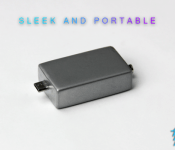
 There are literally thousands of portable battery packs to choose from these days, however, one of my biggest peeves with these generally large and cumbersome battery packs is that unless you carry a bag with you, you will need to actively remember to bring them with you and find somewhere to store it when you leave the house. That’s something that Blade Electronics is trying to address with its PulsePak Kickstarter project, the self-professed “World’s Smallest Smartphone Battery Charger” which easily fits on a keychain.
The PulsePak is intended to be a 1.5×0.9 x0.5 inch box with a micro-USB connector (with a lightning cable connector to follow, maybe) and will hold a battery charge of 300mAh. That might not seem like much compared to some of the monster battery packs out there, but for something that fits on your keychain, you will get between 1-1.5 hours of talk time depending on your device’s capacity. Check out the Kickstarter pitch video below:
The pledges which include the PulsePak start at $15 (not including shipping) for early birds and surprisingly only go up $25 which includes a PulsePak with a limited edition gold anodized finish. Blade Electronics is hoping to reach its target of $25,000, and while they only have $688 in pledges right now, it’s still early days. So if you’re interested in getting on board, be sure to hit the links below and check out their full Kickstarter page.
Source: Kickstarter
//<![CDATA[
ord = window.ord || Math.floor(Math.random()*1E16);
document.write('’);
//]]>
Divoom Voombox; A Water Resistant BT Speaker for the Rough and Tough
Spring is on the way, well, it should be. With warmer weather comes the dusting off of the outdoor gear, prepping for hikes, pulling out the tents, airing up the tires on the trailer, basically preparing to come out of our locked in hibernation. What are the great outdoors without some tunes? Sure, the peace and quiet of nature is pretty wonderful, but sometimes you just need some music to relax with after a long day on the trail. Divoom has a portable Bluetooth speaker that will easily help make your outdoor adventures a party. Meet the Divoom Voombox.
 What’s in the box
- Divoom Voombox – Outdoor Bluetooth Speaker
- USB Charging Cable
- Audio Cable
- Wrist strap
- User manual
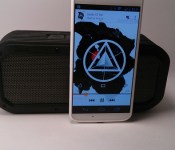
The Voombox measures in at 7.28 x 2.36 x 3.07 inches ( 185 x 60 x 78 mm ) and weighs in at 1.54 pounds ( 700 grams ). In the speaker department it offers up 5 drivers housed inside, a tweeter, 2 mid/woofers and 2 passives totaling 15 watts of output power with a frequency range of 100 – 20000Hz. The Voombox also has a substantial built-in battery, 3200 mAh, that offers up to 12 hours playback. It doesn’t double as an external battery pack though, the battery is solely for the speaker system to use. You have the option of connecting your audio source via an AUX port or through Bluetooth. The Voombox is Bluetooth 4.0 compatible with A2DP Stereo profile support.
The Voombox’s outer shell is a stiff rubber material that offers up a little grip along with disbursing the sound and vibrations evenly when placed on a flat surface.
On the right hand side you find a ‘VOOMBOX’ rubber port cover. Underneath it is where you find the Micro USB charge port and AUX cable port to direct connect an outside audio source to the speaker.

 On the left hand side you find the wrist strap cut out.
On the top you are given 4 buttons for remote operation. You have your power button, volume up and down and a play/pause /pairing button.
 The Voombox also has a mic built-in to allow you to use it as speakerphone if you do so desire.
How does the Voombox perform
Audio performance is always a tough one to adequately explain. The dual 7.5 watt speakers have plenty of umph in them. Depending on your music style, device and any outside EQ settings can quickly change the overall sound. Straight stock off of Google Music without any audio adjustments provides a loud output at full volumes. The bass is present, but not overpowering. It is a bit more driven in the mids, highs and vocals area.
The 3200 mAh battery is rated for 12 hours of music play back and 15 hours of talk time. We have been using the Voombox on a shelf in the shower for he last 2.5 weeks with it getting daily use ranging from 20 minutes to 40 minutes and still have not had to charge it up since the initial full charge. I am sure it is getting close to finally powering off.
All the buttons on the top work as they should. Long pressing on the volume up changes the track forward while long pressing on the volume down goes back a track. The play button is also the pause button. It is also important to note that the volume controls on the Voombox are independent from your phone or tablet.
What I like about the Divoom Voombox – Outdoor
 The look of the speaker is pretty cool. The front and rear grills are mixed with the screwed on cover and grooved rubber shell give it a tough look. It has enough weight to it to feel solid and not like you might break it if dropped. It is clear that it was designed to head out on long trail rides and camping trips. The sound is loud and powerful, it easily fills an open space with music that is clear. I like the fact that the speakers volume is independent from my phone. I can leave my Bluetooth volume all the way up and adjust the speaker without having to turn the Bluetooth volume back up on my device later for use on a different device. While their website and the packaging fails to offer a water resistant rating, but like I said, it has been sitting on the shelf in the shower for weeks and has been splashed numerous times without issues. I would assume it isn’t one that should be fully submerged.
What I don’t like about the Divoom Voombox-Outdoor
There isn’t much not to like. I would have expected a bit more punch from the bass drivers than it has. It isn’t that they distort under normal usage, it is more so that the bass is an underlying sound, but you can feel it if you hold the speaker.
Overall final thoughts
The speaker has a lot of good things going for it. It does have plenty of sound to carry it across fairly large spaces. The water resistant side, the rugged built quality of the Voombox and the price point all line up very well. With multiple color options to help fit your gear and your own unique style, the $99.99 is pretty fair, and almost a bargain for what it is. You can grab any of the colors, red, blue, black or green via Amazon through the link below.


//<![CDATA[
ord = window.ord || Math.floor(Math.random()*1E16);
document.write('’);
//]]>
[VIDEO] HTC Dot View case makes for one desperately good looking Accessory
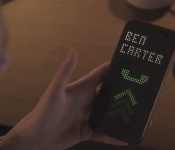
 Now that the 2014 HTC One is finally official, now we can find out all its lovely little secrets, including that flip cover that was leaked prior to the device’s announcement. While the leak seemed to suggest that the flip cover would only serve as a notification screen, a video posted today (which uses the case’s real name, the HTC Dot View case) showcases the various uses of the accessory. Check it out:
While I was never a fan of Samsung’s S-View case, I’m really digging HTC‘s take on a utility case. The fact that it uses the whole front cover as a screen and has meaningful gestures built into it really reinforces the fact that you can use your new HTC One without ever opening the case. The only downside, which has been suggested ever since the Dot View case was leaked, is the fact that the 2014 HTC One uses a Super LCD 3 screen which won’t be as power efficient as an AMOLED screen in the same application. That said, we don’t know exactly how HTC has configured this so we’ll just have to see when people actually get their hands on it.
What do you think about the HTC Dot View case? Is it everything you dreamed of? Let us know what your thoughts on it are in the comments.
Source: YouTube
//<![CDATA[
ord = window.ord || Math.floor(Math.random()*1E16);
document.write('’);
//]]>

IndieGoGo: Meet the HereO, First GPS Watch Aimed at Keeping Your Kids Safe
As a parent myself I know we all want our kids to be safe as much as possible. We still want to give our little ones a little freedom to explorer their surroundings while still being able to relax a little at the same time. There are a number of apps and gadgets one can use to that, including some that are available from your carrier. So long as your child has a phone. Let’s face it though, you aren’t going to hand over a Galaxy S5 to your 3 year old son so you can keep tabs on him at the park. A IndieGoGo funding campaign is currently underway called hereO that is looking to help out parents and children in the safety.
 The hereO is a kid friendly designed GPS watch that tracks your child’s movements and allows you to pinpoint their location right on your device.
Some of the great features:
- Place’s Notification: You can also set up zones to alert you when your child enters or leaves specific areas. This is great for children just starting school.
- Panic Alert: When in need the hereO will send out an alert to all family members on the hereO list.
- Tamper Alert: If the watch gets removed for any reason an emergency alert will be sent to all family members with the watches location.
- History: Back track through the watches location history to see where they have been throughout the day.
- Directions: Get directions from your current location to the location of the hereO.
The hereO app is free and doesn’t just sync with the hereO watch. It will cross sync with your entire family too. Letting you keep an eye on them too. You can see similar info as you would with the watch, but with a few more functions like broadcasting messages to the whole family, make calls and send/receive directions to current family members locations.
 The GPS Watch has a 24 to 72 hour battery life, is water resistant and includes a SIM card. It connects to GPS and cell triangulation for location information, then uses the cell network to transmit the coordinates to the hereO app on your phone.
The hereO will require a month subscription in order to have the GPS up and running, but at $5 a month it is hardly worth complaining about. We pay more for Netflix.
The IndieGoGo project is well underway with just 23 days left. The hereO’s goal is $100,000 and they are just about to hit $70,000. The early Bird special on this campaign will set you back $99, which is a $50 saving from what these will retail for and you get 6 months of service for free. There are still a number of Early Bird Specials left. In typical fashion, you can help them reach their goals for a smaller price tag.
While I think I am a pretty good dad and keep a very close eye on my son when we are out and about, I still have felt that slight panic moment when he has managed to escape my field of view for a few seconds.
If you want to support the project, which is said to launch regardless of the goal being reached or not, then take a click over to the hereO IndieGoGo campaign page.
//<![CDATA[
ord = window.ord || Math.floor(Math.random()*1E16);
document.write('’);
//]]>
Samsung SD and Micro SD Cards On the Cheap, 16GB for $10
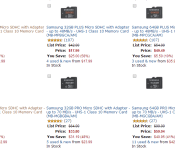
Amazon has this really cool Gold Box Deal of the Day section where you get the chance to snag something for a great discounted price for just one day. Today’s Gold Box Deal is one after my own heart. Today only, you can save up to 65% on select Samsung SD and Micro SD cards. By select, we mean the higher end Plus and Pro versions that are UHS-1 class 10 rated cards.
 The PLUS version cards offer transfer speeds up to 48MB/s while the PRO versions can hit up to 70MB/s. The sale currently covers 16, 32 and 64Gb versions of the PLUS and the PRO cards in the micro SD size format. As well as 16 and 32GB PLUS cards in full size SD format and 16, 32 and 64GB capacities in the PRO version full size SD.
Hit the various links to Amazon below to go check them out and score some storage space. (Listed is a one card of each the PLUS, and PRO versions, when you click through you can choose your storage size.
//<![CDATA[
ord = window.ord || Math.floor(Math.random()*1E16);
document.write('’);
//]]>
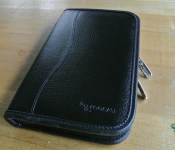
Roocase Executive Portolio Leather Case Review for Samsung Galaxy Tab 3 7.0: Executive and Functional
 I don’t envy accessory manufacturers who are in the business of making device cases; with the market flooded with cheap cases which provide the minimal level of functionality, it can be hard for premium accessory manufacturers to differentiate themselves, whether it’s through better materials or better functionality. We’ve previously taken a look at roocase‘s products (see that review here) and we can see what it takes to be considered more functional and unique than the norm; today, we’ll be taking a look at another of roocase’s folio cases, the Executive Portfolio.
 We’ll be taking a look at the Executive Portfolio specifically for Samsung Galaxy Tab 3 7.0, though the case is also available for a whole number of other tablets such as the Nexus 7, Kindle, etc. (check out roocase’s website here to see if they have this case for your tablet). In terms of what you get in the box, what you see is what you get with the Executive Portfolio, but it’s what’s on the inside that is the main event. What you do get on the exterior of the folio is a leather covering with twin branded zips to make sure nothing on the inside of your case falls out.
 The inside of the case is quite busy, much like an executive might be. On the inside cover, you will find a whole hosts of card slots and a pocket that can be used for storing cash. This space is likely to be enough as a wallet replacement unless you really like to horde cards, but it’s nice to see the option is here as well as the added security of the zipped up case.
 You may remember from the roocase Dual-View case, there was a stylus/pen included in that package. Well, that stylus is back, this time located in the spine of the Executive Portfolio. As before, the quality of the hybrid stylus and pen is nothing to write home about, however it’s a neat inclusion for those people that like using styluses or often find themselves without a writing implement.
 The actually case for your Galaxy Tab 3 is a leather framed affair, much like the one on the Dual-View case. Your tablet gets sealed inside the case with velcro and is a surprisingly snug fit with very little free movement. There’s ample room on all sides to get to all your Galaxy Tab 3′s access ports and buttons which includes the rear camera.
 Which brings us to the coolest part of the Executive Portfolio case; the section which holds the tablet can actually be removed from the folio case to become a standalone case. While it obviously lacks the protection it had while inside the folio, this section has its own functions as well.


As you can see in the photos above, this section of the case has a stand built-in as well as a strap which can be used as a handhold to stop you dropping your tablet during use. While the stand is a bit too short to be used for movie viewing, it is the perfect height for use on the desk during meetings or at your desk and the handhold is something a bit different, particularly if you’re prone to losing hold of your tablet.
 Attaching this section of the case back into the folio is as simple as doing up a button, though I’m a bit concerned about this part of the folio; there is no mechanism to hold the the above pictured flap down so if you were to tip your folio in a particular direction, your tablet would swing out and potentially unclip itself. While this isn’t extremely likely in a professional setting, I do wish there was something there to stop this eventuating.

Rating: 4/5
Professional-looking, functional and with lots of hidden tricks up its sleeve, the roocase Executive Folio leather case is a very multifaceted case, something which is somewhat of a rarity on the market. While individually there are parts of the case which are a bit lacking, the sum of its parts makes the Executive Folio a very good option for the user who wants to look a little more professional without losing the ability to be functional in the office, all for the relatively low price of MSRP $49.99 USD.
If you’re interested in picking up the roocase Executive Folio leather case, you can visit its product page here and see what participating retailers are selling the case. Additionally, the roocase Executive Folio leather case can be found for as little as $35 on Amazon right now (links to Amazon are below).
Gallery of Photos


//<![CDATA[
ord = window.ord || Math.floor(Math.random()*1E16);
document.write('’);
//]]>
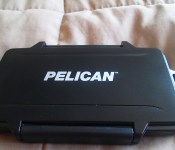
Pelican 0915 Memory Card Case; Tough is only the Beginning [Review]
Over the years I, like many of you I am sure, have acquired a plethora of memory cards. Everything from full size, to mini to micro. Having so many different devices dictates having a couple different card types and sizes. You need one for your digital camera, your phone and your tablet. Assuming your tablet and phone take a card. A more recent problem that I faced was where to keep the ones that weren’t currently in use. Leaving them in a pile on my desk didn’t seem safe and I know I have already lost a couple smaller 8GB cards because of it. That lead me to look for a solution not just for storing the cards while I was home, but also a safe and reliable way to transport them for travel. Until I started looking I had no idea that anything even existed. Enter the Pelican 0915 Memory Card Case.

What’s in the Box
- The Pelican 0915 Memory Card Case
Yes, that is all. Really, what else does it need to have? I would have had to laugh a little if there would have been instruction on how to open the case and place your cards inside.
The card case measures in at 5.55 x 3.27 x 0.85 -inches (140.97 x 83.05 x 21.59 mm) when closed and weighs 0.22 lbs ( 3.52 oz) when empty. Not that a few memory cards will make it weigh much more.
The exterior is a smooth black finish, made from polycarbonite resin. You will find the Pelican logo on the top along with a nice little “OPEN” and arrow on the back. To open the case you flip the latch on the side which clicks down pretty tight.
Inside you have space for all your card storage and travel needs. Both sides offer a 2 x 3 configuration cut into stiff black rubbery foam. On the left you have space for 6 Mini SD Cards and 6 full size SD cards. They conveniently stack on top of each other.
 On the right side you have 6 micro SD card spots with space for 6 more full size SD cards. The grand total is 12 SD cards, 6 Mini SD cards and 6 Micro SD Cards.
 You will also notice a rubber seal on the inside around the rim. Pelican designs their products to be tough, to be protective and to look great. This rubber seal is in place to help protect the cards from any outside dust or water. Yes, the case is water resistant, but a specific warning on the packaging says
“NOT TO BE USED WHILE SWIMMING OR SUBMERGING”
While it might be ‘water resistant, it isn’t designed for diving. It does float and I pushed it under in the sink a few times without issue.

Performance
Unlike most reviews that i do that involve sound, battery life or picture quality, this is just a case. It does its job.
The latch on the front locks down tight, but isn’t impossible to re-open. All the card holder slots are form fitting and just slightly smaller than any of the actually cards. It applies just enough foam pressure to the sides of the cards to keep them from falling out and flopping around inside the case. I did flip it over a few times and hit on my hands to see if I could shake the cards loose.


What I like about the Pelican 0915 Memory Card Case
I love how it looks and feels. It feels solid and secure and gives me a sense of security that the cards won’t get outside influential damage and also that I know where all the cards are at all times. I love that the case stacks the cards inside. They really used all the available space inside to give you as much space to carry as many cards as you might need.
What I don’t like about the Pelican 0915 Memory Card Case
This is a tough one. I think Pelican could do two things differently that would make this perfect, not that it isn’t already perfect. I would like to see them offer a full size and micro only version of the case. After all, it is just a glued in rubber foam insert. Would be simple to toss another model number on it and offer 12 Micro SD slots and 12 full size SD slots. The only reason being that I have had and still have no need or use of mini SD cards. The 6 mini SD slots will go unused.
I also don’t like the strap slot on the top side of the case. It didn’t come with anything to slip through it. I would think it would be for a keyring loop that you could then clip a carabiner through, maybe an attachable ring in the packaging would be nice.
Overall thoughts
You might think the few things I didn’t like are a little over critical. You would be right, they are. The Pelican 0915 Memory Card is a great case and a great product. This is going to be a great case for keeping all my cards safe in one location and not spread out in various drawers. It is going to be a a great travel and camping companion that will easily protect the cards and keep me from loosing them.
I know there are a number of solutions out there that offer various things like spring loaded side slots in a credit card sized case, but that won’t always be good enough for some people. Especially if you consider the cost of some of these higher end cards like the 128GB SanDisk at $120. Not to mention protecting the data that might already be stored on the cards you have.
If you are thinking the Pelican 0915 Memory Card Case is exactly what you have been needing, with summer on the way it should be needed soon, then you should pick one up. Seriously, for $17.49 it is hard not to have one if you have a few cards just sitting around.


 AIVAnet