


Anker Roav VIVA review – add Alexa to your car for just $59.99


We took a look at the new Roav VIVA from Anker. Priced at $59.99, it’s a Bluetooth unit that promises to add Amazon Alexa to your vehicle. It’s a little pricier than most dual-outlet car chargers on the market, but does that Alexa integration make it worth the extra cost? Read on to find out.
Setting up an Anker Roav VIVA is pretty simple. Just plug the unit into an open port on your dash, pair your phone to it, open the app (which you’ve of course downloaded ahead of time) and follow the prompts with regards to music streaming.
From there, just log in to your Amazon account to get started with Alexa. It took me way too long to realize that I wasn’t connecting to the VIVA through my Bluetooth menu – just pairing it. Don’t be like me.
Compatibility-wise, Anker’s acknowledges that there may be some hiccups. A number of cars use different Bluetooth standards and software than are standard – this can cause issues. The list of makes and models that may not be compatible is comprehensive and somewhat unnerving.
It’s far from ideal, but Anker offers a 30-day unconditional money-back guarantee through Amazon. So, even if your car is on the list, there’s really no risk to giving it a try. And for what it’s worth, I drive a 2015 Honda Fit – definitely on the list – and I’ve had no problems whatsoever.
Build
 As we’ve come to expect from Anker, the Roav VIVA is well-designed. It’s got an odd mixture of materials, textures and finishes: faux carbon fiber siding, glossy black plastic plug, a matte black plastic cap, and a frosted translucent LET ring and icon. Somehow it works, though – especially when plugged in.
That matte black cap is at home in basically any black interior. The LED ring – characteristic of an Alexa device – is surprisingly nuanced, the multi-color LED featuring fades, patterns and blinks with impressive sophistication.
In an odd design choice, the two USB ports are located on the underside of the unit, rather than its face or sides. It’s a strange decision, especially when you consider that not all DC ports offer enough clearance to plug a cable in there. When installing the VIVA, I’d definitely insert the cables before plugging in the unit; it’s tough to do, otherwise.

Anker’s Roav VIVA has two microphones and a dedicated noise canceling chip onboard, making it especially adept at isolating voice commands, even in a noisy cabin.
Granted, it’s probably not going to hear you shout at Alexa when you’re blaring Childish Gambino with the bass cranked, but for your average in-car experience, it’s totally adequate. The face of the VIVA also features a physical mute button, for when you’d rather not give Amazon access to every single word you say while driving.
Performance
As a charger, the Roav VIVA performs about as well as I expected. It features two PowerIQ USB ports, which automatically detects the voltage (between 5-12V) and amperage (between 1-2.4A) of your device and charging it at that speed.

While my V30 didn’t detect it as charging via Quick Charge 3.0, the estimated time to take my phone from 74% to 100% (56 minutes via PowerIQ vs 50 minutes for QC3.0) was pretty similar.
But the real selling point here is the VIVA’s on-board Alexa. It essentially uses your phone’s Data to do anything Alexa can do, including communicating with your Smart home devices; unlock your door, turn on your A/C, start up your Roomba… now, your phone can already do any of that, but the Anker Roav VIVA will let you do it while driving – safely.
While many cars on the road have some kind of voice control, Alexa adds a layer of (artificial) humanity to what is often a cumbersome experience. With over 15,000 recognized commands, and the ability to create custom ones, the possibilities are pretty extensive. From Home Automation to ordering, music, sports and communication, Alexa – and its Google/Apple counterparts) – is the future.
Value
At $59.99, the Anker Roav VIVA is expensive for a car charger. But for an Alexa speaker, it’s right on the money. The Amazon Echo Dot retails for $49.99 as well, though you can find it for as low as $34.99 often enough.


Products from Amazon.com
-

-33%
Roav by Anker 30W Car Charger with Quick Charge 3.0, SmartCharge Spectrum with Car Locator, Dedicated App, Car-Battery Monitor, Quick Charge 3.0 and PowerIQ USB Ports and 16000 Color Led Light
Price: $19.99
Was: $29.99
-

-40%
Anker PowerCore 10000, One of the Smallest and Lightest 10000mAh External Batteries, Ultra-Compact, High-speed Charging Technology Power Bank for iPhone, Samsung Galaxy and More
Price: $29.99
Was: $49.99
-

-45%
Anker Elite Dual Port 24W USB Travel Wall Charger PowerPort 2 with PowerIQ and Foldable Plug, for iPhone X / 8/7 / 7 Plus / 6s / 6s Plus, iPad Pro/Air 2 / mini 3 / mini 4, Samsung S4/ S5, and More
Price: $10.99
Was: $19.99
-

-78%
Anker PowerLine 6ft Lightning Cable, MFi Certified for iPhone X/8/8 Plus/7/7 Plus/6/6 Plus/5/5S (White)
Price: $8.99
Was: $39.99
‹
›
While the Roav VIVA doesn’t have the same speaker power as an Echo Dot, it does offer mobility and charging solutions, which the Dot does not. As such, the Roav VIVA is a decent price-point, though not the door-busting bargain we’re used to seeing from Anker.
Get the Anker Roav VIVA for $59.99 on Amazon
Don’t Miss
Google Home is awesome; here’s how to make it even better!
Check it out!
Fortnite on Android first look – you might want to wait off…
At this point, whether you’re a gamer or not, there’s a good chance that you’ve at least heard about Fortnite. This free-to-play game has taken the world by storm and has ended up earning the company hundreds of millions of dollars through in-game purchases.
Fortnite has made its way to PC, Macs, game consoles including the Nintendo Switch, and even Apple’s iPhone. But what about Android? The good news is that Fortnite for Android is here. Unfortunately, not without some caveats. First, you need to have a supported Samsung device at least until August 12th. Second, this beta seems to have some serious performance issues.
Note: I’m a long time Fortnite player on the PC, but also tested the game out extensively on Apple iPhone before the release of the Android version. Our team also has played the Android version on several devices ranging for the S4 Tab to the Galaxy S9 and older devices like the S7 Edge. Unfortunately, the experience just doesn’t live up to what you’d get from PC or even Apple’s iOS version.
Performance: it’s not great..
I have been a long-time Fortnite player primarily playing on my PC. To get the most out of the game on that platform, I have had to rely on a reasonably high-performance CPU and GPU. With my current setup, I have no issues with lag or graphics.
So when I started playing Fornite mobile first on an iPhone, I was surprised by the fact that the gameplay wasn’t garbage. While graphics weren’t nearly at the level found on consoles or PC, they are on par with other hit mobile games. But what wass urprising is that performance didn’t take a hit either. You have to remember that these games are filled with up to 99 people at a time that are all participating in a single match.
The same solid performance doesn’t apply to Fortnite for Android, unfortunately. First, the game is capped at 30fps even on newer devices like the Galaxy S9 and Tab S4. Second, the graphics are considerably tuned down from the iOS version, unless you are willing to put up with extremely bad frame rates. That’s not all.

Battery and data usage
While this is true for the iOS version as well, this game eats up a phone’s battery life. In my testing, I was finding that every match was draining my phone’s battery by up to 10 percent or more.
I get that mobile games are supposed to help people pass the time and have fun on their phones, but when half a dozen matches drain most of a battery, you have to start thinking if it’s worth a dead phone.
Secondly, I can’t recommend playing this game when you’re not on WiFi. As previously mentioned, Fortnite is a live multi-player game that requires a constant data connection to the other 99 users playing in a match. This demand means you will start to drain your data allotment provided by your cellular carrier.
Fortnite on Android: All the info on its unconventional release in one place
If you can look past the performance issues, the game is still playable, just frustrating. So let’s look further at gameplay, game modes, and the rest.
Gameplay
Fortnite for Android is a battle royale genre game where the objective is to be the last player standing. Each match kicks off with every character in a flying bus that takes a random route over an island with multiple types of terrain and cities. At any time during this flyover, players can jump to the ground and begin their journey.
Game modes
Fortnite is perfectly made for users who prefer to either play by themselves or with their friends. To achieve this, Fortnite offers several different default game modes. These include solo, duos, and squads. As the names suggest, solo is for when users want to play as a team of one, duos are for teams of two, and squads allows for up to four people to play together at once.
What’s nice is that if you want to fight alongside other players but don’t have any friends online, you can automatically be paired together with other people playing the game.
Outside of these default modes, Fortnite occasionally introduces modified game styles. For example, at the time of this writing, the battle royale has a 50 V 50 mode where players are put on a team of 50 characters and are given the primary goal to eliminate all opposing members. Other past examples are shotgun and sniper only game modes where players are only able to pick up and use those classes of weapons.

In-game weapons, tools, health, and shields
When a player first lands in the game, they are given nothing but a harvesting tool. While this technically is a weapon, it can’t do much damage to opponents. This tool is primarily used for collecting resources around the map such as wood, brick, and metal
If a player wants to survive, they’re going to need to move around the map and either find guns and explosives or open crates that provide a random array of items that the user might want.
Additionally, players should stock up on healing items and shields. As the character can take damage from opposing gamers, they will want to reheal when possible.
Character customization
The moment a new Fortnite round starts, everyone is on the same playing field. This means that no one player will have better powers, weapons, or capabilities when dropping from the bus. The only advantage someone might have is their own experience gained by previously playing the game.
So then why does everyone look different from one another? The simple answer to this is that people have either unlocked or bought character customization items.
Outfits
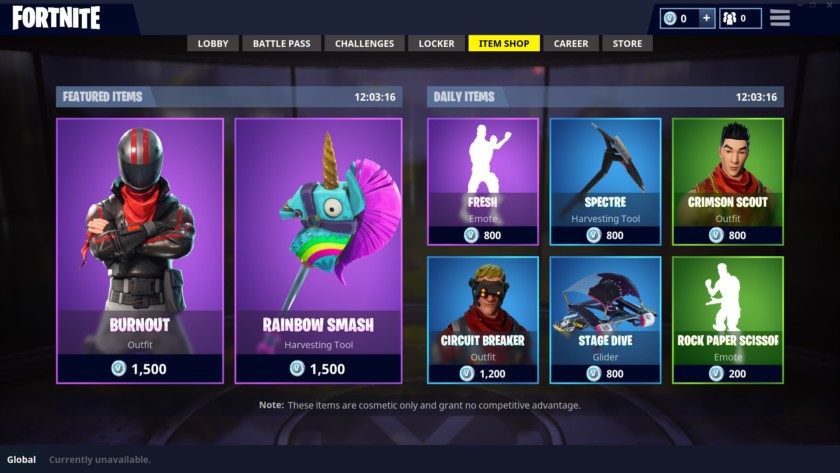
The look of each character is the primary difference between users. When players are new to the game, they’re given several basic-looking avatars that aren’t fancy. As they advance, a limited number of characters can be unlocked for free. But the way most people change their look is by buying different outfits from Fortnite.
I will explain the in-game currency in a bit, but basically, Epic Games releases different looks every 24 hours or so and people have the opportunity to purchase them. But don’t worry, if something disappears from the store before it can be bought, it will show back up in several weeks.
Harvesting tool, glider, emotes, and more
In addition to outfits, players can customize their Fortnite avatar’s appearance by changing the look of their harvesting tool, glider, contrail, and more. Also like outfits, players can unlock or purchase different designs and styles.
Lastly, one of the most popular aspects of the game is the emotes. Whether someone is celebrating a kill or just messing around, users can launch into a dance or action.
In-game purchases
To purchase all of these customization options, users have to use a virtual currency called V-Bucks. Throughout the game, users gain experience points which then progresses them to higher levels. Every once in a while, one of the rewards for advancement is 100 V-Bucks. The problem with this is that everything in Fortnite’s virtual store costs at least 500 V-Bucks and can go up to at least 2,000 V-Bucks.
So if players want a new outfit, emote, or whatever, the only real option is to buy the virtual currency with real money. The exchange rate is roughly $1 to every 100 V-Bucks. To motivate players to spend even more money, Fortnite gives “bonus” V-Bucks when they buy large sums of the currency.
Related: Fortnite might not come to the Play Store, and that’s a horrible idea
I’ve broken down the different tiers for the in-game currency:
- Wingman Starter Pack + 500 v-bucks + 100 bonus = $4.99
- 1,000 V-bucks = $9.99
- 2,500 (+300 bonus) = $24.99
- 6,000 (+1,500 bonus) = $59.99
- 10,000 (+3,500 bonus) = $99.99
Remember, Fortnite is a free-to-play game which means users technically never have to spend a single dollar to play it. By buying V-Bucks and then exchanging those for character customizations, those gamers aren’t getting any advantage while playing. Having the different outfits and accessories is more of a social experience than anything else.
Seasons
To make Fortnite more enjoyable, and make it more than just a game about killing other characters, Epic Games includes weekly challenges that players can complete to level up faster and unlock new outfits, accessories, and more. Each season consists of 10 weeks and each weekly challenge tests a player’s skills.
Battle Pass
Ofcourse, Fortnite wants to try to make money off of its free game. So in addition to buying customization features for avatars, users can purchase 25,000 V-Bucks and unlock the Battle Pass.
When buying this upgrade, players are unlocking more weekly challenges and gain access to more free items while leveling up. Again, there’s no in-game benefit gained by spending $25 every 10 weeks, but it helps users level up faster and get “free” stuff.
Controls
Just like many other mobile video games, all of the controls to navigate the virtual world are at your fingertips. There are two gesture areas in the lower two corners that are used to move the character around. User’s left thumb will be used to walk or run forward, backward, or left or right. The right thumb is what allows the player to look around.
Shooting, jumping, switching guns, interacting with items, and more
But as Fortnite is much more than just running around, there are a lot more buttons placed around the screen. Two easy-to-reach buttons near each navigation area let the user either swing the harvesting tool or to shoot a gun. Having the two buttons in an easy-reach location makes it so users can quickly react when they see opposing players or want to collect materials.
As this transition isn’t always the fastest when in a combat situation, the mobile game has a setting that can be turned on that automatically has the character shoot its weapon when an opponent is in their crosshairs. I found this extremely useful because it lets the player focus their attention on keeping the enemy directly in front of them instead of having to move and shoot at the same time.
 Epic
Epic
Two other static buttons are for crouching and jumping. These are strategically placed above the right thumb so that they can easily be tapped on while running or moving around.
Picking up weapons and supplies is easier on mobile when compared to other platforms. Instead of hitting a particular button, players have to run over the item and it will be collected.
If the gamer’s inventory is full, they will then have to tap on the item and it was be exchanged for whichever weapon is selected in their inventory.
Building
One significant part of Fortnite that separates it from other battle royale games like PUBG is the ability to build structures. Using the material that was farmed utilizing the harvesting tool, players can build simple walls, or they can practice and end up making a skyscraper.
I will say that this is much easier to do on other platforms. On mobile, while trying to move and avoid enemies, users have to lift one of their hands off the screen, press a button to switch into building mode, select the desired material and desired structure type (walls, floors, stairs, or roofs), and then hit build. This process can be extremely cumbersome on mobile, and I found myself not even bothering with the effort while playing.
On-screen audio indicators
Fortnite is a very audio-focused game. By this, I mean that a lot of the strategy while playing comes from listening for other players and chests. But in this case, when users are playing on mobile, they might not have the best speakers on their phones/tablet or be able to have the sound on at all. To help with this problem, Epic Games includes on-screen indicators to help direct or alert players about nearby sounds.
Coming from the PC, I found these indicators to be handy. Even though Fortnite does an excellent job at pinpointing where a sound is coming from audibly while wearing headphones, it can still be challenging to judge it accurately. These indicators fix this problem on mobile.
Conclusion
For people like myself who have been playing Fortnite for months on a different platform, it’s nice to have the game available while on the go. Unfortunately, the experience just isn’t great with the Android version yet.
Editor’s Pick
Fortnite for Android interview – Epic Games CEO Tim Sweeney on breaking away from Google Play
When Fortnite: Battle Royale launched, it was an instant hit, thanks to its more colorful and lighthearted take on the battle royale genre. Indeed, the game has since crossed over from just being a popular video …
Keep in mind this is still a beta, so a few updates could change everything. For now, you’re likely better off waiting or sticking to the game on another platform.
So that’s it for our first look review of Fortnite for Android. We’ll be sure to revisit when the game gets a few updates under its belt. What do you think of the game, have you had the same performance issues? Let us know in the comments.
5 of our favorite features on the Samsung Galaxy Note 9
From a larger display and a massive battery to artificial intelligence in the camera, there’s a lot to unpack from Samsung’s latest smartphone, the Galaxy Note 9.
We’ve spent some time with the phone — you can read our Note 9 hands-on for more details — but here are a few of our favorite features of the phablet.
Intelligent camera
The camera on the Galaxy Note 9 is incredibly similar to the Galaxy S9 Plus’ dual-camera system, but it has two new advantages. Scene Optimizer is powered with artificial intelligence, and it’s a feature we’ve seen on a few Android phones already. The camera is able to detect up to 20 scenes, ranging from pets to sunsets, and it then tunes the contrast, exposure, color, and white balance to create a perfect photo. In a few tests we’ve seen, it seems to deliver the more shareable photo than the S9 Plus’ camera without any A.I. assistance.
There’s also Flaw Detection. Whether it’s a dirty camera lens, too much backlight, or blinking eyes, Flaw Detection lets you know if something’s wrong with the photo you just took, and what you can do to improve it. For example, if someone blinks in a group photo, Flaw Detection will recommend you to snap another pic before you miss the moment.
Water carbon cooling system, and ‘Fortnite’
For hardcore gamers or those who plan on some intense multitasking with the Note 9, have no fear — the phone can handle it. A special water carbon cooling system implemented into the Note 9 keeps the processor from overheating too quickly. That way, you should be able to play games for longer periods of time without seeing any performance hits.
It makes sense then, that Samsung is promoting the Note 9 with a popular game. Fortnite: Battle Royale‘s Android app is exclusively launching on Samsung smartphones and tablets (Galaxy S7/Tab S3 and higher) for the next 30 days. When you pre-order the Note 9, you can get up to 15,000 V-Bucks as well (a $150 value).
The S Pen gets Bluetooth
Julian Chokkattu/Digital Trends
The S Pen is far more capable than ever before. It now has Bluetooth Low-Energy, meaning you can use it to control the Note 9 up to 30 feet away. You can do things like control presentations, take selfies or group photos (without having to touch the Note 9), or control music playback. You can customize what the S Pen’s button will trigger through the Settings menu on the Note 9. While this does mean you have to charge it, the built-in supercapacitor battery in the S Pen only needs 40 seconds in the Note 9 to give it 30 minutes of charge.
Big battery and heaps of storage
Julian Chokkattu/Digital Trends
The Galaxy Note 9 houses a 4,000mAh battery, which is one of the largest we’ve seen on a flagship Galaxy phone. It should be able to last you for more than a day, and maybe even two days with light use.
As for internal storage, the Note 9 comes in either a 128GB size or a massive 512GB model. Samsung is also releasing its own 512GB MicroSD card later this year, so coupled with the 512GB Note 9 variant, you’ll be walking around with a terabyte of storage in your pocket.
DeX Android desktop mode
Jullian Chokkattu/Digital Trends
Earlier this year, Samsung announced the DeX Pad — a follow-up to last year’s DeX Station. Both devices act as docks that connect a Galaxy smartphone to an external monitor, with the benefit of attaching other peripherals like a mouse and keyboard. By plugging your Galaxy S9 into the dock, a desktop version of Android launches on your monitor for improved productivity. But with the Note 9, you can simply connect the phone to a monitor via a USB Type-C to HDMI cable, and DeX mode will automatically launch. The Note 9 can then be turned into a mouse pad, and the virtual keyboard automatically appears when you need to type.
Check out our Galaxy Note 9 vs. S9 Plus vs. S9 comparison to see how the new phone fares against its kin, and our Galaxy Note 9 vs. Note 8 vs. Note 5 to see how it stacks up against its predecessors. Read our Galaxy Note 9 hands-on review for our impressions.
Editors’ Recommendations
- Samsung Galaxy Note 9: Everything you need to know
- Samsung Galaxy Note 9 hands-on review
- Samsung Galaxy Note 9 vs. Galaxy Note 8 vs. Note 5: All the changes of note
- Samsung Galaxy Note 9 vs. Galaxy S9 Plus vs. Galaxy S9: Which is right for you?
- Here’s everything announced at Samsung Galaxy Unpacked
Materials scientists have found a way to make graphene twice as tough
Graphene, a single layer of graphite with the atoms arranged in a honeycomb-like hexagonal pattern, is one of the theoretically toughest materials in the known universe. Not content with that billing, however, materials scientists from Rice University in Houston, Texas, have found a way to make it more than twice as tough — courtesy of embedded carbon nanotubes. In three-dimensional graphene structures, they have demonstrated that it’s possible to strengthen it by up to 10 times.
“We have shown that we can grow graphene with nanotubes,” James Tour, professor of materials science and nano-engineering at Rice University, told Digital Trends. “We call this rebar graphene, with ‘rebar’ being the metal bars that go through concrete to strengthen it.”
The problem, Tour explained, is that while graphene is 100 times the strength of steel, regular pristine graphene can also end up tearing at defect sites due to its extreme thinness. This means that graphene has never reached its theoretical maximum in terms of durability. By embedding carbon nanotubes during the graphene formation process, it’s possible to develop reinforced graphene which reduces the effects of cracks.
The rebar graphene was made by spin-coating single-walled nanotubes onto a copper substrate, and then growing the graphene around it using a process of chemical vapor deposition. “This leads to a covalent chemical linkage between the graphene sheets and the nanotubes,” Tour continued.
The new reinforced graphene process doesn’t add yet more potential applications to the immensely versatile super-material, but rather makes existing use cases more feasible — since graphene’s real-world effectiveness can only be truly measured by its weakest link. “It allows you to do things with graphene which you may have intended to do before, but were unable [to],” Tour said.
In previous tests, researchers from Rice University have shown that graphene has a native fracture toughness of 4 megapascals. In contrast, rebar graphene has an average toughness of 10.7 megapascals. As noted, this difference is even more noticeable in 3D graphene-based structures the lab has engineered.
Next up, Tour said the team is focused on ways to scale the manufacturing process, thereby making this a practical discovery, as opposed to one primarily of interest to researchers in the lab. “What I want to see next is scaling to machines that can do this rapidly, using systems that can fabricate graphene in this toughened form,” he said. “That’s really going to change things, and that’s where we’re going.”
A paper describing the work was recently published in the journal ACS Nano.
Editors’ Recommendations
- Sorry, Spider-Man! Newly developed bio-fiber is even stronger than spider silk
- The best iPhone X screen protectors
- FormLabs Form 2 review
- ‘Beyond Good & Evil 2’ is the space pirate opera of our dreams
- DJI Spark review
Moment is the first to outfit the Galaxy Note 9 with photography lenses
Previous
Next
1 of 3

Moment

Moment

Moment
The Samsung Galaxy Note 9 just launched, but the high-end smartphone already has a set of lenses and accessories to aid the A.I.-powered camera built into the phone. On Thursday, August 9, Moment launched the new collection for the Samsung Galaxy Note 9, which includes two cases that support the company’s current lineup of lenses and an upcoming anamorphic lens.
The two new cases come in a black or walnut finish, but the biggest feature is that the cases open up the smartphone to use with Moment lenses. The company says the Note 9, with a case, is compatible with all of Moment’s current lenses (excluding the older original Moment lenses). The launch makes Moment the first company to outfit the new smartphone with photography accessories, thanks to the Samsung Accessory Program.
The case, like Moment’s other cases, is slim and minimalistic, the company says. While thin, Moment says the rubberized case will help protect the phone from drops and scratches. The case can also be used with a wrist strap.
The case’s lens support includes Moment’s not-yet-launched anamorphic lens. The anamorphic lens creates a 2:40:1 aspect ratio designed for cinematic videos. Moment says the lens also allows for a shallower depth of field despite the wide angle of the lens. The lens uses an updated mounting option, so the upcoming filmmaker’s lens isn’t supported by all of Moment’s cases.
The Note 9 will also support Moment Pro, a camera app with manual controls and RAW shooting, including advanced video modes. The newly redesigned app also uses double taps and a simplified user interface.
The new Moment cases offer the first options for expanding the Note 9’s built-in cameras. Like the S9, the Note 9 main lens can swap between f/2.4 and f/1.5, the latter for better low-light shots and softer backgrounds. The secondary lens offers a 2x zoom, working together with the main lens to offer a portrait mode called Live Focus.
The Note 9’s camera also uses artificial intelligence to enhance the images. Scene recognition helps choose the best settings for around 20 different types of shots — and in our early tests, the Note 9 had the best performance for this type of scene recognition that we’ve seen so far. The smartphone’s AI will also warn you when someone blinked in that photo or if the lens is dirty.
Moment calls the mix between the mobile lenses and the Note 9 “a supercam.” The new Samsung Note 9 accessories are available for pre-order beginning today with a 20 percent discount, which puts the usual $30 case at $24.
Editors’ Recommendations
- Tired of the same Snapchat lenses? Lens Explorer simplifies finding new lenses
- This waterproof case turns your iPhone into an underwater camera system
- Newly redesigned Moment Pro app has manual controls — and Pixel Visual Core
- How to pick the perfect lens to breathe new life into your DSLR or mirrorless camera
- This odd accessory helps photographers shoot through glass with less glare
Dr. Dabber Switch vaporizer review
Research Center:
Dr. Dabber Switch
Ever since we started reviewing cannabis vaporizers and pens here on Digital Trends, we’ve seen devices from a host of manufacturers come through our doors. Some are stalwarts of the industry like Pax, Grenco, and Kandypens, while others are brand new such as Prohibited and Cloudious9.
But one company hasn’t been able to break through even despite being in the industry for the better part of a decade, and that’s Dr. Dabber. While the Las Vegas-based company has quite the extensive line of concentrate-centric vapes to choose from, the ones we’ve received in the past haven’t exactly impressed, and were often easily eclipsed by other companies in terms of both performance and build quality.
For this reason, we were admittedly a bit skeptical when we received a pre-production model of Dr. Dabber’s Switch. At $400, it’s nearly at the top of the price range for portable vaporizers, and its large size is a little intimidating. To find out if it’s actually worth your time, we used it as our main rig for a few weeks and put it to the test.
Design
The first thing you’ll notice about the Dr. Dabber Switch is its size. Make no mistake: this thing’s big. Fully assembled with the bubbler top attached, it’s over a foot high and four inches wide. However, despite the Switch’s size, it’s also fairly light. We’d compare it to the weight of a larger high-quality glass water pipe.
“There’s no other way to say this: The Dr. Dabber Switch rips.”
Operation of the Switch is easy. A switch (go figure, right?) on the bottom ring of the device allows you to quickly go between leaf and oil modes, with three button operation, while the + and – keys allow you to switch between five different power levels per mode, and a large center button makes it easy to start the heat-up process with a single push.
The heating element on the top of the Switch features induction coils surrounded by ground glass, and removable metal cups work to heat your material via the same technology as induction cooktops.
The bubbler itself is made of heavy-duty borosilicate glass and is as solid as you’d expect. You’ll be able to clean this easily just like you would any other dab rig (we highly recommend Mile High Cleaner), and the chamber is large enough to allow for some heavy-duty rips. Included with the Switch is a glass loading tool and carb accessory which works great, as well as a pair of reverse-action tweezers that help you remove and place the induction cups after loading.
“What makes the Dr. Dabber Switch so special is its ease of use.”
What makes the Dr. Dabber Switch so special is its ease of use. We had absolutely no problem loading the device at all. You simply fill the induction cups: a black cup for loose leaf that holds about a 1/3 of a gram of product, and a white cup for concentrates (be sure to use the correct one!). Just use the tweezers to place it back in the device, switch it on, select a power level, and press the center button to start the process. When the LED lights on the top of the device to turn from red to green, you’re clear to start puffing.
Induction heating is truly a dream. Thanks to this technology, we were impressed by how fast the Switch was able to power up produce great vapor: less than ten seconds every time. When the smoke sesh was over, the device’s self-cleaning function allowed us to burn off excess product after using it for concentrates easily, making regular alcohol baths for the pieces unnecessary.
Performance
There’s no other way to say this: The Dr. Dabber Switch rips. At the three highest power settings on either mode we were regularly getting huge clouds out of this thing. In leaf mode, the induction heating vaporized but also burned the material evenly, and in concentrate mode all that was left was residue (which is what you want). Of any vaporizer we’ve tested, the Switch is actually the first to do both forms (flower and concentrates) equally well, and perhaps the closest experience you’ll get to the traditional dab rig/torch method, but without the potential for third-degree burns.
Why is it so big though? Much of the size of the Switch has to do with the removeable 33.3 watt-hour battery, which is one of this rig’s biggest strengths. While Dr. Dabber claims that you’ll get up to 150 cycles on a full charge, we only got about 40 percent of that on average – most likely because we used the self-cleaning function often. The Switch is also is a “passthrough” device, so if you want to use it while it’s connected to the included AC charger, you can do that too. No waiting around for it to charge before you smoke.
Overall we had almost no trouble with this rig — although a few times it appeared to get caught in a “cool-down cycle” that couldn’t be switched off (though it’s worth mentioning that we had a pre-production device, so this issue may have been fixed by now). This is typically because the cool down cycle was interrupted, and a power cycle fixed it.
(Editor’s note: Dr. Dabber cautions NOT to interrupt the cool-down cycle as it may damage the device. However, if your Switch gets stuck, and the device feels cool already, try the above trick and everything should be good. Otherwise, try resetting the device – those instructions are at the end of the user manual.)
“The Switch is by far the best vaporizer we’ve tried to date”
There are some advanced functions which allow for even greater customization, including heat settings and “hold time” – where the unit holds the desired heating profile for anywhere from five to 30 seconds. Most of us won’t need to mess with this, but the options are there in case you need them.
Some Extra, But Useless Features
The LEDs around the top of the device can also be set to either light up as one of 10 different solid colors, 14 different cycling colors, or in stealth (no LED) mode. It’s a cool feature, and more of a conversation starter than anything, but hey if you want to customize your device, here’s one way to do it.
Warranty information
Dr. Dabber’s warranty for the Switch is pretty fair, although far less than the five and ten-year warranties of many of its smaller brethren. A two-year limited warranty is provided on the electronic components and battery pack, but the glass pieces do not carry a warranty. Break the bubbler and you’ll need to fork over $75 for a new one. We’d assume, however, that if there were imperfections in the glass that a quick email to their customer support would help remedy the situation.
Our Take
Despite our misgivings about earlier Dr. Dabber products, the Switch is by far the best vaporizer we’ve tried to date. Induction heating certainly seems like the way of the future when it comes to weed vapes, given its efficiency and proper vaporization of product. Dr. Dabber’s method here is patent pending, so it may be awhile before we see something similar.
Is there a better alternative?
For the serious smoker, no. For cannabis users who are new to the game, there are better options out there. While the Switch is easy enough for just about anyone of any experience level to use, the $400 price tag is going to scare most away. For these folks, we’d recommend going with more entry level unit with a much more budget-friendly price tag.
However, for experienced cannabis users, there is no current equal to this device — at least that we have tested so far. In terms of efficiency and performance, this rig is top-tier and you won’t be able to do much better.
How long will it last?
At least in the near term, we don’t expect to find any devices that may replace this one in terms of the full package. One area where we’re a bit disappointed in is the fact that there’s no app control. It sure would be nice to have the ability to set custom heating profiles without fiddling with the device — which is something you can do with other portables like the Pax 3 and Davinci IQ.
This said, the construction of the device is sturdy and not cheap, so there’s no reason why your Switch shouldn’t give you years of reliable performance.
Should you buy it?
If you are an intermediate or advanced cannabis user, this is definitely a device to consider if you have the disposable income to do so. However, if concentrates aren’t your thing, or you simply don’t need a device that can handle both flower and concentrates, then you’d be wise to consider other (likely cheaper) options.
The best car chargers for the Google Pixel and Pixel 2

Here are our favorite USB car chargers to keep your Pixel topped up on the road.
We’ve all been there (some of us more than others): you hop in your car ready hit the road, and then you check your phone — it’s dying at a rapid pace! You’ve barely enough battery to get to your destination, let alone for the rest of the day once you get there.
Well, that’s what car chargers are for, and if you have a Google Pixel or Pixel 2, this list should be particularly resonant for you. Here are some of the best car chargers you can buy for your Pixel or Pixel 2.
- Aukey USB-C PD
- Aukey Quick Charge 3.0
- Anker USB-C PD
- Spigen 30W
Aukey Car Charger with 27W USB-C PD and 5V/2.4A USB-A
Top Pick

Aukey’s charger features both a USB-C port and a USB-A port, which is the best of both worlds. You can charge your Pixel or Pixel 2 over USB-C at a full 27W, which is the “rapid charge” rate you’d get from the in-box wall charger. At the same time, you can charge another device over USB-A at a respectable 5V/2.4A — enough to get any other phone charged up pretty quickly.
The fastest possible charging speeds, plus an extra USB port for your copilot’s phone, wrapped up into one small device that barely protrudes from your car’s outlet. All this for just $22.
See at Amazon
With 27W of output, this Aukey charger can even charge up USB-C tablets and laptops, which is another big plus. Just remember, you’ll have to bring your own USB-C cable to use this charger.
Aukey Car Charger with 5V/3A USB-C and Quick Charge 3.0 USB-A
Mid-Range Choice

This version of the charger has a USB-C port with 15W of output, which will still charge up your Pixel or Pixel 2 quickly but doesn’t match wall charging speeds. In return, the USB-A port below it has Quick Charge 3.0, which will charge most other modern Android phones extremely fast, just as they would from a wall charger.
It’s a small trade-off and really depends whether you value being able to rapidly charge your Pixel or other USB-C PD devices more than getting top-speed phone charging on the USB-A port. Get it for just $16.
See at Amazon
This is a slightly different version of the first car charger, and you have to look at the details to tell which one you’re getting — the quickest way to tell is that this model has Quick Charge 3.0 branding. The rest of the casing is the same, which is to say it’s compact and doesn’t stand out.
Anker USB-C Car Charger with USB-PD
Most Reliable

Trust and great warranty — that’s Anker’s promise. With its car charger, you get two ports, a USB-C port that supports your Pixel’s fastest charging speeds, and a second USB-A port to top up another device like a tablet.
With its distinctive blue color, Anker’s car charger is compact and reliable. You can grab it for $29.99.
See at Amazon
Spigen 30W Quick Charge 3.0 Dual USB-A car charger
Budget Pick

Spigen’s dual USB car charger is a high-quality part that won’t overheat your Pixel or Pixel 2. It uses USB-A, and supports Qualcomm’s Quick Charge 3.0 standard, which still offers pretty quick speeds for Pixels and can also charge up other phones extra fast.
The beauty of the Spigen charger is that it supports a total of 30W between the two ports, so even with two phones plugged in they’ll both charge up at the maximum rate. The best part? It’s only $13.
See at Amazon
Your picks?
Are you using an awesome USB-C charger that we didn’t mention? Let us know in the comments below!
Updated August 2018: We’ve updated this list with Anker’s excellent new USB-PD charger, which pairs beautifully with the Pixel or Pixel 2.
Google Pixel 2 and Pixel 2 XL
- Pixel 2 FAQ: Everything you need to know!
- Google Pixel 2 and 2 XL review: The new standard
- Google Pixel 2 specs
- Google Pixel 2 vs. Pixel 2 XL: What’s the difference?
- Join our Pixel 2 forums
Best Buy
Verizon
Google Store
Project Fi
Every 500 Million Limited Edition PlayStation Pro 4 will be unique
One of a kind.
Today, Sony said it has officially sold more than 525 million PlayStation systems including everything from PlayStation VR to the PlayStation Vita. To celebrate that accomplishment, Sony is releasing a limited edition 500 Million PlayStation 4 Pro gaming console. When it says limited, it means it. Only 50,000 will be made, and each one will come with a commemorative copper plate on the front with that console’s serial number etched into it.

The case will feature a transluscent dark blue shell and come with a DualShock 4 wireless controller with a matching scheme. The console will also come with a PlayStation camera, vertical stand, and mono headset. The internal hard drive is 2TB, which is the largest of any PlayStation 4 Pro so far. A few of the copper plates mentioned above will also include unique historical numbers related to PlayStation’s history. You’ll get all of that for $500, and pre-orders begin on August 24.
You will also be able to get the DualShock 4 controller by itself for $64.99. A 500 Million limited edition Gold headset featuring that same dark blue translucent color will also be around for $99,99, but both of these devices will only be available in limited quantities. Those will start selling sometime in September.
Check out the PlayStation Blog Flickr account, which includes a lot of detailed photos of this one-of-a-kind console.
The Kindle Fire HD 8 is almost 50% off for only a few more hours
Odds are this deal won’t last!
Update: This offer is only around for a few more hours, so be sure to grab one before the sale ends.

Amazon is running a limited time promotion that drops that price of the Fire HD 8 tablet down to $59.99, a savings of $50 from its regular price. Over the past few months, we’ve seen this tablet sell for as much as $110 but never lower than $80, and in fact, it’s never dropped this low before. It has an 8-inch display and comes equipped with 32GB of storage inside. Per charge, the tablet offers around 12 hours of usage time and it even has Alexa built right in to get your questions answered with ease.
Amazon is selling the 7-inch Fire Tablet with 8GB of storage for $49.99 right now, which means for only $10 more you get an extra inch of screen real estate and quadruple the internal storage. Odds are, at this price, this will begin selling out quickly. Be sure to grab one in black, red, blue, or yellow right now, before they are gone, and also pick up a microSD card so you can store more music, movies, and apps on it.
See at Amazon
Here’s how to download the Fortnite Beta on your Galaxy device

The wait is over: Fortnite is finally available on Android.
Hopefully you’ve been smart enough to ignore all the spam and clickbait out there for supposed Fortnite Beta APKs that have been floating out there, because the real Fortnite Beta is finally here.
Samsung has partnered with Epic Games to make the Fortnite Beta exclusive to Samsung Galaxy devices until August 12. Since Epic Games decided not to launch the game through the Google Play Store, Samsung users can find and download the game right now from the Galaxy App Store.
How to download from the Galaxy App Store
The Fortnite Beta is currently exclusively available on Samsung Galaxy, from the S7 on up, and can be downloaded from the Galaxy App Store.
It’s easy to forget that Samsung has its own dedicated app store that you may have never used before, so we’ll walk through the steps of downloading the Fortnite Installer.


Swipe up to open the app drawer
Tap on the Samsung Apps folder.
Tap to launch the Galaxy App Store.


You should see the big Fortnite banner ad at the top, or you can search for Fortnite.
Download the Fortnite Installer.
Once you’ve downloaded the installer, the app will install the game itself. If you’ve previously played Fortnite on another platform you’ll be able to log in to your existing account and access any in-app purchases and continue your progress on your Battle Pass.
How to get the game on other Android phones
Anyone who doesn’t own a Samsung Galaxy device will have to wait until August 12 to download the game, but you can head over to the Fortnite Android portal to register for the beta with your device. Epic Games will then email you the link to the Fortnite installer once the beta is opened up to non-Samsung devices.
After the Samsung exclusivity concludes, the Android beta will initially be made available on the following devices:
- Samsung Galaxy S7
- Samsung Galaxy S7 edge
- Samsung Galaxy S8 and S8+
- Samsung Galaxy S9 and S9+
- Samsung Galaxy Note 8
- Samsung Galaxy Note 9
- Samsung Galaxy Tab S3
- Samsung Galaxy Tab S4
- Google Pixel and Pixel XL
- Google Pixel 2 and Pixel 2 XL
- ASUS ROG Phone
- ASUS Zenfone 4 Pro
- ASUS Zenfone5Z
- ASUS Zenfone V
- Essential PH-1
- Huawei Honor 10
- Huawei Honor Play
- Huawei Mate 10 and Mate Pro
- Huawei Mate RS
- Huawei Nova 3
- Huawei P20 and P20 Pro
- Huawei Honor V10
- LG G5
- LG G6
- LG G7
- LG ThinQ
- LG V20
- LG V30 and V30+
- Nokia 8
- OnePlus 5 and 5T
- OnePlus 6
- Razer Phone
- Xiaomi Blackshark
- Xiaomi Mi 5, 5S and 5S Plus
- Xiaomi Mi 6 and 6 Plus
- Xiaomi Mi 8, 8 Explorer, and 8SE
- Xiaomi Mi Mix
- Xiaomi Mi Mix 2
- Xiaomi Mi Note 2
- ZTE Axon 7 and 7 S
- ZTE Axon M
- ZTE Nubia Z17
- ZTE Numia Z11
More devices should be added to the list, and we’ll provide step-by-step instructions for installing the game on non-Samsung devices the game has been opened up to all other compatible Android devices.
Are you a Fortnite fanatic?
Fortnite has taken the world by storm! Are you excited to play it on your phone? Let us know in the comments below!
Android Gaming

- Best Android games
- Best free Android games
- Best games with no in-app purchases
- Best action games for Android
- Best RPGs for Android
- All the Android gaming news!

