


Latest Firefox iOS Update Brings New Dark Mode and Tab Features
Firefox received an update on iOS today that brings a new dark theme and a handful of new tab functions to the popular web browser.
For some time now, Mozilla’s mobile browser has had a “Night Mode” option, which reverts the colors of web pages except for images and certain other elements, similar to the way Smart Invert works for iOS.
From left to right: Standard view, Night Mode, and Night Mode plus Dark theme.
Version 13 of the app, released today, adds a new Dark display theme that essentially augments the Night Mode by darkening the interface. Used in tandem, Firefox offers users probably the best night-time browsing experience currently available on iOS.
To activate the night-time options, tap the Menu button (the three-line icon at the lower right of the interface) and enable the Night Mode using the toggle button. Then select Settings -> Display, and choose the Dark theme.
In addition to the above, version 13 of Firefox adds a couple of useful functions for users who tend to have a lot of tabs open at the same time. There’s now a search bar in the open tabs screen to help you find tabs containing specific content, and individual tabs can now be dragged to rearrange them.
Firefox web browser is a free download for iPhone and iPad available on the App Store. [Direct Link]
Tag: Firefox for iOS
Discuss this article in our forums
Xiaomi sub-brand Poco is all set to unveil its first phone on Aug. 22
The Pocophone F1 will make its global debut in New Delhi on August 22.

Earlier this month, Xiaomi announced that it was creating a sub-brand called Poco that targets the mid-range segment. Not much is known about the brand other than the fact that Xiaomi’s Lead Product Manager Jai Mani would be overseeing the project, but that’s set to change next week. Poco’s Indian arm sent out a tweet saying that its first phone will be unveiled in New Delhi on August 22.
More than peak performance, more than speed – the best of smartphone innovation is almost here. Brace yourself for the #MasterOfSpeed. See you on August 22, 2018. #POCOF1 pic.twitter.com/Uwt0ZcB26N
— POCO India (@IndiaPOCO) August 13, 2018
The device in question will be the Pocophone F1. Numerous leaks over the course of the last month have given us an accurate picture of the device and its specs, which will include a Snapdragon 845, 8GB of RAM, 128GB of storage, 4000mAh battery, 20MP front camera with face unlock and AI-based portrait mode, and USB-C connectivity. The F1 will have a notch, and it will be powered by MIUI on the software side of things.
We’ve seen a slate of new devices make their debut in this segment recently — including the Huawei Nova 3 series — and it’ll be interesting to see if Xiaomi can carve out a niche for itself with the Pocophone F1. Thankfully, we don’t have to wait long to find out all there’s to know about the Pocophone F1.
In the meantime, what are your thoughts on the upcoming phone?
Latest IDC numbers show Xiaomi carving out a healthy lead in India
With a market share of 29.7%, Xiaomi is extending its lead over Samsung.

The latest IDC numbers for the second quarter of 2018 show Xiaomi building on its lead in the country. Xiaomi overtook Samsung at the end of last year to become India’s largest smartphone manufacturer, and IDC’s Q2 2018 figures show the company dominating in the online space. Xiaomi accounted for over 56% of all sales in the online segment, and with the company’s increased focus on the offline sector saw 33% of sales coming from retail stores.
The Indian handset market as a whole grew by 20% YoY, recording shipments of 33.5 million units. The segment also saw increased average selling prices to $167, up from $157 a year prior.
Xiaomi announced earlier in the year that the Redmi Note 5 series racked up over 5 million sales in just four months, and the Redmi 5A along with the Redmi 5 continue to do remarkably well in India. In fact, these four models by themselves made up 26% of all phones sold in India last quarter.
One out of four smartphones sold in India was a Redmi phone.
As a whole, Xiaomi accounted for 10 million shipments in Q2 2018, amassing a 29.7% market share. Samsung came in second with 8 million shipments and a market share of 23.9%, followed by Vivo at 12.6% and OPPO at 7.6%. Transsion, which owns offline-focused brands like Tecno and Infinix, came in fifth.
It’s an interesting time in the Indian handset market as there are plenty of manufacturers vying for market share in each segment. Samsung in particular is facing stiff competition across categories — Xiaomi in the budget segment and OnePlus in the mid-range category — and although the South Korean company saw a healthy boost in sales from Q2 2017 (up 21%), it lost out to OnePlus in the premium category.
According to IDC, it’s the budget models that deliver meaningful sales for Samsung in India, with the likes of the Galaxy J7 Nxt, Galaxy J2 2017 and Galaxy J2 2018 driving most of the volume. IDC noted an “incremental demand” for Samsung’s high-end sales, but that wasn’t enough to stave off OnePlus. With the Galaxy Note 9 set to make its debut in India later this month, Samsung is going for an aggressive strategy to win back sales, but only time will tell if it pays off.
How to Send and Receive SMS Messages on iPad and Mac via Text Message Forwarding
Ever since iOS 7, Apple has provided a Text Message Forwarding service that can push SMS messages received through your iPhone’s cellular network to your other Apple devices.
Using the same network, the forwarding service also allows you to send messages from your iPad or Mac to other phone numbers, even if they don’t support Apple’s iMessages platform (dumbphones and Android devices, for example).
For whatever reason, the Text Message Forwarding feature may not be enabled on your iPhone, so if you tend to miss standard text messages coming through to your phone when you’re engaged with something on your Mac or iPad, it’s definitely worth enabling.
Once activated, those messages will show up on all your devices in the Messages app as green chat bubbles, allowing you to distinguish them from regular blue iMessages. Keep reading to learn how to activate the feature in iOS 11.
How to Activate Text Message Forwarding in iOS 11
Launch the Settings app on your iPhone.
Tap Messages.
Tap Send & Receive.
Tap Use your Apple ID for iMessage.
Tap Sign in to use your Apple ID for iMessage, or tap Select Other Apple ID and then enter the login credentials for the account you want to use.
Wait for a moment while iMessage activates. Click OK in any dialog boxes that confirm your Apple ID is now being used for iMessage on your other devices.
Tap back to Settings -> Messages, and tap the new Text Message Forwarding option in the menu.
Use the toggle buttons next to the devices in the list to include or exclude them from the Text Message Forwarding service. Note that only devices logged into the same iCloud account and connected to the same Wi-Fi network will appear in the list.
A security code may appear on the devices that you enable – make sure to type the code into your iPhone to activate them for the service.If you followed the steps above but the Text Message Forwarding option doesn’t appear in your iPhone’s settings app, check that your device is connected to Wi-Fi and the internet connection is good.
Another solution is to turn off and then restart iMessages via Settings -> Messages -> iMessage. You can also try signing out of iMessage and signing in again: Select Settings -> Messages -> Send & Receive, tap your Apple ID at the top, and then tap Sign Out.
Related Roundup: iOS 11
Discuss this article in our forums
Police bust a massive interstate SIM card hijacking ring
Krebs on Security has reported that Florida law enforcement have arrested a man accused of being part of an interstate cybercrime ring that used hijacked phone numbers and SIM cards to steal hundreds of thousands of dollars in cryptocurrencies and cash.
On July 18, Ricky Joseph Handschumacher was arrested in Pasco County, Florida, and charged with grand theft and money laundering. He has pleaded not guilty, though he has admitted to being part of the organization.
While Handschumacher was arrested in Flordia, the first break in this case occurred in Michigan. In February of this year, a mother called the police when she heard her son talking on the phone and pretending to work for AT&T. Upon responding to the report, police found numerous cell phones and SIM cards, as well as computer files that contained “an extensive list of names and phone numbers of people from around the world.”
In March, police followed up on their investigation and discovered the same person using a library’s public Wi-Fi to access personal data. From there, the police seized several dozen SIM cards, a computer, and a Trezor Wallet. The next month, the son’s mother called the police again, saying that her son had gotten another cell phone. After obtaining permission to search the young man’s room, the police found an extensive collection of SIM cards, cell phones, and forged documents.
The police used the forged documents to contact some of the victims of this crime. Three of the victims reported that, together, they had lost roughly $350,000 in various cryptocurrencies. However, that was only the beginning as follow-up investigations revealed that this ring extended far beyond Michigan. The group, which reportedly consists of at least nine people, was spread across multiple states. They made use of Discord and Telegram to plan their heists.
The group’s biggest score, that authorities know of, came in May of this year when members worked together to steal 57 Bitcoins from a single victim. The value of Bitcoin tends to fluctuate, but at the time, the 57 Bitcoins were worth almost $470,000.
While the group’s heist of 57 Bitcoins was a large one, their ambitions were set even higher. During the course of the investigation, law enforcement allegedly uncovered the group discussing their plans to hack the CEO of Gemini Trust Company, a cryptocurrency exchange.
As for Handschumacher, Discord appears to be his undoing. The efforts of law enforcement officers in Michigan allowed the Pasco County Sheriff’s Office to obtain a warrant to monitor the group’s Discord chat. From there, they allegedly saw that Handschumacher was bragging about the group’s success and using his share of the earnings to buy a host of expensive items including a new house and real estate.
Editors’ Recommendations
- Florida police are using Amazon’s creepy real-time facial-recognition tech
- Here are the best shows on Netflix right now (August 2018)
- You’ll never read Facebook’s new data policy, so we did it for you
- The best movies on Netflix right now (August 2018)
- The best movies on Hulu right now (August 2018)
Lenovo’s new mobile workstations pack a punch with Xeon CPUs, Quadro graphics
Lenovo introduced two new mobile workstations arriving at the end of August that are based on eighth-generation Intel Core and Xeon processors. The ThinkPad P1 is the thinnest of the two, measuring 0.7 inches, while the bigger ThinkPad P72 is thicker at 1 inch. Both support huge amounts of system memory, Nvidia’s professional graphics and fingerprint scanners so you’re not relying on passwords.
For starters, we have the ThinkPad P72 sporting a 17.3-inch IPS screen. You’ll have a choice of two resolutions: 1920 x 1080 with a brightness of 300 nits, and 3840 x 2160 with a brightness of 400 nits. This latter screen option supports 100 percent of the Adobe RGB space along with a 10-bit color depth, while the 1920 x 1080 panel has a 72 percent NTSC color gamut.
Backing this display is a variety of eighth-generation Core and Xeon processor options, although Lenovo didn’t specify the model numbers (outside mentioning the Core i9) in its announcement. Discrete graphics can be configured up to Nvidia’s Quadro P5200 graphics chip and system memory up to a hefty 128GB (4x 32GB DDR4). You can throw in 16GB of Optane memory too and up to 6TB of storage.
On the connectivity front, the ThinkPad P72 provides two Thunderbolt 3 ports, three USB-A ports, one HDMI 2.0 port, one Ethernet port, a Mini Display Port 1.4 jack, a Smart Card reader, an SD card reader, and an audio combo jack. Wireless connectivity is handled by Wireless AC and Bluetooth 5.0.
Powering this mobile workstation is a 99WHr battery and 230-watt external power supply. Operating system choices include Windows 10 Pro for Workstations, Windows 10 Pro, Ubuntu Linux and Red Hat Linux. It measures 16.4 x 11.1 x 1.0 inches and has a starting weight of 7.5 pounds.
The ThinkPad P72 arrives later this month with a starting price of $1,950.
Next, we have the smaller ThinkPad P1 packing a 15.6-inch screen. Again, the workstation supports a variety of eighth-generation Core and Xeon processors, but it’s a little less packed than the ThinkPad P72 although there’s plenty to love at the lower price.
“When we set out to create the ThinkPad P1, we knew our challenge was to build a mobile workstation that would carry the legacy of professional power and reliability of our ThinkPad portfolio, but also meet our customer’s need for a thin, light, and sleek design,” says Rob Herman, Lenovo’s general manager of workstations.
Here we see the same display resolutions and color space support, but Lenovo specifically lists Nvidia’s Quadro P1000 and P2000 as discrete GPU options. You’ll also see up to 64GB of system memory (2x 32GB) and storage options cut back to 4TB on an M.2 NVMe SSD.
With this laptop, Lenovo throws in an IR camera for facial recognition along with an HD camera. The connectivity and port complement is identical to the P72 although this laptop is powered by a smaller 80WHr battery and an external 135-watt power supply. It measures 14.2 x 9.7 x 0.7 inches and has a starting weight of a lighter 3.76 pounds.
The ThinkPad P1 arrives by the end of August with a starting price of $1,800.
Editors’ Recommendations
- Lenovo’s first VR-certified 15-inch mobile workstation packs a six-core CPU
- Lenovo ThinkPad T480s review
- Dell has a new Developer Edition mobile workstation with Ubuntu, 3 more on way
- Lenovo ThinkPad T480s vs. Lenovo ThinkPad X1 Carbon
- Dell’s refresh of the XPS 13 2-in-1 series dips its toes into Intel’s Amber Lake
Android Pie on the Xiaomi Mi Mix 2S: Everything you need to know
Mi Mix 2S will receive a MIUI 10 build based on Android Pie.

With Android Pie now available, it’s time to take a look at how the beta has fared on Xiaomi’s Mi Mix 2S and when customers can pick up a stable OTA. The Mix 2S is a refreshed variant of last year’s Mi Mix 2 with a Snapdragon 845 chipset and wireless charging, and is one of the best Xiaomi devices available today.
The Android Pie beta on the Mi Mix 2S was highly interesting for a variety of reasons, as it got rid of MIUI in favor of pure Android. With the Android Pie beta program, Google wanted to expand availability to a wider audience, and that’s where brands like Xiaomi come in. It’s an elegant way for consumers to test new features and provide feedback, and for developers to build apps tailored for the latest version of Android. Here’s what you need to know about the Mi Mix 2S and Android Pie.
MIUI makes way for pure Android…

The Mi A2 is the best showcase for what it would be like to run pure Android on a Xiaomi phone, and the Android Pie beta on the Mi Mix 2S follows in the same vein. The current beta build doesn’t have any MIUI elements, and in its place, you get the Pixel Launcher.
Pure Android on a high-end Xiaomi phone is incredible.
Functionally, it is the exact same interface as the Android Pie build on the Pixels, and that’s great. Xiaomi hasn’t quite offered all the beta builds, but I haven’t encountered major bugs even in the earlier builds, and these were ironed out.
But before you get too excited, know that the pure Android build is going to make way for Xiaomi’s custom ROM in the coming months.
… But that will change once Android Pie hits

While it’s great that there weren’t any MIUI customizations during the Android Pie beta, that isn’t set to last. Xiaomi has stated that it will deliver a full-fledged version of MIUI 10 based on Android Pie in the coming months, and the Chinese manufacturer is now conducting beta testing for the same.
Stable Android Pie will see the reintroduction of MIUI.
That was always going to be the case, as Xiaomi sees a lot of value in the host of features it offers with MIUI. There is a case to be made here, as the Android Pie beta gets rid of Xiaomi’s camera interface and instead offers the Snapdragon Camera, which is sub-par, to say the least.
MIUI has slowly been on a path that sees the global ROM diverging from the Chinese build, and while we haven’t seen a lot of new features in MIUI 10, this is the fastest Xiaomi has offered a platform update on one of its devices, and that was also one of the goals with the beta program.
Don’t hold out for Pie on other Xiaomi phones

For now, Xiaomi hasn’t detailed its Android Pie update timeline, and if history is any indication, it’ll be awhile before we see the latest version of Android on Xiaomi’s phones.
Over the years, the brand has prioritised its own MIUI updates, often offering new versions of MIUI to four-year-old devices. While the platform version itself doesn’t change, Xiaomi adds its own set of security fixes and features into MIUI, making it a decent alternative to receiving the latest version of Android.
There’s no mention of when the Android Pie-based MIUI 10 update will roll out to the Mix 2S, but we’re looking at a possible timeframe of two months if previous betas are any indication.
Android 9 Pie
- Android 9 Pie review: Greater than the sum of its slices
- Everything you need to know about Android 9 Pie!
- Will my phone get Android Pie?
- How to get Android 9 Pie on your Pixel right now
- Join the Discussion
Samsung Galaxy Note 9 vs. BlackBerry Key2: Productivity powerhouse punch-out
The Samsung Galaxy Note 9 is all about productivity. From its Bluetooth-enabled S Pen to its newly integrated DeX Mode, the Note 9 offers lots of ways to get work done. But how does the Galaxy Note 9 compare to the recently released BlackBerry Key2? We put the two smartphones head to head find out.
Specs
Samsung Galaxy Note 9
BlackBerry Key2
Size
161.9 x 76.4 x 8.8mm (6.37 x 3 x 0.35 inches)
151.4 x 71.8 x 8.5 mm (5.96 x 2.82 x 0.33 inches)
Weight
201 grams (7.09 ounces)
168 grams (5.92 ounces)
Screen size
6.4-inch AMOLED display
4.5-inch IPS LCD
Screen resolution
2,960 x 1,440 (516 pixels per inch)
1,620 x 1,080 pixels (434 pixels per inch)
Operating system
Samsung Experience 9 (over Android 8.0 Oreo)
Android 8.1 Oreo
Storage space
128GB, 512GB
64GB (U.S.), 128GB (International)
MicroSD card slot
Yes, up to 512GB
Yes
Tap-to-pay services
Samsung Pay, Google Pay
Google Pay
Processor
Qualcomm Snapdragon 845
Qualcomm Snapdragon 660
RAM
6GB, 8GB
6GB
Camera
Dual 12MP (with OIS) and 12MP (with OIS) rear, variable aperture, 8MP front
Dual 12MP, 8MP front
Video
Up to 4K at 60 frames per second, 1080p at 240 fps, 720p at 960 fps
Up to 4K at 30 frames per second
Bluetooth version
Bluetooth 5.0
Bluetooth 5.0
Ports
3.5mm headphone jack, USB-Type C
3.5mm headphone jack, USB-C
Fingerprint sensor
Yes
Yes
Water resistance
IP68
No
Battery
4,000mAh
3,500mAh
App marketplace
Google Play Store
Google Play Store
Network support
Verizon, Sprint, T-Mobile, AT&T
Verizon, AT&T, and T-Mobile
Colors
Ocean Blue, Lavender Purple
Black, Silver
Price
$1,000
$650
Buy from
Samsung, Best Buy
Blackberry
Review score
Hands on
4 out of 5 stars
Performance, battery life, and charging
Julian Chokkattu/Digital Trends
Both the Samsung Galaxy Note 9 and BlackBerry Key2 were created with productivity in mind. With that said, the Key2 features midrange specs compared to the top-of-the-line hardware you’ll find in the Note 9. Sure, they both feature the same 6GB of RAM, but the Snapdragon 845 chip in the Note 9 can run circles around the Snapdragon 660 processor in the Key2. There’s also a more expensive Note 9 model that bumps the 6GB of RAM up to 8GB and storage from 128GB to 512GB.
As for battery capacity, both phones should be able to easily get even the most demanding smartphone users through an entire day. You’ll find a massive 4,000mAh battery in the Samsung Galaxy Note 9. Although the Key2 has a smaller 3,500mAh battery, its smaller display and less-powerful processor actually give it the edge when it comes to stamina. Both phones feature a quick charge option that should get you a few hours of battery life within 15 minutes. The Samsung Galaxy Note 9 does have one major advantage over the Key2 though, and that’s wireless charging.
The Samsung Galaxy Note 9 takes the crown for this round. In addition to higher-end specs, the Note 9 features wireless charging which is sadly missing on the BlackBerry Key2.
Winner: Samsung Galaxy Note 9
Design and durability
Julian Chokkattu/Digital Trends
Put the Samsung Galaxy Note 9 and Blackberry Key2 side by side, and you’ll see a study in contrasts. The Note 9 is a glass sandwich with curves all over, while the Key2 is more boxy with an rubberized aluminum back and a physical QWERTY keyboard on the front. While beauty is in the eye of the beholder, we’d venture a guess the Galaxy Note 9 will make more people swoon than its competition.
In terms of durability, things are a little more clear cut. The Samsung Galaxy Note 9 is all glass — a material that typically doesn’t fare well with drops. The Blackberry Key2, however, has an aluminum body so its likely to better withstand an accidental drop. That said, the Note 9 is IP68 certified meaning your phone won’t be destroyed if you accidentally drop it in water. Unfortunately, the Key2 has no IP rating so an accidental submersion could be the end of the line.
It’s a close call, but we’re giving the win to the Samsung Galaxy Note 9. While both the Note 9 and the BlackBerry Key2 are attractive phones, Samsung’s smartphone is more stylish. The Note 9 is also IP68 certified while the Key2 lacks water or dust protection.
Winner: Samsung Galaxy Note 9
Display
When you compare the Samsung Galaxy Note 9 to the BlackBerry Key2 one of the first things you’ll notice is a massive difference in screen size, largely because of the BlackBerry’s keyboard. The Key2 has a 4.5-inch IPS LCD display while the Note 9 has a Super AMOLED display that’s 6.4-inches. Of course, size isn’t the only difference. The OLED display in the Galaxy Note 9 offers much more vivid colors and inky blacks than you’ll find on the Key2’s LCD display. And when it comes to sharpness, the Note 9 is the clear winner with 516 pixels per inch (PPI), compared to just 434 PPI on the Key2.
For this round, the Samsung Galaxy Note 9 is the clear winner. Its OLED display is nearly two inches larger than what you’ll find on the Key2 and is much sharper.
Winner: Samsung Galaxy Note 9
Camera
Julian Chokkattu/Digital Trends
The Note 9 features a dual camera setup with 12-megapixel sensors, both with Optical Image Stabilization (OIS). There’s also a variable aperture on the Note 9 that can switch from f/2.4 to f/1.5 for better low-light photos.
In addition to impressive camera hardware, the Note 9 packs in some pretty awesome software features as well. Scene detection uses A.I. to adjust color, white balance, and other settings. There’s also a new a flaw detection feature in the Note 9 that will alert you if someone has closed their eyes when a photo is taken.
The Blackberry Key2 has a dual camera module with 12-megapixel sensors as well: The primary lens has an f/1.8 aperture while the secondary lens comes in at f/2.6. While the cameras have somewhat similar specs, the Key2 doesn’t do well in low-light and doesn’t feature any type of A.I. software to adjust the camera settings.
Another round goes to the Samsung Note 9. Its camera is more capable and versatile than what you’ll find on the BlackBerry Key2 and the addition of A.I.-powered scene detection and flaw detection means you’re much more likely to get the perfect shot.
Winner: Samsung Galaxy Note 9
Software and updates
Julian Chokkattu / Digital Trends
If you’re craving Android Pie, we’re sorry to inform you that neither the Samsung Note 9 nor the BlackBerry Key2 ship with Google’s latest OS. Both phones, however, will get updates to Pie in the future. And when it comes to security updates, both Samsung and TCL send regular updates for their phones, though TCL may be a little quicker to update.
Both phones also include productivity suites to help you get work done on the go. On the Key2 you’ll find the BlackBerry Hub suite of apps; the suite includes a calendar app, unified messaging app, and private folder, amongst other things. The Galaxy Note 9, on the other hand, has DeX mode: With DeX mode you can attach the Note 9 to an external monitor to create a mobile work environment.
We’re calling this round a tie. Both phones ship with Android Oreo and should get Pie at some point in the future. And while BlackBerry features its productivity suite, DeX mode on the Note 9 is great for getting work done on the go.
Winner: Tie
Special features
Julian Chokkattu/Digital Trends
The Samsung Galaxy Note 9 has a few special features that makes the phone very enticing. You’ll find a Bluetooth-powered S Pen that can control the phone remotely triggering photos, slide shows, music and other features on the Note 9. DeX mode is also built-in on the Galaxy Note 9, meaning you can use your phone as a makeshift desktop by attaching it to a monitor.
As for the BlackBerry Key2, its main attraction is its physical keyboard. Of course, the keyboard does more than meets the eye. The spacebar houses a discreet fingerprint sensor, and you can run your finger along the keyboard to scroll through webpages. There’s also the Speed Key that allows you to quickly switch between apps.
It’s a close call because both devices have really unique special features, but we’re giving this round to the BlackBerry Key2. While Samsung has really upped its S Pen game with the Note 9, we still think the physical keyboard on the Key2 is more useful for day to day use.
Winner: BlackBerry Key2
Price
The Samsung Galaxy Note 9 is a premium phone that carries a premium price tag to match. The 128GB version comes in at $1,000 and the 512GB variant will cost you a whopping $1,250. The BlackBerry Key2 however sits firmly in midrange phone territory with a more approachable $650 price tag.
Overall winner: Samsung Galaxy Note 9
Julian Chokkattu/Digital Trends
Our face-off ends with the Samsung Galaxy Note 9 as the clear winner. While the BlackBerry Key2 has awesome productivity features, its specs simply pale in comparison to the Samsung Galaxy Note 9, and DeX mode makes the Note 9 even more enticing to enterprise users. Honestly though, if you’re looking for a productivity workhorse, you can’t go wrong with either the Note 9 or the Key2 and BlackBerry’s phone is a lot cheaper.
Editors’ Recommendations
- Samsung Galaxy Note 9 vs. Pixel 2 XL: Flagship face-off
- BlackBerry Key2 vs. BlackBerry KeyOne: A stunning successor
- LG V35 ThinQ vs. Samsung Galaxy S9 Plus vs. Galaxy S9: Flagship standoff
- Blackberry Key2 vs. Samsung Galaxy S9 and S9 Plus: Is it a contender?
- OnePlus 6 vs. LG G7 ThinQ: Can the flagship killer sink LG’s latest?
Bose headphones, monitors, and more are discounted today
Whether you’re looking for new tech gear or household items, we’ve got you covered.
We found plenty of great deals today that include big discounts on the Bose QuietComfort 35 Series II headphones, Corsair’s K70 mechanical keyboard, a 24-inch Acer monitor, and more! Most of these prices will be gone when the day ends, so don’t miss your chance to save big!
View the rest of the deals
If you want to know about the deals as soon as they are happening, you’ll want to follow Thrifter on Twitter, and sign up for the newsletter, because missing out on a great deal stinks!
Save 95% on a Pro Plan lifetime subscription to Animatron Studio
It’s no secret that video animations are great at attracting online viewers. Who doesn’t love a fun and colorful animated distraction? Don’t you wish you could quickly create your own fun animations, or add a splash of magic to your social media?
Save 95% on a lifetime subscription to Animatron Studio! Learn more
Android Central Digital Offers has a great deal for any budding animators out there. Check out this great deal on the Animatron Studio Pro Plan. For just $49.99, you can get a lifetime subscription to this simple and effective animation platform.
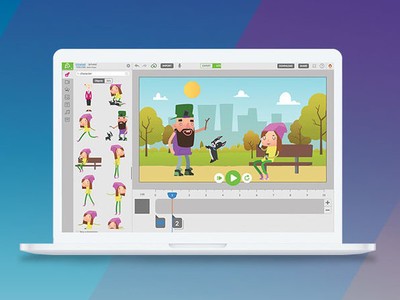
Animatron has designed a powerful tool for creating fun and colorful animated videos that are perfect for storyboarding a bigger film idea, adding a touch of fun to your next presentation, or marketing your small business on social media. You’re able to import and edit your own graphics, photos, and audio to create memorable content, and there are over 500,000 royalty-free assets available for you to use.
Everything you create can be exported to HTML5, SVG, GIF, or to a video format for universal playback. You get 10GB of storage for your movies and 100GB/month of hosting bandwidth.
Create awesome animations for your business or social media! Learn more
A monthly subscription to Animatron’s Pro Plan costs $15/month, so getting a lifetime subscription to these tools for just $59 is an incredible value. Save close to $1,000 thanks to Android Central Digital Offers and only pay once.You don’t need to be a professional animator to create professional-looking animations. Step up your social media game with animations from Animatron!

