


Anker Nebula Mars II tips and tricks to get the most from your projector

Try these tips to make your portable projector even better!
Anker’s Nebula Mars II is great for just turning on and streaming your favorite videos, but you can do a few extra things that make it a more versatile device than most projectors.
Here are some tips and tricks for using the Nebula Mars II!
- Sideload applications
- Adjust the picture
- Pair Bluetooth speakers
- Use the Mars II as a Bluetooth speaker
Sideload applications

One of the benefits of Android is that you can get applications from places besides the Google Play Store, and install them without too much hassle. This means for devices like the Mars II that don’t have the Play Store, you can still install apps that Nebula’s store is missing. As always, make sure you get your APK files from a legal and safe source.
Make sure you have the APK file saved to a USB drive (formatted as FAT32), or use the included WebView browser to download the APK from your source. Protip: a USB mouse makes the web browser so much more enjoyable to use.
Open the File Manager from the projector’s home screen.
Select APK across the top banner.
Select the APK file you’d like to install.
Select Install.
Once the app is done installing, you can either go back to the home screen or open the app directly. And that’s it!
Adjust the picture

The Mars II will automatically adjust its keystone and focus every time it’s moved, so your picture won’t be blurry or off-kilter. This means you can just turn the projector on, set it down and get to watching your favorite shows on a big screen. But, there are a few options if you want to adjust the picture yourself.
Open Settings from the projector’s home screen.
Select Projector.
You get a few options, like changing the color temperature, image mode — Standard Mode for full power, Battery Mode for saving juice — disabling the auto focus and keystone correction, and changing the projection mode.
Pair Bluetooth speakers

The speakers inside the projector are great for the space, but it’s not hard to pair the projector to bigger, better sounding Bluetooth speakers, or enjoy some privacy with Bluetooth headphones.
Open Settings from the projector’s home screen.
Select Bluetooth.
Enter pairing mode on your Bluetooth speakers or headphones.
Select your speakers or headphones from the list of available Bluetooth devices.
That’s it! As long as your speakers or headphones are turned on, any sound from the projector will be routed there. There is also a 3.5mm jack on the speakers if you prefer a wired connection.
Use the Mars II as a Bluetooth speaker

Of course, the Mars II will get louder than your phone’s built-in speaker. This makes the projector great to bring along to cookouts or bonfires. Fortunately, using it as a speaker isn’t difficult.
Press the power button on the remote.
Select Bluetooth speaker.
You can also press the Bluetooth button on top of the projector to switch into speaker mode.
Give the projector a moment to switch to Bluetooth speaker mode. Once the projector lens turns off, it will be fully switched over.
Navigate to Bluetooth settings on your phone, and select the device labeled as Nebula.
That’s it! Now your tunes will come from the projector’s speakers instead of your phones. When you’re ready to switch back to using the projector as a projector, just press the Bluetooth button on top.
What say you?
What tips do you have for using the Nebula Mars II? Let us know down below!
See at Amazon
Fortnite for Android offers more frustration than fun

This is not the best way to play Fortnite.
After a long wait, Fortnite has finally arrived for Android — albeit currently as a beta soft-launched as an exclusive for Samsung Galaxy device. It’s also unique in being one of the biggest titles to find release on Android outside the Google Play Store, making it a rather bold experiment for developers Epic Games who are surely looking to cash in on the Android user base with its massive gaming cash cow.
I’ve been playing it almost non-stop from the moment it was made available in the Samsung Galaxy App Store, and this is my early review of the game having played it on a Samsung Galaxy S8.
See at Epic Games
Fortnite is fun, but not on Android

Fortnite is a great concept for a game and has proven itself to be wildly popular amongst gamers of all ages. I’ll admit to being among the millions of people who will watch Fortnite streamers on Twitch because there’s just something fascinating about the level of creativity that the open world and building mechanics allow.
It’s just a damn shame how Epic Games has gone about releasing the game on Android.
When the news began to trickle out that the game was to be unveiled at Samsung’s Note 9 event it was easy to assume that meant the game was ready for a hyped primetime release. Instead, what we got was the official start of the Fortnite Beta testing for Android, with Samsung Galaxy users getting the first crack at the game.
Having spent a good chunk of my weekend playtesting the game I can definitively say that Fortnite for Android, in its current state, is simply not a fun experience. Considering the iOS beta launched came out five months ago, I would have hoped that the game would have at least run as smoothly at launch for Android but it’s simply not the case.
It’s forgivable for a game released in beta to be a bit buggy, but for Epic Games to release the game on Samsung’s big stage and deliver a product that’s so underwhelming is almost an insult —especially so when compared to PUBG Mobile, a similar battle royale title released with significantly less fanfare.
Graphics are far from “epic”

One of the first red flags I ran into when testing Fortnite was the inability to adjust the graphics settings. By default, they are set to “epic”, but even in the main menu things seem pretty janky right out of the gate with bad anti-aliasing leading to a really out-dated look. Nothing happens if I apply new graphics settings, and when I go back to check I find them set right back at epic again. I’ll chalk it up to the early release status of the game, but then you also see help notes that suggest you “find the right preferences for your computer” and it all starts to feel like a rush job.
Graphical performance might be better on a larger screened device, but it’s still absolutely disappointing when compared to other high-performance games I’ve played recently. This is not typically something that sticks out to me, but the in-game draw distance and rendering of trees and structures is laughable at times. Because the map is so big and there’s so much stuff to render it’s somewhat understandable, but you’ll often see stuff just pop up on the horizon as blocks of color, only becoming a recognizable thing as you get closer or zoom in with a rifle.
A constant source of frustration

There’s been widespread reporting from our own readers and from around the internet that Fortnite for Android is a laggy mess with abysmal frame rates. This has been my experience, too, and has completely ruined at least half of the games I’ve attempted to play.
It will drive you up the walls when you die again because your opponent was able to finish you off you while your game freezes up.
The frame rate seems to particularly take a hit in the early moments of a game after just touching ground or when engaging in tight quarters firefights. Both of these situations are crucial moments in a game such as Fortnite — you’re either desperately searching for weapons and collecting supplies or battling in do-or-die combat. It will drive you up the walls when you die again because your opponent was able to finish you off you while your game freezes up.
There’s been a number of times where I can other players are struggling with the game just as much as I am, which I guess could sort of even out the playing field but certainly not in the way you would want. Instead, it becomes a matter of overcoming lag first and then hopefully hitting your opponent with a kill shot.
These controls are the death of me

Mobile gaming as a whole gets a bad name because touch controls suck. They don’t always suck, but when they suck they really suck. Such is the case with Fortnite, a game that requires you to switch between shooting at moving targets and building structures at a moments notice. It’s a complicated set up and it’s frankly bad. Releasing the game exclusively for Samsung Galaxy devices also unintentionally illustrated just how crappy the trend of shrinking bezels can be for gaming.
Games sure look great on a bright, bezel-less display, but I feel like Epic Games has yet to take into account how shrinking bezels affect button placement. Because Samsung’s screens go as near to the edge of the device as possible, the decision to place the default fire button in the very right corner is downright foolish — spare for probably a child hand.

Because the fire button wasn’t in a natural spot for my thumb I would have to go searching for the fire button after lining up my shot which often meant missing the shot and giving away my location. Fortunately, there is the option to completely customize the heads up display and controls in the settings — and that’s absolutely one of the first things any gamer should do after downloading the game — but then I found the game tends to revert controls back to default after updating.
Epic Games has said that they intend to add Bluetooth controls somewhere down the line, but why not give Android gamers a crucial feature like that right out of the gate? It would have helped to mitigate some of the other points of frustration that is bogging this game down. Instead, the game feels rushed with frustrating gameplay that doesn’t exactly have you eager to keep playing
Cross-platform where it counts

This might sound crass, but the best parts of the game are the menus and the ease at which you’re able to log in to play the game. If you’ve previously created a Fortnite account with Epic, or have played the game on Xbox One or PlayStation 4 you can log in with your preferred credentials and load up your character along with any in-app purchases and gear you’ve collected on other platforms. The on-screen control customization was another crucial
While your account follows you from PC to mobile there is no cross play between platforms. The game only pits you against other mobile players so there’s no concern to be had about getting schooled by a PC or console player — although some players are so good you might think they’ve hacked the game or something.


The other feature I’ll give a nod to is the Battle Pass system. There’s a free Battle Pass that lets you complete challenges and work your way up the tiers to unlock new stuff, but you also have the option to buy into the premium Battle Pass which includes many more challenges to complete and apparently over 25,000 V-Bucks worth of stuff to unlock. Whether you play for free or with a premium Battle Pass, you’re given in-game objectives to complete to progress up the tiers to unlock new emotes, axes, and even V-bucks — the in-game currency — but the game is designed to entice you to spend your hard-earned cash early and often.
In-app purchases are exclusively tied to cosmetic character upgrades and the premium Battle Pass so at least it’s not a game where you can pay-to-win, but I still find the V-Bucks pricing to be quite steep for what you get in return. You can buy 1000 V-Bucks for around $10 USD, or 2,800 V-Bucks for $25 USD. A Battle Pass season costs 950 V-Bucks, while cosmetic upgrades start at around 500 V-Bucks and can go as high as 2,000 V-bucks.
To that end, it does make that Note 9 preorder deal that comes with 15,000 V-Bucks pretty enticing— especially if you’ve discovered Fortnite to be virtually unplayable on your current Galaxy phone and intend to spend them on 15 seasons worth of Battle Passes.
Concluding thoughts
Fortnite is supposed to be a game that pits players against one another, but Fortnite for Android instead pits players against the game itself. Instead of being a test of player ability the game is more so a test of your patience as you constantly struggle against laggy frame rates and sub-par controls.
This game offers you all the content found on other platforms but without the polish or attention to detail that makes it worth your time. At this point in time, Fortnite for Android is not a game I would recommend playing — it’s simply not worth the stress it will induce.
Pros:
- All the fun of Fortnite on your phone.
- Cross-platform support for account purchases.
Cons:
- Gameplay is laggy and lacks settings optimization.
- Controls are weak with no Bluetooth support.
- Perfect storm of frustration and stress.
2
out of 5
Fortnite is free to play with in-app purchases available
See at Epic Games
Android Gaming

- Best Android games
- Best free Android games
- Best games with no in-app purchases
- Best action games for Android
- Best RPGs for Android
- All the Android gaming news!
Grab a Choetech wireless charger for your car or nightstand on sale today
Stay powered up with no charging cables.
The Choetech wireless charging USB-C car phone mount is down to $15.99 with code MSBU35EC on Amazon. The charger normally sells for $30, and this price beats out previous deals by a couple bucks. It has never dropped this low directly.
Choetech’s Stand Fast wireless charging stand is also on sale today. Drop it to $12.99 from $18 with code NSYAANTF.

Choetech’s mount uses a suction cup to attach to your dashboard and holds just about any phone between 2.6 and 4 inches wide. It supports Fast Charge up to 10W with Android phones like the Samsung Galaxy S9, 7.5W charging for the iPhone, and 5W for whatever’s left that is also Qi enabled. The holder is designed not to scratch your phone while still keeping it securely held, and it has a 360-degree rotating ball joint so you can find the best viewing angles while driving. It comes with an 18-month warranty. Users give it 4.2 stars based on 37 reviews.
The stand also does 10W charging for Android and 7.5W charging for iPhone. It has 4.8 stars based on 20 reviews.
See on Amazon
The Oppo R17 offers a glimpse as to what the OnePlus 6T might look like
Look at that itty-bitty little notch!

While it can be fun to look at OnePlus as an underdog in the smartphone space, it’s important to remember that its parent company is Oppo — one of the largest phone manufacturers in the world. OnePlus phones often take a lot of inspiration from Oppo handsets that come out before them, and should that pattern continue this year, the recently announced Oppo R17 looks like an excellent foundation for the OnePlus 6T.
At first glance, the Oppo R17 impresses with its design. The back of the phone has a stunning multi-color paint job that appears to shift hues based on how the light hits it, and around front, we’ve got a large 6.4-inch 2280 x 1080 screen with one of the tiniest notches we’ve ever seen.
There’s still a chin at the bottom of the display, but it’s also so small that most people likely won’t be offended by it.

Under the hood, the R17 is packing a Snapdragon 670 processor, 8GB RAM, 128GB of internal storage, and a 3,500 mAh battery.
There’s still no word as to when the OnePlus 6T will be announced or how much it’ll cost, but should OnePlus use the R17 as inspiration for the handset, upgrade its internals with more powerful specs, and keep the price around the $530 marker of the OnePlus 6, we could be in for a real treat later this year.
See at Oppo
OnePlus 6
- OnePlus 6 review
- OnePlus 6 vs. OnePlus 5T: How much changes in six months?
- OnePlus 6 vs. OnePlus 5: Should you upgrade?
- These are the official OnePlus 6 cases
- The OnePlus 6 doesn’t work on Verizon or Sprint
- Join the discussion in the forums
HomePod Sales May Be Closer to 1-1.5 Million Than 3 Million Since the Speaker Launched
HomePod shipments totaled an estimated 700,000 units in the second quarter of 2018, giving Apple a roughly six percent share of the worldwide smart speaker market, according to research firm Strategy Analytics.
Strategy Analytics previously estimated HomePod shipments totaled 600,000 units in the first quarter of 2018, suggesting that worldwide shipments have reached 1.3 million units since the speaker became available to order in the United States, Australia, and the United Kingdom in late January.
That figure is much lower than one shared by research firm Consumer Intelligence Research Partners, which recently estimated Apple has sold three million HomePods in the United States alone since the speaker launched.
The significant variance in the datasets stems from the fact that Apple doesn’t disclose HomePod sales, instead grouping the speaker under its “Other Products” category in its earnings reports, alongside the Apple Watch, Apple TV, AirPods, Beats, iPod touch, and other Apple and third-party accessories.
Apple reported revenue of $3.74 billion from its “Other Products” category last quarter, up 37 percent from $2.73 billion in the year-ago quarter.
Shipments aren’t sales, either, so it’s impossible to know exactly how many HomePods ended up in the hands of customers.
If we had to guess, we’d say the Strategy Analytics numbers are probably more within the ballpark, as the HomePod is a niche product. The speaker is also available in just six countries, after launching in Canada, France, and Germany in June, with no indication when availability may expand to other regions.
Versus the Competition
HomePod was the world’s fourth most popular smart speaker in the second quarter, behind the Amazon Echo, Google Home, and Chinese company Alibaba’s Tmall Genie, according to Strategy Analytics.
Amazon remained the leader in the category last quarter, with the Echo commanding an estimated 41 percent market share, while the Google Home finished runner-up with an estimated 27 percent market share, according to Strategy Analytics. Alibaba took third place with an estimated seven percent market share.

While the HomePod has made somewhat of a dent, Apple still has significant ground to make up, which is to be expected given its smart speaker launched around two to three years after its biggest competitors.
It may be tough for Apple to gain further market share unless it releases a more competitively priced model, as the HomePod at $349 is considerably more expensive than the Amazon Echo, priced from $50, and the Google Home, $129.
To that end, rumors suggest Apple may have a lower-priced HomePod or a Siri-enabled Beats speaker in its pipeline.
Related Roundup: HomePodTag: Strategy AnalyticsBuyer’s Guide: HomePod (Buy Now)
Discuss this article in our forums
How to take a screenshot on the Galaxy Note 9

Learn it now, use it forever.
No matter what you use your Galaxy Note 9 for, you’re going to need to take a screenshot at some point. And because it’s a Note phone, you have more than one option for a simple screenshot — and plenty of features you can play with after you’ve taken it as well.
This is something you’ll learn now, and be able to use for the life of the phone. And even if you already know one of the methods you may not be as well versed in the others — the Note 9’s screenshot tools are incredibly powerful. Here’s how they work.
How to take a regular screenshot
Taking a single screenshot of your entire screen is simple enough. Samsung gives you two ways to do it.
Screenshot using a key combination
Open the content you wish to screenshot.
At the same time, press and hold both the power button and volume down button for two seconds.
You’ll see the screen flash, and the screenshot will briefly appear on the screen.
The screenshot will be instantly shareable, but also remain in your notifications and Gallery for sharing later.

Screenshot using a palm swipe
Open the content you wish to screenshot.
Place your hand vertically along the left or right edge of your Note 8, and swipe in from that edge with your hand touching the screen.
- If this method doesn’t work, check Settings > Advanced features to enable “Palm swipe to capture.”
You’ll see the screen flash, and the screenshot will briefly appear on the screen.
The screenshot will be instantly shareable, but also remain in your notifications and Gallery for sharing later.
Capture more
No matter how you initiate your screenshot, after capturing you’ll briefly see a set of options at the bottom of the screen, including “scroll capture.” This “scroll capture” button makes the phone scroll through the content shown on your screen and take multiple screenshots, which are automatically stitched together into one long screen showing everything together. This is particularly useful for capturing a full webpage, a set of directions or a long restaurant menu online.
Just tap “scroll capture” as many times as you want, and as soon as you’re done you can share, edit or save the screenshot just like any other.
Take a screenshot with the S Pen and Screen Write
If you’re inclined to take a screenshot and then get to work on it with your S Pen, you can do just that.
Open the content you wish to take a screenshot of.
Take out the S Pen to launch Air Command, tap on Screen Write.
The screen will flash and capture a single screenshot.
You’re now instantly taken to an editing pane, where you can write on the screen with the S Pen.
In the top toolbar, you’ll see options to change the color of your pen, enable an eraser and undo/redo your strokes.
When finished, tap Crop, Share or Save to complete your work.

Samsung Galaxy Note 9
- Samsung Galaxy Note 9 hands-on preview
- Galaxy Note 9 vs. Note 8
- Where to buy the Galaxy Note 9
- Galaxy Note 9 specifications
- Is the Note 8 still a good buy?
- Join our Galaxy Note 9 forums
AT&T
Verizon
T-Mobile
Samsung
2018 iPhones Could Start at $699, May Include Apple Pencil Support, 512GB Storage Option for OLED Models
Apple may introduce its upcoming 6.1-inch LCD iPhone with a starting price of around $699 to $749, according to industry analysis by TrendForce. The pricing strategy is said to be partly a response to lower than expected iPhone sales last year, and partly a result of competition from Chinese brands that have expanded their market shares with devices that offer high performance at affordable prices.
Three new iPhone models are expected to form Apple’s 2018 lineup: two OLED models measuring in at 5.8 and 6.5 inches, and a 6.1-inch lower-cost LCD model. All three models will feature Face ID in lieu of a Home button, but TrendForce predicts the “budget” LCD device will be Apple’s main device in terms of production share.
Image via TrendForce
The specs upgrades would make new iPhones more favorable in the competition with Android phones. On the other hand, the cost of this model has been approaching that of iPhone 8 Plus due to the upgrades. However, the 6.1-inch LCD model would be positioned by Apple’s main product this year, with a production share of around 50% in the new iPhone series. Apple is bound to adjust the prices of this model to meet the market expectation and to further expand its market share. Considering the cost reduction of components, TrendForce estimates the starting price of this LCD version at around $699-749.
As for the new OLED models, TrendForce expects the 5.8-inch device will have a lower starting price of $899 to $949, while the current-generation iPhone X, which starts at $999, will enter its “end of life” process due to the similarity in the specs of the two models. Meanwhile, the upcoming 6.5-inch device will target the “premium business segment” with a starting price of $999.
TrendForce believes Apple could introduce a 512GB storage option for the OLED models. In addition, Apple Pencil support may feature with the new iPhones, although it’s unclear whether this also relates to just the OLED models. Respected analyst Ming-Chi Kuo has previously suggested that Apple Pencil support for a future iPhone is a possibility, although he doesn’t believe iPhones will support Apple Pencil until 2019 at the earliest.
Apple is said to have been bargaining with its supply chain partners to reduce the cost of components, especially those which have been used in earlier generations of iPhone. That view tallies with earlier reports claiming Apple wants Samsung to reduce the price of its OLED display panels so it can cut the cost of current and future iPhone X models.
Price cuts to the display and other components would help Apple lower its bill of materials for the new models, with the savings potentially passed on to customers. For example, in line with TrendForce’s prediction, RBC Capital Markets analyst Amit Daryanani believes the second-generation iPhone X will start at $899, down from $999.
TrendForce expects the production volume of the three new iPhones to be around 83-88 million units, potentially taking a larger share of the company’s annual sales volume compared with the three models it released last year. Sales volume of iPhones in 2018 meanwhile is expected to remain flat or grow marginally by 2 to 3 percent, owing to the saturated smartphone market and the longer replacement cycle of phones globally.
TrendForce believes the two OLED models have been assembled by manufacturers since late July, while the assembly of the LCD models is scheduled for mid-September. Apple is expected to announce the trio of new iPhones sometime in September or October.
Related Roundup: 2018 iPhonesTag: TrendForce
Discuss this article in our forums
How to Use Secure Code AutoFill in iOS 12 and macOS Mojave
Most readers will have at some point received a two-factor authentication code delivered to them by SMS text message. Many apps and websites send the one-time codes to confirm that the person attempting to log in to an account is the legitimate account holder, and not just someone using a stolen password.
Depending on how notifications are set up on your iPhone, receiving a code via text message may mean that you have to switch out from the app or website to read the message and memorize or copy the code, and then switch back to paste it or type it into the login screen manually.
To make this process less of a hassle, Apple is introducing Security Code AutoFill for iOS 12. The new feature ensures that SMS one-time passcodes that you receive instantly appear as AutoFill suggestions in the QuickType bar above the virtual keyboard, letting you input them in the passcode field with a simple tap.
If you’ve enabled Text Message Forwarding on your iPhone, you can use the Secure Code AutoFill feature in macOS Mojave, too. The code should appear in Safari as an AutoFill option in the relevant field as soon as the SMS is delivered to Messages on your Mac.

iOS and macOS use local data detector heuristics to work out whether an incoming message carries a security code, and Apple says the Security Code AutoFill feature does not alter the security of this two-factor authentication method.
So as long as developers craft their secure code text messages correctly, Security Code AutoFill should work in all third-party apps updated for iOS 12 and macOS Mojave, which are due for official public release this fall.
Related Roundups: macOS Mojave, iOS 12Tag: security
Discuss this article in our forums
Omega Centauri hosts 10 million stars and probably not an ounce of life
The search for life in outer space is like the holy grail of astronomy. But with some 170 billion galaxies in the observable universe, where do we even begin?
How about with the bright, Christmas lights-like stars of the densely packed globular cluster Omega Centauri? Surely something so spectacular could harbor life.
Not so. According to a paper published this month in The Astrophysical Journal, scientists can safely cross it off their list.
Omega Centauri is a sight to behold. It contains some 10 million stars, making it the largest globular cluster in the Milky Way. And at about 16,000 light years away, the globular cluster is visible to the naked eye and a prime object of observation for professional astronomers. So it makes sense that scientists would home in on Omega Centauri in their hunt for extraterrestrial life.
“In the search for planets around other stars, we are investigating a wide range of stellar environments that are very different from our own system,” Stephen Kane, a professor of planetary astrophysics at the University of California, Riverside, and study lead, told Digital Trends. “In particular, we are looking for planets that lie in the habitable zone where water on the surface of the planet could be in a liquid state, something which is necessary for life on Earth. The results of our study show that it is highly unlikely that the stars in the largest globular cluster to the Milky Way, Omega Centauri, can host a planet in the habitable zone.”
Kane and his colleagues looked at roughly 500,000 stars whose age and temperature could potentially support planets with life. They measured the temperature and brightness using data from the Hubble Space Telescope and calculated how often these neighboring stars would pass directly within each other’s habitable zones.
“The results of our study show that, on average, the stars of the cluster will pass directly through the habitable zone of other stars around once every million years,” Kane said. “This means that for most of the stars, it will be impossible for a planet to remain in the habitable zone of its host star, thus removing the planet from a location where it could maintain a long period of energy and climate stability.”
Kane said it could be possible for Omega Centauri to contain a group of small planetary systems near its core (much like TRAPPIST-1, a promising solar system for harboring life) but that their calculations made the existence of such systems unlikely.
Moving forward, Kane and his colleagues will collect more Hubble data about our neighboring clusters to determine stars’ habitable zones and how often they cross each other’s paths.
Editors’ Recommendations
- Get your Sagan on with 60 awe-inspiring photos of the final frontier
- Astronomers make huge exoplanet discovery haul in record time
- Mars is as near to Earth as it’s been in 15 years, so Hubble took some photos
- Astronomers finally confirm general relativity around a supermassive black hole
- Scientists pinpoint exoplanets where life could bloom like here on Earth
Xiaomi Mi A2 vs. ASUS ZenFone Max Pro M1: Divergence
You can choose between a great camera or outstanding battery life, but not both.

Earlier this year, ASUS turned the tables on Xiaomi with the ZenFone Max Pro M1, a budget phone with a huge battery and enticing hardware that went toe-to-toe with the Redmi Note 5 Pro and came out ahead in a few areas. ASUS not only managed to undercut the Redmi Note 5 Pro but was also able to make enough units available to meet the deamnd for the M1, which Xiaomi still struggles with today.
We’ve already seen how the ZenFome Max Pro M1 fares next to the Redmi Note 5 Pro, but it makes sense to pit the device against Xiaomi’s latest phone as both devices are running pure Android. The Mi A2 falls under the purview of Android One, whereas ASUS is offering a “stock” Android ROM with a few ZenUI underpinnings.
For its part, the Mi A2 has plenty going for it. The device is powered by the Snapdragon 660, which is more powerful when compared to the Snapdragon 636 in the M1, and has class-leading front and rear cameras. With the Mi A2 set to go on sale later this week in India for ₹16,999 ($250) and the ZenFone Max Pro M1 available for ₹12,999 ($185), it’s time to see how the M1 holds up next to Xiaomi’s latest Android One phone.
Xiaomi Mi A2 vs. ZenFone Max Pro M1: Specs

| Operating System | Android 8.1 OreoAndroid One | Android 8.1 Oreo |
| Display | 5.99-inch 18:9 FHD+(2160×1080) IPS LCD panelGorilla Glass 5 | 5.99-inch 18:9 FHD+(2160×1080) IPS LCD panel |
| SoC | Octa-core Qualcomm Snapdragon 6604×2.2GHz Kryo 260 + 4×1.8GHz Kryo 26014nm | Octa-core Qualcomm Snapdragon 636Eight Kryo 260 cores up to 1.8GHz 14nm |
| GPU | Adreno 512 | Adreno 509 |
| RAM | 4GB/6GB | 3GB/4GB/6GB |
| Storage | 32GB/64GB/128GB | 32GB/64GB/64GB |
| Expandable | No | Yes, dedicated up to 2TB |
| Rear camera | 12MP (f/1.75, 1.25um) + 20MP (f/1.75, 1.0um)PDAF, LED flash, 4K video recording | 13MP Omnivision 16880 f/2.2 + 5MP f/2.4 PDAF, LED flash4K video recording |
| Front camera | 20MP (f/1.75, 1.0um)AI portrait modeLED Selfie lightBeautify 4.0 | 8MP f/2.01080p video recording |
| Connectivity | LTE with VoLTEWi-Fi 802.11 ac, Bluetooth 5.0GPS, GLONASS | LTE with dual VoLTEWi-Fi 802.11 b/g/n, Bluetooth 4.2 with AptXGPS, GLONASSMicro-USB, 3.5mm audio jack |
| Battery | 3000mAh batteryQuick Charge 4.0 (India)QC3.0 (ROW)USB-C | 5000mAh batteryFast charging (5V/2A) |
| Fingerprint | Rear fingerprint | Rear fingerprint |
| Dimensions | 158.7 x 75.4 x 7.3mm | 159 x 76 x 8.46mm |
| Weight | 166g | 180g |
| Colors | Black, Rose Gold, Gold, Blue | Meteor Silver, Deepsea Black |
Where they’re equal
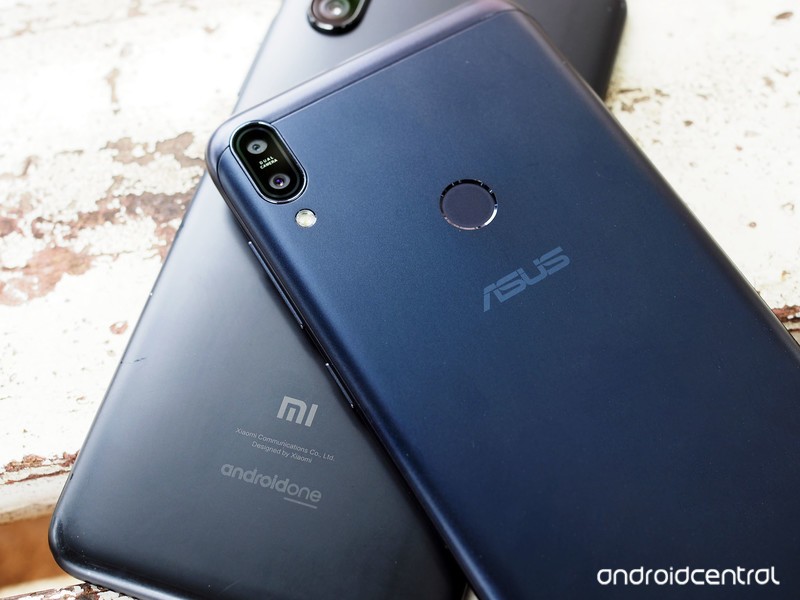
There’s a lot of similarities between the Mi A2 and the ZenFone Max Pro M1. Although ASUS didn’t team up with Google to launch the M1 with Android One, the user interface on the device is near-identical to what you get on the Mi A2.
The Mi A2 is rocking an aluminum unibody chassis, with the M1 offering a metal alloy back with plastic inserts for the antennae and an aluminum mid-frame. Going with a mix of materials has allowed ASUS to cram a monstrous 5000mAh battery in the M1 while still bringing the overall weight down to an easily manageable 180g.
Neither phone stands out from an aesthetic standpoint, and although the Mi A2 feels slightly better to hold in day-to-day usage, it isn’t going to win any design awards.
Both devices feature 5.99-inch 18:9 FHD+ panels, and you get little in the way of display color customization. On the software front, both phones are currently running Android 8.1 Oreo.
What the Mi A2 does better

The Mi A2 is Xiaomi’s most powerful phone in the $250 segment yet, with the device powered by the Snapdragon 660. The M1 meanwhile features a Snapdragon 636, which has similar cores that are clocked lower. You’re not going to see a huge difference between the two devices in real-world usage scenarios, but the Mi A2 has a slight edge when it comes to gaming thanks to higher clocks on the Adreno 512 GPU.
The highlight with the Mi A2 is the front and rear cameras. Xiaomi has mentioned that its main goal for 2018 is to improve the camera quality on its phones, and we’ve seen that over the course of the year with the Redmi Note 5 Pro, Mi Mix 2S, and now the Mi A2.
The 12MP + 20MP cameras at the back do a fantastic job both in daylight and low-light scenarios, and it’s clear that the phone has a considerable edge over the M1 when you look at just a few samples. The 20MP front camera is also a considerably upgrade from what the M1 has to offer, with Xiaomi touting AI-assisted portrait mode along with a front LED module that kicks in during low-light conditions.


Xiaomi Mi A2 on the left, ASUS ZenFone Max Pro M1 on the right.




And while the M1 has an uncluttered user interface, as the device isn’t under the Android One program, there’s no telling when it will pick up the Android Pie update. As for the Mi A2, Xiaomi has stated during the launch that the device will be one of the first third-party devices to pick up the stable Android Pie build, and although we haven’t been told a timeline, it is reasonable to assume that the update will be delivered before the end of the year.
What the Max Pro M1 does better

The ZenFone Max Pro M1 doesn’t hold up to the Mi A2’s cameras, but it utterly destroys Xiaomi’s handset when it comes to battery life. With a 5000mAh battery under the hood, the M1 manages to easily deliver two days’ worth of usage with some charge left over.
Honestly, if you’re looking for a phone with the best battery life in this segment, then the M1 is an easy recommendation. ASUS has also managed to do a better job with the basics — the M1 has a 3.5mm jack as well as a dedicated MicroSD slot in addition to two SIM card slots. The MicroSD slot can fit in a 2TB SD card, and the phone has dual VoLTE.
All of the aforementioned features are integral to budget devices, and they’re missing from the Mi A2. The M1 does one better by including AptX support, which makes a lot of difference when streaming media over Bluetooth.
Finally, the M1 has an edge when it comes to actual sales. All signs point to Xiaomi sticking to a flash sales model for the Mi A2, which if history is anything to go by will make it difficult for customers to get a hold of the device. In contrast, ASUS is selling the ZenFone Max Pro M1 in an open sale on Flipkart. If you’re interested in picking up the device, all you need to do is hit up the link below and shell out ₹12,999 ($185).
See at Flipkart
What should you buy? Down to you

The camera on the Mi A2 is the one to beat in this segment, and if you’re one to take a lot of photos, then the Mi A2 is a no-brainer. The phone is missing the 3.5mm jack and a MicroSD slot, but it isn’t as big a deal when you factor in just how good that camera is in day-to-day usage conditions. Xiaomi includes a USB-C to 3.5mm dongle in the box, and the 64GB of internal storage should be more than enough for most users.
If you require more storage, then you’re better off waiting for the 6GB/128GB variant to launch in the country. There’s no specific timeline for a launch, but it should be in the coming months.
See at Amazon India
If you’re looking for a device with a two-day battery life, then you’ll love what the Max Pro M1 has to offer. ASUS has done a masterful job with the M1, and the device is one of the best budget phones you can buy in 2018.
Sure, the camera isn’t as good as what you get on the Mi A2, but the device has outstanding battery life and has features that target a more mainstream audience, like the 3.5mm jack and a MicroSD slot.
See at Flipkart

