


The best phones on Verizon
We’re a virtual company made up of tech experts from across the globe. We live and breathe Android phones, and use nearly every one to find the best Verizon picks for you.
The Pixel 2 XL is available exclusively through Verizon, and offers everything an Android enthusiast could ask for. Its display has had some issue in the past, but it still offers a great viewing experience with dual front-facing speakers and an 18:9 aspect ratio. Combined with the cleanest build of Android 9 Pie around, the Pixel 2 XL is hard to resist.
Our Pick
Google Pixel 2 XL

$849 from Verizon
Simply as Android as Android gets.
The Pixel 2 XL isn’t just a great phone; it’s Google’s vision of what an Android phone should be. The Pixel 2 XL offers the best Android experience around, and it’s already been updated to Android 9 Pie.
Who should buy this phone?
Customers who value a clean software experience over all else. The Pixel 2 XL features Android in its purest form, with instant updates to the latest versions as they come. It also takes absolutely stunning photos, and its users receive unlimited storage in Google Photos to back up their shots without any loss in quality.
Is it a good time to buy this phone?
Not necessarily. As of August 2018, while the Pixel 2 XL is still a fantastic phone, the Pixel 3 XL is right around the corner. It hasn’t been officially announced yet, but we pretty much already know everything about it.
Reasons to buy
- Stock Android with fast updates
- Excellent camera
- Front-facing speakers
- Unlimited original quality uploads to Google Photos
Reasons not to buy
- No wireless charging or headphone jack
- Display has had a number of problems
There are other great options at Verizon
Verizon was able to snag an exclusivity deal on the Pixel 2 XL, but that’s not the only great phone it offers. Whether stock Android isn’t your thing or you just want a little more from your hardware, you have plenty of other options to choose from to best suit your needs, whether you’re after long battery life, modularity, or just saving money.
For as powerful as the Pixel 2 XL is, it’s missing features like wireless charging and expandable storage. For a phone that does everything you want and more, look no further than the Galaxy S9+.
The jack of all trades
Samsung Galaxy S9+

$929 at Verizon
Master of most.
The Galaxy S9+ is one of the best phones money can buy, featuring a beautiful curved design, one of the best displays on the market, great cameras, and every high-end spec you can name.
The Galaxy S9+ is beautiful and comfortable to hold, and Samsung’s display tech is unrivaled. The cameras are pretty great, too — the S9+ is the first phone to feature dual apertures, allowing for optimal settings in different lighting conditions, along with a second rear camera, used for telephoto zoom.
The workhorse
Samsung Galaxy Note 9

$999 at Verizon
So much room for activities!
If even the Galaxy S9+ feels a little lacking to you, the Galaxy Note 9 might be the perfect solution. It features the same design language as the S9+ with a slightly larger 6.4-inch display and an improved S Pen with wireless capabilities.
The Note 9 will cost you a pretty penny (actually, just a penny under $1000), but it’s the most powerful phone Samsung has ever made, with one of the largest batteries to boot. It packs the same great pair of rear cameras found on the Galaxy S9+, and comes with a Snapdragon 845 and up to 512GB of storage and 8GB of RAM. If you have an insatiable desire for everything high-end, the Galaxy Note 9 is as good as it gets.
The modular phone
Moto Z3

$480 at Verizon
For the tinkerer.
Yes, the Moto Z3 is more or less the same as the Z3 Play we saw earlier this year, but that doesn’t have to be a bad thing. It features a nice 18:9 display, a clean build of Android with useful Motorola add-ons, and support for Moto Mods, which expand its capabilities with projectors, Polaroids, battery packs, and eventually support for Verizon’s 5G network.
The Moto Z3 doesn’t have as powerful a spec sheet as the Pixel 2 XL or Galaxy S9+, but its Moto Mods allow you to add new features at a whim, and the phone still offers a good experience on its own. Its dual cameras are decent for the price, and it’s still powerful enough to handle most tasks with ease.
The video champ
LG V30

$840 at Verizon
A filmmaker’s dream.
If you’re passionate about videography, look no further than the LG V30. Its dual camera module takes stunning photos with options for wide angle or telephoto shots, and the camera app features an incredibly powerful array of video tools, including manual controls and even LOG video with LUTs.
The V30 looks equally great on paper. The Snapdragon 835 processor and 4GB of RAM ensure top-notch performance, and it’s still capable of microSD expandability. The V30 is a great tool for video professionals as well as an excellent and well-rounded phone, and LG’s included quad DAC provides incredible audio quality when using headphones.
Bottom line
If you’re one of the hundreds of millions of people on the nation’s largest carrier, there’s no shortage of great phones for you to choose from. The Galaxy S9+ is a Swiss army knife of a phone that can do just about anything, and the Note 9 is even more crammed full of features. On the other hand, the Moto Z3 has its own advantage with its modular approach, and the LG V30 is unbeatable in the video department.
Still, for hardcore Android enthusiasts like ourselves, the Pie-ified Pixel 2 XL is the way to go. On top of receiving instant software updates, there’s simply no faster, smoother Android experience around, and even a year in, the cameras remain unrivaled. With the Pixel 3 XL right around the corner, it might be worth waiting, but if you need a phone right now, don’t hesitate to snag the Pixel 2 XL.
Updated August 2018: This list has been revamped, with the Galaxy Note 9 finding a spot in the lineup.

Protect your Fortnite account by enabling two-factor authentication
Keep your Fortnite account secure with this simple move.
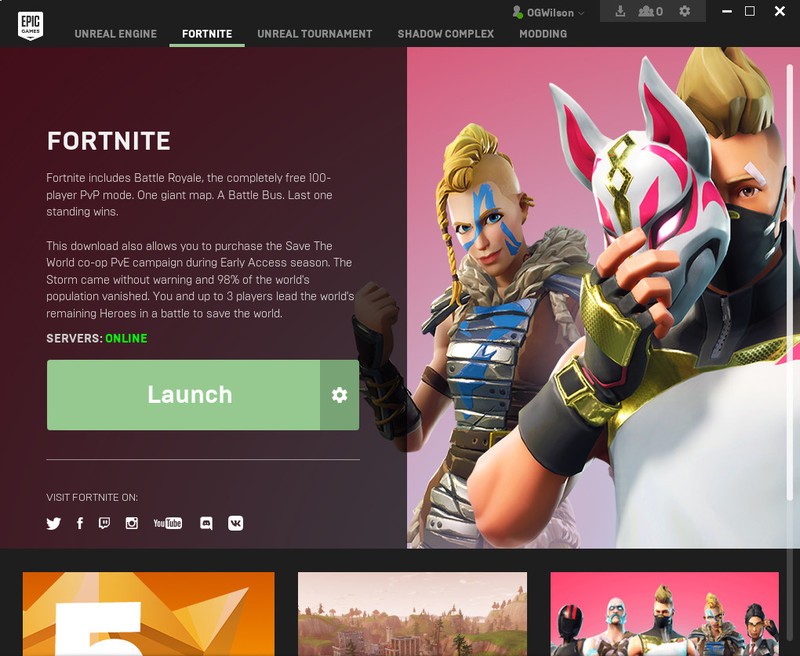
Take a break from getting Victory Royales on Fortnite to read this important piece of advice: you can, and should add two-factor authentication to your Epic Games account. It’s easy and takes all but a few minutes to get it done, and you’ll be glad you did.
What’s two-factor authentication?
Two-factor authentication is a security system that requires two levels of authentication for logging into an account. In most scenarios, the first level will be your typical password, and while a strong password alone is a good start, it’s not foolproof. If someone were to find out your password somehow, they’d be escorted right into your account like they own the place.
But with two-factor authentication, the person trying to break or hack into your account would need a secondary, separate form of authentication to get going. In most cases, this second factor is some sort of security code sent to your email address or phone but could be something as high tech as a piece of hardware that you plug into your computer.
You might already be using two-factor authentication in your life and not even realize it. If you’ve ever been to an ATM to take cash out of the bank, you’ll know that it requires not just the bank card, but also the security code that only you know.
Two-factor Authentication: Everything you need to know
Should you enable two-factor authentication on your Fortnite account?
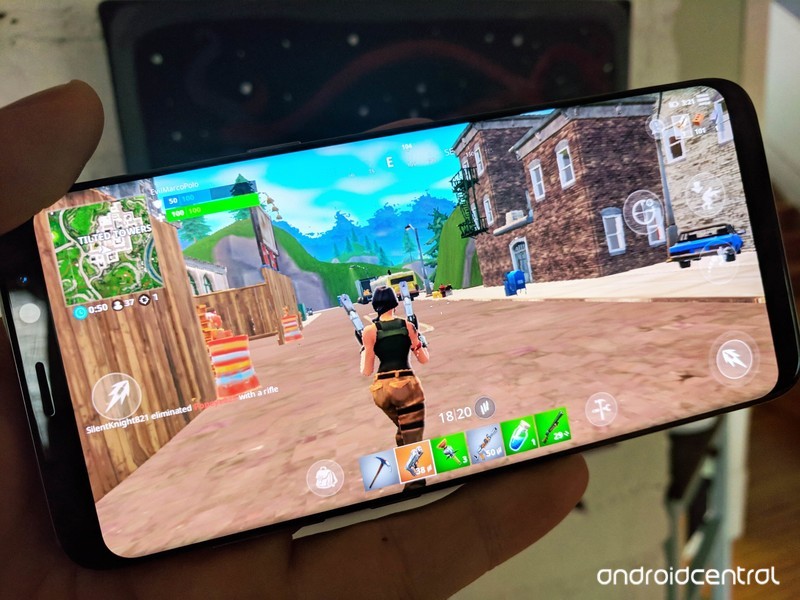
In short: yes. Even if you don’t think someone could possibly get your password, just do it. There are all sorts of phishing scams and schemes out there designed to get you to hand over your password, and even the most eagle-eyed people with an awareness of these schemes could slip up. That’s not to mention what could happen if you’re using the same password in multiple places (which you absolutely shouldn’t do!) and one of those places suffers a breach of security.
By enabling two-factor authentication, you’re ensuring that anyone who happens upon your password can’t truly access the account. It may seem harmless for someone to hack into a user account for a game like Fortnite at first thought, but there’s a lot at risk if it happens.
The biggest risk is for those who have spent money on the game. Not only could someone hijack your account, they can also see your billing information such as your name, your address, and the last four digits of your credit card number. While it’s unlikely someone could figure out how to commit credit card fraud from that data alone, that information could be used to trick, say, a customer service agent into thinking you are the person you’re attempting to fraud.
And that’s not just a concern for your Fortnite account — they can use that information anywhere you do business.
There’s also the matter of someone using your money on skins and potentially sending you into financial peril. It’s just plain annoying to deal with, and it’s certainly something you want to avoid if at all possible.
How to enable two-factor authentication on your Epic Games account
Now that you’ve been informed, it’s time to take action. Thankfully, securing your Fortnite account is quick and easy. Here’s how to do it:
Head to the Epic Games website and sign in.
Hover over your username in the upper-right corner and click Account.
In the left menu, click Password & Security.
Scroll down to the Account Security section and click Enable Two-Factor Sign In.
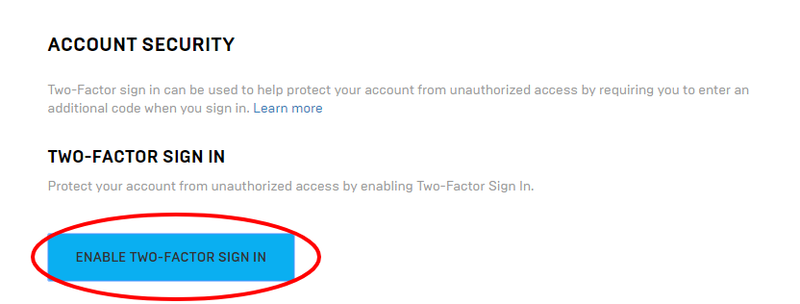
And that’s it. By default, Epic Games will use the verified email address you used to sign up. When attempting to log into the account on a new device or after 30 days of inactivity, they will send a code to that email address which you’ll need to use to complete the login process. Now you can worry less about the nefarious deeds of hackers and more about those of the people trying to keep you from victory in Fortnite!
Fortnite for Android: Everything you need to know
Android Gaming
- Best Android games
- Best free Android games
- Best games with no in-app purchases
- Best action games for Android
- Best RPGs for Android
- All the Android gaming news!
Skype Preview for Android will soon relay SMS messages from your PC and Mac

You’ll soon be able to send and receive SMS messages on your Android phone via Skype for desktop.
Skype is making a bid to be your texting app of choice with its latest preview update. The Skype Preview app for Android has been updated with a new “SMS Connect” feature that will let you send and receive SMS messages from the Skype app on your PC or Mac (via Windows Blog Italia).

Unfortunately, while the option to turn on SMS Connect now appears in Skype Preview’s settings on Android, it doesn’t appear you can enable it just yet. Regardless, Microsoft is promoting the feature with an update to the Skype Preview app on desktop, which offers the option to use Skype SMS or the new SMS Connect. From the description:
Use Skype on your PC or Mac to read and reply to your Android phone’s SMS messages. To get started, tap the button to install Skype on your Android phone.
We aren’t yet seeing the preview update on Windows 10, but the folks at OnMSFT have reported it is rolling out as version 8.29.76.16.
In other Skype news, call recording and encrypted private messages have started rolling out across the app on all platforms. Private messages should already be enabled for everyone, while Microsoft’s director of design for Skype and Outlook, Peter Skillman, says that call recording will reach everyone soon.
Roll out started with 8.27 and will be at 100% soon. Follow these steps: Start the audio/video call. During call, click Options [+] button & select “Start Recording”. You can stop recording call anytime you want. Once done, the recorded content will be available for everyone
— peter skillman (@peterskillman) August 16, 2018
If you’re ready to give any of the new features a shot, you can pick up the release version of Skype and the Skype Preview app from Google Play now. On desktop, you’ll have to opt into the preview via the Skype app’s settings menu.
See at Google Play See at Google Play (Preview)
Toyota Confirms CarPlay in 2019 Sienna
Toyota has confirmed on its website that CarPlay is a standard feature in all 2019 Sienna models sold in the United States. This is the first model year of the Sienna equipped with Apple’s in-car software platform.
LE, SE, and XLE trims of the 2019 Sienna all feature a seven-inch touchscreen display on the dashboard with Toyota’s custom Entune 3.0 infotainment system, through which CarPlay can be accessed. Amazon Alexa and Siri Eyes Free are also supported, but like other Toyota vehicles, there is no Android Auto.
Toyota’s other CarPlay-equipped vehicles include the 2019 Avalon, 2019 Corolla Hatchback, 2019 RAV4, and the 2019 CH-R. It’s also likely that the 2019 Camry, which also has the Entune 3.0 system, will support CarPlay, but Toyota’s website still lists the 2018 model, and a spokesperson would not confirm.
Toyota and its premium brand Lexus were among the last major automakers to begin offering CarPlay earlier this year. On the Lexus front, CarPlay-equipped models include 2019 model years of the ES, LC, LS, RC, and UX.
Toyota and Lexus have deployed a wired implementation of CarPlay, meaning that an iPhone must be connected to the system with a Lightning cable to access a wide variety of apps from the dashboard display, including Phone, Messages, Apple Maps, Apple Music, Spotify, and starting with iOS 12, Google Maps and Waze.
The 2019 Sienna goes on sale this fall at dealerships in the United States, with a suggested starting price of $31,115.
Related Roundup: CarPlayTag: Toyota
Discuss this article in our forums
Sony Unveils New Version of Its Top-Rated Aftermarket CarPlay System
Sony today introduced its new XAV-AX210 receiver, which doubles as an aftermarket CarPlay and Android Auto system.
The XAV-AX210 is an update to Sony’s year-old XAV-AX200 receiver, with the headline new feature being support for iDatalink Maestro, a car audio system that seamlessly interfaces with steering wheel controls, amplifier functions, on-screen vehicle settings, and more when used outside of CarPlay mode.
The receiver has a 6.4-inch touchscreen, but Sony hasn’t specified if it’s resistive or capacitive. Other key features include hands-free phone calls and music playback via Bluetooth, SiriusXM compatibility, rear view camera readiness, a built-in four-channel amplifier, and a built-in CD/DVD player.
This product is ideal for vehicles that don’t come with factory installed CarPlay, mirroring several apps onto the dashboard, including Phone, Messages, Apple Maps, Apple Music, Spotify, and starting with iOS 12, Google Maps and Waze. As a wired system, an iPhone must be connected via Lightning cable.
Sony said XAV-AX210 pricing and availability in North America will be announced in the fall of 2018. It will likely have a similar price as the XAV-AX200, available on Amazon for between $399 and $499 depending on configuration.
Of note, the XAV-AX100 and XAV-AX200 have received favorable reviews from publications such as The Wirecutter.
Other brands with aftermarket CarPlay and Android Auto receivers include Alpine, Pioneer, JVC, Kenwood, and Clarion.
Related Roundup: CarPlayTag: Sony
Discuss this article in our forums
Another Report Says Second-Generation iPhone X and iPhone X Plus Will Support Apple Pencil
Apple’s second-generation iPhone X, and a widely expected 6.5-inch model dubbed the iPhone X Plus, will both be compatible with the Apple Pencil, according to Taiwanese publication Economic Daily News.
Image: EverythingApplePro on YouTube
The report, citing “industry insiders,” claims that Apple Pencil support will be limited to those OLED models, meaning that Apple’s upcoming lower-cost 6.1-inch iPhone with an LCD will not work with the drawing tool. Taiwanese research firm TrendForce shared the same prediction earlier this week.
Apple Pencil launched in November 2015 alongside the original 12.9-inch iPad Pro, and it works with all other iPad Pro models released since. Last March, Apple expanded the tool’s compatibility to the new sixth-generation iPad, a lower-cost, 9.7-inch model targeted at students and the classroom.
If these rumors prove to be true, this would be the first time Apple releases its own stylus for the iPhone in the device’s 11-year history.
When introducing the original iPhone in 2007, Apple’s late co-founder Steve Jobs quipped that “nobody wants a stylus” with a smartphone, but Apple has played the semantics game in insisting that the Apple Pencil is a drawing tool. It’s also been over a decade since Jobs made that comment—things change.
It’s unclear if Apple will release a smaller Pencil for the iPhone, as the current version could be rather unwieldy for use with an iPhone. Apple has yet to update the Pencil’s design since it first launched three years ago.
A stylus on a mobile device is nothing new, but only a handful of modern smartphones have one, including the Samsung Galaxy Note with the S Pen, which can be used to draw on the screen, handwrite notes, annotate documents, and more.
Designed to mimic the feel and sensation of using a pen or a pencil, the Apple Pencil has built-in sensors to determine orientation and angle, and to detect a range of forces for pressure-sensitive drawing and writing. On the iPad Pro, the Apple Pencil is sampled at 240Hz for minimal latency.
Apple is expected to unveil a trio of new iPhones at its usual September event at Steve Jobs Theater, and Apple Pencil support would surely be a headline feature if true. A new Apple Pencil altogether is certainly a possibility too.
Related Roundup: 2018 iPhonesTag: Apple Pencil
Discuss this article in our forums
Lifeguards in Germany link child drownings to smartphone-distracted parents
Ina Fassbender/Getty Images
Pedestrians buried in their smartphones have on more than one occasion ended up walking straight into a large body of water, while drivers distracted by their handsets have been known to cause crashes.
Now, in Germany, lifeguards are suggesting parents are putting their children’s lives at risk by spending too much time staring at their phone instead of keeping an eye on their offspring as they take a summer dip.
Peter Harzheim of the German Federation of Swimming Pool Supervisors said that in a number of cases, parents have been so obsessed with their smartphones that they’ve failed to notice their child struggling in the water, the Guardian reported.
“We’re experiencing on a daily basis that people treat swimming pools like a kindergarten and simply don’t pay attention,” Harzheim said.
He added that in days gone by, parents tended to spend more time in the water playing with their children, but said that the rise of the smartphone has changed all that.
“Increasing numbers of parents are fixated by their smartphones and are not looking left or right, let alone paying attention to their children,” Harzheim said, describing it as “sad” that modern-day parents “behave so neglectfully.”
“Put your smartphone away”
Achim Wiese of the German Lifeguard Association, which represents around 40,000 lifeguards for beaches and lakes around the country, added to calls for parents to put their mobile devices to one side while at the beach or down by the lake.
“Too few parents and grandparents are heeding the advice: when your children and grandchildren are in the water, put your smartphone away,” Wiese said.
While it may well be the case that smartphone distraction has caused some parents’ attention to drift away from the water where their children are swimming, there are no official statistics on the extent of the problem. Indeed, some will suggest that it’s not an issue that’s arrived with smartphones, as an engrossing book or chat with a partner could also cause a parent’s attention to momentarily wander.
The Guardian also points out in its report that the German lifeguard organizations have also blamed funding cuts for pools and lessons that have led to fewer children learning to swim, or swim with any great skill.
For its part, the U.S. Lifesaving Association offers a top 10 list for how to safe in the water. Besides the obvious “learn to swim,” the tips include swimming in places where there’s lifeguard supervision, swimming with a friend, and obeying safety signs and posters related to water conditions. It’s yet to add any advice encouraging parents to put their smartphone down.
Editors’ Recommendations
- Imagine yourself doing the backstroke in one of the 10 largest pools in the world
- Awesome Tech You Can’t Buy Yet: Robo sidekicks, AC for your bed, and more
- This 21-year-old’s 3D-printed aquatic jetpack makes scuba fins look prehistoric
- Don’t put plastic containers in microwave or dishwasher, new research says
- The best outdoor speakers of 2018
Los Angeles subway to become first in the U.S. to use body scanners
Thruvision
Los Angeles’ rail system plans to step up its security efforts by deploying body scanners on its network of 93 subway and light-rail stations. In doing so, it’ll become the first mass transit system in the U.S. to undertake such measures.
But when they’re introduced later in the year, the machines won’t become a permanent part of a station’s infrastructure. Instead, the city’s Metropolitan Transportation Authority has decided to use a small number of the portable trunk-sized scanners, moving them between stations as and when required, the Associated Press reported.
In other words, you can expect to see them set up at a station where a big sports event is being held, or when there’s a protest in the area, or other occasions where a large numbers of people are expected to gather. The authorities point out, however, that the machines could potentially appear at any location on the network.
British security technology company Thruvision, which makes the $100,000 scanners, says the kit can be set up and activated in just 15 minutes.
As with regular security scanners, the machines are capable of performing full-body screenings of people, checking for things like concealed weapons and explosives. But unlike airport machines, Thruvision’s system can monitor moving crowds of around 2,000 people every hour, with no need for individuals to waste time getting in line. Indeed, the system’s efficiency was key in making the proposal a reality.
The technology is said to be capable of identifying suspicious items at a distance of up to 30 feet (9 meters), giving officials enough time to pinpoint, monitor, and perhaps question a person of interest.
Thruvision
Metro security chief Alex Wiggins told the LA Times that the kit would be used to prevent what he described as “mass casualty” attacks. In other words, they’ll be focusing more on searching out assault-style rifles and explosives rather than smaller weapons. He added that the authorities will adhere to the 4th Amendment, making it “very, very clear” that a scan is about to take place. Whether such a notification will reduce the effectiveness of the system remains to be seen.
Thruvision’s technology, which has been in operation for a number of years, is based on research work undertaken by the U.K.’s Rutherford Appleton Laboratory and the European Space Agency, and identifies objects via the natural electromagnetic rays that they give off.
Commenting on the decision to introduce the technology, David Pekoske of Los Angeles’ Transportation Security Administration said the nation is dealing with “persistent threats to our transportation systems ,” adding that it’s their job “to ensure security … so that a terrorist incident does not happen on our watch.”
Editors’ Recommendations
- Hyperloop pod reaches fastest speed yet in Elon Musk’s latest contest
- AR/VR headset creator Magic Leap partners with AT&T on upcoming release
- Who controls the tech inside us? Budding biohackers are shaping ‘cyborg law’
- How to set up a VPN
- Resistance is futile: Amazon Fire TV Cube assimilates cord cutters, cable box users
Google’s New Cloud Storage Plans Launch in the U.S.
Google today launched its new cloud storage pricing scheme under the moniker Google One, which replaces all paid storage plans under the Google Drive brand.
The new plans include 100GB storage for $1.99 a month, 200GB for $2.99 a month, and 2TB for $9.99 a month (down from $19.99). The free 15GB for non-paying users remains. There’s also a new family option for divvying up a single storage plan amongst up to five members.
As a result of the changes, Google is removing its 1TB/$9.99 plan, but existing 1TB Drive plans will be upgraded to 2TB at no extra cost. Pricing for plans larger than 2TB will remain the same.
The new storage plans provide users with space for Google Drive, Gmail, and original quality photos and videos (including 4K) in Google Photos. The paid plans also come with live chat support, something that was previously limited to G Suite business account holders.
Apple’s iCloud monthly storage plans aren’t so different: they start with 5GB free storage for non-paying users, then offer 50GB for $0.99, 200GB for $2.99, and 2TB for $9.99.
On the face of it, Google One’s new 100GB/$1.99 plan offers something of a middle ground between iCloud’s 50GB and 200GB tiers, but that doesn’t account for the practicalities of switching ecosystems that you’d need to factor in, not to mention differing privacy policies.
As of today, the new Google One plans are available to users in the United States, with existing Drive subscribers there having already been moved to the new plans. Google is promising availability for other regions soon.
Tags: Google, Google One
Discuss this article in our forums
Melbourne Teen Pleads Guilty to Hacking Apple Servers and Accessing Customer Accounts
A Melbourne schoolboy has pleaded guilty to hacking into Apple’s secure network after the company notified authorities of the intrusion (via The Age).
The teen, who can’t be named for legal reasons, appeared at an Australian Children’s Court on Thursday facing allegations of hacking into Apple’s servers on multiple occasions.
Details of the case are still sketchy, but the boy’s hacking is said to have begun at the age of 16, and included downloading tens of gigabytes of secure files and accessing “authorized keys” that grant login access to users.
The boy is said to have attempted to hide his identity using a number of methods including “computerized tunnels”, a system which had “worked flawlessly” until the teen was caught.
That chain of events began when Apple apparently detected the unauthorized access and blocked the source of the intrusions. It subsequently notified the FBI, which passed on the information to the Australian Federal Police, resulting in a warrant being executed at the family home last year.
Prosecutors said the raid turned up a “litany of hacking files” on a computer laptop and hard drive, as well as a mobile phone with an IP address that matched the source of the intrusions.
The boy’s lawyer said the teen was a fan of the company and had “dreamed of” working for Apple. His lawyer also asked the magistrate’s court not to disclose some of the details of the case because the boy is well-known in the hacking community and it could put him at risk.
The magistrate’s court acknowledged the guilty plea, and the case has been adjourned until next month for sentencing.
Tags: Australia, cybersecurity
Discuss this article in our forums

