


Is your PC safe? Foreshadow is the security flaw Intel should have predicted
(in)Secure is a weekly column that dives into the rapidly escalating topic of cybersecurity.
If you thought Spectre and Meltdown were going to be the only industry-shaking security flaws to affect nearly every computer, think again. Intel recently revealed three new issues related to its Core and Xeon processors, dubbed collectively as “Foreshadow” by the researchers who discovered the exploits.
Unfortunately for Intel and all of us, Foreshadow doesn’t exactly inspire confidence in the computers we rely on every day. Here’s everything you need to know about the new security flaw.
Meet Foreshadow
Like with Spectre and Meltdown, Foreshadow was first discovered by multiple independent teams outside Intel, in this case as a collaboration between researchers from a few universities.
But the origin story is not where the similarities to the previous security flaws stop. The vulnerabilities revealed in Foreshadow are similar to Meltdown and Spectre in that they take advantage of flaws in the way processors temporarily store data in memory.
In an interview with the BBC, one of the researchers behind the discovery described the attack as targeting a “lock box within Intel’s processors,” which could then leak out any kind of data you wanted.
Intel discovered two other related problems, which researchers have named “Foreshadow-NG” (aka next generation).
The “lock box” Wenisch is referring to is known as the Software Guard Extensions (Intel SGX), and this attack method only works on Intel processors with the special feature. Intel SGX is essentially a set of instructions built into Intel’s chips that enable developers to create private caches, aka enclaves, in memory, for applications such as secure web browsing and digital rights management for streaming video.
This alone was already a dangerous vulnerability waiting to be exploited — but unfortunately, it was only the first of three methods of attack. Upon further investigation, Intel discovered two other related problems, which researchers have named “Foreshadow-NG” (aka next generation).
Foreshadow, the Next Generation
These two vulnerabilities are still based on a processor core’s L1 cache, which is where an individual core of the processor stores the information it will need next. But these newly-discovered issues affect memory uses other than just Intel’s SGX technology.
The first vulnerability in the Foreshadow-NG group can grab data from memory used by the core of an operating system, aka the kernel. This core has access to all data stored in memory, including every app and program installed on the machine. The good news here is that a hacker must have access to your PC and use a malicious program to actually steal that data.
This vulnerability also enables access to data used by the System Management Mode (SMM) installed in all modern processors. This mode is used by the PC’s firmware to control the hardware, manage power, and so on. Again, to steal this data, a hacker must have access to your PC with guest privileges to run malicious software.
Foreshadow affects second- to eighth-gen Intel Core processors, X-Series, and Xeon processors.
The second Foreshadow-NG vulnerability can be used to attack virtual machines. These aren’t real PCs, but rather software-emulated PCs running in memory on a datacenter server. Virtual machines are typically managed by a hypervisor so that data doesn’t leak between these virtual PC instances.
But according to the researchers, a malicious virtual machine could break through those boundaries. “A malicious virtual machine running inside the cloud can potentially read data belonging to other virtual machines as well as data belonging to the cloud’s hypervisor,” the researchers claim.
Who’s affected by Foreshadow?
The original Foreshadow vulnerability, specifically pertains only to SGX-enabled Intel processors. These include all sixth- and seventh-generation Core processors but exclude Atom processors that support SGX. Processors manufactured by AMD are not affected, nor are chips based on ARM’s processor core design (Tegra, Snapdragon, Enyos, etc.).
The Foreshadow security flaw affects nearly every modern computer with an Intel processor.
Foreshadow-NG is a different story. As of now, chips based on ARM’s architecture and x86-based CPUs from AMD are still under investigation. Processors produced by Intel that fall prey to Foreshadow-NG can be found here in a very long list. It essentially covers second- to eighth-generation Intel Core processors, X-Series chips for the X99 and X299 platforms, Xeon processors spanning from the 32400 Series to the Xeon Processor Scalable Family, and so on.
“We are not aware of reports that any of these methods have been used in real-world exploits …”
Intel was quick to report that microcode updates were already issued earlier this year to protect customers against possible attacks. These updates built a foundation for the current mitigations introduced on Tuesday by operating system providers, hypervisor software developers and the open source community.
Changes will also be made on a hardware level in Intel’s next-generation “Cascade Lake” Xeon Scalable processors and “client processors” launching by the end of 2018.
“We are not aware of reports that any of these methods have been used in real-world exploits, but this further underscores the need for everyone to adhere to security best practices,” Intel says. “This includes keeping systems up-to-date and taking steps to prevent malware.”
Editors’ Recommendations
- New Spectre-like bug could mean more performance-degrading patches
- You’ll want to perk up when it comes to the new ‘Lazy State’ Intel CPU bug
- New Spectre attack lets hackers steal data without having to run local code on PCs
- Google Chrome now consumes more memory due to a new Spectre fix
- BMW racing to patch 14 security vulnerabilities found in its cars
How to send and request money using Google Pay
Bob still owe you for pizza last night? Send him this article.

If you’ve got an Android phone, Google Pay is the go-to app for all things mobile payments. You can use it to pay for things at stores that accept NFC, store your boarding passes and event tickets, house your gift cards, and send money to friends/family.
There are a number of apps that allow you to send and receive money from your contacts, but the way this feature is integrated right into the Google Pay app with everything else it has to offer creates a really great all-in-one solution.
With that said, here’s what you need to know about sending and receiving money with Google Pay.
- How to send/request money in the Google Pay app
- How to send/request money via Google Pay in Android Messages
- How to send/request money via Google Pay through the Google Assistant
How to send/request money in the Google Pay app
Whether you need to send your roomate money for groceries, request cash from your friend for last night’s dinner, or whatever else, sending money with Google Pay is simple.
Open the Google Pay app.
Tap Send on the bottom navigation bar.
Tap the blue Send or request button.


Find the contact you’re looking for.
Enter the amount you want to send/request.
Tap Add Note if you want to leave an optional message about what the money’s for.
Once you’re done, tap Request or Send at the bottom to finish up.


How to send/request money via Google Pay in Android Messages
Sending or requesting money in the actual Google Pay is simple enough, but Google’s got a few tricks up its sleeves to make the process even easier.
If you’re texting someone and you realize you need to get some money sent their way, you don’t have to leave the conversation, open Google Pay, send the money, and then tell your friend that you’ve sent it. Instead, you can do all of this directly within your conversation.
Open Android Messages and tap on the conversation thread you want.
Tap the circular + icon near the bottom left.
Scroll down until you see the Google Pay icons.
Tap Send or Receive depending on what you want to do.
Type in the amount
Tap Attach Money / Attach Request.


How to send/request money via Google Pay through the Google Assistant
You can also send/request money using Google Pay without having to open any apps thanks to the Google Assistant! It can be used for both actions just by asking, but for this demonstration, I’ll be asking for $20 from Kennedy.
Say, “Hey Google, request $20 from Kennedy.”
Confirm that you’ve got the right contact, email address, etc.
Say what the money is for.
Tap Yes or say “Yes” to confirm the transaction.


Time to get paid!
With all that said, that’s all you need to know about sending and requesting money with Google Pay.
What’s your favorite way to send money? Have additional questions? Sound off in the comments below!
Download: Google Pay (free)
UK Deal: Start your smart home with Echo Dot + Philips Hue bundles from £80
Alexa + Hue is a match made in heaven.
Amazon UK has reduced the price of the Echo Dot + Philips Hue Starter Kit bundles today, meaning you can get started with your smart home for as little as £79.99 right now.

The kits come with the Echo Dot in black or white, plus the Philips Hue Bridge and a set of bulbs to get you going on your smart lighting journey.
Your light fixture fittings will dictate which set is right for you. Primarily using Edison bulbs? Well, you can choose from the £79.99 White kit that includes 2 dimmable White bulbs — saving you £13 — or the Colour kit that includes 3 bulbs and also throws in the wireless Dimmer Switch for £174.99. This bundle saves you over £35 off the price of buying the items separately.
If you’re rocking Bayonet fittings, you’ll want to pick up the bundle that includes the B22 Philips Hue White and Colour bulbs plus the wireless Dimmer Switch for £174.99.
Of course, if you have multiple different light fittings around your home, you can always pick up additional Philips Hue bulbs down the line and they’ll link up just fine with the Bridge and can then also be controlled by your Echo Dot.
And if you’re already up and running with Hue lights, you can add just the Echo Dot to your smart home system for just £34.99 right now, giving you all that Alexa’s voice control has to offer.
For more UK deals coverage, be sure to keep an eye on Thrifter UK, sign up for the UK newsletter and follow the team on Twitter.
See at Amazon UK
‘Entry-Level’ 13-inch MacBook, Redesigned iPad Pros With Faster 18W USB-C Charger Coming in September, But no New iPad Mini
Apple will launch its much-rumored “entry-level” MacBook in September, according to a report by DigiTimes outlining Apple’s upcoming product launches. The website says the new MacBook will be priced at $1200, according to industry sources, and will be powered by 14-nanometer Kaby Lake CPU architecture, following delays to Intel’s 10-nm rollout.
Earlier this year, DigiTimes said that Apple will release the first MacBook Air with a Retina display in the second half of 2018, and claimed that it will be a 13-inch model in a separate report. It also recently said Quanta will assemble new “inexpensive notebooks” for Apple in the fourth quarter. However, the idea of a $1200 MacBook Air leaves the question of a sub-$1000 MacBook offering wide open.
TrendForce believes Apple will release a new MacBook Air in September or October, while both Apple analyst Ming-Chi Kuo and Bloomberg reporter Mark Gurman expect Apple to release a new entry-level notebook later this year. Whether that’s a MacBook or a MacBook Air remains unclear, but Gurman expects at least one of them to have a $999 starting price.
Today’s DigiTimes report also claims Apple will use the September event to announce the “launch schedule” for its wireless AirPower charger, costing in the region of $160-$190. Apple previewed its multi-device AirPower charging mat at its iPhone X event last September, and confirmed that it will be released at some point in 2018, but it has yet to reveal how much it will cost. An earlier rumor citing “industry insiders” has suggested a price point of around $149.
Apple is expected to announce two new iPad Pro models this September measuring in at 11 and 12.9-inches, featuring slimmer bezels and a TrueDepth camera with support for Face ID. DigiTimes claims the two redesigned iPad Pros will sit alongside Apple’s 9.7-inch iPad and iPad mini 4 to complete its tablet lineup, but notably the report also claims Apple has “no further plan” for the iPad mini 4.
Elsewhere in today’s round-up, DigiTimes claims Apple’s next-generation iPad Pro models will come with a newly designed 18-watt USB-C power adapter for faster charging. Apple is rumored to be including the more powerful charger with its new trio of iPhones coming this year, but this is the first time we’ve heard that it could also feature as part of Apple’s iPad lineup. The adapter would presumably connect to the iPads with a Lightning to USB-C cable, also included in the box.
Apple’s iPads have traditionally come with 10–12W adapters, so including the 18W USB-C power adapter would make sense as it would allow for faster charging without requiring users to purchase separate charging accessories at additional cost. Apple’s current iPad Pro models already support fast charging using one of Apple’s USB-C charge adapters paired with a Lightning cable. With this setup, a 2017 iPad Pro can be charged in half the time.
Lastly, today’s DigiTimes report reiterates previous rumors surrounding Apple’s new 2018 iPhone lineup, which is expected to include two OLED models measuring in at 5.8 and 6.5 inches, and a 6.1-inch lower-cost LCD model. All three will feature Face ID and edge-to-edge displays.
Related Roundups: MacBook Air, iPad mini 4 (2015), 2018 iPhonesTags: digitimes.com, AirPowerBuyer’s Guide: MacBook Air (Don’t Buy), iPad Mini (Don’t Buy)
Discuss this article in our forums
How to Output Your Mac’s Audio to Two Pairs of Headphones at the Same Time
Next time you’re on a flight with someone and you both want to watch a video on your Mac without disturbing other passengers, try this convenient solution for sharing your Mac’s audio among two pairs of headphones.
The method described below should work regardless of whether you’re using one wired pair and one wireless pair of headphones, two pairs of Bluetooth headphones (i.e. two sets of AirPods), or even several pairs.
How to Output Mac Audio to Two Audio Devices
Make sure that the headphones you want to use together are paired with your Mac over Bluetooth and/or connected via the headphone jack.
Launch the Audio MIDI Setup app, located in Applications/Utilities.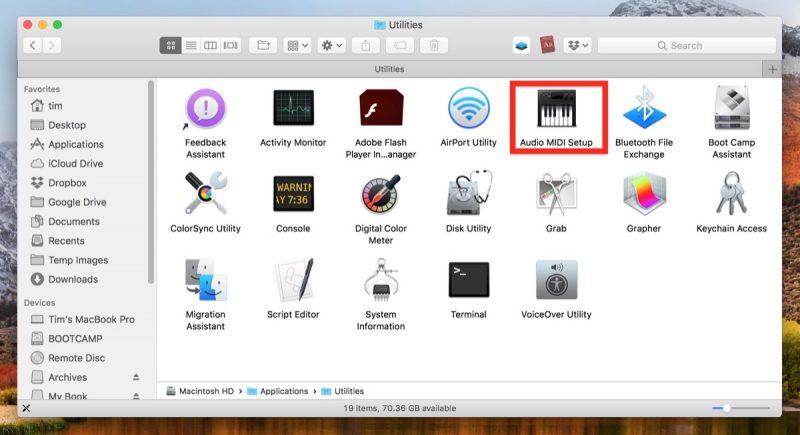
Click the plus (+) button at the lower left of the Audio Devices window and select Create Multi-Output Device.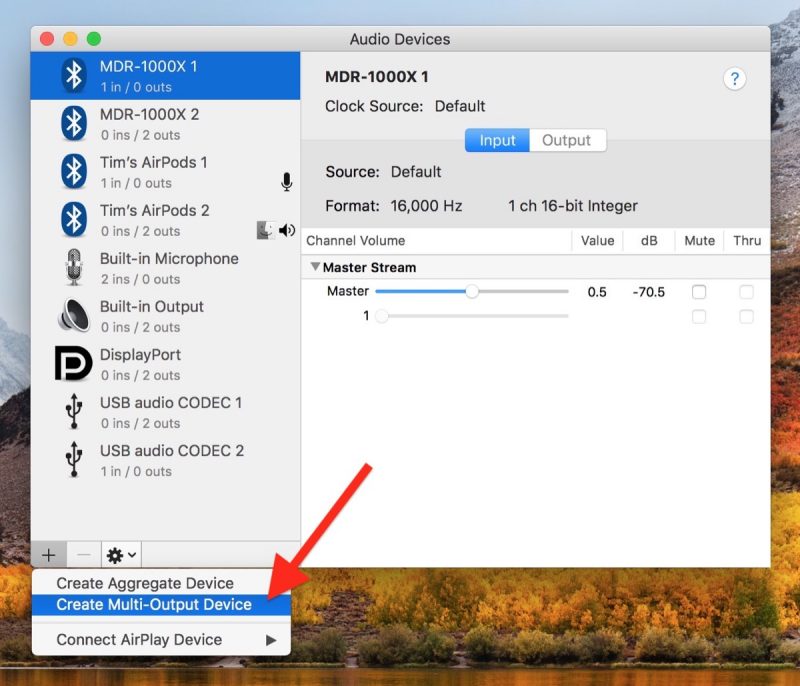
Right-click (or Ctrl-click) the Multi-Output Device in the list that you just created, and select Use This Device For Sound Output. (You can also opt to Play Alerts and Sound Effects Through This Device from the same menu.)
Tick the sets of headphones that you want to use in the Audio Device list. (If one is a wired pair, tick Built-in Output.)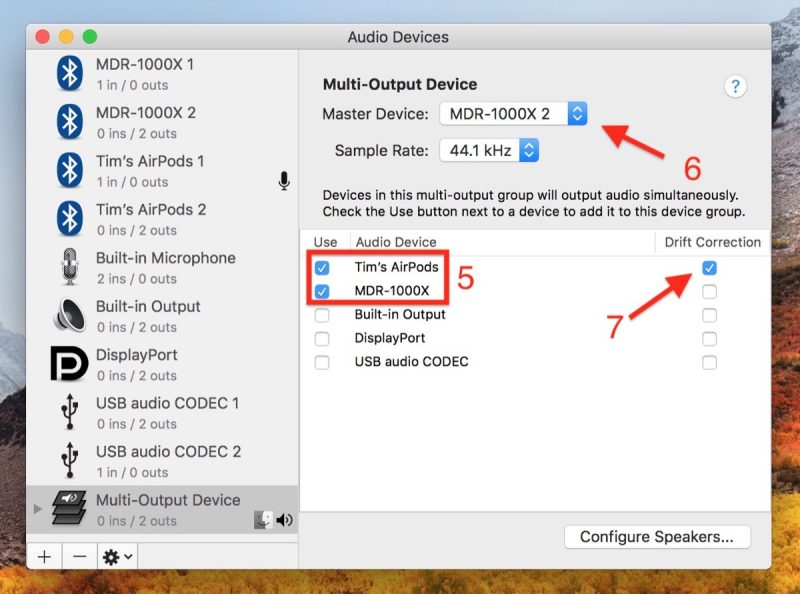
Select a Master Device in the drop-down menu.
Tick Drift Correction for the slave device in the Audio Device list.
Launch System Preferences (select -> System Preferences… from the menu bar) and open the Sound pane.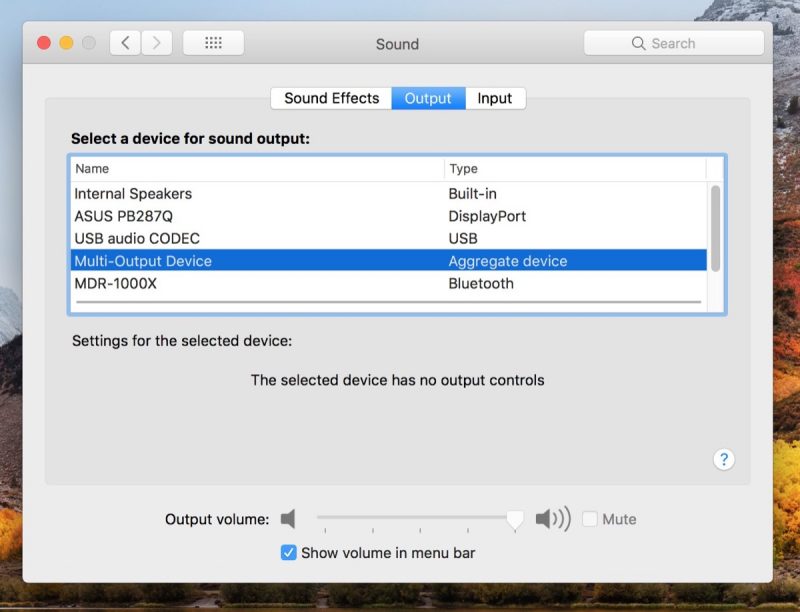
Click the Output tab and choose the Multi-Output Device or “Aggregate device” in the list, and you should be good to go.
Discuss this article in our forums
Elon Musk’s Boring Company wants to dig a tunnel to Dodger Stadium
By all accounts, driving to and from Dodger Stadium on game days is a bit of a nightmare.
That’s why Elon Musk’s Boring Company has just proposed building a high-speed transportation tunnel connecting the home of the LA Dodgers to another part of the city.
The “Dugout Loop,” as the Boring Company is calling it, would run between the stadium and a terminus several miles to the west, a short distance from a Metro Red Line station. Rides would take places inside pods placed on zero-emission “electric skates” traveling at speeds of up to 150 miles per hour, with each pod carrying up to 16 people.
As per the Boring Company’s proposal, the idea behind the Dugout Loop is to “help reduce traffic in Los Angeles by providing a clean and efficient public transportation option to Dodger Stadium.”
It promises that its transportation tunnel would “directly benefit the public by complementing existing public transportation systems and transporting baseball fans and concert-goers” directly to the stadium, with a ticket for the four-minute ride likely to cost no more than a dollar.
The Boring Company said that if it gets the go-ahead to build the tunnel, construction would take up to 14 months and would cause minimum disruption in the local area. It added that it’d foot the entire bill and therefore cost taxpayers nothing.
The Dodgers: “We’re excited”
The Dodgers’ chief financial officer, Tucker Kain, was quick to express interest in the idea, saying in a statement: “We were excited when the Boring Company came to us with this project,” adding, “We’re always looking for innovative ways to make it easier for Dodgers fans to get to a game.”
And the praise doesn’t stop there. Los Angeles Mayor Eric Garcetti, too, offered a positive assessment, tweeting that it’s “always exciting to see innovative ideas … that could help ease congestion … and make our most iconic destinations more accessible to everyone.”
While there are several potential drawbacks with the idea — for example, the Loop would initially be limited to moving only 1,400 people (a mere 2.5 percent of the stadium’s capacity) for each event, and could even result in increased traffic around the western terminus — Garcetti’s warm words suggest the City of Los Angeles is going to take a serious look at the Boring Company’s proposal.
Musk’s long-term ambition is to use his efficient, fast-boring machines to create a network of tunnels beneath Los Angeles to transport cars as well as people, so a short route like the one proposed here could be a useful test bed for the grander project.
In other boring projects, the company already has the nod from the City of Chicago to construct a tunnel between O’Hare International Airport and downtown Chicago, and has also shown off an image of a test tunnel drilled in Los Angeles, confirming that the company isn’t all novelty caps and flamethrowers.
Editors’ Recommendations
- The Boring Company doesn’t sound so boring anymore
- Earn a trove of 200 skins and victory poses in ‘Overwatch’ Summer Games
- Hyperloop pod reaches fastest speed yet in Elon Musk’s latest contest
- Amazing future transports promise to supercharge our commutes
- Amazon is opening a second, much larger checkout-less store
Xiaomi Mi A2: Everything you need to know
Xiaomi’s latest Android One device is one of its best.

With the Mi A2, Xiaomi has retained a lot of the elements that made last year’s Mi A1 one of the best budget phones of 2017, while rolling out upgrades in key areas to make it an enticing option in 2018.
It was the Mi A1 that kicked off the Android One rebirth last year, and the model has worked very well to fill the void left by the Nexus. The Mi A2 is an ambitious effort that brings robust hardware to the $300 price point, but where the phone truly shines in the cameras. Here’s what you need to know about the Xiaomi Mi A2.
Here are the specs
When talking about value, there are few brands that come close to Xiaomi, and the Mi A2 exemplifies the company’s ethos. The phone is powered by a Snapdragon 660, has class-leading 12MP + 20MP cameras at the back, and costs under $300.
Sure, it’s missing out on a few features — the headphone jack and the MicroSD slot — but as an overall package, it’s one of the best devices in this segment.
| Operating System | Android 8.1 OreoAndroid One |
| Display | 5.99-inch 18:9 FHD+(2160×1080) IPS LCD panelGorilla Glass 5 |
| SoC | Octa-core Qualcomm Snapdragon 6604×2.2GHz Kryo 260 + 4×1.8GHz Kryo 26014nm |
| GPU | Adreno 512 |
| RAM | 4GB/6GB |
| Storage | 32GB/64GB/128GB |
| Rear camera | 12MP (f/1.8, 1.25um) + 20MP (f/1.75, 2.0um)PDAF, LED flash, 4K video recording |
| Front camera | 20MP (f/1.75, 2.0um)AI portrait modeLED Selfie lightBeautify 4.0 |
| Connectivity | LTE with VoLTEWi-Fi 802.11 ac, Bluetooth 5.0GPS, GLONASS |
| Battery | 3010mAh batteryQuick Charge 3.0 (USB-C) |
| Fingerprint | Rear fingerprint sensor |
| Dimensions | 158.7 x 75.4 x 7.3mm |
| Weight | 166g |
| Colors | Black, Rose Gold, Gold, Blue |
The cameras are incredible
The cameras definitely give the Mi A2 a leg up in this category
If there’s one reason to recommend the Mi A2 over other devices in this segment, it’s the camera prowess. With class-leading 12MP + 20MP cameras at the back and a fantastic 20MP shooter up front, the Mi A2 is the phone to beat in this area.
The 20MP sensor at the back offers four-to-one pixel binning that drastically reduces noise in low-light conditions. There’s the option to switch between the standard 12MP sensor and the low-light 20MP sensor manually, and the front 20MP has an LED module that kicks in when taking selfies in low-light scenarios.
Here are our first Xiaomi Mi A2 camera samples
Android One + Xiaomi is a potent combination
The cameras definitely give the Mi A2 a leg up in this category, but what makes it stand out from other Xiaomi phones is the fact that it runs Android One. Xiaomi teaming up with Google over Android One is a significant milestone, as the Chinese manufacturer counts MIUI as a differentiator on its phones.
The Mi A2 is running Android 8.1 Oreo out of the box, and Xiaomi has committed to delivering the Android 9.0 Pie update in the coming months. There isn’t a timeline yet for the update, but it should hit all Mi A2 units before the end of the year.
Read our review for all the details
Although the Mi A2 has strong specs, that doesn’t necessarily guarantee it’ll hold up to the rigors of day-to-day usage. If you’re interested in picking up the phone or would like to know how the Mi A2 works as a daily driver, hit up the link below to read our detailed review.
Xiaomi Mi A2 review: A great sequel with a fantastic camera
Here’s how it compares to other phones
The Mi A2 is Xiaomi’s strongest showing yet in the $300 segment, but there’s no shortage of devices at this price point. The Nokia 7 Plus is a great phone in its own right, and while it costs $375, you do get NFC and a MicroSD card slot.
If you’re looking for something with a larger battery, then the Redmi Note 5 Pro is a great choice as well. For gaming, the Honor Play is the device to beat in this category, and ASUS’ ZenFone Max Pro M1 pairs a ginormous 5000mAh battery with a pure Android skin.
Here’s how the Mi A2 holds up against other phones in this category:
- Xiaomi Mi A2 vs. Nokia 7 Plus
- Xiaomi Mi A2 vs. Xiaomi Redmi Note 5 Pro
- Xiaomi Mi A2 vs. Honor Play
- Xiaomi Mi A2 vs. ASUS ZenFone Max Pro M1
Now available in Europe and India
Xiaomi is now selling the Mi A2 in select European markets and India. The phone costs €249 ($290) for the version with 4GB of RAM and 32GB of storage, with the 4GB/64GB variant retailing for €279 ($320).
See at Mi.com
In India, the Mi A2 is exclusive to Amazon India, where the device is available for ₹16,999 ($250). That’s for the model with 4GB of RAM and 64GB of storage; Xiaomi is set to launch the 4GB/128GB variant in the country in the coming months.
See at Amazon India
Android Photography

- The ultimate guide to Android photography
- All about Google Photos
- How to rescue your pics from Facebook
- When to use HDR on pictures
- The best ways to get pictures off your phone
- How to properly light your pictures
- Five must-read video tips
Engineers have made a new type of lithium battery that won’t explode
Samsung’s exploding Galaxy Note 7 smartphone may have been the most infamous example, but plenty of devices which rely on lithium-ion batteries have had their share of combustible incidents. While statistically rare, this is one of the risks of lithium-ion technology; frequently caused by problems with the permeable polyethylene separator that keeps the battery’s cathode and anode components separate.
A new piece of research coming out of the University of Michigan could help make for safer, less combustible batteries, however — and it may do so while doubling the output of current lithium-ion cells, and without taking up any more space.
“We have developed and demonstrated an effective approach to enable a new battery technology that uses a solid ceramic electrolyte instead of a liquid,” Jeff Sakamoto, an associate professor of Mechanical Engineering at the University of Michigan, told Digital Trends. “This ceramic is unique owing to its stability against lithium metal and high conductivity at room temperature. These two attributes enable the use of metallic lithium anodes, which could double the energy density compared to lithium-ion technology. Historically, lithium-ion performance has increased by a few percent per year over the last two decades. Moreover, lithium-ion performance is cresting at about 600 watt-hours per liter. This battery would enable a 100 percent improvement in energy density.”
In tests, the ceramic electrolyte has shown no visible degradation after long-term cycling, a problem which can eventually kill regular lithium-ion batteries. The technology could also lead to significantly faster charging times.
But could it really do away with the risk of exploding batteries altogether? While it may make a “dramatic” difference, Sakamoto acknowledged that more research needs to be done. “Our ceramic electrolyte is made at 1,000[-degrees] Celsius in air,” he continued. “It is not combustible. However, lithium metal is also reactive, but not flammable. We are conducting tests to quantify the safety of lithium metal-based batteries, and acknowledge that lithium metal may pose safety risks, too.”
The next phase of research involves developing a manufacturing process. It is hoped that this can be demonstrated a little under one year from now, by July 2019. “We hope to have a pre-pilot scale process in place by then,” Sakamoto said. “There are still many challenges, but we are making progress and learning a lot along the way.”
A paper describing the work was recently published in the Journal of Power Sources.
Editors’ Recommendations
- The coming hydrogen fuel cell evolution
- Does wireless charging degrade your battery faster? We asked an expert
- Can we get an apology? Two big MacBook fails that Apple should fix at WWDC
- How to care for your laptop’s battery
- No sun? No problem — this solar panel harvests energy from raindrops, too
Engineers have made a new type of lithium battery that won’t explode
Samsung’s exploding Galaxy Note 7 smartphone may have been the most infamous example, but plenty of devices which rely on lithium-ion batteries have had their share of combustible incidents. While statistically rare, this is one of the risks of lithium-ion technology; frequently caused by problems with the permeable polyethylene separator that keeps the battery’s cathode and anode components separate.
A new piece of research coming out of the University of Michigan could help make for safer, less combustible batteries, however — and it may do so while doubling the output of current lithium-ion cells, and without taking up any more space.
“We have developed and demonstrated an effective approach to enable a new battery technology that uses a solid ceramic electrolyte instead of a liquid,” Jeff Sakamoto, an associate professor of Mechanical Engineering at the University of Michigan, told Digital Trends. “This ceramic is unique owing to its stability against lithium metal and high conductivity at room temperature. These two attributes enable the use of metallic lithium anodes, which could double the energy density compared to lithium-ion technology. Historically, lithium-ion performance has increased by a few percent per year over the last two decades. Moreover, lithium-ion performance is cresting at about 600 watt-hours per liter. This battery would enable a 100 percent improvement in energy density.”
In tests, the ceramic electrolyte has shown no visible degradation after long-term cycling, a problem which can eventually kill regular lithium-ion batteries. The technology could also lead to significantly faster charging times.
But could it really do away with the risk of exploding batteries altogether? While it may make a “dramatic” difference, Sakamoto acknowledged that more research needs to be done. “Our ceramic electrolyte is made at 1,000[-degrees] Celsius in air,” he continued. “It is not combustible. However, lithium metal is also reactive, but not flammable. We are conducting tests to quantify the safety of lithium metal-based batteries, and acknowledge that lithium metal may pose safety risks, too.”
The next phase of research involves developing a manufacturing process. It is hoped that this can be demonstrated a little under one year from now, by July 2019. “We hope to have a pre-pilot scale process in place by then,” Sakamoto said. “There are still many challenges, but we are making progress and learning a lot along the way.”
A paper describing the work was recently published in the Journal of Power Sources.
Editors’ Recommendations
- The coming hydrogen fuel cell evolution
- Does wireless charging degrade your battery faster? We asked an expert
- Can we get an apology? Two big MacBook fails that Apple should fix at WWDC
- How to care for your laptop’s battery
- No sun? No problem — this solar panel harvests energy from raindrops, too
Genetically engineered bacteria paint microscopic masterpieces
Scientists have used genetically engineered bacteria to recreate a masterpiece at a microscopic scale. By engineering E. coli bacteria to respond to light, they’ve guided the bacteria like tiny drones toward patterns that depict Leonardo da Vinci’s Mona Lisa. It’s not artistic recognition they’re after. Rather, the researchers want to show that these engineered organisms may someday be used as “microbricks” and living propellors.
“From a physicist perspective, bacteria are marvelous self-propelled micro-machines,” Roberto Di Leonardo, a physics professor at the University of Rome who worked on the project, told Digital Trends. “We are studying possible ways in which these fantastic micro-robots could be controlled using physical external stimuli, such as light, in order to exploit their propulsion for transport, manipulation of microscopic systems inside miniaturized laboratories on a chip.”
When it comes to pound-for-pound swimming skills, E. coli make Michael Phelps look like an amateur. Using propellors powered by a living motor, E. coli can zoom through liquids, covering a distance 10 times their length in just a second. Though their fuel is usually oxygen, scientists recently discovered a protein that allows ocean-dwelling bacteria to be powered by light. They’ve since passed this trait on to other bacteria like E. coli through genetic engineering.
By genetically modifying E. coli and taking advantage of physical properties of the bacteria, Di Leonardo and his colleagues were able to use patterns of light to guide the bacteria toward replicating the Renaissance masterpiece.
“Swimming bacteria, much like cars in city traffic, are known to accumulate in areas where their speed decreases,” Di Leonardo explained. “So if we want to ‘paint’ a white stroke — where bacteria is the paint — we need to decrease the speed of bacteria by locally decreasing light intensity in that region so that bacteria slow down and accumulate there.”
In the study, the researchers shined a negative image of the Mona Lisa, causing the light-responsive bacteria to replicate the iconic portrait. They also conducted the engineered E. coli to morph between images of Albert Einstein and Charles Darwin.
Recreating faces of famous figures is impressive and all, but Di Leonardo hopes this study can spur some real-world innovation. For example, by using lights as guides, researchers may be able to use bacteria as building blocks and propellors for microscopic devices.
“In physics and engineering applications, these bacteria could be used as a biodegradable material for optical 3D printing of sub-millimeter microstructures,” Di Leonardo said. “On the other hand, dynamical control of bacteria could be exploited for in-vitro biomedical applications for isolating, sorting, and transporting larger cells for analysis or diagnostic purposes on the single-cell level inside miniaturized laboratories.”
A paper detailing the research was published this week in the journal eLife.
Editors’ Recommendations
- These living solar cells make energy, even in bad weather
- 8 Amazing CRISPR projects that could change life as we know it
- Tummy ache? Swallow this sensor-studded pill to get a diagnosis on your phone
- The best movies on Netflix right now (August 2018)
- 15 major milestones along the brief history of 3D printing

