


There’s now an app to relive your Windows 95 nostalgia on a modern PC
Image credit: Felix Riseberg
If you’re feeling a little bit of nostalgia for Microsoft’s beloved Windows 95 operating system, there’s finally an app for that. What’s old is now a novelty again, and Slack developer Felix Rieseberg created an app that allows Windows 95 to run inside on more modern operating systems, including Apple’s MacOS, Microsoft’s Windows 10, and Linux.
This current development is based on a web project that supports Windows 95 and a number of operating systems inside a web browser, but Rieseberg goes a step further by packaging Windows 95 neatly into an app that’s approximately 129MB in size.
Over the years, Windows 95 has been ported to various platforms. Most recently, it has been shown running on an Xbox One, an Android Wear smartwatch, and the Apple Watch. In the past, various developers got the OS working on a number of different smartphone platforms, including Google’s Android operating system, Apple’s iPhone running iOS, and Nintendo’s 3DS XL.
“I put Windows 95 into an Electron app that now runs on MacOS, Windows, and Linux,” Rieseberg announced in a good-humored tweet. “It’s a terrible idea that works shockingly well. I’m so sorry.”
Because the app began as a joke for a few of his friends, Riesenberg didn’t enable some features, like support for mountable drives. However, after user requests, Version 1.1.0 of the app now comes with support for floppy disks!
With Windows 95 on your modern computer, you’ll be able to take advantage of some popular titles from back in the day, like WordPad, MS Paint, and even Minesweeper. The developer noted that you can even run Doom as well. When you’re running Windows 95, the app only consumes 200MB of disk space, so it runs pretty lean.
At this time, however, Internet Explorer doesn’t work within Rieseberg’s Windows 95 app. “Sadly, Internet Explorer isn’t fully functional as it simply refuses to load pages,” The Verge reported.
The source code for Rieseberg’s Windows 95 project — with floppy disk support — has been published on Github, so you can grab the files there if you want to give Microsoft’s legacy OS a spin some 23 years after the operating system debuted. If you do give this a shot, let us know what features of Windows 95 you miss or remember most.
Editors’ Recommendations
- The best Windows apps
- Windows 10 Mail will let you handwrite your email with a stylus
- iPhone apps are finally coming to your MacBook. Eventually. Sorta.
- The Pixelbook could soon run Windows 10
- Apple reiterates why touchscreens won’t be coming to Macs anytime soon
There’s a new way to 3D print graphene, the strongest material on Earth
Virginia Tech, Lawrence Livermore National Laboratory
With its incredible strength and potentially miraculous applications, there is a lot to be enthusiastic about when it comes to graphene. But it’s one thing to show off these possibilities in a lab; another entirely to turn it into something that’s usable in real-world situations. That’s something that researchers from Virginia Tech University and the Lawrence Livermore National Laboratory (LLNL) have been working to change. In the process, they have found a way of combining two of the most promising buzzwords in tech — “graphene” and “3D printing” — to open up a world of new exciting possibilities.
“We have been able to achieve 3D graphene aerogels and foams with arbitrary form factors and 3D features,” Xiaoyu “Rayne” Zheng, an assistant professor with the Department of Mechanical Engineering at Virginia Tech, told Digital Trends. “We formulated and printed light-sensitive graphene precursors that is compatible with a desktop SLA printer. This opens up freedom to realize 3D graphene with any topology co-optimized mechanical properties, hierarchical pore sizes, surface areas, [and] conductivities for a host array of applications.”
Regular graphene is a single layer of carbon atoms arranged in a honeycomb-style hexagonal lattice pattern. If graphene is packed, layer on layer, it becomes graphite: A material most commonly used as the “lead” in ordinary pencils. Now we love pencils as much as the next person, but anyone who has ever had a pencil lead snap on them may have a hard time believing this is one of the strongest materials on the planet. That’s because of the way that it is packed together, which fundamentally alters the structure of graphene.
The researchers on this project circumvented that by separating the individual sheets of graphene with air-filled pores, thereby allowing it to maintain its properties. The 3D-printable material that emerges at the end is something called graphene aerogel.
“Graphene aerogels are promising for a number of applications — including energy storage and conversion, catalysis, sorbents, and desalination,” Marcus Worsley, an LLNL researcher on the project, told us. “Recent work has shown some performance improvements for simple 3D-printed structures, but more complex, computer-generated architectures are predicted to be vastly superior. These gains should translate to devices that are more powerful, efficient, and longer lasting. This is the major thrust of our current and future work in this area.”
It may be some time before we are 3D printing with graphene in our home offices, but this still represents an enormous step in that direction.
“With regards to commercialization, we are always happy to work with potential commercial partners to bring our inventions to market,” Worsley continued. A paper describing the work was recently published in the journal Materials Horizon.
Editors’ Recommendations
- Engineers in the U.K. unveil the world’s first graphene-skinned airplane
- Materials scientists have found a way to make graphene twice as tough
- These 3D-printed houses could be one-tenth the price of regular homes
- 15 major milestones along the brief history of 3D printing
- Science says waste beer could help us live on Mars
How to hide photos on your iPhone, iPad, or iPod Touch
If you’re anything like us, you love showing off photos you’ve taken with your phone, but there are times when you’ll want to keep certain pictures away from others, because they’re personal or, well, inappropriate. It’s situations like these when the ability to hide photos on your phone becomes invaluable, especially if you have children or friends who use your device often. We’ll detail how to hide your personal images on your iPhone below and even suggest a few apps for some added security. If you’re looking for more helpful iOS tips, we’ve got a guide for that.
Kyree Leary also contributed to this article.
Hiding photos on your iPhone using built-in features
The quickest way to hide photos on your iPhone is also the easiest, as it doesn’t require any additional software. This method works with the iPad and iPod Touch as well. Keep in mind, however, that this only keeps photos from appearing in the Moments, Years, and Collections views. Hidden photos will still be visible when browsing your Albums. If you’re using iCloud Photo Library, any photos hidden on your iPhone will also be hidden on other devices, including the iPad, iPod Touch, Mac, and iCloud.com.
Step 1. Open the Photos app.
Step 2. Next, tap Select in the upper right corner of your screen and choose which photo(s) you’d like to hide. You can also do this for each photo manually when you are looking at a preview of a single photo.
Step 3. Tap the Share icon in the bottom left corner. On the bottom of the resulting menu, press the Hide button, which looks like two rectangles overlapping slightly with a line through them.
Step 4. Finally, tap Hide Photo to confirm your decision. Hidden photos will be placed in a new Album folder called Hidden.
Unhiding photos on your iPhone using built-in features
Making photos visible again is just as easy as hiding them, and can be done directly on your iPhone. Doing so also affects your iCloud Photo Library.
Step 1. Open the Photos app and go to Albums.
Step 2. Tap the Hidden folder — depending on how many albums you’ve created, you may need to scroll to find it.
Step 3. Select the photo(s) you want to make visible the same way as before.
Step 4. Tap the Share icon and select Unhide, which will have replaced the Hide button and looks very similar, but the line is now behind the two rectangles. If you unhide all of the photos in the Hidden folder, the folder will be automatically removed. Hiding photos again will make it reappear.
Dell XPS 15 vs. MacBook Pro 15
Dan Baker/Digital Trends
Apple and Dell are two of the world’s premier laptop makers, so taking the flagship device from each and pitting them against one another in a head to head is far from easy.
How do you pick between two beautiful laptops that perform well and offer a unique software environment? In this Dell XPS 15 versus Apple MacBook Pro 15 comparison, we duke them out to find a single, decisive victor.
Design
Both the Dell XPS 15 and MacBook Pro occupy the higher-end laptop space in terms of pricing, so unsurprisingly, they both have a premium look and feel. Each has thin bezels, sleek lines and an attractive paint job. The MacBook Pro arguably looks a little more sophisticated, but neither with embarrass you in a public setting.
The XPS 15 does have a slightly more durable feel and that is most notable in the sturdy hinge system that Dell has used in its design too. You’ll need two hands to pry it open, which while not the most intuitive of design choices, does lead us to believe that it would be able to withstand a little more punishment from drops than the 2018 MacBook Pro.
As with other MacBooks, Apple sticks exclusively to Thunderbolt 3 with the MacBook Pro, offering four of them on the latest model, as well as a headphone jack. The XPS 15, however, offers more legacy support, with a pair of USB-A ports, as well as a single Thunderbolt 3 connector, an HDMI output, and an SD card slot, as well as a headphone jack.
Apple did make a point of upgrading the keyboard for its 2018 MacBook Pro — perhaps to avoid future lawsuits — to one that’s more resistant to dust. While we don’t know if that will result in a vast improvement in longevity for the new design, it should be at least better than its predecessors. The Dell XPS 15 keyboard is still nicer though. It’s great to type on and feels snappy thanks to its short, 1.3mm travel distance.
Webcam wise, however, the MacBook Pro’s positioning in the top monitor bezel is much better than the XPS 15’s base-bezel mounting.
Performance
The biggest upgrade in both of these new-generation laptops is the hardware inside them. Both have been upgraded to the eighth-generation of Intel’s CPUs, but both offer different chips and different hardware configurations at different price points. The Dell XPS 15 starts at $1,000 and offers an Intel Core i5-8300 CPU, 8GB of memory, an on-board Intel UHD 630 graphics chip, and 1TB of hybrid hard drive/SSD storage. There are a number of configurations possible, with options all the way up to an Intel Core i7-8750H, 32GB of memory, a GTX 1050 Ti graphics chip, and a terabyte of PCIexpress solid-state storage. The top spec. Dell XPS 15 will set you back $2,100.
In comparison, the MacBook Pro 2018 starts at $2,400 and comes with an Intel Core i5-8259U, 16GB of memory, a Radeon Pro 555X graphics chip, and a 256GB SSD. The highest specification MacBook Pro comes with a Core i9-8950HK CPU, 32GB of memory, a Radeon Pro 560X graphics chip, and 512GB of SSD storage for $3,500. If you need more storage, you can spend up to $6,000 for as much as 4TB of space.
All of this means both laptops are very, very powerful. Which is better really depends on what you want to do. Now that Apple has fixed the throttling issue of its Core i9 CPU, the MacBook Pro should be noticeably more powerful than the XPS 15 in day to day tasks, but the GTX 1050 Ti in the XPS 15 will make it far more capable at 3D rendering and gaming.
It’s a lot more affordable too. You can buy a top of the line Dell XPS 15 for less than the entry-level, 15-inch MacBook Pro. That includes an optional 4K screen too, while the MacBook Pro is confined to a 2,560 x 1,600 display.
Portability
Dan Baker/Digital Trends
Laptops in the 15-inch form factor are never going to be as portable as their smaller counterparts, but modern day notebooks of all sizes are lean and lightweight in comparison to their predecessors. The XPS 15 measures 14.06 x 9.27 x 0.66-inches and is small as 0.45-inches at its thinnest point. It weighs in at four pounds (4.5 pounds with a larger battery).
Apple’s hardware weighs four pounds in comparison and measures 13.57 x 9.48 x 0.61-inches. The differences between the two aren’t going to be noticeable to the average user.
Battery life is also of major importance to portability. The lowest-level Dell XPS 15 comes with a 56 watt hours battery, but all other configurations have 97 watts. We found that gave it around 14-hours in our video looping test — that’s not far behind the market-leading Surface Book 2. The MacBook Pro comes with an 83.6-watt-hour battery, which Apple claims offers up to 10-hours of battery life.
We haven’t been able to run our own battery life tests on the new MacBook Pro just yet, but we would expect the XPS 15 to last longer during general computing.
XPS 15 offers far more bang for buck
Dan Baker/Digital Trends
The new MacBook Pro might be a very capable piece of kit, but it’s quite a bit more expensive than the Dell XPS 15. For less than the entry-level MacBook Pro costs, you can have a full specced XPS 15 and still have a couple of hundred dollars left over. That sort of cost disparity makes this a bit of an easier choice.
The MacBook Pro is an amazing machine and if you’re dead set on a MacOS environment, there’s no better portable hardware to enjoy it on than the new MacBook Pro. For everyone else, the XPS 15 is your best bet.
Editors’ Recommendations
- Dell XPS 15 9570 review
- Dell XPS 15 vs. Razer Blade 15
- Razer Blade 15 vs. MacBook Pro
- Dell XPS 15 9560 review
- Benchmark test shows Core i9 severely throttled in 15-inch MacBook Pro
Thule’s huge sale will save you money on strollers, backpacks, and more
Don’t settle for less than the best, especially when you can save money on it.
Amazon has hundreds of Thule products on sale right now. Think of Thule gear as designed to carry anything you need to transport safely and easily. That includes backpacks for camping, bike racks for your car, and strollers for your children.

The Thule EnRoute Backpack is down to $54.95 right now instead of $70. You can get this same price for every color of the 14L version. The other sizes are on sale as well. Dark Forest only comes in the 23L size, but it is also on sale for $78.95 from a street price around $100. The 14L backpack can hold a 13-inch laptop and 10-inch tablet in dedicated pockets. It can also keep your phone, sunglasses, and other smaller accessories safe with plenty of pockets.
If you’re a parent looking to go jogging with your kid, the Thule Glide 2.0 jogging stroller is $358.95 during this sale, which is a huge drop from its regular $450 price. That price matches one we saw back in May, but it has never dropped in price otherwise. The stroller is designed to fold easily with just one hand. It’s ergonomic with an adjustable handlebar for comfort for the parent and a multi-position canopy with side windows for your child.
You can also get the Thule Raceway Pro Trunk Mount Bike Rack for $278.95 from $350. This price matches a low we’ve only seen once this year. The bike rack is designed to fit securely to any vehicle. It has a system to prevent multiple bikes from swinging into each other, and you can lock your bikes securely to the vehicle.
A few other products on sale include:
- 531 Express surf strap – $30.95 (from $40)
- AllTrail men’s hiking backpack – $126.95 (from $160)
- RoundTrip snowboard roller bag – $198.95 (from $250)
- Cadence Two Child Carrier bicycle trailer – $238.95 (from $300)
These are just some of the products on sale, so check out everything else you can get right now.
See on Amazon
The best tempered glass screen protectors for the Pixel 2

Don’t scratch that Gorilla Glass.
The Google Pixel 2 is pretty amazing — and if you want to keep it in amazing condition, you should protect that screen with a screen protector. Tempered glass screen protectors are your best option for protecting your phone’s screen from drop damage and general wear and tear; and chances are you will see some wear over time.
Fortunately, there’s a number of great options out there for you to choose from. Let’s dive in!
- Whitestone Dome Glass Tempered Glass Screen Protector
- Power Support Tempered Glass Film
- IntelliGLASS Tempered Glass Screen Protector
- Supershieldz Tempered Glass Screen Protector [2-pack]
- ZeKing Tempered Glass Screen Protector [2-pack]
- InvisibleShield Glass+ Tempered Glass Screen Protector
- amFilm Pixel 2 XL Tempered Glass Screen Protector
Whitestone Dome Glass Tempered Glass Screen Protector
Top Pick

The Whitestone Dome Glass screen protector is your best option for protecting your Pixel 2 display. If the worst case scenario has already occurred and your screen is cracked, think of this as a second chance screen before dropping hundreds of dollars on a proper replacement. Typically sold for $60, you can get one for the Pixel 2 for just $45.
See at Amazon
The packaged UV light required to complete the curing process makes this a bit more of an involved process, but spend the time to install it right the first time and you’ll get one of the most reliable screen protectors for your Pixel 2.
The Whitestone Dome Glass screen protector has quickly become one of the more trusted options for keeping your smartphone display safe. Sure, it’s absolutely the most expensive option but it has won over a ton of fans. Check out this review and installation guide to get an idea of how this tempered glass screen protector uniquely adheres like no other screen protector you’ve seen before.
Power Support Tempered Glass Film
Official Offering

Google sells the Power Support as an official accessory alongside the Pixel 2 on the Google Store. Get yours for $40.
See at Google
This is another expensive screen protector for your Pixel 2, but for that money, you can be sure that it’s a quality product and designed precisely for your Pixel 2. It has a black border at the top and bottom to help with lining it up during installation and also has cutouts around the front-facing speakers. Curved edges ensure a good in-hand feel, and the oleophobic coating will ensure you’re not constantly wiping fingerprint and grease smudges off of your screen.
IntelliGLASS 3D Tempered Glass Screen Protector
Thinnest Option

The IntelliGLASS screen protector is incredibly thin and features the ever-important oleophobic coating to prevent oils and dirt from sticking to your screen. It’s a great option that is super thin and lightweight but tough when it counts. Regularly sold for $45, you can get one for just $20.
See at IntelliARMOR
IntelliGLASS uses a silicone-based adhesive that makes for an easy installation, and if you have any problem the IntelliARMOR customer service will work to make things right.
It’s a trusted brand in phone protection, and right now they’ve got a great deal on their IntelliGLASS 3D screen protectors. It’s available with a white or black border, or you can opt for the IntelliGLASS HD that’s fully transparent.
Supershieldz Tempered Glass Screen Protector [2-pack]
Best Value

If you like screen protectors with a border around the screen (which helps with installation), you should check out this affordable offering from Supershieldz. This two-pack of tempered glass screen protectors includes all the features you’d expect, such as hydrophobic and oleophobic coatings to keep your screen clean. Available for just $8, this is a premium option at a budget price.
See at Amazon
The kit includes alignment stickers and Supershieldz guarantees a bubble-free installation. If you run into any issues, you can contact Supershieldz customer support as it offers a no-hassle lifetime replacement warranty on its products.
ZeKing Tempered Glass Screen Protector [2-pack]
Most Coverage

ZeKing offers a really good option if you don’t like leaving the top and bottom edges of your phone exposed. Opting to provide precise cutouts around the front-facing speakers instead, this two-pack of tempered glass screen protectors will offer good protection for the entirety of the display up to the curved edge of the screen glass with an oleophobic coating for avoiding fingerprints. Available for just $6.
See at Amazon
ZeKing offers a basic kit that includes all the standard features including alcohol wipes for a clean installation. At just $6, you aren’t likely to find a better deal on a tempered glass screen protector.
InvisibleShield Glass+ Tempered Glass Screen Protector
Trusted Brand

Zagg is a trusted name in phone accessories, and especially screen protectors. The InvisibleShield Glass+ provides ample impact protection for your screen and is designed to withstand shattering itself. If it does, you can count on its limited lifetime warranty in which it’ll replace the screen protector if it gets worn or damaged for as long as you own the phone — you only pay shipping and handling costs. Get yours for just $24!
See at Amazon
This screen protector is also smudge- and scratch-resistant, too, so it will hold up nicely to daily wear and tear.
amFilm Pixel 2 XL Tempered Glass Screen Protector
Best for 2 XL

Pixel 2 XL owners should consider this tempered glass screen protector from amFilm which has been specifically designed for the larger model and claims to offer edge-to-edge protection with an improved adhesive gel. The glass has a black trim around the perimeter of the curved corner display, and notches cut out of the top and bottom to accommodate the front-facing speakers. For $12.99 you’ll get everything you’ll need to ensure a clean installation and quality protection for your new phone.
See at Amazon
This is a case-friendly screen protector that features an invisible dot matrix to simulate fingerprint contact most accurately. It also has an olophobic coating to prevent fingerprints which is always important.
Which screen protectors do you trust?
Are you going to grab something off our list? Eyeing a different brand? Let us know in the comments!
Update August 2018: Updated formatting and pricing information. These are still the best options for protecting your Pixel 2 screen.
Google Pixel 2 and Pixel 2 XL
- Pixel 2 FAQ: Everything you need to know!
- Google Pixel 2 and 2 XL review: The new standard
- Google Pixel 2 specs
- Google Pixel 2 vs. Pixel 2 XL: What’s the difference?
- Join our Pixel 2 forums
Best Buy
Verizon
Google Store
Project Fi
It’s not worth playing Fortnite for Android without a Bluetooth controller
Epic is doing something about it, but not a moment too soon.

In Epic’s undying thirst to get Fortnite up and running on any and every platform that can handle it, I’ve realized something — Fortnite just isn’t meant to be on everything. It’s an important game for many reasons, the biggest of which being it’s the first game with enough clout to help tear down the cross-platform play barriers that have kept us from the ultimate gaming utopia.
However, for all but the most desperate of Fortnite players who want to survive the storm during every waking hour of every day (an unhealthy schedule for sure), it’s simply not worth playing on mobile. We’ve already made that painfully clear in our review of the mobile release, but there’s one point that bears repeating and beating on like a dead llama: the controls flat out suck.
We need Bluetooth controller support, and we needed it a fortnight ago.
There’s just too much to Fortnite’s elaborate control scheme to properly translate it to a touchscreen. You have to run, turn, shoot, jump, reload, rearrange, mine resources, switch weapons, manage inventories — and all of that is before you even get to building structures. Imagine doing all of these things and needing to do them at a pace so fast that even those playing on keyboard and mouse have trouble coming to grips with it. That’s a moot point if you’re playing in mobile-only lobbies where everyone is on a level playing field, sure, but it helps underscore the point that I’m trying to make: Fortnite is miserable to play on a touchscreen. Period.
That’s why we so desperately need Bluetooth controller support, and we needed it a fortnight ago. (Yes, I made that joke. Sue me.) Fortnite is still tough to play with a controller as evidenced by the many control scheme changes we’ve seen on console, but it’s still eons better than poking away at the janky mobile rendition.
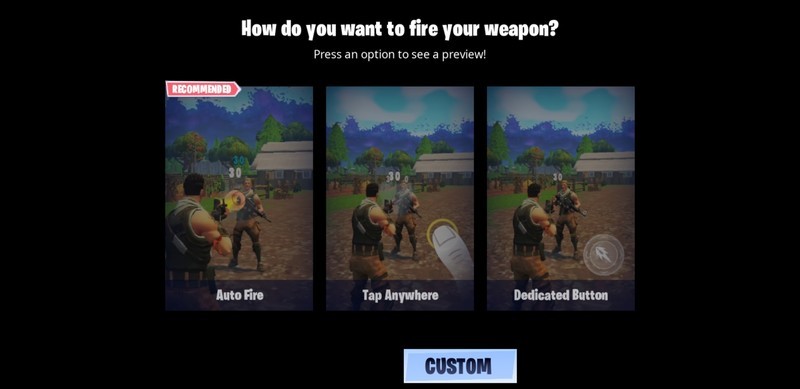
Thankfully, Epic does have plans to bring Bluetooth controller support to Fortnite for Android, and on that day it will be a much better game to recommend for those wanting to play it on the go. Fortnite is still in beta on Android so Epic does have a reasonable excuse for rushing this thing out of the barnyard, but we’re still calling them out if only to drive home the point that this absolutely needs to happen, and hopefully happens sooner rather than later. There will still be the other blights we touched on in our review — namely performance hiccups and the general issues that come with playing on a much smaller display than you’re used to — but at least it won’t totally suck like it does right now.
If you’re as turned off by Fortnite’s mobile controls as we are, resist the urge to play it when you’re jonesing, and instead spend your time figuring out which mobile controller you’re going to use once Epic delivers the goods. We’ve got a great list for you right here, and you can even start eyeing your PlayStation 4 and Xbox One controllers if you already have those handy.
Fortnite for Android: Everything you need to know
Android Gaming

- Best Android games
- Best free Android games
- Best games with no in-app purchases
- Best action games for Android
- Best RPGs for Android
- All the Android gaming news!
4K monitors, Onkyo receivers, and more are discounted today
Whether you’re looking for new tech gear or household items, we’ve got you covered.
We found plenty of great deals today that include big discounts on Samsung’s 4K monitor, Amazon’s condenser microphone, Onkyo’s 7.2-channel receiver, and more!
View the rest of the deals
If you want to know about the deals as soon as they are happening, you’ll want to follow Thrifter on Twitter, and sign up for the newsletter, because missing out on a great deal stinks!
Cyberpunk 2077 absolutely blew us away — here’s why

At Gamescom 2018, we saw Cyberpunk 2077 in action for the first time. And we spent the hours following the presentation utterly dumbfounded. What an incredible ride.
CD Projekt RED is responsible for crafting what is arguably this generation’s best game, in the form of The Witcher 3. The Witcher 3, at the time, featured some truly unprecedented world building, visuals, and writing, with stellar third-person swordsmanship combat and piles of RPG layers on top for good measure. CD Projekt RED won itself praise for its support of The Witcher 3 post-launch too, which saw features and quality-of-life improvements filter in from fan requests, as well as two large expansions adding dozens of hours of additional story content.
CD Projekt RED set themselves a high bar for any future project they shipped. If what I saw this week at Gamescom 2018 was anywhere near the final product, Cyberpunk 2077 won’t just shatter even the grandest of expectations, it will raise the bar for all of gaming for years to come.
It might seem counter-intuitive since I am writing about Cyberpunk 2077, but if you’re a fan of CD Projekt RED’s work, my honest recommendation is to avoid reading or viewing any previews about this game, including this one. Go into it completely in the dark, and have your mind blown in the same way I have. If you do want to learn more, then please, read on, friends.
See at Amazon
Setting the stage for sci-fi dystopia

Cyberpunk 2077 takes The Witcher 3’s world-class world-building and applies it to a gritty sci-fi dystopia, based on the classic tabletop RPG Cyberpunk 2020. Mega-corps control civilization, led by corrupt officials protected by private high-tech super soldiers. Poverty and crime are rife, as the corporations turn a blind eye from their ivory towers. Gangs rule the streets, and Cyberpunk’s protagonist, “V”, finds herself (or himself) fighting to carve a niche in this tech-saturated world.
The sheer abundance of gameplay features and mechanics present in Cyberpunk 2077 was utterly dizzying.
V is effectively a bounty hunter/mercenary-type, working themselves up through the criminal underworld. The single 50-minute quest we were shown at Gamescom featured so many twists and turns, branching narrative options, and gameplay systems, that gathering my thoughts has been remarkably harder than usual when coming in to write a preview. 50 minutes may seem like a long time, but the sheer abundance of gameplay features and mechanics present in Cyberpunk 2077, even in this “small slice” as they described it, was utterly dizzying.
The demonstration opened with V and her partner in shady dealings, Jackie, infiltrating a criminal gang known to be kidnapping mechanically augmented humans, specifically to steal their cybernetic enhancements, forcibly, to then sell them on for profit. Dismembered cyborgs were piled up and discarded like mannequins in a store stock room, slamming home the idea that the lines between “person” and “product” have become utterly blurred in this late capitalist hell.
It was here we got the first taste of what combat will be like in Cyberpunk 2077. Some have lamented the fact CD Projekt RED has gone for a first-person perspective for Cyberpunk 2077, but honestly, for the type of game they’re building, there’s arguably no choice. Much of the game’s detail needs to be seen up-close-and-personal, especially given how vertical the game’s areas can be. A top-down or over-the-shoulder camera view wouldn’t do this approach to level design justice.

Cyberpunk 2077’s area layouts are crammed with options for traversal, opening up different ways to approach combat. Maybe you can slip through a vent and take a quiet approach, or simply go in gun’s blazing. You’ll need to pay attention to your environment if you want to take a more thoughtful approach to the game’s missions, but you’ll still have a vast arsenal of high-tech equipment to blast and cut your way through enemies, in addition to performance-enhancing drugs.
Cyberpunk 2077’s shooter combat felt very much like an interactive version of the infamous lobby scene from The Matrix. Bullet time capabilities are on offer to the player, granting heightened awareness for a brief period of time, creating slow-motion sequences of cascading gore and drifting sparks. The environment was also surprisingly destructible, creating a necessity for high-mobility gunplay. At one point, V and her partner were pinned down by a chap spraying gunfire through a wall, prompting the player to sneak around the back for a flanking kill.
Incredible sci-fi freedom

Cyberpunk 2077 does seem to offer the opportunity for contextual stealth kills as well, along with the tools to allow players to play this way if they so choose. CD Projekt RED emphasized their fluid class system, which allows players to, through cybernetic enhancement and weapons choices, to tailor their own classes. Want to focus on hacking and disabling enemies remotely before ever firing one of your bullet-homing smart pistols? You can. Want to be a Metal Gear Rising-like cyborg ninja, complete with the ability to hook onto walls, slice off limbs with a high-tech katana in slow motion, with enhanced mobility? You can. Want to be a heavy focusing on reducing targets to piles of blood and circuits with a wall-penetrating shotgun? Cyberpunk has you covered. And this was just a taste of what CD Projekt RED has in store for us.
In-keeping with playstyle customization, Cyberpunk 2077 will also allow you to tailor the way your character looks, including things like gender, and other aesthetics. It also enlists some pen-and-paper inspired stat choices, including things like constitution. It also allows you to select some pre-determined backstories for your characters. No doubt these choices will play a significant part in the game’s plot as you progress.
This could be a world sim without equal

If the full Cyberpunk 2077 experience is truly representative of the final product, the world the studio is building for the game will represent one of the most completely realized digital worlds in gaming history.
Cyberpunk’s imagining of a futuristic Northern California megacity is as daunting as it is enticing. Mega-complexes designed to house thousands of residences soar into the sky, while the streets are jam-packed with hundreds of seemingly unique NPCs plying their trade, heading to work, or skulking about in alleys ready to pounce on the innocent.
Everything in Cyberpunk 2077’s world, from menus to quest markets, to HUD elements, are fully realized as part of the game’s world and lore. If you want to display bullet count in your onboard brain OS, you need to purchase a modification for your eyeball. An advertisement in the world might allow you to download a quest marker to find a vendor or other opportunities, while information provided by NPCs in the game’s story will be uploaded directly into your cybernetically-enhanced brain, via personal uplink ports carved into your neck. All menus appear on screens in-game, or via augmented reality, rather than separately.

These systems work both ways, too, of course. Enemy NPCs and characters can hack into your brain, which impacts your HUD display, distorting elements. At one point during a conversation, V was forcibly uplinked by a bodyguard and made to answer questions while being monitored for telling lies or the truth. This opened up several dialogues, and actionable choices, all bearing web of consequences which should grant Cyberpunk 2077 some serious replayability.
Of course, your stats and skills with play a part too, when it comes to hacking and counter-hacking. During another mission, V had the opportunity to escape a tricky situation through a locked door, but the security requirements were too high for the player. Instead, V was able to subdue and hack into the network through an enemy NPC’s brain instead, giving you to upload all sorts of viral software into the gang’s internal network, offering new combat capabilities.

To modify your character, you must attend special clinics in-game that will facilitate upgrades to your body and mind. In the demo, this occurred as part of a cutscene, with “V” remarking that it was akin to visiting the dentist. The player selected mods that connected your gun to your HUD remotely, allowing you to see bullet and ammo count for your weapon, as well as information on different weapon modes. The doctor removes V’s eyeball to perform the enhancements, in a vivid out of body experience. This is a where your organs and senses can be fully digitized, and the very idea of “humanity” has become stretched.
So, so much more to find out

The Cyberpunk 2077 demonstration felt intentionally fast-firing, bombarding the audience with utterly insane amounts of information and gameplay systems, briefly hinting at features before tearing away into the next.
Cyberpunk 2077 at its core is an open-world, first-person RPG, but in execution, it feels like so much more than that. It’s complete with Grand Theft Auto-style open-world driving and car-chase gun battles. It enlists a Deus Ex-style approach to level design, with multiple pathways for different types of playstyles. The gunplay is as violent as Wolfenstein, but as elegant as something like Max Payne, with stunning slow-motion effects, a vast array of super high-tech weapons, with the breadth of combat options you might expect from something like Fallout or The Elder Scrolls, with Metal Gear Rising cyborg ninja combat for good measure.
This is the first press presentation that made me wonder, “can a game possibly be too good?”
For me, what really defined Cyberpunk 2077 was the way choice and consequence is weaved so intricately into the quests, in a way that many other big-name RPG developers have begun neglecting over the years. V’s mission to impress an underworld gangland boss had multiple pathways to completion, some including a non-violent approach hinging on conversational skills, while another focused on hacking abilities and stealth. And of course, there’s always the direct approach, spattered in blood.
Cyberpunk 2077 looks like it has terabytes of secrets waiting to be revealed as we head towards its – as of now – unknown launch date. But, as a fan of The Witcher 3, and CD Projekt RED in general, I know I’ll be dropping my digital pre-order the second they go live. This is the first press presentation that made me wonder, “can a game possibly be too good?”
Cyberpunk 2077 will hit Xbox One, PS4, and PC. It has no known launch date, but it is currently available for preorder at Amazon.
See at Amazon
The Galaxy S9+ is the best Android phone you can buy

The Samsung Galaxy S9+ builds on years of Samsung’s excellence. It starts with a gorgeously sculpted metal and glass body that’s waterproof, with features like dual speakers, a headphone jack and an SD card slot. Inside are the latest and greatest specs, plus a standout pair of cameras on the back and the best display on the market around front.
Our pick
Samsung Galaxy S9+

- $750 from Amazon
- $790 from Samsung
The best Android phone for most people.
Choosing the Galaxy S9+ doesn’t require much thought — it can do everything, and looks great doing it, with few real downsides. It’s beautiful, has the best screen, isn’t missing any hardware features and has one of the best camera experiences available in a smartphone today.
Who should buy this phone
Samsung designs its phones to be appealing to the widest possible audience, and that makes the Galaxy S9+ a great device for just about anyone. It has a big and beautiful display that’s quite simply the best in the industry, but with very small bezels and curved edges, it fits into a relatively compact size.
Internally, it has all of the latest specs to handle any app or task you need. It also has a pair of cameras on the back that are in the mix as the best available today. Samsung has also kept around crowd-pleasing features like wireless charging, waterproofing, an SD card slot and a headphone jack. Really, the Galaxy S9+ does a great job at being all things to all people.
Best of all, if you don’t care for the larger size of the Galaxy S9+ for whatever reason, you can simply buy the smaller and less expensive Galaxy S9 instead and get the same core experience with only a few changes.
Is it a good time to buy this phone?
Yes. The Samsung Galaxy S9+ launched the first week of March 2018, meaning it is still the latest and great phone that Samsung makes. The Galaxy Note 9 is expected to launch around October 2018, which will likely be only a marginal improvement over the Galaxy S9+, and the Galaxy S9+’s successor will not be unveiled until March 2019.
Reasons to buy
- Sleek and beautiful hardware
- Top-notch specs
- Waterproofing, wireless charging and more
- Best-in-class display
- Up to 256GB of storage available
- Fantastic dual cameras
- Dual speakers and a headphone jack
- Available everywhere
Reasons not to buy
- Lots of unnecessary apps installed
- Slow update speed
There are so many great Android phones available, but one stands out just a little extra
The Galaxy S9+ is all about giving you the most features, both hardware and software, in a beautiful package. You get a great display, top-end specs across the board, plus all of the hardware features you expect: waterproofing, wireless charging, an SD card slot, a headphone jack and more. It’s all wrapped up in a glossy and shiny metal-and-glass exterior that’s efficient and great looking.
The camera is all-new this generation, with a sensor that does fantastic processing to remove noise and sharpen fine detail even in poor lighting. It’s aided by a dual-aperture lens to get the best combination of light and detail in different shots, and is paired with a secondary telephoto lens for zoom and portrait mode shooting. Whether you shoot in auto or mess around in manual mode, you can get great shots in just about any scene.
You don’t get the clean and simple software experience of phones like the Google Pixel 2 XL or OnePlus 6, which may take some extra customization and tweaking on your part, but the Galaxy S9+ is far less polarizing overall because it just has so many features to appeal to everyone. When you take it all together, it’s a complete package.
Alternatives to the Samsung Galaxy S9+
The Galaxy S9+ has mass appeal, but it isn’t for everyone. There are several other awesome picks out there depending on your specific needs.
Upgrade pick
Samsung Galaxy Note 9

$999 from Samsung
An incredible phone with a huge price to match.
The Galaxy S9+ is great, but the Note 9 is even greater. It does everything the GS9+ does, but adds in a larger screen, more storage, longer battery life and an S Pen stylus. And it’s about $200 more because of it.
The Galaxy Note 9 is easily the best Note phone Samsung has ever made, and for once it’s actually better than the latest Galaxy S phone in every way. The battery has jumped up to 4000mAh, which gives you effortless all-day battery life, and the rest of the experience is the same as what the Galaxy S9+ offers.
That means you get top-end specs, a great camera, an industry-leading display and so much more. And the Note has an S Pen, which remains unmatched in the smartphone world. The problem is its $1000+ price tag, which is a tough pill to swallow when you can get almost the same experience for about $200 less with the Galaxy S9+. That makes this an “upgrade” and not the standard recommendation.
Budget pick
OnePlus 6

$529 from OnePlus
Great value for an amazing feature-rich device.
The OnePlus 6 is pretty much everything you expect in a high-end phone, but for $200-300 less. You don’t give up much with this $529 phone, and in many ways, you get a better software experience.
These top-end phones are expensive, but that doesn’t mean you’re stuck paying top-dollar for your next upgrade. The OnePlus 6 provides nearly the same experience as these other devices at a substantial discount — just $529. You get all of the latest specs inside, and it’s wrapped up in a beautiful metal-and-glass frame not unlike the Galaxy S9+.
There are a few shortcomings, like an average display, basic speaker, and subpar vibration motor, but the software experience is more akin to the Pixel 2 XL than the Galaxy S9+ — and that’s a good thing. OnePlus has dramatically improved its camera offering to where the OnePlus 6 is just a stone’s throw away from the top-of-the-line phones, which just adds to the great value this phone offers.
Amazing camera
Huawei P20 Pro

A high-end device that checks all the right boxes.
The Huawei P20 Pro is all about the cameras — a 40MP main sensor is assisted by an 8MP telephoto camera and a 20MP monochrome camera to give you so many shooting options and out-of-this-world results. It’s a photographer’s dream.
$800 from Amazon
You may think that the “Leica” branding is a bit of a joke at first, but don’t let that turn you away — the Huawei P20 Pro has an amazing set of cameras that can produce the best photos of any smartphone today. The combination of a 40MP main sensor, an 8MP telephoto camera and a 20MP monochrome sensor give you unending shooting options, and the software pulling it all together knows all of the tricks to create stellar photos.
The rest of the phone experience isn’t subpar, either — Huawei’s built a beautiful phone here with powerful specs. It’s just let down as ever by the Huawei software that heavily tweaks and modifies Android — to a fault. Some can look past that to get those wonderful cameras, though, and will even go so far as to import an international version to the U.S.
Great at a discount
Google Pixel 2 XL

$750+ at Google Store
Stellar software and performance with a superb camera.
The cleanest, smoothest and most Google-friendly phone available. It has sleek hardware, simple software and a killer camera, with years of guaranteed updates and unlimited Google Photos storage.
The Pixel 2 XL doesn’t have a fantastic screen or headphone jack like the Galaxy S9+ does, but that’s one of the trade-offs you make in order to get this fantastic software experience. The camera on Google’s flagship is just as good, though, and some would say that the overall experience, aided by that great software, is more consistent and approachable. You also get three years of guaranteed software updates, which provides excellent peace of mind.
Now that it’s almost a year old, you shouldn’t consider it at full retail. But Google, Verizon and other retailers sometimes have it on discount, and if you can find it for $100 or $200 off it’s a fantastic phone.
Bottom line
The Note 9 is an amazing phone that goes above and beyond the Galaxy S9+, but its price is prohibitive and doesn’t really add up considering the marginal improvements over the GS9+. If you fancy yourself more discerning about software experience, you’ll want to look at the Google Pixel 2 XL — you’ll have to buy unlocked or from Verizon, but that Google software is worth it. For less money, the OnePlus 6 gives you a near-flagship experience and also has great clean software. The most versatile camera imaginable can be found in the Huawei P20 Pro, and the rest of the phone isn’t exactly bad.
That leaves us with the Samsung Galaxy S9+, which is the best Android phone for most people. It provides the best experience, top-end hardware and most features for the widest number of people. It’s also available everywhere, from any carrier or retailer you could imagine.
Update August 2018: The Galaxy S9+ continues to be our top pick for its great features, hardware, camera and wide availability. The the Galaxy Note 9 is on the list as an upgrade pick for when money’s no object. The Pixel 2 XL remains, but only when it can be found on a discount as it’s nearing a year old at this point.
Credits — The team that worked on this guide

Daniel Bader is the Managing Editor of Android Central. As he’s writing this, a mountain of old Android phones is about to fall on his head, but his Great Dane will protect him. He drinks way too much coffee and sleeps too little. He wonders if there’s a correlation.

Andrew Martonik is the Executive Editor, U.S. at Android Central. He has been a mobile enthusiast since the Windows Mobile days, and covering all things Android-related with a unique perspective at AC since 2012. For suggestions and updates, you can reach him at andrew.martonik@androidcentral.com or on Twitter at @andrewmartonik.

Jerry Hildenbrand is Mobile Nation’s Senior Editor and works from a Chromebook full time. Currently he is using Google’s Pixelbook but is always looking at new products and may have any Chromebook in his hands at any time. You’ll find him across the Mobile Nations network and you can hit him up on Twitter if you want to say hey.

