


As sea levels rise, NASA’s new laser satellite will monitor polar ice decline
Previous
Next
1 of 5

NASA ICE

NASA ICE

NASA ICE

NASA ICE

U.S. Air Force/Vanessa Valentine
Earth’s poles are the frontlines in the dramatic tale of climate change, where the impacts of increased temperatures can be seen firsthand as massive ice sheets break off and crash into the sea. Tracking glaciers helps understand the consequences of climate change elsewhere — see, for example, sea level rise — and scientists will soon have new tools to enable them to measure polar ice decline in unprecedented detail
In September, NASA is scheduled to launch an advanced satellite called ICESat-2 (short for Ice, Cloud, and land Elevation Satellite-2), which scientists will use to measure changes in elevation of land ice in polar regions like Greenland and Antarctica. The satellite’s on-board laser can make a whopping 60,000 measurements each second, with precision to within the width of a pencil.
“The new observational technologies of ICESat-2 — a top recommendation of the scientific community in NASA’s first Earth science decadal survey — will advance our knowledge of how the ice sheets of Greenland and Antarctica contribute to sea level rise,” Michael Freilich, director of NASA’s Earth Science Division, said.
NASA has been using satellites to monitor polar ice for 15 years, but ICESat-2 makes significant advances on the agency’s prior campaigns. Among its technological improvements, the new satellite comes equipped with a highly advanced instrument called the Advanced Topographic Laser Altimeter System (ATLAS). By beaming light particles from space to Earth and back, ATLAS can measure the height of ice by calculating how long it takes the light to return.
“ATLAS required us to develop new technologies to get the measurements needed by scientists to advance the research,” Doug McLennan, a project manager for ICESat-2, said. “That meant we had to engineer a satellite instrument that not only will collect incredibly precise data, but also will collect more than 250 times as many height measurements as its predecessor.”
Polar ice melt is felt around the world. About a third of global sea level rise is attributed to melting ice in Greenland and Antarctica, according to NASA. The rate at which sea level is rising is increasing as global temperatures continue to rise.
ICESat-2 will help track these changes, while monitoring regions beyond the poles. ATLAS is also designed to measure treetops and determine how much carbon is stored in forests around the world.
The satellite is set to launch from Vandenberg Air Force Base in California on September 15.
Editors’ Recommendations
- Get your Sagan on with 60 awe-inspiring photos of the final frontier
- Italian researchers discover what they believe is a lake under ice cap on Mars
- NASA’s planet-hunting TESS satellite: What you need to know
- ‘Waterworld’ no longer seems sci-fi, so an artist designed your future gills
- 2018 Ford Mustang GT Performance Pack 2 review
AllTrails’ Lifeline feature will keep you safe in the backcountry
AllTrails, a website and mobile app (iOS and Android) that offers members access to information on more than 50,000 hiking trails across the U.S. announced a new feature designed to help keep outdoor enthusiasts safer in the backcountry. The company unveiled a service for its Pro members that makes it easier than ever to share information about planned hikes, mountain bike rides, trail runs, and other outings. The service even offers services that make it easy to track progress or alert search and rescue services should an emergency situation arise.
Dubbed Lifeline, the service officially launched on the AllTrails website and mobile apps a few weeks ago. The new feature gives users the ability to choose up to five contacts who they want to share their outdoor plans with, giving them access to vital information about the outing. Those individuals are then sent a specially generated URL that allows them to view the user’s intended route on highly detailed maps, where they plan to begin and end their journey, and their estimated start and stop times. Armed with that information, it will be much easier to know whether or not a hiker is overdue and where to begin searching for them should they become lost or stranded.
But Lifeline also offers the ability to provide live GPS tracking, providing the user’s phone has a data connection. If one of the contacts clicks on the provided link while the hike is in progress, they will be able to see the user’s last known GPS location plotted on a map relative to the route they have chosen. This makes it easy to see how well they are progressing, whether or not they are still on the move, and how close they are to reaching the end of the trail.
Other features of Lifeline include the ability to send short, preset text messages to the contacts providing them with updates on progress or alerting them to an emergency situation. The system will also automatically let the user’s friends know when he or she is overdue, which is triggered when they haven’t completed the route by the time that was designated. That alert even includes the last known GPS coordinates for the hiker.
“The addition of Lifeline to our mobile platform is a huge step in ensuring AllTrails users feel connected and confident while exploring in the outdoors,” AllTrails CEO Jade Van Doren said in a statement. “Made for people heading out on their own, and for those exploring in more remote areas, we felt it was important to provide the peace of mind and security that comes from your loved ones knowing your plan, where you are, and getting automatic alerts if something goes wrong.”
Lifeline is included in the AllTrails Pro membership, which costs $30 per year or $100 for a lifetime subscription. For a limited time, however, users can get a 50 percent discount on an annual membership by using “lifeline” at checkout.
Editors’ Recommendations
- The best hiking apps
- The best hiking GPS devices of 2018
- The AllTrails app gets even better, adds more details in new map layer
- The Bivystick uses satellite technology to send messages from anywhere
- The best sport trackers
The best printers of 2018
Ted Needleman/Digital Trends
More
What to look for in a printer
The best cheap printers
The best 3D printers
Although writing and photography, like so much of life, have largely gone digital, there’s still something useful (pleasant, even) about holding physical, tangible pages in one’s hands. So printers still have a place in the modern world. Whether you need to print out a set of reports for an upcoming business meeting, or you want to render your vacation photos on big, glossy sheets, there is a printer out there for you, and we’ve rounded up some of the best.
The best photo printer
Epson SureColor P400
Why should you buy this? To print gorgeous, glossy photos that won’t cost too much
Our Score
The best photo printer
Epson SureColor SC-P400
The SureColor P400 makes gorgeous prints at an affordable price.
$566.99 from Best Buy
$566.12 from Amazon.com
Who’s it for? Budding photographers who want quality prints without spending a luxury price
How much will it cost? $600
Why we picked the Epson SureColor P400:
Photography is an expensive hobby, and if you’ve invested a lot of money in a great camera, you may want a printer that can do your photos justice. While you can certainly drop a thousand dollars on a premium photo printer, the Epson SureColor P400 offers great prints without the need to tap into your retirement fund.
With its unassuming facade, the P400 may not look like anything out of the ordinary, but it houses an eight cartridge system (seven colors and a “Gloss Optimizer”) that can create prints of “excellent color accuracy and saturation,” as we put it in our review. The P400’s seven ink colors allow for a rich variety of shades, and the gloss optimizer gives photos a slick finish that emphasizes the color saturation.
The P400 can accommodate paper up to 13 × 19 inches, and while those sheets may take a little while to print (several minutes, according to our reviewer), the results are stunning. There may be photo printers with a higher ceiling than the P400, but casual photographers or those still learning the ropes should get the most value out of this entry-level beast.
The best all-in-one office printer
Canon Maxify MB5420
Why should you buy this? The Maxify prints quickly, and can handle a heavy workload
Our Score
The best all-in-one office printer
Canon Maxify MB5420
An economical printer that will delight your coworkers.
$399.00 from Jet
$304.99 from Canon
Who’s it for? Small-businesses or even households that do a lot of printing
How much will it cost? $305
Why we picked the Canon Maxify MB5420:
If you run a small business, chances are you need to print a lot of documents, and not just any printer will do. You’ll want a printer that works quickly (so you don’t have people forming a queue, grumbling angrily), and one that can handle the rigors of frequent printing without breaking down.
Enter the Canon Maxify MB5420. With its compact, cube-shaped body, the MB5420 will fit in any office or house, and while it may not be the prettiest horse in the stable, it can pull a lot of weight. The printer can hold a hefty 500 sheets of paper (spread over two trays), and as we noted in our review, it can print monochrome documents at a rate of 22.2ppm (10ppm for color documents). Critically, it can also stand up to a heavy workload. The printer’s monthly “duty” cycle is 2,000 pages, which will likely be enough for any small business.
As an all-in-one device, the MB5420 can do more than just print; it can also fax, copy, and scan, and as we said in our review, “our scanned documents exhibited accurate colors and fine detail.” While it’s not the cheapest printer in the world, the MB5420 gives you a lot of mileage for the price.
The best laser printer
Brother HL-3170CDW
Why should you buy this? It has a small profile and can knock out lovely prints in no time at all
The best laser printer
Brother HL-3170CDW
This Brother printer is sleek, simple, and quick.
$174.99 from Best Buy
$174.91 from Amazon
Who’s it for? Professionals who need color prints quickly
How much will it cost? $250
Why we picked the Brother HL-3170CDW:
If you want a laser printer for your home or office, the Brother HL-3170CDW is a safe bet, a compact device that you can get at an affordable price. This printer can blaze through jobs at a rate of 23ppm, and it holds 250 sheets of paper; both of these factors make it a good choice for offices, where people may need to print out a lot of documents without waiting for someone else’s job to finish.
The printer isn’t just fast; it also supports duplex printing for double-sided pages. Whatever you print will probably look great, as it can print full-color documents at 600 × 2,400 dpi.
Setting up this Brother model is a cinch, and in addition to its ethernet and USB 2.0 connections, it also supports wireless printing; users can connect with Android and Apple devices, among others.
The best portable photo printer
HP Sprocket
Why should you buy this? It’s convenient to carry and easy to use
The best portable photo printer
HP Sprocket
With the Sprocket, your smartphone photos take on new life.
$129.95 from Amazon
$129.95 from Best Buy
Who’s it for? Smartphone shutterbugs who want a physical rendering of their favorite moments
How much will it cost? $130
Why we picked the HP Sprocket:
For most people these days, their smartphones are probably the main way they take photos. As such, portable photo printers are a nice accessory to have on hand, particularly if you’d rather hand your friends a tangible object, rather than just direct them to your Instagram profile.
At roughly 3 × 5 inches, the HP Sprocket is svelte enough to carry in a pocket, with gently rounded corners and smooth edges for easy handling. To use it, simply pair it with a smartphone via Bluetooth, then launch the associated app.
The Sprocket prints 2 × 3-inch photos, which may not seem all that impressive but make for fun, kitschy mementos. It also uses a nifty printing technology called “Zink,” which prints photos without the use of ink. Zink sheets have layers of clear crystals that, when activated by heat, produce color, so you’ll never need to worry about buying tiny ink cartridges.
The best budget printer
Canon Pixma MX922
Why should you buy this? Although it’s an older model, it’s still a reliable all-in-one
The best budget printer
Canon Pixma MX992
Despite its age, the MX922 still works hard — and well.
$69.99 from Best Buy
$69.99 from Amazon
Who’s it for? People who need a good volume of production on a budget
How much will it cost? $100
Why we picked the Canon Pixma MX922:
We’ve had great praise for other Pixma models in the past. Although the MX922 is a few years old now, like a Roman aqueduct, its sturdy design holds up — unlike its price, which has fallen.
The MX922 holds up to 350 sheets of paper, making it useful for offices or people who simply need to do a lot of printing. The printer has both Ethernet and Wi-Fi connections, perfect for settings where numerous people will want to use the printer. An auto duplex document feeder makes copying a breeze.
The MX922 also uses a five-ink system, and while that may not be the most robust color palette, it does result in good quality photos; the printer also sports a separate paper tray for photo paper, so jumping from printing report to printing photos takes no time at all.
Editors’ Recommendations
- The best portable photo printers of 2018
- Canon drops 5 new printers to round out its PIXMA lineup
- The best 3D printers under $1,000
- Brother launches Work Smart series of compact, connected printers for home
- The best 3D printers of 2018
4K TVs from Panasonic and Samsung are gaining HDR10+ support

If you’ve recently bought a new TV from either brand, it’s about to get better.
If you’ve been paying attention to high dynamic range formats in TVs lately, you might recognize the name HDR10+. No, not just HDR10 — the plus is an important differentiator. Created by Samsung, HDR10+ is a competitor to Dolby Vision and HLG that contains dynamic metadata. Translation: filmmakers can control the dynamic range of their movies down to the frame.
Owners of recent Samsung and Panasonic 4K TVs should start receiving a software update soon that brings support for HDR10+, so long as they were made this year. While there isn’t a ton of supported content available just yet, 20th Century Fox has announced that it will begin encoding new films and content with the format, announcing its planned schedule in the coming weeks.
In addition, all of Amazon’s Prime HDR selection is already available in HDR10+, so you don’t have to wait around for 20th Century Fox — if you have Prime Video, you can already take advantage of the format on your TV.
Introducing CordCutters.com
- The hardware you need
- All about streaming services
- What channels are on which service
- FREE over-the-air TV
- How to watch sports
- Join the discussion
- Listen to the podcast
Get the latest deals
Apple CEO Tim Cook Sells $57.8M in Apple Stock
Apple CEO Tim Cook last Friday was awarded 560,000 shares of Apple stock as payment for his service as Apple’s CEO and Apple’s strong performance under his leadership.
Following the award, Cook this week sold more than 265,000 of those shares at prices ranging from $216.96 to $218.54, netting him nearly $57.8 million. The remaining 294,840 shares worth more than $63 million were withheld by Apple for taxes.
As with all transactions where Apple executives sell stock, the sale was done under a Rule 10b5-1 trading plan that was adopted on May 4, 2018.
The stock Cook received last week included 280,000 vested restricted stock units (RSUs) provided to him as part of his compensation as CEO and another 280,000 vested RSUs awarded because Apple achieved a higher shareholder return than at least two-thirds of other companies in the S&P from August 25, 2015 to August 24, 2018.
Mr. Cook’s award provides that if Apple’s relative TSR performance is within the top third of the companies that remain in the S&P 500 for the entire performance period, the 280,000 performance-based RSUs vest in full. If Apple’s performance is in the middle third, the RSUs will be reduced by 50%, and if Apple’s performance is in the bottom third, the RSUs will be reduced to zero. Apple needed to achieve a TSR of at least 56.23% to outperform the middle third of the companies in the S&P 500 for the performance period, and at least 19.94% to outperform the bottom third of the companies. Apple’s TSR for the three-year period was 89.94%, which ranked 50th of the 423 companies that were included in the S&P 500 for the entire period and placed Apple in the 88th percentile. Therefore, all 280,000 of the RSUs subject to performance requirements vested.
Cook is set to receive an additional 560,000 shares each year for the next three years if he remains Apple’s CEO and Apple’s shareholder return continues to be among the top-third of companies in the S&P 500. Cook will also see 700,000 RSUs vest on August 24, 2021.
After selling the stock that he received this year, Cook continues to own 878,425 shares, worth close to $193 million at today’s closing price of $219.70.
In the past, Cook has said that he plans to donate the majority of his fortune to charity. Cook last week donated almost $5 million worth of Apple stock to an unnamed charity.
Tag: Tim Cook
Discuss this article in our forums
Apeman M4 review: A tiny, compact projector that you can take anywhere
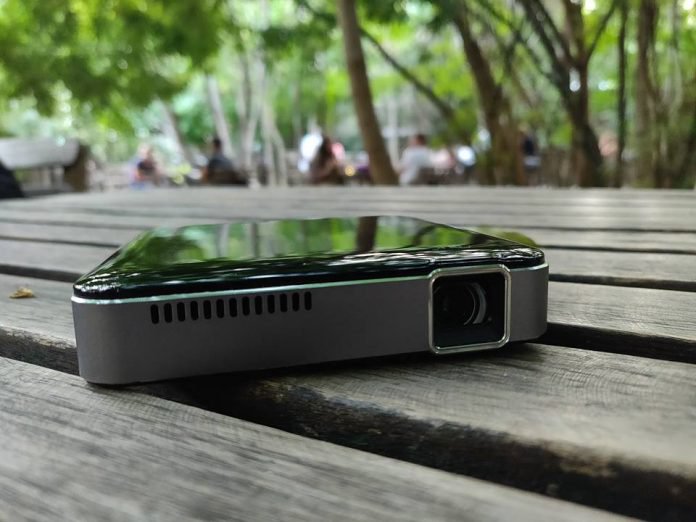

Going camping and need some entertainment? Or you simply want to watch a movie with the whole family and don’t have a big screen TV?
Then a gadget like the Apeman M4 Mini projector might be exactly what you need. We’ve been testing out this particular device for the last few weeks, and here’s what we think of it.
Appearance
The Apeman M4 mini projector comes in a stylish little box that includes the device, an HDMI cable, a tiny tripod, and an AC charger with a USB charging cable.
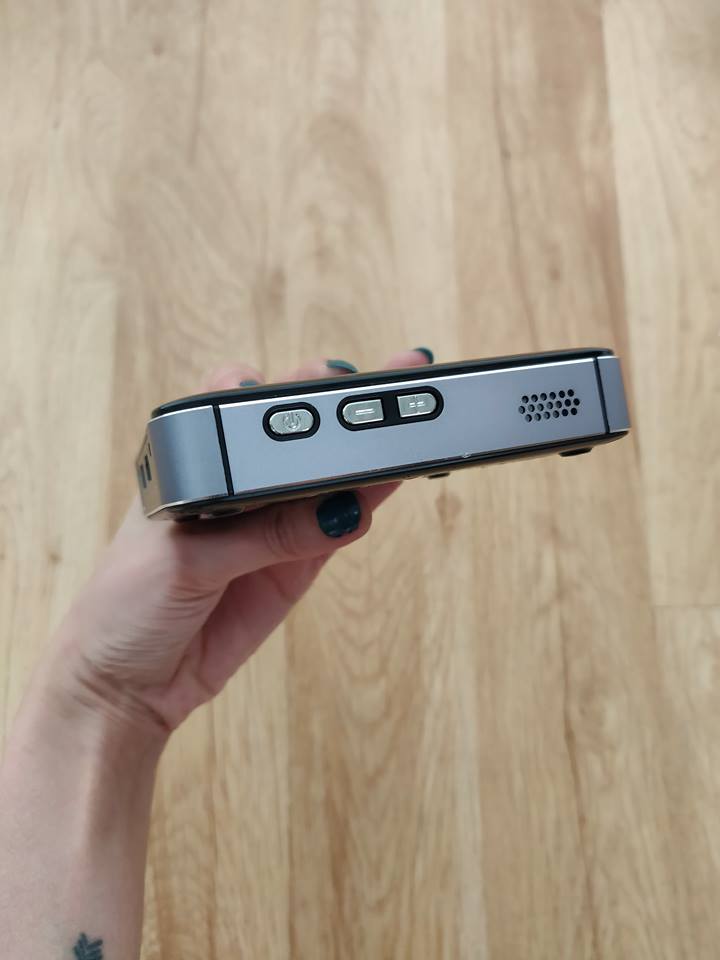
The M4 looks great. It’s quite small and can easily fit in my hand. It has a nice black shiny finish and an overall minimalist design. The unit measures only 3.86 x 3.86 x 0.85-inches and weighs next to nothing. It can be made to fit anywhere including in the pocket of my pants.
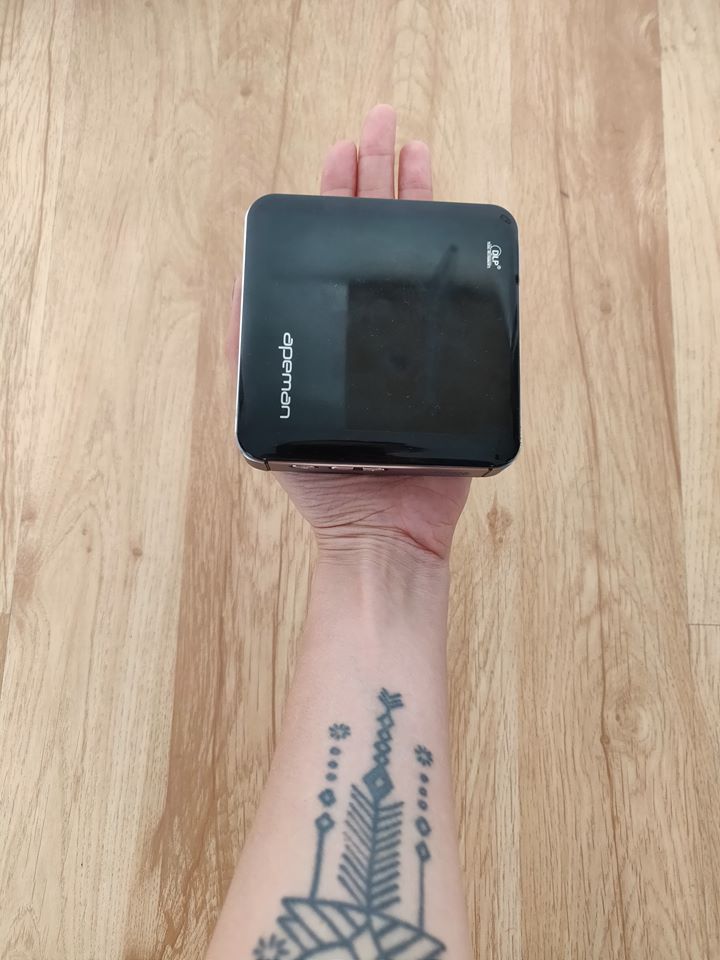
Unfortunately, the top surface is quite a magnet for fingertips which it’s particularly great, but not a deal breaker either. You’ll just need to have a wiping cloth with you at all times.
The projector comes with a large vent at the front, and there’s another one located below. Both are used to dissipate heat. Throughout our testing, the M4 remained quite cool in use and we didn’t notice any overheating.
On the back, you’ll find an HDMI, USB and USB-C ports. The latter is used for charging. There’s also a 3.5mm headphone jack, so you can hook up your favorite headphones.
Functions and use
The M4 is not as feature-rich as some of the other projectors on the market. That’s mostly because it’s a budget affair. However, it does provide more than necessary to get entertainment on the go.
For example, there’s no microSD storage expansion slot. But, the good news is that you can use the USB port to plug in a hard drive. What’s more, the 3,400 mAh rechargeable battery can double as a battery pack to recharge your phone. Which is pretty handy.
The M4 features 50 lumens LED lamp that offers decent quality pictures in a dim or a completely dark room. However, this is definitely not a daylight projector. It has a decent contrast ratio of 1,000:1 but it’s not nearly as powerful as other projectors available on the market today.
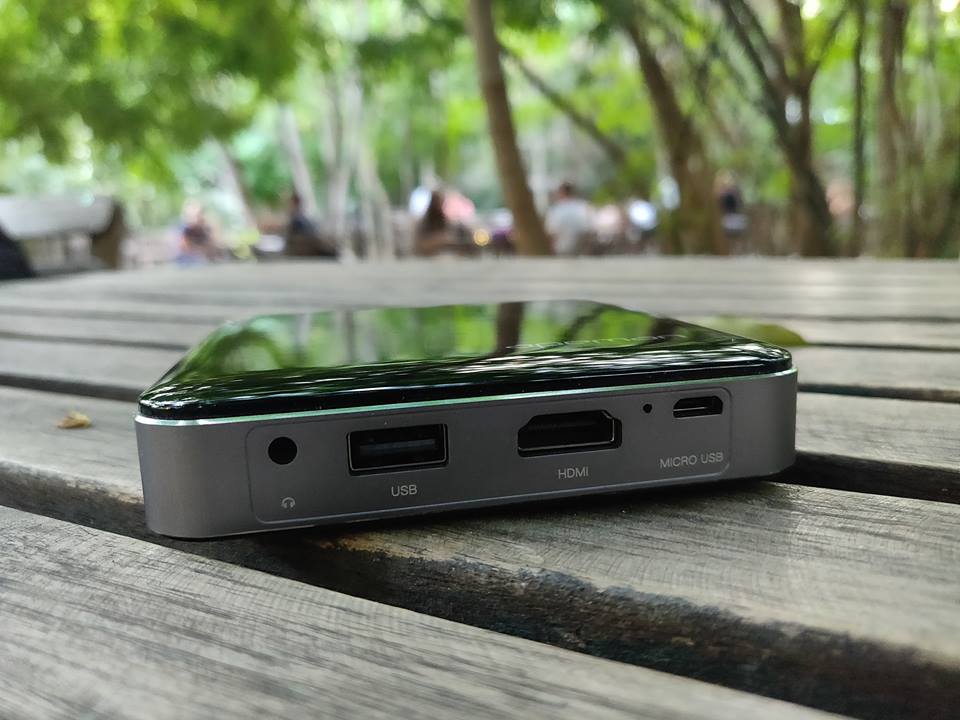
The HDMI port on the M4 makes it fully compatible with any standard media device. However, keep in mind that you’ve got absolutely no wireless connectivity on board including Bluetooth or Wi-Fi. So connecting a smartphone to it is not so simple and would require an additional device like a Roku stick.
A thing I found quite unusual about the Apeman is the lack of software interface. When you turn the projector on, using the power button on the side, you won’t see anything other than the Apeman logo greeting you. No additional Settings options or anything like that. Connect the HDMI cable and you’ll immediately start seeing the projected images.
The upside to this is that the mini projector is really easy to use and works straight out of the box. It doesn’t involve a complicated setup or anything like that. It also comes pre-charged, so simply take it out and start using it.
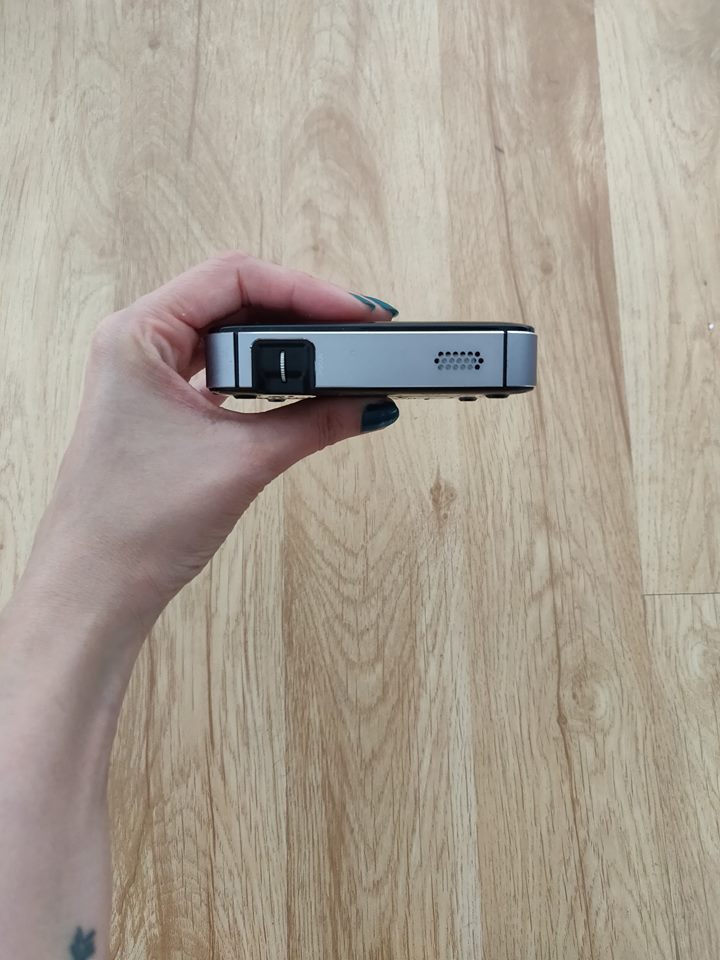
Place the projector at a distance of about two meters for best results. Don’t forget to use the mini tripod that comes in the box; it comes super in handy. Once you’ve found the best distance, all you need to do is manually focus the image and you’re good to go.

In our testing, we discovered that sound quality was pretty impressive for such a tiny device. The M4 features 1-watt stereo speakers which sit on either side of it and can provide loud and clear audio. While the projector’s own speakers can fill up a small room, if you’re looking to use the device in a larger chamber, we recommend you hook up an external speaker (if you have one of those laying around). You can connect them to the Apeman using the 3.5mm audio jack.
As we mentioned above, you’ll need to be in a completely dark room to take advantage of the full quality of the Apeman. The projector has a native resolution of 854 x 480, but it supports 1080p video input. Although it will downscale it. We know the resolution sounds disappointing, but actually, the projections end up looking quite decent on the wall. Colors are ok and the contrast ratio is good enough to watch a movie or look at a family album.
The internal battery can play up to about 80-90 minutes of content before running out of juice. Once the battery is drained it will take about 3.5-4 hours to fully charge it back up.
Conclusion
The M4’s biggest advantage it’s the fact that it’s such a tiny, portable device, which you can take with you literally anywhere. It’s not the most advanced projector we’ve seen, but it does get the job done when you need some quick entertainment to spice up a boring family evening.
The Apeman M4 is available for purchase for $209.99 from Amazon.
Don’t Miss
Google Home is awesome; here’s how to make it even better!
Check it out!
How to make money on Instagram (even if you don’t have a bajillion followers)
Elementary kids in the 1990s didn’t hold up glittered poster-board signs on career day that said “professional Instagrammer.” But as social media platforms grow, so do the number of people actually using them to make a living. In 2018, “professional Instagrammer” is a legitimate career.
Instagram influencers have one thing in common: reach. With enough reach, brands will pay influencers to post about a product in order to reach those followers. Influencers also tend to focus on one specific topic, posting on fashion, travel, food, or technology, just to name a few. That specific focus attracts brands because they can reach a specific audience.
But how do you go from posting a few photos to actually earning cash from Instagram? And do you really need to wait until you have 100,000 followers before earning money on Instagram? Here are five different options that take the guesswork out of learning how to make money on Instagram — and what you’ll need to do to help your profile make the cut.
What kind of profiles make money on Instagram?
Regardless of how you earn money on Instagram, influencer profiles tend to have a few things in common, both for attracting followers and brands alike. Influencers typically have a narrowed focus, a specific style, interesting visuals, and a “healthy” profile.
Focus: Brands aren’t looking to reach everyone — they have a specific audience in mind of the people most likely to buy their products. A high-end clothing brand will reach out to an influencer because he or she frequently posts about fashion, for example. Start by focusing on a niche area so brands and followers know what to expect when they come to your page — look at what you already have on your profile for inspiration or pinpoint what you’re most passionate about. A focus should be narrow enough to create a specific audience, but not so narrow that you can’t build a large follower count.
Style: No, this doesn’t just apply to fashion influencers. Most influencers have a specific style that gives their profile a cohesive look. Maybe it’s the type of photos, the colors and mood from the editing and composition, or even what’s said in the captions. Whatever it is, find what makes your photos yours and play that up.
Visuals: Instagram is a photo-based social network — there’s no getting around that. If you don’t have a great eye for photos, you’ll have a rough time. While you should have good photos on your profile, you don’t necessarily need fancy equipment or tons of experience. Instagrammer Monaris, for example, started with an iPhone and didn’t pick up a dedicated camera until after her followers had already noticed her style.
A “healthy” profile: Instagram is a good social media platform for becoming an influencer because the platform has a comparatively high level of engagement. But irk your followers, and you’ll lose their attention. Don’t start posting sponsored posts and only sponsored posts. That’s like going to a movie theatre just to watch two hours of commercials — no one is actually going to go to that theatre, or in this case, click that follow button. Be sure to balance with the photos that gained you those followers in the first place. Influencers also don’t disappear for days at a time — they tend to post to Instagram regularly.
How to make money on Instagram
While professional Instagrammers (or those that earn a little cash on the side) tend to have a few characteristics in common, there’s more than one way to make money on Instagram. You can choose the option that’s best suited for what you post, or mix in multiple options to generate a steadier source of income.
Join an Instagram influencer community.
With enough Instagram followers, brands may even reach out to you — but until then, Instagram influencer communities make it easier to find brands willing to pay for your reach, photo skills, and unique voice. Instagram influencer communities create a database of influencers for brands to work with. Brands win, because they can easily find influencers to work with. Instagrammers win, because they can find sponsored posts without a bajillion followers. And the influencer community wins because, well, they do take a cut of what you earn.
There are dozens of different types of influencer communities, and they all have different requirements, perks and persona. Here are just a few to consider:
Heartbeat: A platform focusing on female influencers, Heartbeat’s new app pairs potential influencers with brands looking for a similar audience. Besides the female focus, Heartbeat is different because the software matches Instagrammers to brands based on a series of questions about what you like and what you post. There’s no minimum follower count, but the pay isn’t always monetary — some brands trade for free products instead.
Shoutcart: Like an Amazon for Instagram influencers, influencers in this community build a profile and name a price. Brands can then search through the listings and find the right influencer for a campaign. Once a brand chooses you, the campaign is added to your “cart,” but you can opt out if the campaign might not sit well with your followers.
Tribe Group: Tribe Group is an Instagram influencer community based out of Australia. One of the platform’s biggest perks is that influencers set their own prices. Tribe Group also says they’re designed for creativity, not follower counts and celebrities.
Ifluenze: While this platform requires 5,000 followers, the network allows influencers to submit proposals to different brands. The platform then helps brands manage the accepted proposals and track them. This platform will also allow brands to choose just to buy the photo — and not the reach.
Popular Pays: Popular Pays is a gig-based platform — that means brands post their campaign and influencers create pitches on why they should be the influencer to work the campaign. The software also makes sure that a post is approved before going live and helps creators get paid for their work.
Sell fine art.
Turning your Instagram into a place for ads leave a sour taste in your mouth — or want to generate multiple sources of income? Instagram’s photo focus makes selling the photo itself a good option for cashing in, without posting ads. Apps like 8×10 allow photographers and other visual artists to sell fine art prints of their own work to followers. It’s like giving followers an Instagram post that can live on their walls.
8×10 takes care of all the printing, shipping, and payments. Artists use the app to generate a listing for a limited edition run of prints, which can also include a signature. The app allows users to choose the price. The app will even generate a mockup of the image hanging on a wall to share on Instagram. The app is free to use — 8×10 earns their living by taking a cut of each sale, so if you don’t sell anything, you don’t pay anything either.
Some artists use Instagram for reach, then use their own website to sell the prints. There’s potential to keep more of what you sell, but you still have to manage the printing and shipping or find a website platform or plugin that takes care of the shipping for you.
Sell stock photography.
While Instagram’s audience makes it ideal for artists selling their work, wall art isn’t the only way to do that. Selling stock is another chance to earn cash from photos you’re already taking anyways. You can sell Instagrams to stock photography companies using any company that doesn’t limit where you can post your own images in the terms.
Some platforms may be better suited for Instagram-like photography than others. Twenty20 is a stock photography company designed for Instagram-like photos — the company calls itself “the largest authentic photography marketplace.” Other companies like Foap aim for a more Instagram-like style, but there’s nothing saying you can’t go with a giant traditional stock photo company like Shutterstock, StoryBlocks, or even Getty, if you have the clout. Just make sure to read over the licensing agreements to make sure you’re still allowed to post the same photo on Instagram — some licensing agreements may limit what you can do with the image.
Use affiliate links.
Affiliate links aren’t as popular on Instagram because, well, Instagram doesn’t actually let you add a link to your posts unless you have a business account. But that doesn’t mean affiliate marketing on Instagram is a bad idea, just a more challenging one to tackle.
Affiliate marketing is where you get paid every time someone buys a product because of a link that you shared. You get a unique URL and the affiliate program tracks how many people bought the product through that link and you get a cut of those sales. Affiliate marketing is used on websites and blogs (Digital Trends included), but it’s a possibility on Instagram, too.
The challenge with affiliate links on Instagram is that you can’t actually create clickable links within your posts. Most get around that limitation by posting the affiliate link in the bio section where you’re allowed one link. While it’s more difficult that way and you can only do one affiliate link at a time, you don’t have to reach out to brands to participate. Most affiliate programs are free and easy to sign up for — you’ll just need a significant reach if you want to see a significant amount of cash coming in.
Find your own sponsors.
While there are a number of platforms that help Instagrammers without quite so much of a hefty reach find brands to work with, influencers with larger follower counts can organically find sponsors without a middleman. Sometimes, these Instagrammers report having brands reach out to them first — which is why factors like using the right hashtags are so important. Other influencers reach out to the brands themselves — tagging a brand in a post, creating a Direct Message, or sending a pitch to the company’s marketing department.
Influencers that are able to find their own sponsors have a strong profile and a specific style that attracts those brands. Besides having a larger follower count, you’ll also have to set your own rates. The amount you can get from a post depends on the reach you have — but there are online calculators like this one that you can use as a starting point. Surveys suggest an average of a few hundred dollars per post.
Editors’ Recommendations
- Fortnite Flaming Hoops challenge location guide
- Here’s why you’re not getting Netflix in HD or 4K, and how to fix it
- IGTV is sweet — but you probably don’t need the dedicated app. Here’s why
- How to sync a Fitbit tracker or smartwatch
- The best camera apps for Android
Huawei overtakes Apple as the second-largest smartphone seller
Huawei has taken Apple’s spot as the world’s second top-selling smartphone manufacturer, according to Gartner. The report notes that Huawei sold 49.8 million units in the second quarter of 2018, taking 13.3 percent of the smartphone market share and beating out Apple’s 44.7 million units. The report confirms another report from Counterpoint research.
That 13.3 percent market share is up from the 9.8 percent market share that Huawei had in the second quarter of 2017, and Apple’s 11.9 percent market share is down from the 12.1 percent market share from last year — even if only slightly down.
Of course, it’s likely Apple will regain its spot in the third quarter, especially considering the fact that the company is expected to release as many as three iPhones in September. Still, that doesn’t take away from the fact that Apple is facing increased competition from Chinese manufacturers like Huawei, which is forcing Apple to rethink the iPhone and deliver new features in an effort to convince existing customers to upgrade to new models, and others to think about switching to the iPhone. According to Gartner, demand for the iPhone X, Apple’s flagship iPhone, has slowed down much earlier than previous new iPhone models.
After Samsung, Huawei, and Apple, the likes of Xiaomi and Oppo take the fourth and fifth spots, respectively, further highlighting the competition that Apple and Samsung face from Chinese smartphone brands. Xiaomi, in particular, made notable growth. While the company sold around 21 million units in the second quarter of 2017, in 2018’s second quarter, it managed to increase that to almost 33 million units, snapping up 8.8 percent of the smartphone sales market share in the process.
It’s no surprise that Samsung held on to the top spot, but its sales did slow a little. While the company held 19.3 percent of the market share, that is down quite a bit from the 22.6 percent of the market share that it had in the second quarter of 2017.
Gartner also reported on the smartphone operating system market share. According to the report, Android extended its lead over iOS with 88 percent of the smartphone market share, up from 87.8 percent in the second quarter of 2017. iOS held 11.9 percent, while everything else went down from 0.1 percent to 0.0 percent, reflecting the dominance of the big two operating systems.
Editors’ Recommendations
- Huawei just overtook Apple as the second-largest smartphone seller
- Huawei is gaining on Apple as it aims for 200 million smartphone sales in 2018
- Apple shrugs off Fitbit and Garmin to remain king of smartwatches
- Here’s everything you need to know about the Huawei P20
- 8 months after its release, the iPhone 8 outsells the new Galaxy S9
This underwater robot could soon autonomously hunt predatory lionfish
Worcester Polytechnic Institute
When you think about big problems technologists are working to solve, the first thing that comes to mind probably isn’t wiping out a species of invasive predatory fish. But maybe it should be, because here at Digital Trends we previously covered a surprising number of tech solutions to the lionfish problem — ranging from smart apps to a vacuum-inspired approach which sucks up the poisonous fish using jets of water. Now students at Worcester Polytechnic Institute (WPI) are working to develop an underwater robot capable of autonomously hunting and harvesting these creatures.
Lionfish represent a major problem in places like Florida’s Atlantic coast, where they arrived a quarter-century ago. Their venomous dorsal fins can trigger pain, nausea, and breathing difficulties in humans. More crucially, however, they have enormous appetites and are capable of rapidly diminishing local fish populations. They also breed at an astonishing rate, with females able to lay around 30,000 eggs every four days.
The robot developed at WPI consists of a computer vision system and lionfish harvesting tech. The computer vision system uses a TensorFlow neural network to recognize lionfish.
“The prototype harvesting system has a single spear shaft and a revolving piece that holds eight spear tips,” Craig Putnam, senior instructor in Computer Science and Associate Director of WPI’s Robotics Engineering Program, told Digital Trends. “The spear itself is cocked using a ratchet mechanism that stretches elastic bands. The next available spear tip is then rotated into position in front of the cocked spear, ready for the next shot. After each shot, the spear is re-cocked and the next tip is rotated into position. The spear tips themselves float: They stay in the speared fish and are buoyant enough so as to float the tip and the lionfish that was speared up to the surface for collection.”
Although the technology has so far only been tested in the university’s pool, it could one day be used in the open ocean. It could be deployed to hunt autonomously, before returning to the surface when it needs to be recharged or after a set period of time. The robots could potentially be privately owned and used as a fishing tool to harvest fish, which may then be sold. (Lionfish happen to taste great!)
“This year’s MQP (major qualifying project) will primarily be focusing on navigation and path planning,” Putnam continued. “The robot ideally should be able to autonomously descend to an appropriate depth, plot a search pattern, and start searching for Lionfish. It should be able to do all this without running into the reef or targeting anything but lionfish. There is a lot of work to be done, but these are all solvable problems.”
Editors’ Recommendations
- Watch this robot tiptoe over stepping stones with human-like grace and agility
- Festo’s cuttlefish-inspired robot looks like it escaped an alien aquarium
- From robot insects to human-sniffing sensors, this rescue tech could save lives
- Microsoft’s Surface Pen may never need recharging in the future
- MIT’s Cheetah 3 robot doesn’t need sight to navigate stairs
Intel’s latest 8th-gen mobile processors improve battery life and performance
AFP/Getty Images
At IFA 2018, Intel announced additions to its 8th-Generation processor lineup with a focus on mobile performance and enhanced connectivity. The 8th-generation additions include the U-series, which was formerly known as Whiskey Lake, and Y-Series, formerly known as Amber Lake. Intel claims that these chipsets are optimized for mobile form factors, including laptops and 2-in-1 convertibles. The U-series includes the Core i7-89565U, Core i5-8265U, and Core i3-8145U, while the Y-series family includes the Core i7-8500, Core i5-8200Y, and Core m3-8100Y.
Both the U- and Y-series chipsets come with improved connectivity and other features. Intel claims that the integrated Gigabit Wi-Fi will bring up to 12 times the connection speeds to thin and light mainstream laptops for the first time, while the Y-series will come with fast Wi-Fi and LTE support. In terms of performance, the U-series should deliver up to two times the performance for laptop compared to the standard five years ago, and the Y-series delivers double-digit performance gains compared to the previous generation of laptops.
With the 8th-generation U-series chips, “consumers can now download their favorite shows and movies in under a minute, create, edit, and share 4K/360 video content 6.5x faster, and stream and play games, including World of Warcraft: Battle for Azeroth and World of Tanks,” Intel said in a statement. Systems with 8th-generation U-series chips will come with support for multiple voice services, such as Microsoft Cortana and Amazon Alexa, and support for Dolby Vision HDR and Dolby Atmos content.
Intel’s power efficient Y-series chips have been used on thin devices, such as Apple’s 12-inch MacBook, in the past, while the U-series has been a popular staple on mainstream Ultrabooks. In the past, Intel had used its Core m branding on Y-series machines.
Y-series chips will deliver better support for touch and stylus. And its likely we’ll see more convertibles with Y-series processors given improved support for stylus. These systems are expected to come in at just 7mm thick and weigh less than a pound. Coupled with eSIM and LTE support, Intel is positioning the Y-series devices as a competitor to Windows devices running Qualcomm’s Snapdragon chips, which are based on designs created by ARM. Intel’s advantage is that Y-series devices will be able to run the full version of Windows 10 instead of the more limited Windows 10 S Mode.
““The new 8th Gen Intel Core processors extend once again our leadership in delivering exceptional performance. Now with Gigabit Wi-Fi, we’ve enabled faster PC connectivity, added more intuitive voice experiences, and enabled longer battery life needed for the next wave of mobile computing.” said Chris Walker, vice president of the client computing group and general manager of Intel mobile client platform.
With both chipsets targeted at mobile users and for use in thin and light systems, Intel is also making battery life improvements. Devices with the U-series chips are expected to last for up to 16 hours on a single charge, and battery life can go up to 19 hours with power-optimized devices.
Editors’ Recommendations
- Dell’s refresh of the XPS 13 2-in-1 series dips its toes into Intel’s Amber Lake
- Intel upgrades the entry-level workstation market with six-core Xeon E CPUs
- New MediaTek chip brings premium features to budget phones
- Need a new laptop? We’re giving away a Dell XPS 13 compact laptop PC
- Sony crams 8x zoom in the RX100 VI, but it’s still pocketable

