


Jane Krakowski to Star Alongside Hailee Steinfeld in Apple’s Upcoming Emily Dickinson TV Show
Jane Krakowski, known for her roles in “Unbreakable Kimmy Schmidt” and “30 Rock,” has joined the cast of Apple’s upcoming “Dickinson” series, reports Variety.
“Dickinson,” which Apple ordered back in May, is a half-hour show about the life of poet Emily Dickinson, who will be played by Hailee Steinfeld.
Also a musician, Steinfeld is known for her roles in “True Grit,” “Pitch Perfect 2,” “Pitch Perfect 3,” “Ender’s Game,” and coming of age film “Edge of Seventeen.”
Krakowski is joining “Dickinson” to play Mrs. Dickinson, Emily’s mother. In addition to “Unbreakable Kimmy Schmidt” and “30 Rock,” Krakowski has also worked on “Ally McBeal, “Alfie,” “Ice Age,” and “National Lampoon’s Vacation.”
“Dickinson” has been described as a comedic look into Emily Dickinson’s world that explores the constraints of society, gender, and family from the perspective of a budding writer who doesn’t fit into her own time.
For those unfamiliar with Emily Dickinson, she was a prolific American poet known for short lines, slant rhymes, and irregular use of punctuation. Much of her work focused on death and immortality, and she was known for living a reclusive life.
The show is being written and executive produced by Alena Smith, who was previously a writer on “The Affair” and “The Newsroom.” David Gordon Green, known for “Stronger,” Red Oaks,” “Vice Principals,” and “Pineapple Express” will direct.
“Dickinson” is just one of more than a dozen television shows Apple has in the works. Several of the shows are now in the casting stages, including an untitled space drama from Ronald D. Moore that will star Joel Kinnaman, “Are You Sleeping” starring Octavia Spencer, world-building drama “See” that will star Jason Momoa, and a series based on child journalist Hilde Lysiak starring Brooklynn Prince.
Rumors have suggested that we’ll see the first of Apple’s television shows debut in March 2019. It’s not yet entirely clear how Apple plans to distribute the TV shows, but given the sheer number of different shows in the works, it’s likely Apple plans to introduce a new streaming service based on its original content.
According to a June report from The Information Apple is considering building a bundle that would include access to original TV content, Apple Music, and news and digital magazines for one monthly fee.
Related Roundups: Apple TV, tvOS 12Tag: Apple’s Hollywood ambitionsBuyer’s Guide: Apple TV (Neutral)
Discuss this article in our forums
Zagg Announces New Flex Universal Keyboard for iPhone, iPad, and Apple TV
Zagg today announced the launch of the Zagg Flex Universal Keyboard and Stand, which is designed to work with any Bluetooth device. It can be paired to the iPhone, iPad, Apple TV, and more, along with smart TVs, other tablets, and other smartphones.
The Flex Universal Keyboard features a slim protective cover that keeps it safe when in a bag or a purse. When in use, the cover turns into a built-in stand that can hold any-sized smartphone or tablet at an ideal viewing angle.
Zagg has included support for multi-device pairing so the keyboard can be connected simultaneously to two devices, with a toggle available to switch between them.
Laptop-like keys offer a comfortable typing experience while on the go and backlighting for the keys allows the keyboard to be used in low-light conditions. A built-in battery lasts for up to one year before needing to be recharged.
According to Zagg, the Flex keyboard and cover have been designed to be detachable so it can also be used sans cover with devices that don’t require a stand.
Zagg’s Flex Universal Keyboard can be purchased from the Zagg website for $79.99. It will ship out to customers starting on September 19.
Tag: Zagg
Discuss this article in our forums
Apps Sale review – the simple way to discover which paid apps have gone free & on sale

Everyone wants to save money, whether it’s on phone bills, clothes or simply apps and games. Android developers regularly put apps on sale, or even make them for free for a limited time, to attract more attention. But sometimes you won’t know an app has been discounted until it’s too late.
Fortunately, there are ways to find the latest apps and games on sale. You’ll simply need a monitor app like Apps Sale. You can get it from the Google Play Store for absolutely no cost.
The first time you’re using the app, a set of quick instructions will pop up for your convenience. Although, you probably won’t really need those, because the app is super intuitive to use.
Get access to all the discounted apps
Once inside the app, you basically get a long list of apps that are currently discounted or available for free. The developer also lists the date when the deal is set to expire, which is super convenient. Simply tap on the app in question and you’ll be redirected to the Google Play Store where you can immediately download it.
On top of that, the app also offers you promo codes for particular apps. There’s a dedicated section for that, which you can access by tapping the App Promo codes option in Settings (the hamburger menu in the top left corner). However, you will have to download App Giveaway Pro in order to claim the promo codes. This time it will cost you $0.99.


There’s also a Google+ community around the app. Here you can suggest apps to the developers and they will do their best to get promo codes deals for you. And you can interact with the other members of the community too.
The app can also send you notifications with the top 10 new deals, which you can schedule at a time that is convenient for you. The developers claim they don’t include apps with lower ratings than 4 and during our testing, we didn’t find the statement to be inaccurate.
Bottom line is, we definitely encourage you to give this app a try if you’re looking to save some money on your app purchases.
Square Upgrades Square Reader for Magstripe With Lightning Connector
Square today announced that it has updated its original free Square Reader for Magstripe with a new Lightning connector, so sellers with the iPhone 7 and above will no longer need to use an adapter to accept payments from customers.
Prior to the Lighting connector update, the Square Reader plugged into the headphone jack on a device. Square users with the iPhone 7 or later were required to use an adapter with the Square Reader as Apple eliminated the headphone jack starting with the iPhone 7.
Square is also introducing support for using the original Square Reader with a computer using the Square Virtual Terminal. This setup is ideal for sellers who do the majority of their business on the computer, and the software is compatible with Apple’s Macs and Chromebooks.
According to Square, users will need to plug the Square reader for Magstripe into the headphone jack on a computer and then open up the Virtual Terminal to begin accepting payments via computer.
Transactions made via the new Square Reader with Lightning or the Square Reader used with a computer incur a 2.75 percent fee per swipe for Visa, Mastercard, Discover, and American Express. Manually entered computer payments incur a fee of 3.5 percent plus 15 cents.
The Square Reader for Magstripe with the new Lightning connector is available from the Square website for $10 or free for eligible merchants.
Tag: Square
Discuss this article in our forums
It flies and floats! The Spry drone wants to master both the sky and sea
The Spry looks like a typical quadcopter — until you flip it upside-down and toss it in the water. Designed by waterproof drone company SwellPro and Urban Drones, the Spry can navigate both in the air and in water with its (also waterproof) controller. Launching on Kickstarter and fully funded in a day, the Spry crosses both aerial and aquatic categories.
The Spry and its controller float in the water, allowing the drone to take off and land in water. Flip the drone over, and the props can help the drone navigate the water, though the company hasn’t yet detailed how fast or how long the drone can maneuver like a boat. While the company has launched air-to-water drones before like the Splash 3, the company says the Spry is the first that can also temporarily navigate underwater like a submarine using the propellers. (once the propellers stop, the floating drone returns to the surface).
In the air, the Spry is a mix between a racing drone and a camera drone. The drone uses a 4K 30fps camera with 12-megapixel stills, but with the GPS disabled, the drone can hit top speeds of more than 43 mph. With the GPS, the drone offers flight patterns like auto follow and object orbit, along with options like returning to the pilot’s position and holding the drone’s position in the air. The mobile app also allows pilots to pre-set a flight path using waypoints.
The camera sensor is from Sony, using the 1/2.3-inch size common in basic point-and-shoots. Controlling the camera from the remote control, the pilot can also tilt the camera to adjust the view from float to fly.
The included controller is also waterproof and floats, integrating a 4.3-inch monitor for live video. The drone’s Wi-Fi allows for streaming the footage to multiple devices at once, the company says, including optional flight goggles.
“The Spry’s ability to submerge under water and fly in the air makes it the most versatile drone ever created. We’ve only seen this in science-fiction movies,” Alex Rodriguez, Urban Drones CEO, said in a statement.
While the water-to-air design is unusual, the drone uses only a vertical axis gimbal mixed with electronic stabilization — there is some noticeable wobble to the sample footage shared by the company. Full specs on how long the drone can move on water — and underwater — also aren’t yet available. And while the Kickstarter is fully funded, there is always a potential risk with crowdfunded projects.
If the project is successful, early backers could pick up the drone for about $770; the company expects the retail price to be about $990. The company anticipates delivering the drones in December.
Editors’ Recommendations
- The Mito drone captures underwater action without the nausea-inducing footage
- This net-blasting security drone can stay airborne forever. Here’s how.
- The best drones under $500
- Some folks still think it’s a good idea to fly drones over wildfires
- DJI Mavic Air review
Next-gen A.I. hearing aid can translate languages, track fitness, monitor falls
We’ve covered some seriously impressive accessibility devices here at Digital Trends, but in most cases, they’ve all got one major limitation: They’re only trying to restore a certain function to the level that you’d expect in someone without a particular disability. That’s utterly commendable, but with modern technology, it’s sometimes possible to go further than this — to actually try and raise certain senses or functions beyond what you might normally expect to find.
That’s definitely the case for a smart new hearing aid from Starkey Hearing Technologies. With its newly launched Livio A.I. device, the company is reinventing the humble hearing aid for the machine learning generation. Not only does the Livio hearing aid enhance your ability to hear things, but it can also automatically translate foreign languages, and even track physical and mental well-being. Think of it like the babelfish from The Hitchhiker’s Guide to the Galaxy — only with some extra cool tech thrown in there for good measure!
“I believe Livio A.I. heralds the hearing industry’s iPhone moment,” Dr. Achin Bhowmik, Starkey’s chief technology officer, told Digital Trends. “The mobile phones prior to the iPhone were single-purpose devices, allowing us to make phone calls. In contrast, today’s smartphones are multipurpose devices. Hearing aids have so far been single-purpose devices as well, helping people hear better by amplifying sound. We are changing that with Livio A.I. With embedded sensors and artificial intelligence, we are turning the hearing aid into a multifunction health-monitoring and multiuse device that will help us lead better lives in many more ways. This is driven by our mission to improve human lives through technology.”
The next-gen hearing aid can translate between 27 languages, courtesy of a companion smartphone app called Thrive. If an English speaker says something they wish to translate, the words will appear in the selected target language on their mobile device so they can show the other person. If, on the other hand, a person says something in a language the wearer doesn’t speak, the words will be directly translated into spoken English via the earpiece.
The device also offers step-counting features, the ability to quantify your “brain score” based on active listening and social engagement, and smart gestures that allow wearers to control the audio stream from a TV by double-tapping their ear, rather than having to stop and search for the remote.
In the near future, Bhowmik said, the hearing aid will also be able to automatically detect if the user falls down using its in-built sensors. If a fall is detected, the hearing aid will then immediately notify designated emergency contacts by sending alert messages.
Editors’ Recommendations
- From translating hearing aids to sign-language gloves, amazing assistive tech
- Portable microphone system transcribes multi-person conversations in real time
- Here’s how to change Google Assistant’s voice on your Google Home device
- Facebook in hot water again over data deals with Huawei, Lenovo and others
- MIT’s bizarre mask can control your mood, make you feel aroused or anxious
Watch as engineers 3D print a bionic eye prototype
University of Minnesota, McAlpine Group
At the beginning of 2015, Ray Flynn couldn’t see a thing in front of him. The 80-year-old suffered from a common disease called dry age-related macular degeneration (AMD), which caused him to lose his central line of sight and required him to rely on his peripheral vision instead. Flynn couldn’t use ATMs and had trouble distinguishing weeds from flowers in his garden. But in June, Flynn received the world’s first retinal implant to treat AMD, a procedure that left the patient with a bonafide bionic eye.
Now, engineers from the University of Minnesota have made another significant step in the development of bionic eyes. In a paper published this week in the journal Advanced Materials, the researchers describe how they 3D printed a prototype for a synthetic eyeball, equipped with photodetectors that allow the device to pick up light. The prototype could help usher in more advanced devices for visually impaired people.
“Here we demonstrate a fully 3D-printed hemispherical photodetector array that can sensitively detect images with a wide field-of-view,” Ruitao Su, a research assistant at the University of Minnesota who worked on the project, told Digital Trends. “The high efficiency of the photodetectors and the ability to readily customize the size and layout of the design render this approach … promising for the creation of bionic eyes.”
To make the device, the researchers began with a hemispherical glass cone, which they used as a sort of canvass to 3D print an array of photodetectors. Silver nanoparticles were used as conductive interconnections, and a couple layers of semiconductive components helped convert light into electricity. Finally, liquid metal was used to print cathodes on top. The whole process, which took about an hour, is pretty complicated but still generates a relatively primitive prototype.
Ideally, the researchers want to be able to print on a soft material, such as tissue, that can be implanted into a real eye. That means they have a lot of work ahead. Their next steps will include scaling down the size and improving the performance of their 3D-printed photodetectors, such that they can compete with commercial ones, and develop the image sensors to support a comprehensive vision system.
Editors’ Recommendations
- Microsoft’s ‘Andromeda’ device may be a phone after all
- See why no one would have bought Samsung’s Project Valley foldable phone
- This prototype chainless bike suggests the future of cycling could be ceramic
- Infiniti Prototype 10 concept is inspired by classic race cars
- Soft robotic hand gives scientists new grip on deep sea life
Leaked benchmark shows the RTX 2080 outperforming the GTX 1080 Ti
A supposed leaked benchmark shows that Nvidia’s new GeForce RTX 2080 graphics card outperforms the current GeForce GTX 1080 Ti in the 3DMark Time Spy benchmark. Note that this performance has nothing to do with the ray tracing aspect, but rather a meat-and-potatoes comparison between the two using the current Time Spy benchmark.
The leaked benchmark appears as a screenshot on Tum Apisak’s Twitter feed, a well-known overclocker. The new card scored 10,030 points versus the GeForce GTX 1080 Ti with 9,508 points and the original GTX 1080 with 7,325 points.
Look a little further and you’ll see the RTX 2080 managed an average of 64.53 frames per second while the GTX 1080 Ti was a lower 61.14 frames per second and the GTX 1080 at 47.19 frames per second. For the second test, the RTX 2080 managed 58.17 frames per second followed by the GTX 1080 Ti (55.17 FPS) and the GTX 1080 (42.44 FPS).
Given Nvidia’s RTX 20 Series is already out of the bag, we know the RTX 2080 hits shelves on September 20. We also know that review units are already out in the wild for testing. What’s interesting is that the leaked benchmark only focuses on the RTX 2080 and doesn’t include the beefier RTX 2080 Ti arriving in September as well.
The actual benchmark appears on 3DMark here, listed as a “generic VGA” card. The RTX 2080 resided in a test bed with the Intel Core i7-7740X processor using driver version 24.21.14.1117. The listing shows a core clock of 2,025MHz, a memory bus clock of 7,000MHz, and just over 8GB of video memory.
If you missed the pre-show Gamescom event, Nvidia’s RTX 2080 consists of 2,944 CUDA cores with a base speed of 1,515MHz and a maximum speed of 1,710MHz. It ships with 8GB of GDDR6 dedicated video memory with a bandwidth of 448GB/s through a 256-bit interface. The Founders Edition version cranks up the maximum speed to 1,800MHz, requiring a bit more power. The starting price is $700.
Meanwhile, the RTX 2080 Ti has 4,352 cores with a base speed of 1,350MHz and a maximum speed of 1,545MHz. It includes 11GB of GDDR6 dedicated video memory with a bandwidth of 616GB/s using a 352-bit interface. The Founders Edition increases the maximum speed to 1,635MHz for slightly more power. The starting price is $1,000.
The big deal with these cards is that they have cores dedicated to real-time ray tracing (RT Cores) and artificial intelligence (Tensor Cores). The problem is that despite Nvidia claiming numbers regarding “giga rays per second” and the related operations per second, there are no benchmarks to confirm these numbers. Nvidia even said benchmarks need to take a different approach.
That said, UL Benchmarks is working on a new 3DMark benchmark based on DirectX Ray Tracing. This is to prevent invalidating previous scores seen in other tests such as Time Spy and Fire Strike. That said, you can still use these tests to benchmark non-ray tracing performance but benchmarking the actual ray tracing aspect won’t be available until later this year in an update to 3DMark.
Editors’ Recommendations
- New 3DMark benchmark will support Nvidia’s RTX 20 Series possibly this October
- Nvidia’s GeForce RTX 20 Series starts at $500 and features real-time ray tracing
- ‘Tomb Raider’ devs respond to RTX 2080 Ti, ray tracing performance concerns
- Nvidia’s Turing chip reinvents computer graphics (but not for gaming)
- Email shows Nvidia’s GTX 11 Series will start being released in late August
How to link Instagram to Facebook
These days, Facebook and Instagram go hand in hand. The two services offer integration you simply won’t find across any other social media platforms. Unlike Twitter, which publishes your Instagram posts as basic web links, Facebook actually lets you share images directly from the photo-sharing app to your timeline and News Feed.
It makes sense for Facebook to provide streamlined features for a popular app like Instagram, especially given the social media giant bought the platform for $1 billion in cash and stock nearly six years ago. That said, the best thing about syncing your Facebook and Instagram accounts is how effortless it is. Before guiding you through the process, let’s take a look at some of the benefits.
What’s not to like?
There are several reasons why you should consider linking Facebook and Instagram. Linking will allow you to post the pics and videos you take or edit using the aforementioned photo-sharing app directly to Facebook. If you’re someone who enjoys getting likes on Instagram — and who doesn’t? — that will translate to Facebook, too. Each image or video shared goes back to its original source, allowing you to drive up engagement, whether from your friends or a wider audience (assuming your posts on both accounts are public).
Facebook also has a significantly larger user base than Instagram, so there’s a chance it could help you to reach more people. And, seeing as Instagram’s algorithmic feed is thought to prioritize posts with higher engagement, the extra likes could help your content rank higher in the News Feed as well. Even for those who are not looking for more exposure, cross-posting could allow your Facebook contacts that aren’t on Instagram to keep up with your activity. You will also be able to more easily recover either account if you ever lose access.
Finally, due to the seamless integration between the two platforms, your Instagram post details (including captions) will be shared to Facebook, complete with any location data, hashtags, and emojis you’ve added. Your uploads will also be saved to Facebook — in their own album, titled “Instagram photos” — allowing you to quickly tag your friends on the social network.
Linking Instagram with Facebook
The process for linking your Facebook and Instagram accounts is almost identical in iOS and Android. Keep in mind, however, that this process can only be done via a smartphone app, not your desktop. To begin, tap the three horizontal lines in the upper-right corner of your profile, followed by Settings at the bottom of your display.
Next, scroll through the list of options and tap Linked Accounts under the Privacy and Security subheading. Here, you will find a list of social platforms that offer Instagram integration, with Facebook at the top of that list. Tap Facebook and sign in using your login credentials either through the Facebook app or your mobile browser.
Once you’ve signed in, that’s it! Your accounts will now be connected and you won’t have to do anything to post simultaneously on both platforms. Every time you wish to share an Instagram photo on Facebook, you can do so by enabling its corresponding button on the caption screen. You can also set it to automatically share all new posts (more on that later).
To share a previous Instagram pic on Facebook, choose the image you’d like to share from your Instagram profile and tap the ellipsis in the upper-right corner. Next, tap Share in the resulting pop-up menu, toggle the slider beside Facebook, and tap the Share button again in the upper-right corner to post the photo to Facebook.
Removing Instagram integration
Keep in mind that, for whatever reason, you can change the app’s permissions or remove its integration with Facebook at any time. To do so, head back to the Linked Accounts menu that you accessed earlier and tap Facebook. Assuming you’re connected to a Facebook account, the icon will be blue and the name associated with the account will be displayed to the right.
The next page will give you some additional options regarding your account, including options to automatically share your posts and Stories to Facebook. To unlink your account, simply tap Unlink Account at the bottom of the page and confirm your decision in the resulting pop-up window. Should you reconsider, just follow the steps outlined above to reconnect them.
Saqib Shah also contributed to this post.
Editors’ Recommendations
- How to factory reset a Galaxy S8
- Galaxy S7 tips and tricks
- Bigger isn’t always better: 5 of the smallest smartphones worth buying
- Dell G3 Gaming Laptop review
- Nuraphone hands-on review
Review: The WiBa Wireless and Stackable Power Bank and Charging Pad is Convenient but Too Expensive
Avido’s new WiBa Wireless and Stackable Power Bank and Charging Pad combines wireless charging with a wireless power bank, allowing for a completely wire-free iPhone charging experience both at home and on the go.
The WiBa kit comes with three pieces: a wireless charging pad, a 5,000 mAh battery pack, and a cable plus power adapter to power the wireless charging portion of the device. The battery pack is designed to charge on the charging pad with the iPhone able to charge on top of the battery pack, so you can charge both the iPhone and the battery pack all at once.
Made from a white plastic with a soft rubber coating, the WiBa wireless charging pad is about the size of the iPhone X when it comes to length and width, but it’s much thicker.
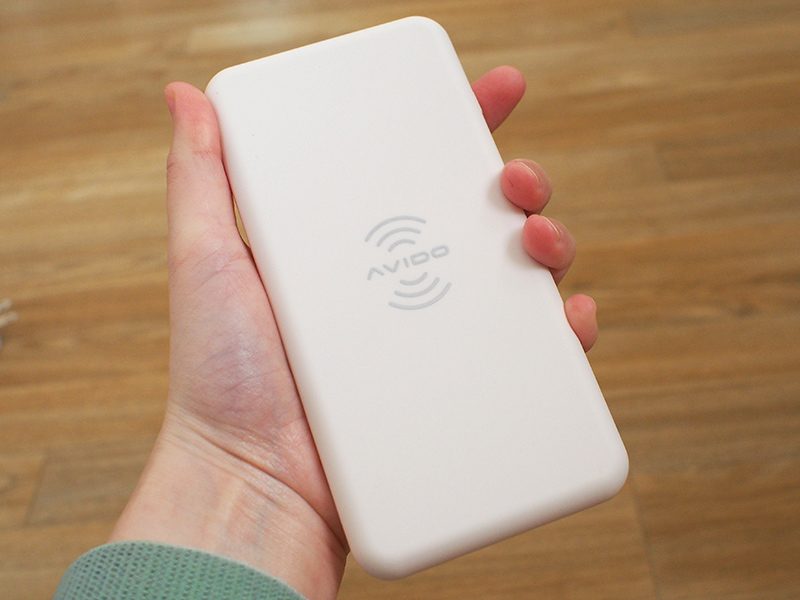
The accompanying power bank is crafted from the same material and is the same size and length as the wireless charging pad. The power bank is even thicker than the pad, which means it’s several times thicker than an iPhone X. Theoretically, you could pocket the power bank just like an iPhone X, but given its thickness, I’m not sure that you’d want to.

The power bank fits better in a bag or a backpack, but it’s still going to take up more room than competing power banks that have the same battery capacity, which is one of the negatives to this accessory.
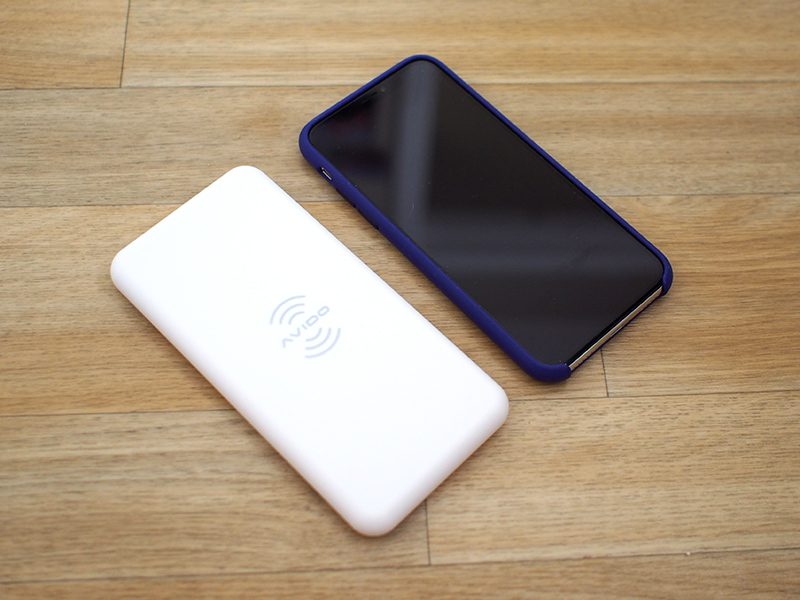
Because it’s the same size as the iPhone X, the wireless charging pad also has a somewhat bigger footprint than most upright wireless chargers, so it’s going to take up more space on a desk than some charging options. Compared to round flat chargers, though, the rectangular shape of the WiBa takes up less overall desk real estate.
At the bottom of the wireless charging pad, there’s a magnetic attachment area where the power bank fits so that it can charge wirelessly. The magnet is nice because the power bank always slips right into the correct place when it needs to be charged with the charging pad, so I never had to fuss with it to find the ideal charging alignment.
There’s also a magnet in the power bank, which works with a separate magnet attachment that’s available for the iPhone to keep it in place while wirelessly charging. My test unit did not come with this accessory so I wasn’t able to try it, but for those who don’t mind a magnet stuck on the iPhone with adhesive, it should make wireless charging via the power bank more convenient.
Sans magnet, it’s not really convenient to charge an iPhone with the wireless power bank unless it’s set on a flat surface because the power bank has no way to attach to the iPhone.
On the wireless charging pad, there’s a single USB-C port to connect it to the included power adapter, while the power bank features both a USB-C port and a USB-A port. The USB-C port can be used to charge the power bank more quickly if you don’t want to use the wireless charging pad, while the USB-A port can be used to charge devices that don’t support wireless charging.

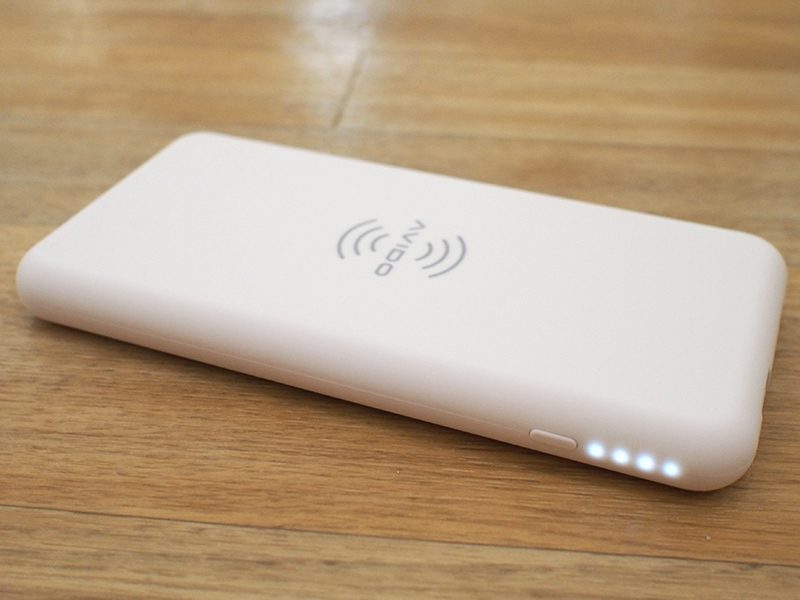
Both the power bank and the charging pad feature an Avido logo front and center, which I wasn’t a fan of. The power bank has four white LEDs on one side that let you know the charge and a bright green LED on the other side when it’s turned on. Both the green LED and the white LEDs come on when the side button is pressed and charging is activated, and the green LED in particular is distracting. It does, however, turn off after a few minutes.
While the iPhone 8, iPhone 8 Plus, and iPhone X support 7.5W wireless charging, the WiBa is limited to 5W charging speeds, which is another downside to the product. It does charge at 10W for Android devices, but Avido told me it was capped at 5W for “safety precautions.”
Avido also pointed out that there’s often not a huge difference between 5W and 7.5W charging, which is not untrue. I’ve tested a lot of wireless charging options both at 5W and at 7.5W. In the best of conditions, you can eke out about 10 to 12 percent more charge over the course of an hour with a 7.5W charger, but the difference can be lower based on temperature and other factors.
I still generally find it worthwhile to choose 7.5W over 5W when possible, so it is disappointing not to see 7.5W support in the WiBa, especially at a $100 price point.
In multiple tests in Airplane mode and starting at a 1 percent charge, the WiBa wireless charging pad and the power bank charged my phone to 28 to 34 percent over the course of an hour, which is what I’d expect to see from a 5W charger. 28 to 34 percent is less than the charge you can expect to see from a wired power bank in an hour’s time, so this isn’t the most efficient on-the-go charging method.

The WiBa boasts a 5,000mAh battery that offers just about enough juice to charge an iPhone X from a dead battery to full once over. In two of my tests, the WiBa power bank charged my iPhone X to 85 percent before dying (again in Airplane mode) but in four other tests, it charged it up to 100 percent with about 5 percent of an additional charge left over.
It’s safe to say that for the iPhone X, and the iPhone 8 Plus, which has a similar capacity battery, you can count on one additional full charge from the fully charged WiBa power bank. You might get one and a half to two full charges for the iPhone 8, which has a smaller battery.

As with the 5W charging limitation, I found the 5,000mAh capacity of the WiBa power bank to be disappointing given the size of the accessory and its price.
Bottom Line
The WiBa charger is a nice idea, and I can’t argue that it’s not convenient, but it doesn’t feel like it’s offering enough utility for the high price tag.
This is essentially a 5W wireless charger paired with a 5,000mAh battery pack. You can buy a 5,000mAh power bank on Amazon for about $10 to $15, and a wireless charger costs right around $15 to $20, for a total of $25 to $35.
That means Avido is charging quite a premium for the sake of convenience. Sure, you don’t need to plug in the power bank while it charges or the iPhone while it charges from the power bank, but what’s that shortcut worth?
I personally would opt for a standalone 7.5W wireless charger and wired power bank over this particular solution, but people who are looking for a grab and go no-hassle solution where the extra battery is simple to charge may prefer the WiBa setup.
I really would have liked to see a higher capacity battery with the WiBa, because a single extra charge for $100 doesn’t feel worthwhile. Power banks that offer three times more capacity don’t even cost $100.
It’s also worth noting that wireless charging may not be the best power bank solution. Most people likely reach for a power bank when an iPhone’s battery is critically low, and faster charging speeds are preferred in these situations. As a reminder, an hour of charging with the WiBa got my iPhone X to about 28 to 34% across multiple tests.
How to Buy
The WiBa Wireless and Stackable Power Bank and Charging Pad can be purchased from the Avido website for $99. An extra 5W charging pad can be added for a total of $139.
Note: Avido provided MacRumors with a WiBa wireless charger and power bank for the purpose of this review, which was returned to Avido at the conclusion of the review. No other compensation was received.
Discuss this article in our forums

