


Apple Pay’s New Promotion Offers Free Postmates Delivery for First Orders From New Customers
Apple is again partnering with Postmates for this week’s Apple Pay promotion, which offers a free delivery from the app when using Apple Pay for your first Postmates delivery. This means that the offer is valid only to new customers who have not previously made an order on the Postmates app before.
If you qualify and are 18 years or older, the promotion will run through September 5, 2018. You can check if Postmates is in your area by downloading the app [Direct Link], and if it is you can then place an order for food, groceries, or many other items. Choose Apple Pay during checkout, and you’ll get the first delivery for free. No promo code is required.
This week’s Apple Pay promotion is themed around the weekend, and Apple encourages customers to “pick up supplies quicker at your favorite places” and pay with Apple Pay, including Baskin-Robbins, Jamba Juice, and Trader Joe’s.
Apple offered the same promotion with Postmates back in May, and previously partnered with the delivery app in one of the first Apple Pay promotions last November. Other recent promotions include partnerships with StubHub, TGI Fridays, Adidas, Instacart, Fandango, and more.
Tags: Postmates, Apple Pay promo
Discuss this article in our forums
Eve Systems Announces New Light Strip, Power Strip and Light Switch
Eve Systems, formerly Elgato, today announced several new additions to its popular HomeKit product lineup, including a power strip, a light strip, and a new light switch for use in Europe.
The Eve Light Strip follows the Eve Flare, a HomeKit-connected mood lamp that was released in May. The Eve Flare was limited to countries in Europe and is not available in the U.S., but the Light Strip will see a wider release.
The LED light strip works with a selection of pre-installed lighting scenes and allows users to set their own colors. According to Eve, the Light Strip provides up to 1800 lumens across its two meter length thanks to triple-diode architecture. Eve Light Strip can be extended to a total length of 10m with additional light strip purchases.

Unlike most Eve products, which connect to HomeKit over Bluetooth, the Light Strip connects using a 2.4GHz Wi-Fi connection. It does not, however, require a bridge and works on a standalone basis.
The Eve Power Strip is a triple-socket power strip that adds separate HomeKit-based controls to three devices that are plugged into it. It features a black housing that’s framed in aluminum, with built-in surge protection safeguards.

With the Eve app, the Eve Power Strip is able to measure power consumption and provide energy cost projections, allowing users to keep track of power usage for the devices that are plugged in. Like the Eve Light Strip, Eve Power Strip connects to a HomeKit setup using a 2.4GHz Wi-Fi connection.

The third product Eve is announcing today is a new Eve Light Switch, which is designed to replace common European switches. Eve already has a Light Switch compatible with U.S. setups, and this new version expands the light switch to Europe.

With HomeKit integration, all Eve accessories can be controlled via Siri voice commands, through the Home app, or through the dedicated Eve app. Eve accessories can also be integrated into HomeKit scenes and automations alongside other HomeKit products.
Eve Light Strip, the new Eve Light Switch, and the Eve Power Strip will be available at a later date from the Eve website and from retailers like Amazon. The Light Switch will be priced at 99.95 euros, while the Light Strip will be priced at $79.95. Pricing for the Power Strip has yet to be announced.
Tags: HomeKit, Eve
Discuss this article in our forums
Apple Recently Visited With Taiwanese Makers of Thinner and Brighter MicroLED and MiniLED Displays
Apple representatives attended the Touch Taiwan display industry convention in Taipei this week, holding private meetings with Taiwanese display makers AU Optronics and Epistar, according to the Economic Daily News.
The report claims Apple held the meetings to learn more about each company’s development of next-generation display technologies MicroLED and MiniLED, suitable for future generations of iPhones and Apple Watches. As those names suggest, both technologies utilize arrays of very tiny LEDs.
In May, AU Optronics received a Best in Show award at the Display Week 2018 convention in Los Angeles for its multiple advanced display technologies, including the “world’s highest resolution and full color TFT driven 8-inch micro LED display technology,” according to the company’s press release.
Apple is said to be most interested in MicroLED, as MiniLED is described as more of a transitionary technology that it may skip.
Apple has been exploring MicroLED displays since at least 2014, when it acquired MicroLED display maker LuxVue. In 2015, Apple reportedly opened a secretive laboratory in Taoyuan, Taiwan to research the technology, but has since shifted the efforts to Santa Clara, California, near its headquarters.
In addition to AU Optronics and Epistar, Apple has reportedly collaborated with its contract manufacturer TSMC to develop methods of mass producing MicroLED panels. Apple also reportedly held talks with another Taiwanese company PlayNitrite, which has developed its own MicroLED solution PixeLED.
MicroLED displays have many of the same advantages as OLED displays have over LCDs, including improved color accuracy, improved contrast ratio, faster response times, and true blacks given both have self-lit pixels, but they are even thinner, much brighter, and more energy efficient than OLED panels.
 Image Credit: TrendForce
MiniLED displays also have benefits such as improved brightness and contrast ratio, but they have a backlight like LCDs.
As with OLED, Apple’s use of MicroLED would likely start small, with the Apple Watch, followed by the iPhone. A recent report said Apple may use MicroLED for its widely rumored augmented reality glasses as well.
All in all, the transition to MicroLED should lead to even better displays and longer battery life on future Apple devices.
Tags: Micro-LED, AU Optronics, Epistar, Mini-LED
Discuss this article in our forums
If you’re still using Yahoo email, it’s still spying on you
Yahoo’s email platform might have been picked up during the big Verizon buyout of 2017, but that doesn’t mean much has changed at the longstanding internet company. Just as it has in the past, Yahoo mail continues to scan the content of its users’ emails in order to sell that information on to advertisers. Although far from the size it reached at its peak, with some 200 million users said to be affected by this potential privacy invasion, the impact is far-reaching.
Revealed by sources that spoke to the Wall Street Journal, Yahoo’s parent company, Oath (that is itself a subsidiary of Verizon) claimed that it only scans promotional emails, and suggests that free email would always come with some associated costs. As the paradigm goes, if you don’t pay for a product, you are the product. But as The Verge highlights, Yahoo also conducts this form of email scanning on its premium mail platform, which costs users $3.50 per month.
The entire system can be opted out of, but to do that you have to jump through some very specific hoops and they don’t lead you to a settings menu, which could be confusing for those who typically consider themselves more savvy about such oversight of their personal content.
Oath claims that it scrubs any personally identifiable information from the information it sells to advertisers and doesn’t target anyone directly. Its system involves categorization of its user base, thereby sending users ads based on their perceived personality, financial status, or current employment based on the algorithms Yahoo uses to discover such information about them.
According to the Wall Street Journal sources, Oath is well aware that many people use Yahoo accounts for spam, which could mean that the company is simply using this scanning system to try and scrape as much value as possible from its acquisition as the relevancy of Yahoo Mail continues to fall. However, for those who do continue to use the online service, it could be cause for concern.
The titan of the industry, Gmail, has taken steps in recent months to improve the privacy of its service, introducing new features like timed emails and a confidentiality mode. Some warn, however, that its linking system could ingrain poor habits among users which could put them at risk of malware infection.
Editors’ Recommendations
- Just when you thought spam was dead, it’s back and worse than ever
- Homeland Security is worried about Gmail’s confidentiality mode
- Firefox’s new Monitor service will let you know if you’ve been hacked
- Here’s how to send a text message from your email account
- People are reading your email. Here’s how to make them stop
Onikuma’s K6 is a sub-$30 gaming headset you should definitely consider

It certainly looks like a gaming headset, but is it worth the budget price?

Onikuma has a good range of gaming accessories, focusing mainly on gaming headsets, keyboard, and mice. The K6 gaming headset costs about $28 and looks quite impressive coming out of the box.
It’s styled for gamers who like RGB lighting, but when it comes down to game time, how does it sound? And how well does the microphone work? I used this headset for about a week to find out what it’s all about.
Affordable and comfortable
Onikuma K6 gaming headset
A solid headset that’s comfy and cheap.

This budget gaming headset is a cost-effective, comfortable option if you have multiple consoles and devices to hook up to.
$28 at Amazon
Pros:
- Around-the-ear cups with plenty of padding.
- RGB lighting.
- Long cable.
- Clear sound.
- Multi-platform.
Cons:
- Need an adapter for older Xbox One controllers.
- Some mic looping if the sound is too high.
- No clip on the inline remote.
What you’ll love about the Onikuma K6 gaming headset

The Onikuma K6 seems like a sturdy set of headphones right out of the box, with a wide band that adjusts for length by about an inch on either side. The ear cups don’t articulate to better hit the sides of your head straight on, but there’s about an inch of pleather-coated padding on both ear cups that removes the need for extra moving parts.
I was concerned that these headphones would be too heavy to wear comfortably for long periods of time — I’m coming from a lightweight, bargain-bin headset — but I had no trouble gaming for hours on end. The padded cups are large enough to fit around my (big) ears so there’s no pain there, and there’s likewise plenty of padding on the bottom of the headband. The headset is just tight enough to not move around, removing the need for constant adjustments while you’re playing.
| Drivers | 50 mm |
| Audio | Stereo |
| Sensitivity | 108 dB +/- 3 dB |
| Speaker impedance | 32Ω |
| Speaker frequency range | 20 Hz to 20 KHz |
| Mic diameter | 60 mm |
| Mic sensitivity | -38 dB +/- 3 dB |
| Mic frequency range | 100Hz to 16 KHz |
| Connection | Split 3.5 mm cableUSB-A |
Some of the bulk that had me worried about weight comes from the LED lighting on the outside of the ear cups. There’s a funky kind of turbine design in black and white that’s always visible, but with the USB-A port plugged in and the mic enabled on the inline remote, you get an accent that switches between red, green, blue, purple, yellow and teal. It’s a great addition for anyone who wants their gaming gear to light up, and you can always unplug the USB-A cable to go dark.
The headset has about an eight- or nine-foot braided cable that splits at the bottom for USB and 3.5 mm, and there’s another splitter included in the box if you’re using the headset with your PC (which requires mic-in and audio-in). As for consoles, you’ll only get the extra lighting if you plug in with USB, which in a lot of cases isn’t possible because you’re hooked up to your controller. For those of you using the first-generation Xbox One controllers, a separate Xbox One Stereo Headset Adapter is needed for full functionality.
The dual stereo speakers aren’t going to match the sound from a headset that costs $100 and up, but for my purposes — non-competitive PC gaming, listening to podcasts, meetings — they worked without flaw. They get loud, they stay clear, and the rotating microphone can be put up when not in use. The thick padding around the cups also does a decent job of cutting out ambient sound around you, giving a nice immersive feeling while you’re in a game.
What you’ll hate about the Onikuma K6 gaming headset
For the price, there’s not a lot to hate about the Onikuma K6, and there’s really nothing I can’t deal with. However, I do miss a clip on the inline remote, as it would take some of the weight off of the headset. The cable seems durable, but it is heavy, especially when you’re standing.
The other issue I came across a couple of times was mic looping, where others in my party could hear my audio coming across the mic. This only happened when I had game sound cranked up, and moving the mic away from my face — it has a long flexible arm in addition to rotating up when not in use — also seemed to help the problem. The mic is sensitive enough that it will still pick up your voice even if it’s not directly in front of your mouth.
Onikuma K6 gaming headset bottom line
Onikuma is offering a free replacement policy and a one-year money-back guarantee on its K6 headset, so there is definitely some confidence behind the product. For my own purposes, like general PC gaming, the headset is right on, though I could do with the LED lighting.
The cable is long enough — though a clip on the inline remote would be nice — and I get clear, loud sound from the speakers. The mic might pick up a bit of the audio coming out of the headset for an annoying loop when I have my sound up too high, but for the most part, it delivers my voice clearly to those I’m playing with. The best part, though, is that the padding and size of the ear cups mean I can keep the headset on longer than I really should.
Should you buy this gaming headset?
If you have $30 to spend on a device that truly looks like a gaming headset, and you have a couple of consoles and a PC lying around with which to use it, the option from Onikuma should certainly be considered.
4
out of 5
It will probably work best with a PC thanks to close proximity to a USB port for lights, but it will certainly work with second and third-gen Xbox One and PlayStation 4 controllers.
See at Amazon
How Does Tello Mobile Stand Out From Other MVNOs?

If you’re on the verge of losing faith when it comes to reliable wireless carriers, take a look at Tello Mobile, the Sprint powered MVNO that made quite a splash in the market in the last year when it comes to outstanding prices and reliable service.
While it’s no secret that MVNOs are a cost-effective alternative to the big 4 carriers, not all offer the same value for money.
Android users can now enjoy Tello Mobile’s plans & perks, as well as the same quality and coverage as the big players, minus the huge monthly costs. As long as your Android phone is compatible with Sprint, you’re in for a wireless treat.
No More Predefined Phone Plans
Tello Mobile’s biggest hook is the freedom to build your own plan instead of getting the predefined packs forced as default by other carriers.
Tello customers can choose the amount of minutes, text and data they need, and go up or down as they please, free of charge.
Nowadays, smartphones have become a small extension of our persona, so it’s only natural people want flexibility and tailor made solutions that can adjust to their way of life. Tello mastered the well known need of a customizable experience that all Android lovers have.
Tello’s plans range from $5/month to $39/month, all with a side-dish of savings. Competitive pricing, no strings attached and a flexible service is the perfect combo that sets Tello apart. You can have the popular plan with 1GB of data, unlimited minutes & text for just $14/mo, go for 2GB + unlimited minutes & text for $19/mo or even start slower, with a talk & text only plan, perfect for kids, or seniors.
Freebies: unlimited 2G data, hotspot, visual voicemail, free calls to Canada, Mexico & China included in every plan. You can always mix your phone plan with Pay As You Go Credit for your international calls, and enjoy low rates all around.

Human Customer Service — No Robots
A 9.1 rating based on over 2.9k unbiased reviews on TrustPilot, makes it clear that this carrier is all about customer satisfaction.
With practically no waiting time and 4 different languages spoken by Tello support team, it’s no wonder they’re among the only wireless services to get a 5 star rating.
Real Cell Phone Service
A lot of alternative phone service providers offer primarily voip service.
That is not the case with Tello, which provides actual cell phone service on the Sprint network so you don’t have to worry about constant Wifi access to ensure the quality of our calls.
Wifi calling is however available through My Tello App – great when abroad to make calls over Wifi to any country in the world using their Pay As You Go balance or to the US using their Plan balance.
Transparent all the way
The budget-friendly MVNO keeps things easy and upfront.
The signup process is hassle free and everything can be managed online, via the website or the dedicated Android app.
Once you sign up for Tello, their app makes it easy to review your plan and paygo balance, check your all records, set payment methods or even upgrade or downgrade your plan for no added cost.
There are no contracts and no credit checks.
No extra fees whatsoever, not even for porting out.
Is your Android phone a match with Tello?
Not matter the brand, if your Android device was manufactured for the USA and is compatible with the Sprint network, you’re good to go.
Got an Android you want to enroll? Dial *#06# and you’ll view your ESN code. Use the code to check if your phone is Tello compatible here.
Before you enroll, be sure to check Sprint coverage in your area. Sprint has been doing a lot of work on improving its signal and Tello customers clearly enjoy everything this MVNO has to offer:
“Tello for Life”
“…What you guys are doing in the mobile phone market is unmatched. I get unlimited talk and text I used Ting before swapping to you. While I could keep my bill about $15 a month, it was with less than 300 minutes or texts. Now it’s $15 and that’s with a gig of data thrown in. I also get to use any phone that I want. ..”
“Honest”
“Honest, quick results. I was with sprint for over a decade, and I’m more impressed with tello than I have been with sprint. Thank you for all that have helped me!”
“Tello is the best thing since sliced…”
“Tello is the best thing since sliced bread. Great rates, great customer service. I hope the founders of this company will soon be millionaires, because they deserve it. I have told everyone that I know about it and they can’t believe how tremendous everything about Tello is. I am a big fan.”
Students can stream Spotify, Hulu, and Showtime all for $5 a month
So much content for such a tiny price.
Listen to your favorite music, watch your favorite shows, and catch up on a few series you couldn’t watch before with this expanded bundle from Spotify that now includes Hulu and Showtime. Spotify first teamed up with Hulu late last year to offer a similar service, but Showtime is a new addition that doesn’t add anything to the price. That’s a great combo of programs, especially if you don’t have cable but do have access to some high-speed Internet. You will need to prove you’re attending a Title IV accredited institution to get the deal, so no fooling the system.

The bundle includes a subscription to Spotify Premium, Hulu with Limited Commercials, and Showtime streaming services. The Hulu subscription is regularly $7.99 a month by itself. Spotify Premium is $9.99 and Showtime is $10.99 a month when purchased directly. There are lots of ways to get discounts on all of these services, but getting all three together for $4.99 is nuts.
The original plan combining a subscription to Spotify and Hulu eventually became available to everyone for $12.99, which was still a savings of $5 a month over having both plans individually. Spotify might do the same for this expanded plan eventually. We’ll definitely be keeping an eye out for that.
That $4.99 a month for students is right in line with other streaming services. Both Amazon Music Unlimited and Apple Music have plans at the same price point for students, but neither of those plans include a video service just yet.
The even crazier part is if you sign up for Spotify’s bundle you’ll get the first three months for 99 cents, saving you even more money over time. Plus, if you’re already subscribed to Hulu or Showtime you can still get this deal. You’ll just have to change some billing info around.
See at Spotify
The most essential cases for your Essential Phone
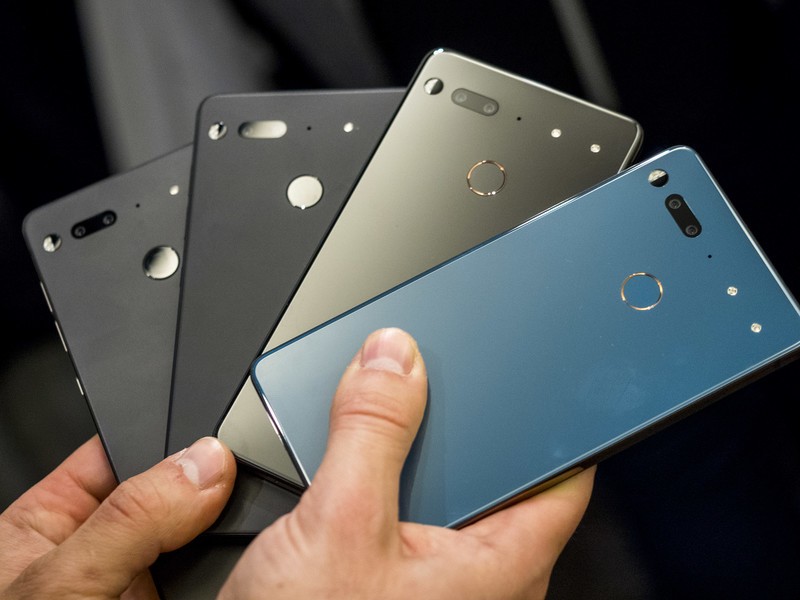
Keep your Essential Phone safe and functional with a quality case!
The Essential Phone was the first phone released by Andy Rubin’s new company in 2017, and while it didn’t blow away the competition, it certainly was a trendsetter for the things we’ve seen on smartphones since — shrinking bezels and screen notches.
We’ve seen some deep discounts including it being the best deal of Prime Day; there’s a ton of new Essential Phone owners out there. If you are among them, you should absolutely get a case. Do note that the 360-camera accessory won’t be compatible with most cases, although we’ve added a couple of cases that are designed to accommodate the accessory.
- Incipio DualPro
- Incipio NGP Pure clear case
- TUDIA Ceramic Feel case
- TUDIA Carbon Fiber case
- Feitenn Flip Wallet case
- Poetic Guardian Full-Body case
- TUDIA Snap On Case
- DUEDUE Heavy Duty Hybrid Case
Incipio DualPro
Best Overall

This case offers dual-layer protection that will keep your Essential phone well protected from scuffs and drop damage. The hardened outer shell features a soft touch finish that feels great in your hand and the overall design minimalist. Get yours for around $20
See at Amazon
This is the first of two Incipio cases on our list, and it’s our top pick overall because of its minimalist design and soft touch finish. It’s an excellent option for keeping your Essential phone safe that’s available at the best price we’ve seen — just $20.
Incipio NGP Pure clear case
Best Clear Case
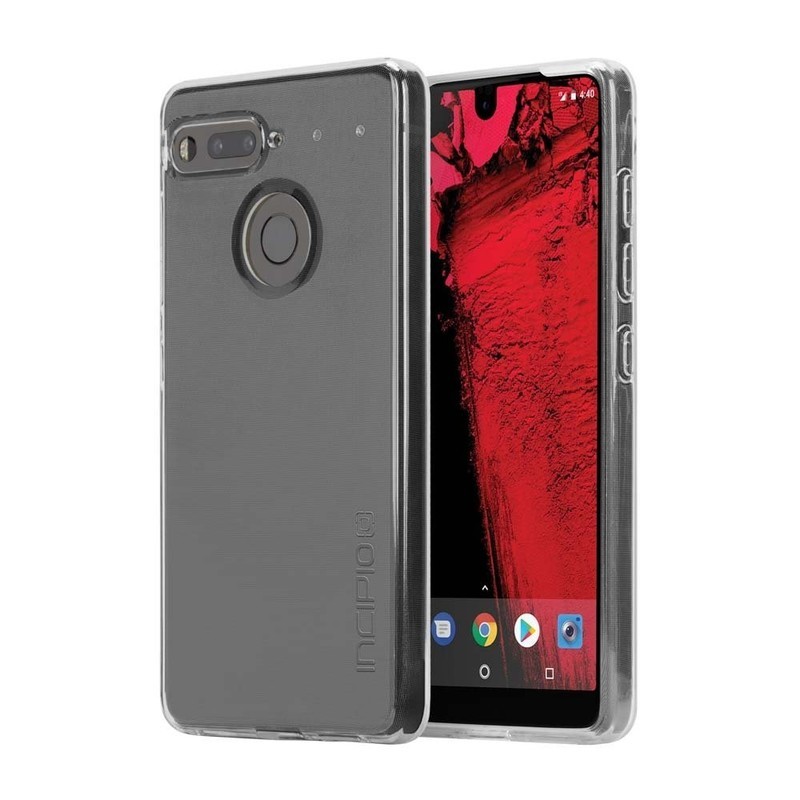
If you bought your Essential Phone because of its fresh design choices, you might be wary to cover that ceramic up with an opaque plastic case. Incipio has you covered with this one-piece clear case that offers a clear view of your Essential Phone while keeping it protected. Get yours for as low as $13 on Amazon!
See at Amazon
Made of a flexible polymer material, this is an easy case to install with full coverage around the edges of your phone, including a lip around the screen and protection for the camera around back.
TUDIA Ceramic Feel case
Feels like Ceramic

If you love the feel of that Ceramic backing but also want to keep it safe, TUDIA offers this case that mimics the same hand feel of the Essential Phone’s ceramic while keeping the device itself safe. It’s a thin and minimalist case that’s available in five different styles (including the super stylish white marble pictured) for just $20.
See at Amazon
The Essential Phone was designed with a ceramic backing — not something you see on many major phone releases. So if you want to retain that feeling in the hand, TUDIA designed the case with tempered glass on the back of the case that also adds extra protection. By doing this, they’ve managed to maintain the look and feel of the Essential Phone which is pretty great.
TUDIA Carbon Fiber case
Spigen alternative

This one-piece case is made of TPU and features carbon fiber accents along the top and bottom, along with textured sections along the sides. The design of this case is not compatible with the 360-degree camera attachment, but it does offer great protection for your phone while keeping the camera, fingerprint sensor, and buttons fully accessible. Get yours for just $10.
See at Amazon
One of our favorite cases is the Spigen Rugged armor case, but Spigen didn’t design cases for the Essential Phone. Fortunately, TUDIA stepped up and offers a very similar one with some extra accents that should help with grip along the sides.
Feitenn Flip Wallet case
Best wallet case

This functional wallet case combines synthetic leather or fabric with a soft and clear TPU shell on the inside to provide top-notch protection for your phone. Cases start at around $10 and are available in your choice of six color styles.
See at Amazon
Looking to add some extra functionality to your phone carry? A wallet case lets you store your ID, credit card, and some cash right along with your phone so everything you need for a night out is in one place. There’s a magnetic closure to keep the front flap closed when not in use, and it can also be folded over to be used as a kickstand for watching videos.
Poetic Guardian Full-body case
Best Full-body Case
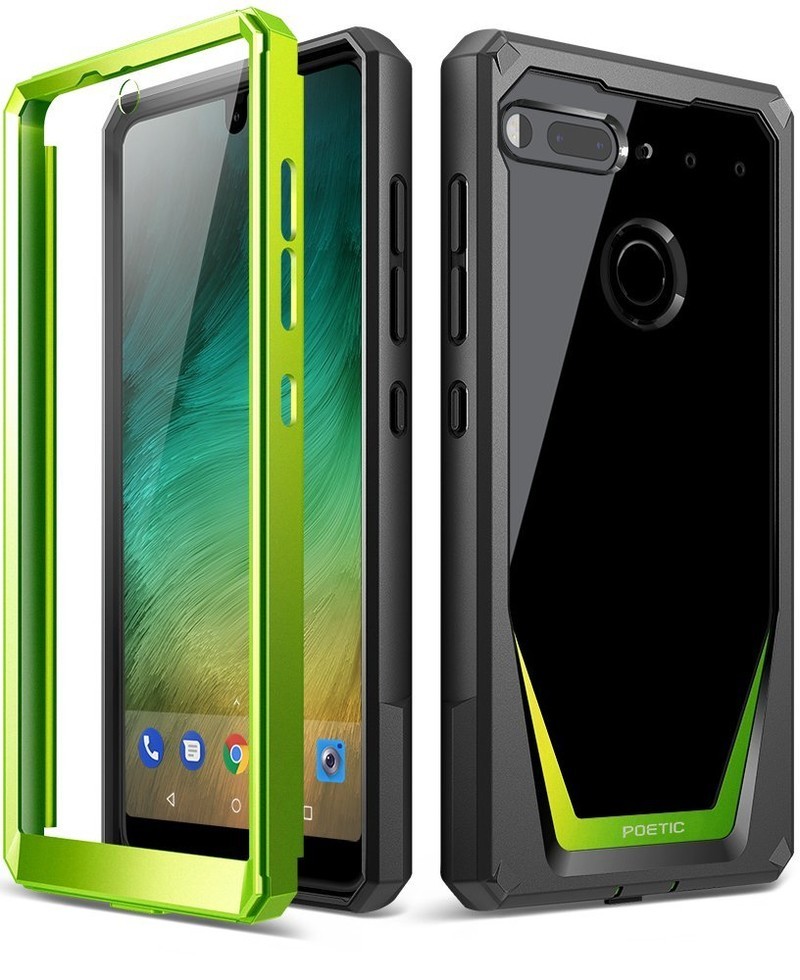
The Poetic Guardian is a full-body case that includes a front plate with a built-in screen protector. Combining soft and shock absorbing TPU with rigid PC bumpers offers great protection for your phone and a clear back panel to show off the design of your phone. It’s available in four fun color styles for just $17
See at Amazon
Looking for something that combines flashy design with rugged protection? Check out these Poetic Guardian cases which combine quality protection along with the views of a clear case.
TUDIA Snap On Case
Best Case for Add-ons

It’s a thin case made of polycarbonate material that offers basic protection against drops and scratches — except it also leaves the top corner of the back exposed so you can attach the 360-degree camera without removing the case. Priced at just $11, this case accommodates the use of Essential’s 360-degree camera accessory.
See at Amazon
If you want to get the most out of the Essential Phone and that camera accessory, then you might be interested in this case from TUDIA. This case does somewhat compromise the effectiveness of the case by leaving an eighth of the back of your phone exposed, but if you want the 360-camera accessory (just $47), this is a great option.
DUEDUE Heavy Duty Hybrid Case
Best Heavy Duty Case

This rugged case offers triple-layer protection for your phone so that your phone is always well protected — but if the moment strikes you and you want to capture some 360-degree videos or photos, simply fold down the top half of the back of the case and voila! You have access to the accessory port for attaching that camera.
See at Amazon
This case option is the best solution we’ve found for keeping your Essential Phone protected while also accommodating the 360-degree camera. Available for $10, this case lets you make use of the camera accessory without compromising any protection.
Update August 2018: Updated pricing information and removed options that are no longer available. These are still the best options for the Essential Phone!
Essential Phone
- Essential Phone review
- Essential Phone specs
- The latest Essential Phone news
- Join our Essential Phone forums!
Amazon
Best Buy
Sprint
Telus
How to clean your Oculus Go

Clean off the jelly fingerprints and get back to the fun.
Now that the Oculus Go has hit store shelves, everyone wants to get their hands on one. So you bring it home, get it all set up, play your device and have an amazing time — except when you go to put it down, you put it into a puddle of milk your toddler spilled three hours before. Or, maybe you just want to maintain the cleanliness that it came out of the box with. Whatever your reasons, we’re here to help you figure out how to clean your Oculus Go headset. From the safest cleaners to the proper cleaning steps are, you have come to the right place.
Warnings
When it comes to cleaning your VR headset, there are a few things you might not know. Before you get your supplies to clean — or worse, guess the right strategy — let us help you out.
Do not use chemicals on your lenses
This will cause permanent damage to your lenses that will take away from your experience.
Do not use abrasive cloths
Even if you’re not using them on a surface you need to see from, make sure you aren’t using any abrasive cloths. Remember, this headset has to go back on your face, and if you use a brillo pad to wipe out the inside, you’re just going to make your face hurt from the rough plastic you’ve created.
Remember to clean your device
Even though it’s a preference, you don’t have to clean your headset after every use. But you do want to make sure you give it a good wipe down here and there. This will make sure your lenses are always showing you pristine images and you aren’t sharing germs with your friends (or yourself)!
Disinfecting wipes or casual maintenance

So what you want to do is get yourself some alcohol-free sanitary wipes. The reason you don’t want alcohol in the solution is that the alcohol in most cleaners will actually damage the lenses to your VR headset. This means you’ll get warps in the glass or even color distortion which will absolutely ruin your headset. So, even if you think you’re super careful with your cleaning, it’s best to not take any chances of a drip or slip. You can use these wipes on just about your entire headset, including the controller, but you still want to do your best to avoid the lenses anyway.
Alcohol-free sanitary wipe

There are two different types of disinfecting wipes that should be in your cleaning cabinet if you own a VR headset. The first one is an alcohol-free sanitary wipe. You can find these wipes for about $8, and they’re perfect for cleaning out the headset between turns with friends. This way when one person is done using your Oculus Go, they can wipe off all their sweat and germs before passing it around.
See on Amazon.
The deep clean

First thing’s first, you want to make sure you have a dry microfiber cloth, a can of compressed air, a few Q-tips, and non-alcoholic disinfectant wipes. These will be all the handy tools you might already have available in your home. If not, there’s no problem. They’re all easily found on Amazon.
The necessities

You can find a can of compressed air for $9 and a pack of microfiber cloths for $12, both on Amazon.
See on Amazon.
Take your can of compressed air and get into all those hard-to-reach places to knock all the dust lose.
Use your Q-tip to finish cleaning the dust knocked loose.
Use your Q-Tip to wipe out the edges of your lenses.
Use a dry microfiber cloth to wipe down the outside of the device.
Use a non-alcoholic wipe to clean out the hard plastic and foam interface.
Use a dry microfiber cloth to wipe down the inside of the device.
Use a dry microfiber cloth to clean the lenses – circular motions!
Use your non-alcoholic wipes to clean off the controller.
What’s your routine?
How often do you clean your headset, and what are your favorite products to use? Tell us in the comment section below!
Updated August 2018: Updated this guide with new formatting so that it’s even easier to read!
Be kind to the planet with these new green Nimble charging accessories
Tech for good.

Nimble, a company founded by people from Mophie, is here to change the way we charge our phones. The brand just started selling tech charging accessories on its website, and items will be listed on Amazon soon too.
Here’s the thing. The tech products we rely on, and the accessories for those products, don’t come at a low cost. Yes, yes, maybe you got yourself a nice Thrifter deal, but I’m not talking about cost in terms of money here. The vast majority of the time, things like phones, portable chargers, and cables are made with components that are awful for the environment. Plastic, metal, toxic chemicals like lead and mercury… it’s all bad, and it gets even worse when items aren’t recycled properly. We’re talking chemicals-in-groundwater bad. Irreversible-mercury-contamination bad. I’m not here to lecture you for something that almost everyone is guilty of, but electronic waste is super-harmful to our planet and the people that live on it.
Nimble is here to help. Currently, the product lineup consists of a wireless charging stand, wall chargers, a travel-friendly wireless charger, four portable battery chargers with various mAh capacities, and a USB-C cable. Prices start at $19.95, and the best part is, the items are much more eco-friendly than your average consumer electronics. The company works with thoughtful suppliers and aims to work with better materials, like bioplastics and organic hemp. The packaging is environmentally responsible, the pricing is a benefit of digital-only branding, which also cuts down on transportation pollution, and the brand’s One-for-One Tech Recovery Project includes a prepaid envelope with every purchase. Fill it with old or obsolete electronics and send it in to get recycled. It couldn’t be simpler than that.
The items are high quality, too. Every charging brick has an 18W USB-C port, there are multiple 15W USB-A ports, there’s a bioplastic-and-magnet cable management system, the wireless charging pad has an additional USB-A port and a kickstand…the list goes on and on. You can really tell how much thought Nimble put into the items it makes. More accessories are coming within the next year, too.
Perhaps next time you’re in the market for a new tech accessory, you can do yourself and the planet a favor and pick one up from Nimble.

