


Can I use two Nest Protect detectors in the same home?

Best answer: Yes. Up to 10 Nest Protects can be used with the same Nest account, in one or multiple locations.
Amazon: Nest Protect ($119)
Multiple Nest Protects are supported
You probably have more than one smoke alarm in your home right now, and that’s because multiple units are needed according to national and local law. The National Fire Protection Association (NFPA) regulations for residential dwellings — single family homes that don’t house a business or provide care services — say you’ll need an alarm in multiple areas, including all sleeping areas, every level that’s separated by a door, new homes built since 2007, and for certain-sized dwellings, one every 500 square feet of floor space.
Luckily, your Nest account allows up to 10 Nest Protects enabled at once and these can all be in the same location or spread across several different locations (we recommend the latter).
And you’re going to want to get that full protection. Nest Protects are both smoke and carbon monoxide detectors, so you’ll be covered. However, it goes beyond just a typical smoke detector. Nest Protects are smart, so they can not only regulate themselves but have multiple settings, including a Home/Away Assist feature that uses sensors to detect whether you’re home or not. It can also contact up to 20 people via smartphone if one of them goes off.
Best of all, because they’re smart, they won’t deafen you while going off. That’s literally music to our ears.
Our pick
Nest Protect

$119 at Amazon
If you’re replacing or adding smoke detectors, the Nest Protect is your best buy.
A smoke detector needs to warn you when appropriate, and not give false alarms. The Nest Protect excels at both and also provides excellent carbon monoxide detection. Because they’re from Nest, they are easily integrated into any home automation plan and work with Amazon Alexa and Google Assistant.
This is everything we know about the OnePlus 6T!
OnePlus is going to end 2018 with a bang.

Ever since it was released this past May, the OnePlus 6 has been one of the absolute best values in smartphones we’ve seen in 2018. The phone’s only gotten better thanks to striking new colors and fast software updates, and right around the corner is its incremental successor — the OnePlus 6T.
The 6T likely won’t shake up the OnePlus 6’s formula too much, but even so, it’s already shaping up to be one of the year’s most interesting smartphones.
Without further ado, here’s everything we know about the OnePlus 6T!
The latest OnePlus 6T news
September 4, 2018 — Retail box reveals an in-display fingerprint sensor and “waterdrop” notch
Our first big OnePlus 6T leak has finally arrived!


A retail box for the phone recently appeared in a few photos online, and while the phone itself isn’t anywhere to be seen, the packaging actually confirms a couple key details about it.
Thanks to an outline of the 6T inside the box, we can see that it adopts a very similar design compared to the Oppo R17 that was announced in mid-August. As such, we’ve got a phone with very slim bezels, a tiny chin at the bottom, and a waterdrop style notch at the top.
This outline also shows a fingerprint near the bottom center of the display — suggesting that the 6T will be the first OnePlus phone to adopt an in-display fingerprint sensor.
August 17, 2018 — OnePlus 6T to launch on T-Mobile in the U.S. in October
A new report from CNET surfaced today, and if you’ve been waiting for more juicy details on the OnePlus 6T, there’s plenty for you here.
OnePlus phones in the U.S. have always been sold exclusively as unlocked handsets through OnePlus’s website, but with the 6T, OnePlus will be launching the phone on its first carrier partner in the States — T-Mobile. The T-Mobile version of the OnePlus 6T is said to be “optimized for T-Mobile’s network” and will work beautifully with the Un-Carrier’s 600Mhz band.
Pricing for the OnePlus 6T is said to be about $550 (a slight increase from the $529 OnePlus 6) and it’ll launch at some point in October.
August 14, 2018 — The new Oppo R17 is likely the phone the OnePlus 6T will be modeled after

If you’ve been following OnePlus for a while, chances are you know that its parent company is Oppo. OnePlus typically uses Oppo phones as references for its own hardware, and this year, the reference device for the OnePlus 6T will likely be the all-new Oppo R17.
While the 6T won’t be identical to the R17, the phone’s biggest features will likely carry over — including the waterdrop notch at the top of the display and all-glass back.

The R17’s notch is one of the smallest we’ve ever seen, and should this make its way to the 6T, it’ll be a big win for the phone’s design. The display below that measures in at 6.4-inches, and to not much surprise, retains a resolution of 1080 x 2280 Full HD.
Where will I be able to buy the OnePlus 6T?

Like previous OnePlus phones, we’re certain that the OnePlus 6T will be sold unlocked on OnePlus’s website.
However, new this year in the U.S., OnePlus has apparently secured its first carrier partner.
In addition to selling the phone unlocked, OnePlus will also sell the 6T via T-Mobile. The unlocked variant will work just fine on TMO, but by having the phone sold directly through the carrier and available to purchase via monthly financing, this should hopefully get the 6T in more people’s hands than previous OnePlus devices.
When will the phone be released?
According to a report from CNET, the OnePlus 6T will launch this fall — sometime in October, to be exact.
Seeing as how the OnePlus 5T went on sale November 21 and sales for the 3T opened up November 28, we have no reason not to believe OnePlus will shoot for an October launch. It’s not uncommon for OEMs to move up launch dates by a month or so compared to previous releases, and seeing as how the next-gen iPhones will be announced on September 12 and the Pixel 3 will be unveiled on October 9, OnePlus appears to be slotting itself in nicely with those big-name launches.
How much will the 6T cost?

Per that same report, the OnePlus 6T will cost $550.
In typical OnePlus fashion, that’s a minor price hike compared to its past releases. Here’s how the $550 OnePlus 6T will compare to previous OnePlus phones:
- OnePlus 6 — $529
- OnePlus 5T — $499
- OnePlus 5 — $479
- OnePlus 3T — $439
- OnePlus 3 — $399
OnePlus 6 review: The matter is settled
OnePlus 6
- OnePlus 6 review
- OnePlus 6 vs. OnePlus 5T: How much changes in six months?
- OnePlus 6 vs. OnePlus 5: Should you upgrade?
- These are the official OnePlus 6 cases
- The OnePlus 6 doesn’t work on Verizon or Sprint
- Join the discussion in the forums
Canada Daily Deals: GoPro Hero6, Bluetooth headphones, and more
Whether you’re looking for new tech gear or household items, we’ve got you covered.
We found plenty of great deals today that include big discounts on GoPro’s latest action cam, Bluetooth headphones for working out or zoning out, roasted coffee beans, and much more!
View the rest of the deals
Each day, the Thrifter Canada team scouts out and shares amazing deals on products you know and love, helping you find the best prices on the ‘net.
For more Canadian deals coverage, be sure to keep an eye on Thrifter CA and follow the team on Twitter.
MacRumors Giveaway: Win a TS3 Plus Thunderbolt 3 Dock From CalDigit
For this week’s giveaway, we’ve teamed up with CalDigit to offer MacRumors readers a chance to win a Thunderbolt Station 3 Plus dock, which offers 15 ports for Apple’s Thunderbolt 3-compatible Macs.
Priced starting at $299.99, the TS3 Plus can replace all of your other dongles because of the sheer number of ports that it offers. Available in both silver and a new space gray option, the TS3 Plus will match Apple’s devices.
Design wise, the TS3 Plus, which is designed to be a desktop dock, is made from aluminum with ribbing on the sides, and it can be positioned either horizontally or vertically to work with any desk setup.
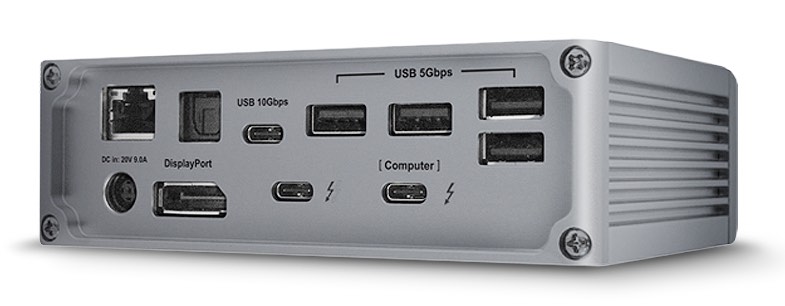
At the front and back, the dock includes two Thunderbolt 3 ports, an SD card reader, five USB-A ports, one USB-C Gen. 1 port, one USB-C Gen. 2 port, a DisplayPort 1.2 port, a Digital Optical Audio port, Audio In & Out, and a Gigabit Ethernet port.
The included USB-C Gen. 1 port offers 5Gb/s throughput, while the USB-C Gen. 2 port offers 10Gb/s throughput, ideal for high-performance SSDs.

The TS3 Plus provides 85W of charging power so it’s able to charge Apple’s 15-inch MacBook Pro models, along with the 13-inch 61W models with an included Thunderbolt 3 cable. It supports one 60Hz 5K display via Thunderbolt 3 or two 60Hz 4K displays using the DisplayPort and Thunderbolt 3 connections.

CalDigit’s TS3 Plus is compatible with 2016 and later 13 and 15-inch MacBook Pro models that support Thunderbolt 3, the 2017 iMac models, and the iMac Pro. We have two of the CalDigit docks to give away.
To enter to win, use the Rafflecopter widget below and enter an email address. Email addresses will be used solely for contact purposes to reach the winners and send the prizes. You can earn additional entries by subscribing to our weekly newsletter, subscribing to our YouTube channel, following us on Twitter, or visiting the MacRumors Facebook page.
Due to the complexities of international laws regarding giveaways, only U.S. residents who are 18 years or older and Canadian residents (excluding Quebec) who have reached the age of majority in their province or territory are eligible to enter. To offer feedback or get more information on the giveaway restrictions, please refer to our Site Feedback section, as that is where discussion of the rules will be redirected.
a Rafflecopter giveawayThe contest will run from today (September 7) at 11:00 a.m. Pacific Time through 11:00 a.m. Pacific Time on September 14. The winners will be chosen randomly on September 14 and will be contacted by email. The winners will have 48 hours to respond and provide a shipping address before new winners are chosen.
Tags: giveaway, CalDigit
Discuss this article in our forums
Proposed Tariffs Will Impact Apple Watch, AirPods, HomePod, Mac Mini and More
A proposed $200 billion tariff on Chinese goods would affect the Apple Watch, AirPods, HomePod, Beats headphones, AirPort routers, Apple Pencil, Magic Mouse and Magic Keyboard, MacBooks, Mac mini, and a selection of cables, chargers, and adapters, Apple said today in a letter sent to the U.S. government.
Apple’s letter urges the Trump administration not to apply the tariffs that will affect Apple products and to find “other, more effective” solutions instead. According to the company, the U.S. will be the hardest hit by the proposed tariffs, leading to lower U.S. growth and competitiveness and higher prices for U.S. consumers.
Apple CEO Tim Cook with Donald Trump at the Executive Tech Summit at Trump Tower in December 2016
The proposed tariff list covers a wide range of Apple products and the products used in our U.S. operations: Apple digital health and wireless connectivity products, including Apple Watch, Apple Pencil and Air Pods; Apple computing tools such as MacMini; Apple adapters, cables and chargers engineered for efficiency and safety; Apple-designed components and made-to-specification tooling for Apple’s U.S. manufacturing and product repair facilities; specialty testing equipment for Apple’s U.S. product development labs; and servers, hard drives and cables for Apple’s U.S. data centers that support our global services such as the App Store.
According to Apple, the tariffs will increase the cost of its U.S. operations, divert resources, and disadvantage Apple compared to foreign competitors, leading to more expensive Apple products for customers.
Second, because all tariffs ultimately show up as a tax on U.S. consumers, they will increase the cost of Apple products that our customers have come to rely on in their daily lives. For example, the proposed tariffs cover Apple Watch, which has become the top-selling smart-watch in the U.S. and globally.
Since we introduced Apple Watch a few years ago, we have heard from users about how it has changed, and in some cases saved, their lives. Apple Watch is also being used in conjunction with American universities to help individuals to manage health conditions such as epilepsy and post-heart attack recovery.
Apple CEO Tim Cook said in July that Apple was evaluating the fourth tariff the United States plans to implement and would comment on its impact on Apple at a later date, which is what today’s letter pertains to. Cook called the examination of the tariff “a tedious process” because of the need to consider not only revenue, but also purchases being made through other companies unrelated to revenue, such as data centers.
The United States has already put three sets of tariffs in place affecting steel, aluminum, and $50 billion worth of other goods from China, but none of these tariffs have impacted Apple products and devices.
When commenting on tariffs in July, Cook said that while Apple believes the trade agreements the U.S. has with other major economies are in need of modernization, tariffs are not the right approach. Cook said Apple is, however, “optimistic” the tariff issue will be sorted out, and that the company is hoping “calm heads prevail.”
Apple shares dropped following the tariff news.
Apple’s Comments Regard… by on Scribd
Note: Due to the political nature of the discussion regarding this topic, the discussion thread is located in our Politics, Religion, Social Issues forum. All forum members and site visitors are welcome to read and follow the thread, but posting is limited to forum members with at least 100 posts.
Discuss this article in our forums
What to Expect at Apple’s September 2018 Event: New iPhones, Apple Watch Series 4, AirPods, AirPower and More
On Wednesday, September 12, Apple will hold its annual iPhone-centric event at the Steve Jobs Theater on the Apple Park campus. This year’s theme is “Gather Round,” the line that was on the invitations sent out to members of the media in late August.
This year’s event is shaping up to be quite exciting, with three new iPhones and refreshed Apple Watch Series 4 models on the horizon. Bigger displays seem to be the major draw this year, with Apple introducing both a 6.5-inch iPhone and larger-screened Apple Watch models that have smaller bezels.
Subscribe to the MacRumors YouTube channel for more videos.
2018 iPhone Lineup
Apple’s 2018 iPhone lineup will consist of three devices: a 5.8-inch OLED device that’s a follow up to the current iPhone X, a larger 6.5-inch OLED device that’s a sort of “iPhone X Plus,” and a 6.1-inch device with an LCD screen and a lower price tag that’s meant to be Apple’s more affordable smartphone.
All three of the iPhones will feature nearly edge-to-edge designs with a notch that houses a TrueDepth Camera System, putting an end to the Touch ID Home button in Apple’s flagship iPhone lineup. While the three iPhones will have almost non-existent bezels like the iPhone X, the 6.1-inch iPhone’s bezels may be slightly thicker due to the LCD display instead of the OLED display.
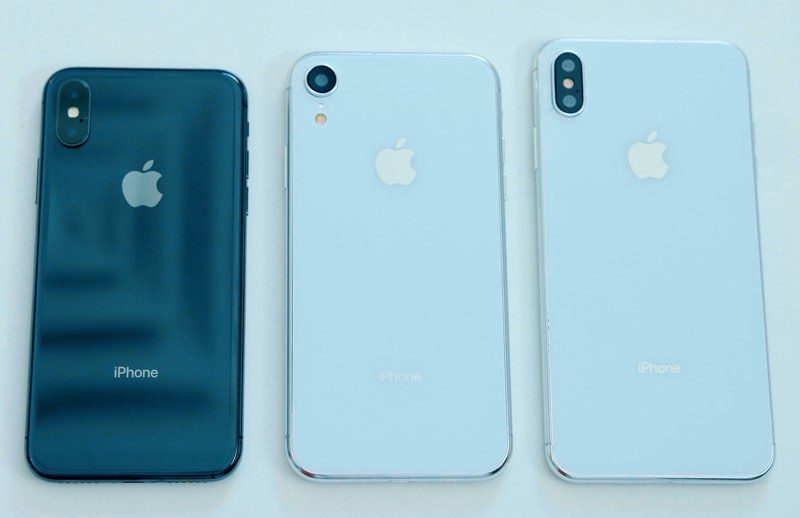 2018 iPhone dummy models
Internally, Apple employees are said to be referring to this year’s iPhones as an “S” upgrade, a notation reserved for years when upgrades focus on internal components rather than design changes. “S” naming is appropriate given that all three iPhones are using an X-style design even though there are two new devices.
Apple is expected to use the 7-nanometer TSMC-manufactured A12 chip in all of the new iPhones for parity in processing power. The A12 should be faster and more efficient than the A11 for faster processing times, better graphics, and improved battery life. Early benchmarks suggest the A12 is 10 percent faster than the A11.
Leaked information from Apple suggests the 5.8-inch iPhone will be referred to as the “iPhone Xs” while the larger 6.5-inch iPhone could be called the “iPhone Xs Max,” with Apple doing away with the “Plus” moniker that it has used since the release of the iPhone 6 and iPhone 6 Plus.
Such a naming scheme makes some sense because the “Plus” designation has traditionally referred to phones that have features non-Plus phones do not, but it does not appear that there are differentiating features between the two OLED iPhones with the exception of screen size, battery life, and price tag.
The iPhone Xs models, which will have resolutions of 2,688 x 1,242 (6.5″) and 2,436 x 1,125 (5.8″) according to rumors, will feature 12-megapixel dual-lens camera systems like the iPhone X, sturdy stainless steel frames, faster Intel LTE modems with support for 4X4 MIMO, 4GB RAM, and up to 512GB of storage space.
Improved battery technology may allow Apple to introduce a two-cell L-shaped 3,300 to 3,400 mAh battery in the 6.5-inch model and a 2,700 to 2,800 two-cell battery in the 5.8-inch iPhone.
Apple’s iPhone Xs devices are expected to be available in silver and space gray like the iPhone X, but leaked images suggest Apple is also planning to introduce a new gold shade. Apple last year intended to introduce a gold iPhone X according to rumors, but was unable to do so due to manufacturing issues. Those problems have presumably been worked out this year, allowing for gold iPhone Xs models.

The 6.1-inch iPhone, which we don’t know the name of, will look similar to the iPhone Xs models, but with lesser features that are meant to keep costs lower. In addition to a 1,792 x 828 LCD display instead of an OLED display, this device will feature an aluminum frame instead of a stainless steel frame, a single-lens 12-megapixel rear camera rather than a dual-lens rear camera, a 2,600 to 2,700 mAh single-cell battery, up to 256GB of storage space, an Intel LTE modem with 2X2 MIMO, and 3GB RAM.
We’ve heard some rumors suggesting the 6.1-inch iPhone’s display won’t support 3D Touch, but it’s not clear if this is accurate. There has also been some speculation that Apple intends to use an aluminum rear shell rather than a glass rear shell, thereby not allowing wireless charging, but we believe all three iPhones will support wireless charging functionality.
 Glass panels for the 2018 iPhone models
Faster wireless charging is a possibility for at least one of the iPhones Apple is developing with rumors suggesting Apple is working on a wireless charging coil made from copper wire instead of the ferrite polymer composite used in the current iPhone lineup. A copper wire charging coil would allow for faster and more efficient wireless charging, perhaps bumping up the 7.5W limit in the iPhone 8, 8 Plus, and X.
Like the 2013 iPhone 5c, the 6.1-inch iPhone will supposedly come in a multitude of colors, with possibilities that include grey, white, blue, red, pink, black, and orange. The 6.1-inch iPhone will mark Apple’s first real use of bright colors since the iPhone 5c.
 6.1-inch iPhone dummy models in red, blue, and white, three color possibilities that have been rumored. From Slashleaks.
The 6.5-inch iPhone Xs Max and the 6.1-inch iPhone may support dual-SIM dual-standby in some countries like China, allowing for two SIM cards to be used at once. It’s not clear if this functionality will be coming to the United States, however. There has also been a rumor Apple could include eSIM functionality in some of the devices planned for 2018, so we’ll have to wait for launch to get a full picture of the SIM situation.
Rumors suggest Apple’s 6.1-inch “low cost” iPhone will be priced at $600 to $700, making it more affordable than the two OLED models that are in the works. The 5.8-inch iPhone Xs could be priced at $800 to $900, making it cheaper than the $999 iPhone X, while the 6.5-inch iPhone Xs Max could be priced at $900 to $1,000.
 Chart outlining prospective 2018 iPhone features, via Ming-Chi Kuo
Some of the new iPhone models may ship with a Lightning to USB-C cable rather than a Lightning to USB-A cable plus a more powerful 18W power adapter, which would enable fast charging speeds right out of the box without the need to purchase additional equipment.
While all three iPhone models are set to make their debut at Apple’s September 12 event, rumors suggest the 6.1-inch model may not be available for pre-order alongside the two OLED models due to production difficulties. It is unclear if this information is accurate, but we’ve heard several rumors suggesting production issues for the 6.1-inch iPhone.
For additional information on the three iPhones Apple will introduce next week, make sure to check out our iPhone Xs roundup.
Apple Watch Series 4
The Apple Watch Series 4 is expected to feature a display that’s 15 percent larger than the display of the Apple Watch Series 3, a change implemented through a reduction in the size of the bezels of the device.
A larger display size will provide more room on the screen for apps and it will allow more space for watch faces. Apple is expected to introduce at least one new watch face with support for up to nine complications.
 Leaked image of Apple Watch Series 4
While we don’t know the resolution of the 38mm Apple Watch, data found within the beta suggests the 42mm version will feature a resolution of 384×480, up from 312×390 in the current 42mm Apple Watch models.

Aside from the larger display, a leaked marketing image suggests the Apple Watch Series 4 will look similar to the Series 3, with no major design changes. With no significant change in design, Apple Watch Series 4 models will continue to be compatible with existing Apple Watch bands.
The Apple Watch Series 4 could include a gold stainless steel color for the first time based on the leaked image, and there have been rumors that it could potentially use a haptic side button rather than a physical side button.

Other rumors have pointed towards a longer battery life enabled through a higher-capacity battery and improved health monitoring capabilities related to the heart rate sensor, but we haven’t heard concrete details on what could be included.
Alongside the new Apple Watch, Apple is expected to introduce a selection of new bands as it does with each major event.
For more information on what we can expect to see in the Apple Watch Series 4, make sure to check out our Apple Watch roundup.
AirPower
Apple introduced the AirPower in September 2017 and promised to launch it in 2018, but development issues have delayed its release. Rumors have suggested Apple’s updated timeline included a release in or before September, so we’re hitting that deadline.
We expect to see Apple’s AirPower become available for purchase alongside the new 2018 iPhones and Apple Watch models.

The AirPower is designed to charge the Apple Watch (Series 3 and 4), glass-backed iPhones, and AirPods all at the same time, with a wireless charging case required to enable wireless charging for the AirPods.
AirPods
With the AirPower, Apple is supposed to be introducing a new AirPods Charging Case that adds wireless charging to the earbuds, but because the AirPower has taken so long to launch, we’re set to see updated AirPods with new features.
Rumors suggest that the AirPods will see a minor update this year adding an upgraded wireless chip that supports hands-free “Hey Siri” functionality. With “Hey Siri” support, AirPod owners will be able to activate Siri without needing to double tap on the AirPods with a finger.

An upgraded set of AirPods will also likely ship with the aforementioned Charging Case with wireless charging capabilities, and Apple is also expected to sell that case on a standalone basis so customers who have already purchased AirPods can upgrade to it.
 Existing AirPods Charging Case next to redesigned AirPods Charging Case with wireless charging capabilities
No other major changes are expected for the AirPods this year, but there have been some hints that Apple is working on a set of Apple-branded high-end over-ear headphones that could launch in late 2018 at the earliest, so we may see a mention of them. Rumors on a launch date have been mixed, though, so Apple may not be ready to debut these until 2019.
For more information on the AirPods, check out our AirPods roundup.
Software Updates
New versions of iOS, macOS, watchOS, and tvOS have been in beta testing since June, and Apple is likely to provide golden master versions of each of the updates following its September 12 event.
The golden master versions of iOS 12, macOS Mojave, watchOS 5, and tvOS 12 will represent the final version of the software that will be provided to device owners when the software launches.

We expect to see Apple release iOS 12, watchOS 5, and tvOS 12 on Wednesday, September 19, two days ahead of the predicted launch of the 2018 iPhone models. Such a launch date would be in line with past software release timelines. We could also see macOS Mojave on that day, but historically, macOS release dates have varied somewhat.

Additional information on all of the new features included in Apple’s fall 2018 software lineup can be found in our iOS 12, tvOS 12, watchOS 5, and macOS Mojave roundups.
Possibilities for September or October
Several additional updates are on the horizon for Apple’s Mac and iPad lineups, but in past years when there have been a slew of fall updates to unveil, Apple has held two events: one in September focusing on iPhones and the Apple Watch and one in October to focus on Macs and iPads.
While it’s possible Apple could unveil new Macs and iPads at its September event, we believe the company is going to wait until an October event simply due to time constraints and the sheer number of devices that are in the works for the fall.
iPad Pro
Apple is working on updated iPad Pro models that adopt an iPhone X-style design with slimmer bezels and no Home button, with the iPads instead set to gain a TrueDepth Camera System that will allow Face ID to be used for biometric authentication purposes.
While the iPhone X includes a notch for the TrueDepth Camera, leaked iPad Pro designs in the iOS 12 beta suggest the iPad Pro models will not have a notch, instead retaining slim top and bottom bezels. Apple is also not planning to use an OLED display for the iPad at this time due to cost and production issues.
 Renderings of 12.9-inch iPad Pro based on alleged CAD drawings
Rumors suggest the new iPad Pro models will be available in screen sizes that are approximately 11 and 12.9 inches, with Apple using chamfered edges that are similar in design to the iPhone SE. The antenna lines on the device may also be located at the top and bottom, similar to the iPhone 7.
 Renderings of 12.9-inch iPad Pro based on alleged CAD drawings
Renders based on leaked CAD drawings suggest the iPad Pro has a relocated Smart Connector that’s been moved from the side of the device to the back of the device, but how this would functionally work remains in question, so it’s not clear if the information is accurate.
We’ve also heard that the new iPad Pro models will not feature a headphone jack, with Apple opting to do away with the port as it did in the iPhone lineup beginning with the iPhone 7.
For more information on what to expect from upgraded 2018 iPad Pro models, check out our iPad Pro roundup.
Mac mini
Apple is said to be working on a refreshed version of the Mac mini that’s focused on pro users. The upgraded device will include new storage and processor options, and because of its pro focus, it could be more expensive than previous Mac mini products.
There’s not a lot of additional information available on the Mac mini, but a previous rumor suggested the higher-end version “won’t be so mini anymore” hinting at least one configuration with a larger size to accommodate higher-end components.

Given that this is going to be a pro-focused machine, it’s not clear what chips it will adopt, but Intel this year has announced 8th-generation processors appropriate for both desktop and notebook machines. Past Mac mini models have used the same chips as the 13-inch MacBook Pro, but Apple may be planning to opt for more powerful chips for a pro Mac mini model.
For everything we’ve heard on the Mac mini, check out our Mac mini roundup.
Low-Cost MacBook Air
Apple has a 13-inch MacBook Air replacement in the works, which has been the subject of rumors for more than a year now. It’s been unclear whether Apple plans to position the machine in the MacBook Air family or the 12-inch MacBook family, but some concrete details about the upcoming notebook can be gleaned from everything we’ve heard.
Positioned as an entry-level low-cost machine in Apple’s product lineup, the notebook will be 13 inches in size and it will feature a Retina display. It is said to be similar in design to the current 13-inch MacBook Air, but with slimmer bezels.

It’s not entirely clear how Apple will distinguish this machine from the 12-inch MacBook if it’s going to offer a Retina display, but if the design is similar to the current MacBook Air, the 12-inch MacBook will still be Apple’s lightest machine, justifying its higher price tag.
Various pricing rumors have suggested that it could be available for anywhere from $799 to $1,200, but the most reliable source, Bloomberg, believes it will cost under $1,000.
Whiskey Lake chips appropriate for a MacBook Air-like machine were announced by Intel in August, and so Apple could potentially be planning to use these chips in the device.
For more on the mixed rumors we’ve been hearing about the 13-inch low-cost notebook, check out our MacBook Air roundup.
12-Inch MacBook
Regardless of whether the rumored lower-cost 13-inch notebook is a MacBook Air or a MacBook, Apple is still planning to maintain the 12-inch MacBook lineup and a refresh is in the works.
Upgraded 12-inch MacBooks are likely to feature Intel’s 8th-generation Amber Lake Y-series processors, announced in August. These chips bring processor and battery improvements, so new MacBooks could offer both faster performance and longer battery life.

Aside from upgraded Intel chips, there’s been little information on what else Apple might add to a refreshed MacBook lineup.
For more on the MacBook, check out our 12-inch MacBook roundup.
iMacs
We haven’t heard any iMac rumors in recent months, but Apple refreshes its iMac lineup on a yearly basis and this year is not likely to be an exception.

We’re expecting refreshed iMacs in 2018 that feature upgraded 8th-generation Intel processors, improved GPUs, and perhaps the adoption of the T2 chip that was introduced in the iMac Pro and has since been added to the MacBook Pro.
More details on the iMac can be found in our iMac roundup.
Conclusion
Apple’s 2018 “Gather Round” event will see the introduction of a slew of new flagship products that will build on the success of the Apple Watch Series 3 and the iPhone X. We also likely have a major Mac and iPad-focused event to look forward to in October should Apple not introduce new Macs and iPads at its September event.
Following the debut of the new iPhones and Apple Watch models on September 12, we are expecting Apple to hold pre-orders on Friday, September 14. If Apple sticks to pre-order times from past years, we can expect orders to be accepted starting at 12:01 a.m. Pacific Time.
After a September 14 pre-order date, the new devices are likely to see an official launch date on Friday, September 21.
The event will kick off at 10:00 a.m. Pacific Time, with Apple planning to live stream the product unveiling on its event website and through the Events app on the Apple TV. For those unable to watch, MacRumors will have live coverage both here on MacRumors.com and on our MacRumorsLive Twitter account, along with continuing coverage throughout the rest of September.
What are you most looking forward to seeing Apple introduce this year? Let us know in the comments.
Related Roundups: Apple Watch, watchOS 4, watchOS 5, iPhone Xs, AirPodsBuyer’s Guide: Apple Watch (Caution), AirPods (Caution)
Discuss this article in our forums
Xiaomi Pocophone F1 review: First impressions

We’d like to thank our friends at GearVita for supplying the device for this review. We’ve placed a link at the end of the review if you’d like to purchase the Xiaomi Pocophone F1 from GearVita.

Generally speaking, if a phone launches a Snapdragon 845 (currently the best mobile processor on the market) 6GB RAM (the gold standard of mobile memory) and most of the must-have amenities of modern smartphones, you’d expect to drop about $700 on it – like the Samsung Galaxy S9, or LG G7, perhaps. If you’re phone-savvy, you might even be able to spend $500 on a Xiaomi Mi Mix 2S or a OnePlus 6.
But $300? For those specs? All-but unheard of.
At least, so we thought. The Pocophone F1 (from the aforementioned Chinese tech giant Xiaomi) crams flagship-caliber hardware into bargain bin pricing, while simultaneously cutting very few corners in the process. Released in August and starting at just $300 for the base model, the F1 features a very impressive spec-sheet worthy of a phone twice its price.

Pocophone F1 Specs At-A-Glance
- Display: 6.18″, 1080p IPS LCD (82.2% screen-to-body ratio)
- Platform: Qualcomm Snapdragon 845 CPU, Adreno 630 GPU
- Memory: 6+64/128GB or 8+256GB RAM/ROM (expandable)
- Rear camera: 12+5MP, f/1.9, 1/2.55″, 1.4µm
- Front-facing camera: 20 MP, f/2.0, 0.9µ
- Connectivity: Bluetooth 5, WiFi 802.11ac
- Audio: 3.5mm jack, “Stereo” Speakers (see below)
- Battery: 4,000mAh battery
- Build materials: Plastic Body, Gorilla Glass display
- Measurements: 6.12 x 2.96 x 0.35 in, 6.35 oz

But is it really that good?
Short answer? Yes, yes it is. It runs just as smoothly as my OnePlus 6, with better battery life and a screen that competes despite being “just” a 1080p IPS LCD. Since it runs on a Snapdragon 845 core, it features the same built-in Bluetooth 5.0 and 802.11ac WiFi modules that you’d see on any other flagship phone. At 4,000mAh, the battery is about 25% larger than your average flagship battery, and the same size battery as the spankin’ new Samsung Galaxy Note 9.
Need more praise? As GSMArena points out, the Pocophone F1 puts up a ridiculous 285k aggregate AnTuTu score, landing it squarely between the OnePlus 6 (286k) and the Samsung Galaxy Note 9 (283k). That’s pretty great company to be in. And granted, that metric only measures raw processing power and doesn’t take into account things like firmware and the performance of accessory modules, but even still – that number blew me away.


Okay, so what’s the catch?
There’s one rather severe catch and a number of smaller ones. The major on – for US users, at least – is that neither the Global nor India versions of the Pocophone F1 support any of the Primary LTE bands of the four major US-based carriers. This means that while the Pocophone will technically run on either of the GSM-based carriers (AT&T or T-Mobile), the best connection you’ll ever see is the HSPA+ “4G” label – never a true LTE connection.
The smaller catches are significantly smaller. The phone doesn’t feature wireless charging or NFC – which is a deal-breaker for very few people, I would imagine. It also features a plastic back, which is a purely cost-cutting move I’m sure most people will be able to handle at this price point. Ironically, perhaps the plastic back makes the Pocophone more drop resistant than many glass-bodied phones on the market.
I won’t sugar coat it for you, the “Stereo” speakers on the Pocophone F1 are not great. In anything other than a quiet room you’ll struggle to hear it even on max volume – and I use “Stereo” in quotes because while the phone has two speaker grates on the bottom, there’s only one speaker in there. Covering up the right one makes sound all but muffled, while covering up the left one doesn’t impact sound in the least. It’s a fake speaker grate, and marketing the phone as having Stereo speakers is rather disingenuous of Xiaomi.
Verdict
And that’s it. Everything else works as you’d expect from a phone running the above specs, which is to say – quite well. Personally, if the couple problems listed above are all that’s wrong with a $300 flagship, I call that a huge win for Xiaomi.
Now if they’d just make a North American version, we might see a true shakeup in the industry. Keep an eye out for my full review in a week, AndroidGuys.
Again, we’d like to thank our friends at Gearvita for supplying this device for review. If you’d like to pick up a Pocophone F1, head over to GearVita and pick yours up today.
Samsung Galaxy Note 9 Review: A great phone that comes at a price

Samsung always swings for the fences with their Note line up and it should because it is quite literally its biggest phone of the year. Not every year can be a home run though. Most people have all but written off the Galaxy Note 9 as nothing more than an incremental upgrade. They would not be wrong, but even minor upgrades can have a big impact.
A little about this review
The Samsung Galaxy Note 9 used in this review was provided courtesy of AT&T and used on their network for the past three weeks.
Read More: First 10 things to do with your Note 9
Design
Not much has changed here, if you liked the design of the previous Note 8 then you’ll enjoy the Note 9. Samsung is back with the same glass sandwich with metal chamfered frame they’ve been using for the past couple of years now. Just about every phone maker has jumped on this trend, and if it ain’t broke don’t fix it.

By utilizing this same design Samsung has also retained some of the best features of the Note 8 such as the IP68 waterproofing, wireless charging, and near flush camera design. However, it also retains some of the flaws of this particular design.
For example, the glass back is a fingerprint magnet and no matter how tough Gorilla Glass 5 is, glass is still glass and is less durable than a plastic or metal back. The Galaxy Note 9 does have some improvements though.

The fingerprint scanner is now in a much better location in the center of the phone. While it is much easier to reach now, it could be a little lower and larger. It is still a little too high and you run the risk of overreaching and smudging the camera lens with them so close in proximity to each other.
Screen
The screen is also slightly larger than the Note 8 and as always it is gorgeous. Others can get close but no one can compete with the beauty of a Samsung AMOLED panel. It is sharp, the colors are vivid, and the blacks are inky.

Samsung regularly wins awards from DisplayMate for having the best displays of the year and it is a title well deserved. Plus, you’re getting a slightly larger screen in essentially the same sized body. It’s really hard to complain about that, especially when they do it without an obnoxious notch.
S-Pen
The Note series simply wouldn’t be the same without the S-Pen. It is a unique feature that Samsung offers that no other phone on the market comes close to replicating. Regardless, Samsung continues to search for ways to enhance and improve the experience. This year we saw the Galaxy Note 9 S-Pen get its biggest upgrade ever in the form of Bluetooth LE.
With Bluetooth LE built in the S-Pen can now act as a remote providing features. By pressing once, long pressing, or double pressing the button you can unlock your phone, launch the camera, take photos, control media playback, control Powerpoint presentations, and more. Samsung even allows you to customize these actions in the settings menu.

The one downside of this upgrade is that Bluetooth devices run on battery power. Similar to Bluetooth speakers and headphones the S-Pen now has a battery inside that must be charged. The good news is 40 seconds of charging is enough to give the S-Pen 30 minutes worth of usage.
Fortunately, if the battery dies in the S-Pen all of the old features still work. You will only lose the ability to use the button to launch apps or control them.
Read More: Tips and Tricks for the S-Pen
Even with all the tricks, the S-Pen is capable of old and new. I still can’t find much of an excuse to use it. Whenever I have a Note phone I always have to force myself to use the S-Pen. Once I send it back I never once miss having the S-Pen. For all intents and purposes, the S-Pen is nothing but a gimmick to me. However, that is only my personal opinion as I’m sure many others out there use it and love it.
Bixby Button
The Bixby button is back and is just as useless as ever. Samsung is determined to force this on their users whether they want it or not. At best this is a worthless button and at worst the button is a major annoyance when you trigger it accidentally.
If only Samsung were to allow a little customization of the button similar to the button on the S-Pen. You don’t have to allow us to assign it to Google Assistant but at least give us the option to assign other actions to it.
Unfortunately, the apps that once made this little button more useful by reassigning it do not currently work with the Galaxy Note 9. Nor do you have the option to disable the button in the Bixby settings like in previous phones. Hopefully, by the time this review is released or sometime in the near future this will change. Until then, we must live with Bixby getting in our way.
Headphone Jack
Yes, the headphone jack is still there. Once again Samsung bucks the trend of nixing the headphone jack and forcing wireless audio on their customers. As an avid music fan who owns several wired and wireless headphones that I use regularly, I dread the day that Samsung and LG give in to this trend. Thankfully, that day has not come yet and I don’t have to live the dongle life.
Speakers
Continuing with their improvements over the Note 8, Samsung has made the stereo speakers even better this year on the Note 9. Between the bottom firing speaker, earpiece speaker, and Atmos processing the Note 9 sounds fantastic. I wouldn’t say it can compete against a phone with true stereo front facing speakers, but the Note 9 gets closer than ever to being one of the best sounding Android phones.
Storage
Bravo to Samsung for making the 128GB model the base model for the Galaxy Note 9. This doubles the amount from the previous Note 8 and Samsung also sells a 512GB version. If you really want to go overboard then you can take advantage of the microSD card slot and carry a whopping 1TB in your pocket by adding a 512GB microSD card.
Software
Samsung is notorious for their software skin most commonly known as TouchWiz or Samsung Experience. The name Samsung Experience does it the most justice because that is what Samsung is trying to provide its users. When you use a Samsung phone it is distinctively different from stock Android. Samsung is also the only handset maker to include a skin on an Android Go phone.
This is one way Samsung brands themselves and sets their phones apart from others in the marketplace. However, there are things to love and things to hate about the Samsung Experience.


Some of the things I love are all the extra features that are added to Android. These include extras such as themes, a customizable always on display, calibration options for your display, a sound equalizer, dual messenger, video enhancer, one-handed mode, multi window, and much much more.
Read More: 9 Tips and Tricks for your Note 9
Samsung also includes a couple of extra software goodies which work in conjunction with their hardware. S-Health, for example, uses the sensors on the back near the camera as well as other sensors in your phone to help you keep track of your health.
Samsung Pay also deserves a special mention thanks to the use of Magnetic Secure Transmission (MST) technology in its phones. Thanks to this wonderful technology you can make mobile payments at almost any terminal that accepts a debit or credit card. This by far is one of my favorite exclusive features and I love being able to pay with my phone almost anywhere.

Some of the reasons to hate the Samsung Experience come in the form of delayed OS upgrades and in general some performance lag. In my opinion, all of the advantages outweigh the disadvantages and I prefer a phone packed with more software and hardware features.
Performance
As I mentioned, one of the drawbacks of Samsung’s heavy software skin is performance lag. Fortunately, the Snapdragon 845 SoC and 6GB of RAM offer quite a powerful duo to combat any sluggishness. In my usage, the Galaxy Note 9 was the quickest and snappiest Samsung phone I have ever used. It might still struggle to keep up with some phones running lighter skins, but overall I didn’t notice any lag or performance quirks and it kept up with everything I threw at it.
For those interested in the stats when I personally ran AnTuTu it returned a score of 283533 and Geekbench reported a single core score of 2435 and 8760 for multi-core performance. This ranks the Note 9 as one of the top five fastest phones out right now.
Camera
The same 12MP dual camera setup with dual focal lengths from the Note 8 returns on the new Note 9. This time gaining a new trick with the variable aperture. We first saw this in the Samsung S9 models where the aperture on the main camera can switch dynamically from f/2.4 to f/1.5.
The reason for the dynamic aperture is because when you shoot with a lower aperture such as f/1.5 it keeps less of what’s in the frame in focus. Using a variable aperture allows you to shoot f/2.4 in abundant light keeping more in focus while only switching to f/1.5 in low light allowing the camera to absorb more light.
On top of having a variable aperture, Samsung also makes use of two different cameras giving you options for a 2X optical zoom and portrait modes. In my experience, this dual camera setup works better than the single-camera portrait modes. Due to providing a greater range to capture the subject in portrait mode and offering a warning when it won’t work.


Regular Camera

2X Optical Zoom
One thing to note is the 2X optical zoom camera has significantly worse camera quality in low light conditions. If you are trying to take photos in a low light situation you’ll get much sharper and detailed photos if you use the regular camera. Check the full view of the samples below for an example of this.

Regular Camera

2X Optical Zoom
Samsung also includes a new software enhancement to the camera in the form of scene optimizer. After taking many samples and comparing them, it seemed to me scene optimizer no matter what scene means make it darker and add a yellow tint. That doesn’t always result in the best photo, and generally, I preferred to leave it turned off.

Scene Optimizer Off

Scene Optimizer On
Where it was most helpful was for detecting flawed photos. For example, if something moved and was blurred or someone blinked it would pop up a message immediately after saving the photo giving you plenty of time to snap another.

As far as overall photo quality is concerned Samsung always has one of the top cameras on Android. General second only to the Pixel phones and in my opinion that is the case here as well. The Note 9 continues on with this tradition and if you’re looking for the second best camera with the most features available then you’re looking for the Note 9.
View More Photos on our Google Photos Album
The front-facing camera much like the rear-facing camera is feature packed. This 8MP f/1.7 shooter includes autofocus, beauty modes, built-in stickers, AR emoji, and a portrait mode.


It includes just about everything you could need or want for a selfie camera except for a portrait lighting mode similar to the iPhone X. Personally, I’d prefer a portrait lighting mode over all of these useless stickers and AR emoji.

Unlike the rear camera that provides a decent second place to the Pixel phones, I find the front-facing camera is significantly worse than the Pixel phones. It is entirely due to Samsung’s over processing of the photos, where even with all the beauty filters set to 0 the images still come out soft.

If you were to try the Google Camera app for selfies then the results are much sharper with far better contrast. Which leaves me very disappointed in the front facing camera on the Note 9 unless using third party software.
Battery
With the jump to a 4000mAh battery, I was ready to be impressed by the Note 9. To my disappointment, I wasn’t quite blown away by the battery life. That doesn’t mean battery life isn’t good, on the contrary, it is quite good. I was easily able to end my days with 5 hours of screen on time with at least 30-40% of battery life remaining. If I was a little more conservative I could even see almost up to two full days of usage.
You might wonder, what is there to be disappointed about then? The answer to that question would be that all of this is done on the FHD 1080p resolution. While other phones such as the Pixel 2 XL and LG V35 are able to accomplish similar or dare I say better battery life using QHD resolutions with smaller batteries.
If you increase the resolution to QHD on the Note 9 then you’ll see closer to 6 hours total screen on time. Without a doubt, that’s still great battery life and most general users will be pleased. Personally, though, I expected more from the upgraded battery.
Final Thoughts
Despite a couple of qualms here and there the Samsung Galaxy Note 9 will have no trouble ranking as one of the best phones of 2018. It is fast, it’s premium, it has a great camera, it has great battery life, and it has a new improved S-Pen. There were only a few reasons I could come up with to not buy this phone.
First off, it is $1000 dollars which is no easy sell but unfortunately, this is becoming more common in the smartphone market. Another reason would be that you have a Note 8 and have no complaints about the battery life and no use for a Bluetooth S-Pen. Then there’s the final reason, which is you love the Pixel phones for stock Android, fast updates, and the best camera on Android.
Beyond any of these reasons, the Galaxy Note 9 is going to be one of the top two phones of the year and if you can afford it, then get it. Outside of the price I could not find any one flaw that would prevent me from buying and loving this phone.
Buy from AT&T Buy from Samsung
Devices used in this article were provided by AT&T
Read next:
- When and Where to Buy: Samsung Galaxy Note 9
- You can grab all 12 of the Note 9 wallpapers right now
- Here’s the list of official accessories for the Galaxy Note 9
- Nine things we love about the Note 9
Google’s Pixelbook 2 tablet could debut with fingerprint security
Dan Baker/Digital Trends
Google’s next-generation Chrome OS-powered Pixelbook 2 may be borrowing some biometric security features from Windows Hello. The refreshed Pixelbook could appear as early as October 9 at Google’s hardware event in New York City, and will reportedly boast support for a facial-recognition scanner and fingerprint reader, according to code discovered in a developer build of Chrome OS. Biometric security could make it easier for Chrome OS users to log into their devices without having to fumble with typing in a password using the on-screen keyboard, especially when it’s used with a tablet.
Leaked code found within the Chrome OX 70 Developer Channel suggests that Google is working on adding biometric security support to its operating system, a feature that’s both supported by Windows Hello on Windows 10 and with the Touch ID sensor on MacOS. What’s interesting is that the code comes with an animated tutorial showing users how to register their fingerprint, and the animation features a rendered image of what appears to be a very specific tablet design, which is believed to be for a Google-made Chrome tablet called Nocturne.
“We assume that they will change this particular part of the setup based on the device, but the first device we know of getting a fingerprint scanner is ‘Nocturne’, the assumed detachable set to launch a month or so from now,” Chrome Unboxed said. The render shows the fingerprint sensor on a side edge of the tablet. The position of the fingerprint sensor may be justified given that the render depicts the tablet with extremely narrow bezels surrounding the display.
The referenced Nocturne device may be one of several Google-made Chromebook devices that may be unveiled in October under the Pixelbook branding. Nocturne is widely believed to sport a detachable form factor, similar to HP’s Chromebook x2, where the keyboard could be removed to allow users to use the Chromebook in a tablet form factor.
Developers stumbled upon the code for face unlock a few days ago, and the code mentions Intel’s Face Engine, which would give Chrome OS a similar facial-recognition camera that many Windows devices have adopted with Intel’s RealSense cameras.
Previous Chrome OS code revealed hints that Google may be giving the detachable and convertible form factors a push, including supporting a desktop mode whenever a Chrome OS tablet detects a keyboard and mouse.
Editors’ Recommendations
- 5 features we want in Google’s Pixelbook 2
- Chromebook users may soon get the Pixel phone’s best feature: Its camera app
- New Chrome OS features make your Chromebook a better Windows replacement
- The Pixelbook could soon run Windows 10
- Google Pixelbook review
The HP Chromebook X2 is the best Chromebook you can buy
We’re a virtual company made up of tech experts from across the globe. We don’t just write about Chromebooks, we use them every day.

The HP Chromebook X2 is the best Chromebook you can buy today. We base this on the overall value; you get what you pay for plus a lot more. Plus, you get a fine tablet that runs Android apps.
Our Pick
HP Chromebook X2

- $599 from Best Buy
- $599 from HP
The Chromebook X2 is a winner no matter how you use it.
HP’s Chromebook X2 is the first detachable Chromebook, and the category is starting off with quite the bang. This powerful Chromebook does double-duty as a tablet, so that plus its use of Android apps make the X2 something you might also consider if you’re looking for a new Android tablet.
Who should buy this Chromebook
Chromebooks are designed to be simple and secure ways to do everything most of us want to do on a computer. The HP Chromebook X2 fits the bill here, but is also a powerful laptop for folks who fancy themselves as power users and want to do a little more.
Digital artists will appreciate the excellent active Pen, which offers precision drawing and pressure sensitivity. Developers will love the power to open multiple windows and applications while they run and test their code. Business professionals will have the power to work at home or on the go with an ultra thin and light business-class machine. And during any downtime, everyone can appreciate the amazing 12.3-inch display and one million+ Android apps that let you do anything from watching your favorite movie or playing a 3D game.
The HP Chromebook X2 may not be the perfect Chromebook for everyone, but it offers the best feature to value ratio of any you’ll find today.
Is it a good time to buy this Chromebook?
Yes. The HP Chromebook X2 was introduced in 2018 and will be officially supported by HP and Google until at 2024. It’s crafted from the latest components and should have plenty of power throughout its lifespan.
Reasons to buy
- Powerful processor
- Ultra thin and light
- Beautiful vibrant display
- Great battery life
Reasons not to buy
- No keyboard backlighting
- Only 32 GB of onboard sotrage
- No upgrade options
Dollar for dollar, you can’t beat what HP is offering
HP has built a powerful Chromebook that can moonlight as an awesome tablet with the Chromebook X2. We love the Intel Core M3 processor, the 0.3-inch thickness and the functional features like Assistant and Google Lens. But as we’ve seen before in the Chromebook world, the display steals the show.
The display on the HP Chromebook X2 is the very same 12.3-inch 2400×1600 IPS touch panel that you’ll find on the Pixelbook or Samsung Chromebook Pro. It’s beautiful to look at and supports a stylus, which is included and stows in a handy loop on the keyboard.
It’s the best Chromebook you can buy, and a contender for the best tablet, too.
You’ll have plenty of power for the browser or to pull up spreadsheets and presentations in Google Docs and Android apps while you’re working. Or play something from Netflix on the gorgeous screen when you’re not.
With a more power-hungry screen than many other Chromebooks, the Chromebook X2 still has great battery life. It will last most people a full workday (8-10 hours) on a single charge. When it’s time to charge the battery, you’ll appreciate the standard USB-C charging instead of a proprietary input. With the right cable, your Chromebook X2 will charge anywhere your phone does.
The HP Chromebook X2 is a great all-around package, and right now it’s the best Chromebook available.
Alternatives to the HP Chromebook X2
We think the HP Chromebook X2 is the best overall Chromebook you can buy, but we know it’s not going to fit everyone. That’s great because there are plenty of other options available and finding one that suits you perfectly should be easy. We’ve outlined a few in case you’re looking for something different.
Runner Up
Google Pixelbook

If you want or need the very best and are willing to overpay for it, the Pixelbook was made for you.
$999 at Best Buy
As Google’s Halo device, the Pixelbook has the design and specs that make it amazing to use. but it has a price that’s hard to swallow.
It’s thin and sleek, and oozes “premium” when using it, has the best keyboard and trackpad of any Chromebook, and a gorgeous touchscreen. It was also designed from the ground up for Google Play and use as an Android tablet, and it excels at it. While you’ll pay double the price of our top pick; for some it will be worth it.
Value Pick
Acer Chromebook R13

The Acer Chromebook R13 looks and feels like a product that should cost a lot more.
$329 at Amazon
The Chromebook R13 is an excellent choice for anyone who wants a premium product without a premium price.
The Acer Chromebook R13 is the most machine you’ll find under $400. It has a 1080p IPS touchscreen for interaction with Android apps and can fold back into various modes for an all-touch experience. It’s solid, well machined, and is nothing like a typical “cheap” laptop. It’s a great choice for savvy shoppers.
On the Go
ASUS Chromebook Flip 101

The 10-inch Chromebook Flip is the ultimate uber-protable.
$329 at Amazon
Take your digital life everywhere with the light and portable Chromebook Flip.
The original Chromebook Flip took us by surprise when we first saw it, but many have come to love this light, portable, and unassuming little Chromebook. The C101 version takes the portability and Android support we all loved and adds newer components, more storage, and better battery life. It’s perfect for anyone who is constantly on the move.
Bottom line
The HP Chromebook X2 is the overall best Chromebook you can buy and one of the best we’ve ever seen. You’ll love its features and we think it’s the perfect blend of performance versus price. But all of us have different needs and luckily there are plenty of other models out there to fit yours perfectly.
Credits — The team that worked on this guide

Jerry Hildenbrand is Mobile Nation’s Senior Editor and works from a Chromebook full time. Currently, he is using Google’s Pixelbook but is always looking at new products and may have any Chromebook in his hands at any time. You’ll find him across the Mobile Nations network and you can hit him up on Twitter if you want to say hey.

Daniel Bader is the Managing Editor of Android Central. As he’s writing this, a mountain of old Android phones is about to fall on his head, but his Great Dane will protect him. He drinks way too much coffee and sleeps too little. He wonders if there’s a correlation.

Tom Westrick is an information technology specialist and full-time Chromebook user. His job at Mobile Nations keeps him busy and his HP Chromebook X2 keeps him productive.
Update, September 2018: The HP Chromebook X2 is the first convertable Chromebook and the best you can buy.
Chromebooks
- The best Chromebooks
- Chromebooks in education: Everything you need to know
- Should you buy a Chromebook?
- Chromebook Buyers Guide
- Google Pixelbook review
- Join our Chromebook forums

