


Canada Daily Deals: TCL 4K TVs, Nest Hello doorbells, AMD Ryzen CPUs, more
Whether you’re looking for new tech gear or household items, we’ve got you covered.
We found plenty of great deals today that include big discounts on TCL 4K HDR Roku TVs, Jabra Elite Active 65t true-wireless earphones, Nest Hello bundles, AMD Ryzen processors, USB-C cables, and much more!
View the rest of the deals
Each day, the Thrifter Canada team scouts out and shares amazing deals on products you know and love, helping you find the best prices on the ‘net.
For more Canadian deals coverage, be sure to keep an eye on Thrifter CA, sign up for the Canadian newsletter and follow the team on Twitter.
LG V40 ThinQ review: Five cameras aimed straight at Samsung

LG basically made its own version of a Galaxy S9+, and that may just be enough.
From the start, LG’s V series has been about content creation and offering more ways to capture the world around you. But over the years, the G and V series have to converged to the point where they’re nearly identical. Not unlike Samsung’s Galaxy S and Note lines (go figure), the G and V series are basically the same aside from slightly different sizes and some key feature advancements that a staggered release cycle affords.
In a world where the LG G7 hasn’t garnered the mind share of Samsung’s Galaxy S9+, that leaves the V40 in a tough spot considering how much it shares with LG’s attempt from earlier in the year. The “hook,” if you will, is a five-camera setup that’s backed up by neat camera software. But the V40 has more to offer, as the rest of the phone is filled with appealing specs and features lifted directly from Samsung’s playbook.
Here’s how it all comes together in the LG V40.
Five camera fun
LG V40 ThinQ

$949 at Best Buy
A great all-around high-end phone, with a price tag to match.
LG managed to make a top-notch phone by following Samsung’s lead. The V40 is a beautiful and solid phone that’s filled with must-have and nice-to-have features, with top-end specs and a large high-quality display. The software is quick and relatively simple, choosing to lean toward Google’s ecosystem more than ever. The triple camera combination is a treat to shoot with and provides both unique and good-looking photos. The only potential shortcoming is underwhelming battery life that isn’t as good as you’d expect for the V40’s size.
Pros:
- Big, beautiful screen
- Triple camera is a treat
- Solid and beautiful hardware
- Headphone jack and good DAC
- Wireless charging
- Simpler software than before
Cons:
- A phone this big should have more battery
- Secondary cameras missing OIS
- No higher storage option available
- Aurora Black model is slippery
About this review
I’ve been using a U.S. unlocked LG V40 for 6 days, initially in San Francisco, CA and then in Seattle, WA. The phone’s software updated 2 days into the review period to build OPM1.171019.026 with the September 1, 2018 security patch. It was provided to Android Central for review by LG.

Solid
LG V40 Hardware, display and features
The V40 generally follows the industry trend of being a rounded metal-frame phone with smoothly sculpted glass and a typical layout of buttons and ports. The 6.4-inch display is notably larger than the G7, and is ever-so-slightly larger than the Galaxy S9+ — less than 1mm taller, and 2mm wider. It has a notch, of course, but LG made a subtle change to make the bottom bezel the same thickness as the top — and despite the notch up there it has a very nice sense of symmetry when you look at the screen.
This is a really nice OLED screen you’ll enjoy looking at, but it isn’t quite as good as Samsung’s.
That display is an OLED panel, which marks a move away from the G7’s LCD and hasn’t exactly been a point of strength for LG phones. You may recall the furor over the Pixel 2 XL’s LG-made panel being so bad, but thankfully the V40’s panel looks nothing like that. Actually, it looks really good. It’s crisp and colorful, with only mild color shifting at tight viewing angles. And it now has a proper auto-high-brightness mode that can enable by default in sunlight and doesn’t need to be triggered manually. The max brightness is good enough to easily see the screen in bright sunlight, and it also gets really dim at night. I won’t say it’s as wonderful as Samsung’s latest screens — which are just amazing — but it’s darn close, and good enough that I haven’t found any reason to complain about its characteristics.
The phone is solid, but the matte glass finish is what really takes it over the top — don’t get the Aurora Black color.
Because it’s relatively light, the V40 doesn’t seem quite as solid or substantial. At 169 grams it’s 10% lighter than the Galaxy S9+ and 16% lighter than the Note 9 — it’s also over 1mm thinner. But most people will find the reduction in quality heft a fine trade-off for being able to use the phone in one hand more comfortably. The V40 is still awkwardly tall and a little slippery when it comes to adjusting your hand to reach the top third of the display, but the lower weight helps with usability regardless.
The slippery finish is actually exclusive to this Aurora Black V40 that I’ve been using, because LG has an altogether different finish for its other colors. Moroccan Blue, which is the only non-black option in the U.S., and other international options have a softer matte finish to the glass that is amazing to hold. The frosted glass finish is easier to grip, collects fewer fingerprints and offers a neat color-shifting look that makes the black version even more boring by comparison. It’s a shame LG didn’t apply this “soft” finish to all of the colors — a big missed opportunity to differentiate entirely from Samsung’s glossy backs. The black one looks and feels fine, and has a subtle color-shift effect to a more blue-green in the right lighting, but as soon as your see Moroccan Blue you’ll want it — and sadly, it’s exclusive to Verizon for some unknown period.
LG took Samsung’s lead and simply offers every spec and feature the competition has.
Elsewhere, LG’s done a darn good job of filling the V40 with the features people are clamoring for. It’s water resistant, of course. The 64GB of storage is typical, but the SD card slot is a nice bonus for many people. There’s also a headphone jack, which is appreciated, and LG continues to get plaudits for including a nice DAC to help it out. LG’s so-called “BoomBox” speaker system is an attempt to skip dual speakers in favor of using the whole phone as a resonator for the single speaker at the bottom, and for the most part it works well. When you set the phone down on a table it really helps amplify the sound, and it sounds pretty good — but when you crank up the volume a bit when watching or listening to something as you hold the phone, it feels … odd. The whole phone vibrates, which isn’t pleasing, and you can still run into the age-old problem of blocking the single bottom speaker with your pinky finger.

Triple treat
LG V40 Cameras
We’ll eventually reach the point of diminishing returns with the number of cameras on smartphones — but right now, having three distinct sensors and lenses on the back of a phone seems totally normal. LG’s marketing talks about a “penta” (five) camera setup on the V40, but of course, only three are on the back with the other two on the front. The set of three breaks down like this: a 12MP main sensor with a standard-view lens, a 16MP sensor with a wide-angle lens, and another 12MP sensor (different from the primary) with a 2X telephoto lens.
The main camera took a step up, and the two supporting lenses just add to the experience.
The wide-angle sensor and lens are the same as the LG G7, which is fine, but the main sensor and lens have thankfully been upgraded. The main sensor has 1.4-micron pixels, much larger than the G7’s 1-micron, and the lens is now a little brighter at f/1.5. There are also purported upgrades to the photo processing, including smarter HDR that chooses how many frames to process based on what’s in the scene and specific changes to improve low-light photo quality overall.


I’m so glad LG made the sensor and lens upgrade to get more light in. It really shows in the final product, whether you’re shooting in low light or not. Shooting in auto mode it seems pretty clear when the multi-frame HDR mode kicks in and really bumps up the colors, but even without it the V40 takes pleasing and natural-looking photos. My only complaint is in the fine details, where LG’s processing lands in a weird middle ground between Samsung and Google. It isn’t super-smooth like Samsung, nor is it natural like Google — when you zoom in you’ll see blotchy chroma noise on occasion, and oftentimes sharp edges come out soft. It looks just fine on a phone or even a computer screen, but zooming in reveals displeasing defects in some photos.
Photo quality is good, but the prevailing feeling is that the V40’s camera is fun to shoot with.
LG’s wide-angle camera continues to be a unique treat. I love taking these wide-angle shots, and they just offer a nice change of pace to mix up the kinds of photos I share with people. Not all scenes call for it, but going back to a phone without a wide-angle camera feels like a limitation. The telephoto camera isn’t such a great success. A sensor with 1-micron pixels behind an f/2.6 lens without OIS is a recipe for poor photos in anything but perfect lighting, as so many other manufacturers have found. It’s useful for zooming with less resolution in daylight, and facilitates a proper portrait mode with faux bokeh, but it isn’t nearly as good as the Galaxy S9+’s better sensor and OIS.
The combination of three sensors and really good camera software make the V40 a downright fun phone to shoot with, and also has the quality to back it up. LG’s software makes switching between the three cameras seamless and even offers options to preview all three views at once or capture photos sequentially each one. There’s a robust manual mode if you want it, but the automatic mode absolutely gets the job done with no fuss. LG may not be winning the camera battle with absolute quality and accuracy when you nitpick the details, but the whole experience is right up there with the competition.
The dual front-facing cameras don’t change the game much from the LG G7. The main camera is the same 8MP sensor with fixed focus, an f/1.9 lens and 80-degree field-of-view. It’s paired with a 5MP sensor with fixed focus and an f/2.2 lens, but a slightly wider 90-degree lens. This gives you some flexibility for a tighter selfie with the main camera or a larger group shot with the secondary, but we’re talking about 80- vs. 90-degrees here, which is small. The main camera captures much more detail in your face, but either one will be good enough for social media and messaging. The wide-angle shooter is near-necessary for group shots, but I still wish at least the main sensor had auto focus, as that’s a premium feature I expect on a high-end phone like this.

Going simpler
LG V40 Software, performance and battery life
I stopped using the LG V30 before its Oreo update and didn’t spend much time with the LG G7, so this is my first time really getting in deep with the company’s latest software offering. The V40 is launching on Android 8.1, which in itself isn’t disappointing except for the fact that LG made a grandiose announcement that its “Global Software Upgrade Center” would be improving its update cadence and stability. Where’s Android 9 Pie at?


Even though we’re looking at Oreo, LG has made a concerted effort to streamline and simplify its software. In my time speaking with LG representatives, they specifically called out the reduced amount of bloatware and duplicate apps on the V40. LG no longer ships its own calendar or calculator apps, for example, and defaults to Google’s instead. This is one of the main benefits of LG’s software over Samsung’s — it’s at least somewhat self-aware of the fact that very few people want its apps, so it’s cutting back on the offerings. There are still a few that can’t be disabled, but there’s far less app cruft to deal with than in the past.
Feature creep has been reduced, as has bloatware and duplicate apps. LG is going simpler.
The feature creep has also been reduced, with fewer unnecessary whizz-bang things popping up and distracting you. I still had to spend the typical couple of hours going through settings and turning off things that I don’t want, but it can all be turned off, which I really appreciate. There are still baffling omissions like not having a fingerprint swipe gesture for the notification shade and having an app drawer that doesn’t auto-sort alphabetically, but on the whole, I’m finding LG’s software to be quite pleasant.
If you’re a fan of Google’s services you’ll be fine with LG’s integration of the Google Assistant, Google Feed and Google Lens as well, which replaces any sort of LG-specific “AI” you’d expect. The Feed is found as part of the default launcher, the side-mounted Assistant button auto-launches the service and Google Lens is baked right into the camera app. You can just as easily ignore it all, but I find it much less intrusive than Samsung’s Bixby push, and the hardware button placement is low enough that it isn’t accidentally pressed every single day.
Performance and stability are both great — now, how about that Pie update?
Performance and stability have also been excellent, which I’d completely expect for this class of phone with these internals. The only sluggishness I’ve seen has been with opening the camera after a handful of hours of not using it, which is disappointing. I want that camera to always be available, and sometimes it takes a few beats to get going with a double-press of the power button. The rest of the experience has been a treat, no matter what I’ve thrown at the phone.


So how long does the performance last? Unlike the Galaxy Note 9, the V40 doesn’t have an impressively sized battery, at just 3300mAh, considering the overall footprint of the phone. That’s considerably less than the Note’s 4000 and even Galaxy S9+’s 3500mAh. As you can see in the above screenshots, battery life can obviously vary based on how hard you hit the phone. I don’t do anything to “save” battery on my phones — I use auto brightness, let all of my apps sync and use the phone whenever (and however) I need it. On a heavy day I was able to kill the V40 in under 14 hours with over 4 hours of screen-on time, tons of Bluetooth audio, lots of time on LTE and about 30 minutes of driving with navigation Android Auto. On easier days, I went to bed with over 30% battery remaining despite my typical usage and over 3 hours of screen-on time.
The V40 will handle a full day of use no problem — the question is how much reserve you’ll have left at the end of the day.
These numbers are very much in line with my Galaxy S9+ battery life history: the V40 will handle a full day of typical use with plenty to spare and no battery-saving tricks; but if you hit it hard, you may be looking at a late-evening top-up or very little left in the tank at the end of the day.
When it comes to recharging, the V40 is really quick. That smaller capacity paired with Quick Charge 3.0 leads to fast top-ups over USB-C, which you may need if you hit the phone hard. It also has wireless charging, and worked perfectly with my Samsung wireless chargers.
I know most people won’t need more battery capacity than the V40 offers, and I certainly appreciate the lighter overall weight of the phone. But LG could’ve really stuck it to the competition by getting this capacity up above 3500mAh just to give a bit more longevity confidence to potential buyers.

Conclusion
LG V40 Review
As I used the LG V40 for the past week, I wonder why interest in LG’s latest phones isn’t higher. A few years ago, LG was doing pretty quirky stuff with its phones that was polarizing (and sometimes objectively bad). Now, it’s making darn good phones that match the competition spec-for-spec and feature-for-feature, and have a couple neat differentiators — and the V40 is a perfect example. It’s not weird or compromised, it’s just a top-end flagship with everything we expect in that class. It effectively lands between the Galaxy S9+ and Note 9, but offers just a little bit of LG flair to stand out. That’s a fine recipe.
Purely phone versus phone, I actually like the V40 more than the Galaxy S9+ — but you have to look at the price differential.
The hardware is very similar to the Galaxy S9+. The display, too, is approaching Samsung’s greatness. It has effectively the same hardware features in terms of battery, wireless charging, SD card slot, speakers, a headphone jack and IP68 resistance. The main camera isn’t quite on Samsung’s level, but the addition of a wide-angle shooter and neat camera software may make up for it in some people’s eyes. I actually feel like LG’s software is comparable to Samsung’s as well — it has a little less polish, but much less bloatware and fewer odd quirks. And yeah, it focuses on Google Assistant instead of Bixby.
Putting aside LG’s clear disadvantage of momentum and branding, the V40 is every bit as nice a phone as the Galaxy S9+. But that’s really the issue for LG: it’s making a phone that, on the whole, is comparable to Samsung’s, rather than objectively better. In that case, what’s the real draw for someone to try out an LG phone rather than stick with the Samsung brand they already know and trust?
4
out of 5
Well, it really comes down to a handful of choices on marginal differences — primarily, in the camera and software experience. You have to want the wide-angle lens on the back and fun camera software. You could also desire a phone that has a flat display rather than a curved one. Or you just don’t enjoy Samsung’s software. The soft matte finish on the back glass (except for the black model) is a small point of differentiation as well, but not a game-changer. Aside from those small areas, the V40 simply mirrors the Galaxy S9+ — and most people will be looking to Samsung by default. Particularly when the Galaxy S9+ is $100-150 less at retail.
Making a decision in a vacuum purely phone versus phone, I actually like the V40 more than the Galaxy S9+. I land on LG’s side with the cameras and software, and find the other small differences to be inconsequential. But give me a $150 discount, and it’s near-impossible to turn down the Galaxy S9+ in that scenario. Up against the Note 9, LG matches Samsung on price but loses out in battery and doesn’t offer a stylus — a different scenario, for sure. Perhaps LG can truly compete in a month when the inevitable price cuts arrive.
See at Best Buy
LG V40
- LG V40 ThinQ review: Five cameras aimed at Samsung
- LG V40: All of the latest news!
- LG V40 specifications
- LG V40 vs. Samsung Galaxy S9+: Which should you buy?
- Join our LG V40 forums
AT&T
Verizon
T-Mobile
Sprint
Best Buy
Square Launches All-in-One Payment Device ‘Terminal’ With NFC and Card Support
Payments company Square today announced the launch of a new point-of-sale hardware device called “Terminal,” which combines NFC, credit/debit card swiping, and chip-based payments all in one piece of hardware. Like Square’s other devices, Terminal supports Apple Pay, Google Pay, and other mobile wallets using near-field communication.
Square says Terminal can be used alongside an existing point-of-sale solution or as its own standalone payment processing system. Terminal also has an all-day battery, Wi-Fi and Ethernet internet connections, an offline mode, quick setup, fraud prevention, and is fully mobile so it can be used on a countertop or taken directly to customers. In terms of pricing, businesses will have to pay one transaction rate of 2.6% + 10¢ for every payment, and Square promises no hidden fees.
“We love how the hardware, payments, and printer are all part of one device,” said Fabrice Borg, manager of Prive by Laurent D Salon in New York, NY. “Square Terminal makes for a more seamless and professional experience when we bring the terminal to our customers and they can pay for their services right from the salon chair.”
Square first launched its original NFC reader back in November 2015, allowing any business to introduce Apple Pay support to their checkout process. Over the years the company expanded into the United Kingdom, introduced new point-of-sale devices like the Square Register, and updated the swipe-based Square Reader with a Lightning connector.
Those interested can purchase Terminal in the Square Shop for $399, or pay $37 per month for 12 months.
Related Roundup: Apple PayTag: Square
Discuss this article in our forums
Apple Highlights Apps Offering Siri Shortcuts Integration
Apple in iOS 12 introduced a new Siri Shortcuts feature that’s designed to let users create multi-step automations using first and third-party apps.
Since iOS 12’s release, app developers have been adding Siri Shortcuts support to their apps, and today, Apple highlighted several apps that have launched useful Siri Shortcut options.
Tile, for example, has added a Shortcut designed to let you find an item attached to a Tile device, like your keys, by asking Siri. Apps like CARROT and Dark Sky offer up weather details with Siri commands like “rain report” or “UV index,” while Citymapper lets you get commute information in seconds.
Evernote lets you get quick access to Shortcuts for sharing notes, creating audio notes, creating camera notes, and printing, while Day One has Shortcuts for creating journal entries and recording audio. Calendar app Fantastical lets you schedule events and preview what’s coming next, and Trello, Things, and Omnifocus all have Shortcut options for streamlining projects.

Apple also highlights Waterminder for tracking your water intake, Lose It! for keeping track of what you’re eating, MyTherapy for monitoring daily medications, and meditation in Headspace, all features that can be accessed via simple Siri commands without the need to open up the respective apps.
Related Roundup: iOS 12Tag: Siri
Discuss this article in our forums
Apple Pay Promo Offers $25 Coupon After $100 Purchase From Oakley
Apple today sent out emails highlighting its latest Apple Pay promotion, which offers Apple Pay users a $25 coupon after they spend $100 at Oakley.com.
To get the reward, users must make a purchase of $100 or more from the Oakley website and then use Apple Pay as a payment option when checking out.
The discount is not immediate and will not apply to the $100 purchase, but will instead be provided as an additional $25 discount coupon within two weeks of purchase.
Apple says the deal will be available from October 18 through October 24. The $25 coupon must be redeemed before December 31, 2018, and it can only be used on full-price items. The full fine print:
Offer valid on purchases of $100 or more on Oakley.com with Apple Pay from October 18 through 24. Customers will receive their $25 coupon via email within two weeks of purchase. Limit one per customer. Coupon must be redeemed before December 31, 2018, and can only be used on full-priced items. Cannot be combined with other promotions or discounts. Void where prohibited. Some restrictions apply. Offer only valid with Oakley.
Apple’s latest email also promotes several other companies that offer outdoor and cold weather gear including Ugg, The North Face, and Teva, all of which support Apple Pay.
Related Roundup: Apple Pay
Discuss this article in our forums
When You Can Pre-Order the iPhone XR in Every Time Zone
Pre-orders for the iPhone XR will kick off on Friday, October 19 at 12:01 a.m. Pacific Time, allowing customers to purchase the third flagship iPhone in the 2018 iPhone lineup.
Apple is planning to make the new devices available in multiple countries around the world simultaneously, so we’ve created a list of when pre-orders will kick off all around the world.
- Australia West – 3:01 p.m. AWST
- Australia East – 5:01 p.m. AEST
- Austria – 9:01 a.m. CEST
- Belgium – 9:01 a.m. CEST
- Canada West – 12:01 a.m. PDT
- Canada East – 3:01 a.m. EDT
- China – 3:01 p.m. CST
- Denmark – 9:01 a.m. CEST
- Finland – 10:01 a.m. EEST
- France – 9:01 a.m. CEST
- Germany – 9:01 a.m. CES
- Guernsey – 8:01 a.m. BST
- Hong Kong – 3:01 p.m. HKT
- Ireland – 8:01 a.m. IST
- Isle of Man – 8:01 a.m. BST
- Italy – 9:01 a.m. CEST
- Japan – 4:01 p.m. JST
- Jersey – 8:01 a.m. BST
- Luxembourg – 9:01 a.m. CEST
- Mexico – 2:01 a.m. CDT
- Netherlands – 9:01 a.m. CEST
- New Zealand – 8:01 p.m. NZDT
- Norway – 9:01 a.m. CEST
- Portugal – 8:01 a.m. WEST
- Puerto Rico – 3:01 a.m. AST
- Saudi Arabia – 10:01 a.m. AST
- Singapore – 3:01 p.m. SGT
- Spain – 9:01 a.m. CEST
- Sweden – 9:01 a.m. CEST
- Switzerland – 9:01 a.m. CEST
- Taiwan – 3:01 p.m. CST
- UAE – 11:01 a.m GST
- United Kingdom – 8:01 a.m. BST
- United States West – 12:01 a.m. PDT
- United States Mountain – 1:01 a.m. MDT
- United States Central – 2:01 a.m. CDT
- United States East – 3:01 a.m. EDT
- US Virgin Islands – 3:01 a.m. AST
We haven’t listed every time zone for every country, such as in Canada, Russia, and the United States, nor have we listed every available pre-order country, so make sure to double check your specific time zone so you’re certain you know the exact time that pre-orders will kick off. A time zone converting website is a useful tool for confirming accurate pre-order times.
It’s not yet clear if supplies of the iPhone XR will be constrained, but there have been rumors of production issues that led to a launch delay, so it’s best to pre-order the iPhone XR as soon as possible if you’re aiming to get a new device on release day.
iPhone XR pre-orders will be available on October 19 in Albania, Andorra, Australia, Austria, Bahrain, Belgium, Bosnia, Bulgaria, Canada, China, Croatia, Cyprus, Czech Republic, Denmark, Estonia, Finland, France, Germany, Greece, Greenland, Guernsey, Herzegovina, Hong Kong, Hungary, Iceland, India, Ireland, Isle of Man, Italy, Japan, Jersey, Kosovo, Kuwait, Latvia, Liechtenstein, Lithuania, Luxembourg, Macedonia, Malta, Malaysia, Mexico, Monaco, Montenegro, Netherlands, New Zealand, Norway, Oman, Poland, Portugal, Puerto Rico, Qatar, Romania, Russia, Saudi Arabia, Singapore, Serbia, Slovakia, Slovenia, South Africa, Spain, Sweden, Switzerland, Taiwan, Thailand, the UAE, UK, US, and US Virgin Islands.
The first iPhone XR pre-orders will arrive to customers on Friday, October 26, the XR’s official launch date.
Related Roundup: iPhone XRBuyer’s Guide: iPhone XR (Caution)
Discuss this article in our forums
Are e-cigarettes safe? Here’s what the most recent science says
arminstaudt/123RF
Vaping is on the rise especially among teens who are hitting their Juuls before, during and after class. This newfound adolescent experimentation has kicked off a renewed interest in the safety of vaping. Often touted as a safer alternative to cigarette smoking, there is a lot of hysteria and misconceptions surrounding vaping and its health effects. Is vaping safe? We combed the recent medical and scientific literature to see what the latest science has to say. Here’s what we found.
E-cig vapor contains fewer toxic substances than cigarette smoke does
It’s been well documented that cigarette smoke contains a variety of poisonous and carcinogenic compounds, but what about the vapor from e-cigarettes? A 2014 study tested 21 different e-cig liquids and found that e-cigarette vapors did contain toxic compounds, but at a level that was 9–450 times lower than cigarette smoke. In fact, many of the vapors were no higher than the reference product which served as the baseline for measurement. That’s good news for people who are quitting smoking and vaping instead.
Toxins in e-cig vapor may be absorbed into the body
Previous studies show that e-cig vapor contains low amounts of toxic and carcinogenic compounds, but what happens to these substances when these are inhaled? A March 2018 study published in Pediatrics examined the urine and saliva of adolescent subjects to find out. Their research showed that teens who both smoked cigarettes and vaped had the highest levels of toxins and carcinogens when compared to e-cig user and non-smokers. Teens who only smoked e-cigs were not spared as they also had elevated levels of potentially harmful compounds such as acrylonitrile, acrolein, propylene oxide, acrylamide, and crotonaldehyde.
“The presence of harmful ingredients in e-cigarette vapor has been established; we can now say that these chemicals are found in the body of human adolescents who use these products,” concluded the authors of the study. We still don’t know whether the levels of these toxic an carcinogenic chemicals will have a long-term effect on the body. Only time will tell.
Vaping may increase your risk of heart attack
Vaping may give you a buzz and calm your nerves, but what it does to your cardiovascular health is concerning. A small study by researchers at Karolinska Institute revealed that vaping with nicotine produced a significant increase in heart rate, blood pressure, and arterial stiffness. A combination that later in life can lead to heart attack and stroke.
A follow-up study in 2018 by UCSF professor of medicine Stanton Glantz expanded the scope of the research by looking at the survey results from 70,000 people. After taking into account other demographics and health factors such as hypertension, diabetes, and high cholesterol, Glantz found that daily e-cig use doubles your chance of a heart attack. This risk is only slightly lower than daily cigarette use which triples your risk.
The worst combination is vaping and smoking cigarettes every day, which increases your heart attack risk fivefold. There is a silver lining, though: If you only use e-cigs occasionally, then you have little to worry about as your heart attack risk does not significantly change. Another piece of good news? This risk disappears as soon as you stop vaping.
Flavorings taste good, but they’re not good for your lungs
The favorite flavoring agent Cinnamaldehyde is the chemical that gives cinnamon its characteristic smell and taste. It’s deemed safe for use in food products, and has therefore found its way into many popular e-cigarette flavors — but little research has looked what happens to Cinnamaldehyde when is it vaporized and inhaled.
A team of researchers University of North Carolina at Chapel Hill explored this question and discovered that Cinnamaldehyde disrupted the function of the cilia in lung cells that were grown in a lab. Inside our bodies, these cilia are critical to our respiratory system because they remove bacteria and other foreign substances from the lungs, Without functional cilia, people are at significantly higher risk of developing bronchitis and lung infections.
Lead study author Phillip Clapp, Ph.D. points out that most flavoring agents are reactive aldehydes that are similar to Cinnamaldehyde. They also are added in very high concentration. If Cinnamaldehyde has this profound of an effect on the lungs, then it is possible these other flavorings may have the same deleterious effect, too. Further study is needed to either confirm or refute these findings — though it’s worth noting that lung damage isn’t necessarily the only harm flavorings might cause. Other experiments suggest that flavoring compounds might also be harmful to blood cells.
Vaping often leads to cigarette use in teens, but not adults
Vaping was introduced as a way for people to kick the smoking habit without giving up their love of smoking. They could inhale the tasty liquid vapor of an e-cigarette and avoid the harmful toxins and carcinogens that come from tobacco smoke. While adults often stick to e-cigs after giving up regular cigarettes, teens often do the opposite. Teens are turning up their noses at cigarettes and choosing to vape instead. Once they start using e-cigs, teens are six times more likely than non-smokers to start smoking once they reached legal age, according to a 2016 study by researchers at the University of Southern California.
Editors’ Recommendations
- The best e-cigarettes
- The best vaporizers for flower and concentrates
- The numbers don’t lie: Facebook is faltering. So what will eventually replace it?
- The ThinkPad X1 Extreme might be my dream laptop
- The MacBook’s keyboard sucks, so use this mechanical keyboard instead
Ryzen shine! AMD’s next CPUs could beat Intel at gaming in 2019
Bill Roberson/Digital Trends
A new hint at the performance of AMD’s next-generation Zen 2 CPUs — likely to be called Ryzen 3000-series — suggests they could be far more capable than the company’s existing chips. The rumor claims that they offer as much as a 13-percent improvement in instructions per clock (IPC), which when combined with a likely clock speed increase and maybe even additional cores, could see AMD steal the performance crown from Intel in more than just multi-threaded settings.
AMD’s first-generation Ryzen CPUs offered more than 50 percent improvement in instructions per clock over its predecessor chips. That, combined with additional cores made AMD’s CPUs competitive with Intel at the top end for the first time in a long time. Intel still retained a small but noticeable lead in single-threaded and gaming scenarios, but AMD’s Zen+ Ryzen 2000-series CPUs closed the gap a little more with a further three-percent increase in IPC over the first Ryzen chips. If claims of a 13-percent increase in IPC with Zen 2 hold true, AMD may pull ahead of Intel in gaming and single-threaded tasks, and may offer greater multi-threaded performance, too.
This latest rumor comes from Twitter user Bits and Chips, via Hexus. While Bits and Chips suggests that its tweets shouldn’t be taken too seriously, it has in the past leaked news for Zen which turned out to be correct. It claims that a source who works at a “big company” shared the “13 percent” figure, but didn’t relay much clarification for it.
Zen+ -> Zen2: +13% IPC (Average) in scientific tasks. Not bad.P.S. No gaming data, atm.
— Bits And Chips – Eng (@BitsAndChipsEng) October 16, 2018
The source did claim that clock speeds won’t change much between the Zen+ and Zen 2 generations. That said, since the 7nm process should be more efficient, it may open up more room for overclocking in turn.
The Zen 2 architecture is expected to make its debut at CES 2019, with some suggestion that the first CPUs will go on sale in May that same year. We did hear rumblings that top Zen 2 CPUs may raise the core count to 16, but we would expect most Ryzen 3000 CPUs to retain more common core counts to focus performance on limited thread software like gaming.
For those already running Ryzen CPUs, either first or second-generation, the most exciting part of this is that motherboards will be immediately compatible with Zen 2 chips when they debut. The AM4 socket is being used for all generations of Zen right through until 2020, so AMD fans won’t need to factor in a motherboard upgrade just to retain the latest and greatest performance.
Editors’ Recommendations
- Intel’s ninth-generation CPUs could launch on October 1
- AMD Ryzen will add two budget CPUs, gaming-oriented update October 29
- AMD’s 32-core Threadripper 2990X could cost a whopping $1,800
- AMD’s Ryzen desktop CPUs for 2019 may double the core count
- The best processors for gaming
Samsung Galaxy Book 2 packs Snapdragon 850 into Always Connected Windows 2-in-1
Previous
Next
1 of 12

Julian Chokkattu/Digital Trends

Julian Chokkattu/Digital Trends

Julian Chokkattu/Digital Trends

Julian Chokkattu/Digital Trends

Julian Chokkattu/Digital Trends

Julian Chokkattu/Digital Trends

Julian Chokkattu/Digital Trends

Julian Chokkattu/Digital Trends

Julian Chokkattu/Digital Trends

Julian Chokkattu/Digital Trends

Julian Chokkattu/Digital Trends

Julian Chokkattu/Digital Trends
Samsung’s new Galaxy Book 2 is moving away from Intel hardware, as the second-generation device ditches the Core M3 and Core i5 configuration options for a Qualcomm Snapdragon 850. The high-end system on a chip (SoC) combines a powerful octa-core processor with an onboard graphics processor for solid all-round performance and efficiency. But that’s not all the new Samsung 2-in-1 has to offer.
The original Galaxy Book was a valiant effort to create a versatile modern 2-in-1, and we found it to be light and powerful, and noted that it came with a beautiful display. But a lackluster battery life and terrible keyboard meant that it didn’t hold a candle to some of our favorite 2-in-1s like Microsoft’s Surface Pro. The Galaxy Book 2, however, appears to have taken great strides to fix its predecessor’s most glaring problems.
For starters, its battery life is supposedly far more impressive. While we don’t have raw watt-hour numbers for it, Samsung claims that when it’s running the Windows 10 S operating system it ships with, it can achieve as much as 20 hours. While we’d expect that to be in ideal scenarios, the company only claimed a life of 11 hours with the original Galaxy Book, so that gives us hope for great improvement to its life between charges. Fast charging, too, means that downtime with this device should be minimal, even for heavy users.
Alongside the new Qualcomm SoC Samsung has maintained the same 4GB of memory, though it has upped the default storage from 64GB with the last generation to a respectable 128GB as the default this time around. The display has received a bump in resolution, too, offering 216 pixels per inch with its 2,160 x 1,440 panel.
The physicality of the device hasn’t changed much. The curved corners of the Galaxy Book have been made more square on the Galaxy Book 2, and the bezels have been slimmed down slightly — but not enough to significantly hinder your grip while it’s being used as a tablet. Most interestingly, the Galaxy Book 2 now contains an integrated stand, similar to the stand on other 2-in-1 devices, like the Surface Pro 6.
The new-generation 2-in-1 is a little larger and heavier as well, though not so much that we’re concerned about portability.
Other new features include built-in Gigabit LTE connectivity. This was optional with the original Galaxy Book, but Samsung claims that implementing it for everyone will allow every user to remain connected at high speed at all times. Its ports include a pair of USB-C, a MicroSD card reader, and a 3.5mm headphone jack.
The Samsung Galaxy Book 2 is set to go on sale at an entry-level price point of $1,000 and will be available in AT&T, Microsoft, and Samsung’s stores on November 2. Those wishing to try before they buy will be able to test it out in AT&T, Sprint, and Verizon stores later in the month.
Huawei Mate 20 Pro vs. Mate 20 vs. Mate 20 X vs. Mate 20 Lite
 Julian Chokkattu/Digital Trends
With the reveal of the Mate 20, Mate 20 Pro, and Mate 20 X, Huawei’s new Mate 20 series is now complete, and the three new phones join the Mate 20 Lite. All four phones are powerful, A.I.-driven phones with prices to suit a range of budgets, and screen sizes for almost everyone’s tastes.
But with four Mate 20 phones up for consideration, which phone is best for you? Should you splurge all of your money on the Mate 20 Pro, save some green with the Mate 20 Lite, or go for one of the two middle options? We took a look to find out.
Specs
Mate 20 Pro
Mate 20
Mate 20 X
Mate 20 Lite
Size
157.8 x 72.3 x 8.6 mm (6.22 x 2.85 x 0.34 inches)
158.2 x 77.2 x 8.3 mm (6.22 x 3.04 x 0.33 inches)
174.6 x 85.4 x 8.2 mm (6.87 x 3.36 x 0.32 inches)
158.3 x 75.3 x 7.6 mm (6.23 x 2.96 x 0.30 inches)
Weight
189 grams (6.66 ounces)
188 grams (6.63 ounces)
232 grams (8.18 ounces)
172 grams (6.07 ounces)
Screen size
6.39-inch AMOLED
6.53-inch IPS LCD
7.2-inch IPS LCD
6.3-inch IPS LCD
Screen resolution
3,120 x 1,440 pixels (538 pixels-per-inch)
2,244 x 1,080 pixels (381 pixels per inch)
2,244 x 1,080 pixels (346 pixels per inch)
2,340 x 1,080 pixels (409 pixels per inch)
Operating system
EMUI 9 (over Android 9.0 Pie)
EMUI 9 (over Android 9.0 Pie)
EMUI 9 (over Android 9.0 Pie)
EMUI 8.2 (over Android 8.1 Oreo)
Storage space
128GB
128GB
128GB
64GB
MicroSD card slot
No — expansion of up to 256GB via proprietary Nano Memory Card
No — expansion of up to 256GB via proprietary Nano Memory Card
No — expansion of up to 256GB via proprietary Nano Memory Card
Yes, up to 256GB
Tap-to-pay services
Google Pay
Google Pay
Google Pay
Google Pay
Processor
Kirin 980
Kirin 980
Kirin 980
Kirin 710
RAM
6GB
4GB, 6GB
6GB
4GB, 6GB
Camera
Triple sensor 40MP and 20MP and 8MP rear, 24MP front
Triple sensor 16MP and 12MP and 8MP rear, 24MP front
Triple sensor 40MP and 20MP and 8MP rear, 24MP front
Dual sensor 20MP and 2MP rear, dual sensor 24MP and 2MP front
Video
2,160p at 30 frames per second, 1,080p at 60 fps, 720p at 960 fps
2,160p at 30 frames per second, 1,080p at 60 fps, 720p at 960 fps
2,160p at 30 frames per second, 1,080p at 60 fps, 720p at 960 fps
1,080p at 30 fps
Bluetooth version
Bluetooth 5.0
Bluetooth 5.0
Bluetooth 5.0
Bluetooth 4.2
Ports
USB-C
3.5mm headphone jack, USB-C
3.5mm headphone jack, USB-C
3.5mm headphone jack, USB-C
Fingerprint sensor
Yes (in-display)
Yes
Yes
Yes
Water resistance
IP68
IP53
IP53
No
Battery
4,200mAh
Huawei SuperCharge fast charging (up to 70 percent in 30 minutes)
Qi wireless charging
4,000mAh
Huawei SuperCharge fast charging (up to 60 percent in 30 minutes)
5,000mAh
Huawei SuperCharge fast charging
3,750mAh
App marketplace
Google Play Store
Google Play Store
Google Play Store
Google Play Store
Network support
T-Mobile, AT&T
T-Mobile, AT&T
T-Mobile, AT&T
T-Mobile, AT&T
Colors
Emerald Green, Midnight Blue, Twilight, Pink Gold, Black
Midnight Blue, Twilight, Black
Midnight Blue, Phantom Silver
Black, Sapphire Blue
Price
1,049 Euros (around $1,220)
799 Euros (roughly $930)
899 Euros (roughly $1,050)
380 British pounds (roughly $500)
Buy from
Huawei
Huawei
Huawei
Huawei
Review score
Hands-on review
Hands-on review
Mate 20 X news
Hands-on review
Performance, battery life, and charging
 Julian Chokkattu/Digital Trends
The Mate 20 Lite is an early casualty of this battle, since it’s equipped with the least powerful processor here — the Kirin 710. The remaining three phones are equipped with Huawei’s new, super-powerful Kirin 980 processor, and have access to 128GB of onboard storage, and up to 6GB of RAM, making them similarly powerful. However, the Mate 20 X comes with an innovative cooling system that uses graphene and a vapor chamber to keep the phone cool. This should mean the Mate 20 X’s processor can handle more demanding tasks without having to slow down, giving it an edge in performance.
Each of these phones also has a beefy battery, and they’re all likely able to provide multiple days of battery life on a single charge. The Mate 20 X’s 5,000mAh battery is the biggest by far, dwarfing the large 4,200mAh battery in the Mate 20 Pro. Only the Mate 20 Pro comes with Qi wireless charging, but the Mate 20, Pro, and X get Huawei’s SuperCharge fast charging. Huawei claims the Mate 20 Pro can recharge up to 70 percent in 30 minutes — and the Mate 20 and X aren’t far behind this speed.
While each phone does well in this category, we’re giving this to the well cooled Mate 20 X with its huge battery.
Winner: Huawei Mate 20 X
Design and durability
Previous
Next
1 of 4

Mate 20 Pro Julian Chokkattu/Digital Trends

Mate 20 Julian Chokkattu/Digital Trends
Mate 20 X Andy Boxall/Digital Trends
Mate 20 Lite Andy Boxall/Digital Trends
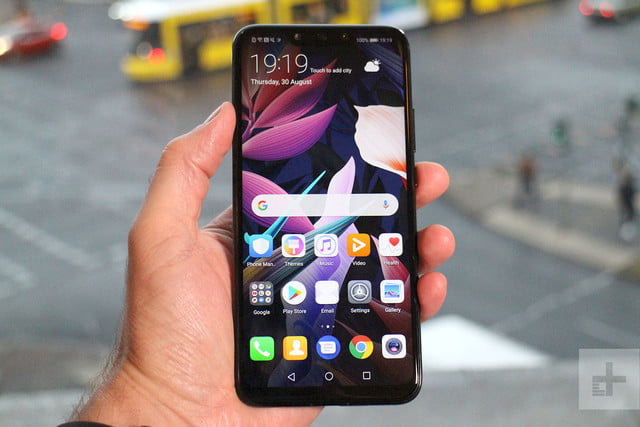
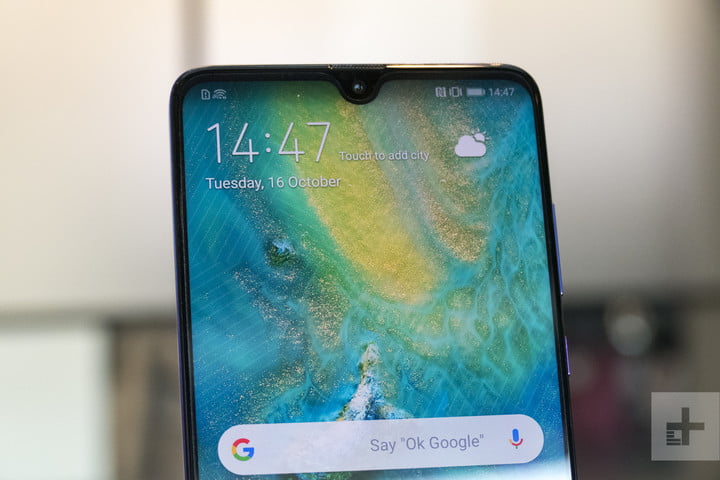
While we may have our qualms about whether the Mate 20 series is as good looking as the P20 Pro, these phones certainly have their charm. Being the cheapest, the Mate 20 Lite is probably the least attractive, with a traditionally chunky notch. That said, it’s a relative observation, and it’s still an attractive design with a glass back. The Mate 20 Pro also has a huge notch where the 3D face-sensing tech lives, but it’s also the only phone with an AMOLED display that curves into the all-glass body. The Mate 20 and Mate 20 X have the best notch — the tiny Dewdrop design — and also have premium glass builds. That said, the Mate 20 X is utterly massive, and almost impossible to wield one-handed.
There’s a clearer winner in durability. Each phone uses a potentially fragile glass build, but only the Mate 20 Pro comes with significant water-resistance with an IP68-rating. The Mate 20 has a splash-resistant IP54-rating, while the Mate 20 X has an even lower IP53-rating. The Mate 20 Lite is the worst off, with no water-resistance at all.
It’s hard to rule a winner in design, and though we prefer the Dewdrop notch of the Mate 20 and X, the Mate 20 Pro’s water-resistance is enough — for us — to bring it back to win this round.
Winner: Huawei Mate 20 Pro
Display
 Julian Chokkattu/Digital Trends
There are a wide range of big displays here, from 6.3-inches to a massive 7.2-inches. But size isn’t everything, and it’s the Mate 20 Pro’s AMOLED display that’s the best looking. The LCD displays on the Mate 20, X, and Lite are great, but they pale into insignificance next to the deep inky blacks and vibrant colors on the Mate 20 Pro. It’s also the only phone with a 1440p resolution — the rest top out at 1080p — and it curves into the body. While it’s rudely interrupted by the large notch, it’s still easily the brightest, crispest, and most beautiful display here.
Winner: Huawei Mate 20 Pro
Camera
 Julian Chokkattu/Digital Trends
The Mate 20 Lite was always going to be the weakest option here, and though its twinned 20-megapixel and 2-megapixel camera lenses do a good job, it’s not up to the standard of the triple-lens set-ups on the other three phones. The Mate 20 comes with a 16-megapixel ultra wide-angle lens, a 12-megapixel wide-angle lens, and an 8-megapixel 2-times telephoto zoom lens. We’re expecting this camera to take some amazing photos — but not as amazing as the 40-megapixel wide-angle lens, 20-megapixel ultra wide-angle lens, and 8-megapixel 3-times telephoto zoom lens in the Mate 20 Pro and Mate 20 X.
The Mate 20 Pro and X are equally matched in other areas too, with the same 24-megapixel selfie lens, the same A.I.-tweaked settings and modes — including some amazing video modes that change your view in real-time. They’re even equal in pure video terms too, with both being able to take 4K video at 30 frames-per-second, and super-slow motion at 960 fps.
The Mate 20 Pro and X are equal on paper, and until we’ve tested to see if they differ in real terms, we can’t prize them apart.
Winners: Mate 20 Pro and Mate 20 X
Software and updates
 Mate 20 Pro Julian Chokkattu/Digital Trends
Stock Android fans beware: You’ll find Huawei’s Emotion UI (EMUI) skin laid over Android on each of these phones. The Mate 20 Lite is an early casualty though, as it’s running Android 8.1 Oreo — and there hasn’t been word that it’ll get an update to Android 9.0 Pie yet. Each of the other phones comes with the latest EMUI 9 laid over Android 9.0 Pie. It’s a surprise to see this OS on Huawei’s phones so fast — a heavily customized skin like EMUI often takes months to update, so we didn’t expect to see a Huawei phone running Pie for a while longer. It’s a nice surprise, and it bodes very well for later updates to the Mate 20, Pro, and X. Expect Android Q, and possibly Android R on those phones.
Winners: Huawei Mate 20, Mate 20 Pro, and Mate 20 X
Special features
 Julian Chokkattu/Digital Trends
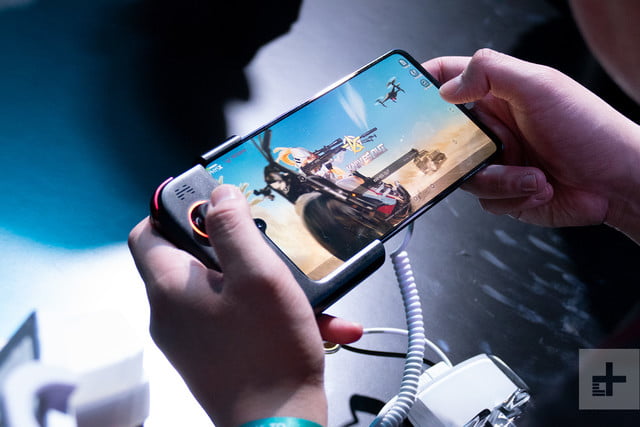
You’ll find Huawei’s super-powered gaming mode, GPU Turbo, on each of these phones, and there’s advanced A.I. built into each of them as well, which will recognize scenes in your camera, manage your resources while gaming, and power the Qmoji Animoji-style AR emoji feature. The A.I. goes even further in the Mate 20, Pro, and X though, with A.I. handling the real-time filters laid over video, and real-time object identification. Those three phones also have access to Huawei’s new gesture navigation.
But it’s the Mate 20 Pro that packs the most special features. It’s the only phone to come with an in-display fingerprint scanner, and there’s also advanced facial recognition on the level of Apple’s FaceID, and the ability to reverse wireless charge. Drop a wirelessly charging device on top of the Mate 20 Pro and the Huawei phone will charge the other device. It’s bonkers and we love it.
Winner: Huawei Mate 20 Pro
Price
None of these phones has been officially released in the U.S. yet, but you can pick one up from an importer as long as you don’t mind paying import tax. They also won’t work with Verizon or Sprint, so keep that in mind if you’re locked in with either.
The Mate 20 Pro costs 1,049 Euros (around $1,220), and the Mate 20 starts from 799 Euros (roughly $930). Both phones are currently available for pre-order. The Mate 20 X costs 899 Euros (roughly $1,050), and will be available for pre-order from October 26. The Mate 20 Lite is the cheapest at just 380 British pounds (roughly $500), and is currently available for purchase.
Overall winner: Mate 20 Pro
It would have been embarrassing for Huawei if the phone it had pegged as the most advanced didn’t win this battle, and thankfully Huawei’s most advanced flagship phone ever has come out on top, thanks largely to its incredible camera, AMOLED display, in-display fingerprint scanner, and advanced facial recognition tech. If money is no impediment, then the Mate 20 Pro is definitely the phone to get.
But the others still have their places. The Mate 20 Lite is an excellent $500 phone (though it’s up against the mighty OnePlus 6 in that price range), the Mate 20 is still an exceptional flagship device which serves as the Galaxy S9 to the Mate 20 Pro’s Galaxy Note 9. The Mate 20 X is an odd phone to pin down, but it’s clearly the phone to get if you want the largest possible screen you can lay your hands on, or a powerful mobile gaming device like no other.
Whichever you pick will be highly personal though, and you’ll be happy either way. But we’d pick the Mate 20 Pro every day.
Editors’ Recommendations
- Huawei Mate 20 hands-on review
- Huawei Mate 20 Pro vs. Samsung Galaxy Note 9: Flagship fight
- Huawei Mate 20, Pro, and X: Everything you need to know
- Huawei Mate 20 Pro hands-on review
- The Huawei Mate 20 Lite is A.I.-powered, attractive, and affordable

