


Nintendo will convert Gold Points into Switch game discounts
If you buy a lot of Switch games, good news — Nintendo is about to reward you with some discounted software. The company announced in a blog post today that you’ll soon be able to spend Gold Points — earned by purchasing Nintendo games — on Switch software in the eShop. Each Gold Point is worth one British pence, which means you’ll need to buy a lot of games (a £40 game on the eShop will net you 200 Gold Points, or £2) before you can get something substantial for free. If you don’t have enough points, you can always make up the difference with regular cash.
The change will come into effect in “early March” for UK and European Switch owners. (We’ve asked Nintendo for confirmation that the same scheme will be available in the US.) Gold points are valid for a year, which means you can wait and accrue a sizeable stack of games before cashing in their associated points on a new title. Nintendo trialed the concept the last year with a smattering of 3DS and Wii U titles. It was a temporary promotion, however, and limited to “Nindies” such as Runner2, Art of Balance and Zen Pinball 3D. Expanding the concept to Switch is a smart way to boost the system’s already impressive software attach rate.
From early March, you’ll be able to use #MyNintendo Gold Points in #NintendoSwitch #eShop.
More details here: https://t.co/a6GSxZ45AL pic.twitter.com/MipJDaQPkh
— Nintendo of Europe (@NintendoEurope) February 8, 2018
Source: Nintendo (Blog Post)
GDC 2018 will feature the event’s first film festival
The Game Developers Conference (GDC) takes place in San Francisco next month and this year’s event includes the GDC’s first ever film festival. For three days starting March 19th, the GDC will host a selection of documentary and narrative films focused on the art and culture of video games, and Q&As with the filmmakers will follow most of the screenings.
Each day of the festival with be themed. The first day, focused on international works, will feature screenings of Branching Paths, Moleman 4 — Longplay and the premiere of Heting Chen’s Indie Games in China. The second puts the spotlight on webseries with the premiere of the feature-length version of The CheckPoint Series and two work-in-progress screenings of Noclip: Horizon: Zero Dawn and Area 5’s Outerlands. The last day features works on arcade history and includes Touching Sounds, The Lost Arcade and the premiere of Josh Tsui’s Insert Coin: Inside Midway’s 90s Revolution.
Anyone with a GDC 2018 pass can view the films and admittance is on a first-come first-served basis. GDC 2018 kicks off on March 19th and runs through the 23rd.
NASA tests treatment that could slow astronauts’ muscle loss
Even though astronauts exercise everyday while they’re aboard the International Space Station (ISS), they still experience a fairly significant loss of muscle mass. So much so that they require physiotherapy once they return to Earth. However, researchers with the Houston Methodist Research Institute and the Novartis Institute for Biomedical Research are testing a device that can continuously administer a medicine that may help prevent muscle deterioration, Seeker reports. The team sent 40 mice to the ISS in December, some with devices that deliver the drug and some with devices that just deliver an inactive solution. Half returned to Earth in January and the other half will do so this month.
The device is an implanted nanochannel delivery system that can administer the medicine automatically on its own. And the drug is formoterol, a medication that relaxes muscles and is used to treat asthma and chronic obstructive pulmonary disease. The researchers are evaluating how the device and the drug work on muscle loss in the mice and while astronauts stand to benefit from this type of treatment, so do people on Earth. Those with diseases that keep them immobile for months also experience significant muscle deterioration and would benefit from a drug that could help slow or prevent that loss. Additionally, the device could administer other types of drugs such as HIV treatments that must be taken regularly without interruption.
The device isn’t yet approved by the FDA, so it will be some time before it can be tested on humans. But as we gear up to crewed missions to Mars, which will require astronauts to live in microgravity for far longer periods of time than those who work on the ISS, a muscle-loss intervention will be required. And one like this that astronauts won’t have to administer themselves and can last for months on end seems to be an ideal solution.
The research team is also working on a version of the device that can be controlled remotely. It’s scheduled to be tested on the ISS sometime next year.
Via: Space.com
Source: NASA
How to buy a camera in 2018
Smartphones have replaced dedicated cameras for most folks, but weirdly, that’s a good thing for photography lovers. With fewer boring point-and-shoots, manufacturers are focusing on building incredible cameras like Sony’s RX100 Mark V compact, the Fujifilm X-T2 mirrorless and Nikon’s high-end, full-frame D850 DSLR. For $500 and up, these models deliver faster shooting than ever, 4K video, wireless mobile sharing and more.
Performance and features vary wildly beyond that, though, and there are often several excellent choices in the same price range and camera category. Which model to get, then, depends strongly on your budget and what you’re planning to do, whether it be tourism, art photography or student films. I’m here to break down all the features of each model, look at the subtleties and help you ask yourself the right questions.
The basics

DSLRs have a reflex mirror that lets you look directly through the lens at your subject. When you take a shot, the mirror jumps out of the way to expose the sensor. All of that adds bulk and, for most models, means you can’t see the “decisive moment” when you take a photo.
At the same time, the mirror allows DSLR makers to put autofocus phase-detect sensors directly into the light path via a secondary mirror. Those measure the distance to your subject before you even take the picture, making autofocus nearly instantaneous. You lose that advantage, however, when you shoot videos or photos in live-view mode with the mirror up.
Mirrorless and compact cameras rely on electronic viewfinders (EVFs) or, in many cases, just a rear display. EVF quality has improved a lot over the past few years but still lacks the clarity of a DSLR’s optical display. Many EVFs also have a touch of lag, so the scene you see may be a few milliseconds behind reality. On the other hand, unlike an optical viewfinder, an EVF shows exactly what the final image will look like.
For autofocus, most mirrorless cameras have contrast-detect autofocus that must “hunt” for proper focus via a sort of trial-and-error method. That means mirrorless cameras generally have slower AF performance than DSLRs when taking photos. There is no disadvantage, however, in autofocus performance when shooting video.
DSLRs and mirrorless cameras let you change lenses, but you’re stuck with what’s built into a compact camera. While that’s great for portability, a single lens means you’re going to sacrifice something. Fujifilm’s X100F, for instance, has a fast but fixed 35mm-equivalent f/2.0 lens and no zoom. Sony’s RX100 V has a 24-70 mm zoom, but it’s slower at the telephoto end (f/2.8) and less sharp than a prime lens.
DSLR vs. mirrorless vs. compact

So should you get a DSLR, mirrorless or high-end compact camera? And do you need a one-inch, micro four-thirds, APS-C or full-frame sensor? How many megapixels? What about the low-light sensitivity?
Let’s break these things down with some nice charts. Bear in mind that the points apply in most but not all cases. For instance, recent DSLRs and mirrorless cameras have improved live-view autofocus, vastly closing the AF performance gap.
| DSLR | Mirrorless | Compact |
| Best battery life | Less battery life | Least battery life |
| Purity/clarity of optical viewfinder, but you can’t see the final result | Electronic viewfinder or rear display only, less clarity but what you see is what you get | Electronic viewfinder or rear display only, less clarity but what you see is what you get |
| Fastest, most accurate autofocus | Good autofocus but a notch below DSLR | Another notch below mirrorless |
| Most lens options for Nikon and Canon, allows maximum creativity and choice | Good lens options, lack of a mirror means smaller lenses and slightly better optics than a DSLR | Only one lens means less creative control but lightest, least bulky option |
| Heaviest and bulkiest, good for professionals but bad for tourists who want to pack light | Much lighter than a DSLR but also less stable for video and when shooting with large lenses | Extremely light, often pocketable size |
Sizing up sensors
Think of camera sensors like sports cars but in reverse: The bigger the sensor, the sportier and more expensive the camera. With that extra performance, though, more things can go wrong when you make a mistake.
Full-frame is the Lamborghini of sensors, available on pricey cameras like Sony’s A7R III, the Nikon D850 and 5D Mark IV from Canon. At a size equivalent to 35mm film (36 x 24 mm), it offers the best performance in terms of image quality, low-light capability and depth of field. It’s also the most expensive and finicky. While images can look beautiful when you shoot at f/1.4, the depth of field is so razer thin that your subject’s nose might be in focus but not her eyes. This can also make video shooting difficult.

The next size category is APS-C (around 23.5 x 15.6 mm), offered on most of Fujifilm’s X-series lineup, Sony’s A6500 and the Canon 7D Mark II, among many other models. It’s cheaper than full frame, both for the camera body and lenses, but still brings most of the advantages. You get still get dreamy bokeh, high ISOs for low-light shooting and relatively high resolution. With a sensor size equivalent to 35mm movie film, it’s ideal for shooting video, and focus is less demanding than with full-frame cameras.
Micro Four Thirds (17.3 x 13 mm), a format shared by Panasonic, Minolta and Olympus for all of their mirrorless cameras, is the next step down in sensor size. It offers more even lower resolution, bokeh and light-gathering capability than APS-C and full frame but allows for smaller and lighter cameras and lenses. For video, you can still get reasonably tight depth of field with good prime lenses, but focus is easier to control. If you want a DSLR, none are available with Micro Four Thirds sensors.
The other common sensor size is Type 1 (1 inch). That’s used mostly by compact models like Sony’s RX100 V and the Panasonic Lumix G7X II. The smaller size permits a smaller camera body and lens but still offers much better image quality than a smartphone. Most high-end compacts, unlike many DSLRs and mirrorless models, offer 4K video.
It’s worth mentioning that Sony makes the sensors for nearly all other camera manufacturers nowadays, with the exception of Canon and, in some cases, Nikon. Earlier this year, Sony told Imaging Resource in a since-deleted article that it keeps its best technology for itself.
| Full frame | APS-C | Micro Four Thirds | Type 1 |
| Largest size (36 x 24mm) and highest resolution, up to 50 megapixels | Second largest size (22.2 x 14.8mm Canon and 23.5 x 15.6mm others), resolution up to 24 megapixels | 17.30 x 13mm sensor size, resolution up to 20 megapixels | 13.20 x 8.80mm sensor size, resolution up to 20 megapixels |
| Largest pixels for dimly lit photos and video with less noise, usable up to ISO 104,200 | Pixels still big enough for low-light photos but more noise than full frame | Not the best for low light, with the exception of purpose-built models like Panasonic’s GH5s | Even the best models like Sony’s RX100 V will be noisy above ISO 6400 |
| Razer-thin depth of field for artistic bokeh | The sweet spot for video, but fewer artistic bokeh possibilities than full frame | Decent but not spectacular bokeh | You’ll need to zoom in and use a low f/stop for blurred backgrounds |
| Narrow depth of field creates problems with focus and bright sunlight | Easier to control focus and shoot in bright light | Focus and light more easily controlled | Relatively easy to nail focus, even wide open |
Video

If video is why you’re buying a mirrorless or DSLR camera and decent photos are just a bonus, then your needs change radically. For vlogging, you probably want a “selfie”-type flip out rear screen — an item that’s not available on any Sony mirrorless camera, but can be found on other models like Canon’s Rebel T7i and the Panasonic GH5.
Here are a few other things you need to ponder. Does your camera line-skip for video recording, or readout the whole sensor? Sony’s A7S II and A7R III, for instance, read the whole sensor, but only in cropped APS-C mode. The A6500 and the GH5, by contrast, scan the entire sensor and super-sample, giving you crisp video with no nasty moire and aliasing artifacts.
Is rolling shutter, or the “jello” effect that can skew video, well controlled? All CMOS cameras have it, but it varies a lot by model. It’s pretty brutal on Sony’s A7S and A7S II, for instance, but much better on the Sony A9 and Panasonic GH5.
Other things to consider: How’s the form factor for video (smaller isn’t necessarily better)? How long can you shoot before the camera heats up or stops? Does it support 10-bit HDR video? Is there a microphone and/or a headphone jack? (if you do a lot of interviews, it’s preferable to have both.) How’s the video autofocus? With its fast, accurate Dual Pixel AF, Canon models like the 7D Mark II and Rebel T7i are the gold standard for vloggers and one-man-band shooters, but Sony’s latest models are catching up.
OUR TOP PICKS
Best cameras if money is no object
Over the past few months, a pretty clear consensus has emerged about the top two cameras on the market: the Sony A7R III and Nikon D850. That’s convenient, because the Nikon is a DSLR and the Sony a mirrorless camera, and each model plays to the strengths of its category. Yet neither model has any real weak spots, and image quality is spectacular on both. Another dark horse is Canon’s 5D Mark IV, but it’s due for a refresh and can no longer keep up with newer rivals.
The Sony A7R III
Until recently with Sony’s A7 series, you got to choose the A7S models for low-light capability or resolution with the A7R. The A7R III mirrorless breaks that mold, because with a 42.4-megapixel sensor and 102,400 max ISO, it does both of those things well. It can even go where high-resolution cameras aren’t supposed to, shooting 10fps in bursts and recording 4K video internally with a full (albeit cropped) sensor readout. Autofocus speeds are faster than ever for both video and photos too, thanks to improved contrast detection AF and faster processing. For what you get, the $3,200 asking price is actually reasonable.
Nikon D850
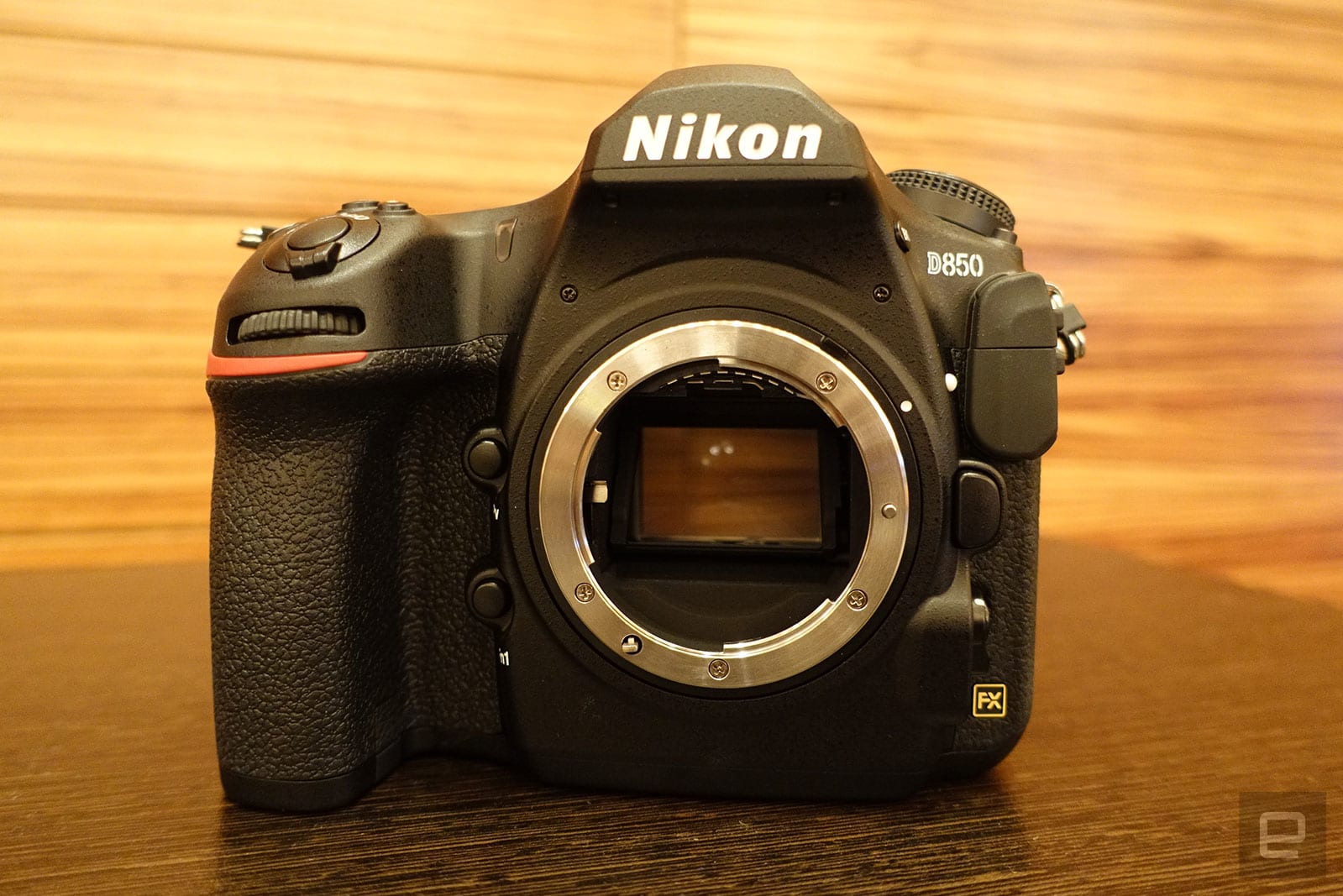
If mirrors are more your thing, Nikon’s $3,300 D850 is the camera du jour. With a 45.7-megapixel sensor and max 102,400 ISO, image quality is on par with Sony’s A7R III. It can also shoot fast, at up to 7fps, which is far from the 14fps of the more professional D5 but, again, incredibly good for such a high-res camera. Nikon has upped its video game as well with the D850 by introducing 4K internal recording. Choosing between the A7R III and D850 is a tough call, but Nikon’s model has better handling and speed for pro photographers while Sony takes the prize for video shooters.
Best mirrorless cameras
Sony A7R II, A7S II, A7 II
Sony is currently the only game in town for full-frame mirrorless cameras. If the new A7R III is too rich for your blood, however, Sony still manufactures the high-resolution 42.4-megapixel A7R II and low-light monster 12.4-megapixel A7S II, both priced around $2,500. If that’s still too much, consider the $1,100 24.3-megapixel A7 II, which has built-in 5-axis stabilization. All three cameras are great for video, thanks to built-in microphone and headphone inputs, but if you need 4K, you’ll have to spend more — the A7 II is limited to 1080p.
Fujifilm X-T2

If you like your controls manual and your bodies classic, the $1,600 Fujifilm X-T2 already has you sold. But underneath that lovely exterior, there’s much-improved performance over its predecessor, the X-T1, especially for autofocus. With a new 24.3-megapixel X-Trans III CMOS sensor and image processor, you can shoot up to 8fps in burst mode and capture 4K video at 30fps. Compared to its main rival, Sony’s A6500, the X-T2’s better handling gives it an edge for shooting stills while the Sony excels at video.
Sony A6500
Sony’s central theme when it launched the $1,400 Alpha A6500 mirrorless was speed. Thanks to a buffer that’s baked directly onto the sensor, you can focus in five-hundredths of a second and shoot at 11fps for up to 30 seconds, capturing more than 300 shots. And when it comes to video, the A6500 is the APS-C champ, handling 4K at up to 30fps by sampling the entire 6K sensor, making for crisp, artifact-free video.
Panasonic GH5 and GH5s
Video shooters have embraced the GH5 ($2,000) and new GH5s ($2,500). Despite the smaller sensor and reduced bokeh compared to, say, the Sony A7S II, the GH5 is the only mirrorless consumer camera to offer 10-bit, high-data-rate 4K-video recording. That gives you a large amount of control over video in postproduction, letting you tweak the colors to a fine degree. It also allows producers to create HDR videos that are perfect for today’s modern TVs and projectors. You also get both headphone and microphone inputs.
Olympus OM-D E-M10 Mark III
Money is an object for many of us, and that’s where Olympus’ sweet, badly named OM-D E-M10 Mark III comes in. For just $650, you get everything a beginning- to intermediate-level shooter could want, like manual adjustment dials, a compact size, 2.36-million-dot electronic viewfinder, 5-axis in-body stabilization and 4K, 30fps video. The drawback is its Micro Four Thirds 16.1-megapixel sensor that’s both smaller and lower resolution than on rival cameras. Image quality is good, but you’ll get more noise and less-dynamic range in low-light images. Battery life is not the best either.
Best DSLRs
Nikon D810
With the D850 now at the top of Nikon’s DSLR food chain (bar the pro-oriented D5), the full-frame D810 became a lot more interesting. The new model pushed the D810’s price down to around $2,400, but it’s still an ideal portrait and landscape camera, thanks to the 36.3-megapixel filterless design. It’s a lot bulkier than mirrorless models like the Sony A7R II, but many photographers find that gives it better stability, toughness and handling. For video, you’ll want to look elsewhere if you need 4K, as the D810 is limited to 1080p.
Canon EOS Rebel T7i
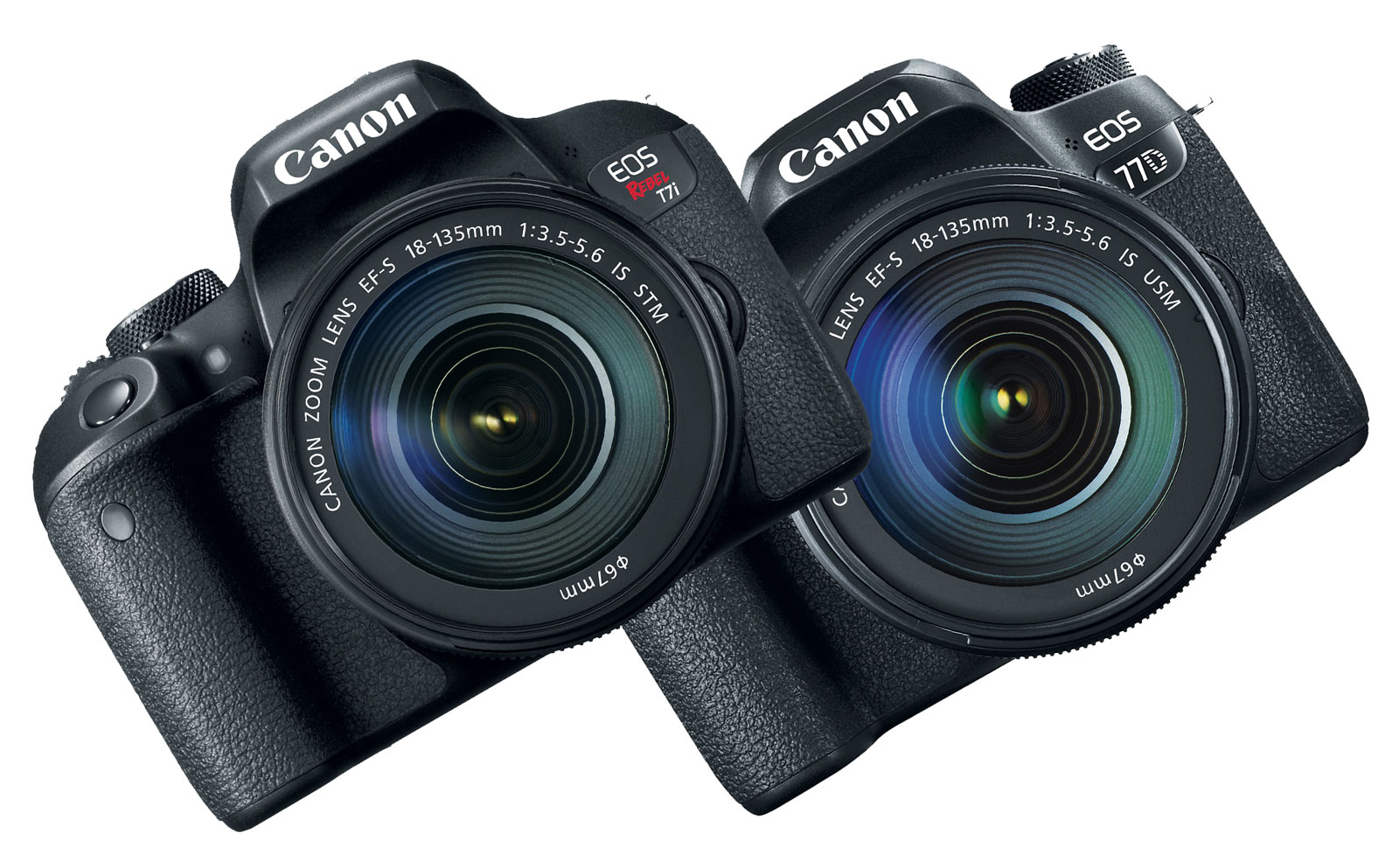
Nikon and Canon both offer numerous APS-C sensor DSLRs, but the best value of the bunch might be the Rebel T7i, launched last year. For $750, you get a 24.2-megapixel, 45-point autofocus sensor that shoots at 6fps with better low-light capability (up to 25,600 ISO) than before. It has NFC, WiFi and Bluetooth capability for quick sharing and a less fiddly user interface. Drawbacks? As with other DSLRs, there’s a frustrating lack of support for 4K video.
Nikon D3400
The fact that you can find Nikon’s D3400 with no fewer than two kit zooms for less than $600 makes it one of the true bargains out there. The 24.2-megapixel sensor delivers great image quality, and performance is decent, thanks to the 11-point autofocus system and 5fps continuous shooting. Bonus features include a flip-up rear screen and Nikon’s SnapBridge Bluetooth for easy file sharing. On the downside, that screen isn’t a touchscreen, and video resolution is limited to 1080p.
Compact cameras
Fujifilm X100F
If you like to record while walking around or are a travel photographer who wants the best in your pocket, there’s Fujifilm’s X100F. The fixed 23mm f/2.0 lens is a hard sell, but like any prime, it offers better quality than a zoom. Apart from that, you get everything you could want in a compact, like 8fps burst shooting, a hybrid optical/EVF and 24.3-megapixel X-Trans sensor seen in the X-Pro2 and X-T2. It also features easy-to-use manual dials and squeezes all of that into an elegant, tiny package.
Sony RX100 Mark V

Sony’s flagship compact has such a high level of impressive technology that it’s worth every penny of its admittedly high $1,000 asking price. You get a fast 24-70mm equivalent f/2.8-2.8 lens, a 2.36-million-dot OLED EVF, optical image stabilization and a 20.1-megapixel sensor. The standout feature, however, is the speed: You can shoot 24 RAW images per second for 150 shots and focus on your subject in just .05 seconds. As with other Sony cameras, the RX100 V’s Achilles’ heel is its handling; you’ll have to contend with a wonky menu system and a limited selection of manual controls.
Panasonic Lumix TZ100/ZS100
If you’re looking for a superzoom and don’t want to spend an insane $1,700 on Sony’s RX10 IV, take a look at the Panasonic Lumix ZS100. For about $1,000 less ($700), you get an EVF, 1-inch sensor, f/2.8-5.9 25-250mm equivalent zoom, 5-axis optical stabilization, 10fps continuous shooting and 4K video at 30fps. Sure, the zoom range and shooting speeds aren’t as impressive as Sony’s RX10 IV, but almost nobody needs those features and the ZS100 is less than half its weight and size.
Wrap-up
There’s never been a better time to buy a camera, as new DSLR, mirrorless and compact models can handle just about everything you throw at them. At the same time, cameras are among the most technologically complicated devices you can get and can cost thousands of dollars, so making the right decision is crucial. The key is to decide what you want to do with one and find the model with the features that best fit. Once you’ve narrowed it down, head to a camera store so you can find the one that feels the best in your hands.
Lawsuit claims Google ‘knowingly sold’ Pixels with microphone issues
Shortly after Google released its first branded smartphones in 2016, the Pixel and Pixel XL, some early adopters reported a microphone issues. While they were fixed in phones produced later, the problems disabled all three mics on the devices and often cropped up at odd times, like when holding the devices in different ways or in cold temperatures. Now the search giant faces a class-action lawsuit alleging that the company knew about the issues but sold the phones anyway.
At the time, a Google employee on the Pixel support forums stated that it might be caused by “a hairline crack in the solder connection on the audio codec,” internal damage that might even be caused by simply dropping the phone a short distance. The search giant supposedly prevented in later phones with tweaks in the manufacturing process, but didn’t offer a fix for current phones — just replacement under warranty.
The lawsuit (PDF) claims that even some phones replaced under warranty experienced the microphone issues — and regardless of the fixes in place, continued to knowingly sell Pixel and Pixel XL devices with the defect.
“Despite receiving hundreds of complaints shortly after launch — and admitting the phones have a “faulty microphone” — Google continues to sell the Pixel phones without telling purchasers about the microphone defect. Moreover, instead of fixing the defective Pixel phones, providing refunds, or replacing the devices with non-defective phones, Google has replaced defective phones with other defective phones, resulting in many consumers repeatedly experiencing the microphone defect,” the lawsuit stated.
We reached out to Google for comment on the matter and will update when we hear back.
Via: 9to5Google, Fast Company
Source: “Patricia Weeks and Waleed Anbar, et al v. Google LLC” (PDF)
Upcoming Chrome update will label HTTP sites ‘not secure’
Chrome has been taking measures to inform users when they’re on an unencrypted HTTP website, adding notifications to more and more sites over the last couple of years. Today, Google announced it will be taking that one step further, labeling all HTTP sites as “not secure” starting with the release of Chrome 68. You can see what that will look like in the image below.

Google says there has been a lot of progress when it comes to getting developers to switch their sites to the more secure HTTPS. Now, over 68 percent of Chrome traffic on Android and Windows is protected while over 78 percent is protected on Chrome OS and Mac. Additionally, 81 of the top 100 sites now use HTTPS. To keep things going in that direction, Google’s open-source Lighthouse tool now has an audit feature that lets developers see which resources are being loaded with HTTP and which of those can be simply upgraded to HTTPS.
“Chrome’s new interface will help users understand that all HTTP sites are not secure, and continue to move the web towards a secure HTTPS web by default,” Google said in a statement. Chrome 68 is scheduled to be released in July.
Image: Google
Oculus’ Quill tool now lets you animate VR
For those interested in creating 3D art directly in VR, the update to Oculus’ Quill released today should be good news. The update includes new animation tools like free frame-by-frame redrawing, copy-and-re-pose animation and an animation brush that let artists bring their drawings to life directly in Quill. “These tools open the door for a whole new kind of storytelling, with VR characters who move and perform in scenes and environments that are more alive than ever,” Facebook, which owns Oculus, said in a statement. “Inspired by the early hand-drawn animation of the 1920s, but powered up with modern technology and native VR workflows, Quill animation brings a new level of freedom to artists in this rapidly emerging medium.”
Quill was used to create the Emmy-nominated Dear Angelica, and with the animation tools released today, Facebook says that production times can be significantly shorter than when traditional 3D animation software is used. In tests of the new tools, artist Goro Fujita completed his animated short film Beyond the Fence in only three weeks.
Facebook says there’s more in store for Quill. “We’re working on many more Quill updates and features, including the ability to discover and watch animated Quill stories in Facebook Spaces with friends,” it said. “Today’s Quill animation tools are one step toward that future as they empower artists to push the boundaries of VR-native storytelling — to invent a new kind of narrative that’s not just compellingly watchable, but fully immersive and perfect to be shared together.”
Refine Pinterest Lens visual searches with text suggestions
2017 was a good year for Pinterest Lens users. Whether the feature helps you find recipes based on your brunch pics, offer style tips from the clothes you already own or gave you a hand with your Target shopping, the company’s visual search is handy for a lot of things. In fact, Pinterest says Lens powers over 600 million of those searches monthly, and twice as many folks are using it every day compared to six months ago.
As part of the one-year anniversary of Lens, Pinterest is rolling out a new feature for the tool. In the iOS version of the app, you can now add text to any photo search. In other words, when you’re looking a new sofa to match your coffee table, you can refine a Lens search with the word “sofa” to guide the results. Basically, if you’re looking for specific items, using both a photo and a keyword should help. The new ability will only be available for iOS users when it arrives next week, but the company promises the Android faithful will be able to take advantage soon enough.
If the last several months are any indication, Pinterest will continue to throw its weight behind Lens. The company says it’s improving the tool on a daily basis, constantly recognizing more objects and making it more accurate. One thing is for sure: Pinterest is no longer just a place you store recipes and project ideas, it has become a very powerful search tool.
Source: Pinterest
Snapchat Launches ‘Create Your Own Lens’ Studio Within iOS App, Adds New Caption Styles for Snaps
Yesterday Snapchat announced its first-ever live television event coverage, aimed at key highlights coming out of the 2018 Winter Olympic Games. Today, the company is revealing an enhanced version of its custom Geofilters with a new paid “Create Your Own Lens” studio that lets users build and edit their own personalized selfie Lenses for major events and parties.
Snapchat’s “Create Your Own Lens” on iOS
Available today in the iOS app and on the web, the new section of Snapchat will allow users to create their own custom selfie Lenses and Filters, which friends and family members within a designated location will then be able to use in their own Snapchat apps. The studio includes over 150 templates at launch, amassed from Snapchat’s well-known selfie Lenses and Filters that have previously appeared in the camera section of the app.
 “Create Your Own Lens” on the web
Users will be able to navigate to “Settings” in the iOS app, select “Filters and Lenses,” choose their desired Filter or Lens, customize it with text, enter the time of the event with the location, and checkout at least three hours before the event begins. The company said that prices for each creation start at $9.99, and vary due to factors like location size and duration. As of now, Snapchat is keeping the Create Your Own Lens studio aimed at consumers only, and noted that brands trying to use it for advertising purposes will not get their submissions approved.
In the same update, Snapchat users on both iOS and Android will begin seeing new caption styles today and a new user interface to go along with them. Previously, Snapchat had two styles — a bar of text and resizable text — but now users will gain access to Brush, Italic, Glow, Gradient, Rainbow, Fancy, Old English, and more. Caption styles will now be located under the text entry field in a horizontal bar that users can swipe through to choose their preferred text option, and two different styles can be placed on the same Snap.

Snapchat’s series of updates this week come after the company announced that it increased to 187 million daily active users in the fourth quarter of 2017, up from 178 million during the third quarter. Snapchat has been fighting to gain new users after rival Instagram introduced its own Stories format in 2016, and in September 2017 Instagram reached 500 million daily active users (for both traditional posts and Stories).
iOS users should start seeing the new update rolling out to the Snapchat app [Direct Link] throughout the day.
Tag: Snapchat
Discuss this article in our forums
Hulu Begins Rollout of 60fps Live Streaming for Select Channels on iPhone, Apple TV, and More
Hulu on Reddit this week announced that it will begin rolling out support for 60 frames per second live streams on its “Hulu With Live TV” cord-cutting service, launching in time for viewers to stream the Olympics and March Madness. Hulu said it was aware that 60fps streaming was “one of the most-requested features” by its viewers, leading to this week’s announcement (via Cord Cutters News).
The company explained that the update will see a launch in phases, and began yesterday with Phase 1, including the following channels now supporting 60fps on Hulu With Live TV: CNN, CNN International, HLN, TNT, TBS, TCM, TruTV, Cartoon Network, Adult Swim, all SHOWTIME channels, “about half” of available FOX affiliates, all NBC affiliates, and New England Channel News.
Due to the dependencies required to enable 60fps, we’ll be rolling it out in phases to get you these higher-quality streams as quickly as possible. By offering our live streams at this frame rate, our goal is to provide a significantly more immersive viewing experience for Live TV. You’ll notice the difference most when watching sports or news, so we’re excited to have this in time for the 2018 Winter Olympics and March Madness (NBC and Turner channels, respectively).
Hulu noted that individual affiliates “may temporarily revert back” to 30fps streams when adjusting for internet speeds, giving viewers a more stable experience. Phase 1 will include Hulu apps on iPhone, iPad, Apple TV, Xbox One, Fire TV, Samsung Tizen TV, and Nintendo Switch.
The company hasn’t yet indicated when Phase 2 will begin, or what channels/devices will be part of that rollout. Later this year, Hulu will also be launching a redesigned user interface across its on-demand and live services, including a new Live TV guide. For the Live TV section of Hulu, the latest numbers put the service at 450,000 paid subscribers, beating out YouTube TV (300,000), but still trailing DirecTV Now (1 million) and Sling TV (nearly 2 million).
Tag: Hulu
Discuss this article in our forums

