


Solo: A Star Wars Story tickets are on sale now!

Find out what the scruffy looking nerf herder was up to before he met Luke.
In celebration of Star Wars Day – May the Fourth, tickets for Solo: A Star Wars Story have finally gone on sale. You can get tickets online right now through Fandango for showings as early as 7:00 PM on May 24. Yes, that’s the day before the movie’s official May 25 release date. Don’t ask.
See at Fandango
May the Force be with you when getting your tickets!
The newly-released Oculus Go is already down to just $169 at eBay
Not much time to save.
Using the coupon code PMAY4TH at eBay you can pick up the all-new Oculus Go for just $169.15. It was only just released earlier this week, so this is the first discount we’ve seen on it. The standalone headset normally sells for $200, but this limited time eBay sale offers you a way to pick one up for a little less. This discount is available on both the 32GB option and 64GB version. It’s designed to sit between a Gear VR headset and the Oculus Rift, giving you an awesome experience without the need to dock your phone or strap to a computer.

Both listings are via Newegg’s official eBay storefront, so you don’t have to worry about it being a sketchy retailer that you are buying from. Getting the Oculus Go set up can be a bit tricky, but we have a great guide to get you started.
See at eBay
How many connected devices are in your home?

There’s plenty of home tech these days, but not everyone finds it all that useful. Where do you stand?
Smart home accessories are becoming more ubiquitous every year, and these days you can find them everywhere from specialized stores like Best Buy to more broad locations like Target and Walmart. Some home tech, like connected security cameras and smart thermostats, offer immediately obvious benefits for home security and automation. Other gadgets like smart lightbulbs seem a bit unnecessary to some, but can help achieve certain aesthetics in a room.
The one smart home gadget that almost everyone has sitting around is an assistant-powered speaker. Whether it’s an Amazon Echo, a Google Home, or even an Apple HomePod, smart speakers are a great addition to any home that can do anything from playing music and podcasts to controlling other smart home devices, all with a simple voice command. Smaller speakers like the Google Home Mini are often bundled in for free with phones and tablets, making them a great, easily accessible first smart home device for general consumers.
See Amazon Echo (2nd Generation) at Amazon
For those more concerned about security than voice commands, a connected camera or doorbell can be a great addition to the home. Nest is one of the biggest players in this realm, with excellent products like the Cam IQ and the Hello doorbell, but there are plenty of other great alternatives from brands like Ring and Canary. A security camera is only useful as long as you can see the feed, and smart cameras let you see what’s going on directly from your phone — most products in this category even let you hold conversations with people on the other end.
Then there are the more aesthetically focused products. Smart lights from brands like LIFX and Philips Hue have become extremely popular lately, with the ability to set specific colors and color temperatures for each individual bulb. Some can even be set up to flash different colors to notify you of new messages on your phone or incoming weather alerts.
See LIFX A19 Smart LED Light Bulb on Amazon

Of course, we can’t leave out home monitoring and automation tools. This is where Nest got its start, with products like smart thermostats and smoke alarms. Ecobee has also gained some traction with its own line of thermostats. The focus of all of these products is to save you money and, in the case of the Nest Protect smoke alarm, potentially save lives.
See Ecobee4 Thermostat with Sensor on Amazon
This only scratches the surface of the unending selection of smart home tech, and whether you’ve equipped your home with a full range of cameras, lights, thermostats, and more, or you’re only just now dabbling in smart speakers, we want to know.
What are some of your favorite smart home gadgets? If you could only keep one smart device around, which would it be?
Spotify vs. Google Play Music: Which should you subscribe to?

Which music service is right for you?
Music subscriptions can help set the tone for your life, as the music you listen to day in and day out can help keep your energy up, your mood stable and bright, and your fingers tapping out a rhythm. As someone who never, ever leaves home without headphones, I’ve taken a deep look at Google Play Music and Spotify so as to help you figure out which service is more deserving of you and your jam sessions.
Here are the perks and pitfalls for Spotify and Google Play Music, by category.
Look and Layout
- Spotify’s dark theme beats Play Music’s retina-searing white. Spotify’s dark theme gives the app a cleaner, crisper look, and makes the app far easier on the eyes during late night jam sessions or nightly drives.
- The tabs at the bottom of the Spotify app make it easier to jump between sections of the app than Google Play Music.
- Google Play Music’s playback screen features zoomed in album art, which looks awkward and obscures some of the playback controls for albums with busier artwork. Spotify’s playback screen shrinks the artwork a bit, but slivers of other album art give hints at the next and previous songs, however some playlists and albums on Spotify have started adapting the zoomed-in full-screen album art like Play Music.
- Play Music’s Now Playing Queue is standard and straightforward, and you can see ahead several songs on radio stations, and you can swipe away songs you don’t like. Spotify doesn’t always show you what’s coming up, and its queue management is ever so slightly insane.
Sound Quality and Device Limitations
- Spotify offers audio streaming qualities up to 320 kbps when Spotify Premium users set their quality up to “Extreme quality”, and audio quality up to 256 kbps while playing on Chromecast. Google Play Music offers audio streaming qualities up to 320kbps on both the streaming library and uploaded music, though the quality of uploaded music is dependent on the quality of tracks uploaded. Of course, actual audio quality will depend on your streaming settings, the system you’re listening on, and the quality of the music that was uploaded into the library.
- Google Play Music offers to option to stream at a lower quality while on mobile data to conserve data; Spotify has the same audio setting for streaming on both Wi-Fi and data. Google Play Music also features a Stream only on Wi-Fi to help further preserve your precious mobile data.
- Spotify lets you stream Spotify on as many devices as you like but you can only download music for offline playback on three devices, and only up to 3,333 songs. Meanwhile, Google Play Music has a 10-device limit and a four-device de-authorization limit per year, you can download as much music as your device can hold.
- Google Play Music has an app for Android TV, both Play Music and Spotify have apps for Android Wear, and both support Google Cast. Spotify uses Spotify Connect to connect to a wider variety of speakers and devices than just Google Cast, including Sonos and car systems.
Library and Features
- Both Google Play Music and Spotify have over 30 million songs available to their users to stream. Google Play Music offers links to music videos for millions of songs on YouTube, which are ad-free in countries with YouTube Red. Spotify offers a handful of Spotify Original Video Series, which highlight local music, exclusive performances, and more. Both services have also expanded their podcast offerings in recent years, and Spotify can even help you find upcoming concerts in your area.
- Spotify doesn’t let you upload your own music library, but you can 10,000 songs from the streaming catalog to Your Library. Google Play Music lets you upload 50,000 songs to your Play Music library and stream them wherever for free, and you can add as many subscription songs to your library. If you are a paid subscriber, Google Play Music lets you mix and match uploaded content and subscription songs.
- Spotify’s automatic stations and suggested songs seem to be slightly more accurate in their predictions than Google Play Music’s. Spotify also offers up Discover Weekly and Daily Mix playlists to help you keep your music fresh.
Playlists and Sharing
- Google Play Music’s playlists are private by default; Spotify’s playlists are public by default and can allow collaboration. Every song you add to a playlist in Spotify, everyone can hear. Google Play Music only shares subscription songs in public playlists, not uploaded songs.
- Spotify doesn’t allow users on Android (or web) to reorder songs within a playlist without deleting them and re-adding them in the order desired. Spotify doesn’t even allow web users to rename playlists, either. Google Play Music allows you to edit, reorder, and rename playlists on mobile and web platforms.
- Playlist sharing on Spotify lets users listen to the playlist directly on some websites and social media platforms like Twitter and Reddit. Google Play Music’s playlist sharing is just a normal hyperlink.
- If you have friends on Spotify that you follow, you can see what they’re listening to and what playlists they’re building. If you want to listen to something on the down-low, you can start a Private Session and what you’re listening to won’t be shared.
Plans and Pricing
- Spotify Premium for Family and Google Play Music family plan are both $14.99 a month and give up to 6 users their own premium subscription account. You can’t change addresses on a Spotify Premium for Family Plan; if you move, you have either go to individual plans or delete your accounts and start over.
- Google Play Music’s family plan does not require everyone to live under the same roof, which Spotify Premium for Family not only requires, but enforces.
- Google Play Music comes with YouTube Red in the United States, Mexico, Australia, New Zealand, and South Korea, eliminating ads on YouTube and allowing you to save YouTube videos for offline playback.
- Spotify offers a student discount (and Hulu basic access) for college kids for $5 a month; Google Play Music does not offer any student discounting. Spotify also offers a Spotify and basic Hulu bundle to Spotify Premium subscribers for $13 a month.
Where Spotify is better

Spotify is for shufflers and sharers that don’t buy music and just want Spotify to serve up what’s popular or stations based on their genres and artists of choice. It’s great for users who just want a bit of music to fill their lives and tech fiends that switch devices too frequently for Google Play Music’s device limit policy. The app’s dark theme and easy layout are easier for casual listeners to browse. It’s also good for students who need a cheap solo plan and Hulu users looking to save money on a bundled subscription.
Sign up for Spotify
Where Google Play Music is better

Google Play Music is good for families, users with well-established music libraries, and those with particular playlist tastes that they can satisfy between purchased, subscription, and uploaded music. Google Play Music’s family plan doesn’t have nearly the strings that Spotify’s does, and is a better bargain. If you’re in the U.S. even if your family isn’t big on Google Play Music, everyone can ditch the ads on YouTube, which is almost worth the subscription price by itself.
Sign up for Google Play Music
What’s your choice?
Which streaming service do you prefer? Does Spotify have your number with its Daily Mixes and Discover playlists? Do you need the library blending powers of Google Play Music to bring your old-school library to the 21st century? Tell us which service you’re using and why in the comments.
More: Spotify Free vs. Spotify Premium vs. Spotify Premium for Family
Updated May 2018: This article has reflected some updates to the Spotify app and the Spotify-Hulu bundle for Spotify Premium members.
This Chrome extension adds Rotten Tomatoes and IMDB info to Hulu listings

Install, hover. Done.
Now this is pretty cool. If you’ve ever been looking through the Hulu listings on a web browser and wondered “Wouldn’t it be great to have Rotten Tomatoes and IMDB information for each show?” — you’re in luck. It’s been done with a pretty basic Chrome extension from Flixed.io.
Here’s what you do:
You’ll need to be using the Chrome browser. Because it’s a Chrome extension. So Chrome.
Install the plugin.
Hover over a listing in Hulu, and you’ll see the IMDB and RT information right there.
Nice and easy.
Best Wireless Headphones for the Google Pixel 2

What are the best wireless headphones for the Google Pixel 2?
The Google Pixel 2 is a great phone, but you’re going to need a quality pair of Bluetooth headphones thanks to the removal of the 3.5mm headphone jack.
Fortunately, there are a plethora of options to choose from, from “Made for Google” options like the Pixel Buds to tried and tested classics. We’ve tried to round out a list that offers a good variety of styles and price points, so you should be able to find the right pair for your needs.
- Google Pixel Buds
- Bose QuietComfort 35
- Jabra Move Wireless
- Libratone Q Adapt
- Bowers & Wilkins PX
- Sony H.ear Wireless Noise Cancelling Headphones
- Jaybird X3 Sport
Google Pixel Buds

Google unveiled its own wireless headphones alongside its new Pixel phones, and the Pixel Buds look like a compelling option for anyone in need of a fresh new pair of Bluetooth headphones — with advanced smarts built in!
Arguably the biggest feature you get by pairing the Pixel Buds with a Pixel 2 is the ability to trigger the Google Assistant with a quick tap and also use Google’s impressive language translation technology to translate up to 40 supported languages into English nearly instantaneously. This feature is only available for Pixel phones and as such make them a really intriguing option — especially if you love to travel to far-off lands where that live translation feature could come in extremely handy.
See at Google
Bose QuietComfort 35 II

When it comes to over-ear noise-canceling Bluetooth headphones, the Bose QuietComfort 35 II’s are basically the gold standard. The Bose brand is synonymous with high-quality audio products and the QC 35s are a great example of their craftsmanship.
Featuring some of the best noise cancellation you’ll find, these are ideal options for your noisy commute or for frequent travelers who want to cut out the sound of the airplane engines. Cutting out that distracting noise is important and with 20 hours of battery life, you can wear them comfortably for hours without worrying about these dying on you. There’s also a button for quickly accessing Google Assistant, which is awesome.
Sure, these puppies will set you back $349, which is a fair price for what is arguably the best noise-cancelling headphones out there. They’ve been reviewed well by most people who’ve tried them, including AC’s own Phil Nickinson, who called them nearly perfect. If noise cancellation and comfort are your biggest factors when buying headphones, you have to consider Bose.
See at Amazon
Jabra Move Wireless

Not looking to break the bank on headphones? You’ll want to consider the Jabra Move Wireless on-ear headphones. They’re lightweight and durable with a headband made of stainless steel and dirt-resistant fabric on the ear cups. You get up to 8 hours of music playback and 12 days of standby time on a single charge.
These headphones were selected by the Wirecutter as the best wireless Bluetooth headphones you can buy after testing 115 headphones. They say the sound quality and comfortable fit belies the lower price, so if you’re looking for Bluetooth headphones that sound great at a great price, pick up a pair for as low as $66.
See at Amazon
Libratone Q Adapt

These on-ear headphones from Libratone are featured in the Google Store as a “Made for Google” certified accessory. They’ve got a great look to them and feature adjustable noise cancellation, a touch interface for controlling playback and volume, and a built-in microphone for taking calls.
While the Pixel 2 did away with the headphone jack, there’s a good chance that you still own several products that use them, so Libratone has included an optional 3.5mm cable for those times when you’d prefer a wired connection.
The Q Adapt cost $249, which is a fair price to pay for excellent sound and tremendous comfort in a smallish package.
See at Google
Bowers & Wilkins PX

If you’ve got money to burn on your Bluetooth cans, you may be interested in the Bowers & Wilkins PX wireless headphones. B&W is a trusted name in audio equipment and its latest wireless headphones have been earning rave reviews.
The main attraction here is the outstanding noise-canceling and sound quality, making these an ideal choice for any audiophiles living that big city lifestyle. They’re also quite adaptable, supporting both 3.5 mm and USB-C wired connections.
AC’s own Tom Westrick picked up a pair of his own recently and praised them for their comfort and sound quality, which he says are better than any other pair of headphones he’s tried — and for a price of $400, you’d definitely expect a premium experience.
See at Amazon
Sony H.ear Wireless Noise Cancelling Headphones

Sony’s wireless over-ear headphones are jam-packed with features such as noise-canceling, NFC connectivity, and a handy carrying case for traveling. They’re wireless with Bluetooth 4.1 technology, but also include a 3.5mm cable with inline volume controls. They have digital noise-canceling that adapts to your surroundings to cut out unwanted sound and deliver high-resolution audio to your ears.
They’ve got a sleek and comfortable design that you can wear for hours, and you can expect up to 20 hours of playback time on a battery charge. If they die, you’ve got a wired connection available, so make sure you got your headphone adapter with you.
These will run you just over $300, and they are arguably better than Sony’s more-expensive WH1000XM2.
See at Amazon
Jaybird X3 Sport

Jaybird has been making quality headphones for quite some time and the Jaybird X3s are no exception.
You can get a full week of workouts on a single charge and a quick 15 minutes of charging will get you a full hour at least. If you rely on your tunes to get you through a workout, check out the Jaybird X3 wireless earbuds and enjoy.
These headphones come in Blackout or Sparta (white) colors, and they’re sweat- and rain-proof, so you can pour your heart and soul into every workout without worrying about frying them. Pricing starts around $100.
See at Amazon
What have you tried?
What are your favorite wireless headphones that you’ve tried? Any thoughts on the options we’ve listed here? Let us know in the comments!
Update, May 4: These are still our top picks for the best headphones you can buy for the Pixel 2, but thankfully some of them are even cheaper.
Google Pixel 2 and Pixel 2 XL
- Pixel 2 FAQ: Everything you need to know!
- Google Pixel 2 and 2 XL review: The new standard
- Google Pixel 2 specs
- Google Pixel 2 vs. Pixel 2 XL: What’s the difference?
- Join our Pixel 2 forums
Best Buy
Verizon
Google Store
Project Fi
Vine’s rapturous return has been delayed indefinitely
When Twitter shut down Vine in early 2017, the internet mourned what had become a haven for bizarre and unexpectedly sublime content. But by the end of the year, hope returned when its cofounder Dom Hofmann tweeted a simple but unmistakable Vine 2.0 logo announcing he was creating, on his own, a new version of the platform. And yet, fate is a fickle mistress. The tweet originally announcing the platform’s return is gone, as with all others on Hofmann’s account — save one stating that Vine 2.0 has been postponed indefinitely.
the v2 project is postponed https://t.co/H0e9e0BTdg pic.twitter.com/mN5wIbdQsf
— v2 (@v2app) May 4, 2018
In a message to the platform’s community, Hofmann admitted that despite initially asserting Vine 2.0 would be a self-funded personal project, the overwhelming attention has ratcheted up expectations. With so many people eager to join, estimated costs got too high for Hofmann to afford alone — especially to afford legal fees, he added — that it would require outside funding to launch at such a scale. As someone who already runs a company, Hofmann would have to start a new one, with investors, to handle the task.
So Hofmann is taking a step back and pausing the release indefinitely until more pieces fall into place. “I’m very, very sorry for the disappointment. If it’s any consolation, I think it would have been even more disappointing if this service had been developed and released incorrectly, which is where we were headed. I’d like for us to get it right,” Hofmann wrote in the post.
If you need your Vine fix in the meantime, he recommended jumping on similar apps that have sprung up recently — and urged developers releasing projects in the space to reach out to him.
Source: Vine 2.0 forum
Apple to Shut Down Texture App for Windows Following Acquisition
Following its acquisition by Apple, Texture this week announced plans to shutter its Texture magazine subscription app for Windows users at the end of June.
As noted by The Verge, Texture recently sent out emails to its users letting them know that the Windows service will be discontinued on June 30th, and the company also added a notice to its website.
Texture says the Windows app, which has not been updated in some time, is being shut down to “keep things working smoothly.” The discontinuation of the app may have been on the horizon regardless of the acquisition by Apple based on its infrequent updates and poor reviews.
Texture is an all-access pass to the world’s best magazines. To keep things working smoothly, older versions of the app sometimes need to be retired. After June 30th, 2018, the Texture Windows app will no longer be available. Your Texture subscription will continue to be available on compatible phones or tablets running iOS or Android and on Fire HD tablets along with ongoing access to all the magazines you have selected as your favorites.
Windows users who are losing access to Texture through the Windows platform will be able to continue to access Texture using smartphones and tablets running iOS or Android, but there will no longer be a way to read Texture magazines on a Windows PC.
Apple first announced plans to acquire Texture in mid-March. At the time, Apple iTunes chief Eddy Cue said Apple was “committed to quality journalism from trusted sources and allowing magazines to keep producing beautifully designed and engaging stories for users.”
For those unfamiliar with the service, Texture offers subscribers unlimited access to more than 200 digital magazines for $9.99 per month. Available titles include major magazines like Cosmopolitan, People, Better Homes and Gardens, Time, Bloomberg Businessweek, Forbes, Condé Nast Traveler, Allure, Billboard, Town & Country, ELLE, Good Housekeeping, National Geographic, Rolling Stone, Vogue, and more.
Rumors have suggested Apple plans to use its Texture acquisition to launch an upgraded Apple News app with a subscription-based news service that would include Texture’s magazine subscription options.
The news subscription option, which would be similar to Apple Music but for news and magazines, would provide a boost to Apple’s growing services category.
Tags: Apple acquisition, Texture
Discuss this article in our forums
‘Arrested Development’ season 5 will include Jeffrey Tambor
After Jeffrey Tambor was accused of sexual harassment and assault by multiple women, he left the hit show Transparent. However, what would become of his other projects was up in the air. Now, Netflix has confirmed to TV Guide that Jeffrey Tambor will appear in the fifth season of Arrested Development, which will premiere on the streaming service soon.
It’s not clear whether Tambor’s storyline in the fifth season will be truncated or changed based on the accusations. However, two of Tambor’s Arrested Development co-stars have publicly supported the actor: Jason Bateman and David Cross. Cross also indicated that more of the Arrested Development cast and crew supports the actor, though none others have come forward to voice that support.
Source: TV Guide
Lenovo Mirage Solo review: A solid VR headset looking for a niche

There’s nothing quite like spring in New York. It’s warm, but not too warm. Protests and open-air markets are spinning up at Union Square. The popsicle vendor next to the office is slinging treats while the heady aroma of kebabs from the food truck around the corner draws a crowd of lunchtime regulars. At long last, people are luxuriating outside and New York feels alive again. Naturally, since the city was brimming with energy, I had no choice but to go outside and goof around with a VR headset.
You see, Lenovo’s Mirage Solo is part of a new breed of self-contained VR headsets. You don’t need to connect it to a powerful PC or stick a phone inside of it. You just turn it on, pick up Google’s classic Daydream controller, and dive right in. While headsets like the Oculus Go are accessible because they’re fairly cheap, Lenovo and Google were a little more ambitious. They needed to take the existing Daydream concept and make it more capable. By cooking up a way to help this all-in-one headset understand your movement in the real world and translate it into virtual ones, I’d argue they succeeded.
It helps that Lenovo didn’t have to design the Mirage to work with different kinds of phones — instead, it packed those smartphones components into the headset itself. Tucked away inside the Mirage’s plasticky white body is a Qualcomm’s Snapdragon 835 chipset, 4GB of RAM, 64GB of storage, a microSD slot and a 5.5-inch LCD screen. Basically it’s a flagship phone from 2017, just designed to be worn on your face. Lenovo did modify or rebuild some of the parts to perform a little better, though.
Take that Snapdragon, for instance: it can run at higher speeds than normal when apps and games require extra power. The difference isn’t massive, but it was sometimes noticeable when I compared the same apps on a phone inside a Daydream View headset. The addition of heatsinks toward the front of the headset meant the Mirage Solo was less prone to overheating under heavy loads, even when I took it outside to play games under that beautiful, spring sun. It’s obviously not as powerful as, say, an HTC Vive Pro tethered to a gaming PC, but those chipset tweaks and some impressive app designs mean the difference isn’t as vast as one might assume.
Lenovo and Google made a somewhat controversial decision in opting for LCD instead of OLED for the screen. OLED is more common in VR headsets because of its faster refresh and deeper blacks. But they do suffer from ghosting when there’s lots of contrast in a scene. Lenovo’s solution was to cook up a specialized LCD running at 2,560×1,440 (also known as QHD) and it worked. There’s essentially no ghosting here. The flip side is that, while the screen is technically capable of refresh rates as high as 90Hz, Lenovo capped it at 75Hz so as not to burn through the battery too quickly. As it stands, one charge is generally been good for between 2.5 and 3 hours of use — I can’t imagine how fast those figures would tank if the screen were updating 90 times a second.
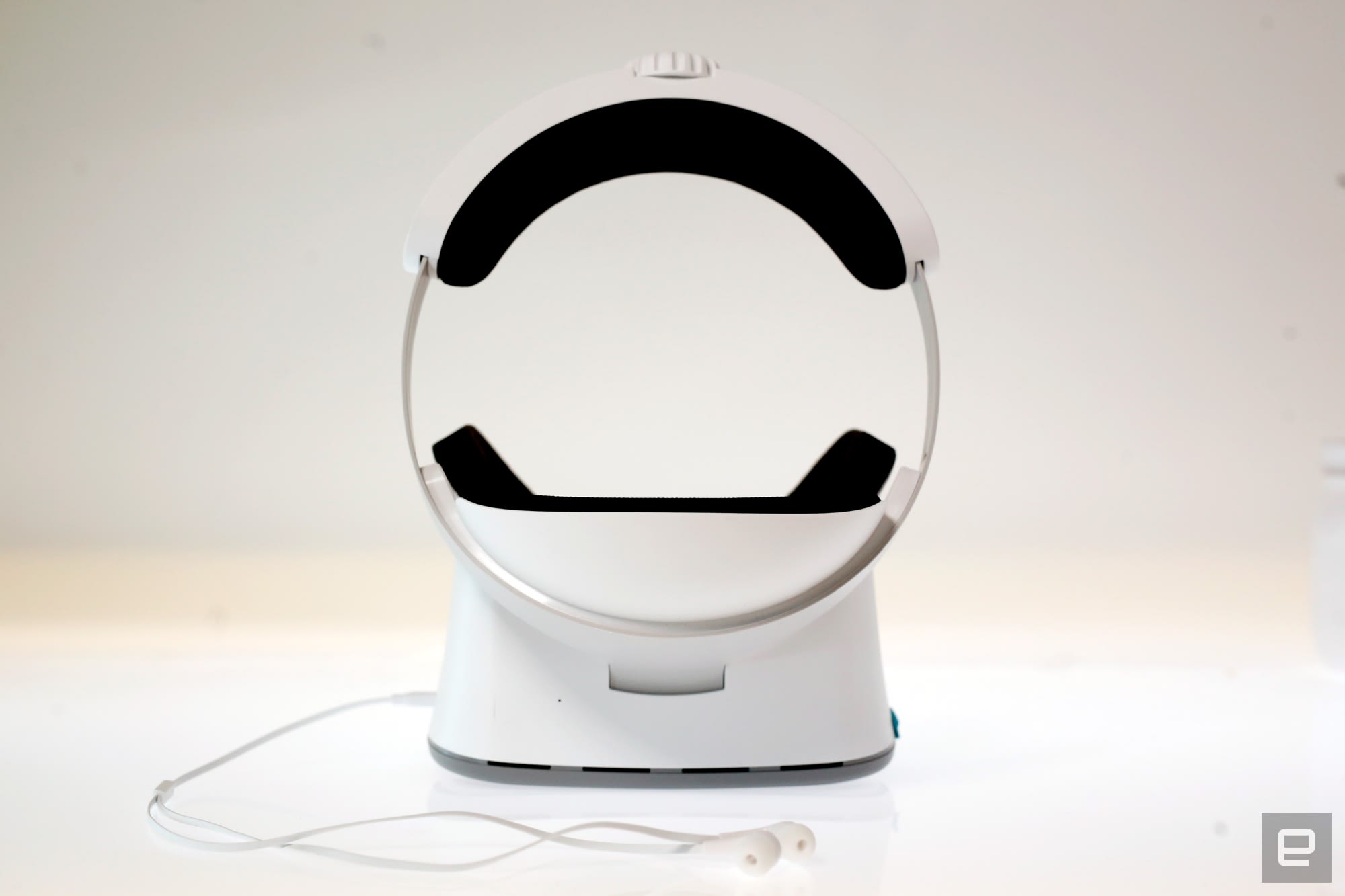
None of this would matter if the headset itself was too unwieldy to use, but thankfully that’s not the case. I’ve found Lenovo’s design extremely comfortable to wear for long periods of time, even when I’m wearing my massive hipster glasses. Rather than offer a tangle of elastic straps and call it a day, the company went with a solid plastic strap that wraps around your head like a crown. To get the headset feeling appropriately snug, you can twist a dial around back to adjust the circumference and press a button on the bottom of the headset to control how far forward you want the forehead plate to sit.
Engadget
Describing how one can adjust the headset just then was more awkward than actually using it. It never took me more than a few moments of fiddling before I found my sweet spot, and the headset never felt overly cumbersome. As with most devices meant to attach to your person, your experience might be different. I didn’t notice any outside light leaking in around the edges, but a few colleagues with more reasonably sized heads struggled with that. Oh, and while the Mirage Solo might be my favorite headset to wear, its solid headstrap means it’s far less portable than a Gear VR or Oculus Go. You could throw this thing in a backpack and whip it out on a plane, but it’ll take up so much space in your bag that it’s almost not worth it.
Of course, this headset is as important (and as expensive) as it is because of its WorldSense tracking technology. Baked into the front of the headset are two cameras that, combined with a set of rotational sensors inside the headset, provide true 6-degrees-of-freedom movement in whatever apps support it. Put another way, you’re not limited to simply looking around the world the way you would with something like an Oculus Go — you can physically bob, weave, step into and slink out of virtual environments. There are no external sensors involved, and no closed off spaces required. For the most part, it just works — albeit with some limitations.
Exactly how much you’ll get to wander is up to Google and Daydream developers, though most apps won’t let you move around for more than a few feet before reminding you to take a step back “into the experience”. And since the pack-in Daydream controller only supports three degrees of freedom compared to the headset’s six, I often experienced a sort of physical disconnect because I could maneuver my “body” inside some virtual environments in ways the controller couldn’t.

You’ll look like a goofball using the Mirage Solo outside, but it performs well under the hot sun.
Engadget
It can feel limited at times, but WorldSense tracking is huge addition to mobile VR, and I hope it doesn’t take too long to become the rule instead of the exception. In the meantime, though, we’re left with a big question: will developers actually bother building new experiences for WorldSense? It’s tough to say, but Google is off to a pretty good start. Of the roughly 250 Daydream apps currently available, I’m told around 40 will be updated with WorldSense support by the time you can buy a Mirage Solo. Google engineers also told me that adapting some existing Daydream apps to work with WorldSense could be as simple as toggling a setting.
It’ll obviously take time for WorldSense to pick up traction (or, you know, fail completely), but some of the initial experiences for it are a blast. The most impressive by far as been Blade Runner: Revelations, a Daydream exclusive that puts you smack in the middle of a futuristic, neo-noir Los Angeles. It starts off by putting you in the seat of a flying car called a spinner, and I spent the first few minutes crouching, stepping side to side and craning my neck to take in every little detail of the spinner’s interior and the aerial views of LA. Then you’re dropped into a tense, vibrant back alley and you’re left to start your investigation.

And then there’s Rez: Infinite, a port of a re-release of one of my favorite games of all time. I’d sound like an idiot trying to explain the story, but it’s an on-rails shooter that blends absurdly trippy visuals and joyous musicality in a way that feels truly, special in VR. I might’ve looked like an idiot playing it outside, sure, but I frankly couldn’t care less. If other developers commit to crafting experiences as fun and as visually arresting as these, then Daydream’s future as a VR platform has a lot of potential.
As much as I’ve enjoyed my time with the Mirage Solo, I’ve had a hard time figuring out exactly who it’s for. The $400 price means it isn’t as attractive to VR newcomers as a phone-based Gear VR or Daydream View. On the other end of the spectrum are the VR die-hards, people who already have pricey gaming PCs and don’t balk at the cost of an Oculus Rift or an HTC Vive Pro. In a way, the Mirage Solo exists in a sort of middle ground that few major companies have made much progress in yet — the self-contained Oculus Santa Cruz isn’t on sale yet, and HTC’s Vive Focus is only available in China for now. As a result, the Mirage Solo feels like an option for a very specific kind of VR fan: someone who values flexibility but doesn’t want to compromise on power too much. That’s a weird slice of the VR market to be sure, but for them, there might not be a better choice.

