


The Project Cars series is coming to mobile
The game’s being made by Slightly Mad Studios and Gamevil.
If you’re a fan of racing games, chances are you’ve heard of Project Cars. The first entry in the series was launched on consoles and PC back in 2015 and last September saw the release of Project Cars 2. Project Cars Go has just been announced by developer Slightly Mad Studios, and in a first for the series, will be released exclusively as a mobile title.

Slightly Mad is partnering with Gamevil for Project Cars Go, with Slightly Mad’s CEO Ian Bell saying –
Alongside Gamevil, Project CARS GO will put players in the driver’s seat to experience the adrenaline pumping racing game in a whole new way. The racing genre has a large, dedicated fan base, who are going to be stomping the gas pedal and burning rubber very soon.
Although Bell hints at players being able to jump into Project Cars Go “very soon”, a proper release date has yet to be announced. It’s also unclear if the game will be paid or free-to-play, but we’ll keep an eye out for these details as they become available.
If you’re a fan of the Project Cars series, are you looking forward to its expansion to mobile?
Best Racing Games for VR
Organize your office with four AmazonBasics 20-inch zippered cable sleeves for $7
No more cords.
Good cable management is essential to a clean office space. If you want an easy way to gather all your cables together, keep them secure but flexible, and still conceal them, then you should get a four-pack of AmazonBasics 20-inch zippered cable sleeves for $6.54 with code 15THRIFTER15. The code works on both the black and white versions. Just a few days ago, these were going for as much as $14. They recently dropped in price to $7.69, and now this Thrifter-exclusive code gives you another 15% off the price, dropping the sleeves down to the lowest price we’ve ever seen.
These are add-on items, which means you will need to get your shopping cart up to $25 to take advantage of the deal price. We’ve got plenty of other Amazon deals worth checking out if you need some inspiration.

You might be used to the sheer amount of cables it takes to put together a stellar office workspace or home entertainment center, but the other members of your house might see it as an eyesore. For example, I just finished building a brand new standing desk for my office. I worked really hard to keep the cables as minimal as possible and secured where they could be secured. When I showed the space to my wife, the first thing she said was “Look at all those cables!” even though she was seeing about 10% of the total.
These sleeves could solve that problem by concealing the group of cords inside a durable, flexible sleeve that’s fully-zippered and can hold several cables at once. Considering each purchase comes with four sleeves, you can use these anywhere around your house you have a lot of wires. Get multiple packs to cover really long cable runs with more than one sleeve. These are backed by a one-year warranty, and users give these sleeves 4.2 stars based on 39 reviews.
See on Amazon
Get your X-Force on with this bigger, badder Deadpool 2 theme
Hide the children and the chimichangas! Deadpool is coming and this time he brought Cable!

Deadpool is many things — passionate, purpose-driven, pepperoni flatbread-faced. Now that the merc with the mouth is back with another raunchy, paridoxically reverent and self-parodying blockbuster bloodbath for us to kick off the summer with, we’ve come back with yet another Deadpool theme to bring his dashingly deadly flair to your Android home screen. We’ve done a Deadpool theme before, but this year’s model is 20% cooler and 200% easier to apply to your phone, so you have no reason not to give it a shot.
Today’s theme has been assembled in Smart Launcher 5 to take advantage of the Icon Pack Studio integration and the gridless widget-placement system, but it can be easily applied to most customizable launchers like Nova Launcher and Action Launcher. We’ll also be using KWGT for a customized Deadpool widget.
Applying a dead simple wallpaper
Dead Red Icons in Icon Pack Studio
- Importing DeadRedIcons
- Applying DeadRedIcons to Smart Launcher
- Applying DeadRedIcons to other launchers
- Applying Deadpool logo icon
Deadpool Threeway Widget in KWGT
- Importing Deadpool widget in KWGT
- Adjusting your Deadpool widget
Applying dead simple wallpaper

These themes usually hunt for big, bold wallpapers to match their characters or purpose, but a Deadpool theme breaks all the rules. This theme isn’t about the wallpaper but rather the widgets and icons, so we’re going with a slimming, battery-sipping, hex black wallpaper. Once you’ve downloaded it, it’s easy to apply it.
Long-press an empty space on your home screen until a menu appears.
Tap Wallpaper.
Tap Other images.
Tap Photos.


Navigate to and tap your downloaded hex black wallpaper.
Tap Set Wallpaper.
Tap Home screen and lock screen.


Dead Red Icons in Icon Pack Studio

Now, let’s get to the fun stuff. There are a few icon packs out there that homage Deadpool in some way, but none come closer than building your own Deadpool logo-inspired pack in Icon Pack Studio!
I’ve already built the pack, so all you have to do is import this DeadRedIcons Preset and apply it.
Importing the DeadRedIcons pack in Icon Pack Studio
Open Icon Pack Studio.
Tap Let’s start.
Tap Next five times to skip through the initial icon pack building process. Note: please come back later and play with Icon Pack Studio to see if it could fit another theme of yours down the road.


Tap Save to exit the initial icon pack building process
Tap the three-dot menu in the top right corner of the screen.


Tap Import Iconpack.
Navigate to and tap the DeadRedIcons file you downloaded.


The pack will be added to your Icon Pack Studio library. Now we need to apply them, and that process varies slightly depending on if you’re using Smart Launcher 5, which Icon Pack Studio was made to accompany, or another launcher.
Applying DeadRedIcons to Smart Launcher 5
Tap the three-dot menu below the DeadRedIcons pack.
Tap Apply.
Tap Home Screen and App Grid to apply the icons to both your home screen and app drawer.
Tap OK.


The pack will be applied and you can go back to the home screen to witness the applied pack.
Applying DeadRedIcons to other launchers
Tap the three-dot menu below the DeadRedIcons pack.
Tap Export.
Icon Pack Studio is meant for personal use, not for commercial profit. Tap I agree to acknowledge that you’re just using this pack for yourself.


Once the pack is exported in a handy app installer package and is ready to install, a notification will appear on your phone. Tap to install.
You need to allow Icon Pack Studio to install the exported icon pack as a separate app so tap Settings.
Tap Allow from this source to toggle it on. On older versions of Android, you will instead be tapping Allow unknown sources.


Tap the back button to return to the install screen.
Tap Install.
Once the app is installed, tap Open.


Tap Apply.
Tap your desired launcher in the popup launcher menu.
Tap OK or Apply depending on your launcher.


Your icons will now be applied to your chosen launcher.
Applying the Deadpool icon to your app drawer (or any other app)

Now, app drawer shortcuts have been replaced more and more these days with gestures, but if you have an app drawer shortcut, it deserves a special Deadpool icon, pulled from the Deadpool widget we’ll be applying in a minute. If you don’t have one, then you could always apply the icon to the center app in your dock, like my lovely Chrome Browser.
Download our Deadpool KWGT logo icon and let’s apply it.
Long-press the app (drawer) shortcut you want to edit.
Tap the icon to replace it.
Tap From Gallery.


Tap Gallery or Photos.
Navigate to a select your downloaded Deadpool icon.
Tap Done.


Deadpool Threeway Widget in KWGT
Now, it’s time for the star of the show. This Deadpool KWGT is a threeway widget, offering weather information, battery level, and music information/controls. The first comic bubble gives weather information in Deadpool’s classic fourth-wall-breaking style. The second comic bubble gives song information, and tapping it will open your music player app.
Then we have the Deadpool Logo. The three rings around the logo are Battery, Hours and Minutes. The Deadpool logo’s circle shows music playback, and then the eyes and center stripe are Previous, Play/Pause, and Next. That’s right folks, Deadpool’s not just a pretty mask, he’s a functional music widget!
Let’s get awesome, shall we?
Importing Deadpool preset in KWGT
Before we get started, you will need to download both KWGT and KWGT Pro Key, which is required for importing presets like our Deadpool Threeway Widget. Once you download the Deadpool Threeway Widget, use a file manager app to copy it to Internal Memory/Kustom/widgets. If you haven’t opened Kustom before, you might have to make the Kustom folder or widgets subfolder. Once the preset file is saved in Kustom/Widgets, importing it is a snap.
Long-press an empty space on your home screen until a menu appears.
Tap the plus icon next to the lock icon.
Tap Widget.


Scroll down the widget list and tap Kustom.
Tap KWGT 4×4.
Long-press the newly added widget until a menu and bounding box appear.


Drap up the bottom line of the widget box until the widget is almost square.
Tap the widget to configure it.
Tap Deadpool Threeway Widget.
The preset will load. Tap the floppy disc icon in the top right bar of the screen to Save the widget.


If you haven’t previously given KWGT Notification Access, Tap Fix. We need notification access for the widget to pull in music information and controls from your music app’s notification.
Tap Kustom Notifications to grant it Notification access.
Tap Allow.


Tap the back button to return to KWGT.
Tap Save to save the widget again.
Return to the home screen to see the finished theme.


Adjusting your Deadpool widget
Once you’ve imported the Deadpool Threeway Widget, there may be a few tweaks you’d like to make to the base widget:
- Want to make the whole widget bigger or smaller in relation to your widget box? Tap Layer and adjust the Scale up to down to your liking.
- Want to reposition the sections of the widget to better fit your home screen or particular widget size? Tap the section you wish to move (for instance the Deadpool Weather Box), and then tap Position. Adjust the X and Y offsets to reposition the section of the widget.
-
The Deadpool Weather Box is set to open 1Weather. To change it to the weather app that you’re using, Tap the Deadpool Weather Box, then tap Touch. Tap Launch App, then App to set the weather app you use. Or any other app you’d prefer it to open.


- Weather providers offer different descriptions of current weather conditions and some providers are more accurate in different regions than others. To change the weather provider KWGT uses, tap the three-line menu icon in the top left corner of the screen and tap Settings. Under Weather, you can tap Weather Provider and select from half a dozen sources.
-
KWGT by default will pull in the details and controls for any media notification that it sees. If you only want KWGT to pull in data from one app, you can enter KWGT Settings and set Preferred Music Player to your chosen music app.


There are a lot of ways to customize KWGTs, and I welcome you to play with this preset and find even more amazing ways to customize it. I’m sure there are better Deadpool-isms for the comic boxes out there, so tell me what you come up with for yours.
Your turn

This Deadpool theme is slick, sick, and most importantly. It’s easy to apply on your own device, so what are you waiting for? Are you all about the DeadRedIcons that give every app in your drawer a mercenary mask, or do you want the multitasking mastery of the Deadpool widget? Show us how you Deadpool up your phone — and tell us in the comments if you have any other themes you want us to tackle! This theme was a reader request, and I’m ready and waiting to build some more.
The true cost of a PlayStation VR
We crunched the numbers so you don’t have to.

The PlayStation VR has been out for quite some time, and the costs may have dropped ever so slightly. However, VR in any state will cost you an arm and a leg, so why not go with the more affordable option? If you want to invest into PlayStation VR but you don’t know what exactly to budget for, I’ve broken down everything you will need in order to break ground on the world of PlayStation VR.
What you need to play PSVR

PlayStation 4: Although this may sound obvious, it is the most vital part of the PSVR experience.
PSVR: Whether you grab just the headset, or you get one of the bundles, this is just as important as the PlayStation itself. It comes with the camera, so you won’t have to worry about getting that on its own.
PlayStation Move controllers: These are vital to tracking your movements in the PlayStation VR world.
Games: There are loads of games to choose from, but most come at a large price.
Cost of a PS4

Many people who are considering buying a PSVR probably already have a PlayStation 4, but for those who don’t have one, it’s important to factor in the actual system cost.
There are various consoles you can choose from, whether you’re looking for the Slim, the Pro, or just a regular PS4. We will outline the prices of the cheapest option we can find for the U.S., Canada, and the UK.
U.S.: $299.99 This includes the 1TB PS4 as well as a DUALSHOCK 4 controller.
See at Best Buy
Canada: $379.99 This includes the 1TB PS4 and a DUALSHOCK 4 controller.
See at Best Buy
U.K.: £249.95 This includes the 500GB PS4 and a DUALSHOCK 4 controller.
See at Amazon
Cost of the PSVR headset

The PlayStation VR headset will come in a bundle, and that’s generally the only way you can find it. If you can find the headset on its own, it’s typically not as good of a deal. These are the same bundle with the newest version of the PSVR headset.
U.S.: $299.99 This includes everything you need for PlayStation VR to work, including the camera, as well as DOOM VFR.
See at Best Buy
Canada: $379.99 This includes everything that you need for the headset to work, including the camera, as well as DOOM VFR.
See at Best Buy
U.K.: £369.99 This includes the headset, DOOM VFR, and all necessary cords for the PSVR to function. It does not include, however, the PlayStation Camera that you will have to purchase separately.
See at Amazon
PlayStation Move controllers

If you already have Move controllers from your PS3, you won’t have to buy new ones as they will work just fine on PS4. You need two move controllers in order to use them with your PSVR properly.
U.S.: $96.58 This includes both necessary controllers.
See at Amazon
Canada: $99.95 This includes both necessary controllers.
See at Best Buy
U.K.: £66.99 This includes both necessary controllers.
See at Amazon
Games
There are loads of different games that you can choose from for your PlayStation VR, but let’s say you want to get started with one of the more popular games. This is the cost for the game Moss, an incredibly fun and popular PSVR game.
U.S.: $29.99 This is the downloadable game for the PlayStation.
See at the PlayStation Store
Canada: $39.99 This is the downloadable game for the PlayStation.
See at the PlayStation Store
U.K.: £24.99 This is the downloadable game for the PlayStation.
See at the PlayStation Store
Total cost if you already own a PS4
Since a good number of people already have a PS4 sitting in their homes, we took the liberty of adding up all the other pieces you need to enjoy the PlayStation’s VR experience, sales tax not included.
U.S.: $426.56
Canada: $519.93
U.K.: £461.97
Total cost of if you don’t own a PS4
If PSVR is making you into a PS4 convert, here is the price of the entire investment without sales tax.
U.S.: $726.55
Canada: $899.92
U.K.: £711.92
Final Verdict
Although PSVR will cost you a pretty penny, it’s a lot cheaper than having to buy a high end computer like you would for the Vive or Rift. With the PlayStation VR, you can save money by buying bundles and playing games that you can use the DUALSHOCK controller as your main movement. Overall, it is worth every penny you spend.
PlayStation 4

- PS4 vs. PS4 Slim vs. PS4 Pro: Which should you buy?
- PlayStation VR Review
- Playing PS4 games through your phone is awesome
Amazon
Google Home Max now available in Canada for $499
You can buy the speaker at Best Buy and the Google Store.
The Google Home Max made its debut in the United States last December, and five months later, Google’s finally decided to bring its flagship smart speaker to Canada.
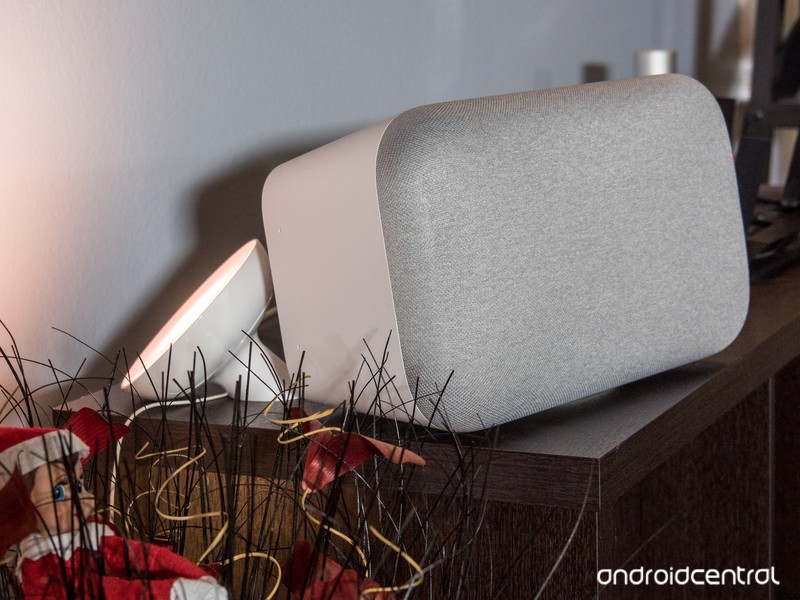
Nothing’s changed with the Home Max since its initial release, but as a quick refresher, here’s what you can expect:
- Two 4.5-inch high-excursion subwoofers
- Audio output that’s 20x more powerful than the regular Google Home
- Custom tweeters
- Smart Sound system that senses the acoustics of your room in order to provide the best sound possible
In addition to playing music by asking the Google Assistant, you can also connect your phone via Bluetooth, cast your songs, or plug the Home Max into a record play thanks to the included aux port.
Phil praised the Home Max for its excellent sound and far-field microphones in his review, but also knocked it for clunky volume controls and a steep price tag. You’ll pay $499 CAD for the Home Max in Canada, making it a very premium gadget.
If you’re interested, you can pick up the Google Home Max right now at Best Buy Canada and the Google Store.
See at Google Store
Google Home
- Google Home review
- Google Home Mini: Everything you need to know!
- Google Home Max review
- These services work with Google Home
- Google Home vs. Amazon Echo
- Join our Google Home forums!
Verizon
Best Buy
Target
Google Store
Arlo Pro Camera Firmware Release Notes Suggest Incoming HomeKit Support
Netgear’s line of connected smart home cameras, called “Arlo,” currently only support HomeKit for the Arlo Baby camera. However, this could be changing in the near future as release notes posted by an Arlo community manager on the company forums suggest that support for HomeKit will be part of a soon-to-launch firmware update for the Arlo Pro camera.
There are a variety of wire-free and AC-powered Arlo devices, including the base Arlo camera, Arlo Pro, Arlo Pro 2, Arlo Go, Arlo Q, and Arlo Q Plus. According to the release notes in the forums, HomeKit would only be coming to the wire-free Arlo Pro camera. Recent release notes for the Arlo Pro 2 lack a mention of HomeKit support, but it’s unclear why the company would limit HomeKit to just the first generation of the Arlo Pro line.
For the Arlo Pro, the update also includes a fix for high pixelation of images, support for new Wi-Fi codes, and more.
Arlo Pro Camera 1.092.0.13_19715
– Fix for high pixilation of images
– Include backwards error correction to minimize ghosting
– Add support for new wifi codes
– Add support for Homekit
– Add support for H15 hardware
– Bug Fixes
Netgear introduced HomeKit into the Arlo Baby camera in February through an update to the Arlo iOS app. When smart home devices support HomeKit, users can then add them into Apple’s Home app, where it’s much easier to connect a variety of products into scenes for a home that can then be controlled with a tap of a button or through Siri.
Yesterday, Netgear launched the Arlo Security Light as a companion product to its cameras. The wire-free LED light illuminates outdoor areas, can detect motion, and mainly touts Amazon Alexa support on its web page.
Apple sells the Arlo Baby camera on Apple.com for $189.95, along with other HomeKit-compatible security cameras like the Logitech Circle 2 ($179.95) and D-Link Omna Cam ($149.95). Arlo Pro cameras are comparatively more expensive because they require a base station. Arlo Pro starts at $249.99 for one camera and a station, and the Arlo Pro 2 starts at $479.99 for two cameras and a station.
(Thanks, Ryan!)
Tags: HomeKit, NETGEAR
Discuss this article in our forums
Facebook to Launch Cloud Storage Feature for Photos and Videos Taken With In-App Camera
Facebook today announced three new mobile app features aimed at helping its users better “create and save memories,” with a launch in India first and then rolling out to the global community “shortly thereafter” (via The Verge).
The first feature allows photos and videos taken with Facebook’s in-app camera to be saved directly to a user’s Facebook account in the cloud, and not onto their device’s storage. This is aimed at the India market due to the popularity of cheaper entry-level devices in the country and their inherent storage limitations.
Image via The Verge
These pictures and videos will only be visible to the user after they’re saved, but can then be posted to a wide audience. According to The Verge, “If there’s a capacity limit to the new storage options, Facebook doesn’t mention it.”
Also in the camera, users will be able to share voice messages as “Voice Posts” thanks to a new audio option. This is another aim at the Indian smartphone user market, since local users will be able to quickly record a voice message and send it to a friend, without Facebook needing to update its app with more native language keyboards.
Lastly, users will gain an ability to archive their favorite Facebook Stories before they disappear after 24 hours. Facebook debuted a somewhat similar feature for Instagram late last year, allowing users to highlight their favorite stories permanently on their main profile as a way to show off their personality to any visitors.
Facebook is also gearing up to launch a major Messenger update, which will introduce a dark mode, customizable chat bubbles, and a simplified user interface into the chat app. Facebook revealed the update during its F8 conference earlier this month, admitting that Messenger had become cluttered over the last few years and promising that the new update would greatly streamline and simplify the app.
Tag: Facebook
Discuss this article in our forums
2018 iPhones Again Said to Have Faster 18W USB-C Charger in Box
Apple’s widely rumored trio of new iPhone models expected to be announced in September will feature 18-watt USB-C power adapters in the box for much faster wired charging, according to ChargerLab.
ChargerLab’s render of European version of Apple’s rumored 18W USB-C charger
The new, rounder-shaped power adapter would connect to an iPhone with a Lightning to USB-C cable, also expected to be included in the box, enabling much faster charging speeds than the tiny square-shaped 5W power adapter included with current iPhones. A render of the European version is shown above.
MacRumors tested the iPhone X with various third-party 18W wired chargers last year, for example, and found that the device reached a 79 percent charge after one hour. With a 5W charger, the iPhone X only reached a 39 percent charge in that time. We explained our methodology in detail in that article.
Today’s report, based on information from “inside the production line,” corroborates a post on Chinese social network Weibo that also claimed 2018 iPhones will come with an 18W USB-C charger and a Lightning to USB-C cable in the box. That report included drawings of what the North American charger may look like.

All in all, the new 18W power adapter would generally charge an iPhone at least twice as fast as the current 5W charger. Fast charging is supported by the iPhone 8, iPhone 8 Plus, iPhone X, and presumably future models, rumored to include a new iPhone X, a larger iPhone X Plus, and a lower-priced 6.1-inch iPhone.
Related Roundup: 2018 iPhones
Discuss this article in our forums
Microsoft Planning Low-Cost Surface Line to Compete With Apple’s $329 iPad
As Apple’s iPad and Microsoft’s Surface continue to compete in the tablet market, a new report out today by Bloomberg claims that Microsoft is planning its next tablet line to be lower-cost in an effort to attract people to Surface products who aren’t interested in the more expensive Surface Pro. The move is directly aimed at competing with Apple’s recently launched $329 iPad, and could see Microsoft debut the devices as soon as the second half of 2018.
According to people familiar with the company’s plans, the tablets will be priced at around $400, so they would still be more expensive than Apple’s cheapest options. They will be the first Surface devices to adopt USB-C and rounded edges “like an iPad,” instead of the square corners of the current devices. Storage tiers will include 64GB and 128GB, as well as LTE options, and the devices will feature 10-inch screens.
The Surface Pro
In an effort to make the tablets 20 percent lighter than the high-end $799 Surface Pro, Microsoft is believed to sacrifice battery life by as much as “four hours fewer” than the current generation (13.5 hours for Surface Pro). Not much is known about the insides of the upcoming tablets, but the people said that Intel will supply the main processor and graphics chips.
The devices will continue to have the kickstand for upright typing and video watching seen in current Surface models, and they will run Windows 10 Pro. Ultimately, the company is trying to enter the low-cost market again after previous attempts with the Surface RT in 2012 and the Surface 3 in 2015, which both started at $499 and performed poorly in comparison to the growing Surface Pro line.
Microsoft has struggled to find a high-volume hit with the Surface devices as well as to introduce a flow of new choices to keep growth steady. In the fiscal year that ended last June, Surface revenue declined 2 percent as the company faced lower volume sales owing to an aging Surface Pro line. Revenue rose 32 percent in the most recent quarter, indicating new interest in Microsoft’s hardware.
Apple sold about 44 million iPads that generated almost $20 billion in revenue during the past four quarters. Microsoft’s entire Surface hardware business produced $4.4 billion for the same period.
Microsoft is believed to be looking at Apple’s education-focused iPad launch from earlier in 2018, and the new Surface models “could likewise appeal to students and teachers,” as well as schools that look into buying cheap tablets in bulk. With the cheaper Surface, the company is planning low-cost updates to its keyboard cover, stylus, and mouse. Prices haven’t yet been pinpointed, but as a comparison the current keyboard cover runs for $160.
Apple’s low-cost iPad includes Apple Pencil support, an A10 Fusion chip with 64-bit desktop-class architecture, a Retina display, enhanced cameras, and advanced sensors with a gyroscope and accelerometer, which fuel powerful augmented reality apps through ARKit. Although the iPad is normally $329 for consumers when not on sale, Apple sells it at $299 to schools and says that the tablet was built for mobility and durability for students, sporting an aluminum unibody construction.
Related Roundup: iPadTags: Microsoft, Microsoft SurfaceBuyer’s Guide: iPad (Buy Now)
Discuss this article in our forums
Apple Has Fully Restored Inventory of Mid 2012 and Early 2013 MacBook Pro Batteries
Following over a year of shortages, Apple has fully replenished its supply of top case assemblies with glued-in batteries for Mid 2012 and Early 2013 models of the 15-inch MacBook Pro with Retina display.
Mid 2012 MacBook Pro and its top case with battery via iFixit
A top case is the aluminum enclosure that houses the keyboard, trackpad, and speaker grilles on a MacBook Pro. For the two aforementioned models, the battery is affixed to the underside of the top case with strong adhesive, meaning the entire assembly needs to be swapped out for a simple battery replacement.
Now that inventory of the top cases is widely available again, Apple is “no longer offering free, delayed repairs” to customers with new service orders, according to its internal memo distributed to Apple Stores and Apple Authorized Service Providers on Tuesday and obtained by MacRumors from a reliable source.
Instead, Apple has resumed charging its standard out-of-warranty fee for all 15-inch MacBook Pro battery replacements, which is $199 in the United States. The fee is waived if the notebook is covered by an AppleCare+ plan.
Apple first notified service technicians about the “severe constraint” of the top cases in March 2017, when it temporarily stopped facilitating battery replacements. Apple expected the shortage to be resolved by September 15, 2017, but it later extended the date to November 15, 2017, and it evidently took longer.
As a temporary solution, Apple permitted customers to delay service until inventory became available, in exchange for Apple covering the full cost of the battery replacement. If a customer was unwilling to wait, however, Apple permitted them to exchange the MacBook Pro for a functionally equivalent model.
This generous policy resulted in many customers being able to exchange a 2012 MacBook Pro for a much newer model, such as a maxed-out refurbished 2016 MacBook Pro with Touch Bar, for just the $199 cost of a battery replacement. The only requirement was that the battery failed Apple’s diagnostic test.
Apple stopped offering replacement units for repairs initiated after July 26, 2017, due to a temporary improvement in top case availability, but it began offering free, delayed battery replacements again for repairs initiated after August 25, 2017. That policy is what appears to be ending as of this week.
All in all, customers with a Mid 2012 or Early 2013 model 15-inch MacBook Pro who are in need of a new battery should be able to pay for the service without significant delays or other issues going forward. The process can be initiated from the Contact Apple Support page by selecting Mac → Mac Notebooks.
Related Roundup: MacBook ProBuyer’s Guide: MacBook Pro (Don’t Buy)
Discuss this article in our forums

