


Hulu adds a slew of improvements for when you’re on the road
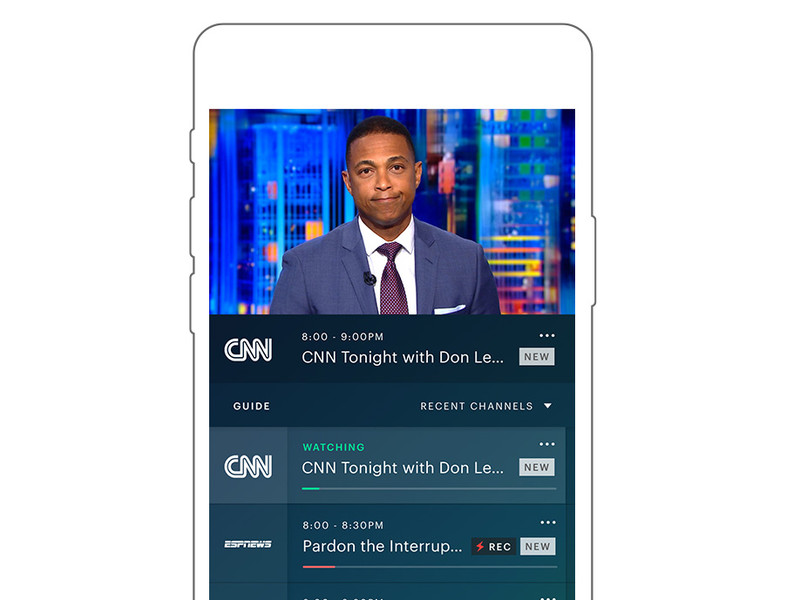
Better playback on phones, laptops, HDMI and Chromecast are on tap.
A lot more people are watching Hulu these days, and a lot more of them are watching on their phones. According to the company, we’re talking about 84 percent more hours a month compared to a year ago.
Same goes for laptops, of course. When you’re on the move, those are two of the most likely devices to be with you. And in that spirit, Hulu has announced a bunch of improvements for viewing video on your phone or laptop.
First, Hulu is adding a “dedicated live TV destination” that’ll quickly take you right back to the last channel you were watching. It’ll come in the form a lightning bold on your nav bar. The mobile experience alway will get that fancy new live TV guide, so you can see what’s coming up over the next day, and make it easier to switch channels.
There’s also a new portrait-mode player, so you can view the guide while you’re watching something else. (As someone who hopelessly flips around looking to see what else is on, that’s greatly appreciated.)
Also, scrubbing is being improved so you get a preview of where you’re seeking to.
All in all, yeah, those are features that Hulu probably should have already had. But it’s nice to see them added now, anyway.
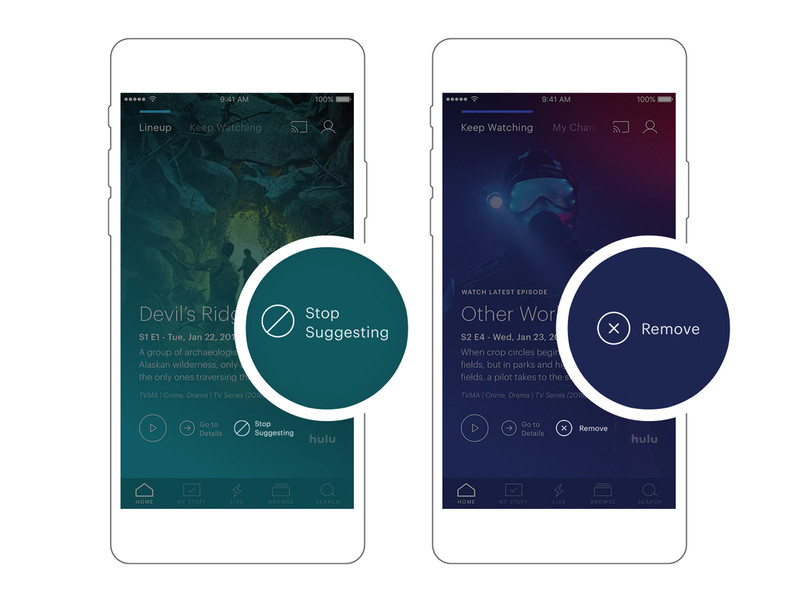
Hulu also is making it easier to control recommended shows. There’s a new “Stop Suggesting” button that will — wait for it — stop suggesting a specific show. And they’re also adding a dedicated “remove from watch history” button that’ll get those embarrassing binges out of your history.
And finally, Hulu says it’s adding HDMI support for iOS and improving Chromecast playback for those times you’re on the road but have access to a nice big TV. And the new guide experience is coming out of beta and will be available for everyone at new.hulu.com.
Introducing CordCutters.com
- The hardware you need
- All about streaming services
- What channels are on which service
- FREE over-the-air TV
- How to watch sports
- Join the discussion
Get the latest deals
A startup called Wonder is building an Android-powered Switch competitor
The gadget is scheduled to come out at some point in 2019.
No matter how heavy of a gamer you are, you’ve likely heard about the Nintendo Switch somehow. Whether you spent the first few weeks of March last year trying to seek one out at your local retailer or know about the console through your gaming-inclined friends, the Switch has become something of a phenomenon.

Now, a startup by the name of Wonder is looking to take the Switch’s formula and replicate it using Android.
In an interview with The Verge, Wonder CEO and Co-Founder Andy Kleinman gave the site an early look and what’s to come. When you buy Wonder’s product, you’ll get a smartphone with a “massive screen,” a docking station that’ll connect it to your TV, and a controller that can be used to play games on the big screen or dock the phone into for gaming on the go. The phone will be powered by the Android-based WonderOS, and similar to a gaming PC, Wonder’s custom software will allow its GPU to be overclocked to get the best gaming experience possible.
Along with the hardware, Wonder will also offer a paid subscription service. As noted by The Verge —
The software services will supposedly range from access to original games from existing game makers, licensed and mobile-optimized third-party titles, streaming game and media options, and other entertainment hub-like features. There’s no word yet on pricing, or even the specs of the phone itself.
Wonder wants to create an ecosystem for gaming/entertainment enthusiasts similar to what Apple has with its products, and while that’s an admirable goal, it’s also an incredibly daunting one. The idea of having one device to act as your smartphone, game console, and entertainment hub is exciting, but one of the reasons the Switch works so well is that it focuses its efforts solely on gaming. There’s no YouTube app, internet browser, etc. The Switch is all about games, and that limited focus is why it thrives.
Can Wonder succeed where others have failed?
Gadgets of the past that have tried to be an all-in-one solution have ultimately failed, and previous Android gaming efforts from NVIDIA and OUYA didn’t catch on with mainstream consumers. That’s not to say Wonder can’t achieve success, but it’s looking at a steep uphill battle in order to do so.
Wonder expects to launch its hardware and subscription service at some point in 2019, meaning we’re still a ways off before seeing any of this come to light. I’m certainly intrigued by what the company wants to do, but I think it’s important to be cautiously optimistic until more details come out.
Are you interested in what Wonder’s creating?
Google reportedly working on ‘Yeti’ gaming hardware and streaming service
The U.S. Senate voted 52-47 in favor of restoring Net Neutrality
Even if the vote passes the Senate, there’s still a long battle ahead.
Updated 5/16/18 — The Senate’s final vote is in, with the official number being 52 – 47 in favor of restoring Net Neutrality! While this is an exciting and unexpected development, the battle to completely reverse FCC Chairman Ajit Pai’s actions is far from over. The CRA will now go to the House of Representatives where Republicans currently hold the majority at 236 to 193. If it by some miracle passes through the House, it then needs to be approved by President Trump who will more than likely veto it. Net Neutrality still has a chance, but we’re going to have to fight tooth and nail to make sure it sticks around.
In mid-December last year, the FCC voted to repeal Net Neutrality. That repeal will officially go into action on June 11, but not before the U.S. Senate votes to hopefully restore it.
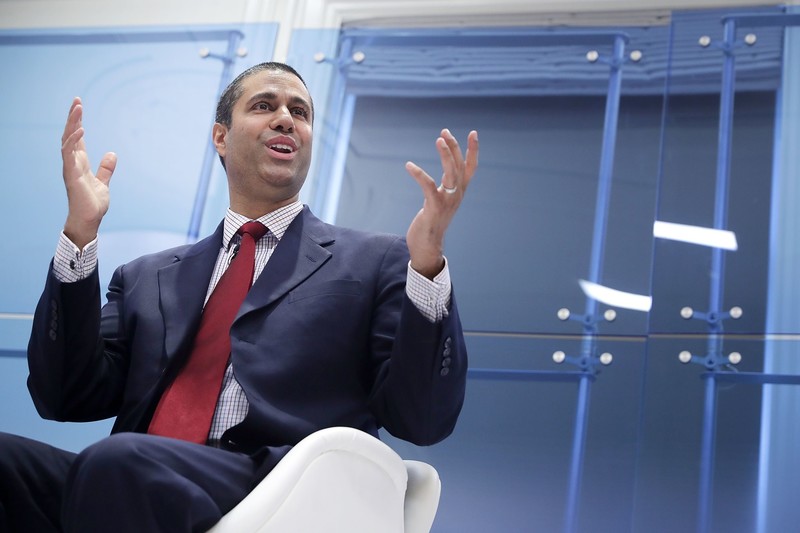
FCC Chairman Ajit Pai
On May 14, Democratic Senator Ed Markey announced that he and other fellow Democrats have pushed the U.S. Senate to vote on whether or not the FCC’s repeal of Net Neutrality should be reversed. The vote will take place on Wednesday, May 16, and it’s being done as part of a Congressional Review Act (also known as a CRA).
Commenting on the announcement, Senator Markey said –
By passing my CRA resolution to put net neutrality back on the books, we can send a clear message to American families that we support them, not the special interest agenda of President Trump and his broadband baron allies. May 16 will be the most important vote for the internet in the history of the Senate, and I call on my Republicans colleagues to join this movement and stand on the right side of digital history.
So far, 50 of the 100 Senators have said they’ll vote to restore Net Neutrality (one of which is a Republican). Considering this and the fact that Republican Senator John McCain will be absent due to his current health conditions, there’s a chance the Democrats could get the vote to go through.
If that happens, however, that doesn’t necessarily mean Net Neutrality will once again be alive and well. After the Senate, the vote will then need to through the House of Representatives where Republicans have the majority of seats at 236 to 193. If it by some miracle gets through the House, there’s still the chance that President Trump will veto it.
Even with those obstacles in mind, it’s still somewhat reassuring to see that action is being taken to roll back FCC Chairman Ajit Pai’s decision.
What do you expect will happen this Wednesday?
Net neutrality, consolidation, monopolies, and you
Apple Accessory Sales: Get 25-45% Off iPhone/iPad Cases and More at Speck and Belkin
Accessory maker Speck today launched a notable sale that discounts products by 45 percent across its online storefront, ranging from smartphone cases to bags, screen protectors, cables, and more. To see the sale prices, find an item to add to your cart, click “View Cart” in the pop-up menu, then enter the discount code SUPER45 in the box at the bottom lefthand corner of the screen.
Note: MacRumors is an affiliate partner with these vendors. When you click a link and make a purchase, we may receive a small payment, which helps us keep the site running.
Speck offers free U.S. shipping and $5 two-day shipping on all orders, and the 45 percent discount will be applied to the total order cost, so multiple products can be purchased at once. Note that if Speck’s products already have a promotion running, like the current offer for $10 off MacBook cases, then the 45 percent savings won’t get applied in the cart. The company also limits the color options available under the promo code in some cases.
Speck’s sale runs through Friday, May 18, so check out a few ideas on items to buy in the list below, and head over to Speck’s dedicated Apple section for more discounted Apple accessories. If you have non-Apple products, the sale also covers accessories for products from Samsung, Microsoft, Google, and others.
iPhone Cases
-
Presidio Grip iPhone X / iPhone 8 – $21.97, down from $39.95
-
Presidio Inked iPhone X / iPhone 8 – $24.72, down from $44.95
iPad Cases
-
Balance Folio for 9.7-inch iPad – $21.97, down from $39.95
-
Balance Folio for 12.9-inch iPad Pro – $27.47, down from $49.95
-
Durafolio for iPad Air 2 – $32.97, down from $59.95
Belkin also has a sale going on this week, offering customers the chance to get 25 percent off select products on its Steals and Deals page using promo code STEAL25. Products available in the sale include USB car chargers, iPhone armbands, iPad cases, Apple Watch bands, USB-C and Lightning cables, and more.
Our exclusive deals with Anker are also ongoing this week, so if you haven’t taken a look at the discounted products be sure to visit our blog post on the sale. Anker’s devices marked down include iPhone X cases, Lightning cables, wall chargers, a wireless Qi mat, and more. The exclusive promo codes will last through May 31, 2018.
Visit our full Deals Roundup for more information on this week’s sales.
Related Roundup: Apple DealsTags: Belkin, Speck
Discuss this article in our forums
Hulu for iOS Gaining Live TV Guide, Enhanced Scrubbing and Options to Better Tailor Recommendations
Hulu today announced several features that are coming to the web and its mobile apps for iOS and Android to optimize the mobile viewing experience.
Hulu’s Live TV guide, which debuted last week on the Apple TV, Xbox One, Amazon Fire TV, and Nintendo Switch, will be added to mobile devices, allowing users to get to live TV with fewer clicks, see what’s on, and see what’s coming up.
On iOS and Android devices, a portrait player will let users see what’s on and switch between channels without having to browse in landscape mode. Rotating the phone horizontally will then launch into full screen mode. When watching on-demand content, Hulu will offer up recommendations on what to watch next when the phone is rotated into portrait mode.
For Watch History, Hulu is adding “Stop Suggesting” and “Remove” toggles to allow users to better tailor their recommendations to their tastes.

Hulu also plans to enhance scrubbing and frame previews, so it’s easier to navigate through shows and movies to find a specific scene, rewatch content, or skip ahead.
HDMI support is being added to iOS to allow an iPhone to be connected to a TV with a Lightning to HDMI adapter, and on the web, live TV subscribers will have access to the new Hulu experience for web.
All of these features will begin rolling out to Hulu users starting next week.
Tag: Hulu
Discuss this article in our forums
OnePlus Again Pokes Fun at Apple’s Headphone Jack Removal During OnePlus 6 Announcement
OnePlus today announced the launch of its latest flagship phone, the OnePlus 6, and the company couldn’t resist taking yet another jab at Apple and its decision to remove the headphone jack from its flagship iPhones.
During the event, OnePlus introduced new $69 OnePlus Bullets Wireless headphones that are shipping alongside the new OnePlus 6. “Just one thing though. I wonder. If you can connect your earphones using Bluetooth, you don’t need a headphone jack anymore, do you?” said Carl Pei, OnePlus co-founder.
Pei’s headphone jack joke starts at 1:14:00
Pei was making a joke at Apple’s expense, as despite the inclusion of Bluetooth headphones with the OnePlus 6, it continues to include a headphone jack. “And yes, there’s still a headphone jack,” Pei said during the unveiling of the OnePlus 6.

OnePlus made a similar joke on stage last year, after Apple eliminated the headphone jack from the iPhone 7 and the iPhone 7 Plus, a move that proved to be unpopular with some customers despite the introduction of the AirPods.
“On the bottom, you’ll notice that we ditched the 3.5mm headphone jack. The elegance of the overall design is instantly heightened. And who needs a headphone jack anyway? That’s why Bluetooth exists, right? Just kidding. Of course the OnePlus 5 has a headphone jack.”
Design wise, though it includes a headphone jack, the new OnePlus 6 takes other design cues from the iPhone X, like many Android smartphones this year. It features a 6.28-inch AMOLED display with minimal bezels and a notch at the top to house the front-facing 16-megapixel camera, along with a glass body. There are two vertically positioned cameras at the rear of the device.

Inside, the OnePlus 6 sports a Qualcomm Snapdragon 845 processor, 6GB to 8GB RAM, and a minimum of 64GB of storage. It comes with facial recognition capabilities, which the company says uses more than 100 identifiers for security purposes, and it also features a fingerprint sensor at the back. Other features include support for dual SIM cards, fast charging, rain resistance, and the ability to run the latest versions of Android, including the current Android P beta.

Pricing on the OnePlus 6, which launches on May 22, starts at $529. The device is available in several colors, including Mirror Black, Midnight Black, and Silk White. The OnePlus Bullets will be available on June 5 for $69.
Tag: OnePlus
Discuss this article in our forums
U.S. Senate Votes to Restore Net Neutrality, Now Expected to Face Major Hurdle in House
The United States Senate today voted to repeal the Federal Communication Commission’s “Restoring Internet Freedom” order, which was enacted last December and reverses Obama-era Net Neutrality rules. Today’s decision ended with a vote of 52-47 in favor of restoring Net Neutrality protections, with supporters totaling all 47 Democratic Senators, two independents, and three Republican Senators.
The Senate Democrats used the Congressional Review Act to call for the vote to halt Net Neutrality’s repeal. The law gives Congress 60 days to review and potentially reverse regulations passed by a federal agency, in this case the FCC.
Under the act, the decision will now move onto the House of Representatives, where it’s expected to not make it past the Republican-majority House. If the measure ultimately makes it to President Trump’s desk, it’s likewise believed that he wouldn’t back the decision to go against a regulation created by his own FCC chairman Ajit Pai.
Net Neutrality has been an increasingly heated debate since momentum gathered in the Republican-controlled FCC last fall, predicting the repeal of the rules that eventually came in December. If the new efforts fail, Net Neutrality rules will officially end in the U.S. in less than a month, on June 11, 2018.
The reversal of Net Neutrality protections classifies internet service providers as “information service” providers, as they were prior to the advent of Net Neutrality in 2015. While supporters of the rollback describe the move as a return to a less-regulated internet, opponents fear that ISPs will be able to slow down internet speeds — or block access completely — to any website they see as a competitor.
Some ISPs have come out stating they would not slow down a user’s internet in any way, including AT&T. In January, the carrier pledged a commitment “to an open internet” in an open letter written by CEO Randall Stephenson. The letter explained that AT&T has not and does not plan to block websites, censor online content, or throttle, discriminate, and degrade network performance based on a website’s contents, although Stephenson didn’t mention some topics of concern for Net Neutrality supporters like online fast lanes and “paid prioritization.”
Apple’s comment on the topic last year stated that the Net Neutrality repeal could “fundamentally alter the internet as we know it,” and if it passed it would be put in place to the detriment of consumers, competition, and innovation. Around the same time last August, the FCC received a record-breaking 22 million comments from the public who voiced their opinions on the controversial issue in the months leading up to the December vote.
Note: Due to the political nature of the discussion regarding this topic, the discussion thread is located in our Politics, Religion, Social Issues forum. All forum members and site visitors are welcome to read and follow the thread, but posting is limited to forum members with at least 100 posts.
Tag: net neutrality
Discuss this article in our forums
BlitzWolf Wireless Charger; Modern aesthetic, standard specs (Promoted)

Let’s be honest here. Wireless chargers are a dime a dozen. They really fall into two categories – Crap, and Does Its Job. So when I first unpacked the BlitzWolf wireless charger, you can understand my initial ho-hummery – but as I took a closer look at it, I came realize that this wasn’t your run-of-the mill Qi charger.
Build
At first glance, the BlitzWolf Wireless Charger seems like pretty standard affair. But picking it up reveals a more carefully designed product.

An aluminum chassis immediately sets it apart from other wireless chargers, which tend to be plastic. The glass ceramic face feels especially nice, though the silvery BlitzWolf branding is a little jarring compared to the elegance of the rest of the device. The bottom of the charger is home to four rubber casters, which combined with the weight of the charger make for a very stable platform.
The Blue LED on the front of the device is a nice departure from the standard – and bright – lime green LED we normally see. This makes it a solid choice for a nightstand, so you can see at-a-glance that your phone is charging without blinding yourself. As you’d expect, there’s not much else to the gizmo. Like most wireless chargers, it has a singular purpose and no bells and/or whistles.
Performance
In practice, the BlitzWolf Wireless Charger isn’t quite as wonderful as its design might indicate.  It performs about as well as can be expected from any wireless charger, but doesn’t bring anything to the table you haven’t seen before.
At 5V, 1A, the BlitzWolf Wireless Charger outputs the same as any Qi-standard charger. Which is, to say, about as fast as standard MicroUSB charging, without any kind of Quick Charge. As such, it makes sense that the device makes use of a MicroUSB port on the back, and only supports up to 5V, 1.5A input.
Like I said – it’s a fairly standard affair. One thing I was impressed with, though, is its ability to charge even through the thick TPU/PolyCarbonate material of a Spigen case on my V30. Many wireless chargers I’ve used in the past haven’t been able to charge through a thick case, but this one did the trick – albeit with a little careful positioning.

Value
At $16.99, the BlitzWolf Wireless Charger is about on par with other devices of its kind. And that’s a good thing, given how well-made and effective the device is. It feels a lot more expensive than it is, and it performs as well as any wireless charger on the market, at the moment. While I’d love to see a higher output or a Type-C USB input, BlitzWolf put out a perfectly adequate wireless charger with a modern, gorgeous aesthetic.
Buy BlitzWolf’s Wireless Charger from Amazon
Google Photos now using A.I. to simplify editing and sharing images
On May 8, Google CEO Sundar Pichai took the stage at Google I/O to deliver his keynote presentation, which centered on artificial intelligence. And now, some of those A.I.-based features are beginning to roll out across many of its products and services, including Google Photos with “suggested actions.” While Google Color Pop was the first feature to roll out after Google I/O, all of the new A.I.-enhanced features are now available on the Google Photos app.
Over 5 billion pictures are viewed every day in Photos, and Google sees A.I. as the answer to speeding up the editing and sharing process. Suggested actions, as the name implies, are context sensitive actions that will display automatically while viewing individual photos. For example, using facial recognition, Photos will know who’s in a picture and offer a one-tap option to share it with that person (assuming this is someone in your contact list whose face Google has already learned). If that person appears in multiple images, Photos will even suggest to share all of them — again, with just a single tap.
When it comes to editing, different corrections will be suggested based on the look of the photo. If an image is underexposed, a simple “Fix brightness” suggestion will pop up automatically. Other suggested actions will be less subtle, including the “Pop color” option that desaturates the background to draw attention to your subject. Sure, selective color is one of the more notorious photographic clichés today, but the impressive part here is how the app is able to accurately differentiate the subject from the background. On images where the software is able to pick out the subject, Google Assistant will suggest the edit.
Even more impressive — and likely more useful — is the ability to add color to a black-and-white photograph. When viewing a monochrome image, Photos will suggest to “colorize” it. Like magic, tapping the button turns the image into a full color photograph. Not surprisingly, showing off this feature earned a chorus of cheers from the audience. Adobe demonstrated a very similar technology last year at the annual Adobe MAX conference.
Another audience favorite feature was much more mundane, but no less useful. By taking a picture of a document, Google Photos will be able to automatically convert the image into a PDF — even if the photo was shot at a wonky angle. The app recognizes the document within the frame and crops it out and changes perspective as necessary. Admittedly, this is likely one of those features you will use rarely — but when you need it, you will really appreciate having it.
If the suggested actions work as well in practice as they did in the recorded demonstration, it will likely be the most important update to Google Photos yet. Suggested actions will begin rolling out to users “in the next couple of months,” according to Pichai.
Although not related to photography, Google also demonstrated new machine vision capabilities coming to Google Lens. Simply by pointing the camera at things, you’ll be able to learn more about them, from looking up words on a restaurant menu, to identifying the building in front of you, to analyzing an outfit you like and automatically being shown similar styles. Again, it remains to be seen how this works in practice, but if it’s anywhere close to the performance we saw in Google’s presentation, this will be a very impressive new feature.
Later during I/O, Google announced a partners program for Google Photos, which will allow third-party apps to integrate with the photo platform.
Updated on May 16, 2018: Updated post to reflect A.I. enhancements are now available.
Editors’ Recommendations
- Here’s everything we saw at the action-packed Google I/O 2018 keynote
- With developer program, Google Photos is about to become a lot more versatile
- Google News receives a major overhaul, replaces Google Play Newsstand
- A.I. and Google News: The push to broaden perspectives
- Google responsibly: New Android features remind you to give your phone a rest
You’re not hearing things: Viral Laurel vs. Yanny debate is an audio brain teaser
The internet loves a good debate — and three years after a photo created a blue-gold dress divide nearly as wide as the blue-red political gap comes a recording of a robotic voice saying Laurel. Or Yanny. But which one is it? The audio recording is making the viral rounds across social media platforms after originating on Reddit this week.
What do you hear?! Yanny or Laurel pic.twitter.com/jvHhCbMc8I
— Cloe Feldman (@CloeCouture) May 15, 2018
The four-second clip is simply a robotic voice repeating one name several times. But depending on who you ask, some hear Laurel and others hear Yanny. And still more hear Laurel one time, and Yanny another. So is it robot trickery or is the internet hearing things?
The answer, acoustic professionals suggest, isn’t that you are hearing things, but that you are listening to things. Like the photo of the dress that created confusion by manipulating what the brain expects to see, the discrepancies between the two different interpretations of the same audio clip have similar origins. By using similar sounds and leaving gaps in a low-quality recording, the brain fills in the rest of the details, which is allowing people to hear different things from the same recording.
“Part of the answer is the difference between listening and hearing. Most people think of hearing as occurring in the ear, but hearing and listening actually occur in the brain,” Douglas Beck, an audiologist working with Oticon Inc. hearing aids and the magazine Hearing Review, told National Geographic. “Hearing is simply perceiving sound. That is, you can hear while you’re asleep, and so in that regard, hearing is passive. Listening is attributing meaning to sound.”
The similar sounds between the two words and the noise in the low-quality recording have the brain trying to fill in the gaps. Depending on how your brain does this, you might be hearing Laurel or Yanny. The result is an audio brain teaser like the Rubin’s Vase, that image where you can see either a vase or two faces depending on if your brain sees the positive or negative space first.
Ok, so if you pitch-shift it you can hear different things:
down 30%: https://t.co/F5WCUZQJlq
down 20%: https://t.co/CLhY5tvnC1
up 20%: https://t.co/zAc7HomuCS
up 30% https://t.co/JdNUILOvFW
up 40% https://t.co/8VTkjXo3L1 https://t.co/suSw6AmLtn— Steve Pomeroy (@xxv) May 15, 2018
Frequency and pitch could also play a role in how the recording is interpreted, others suggest. Just as Photoshoppers worked on the dress, social media users are taking the recording into audio software. One pitch-shift adjustment makes it easy to hear both words with the manipulated pitches.
While you may hear something different than the person sitting next to you, there is a scientific explanation — so try not to let your support for either team Laurel or team Yanny ruin a friendship.
Editors’ Recommendations
- This hearing aid will read your brain to help you understand what’s being said
- Assistive tech is progressing faster than ever, and these 7 devices prove it
- Apple’s newly proposed emojis are more inclusive for those with disabilities
- New blow for ZTE and Huawei: Devices pulled from military base stores
- Here’s everything we know about the OnePlus 6 smartphone so far

