


How to get started with YouTube Music
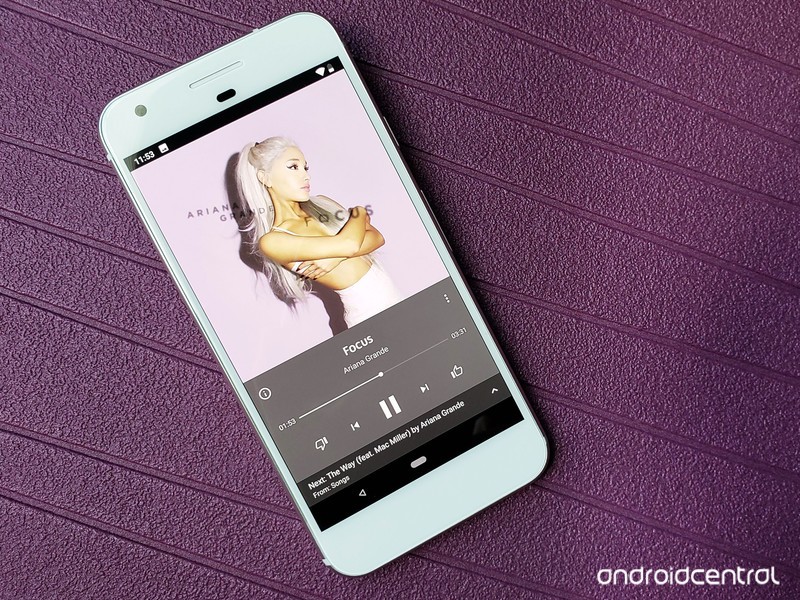
The new YouTube Music experience is here, so let’s get the music flowing.
YouTube is one of the most-used video sites in the world, and a great many of the videos that we flock to on the platform center around the music that drives our lives. Whether you subscribe to a music streaming service or not, chances are you’ve gone to YouTube to find that one song that’s stuck in your head, or to check out a cover by some up-and-coming artist, or to watch the latest mind-blowing music video.
YouTube is now leveraging its uniquely unparalleled music and music video selection to offer the completely-revamped YouTube Music, a music app that brings the best music on the most popular video platform in the world together with traditional album and songs from top labels.
And since it’s all powered by YouTube, setting it up is almost embarrassingly easy.
- How to set up YouTube Music
- How to search for music in YouTube Music
- How to control playback modes in YouTube Music
- How to add a song to your YouTube Music library
- How to add an album to your YouTube Music library
- How to create a playlist in YouTube Music
- How to make YouTube Music your primary music service in Google Assistant
First, download it
The new YouTube Music is only available in five countries right now:
- U.S.
- Australia
- New Zealand
- Mexico
- South Korea
If you’re in one of those countries, you can head to the Play Store to download the app and get started using the instructions below.
Download YouTube Music (free)
How to set up YouTube Music
The beauty of YouTube Music is that since it’s tied to the same YouTube search and watch histories that you’ve built up over the life of your Google account — which for most of us is upwards of a decade — YouTube Music doesn’t really need to ask you which artists you like or what genres you’re into. It already knows. In fact, even if you’ve never used YouTube Music before, for most users opening YouTube Music for the first time are really only going to be asked a few things:
- If you’re not already a YouTube Music, Google Play Music, or YouTube Premium subscriber, Google will ask if you’d like to start a free 30-day trial of YouTube Music Premium.
-
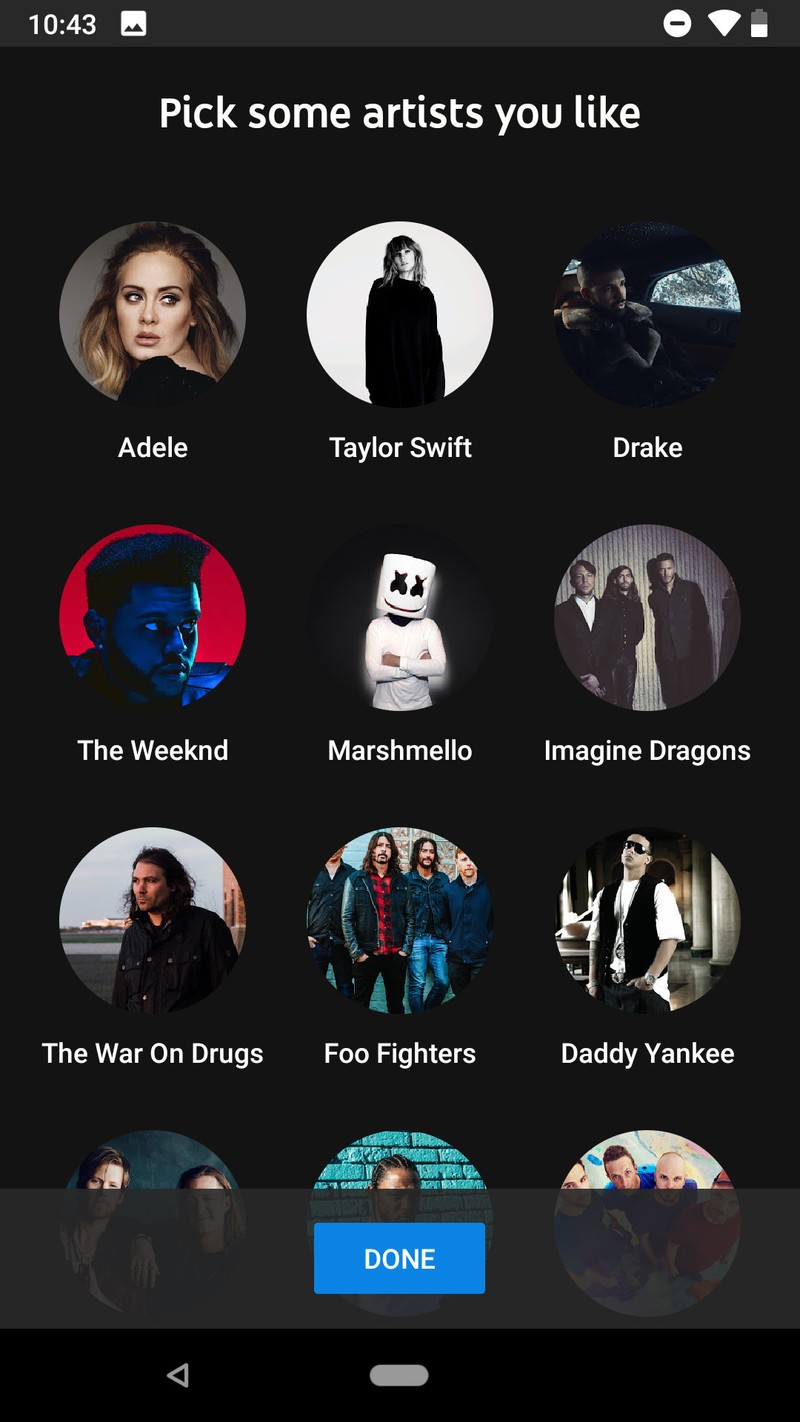
If you don’t have any YouTube history at all — or you’ve recently deleted your YouTube history — you’ll be asked if you’d like to tell YouTube music which artists you like so that YouTube can start recommending music based on your tastes rather than simply what’s popular:
- Tap Let’s go.
- Tap the artists you’d like to follow.
- Tap Done.

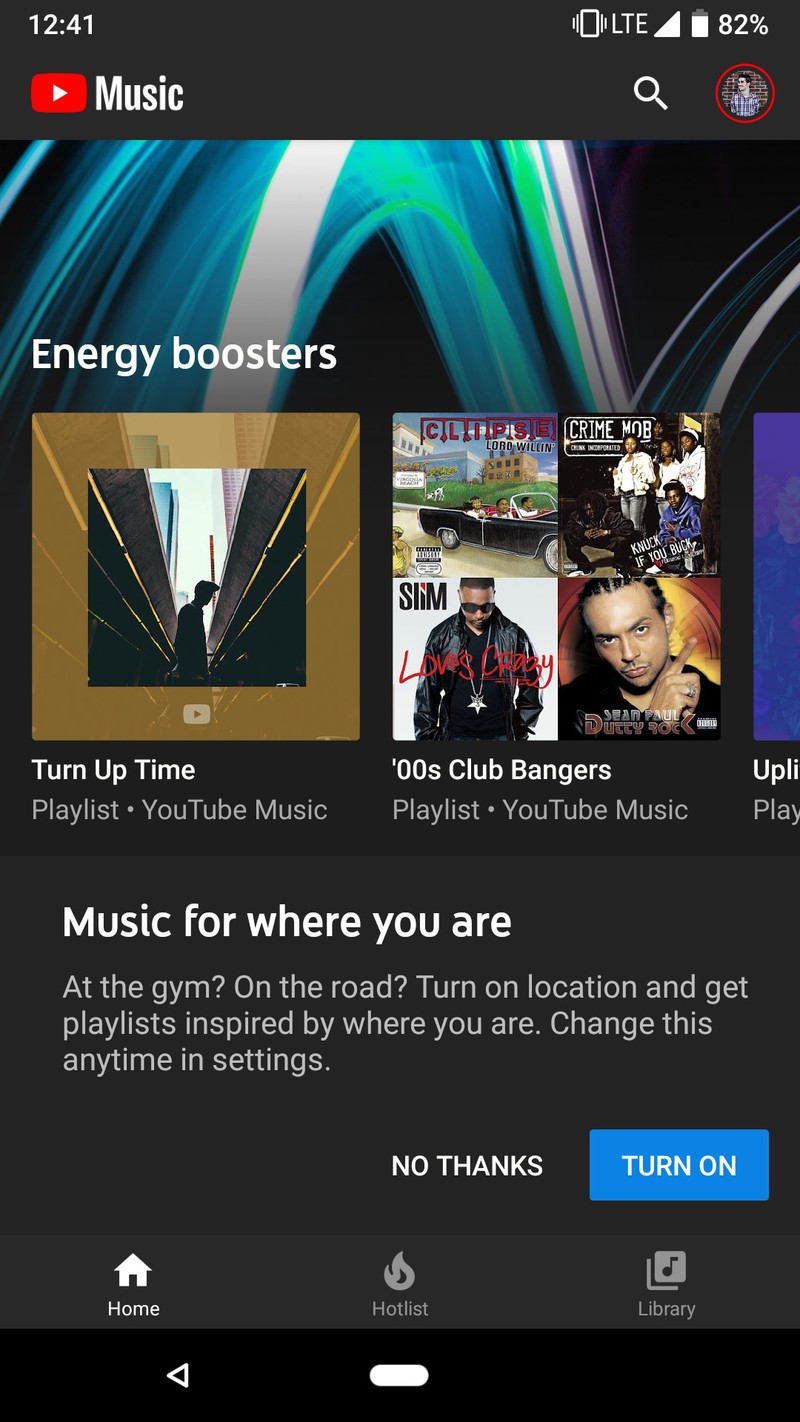
Regardless of if you’re a free or paid user, YouTube will ask to access your location in order to offer up activities-based suggestions, such as energetic music at the gym or calming music at the airport. Tap Allow if you want to get activity-based recommendations on the Home tab of YouTube Music.
You’ll immediately be served up a plethora of suggested playlists based on your artist preferences, your YouTube history, your location, and the latest music trends on YouTube. From here, you can select something on the Home tab to play or go search for whatever earworm is stuck in your head right now.
How to search for music in YouTube Music
Search is something Google does better than anyone when it puts its mind to it, and they have certainly put their mind to it in YouTube Music. When you tap that search icon in top bar of the YouTube Music app, you can search for songs, artists, albums, and music videos, but that’s really just the beginning.
- Tap the microphone at the right edge of the search bar and sing out some lyrics. Singing “Oh, baby give me one more chance” immediately brought up Jackson 5’s “I Want You Back”.
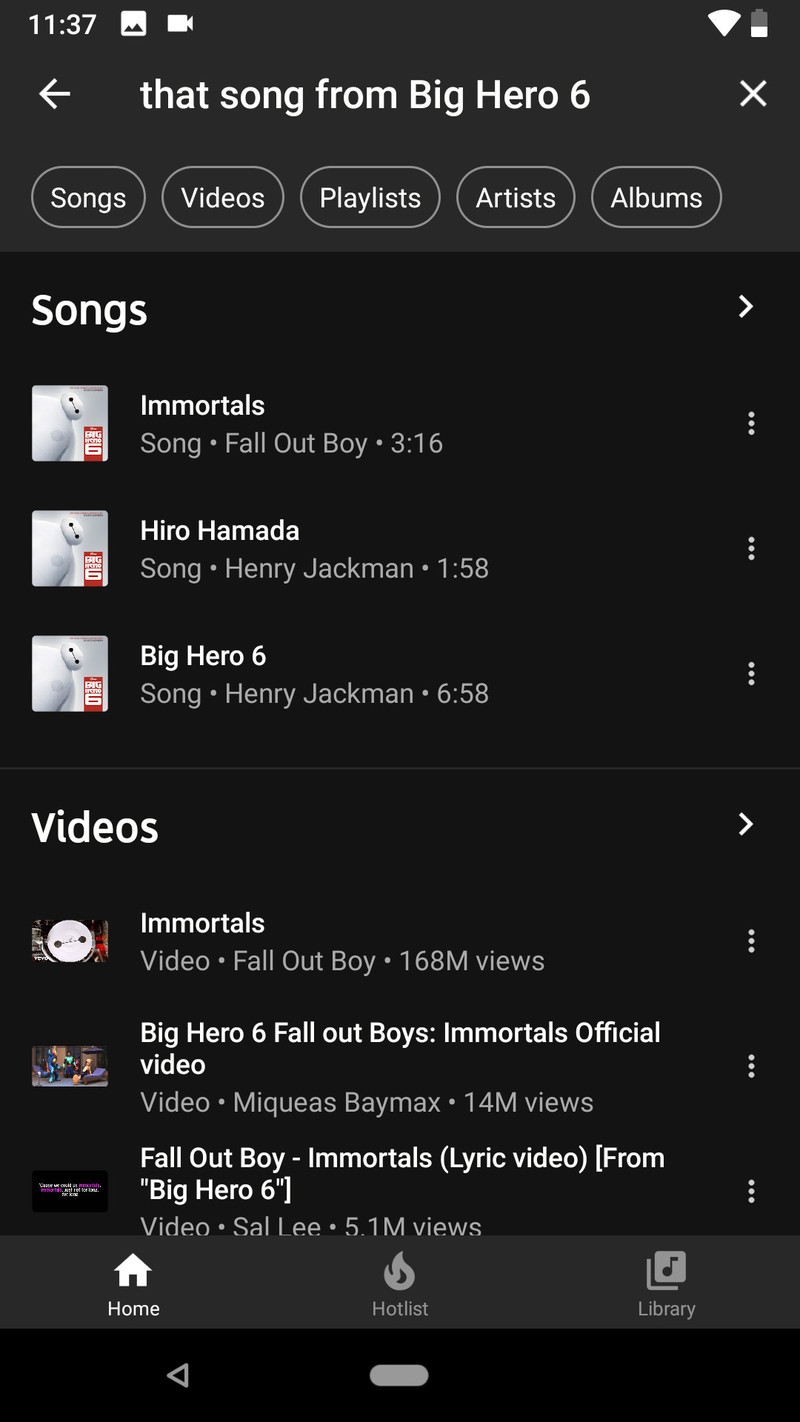
- Ask for a song from a particular movie. Ask for “the song from Big Hero 6” and Immortals by Fall Out Boy will top the search results, with the movie’s soundtrack lower in the results.
-
Search for collaborations by naming the artists. “That song with Lin-Manuel Miranda and Jennifer Lopez” resulted in “Love Make The World Go Round” and “Almost Like Praying”, musical team-ups they’ve done for charity in the last two years.


The one search feature YouTube Music doesn’t quite seem to have yet is scatting a melody for it, which is a bummer since sometime we can’t remember the lyrics, only the melody. I guess that’s what Shazam is still around for.
How to control playback modes in YouTube Music
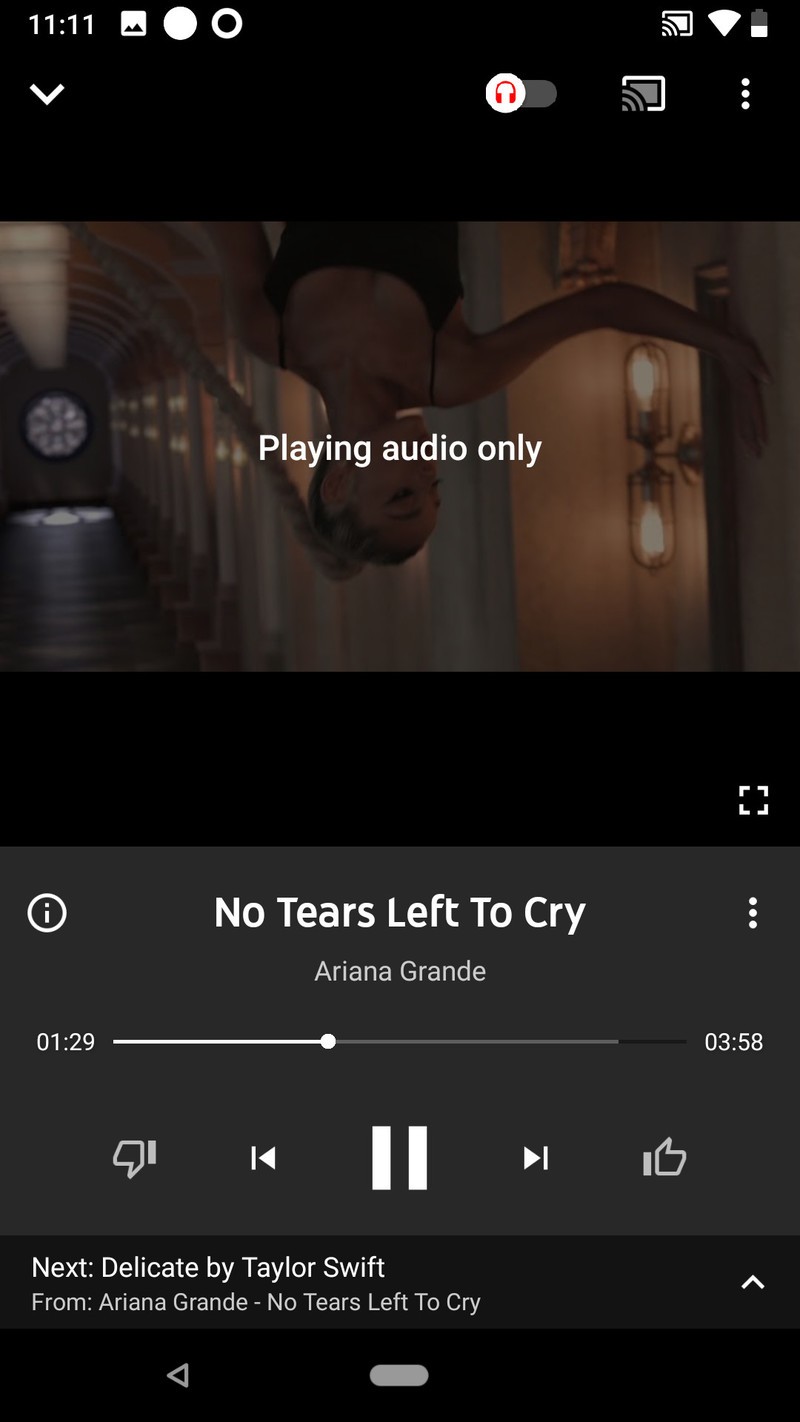
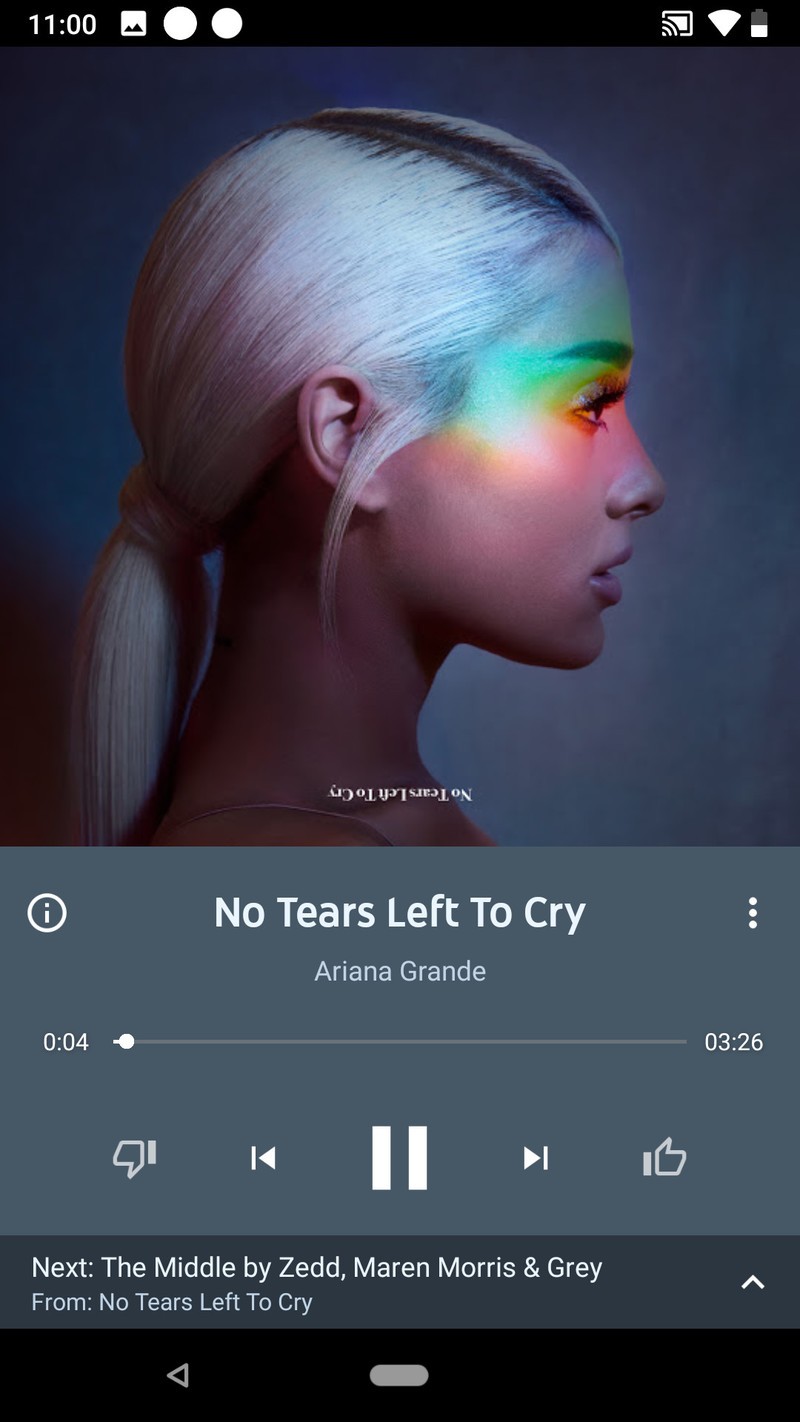

The playback screens on YouTube Music are a little different from traditional music apps. On the main playback screen, you’ll see a toggle in the top bar; this is the toggle that switches between playing video and playing audio only. This allows you to switch back and forth if you come across a video on a station or playlist that you want to watch the video for, like a totally sweet music video or a lyrics video. To the left of the track information is an info icon that will pull up quick links to the artists and album for the song. To the right is a three-dot menu icon, which you can use to add the currently playing song to your library, playlist, or start a song radio station.
Where are the shuffle and repeat buttons, you ask?
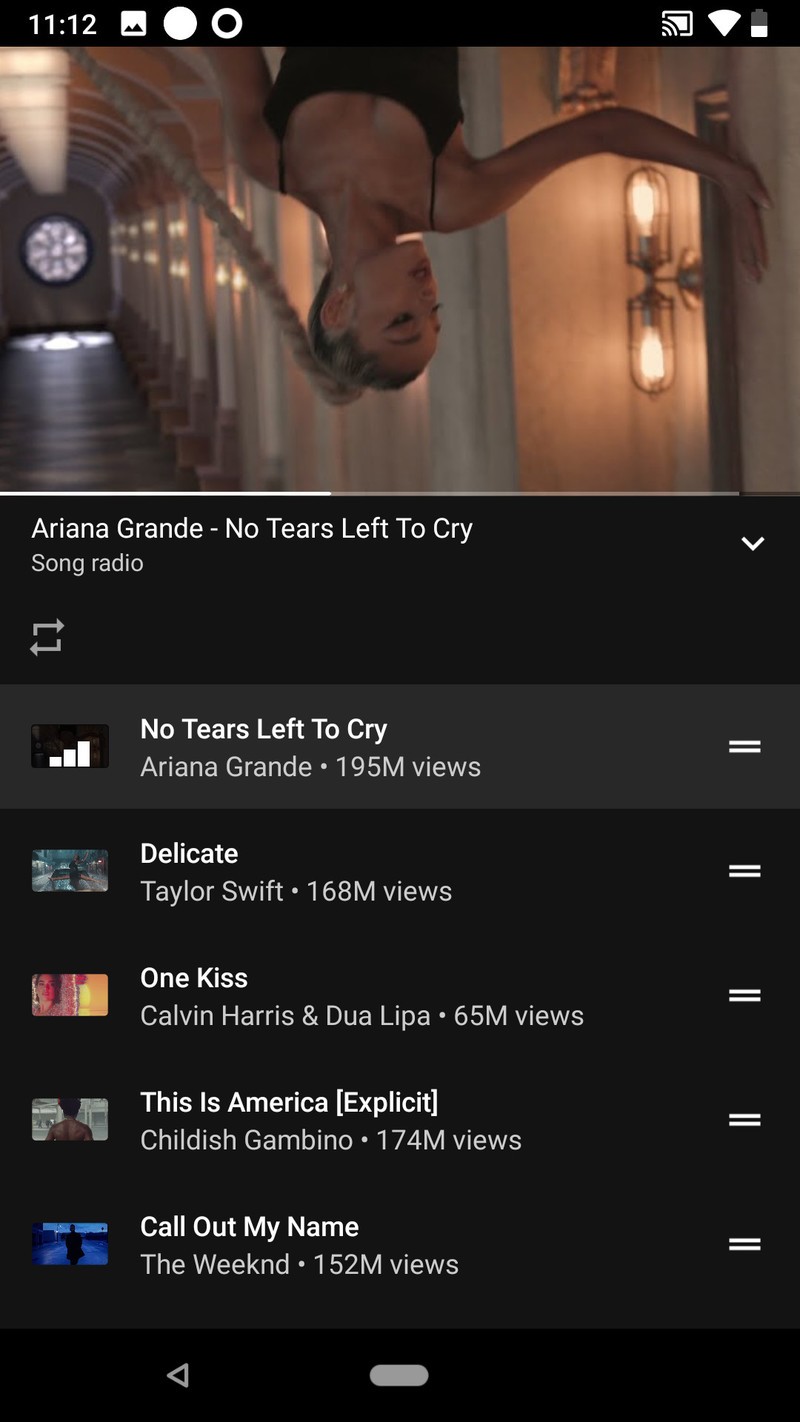


Swipe up on the main playback window and the controls will move up to sit on the of the video/audio only thumbnail, revealing the queue below the playback screen. The repeat button will appear between Queue and the currently playing video, along with the shuffle button when listening to a playlist or album. On stations, such as the songs stations that start when you tap a search result, shuffle isn’t available since stations are always on shuffle.
No matter what you’re listening to, Repeat One or “Listen on repeat”, is available, which is great news for those of us that will listen to a song 30 times in a row while learning the lyrics. If you tap shuffle on an album or playlist, you can watch the songs shuffle around with a nice little animation.
How to add a song to your YouTube Music library (add to Liked songs)
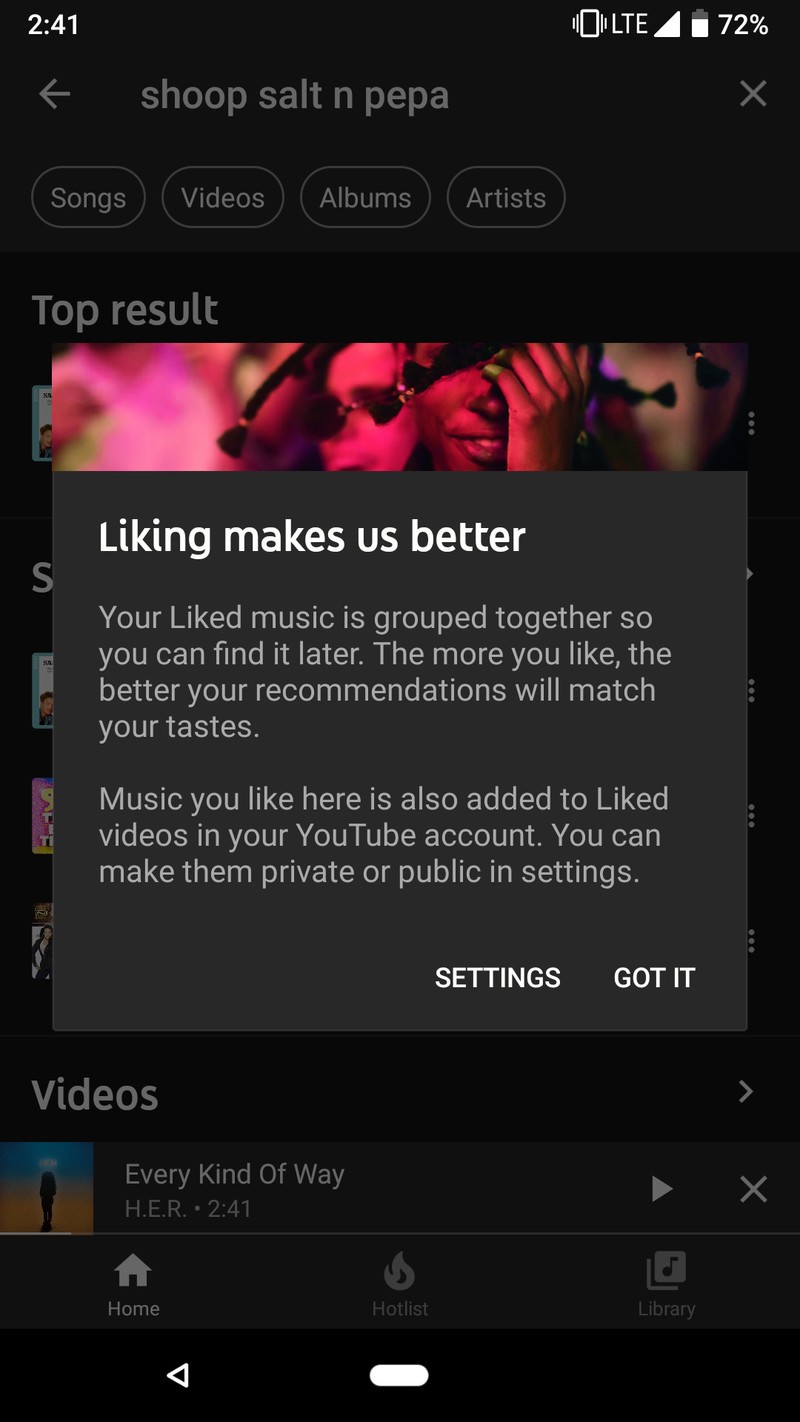
If you want a song in your library, adding it to your library is as easy as hitting the thumbs up button in the playback window. Every song you give a thumbs up to is added to your library in the “Liked songs” playlist. If you want to add a song to your library that you’re not currently playing, it’s easy to do that, too.
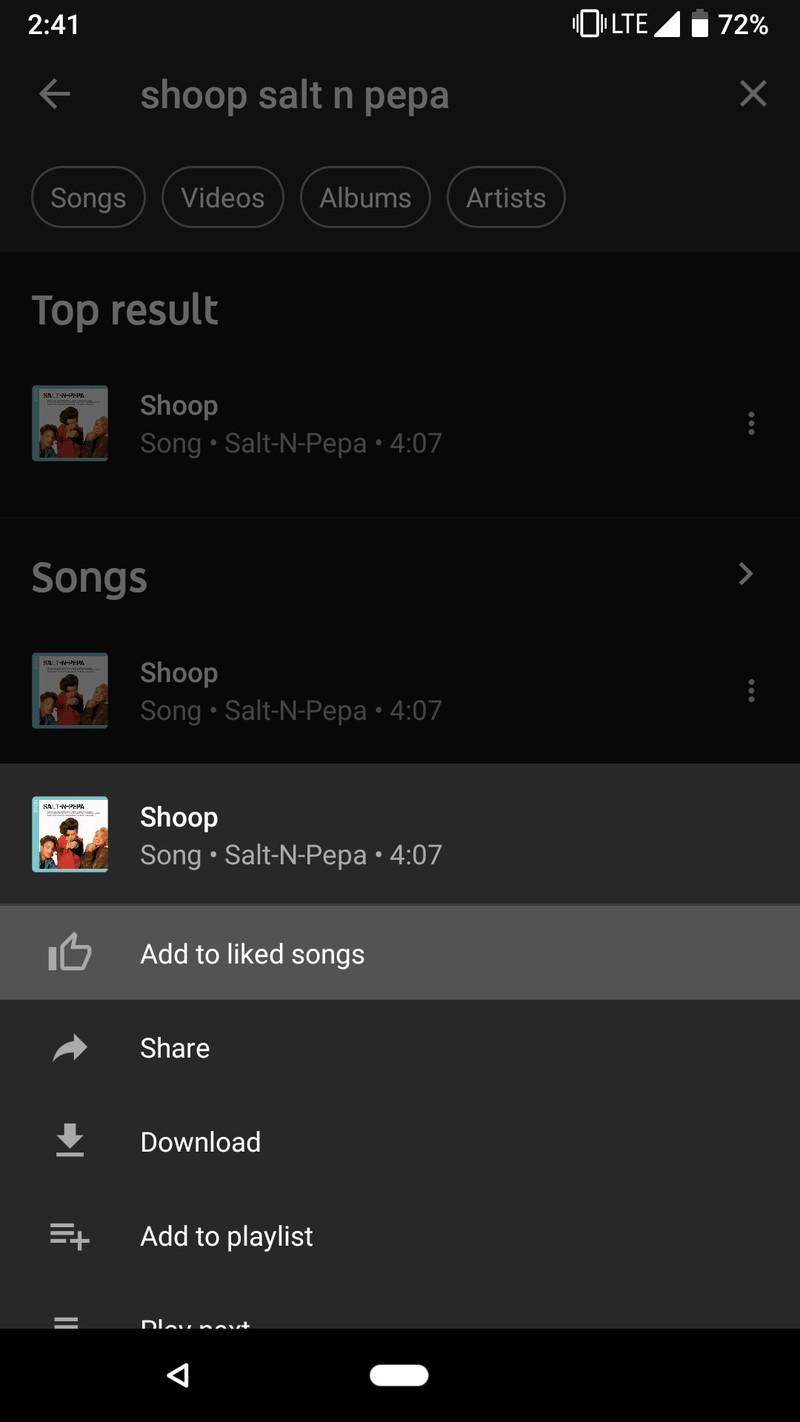
Tap the three-dot menu icon next to a song in a search result, list, or album you want to add to your library.
Tap Add to liked songs.
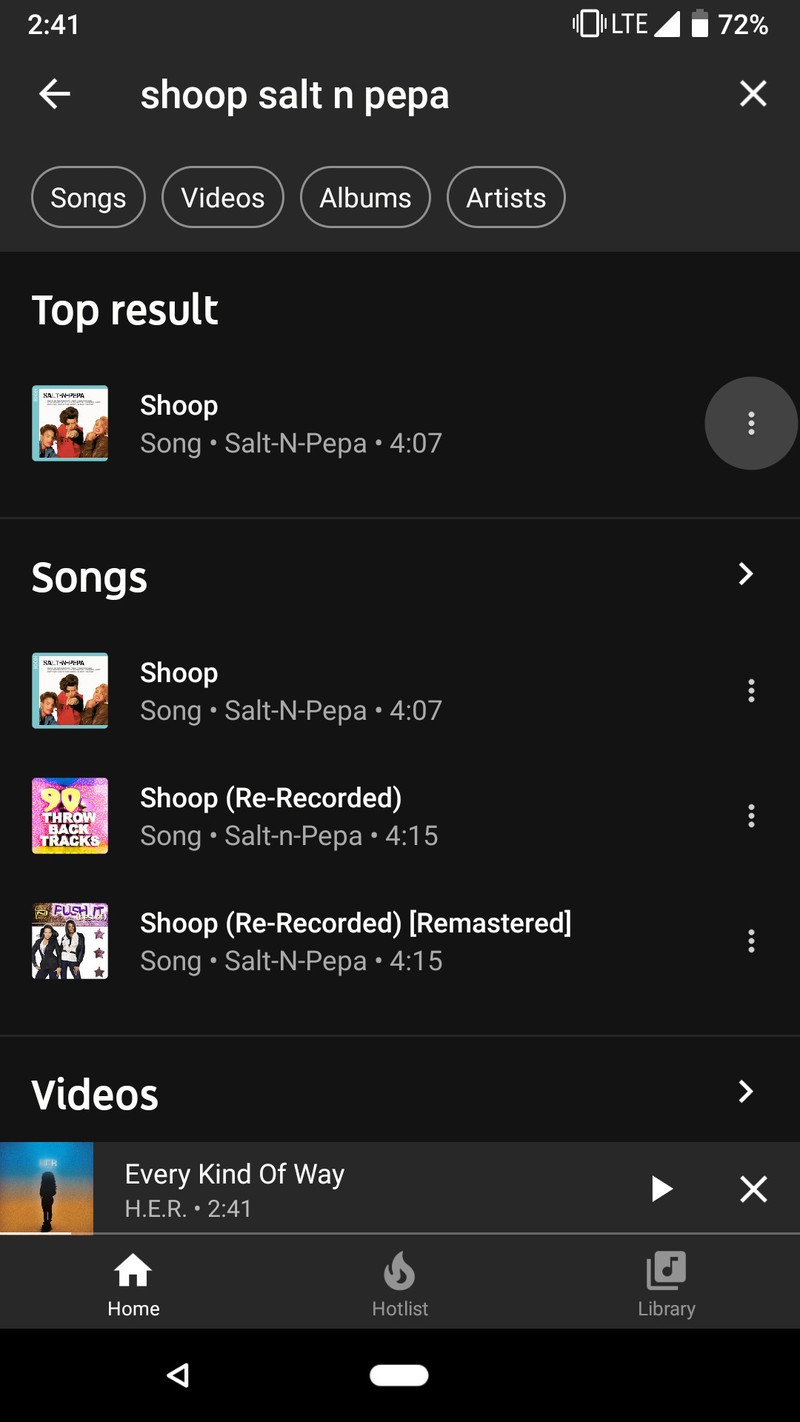
Adding individual songs to your library is good for singles and YouTube videos that aren’t part of a traditional album, but if you like multiple songs in an album, you can add the whole album to your library to make them easier to find.
How to add an album to your YouTube Music library
Adding albums to your library is almost easier than adding a song or a playlist, and while album availability seems oddly spotty for some labels right now, we’re expecting things to get more consistent as YouTube Music continues to roll out and establish itself.
Tap the album you want to add, either from a search result or an artist page.
Tap the Add to library icon between the album art and the download album icon.



How to follow an artist on YouTube Music
If you like an artist and want to hear when they release new albums or upload new videos, you can follow them, just like any of the music channels you’ve subscribed to on YouTube over the years.
Tap the artist you want to follow in an album listing or search result.
Tap Subscribe.

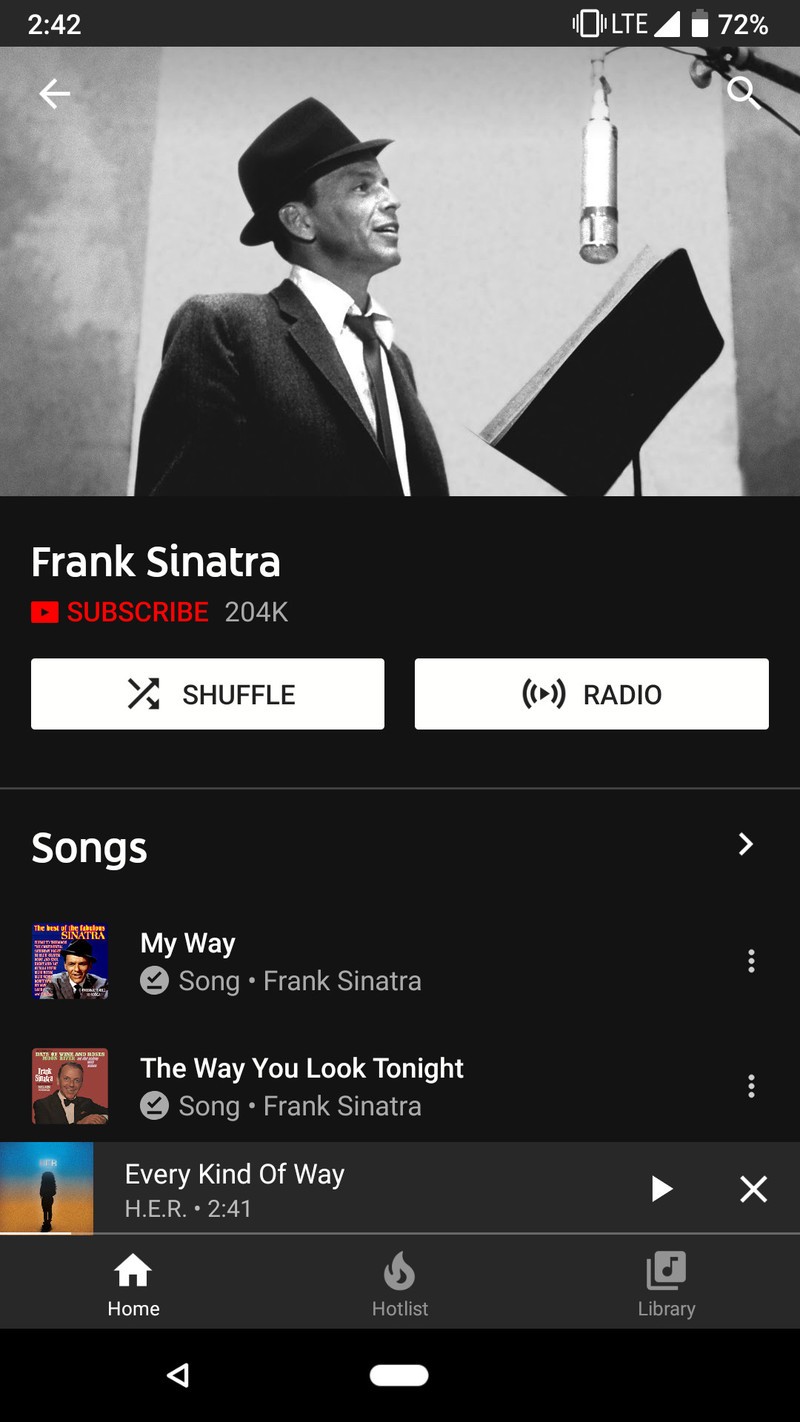

Subscribing to an artist will also subscribe you to their channel in the main YouTube app, so you’ll be able to keep up with their latest content on either app.
How to create a playlist in YouTube Music
If an album or a station doesn’t get quite the mix you want, you can build your own playlist in YouTube Music, and building them is a snap. The playlists you build in YouTube Music are visible in the main YouTube app, and playlists that have eligible videos in them appear in the YouTube Music app. Until YouTube Music’s new desktop interface is available, editing a playlist on a computer is only available through the regular YouTube site.
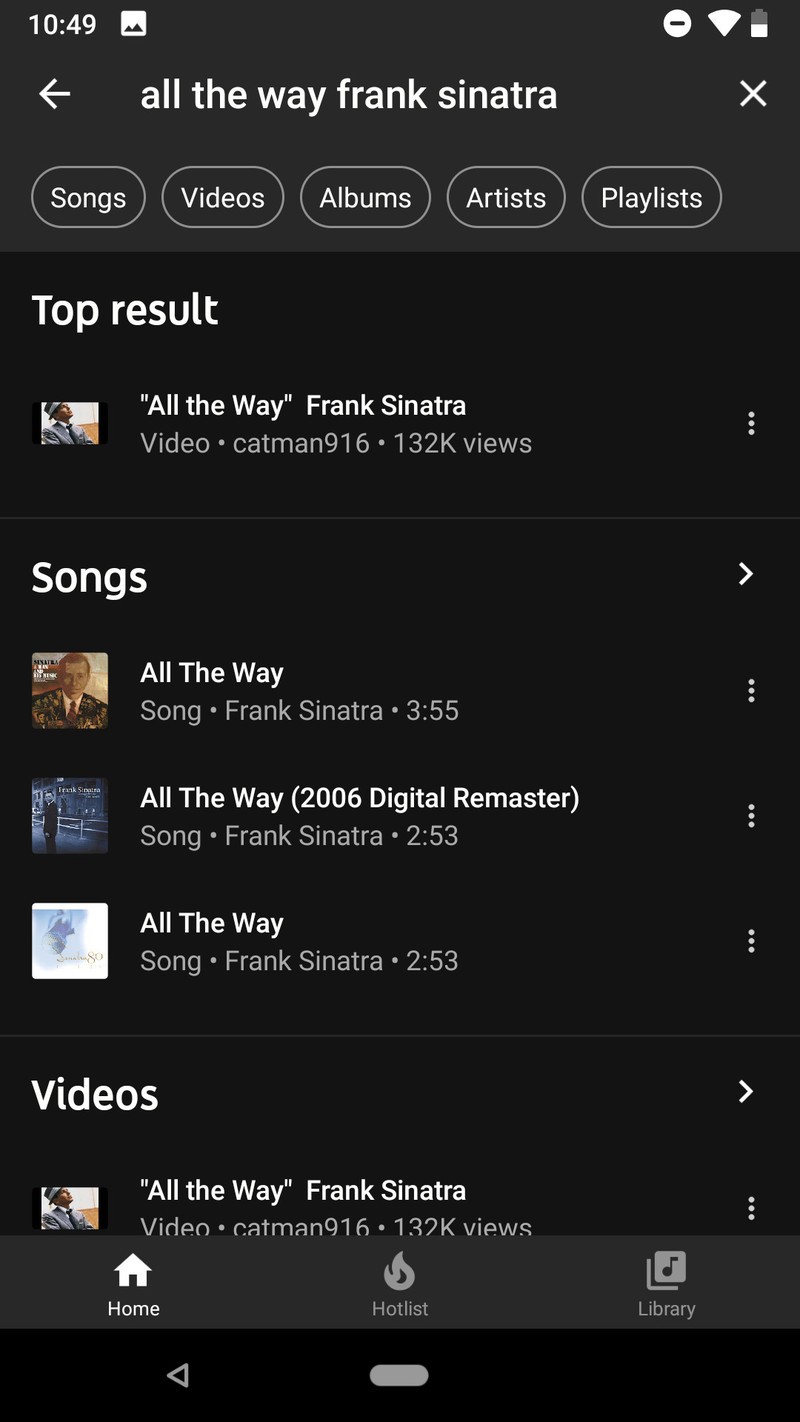
Tap the three-dot menu icon next to a song in a search result, list, or album you want to add to your library.
Tap Add to playlist.
Tap Create new playlist.
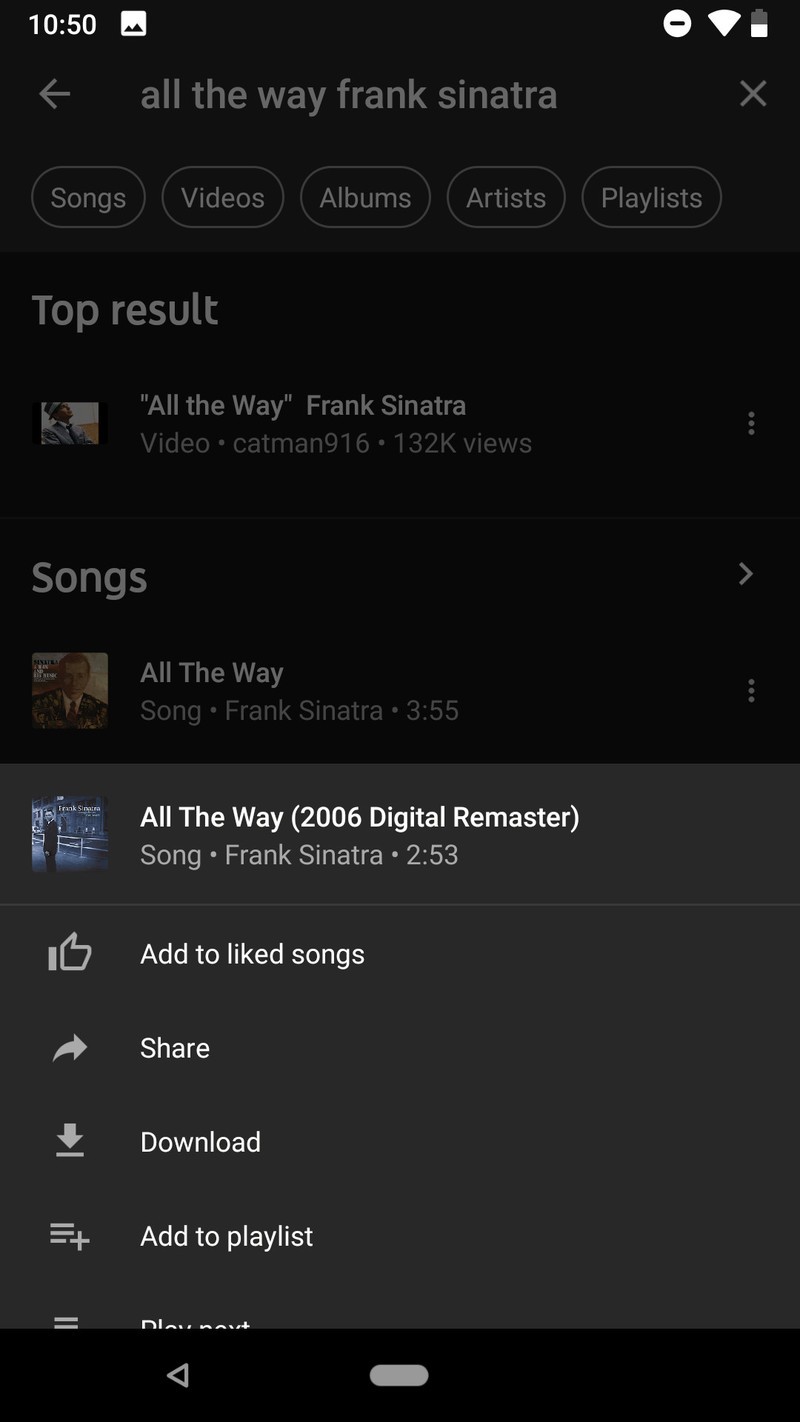

Name your new playlist.
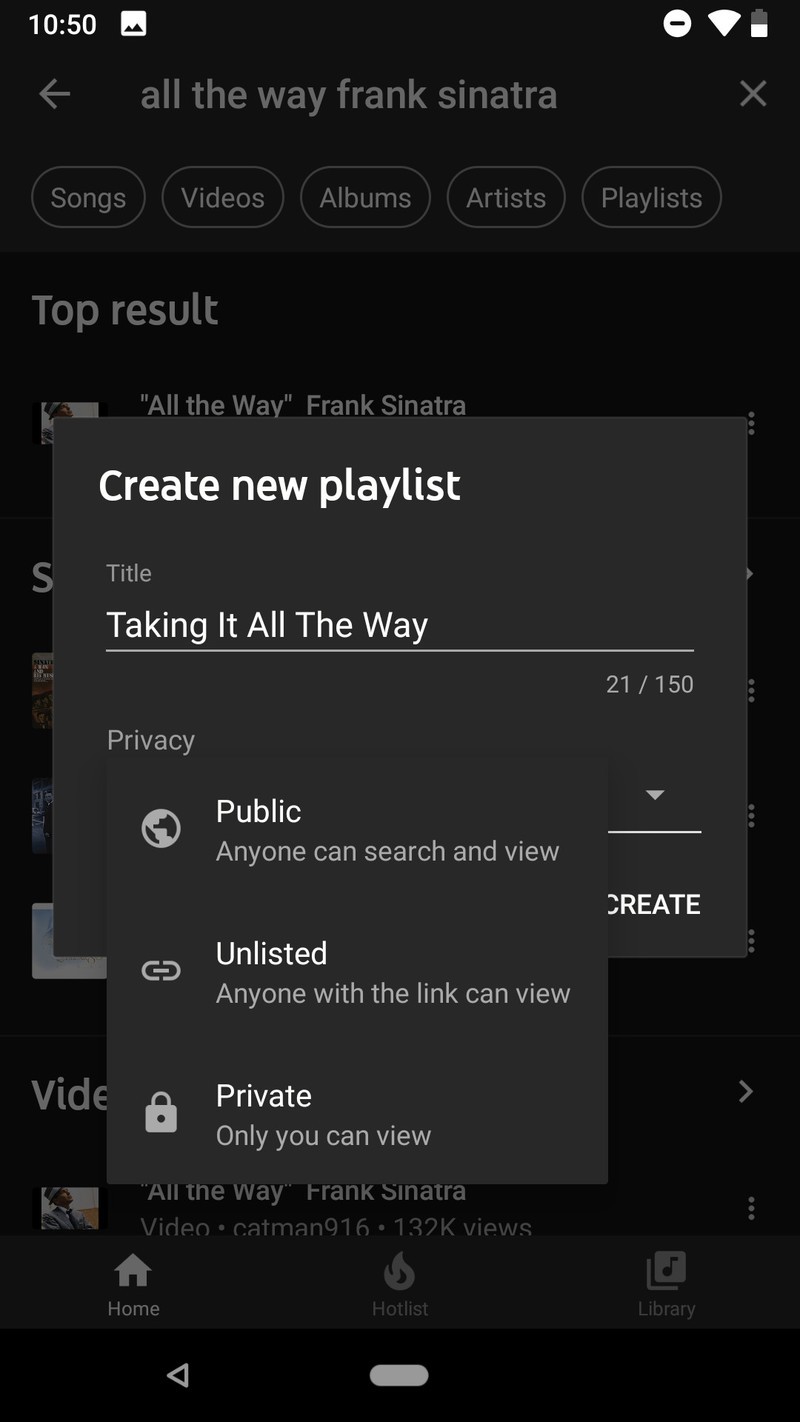
Select a privacy level for your new playlist.
- Public playlists are visible to everyone and accessible through YouTube and YouTube Music searches. Public playlists are also visible on your public YouTube profile.
- Unlisted playlists are only visible to other through the sharing URL. They do not appear in searches or your public YouTube profile.
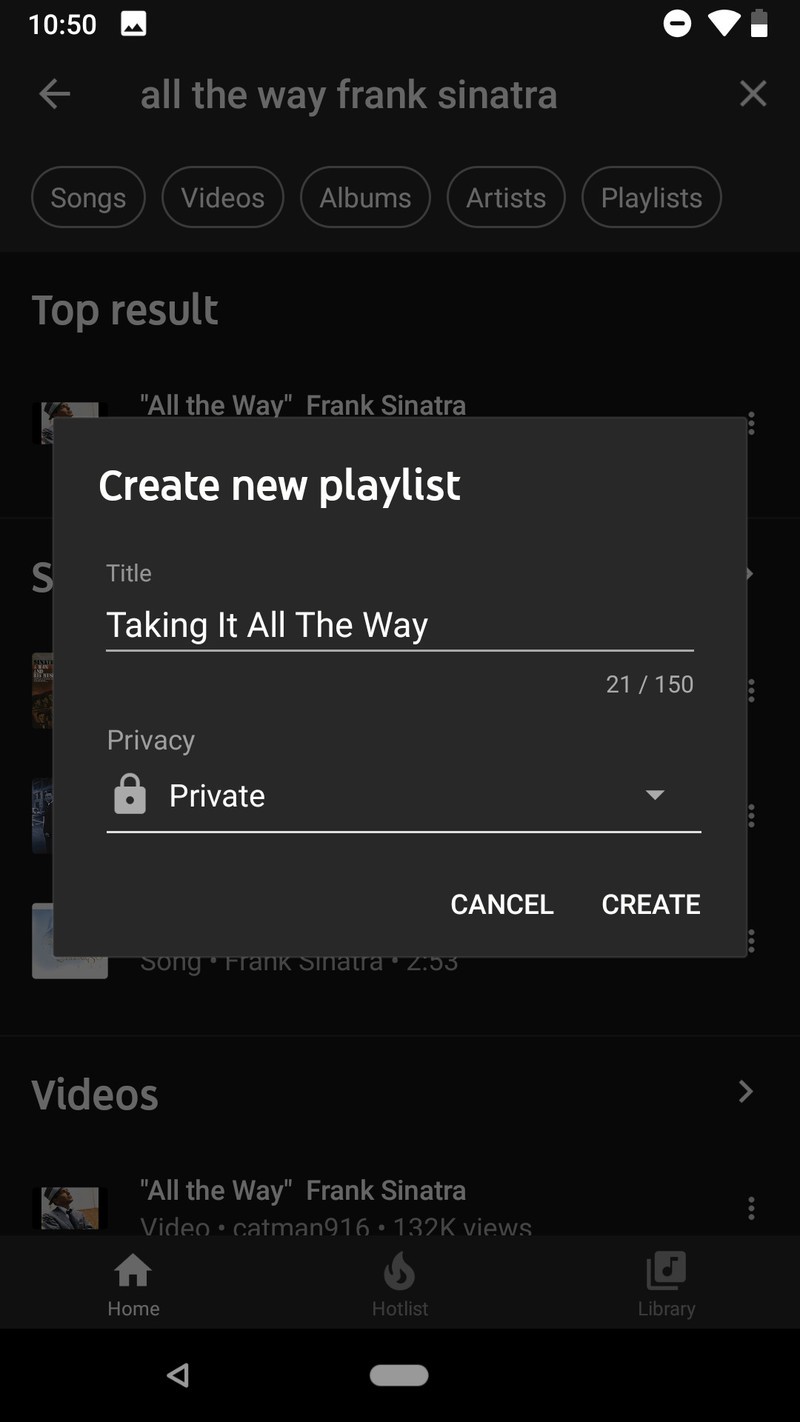
- Private playlists are only visible to you. This is what you’ll want to select for your Guilty Pleasures mixtape.
Tap Create to create the playlist and add the first track.
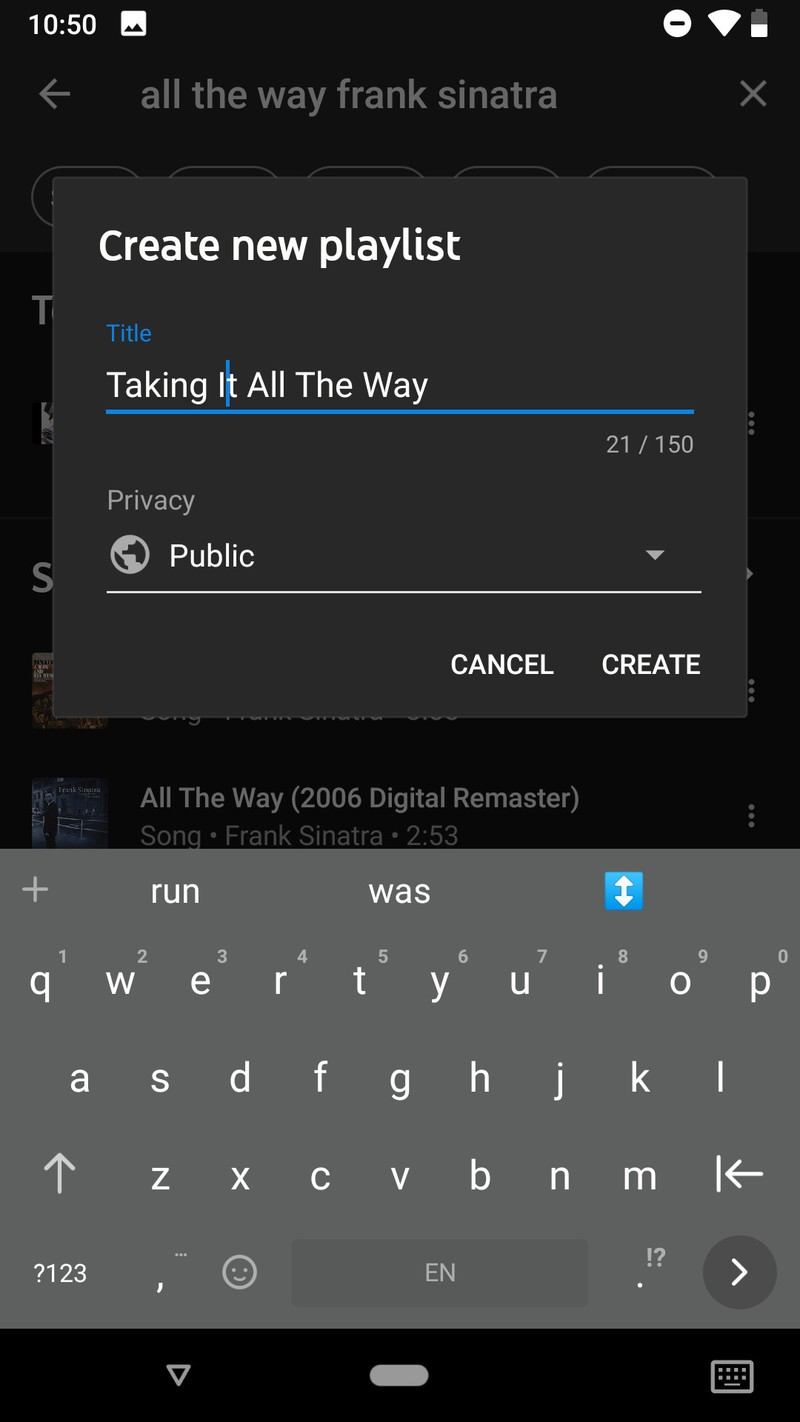
Once a playlist is created, you can add songs, remove songs, and edit the playlist on YouTube Music, YouTube’s main app, YouTube’s website, and coming soon on the new YouTube Music website.
How to make YouTube Music your primary music service in Google Assistant
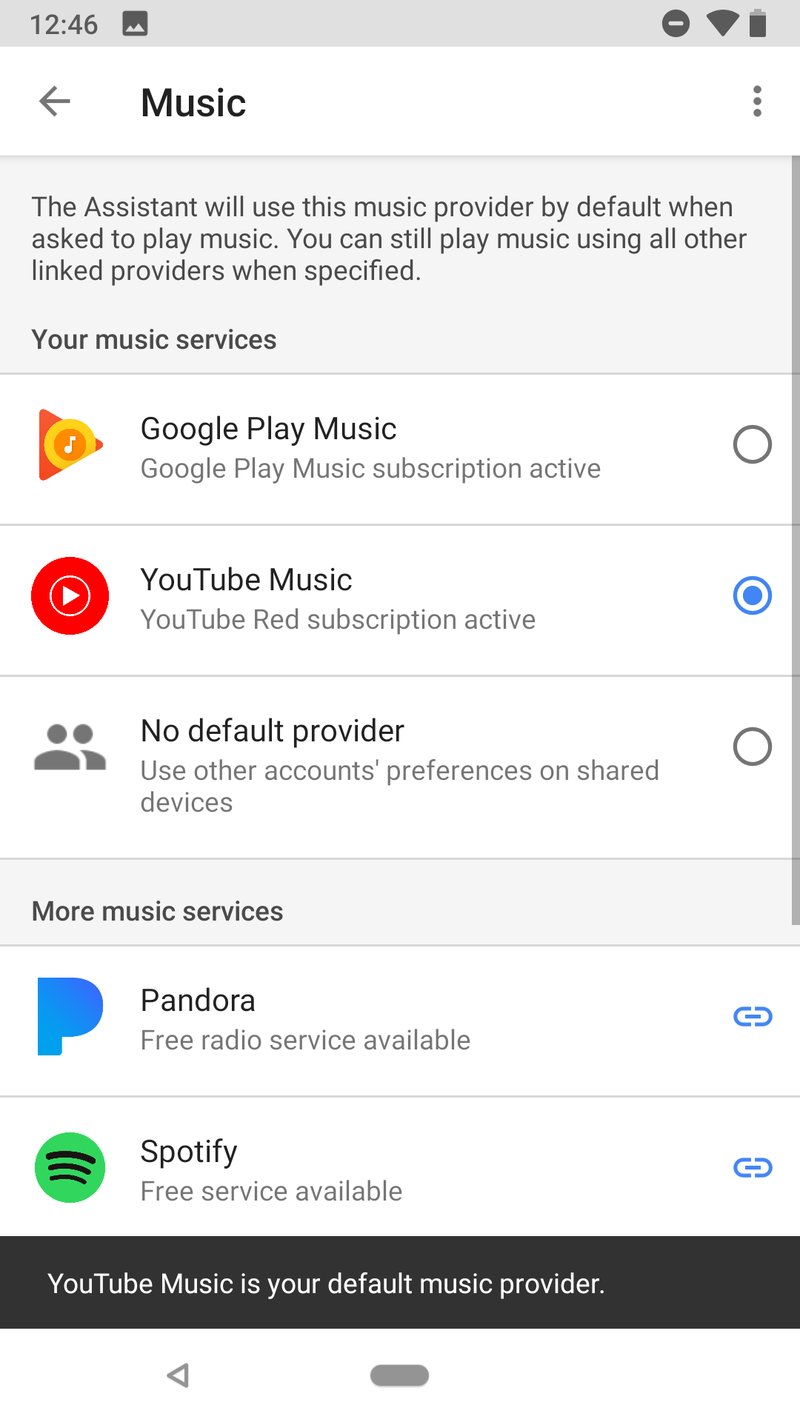
Among the many services that Google Assistant can control, music may be one of the most important. Your default music service in Google Assistant will be used every time you ask Google for a song, playlist, or album. If you’re going to give YouTube Music a try, you should set it as your default music provider, so you can see how well it responds to your requests and commands, especially with albums and YouTube Music’s fancy search skills.
Open the Google Home app.
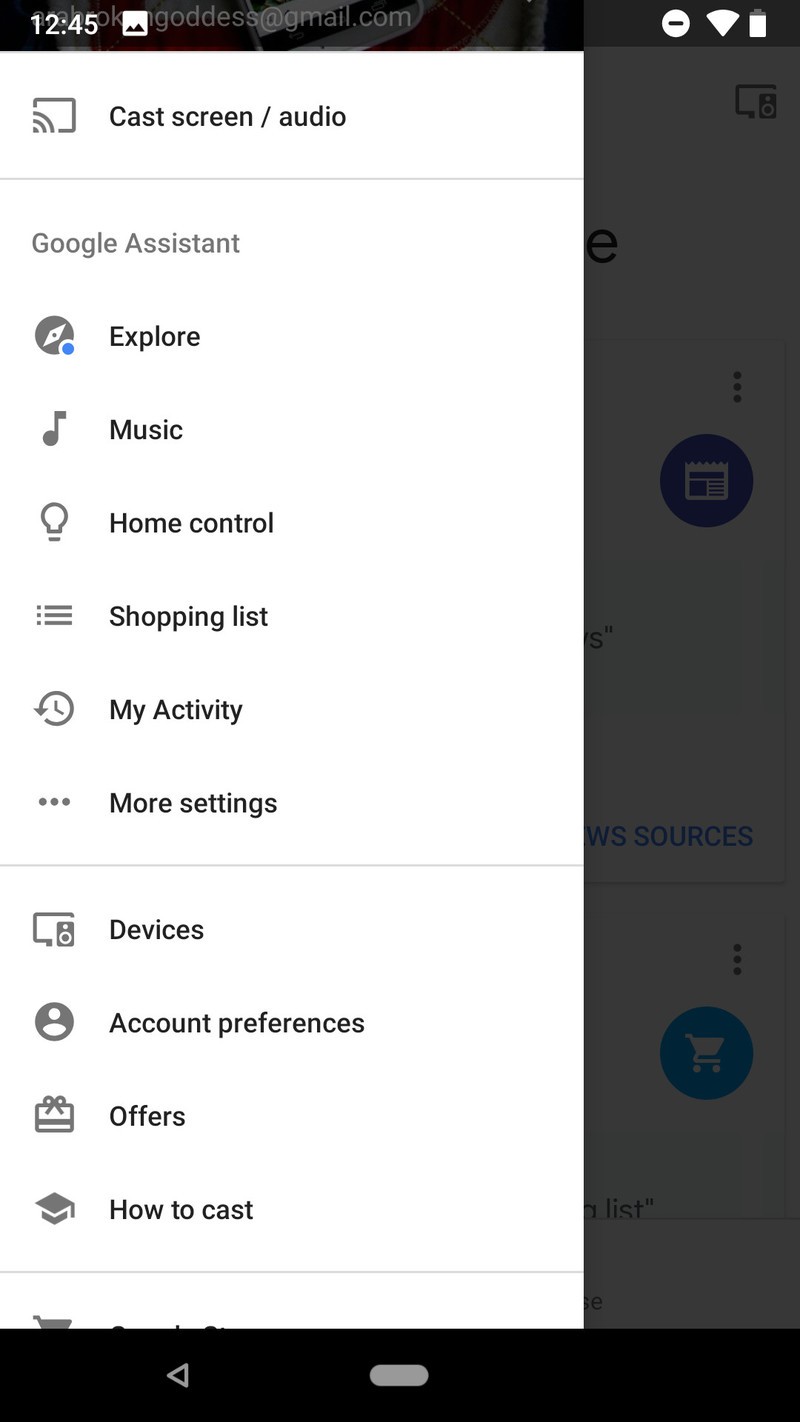
Tap Menu (the three-line icon) in the top left corner of the screen.

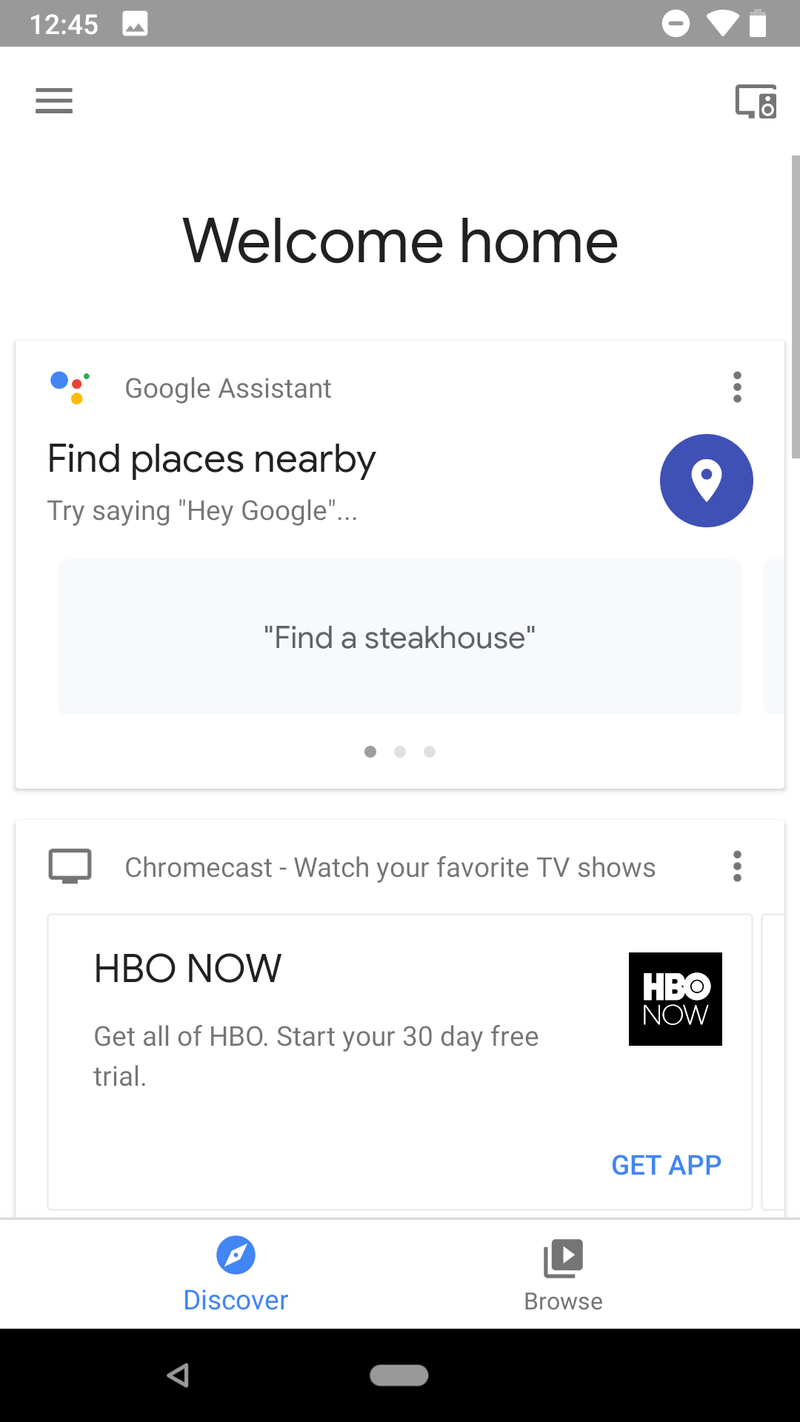
Tap Music.
Tap YouTube Music.
Your turn
YouTube Music is an adjustment from traditional music services, but thanks to the Google’s search prowess and downright uncanny predictions and recommendations, getting used to Google’s newest music service should be as painless as possible. If you have more questions about new app, ask them in the comments and we’ll try to answer them in our continuing coverage of YouTube Music.
Which color OnePlus 6 should you buy?
Make sure you make the right OnePlus 6 decision.

“Most people put their phones in a case, so why does it matter what color you buy?” I hear a variation of that sentence very time I talk about phone colors and materials.
But if that were the case, companies would release phones in one color — “Model T” black — and call it a day. Instead, we’ve seen color trends come and go, and increasingly a variety of hues, materials, and shimmer to suit anyone’s tastes. And while many people do cover their phones with gaudy cases, there are an increasing number that choose to go naked, or use a clear case, to see the phone as it was intended.
The OnePlus 6 comes in three colors, and each feels as distinct as it looks. Choosing which one to buy won’t be easy, but hopefully, we can help.
Mirror Black
Mirror Black is the obvious choice for the OnePlus 6 because it’s the default choice — if you want the cheapest variant of the phone, you have to choose Mirror Black.
Given that the OnePlus 6 is covered in glass, the Mirror Black variant looks the most traditionally reflective, with OnePlus “coating it with a mirror sheen, giving it the look and feel of ceramic.” While the coating means it picks up fingerprints quite easily, it’s also surprisingly grippy, allowing you to safely use the phone without a case. You’ll be wiping it down every few minutes, but when fresh and clean the phone looks incredible, and picks up on the strongest light source in the room.
Who should buy the Mirror Black OnePlus 6?
If you’re looking to get a OnePlus 6 that looks as far from a previous OnePlus device as possible, Mirror Black is where it’s at. Or, conversely, if you loved the short-lived OnePlus X (OnePlux), this is your only real option.
At the same time, given that the Mirror Black model is the only one offered at the $529 starting price, for 6GB of RAM and 64GB of storage, it should be considered the frugal pick.
Midnight Black
Midnight Black is the more traditional-looking variant of the OnePlus 6, harkening back to the halcyon days of the OnePlus 3T, where the “matte black everything” was all the rage. While this particular variant is covered in glass, it looks very much like metal, and offers a cleaner, more sophisticated look to the OnePlus 6.
It’s also available in both 128GB and 256GB variants, both of which have 8GB of RAM.
Who should buy the Midnight Black OnePlus 6?
If you long for the days when the OnePlus line was made of metal, the Midnight Black OnePlus 6 is the closest thing you’ll get. At the same time, it actually looks better than the metal versions because despite the matte underlay, the glass catches the light and looks really nice in almost any lighting condition.
That said, it’s not as striking as the Mirror Black model, so it’s easily covered in a case without regret.
Silk White
Coming June 5, and only available in one storage combination — 8GB of RAM and 128GB of storage — the limited-edition Silk White OnePlus 6 features a glass back, but underneath is a crushed pearl design that looks slightly pocked in the light. With rose gold accents, the Silk White OnePlus 6 is striking and unique, and will definitely be more coveted given its limited-edition nature.
Who should buy the Silk White OnePlus 6?
If you’re looking for the only OnePlus 6 color that actually has any color, Silk White is the obvious choice. If you enjoy rose gold, or just want a phone that looks a bit different, it’s the way to go.
At the same time, it’s possible, given the Silk White’s limited manufacturing run, that it may become something of a collectors’ item, so you better get on it fast if you want one when it goes on sale June 5.
See at OnePlus
What’s your color?
Have you chosen a OnePlus 6 color? Are you waiting for the Silk White version? Let us know in the comments below!
OnePlus 6
- OnePlus 6 review
- OnePlus 6 vs. OnePlus 5T: How much changes in six months?
- OnePlus 6 vs. OnePlus 5: Should you upgrade?
- These are the official OnePlus 6 cases
- The OnePlus 6 doesn’t work on Verizon or Sprint
- Join the discussion in the forums
Beats ‘Decade Collection’ Headphones Appear on Best Buy Website Ahead of WWDC
A special “Decade Collection” range of Beats Headphones are currently being promoted by online retail merchants ahead of scheduled availability on June 4, suggesting Apple will officially announce the collection during its keynote at the Worldwide Developers Conference.
A new Beats “Decade Collection” page on the Best Buy website spotted by AppleInsider provides a thorough breakdown of the Beats By Dre 10th anniversary limited edition range, which has yet to appear in Apple’s online product listings. Details about the new Beats models also went live on the website of New Zealand-based retailer Smiths City.

Beats was launched so people could hear music the way the artist intended. A decade later they’re still changing the game. Styled in Defiant Black-Red in tribute to their bold beginnings and music’s dynamic emotion, the Beats Decade Collection celebrates their first 10 years of innovation.
The collection showcases a “Defiant Black-Red” color scheme to existing products in the Beats lineup, including Studio3 Wireless, Solo3 Wireless, Powerbeats3 Wireless, BeatsX Wireless, and urBeats3. All the headphones are available to pre-order at the same price as their more typically styled equivalents.

A report last week claimed that Apple’s rumored “low-priced” version of the HomePod will be placed under the Beats by Dre brand instead of the expected Apple branding – although it seems unlikely that Apple would combine the two brands into one product.
Apple is also rumored to be working on a set of high-end over-ear headphones that, like the company’s HomePod and AirPods, will be Apple branded rather than Beats branded.
Tags: Beats, WWDC 2018
Discuss this article in our forums
How to Add an AirDrop Shortcut to Your Mac’s Dock
Apple’s AirDrop feature lets you wirelessly send and receive files between nearby Macs as well as to and from local iOS devices. It’s usually accessed from the sidebar of an open Finder Window (or using the Command + Shift + R keyboard shortcut within Finder), but here we’re going to share with you a trick that enables you to launch AirDrop straight from your Mac’s Dock.
Having the AirDrop shortcut in your Dock will allow you to access it from any screen, regardless of the application you’re using, and without having to open a Finder window first. Regular AirDrop users in particular should appreciate the convenience it provides.
How to Add AirDrop to Your Mac’s Dock
Open a Finder window or click the Desktop.
In the Finder menu bar, select Go -> Go to Folder.
Paste the following directory path into the dialog and press Enter: /System/Library/CoreServices/Finder.app/Contents/Applications/
The Contents/Applications folder within the Finder.app package will appear. Using your mouse, drag the AirDrop app to the desired location in your Dock.
Close the Finder window.Next time you want to open the AirDrop window to share something, simply click the app icon in your Mac’s Dock. Note that you can also drag the iCloud Drive app from the Finder package in the same way, for quick one-click access to the files and folders in your cloud storage.
Related Roundup: macOS High SierraTag: AirDrop
Discuss this article in our forums
Apple ‘pleased’ that Samsung is paying it $539M ‘for copying our products’
It’s a case that’s been bouncing around the courts like a ball in a pinball machine, but it looks like it could finally be over.
We’re talking about the seven-year patent battle involving Apple and Samsung where the former accused the latter of taking ideas from its iPhone for its own smartphone designs.
On Thursday, May 24, a unanimous decision by a jury in the U.S. District Court in San Jose, California, means that Samsung must pay Apple $539 million for infringing five patents affecting a number of Android handsets that the Korean tech firm sold in 2010 and 2011.
In a statement issued shortly after the decision was handed down, the iPhone maker said the case had always been about protecting hard work and innovation.
“We believe deeply in the value of design, and our teams work tirelessly to create innovative products that delight our customers,” the Cupertino, California-based company said.
It added, “This case has always been about more than money. Apple ignited the smartphone revolution with iPhone and it is a fact that Samsung blatantly copied our design. It is important that we continue to protect the hard work and innovation of so many people at Apple.”
The tech giant closed by thanking the jury and saying it was “pleased” that they agreed that Samsung “should pay for copying our products.”
Samsung said Thursday’s decision “flies in the face” of an earlier Supreme Court ruling “in favor of Samsung on the scope of design patent damages,” adding that it was now considering “all options to obtain an outcome that does not hinder creativity and fair competition for all companies and consumers.”
While the courts had already ruled that Samsung had infringed patents belonging to its rival, this latest legal tussle was all about determining how much Samsung should hand over. The battle revolved around the definition of the “article of manufacture,” in other words, whether the damages should relate to the entire phone or the individual components linked to the infringed patents. Apple sought damages related to profits made by the infringing phones, a figure it put at more than $1 billion, whereas Samsung wanted the final figure linked to the individual components and features, which it said amounted to $28 million.
In the end, following arguments from legal representatives on both sides, the court arrived at $539 million.
Most of the financial penalty — $533,316,606 to be precise — has been awarded for Samsung’s infringement of three Apple design patents, while the rest — $5,325,050 — is for the infringement of two of Apple’s utility patents that relate to the phones’ functionality.
Editors’ Recommendations
- Samsung and Apple’s lawsuit may finally be drawing to a close
- Judge says Samsung ‘rigged the deck, fixed the game’ with Galaxy
- Here’s everything we know about the Samsung Galaxy S10
- Here’s everything we know about the upcoming Samsung Gear S4 smartwatch
- How to use Samsung’s Bixby assistant for all of your smartphone tasks
Google Home vs. Amazon Echo: Which should you buy in India?
Google Assistant and Alexa have plenty to offer in India, but which platform is right for you?

Amazon launched the Echo family of devices in India last November, and Google introduced the Google Home in the country in April. The entry-level options — the Google Home Mini and the Echo Dot — cost ₹4,999 in the country, with the larger Google Home and Amazon Echo coming in at ₹9,999. The larger Echo Plus, meanwhile, is available for ₹14,999.
If you’re looking to pick up a smart speaker but haven’t made up your mind yet, here’s what you need to know about using the Google Home and Amazon Echo in India.
What the Google Home does better

One area where the Google Home wins out over the Echo is integrating with Google services. You’ll be able to get your calendar alerts, get real-time traffic alerts, route estimates for work, and more.
Google Home offers six routines — a set of customizable actions that are triggered by a phrase. Just say “Good morning,” and the Assistant will give you updates on the weather, take your phone off silent mode, deliver your news briefing, read your calendar entries for the day, your reminders, and traffic updates for your commute.
If you have Hue lights linked up to Assistant, you’ll also be able to control them with routines. It’s a great new addition and makes the Google Home that much more usable.
The Google Home also casts media to any Chromecast devices or Android TVs in your house. You can get it to play a particular show on Netflix on your Cast-enabled device by issuing a command as well. Then there’s a shopping list feature, which lets you add items to a list.
Google Home is great if you’re already invested in Google’s ecosystem.
The feature I use the most is “ring my phone:” You can just ask Assistant to ring your phone, and it will do so even if your device is on silent. I also like the fact that Google Home offers custom profiles, so when my wife asks Assistant to find her phone, it recognizes her voice and ring her device.
Another advantage is the fact that you can use any language for Assistant (ranging from English to France, Mandarin, German, and Italian), and it will work just fine. This isn’t possible with Alexa: you’ll only be able to use English (India).
You’ll also be able to listen to podcasts, and as the Play Store now sells audiobooks, you’ll be able to ask Assistant to play a particular audiobook in your library. Assistant is also better at answering search queries, and it is able to pick up on contextual cues.
All Google Home purchases in India come with a six-month subscription to Play Music All Access, and Assistant also has Saavn and Gaana integration if you want to play tunes from either streaming service.
As for music playback itself, I prefer the Google Home to the standard Amazon Echo. The Google Home offers a more natural sound, and at full volume it can easily fill a medium-sized room.
What the Amazon Echo does better

Amazon has invested significant resources in customizing Amazon Echo for the Indian market, and that’s clearly evident from the moment you start using Alexa. You’ll be able to link your Uber/Ola account and book a cab, get restaurant recommendations from Zomato, get cricket updates from CricInfo, and so much more.
You’ll even get Bollywood and cricket-themed jokes from Alexa, and the ability to add a host of Indian publications for daily news updates, unlimited music streaming with Amazon Music, and the list goes on.
Right now, Alexa has Google Home beat when it comes to value.
Oh, and you can also buy products from Amazon by just using your voice. Alexa will look through your Amazon purchase history to see if you’ve purchased a similar product in the past, and if not, it will surface the three top links on Amazon for that particular item.
Amazon also has an Alexa-to-Alexa calling feature, so if your friend or family members also have an Alexa device, you’ll be able to call them for free.
You’ll be able to hook up your Kindle account with Alexa and have the assistant read books to you. It isn’t the same as an audiobook — as Audible isn’t available in India yet — but it is a start.
If you’re looking to pick up the Echo Plus, know that it has a built-in Zigbee hub for your smart home products. So if you’re looking to connect Hue lights, for instance, you don’t need to buy a dedicated bridge anymore. In general, Alexa is much better when it comes to controlling your smart home gear, and that’s because Amazon has enabled hundreds of local skills from the likes of Syske, Oakter, Picostone, and the like.
Amazon Echo, Echo Dot, or Echo Plus: Which should you buy in India?
I recently got the Picostone Basic to control my living room downlights, and the system works with Alexa out of the box. It doesn’t work with the Google Assistant just yet, but that’s slated for the coming months.
That’s a common theme when talking about the Google Home — as I mentioned earlier this year, it still feels like the speaker is a work in progress in India. And that’s frustrating, because you’d expect that it would offer integration with services like Zomato, Uber, Ola, and others.
While I had no issues with either assistant recognizing and understanding my accent, Alexa has an edge on this front. It understands local names, nouns, and colloquial terms much better than Assistant.
Which should you buy? Amazon Echo

This is a tough one, because both the Google Home and Amazon Echo have plenty to offer in India. The main downside with Google Home is that it has zero customization for the Indian market, so you’re missing out on basic features like the ability to call a cab on Uber or Ola, or view nearby restaurants with Zomato.
Then there are other features — like hands-free calling — that aren’t live yet in India. Google says it is working to bring added functionality to Google Home in India, but right now there’s not a lot of support for third-party services on the platform. That said, Google Home handles search queries better, and it’s generally better for music playback.
While the smart home speaker market is still nascent in India, whoever comes up with Hindi support will automatically take the lead. The ability to interact with a voice assistant in Hindi will be a game-changer, as it will open up the market to a much wider audience. Both Google and Amazon have mentioned that they are working on enabling Hindi integration, and I figured Google would have that feature out of the box considering Assistant picked up Hindi support back in March. However, that wasn’t to be.
As much as I like the Google Home, I cannot recommend it for the Indian market, at least in its current state. It’s infuriating to know that Google made little to no effort integrating local services into Assistant, and it has a long way to go before it achieves feature parity with Alexa in the country. I’m also annoyed that the Google Home launch in India broke Spotify integration, as the service isn’t officially available in the country yet.
If you’re looking for a more localized smart speaker that offers better integration with services you’ll end up using daily, Amazon Echo is a much better purchase.
See at Amazon
Amazon Echo
- Tap, Echo or Dot: The ultimate Alexa question
- All about Alexa Skills
- Amazon Echo review
- Echo Dot review
- Echo Spot review
- Top Echo Tips & Tricks
- Amazon Echo vs. Google Home
- Get the latest Alexa news
See at Amazon
Moto G6 and G6 Play are launching in India on June 4
No news yet on the Moto G6 Plus, but the Moto G6 and G6 Play are heading to India next week.

Motorola India teased the launch of the Moto G6 series earlier this month, and we now have official confirmation. The Moto G6 and Moto G6 Play will make their debut in India on June 4, with the former exclusive to Amazon and the latter set to go on sale exclusively at Flipkart. Right now, there’s no information on when the Moto G6 Plus will launch in the country.
Motorola unveiled the Moto G6 series last month in Brazil, and there are several changes from last year’s offerings. First up, all three models feature an 18:9 form factor, and they also come with a glass back design that’s reminiscent of the Moto X4. The Moto G6 features a 5.7-inch FHD+ display, and is powered by the Snapdragon 450. It’ll be available with 3GB or 4GB of RAM, and 32GB or 64GB of storage, but it’s likely we’ll see the 4GB/64GB option as the standard model for India.
There’s a microSD card slot, a dual 12MP + 5MP camera at the back, 8MP front shooter, Wi-Fi 802.11 a/b/g/n, Bluetooth 4.2, USB-C, and a 3000mAh battery.
The Moto G6 Play, meanwhile, comes with a 5.7-inch 720p panel (1440 x 720), Snapdragon 427, 2GB/3GB of RAM, 16GB/32GB of storage, microSD slot, 13MP rear camera, 8MP front camera, and a massive 4000mAh battery. The large battery allows the Moto G6 Play to stand out, but the rest of the hardware isn’t all that enticing when you consider the likes of Xiaomi offer beefier hardware at the same price point.
Moto G6, G6 Play, and G6 Plus: Everything you need to know
Both phones come with a nano-coating that makes them resistant to the occasional splash of water, and they’re also running Android 8.0 Oreo out of the box.
We’ll have to wait until next week to know how much either model will cost in the country, but Motorola has stiff competition in this category. The Nokia 6.1 costs about the same as the Moto G6, and offers better hardware in the form of a Snapdragon 630, and HMD has done a fantastic job when it comes to updates.
It’ll be interesting to see how much the Moto G6 will end up retailing for in India, as that will ultimately decide if the device will sell in any meaningful quantities.
As sale rumors swirl, Essential claims it’s focusing on ‘game-changing’ products
Julian Chokkattu/Digital Trends
After its first product launch saw dismal sales and immediate price cuts, Essential, the company created by Android co-founder Andy Rubin, is considering selling itself, according to sources speaking to Bloomberg. That is a quick turnaround, considering the Essential Phone (PH-1) launched late in 2017.
Essential was the first to introduce the “notch” design — a cutout at the top of the phone housing the camera — that beat the iPhone X to the punch. It also distinguished itself with its titanium and ceramic design, and also by running a stock version of Android with zero bloatware, offering swift Android updates when Google rolled them out. Sadly, it wasn’t enough. Reviews, including ours, dinged the phone for its poor camera, though Essential has spent the past few months improving it through software updates.
When Essential launched its first smartphone, the company announced — perhaps prematurely — its road map for the coming year. The plan was to create modular components for its flagship phone every quarter, and then launch a smart home product called Essential Home, running a proprietary operating system called Ambient OS. To date, the company has only launched one module — a 360-degree camera — and a few different color variants of the original Essential Phone. The device’s price also dropped fairly quickly from $700 to below $500.
Now, the Bloomberg report states the company is considering selling its patent portfolio, the original Essential Phone as well as the 360-degree camera, its engineers, and its smart home product. Oh, and it has ceased development of an upcoming phone, presumably the Essential Phone (PH-2). A final decision hasn’t been made yet.
“We always have multiple products in development at the same time and we embrace canceling some in favor of the ones we think will be bigger hits,’ an Essential spokesperson told Digital Trends. “We are putting all of our efforts toward our future, game-changing products, which include mobile and home products.”
Rubin also tweeted out the same exact response.
We always have multiple products in development at the same time and we embrace canceling some in favor of the ones we think will be bigger hits. We are putting all of our efforts towards our future, game-changing products, which include mobile and home products.
— Andy Rubin (@Arubin) May 24, 2018
It sounds as though development of the Essential Phone 2 has been canceled. Only 150,000 Essential Phones have been sold to date, which is why the company may be gearing up to exit the smartphone business. Bloomberg states there is a chance it could re-enter the market, as Essential has explored using a different manufacturer other than Foxconn.
The Essential Home is reportedly still in the works and it’s expected to launch next year, according to Bloomberg’s sources.
Editors’ Recommendations
- Everything you need to know about the Essential PH-1 phone
- Apple’s iOS 11.3 is now available for download on the iPhone and iPad
- ‘Destiny 2’ Legendary Shards guide: What they are and how to get them
- Google’s new ‘tablet mode’ further blurs the line between Chrome OS and Android
- Trying to understand Facebook’s Community Standards? Here’s the gist
It sounds crazy, but jet thrusters on a motorbike may actually make it safer
When you hear the words “motorbike” and “jet thruster” together, your next thought probably isn’t, “Wow, that sure sounds like a recipe for safety.” In this case, however, you may well be wrong. Researchers at the German engineering and electronics company Bosch have developed jet thrusters for motorbikes which actually make the experience of riding a bike safer.
The technology is an effort to reduce what are referred to as “low-side” crashes. That is the type of crash which occurs when a bike is leaning to one side while cornering, with the result being either the front or rear wheel sliding out from under the driver. This can be the result of too much braking on the part of the driver, too much acceleration, or slippery road conditions, such as when you’re driving on wet roads or gravel surfaces. Whatever the cause, though, the results are rarely good.
It is these type of crashes Bosch wants to reduce. Their technology works out when wheel slip is happening and, where necessary, uses thrusters to right the bike before its impending doom.
Bosch
“It’s like a magic hand that keeps the motorcycle on track and considerably reduces the risk of a fall,” Fevzi Yildirim, regional business unit leader for Bosch Two-Wheeler and Powersports, told Digital Trends. “A sensor detects sideways wheel slip. If a certain value is exceeded, gas is released from a gas accumulator of the type used in passenger-car airbags. The gas flows into the tank adapter and is vented in a certain direction through a nozzle. This reverse thrust keeps the motorcycle on track.”
The technology isn’t on the market yet, but it could help improve safety for motorcyclists who, compared with car drivers, are far more exposed and unprotected on the road, and therefore face greater risks. Hopefully, we’ll see technology such as this incorporated into future motorbikes, although Yildirim notes that it is still a research and development initiative.
“Sliding mitigation is an advanced research project aimed at overcoming differences in surface friction,” Yildirim said. “There are still a few open technical challenges to be solved. Nonetheless, it shows all our efforts to realize our vision of accident-free riding in the future. We have proved that such a system can work.”
Editors’ Recommendations
- Awesome Tech You Can’t Buy Yet: Wine preservers, pocket typewriters, and more
- Polaris eyes desert dominance with the 2018 Polaris RZR XP Turbo S
- Ford recalls more than 1.3 million cars because the steering wheel can come off
- Testing a Ducati motorcycle with a Velomacchi gear pack
- Ridy smart camera will alert drivers when they’re drowsy or distracted
The sound of silent snoring: QuietOn Sleep earbuds aim to cancel out the noise
Do you have a spouse or significant other who snores? If you’re not willing to call it quits on your relationship in the name of a good night’s sleep, you may want to consider shelling out for a pair of futuristic earbuds, developed by a team of ex-Nokia engineers. Like supercharged ear plugs, the QuietOn Sleep earbuds use cutting-edge noise-canceling technology to block out low-frequency sounds.
The earbuds trace back to the early 2010s, when company founder Janne Kyllöne became interested in noise-canceling technology after enduring countless business flights. In 2015, Kyllöne and fellow Nokia engineer Matti Nisula manufactured the first prototypes and had them tested and validated. This lead to a 2016 Indiegogo campaign, which raised $1.3 million. The first-generation earbuds were successfully delivered to backers and, by last year, more than 15,000 units had been shipped to 120 countries around the world. Now the team is back with a follow-up, improving on the original earbuds in a few key ways.
“After one year being on the market, we’ve learned from the market and realized how big the demand is,” Kyllöne told Digital Trends. “People crave a device that can help them improve their wellbeing, whether for their snoring spouses, or sleeping in hotels while traveling for business, or dealing with noisy neighbors.”
The new earbuds are 40 percent smaller and 50 percent lighter than their predecessors and boast improved snore-blocking technology. They are designed to fit snugly in your ears and from there, they then emit a special phase-shifted sound that is designed to block out any low-frequency noise below 500 Hz. Carrying 20 hours of battery life, they are mainly advertised as being useful for blocking out snoring, although they should do equally well at masking sounds like the hum of a subway train or airplane cabin.
The Indiegogo campaign to fund the new earbuds has finished now, but you can still pledge money to hopefully secure a pair for yourself. As ever, we recommend that would-be customers familiarize themselves with the risks of crowdfunding campaigns. However, if you’re nonetheless happy to go ahead, a pair of QuietOn Sleep earbuds will set you back $159. Shipping is set to take place in October.
Editors’ Recommendations
- The best sleeping pads
- Nectar’s adjustable bed frame comes with a NASA-inspired Zero Gravity setting
- A review of Roofnest’s new rooftop tents
- There’s finally a pillow designed specifically with side-sleepers in mind
- The best rooftop tents

