


Apple could be secretly working on an ARM-based, touchscreen computer
Apple is reportedly at work on an entirely new line of computers under the codename “Star.” Distinct from products like the MacBook or the iPad Pro, Project Star is said to be a “brand new device family.” Project Star is said to be a hybrid touchscreen computer that “runs a derivative of iOS,” according to 9to5 Mac.
The report doesn’t have a lot of details, nor does it claim a specific source, but it does offer a few interesting snippets of information that hint at what kind of device this will be. Apparently, this Project Star computer will include a touchscreen, a SIM card slot, GPS, compass, and is water resistant. All of those things sound like a mobile device like an iPad, but 9to5 Mac has also notes that it runs a specification called Extensible Firmware Interface (EFI). If it really does use EFI, that could mean we’re looking at something more akin to an ARM-based notebook. An ARM-based MacBook would give it capabilities such as LTE — a feature that new Qualcomm-powered laptops like the HP Envy X2 have.
Although we should take the report with a grain of salt until we hear more, we have been waiting for Apple to reveal its plans for a new entry-level MacBook all year. While all the rumors surrounding a new laptop have hinted it was a new MacBook or MacBook Air, some kind of a hybrid device would turn out to be much more interesting. There are claims that prototypes have already been created and are currently being tested by Apple employees in Cupertino. Even more surprisingly, the ship date could be as soon as 2020.
The division between Mac and iOS has been a hurdle Apple has been trying to leap for years now. Features like the Touch Bar on the MacBook Pro or the iPad Pro’s Smart Keyboard are all examples of ways to bring the functionality of the two product lines together. There were even reports earlier this year that Apple was planning to find a way to bring iOS apps to the Mac, which would make a lot of sense on a device like the one mentioned in the report.
On the other hand, Apple CEO Tim Cook recently stated that Apple customers weren’t interested in a device that merges MacOS and iOS and that it would only water down both of them.
We may learn more about Apple’s plans for future MacBooks at its upcoming developers conference, WWDC.
Editors’ Recommendations
- Apple neglects Macs on second-quarter earnings call, again
- Apple Store hints you shouldn’t buy a new MacBook Pro until after WWDC
- Apple’s latest touchscreen keyboard patent suggests a squishy, keyless future
- You may never own a quantum computer, but IBM will still let you use one
- Microsoft’s HoloLens could be gearing up to kick Intel to the curb
How to get the most from YouTube Premium: Top tips and tricks
Need a helping hand with YouTube Premium? We’ve got your back.
If you’re a hardcore YouTube user, chances are you’re thinking about or already have subscribed to YouTube Premium. YouTube Premium offers an enhanced version of the YouTube you know and love for just $11.99/month, and for that price, you get a heap of benefits and perks to check out.
Knowing how to access these and tweak them to your exact liking will ensure you get the most out of your membership, and that’s exactly what we’re here to help you with.
Let’s get to work!
Note: This guide refers to YouTube Premium, which will be the eventual name for the current service, YouTube Red. We will update the screenshots when the new service officially launches.
How to turn on Background Playback
Background Playback allows the audio of YouTube videos to keep playing even when you leave the app to do something else. It’s an incredibly handy feature, and turning it on is pretty simple.
Tap on your profile icon at the top right of the screen.
Tap Settings.
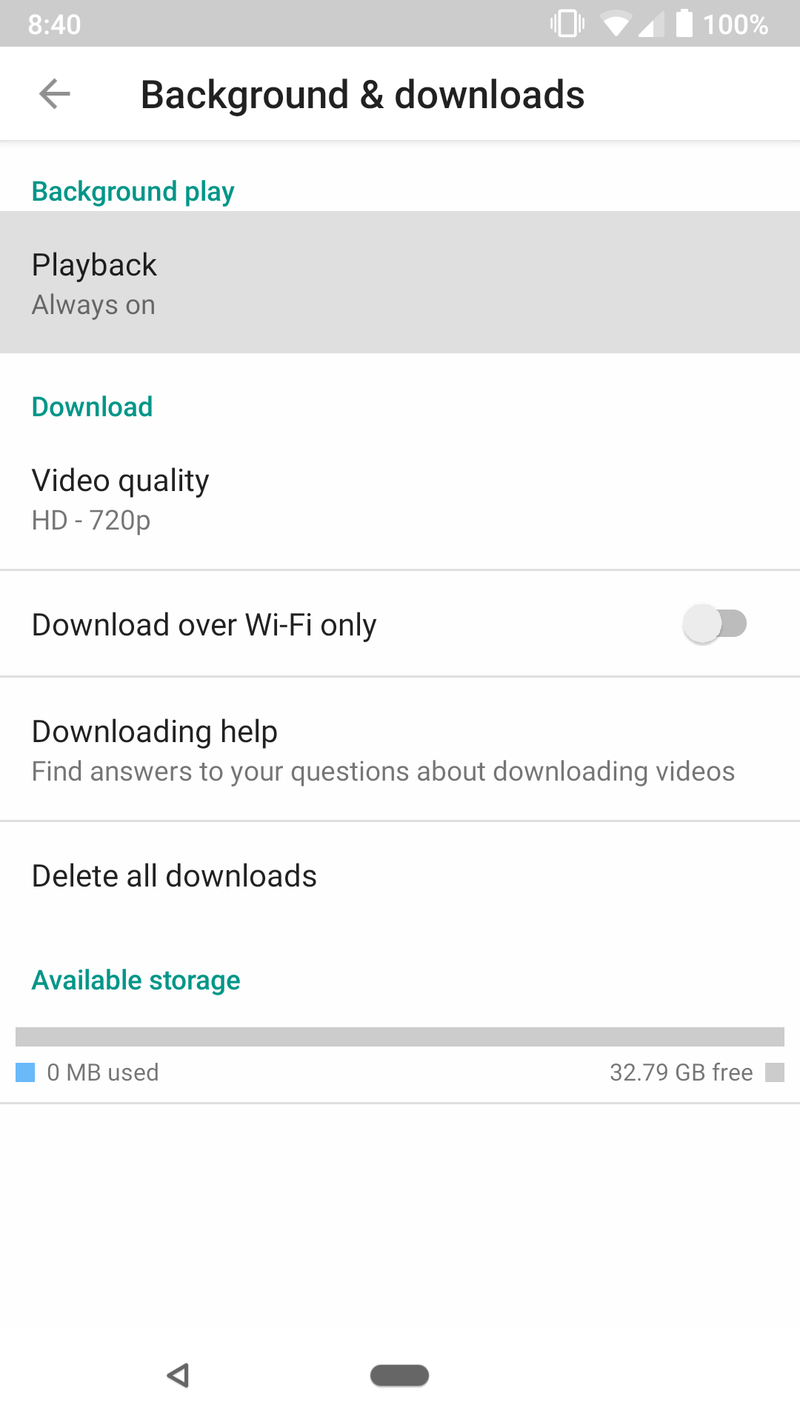
Tap Background & downloads.
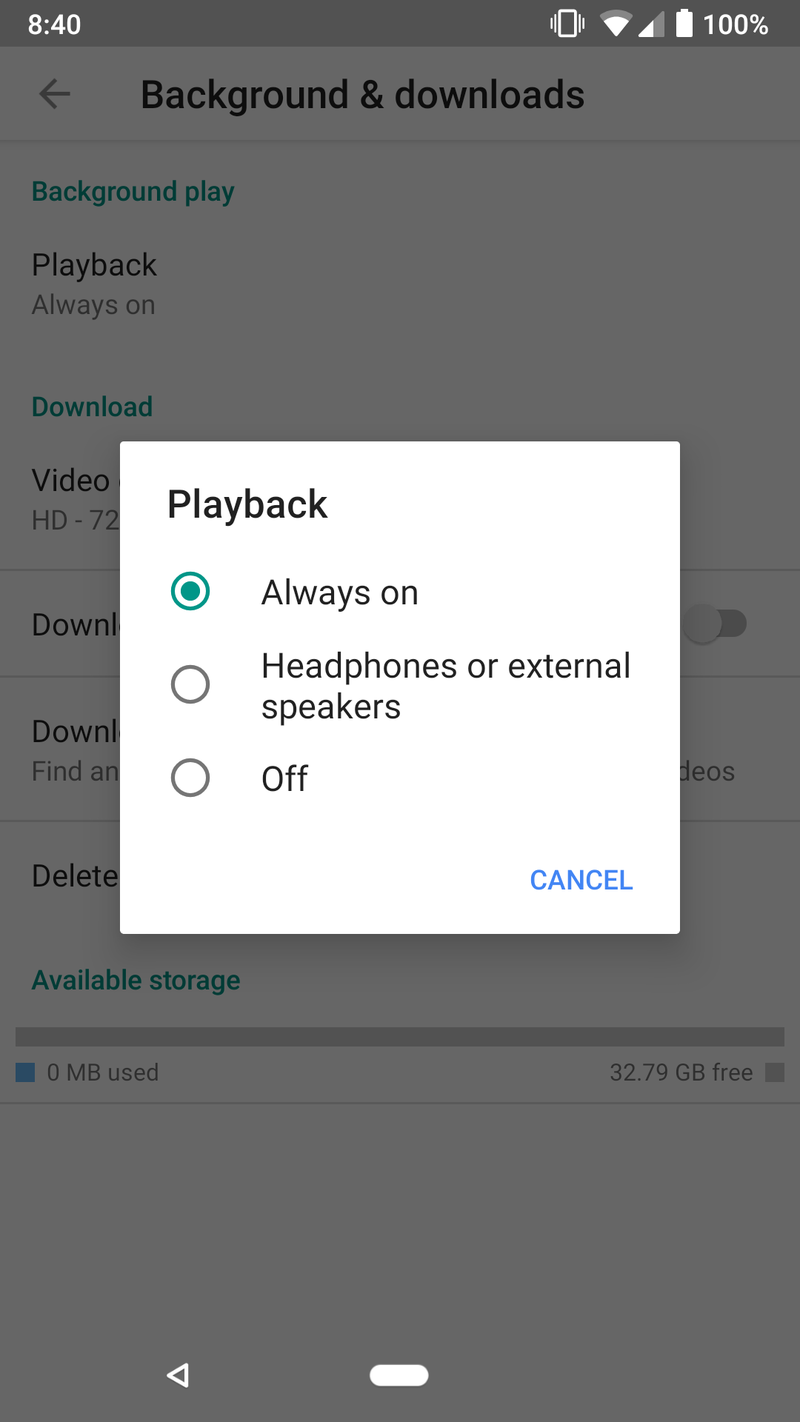
Tap the Playback option at the very top of the page.
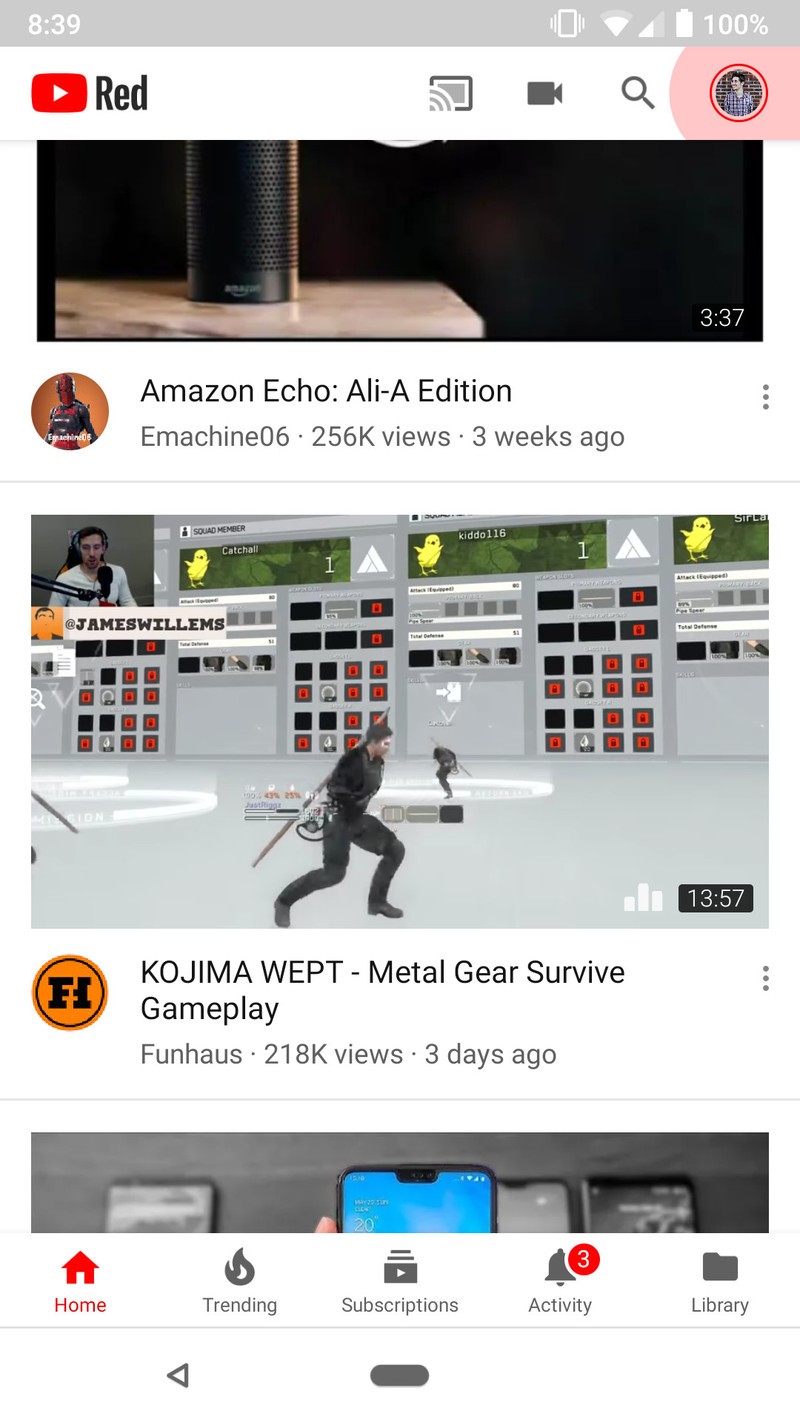
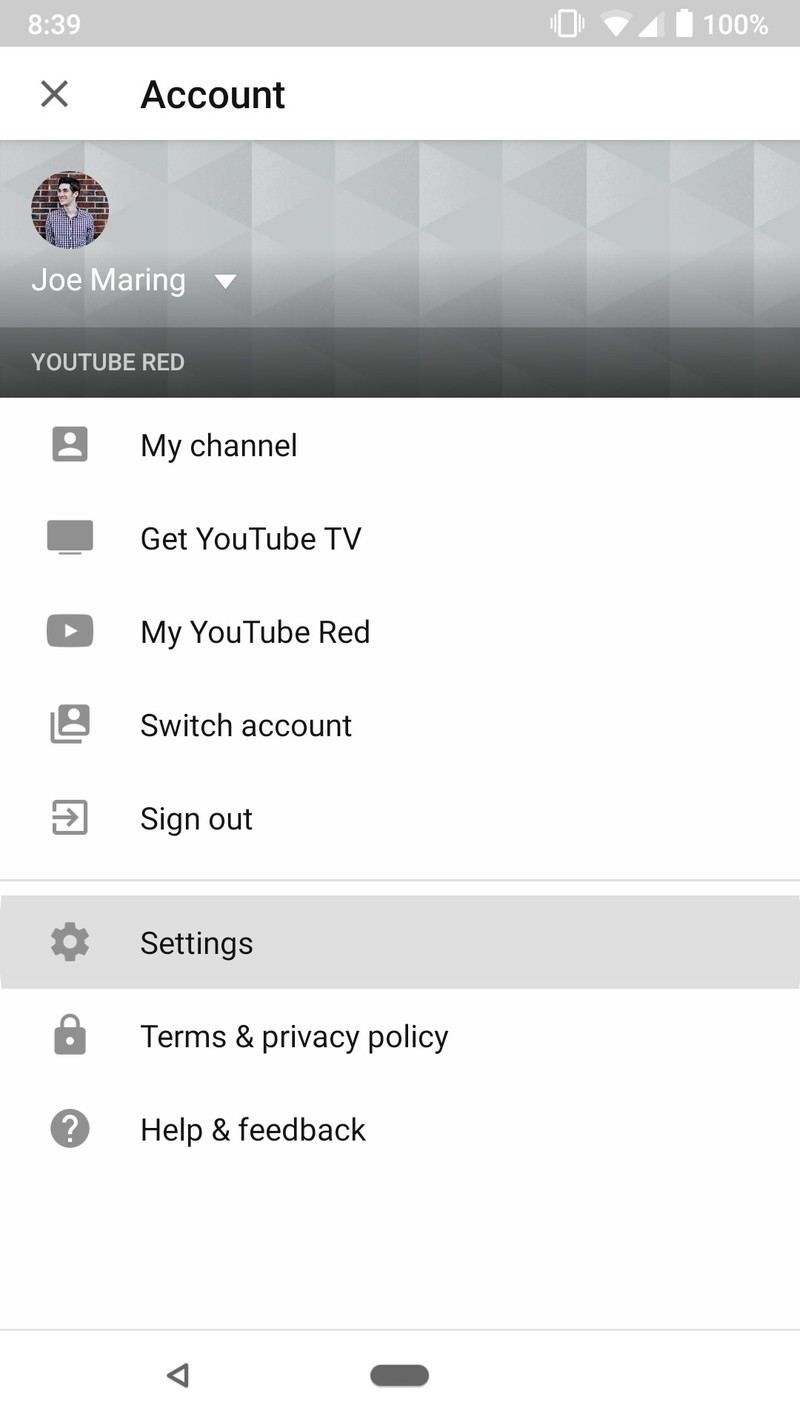
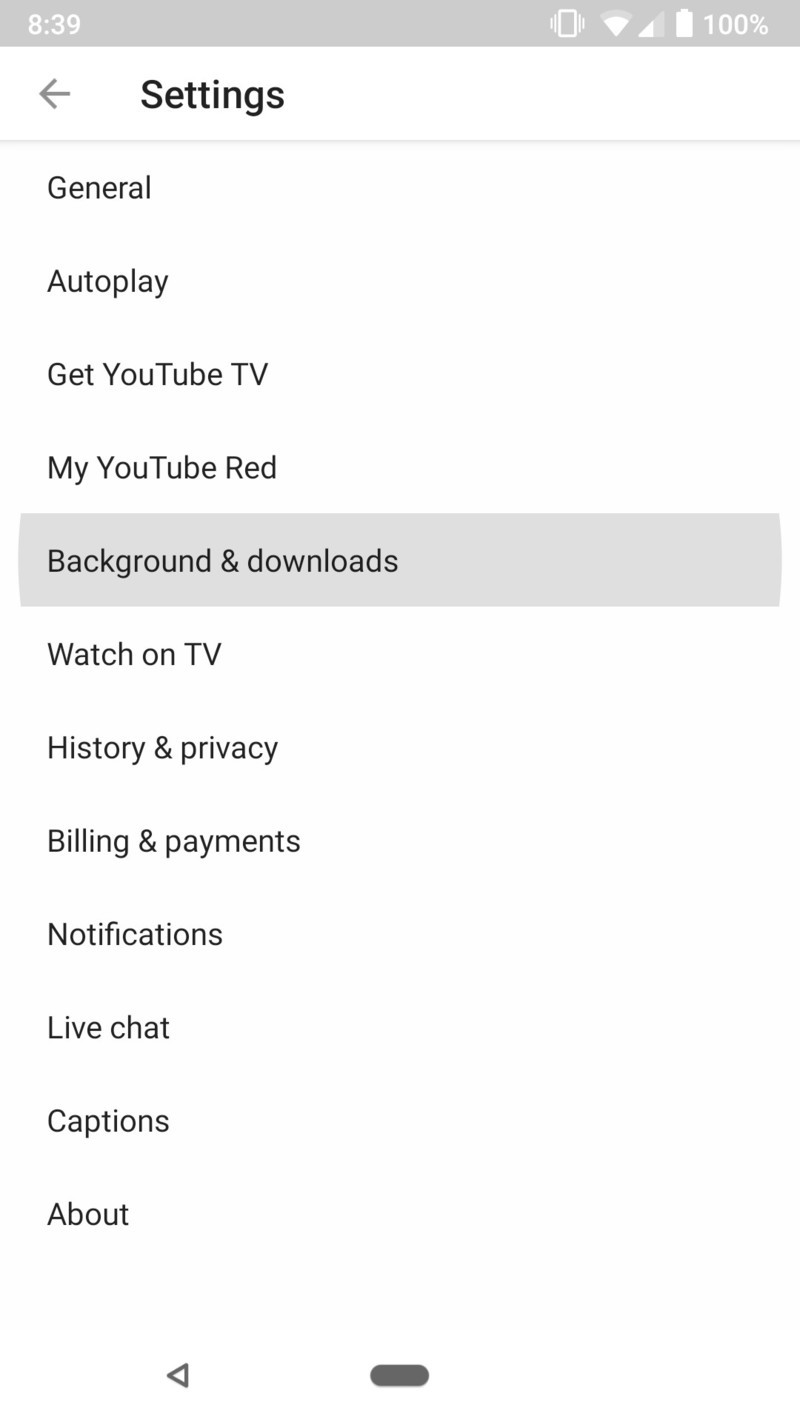
From here, you can choose to have Background Playback always on, only when you’ve got headphones or external speakers connected, or turn it off altogether.
Why can’t my movies use Background Playback?
As awesome as Background Playback is, it does have one main limitation — it can’t be used to play and movies you’ve purchased in the background.
Movies you buy through YouTube are handled differently than regular uploads and are entirely separate from YouTube Premium. It’s a bummer they don’t work with Background Playback, but that’s just the way it is.
How to save a video to play offline
If you’re watching a video that you want to save for offline playback, all you need to do is tap a couple buttons.
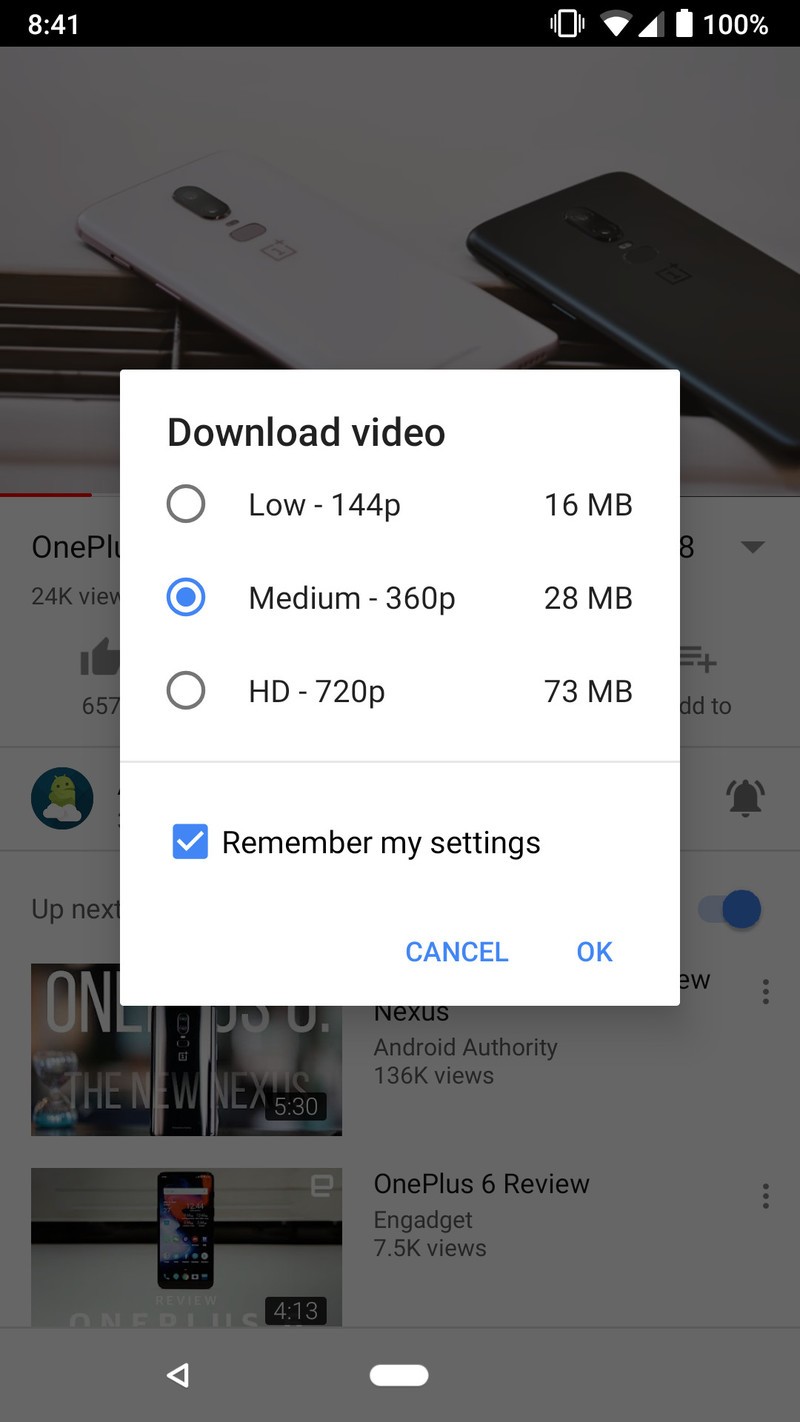
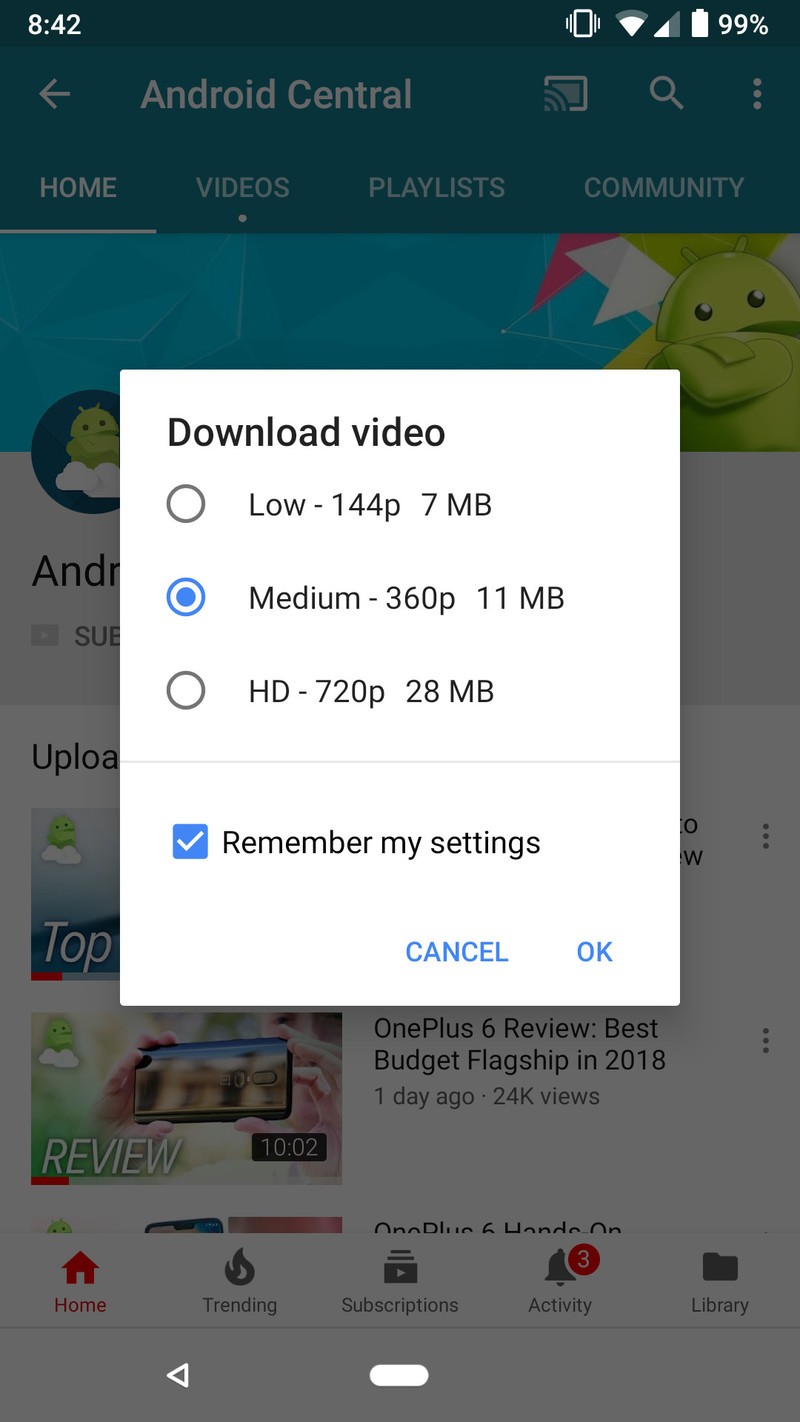
While watching a video, tap the Download button.
Select the quality you’d like and then tap Ok.

Alternatively, you can also download a video without having to first open it up.
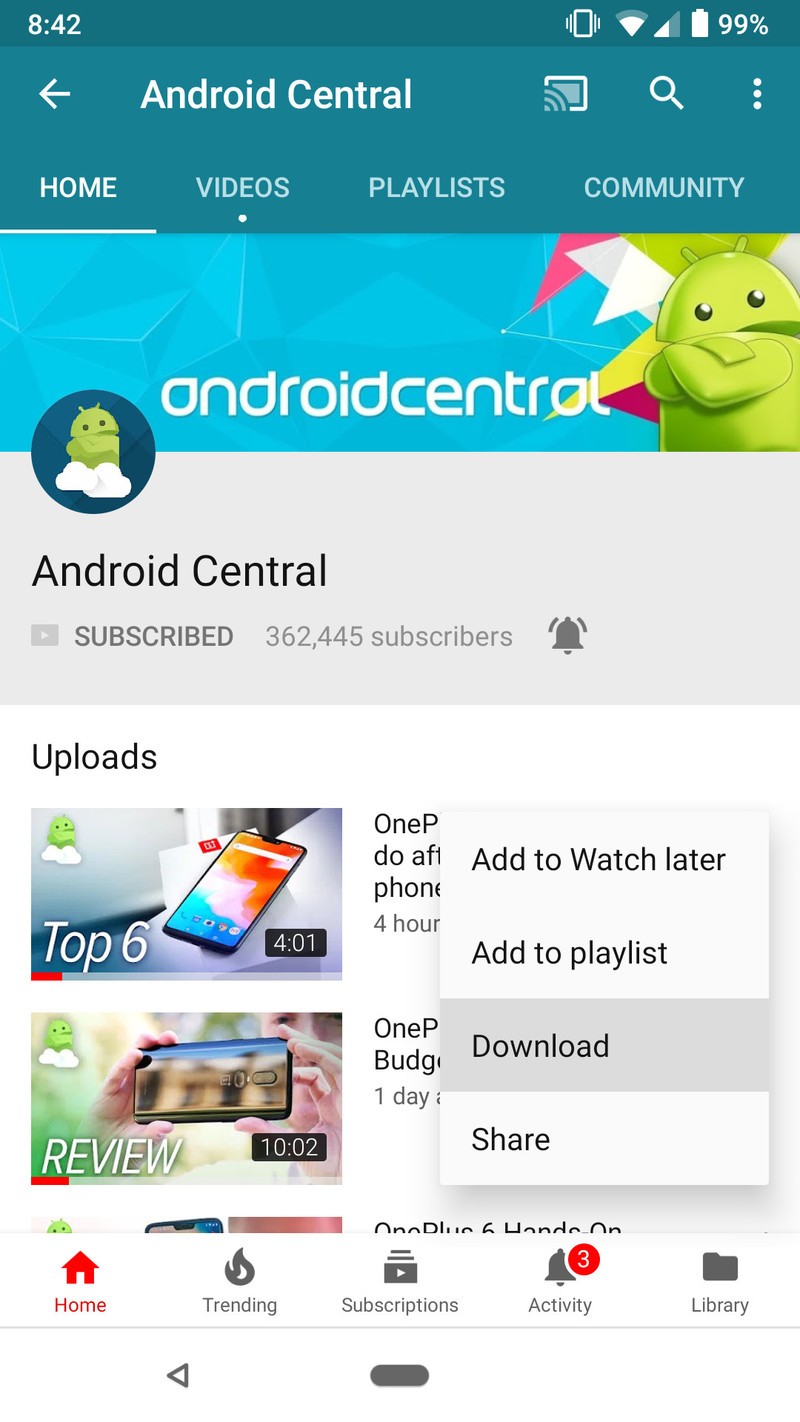
Tap the three dots next to a video.
Tap Download.
Select the quality you’d like and then tap Ok.

How to save a playlist to play offline
Playlists are great for organizing your favorite videos, and just like standalone clips, you can download entire playlists to your phone, too.
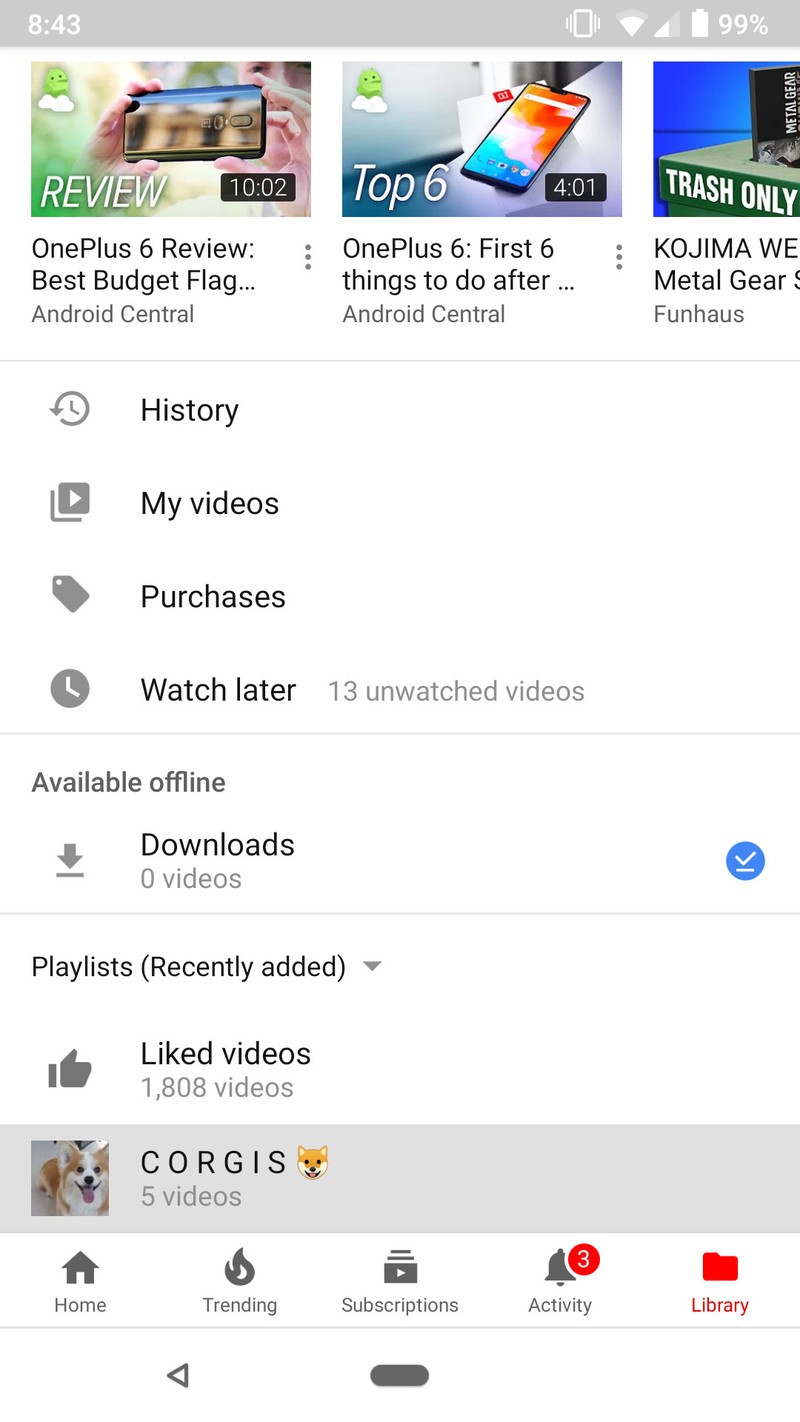
Tap on the Library tab near the bottom of the app.
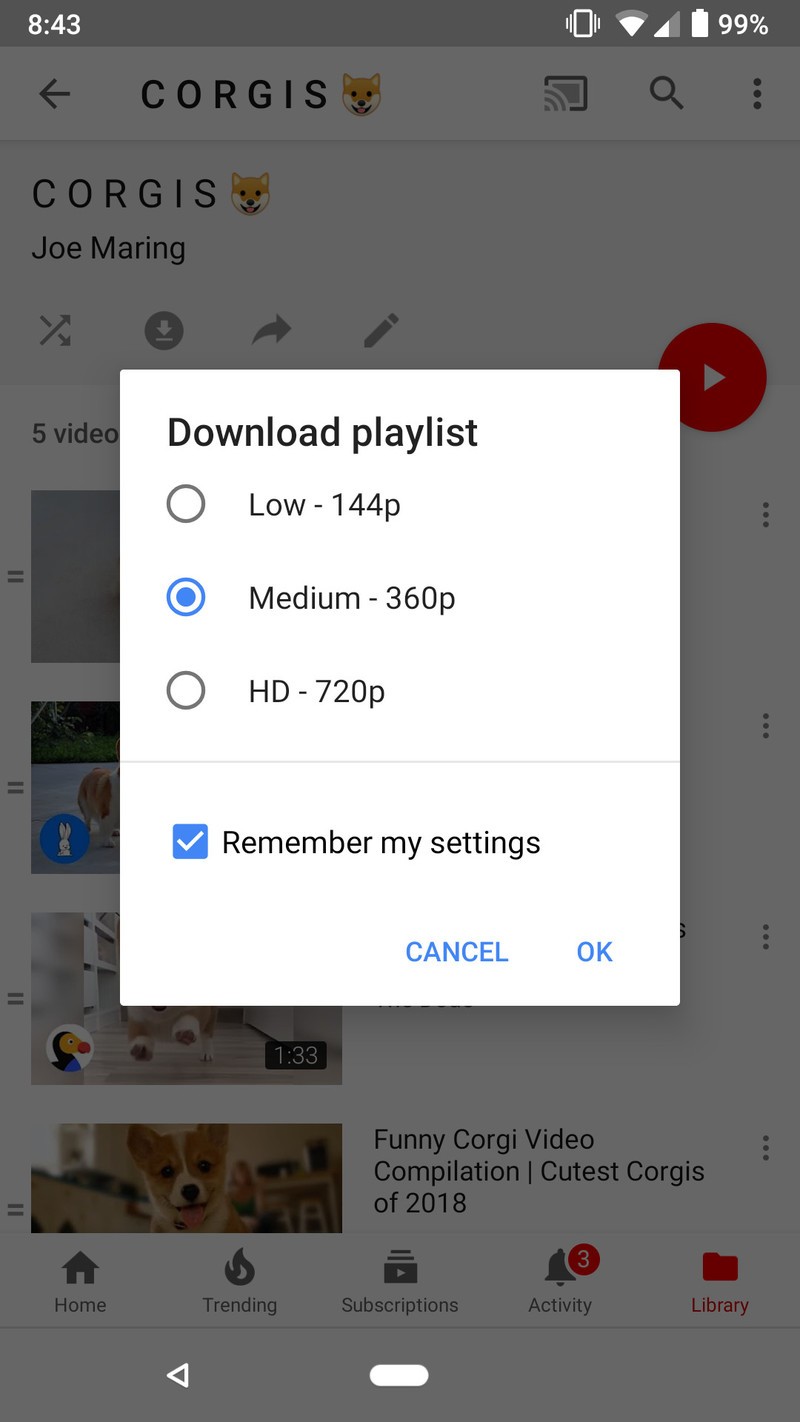
Tap the playlist you want.
Tap the download icon near the top left and select your desired video quality.

How to change video quality for YouTube downloads
After downloading a video for the first time, the video quality you choose will be remembered for all future downloads. Thankfully, changing this is really easy.
Tap on your profile icon at the top right of the screen.
Tap Settings.
Tap Background & downloads.
Tap Video quality
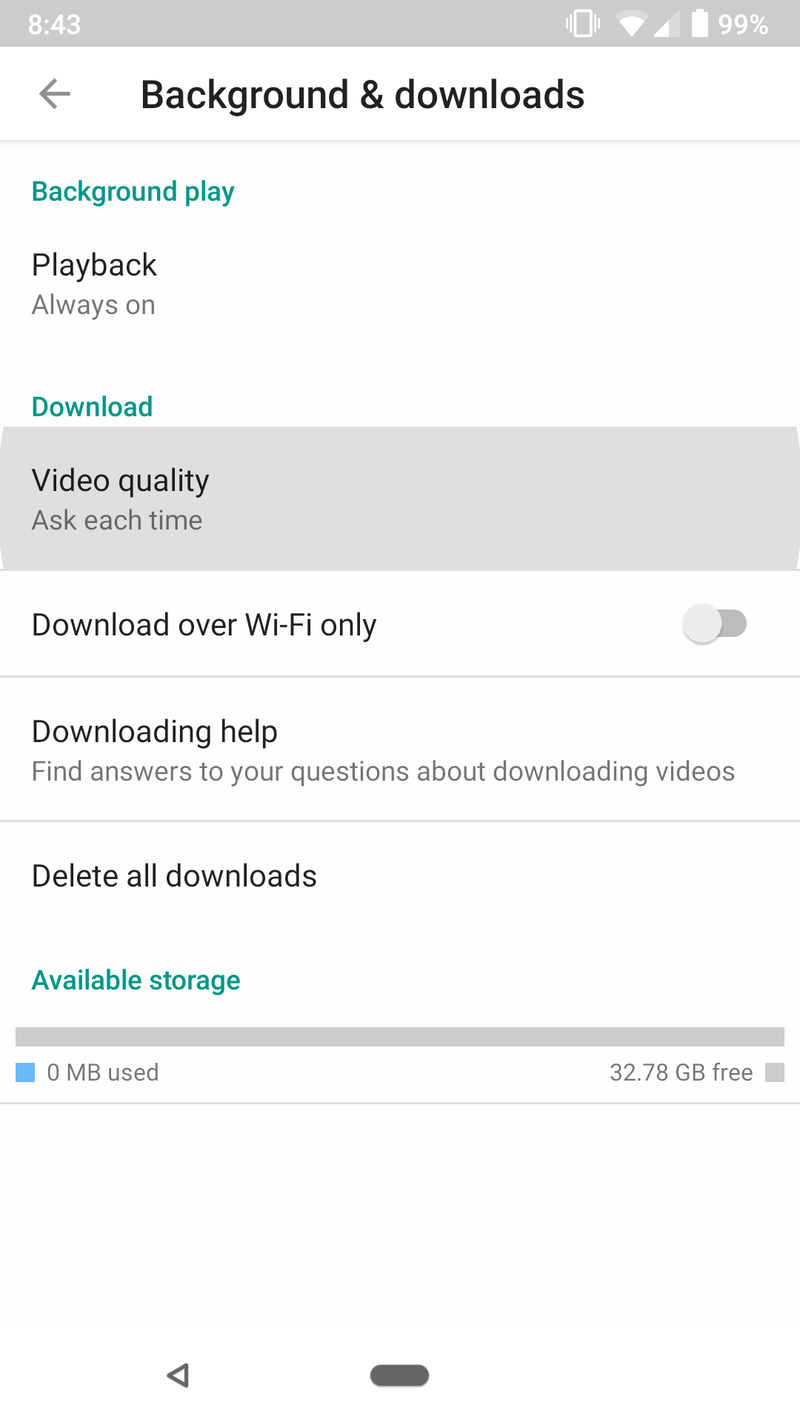
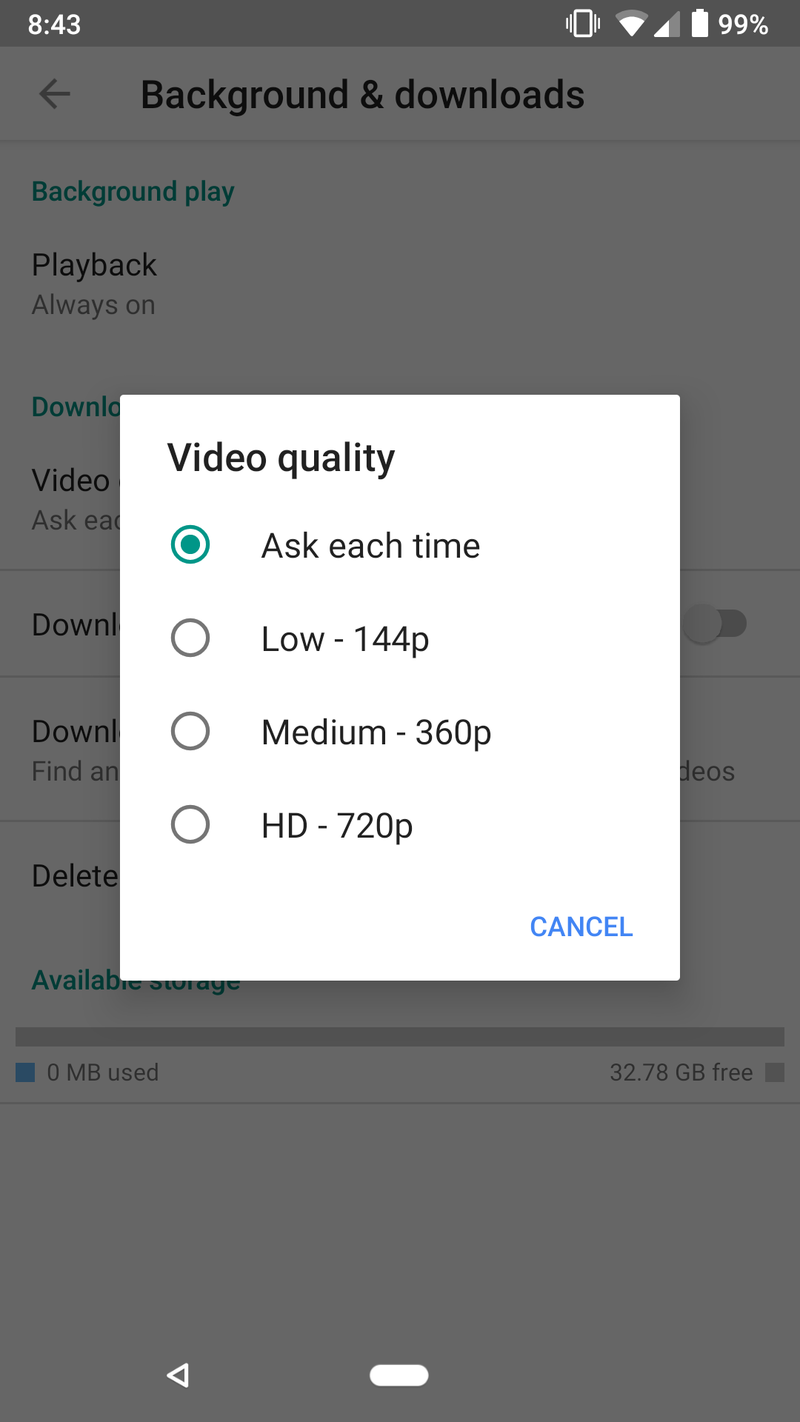
Here, you can choose between HD (720p), Medium (360p), and Low (144p). Alternatively, you can tap Ask each time to have YouTube ask you for your preference every time you download a clip.
How to download YouTube videos to an SD card
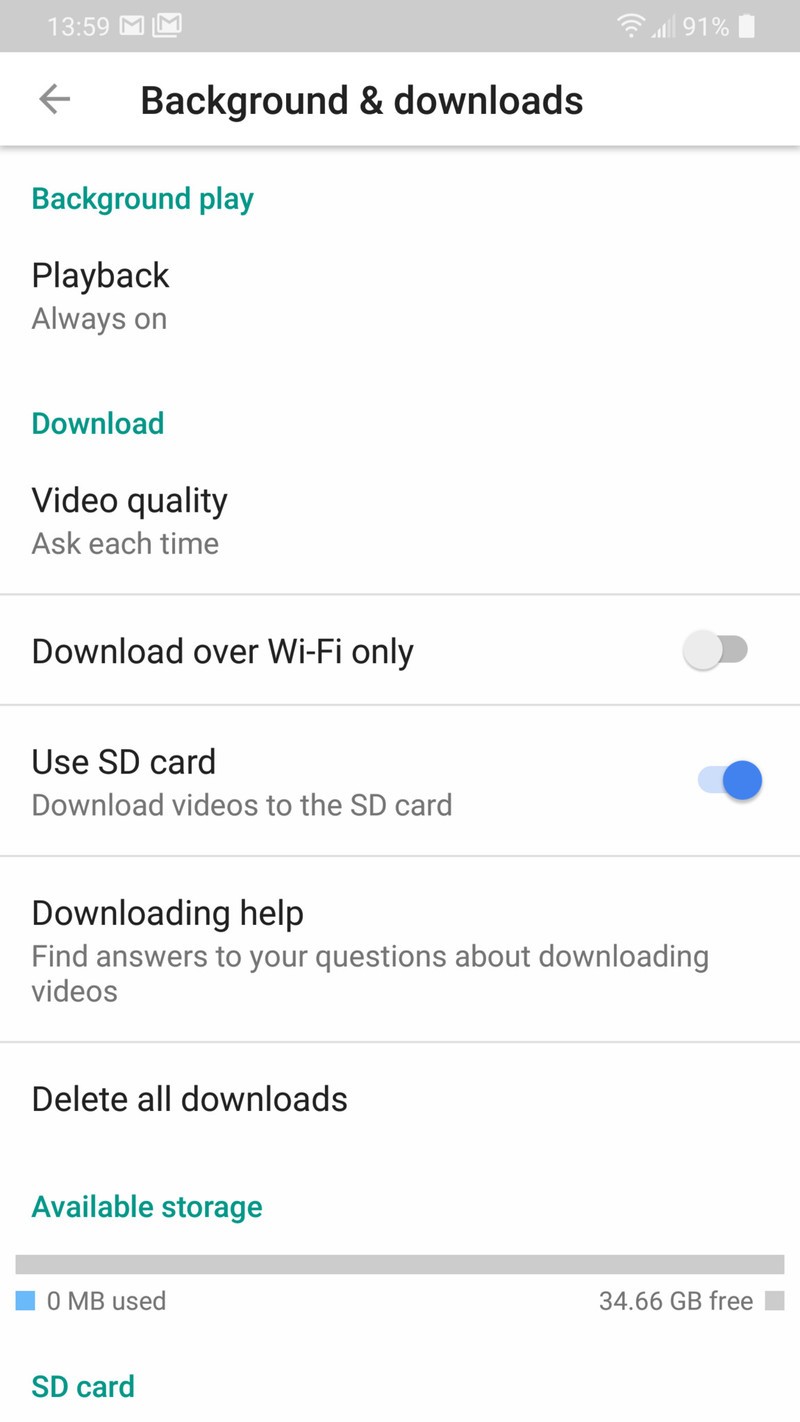
If you’re using a phone with that supports MicroSD cards, you can choose to have your videos download to your card rather than your phone’s internal storage.
Tap on your profile icon at the top right of the screen.
Tap Settings.
Tap Background & downloads.
Tap on the Use SD card toggle.
How to turn on Download over Wi-Fi only
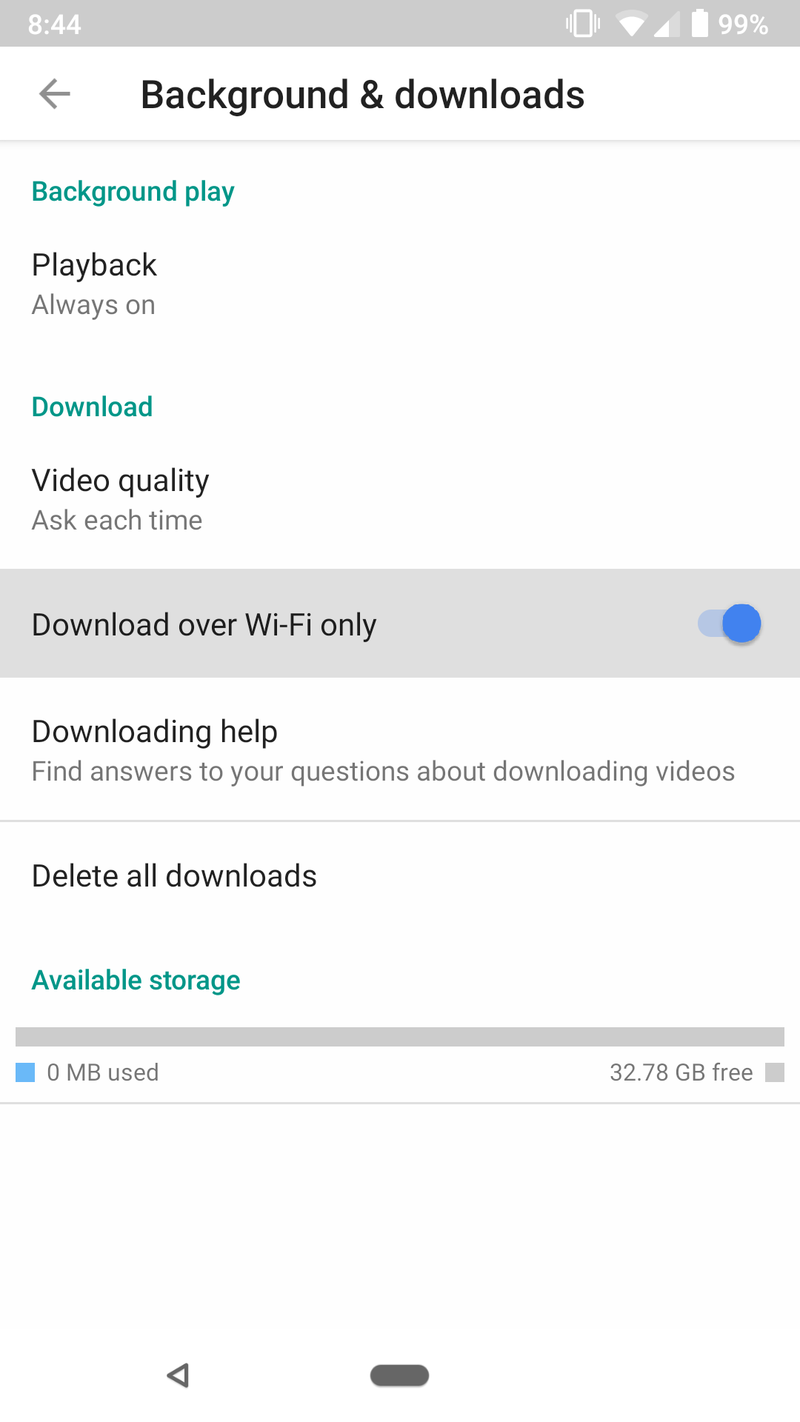
Being able to download videos for offline use is an awesome perk, but if you have a limited amount of mobile data to use each month, you’ll want to ensure that you’re only downloading these files when you’re connected to a Wi-Fi network.
Tap on your profile icon at the top right of the screen.
Tap Settings.
Tap Background & downloads.
Tap the Download over Wi-Fi only toggle.
How to watch YouTube Originals
Another awesome perk with YouTube Premium is having access to all of YouTube’s original programming. There are already a host of movies, TV shows, and documentaries to check out, and browsing through the entire collection is easy peasy.
From the Home page, tap on the **Originals* icon near the top. A scrolling gallery will show some of YouTube’s featured content and scrolling down will show all of the shows broken up into various categories — including Comedies, Documentaries, Sci-fi/fantasy, Family, and more.
Along with this, you can also just search for a YouTube Original show like you would any other video and start watching it that way.
How to remove ads with YouTube Premium
For a lot of folks, one of the biggest perks included with YouTube Premium is that all advertisements are removed from videos you watch.
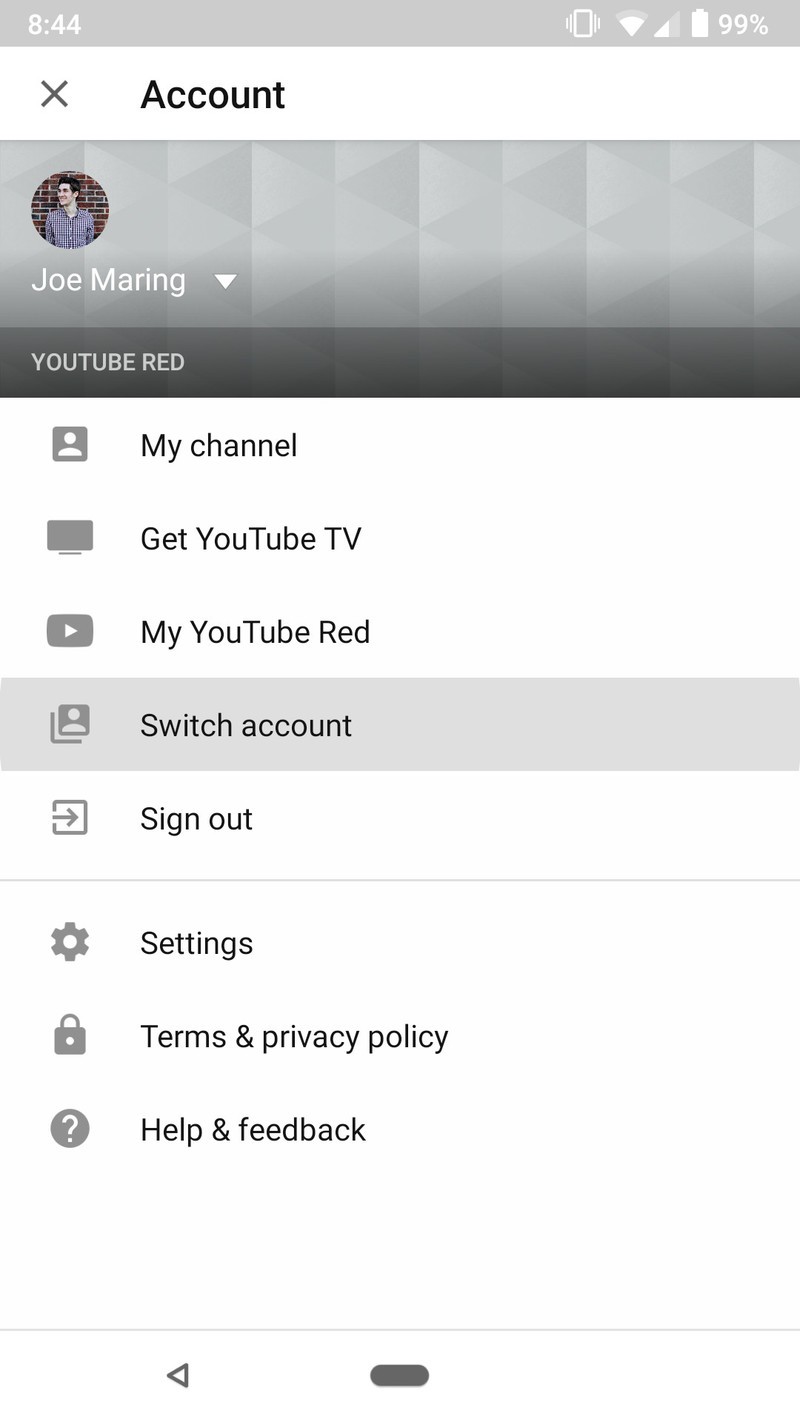
Ads will be removed automatically, but you need to be sure you’re logged into the account you signed up for YouTube Premium with.
Tap on your profile icon at the top right of the screen**.
Tap Switch account and choose the account that’s associated with your Premium subscription
Did we miss anything?
Need some extra help with the above topics? Trying to figure something out that we didn’t cover? Sound off in the comments below and we’ll try to chime in ASAP!
Download: YouTube (free)
GDPR is a great thing hampered by one bad idea

Addressing privacy concerns and bringing more disclosure to users is long overdue, but the 72-hour reporting rule might do more harm than good.
The past week was important for you and your personal information, whether or not you live in the EU.
GDPR, the General Data Protection Regulation that sets guidelines about how personal information of EU citizens is collected and processed, is now official. It’s a great idea — uniform rules about how your information is gathered, how it’s stored, and how you can take it back, are long overdue. There has been (and will continue to be) plenty of discussion over what’s good, bad and ugly about GDPR, but most people who work in information security agree that the goals are well-intentioned and will provide the kind of protections we all need in the 21st century.
A bunch of popular websites just aren’t available to European visitors because you aren’t GDPR-compliant.
The individual articles of GDPR, however, aren’t so universally praised. Having gone into effect Friday, May 25, we already see fallout: the New York Daily News, Chicago Tribune, LA Times and other high-profile websites are now unavailable in countries covered under GDPR regulations because they weren’t ready for the new rules. Many other websites and online services have bombarded users with new terms to agree to, and complaints have already been filed against notable tech giants Google and Facebook because they do not offer free services without allowing users to opt out of data collection.
More: Google’s making it easier to understand and manage user data it collects
Issues like these aren’t surprising. Neither is the sentiment that cloud-based services will lose revenue and be forced to raise prices as a result of GDPR, which half the attendees of Infosecurity Europe 2018 think will soon be happening. They also feel that GDPR will stifle innovation as small organizations will not be able to afford the necessary infrastructure to be compliant. This is good discussion by the people who need to be discussing it. Better privacy is worth the hours of back-and-forth needed to get it right.
But there’s one part of GDPR that I think is going to do more harm than good — Article 33’s 72-hour reporting rule. You can read the full text here, but the gist of it is that a company which keeps personal identification of EU citizens is fully responsible for any breach of security, no matter the reason, and must provide full disclosure to a supervisory committee within 72 hours of a breach. There is nothing great about this rule, but two parts are going to lead to service providers covering up data breaches rather than responsibly reporting them.
The first is the supervisory committee. Different countries have different ways of governing their citizens, but one thing they all have in common is preferential treatment when it comes to creating and staffing any official committee. A friend of a friend or that third cousin who can’t stop asking for a handout are prime candidates for any committee seat, and when the primary goal is protecting user data, only the most qualified individuals should be considered. Let’s hope that’s exactly whats done here and regulations can be adapted and enforced by people who have our best interests at heart and are qualified.
Small companies without the resources necessary to do a full breach investigation may choose to cover them up.
A bigger issue is the forced 72-hour reporting. Even a fully staffed Fortune 500 organization is not going to know enough about a data breach to start filing reports with a government agency. Given such a short time, expect little more than a company’s information security officer saying there was a breach and we’re not yet sure of any details. That’s little more than a waste of time for everyone involved, and I’d rather that time be spent trying to find out the why, the how, the when, and the who surrounding any type of data breach.
A smaller company who may already be struggling to meet GDPR compliance will be tempted to investigate if it can contain the breach and mitigate the damages on its own without any reports. When you’re under pressure and understaffed, a cover-up can sound like the right option.
Clearly, it never is. But companies great and small have been known to choose the wrong option time and time again when it comes down to the wire. Any regulation designed to protect users from companies making poor decisions is better without a rule that may push them to do just that.
Responsible and prompt reporting of a data heist is a must. Forcing companies that harvest and hold our data to do the right thing isn’t of much use without it. Creating the right oversight committee filled with the right people to revise how break-ins are treated — or even offering assistance when they happen — would go a long way to making GDPR a template for the rest of the world to follow.
Best Package Tracking Apps for Android

What’s the best way to track a package on Android? Check out these package tracking apps!
If you’re shopping online from a bunch of different sites, it can be difficult to keep track of every purchase. Download a killer parcel tracking app and get your ducks in a row before a fat guy comes down your chimney.
- Deliveries
- ParcelTrack
- AfterShip
- 17TRACK
- TrackChecker Mobile
- Package Tracker Pro
- Slice: Package Tracker
Deliveries


Deliveries is likely one of the first names you’ll hear when you want to find a great package tracking app. It supports over 40 shippers and couriers, as well as postal services in 21 countries.
You can sync your packages across your devices, and in most cases track packages using Google Maps, so you can see exactly where your stuff is at all times. You can even get notifications when shipping statuses are updated.
Download: Deliveries (Free, IAPs)
ParcelTrack


ParcelTrack is another wonderful tracking services that brings all of your incumbent deliveries into one place where you can monitor each one’s status on the go.
You’ll be provided with push notifications for shipping updates, and the very handy ParcelTrack Inbox simply extracts tracking numbers from the shipping emails you send its way, so you never need to tediously enter long tracking numbers.
Download: ParcelTrack (Free, IAPs)
AfterShip


AfterShip is a completely free service that helps you track your shipments with over 360 couriers and does it all ad-free.
The developer recently added a data sync feature so you can keep track of your parcels across your devices, and when you copy and paste in tracking numbers, AfterShip automatically detects the courier to save you the hassle.
Download: AfterShip (Free)
17TRACK


17TRACK is a great app to use if you like to often order from China or countries where shipping to North America is sometimes dicey at best. It supports over 170 postal carriers, as well as many, many of the world’s largest couriers, like DHL, UPS, FedEx, and a ton more.
You get a custom widget for your home screen, alerts for status changes, syncing across devices, and you can add multiple tracking numbers at once, while the app auto-detects carriers and tracks your packages accordingly.
Download: 17TRACK (Free)
TrackChecker Mobile


TrackChecker Mobile might just be the most versatile package tracking app around and is great if you like to order parcels from those hard-to-reach places. It tracks packages being carried by over 550 couriers and postal services in 200 countries.
Customization is a big part of TrackChecker Mobiule’s charm; you can choose how frequently you want to receive notifications, and you can even export and imports tracking information to and from your PC.
Download: TrackChecker Mobile (Free, IAPs)
Package Tracker Pro


Package Tracker Pro has been around for a long time, so it’s no wonder that it’s everyone’s favorite paid tracking app. It offers you features by the boatload, in the form of customization options, sorting options, the ability to archive tracking numbers, route maps, and a whole lot more.
The other great benefit of buying Package Tracker Pro is the support you get from the developer. You can email or contact Minstech Software via its website with any questions or suggestions you might have.
Download: Package Tracker Pro ($1.99)
Slice: Package Tracker


Slice is great — if you’re ok with an app having access to read your email. That’s the whole point of this app: it reads your email, determines whether or not that particular email is for an online order, and automatically pulls your order details, organizing them for you and giving you updates on delivery status.
Slice pulls data from all the major U.S. carriers, like USPS, UPS, FedEx, DHL, and others, and it even goes so far as to notify you if the price of something you bought from a particular retailer has dropped since you bought it. If the retailer is supported by Slice, like Best Buy, Nordstrom, Walmart, and others, you can actually claim the price adjustment right from the app.
The main thing you have to be cool with here is Slice having direct access to your email. If you’re not cool with that access, then settle for manually adding information to other apps. But if you want to go down the automatic route, this is the app.
Download: Slice: Package Tracker (Free)
How do you keep track?
Do you use an awesome package tracking app not mentioned here? Let us know in the comments below!
Updated May 2018: Added Slice: Package Tracker to the list. The rest are still the absolute best package tracking apps you can find for Android!
Could fleets of self-driving cars become a public health concern?
When it comes to autonomous and self-driving vehicles, they are perched up on a pedestal as being the future and a major solution to environmental and public transportation woes, mainly in the name of safety, reducing traffic congestion, and ultimately reducing a city’s carbon footprint. But how about associating autonomous and self-driving vehicles as a health, safety, and sanitary issue?
When it comes to autonomous and self-driving vehicles meant for fleet purposes, such as potentially replacing traditional drivers in the world of taxicabs and ridesharing, cleanliness of these vehicles could become a major issue, according to Slate.
It’s hard to deny that even today, taxicabs, Ubers, and even Lyfts, can have questionable levels of cleanliness already, so this concern isn’t unfounded as an emerging form of public transportation suffering from growing pains. Anyone who’s utilized public transportation in any form in any major metropolitan area knows that even current methods of transportation present major public health challenges.
When it comes to shuttling thousands, if not millions of people, on a regular basis from point A to point B, it’s inevitable things will get dirtied up just by the usual flow of people by massive amounts of volume. That, of course, makes it a public health concern, especially when it comes to the control of pathogens and disease, among many other human health concerns when a mass of bodies converges in a single, confined space. From those trying to get the local health clinic for assistance and those who get promiscuous after a late night of drinking. You get the idea, which is why it’s always good to wash your hands after using public transportation.
PaylessImages/123RF.com
Thankfully, there is usually a dedicated maintenance team that helps keep things as clean as possible according to health department and commercial policy requirements. But that can range from a multi-person housekeeping staff for subway cars to just a single driver of a taxicab, both of which you hope would keep the seats remain stain-free and sanitized. And everyone’s idea of clean varies, greatly.
So it is without a doubt that cleanliness will be a public health concern for self-driving cars. Removing the driver also removes the human element who is expected to maintain cleanliness.
But this isn’t to say there aren’t any solutions. Most taxicab and livery fleets usually get cleaned up regularly when they’re parked at home base and throughout the day. Additionally, lots of taxi and hire fleets feature special antimicrobial seat covers to simplify maintenance.
With self-driving vehicles, the driver might not be present to keep these things clean. So it will be important for the automakers of self-driving vehicles to incorporate quality, health-conscious designs and materials while it’s up to fleet operators to maintain a cleaning regiment.
Editors’ Recommendations
- Autonomous cars with remote operators to hit California streets in April
- Residents in this Florida city will soon let their cars do the talking
- Nvidia hits the brakes on public autonomous tests after fatal Uber crash
- Waymo releases Arizona crash video, stresses van was operating in manual mode
- Cop tickets a GM-owned self-driving car, though company disputes violation
FBI: Reboot, reset your router immediately to prevent cyberattacks
Following reports that a type of malware has infected more than 500,000 routers used in homes and small businesses in more than 50 countries, the FBI is urging all consumers to reboot their routers. The VPNFilter malware was discovered by Cisco’s security researchers and affects routers made by Linksys, Mikrotik, Netgear, QNAP, and TP-Link. The U.S. Department of Justice said the authors of the VPNFilter were part of the Sofacy group that answered directly to the Russian government, Reuters reported, and that Ukraine was the likely target of the attack.
“The VPNFilter malware is a multistage, modular platform with versatile capabilities to support both intelligence collection and destructive cyberattack operations,” Cisco said in a report. Because the malware could collect data from the user and even perform a large -scale destructive attack, Cisco recommends that owners of SOHO or network attached storage (NAS) devices be especially cautious with this type of attack. And since it’s unclear how compromised devices were infected in the first place, officials are urging users of all routers and NAS devices, not just the 14 devices identified by Cisco, to reboot.
Cisco
“The FBI recommends any owner of small office and home office routers reboot the devices to temporarily disrupt the malware and aid the potential identification of infected devices,” FBI officials warned. “Owners are advised to consider disabling remote management settings on devices and secure with strong passwords and encryption when enabled. Network devices should be upgraded to the latest available versions of firmware.”
There are three stages to VPNFilter — a persistent stage 1 and non-persistent stages 2 and 3. Because of how the malware works, rebooting will clear out stages 2 and 3 and mitigate most problems. The FBI had seized a domain used by the malware’s creator to deliver stages 2 and 3 of the attack, and that these later stages cannot survive a reboot.
The Justice Department also issued a similar warning, urging users to reboot their routers. “Owners of SOHO and NAS devices that may be infected should reboot their devices as soon as possible, temporarily eliminating the second-stage malware and causing the first-stage malware on their device to call out for instructions,” the department said in a statement. “Although devices will remain vulnerable to reinfection with the second-stage malware while connected to the Internet, these efforts maximize opportunities to identify and remediate the infection worldwide in the time available before Sofacy actors learn of the vulnerability in their command-and-control infrastructure.”
Cisco advised all users to perform a factory reset of their devices, which would clear out even stage 1 of the malware. If you’re unclear on how to perform a factory reset, you should contact the router manufacturer for instructions, but in general inserting a paper clip into the “reset” button located on the back or bottom of your router and holding it in place for a few seconds will wipe your router. Additional recommendations to mitigate future attacks are also found in Cisco’s report.
Editors’ Recommendations
- A rebooted Palm smartphone could launch on Verizon later this year
- ‘Shadow of the Tomb Raider’ officially announced alongside teaser trailer
- ‘Shadow of the Tomb Raider’ hands-on preview
- ‘Roseanne’ reboot on ABC pulls in over 18 million viewers
- ‘Shadow of the Tomb Raider’ hands-on preview
30 percent fewer taxis in New York City could be an improvement, MIT says
It’s pretty clear that self-driving cars will have a big disruptive impact on the taxi industry — but so too could the right routing algorithm. In a new paper published in the journal Nature, researchers from MIT describe an ultra-efficient dispatching algorithm that they say could slash the size of a city’s fleet of taxis by 30 percent.
“The question we tried to answer is the following: At any given time throughout the day in a city such as NYC, which cab should pick up which passenger so that we make sure all passengers are picked up at their requested time without any delays and with only the absolute minimum number of cabs possible?” research scientist Moe Vazife told Digital Trends.
Their work demonstrates that failing to assign vehicles in a smart way means that cities wind up with more vehicles on the road that are needed. Whether you’re running a taxi company or just worried about the environment, that’s not good news. However, solving the “minimum fleet problem” means that a more intelligent approach cut down on the number of cars required.
“To tackle this problem we devised a network-based approach in which we create a large network consisting of many many nodes and links, based on the information we have from trips and travel times in a city at a given day,” Vazife continued. “Then we use a very efficient algorithm to find the golden fleet-size number given the set of trips as well as a detailed plan for each vehicle in the fleet.”
For the time being, Vazife said that it might prove challenging to implement because human drivers will not always behave in a way that is consistent with the algorithm’s recommendations. But in a future world of autonomous cars, this could provide a great way of optimally serving cities’ transportation demands while ensuring that the footprint and operational costs are as low as possible.
“I think there are still exciting research problems to solve before making this available in practice,” Vazife said. “The next steps, in my opinion, is trying to [examine] some of the addressable limitations which we have discussed in our paper, and exploring further the possibility for an implementation in the form of an on-demand mobility service to improve the vehicle utilization rates in our cities, as well as traffic conditions of our cities’ roads.”
Editors’ Recommendations
- Uber vs. Lyft: Which ridesharing app goes the distance?
- From robotic bees to bacteria, the tech that is making for a greener tomorrow
- Uber gears up for its latest scheme in the tricky Japanese market
- See what it’s like to take a ride in Drive.ai’s self-driving taxi
- Why self-driving trucks will take over before self-driving cars
Surgeons might soon train in VR simulations instead of using real cadavers
It’s not the most glamorous part of medicine, but cadavers, aka dead bodies used for training, are an essential resource for learners. Unfortunately, they are also not readily available. An increasing number of physician assistant and nurse practitioner programs, along with a shortage of donations, means that there is frequently a strain on supply. Could cutting-edge technology help?
Quite possibly so, suggests a project from Montpellier Medical University in France, Artec 3D and medical assessment company IMA Solutions. They are using the latest 3D scanning and virtual reality technology to create photorealistic virtual cadavers which can be used by students and professionals to carry out realistic dissections — without necessarily having to touch a real dead body in the process. The tool is being turned into an app, which is planned for release later in 2018.
“Two surgeons from the Montpellier Medical University city anatomy laboratory, Dr. Guillaume Captier and Dr. Mohamed Akkari, had the idea to create a VR application so medical students will be able to practice dissecting bodies in VR before attempting the task on a real cadaver,” Andrei Vakulenko, chief business development officer at Artec 3D, told Digital Trends. “In the app, there will be a practice mode and also an examination mode for the professors to run. In the practice mode, the user can select a part of the anatomy, will be given information on how best to dissect this area and can attempt it. In the examination mode, the student will need to answer questions and show his or her dissection ability. Once a student passes the examination mode, he or she will have sufficient practice and experience to try dissecting a real corpse.”
The cadavers in the app are 3D-scanned versions of real bodies. These were scanned with a metrological grade Artec Space Spider 3D scanner to ensure that the visuals look as realistic as possible. Vakulenko noted that the scanning had to be carried out very quickly because of the changes the body undergoes over time, and the fact that it needed to appear consistent in the app itself. The dissection itself can be carried out using haptic tools which will allow trainee surgeons to practice their operating skills.
“The app is still in development, but the plan is to make the dissection as realistic as possible, working at high 3D real-time refresh rates and also simulating the use of surgical tools with a device like the 3D Systems’ haptic device, which gives the actual sense of touch and physical pressure,” Vakulenko said.
Editors’ Recommendations
- 8 Amazing accessories that could make virtual reality even more immersive
- Haptic VR surgery isn’t for the faint of heart, but it could help surgeons
- Gaming is just the beginning. Here are 8 innovative ways VR is being used today
- 14 major milestones along the brief history of 3D printing
- Disney and MIT made a jacket that mimics feeling of snakes slithering on you
People are apparently using their phones too much and getting ‘numb thumbs’
Are you a numb thumber?
Smartphones have become a regular part of our daily lives. We use them to text, tweet, and stream videos, and all of this requires the use of our fingers — more often than not, specifically our thumbs.
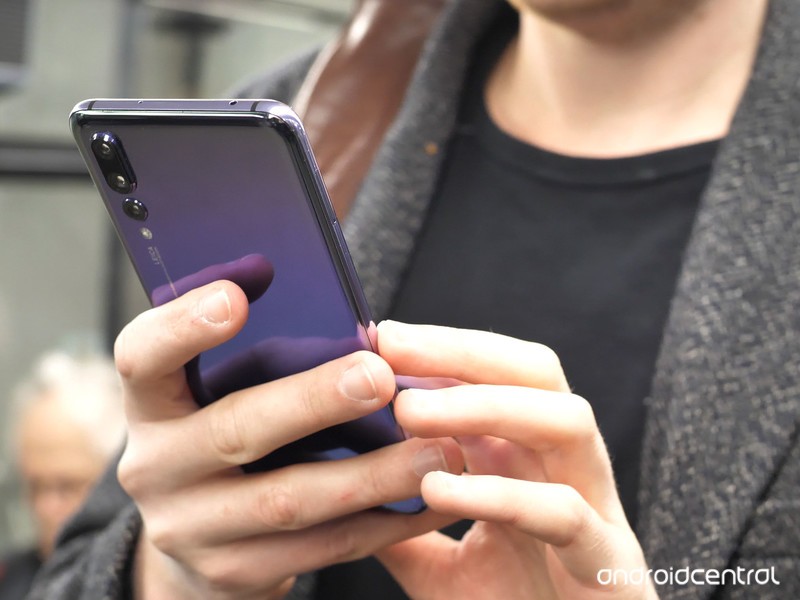
Nellie Bowles at The New York Times recently published an article called “Me and My Numb Thumb: A Tale of Tech, Texts and Tendons.” In it, Bowles talks about how, as she’s continued to use her phone day after day, she’s discovered a pain in her right thumb. She calls this “a depressingly modern condition in which the tendons around the thumb inflame as a result of repetitive strain,” but one day, it got pretty serious —
Eventually, my right thumb just stopped working. It could not muster the strength to press down on my phone. It was both numb and achy. And the pain that had started in my hand was now shooting down my arm. I had a problem, one I later learned was becoming common.
Bowles says she soon discovered that many of her co-workers and friends had experienced similar issues, and after speaking with her doctor, discovered she may have a condition called De Quervain’s Tendinosis. This is caused when a tendon is overused due to repetitive motions/actions, and as Bowles continues —
“It’s a crisis,” said Sanjeev Kakar, an orthopedic surgeon at the Mayo Clinic in Minnesota who specializes in hand injuries and has seen an increase in the number of thumb “overuse cases.” Dr. Kakar said he had noticed that the condition was spreading among adults and older people in particular.
Bowles also reached out to Professor of Communication Nancy Ann Cheever from California State University, who said —
We assume teenagers are using their phones more, but it’s actually not the case, because younger people tend to have a lot more awareness of their smartphone use. They have a more complete understanding of the harmful effects of smartphone use because they’ve been taught about it since they were kids.
I’ve personally never experienced anything along these lines, but a couple of my family members have previously complained about their hands and thumbs hurting from holding/using their phones as often as they do.
What about you? Do you have numb thumbs? Let us know (if you can) in the comments below 👍
Phone addiction is making me sad and anxious, but so is the idea of quitting
Pick up the Samsung Galaxy Tab A tablet for just $150 today
This 8-inch tablet is down to an all-time low price via Amazon right now.
The Samsung Galaxy Tab A 8″ Tablet is down to $149.99 at Amazon for a limited time. This deal marks the lowest it’s ever dropped there by $10 and saves you $50 off its regular price.
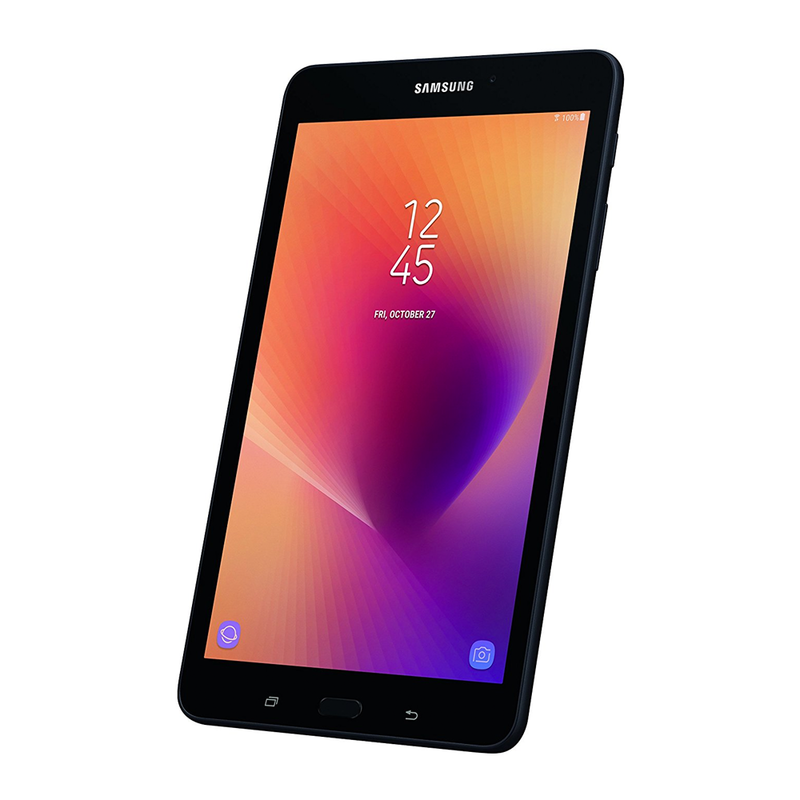 Carrying the Samsung Galaxy Tab A around is like having a giant smartphone to play around on. You can watch movies or TV, play games, read and send emails, browse the web and more. It comes with 32GB of internal storage, but you can add in a 128GB micro SD card with triple the storage space for an extra $37 right now.
This tablet can last for up to 15 hours while using the Internet, or up to 153 hours while just listening to music. It has a rear 8MP camera with flash, featuring HDR mode along with a 5MP front-facing camera. Over 160 Amazon customers rated it with 4.5 out of 5 stars collectively.
See at Amazon

