


Best Cheap Android Phones in 2018
We’re a virtual company made up of tech experts from across the globe. We live and breathe Android phones, and use nearly every one to find the best budget picks for you.

The Motorola Moto G6 currently offers the best combination of performance, features, and value. It overshadows the competition with its wide availability, fast performance, and support for nearly every network in the world, beating out a number of rivals from Nokia and Honor.
Our Pick
Moto G6

Amazon — $235
- $235 from Amazon
- $249 from Motorola
The best budget Android phone for most people.
A winner in every respect, from the modern design to the dual camera setup and excellent performance, the Moto G6 represents the pinnacle of Motorola’s dominance in the budget phone space.
Who should buy this phone
Not everyone needs a big, expensive Android phone — especially if they’re looking to buy it outright. At $249 (or less from Amazon’s Prime Exclusive program), the Moto G6 provides 90% of what flagship devices offer at a third of the price. This phone is for anyone coming from an older budget phone, or just looking to simplify and downsize, without losing the core Android experience.
Read our full Moto G6 review to learn more about the phone!
Is it a good time to buy this phone?
Yes. As of June 2018, the Moto G6 is brand new and will continue to be supported and updated by Motorola for two years or more. And because it’s a budget phone already, the price is unlikely to drop dramatically over the course of its life, so anyone looking for an inexpensive Android phone, now is a great time to pick up the Moto G6.
7 reasons to buy
- Great build quality and design for the price
- Excellent main rear camera
- Good battery life
- Compatible with all major U.S. and international carriers
- Moto Display adds tremendous value
- USB-C fast charging
- Available as Amazon Prime exclusive
2 reasons not to buy
- Moto G line isn’t known for swift software updates
- Lacks NFC
Most people don’t need to spend a lot on a phone anymore
Flagship phones like the Pixel 2 and Galaxy S9 series can be up into the $700 or $800 range, and many of the features that come with them, like wireless charging or waterproofing, aren’t fundamental to a device’s enjoyment. They’re bonus features.
The best Android phones you can buy
Increasingly, you’re paying so much more for those bonus features that the Law of Diminishing Returns comes into play. At its core, the Moto G6 offers 90% of phones double and triple its cost. A few years ago, that delta would have been a lot more, but the prices of budget components have dropped so much, and retained so much of their more expensive counterparts’ characteristics, that it’s often not worth recommending those expensive flagships anymore.
The Moto G6 and its other budget counterparts on this list have awesome, high-resolution touchscreens, reliable software, and great cameras. Some features, like NFC, drive up manufacturing costs, so you have to weigh whether you need NFC-enabled features like mobile payments. And the Moto G6 also lacks the same graphical power as its more expensive competitors, but most games play without issue, even at medium or high settings, because Android games are designed to play on hardware of all sizes and prices.
The Moto G6 has all the major features you need from a modern smartphone, and the ones it lacks you can easily live without.
Motorola has had five years of practice making the Moto G line into a budget powerhouse; when it designed the first Moto G back in 2013, it eschewed expensive materials like metal and glass and focused instead on the core experience. Starting in 2016, Motorola began finding ways to add important features like fingerprint sensors, and last year, in 2017, the company transitioned the Moto G line to metal. With the sixth-gen lineup, that includes the cheaper Moto G6 Play and more expensive Moto G6 Plus, it’s back to a combination of plastic and glass, it’s a nice visual improvement over previous models.
At the same time, Motorola understands its audience, which is why it added a dual camera setup to the Moto G6. The second camera adds depth effects like portrait mode without sacrificing the excellent pedigree of the main 12MP sensor.
Finally, if you’re in the U.S., the Moto G6 is one of the few sub-$300 phones to work on all four U.S. carriers, and it’s even sold at directly at a couple of carriers, another advantage of Motorola’s long-standing relationship with companies like Verizon.
Alternatives to the Moto G6
Motorola isn’t the only player in town when it comes to cheap phones. In recent years, Honor, a subsidiary of Huawei, and HMD Global, which has reinvigorated the Nokia brand, have kept Motorola on its toes in the budget space. Then there’s Alcatel, which continues to bring down the cost of phone ownership with its new Android Go-powered devices.
Runner-up
Nokia 6.1

Nokia’s lineup of inexpensive Android phones has received an impressive refresh for 2018, and the $250-ish Nokia 6.1 is the best of the lot. It’s made of a single piece of Series 6 aluminum, which should hold up better than the Moto G6’s glass back, and its Snapdragon 630 processor is quite a bit more powerful. It also runs Android One, which means the updates come directly from Google, so they’ll be more timely, and the Nokia 6.1 will receive Android P before the Moto G6.
On the other hand, the phone only works on T-Mobile and AT&T in the U.S., and doesn’t have the same caliber of camera as the Moto G6. And given that it’s running Android One, it lacks some of the value-added software features like Moto Display that we love on the Moto G6.
See at Amazon
Everyone knows the Nokia brand, so we were cautiously optimistic when HMD Global, which is made up of a bunch of former Nokia engineers and executives, debuted a full line-up of Android-powered phones. With its second-generation lineup, which includes the inexpensive Nokia 2.1 and beautifully-designed Nokia 7 Plus, the company has hit it out of the park.
We love the Nokia 6.1 because it hits the right sweet spot between performance and value.
A battery that keeps going
Honor 7X

Another great option in the budget space is the Honor 7X, which features a beautiful, tall 5.93-inch 18:9 screen, a really powerful Kirin processor and, best of all, a 3,340mAh battery, all for $199.
Honor, which is owned by Huawei, is able to keep its costs low because it sells more phones than Motorola and Nokia combined. The Honor 7X lacks the nuanced software of either of the above recommendations, but its metal frame covers some really powerful internals.
See at Amazon
Honor is one of those companies that, because of Huawei’s problems in the U.S., hasn’t really received its fair share of coverage, and that’s a shame. The Honor 7X is a tremendous phone, especially for its $199 price, and there’s very little it does badly. In other markets, the more expensive Honor 10, takes everything we love about the Honor 7X and improves upon it, while U.S. customers can also enjoy the confusingly-named Honor View10, which shares a lot of the Honor 10’s best traits.
Value pick
Alcatel 1X

No one thought it was possible, but you can now buy a great Android phone for just under $100. The Alcatel 1X is the latest in the company’s budget lineup, and it’s the first to run Android Oreo Go Edition, Google’s suite of apps and software optimizations to make Android run well on inexpensive hardware.
With the 1X, you lack a lot of the amenities of even the $250 Moto G6 — it’s all plastic, for starters, and only has 1GB of RAM — but if all you need is a basic smartphone to make calls, browse Instagram, and take a few photos, the Alcatel 1X is a fantastic option.
See at Amazon
Bottom line
There’s no shortage of awesome Android phones these days, whether you want to spend more than $700, less than $300, or even $100. The above phones represent the best of a set limitation — that of not wanting to overspend on a product that, inevitably, will need to be replaced in a couple of years.
But that’s the beauty of a device that costs a third of what you’d spend on a Galaxy S9 or Pixel 2. It offers 90% of what those phones cost and can be replaced more easily. While you may miss out on some of the more advanced features like waterproofing and wireless charging, and you may not receive as many updates, or for as long, these phones represent a new breed of budget devices you can feel confident in buying. The Moto G6 is the best of the bunch, but they are all great in different ways.
Credits — The team that worked on this guide

Andrew Martonik is the Executive Editor, U.S. at Android Central. He has been a mobile enthusiast since the Windows Mobile days, and covering all things Android-related with a unique perspective at AC since 2012. For suggestions and updates, you can reach him at andrew.martonik@androidcentral.com or on Twitter at @andrewmartonik.

Jerry Hildenbrand is Mobile Nation’s Senior Editor and works from a Chromebook full time. Currently he is using Google’s Pixelbook but is always looking at new products and may have any Chromebook in his hands at any time. You’ll find him across the Mobile Nations network and you can hit him up on Twitter if you want to say hey.

Daniel Bader is the Managing Editor of Android Central. As he’s writing this, a mountain of old Android phones is about to fall on his head, but his Great Dane will protect him. He drinks way too much coffee and sleeps too little. He wonders if there’s a correlation.
ASUS ROG Phone specs: 90Hz AMOLED display, 512GB storage, Snapdragon 845, and RGB lighting!
The ASUS ROG Phone has an aggressive design and a unique cooling system.
ASUS is making its entry into the mobile gaming segment with the ROG Phone. Aimed at enthusiast gamers, the phone combines a very aggressive design with top-notch specs and a new cooling system to manage thermals.
Like most high-end phones this year, the ROG Phone is powered by the Snapdragon 845, but the clocks on the four performance cores have been bumped up to 2.96GHz, making it a powerhouse. To effectively dissipate heat, ASUS is introducing a 3D vapor-chamber cooling system. Here’s a quick look at what’s powering the ROG Phone.
ASUS ROG Phone specs
| Operating System | Android 8.1 Oreo |
| Display | 6.0-inch 18:9 AMOLED panelFHD+ (2160×1080), HDR90Hz refresh rate |
| Chipset | Octa-core Qualcomm Snapdragon 845Four Kryo 385 cores up to 2.96GHzFour Kryo 385 cores at 1.70GHz10nm |
| GPU | Adreno 630 |
| RAM | 8GB |
| Storage | 512GB |
| Expandable | No |
| Battery | 4000mAh |
| Rear Camera | 12MP (f/1.8, 1.4um) + 8MP (f/2.0, 1.12um)PDAF, gyro EIS |
| Front Camera | 8MP (f/2.0, 1.12um) |
| Connectivity | Wi-Fi 802.11 ac 2×2 MIMONFC, LTE with VoLTE, Bluetooth 5.0GPS/AGPS/GLONASS/BeiDou |
| Charging | USB-CQuick Charge 4.0, Hypercharge |
| Security | One-touch fingerprint sensor (back) |
| Water resistance | No |
The ROG Phone has plenty of grunt when it comes to the hardware side of things, and it is running Android 8.1 Oreo on a custom version of ZenUI. The
For more on the ROG Phone, take a look at our detailed hands-on:
ASUS ROG Phone hands-on: A fantastic option for a particular kind of gamer
ASUS ROG Phone hands-on: A fantastic option for a particular kind of gamer
The ROG Phone is a promising device that caters to a very specific niche.

Mobile gaming is seeing a resurgence in 2018, and manufacturers are starting to cater to that market with specialized devices. With $46.1 billion in annual revenue, mobile gaming has outstripped PC gaming ($29.6 billion) and consoles ($33.5 billion), and recent launches like PUBG and Fortnite are catalyzing the market.
ASUS is making its foray into this segment with the ROG Phone, which has a bold design aesthetic that’s similar to the brand’s lineup of PC peripherals. The device also features the latest hardware available today, and has a few tricks up its sleeve that makes it the ideal phone for gamers.
If there’s one word to describe the design of the ROG Phone, it would be aggressive. ROG is known for its bold designs in the gaming PC segment, and it is bringing a similar design aesthetic to its phone. There’s a lot going on at the back of the device, with the camera module and the fingerprint sensor sporting a jagged design. The back itself is made out of glass, and it picks up smudges easily.
The angular motif continues across the back, and there’s a metal insert that conducts heat away from the device. Dubbed the ROG Aerodynamic System, it is designed to funnel air effectively to the phone’s innards via the cutouts next to the fingerprint sensor.
The look at the back is certainly a polarizing one, but if you’re one to pick up ASUS’ motherboards or the STRIX line of video cards, the design of the ROG Phone is right up your alley. And that’s the audience ASUS is targeting anyway. This isn’t a mainstream device like the Galaxy S9+ or the Pixel 2, but one that ties into the overarching gamer culture.
In recent years, the PC hardware industry has focused on adding RGB lighting to a variety of products. Companies like ASUS and Corsair have been putting RGB lighting into keyboards, mice, cases, and even PSUs, and now the ROG Phone is the first smartphone to pick up RGB lighting.
If you like RGB lights, you’ll love what the ROG Phone has to offer.
The ROG logo at the back of the device lights up whenever in game mode, or you can manually engage it by squeezing both sides of the device. The squeeze feature is similar to what you’d find on a Pixel 2, but here you turn on RGB lighting instead of invoking the Assistant.
The RGB lighting ties into the brand’s Aura Sync platform, and you can control the intensity of the lights, choose a lighting effect, select a particular color instead of cycling through all hues, and much more from the settings.
Every ROG Phone comes with an AeroActive Cooler that effectively acts as an external fan. The cooler hooks up to the phone via a side-mounted port located on the right side, and there’s a tiny fan inside the cooler that kicks in as soon as it’s connected.

The cooler has a 3.5mm jack and a USB-C connector, and you can hook up your audio gear or charge your phone directly via the ports when you’re in the middle of a game and not worry about cables coming in the way. Oh, and because the AeroActive Cooler covers the ROG logo on the phone, it has a logo of its own at the bottom. And yes, that has RGB lighting as well.
The phone itself has a USB-C charging port and a 3.5mm jack at the bottom, and stereo speakers up front. There wasn’t adequate time to take a look at the camera, but ASUS is using the same modules and dual 12MP + 8MP configuration as the ZenFone 5Z.
The AeroActive cooler is meant to act as an auxiliary cooling solution to boost sustained performance. The bulk of the cooling is done by a new 3D vapor-chamber cooling system that has a carbon cooling pad and a heat spreader that effectively dissipates heat away from the PCB. With the new cooling tech and the add-on AeroActive cooler, ASUS is touting a 5x increase in sustained performance for the device.
| Screen | 6.0-inch 18:9 AMOLED |
| SoC | 2.96GHz Snapdragon 845 |
| RAM | 8GB |
| Storage | 512GB |
| Camera 1 | 12MP rear, ƒ/1.8, EIS |
| Camera 2 | 8MP rear, ƒ/2.0 |
| Battery | 4000mAh |
| Connectivity | Gigabit LTE |
| Security | Fingerprint |
| Cooling | 3D vapor-chamber cooling system |
ASUS had to introduce a new cooling system because the ROG Phone is powered by a higher-binned Snapdragon 845. Unlike the Galaxy S9+ or the OnePlus 6, which are clocked at 2.80GHz, the performance cores on the ROG Phone go up to 2.96GHz. ASUS says the ROG Phone is the first phone in the world to feature the higher-binned Snapdragon 845, and for now it rules the roost when it comes to benchmarks.
The Snapdragon 845 in and of itself has noticeable performance improvements over its predecessor, and the 2.96GHz clocked version definitely kicks things up a notch in this area. The phone also has 8GB of RAM as standard, and 512GB of internal storage. You’re not going to run out of space — or feel the phone slowing down — anytime soon.
Coming to the display, the ROG Phone has a 6.0-inch FHD+ (2160×1080) AMOLED panel, and like the Razer Phone, it offers a high refresh rate. The 90Hz refresh isn’t quite as high as the 120Hz on the Razer Phone, but ASUS is touting a lower response time of 1ms, calling it the world’s fastest AMOLED display. And the fact that it is an AMOLED panel should mean much better colors and better visibility in outdoor conditions, an area where the Razer Phone has struggled in the past.

The display on the ROG Phone is also certified for HDR and has the DCI-P3 color gamut. In the little time I used the phone, the screen felt vibrant and responsive, and it was a delight to play games thanks to the high refresh rate.
There’s a gaming-focused feature dubbed AirTriggers, which leverages the ultrasonic sensors present on either edge of the right side of the phone and allows them to be configured for in-game actions.
Essentially, the ROG Phone has pressure-sensitive edges, and you’ll be able to map them to control in-game buttons or actions, much like you would on a handheld console. The ROG Phone also has an “advanced” vibration motor for the haptic engine.

The ROG Phone comes with a 4000mAh battery that ASUS says is good for seven hours of continuous gaming and 11.5 hours of video playback over Wi-Fi. When you do need to top up, you’ll be able to use the HyperCharge tech to charge up to 60% of the battery capacity in just 33 minutes.
The HyperCharge tech is very similar to what we’ve seen with Dash Charge: the charging circuitry is offloaded to the wall charger, so the device doesn’t get hot when it’s charging. Moving the ICs to the charger also allows ASUS to charge at a higher amperage, which enables the battery to top up quickly.
In addition to HyperCharge, the ROG Phone is compatible with Quick Charge 4.0, Quick Charge 3.0, and USB-C PD.

On the software front, the ROG Phone is running ZenUI atop Android 8.1 Oreo. Because this is a device aimed at gamers, ASUS customized ZenUI with a black color scheme interlaced with red accents. The icons also have a red border, and as much as I like the external design, the UI feels tacky.
Hopefully there should be a way to dial back the customization and default to a standard ZenUI theme, because the red accents in the notification pane are overdone.
A gaming phone isn’t complete without accessories, and ASUS has a lot to offer on that front. There’s a Mobile Desktop Dock that lets you hook up the phone to a TV or monitor, a GameVice controller that turns the device into a wireless controller, and a TwinView Dock that turns the phone into a handheld console with two screens.

The Mobile Desktop Dock is an interesting add-on as it effectively emulates desktop gaming. You can slot your phone into the dock, connect a keyboard and mouse, and hook it up to a TV or monitor and play the game the same way you would on a console or a gaming rig.

The GameVice controller has a similar feature-set, with the accessory adding action buttons, an analog stick, direction pad, and trigger buttons to the device. You essentially slot the phone in the controller, and it streams the game to a TV over WiGig, facilitating wireless playback.

The TwinView Dock is the one I’m excited about, as it adds a second screen. The phone slots in at the bottom, and the dock has a screen up top that can be used as a secondary display. A possible use case would be running a messaging service on the secondary screen when you’re gaming with your friends, and ASUS has mentioned that it is talking to game publishers to enable second screen functionality to mobile games.

In addition to the docks, ASUS is rolling out a ROG Delta headset that connects over USB-C. The gaming headset features ESS Technologies’ 9218 Quad DAC, an insane 127-decibel signal-to-noise ratio, and like most other ROG products, it has RGB lighting.
The Delta has 16LEDs embedded in its design, and you’ll be able to control the lighting effects with Aura Sync. If you think the design is ostentatious, there’s a toggle at the back to disable the RGB lighting.

Overall, there’s a lot to like about the ROG Phone. The design is sure to turn heads, and it’s safe to say that this is one of the fastest phones around. ASUS has added a ton of features designed to maximize the performance, and the accessories add another dimension to the gaming experience.
The only unknown at this point is when and where you’ll be able to buy the ROG Phone, and for how much. With the phone slated for a launch sometime in Q3 2018, we’ll know more closer to launch.
In the meantime, what do you think of ASUS’ gaming phone?
What to look for in a used Chromebook

One of the best Chromebook features often gets overlooked: over six years of operating system support direct from Google. That means you get all the new features that come to Chrome OS (provided your hardware allows) as well as security fixes and those tiny updates that make things just work better. That means a Chromebook you buy today will still be supported in 2024, and a Chromebook that sold new in 2016 still has four years of updates ahead of it.
It also means that buying a used Chromebook can be an awesome idea as long as you know what to look for.

The obvious is obvious

You’ll, of course, want to make sure everything is in working order. If you’re buying through an individual seller, have him or her fire it up and let you give it a spin.
- Make sure ALL of the keys work (sticky drinks like soda can get under laptop keys and do bad things) including the shift functions.
- Check the display carefully. Things like cracks or scratches are easy to see, but also look for spots of “dead” pixels that don’t light up and spots of psychedelic colors where pressure was applied and broke a few diodes. Turning it at a bit of an angle can help here.
- Make sure you see it up and running without the power supply plugged in. And make sure the power supply is the right power supply — have the seller plug it in so you can see if it’s charging.
- Check all of the ports. Bring an SD card and a USB mouse with you if you can.
Of course, look at the whole package to see if there are any cracks, dents or other signs of damage. Chromebooks are designed to be portable and that means they often see some rough treatment banging around in a backpack or laptop bag. They’re usually pretty tough, but we all know people who get careless with their stuff and no amount of toughening can withstand abuse.
What’s not as obvious

Chromebooks see plenty of feature updates from Google over that long lifespan. You’ll want to make sure any Chromebook you are buying today has the hardware to take advantage of those features. Even if the next update introduces something your new gently-used Chromebook can’t support, you’ll still have plenty of fun with it before it’s reached the end.
- Check when it was originally released. Buying a Chromebook that came before the end of 2015 almost certainly means you will never see Android app support. You want Android apps on your Chromebook because they add over one million new things to install, and at least a few of them you’ll want to try.
- A touchscreen is a great thing to have on every Chromebook even if you never plan to use it. A big draw of Chromebooks is that they are a mobile device with a full keyboard, but there will be times when you want to tap or long press or two-finger-spin-around-gesture when you’re using Android apps.
- Check the camera. Don’t expect a professional grade portrait machine here, but Hangouts are pretty awesome on a Chromebook and you will want to make sure you don’t look like a potato.
Finally, think about the internal specs. They really don’t matter if you just want a light portable window to the internet and all your favorite services, because Chromebooks were designed to be incredibly efficient and run on hardware that’s worse than what’s probably inside your phone. But there are a few things you need to know.
-
If you do buy a Chromebook that was released before the fourth quarter of 2015, you want to look for an Intel processor. ARM processors are used partly because they deliver exceptional battery life — a big plus for a Chromebook. But early models used ARM chips that were a bit anemic. You’ll still be able to do everything you want to do on the web or through any apps you install, but you’ll struggle when multi-tasking or having a bunch of browser tabs open. You don’t need to know any specifics here, just look for the word Intel. If the CPU isn’t from Intel, it’s an ARM chip.
-
2GB of RAM works fine, but 4GB of RAM is much better. Chrome OS uses a special method of RAM management that creates a virtual disk for caching data. 4GB of RAM means better caching performance as well as more free RAM for applications once the system is finished working. You’ll see a big difference here if you open an HD YouTube video then start opening other browser tabs or applications.
-
Not every Chromebook supports Pen input. If you want to use a pen with your Chromebook for things like note taking (Google Keep on your lock screen is great for this) or drawing, make sure the model you’re looking at supports one.
-
Preparing for the future. This is tough to do, but it never hurts to think about what might come next. At Google I/O 2018 we saw Google demonstrate a safe way to install and run Linux applications on the Pixelbook, and they told us that this feature will be coming to Chromebooks with Intel processors that can run 64-bit applications soon. We don’t know what might come next, but we do know that specs that seem to be overkill for a Chromebook can come in quite handy as exotic features are added.
See used Chromebooks at Swappa
Buying a used Chromebook is a great idea, especially when new models are hitting the shelves for the year. You can expect years of use from most used Chromebooks and a price that makes buying used an incredible value. Just know what to look for and why you’re looking so you know how it will fit into your life.
Chromebooks
- The best Chromebooks
- Chromebooks in education: Everything you need to know
- Should you buy a Chromebook?
- Chromebook Buyers Guide
- Google Pixelbook review
- Join our Chromebook forums
Apple Music Embeddable Web Player Widget Updated to Let Subscribers Sign in and Play Full Tracks, Albums, and Playlists
Apple has updated its Apple Music tools website with a new interface that allows subscribers to sign in and play full songs, albums, and playlists within embeddable widgets, leading to speculation that the company could be about to introduce an Apple Music web client.
Signed into a widget on the Apple Music Tools site
Apple has been hosting the tools URL to let artists download Apple Music badges and generate embeddable widgets for promotional use on their own websites and blogs.
Previously it was only possible to play 30-90 second sample tracks in widgets. However, a Reddit user discovered that after logging in with their Apple Music credentials using a sign in button, they were able to search for and listen to full songs, albums, and playlists through the site, as well as add songs directly to their Apple Music library without being kicked out to another app.
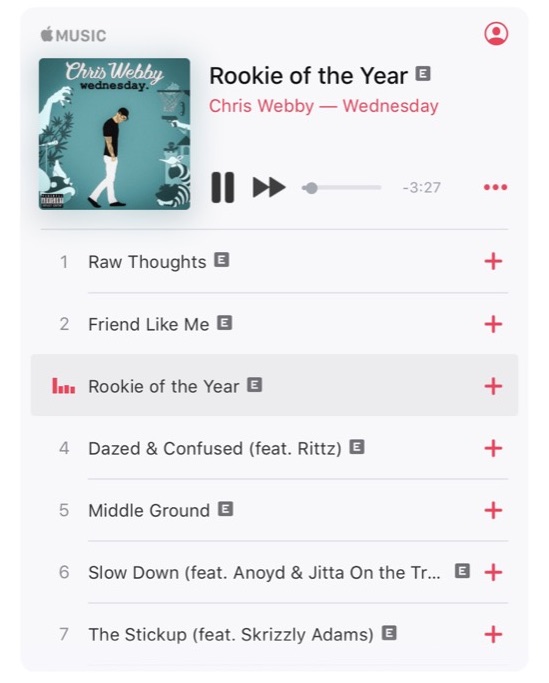 The Apple Music web player, logged in via an iOS device
While it’s still not possible to browse your library, create playlists or see what friends are playing on the site, the change does suggest Apple could be preparing a full-fat Apple Music web client to compete with existing offerings from the likes of Spotify.
You can learn whether Apple announces that a web player is in the works today and keep abreast of all other Apple-related developments at WWDC right here at MacRumors. 
We’ll be in attendance at the keynote, set to start at 10:00 a.m. Pacific Time, and be sure to stay tuned to our @MacRumorsLive account on Twitter, with live coverage of the event beginning shortly after 8:00 a.m. Pacific Time.
Tags: Apple Music, WWDC 2018
Discuss this article in our forums
Apple Set to Tighten Grip on MacBook Supply Chain and Cut Contractor Profits
Apple is set to tighten its control of its MacBook supply chain by directly negotiating prices with third-party suppliers of non-key parts such as screws and plastics, which are required by contract suppliers to produce major components.
According to a new report by DigiTimes, industry sources say the move by Apple will significantly reduce profit margins of its contracted supply partners, however Apple has neither confirmed nor denied the move.
The Taiwan-based website’s sources said that this will be the first time Apple has ever interfered with the procurement of non-crucial materials and parts by its contracted key component producers, who manufacture the processors, panels, batteries, chassis, and heat dissipation modules in Apple MacBooks.
Taiwan contracted supply partners of MacBooks were reportedly told of the new policy during a meeting they attended at Apple’s headquarters in Cupertino.
If enforced in time for MacBook models to be released this year, the policy could erase 10 to 15 percent of profits currently made by contracted producers from the purchases of materials, leaving them with only the contracted MacBook manufacturing fees.
Apple has reportedly decided to expand its centralized procurement coverage to include upstream materials such as copper and cobalt, and non-key parts and components from third-party suppliers. The electronics giant will reportedly directly set the prices and order volumes for such materials and minor parts and components, instead of only screening the name lists of qualified third-party suppliers proposed by contracted supply chain partners and inspecting their supply quality and shipment schedules.
The same industry sources predict that when the policy goes into effect, contracted supply chain players will have to boost their self-sufficiency for components or look to other markets like cloud, AI and automotive electronics applications to claw back profitability.
Apart from typical MacBook refreshes, former KGI Securities analyst Ming-Chi Kuo believes Apple is working on a “more affordable MacBook Air” set to be released at some point in 2018.
We’ve heard a similar rumor from DigiTimes, which says Apple is working on a new entry-level 13-inch MacBook in the second half of 2018, which would serve as a replacement for the MacBook Air, but we don’t expect it to surface during this year’s WWDC.
There are no details on what features an updated MacBook Air could include, but if Apple is aiming to keep costs down, it could receive minimal updates. The MacBook Air remains outdated and continues to use a processor from 2014, so an updated version could include a new processor and new graphics. Thunderbolt 3 could also be added, and it’s possible Apple will update the display.
Tag: digitimes.com
Discuss this article in our forums
Simon Cowell says no longer using a smartphone is a ‘very strange experience’
For many people, smartphone separation anxiety is a thing. Misplacing it or having to put it way for a period of time can, in some cases, result in a faster heart rate, clammy hands, and even a few beads of sweat forming on your furrowed brow.
But with smartphones these days used for just about every task known to man — except, perhaps, making calls — it’s little wonder that many of us feel the jitters if we can’t use it precisely when we want.
This, then, makes it somewhat surprising to learn that Simon Cowell hasn’t used his handset in almost a year. Even more startling, he says he feels great for it.
The 58-year-old creator of popular TV talent shows in the U.S. and U.K. told the Mail recently that he ditched his smartphone because he started to find it annoying.
‘I literally have not been on my phone for 10 months,” Cowell said over the weekend.
“The difference it made was that I became more aware of the people around me and way more focused. The thing I get irritated with is when you have a meeting everyone’s on their phone, and I was probably in that place, too. You can’t concentrate.”
Far from causing him stress, Cowell claims life without a phone has actually been “good for my mental health. It’s a very strange experience but it really is good for you and it has absolutely made me happier.”
A quick look at Cowell’s Twitter feed appears to confirm his self-imposed smartphone separation, with his 12.5 million followers having received no new tweets since June 2017.
The media mogul is already known to be a bit of technophobe, confessing years ago that he doesn’t even know how to operate a computer.
Of course, a busy fella like Cowell is likely to have a personal assistant helping him with what must be a hectic schedule, and it’s a safe bet they’re not operating sans smartphone. As for Cowell himself, he looks all set to stay smartphone-free for the foreseeable future.
Time management
While many regular folks will be willing to admit they use their handset a little more than they should, the idea of ditching it entirely will seem like a drastic — and wholly impossible — measure to take.
But now tech companies, it seems, are taking the lead. While certainly not encouraging anyone to discard their handset for good, a growing number of tech firms are trying to encourage people to look more closely at how they engage with their device. Google, for example, is rolling out tools to help users better manage the amount of time they spend on their phone, while YouTube recently added a feature that prompts people to take a break from the video-streaming app after a specified amount of time.
Instagram is also believed to be prepping a time-management tool, while Apple, too, may introduce a similar feature aimed at children after shareholders called on the tech company to look at adding more parental controls.
Editors’ Recommendations
- Academy Award winner will star in new, live-action ‘Spawn’ movie
- WhatsApp co-founder to depart after apparent clashes with Facebook
- Bitcoin put him on the street. Then it made him a fortune
- Adrian Younge makes music for everything from orchestras to Netflix’s ‘Luke Cage’
- Britain’s best-known money-saving expert sues Facebook over fake ads
Amazon is not liable for an exploding hoverboard that burned down a house
A judge in Tennessee has ruled that Amazon is not liable for the damage and injuries caused when a hoverboard exploded and burned down a family’s home, CNBC reports. The plaintiff, Megan Fox, argued that Amazon did not properly warn her family about the dangers of the product, but the judge did not agree with her.
In 2015, the Nashville mother bought her 13-year-old son a hoverboard for Christmas. The devices were very popular at the time, with Amazon selling a quarter of a million in a month’s time. On January 9th, the hoverboard caught fire and exploded. Fox’s home was lost in the fire and her husband suffered two broken bones.
In her lawsuit, Fox argued that because the hoverboard was purchased from Amazon, the online retail giant was partially responsible for the product’s safety issues. Judge William Campbell dismissed the case before it went to trial, saying that Amazon was merely acting as a middleman.
The plaintiff’s lawyer, Stephen Anderson, said that they are currently considering appealing the judge’s ruling.
Internal documents reveal that Amazon was aware that that the hoverboards could have had problems. Amazon did reach out to customers offering them a refund before eventually removing the potential rolling bombs from the storefront altogether.
Campbell’s decision is not the first time that the courts have agreed with Amazon’s middleman argument. In 2015, Heather Oberdorf was partially blinded after a retractable dog leash hit her in the face. The leash was purchased on the Amazon marketplace, but Oberdorf could not locate any representatives of the leash’s manufacturer.
The judge overseeing the case said that Amazon was not liable to Oberdorf because the Amazon Marketplace acts as a “sort of newspaper classified ad section, connecting potential consumers with eager sellers in an efficient, modern, streamlined manner.”
Oberdorf’s attorney David Wilks disagrees and told CNBC that he believes Amazon should be held to the same standards as brick and mortar retailers. For now, however, Amazon does not have to play by those rules.
“Amazon is prolific and dominant and only getting bigger and throwing brick-and-mortar stores out of business left and right,” Wilks said. “But they don’t have to play by the same rules.”
Editors’ Recommendations
- Judge rules it’s unconstitutional for Trump to block critics on Twitter
- Everything we know about ‘Star Wars: Episode VIII’
- A library at your fingertips: The 100 best free Kindle books
- Bitcoin put him on the street. Then it made him a fortune
- Binge away with our guide to the best on-demand streaming services
Apple CEO Tim Cook Shares Video of WWDC 2018 Scholarship Winners and Their Apps
In the months leading up to Apple’s Worldwide Developers Conference each year, the company offers free WWDC scholarships to students and STEM organization members who don’t have the $1,599 necessary to purchase a ticket to the event.
When selected, the scholarship winners gain a free WWDC ticket, free lodging, and a free one year Apple developer membership. On Twitter today, Apple CEO Tim Cook celebrated these 350+ individuals with a quick video highlighting a few of the winners and their apps.
In the video, Cook is seen discussing the apps with the scholarship winners, who also briefly describe the projects they’re working on. Some apps include “Study Buddy Connection,” which aims to streamline how tutors and students find one another, and “UV Safe,” which sends out iOS notifications to apply sunscreen based on the UV index at your location.
Accompanying the video, Cook’s tweet says: “Nothing inspires us more than fresh ideas.”
Nothing inspires us more than fresh ideas. Meet a few of the 350+ talented #WWDC18 student scholarship winners! pic.twitter.com/XHRQdgCugE
— Tim Cook (@tim_cook) June 4, 2018
WWDC 2018 kicks off tomorrow with a keynote at 10:00 a.m. Pacific Time at the McEnery Convention Center in San Jose, California. As developers and other attendees arrived in California over the weekend, the first glimpses of conference swag appeared online, including a Levi’s denim jacket and a collection of Apple-themed enamel pins.
MacRumors will be providing all of the usual coverage of the conference, with real-time keynote updates found on our @MacRumorsLive Twitter account and all of the event highlights appearing on MacRumors.com throughout the day and week. In preparation for the keynote, visit our full How To guide on the best ways to watch the presentation live on June 4.
Tags: Tim Cook, WWDC 2018
Discuss this article in our forums
Xbox One may soon welcome Alexa and Google Assistant
Windows Central
Rumors have been swirling for months about Microsoft’s plans to integrate virtual assistants such as Alexa with the Xbox One console, and Windows Central has uncovered some evidence that such a move may come sooner than expected.
A screenshot reportedly from an upcoming Xbox One build shows a “Digital Assistants” section added to the Preferences menu, which would presumably allow you to enable Cortana, Google Assistant, or Alexa for the console using a smart speaker rather than a microphone.
The website details how a further menu allows installation of various Xbox skills to the platform, allowing such things as voice commands through smart speakers without having to fumble for a microphone and headset. Such an expansion of the Xbox One capabilities would certainly make sense, now that Kinect has been relegated to the scrap heap and Cortana has transitioned to a voice app without a dedicated hardware component (not yet, anyway).
Not to mention that Cortana and Alexa have also been playing nice with each other recently, with cross-device integration and an Echo-less Alexa built into upcoming Windows 10 PCs.
For those wondering about my actual JOB – I’m going to help figure out how to grow Alexa/Echo presence in gaming. It’s a different spin on what I’ve done before but still keeps me close to the industry. Going to be a fun adventure I can tell already. Cool ideas? Hit me up.
— Albert Penello (@albertpenello) May 23, 2018
A senior Xbox executive also recently jumped ship for Amazon after 18 years with Microsoft. Former console marketing lead Albert Penello, who was instrumental in the launch of the original Xbox back in 2000, announced his new position in May on Twitter, saying that “I’m going to help figure out how to grow Alexa/Echo presence in gaming.”
The full extent of the voice command interaction is just speculation at this point, but it could restore some of the Kinect features that many Xbox owners had grown accustomed to. There are some game-specific Alexa Skills available, but console integration would likely streamline the whole process. Not only would such an upgrade allow voice commands for specific games, it will almost certainly include voice navigation capabilities for the other entertainment apps available on Xbox One as well.
The leaked screenshot seems to indicate than this capability is nearly complete, and an official announcement will likely be coming soon. With E3 right around the corner, we’ll probably be hearing more about this in the days and weeks ahead.
Editors’ Recommendations
- Amazon Echo review
- Microsoft wants Cortana and Alexa to be friends. Is that cool or just awkward?
- What is Alexa? It’s Amazon’s virtual voice assistant
- Microsoft Cortana can now be activated without the whole ‘Hey’ business
- Google Home review

