


The best MacBook Pro you can buy is on sale for $1,000 at Best Buy
Best Buy is taking $300 off the price of Apple’s latest 13-inch MacBook Pro notebooks as part of a limited time promotion. With the discount, Apple’s entry-level MacBook Pro laptop comes in at just under $1,000, down from $1,300, but that model doesn’t come with the Touch Bar. Apple also has a $1,200 configuration, discounted from $1,500, as well as a high-end $1,800 configuration, down from $2,100, as part of this sale.
At the base $1,000 configuration, you’re going to get a seventh-generation Intel Core i5 processor, 8GB RAM with 128GB storage, integrated Intel Iris Plus Graphics 640, and two Thunderbolt 3 ports. The laptop is available in both silver and space gray at that price. The $1,500 model bumps the storage up to a 256GB solid-state drive, but keeps everything else the same. It also doesn’t ship with Apple’s Touch ID fingerprint scanner or the Touch Bar. This configuration is also available in silver and space gray. And finally, Best Buy’s top configuration comes with 512GB of storage, two additional Thunderbolt 3 ports, Touch ID scanner, and the new Touch Bar. The $1,800 configuration also doubles the memory to 16GB and comes with an upgraded Intel Iris Plus Graphics 650, but only the space gray version of this laptop is in stock at Best Buy at the time of writing.
While these are the newest MacBook Pros, there are some caveats you should be aware of before you make a purchase decision. First, unlike older MacBook Pro models, Apple switched to a new butterfly key switch design for its keyboard. This allows Apple to design the laptops with a slim profile, but the downside is that key travel is shallow and could be uncomfortable to type on. Second, the keyboard may be twice as prone to failure as older keyboards, and out of warranty repairs are expensive given the complex assembly of the keyboard.
The latest Best Buy price discounts come at a time when rumors of a MacBook Pro refresh are at a high. Although these laptops use Intel’s seventh-generation processors, the latest competing notebooks running Microsoft’s Windows 10 operating system have been shipping with Intel’s newer eighth-generation processor, which comes with better performance and improved battery life. Still, if you don’t need the latest hardware processors, the discount could represent a good value. And when Apple releases its next version of MacOS called Mojave this fall, these MacBook Pros will be capable of running the update. Mojave brings a Dark Mode as well as a number of new features and security fixes to make it harder for websites to spy on your online activities.
If you’re in the market for a new laptop, be sure to also check out some of our favorite MacBook Pro alternatives.
We strive to help our readers find the best deals on quality products and services, and choose what we cover carefully and independently. If you find a better price for a product listed here, or want to suggest one of your own, email us at dealsteam@digitaltrends.com.Digital Trends may earn commission on products purchased through our links, which supports the work we do for our readers.
Editors’ Recommendations
- Best Buy’s one-day Apple flash sale includes up to $400 off the MacBook Pro
- Best Buy knocks up to $265 off the MacBook Pro in one-day sale
- The best MacBook
- Best Buy drops its price for the MacBook Air to as low as $650
- The slick HP Chromebook x2 just landed at Best Buy
Kobo Clara HD review
Research Center:
Kobo Clara HD
It’s hard to believe it has been eight years since Kobo released its first ebook reader. The original Kobo was an ambitious, but somewhat impractical ebook reader. It nailed the basics, like its six-inch E Ink display with a 170 DPI, as well as a big rubber navigation button. What was missing, however, was Wi-Fi or cellular connectivity — if you wanted to download a book, you’d need to plug the Kobo ebook reader into your laptop.
Ebook reader technology has come a long way, but Amazon has claimed the space as king with its Kindle devices. Rakuten’s Kobo is still in the fight, though, and its latest entry is the Kobo Clara HD, a budget ebook reader meant to directly compete against Amazon’s affordable Kindle Paperwhite. It doesn’t have all the bells and whistles you’ll find on more expensive ebook readers like the Kobo Aura One and Kindle Oasis, but there’s a lot packed in for just $130.
Ergonomic design
The Kobo Clara HD looks like the average ebook reader. It has a six-inch, 300 pixels per inch (ppi) E Ink display nestled in a chunky and plastic black slab. The thick bezels around the whole ebook reader may look dated, but it helps with holding the device comfortably when reading.
On the bottom, you’ll find a MicroSD charging port alongside the power button. We’d really like to start seeing USB Type-C charging ports in ebook readers, since that’s what many phones and laptops use and it’d make things simple if only one cable was needed, but even the most expensive ebook readers still use MicroUSB.
Flip the Kobo Clara HD over and you’ll find a textured back that’s gently curved to fit perfectly in the palm of your hand. And at a little under 6 ounces, about the weight of an iPhone 8 Plus, the Clara HD is one of the lightest ebook readers we’ve used. All of that means it’s lightweight and comfortable to use for long periods of time. The 6-inch form factor makes it a perfect companion for commutes.
At a little under 6 ounces, about the weight of an iPhone 8 Plus, it’s the lightest ebook reader we’ve used.
There is one feature missing that would make the Kobo Clara HD the perfect budget ebook reader — water resistance. We’ve only seen water resistance in a handful of expensive ebook readers, so we’re not surprised to see it absent here, but considering Kobo beat Amazon to the punch before, it’d be nice to see the company do it again with one of its most affordable ebook readers.
Great display and zippy performance
Once we started our first book, The Female Persuasion, on the Kobo Clara HD, we were hooked. The 300 DPI E Ink screen produces crisp text and sharp images. Page transitions — which can be painfully slow on older ebook readers — are nearly instantaneous. And since the Clara HD refreshes the screen at the end of each chapter, we didn’t notice any significant ghosting on the display.
Julian Chokkattu/Digital Trends
The Clara HD does an excellent job of automatically managing brightness throughout the day, but there’s also a brightness slider that lets you to make manual changes to suit your personal preferences. It’s perfectly readable outdoors in direct sunlight. There are also a number of customization features, like the ability to choose from 11 different fonts along with 40 font size options. You can also tweak font weight and sharpness settings. It’s also easy to highlight, annotate, and share passages via Facebook.
The 300 DPI E Ink screen produces crisp text and sharp images.
The ebook reader uses the same ComfortLight Pro technology found in other Kobo ebook readers. It’s essentially a blue-light filter that works automatically by tracking the time and your timezone, and it then reduces the amount of blue-light exposure at night. The screen gets more orange, but it’s certainly more helpful for your health as blue light from screens can hinder your sleep.
The Clara HD’s internals are unremarkable, but we haven’t run into problems after quite some use. It’s powered by a 1GHz processor along with 512MB of RAM. Books load quickly and page transitions are seamless. What does stand out however, is the Clara HD’s 8GB storage capacity. It’s double what you’ll find on the Kindle Paperwhite or the similarly-priced Kobo Aura, and it should allow you to store around 6,000 books on it.
One glaring omission
If you’ve ever used an ebook reader before, the Clara HD’s software experience will be familiar. When you turn the device on, there’s a homepage that shows the current book you’re reading, as well as a library of all the titles you own. There’s also an e-book store alongside a list of recommended books. The bar at the top provides features a drop-down menu to quickly access the ebook reader’s features as well as a battery life indicator, search bar, sync icon, and brightness control.
Julian Chokkattu/Digital Trends
In addition to all the basic features you’d expect on an ebook reader, the Kobo Clara HD also has Pocket integration, and the icon can be found on the bottom of the home screen. Tap it, and here you can access articles and websites sent from Pocket on your laptop or computer’s browser. You’ll find a similar feature on Kindle with Instapaper, but to use it you’ll need to pay $20 a year on the Kindle.
It has 8GB of storage capacity, double what you’ll find on the Kindle Paperwhite or similarly priced Kobo Aura.
The Clara HD also has an Activity mode that lets you track reading time, average minutes per session, and number of books read. It’s a simple yet handy feature that offers a lot of insight into your overall reading habits.
But there is one glaring omission on the Clara HD, and it’s Overdrive integration. It’s a feature first introduced on the Kobo Aura One that allows you to download library books directly to your ebook reader for a short period of time, but it’s nowhere to to be found on the Clara HD. Yes, you can manually add Overdrive titles to the Clara HD, but it’s an involved process requiring you to connect your ebook reader to your computer each time you want to check out a book. We’d have liked it to be a simpler process here.
No magazines or newspapers
In addition to an ebook reader store boasting more than five million titles, the Kobo Clara HD supports more than a dozen different formats including EPUB, MOBI, PDF, TXT, HTML, RTF, and more. Buying e-books directly from the Kobo Store on the ebook reader is the easiest way to get your next read, but adding titles from third parties requires you to side-load the book into the Kobo Clara HD. It can be a little bit of a pain, and there’s no handy “Send To Kindle” type feature that allows you to email documents directly to the ebook reader.
Kobo Clara HD Compared To
Sony Digital Paper DPT-RP1
Boox Max 2
Kindle Oasis (2017)
Kobo Aura H2O Edition 2
Kobo Aura One
Kindle Oasis
Amazon Kindle Paperwhite 2015
Amazon Kindle Paperwhite (2013)
Kobo Aura HD
Kobo Mini
Sony Reader PRS-T2
Amazon Kindle Paperwhite
Spring Design Alex
Barnes & Noble Nook
Sony PRS-700
You won’t find newspaper or magazine subscriptions in the Kobo Store. It was available at some point, but it was removed several years ago. Rakuten Kobo said they removed the feature to focus on their key e-book business. You can access newspaper and magazine subscriptions on Kindle devices, so this may not be the device for you if that’s what you want to use an ebook reader for.
Long-lasting battery
Kobo said the average reader will be able to use the Clara HD for weeks between a single charge. We’ve used the device for about a week and our Kobo Clara HD still nearly has a full charge. It’s safe to say that you won’t have to worry about charging this device much.
Price, availability, and warranty information
The Clara HD costs $130 and it’s available now from Kobo’s website.
It comes with a one-year warranty that covers manufacturer defects. If you encounter problems, you can send your ebook reader to Rakuten Kobo for repair or replacement.
Our Take
The Kobo Clara HD has all the features you’d expect, and then some, in an entry-level ebook reader. It’s lightweight, has a spectacular six-inch HD display, offers a lot of storage, and adds automatic lighting adjustments for night-time reading.
Is there a better alternative?
The Kobo Clara HD is your best choice if you’re looking for a budget ebook reader. The Kindle Paperwhite is a similar ebook reader overall — even in price — in case you want to use Amazon as your e-book store.
If you’re open to spending more money, we recommend taking a look at the Kobo Aura One or the 2017 Amazon Kindle Oasis. Check out our guide to the best ebook readers for more.
How long will it last?
If well cared for, the Kobo Clara HD is likely to last four or five years, likely more. Ebook reader technology evolves slowly, so it’s less likely you’ll see substantive changes in the field that would render the Kobo Clara HD obsolete in the near future. In terms of hardware, the battery is the component mostly likely to fail on most devices. But since you only need to charge the ebook reader a few times a month, it should take quite a few years before you begin experience issues with battery degradation. A more likely scenario is that you’ll simply outgrow the Kobo Clara HD over time and want to upgrade to an ebook reader with a larger display or more features.
Should you buy it?
Yes. If you’re looking for an excellent entry-level ebook reader, the Kobo Clara HD is our top pick.
Another Facebook fail: Bug caused it to publicly share 14M private messages
Facebook finds itself in hot waters again. With the now infamous Cambridge Analytica breach still fresh in people’s minds, Facebook has now inadvertently made the private posts of some 14 million users on its network publicly visible.
So rather than being shared with a small group of family and friends, these posts — including photos and videos — were made available for everyone to see. Facebook said the issue has been corrected, and posts that were intended to be shared privately have been recategorized. However, Facebook’s latest misstep comes at a time when the company’s privacy practices have been called into question.
This latest glitch was blamed on a bug that appeared during Facebook’s testing of a new feature. Facebook was trying out a new option for people to share featured items on their feeds. Instead of relying on previous privacy settings established by the users, the glitch made postings public as a default. This bug affected posts between May 18-22, but Facebook didn’t correct the issue and recategorize these posts as private until May 22, CNET reported.
“We recently found a bug that automatically suggested posting publicly when some people were creating their Facebook posts,” Facebook Chief Privacy Officer Erin Egan said in a statement. “We have fixed this issue and starting today, we are letting everyone affected know and asking them to review any posts they made during that time. To be clear, this bug did not impact anything people had posted before – and they could still choose their audience just as they always have. We’d like to apologize for this mistake.”
If you’re affected by this error, Facebook will notify you by Thursday, June 7, with an alert in your notifications.
This latest incident could result in a deception investigation by the U.S. Federal Trade Commission, said Jonathan Mayer, a Princeton University assistant professor of computer science and public affairs. “That’s because the company had promised that the setting users set in their most recent privacy preferences would be maintained for future posts,” ABC News explained. “In this case, this did not happen for several days.”
In addition to the Cambridge Analytica scandal that exposed the personal data of as many as 87 million users of the social network, Facebook was most recently in hot water when it was reported that the company may have shared the data of its users with device manufacturers, including Chinese companies ZTE, Huawei, and Lenovo.
The best free recording software
Thanks to advances in computer software, it has never been easier to make your own music from home or on the go, rather than in a pricey studio. When it comes to the search for a free and reliable Digital Audio Workstations (DAW) to record music, the internet has a lot to offer, but what is the best free recording software?
Though “freemium” software often lacks the advanced functionality of renowned programs like Pro Tools, it still provides options for recording audio, adding effects, and cutting waveforms, among other basic tasks. Below, we compiled a list of the best free recording software you can download, install, and immediately start using on your computer.
If you want to play around with someone else’s tracks, these are the best music download sources.
The best
GarageBand
Although MacOS isn’t always the only platform for great software, when it comes to free recording applications, it has the best of the bunch. GarageBand is an Apple exclusive program that gives you a full audio creation suite with features for audio recording, virtual instruments, MIDI-editing, and even music lessons built right in.
Part of the appeal of GarageBand is how simple it is to get going with. Its interface is intuitive and easy to learn and if you want to record something you just plug in your instrument or device and get started. There is a wide array of virtual amps and effects you can use, as well as drum tracks that sound like they were performed by real musicians.
The sound and loop library that’s available for editing into your own tracks is growing all the time and you can even bring in your iOS devices for wireless control of your set up. GarageBand is the most fully featured, free application on this list. While you will need to have an Apple device to run it, you’d be hard-pressed to find a better application that doesn’t force you to get out your credit card first.
Download now for:
MacOS iOS
The rest
Avid Pro Tools First
Avid
Avid
Pro Tools First is a limited version of the main Pro Tools and Pro Tools HD applications, but it’s still pretty capable in its own right. Aimed at singers, songwriters, and musicians who are just getting started with audio recording or want to try out the software before buying, the main limitation is that you can only store projects in the cloud and then, only up to 1GB in total size. You’re also limited to 16 simultaneous audio tracks, four inputs, and 16 instruments.
Beyond that though, the features and capabilities are much the same, giving you a good idea of what the tool can do. For example, you still gain access to 500MB of bundled loops from leading producers, the Xpand!2 multitimbral music workstation with 20 effects and plugins, and the same support for third party-interface systems as the premium versions.
One upside of not having quite so many features as the premium editions of Pro Tools, is that Pro Tools First has less strenuous system requirements. It only needs an Intel Core 2 Duo processor, with 2GB of RAM and 15.5GB of install space. If you do choose to upgrade to the standard or HD version further down the line, they’ll set you back $25 and $83 a month respectively.
Download now for:
Windows MacOS
Audacity
First released in 2000, Audacity has gone on to become one of the most popular pieces of free software around, and for good reason. The open-source program gives users a wide range of options for recording and editing audio, all tied together with a simple interface. Everything Audacity has to offer is free of charge. Compared to other notable DAWs such as ProTools and Sound Forge, Audacity’s layout is very minimalist. There are toolbars for navigating a track, editing it, and mixing. When tracks are loaded, they will appear as waveforms, and users can edit specific sections of a track by highlighting the appropriate section of the waveform.
Of course, no piece of free software is without its shortcomings, and despite Audacity’s many virtues, it has some issues. The most notable problem is that Audacity uses “destructive editing,” which means that when users add effects to a track, they are actually altering the waveform; these changes happen to the original file, so you can’t go back and undo them later. This isn’t necessarily a problem if you’re carrying out simple tasks — such as editing pauses out of a podcast — but more complex actions like mixing might be difficult.
Further, Audacity requires numerous plugins to reach optimal functionality; it cannot export projects as MP3s, for example, unless you install an MP3 encoder. Though, you could just convert the files from MP3 yourself, using external apps. Overall, however, Audacity offers one of the most robust packages available among free recording programs.
Download now for:
Windows MacOS Linux
Ardour
Ardour is an open-source DAW designed for Linux and available for MacOS and Windows. Its developer, Paul Davis, also invented the Jack sound server for Linux and worked previously as one of the original programmers at Amazon.
Ardour features highly versatile multi-track recording features that include the ability to import video for film scoring purposes, to record and edit either non-destructively or destructively, and to prepare any combination of individual tracks for recording. Its use of Jack makes it compatible with a number of outside applications, as well. However, unlike other DAWs, Ardour does not come with any built-in effects or instruments and relies instead on the installation of third-party software.
Download now for:
Windows MacOS Linux
Zynewave Podium Free
In 2005, programmer Frits Nielson left his position as a user interface designer with TC Electronic to focus his efforts on a recording application he began developing back in the early ‘90s. Nielson started a company called Zynewave and released a program called Podium — a fully functional DAW with a 64-bit sound engine, MIDI capabilities, VST and third-party plugin compatibility, and a number of other advanced functions. It was also priced at a mere $50.
Zynewave now offers a free version of its software called Podium Free. Granted, it comes with some limitations — Zynewave has disabled Podium’s multiprocessing capabilities, which hinders the program’s performance under pressure and its surround-sound playback capabilities. Otherwise, though, Podium Free is identical to Podium, a program that takes some getting used to.
Once users learn how to use it, however, they will find that Podium Free offers an interface that excels in terms of customization, while offering a suite of effects and other features on par with premium DAWs. The program also never times out or displays a nag screen, and Nielson regularly updates the software to fix bugs and known issues.
Download now for:
Windows
Editors’ Recommendations
- How to record a Skype call
- How to convert M4A files to MP3 format for listening on any device
- The best video-editing software
- How to download music from YouTube
- The best free video-editing software
Essential Phone gets new 3.5mm headphone jack module and MQA certification
Essential’s also giving its customers three free months of TIDAL.
One of the big selling points with the Essential Phone was supposed to be a magnetic accessory system that would allow for all sorts of fun modules. The only one that’s actually come to market so far is the 360-degree camera, but now Essential’s confirmed its next accessory is a 3.5mm headphone jack.

Similar to the 360-camera, this headphone jack adapter will snap onto the back of the Essential Phone using its two-pin connection system. You can already bring back the 3.5mm port using a regular USB-C adapter, but Essential says this will offer an “audiophile-grade amp” for enhanced tunes. It’ll be available this summer and pricing details are still unknown.
Essential goes on to say that:
The Audio Adapter HD can fit almost all types of 3.5mm headphones and is crafted from machined titanium for exceptional durability. Plus, with Click technology, you can charge your phone and listen to music simultaneously.
Along with the new accessory, the Essential Phone’s also receiving a software update that gives it MQA certification. MQA stands for “Master Quality Authenticated” and allows the Essential Phone to properly handle lossless music files “so you can experience the sound of the original recording” for what you’re listening to.
Lastly, Essential’s rounding these audio upgrades out by giving new and existing owners of the Essential Phone three free months of TIDAL.
Essential Phone 2 reportedly canceled, Andy Rubin considering selling the company
Essential Phone
- Essential Phone review
- Essential Phone specs
- The latest Essential Phone news
- Join our Essential Phone forums!
Amazon
Best Buy
Sprint
Telus
Apple Signs Writers Guild Contract, Setting Possible Precedent for Future Negotiations
Apple has signed the current Writers Guild of America master contract, agreeing to terms above the minimum for programming offered free online. This is significant because it could have implications for the next round of WGA talks ahead of the expiration of the current contract in May 2020, Variety reports.
In a message to WGA West members, President David A. Goodman and executive director David Young wrote:
These deal terms are significant. First, the current MBA does not contain minimums or residuals for projects on free-to-consumer services (think Crackle). Terms have to be negotiated on a writer by writer basis. Except, now, at Apple.
Second, while almost all Guild-covered Internet programming has thus far been under a subscription (consumer pay) model — like Netflix, Amazon and Hulu — Facebook has already launched shows on their free-to-consumer service. As this market develops, it will be imperative to negotiate MBA protections for writers creating content for such services. Our Apple deal moves us in that direction while the 2020 negotiations are still two years away.
In other words, the better deal (for writers, at least) that Apple agreed to with the WGA could act as a starting point for contract negotiations, rather than the lower standards in the current contract.
Apple has been active in developing shows and movies for its own platforms in recent years, including signing actress Lizzy Caplan for its new series “Are You Sleeping?” and landing the TV adaptation rights to Gregory David Roberts’ 2003 novel “Shantaram.”
Tag: Apple’s Hollywood ambitions
Discuss this article in our forums
Apple Stops Signing iOS 11.3.1 Following iOS 11.4 Release
Following the release of iOS 11.4 on May 29, Apple has stopped signing iOS 11.3.1, the previous version of iOS that was available to consumers.
iPhone, iPad, and iPod touch owners who have upgraded to iOS 11.4 will no longer be able to downgrade to earlier versions of iOS.
Apple routinely stops signing older versions of software updates after new releases come out in order to encourage customers to keep their operating systems up to date.
iOS 11.4 is now the only version of iOS 11 that can be installed on iOS devices by the general public, but developers can download iOS 12, the next-generation version of iOS that’s in beta testing ahead of a fall release.
Discuss this article in our forums
Apple Pay Promo Offers $20 Gift Code With $100+ Purchase From Nike App
A new Father’s Day-themed Apple Pay Promo is providing customers who spend at least $100 in the Nike app with a $20 gift code, according to emails Apple sent out to Apple Pay customers this afternoon.
The offer is valid from June 7 to June 11 and requires customers to make a $100 purchase using Apple Pay in Nike’s app. The $20 code is not provided at the time of purchase, but will be delivered within two weeks of purchase.
The $20 promo code must be redeemed by August 25 on a separate Nike app purchase. Apple is also promoting the Apple Store, StubHub, and Newegg as recommendations for Father’s Day.
Apple regularly sends out Apple Pay promotional emails to customers with discounts on a range of products. Recent deals have included $15 off flowers for Mother’s Day and 10 percent off furniture from Hayneedle.
Related Roundup: Apple Pay
Discuss this article in our forums
TreVolo S review: Strangest but most popular speaker in the house

Listen to the latest podcast!
If you picture “Bluetooth speaker” in your brain, you are almost certain to conjure up a very plain black or very very dark gray brick, with a perforated front and near-invisible control buttons. There are dozens, if not hundreds, of these clone-like bricks in the market. Heck, I have at least three of them in the house as I type this. But, I’ve been given the opportunity to try out a speaker from BenQ; the Trevolo S.
If you’re familiar with BenQ, you know their wheelhouse is high-quality projectors and displays. Seems that BenQ wanted to put their unique spin on a speaker….and boy did they ever! The Trevolo S is an very high-quality electrostatic speaker… easily the most unique in the market- and honestly, the most popular speaker in our house. It’s not cheap, but as you’ll find, every part of this speaker sings quality. It currently retails for $199 (link to the Amazon listing here).
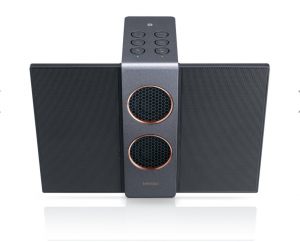
Body & Design
Starting with looks, the Trevolos S is unlike any speaker before it. The highs and mid-range are provided by impossibly-looking thin “wings”, which fold out from the main body for listening. These super-thin speakers are not built like traditional cone speakers but are in fact electrostatic speakers.
 Electrostatic technology makes this speaker unique.
OK, so what on earth is an electrostatic speaker??? This was my question exactly, and if you have even a little bit of nerd blood in you, it’s actually pretty cool science. Instead of the traditional magnet-driven vibrating cone, electrostatic speakers are comprised of a very thin membrane sandwiched between two plates. For audio, electrical current is passed through this membrane, causing the vibrations.
The woofer section in the main center body is comprised of two 12W woofers (each driven by a dedicated amplifier). The front woofer grilles stand out with bold large-perf faces rimmed with a very handsome copper trim. On the sides the body has more integral perforations for passive bass sound.
Controls are (thankfully) large circular buttons with the familiar icons. There is one extra button on top, titled MODE. This button is to enable what BenQ calls “3D Audio”, cranking up the spacial aura of the sound. BenQ’s goal here is to make the audio more multi-directional, and for the most part it works; more on this farther below. The backside has a microUSB charging port and 3.5mm headphone jack.
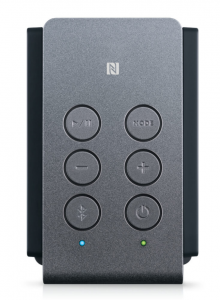 Controls are simple and easy to figure out.
The wife and kiddos just love the looks of the speaker. The kiddos argue who gets to use it, mostly because of the novel aesthetic. My wife (Hi Lisa!) thinks it’s the most handsome speaker available, and requests it front-and-center in our kitchen/entertaining area (a statement that’s never been previously made in this house). It’s replaced the aging Big Jambox as the ‘main’ house speaker. I can’t argue that point, either; it’s a conversation-starter but not in a weird “what is that?!” way.
Audio Experience
As I stated before, the Trevolo S is uber-popular at our house, and in my opinion is simply the best Bluetooth speaker experience I’ve ever had. It’s mainly a story of quality over quantity here.
 Backside of the speaker.
While most other speakers are carrying on about their volume and super-duper bass output, the Trevolo S focuses on audio quality. The electrostatic speakers make much less distortion than traditional speakers. So much so I’ve kinda fallen for the audio delivered by this speaker. It’s a bit hard to explain, but while most speakers have a boom-y sound effect, the sound profile of the Trevolo S is just so much much more clear. Actually, clear doesn’t cut it- transparent is more like it. There is almost zero hum, buzz, for fuzz coming through — just extremely clean, pure music.
Playing tunes while working around the house, I physically stopped to listen closer more than once. Familiar songs came through on another level, almost like when you hear a band live for the first time.
I know I’m gushing a bit, but let me be clear here that these are uncompensated words of mine, here. The Trevolo S is my favorite Bluetooth speaker; one truly deserving of its elevated price point.
What Could Be Better
Now, every speaker is a compromise. And the Trevolo S doesn’t escape this truism. While a lot of music types truly shine on this speaker, more bass-heavy genres (hardrock,metal, hip-hop) will suffer a bit here. There just isn’t enough output to match loud hard-hitting music.
As for volume, two 12W woofers it has, but when you crank it up, the audio quantity starts to flatten out pretty fast. This speaker is best used for normal-level listening habits.
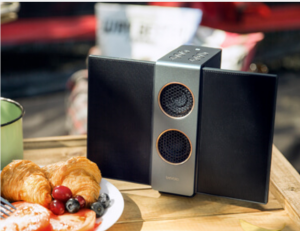 Treveolo S: Not exactly a party animal.
Physically, while certainly pretty, The Trevolo S is not best used as a portable sound unit. The fold-able electrostatic wings infer portability, but they are not robust enough to be used for this purpose (my opinion here). Also, the tall, skinny profile of this speaker makes for a top-heavy thing….so much so that I keep it up high in the house for fear of tipping incidents. It certainly doesn’t seem like it would take a whole lot to topple it.
While it offers multi-speaker stereo mode (dedicated left & right channel function) and party mode (multi-speaker broadcasting), and while these are great features, most of us just aren’t going to be shelling out for multiple units of this speaker, so it’s fairly moot.
Conclusion
I can’t recommend it as a portable/traveling companion, but this is perfectly okay as I don’t think BenQ is fooling anyone here. This speaker belongs front-and-center on your shelf, table, or bedroom dresser.
Other than that, and the higher-than-normal price for a Bluetooth speaker, I have nothing but positive things to say about the BenQ Trevolo S. Between its beautiful looks, solid construction, ease of use, and top-notch audio experience, it will appeal to most if not all of your household for daily use.
Nvidia’s ‘infinite resolution’ patent could change gaming forever
In a patent filing released on Thursday, June 7, Nvidia describes a technology that could fundamentally alter the way games look, feel, and perform. Nvidia calls it “infinite resolution,” and it’s effectively a clever way of using vector graphics to replace static textures in games. Let’s dive into what that means and why it could be a big deal.
Today, most games use textures that are created for a set of fairly standard resolutions, 720p, 1080p, 1440p, 4K — and some in-between. These textures cover just about every surface in modern PC games, from character models, to weapons, to environments, every 3D model is effectively “wrapped” with a 2D texture. Nvidia filed a patent to change how these textures are rendered.
Currently, developers package games with a series of these textures, one for each resolution the game runs at, and one for each detail setting at each resolution. This requires a lot of storage space, and it means that today’s games have a ceiling or a maximum resolution.
To see what we mean, try opening up Diablo 2 on a modern computer. Your resolution in that game is going to max out somewhere around 1024 x 768, way below what current monitors are capable of. As a result, it’s not going to look its best. The game is going to stretch those old under-sized textures across your whole display, like when you zoom in really far on a small picture.
Nvidia’s solution would fix these issues. Instead of packaging games with a massive set of static textures, games built using Nvidia’s technology would include only a single set of texture information, not the actual textures themselves. Effectively, each in-game texture would be drawn in real time from instructions the developers include in the game. Your computer would use its processing and graphics rendering horsepower to do the heavy lifting here.
Because your computer would be drawing each texture in real time, your games would be future-proofed to some extent. If a game like Diablo 2 was built using this technology, that would mean playing the game on a massive 8K monitor would look just as tack-sharp and detailed as it would on an old 800 x 600 CRT monitor.
This technology isn’t actually anything new, it’s just a novel application of an existing technology: Vector graphics. If you’re unfamiliar, vector graphics are used for a variety of purposes, but most notably they’re used in graphic design. When a designer creates a logo or design with vector art, that logo or design can be blown up or shrunk down to any size without losing detail. Nvidia’s patent filing here simply applies these principles to textures in PC games.
It’s unclear what potential speed bumps this technology might encounter, how it might bog down a typical gaming PC, or whether it would only be useful for certain types of games, but it’s an interesting concept and we’re excited to see where it could lead. To be clear, Nvidia has been working on this for quite a while, but this latest patent filing suggests the company could be close to bringing it to market.
Editors’ Recommendations
- AMD indirectly blasts Nvidia’s GeForce Partners Program in open letter
- Here’s how you can watch Nvidia’s GTC 2018 keynote kicking off at 9 a.m. today
- Nvidia ‘confident’ monitors using its G-Sync HDR tech will arrive in April
- Nvidia shows off the world’s largest GPU at its GTC conference
- Start your 57th character when ‘Skyrim VR’ hits Rift and Vive this April

