


Best Samsung Galaxy S9 Cases

Find a sleek and stylish case to keep your S9 protected.
Whether you bought your Samsung Galaxy S9 at launch or have decided to upgrade to the S9 after reading the reviews, you’re going to want to buy a case to keep it safe. here, which means it’s time to ruminate over which accessories to buy!
Here are the best cases we’ve found for the Galaxy S9. We’ll be updating this article as more awesome options become available.
- Samsung S-View Cover
- Samsung Hyperknit Cover
- Samsung Alcantara Cover
- Otterbox Commuter Series
- RhinoShield CrashGuard bumper
- Lifeproof SLAM case
- Maxboost mSnap Perfect Fit case
- Speck Presidio case
- BodyGuardz Ace Fly clear case
- Spigen Rugged Armor case
- VRS Design Clear Slim case
- Ringke Fusion Clear Case
- SUPCASE Unicorn Beetle Series case
- dbrand skins
Samsung S-View Cover

We’ll start out with some of Samsung’s own cases, although they’re not yet available for purchase.
The first one is the perennially awesome S-View case. This folio-style flip case features a clear cover for the screen that keeps it protected from scratches while also letting you see notifications and accept calls with a swipe. It can also be folded up as a hands-free stand.
You’ll drop big money on this one — Samsung lists the S-View case at $60.
See at Samsung
Samsung Hyperknit Cover

Google seemed to start the fabric case trend, but we’re happy to see Samsung also embracing it.
Made of woven nylon, this case looks brilliant in red with a nice, soft finish. Everyone’s going to want to see your brand new phone, so why not add a bit of extra flash while keeping it safe? With extra protection in the corner and clean cutouts around the camera and fingerprint sensor on the back you’ll love the functional and stylish design on display here. You can get yours for just $35.
The Galaxy S9 and its Hyperknit case are a match made in heaven
See at Samsung
Samsung Alcantara Cover

First-party accessories are always on the more expensive side, so they really need to offer customers something unique. Samsung’s Alcantara covers have been recent standouts, offering a combination of sound protection and a cozy finish for your Galaxy devices.
The Alcantara case won us over with the Note 8, so we’re pretty happy to see it offered by Samsung for the S9. Made of Alcantara, a lightweight material that’s rugged and durable while keeping a slim form factor, you’ll get a stylish and grippy case that won’t add much bulk to the phone. It’s not yet available to buy but would be worth keeping an eye out for.
You can get this stylish case for $50 direct from Samsung or for $42 on Amazon.
Samsung’s Alcantara case is the most luxurious way to protect your Galaxy S9 or S9+
See at Amazon
RhinoShield CrashGuard bumper

If you would really prefer not to put a bulky case on your phone but still want some added peace of mind for those rare times where your phone slips out of your hand, consider the CrashGuard bumper from RhinoShield.
This is a really well-designed bumper that’s rugged and shock absorbing in the corners and along phone’s edges — exactly where you need it most. It’s quick and easy to install and lets you still fully show off the design of your phone.
You can get this minimalist case solution for just $25.
See at Amazon
OtterBox Commuter Series

Few names are as symonymous with phone cases as OtterBox. They’re built a reputation as a trusted brand by designing really rugged cases and backing their products with superior customer service.
We’d recommend the Commuter series case which is a pocket-friendly case that still delivers the rugged protection you’ve come to expect from an OtterBox case. It’s got one big cutout on the back for the camera and fingerprint sensor and includes port covers to keep dirt out. You can get yours for just $30 from Amazon.
We’ve highlighted the Commuter Series here, but OtterBox has over 10 different case styles available for the Galaxy S9 which you can check out on their site.
See at Amazon
Lifeproof SLAM case

When you’re dropping over $700 on a brand new phone, you want to protect it from everything life might throw at it, especially if you plan on spending a ton of time outside this summer.
Lifeproof cases typically offer protection from dirt and snow, but the SLAM case focuses exclusively on drop protection. Lifeproof says this case can survive drops from up to two meters (6.5 ft) thanks to the reinforced bumpers. It’s also got a rugged backplate that’s clear to show off the phone’s design and also compatible with wireless charging. While it’s not quite as Lifeproof as you’d expect, it’s also not as expensive as other Lifeproof cases at only $50. Plus, it looks pretty cool with the black and neon green, don’t you think?
Looking for the classic FRE Lifeproof case? You can get the supreme Lifeproof case for a whopping $89. It’s real pricy, and probably more than we could justifiably recommend to the average user, but if you want one you can buy it straight from the source.
See at Lifeproof
Maxboost mSnap Perfect Fit

The Galaxy S9 deserves protection, but we don’t always want to give up the thin and sleek Galaxy S9 design to get it. That’s why the Maxboost mSnap case is so great. It has an extremely hard and tough plastic exterior that doesn’t flex or bend, and that means it can take all of the bumps and scrapes of daily life. But at the same time, those properties also let it be incredibly thin.
The mSnap case has cutouts on the corners just to be able to slide over the phone — and even that takes some force to get it on and off. It just shows you how strong this case is. Once you do get it on, your phone’s protected — there’s even a good little lip around the front so you can put the GS9 face-down on a table without scratching it. The case has a soft-touch coating that gives it just enough grip to hold comfortably but not so much that it snags on pockets.
The mSnap comes in four colors, and starts at just $8.
See at Amazon
Speck Presidio

Speck has a full line of cases available for the Galaxy S9, but we’ll focus on the Presidio case here because it’s a great place to start. It’s got a simple design with smart features where it counts like double protection in the corners and a slim profile that’s compatible with wireless charging. It’s been drop tested up to 10 feet and the matte finish is scratch resistant so it shouldn’t show wear. Get this classic looking case for just $40.
This is just one of the many case styles Speck offers, so check them all out if you want something with a bit more flair.
See at Amazon
BodyGuardz Ace Fly clear case

Looking to show off your Galaxy S9 without leaving it prone to drop damage? BodyGuardz offers a clear case they say is built using the same impact gel used in padding and helmet technology for athletes.
Whether or not that marketing talk sways you, the Ace Fly clear case looks like a reliable clear case. BodyGuardz backs their products with a lifetime warranty and you have a 30-day money back guarantee so if you don’t love it you can simply return it.
Available for $35, these cases are also compatible with the Pure Arc Tempered Glass screen protector, so if you’ve used BodyGuardz screen protectors before and trust the brand this would be a good combo to keep your Galaxy S9 fully protected right out of the box.
See at Amazon
Spigen Rugged Armor case

The Spigen Rugged Armor case is my go-to phone case. It’s a sleek, one-piece case that adds good protection to your phone without much bulk. Thin enough to not impede wireless charging, this is a great minimalist case that still offers rugged protection.
More importantly, it always comes in at a great price. At just $12, it’s one of the cheapest options currently available from a brand we trust.
See at Amazon
Spigen Liquid Crystal clear case

Looking for a clear case option under $20? Spigen’s got you covered there, too. Just like the Rugged Armor case, the Liquid Crystal is slim and pocket-friendly. Made of flexible TPU, it’s easy to slip on and will provide quality protection while still letting you show off your phone’s design.
You can get the Liquid Crystal for $11.99 or add a funky print or some sparkles for just $12.99.
See at Amazon
VRS Design Clear Slim case

These clear cases from VRS Design basically offer it all. It’s a clear case that shows off the body of the Galaxy S9 with a shockproof bumper available in the exact color to match your device.
Better still, these cases are thin enough to be fully compatible with wireless charging. Make sure you get the right color for your phone to complete the look.
You can get this case for just $14 on Amazon.
See at Amazon
Ringke Fusion Clear Case
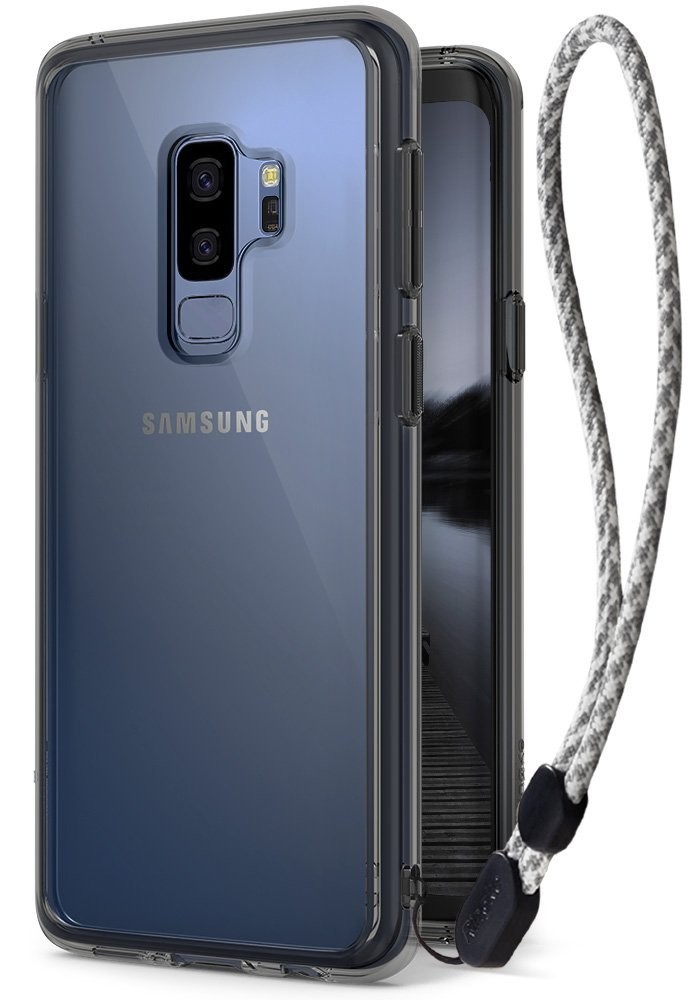
The best way to protect your phone from drop damage is to not drop your phone. The latest Fusion clear case from Ringke includes a handy wrist strap built into the case.
Whether or not you want to use the wrist strap is up to you, but it’s a thoughtful addition to a consistently stellar case style. Available as a clear case or with a Orchid Purple or Smoky Black bumper accent, you can get this case for just $11 on Amazon.
See at Amazon
SUPCASE Unicorn Beetle Series case

The Unicorn Beetle case is one of those phone cases that people buy with every new device. It’s got that classic rugged design with ridges to help with grip and it includes a built-in screen protector to keep your S9 in pristine condition.
Port plugs keep dust and pocket lint out of your charging port and headphone jack, and it also comes with an optional belt-clip holster. Rugged enough to keep your phone protected and yet thin enough to work with wireless charging, get your Unicorn Beetle Series case starting at just $15.
See at Amazon
dbrand Skins

Dbrand Skins are a consistently popular option for phone enthusiasts who want to customize the look of their phone without adding any bulk. They of course offer an awesome level of customization for creating a skin for your Galaxy S9.
You can pick between nine different texture styles for the back, the minimal bezels on the top and bottom of the display, and even around the camera sensor! You can mix and match and create your dream skin. Didn’t get the phone color you wanted? Make it your own with dbrand!
See at dbrand
Updated June 2018: We’ve added the Maxboost mSnap case to the roundup. Enjoy your Galaxy S9!
Samsung Galaxy S9 and S9+
- Galaxy S9 and S9+: Everything you need to know!
- Galaxy S9 review: A great phone for the masses
- Complete Galaxy S9 and S9+ specs
- Galaxy S9 vs. Galaxy S8: Should you upgrade?
- Join our Galaxy S9 forums
Verizon
AT&T
T-Mobile
Sprint
E3 video games, the BlackBerry KEYone, smart toothbrushes, and more are all discounted today
Whether you’re looking for new tech gear or household items, we’ve got you covered.
We found plenty of great deals today that include big discounts on the BlackBerry KEYone, Oral-B Bluetooth toothbrushes, E3 video games, and more! Time’s running out to take advantage of these prices, so hurry!
View the rest of the deals
If you want to know about the deals as soon as they are happening, you’ll want to follow Thrifter on Twitter, and sign up for the newsletter, because missing out on a great deal stinks!
These are all the Android games announced at E3 2018
Gaming on Android is about to get really exciting.

E3 is the biggest gaming event of the year, and while the focus is primarily on console and PC titles, mobile games are steadily becoming more and more prevalent.
This year’s E3 is no different, and as the conference progresses and more announcements are made, we’ll be updating this list with all of the biggest Android games that are unveiled.
Without further ado, here’s what’s been announced!
Elder Scrolls Blades
Although there’s no denying that Fallout 76 was the highlight of Bethesda’s E3 conference, one of the most surprising announcements came in the form of Elder Scrolls Blades.
Elder Scrolls Blades is a first-person RPG adventure in which you play as a member of the Blades, “the empire’s top agents”. According to Bethesda’s Todd Howard, the game will see you coming back from a mission only to find your home completely destroyed. In your quest to find out who’s responsible for this destruction, you’ll be sent off into exile and go through dungeons that are both procedurally generated and pre-created by Bethesda.
Blades will eventually launch on consoles, PC, and VR headsets, too.
Despite being a mobile game, Elder Scrolls Blades will have “console-quality graphics” and offer players a variety of ways to interact with everything. You can move your character by tapping on the screen or use virtual joysticks, combat is “all-new” and “follows your specific movements and timings”, and a “town-building” mode in Blades will allow you to create/manage your own village.
You can play Blades by holding your phone horizontally like most games of its nature, but Bethesda is also letting you go through the whole thing with your phone in portrait mode.
Elder Scrolls Blades will later make its way to PCs, consoles, and VR headsets, but it’ll first launch as a mobile title for Android and iOS in the fall.
Sign up for early access
Command & Conquer: Rivals
Command & Conquer is one of the most popular strategy games around, and 12 years after the last new entry in the series was released, it’s making a return in the form of Command & Conquer: Rivals.
Rivals pits two players against each other, each with their own base. The end goal is to destroy your opponent’s base, and while you can do this by sending countless troops to it, the ultimate task is to capture the large missile in the middle of the map. If you successfully capture the missile by the time it’s ready to launch, it’ll go hurtling toward’s your enemy’s base. After two successful hits with this, you win.
You can use a variety of troops and vehicles to help you win matches, and since Rivals is a free-to-play title, expect loot boxes to enhance your experience (and drain your wallet).
Learn more about Rivals here!
Gears Pop!
Alongside Gears of War 5, Microsoft also used its E3 conference to announce a new mobile spin-off game in the series — Gears Pop!
Microsoft partnered with Funko to create Gears Pop!, and as the title suggests, you’ll play the game as Funko Pop! versions of popular Gears of War characters. I’m not a Gears fan myself, but it’s awesome seeing Funko’s Pop! figures coming to life in the short teaser trailer we got.
There’s still a lot we don’t know about Gears Pop!, but Microsoft has confirmed it’ll be available for Android and iOS at some point in 2019.
We’ll be updating this list throughout E3 as more games are announced, so be sure to check back often!
Android Gaming

- Best Android games
- Best free Android games
- Best games with no in-app purchases
- Best action games for Android
- Best RPGs for Android
- All the Android gaming news!
Sony says it’s stopping development of its Xperia Home launcher
Only bug fixes will be added from here on out.
Most Android OEMs outfit their phones with their own skin on top of Android, and with that, a custom launcher. Sony’s phones have long come with the Xperia Home launcher, and following the latest update that landed on June 11, development for it will be ending.

As noted by moderator Erika Prymus for the Xperia Home Open Beta on Google+:
A business decision has been taken that our current launcher, Xperia Home should enter maintenance phase.
In this “maintenance phase”, Xperia Home will no longer receive new features. There will still be updates down the road, but they’ll strictly be focused on removing bugs “for as long as deemed necessary.”
Additionally, this transition also means that the Xperia Home Open Beta program will be ending.
The latest update to Xperia Home (11.3.A.0.17) prior to this switch was mostly focused on bug fixes anyways. As noted by Sony, some of the highlights include fixes for widgets not updating, crashes when trying to open a photo from search, and more.
What does this mean for the future of launchers on Sony phones? Although Xperia Home will probably keep on chugging for a while to come, it’s likely that Sony’s either looking to create an all-new experience or just go the Nokia route and mimic the Pixel Launcher. I’d prefer to see the latter of those two things, but only time will tell.
Are you a Sony fan? What do you think about the end of Xperia Home?
Best Android Launchers in 2018
Samsung Demands Another Retrial, Says ‘No Reasonable Jury’ Could Have Sided With Apple
Last month, a jury ruled that Samsung must pay Apple $539 million for violating Apple design patents as part of a legal battle that has spanned years, but the jury’s ruling apparently won’t be the end of the dispute between the two companies.
Samsung last week filed an appeal (via CNET) asking the U.S. District Court in San Jose to either reduce the judgment against it to $28 million or hold a new trial. Samsung filed the motion on the grounds that “no reasonable jury could have found that any of Apple’s asserted design patents was applied to Samsung’s entire accused smartphones.”
The jury’s ruling, says Samsung, is “excessive” and the evidence “supports a verdict of no more than $28.085 million,” which was the amount Samsung advocated for during the trial.
The latest Samsung v. Apple trial was held to redetermine the amount of damages Apple had to pay after Samsung appealed to the Supreme Court and said that the original damages award, set at $399 million after several appeals, was a disproportionate sum for the design violation.
During the trial, the jury was tasked with deciding whether the damages should be based on the total value of the iPhone or if Samsung’s penalty should be based on just the elements of the iPhone that it copied.

Apple argued for $1 billion in damages based on the total design of the iPhone, while Samsung argued that it should pay a far lesser amount, the aforementioned $28 million. The jury split the difference and awarded Apple $539 million, which happened to be a far larger penalty than the original $399 million damages ruling from 2015.
When the jury’s ruling was announced in May, Samsung promised to appeal in a statement: “Today’s decision flies in the face of a unanimous Supreme Court ruling in favor of Samsung on the scope of design patent damages. We will consider all options to obtain an outcome that does not hinder creativity.”
Samsung also filed a separate motion at the same time asking the court to order Apple to reimburse it for a $145 million payment that Samsung submitted for a now-invalidated multi-touch patent.
Apple has 10 days to respond to Samsung’s new filing, with a hearing scheduled for July 26.
Tags: Samsung, lawsuit, patent trials
Discuss this article in our forums
Facebook Launches New ‘Memories’ Section for Reflecting on Old Photos, Posts and Life Events
Facebook today announced the launch of a dedicated “Memories” section on its social network, which the company says is designed to be a single place on Facebook to reflect on “the moments you’ve shared with family and friends.”
Memories, which is an expanded version of the current “On This Day” feature, provides a look back at posts and photos, friends you’ve made, and major life events.
Facebook says the Memories page will integrate several sections, including “On This Day,” which will continue to show posts and photos and “Friends Made On This Day,” highlighting when you added a person as a friend.
Recaps of Memories will also be included, featuring monthly recaps of memories that have been bundled into a message or a short video, and finally, the section will house “Memories You May Have Missed,” highlighting new content if you haven’t checked your memories lately.
Facebook says that Memories will be customizable using built-in controls to hide content if desired.
We know that memories are deeply personal — and they’re not all positive. We try to listen to feedback and design these features so that they’re thoughtful and offer people the right controls that are easy to access. We work hard to ensure that we treat the content as part of each individual’s personal experience, and are thankful for the input people have shared with us over the past three years.
The new Memories section, which is rolling out, can be accessed through a Memories link, to the left of the News Feed when on a computer, and in the “More” tab on mobile devices.
Tag: Facebook
Discuss this article in our forums
Net neutrality is dead, but it could make a comeback
The Federal Communications Commission’s ruling against net neutrality took effect on Monday, June 16, ending three years of internet protective measures that were enshrined during the last presidency. While many supporters lament its demise, however, state legislators could make it so that most U.S. citizens end up enjoying the benefits of net neutrality again in the future.
Net neutrality is both a principle and legislation that is designed to make the internet a level playing field for everyone — consumers and businesses. It makes it so that companies cannot charge different content providers different rates for different content, and ensures that internet users can access anything online at the full speed of their internet connection, regardless of the sensibilities of their internet service provider.
Originally protected under law by the Obama administration’s Open Internet Order, that was voted to be repealed in late 2017 and now that repeal has come into effect. The key proponent and driving force of the repeal is FCC chairman Ajit Pai, who claimed in an op-ed on CNET that the legislative change would actually be a good thing for consumers and could usher in a new age of faster internet and protections against anti-competitive behavior.
Many organizations and legislators think otherwise, though. There have been calls to block the repeal since it was enacted by advocacy groups and politicians. While those cries may have fallen on the deaf ears of Pai’s FCC though, local legislators have been making some headway. The New York Times points out 29 states have introduced bills to ensure net neutrality is maintained within their borders. A number have already failed, but Oregon’s has been enacted, as have Vermont’s and Washington’s. The majority are still pending, so if you live in any of the states listed on the National Conference of State Legislator’s website, your state may end up retaining net neutrality at the local level.
Even then, a number of companies have pledged to not throttle content without net neutrality preventing them from doing so. As Common Dreams reports, a number of U.S. city mayors have also refused to do business with companies that don’t continue to abide by the principle of net neutrality.
Even with net neutrality effectively dead at the federal level, and no real sign of that changing any time soon, it could be that grassroots campaigns and local government officials can maintain the open and free internet that so many people enjoy today.
Editors’ Recommendations
- Congress has until Monday to save net neutrality and keep the internet open
- U.S. Senate votes to overturn FCC’s repeal of net neutrality protections
- AT&T and Verizon lobbying for increased pricing power over smaller ISPs
- FCC’s net neutrality rules officially end, but 18 ISPs promise to stay honest
- FCC adopts news rules to stop phone companies from ‘slamming’ and ‘cramming’
Color-changing LED stools let you know if you’re sitting with bad posture
Sitting down for hours on end is bad for you. But what is the best way to prompt folks to get up and stretch their legs every so often? Looking for a solution to that very issue has previously led designers, technologists and engineers to create everything from standing desks to the Apple Watch’s periodic reminders that you should get up and move around. A new effort from German research organization Fraunhofer may be our favorite approach yet, however.
They have developed a special LED stool which is designed to encourage healthy sitting, and prompt “active, conscious movements” while a person is sitting down. The health benefits of promoting healthy back movements could not just help reduce back pain (an obvious side effect of sitting with poor posture), but also cardiovascular problems, excess weight, and high blood pressure, which can result from an inactive lifestyle.
The stool is fitted with a variety of sensors and LEDs which offer color-coded feedback regarding the way that you are sitting, as well as providing more detailed information through a connected app. The pressure sensors in the stool identify incorrect posture through measuring a user’s weight distribution on the seat. The seat can even lead you through defined movement exercises.
Oh, and did we mention the games? That’s right: since this is a proof of concept, the researchers went one step further and constructed a gaming table which lets people play seat-related games. Okay, so a game that you control by sitting nicely doesn’t sound amazing, but in this case the results are pretty neat. The researchers reworked classic titles like Pong, in which you control the on-screen paddles by making certain pelvic movements.
“We know from scientific research that the balancing movements have a positive impact on mental performance in terms of concentration and productivity,” Nguyen-Truong Le, one of the researchers on the project, told Digital Trends. “By playing games in such ways at work, social interaction with co-workers can be improved.”
There are no immediate plans for commercialization. Instead, the researchers point to this as a demonstration of its soft pressure sensors. These can be built into a wide range of environments, including not only stools, but also mats, steering wheels, and far more. They could therefore be used for a wide variety of applications. Don’t give up hope if you’re dreaming of getting your hands on these smart stools, though. “There will be an open-source distribution of the instructions, including the CAD files and the software to rebuild this product idea,” Le continued. “Everyone can benefit from this project.”
Editors’ Recommendations
- Get the support you deserve at work in one of the best office chairs
- Awesome Tech You Can’t Buy Yet: Smelly alarm clocks and portable camera gimbals
- The best monitor you can buy
- The best SUVs you can buy
- The best tablets you can buy
Google takes Chromebooks beyond the browser with Chrome OS 67
Dan Baker/Digital Trends
After having brought support for running Android apps on Chromebooks, Google just launched Chrome OS 67 with support for even more apps. With the release of Chrome OS 67, Progressive Web Apps, or PWAs, can now be installed as stand-alone apps, Google noted on its blog.
As its name suggests, Progress Web Apps are web apps, but instead of running inside a Chrome browser tab, they’ll have their own window and behave more like a native app. Microsoft announced support for PWAs on Windows 10 earlier this year, and one of Google’s first PWAs to launch this year is the Google Photos app. Like their native desktop app counterparts, PWAs can function offline and are speedy to operate and load.
On Chrome OS, Progressive Web Apps are deployed as a hybrid between a native app and a web app. Borrowing from traditional web apps, they’ll have shareable URLs and come with Google Cast support, ZDNet reported. Multitasking users can also switch between windows with an alt-tab key command. Google will bring support for Progressive Web Apps to Chrome browsers on MacOS and Windows in future releases.
If you’re an owner of a Chromebook with newer form factors, like HP’s detachable Chromebook x2, Chrome OS 67 also supports a new feature that can detect when a tablet is detached from the keyboard and attached to a new base. Support for Touchable Material Design 2.0 will make it easier for Chrome OS tablets, like Acer’s Chromebook Tab 10, to interface with Chrome OS using touchscreens. For those running Android apps on a compatible Chromebook, Google noted that Chrome’s page zoom feature is now extended to Google Play apps.
Other features aimed at making Chromebooks a better experience for users focused on productivity include support for zipping files on Google Drive using the Files app and split-screen multitasking in Tablet mode. Google is also giving users more control of how they put their Chromebooks to sleep by displaying a power menu with shortcuts when the power button is held down. A cleaner Bluetooth list, support for Android Debug Bridge over USB in developer mode, and Select-to-Speak ability for text to be read aloud round out the list of new features.
This update will automatically be rolled out to Chromebooks over the next several days. Along with these new features, Google announced that the latest version of Chrome OS also comes with security fixes and other small improvements. After having been broken since the Chrome OS 64, user Mace noted on Google’s blog that Google casting is now working again on public IP addresses with this build. If you’re looking for a new Chromebook, Google is also running a huge promotion on its Pixelbook right now.
Editors’ Recommendations
- Google’s new ‘tablet mode’ further blurs the line between Chrome OS and Android
- The best Chromebooks
- Chromebooks will start to feel more like Windows, but in a good way
- Acer Chromebook Spin 11 review
- You’ll soon be able to send texts on your Chromebook
Browse the internet privately for life for just $40
Protecting our information and identity online is paramount in our world where online activity is become more and more prevalent as time goes on. Whether that information is a credit card number, banking information, or even your search history, you don’t want anyone being able to track your browsing habits — both for safety and simple privacy. But the normal internet connection you get from your service provider isn’t as secure as some people would like.
A VPN is your solution to keeping your online habits private. Using a “virtual private network,” you get the functionality, security, and management that the VPN service provides in order to keep safe and discreet online. VPNs aren’t just for privacy; you can use local VPNs in order to get resident online pricing for things like flights, hotels, and more.

VPN Unlimited is one such VPN provider that can help you access the web safely and securely. A lifetime subscription generally retails for $499.99, but at Android Central Digital Offers, you can get yours for $39.99. This is the lowest price yet for this great VPN service.
VPN Unlimited gives you secure access to public Wi-Fi networks, unlimited bandwidth, an unlimited high-speed connection, a growing selection of global services in over 50 countries, fast server switching, as well as ad blocking, malware protection, and tracker blocking. If you value your online privacy and flexibility, then subscribe to a VPN. Get a subscription that covers five devices for life for just $40
See at Android Central Digital Offers

