


OPPO Find X is here with a pop-up slider for all three cameras
The Find X comes with a pop-up motor that hides the cameras when not in use.

Image credit: The Verge
OPPO is reviving the Find series with its most ambitious device yet. The Find X is set to go live later today, but The Verge has an early look at the device.
The Find X comes with an innovative pop-up slider that contains all three cameras — the dual 16MP + 20MP rear camera and the 25MP front camera. Doing so has allowed OPPO to maximize screen space while eliminating the notch, with the Find X offering a 6.4-inch 1080p OLED display with a 92.26% screen-to-body ratio.
That’s slightly more than that of the Vivo Nex, with Vivo’s handset also featuring a retractable front shooter. Unlike the Nex, the Find X doesn’t have an in-display fingerprint scanner, and instead relies solely on 3D facial recognition tech that’s hidden in the pop-up assembly. It works thusly: you switch on the display, swipe up on the lock screen, and the camera pops out to authenticate your face and unlock the device.
OPPO says the motorised mechanism takes just 0.5 seconds to pop up, so while it may not be quite as fast as using a standard fingerprint sensor, it is a novel way to unlock the phone.

Image credit: The Verge
Under the hood, the Find X features the latest hardware available today in the form of a Snapdragon 845 chipset, 8GB of RAM, 256GB of storage, global LTE bands, dual SIM card slots, and a 3730mAh battery with OPPO’s VOOC fast charging tech. On the software front, the Find X comes with the latest iteration of Color OS running on Android 8.1 Oreo.
Crucially, the Find X will be the first OPPO phone sold in North America and Europe — that’s the reason for global LTE connectivity. For now, there’s no information on what markets the phone will be available in — or what it’ll cost — but we should know more in the coming weeks. The Find X is going on sale in China from today, and should make its way to other Asian markets shortly.
What do you guys make of the OPPO Find X?
Best Samsung Galaxy S9 & S9+ Deals and Promotions
Save the Galaxy — spend less money.

The Galaxy S9 and S9+ are now available to purchase in many countries around the world. Carriers are falling over themselves to give you a good deal on an early purchase of Samsung’s latest phones. Here are all of the latest deals from the top carriers and retailers.
U.S.
Verizon
You can pick up the Galaxy S9 for $33.33 per month and the Galaxy S9+ for $38.75 per month. Both of those are the prices over 24 months, meaning you’ll ultimately pay $799 for the S9 and $929 for the S9+. Ouch. To help reduce those costs, you can trade-in an eligible phone on Verizon and take up to 50% off. The exact details are as follows:
- Galaxy S9 for $16.66/month: Trade in iPhone X, iPhone 8/8 Plus, iPhone 7/7 Plus, iPhone 6S Plus, Pixel 2/2 XL, Pixel/Pixel XL, LG V30, LG G6, Moto Z2 Force, Moto Z Force, Galaxy Note 8, Galaxy S8/S8+, Galaxy S7 Edge.
- Galaxy S9+ for $19.37/month: Trade in iPhone X, iPhone 8/8 Plus, iPhone 7/7 Plus, Pixel 2/2 XL, LG V30, Moto Z2 Force, Galaxy Note 8, Galaxy S8/S8+.
- Galaxy S9 for $21.66/month: Trade in iPhone 6/6 Plus, iPhone 6S, HTC 10, LG V20, LG G5, Moto Z2 Play, Moto Z Droid, Galaxy S7, Galaxy S6/S6 Edge/S6 Edge+, Galaxy Note 5.
- Galaxy S9+ for $25.18: Trade in iPhone 6S/6S Plus, Pixel/Pixel XL, HTC 10, LG V20, LG G6, Moto Z Force, Moto Z2 Play, Galaxy S7/S7 Edge, Galaxy Note 5.
- Galaxy S9 for $25.00/month: Trade in iPhone SE, HTC One M9/M9+, LG V10, LG G4, Moto Z Play, DROID Turbo 2, Galaxy S5, Galaxy Note 4, Galaxy Note Edge.
- Galaxy S9+ for $29.06/month: Trade in iPhone 6/6 Plus, iPhone SE, HTC One M9/M9+, LG V10, LG G5, Moto Z Droid, Moto Z Play, DROID Turbo 2, Galaxy S6/S6 Edge/S6 Edge+, Galaxy Note 4.
See the Galaxy S9 at Verizon See the Galaxy S9+ at Verizon
AT&T
AT&T has upped the price for the phones beyond what you’d pay unlocked or from T-Mobile. The carrier is advertising $26.34 per month for the GS9 and $30.50 per month for the S9+ – but that’s over 30 months, so the full price comes out to $790 and $915, respectively.
For a limited time, though, AT&T is offering 50% off the S9 or $395 off the larger S9+. You must purchase the phones on AT&T Next, start a new line of service, and sign up for a DirecTV or Internet plan.
Those are a lot of hoops you need to jump through, but if you were already planning on getting the S9 or S9+ on AT&T, you might as well look into this.
See at AT&T
T-Mobile
T-Mobile is matching the unlocked pricing of $720 for the Galaxy S9 and $840 for the S9+. T-Mobile says that the S9 series plugs into its new 600MHz spectrum, which offers more coverage in rural areas.
The Un-Carrier is currently running a BOGO promotion where you can buy one Galaxy S9 and get another for free or $720 off the larger S9+.
Both phones must be purchased on monthly installment plans in order to be eligible, and you’ll need to either active two new lines for new customers or add at least one new one if you’re an existing subscriber.
See at T-Mobile
Sprint
On Sprint you’ll pay $792 for Galaxy S9 and $912 for Galaxy S9+, but they’re also available through Sprint’s Galaxy Forever lease program, which allows you to upgrade to the newest Galaxy after 12 months, for $33 per month for S9 and $38 per month for the S9+.
There aren’t any deals for buying the S9 series outright from Sprint, but you can save quite a bit with the Galaxy Forever program right now.
Instead of $33/month for the S9 and $38/month for the S9+, you’ll spend just $16.50/month for the S9 and $21.50/month for the S9 Plus. No trade-in is required for this promotion, but you will need to add a new line of service.
Once the order is made, you should see your monthly bill credit applied within two billing cycles.
See at Sprint
Amazon
Amazon matches every other retailer with U.S. unlocked pricing at $719 and $839, with all three colors of both sizes of the phone available. When shopping at Amazon, be sure to get the proper U.S. model rather than the international models that can also be found from third-party sellers — buying an international model may be a tad cheaper in some cases, but won’t come with a warranty.
See at Amazon
Best Buy
You can buy the carrier versions of the Galaxy S9 and S9+ for Verizon, AT&T and Sprint, plus the unlocked version (we recommend that one) at their usual prices. Best Buy runs its own trade-in program, and also typically matches whatever the carriers are offering directly in terms of incentives. Best Buy also offers 24-month no-interest financing if you have a Best Buy credit card.
See at Best Buy
Samsung
If you prefer buying your phones directly from the manufacturer (consider it!), without all the bloatware and potential SIM locking, Samsung is offering both the S9 and S9+ unlocked. In the U.S., you’ll pay $719 for the Galaxy S9 and $839 for the Galaxy S9+, but both are available with Samsung’s financing program if you’d prefer to pay over several months.
Samsung also sells the carrier variants of both phones, matching the pricing you’d find from the carriers but not necessarily any of the other incentives above and beyond that.
One big advantage Samsung has over everyone else is that it’s the exclusive place you can buy the 128GB and 256GB configurations for the S9 and S9+. You’ll pay $50 more per each storage upgrade, resulting in the following pricing:
- Samsung Galaxy S9 w/ 128GB – $769.99
- Samsung Galaxy S9 w/ 256GB – $819.99
- Samsung Galaxy S9+ w/ 128GB – $889.99
- Samsung Galaxy S9+ w/ 256GB – $939.99
Samsung’s got a couple killer deals right now, one of which gets you an instant $350 trade-in credit when you purchase an S9 through the Samsung Upgrade Program. Buying the S9 or S9+ through Samsung will also allow you to purchase the Power Bundle for $49 or the Upgrade Bundle for $99.
The Power Bundle comes with a fast wireless charger, 5,100 mAh battery pack, and adaptive fast charging car charger. On the other hand, the Upgrade Bundle inlcudes a fast wireless charger, Samsung Gear VR, and AKG Y50BT wireless headphones.
See at Samsung
Canada
Rogers
It shouldn’t come as much of a surprise that Rogers has the Galaxy S9 and S9+. The amount you pay depends on which plan type you choose, with the pricing working out as follows:
- Premium+ Tab: $249 for the Galaxy S9 / $379 for the Galaxy S9+
- Premium Tab: $449 for the Galaxy S9 / $579 for the Galaxy S9+
- Smart Tab: $599 for the Galaxy S9 / $729 for the Galaxy S9+
- Talk & Text or No Tab: $999 for the Galaxy S9 / $1129 for the Galaxy S9+
If there’s a Rogers store near you, you can grab the Galaxy S9 for $0 (that’s right, $0) when you purchase it on one of the carrier’s Share Everything plans after completing an eligible trade-in.
For online shoppers, Rogers is giving out a coupon for 15% off select accessories when you actvate a device from its website and waiving its $30/line Connection Fee.
See at Rogers
TELUS
In addition to Rogers, you can also get the Galaxy S9 through TELUS. The regular S9 costs between $250 and $450 upfront depending on which plan you choose, with the same holding true for the S9+ that varies at $380 and $580.
See at TELUS
Bell
Bell is selling the S9 and S9+ for $250 on a 2-year term with an $80/month contract, or $450 for a $70/month contract. It’s $1019 outright. The S9+ costs $380 and $580 in the same configurations. As with all other carriers, the phone comes in either grey or purple.
If you’re interested in the smaller Galaxy S9, Bell’s letting you pick it up for $0 if you trade-in an eligible device and sign up for a 2-year Premium Plus plan with data.
For this offer, you’ll only be able to redeem it at one of Bell’s physical retail stores.
See at Bell
Unlocked
In Canada, Samsung is selling the Galaxy S9 and S9+ unlocked, starting at $960 for the smaller phone and moving up to $1100 for the larger one. Both phones remain unlocked once you put a SIM card into them, but they download (and keep) the carrier details from the first SIM that was inserted into them, much like their carrier counterparts. In Canada, Samsung is offering only the Lilac Purple and Titanium Grey models.
See at Samsung
UK
O2
O2 in the United Kingdom is selling the Galaxy S9 for £49.99 upfront and then £56 per month for 24 months. If you want the larger and more impressive Galaxy S9+, you’ll pay the same £49.99 upfront cost but a more expensive £61/month charge.
If you buy a Galaxy S9 or S9+ from O2 right now, the carrier will give you the Samsung Galaxy Tab A 10.1 absolutely free. This offer is good until July 11 and the tablet should ship out 14-40 days after your purchase is made.
See at O2
Vodafone
Vodafone is also offering the Galaxy S9 series in the UK, and for the regular S9 you’ll pay £29 upfront followed by £59/month. If you want to step up to the Galaxy S9+, you’ll pay a bit more ay £49 upfront and then £69 per month.
You won’t get any freebies when purchasing the S9+, but if you pick up the regular S9, Vodafone will give you an extra 10GB of monthly data.
See at Vodafone
EE Mobile
For EE Mobile customers, the Galaxy S9 regularly sells for £58 per month and the S9+ for £68 per month. The former comes with 64GB of storage while the latter has 128GB, but no matter which you choose, you’ll be able to get the phones in either Lilac Purple, Coral Blue, or Midnight Black.
If you act fast, however, EE Mobile’s offering its lowest price ever on the two phones — £43/month for the S9 and £53/month for the S9+.
Also, if you trade in a Galaxy S7, you can get the S9 for £28/month and the S9+ for £33/month.
See at EE Mobile
India
The Galaxy S9 and S9+ are now available for purchase in India, with prices starting at ₹57,900 ($890). Both devices are on sale direct from Samsung India as well as Flipkart and Paytm Mall, and will be heading to thousands of retail stores across the country.
Both the 64GB and 256GB storage configurations are available in India, but if you’re interested in picking up the 256GB model, you’ll have to buy from Samsung India’s store. Samsung is rolling out a ₹6,000 ($90) cashback to those picking up the phone via Paytm, and HDFC credit and debit card users can also get ₹6,000 off on either device. Here’s how much the Galaxy S9 and S9+ cost in India:
- 64GB Galaxy S9: ₹57,900 ($890)
- 256GB Galaxy S9: ₹65,900 ($1,000)
- 64GB Galaxy S9+: ₹64,900 ($1,015)
- 256GB Galaxy S9+: ₹72,900 ($1,120)
See at Flipkart
Update, June 19, 2018: Added new deals for T-Mobile, Samsung’s online store, O2, Vodafone, and EE Mobile.
Samsung Galaxy S9 and S9+
- Galaxy S9 and S9+: Everything you need to know!
- Galaxy S9 review: A great phone for the masses
- Complete Galaxy S9 and S9+ specs
- Galaxy S9 vs. Galaxy S8: Should you upgrade?
- Join our Galaxy S9 forums
Verizon
AT&T
T-Mobile
Sprint
Canada not addressing U.S. plea to cut ties with Huawei
Huawei’s actively developing its 5G technology in the country.
2018 has seen Huawei faced with a lot of heat from the United States’ government over national security concerns, and most recently in this never-ending crusade, the U.S. is now asking that Canada end its working relationship with the Chinese telecommunications company.

According to The Globe and Mail, lawmakers from the U.S. began asking that Canada cut its ties with Huawei on Monday. Huawei is currently using Canada to develop its emerging 5G technologies, but the U.S. in insistent that Huawei poses a security threat to Canada as it does in the States.
Following this request, Public Safety Minister Ralph Goodale said:
I do not discuss specific cases in the House or with the media. The security and police authorities of this country are charged with the responsibility of taking the steps that are necessary, within the law and the Constitution, to keep Canadians safe and to safeguard the national interests of Canada, and they do that job.
As you might expect, Huawei’s critics aren’t at all pleased with this response. Nathan Cullen, a member of the Candian House of Commons, believes there should be a vote to determine whether or not Huawei should be allowed to continue working on Canada’s 5G infrastructure. In responses to Goodale’s statement, Cullen said:
Simply shrugging and giving non-answers is not going to give Canadians or our security partners in Australia or the U.S., or others … any assurance that Canada takes security at all seriously.
Outside of Canada, the United States continues to throw just about everything it’s got at Huawei. The U.S. began criticizing Google for its relationship with Huawei in early-June, and before that, initiated a criminal investigation into the company over reported violations with Iran sanctions.
Huawei will stop focusing on the U.S. following security setbacks
Pixelbook 2: What Google can do to make the best Chromebook even better
The Pixelbook is already pretty damn great, but there’s always room for improvement.

I’ve been the proud owner of a Google Pixelbook since February, and since then, not a moment’s gone by that I don’t regret replacing my 2016 MacBook Pro with it. The Pixelbook is one hell of a machine that’s proven to be perfect for my workload, and of all the laptops I’ve owned, has quickly become one of my favorites.
However, as much praise as it deserves, nothing is ever perfect. Google hit a home run with the Pixelbook, but there are a few things I’d like to see changed whenever gen-two is released.
Whether we see a Pixelbook 2 with the Pixel 3 this October or have to wait until 2019 for a successor, this is what Google can do to make its next Chromebook flagship even better.
Put those bezels on a diet

The Pixelbook has a downright gorgeous display. The 3:2 aspect ratio is excellent for productivity, the Quad HD panel is sharp and crisp, and the 400 nits of brightness means you can always see exactly what you’re doing. However, as great as it is, I can’t help but cringe whenever I see those giant black bars surrounding all sides of it.
Google says it made the bezels the size they are so that you have a place to hold the Pixelbook when used it Tablet Mode, but I don’t think anyone would really complain if they went on a much-needed diet.
We don’t have to go quite as slim as what Huawei’s doing with the Matebook X, but some reduction here would be greatly appreciated.
I wouldn’t change a thing about the screen itself, but by reducing the picture frame around it, it can look even more impressive on the Pixelbook 2.
Give us better external speakers

The Pixelbook’s speakers are hidden under the keyboard — smart 👍.
Slimmer bezels would allow the Pixelbook 2 to be a truly fantastic device for consuming TV shows, movies, and more, but in order for it to be a true media powerhouse, Google has to use better external speakers on it.
The speakers on the Pixelbook get plenty loud, but that’s about the only praise I can give them. They’re flat, boring, and a huge step-down from the speaker setup on my old MacBook Pro.
I think Google got the positioning of them right by hiding them underneath the keyboard, but I’d love to see higher-quality ones introduced next time around.
Add a fingerprint sensor, face unlock, or both
In day-to-day use, one of my biggest gripes with the Pixelbook is the lack of any biometric unlocking system. Your only options for unlocking are typing in your password or using the fingerprint sensor on your Android phone if waking the Pixelbook up from sleep/standby, and after a while, this can get awfully annoying.
It wouldn’t be hard at all for Google to slap a fingerprint sensor on the top or side of the Pixelbook 2, but I also wouldn’t say no to Google introducing a face-unlock system similar to what a lot of Windows 10 laptops have with Windows Hello.
Keep improving on the Pixelbook Pen

I decided to pick up the Pixelbook Pen a few months after using the Pixelbook without it, and since then I’ve been addicted to using it. I’m about as far from an artist as you can get, but the Pen has been a great tool for jotting down notes for editorials, scrolling through web pages, and tapping small buttons/checkboxes my clumsy fingers struggle with.
The current implementation of the Pixelbook Pen works quite well, but I’ve noticed that there’s a fair bit of latency when using it. It’s nothing game-breaking and is still perfectly usable for note-taking, but it’s still an eyesore and something that should be addressed.
Also, while the 2,000 levels of pressure sensitivity feel nice, Samsung’s recently announced Chromebook Plus V2 boasts more than double at 4,096 and costs $500 less. Couple increased sensitivity with decreased latency, and the Pixelbook 2 will make the Pixelbook Pen a no-brainer.
That’s it

This is one of the shorter editorials I’ve written, but that’s because Google really did get almost everything right with the Pixelbook.
It’s incredibly fast, the keyboard and trackpad are both fantastic, and battery life is superb.
With those few changes and upgrades to the latest-available silicon, the Pixelbook 2 is going to be incredibly exciting. I probably won’t be upgrading as all the updates I want to see are fairly minor, but for folks that missed out the first time around, I’m excited for them to get their hands on the second iteration of Google’s vision for what laptops should be.
What about you? Whether or not you’ve got the first Pixelbook, what are you hoping to see in gen-two? Drop a line in the comments below!
Psssttt — The Pixelbook is still an awesome buy and is on sale right now for just $750 — an entire $250 off its normal MSRP.
See at Amazon
Chromebooks
- The best Chromebooks
- Chromebooks in education: Everything you need to know
- Should you buy a Chromebook?
- Chromebook Buyers Guide
- Google Pixelbook review
- Join our Chromebook forums
Samsung’s T5 500GB portable SSD is down to an all new low price of $128
Great price.
Update: The price has dropped again by a few bucks, bringing it down to $127.99 right now!
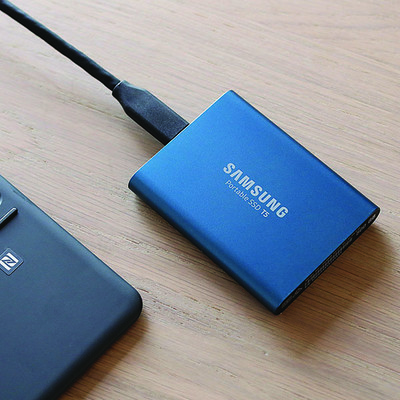
The Samsung T5 500GB portable solid state drive is down to $127.99 on Amazon for the first time. This price is an all new low for the T5 and beats the previous low by $20. This deal is even better than last year’s holiday shopping season.
The 250GB version of this SSD also dropped in price recently. It’s down to $97.99 from $120.
The Samsung T5 has gotten quite a few great critical reviews in a short amount of time, including an Editor’s Choice and 4 stars from PC Mag, 4.5 stars from Tech Radar, and a review from Forbes that said it “offers a great sweet spot in terms of size, performance and price.” Amazon users give it 4.7 stars based on 539 reviews. Samsung backs it up with a three-year warranty, as well.
See on Amazon
How to use an Amazon Cloud Cam outdoors

I’ve been using Wi-Fi security cameras in my house for years. I started with a Nexia Home system ages ago, then upgraded to Simplicam due to their price and various subscription plans. From there it was a short stint with the Logi Circle (which are still great cameras) until I finally landed on the Amazon Cloud Cam when it was released last fall. While this version was only meant to be indoors, it didn’t stop me from wanting an Amazon Cloud Cam outside.
See at Amazon
While they work amazingly well indoors — since day one I’ve longed to put one outside overlooking my driveway. I’ve been holding with hopes that Amazon will release a full-fledged Cloud Cam outdoor version (please Amazon!) and searching frantically for a short-term solution. It wasn’t until a few days ago that I came across this outdoor housing made to fit the Cloud Cam that my prayers were (somewhat) answered.
Before we go too much further — no, this isn’t a 100% weather-proof solution. Even if you want to use your Cloud Cam outdoors, you’ll still be using an indoor camera outside where it’s not intended to be used and will be susceptible to the elements (depending on your placement, of course). While this housing does a really good job of covering most of the camera, there is still a bit of the underside exposed. It’s insanely sturdy and very well made, but it’s not without its faults. Should it worry you? Again, it depends where you put your camera and what the weather is like where you live. Caveat emptor.

That being said, this thing is much more than I expected for the $13 price tag. Unlike other silicone “covers”, this bad boy is solid, sturdy plastic that I can’t say enough good things about. The entire housing comes with a variety of pieces — the main housing itself, a clear plastic protective face-plate, a sticky foam ring (for helping with night vision, more on that later), front cover, a few small screws and even a small eyeglass-size screwdriver. Also, instruction manuals, if you’re into that sort of thing.
There was one hiccup that I ran into right at the start that hopefully, you can avoid. Before you get going, know that you’ll need to have the power cable plugged into the camera before you put the housing on. This was a slight issue for me as my cable runs through a wall outside, meaning I had to assemble the housing on the camera while standing 10 feet up on a ladder. Not impossible, but still not as easy as doing it on the ground.
Putting it together is actually super easy. To attach the housing, you slide the main unit over the camera and then put the protective screen in place. The instructions here state to make sure that the holes are lined up symmetrically (showing just how awesomely thorough the whole process is) but aside from that, there’s not much to it.

After the screen is in place, you stick the little foam ring in the center around the camera lens to help prevent glare from the IR illuminators. Anyone who has ever put a camera like this in front of a window and tried to use night vision knows why this is important (thankfully you can always just turn off night vision). Then just put the front plate into place, put in the provided screws and you’re good to go.
Even though my camera is on the far end of my house, outside and away from my router, I haven’t noticed any major lag or degradation with this housing in place. Granted, everyone’s experience will be different, but my only real worries are weather-related. There’s a super slim chance that the camera could get wet during a torrential downpour, and I’m also not sure how it will fair on super hot days with no way to vent excess heat — but only time will tell. Did I mention how well-built this thing is?!
For now, I’m ecstatic that I can finally use my Amazon Cloud Cam outdoors without shelling out a ton of money in the process.
See at Amazon
YouTube Music vs. Spotify: Which is the better streaming music service?

Can the biggest name in streaming video overtake the biggest name in streaming music?
If there is a throne to be won in music streaming, Spotify won it years ago. They’ve got a great selection, they’ve somehow gotten a better reputation for algorithms than Google, and with their Student pricing, they lure in younger listeners in droves and then hook them into staying long after they graduate. Not even Apple — the name synonymous with music players for the last 20 years — could make much of a dent. But there is a new challenger coming for the king.
If you’re going to try and fight Spotify, you need more than great value, superior selection, and fancy new features — all of which the all-new YouTube Music has. No, you need two things that aren’t found in an app’s feature list or shiny, new web client.
You need brand power, and you need to have history. YouTube’s brand power and history are far more storied than Spotify’s, but how much of that will translate to YouTube Music this time around?
Plans, Pricing, and Device Limits
YouTube Music and Spotify both offer free versions and paid versions. Neither let you download music for offline listening — and both break up the music with audio ads every few songs — but at least Spotify will let you play music with the screen off. YouTube Music pauses the music when free users turn off the screen or leave the Now Playing window, which means that YouTube Music Free will monopolize your screen and thus your battery while you’re listening to it.

Spotify Premium is $9.99/month for a single user or $14.99/month for a family plan of up to 6 users at the same billing address — all Spotify accounts must be billed to the same address for a family plan. A $4.99/month Spotify Student plan bundles in a basic (ad-support) Hulu subscription, and is just about the best student subscription price in streaming media today. Spotify Premium can bundle with basic Hulu for non-students at $12.99/month. Spotify only has a device limit for downloads, which is 3 devices, each with a download limit of 3,333 songs, which is easy to remember and easy to hit for music addicts.
See at Spotify
YouTube Music Premium is $9.99/month for a single user and $14.99/month for a family plan of up to 6 users over 13 years of age — you have to be at least 13 years old to have a Google account. It removes ads and unlocks background playback and offline playback for YouTube Music. For an extra $2/month — $11.99 for a single user or $17.99 for a family plan — you can get YouTube Premium, which gets rid of ads and enables background/offline playback in YouTube, YouTube Music, YouTube Kids, YouTube Gaming, YouTube VR, as well as giving users premium features in Google Play Music and access to YouTube Originals content.
If you’re going with YouTube Music, pay a little more to get a whole lot more bang for your buck with YouTube Premium.
See at YouTube
The new YouTube Music is available right now in 17 countries — Australia, Austria, Canada, Denmark, Finland, France, Germany, Ireland, Italy, New Zealand, Norway, Mexico, Russia, South Korea, Spain, Sweden, Switzerland, the United Kingdom and the United States — whereas Spotify is available in over 60 countries.
Library and Selection

Spotify has over 30 million songs in its catalog, and while YouTube Music doesn’t give out a hard number for the songs in its catalog, it doesn’t matter what the official number is, because that would only count the official songs YouTube Music hosts through its deals with record labels.
And there is so much more to YouTube Music’s selection than that.
YouTube Music has official songs and albums from the record labels, and to that it adds official music videos, live concert videos — both official and fan-uploaded, fan covers, remixes, and mashups. Then there’s also the millions upon millions of songs that aren’t in YouTube Music’s official library, nor any official streaming library, in many cases.

Some of this fan-uploaded content is illegal. When copyright holders serve DMCA requests, YouTube pulls that content, but that’s a constant game of whack-a-mole that most labels don’t have the time or resources to play. There are also labels that have folded, songs that have partially or entirely lapsed/frozen rights, songs that labels have lost, and much of that music is only available via fan uploads, so YouTube Music will be the only legitimate streaming service that can even hope to have them unless the service has a personal music locker.
In short: Spotify has more official songs, but YouTube has far, far more music that’s actually available to listen to.


The one caveat to YouTube Music’s awesome library right now is that library management is still somewhat lacking. Everything you do in YouTube Music shows up in YouTube’s main app, from searches to added albums to every song you listen to cluttering up your watch history. YouTube has told Android Central they “are working on making it easy to separate YouTube Music & YouTube Main watch history and will also have a way to hide playlists/albums added from Music in Main.”
Stations and Mixtapes — A battle of algorithms

Spotify is known for its algorithms. From the Daily Mixes that will adjust and tweak their listening-based stations every day to the much-beloved Discover Weekly to everyday artist- and playlist-based radio stations, Spotify’s recommendations are consistently lauded by tech enthusiasts and music addicts alike. They even break out the algorithm-based Daily Mixes into several different mixes so that you can get more rock recommendations without the teeny pop you play for your daughter sneaking in.
YouTube Music’s algorithms don’t have the pedigree of Spotify’s, and they only have two main mixes for users: Your Mixtape and Offline mixtape. In the new YouTube Music, all genre radio stations have been completely hidden unless you explicitly ask for them, but a radio station button sits at the top of every artist page. And once you get a station going, Google’s stations shine like the diamonds in the rough they are.

YouTube Music’s station offerings seem inadequate, but only until you listen to one.
Your Mixtape may be a bit diverse in its genres since everything is in one mix, rather than separated by genre/type like Spotify, but Your Mixtape dials into your tastes very, very quickly. YouTube Music has years of YouTube history to feed its radio algorithms as well as the recommendations that litter the Home feed. Spotify’s algorithms may package things a little better with Daily Mixes 1-7, but those 7 mixes still haven’t learned me as well in months as YouTube Music has in a week.
Then we have Offline Mixtape, one of the features of the original YouTube Music. Offline Mixtape takes the algorithm from Your Mixtape and uses it to generate a playlist that is regenerated and re-downloaded daily. You choose how many songs the playlist includes, up to 100, and it presents you with a new mix every day to rock out to during your commute. Offline Mixtape is a downloadable Daily Mix, something that not even Spotify’s many mixes can do.
Stability and Sound Quality
YouTube Music is still its early stages and is lacking a great many features. There are serious UI bugs, especially when using the app offline, casting, and trying to manage or browse your own library, as every category in Your Library is sorted by date added rather than name.

YouTube Music’s audio quality right now is stuck at average. Spotify offers audio streaming qualities up to 320 kbps via Spotify Premium’s “Extreme” audio quality option, whereas YouTube Music’s current music quality in the app is about 128 kbps. YouTube Music has told Android Central that more robust audio quality settings are coming in an upcoming update, but they’re not here quite yet. Spotify also has Android Auto support, something every music subscription service should have in 2018, and video-based YouTube Music needs that even more than most.
For now, YouTube Music sounds fine unless you’re an audio snob, and it’s a bit buggy. We expect things to improve soon, but we have to compare what we have right now.
Why Spotify is better right now…

Spotify has almost a decade head-start over YouTube Music: a decade to build a loyal user base around the world, one of the best-known brands in music, and enough history with its users to deliver consistent and consistently awesome mixes to its users daily, weekly, and yearly. It’s also had a decade to smooth out its rough edges and refine their experience, while YouTube Music is still firmly in the growing pains stage of its development.
Spotify is still the clear winner for students, as $5/month for Spotify Premium and Hulu is pretty hard to beat, and by the time the Student discount ends, most users have too deep a library and history in Spotify to just pick up and move to a new service.
Read more: Everything you need to know about Spotify
…and why YouTube Music is going to dethrone it sooner than you think
Spotify has built itself up as one of the biggest names in music, but its brand power is still a drop in the bucket compared to YouTube, which is one of the most-visited sites on the internet. YouTube’s brand power even extends to music already — from the most viewed music videos ever to viral covers from upcoming artists, from mind-blowing remixes to that one song that you can’t remember the lyrics to.
 Just look at those views.
You already use YouTube for music. Google just needs to convince you to pay for it.
YouTube Music has a few very compelling arguments already — if you’re a free user, you have to keep the screen on the whole time, which is a battery drain and keeps you from using your phone for anything else. You also can’t download music for offline playback without Premium, which is a more common practice. However, the most compelling reasons for subscribing aren’t even in YouTube Music — at least, not today.
YouTube Premium is $2/month more than Music Premium, and is the no-brainer for anyone considering paying for a YouTube subscription. For $2 more, you get offline and background playback on all of YouTube instead of just on YouTube Music content. You get rid of YouTube ads on all of YouTube, and you get access to YouTube Originals, should you need any more freebies thrown in.

Then there’s the news that Google Play Music is going to eventually give its best feature to YouTube Music: its music locker. Google Play Music’s free, 50,000-song music locker is something that doesn’t really have a rival on the market right now. If a user can’t find a song in Google Play Music’s subscription library, they can upload it to their library themselves. That’s invaluable, and it’s coming to YouTube Music, which will combine the biggest, baddest music subscription catalog on the planet with the ability to patch any conceivable hole in it a user finds.
Read more: YouTube Music review
Updated June 2018: We’ve updated this guide to reflect YouTube Music rolling out to more countries and YouTube’s new pricing tiers. YouTube Red is dead. Long live YouTube Premium — and seriously, I mean it, do not pay for Music Premium. Spend $2 and get 200% more features!
Killing Floor Incursion review : Guns, zombies, and severed arms

Better zombies have come to a VR headset near you
This sci-fi horror, created by Tripwire Interactive, hit some VR platforms earlier this year. But this title coming to PlayStation VR (PSVR) is such a big deal because Incursion is a VR exclusive, which means the scares are new and the action is so much more intense.
Perhaps more important, we know that Incursion came to PlayStation VR as a complete game, unlike other platforms. In November of 2017, the game received a few more updates including Hard Mode for the campaign, a Holdout Mode for how long you can survive, a new Katana weapon for the Holdout mode. Options for smooth rotation and a good amount of bug fixes were also included in this update. Here I’ll go over all of these updates, as well as the overall review of the game.
So, if you’re interested in trying out Killing Floor Incursion for the PSVR, read on below and get your Zed on!
See on PlayStation Store
Controls

At the start of the game, they ask you if you are right or left handed, and I really appreciated that optional setting. Another thing that got them loads of points from me was the ability to turn on an option for playing when sitting down. This was particularly awesome because not too many horror games are accessible to someone who might not be able to stand.
Movement and control buttons
The smooth rotation turning option was just a little too slow and definitely took some getting used to, but I’ve never been a fan of click turning because it always makes me feel nausous. There’s no option to change the speed of the turning, but hopefully, one will be included in the next update.
Other than that “Free movement”, which is the ability to walk or run, really made the game feel real. When it comes to horror VR games I appreciate being able to actually run from the enemies because teleportation movement makes me feel like I’m cheating. When I’m playing a horror game being able to teleport behind my enemy just makes it too easy to play.
Gameflow from pre-set controls

I appreciated being able to set my holster to my chest or my waist. Being a short person I have it set to my chest, but it’s going to register at my waist anyway, so these types of customizations can really make an impact on gameplay. There is also an option to store things on your back, but there were more times than not where I would just end up throwing an object behind me. The best way to avoid this is to hover your hand over your back for a moment before you let go.
There was also a “Control scanning” option that worked in two different ways. You could send your little robot friend out to find something (via an option in the menu) or turn on your control scanning. This is an interesting mechanic that lights up items that are near you and illuminating objects that you can collect or interact with.
Now let’s talk about melee options. There are melee weapons for you to fight with should you run out of bullets. Then, much to my amusement, if you run out of bullets and don’t have any knives you can use the butt of your gun or the severed limb of a zombie. That’s right, you can beat zombies to death with the bloody side of their own limbs. Phenomenal.
Presentation

The overall visuals were rather dark, but not in a murky or cloudy sense. This made everything an extra level of creepy and I loved every minute of it. The background sounds also get an A+ from me. Hearing the owls, bugs and other general forest noises added a level of immersion that made it feel that much more real. Heck, you can even hear the sounds of people dying and zombies groaning even if you’re nowhere near a spawn for combat. They did an extraordinary job making me feel like I was in a real live zombie stimulation.
The last thing I want to goob about is how great their zombies looked. You can see the amount of detail that went into them all the way from movement to rotting flesh festering as they walked. While there were zombies who looked similar there were enough varieties to make it feel like a true horde. Also, spider zombies. Nope. Not even once. 10/10, terrifying every time.
Story mode

The beginning of the game gives you plenty of time to learn the mechanics and gather things before throwing you into the fire. This is pretty important for horror games, so be confident in knowing you’ll be able to get those controls down packed before you experience your first zombie. To top it all off, the controls are actually fairly easy to use. This, combined with the Move Controllers great design, made learning go smoothly. And then there was Emma.
Emma Rose is the voice in your headset. While I appreciate a character who is there to explain the mechanics and what you need to do, the way she is presented wasn’t the best. She reminded me all too much of Navi from Legend of Zelda, and not in a good way. The first time she explained how to do something, or what I needed to do, it was okay. But, if you take too long she will continue to ping you with notifications. There are already arrows in your field of vision that show you where to go, so some of the things she said were all but pointless. This got annoying very fast as I’m a player who likes to fully experience my surroundings and take my time to figure things out before moving forward. With her constantly nagging in my head I felt rushed and, ultimately, pretty annoyed.
With the new updates, they have now added a “Hard Mode” for the campaign. This gives you less ammo and health as well as more power Zed with different abilities. So, if you’re looking for a challenge or to be scared out of your pants, you should check it out!
Holdout Mode

Holdout Mode is an amazing option where you can see just how long you can survive against a horde in a set location that you get to choose. After you complete a level in the campaign mode, that level will be available to play in Hold Out mode. Here you will only start with a pistol and a knife, but don’t worry. There are better equipment and powerups you can collect on the way. This mode isn’t just killing zombies. There are also puzzles, locks and full maps for you to explore and discover.
Your scores are marked on the leaderboards so there is a very real competition to get the best score among your VR peers!
Final thoughts
The entire story mode of the game takes about seven hours to complete. Then when you add on their multiplayer options and Holdout Mode, Killing Floor Incursion could very easily be a game that you have a blast with for quite some time. For $29.00 on the PlayStation Store it’s almost a steal. From graphics to gameplay to controls I give this title a 4.5 out of 5 stars.
The only reason it’s not a 5 out of 5 is that I wholeheartedly believe the movement visuals could have been a little better. As someone who spends a lot of time in VR having to get used to movement in VR isn’t something I’ve had to do for a while.
Regardless, go check out this game and get your Zed on!
See on PlayStation Store
4
out of 5
PlayStation 4

- PS4 vs. PS4 Slim vs. PS4 Pro: Which should you buy?
- PlayStation VR Review
- Playing PS4 games through your phone is awesome
Amazon
Microsoft Edge beta for Android picks up Adblock Plus support
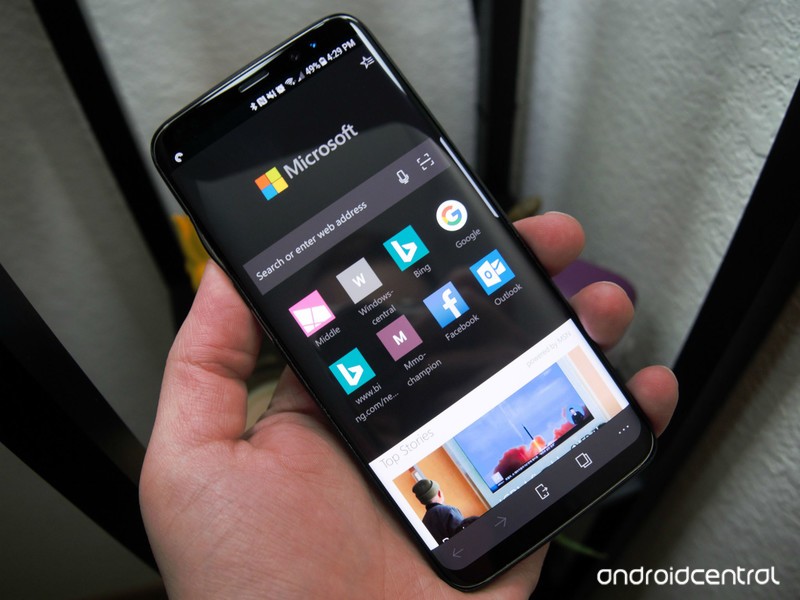
Now you can stop ads before they start.
Microsoft continues to iterate on its Edge browser for Android, with beta testers being first in line for improvements. And with the latest beta release, the company is tackling an area that’s sure to be important to everyone: ads.
The Microsoft Edge for Android beta now includes support for ad blocking via Adblock Plus. Built directly into the browser, users can now turn the feature on from within the settings menu. If you’ve used Adblock Plus on your desktop machine, then you’ll know what to expect here, with the feature keeping sites clear of potentially annoying advertisements as you browse.
Though ad blocking is the only new piece of this update, Microsoft is also continuing to test its intelligent visual search and favorites for internal Intune-managed work and school accounts. Here’s a look at all of what’s new:
- Content blocking with Adblock Plus is now available under Settings
- Intelligent visual search gives you a cool new way to find contact info, identify landmarks, or find similar images based on a photo
- See organization-managed favorites and internal web apps on Intune-managed work and school accounts A better book reading experience including ability to see/add bookmarks and to change text spacing
- Performance improvements
If you’re an Edge beta tester, the latest update is in the process of rolling out now. Do note that we haven’t seen it arrive on all of our devices yet, so this appears to be a slow rollout of sorts. Otherwise, expect ad blocking to make its way to the release version relatively soon, should testing go well.
See at Google Play
CordCutters.com answers: Do you need an ‘HD’ antenna?

Don’t laugh — it’s a perfectly fair question.

Whether you’re using an Amazon Fire TV, or Android TV, or Apple TV or even Roku, one of the first accessories you should pick up is an over-the-air antenna. It’s the best way to fill the gaps that streaming TV can occasionally leave behind. And it often does so with even less compression, which is great.
Oh — and once you’ve bought the antenna, all the content is free.
But one question folks ask all the time is whether you need an “HD” antenna. And it’s a fair question — it’s all about the HD content these days, right? And it’s an especially salient question because it’s absolutely possible to watch shows over the air in “HD.” (OK, 1080i, but that’s another thing for another time.)
So let’s answer the question, shall we?
Read at CordCutters.com: Do you need an ‘HD’ antenna?
Introducing CordCutters.com
- The hardware you need
- All about streaming services
- What channels are on which service
- FREE over-the-air TV
- How to watch sports
- Join the discussion
Get the latest deals

