


These smart lights work with Amazon Alexa

Control your home’s lighting using Alexa and these smart bulbs.
Amazon offers an affordable way to start building out a voice-activated home automation system for your house or apartment with their Amazon Echo and Echo Dot powered by their A.I. assistant, Alexa. On its own, you can use Alexa to play music and find news, sports, and other information. But things get really interesting when you start to connect Alexa up to smart devices, including connected LED bulbs and smart switches, around your house.
There are many light options compatible with Alexa. We’ve broken things down based on the different brands and ecosystems that each have their own compatibility with smart lights and smart switches that you’ll ultimately be able to control via Alexa on your Amazon Echo.
- Philips Hue
- Samsung SmartThings
- Insteon Hub
- WeMo switches and outlets
- Lutron dimmers and switches
- LIFX smart bulbs
- GE Link LED Smart Bulb
- TP-Link
- Nanoleaf Aurora Smart LED Light Panel – 9 Pack
- Haiku Home Premiere LED Lights
- Smartika Smart Home Lighting
Philips Hue

Philips Hue is the leader in smart bulbs, and are downright cool. You can connect up to 50 Philips Hue bulbs, lamps and lighting strips via the Philips Hue Bridge, so chances are you could convert all your home’s lighting over to the Philips Hue system. Whether you’re looking for 60W equivalent white LED bulbs, bulbs that feature 16 million colors, or LED light strips for futuristic accents, there’s a reason why so many people have gone with Philips Hue.
Alexa syncs right up to the Philips Hue Bridge, which means you’ll be able to set up different lighting groups for your rooms and IFTTT recipes on your phone, then also control everything with the sound of your voice via your Amazon Echo. There’s a lot of fun to be had here, as Philips Hue lights can be synced up to your music for epic dance parties, and otherwise customized in countless different ways to suit your lifestyle.
If you’re interested in getting started with Philips Hue, you’re best off getting a starter kit. There are a couple of different options to consider:
- Philips Hue Starter Kit w/ two bulbs and one Bridge — $69.99 on Amazon
- Philips Hue Starter Kit w/ two A19 bulbs, one Bridge and one Dimmer switch — $129.99 on Amazon
- Philips Hue Starter Kit w/ three White and Color Ambiance bulbs and one Bridge — $170 on Amazon
No matter which starter kit you choose, the beautiful part of going with Philips Hue is that it’s super easy to add extra bulbs or other elements to your ecosystem later.
Samsung SmartThings

SmartThings provides a full suite of options for home automation, which includes a few options for smart lights. You’ll need a SmartThings Hub ($98) to get started, but from there you can connect plug-in smart switches for appliances, lamps and outdoors, and in-wall dimmers which support dimmable LED and CFL technologies along with legacy support for incandescent, halogen, Mark 10, and magnetic lighting loads.
You can also connect smart bulbs from Philips Hue or Osram to your SmartThings Hub, along with a host of other super handy home automation products that all work within the SmartThings ecosystem.
If you’re mainly interested in smart lights, you can get a SmartThings Hub and an Osram bulb bundle ($109). If complete home automation is your ultimate goal, you might be more interested in the SmartThings Home Monitoring Kit ($169.99), then build your own lighting arsenal from the available SmartThings-compatible lighting options.
Insteon Hub

Insteon’s offerings for smart home lighting mostly include in-wall dimmers and switches and plug-in dimmers. They do offer their own programmable, dimmable 8W LED bulbs ($29.99). You can use the Insteon app to set bulbs into groups for scheduling and creating scenes, then take control via Alexa.
To start building out your Insteon smart lighting ecosystem, you should get the Insteon Starter Kit ($99.99), which comes with the necessary Hub, and two Dimmer Plugs, perfect for setting up a voice-controlled bedside lamp. From there, you’ll need to buy compatible bulbs as you need them.
Insteon’s system is a decent option for those looking for home automation, but overall their lighting options are somewhat lacking.
WeMo switches and outlets
WeMo offers Wi-Fi enabled smart switches and outlets that you can control via Alexa. The WeMo Light Switch ($40.99) can be used to replace any light switch in your home, letting you schedule and control your lights and appliances without the need of a central hub.
This one is better for the DIYers out there who are interested in manually creating their own home automation network with in-wall switches and plug-in adapters to control lamps and other small appliances. Those looking for hassle-free installation and smart bulb options are best looking elsewhere.
Lutron dimmers and switches
Lutron Caseta Wireless products offer a selection of smart dimmers and switches that connect via the Caseta Wireless Smart Bridge. Connect your Smart Bridge to Alexa allows you to control all the dimmers and switches with your voice.
Check out the Lutron Caseta Wireless Smart Lighting In-Wall Dimmer Kit ($189.99) or the Plug-in Dimmer Kit ($189.99) to see what this system is all about. This is another route that’s going to require DIY effort with initial setup and is also lacking branded LED bulb options, but the Hub is compatible with a bunch of other smart devices from leading brands including Ecobee, Nest, Honeywell, Logitech, and Sonos.
LIFX smart bulbs

LIFX offers a range of smart bulb selections for indoor and outdoor use that are compatible with Alexa. Not only can you turn your LIFX bulbs on and off using only your voice, but Alexa can also control and tweak your bulb color or light temperature, so you always have complete control over your bulbs.
You can buy them individually or save money by bundling them into multipacks so you can upgrade bulbs around your home and link them all together via Alexa. They also sell bulbs with built-in infrared to enhance your security cam’s vision, as well as LED strips to add some futuristic and colorful accents to your home. Check ’em out!
See at LIFX
GE Link Smart LED Bulb

General Electric has a few smart bulb options available that work with Alexa but require a hub (compatible with SmartThings or Wink Hub 2.
You can get a standard A19 bulb for $29 (great if you already have a compatible smart home hub), or you can opt for the GE starter kit which includes two A19 bulbs and a compact GE Link Hub for just $75.
Other bulb sizes are also available.
See at Amazon
TP-Link
TP-Link offers smart bulbs that connect to your home network via Wi-Fi and do not require a standalone hub. There are four bulb options, from a standard white dimmable bulb to a fully-customizable multi-color bulb.
All of TP-Link’s bulbs are pairable with the Alexa app which allows you to control your lighting with your voice. TP-Link sells other smart home devices such as smart plugs which are also controllable via Alexa, as well as cloud-based cameras which are not.
See at TP-Link
Nanoleaf Aurora Smart LED Light Panel – 9 Pack

Not all lighting options need to be bulbs. The Nanoleaf Aurora are Smart LED Light Panels that you can connect to create an entirely custom and unique lighting solution for your home office, gaming corner, or wherever you want to show them off.
The best place to start would be the nine-pack kit that comes with nine panels that can be configured however you’d like, and you can add up to 30 panels if you desire. The nine-pack is available on Amazon starting at $220 and they might not be the most practical lighting solution but damn they’re cool. Add in Alexa functionality and BAM! Suddenly you got the coolest living room on the block!
Check out the full review of these modular lights.
See at Amazon
Haiku Home

Smart lights are awesome.
Hey Alexa, Turn them on.
The future is now!
All poetry aside, these light fixtures are stylish and premium smart lights to consider if you’re renovating your home and want to massively upgrade your home lighting with something you can control with Alexa.
Beyond Alexa voice control, these fixtures include built-in motion sensors that can be set up to instantly illuminate the room when you walk in and turn off when you leave. You can install them indoors or outside, and they also include Haiku’s Smart Lighting technology that measures the ambient light in the room and automatically adjusts the lighting level to ensure consistent lighting throughout the day.
These are highly reviewed on Amazon, are available in multiple styles and colors to match your decor, and start at around $199. Check it out!
See at Amazon
Smartika Smart Home Lighting

Smartika has been making stylish and functional smart home lighting options since 2014, developing a line of smart LED fixtures that would look great in any home.
They’ve got some cool looking stuff like the Indoor/Outdoor wall light pictured to the right, along with a track-light fixture and pot lights that can all be linked to a Smartika Central Control HUB ($35).
- Smartika PROFILE Indoor/Outdoor Wall Light ($110)
- Smartika HALO LED Integrated Track-Light Fixture ($190)
- Smartika RADIUS LED Smart Recessed Ceiling Light ($49)
- Smartika EDGE LED Smart Recessed Light Square Cover Plate ($55)
Learn More
Which should you get?

Thanks to Alexa’s compatibility with a variety of smart light systems, you’ve got several great options for automating and customizing your home. Which system you go with will greatly depending on your current living situation.
If you’re living in an apartment and are just looking to control some funky lighting options via Alexa voice controls, Philips Hue is your best bet. Buying a starter kit is a great investment that you can take with you as you move — and with the lifespan of LED lighting well exceeding a decade, you’ll enjoy the freedom to rearrange, expand and easily move your Philips system wherever you go.
If you’re a homeowner looking to integrate IoT devices throughout your home, you’ll want to buy an Alexa-compatible hub that shares a wide range of compatibility with other brands and products, such as SmartThings or even a Wink Hub 2, then build out your smart bulb and other devices to the exact specifications of your home.
And if you’re in the process of planning a home renovation, it might be worth looking at WeMo, Insteon, and Lutron’s in-wall switches or dimmers to convert your existing home wiring into a smart lighting system that you can then control with your voice. Don’t just update the look of your home — upgrade its functionality, then let Alexa control it all with the power of your own voice.
Updated June 2018: Updated pricing information and removed options that are no longer available.
How to enable Continued Conversations with Google Assistant on your Google Home
Saying “Hey, Google” all the time is so 2017.
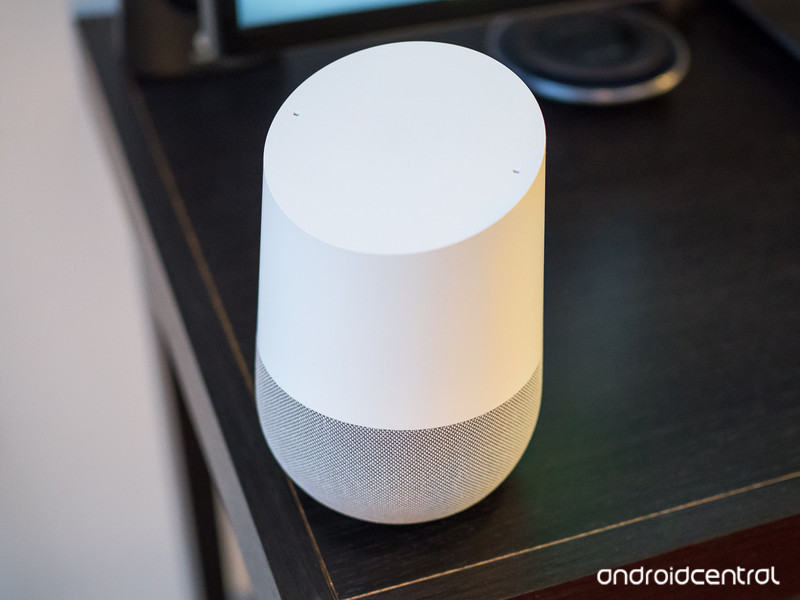
As magical and futuristic as the Google Home often is, having to repeatedly say “Hey, Google” or “Okay, Google” each time you want to talk to it can get very annoying very quickly.
Thankfully, with the release of Continued Conversations, Google’s offering a solution to this pain point. With Continued Conversations, your Google Home will keep listening to you for a short period of time so you can continue asking questions or issuing commands without having to say “Hey, Google” every single time.
Continued Conversations is rolling out to English users in the United States now, and to enable it, here’s what you need to do.
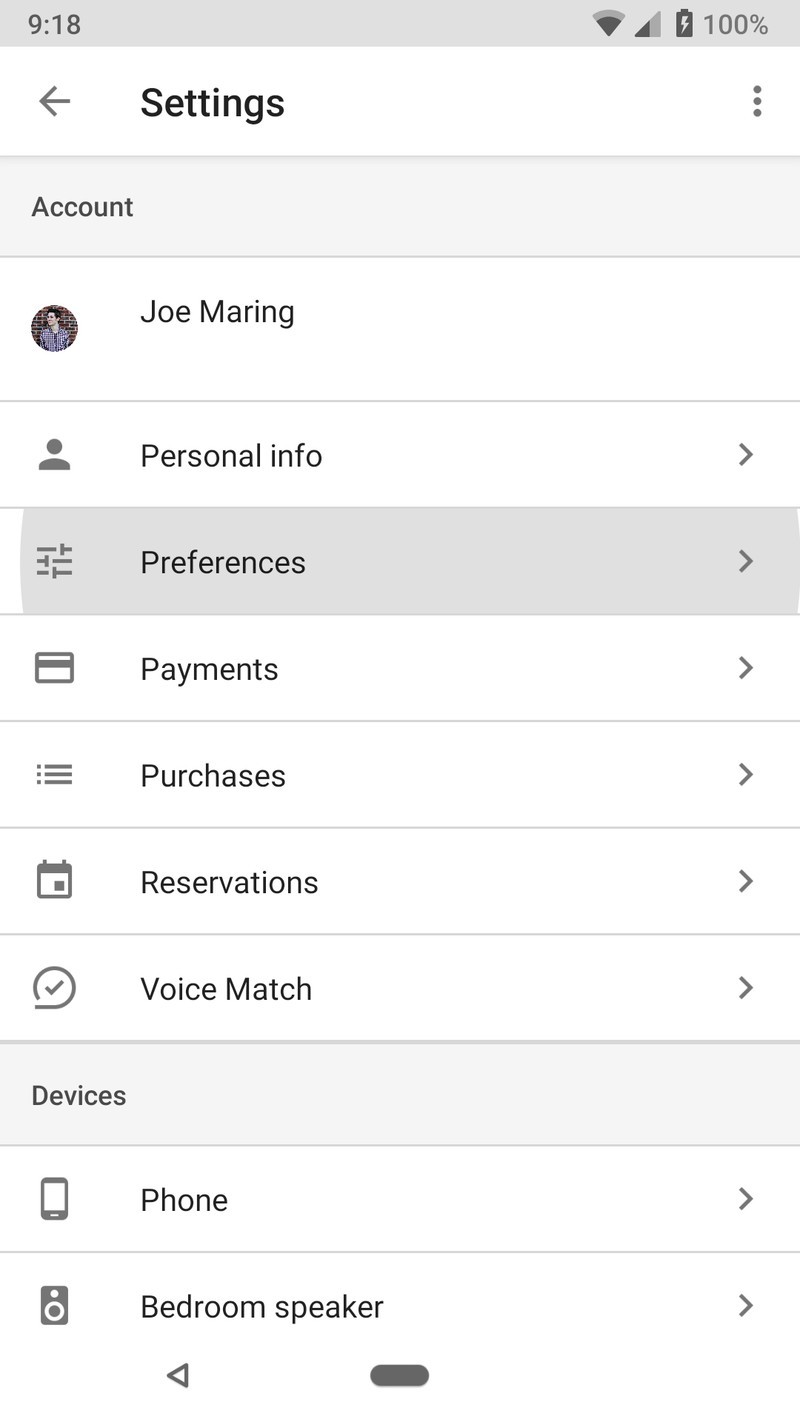
Open the Google Assistant on your phone and tap the blue circle with a rectangle in the midde.
Tap the three dots at the top right.
Tap Settings.


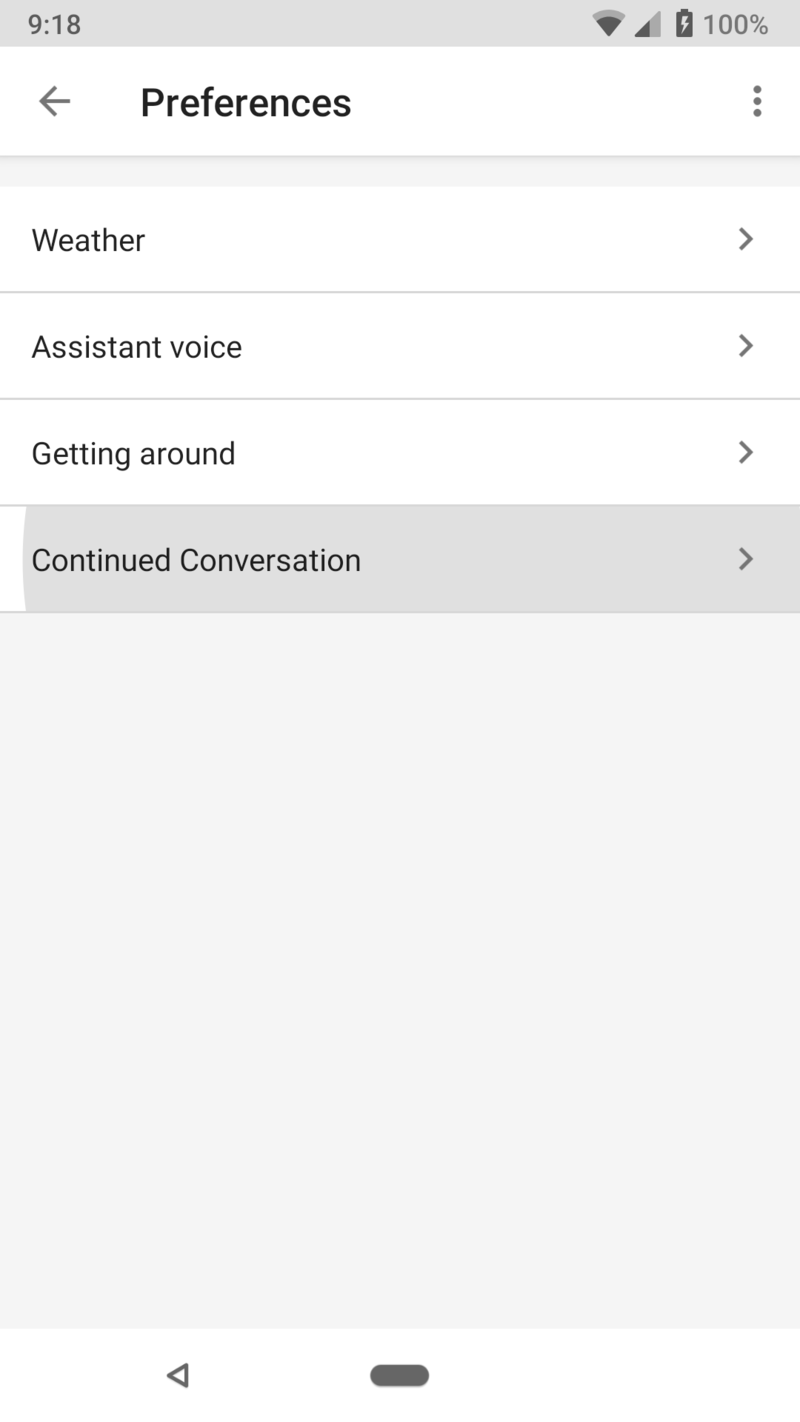
Tap Preferences.
Tap Continued Conversations.
Tap the Continued Conversations toggle so that it’s blue.
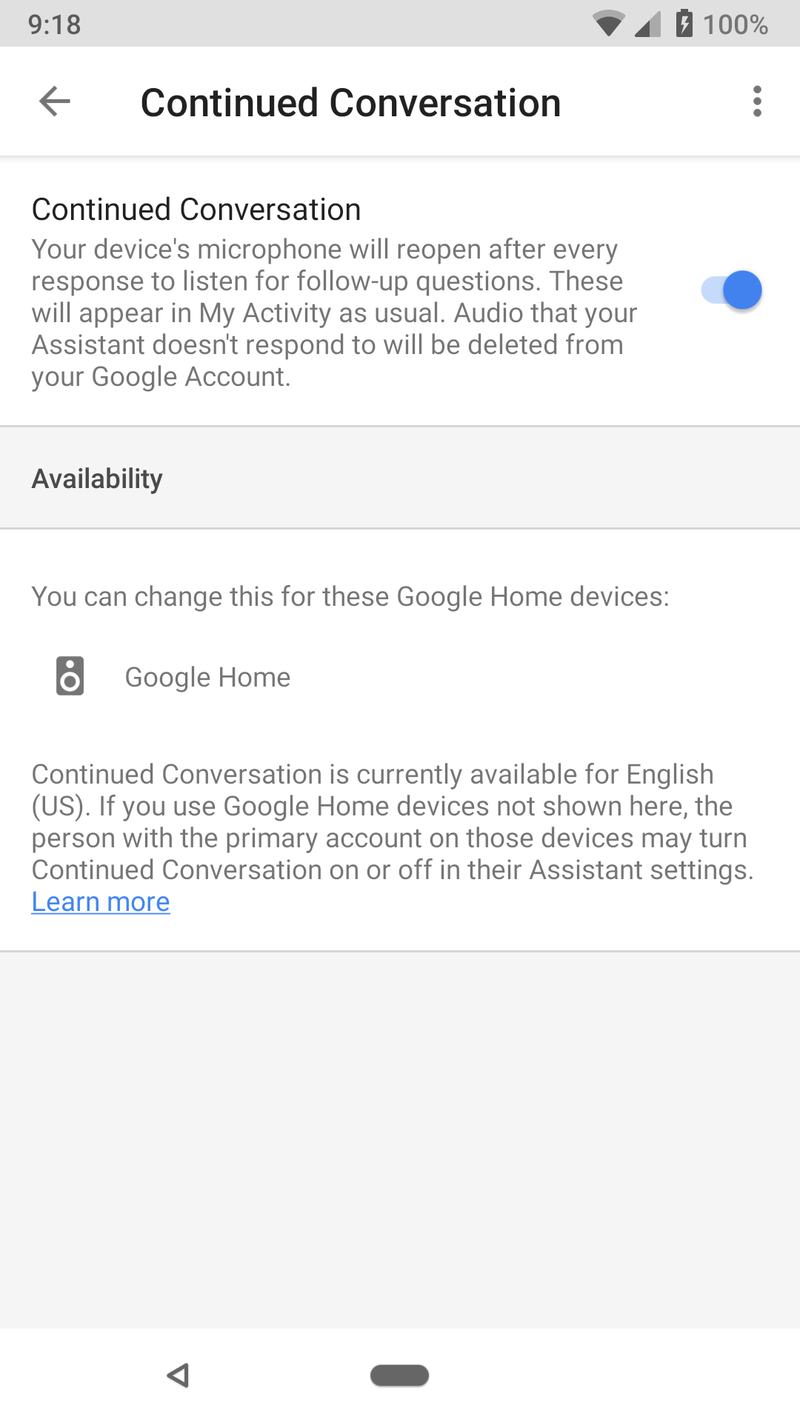
Once enabled, you’ll be able to start talking to your Google Home(s) in a much more natural manner.
The LED lights on your Google Home will stay lit up so you know it’s still listening, and while it’ll automatically stop after around 8 seconds, you can manually have it stop by saying “thank you” or “stop.”
After you get a chance to play around with Continued Conversations, drop a line in the comments below and let us know how you’re liking the new feature!
How to set up your Google Home, Google Home Mini, and Google Home Max
Google Home
- Google Home review
- Google Home Mini: Everything you need to know!
- Google Home Max review
- These services work with Google Home
- Google Home vs. Amazon Echo
- Join our Google Home forums!
Verizon
Best Buy
Target
Google Store
Sunrise Gold Galaxy S9 hands-on: Enjoy the view
The phone’s available exclusively at Best Buy and Samsung.com in the U.S.

Samsung announced two new colors for the Galaxy S9 in mid-May, including Sunrise Gold and Burgundy Red. The former of those two goes on sale in the U.S. on June 24, and if you’re not sure if it’s the version for you, we got a chance to go hands-on with Samsung’s newest look to see whether or not it’s worth getting over Coral Blue and Lilac Purple.
Aside from the difference in color, one area where the Sunrise Gold S9 stands apart from its siblings is with the finish of its glass.
Similar to the Midnight Black and Silk White OnePlus 6, the Sunrise Gold Galaxy S9 has a matte finish on its glass that looks and feels great.
It’s still not the most grippy phone in the world, but it does a great job at hiding fingerprints while being reflective enough to pull off some slick light reflections.
Samsung Galaxy S9: Which color should I buy?
To match the glass back, you’ll also find a gold paint job on the rear camera housing, metal frame, and even the inside of the 3.5mm headphone jack and USB-C port.
The new color and matte finish are absolutely beautiful.
As for the phone itself, this is the same Galaxy S9 we know and love. Samsung’s Super AMOLED display looks as good as ever, the Snapdragon 845 is more than powerful for day-to-day tasks, and the variable aperture for the 12MP camera allows you to pull off some excellent low-light photographs.
If you’re interested in picking up the Galaxy S9 or S9+ in Sunrise Gold, the phone is being sold in the United States exclusively through Best Buy and Samsung’s own online store. It has the same starting price of $720 with 64GB of internal storage, but if you buy it through Samsung, you can also get it in 128GB and 256GB flavors for a bit more.
What do you think about Samsung’s latest S9 color?
Samsung Galaxy S9 and S9+: Everything you need to know!
Samsung Galaxy S9 and S9+
- Galaxy S9 and S9+: Everything you need to know!
- Galaxy S9 review: A great phone for the masses
- Complete Galaxy S9 and S9+ specs
- Galaxy S9 vs. Galaxy S8: Should you upgrade?
- Join our Galaxy S9 forums
Verizon
AT&T
T-Mobile
Sprint
Smart lights, 4K receivers, standing desk converters, and more are all discounted today
Whether you’re looking for new tech gear or household items, we’ve got you covered.
We found plenty of great deals today that include big discounts on standing desk converters, Onkyo’s 4K receiver, Philips Hue smart lights, and more! Time’s running out to take advantage of these prices, so hurry!
View the rest of the deals
If you want to know about the deals as soon as they are happening, you’ll want to follow Thrifter on Twitter, and sign up for the newsletter, because missing out on a great deal stinks!
Keep your stuff safe with one of these $10 BFULL 10L waterproof dry bags

Today only, Amazon’s offering the BFULL 10L Waterproof Dry Bag in your choice of 3 colors for only $9.75. These typically sell for $14. Black and orange are currently add-on items that will ship with orders over $25, but as of press time, the blue bag is available to buy without the add-on restrictions.
These bags received positive customer feedback from the handful of users that left reviews. The bag promises to be tough and durable, yet lightweight, with a small form factor that’s easy to carry around. There are two additional pockets on the outside of the bag, too. In addition, the bag folds down and is super-compact when empty.
Take your new dry bag with you on a river float, kayaking, camping, or on a beach day. You might also want a special phone protector to ensure that your smartphone doesn’t take on any water damage.
See at Amazon
Deal: Get two 1-year MoviePass memberships when you buy a Galaxy S9/S9+
The promotion is available now through June 30.
Samsung and MoviePass are coming together to offer one of the most interesting promotions we’ve seen this year. For a limited time, Samsung’s giving out two MoviePass memberships when you purchase one Galaxy S9 or S9+.

MoviePass is the subscription service that allows you to see new movie releases in theaters by paying a monthly subscription fee, and the version Samsung’s including is the MoviePass Unlimited plan that regularly costs $9.95/month.
After buying your S9 or S9+, you’ll receive an email containing two promo codes within 14 days that can be used to redeem your free memberships. With MoviePass Unlimited, you can see one new movie per day in theaters every single day. Two memberships would regularly cost $251.90 for a full year, so you’re getting a pretty solid deal.
This promotion is available now and good through June 30, 2018. To take advantage of it before time runs out, click/tap the button below.
See at Samsung
Samsung Galaxy S9 and S9+
- Galaxy S9 and S9+: Everything you need to know!
- Galaxy S9 review: A great phone for the masses
- Complete Galaxy S9 and S9+ specs
- Galaxy S9 vs. Galaxy S8: Should you upgrade?
- Join our Galaxy S9 forums
Verizon
AT&T
T-Mobile
Sprint
Bethesda Sues Warner Bros for Copying Fallout Shelter With New Westworld iOS Game
Warner Bros’ new Westworld game for mobile devices is a “blatant rip-off” of Bethesda game Fallout Shelter, according to a lawsuit Bethesda filed in a Maryland U.S. District Court this week.
At issue are the similarities between the two games. In Fallout Shelter, which was first released in 2015, you run an underground bunker in the Fallout universe, directing your bunker inhabitants to build and run new facilities, go out on expeditions, and more, with the ultimate goal of building up the bunker.
Westworld, based on the popular HBO show and released this week, uses a similar concept, with an underground Delos facility that players are required to build out to create AI hosts and satisfy guests in the park. The ultimate goal is to build up your underground Westworld facilities along with the above-ground park.
In the lawsuit, which was shared by Polygon, Bethesda accuses Warner Bros and game developer Behaviour Interactive of breach of contract, copyright infringement, unfair competition, and misappropriation of trade secrets. Behaviour Interactive worked on both Fallout Shelter and Westworld.
The Westworld game, says Bethesda, uses the same game design, art style, animations, and features as Fallout Shelter, in addition to stealing copyrighted computer code created for Fallout Shelter. As evidence for this, Bethesda claims Westworld has a unique bug that was also found in early builds of Fallout Shelter.
 Fallout Shelter
According to Bethesda, Behaviour Interactive utilized its restricted access to Bethesda’s intellectual property, including copyrighted code, to reduce costs and development time to bring Westworld to market faster.
The Westworld game is a blatant rip-off of FALLOUT SHELTER. Working with the same copyrighted computer code used by FALLOUT SHELTER, Westworld has the same or highly similar game design, art style, animations, features and other gameplay elements as FALLOUT SHELTER, all of which are owned by Bethesda.
Behaviour’s breach of its contract with Bethesda is evidenced by the gameplay of Westworld, which uses the same copyrighted computer code created for Bethesda’s FALLOUT SHELTER game. Behaviour’s use of the computer code owned by Bethesda to develop Westworld even included the very same ‘bugs’ or defects present in the FALLOUT SHELTER code.
It’s impossible not to see the similarities between Fallout Shelter and Westworld, and as is pointed out in the lawsuit, several reviews and stories on the Westworld game that have come out over the last few months have noted those similarities. VentureBeat, for example, said in March that the “side-view user interface looks a lot like Fallout Shelter,” while ShackNews said “Westworld mobile is definitely taking a page out of the Fallout book,” during the same timeframe.
 Westworld
In light of the alleged intellectual property theft, Bethesda has asked the court for a jury trial, statutory damages, and actual damages, along with restitution and lawyers fees and costs. The company is also asking for every version of the Westworld mobile game to be removed from distribution.
Tag: App Store
Discuss this article in our forums
Maker Hart Just Mixer M Review


While you can go out and spend a boatload of money on various pieces of equipment, you’ll always need accessories. This may range from just a single microphone, or flash for videos, but there’s always a need for something.
Even after you purchase the big-ticket items, there are others that just help improve the general experience. That’s where the Maker Hart Just Mixer M comes into play, at least for videographers or podcasters.
Overview
The Maker Hart Just Mixer M is exactly that – a mixer. the Mixer M acts as a pre-amp and makes life easier for those who need more control over their volumes.

There are are series of nobs and dials that can be adjusted from the Mixer M directly. Additionally, we have two microphone inputs, a line-in connector, and an auxiliary cable output.
The interesting thing here is that this mixer works in a myriad of situations. Just Mixer claims that you can use the Mixer M in the following applications
- Webcast by smartphone
- Webcast by Computer or Notebook
- With an Instrument
- Outdoors with Tablet or Smartphone
Specifications
- Stereo Channels – 4 (2 x Mic, Line, Aux)
- USB Audio – IN / OUT
- Special Function – Phantom Power, MUTE
- Power Type – USB 5V/1A
- Control – Balance/Gain
- Stereo Outputs – 3.55mm/ 1/4-inch, Master USB Audio
- Phone Out – Yes
- Fader Length – 20mm
- Accessories – TRS > TRRS Adapter
- Dimensions – 5-inches x 3.3-inches x 0.9-inches (12.6 x 8.5 x 2.3 cm)
- Weight – 120g / 4.2oz
Mixer M Key Features
As is the case with any of these mixers and pre-amps, there are a few key features to look over. Here’s a list of what is offered by the Mixer M:
- Mic Preamp – Phantom Power and plug-in power provided by onboard microphone preamplifiers.
- USB Audio Interface – Stream 24-bit digital audio over USB from the mixer to any computers or mobile devices.
- Portability – Instead of worrying about being connected to a wall, you can use a portable charger to keep the Mixer M rolling for as long as you are.
- Ideal for webcasting – There are inputs for mics, USB audio, and auxiliary. These combined with the various outputs and Master/Channel volume faders combine for one of the best mixers.

In the box, you get the Mixer M itself, along with a 3-foot auxiliary cable, 3 foot USB to microUSB cable, and wall-plug. While this isn’t a starter kit providing everything you need, the Mixer M can really help step up your production.
You’ll need to find the right set of headphones and right microphone to connect to. But once those are in place, the Mixer M will help make you sound like a professional, regardless of what content is being created.

For those looking to get everything in one package, you can pick up the Premium package. This includes all of the aforementioned pieces, but also features the following:
- XLR to 1/8-inch 3.5mm cable
- 1/8-inch to 1/4-inch 3.5mm cable
- Combo Jack/Phone audio cable – 1/8-inch TRS to TRRS
- Lavalier (Lapel) microphone
Conclusion
The Mixer M really is one of the best options on the market for those looking to get started in the world of audio. It seems that Maker Hart has hit the nail on the head and provided quite an impressive microphone mixer for beginners and professionals alike.

Now for the big question – price. You may be surprised by this, but the Mixer M starts at just $87.99. If you want to spring for the aforementioned Premium package, then you’ll be shelling out $109.99.
However, similar products are priced anywhere from $100 to $300 and more. So you’ll be getting an outstanding value from the Maker Hart Just Mixer M.
If you want to pick up one of these for yourself, hit the button below to head over to Amazon. Sound off in the comments and let us know what you think about the Just Mixer M from Maker Hart.
Buy the Maker Hart Just Mixer M!
Using your phone to unlock your car is now one step closer to reality
A keyless future is coming closer to fruition now that the Car Connectivity Consortium (CCC) has published the Digital Key Release 1.0 Specification. The document offers a peek at how tech companies could standardize the use of smartphones to both lock and unlock any car, as well as start its engine and share access to the vehicle. The CCC, whose members include both Apple and Samsung, is looking to leverage technologies like Bluetooth and NFC in order to bring the new standard to life.
In particular, this first stab at a solution offers a secure way for customers to “download” a digital key straight to their mobile device. It would then utilize NFC connections to actually get into and start the car. The technology is also said to use a “Trusted Security Manager” system in order to add some extra protection to the digital keys on your smartphone. After all, if your phone could unlock your car, you’d be losing a whole lot more than your contacts and photos if it were misplaced or stolen.
In addition to Apple and Samsung, the CCC also boasts a number of big name car companies among its ranks, including Audi, BMW, General Motors, Hyundai, and Volkswagen. So if this specification were to be implemented, it would be likely that a large proportion of the cars on the road would soon have access to this smartphone entry system. Indeed, a number of car companies have already pledged that upcoming models of their automobiles will depend upon smartphones rather than physical keys, including Audi, Lincoln, Mercedes-Benz, Tesla, and Volvo.
“By standardizing a Digital Key solution that complies with our security standards we lay the building blocks for innovative services on a broad basis,” said Ulf Warschat, head of Body Electronics at Audi.
The CCC is now hard at work on Digital Key 2.0, which is slated to be released in 2019. It should offer a “standardized authentication protocol” for phones and cars, and ensure that various cars and smartphones are all compatible with one another.
As Alexander Maier, a BMW executive noted, “Leveraging all benefits of Release 2.0 will enable a scalable solution, interoperable with all smart devices and vehicles delivering a superior user experience to our customers.”
Editors’ Recommendations
- Your next car will talk to crosswalks, pay your tolls, and find its own parking
- The best wireless phone chargers for your iPhone or Android
- How to get Amazon to deliver to the trunk of your car
- How to overclock your GPU
- You can now unlock your Yale smart lock with your voice via Alexa
Get a warrant before tracking cell phone users, Supreme Court rules in privacy win
Privacy has emerged victorious in Washington, D.C, where the U.S. Supreme Court ruled on Friday, June 22 that police generally must obtain a judge’s permission before obtaining cell phone records to track individual customers. In the 5-4 decision, the highest court in the United States determined that police departments across the nation must first attain a search warrant before tracking mobile device users. This decision could have enormous implications, given that around 95 percent of Americans have a cell phone.
Chief Justice John Roberts authored the court’s opinion, and noted, “A phone goes wherever its owner goes, conveying to the wireless carrier not just dialed digits, but a detailed and comprehensive record of the person’s movements.”
How exactly does this work? Anytime you receive or send a text message or a call, your phone sends a signal to a cell tower in order to connect you with the telephone network. As you move, the signal moves with you from tower to tower, and cell phone companies keep logs of the phone numbers that are sent through each tower in order to determine billing questions like roaming charges. Of course, in the hands of law enforcement agencies, this information can also map out a person’s movements with great detail over an extended period of time.
The Supreme Court made a couple of exceptions to its general warrant rule, so police will still be able to obtain phone records without a warrant in emergency situations including the need “to pursue a fleeing suspect, protect individuals who are threatened with imminent harm, or prevent the imminent destruction of evidence.”
The case was brought to the Supreme Court by a man named Timothy Carpenter, who was accused of robbing a number of Radio Shack and T-Mobile stores after the FBI leveraged three months’ worth of cell phone records to prove that he was in the vicinity of the stores during the crimes. Carpenter claimed that because the FBI never had a search warrant, this evidence and his conviction could not stand.
The Justice Department and lower courts urged the Supreme Court to rule against Carpenter, with the Trump administration’s legal brief on the matter reading, “Cell phone users voluntarily reveal to their providers information about their proximity to cell towers so the providers can connect to their calls. Users cannot reasonably expect that the providers will not reveal that business information to the government.” The Supreme Court, however, disagreed.
Editors’ Recommendations
- After the San Bernardino iPhone fiasco, lawmakers introduce the Secure Data Act
- Florida police attempt to use dead man’s fingerprint to unlock his phone
- Apple ‘pleased’ that Samsung is paying it $539M ‘for copying our products’
- T-Mobile website bug reportedly exposed private customer account details
- DNA link to Golden State Killer raises questions of privacy versus safety

