


Tinder is making it safer than ever for you to keep swiping
In case you were concerned, Tinder has now finally encrypted the photos you send on the popular dating app. In a letter to Oregon Senator Ron Wyden, Tinder’s parent company Match Group announced that it had implemented changes to ensure that photos sent between Tinder’s servers and the mobile app are now encrypted. This actually become effective back in February, following a report from security firm Checkmarx that showed that Tinder did not have basic HTTPS encryption for its photos.
So, um, this is pretty weird. Apparently Senator Wyden just got Tinder to properly encrypt your swipe data, so you can all get it on in private. pic.twitter.com/BniAVUi77Q
— Matthew Green (@matthew_d_green) June 29, 2018
What did that mean, exactly? Basically, if you were on the same Wi-Fi network as a Tinder user, you (assuming you were a trained security researcher or hacker) would be able to see any photo the user did, or insert your own images into his or her photo stream. Curiously enough, it was only the photos that were not HTTPS-encrypted — other data maintained this basic security protocol. However, the app as a whole was still unsecured enough that a hacker sharing a Wi-Fi network would be able to see all swipes and matches.
But now, all that has changed. Photos were encrypted beginning June 4, and more recently, the app introduced another security feature that makes all swipe data the same size. This makes it more difficult to differentiate among actions taken on the app (swiping, messaging, etc). That change was implemented more recently on June 19.
“I want to assure you that protecting the private data of our users is a top priority,” the Match Group wrote in its letter to Wyden. “We take the security and privacy of our users seriously and employ a network of tools and systems to protect the integrity of our platform, including encryption.”
We should point out, of course, that none of the above will really affect you in any capacity. Your Tinder profile won’t look any different, nor will your experience feel dissimilar from what you are accustomed to. That said, you can rest assured that nefarious actors should not be able to see your profile pictures. But please note — if there are nefarious actors using the dating app as fellow users, they are still fair game.
Editors’ Recommendations
- Hearts broke because Facebook made it hard for Tinder users to log in
- Money can’t buy you love, but it may buy you more compatible picks on Tinder
- Tinder begins testing a new video looping feature to add to profiles
- Tinder’s parent company Match Group swipes right on Hinge
- The best dating apps of 2018
A slimmer Spotify? Music streamer tests a ‘lite’ version for Android
Having a slower network or less data on your plan will no longer stop you from accessing the most popular apps and services on the market. The latest company to introduce a slimmed- down version of its mobile app is Spotify, who has recently debuted the predictably named Spotify Lite. As its name suggests, it’s a lightweight version of its original music streaming offering, though it seems as though it’s not exactly the most useful or successful of the “lite” apps we’ve seen thus far.
Facebook, Facebook Messenger, Instagram, and YouTube have all previously created smaller, more data-efficient versions of their apps. And while most of these maintain the major features of their bulkier older siblings, Spotify seems to have missed the mark a bit. As originally reported by Android Police, it would appear that several of the features that make Spotify, well, Spotify, aren’t appearing in Spotify Lite.
Sure, the app is only 15MB (the main app is about 100 MB), and there is also a customized launch screen and Facebook integration. But by cutting down so much on the app, it seems that Spotify has also cut down on a lot of key functionality, too. For example, you can’t access offline playback, which seems counterintuitive seeing as this feature is one of the primary data savers that Spotify currently offers.
Also missing is any extreme quality playback, though this is more forgivable seeing as you’re likely not as concerned with how clear your tunes are — just that you’re able to get them. However, Spotify Connect is also nowhere to be found, which means that you can’t stream audio from wireless speakers and other similar devices. And even if you’re a paid Spotify Premium subscriber, you won’t be able to select a specific song to play, even if you’re working from within a playlist. You’re effectively stuck on an endless shuffle loop, which means that basically none of the Premium features you pay for are present in this version of the app.
But all these shortcomings aside, you could still, of course, take Spotify Lite on a test run. Android Police has the Spotify Lite APK at APK Mirror, and you can also check it out on the Play Store, where it’s being listed as a test. It’s actually only available for download on Android in Brazil.
A Spotify spokesperson told The Verge that the team “routinely conduct[s] a number of tests in an effort to improve our user experience. Some of those tests end up paving the path for our broader user experience and others serve only as an important learning. We aren’t going to comment on specific tests at this time.”
Editors’ Recommendations
- Spotify overhauls its free tier, adds on-demand streaming on mobile
- Apple Music vs. Spotify: Which service is the streaming king?
- Spotify vs. Pandora: Which music streaming service is better for you?
- How much is Spotify Premium, and how can you get it at a discount (or for free)?
- The best music apps for iOS and Android
Game stream service found adware plaguing over 78,000 ‘Fortnite’ players
Game streaming service Rainway recently discovered adware plaguing over 78,000 Fortnite players. Rainway is a game streaming client installed on your PC that will stream your games to other devices using an internet connection. The platform itself includes a tracker that records error reports for the engineering team. To their surprise, hundreds of thousands of these reports began appearing on June 26, raising a red flag.
“Not feeling very excited to see such an influx of events on a Tuesday the engineering team was a bit flustered, after all, we hadn’t released any updates to that particular piece of our solution,” says Rainway CEO Andrew Sampson. “It became pretty clear soon after that this new flood of errors was not caused by something we did, but by something someone was trying to do.”
After examining the reports, the team noticed calls to various advertisement platforms. Given Rainway doesn’t include ads, they dug deeper and discovered that JavaScript was attempting to grab advertisements but couldn’t because only specific web addresses are whitelisted by the platform. The resulting JavaScript errors are what flagged the Rainway team.
A further examination confirmed that the problem had nothing to do with the Rainway platform itself. That pushed the team to seek out a common factor. Since customers have different hardware configurations and internet service providers, the only common factor in the error reports was Fortnite. More specifically, a Fortnite hack.
The beauty of PC games is that many can be modified. The dark side of this benefit is that hackers will take advantage of gamers wanting cheats, cool weapons, and armor. The team jumped on YouTube, discovered who and what hacks you can download for Fortnite, and installed “hundreds.” Most were malicious, but the team sought after one specific hack.
Ultimately, they struck gold. The offensive hack promised free V-Bucks (the in-game currency) and an auto-aim component. The team created a virtual machine and installed the hack to see adware route all internet traffic through itself. The result was a man-in-the-middle attack that generated web page requests containing tags for Adtelligent.
Sampson says Fortnite players downloaded the fake mod more than 78,000 times before it was pulled by the file host due to Rainway’s report. The team also contacted video ad serving platform SpringServe to identify the “abusive creatives” and Adtelligent to report the ad-based keys linked to the internet addresses.
“We’ve also put out an alert to all infected users and increased our security by enabling certificate pinning, helping mitigate any future MiTM attacks,” Sampson says. “In the future, we will alert users when we detect any foreign activity that we think could be a sign of an infection.”
Ultimately, Rainway received 381,000 reports stemming from the malicious Fortnite mod.
As Sampson points out, if something you download seems too good to be true, you may end up reformatting your PC. Mods are great for PC gaming, but only through controlled platforms that examine the legitimacy and safety of these user-created modifications. Not everyone has good intentions.
Editors’ Recommendations
- Google might be planning a game console. That doesn’t mean it will happen
- App downloads and revenues continue to grow on Android and iOS
- Intel reportedly gears up to patch 8 Spectre Next Generation CPU flaws
- Google ‘Yeti’ game console rumors: Everything we know
- Adware posing as a private network client secretly takes screenshots
The next Huawei Watch could store a pair of wireless earbuds
The Huawei Watch is considered by many to be one of the best Wear OS smartwatches out there, but if Huawei’s latest patent is anything to go by, the company could be preparing a new smartwatch that seriously steps things up in terms of versatility. Why? The patents describes a smartwatch that can store a pair of true wireless earbuds.
The patent was first spotted by LetsGoDigital and it details a few different ways in which the earbuds could be stored in the watch. For starters, they could be stored in a spring mechanism that can open or close, or they could magnetically attach to the watch. In one example, the earbuds are even stored in the watch’s clasp.
The patent also goes into the earbuds themselves, noting that they could be water-resistant and feature active noise cancellation.
Of course, while there is no doubt that this is something Huawei could do with the Huawei Watch 3, it’s another topic entirely when it comes to whether the company should do it. Smartwatches have already been criticized for their bulk compared to typical analog watches, and adding storage for a pair of earbuds likely won’t help much.
It’s important to note that just because Huawei has filed for a patent for this tech, that doesn’t mean we’ll see an actual product that can store earbuds any time soon. Companies routinely file patents for tech that never ends up getting used in a product, and it’s certainly possible — and even likely — that will be the case for this patent.
It could be a while before Huawei released a new smartwatch. The company recently launched a 2018 edition of the Huawei Watch 2, making it clear that a true Huawei Watch 3 may not be released for some time. Still, the company did confirm in an interview with TechRadar that it was working on a third iteration of the Huawei Watch, so it’s possible that we’ll see it released at some point in the next year.
In any case, even if the watch can’t actually store earbuds in its body, it would be nice to see it ship with them. Smartwatches are becoming increasingly independent from smartphones, meaning that it can be useful to have a pair of headphones that you use with your watch when you don’t want to take your phone with you.
Editors’ Recommendations
- Apple MacBook 12-inch review
- New blow for ZTE and Huawei: Devices pulled from military base stores
- Here’s everything you need to know about the Huawei P20
- Why can’t Americans buy the best Android phone of 2018? Scaremongers
- Huawei has a clever way to put Windows on phones
Another streaming service is about to raise its prices, too

That’s $60 for the year, across the board.
So the funniest thing just happened. First DirecTV Now increased the monthly price of its plans by $5 a month over the weekend. And you’ll never guess what else just happened.
Now PlayStation Vue is increasing the price of its plans by $5 a month. (Never mind that DirecTV Now had said it was increasing prices to better stay in line with where the market was.)
The change goes into effect at the end of the month and will raise the price on all four of PlayStation Vue’s streaming plans.
PSVue is available on just about every device you can think of (save for the Xbox, obviously). So if you’re using this on Android TV or Apple TV or Roku or whatever, it might be time to check that monthly bill and make sure you’re getting what you pay for.
Read the full story at CordCutters.com
Introducing CordCutters.com
- The hardware you need
- All about streaming services
- What channels are on which service
- FREE over-the-air TV
- How to watch sports
- Join the discussion
Get the latest deals
Android Security Bulletin: Everything you need to know!

Fixing the latest bugs and exploits in Android every month.
Google has detailed the latest Android Security Bulletin and released the fixes for Nexus and Pixel devices.
These are exploits and other security concerns that affect Android as a whole. Issues with the operating system, kernel patches, and driver updates may not affect any particular device, but these need to be fixed in the Android base by the folks maintaining the operating system code. That means Google, and they’ve detailed the things they have improved for this month.
Updated factory images for Pixel and Nexus devices that are supported are available, and over-the-air updates are rolling out to users. If you don’t want to wait, you can download and flash the factory image or OTA update file manually, and here are some handy instructions to get you started.
How to manually update your Nexus or Pixel
The company that made your phone uses these patches to send an update out to you.
These changes have been released to the people making Android phones for at least 30 days, but Google can’t force anyone to deliver them to you. If you’re using a phone from Samsung, LG, or anyone besides Google, you’ll need to wait for them to send an update and shouldn’t try to flash any of the above files.
Of course, Google has safety checks in place to prevent any problems on your phone because of any security exploits. Verify Apps and SafetyNet are at work anytime you add an app to your phone, and seamless updates to Google Play Services will keep them up to date regardless of any hold up from a manufacturer or carrier. Details and incident numbers can be found in the yearly Android Security Review (.pdf file).
Highlights for July 2018
July 2018’s update comes with two patch dates: 07/01/2018 and 07/05/2018.
- The same as every month, the Android Media Framework sees patches to prevent the latest exploits. This time several escalation of privilege attacks and a denial of service exploit have been patched.
- Qualcomm has patched a slew of issues, both open source and closed, that address issues for phones using its hardware.
- Google also patched a Pixel-specific issue to improve Wi-Fi reception with specific routers. That can be seen here.
Previous bulletin highlights
Here are summaries and highlights of recent patches from the monthly Android Security Bulletin. As with the current bulletin, these issues were also mitigated by Google’s Verify Apps, Safety Net, and seamless updates to Google Play Services.
Highlights for June 2018
June 2018’s update comes with two patch dates: 06/01/2018 and 06/05/2018.
- Once again the Android Media Framework sees patches to prevent the latest exploits from gaining elevated privileges, as does the Application Framework.
- LG, Qualcomm, MediaTek, and NVIDIA all provide important fixes for their assorted binaries across all devices, and critical issues with the bootloader were patched by Qualcomm and LG.
- Google also patched a number of Nexus and Pixel-specific issues in this month’s bulletin as well as made usability tweaks for those devices. Those can be seen here.
Highlights for May 2018
May 2018’s update comes with two patch dates: 05/01/2018 and 05/05/2018.
- The most severe issues addressed are in the Android runtime and Media framework, and would allow a remote user to gain elevated privileges if not fixed.
- Qualcomm and NVIDIA both provide important fixes for their assorted binaries across all devices, and Qualcomm has addressed a critical bug in the WLAN driver of their chips.
- Google also patched a number of Nexus and Pixel-specific issues in this month’s bulletin, which can be seen here.
Archives of all previous Android Security Bulletins are available at the Android Security website.
See the Android Security website for details on all bulletins
Updated July 2018: Google has detailed the latest Android Security Bulletin and released July 2018 security updates for Pixel devices.
How to manually turn on dark mode in Android P
Let’s do this thing.

Beta 3 / Developer Preview 4 for Android P is officially here, and while it’s not a drastic change over the previous version, there is one highlight feature worth pointing out — a manual dark mode. Google told us this was coming in mid-June, and now that that day has finally arrived, we’re here to tell you just how to enable it.
In order for this to work, you’ll need to have a Pixel phone running the latest available version of the Android P beta (currently Beta 3 / Developer Preview 4). Assuming you do, manually turning on dark mode is pretty simple.
Open Settings.
Tap Display.
Tap Advanced.
Scroll down and tap Device theme.
Tap Dark.


By default, the device theme is set to Automatic (based on wallpaper) like we’ve had since the Pixel 2 came out last October. However, with this latest version of the Android P beta, you can manually toggle the dark or light setup no matter what wallpaper you have.
As it stands, device theme changes the appearance of your app drawer, quick settings panel, folders, Google Feed page, the outline surrounding the Google Search bar and app shortcuts when viewing your recently opened apps, and the power menu/volume level popups.
Now, only one question remains — light or dark?
Android P features we love: Better, faster biometrics
Android P
- Android P: Everything you need to know
- Android P Beta hands-on: The best and worst features
- All the big Android announcements from Google I/O 2018
- Will my phone get Android P?
- How to manually update your Pixel to Android P
- Join the Discussion
Apple to Announce Third Quarter 2018 Earnings Results on July 31
Apple today updated its investor relations page to announce that it will share its earnings results for the third fiscal quarter (second calendar quarter) of 2018 on Tuesday, July 31.
The earnings release will provide a look at continued sales of the iPhone X, iPhone 8, and iPhone 8 Plus, along with data on how well the new low-cost 9.7-inch iPad is doing.
Apple’s guidance for the third fiscal quarter includes expected revenue of $51.5 to $52.5 billion and gross margin between 38 and 38.5 percent. Based on those guidance numbers, Apple will beat its Q3 2017 earnings results.
Apple’s quarterly earnings statement will be released at 1:30 p.m. Pacific/4:30 p.m. Eastern, with a conference call to discuss the report taking place at 2:00 p.m. Pacific/5:00 p.m. Eastern. MacRumors will provide coverage of both the earnings release and conference call on July 31.
Tags: earnings, AAPL
Discuss this article in our forums
Matrix PowerWatch X review: The would-be future of wearables
It’s about time the smartwatch fitness tracker industry did something interesting. We only need so many devices to count calories and measure heart rate.
The Matrix PowerWatch X might be just the shakeup that we’re looking for. This watch has pretty light fitness and “smart” functionality, but nevertheless grabs attention with one show-stopping feature: it never needs charging!
That’s right, this is a watch with a digital display and accompanying app that you can wear indefinitely without ever needing to look for a power outlet thanks to its proprietary thermoelectric technology. The PowerWatch X (like previous models) is powered by your own body heat, charging as you wear it.
We’ve all seen analogue timepieces pull a similar trick by using kinetic energy. However, that a digital watch with notifications, a stopwatch, and more never needs a charge is really interesting.
Is the Matrix PowerWatch X a device you’ll want to wear on your wrist? Let’s take a look in our full Matrix PowerWatch X review.
Features and capabilities
As I alluded to earlier, this watch isn’t all that smart. It’s light on fitness tracking features too.
It’s got a clock (of course), as well as a stopwatch mode and a running mode. It can receive notifications (SMS and phone calls), count calories, steps, and track sleep. Matrix also says customizable watch faces are coming.
All this runs on a custom, very light OS, which you navigate with two buttons and a dial on one side of the device. To change settings and access your data, you need to use the accompanying app for iOS and Android.
Instead of a heart rate monitor, the watch calculates calories at least partly by your body heat. Seeing as the body converts heat into energy, it’s theoretically another route for getting a good estimate. Apparently, the body generates 100 watts of heat at rest, and that number then jumps to a kilowatt when exercising!

That body heat is what gives the watch its longevity. Never having to take your watch off to charge is very cool, and it also makes a lot of sense for a fitness tracker. After all, if you’re meant to count your steps and track your sleep, when exactly are you meant to charge these things?
Moreover, this could be very useful for someone doing a long expedition who doesn’t want their device to die halfway through the trip. It’s also going to win favor with the environmentally friendly crowd, seeing as bioenergy is pretty clean!
For the average Joe, it might sound like a small thing, but it’s strangely liberating knowing you’ll never have to charge your device. (Even if most fitness trackers only require charging once every few days or even weeks the rest of the time anyway!)
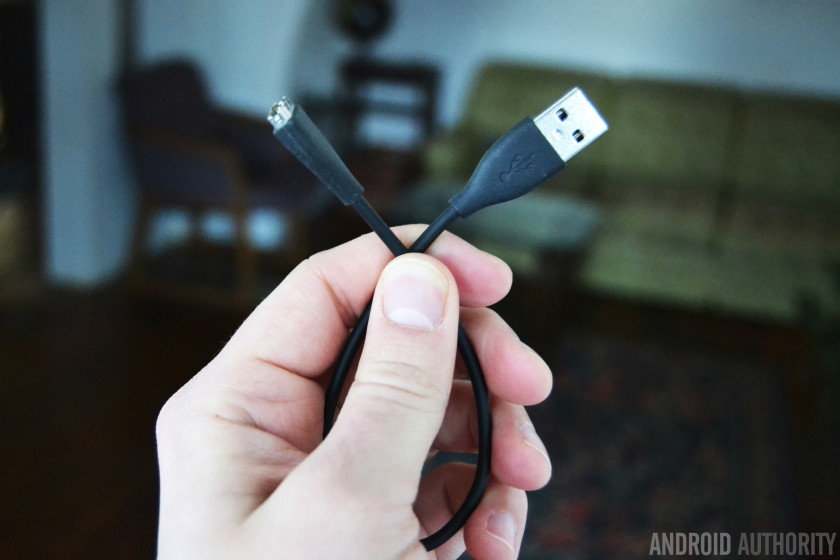
Interestingly, it’s not so much your body heat alone that charges the device, but rather the differential between your body heat and the ambient temperature. If you’re running and getting hot somewhere that is very cold, that actually charges it faster.
When you take the device off, it enters an idle mode, saving your data until you next put it on. Apparently, it can last in this idle mode for up to two years.
Performance
So, there aren’t a ton of features here aside from the battery, which might lead you to expect the watch would perform those few jobs really well.
Not so much.
The notifications are very basic, to the point where you’re literally just being notified that you have a call incoming, or an SMS received, and who it is from, rather than what it says. You’ll need to open your phone to learn anything about it. Worse, sometimes they don’t come through at all.

The predecessor to this device — the Matrix PowerWatch (the X is new) — actually comes without the notifications. You could always save yourself a few bucks and some frustration by getting that instead.
Then there’s the sleep tracking, which flat out doesn’t work as far as I can tell. It’s supposed to auto-detect when you doze off and there is no way to start the tracking manually. According to the Matrix PowerWatch X, I haven’t slept a wink in the past three days. Disappointing!
The sleep tracking just flat out doesn’t work as far as I can tell.
Step counting fairs a little better and largely correlates with what my other devices tell me. Calorie counting is definitely a little strange though. I’m 77kg with around 11 percent body fat at the moment. Yesterday I walked 6,923 steps and did a 40-minute workout, but apparently only burned 1,500 calories. That is way off, and I would expect to see at least 2,400 calories.
This could be at least partly because the device wasn’t tracking my sleep — you burn a surprising number of calories at night. It could also be due to the simple fact that heat alone isn’t enough to calculate calories accurately. If it was combined with a heart rate monitor (which would require significantly more juice to power) that would be a different story.

Working out with the MATRIX PowerWatch. It can only track runs unfortunately but also seemed to fail to notice I burned extra calories for this hour…
Moreover, I’m not convinced the device is actually doing any BMR calculations to work out how many calories I burn at rest. You can input your details into the app, but it never explicitly asks you to. Since finding that option, I haven’t noticed much difference.
I love being able to see the power meter on the watch face — telling me how much electric power my body is generating — but that information doesn’t really correlate with anything particularly useful (it seems to go up and down randomly with no relation to what I’m actually doing). I’m not convinced it’s more than a gimmick, though it’s admittedly a cool one.
The app
The app is also disappointing.
When I first received my review unit, I eagerly installed the app and got ready to set up the device, only to find it wouldn’t pair via Bluetooth. I tried again and again — even on a different phone, in case it just wasn’t playing nice with my Honor 10.
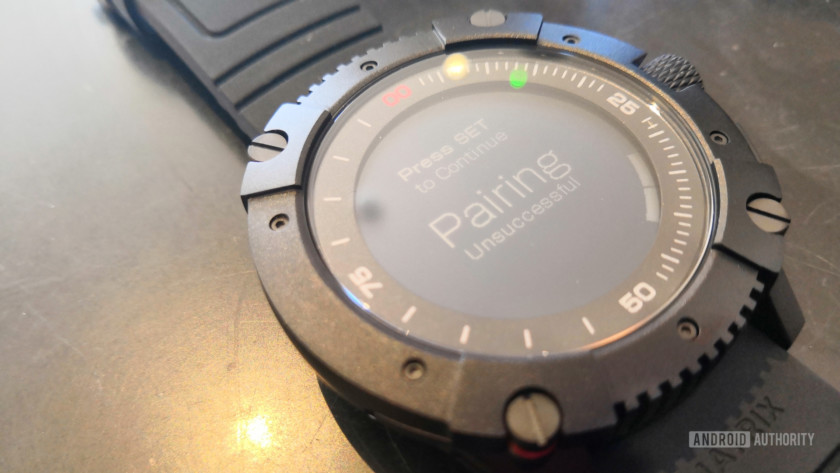
Well that’s disappointing…
Checking reviews on the Play Store, it turned out I wasn’t the only person experiencing this issue. Seeing as you need to sync the device to set it up, I actually worried I wasn’t going to be able to write this post!
Luckily, when looking at the IndieGoGo page for the original Matrix PowerWatch (which uses the same app), I spotted a comment that mentioned their watch would sync only one in every 10 attempts. I decided to persevere and eventually it paired.
Since then, syncing has been a little more reliable (though not perfect). The biggest issue otherwise is that the app is incredibly bare bones, providing barely any more information than the watch face itself. Interaction is also awkward, to the point where scrolling doesn’t quite work for inputting numbers meaning I was forced to press “+” 30 times to enter my age (it starts at 0) and 77 times to enter my weight!

This is pretty much it…
The app is also incredibly power hungry. I’ve had to charge my phone significantly more frequently while using it.
Hopefully this will receive some attention going forward.
The design
Although the concept is cool, the design of the device isn’t quite so space age. I like to think a watch powered by bioenergy is the kind of thing Tony Stark would wear. Sadly, I just can’t see him — or anyone who loves premium tech — being particularly eager to flaunt this design.
Although the concept is cool, the design of the device is also not quite so space age.
It’s not hideous or anything. It’s just not as svelte or curved as a lot of the competition. Nor is it as refined and elegant as an old-school analogue watch. The detailing falls flat, and it’s just kind of chunky.
It’s also really large, at 13.5mm thick with a 50mm diameter and 60-70g weight (I don’t know why this number varies so much either!).
The size doesn’t just make the watch a little ostentatious, it also makes it somewhat awkward and occasionally uncomfortable. It gets sweaty, catches on things, and it’s difficult to sleep with. Its included strap is rubber too, which tends to get hot and adds to the uninspiring look. You could of course change that should you so wish however.
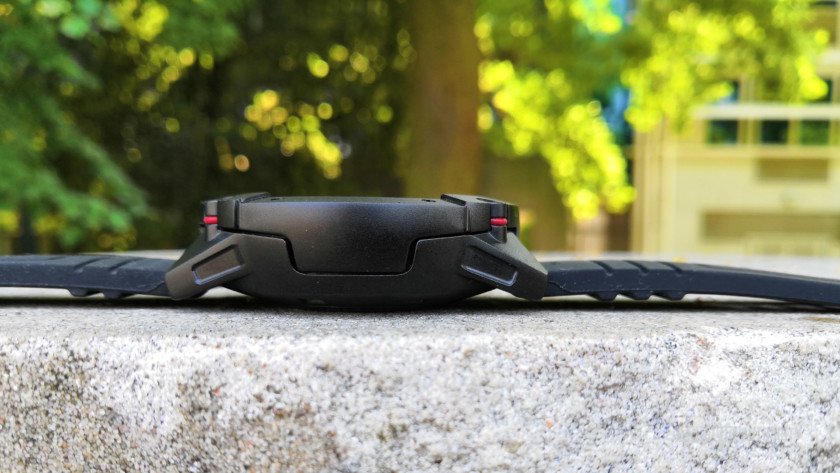
The Matrix PowerWatch: thick!
On the plus side, this watch is also waterproof up to (down to?) an awesome 200 meters — making it the most water-resistant smartwatch on the market, according to its manufacturer. It uses aircraft-grade aluminum, making it very light and durable. It certainly looks rugged.
The display itself is black and white and the UI is predominantly text based. It’s fairly visible in direct sunlight, but there’s no backlighting. You can turn on a small light in one corner for reading the time in the dark though.
In future, Matrix Industries says it will bring a range of customizable watch faces to the gadgets. Taking a quick look at reviews and comments for the first Matrix PowerWatch though, the company already appears a few months behind schedule in this regard.

As mentioned, interaction is handled by two buttons and a dial. These are rather fiddly to use. It’s not always intuitive navigating through menus or starting and stopping the timer, among other things. I’m not really sure what the point of the dial is. It can scroll through some settings, but so can the mode button. Hopefully, this is an indication of upcoming features?
Closing comments
I can’t help but feel I’ve been a bit harsh on the Matrix PowerWatch X. The device is no doubt a laudable attempt at doing something different in the smartwatch space. I always have a soft spot for crowdfunded projects.
The watch is also pretty expensive. The Matrix PowerWatch X goes for $279, which is about the same as the Garmin Vivoactive 3 or the Fitbit Ionic, both of which offer considerably more options and features. Even the notification-less, 50m resistant original Matrix PowerWatch is $199.
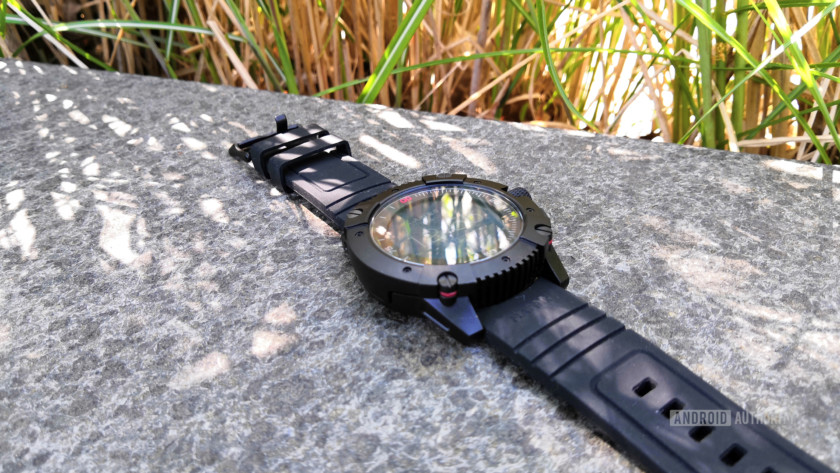
Right now, it doesn’t really deliver on its potential. It has a lot of bugs and growing pains, and it’s not particularly good looking or comfortable. It feels more like a tech demo than a finished product.
Even if you’re a wealthy early adopter who just wants to show off with something unique, this hardly looks like the kind of thing you’d actually want to wear out and use as the conversation piece.
You probably shouldn’t buy this watch, but I hope Matrix Industries keeps making more. If the company can make the watch slimmer, improve its design, fix its software, and iron out the bugs, it could have something really special.
There’s a lot of potential here, but the Matrix PowerWatch X just doesn’t nail the execution.
How to use your camera’s histogram
Have you ever taken a photo and thought it looked great on your digital camera’s LCD, only to get home and discover an overexposed mess on your computer screen? Yuck.
It can be difficult to discern if an image looks good on a small, bright screen, but fortunately, there’s a tool you can use to determine whether your image is too bright or too dark: your camera’s histogram. This is a feature that used to be reserved only for more advanced cameras, but in recent years has been added to more and more base level units – even many phones.
Photography 101
Exposure, aperture, and ISO
Shoot better photos at the golden hour
The rule of thirds and how to use it
How to take great actions shots
Here’s how to get the most out of the histogram, which will let you get the correct exposure on your images — and ultimately let you ace your digital photography.
What is a histogram?
The dictionary definition of a histogram is a graphical representation of data distribution, usually displayed as a bar graph. In digital photography, this related to the pixels that make up your image, and a histogram on your camera displays where each pixel is distributed from pure black to pure white in terms of brightness. In practice, this looks like a chart with a series of peaks and valleys. The higher the peak, the more bright pixels. This is the tonal distribution of your image, and by reading it you can judge the exposure of your image on you camera’s LCD or EVF.
The histogram can usually be found on an image by image basis when you scroll through your photos (depending on your camera’s playback mode, it may or may not be on by default). Many cameras now also allow for a live histogram view, either on the rear LCD or — in the case of mirrorless cameras — on their electronic viewfinders. This is incredibly helpful, because you can watch your histogram change as you frame your image and adjust your exposure.
An example of a DSLR’s histogram. (Image via Nikon)
How do you use a histogram?
Despite being one of the best ways to quickly and accurately judge your exposure, the histogram is often overlooked by amateur and novice photographers. After all, if you don’t know what it is, a histogram just seems like a weird graph, and many people have no idea how to use it to their advantage. Also, the “ideal” histogram is different for every shot and changes depending on the look you desire. So when you’re not comfortable with the histogram, there can be a lot of hesitancy to rely on it.
Luckily, on the most basic level, a histogram isn’t difficult to understand: The horizontal axis shows the tonal distribution (dark to light), while the vertical axis shows the number of pixels in a particular tone – and remember, the higher the peaks, the more pixels there are. The far left of the horizontal axis shows the darkest areas of the image, then moving to medium-gray in the middle and lightest on the far right. An image with a lot of light, for example, will see the graph’s data toward the middle and right of the histogram.
The histogram in this image shows that the majority of pixels are in the far left, indicating that there are a lot of dark tones.
You’ll lose details where your image is too bright or too dark, and you’ll notice if a photo is overexposed or underexposed in the histogram as missing pixel information on the far left or far right. This is when you should adjust your settings to compensate – try a different shutter speed, choose a larger or smaller aperture, increase or decrease the ISO, or adjust the exposure compensation.
Depending on the situation, sometimes an uneven distribution is OK. If you’re shooting snow, a white object, or something against a white background, the histogram will display more data points on the right. The opposite holds true when you’re shooting a dark scene or a black object. The key here is knowing what you want your image to look like and exposing it properly to get that result. On its own the histogram is just data, not right or wrong in any situation; you need the context of your desired image to gauge whether the data on the histogram will give that to you.
There’s obviously a lot of overexposure in this photo, and the histogram shows that.
The histogram is a not a foolproof tool for shooting perfectly exposed photos, because that’s not always possible. You can’t push a button and make a picture better – not even the camera’s auto setting is smart enough to do that. But think of it as a useful tool that tells you quickly what your photo’s exposure levels are, instead of just guessing by looking at the image on the LCD. As your photography improves and you learn to adjust the settings to compensate, you will learn to read the histogram better too.
You can also utilize the histogram in apps like Adobe Photoshop or Lightroom to improve image quality during post-processing. It can help you more accurately match the look and exposures of a series of images you may be editing, or even just analyze your images after a shoot to see how you may improve your photography.
Still unsure? Check out this video from Creative Live that demonstrates how the histogram works.
Editors’ Recommendations
- 17 tips and tricks for better digital photography
- Panasonic Lumix GH5S review
- Photography 101: exposure, aperture, shutter speed, and ISO
- How to photograph the stars: 9 steps to stunning night images
- What is HDR photography and how can I shoot it with my camera?

