


Think you’re an Apple fan? This collection of prototypes has you beat
If you thought you were Apple’s biggest fan, Hap Plain likely has you beat. He owns more than 250 prototypes spanning PowerBooks, iBooks, iPhones, iPods and “pretty much everything in-between.” It may be the largest private collection of Apple prototypes in the world worth a good $1 million, if not more. The items aren’t just dead weights either: He purchases and fully restores these prototypes to working condition.
Despite his parents using Windows-based PCs, Plain jumped on Team Apple in school with the Performa 575 serving as his first computer in the 1990s. While looking for a job in the Bay Area just after college, he began restoring Power Mac G4 Cubes for extra money. During his search for additional Cubes, he stumbled upon a rare clear Macintosh SE. That ignited Plain’s desire to collect every Apple prototype on the planet.
You can see his collection here, which includes the clear Macintosh Color Classic, the developer’s edition of Apple Lisa, a prototype Macintosh TV, a very early stage 20th Anniversary Macintosh, and more. Note that every out-of-pocket purchase is a prototype that is typically not functional. Nearly every machine in his collection is restored and fully operational.
During the day, Plain works at a Lexus dealership in Monterey, California. After working hours, he’s not only collecting and restoring Apple’s prototypes, he’s selling them on eBay, too, if they don’t fit within his private collection. Using the “alittlebytedifferent” alias on eBay, Plain currently only has six items up for sale including four vintage Apple modems and the 20th Anniversary Macintosh.
But just in the past two months, Plain sold a fully restored clear Macintosh portable for $16,225 and a clear Macintosh SE for $22,600. He even pushed a $100,000 developer’s edition of Apple Lisa that raised a red flag at Apple. According to Plain, Apple isn’t “very keen on having individuals sell prototypes on e-commerce websites,” as the company’s legal team forced him to remove the listing.
Of course, Plain isn’t the only individual selling prototypes on eBay. The highest-priced prototype we found was the Macintosh LC for $9,999, the TechStep Diagnostic Tool for $3,563, a MacBook Pro for $2,999, a first-generation Lisa converted to a second-generation model for $2,799 and loads more. You can even find a clear iPod for $186.
But for Plain, collecting and restoring prototypes isn’t about making money.
“It’s about the hunt and finding these items and keeping them alive and making sure that they don’t end up in some type of e-waste facility because they are pieces of history and do tell the history of the company over time,” he says.
Plain’s “end game” is to see his collection on display at a museum so that Apple fans can personally see the prototypes they’ve heard about since the 1980s. But because hunting down every prototype is long, hard work, he’s now offering a “finders fee” to individuals who point him in the right direction.
“Finding Apple prototypes isn’t an exact science,” he says. “I appreciate everyone who has helped me get to where I am today.”
Editors’ Recommendations
- Apple Car: What you need to know about Project Titan
- Apple vs. Qualcomm: Everything you need to know
- Everything you need to know about Samsung Pay
- How to download the data Apple has about you
- Apple HomePod tips and tricks to get you started
Best Accessories for BlackBerry KEY2

We’ve got cases, screen protectors, chargers and more!
BlackBerry is back with the KEY2: Everything that was great about last year’s KEYone is still here, and everything that wasn’t awesome has been improved. Even if you had last year’s KEYone, there’s more than enough reason to upgrade, which means it’s time for new accessories.
BlackBerry will have a few first party accessories on offer, but third parties have some that are already available. And of course, there are some accessories that will work with any phone. Here are the accessories you should check out!
- Osophter Wallet Case
- MicroP Full-body Protective case
- PDAir Leather Holster Pouch
- TopACE Tempered Glass Screen Protector
- Bedifol upscreen Spy Shield Privacy Screen Protector
- AUKEY USB-C PD Car Charger
- Anker PowerCore Speed Power Bank
Osophter Wallet Case

It’s always nice when one accessory can replace multiple things you have, and that’s exactly what wallet cases do. With this case from Osophter, you get one slot for an ID card, perfect if you can use Google Pay everywhere you go. The front folio can bend back and act as a stand for your phone, perfect for watching a quick YouTube video. There’s a speaker cut out on the front folio so you can take phone calls with the case closed, and there is plenty of room for all the ports and buttons.
The Osophter Wallet Case is available in black or brown for $10.
See at Amazon
MicroP Full-body Protective case
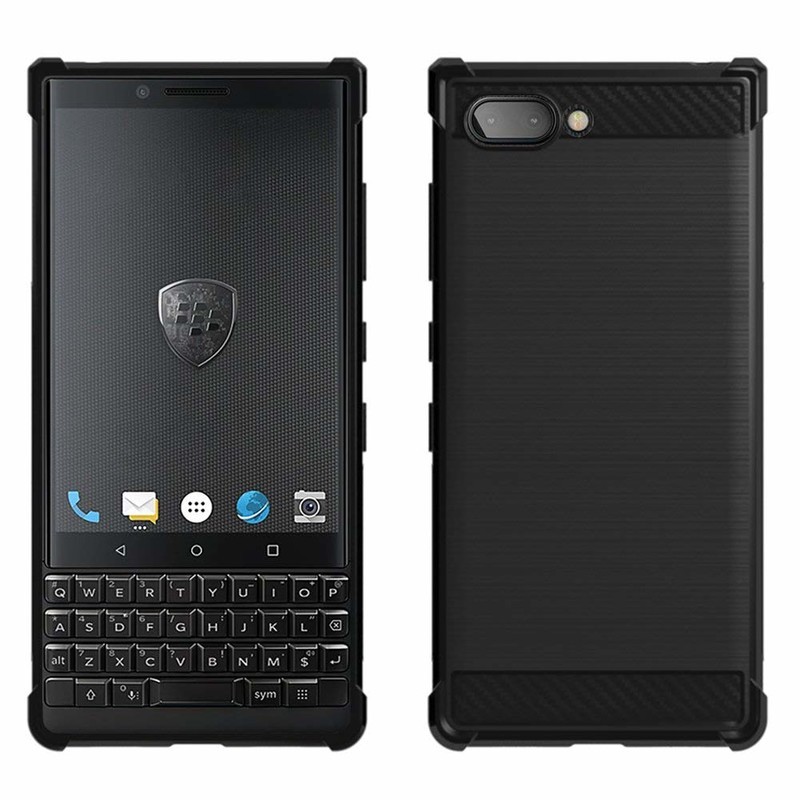
Sometimes, you need a bit more protection for your phone. MicroP is here with their rugged Full-body Protective case. You get a design that will protect against most drops and materials, as well as repel moisture. There are precise cutouts for the ports, camera and speakers, and the buttons are replicated on the case itself. This is a no-frills design that does its job well, and look professional doing it.
The MicroP Full-body Protective case is available for $8.
See at Amazon
PDAir Leather Holster Pouch

BlackBerry phones and pouches have been a perfect pairing since the old days, and that trend continues even in 2018. PDAir is here to make sure you can be just as stylish with your KEY2 as you were with your Bold 9900.
This doesn’t include a belt clip, so you can’t completely go early-2000s dad (yet). But, this pouch will keep your KEY2 scratch free while it’s in your pocket, meaning it will be superbly pristine in your board meetings. There’s no embossed BlackBerry logo like on old first-party offerings, which is a bit of a shame.
The PDAir Leather Holster Pouch is available for $37.
See at Amazon
TopACE Tempered Glass screen protector
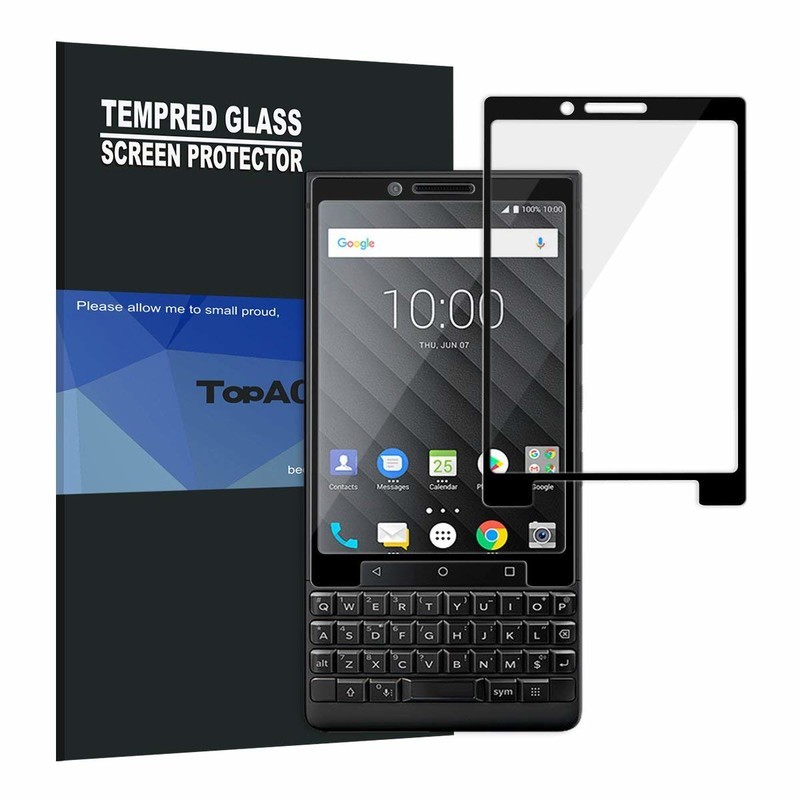
With the body of the KEY2 protected, it’s time to focus on the screen. Tempered glass screen protectors are all the rage, since they feel as nice as your display but still offer protection. TopACE has a two-pack of tempered glass screen protectors for the KEY2 that should make anyone happy.
There’s only one cutout, which means the glass will be easier to align and fewer places for dust to cling to. The screen protector itself has an oleophobic coating, meaning your fingerprints won’t smudge up the display. The screen protector is also scratch resistant, so it should survive well in your pocket.
The TopACE Tempered Glass screen protector is available in a two-pack for $8.
See at Amazon
Bedifol upscreen Spy Shield

Of course, if you want some PRIVacy while you’re typing away on your BlackBerry, you’ll want to invest in a certain kind of screen protector. Bedifol has such a model, one that seriously restricts the viewing angles of your display, so that random people on the street can’t look at the sensitive data on the display.
This is a film screen protector, so it won’t feel as nice as a tempered glass one. There’s also an oleophobic coating to keep fingerprints and smudges at bay, and Bedifol promises a bubble-free installation.
Bedifol’s upscreen Spy Shield is available in a single pack for $22.
See at Amazon
More: Best Screen Protectors for BlackBerry KEY2
AUKEY USB-C PD Car Charger

While the KEY2 has stupendous battery life, it never hurts to be able to charge it when you’re out and about. The best way is with a car charger, and AUKEY has the perfect model. It supports USB Power Delivery, meaning your KEY2 will fast charge when using this charger in your car.
It also includes a USB-A port to charge other devices, such as your headphones or someone else’s phone. This supports charging up to 27W, so it may even be able to charge your laptop — albeit slowly. And with every new device charging over USB-C, this will be a great investment going forward.
AUKEY’s USB-C car charger is available for $20.
See at Amazon
Anker PowerCore Speed Power Bank

If you need a charge away from your car or a wall, a power bank is essential. Anker makes plenty of these, but the PowerCore Speed is among the best. The battery itself charges over USB-C, so you only need to pack one cable for your phone and the battery. You can charge the KEY2 from the same USB-C port, and charge an additional gadget from the USB-A port. This model outputs at 30W, so it may be able to work with your laptop as well. And with a 20,100 mAh capacity, you’ll get multiple charges from the battery.
Anker’s PowerCore Speed Power Bank is available for $100.
See at Amazon
What say you?
What accessories are you using with your KEY2? Let us know down below!
BlackBerry KEY2
- BlackBerry KEY2 review
- BlackBerry KEY2: Everything you need to know!
- BlackBerry KEY2 specs
- BlackBerry KEYone review: Coming home
- Join our BlackBerry KEY2 forums!
Buy the BlackBerry KEY2
Create stunning corporate videos easily for only $50!
Big corporations have the money to hire freelance videographers or entire in-house video teams, but if you’re just trying to get your brand off the ground, the capital likely isn’t there. And if you can’t hire out and don’t possess solid video editing skills, then producing an effective video that can help you keep up with today’s advertising might be difficult or altogether impossible. That’s where apps with built-in effects and animations come in. They help you easily put things together in a way that doesn’t require four years of film school.
Videobolt Pro is one such app, and it features an advanced motion graphic marketplace that allows you to source and customize awesome intro/outro animations, cinematic titles, promotional slideshows, and music visualizers, as well as templates. A lifetime subscription to software like this regularly retails for $1,500, but at Android Central Digital Offers, you can get yours for only $49.99, a savings of 96%. So rather than paying for the price of a video editing college course, you can easily edit great pieces for a fraction of the cost.

With your lifetime subscription to Videobolt Pro, you’ll get the following:
- Access to 96 videos a year, delivered as 8 a month
- Intro/outro animations to promote your brand, cinematic titles, promotional slideshows, and music visualizers
- Advanced customization tools that let you adjust templates for colors, effects, positioning, and more
- One-click undo functionality
- Automatic still-image previews on every change
- Automatic project saving and drafts
So if you’re not the best video editor and have no motion graphics or animation training, but you still want your videos to look professional and have them stand out among all of the other online brand videos, then get your lifetime subscription to Videobolt Pro at Android Central Digital Offers for only $49.99. No need to hire out, no need to pay a freelancer, and no need to spend years in a college course.
See at Android Central Digital Offers
These are all the phones Sony is launching in 2018

Here’s a look at Sony’s smartphone lineup for 2018.
Sony has an…interesting…position in the Android smartphone space. Sony produced some darn good phones in 2017, such as the Xperia XZ Premium and XZ1, but when compared to handsets like the Galaxy S8, Pixel 2, and even the OnePlus 5T, Sony’s offerings fell flat in one area or another.
We’ve seen Sony’s hand for 2018, and while this year’s phones still won’t keep everyone from jumping on the Samsung and Google bandwagons, they are compelling handsets that are at least worth checking out.
The phones that are still coming
Sony Xperia XZ2 Premium

In mid-April, Sony announced the Xperia XZ2 Premium. This is a bigger, badder, more expensive version of the regular XZ2 that’s already been released, and while there’s no denying its power, it’s going to set you back a very pretty penny.
One of the main draws to the XZ2 Premium is its 5.8-inch 4K HDR display. That’s the same resolution found on most premium TVs these days, and Sony says it’s 30% brighter than the previous Xperia XZ Premium.
You’ll also find dual 19MP + 12MP rear cameras, the Snapdragon 845, 6GB RAM, and a 3,540 mAh battery.
The Xperia XZ2 Premium costs $999.99, and pre-orders are open now at Amazon and Best Buy with shipments expected to start going out on July 30. Buying the phone from Amazon will let you get a free pair of Sony’s Xperia Ear Duo earbuds that retail for $280, but even then, only die-hard Sony fans will likely give any serious thought to the phone with a price that big.
See at Amazon
Sony Xperia R2/R2 Plus

Sony Xperia R1 and R1 Plus.
Last October saw the release of the Xperia R1 and R1 Plus — two budget phones that offered rock-solid specs at seriously affordable price points.
The rumor mill on successors to these two phones is pretty quiet at the moment, but there’s no reason to believe Sony won’t kick out an R2 and R2 Plus before 2018 is over.
India was the target market for the R1 series, and assuming the we get an R2, that’ll likely remain the same.
Mid-range Sony Xperia R1 and R1 Plus now available in India
The phones that have already been released
Sony Xperia XZ2


Sony’s big flagship this year is the Xperia XZ2. The XZ2 is a successor to last year’s XZ1 and features a completely new design language compared to other Xperia phones of the last few years. The glass back is super reflective with elegant curves, the fingerprint sensor is smack dab in the middle below the rear camera, and there’s an 18:9 screen with slim bezels.
Under the hood, the XZ2 is packing all of the latest specs — including the Snapdragon 845, 4GB RAM, 19MP/5MP rear/front cameras, IP68 dust/water resistance, and Android 8.0 Oreo. The phone costs $800 and is on sale now.
Sony Xperia XZ2 preview: Slimmer bezels, wider appeal
Sony Xperia XZ2 Compact

There’s no denying that the XZ2 is a powerful phone, but what if you want all that horsepower in a phone that’s considerably smaller and a bit cheaper? For you, Sony’s got the Xperia XZ2 Compact.
The XZ2 Compact is mostly the same phone as the regular XZ2, save for a smaller battery, 5-inch screen, and a plastic back. Everything else, such as processor and cameras, are exactly the same.
It’s not necessarily cheap at $649, but it’s one of the few truly small phones that offers a no-compromises flagship experience.
Sony Xperia XZ2 Compact review: The new standard for small
Sony Xperia XA2/XA2 Ultra

During this past CES, Sony officially took the wraps off of the Xperia XA2 and XA2 Ultra. Both phones are mid-rangers in Sony’s lineup for the year, and while there’s nothing particularly exciting about them, they do the basics really, really well while keeping costs low.
The XA2 offers a refreshingly small 5.2-inch display, and for those of you that prefer big phones, the XA2 Ultra should serve you just fne with a 6-inch screen size. Both come equipped with an LCD panel and resolution of 1920 x 1080, and for the first time ever, these two Sony phones have working fingerprint sensors in the United States 👏.
Each phone also shares NFC, Android 8.0 Oreo out of the box, USB-C for charging, and a 3.5mm headphone jack. Aside from the screen size, the only other big difference lies with the XA2’s 3,300 mAh battery and the XA2 Ultra’s 3,580 mAh unit.
The XA2 sells for a fair $349, and stepping up to the XA2 Ultra will cost you $449.
See at Best Buy
Sony Xperia L2

If you like what the XA2 and XA2 Ultra bring to the table but want to spend even less, Sony’s Xperia L2 is for you.
The Xperia L2 has a 5.5-inch display with a resolution of 1280 x 720, MediaTek processor, 3GB of RAM, and a 3,300 mAh battery. As for the cameras, you’ll find a 13MP sensor on the back and an 8MP one up front.
There’s a working fingerprint sensor on the L2 and support for NFC just like on the XA2 and XA2 Ultra, but unlike those phones, the L2 ships with the older Android 7.1.1 Nougat.
You can buy the Xperia L2 in black, gold, and pink, and its price of $250 is more than manageable.
See at Best Buy
Updated June 27, 2018: Added availability and pricing information for the Xperia XZ2 Premium.
Otterbox Commuter Series case for Samsung Galaxy S9+ review: Built to last
Otterbox’s Commuter Series offers superior protection while maintaining a slim figure.

One of the first names you’ll think of when it comes to buying a quality protective case is OtterBox. The company has a whole line of cases for the Samsung Galaxy S9 and Galaxy S9+. One of them is the Commuter, which offers a higher level of protection without adding a ton of bulk. Here are some thoughts after taking it for a spin.
Otterbox Commuter Series case for Galaxy S9+

Price: $49.99
Bottom line: It’s pricey, but the OtterBox Commuter Series case was built to perfection and has the quality to last.
The Good
- Easy installation
- Porthole covers
- Responsive buttons
- Two-piece design
- Raised edges
The Bad
- A little pricey
- Needs custom screen protector
See at Amazon

Otterbox Commuter Series case What I like
OtterBox cases have traditionally come in a fair bit bulkier than most others, with the company favoring toughness over brawn in most cases. But in recent years, OtterBox cases have struck a delightful balance between design, protection, and utility. The Commuter Series case for the Samsung Galaxy S9 and Galaxy S9+ is no different.
What we have here is a two-part case that does all it can to protect the Galaxy S9’s sensitive curved edges. A silicon inner-shell fits around the phone like a worn-in glove, and the case is reinforced by a tough plastic outer-shell. This design makes for a case that feels well-protected, and despite there being two pieces it doesn’t add much bulk to the overall package.
The Commuter is a lot like a bumper case in that regard. In fact, I’ve had so-called bumper cases that felt much bulkier. It’s also just not ugly, something that tends to be an issue in this class of cases. OtterBox doesn’t do anything wild in terms of aesthetics, but that’s precisely why I like it. The case takes a backseat to let the Galaxy S9’s beautiful display shine through.
Regarding functional bits, the Commuter does well to offer access to all of the Galaxy S9’s buttons without much friction. Buttons feel satisfying to press and don’t take much force to register the action on your phone. At the same time, it has enough feel and tactile feedback to ensure you aren’t pressing the button any more or less than you need to, a boon for those who use gestures on a regular basis. Also, wireless charging works just as well as it would without a case.
One last thing: this case has port covers, and I love them. Yes, the Samsung Galaxy S9 is IP68 water and dust resistant, but that doesn’t mean other substances that aren’t purely dust or water can’t damage it. The port covers on the OtterBox Commuter give you a nice added layer of protection if you want to limit exposure as much as possible. The rubber covers have a snug and secure fit, and I don’t imagine they’ll get flimsy over time.

Otterbox Commuter Series case What I don’t like
There are a couple of annoyances to had, but they could be non-issues depending on your particular usage. For one, the raised edges on the front of the case may interfere with your screen protector of choice. You could use an Exacto knife to adapt your current screen protector if you don’t want to buy a new one, but if you want a perfect fit, then your best bet is to snag an Alpha Glass screen protector from OtterBox, an added $50 investment.
The porthole covers can also be a bit annoying to deal with at times. The covers bend back far enough for my various cables to fit, but it almost guarantees that cable swapping has to be a two-handed affair as the covers spring back into their natural position reasonably quickly. It’s not enough of a pain to ruin the case as a whole, but if you can’t stand to use two hands when you need to charge your phone or use wired headphones, it’s something to think about.

Otterbox Commuter Series case for Galaxy S9+
If you’ve always loved the protection of the OtterBox family but thought it was a bit too bulky for your taste, we encourage you to give the Commuter series a chance. It’s sleek, relatively thin, and provides toughness at every angle.
4.5
out of 5
You’ll pay a bit more for the OtterBox brand, but you’re getting a quality case that should stand the test of time and keep your Galaxy S9+ from certain doom if you’re ever unfortunate enough to drop it.
See at Amazon
Samsung Galaxy S9 and S9+
- Galaxy S9 and S9+: Everything you need to know!
- Galaxy S9 review: A great phone for the masses
- Complete Galaxy S9 and S9+ specs
- Galaxy S9 vs. Galaxy S8: Should you upgrade?
- Join our Galaxy S9 forums
Verizon
AT&T
T-Mobile
Sprint
Samsung Galaxy S9 and S9+: Everything you need to know!

Samsung once again has a fantastic pair of flagships.
Samsung’s new Galaxy S9 and S9+ are definitely iterative updates over last year’s dramatically redesigned Galaxy S8 series, but that’s not a problem. Instead of going back to the drawing board altogether, Samsung focused on fixing a lot of the issues while making drastic improvements to the camera experience and retaining everything that made the last generation so great.
Whether you’re looking to buy or make the most of your new Galaxy S9, we have all of the information you need right here.
July 9, 2018 — The U.S. unlocked Galaxy S9 is now down to $699.95 on Amazon
An unlocked Galaxy S9 typically costs $720, but on Amazon, that price has been reduced to just $699.95.
A savings of $20 isn’t particularly huge for a phone this expensive, but this is one of the lowest prices we’ve seen so far for an official U.S. unlocked variant of the S9 with Samsung’s warranty.
It’s unclear if this new pricing is only temporary or will be sticking around for a while, but if you want to grab one for yourself, click/tap that button below.
See at Amazon
June 27, 2018 — The unlocked Galaxy S9 now supports FM radio
Way back in January at the beginning of the year, Samsung announced it was partnering with NextRadio to bring free FM radio to the Galaxy S9 in both the U.S. and Canada.
The unlocked version of the S9/S9+ has still been without this FM functionality, but after a software update began rolling out on June 25 that upgraded the version number to G965U1UES2ARF4/G960U1UES2ARF4, a few Redditors quickly noticed that this finally turned on the FM radio chip.
To use this, download and install the NextRadio app from the Google Play Store, enable the Basic / FM Only Mode to make sure you’re not using any data, and plug in a pair of wired headphones/earbuds as these act as the antenna for the FM signal.
What are the big changes over the Galaxy S8 series?
In a word, the camera. Samsung has kept the primary sensor at 12 megapixels, but that’s where the similarities end. The S9 and S9+ have adjustable apertures, switching seamlessly between f/1.5 and f/2.4, sitting in front of an all-new sensor that is great in low light. The Galaxy S9+ also gets a second 12MP sensor with a “telephoto” lens that provides 2X zoom and facilitates Live Focus, Samsung’s version of portrait mode that debuted with the Galaxy Note 8.
Samsung Galaxy S9 and S9+ specs
In terms of specs, the Galaxy S9+ (but only the S9+) has two more gigabytes of RAM than last year’s models. And let’s not downplay the importance of the fingerprint sensor being relocated to a much more sensible place on the back of the phone — below the now-vertical camera module.
Samsung Galaxy S9 review: A fantastic phone for the masses
Samsung Galaxy S9 India review: As good as it gets
Samsung Galaxy S9 review, 3 months later: Holding the high standard
Should you upgrade to the Galaxy S9?
This is the big question — and as always, it depends. If you’re running a Galaxy S6 or S7, and want to move to something new in the Samsung world, the answer is absolutely. If you’re rocking a still-new Galaxy S8 or Note 8, the answer is no. While there are substantial differences that clearly make the Galaxy S9 a better phone, the S8 is just a year old at this point, and has most of the Galaxy S9’s features thanks to its Android 8.0 Oreo update.
Samsung Galaxy S9 vs. Galaxy S8: Should you upgrade?
Samsung Galaxy S9+ vs. Galaxy Note 8: Which should you buy?
Is the Galaxy S9 better than the competition?
There are so many great phones on the market right now — how do you decide which one to buy? Here are our looks at the new phones compared to some of the best devices on the market.
The Galaxy S9 is the smaller of the flagships, and here’s how it compares to some of the other major phones on the market.
Samsung Galaxy S9 vs. iPhone X: The best of metal and glass
Samsung Galaxy S9 vs. Google Pixel 2: Which should you buy?
Samsung Galaxy S9 vs. Honor View 10
And how about the larger Galaxy S9+?
LG G7 vs. Samsung Galaxy S9+: Which should you buy?
Samsung Galaxy S9+ vs. Google Pixel 2 XL: The true flagships
OnePlus 6 vs. Samsung Galaxy S9+: Which should you buy?
Should you buy the Galaxy S9 or larger S9+?

OK, so you’ve made up your mind to buy the Galaxy S9 — but wait, should you get the S9 or the larger S9+?
Unlike last year, the Galaxy S9+ feels like more of the “default” choice of the two. It has extra RAM and a secondary rear camera in addition to its overall larger screen and bigger battery — yet the price delta between the two hasn’t changed. If you can handle the size difference and would like the extra battery life, go for the Galaxy S9+.
Here’s why the Galaxy S9+ is worth the extra money over the GS9
What colors are available?

Like last year, there are multiple colors of the Galaxy S9 series to purchase: Midnight Black, Lilac Purple, Coral Blue and Titanium Gray. U.S. buyers only get access to three of the four — silver is only available internationally — and both blue and purple are slight updates over last year.
A few months after the S9’s release, Samsung introduced two new colors in the form of Sunrise Gold and Burgundy Red.
Burgundy Red and Sunrise Gold are available around the world, and we took a look at the latter and it’s beautiful!
What color Galaxy S9 should I buy: Black, blue, purple, or silver?
Galaxy S9 and S9+ get Sunrise Gold and Burgundy Red color options; ARCore support
You can get as much as 256GB of internal storage
No matter where you decide to buy the Galaxy S9, 64GB is the default storage space that’s available with the phone. 64GB should be more than enough for most people, but if you want, you can always expand it with a microSD card.
However, if you’re someone who has a lot of local files and goes through GB like nothing, you may want to consider upgrading to a 128GB or even a 256GB model.
These larger configurations are sold exclusively on Samsung’s website and you’ll spend an extra $50 per each storage upgrade.
Samsung Galaxy S9: Which storage size should I buy?
Where can I get the best deal on a Galaxy S9?

The Galaxy S9 is now available worldwide, both from carriers and also unlocked.
In the U.S., the Galaxy S9 costs between $720 and $800, while the Galaxy S9+ goes for between $870 and $915. For all the details, take a look at our roundup of the best Galaxy S9 deals.
Where to buy the Galaxy S9: Best deals for your new phone
See at Verizon
Getting started with the Galaxy S9

Once you pick up your new phone, there are a few things you should do immediately. Here’s how to make your GS9 experience great!
The first 9 things to do with your Galaxy S9
The first 5 things to turn off in the Galaxy S9’s software
What’s this about bad battery life with the Exynos processor?
Samsung has regularly used both its own processors and Qualcomm’s latest chips in different markets, and it’s regularly been a point of discussion between enthusiasts as to which one is “better” overall.
In the Galaxy S9 and S9+, there’s a clear differentiation in that the Exynos versions of the phone have been getting much shorter battery life. To make things worse, the Qualcomm models are also outperforming Exynos in many synthetic benchmark tests.
So what can you do? Well, not much — Samsung doesn’t sell both versions of the phones in the same markets, so you can’t exactly cross-shop the two processors. The hope is that Samsung could update the firmware on the Exynos models to improve processor efficiency a bit.
Samsung Galaxy S9 battery problems, explained: Exynos vs. Snapdragon
Help me get started with accessories!
Once you have your Galaxy S9 or S9+, you’ll want to look into accessories like cases and screen protectors that make the phone even better. We’ve rounded up our favorites for you.
The best Galaxy S9 accessories
The best cases for the Galaxy S9
Four Great Quick Chargers for Galaxy S9
Spigen Rigged Armor case for Galaxy S9+ review: Low cost, rugged protection
Maxboost mSnap case for Galaxy S9 review: The only case you need
Having battery life problems?
The Galaxy S9 isn’t perfect —obviously, no phone is — but if you’re experiencing battery life problems, we have a guide on how to fix that.
How to fix Galaxy S9 battery life problems
Updated June 27, 2018: Added links to recent case reviews, accessory roundups, and information on new color options.
Samsung Galaxy S9 and S9+
- Galaxy S9 and S9+: Everything you need to know!
- Galaxy S9 review: A great phone for the masses
- Complete Galaxy S9 and S9+ specs
- Galaxy S9 vs. Galaxy S8: Should you upgrade?
- Join our Galaxy S9 forums
Verizon
AT&T
T-Mobile
Sprint
This may be the sexiest over-the-air antenna we’ve seen

Mohu Blade won’t break the bank — or make your living room look bad.

When it comes to your home entertainment system, nothing beats a good streaming box like Android TV or Apple TV, or even a Roku or Amazon Fire TV. But that’s not the end of the story. You need a good over-the-air antenna, especially if you want to fill out any gaps in your streaming coverage.
And the Mohu Blade ($39 at Amazon) is a good indoor over-the-air antenna. Better than good, in fact, because it looks great. And when it comes to antennas that are going to be mounted inside, for everyone who comes over to see, you’re going to want something that doesn’t look awful. And whether it’s mounted on the wall or standing alongside your TV, the Blade’s going to look good.
The only question, then is what are you waiting for?
Read: Mohu Blade OTA antenna reviewMore: The best over-the-air antennas
Introducing CordCutters.com
- The hardware you need
- All about streaming services
- What channels are on which service
- FREE over-the-air TV
- How to watch sports
- Join the discussion
Get the latest deals
This 50-inch Hitachi 4K TV is down to under $290 for Prime members today
So many pixels!
Amazon is offering the Hitachi 50-inch 4K LED TV for $289.99 today as part of its Gold Box deals of the day. This is a brand new model for 2018, so there isn’t much to compare the pricing too, but it does normally sell for $379.99, which means that you’re saving $90 today. It has 3 HDMI ports, 1 RF antenna input, 1 USB port, 1 optical audio, and 1 audio output, as well as a component and composite video input on the back.
 While this may not be the best 4K TV on the market or have the most advanced set of features inside, at this price it’s hard to pass up. It gets you a solid picture with a lot of inputs for daily use. It works great in a spare bedroom, loft, basement, or even your family room. This price is exclusive to Amazon Prime members, so if you aren’t already a member, you’ll want to sign up for a free 30-day trial right now.
Prefer something with smart features like Roku built right in? Check out this discounted set from TCL.
See at Amazon
Anker Nebula Mars II portable projector review: The night comes alive

Makes your next camping trip or nighttime party worth attending.
Anker is probably a familiar company for most of you, thanks to loads of power banks, USB cables and other accessories they sell on Amazon and in some retail locations. Anker has been inching towards other accessories with its sub-brands, like Zolo headphones and Nebular projectors.
The Nebula projectors are all about portability: the small Capsule projector is the size of a soda can, while the slightly bigger Nebula series is about the size of a lantern. No matter which size you go for, they include a built-in battery to use when you’re away from power.
Anker Nebular Mars II projector

Price: $429.99
Bottom line: if you want a projector for movies nights outside, this is the one for you.
The Good
- Four-hour battery life lets you watch movies anywhere
- Uses Android as an operating system, letting you plug in a USB drive or download apps directly
- Includes an HDMI port to use other devices
- Automatic focus and keystone correction
- Lightweight and easy to pack
- Has built-in speakers that are surprisingly good
- Great images in low light
The Bad
- Proprietary charger
- Doesn’t include the Play Store
- Not bright enough to use during the day, or in a conference room
See at Amazon
Anker provided this projector for the review, and I’ve been using it off and on since it arrived on June 20. This includes using it inside my apartment during the day and at night, inside a workplace during the day, and outdoors at night.

Anker Nebula Mars II What’s included
Inside the box, you’ll find the projector itself, the remote with batteries, the manual, and a proprietary power adapter.

Anker Nebula Mars II Design
The design of this projector reminds me of a lantern; so much that I wish it came in green for my weekend cosplays. The front has a plastic piece to protect the lens; slide this down and the projector will automatically turn on. Right above this are four LEDs so you can estimate the battery level. While there is a remote included, all of the controls you would need are also on the top of the projector.
Around back, you’ll find the charging port, HDMI-in, USB and 3.5mm audio-out, as well as a reset button and infrared sensor. It’s a shame this projector doesn’t charge with USB-C, since competing projectors have included that. The fan and vents are also located on the back, and the speaker grills wrap around the other sides. Finally, the bottom has a threaded hole to place the projector on a camera tripod.

Anker Nebula Mars II Features
The Nebular Mars uses Android for its operating system, but it’s not Android TV or another familiar variant. Instead, it has been customized by Anker to provide a “big screen” experience with tiles instead of app icons, and other features similar to other TV operating systems. There’s no Google Play Store, but mainstays like YouTube, Amazon Video and Netflix are available from Anker’s app store. It appears most apps in the store are built for Android TV, so it won’t be like you’re using an application designed for a smartphone on a 100-inch screen.
The USB port on the back can be used to playback movies from a thumb drive (formatted as FAT32), but it can also be used to power a streaming stick that is plugged into the HDMI port. This will shorten the projector’s battery life, but you’ll still get hours of playback.


Anker Nebula Mars II Experience
The lamp clocks in at 300 lumens, which relegates it to only being used at night. I’ve tried using this during the day, both for watching movies and presenting materials in meetings. In both cases, it just doesn’t get bright enough to see the subject without straining your eyes. Anker isn’t really advertising this for business use, but it’s worth noting. They do show a photo of someone using it in a living room in the daytime, which would just be an unpleasant experience.
Let the sun go down, and it’s much better. This projector can produce a 100-inch image when it’s placed 10.1 feet from the wall or screen, making it perfect for a campsite or a backyard. There’s also automatic keystone correction and focusing, so all you have to do is just place the projector down and let it do the work of making the image look great.
So how’s the picture quality? Great, in relative terms. This is a 720p projector, which won’t blow you away, but it’ll work well enough with all of your media. The projector can accept sources up to 1080p resolution, so leave your UHD Blu Ray rips at home. One more trick up its sleeve: the projector can pair with your smartphone and act as a Bluetooth speaker. The speakers are great given the size, and should be enough to keep everyone happy during movie time.
Using the projector is a treat. It takes just a few moments to boot up, focus, and then start playing whatever media you have. If you’re somewhere you have an Internet connection, you can use your favorite streaming services. Otherwise, just plug in an HDMI device or thumb drive and watch your movies that way.
Anker Nebula Mars II Should you buy it?
Maybe. This won’t be a good replacement for a home theater system, but if you do a lot of camping or want an easy way to watch movies in your backyard, it’s hard to go wrong. I can’t overstate how easy it is to just turn on this projector and go — it will focus itself in an instant. Anker has most streaming services covered in their store, and you can sideload any apps that are missing since this is running Android.
4
out of 5
The Anker Nebula Mars II is a great portable projector with a couple of big caveats. If you stick to projecting in the dark, you’ll be very happy with it.
See at Amazon
Samsung just opened the world’s largest phone manufacturing plant
The factory is capable of producing 120 million phones each year.
In Noida, India, Samsung formally opened up a brand-new smartphone manufacturing plant on Monday, July 9. According to Samsung, it’s the largest phone factory on the planet.

The factory will be used to produce both flagship smartphones and budget ones that cost under $100, and during a single year, Samsung says it’ll be able to produce up to 120 million handsets.
Commenting on the plant’s launch, Faisal Kawoosa (a lead at research firm CMR Pvt.) said:
The opportunity is just massive. Such a large facility will help Samsung cater to the huge demand in a country of 1.3 billion people where there are only 425 million smartphone users.
Per numbers from IDC, India saw just 124 million smartphone shipments in 2017. That’s a lot of phones, but for a country as large as India, there’s still plenty of room to grow.
Speaking of Samsung phones, we’re just a month away from the Galaxy Note 9. Are you looking forward to it?
Sunrise Gold Galaxy S9 hands-on: Enjoy the view
Samsung Galaxy S9 and S9+
- Galaxy S9 and S9+: Everything you need to know!
- Galaxy S9 review: A great phone for the masses
- Complete Galaxy S9 and S9+ specs
- Galaxy S9 vs. Galaxy S8: Should you upgrade?
- Join our Galaxy S9 forums
Verizon
AT&T
T-Mobile
Sprint

