


Best External Battery Packs for Google Pixel in 2018

Finding a battery pack that’s optimized to charge the Google Pixel isn’t as simple as you’d think.
Looking for a battery pack for your Google Pixel? Great! But before you do, you need to keep a lookout for a few things.
For starters, forget about Quick Charge 3.0. Qualcomm’s fast-charging technology doesn’t work over USB-C — instead, the Pixel uses USB-PD, a standard for charging devices via USB-C. That’s not to say that you can’t use a battery pack with Quick Charge technology; you just won’t get any use of the rapid charging features.
Ideally, you’re going to want to find battery packs that let you use USB-C to USB-C cables and make mention of USB-PD compatibility. We’ve broken down some of your best options below and have ordered them base on battery size!
- Anker PowerCore+ 26800 PD battery pack
- ORICO 10,000 mAh portable battery
- Kanex GoPower 15,000 mAh portable battery
- Jackery Titan S 20,100 mAh battery pack
- RAVPower 26,800 mAh external battery
Anker PowerCore+ 26800 PD battery pack
Top Pick

Anker is one of the most trusted brands of external battery packs, and its PowerCore+ 26800 is an absolute beast. With 26,800mAh of battery capacity, you’ll be able to get multiple charges out of this battery pack. It comes with a 30W fast charging USB-C wall charger for topping up the battery pack, some charging cables, and a travel pouch.
Using Anker’s PowerIQ 2.0 technology, this stylish battery pack will intelligently charge your devices as fast as possible and is even capable of recharging bigger devices like laptops or a Nintendo Switch. This is a versatile battery pack that you’ll want to stow away in your bag whenever you travel or don’t think you’ll be near an outlet to charge your phone. But a premium product comes at a premium price, and the Anker PowerCore+ 26800 PD can be yours for $120 on Amazon.
See at Amazon
ORICO 10,000mAh portable battery
Best Protected

ORICO’s battery pack features a USB-C port that appears to be USB-PD compatible, but you’ll once again need to supply your own USB-C-to-USB-C cable to get the most out of it.
This battery pack is made with a stylish aluminum alloy casing for an upscale and durable look. There are LED indicators that show you the remaining battery life and includes all the protection features you require, including voltage and current surges, over-charging, and more. Orico also offers an 18-month warranty on its battery packs, along with lifetime technical support. It’s also one of the cheaper options on this list at just $26.
See at Amazon
Jackery Titan S 20,100mAh battery pack
Best for USB-C

The Jackery Titan S is a beefy option for keeping your Pixel topped up. With a generous 20,100mAh battery capacity, this battery features a USB-C port that supports 5V/3A.
It also has a USB-A port that supports Qualcomm Quick Charge 2.0 for those devices, but it most importantly comes with a USB-C cable for charging your pixel. You can snag one of your own for just under $50.
See at Amazon
RAVPower 26,800mAh external battery
Most Power

Last but certainly not least is the massive RAVPower 26,800mAh external battery, which is optimized for USB-PD devices such as the Pixel.
RAVPower claims you’ll be able to recharge this battery pack in a fraction of the usual time, just four to five hours compared to the standard 14 hours. For charging your Pixel, you’ll want to use the USB-C port along with the included USB-C cable, but you also have two standard USB-A ports for charging other devices, which include iSmart 2.0 technology which intelligently detects and adjusts the charging current to obtain the fastest charging for your device. Get yours for just $60 on Amazon with the included coupon.
See at Amazon
Got any battery packs you’ve tried and tested?
Have you tried any of the battery packs on our list? Got one that’s been working great for you? Let us know in the comments!
Updated July 2018: These are still the best external battery packs for your Google Pixel. Prices have been updated.
Google Pixel + Pixel XL
- Google Pixel and Pixel XL review
- Google Pixel XL review: A U.S. perspective
- Google Pixel FAQ: Should you upgrade?
- Pixel + Pixel XL specs
- Understanding Android 7.1 Nougat
- Join the discussion in the forums!
Google Store
Verizon
Best OnePlus Phone in 2018

The last two generations of OnePlus phones are worth knowing about.
OnePlus has to be admired for its rapid pace of innovation, and iteration, with its smartphones. Aside from a small hiccup with the low-priced OnePlus X, the company has only ever sold one phone at a time — and in the last few generations, it has decided to move to a six-month refresh cycle. That means you’re always getting the latest and greatest technology, provided you’re willing to regularly upgrade — and at the very least, you get to see what OnePlus has in mind with a new product twice a year.
This is the latest crop of OnePlus phones you should know about.
OnePlus 6

Released May 2018 The OnePlus 6 is another winner. At just $529, it can challenge all of the big name phones for hundreds of dollars less. It has all of the top-end specs you expect, plus lots of nice-to-have features like a big display, long battery life and a headphone jack. The glass body has a bit more class than previous OnePlus phones, and feels like it’s worth far more than you paid.
Between a new camera hardware setup and more advanced image processing from the new processor, OnePlus actually took a big step up in overall camera quality as well. Low light photos are much better than even the OnePlus 5T, and that’s on top of daylight shots that challenge some of the best cameras available today.
You can get so much phone for hundreds less than the big-name competition — that’s why it’s worth looking at a OnePlus 6.
See at OnePlus
OnePlus 5T

Released November 2017 OnePlus is amazingly aggressive about releasing a new phone every six months or so, and it stops selling the previous model immediately. But that also means there’s still a robust market for refurbished and used versions of the previous phone — in this case, the OnePlus 5T. If you don’t want to fork out the $550+ for a OnePlus 6, you can get a lot of the same experience from the 5T for about $150-200 less.
The OnePlus 5T still feels like a very modern phone, and has the exact same software experience as the OnePlus 6 with a long runway for software updates ahead of it. It has a big, tall display with top-notch specs inside and solid battery life. The cameras aren’t quite as good as the OnePlus 6, but they’re respectable for this price point.
When shopping for a refurbished or used model, just be sure to read the description carefully and only buy from a reputable source — also remember you won’t be getting a warranty with the purchase. But to save some money and still get a great phone, it may be worth it.
See at Swappa
OnePlus 6
- OnePlus 6 review
- OnePlus 6 vs. OnePlus 5T: How much changes in six months?
- OnePlus 6 vs. OnePlus 5: Should you upgrade?
- These are the official OnePlus 6 cases
- The OnePlus 6 doesn’t work on Verizon or Sprint
- Join the discussion in the forums
Update, July 2018: The OnePlus 6 is the only phone sold new by OnePlus, and so it gets the top spot. We’ve left the 5T in for an honorable mention because it’s still a good phone and a more affordable one used or refurbished.
Musical instruments, coffee makers, Alexa-enabled car chargers, and more are all discounted today
Whether you’re looking for new tech gear or household items, we’ve got you covered.
We found plenty of great deals today that include big discounts on a variety of musical instruments, a 12-cup coffee maker, the Anker Roav Alexa-enabled car charger, and more! Time’s running out to take advantage of these prices, so hurry!
View the rest of the deals
If you want to know about the deals as soon as they are happening, you’ll want to follow Thrifter on Twitter, and sign up for the newsletter, because missing out on a great deal stinks!
Tekton’s 135-piece electronics repair kit is only $27 right now
Fix it yourself.
The Tekton 2841 Everybit 135-piece electronic repair kit and security bit set is down to $27.20 on Amazon thanks to a direct drop to $28.10 and an on-page coupon that takes off another 90 cents. This set normally sells between $33 and $34. Today’s deal is about two dollars better than one we saw in June.
Tekton also has a 27-piece kit on sale for $8.41. It normally sells for around $10, and this is its lowest price ever.

The 2841 Everybit kit has 105 screwdriver bits, 22 precision bits, and a ratcheting screwdriver. The screwdriver has multiple drive positions and a rubber grip for comfort. The bits are designed with repairing electronics in mind, including laptops, tablets, phones, gaming consoles, watches, and more. It even includes pentalobe bits specifically for the iPhone and MacBook. Users give it 4.6 stars based on 879 reviews.
See on Amazon
Awair 2nd Edition boasts better readings, more personalized recommendations
Wondering how clean your air is? The Awair 2nd Edition will show you, right down to the molecule.

Awair, the company behind the fashionable and functional Awair and Awair Glow air quality monitors has announced the Awair 2nd Edition. It’s a largely iterative update to its predecessor, but this model boasts more acute fine dust readings in that it can detect particulate that is under 2.5 micrometers in diameter.
Combine that with more personalized recommendations for purifying the air in your home, and you have a valuable tool at your disposal if you’re an allergy or asthma sufferer, have an infant in the home, or simply have a vested interest in the quality of your air.
The Awair 2nd Edition is compatible with Google Assistant, Amazon Alexa, Nest, IFTTT, and more. The app lets you see your air quality at a glance, and you can delve deeper by checking out the carbon dioxide levels, as well as the temperature, humidity, chemicals, and now fine dust levels.
See at Awair
What’s new in Chrome OS (Stable, Beta, and Developer Channels)
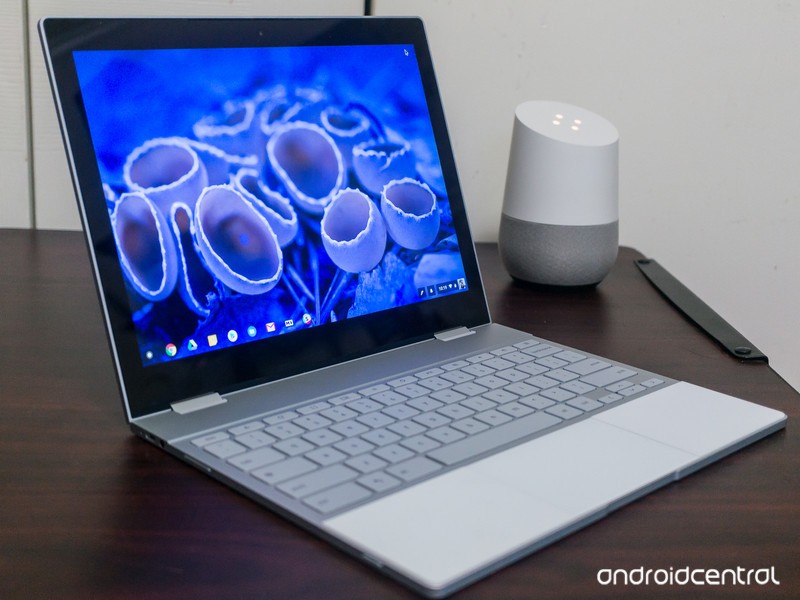
Not sure what’s new in Chrome OS? We’ve got you covered!
Chrome OS, Google’s own desktop operating system, receives regular updates to outfit it with new features, bug fixes, and more. There are three main levels of Chrome OS (Stable, Beta, and Developer) and while you can learn more about what these mean here, this guide will be updated regularly to highlight the main additions with each new release.
Since Google releases updates so frequently, we’ll only share them when something significant is added or patched as new builds are rolled out.
Without further ado, here’s what’s new in the Stable, Beta, and Developer Channels for Chrome OS!
Stable
June 7, 2018 — Progressive Web Apps can be installed and Tablet Mode gets split-screen support
Chrome OS’s Stable Channel was updated to 67.0.3396.78 on June 7, and it comes equipped with a host of new features.
One of the big highlights is the ability to download Progressive Web Apps as standalone applications — similar to how you’d download Android or regular Chrome OS apps. Progressive Web Apps are technically portals to websites but come with refined user interfaces and increased performance. They essentially give you desktop apps for things like Spotify, Flipboard, and more without developers having to create apps specifically for Chrome OS, meaning that we’ve just about ended the complaint that Chrome OS doesn’t have enough applications available for it.
Another big addition is that you can now use apps/websites in split-screen while in Tablet Mode. With devices like the HP Chromebook X2 and Acer Chromebook Tab 10 now around, a feature like this couldn’t have come at a better time.
Other goodies include a cleaner list of your Bluetooth devices, the ability to zip files on Google Drive via the built-in Files app, and new shortcuts that pop up when holding down your power button.
Read through the full changelog here
Beta
June 7, 2018 — All HTTP sites are now labeled as “Not Secure”
HTTPS is the future of website security, but for whatever reason, there are still some sites that continue to use the old HTTP standard.
As it stands right now, sites using HTTPS show a green “Secure” badge to the left of the domain. Starting with the Chrome OS 68 beta, that “Secure” badge is being removed and all HTTP sites wil show a “Not Secure” label so users can more easily identify if they’re on a site that’s not as safe as it should be.
Read through the full changelog here
Developer
July 11, 2018 — Android Nougat’s app shortcuts are now live!
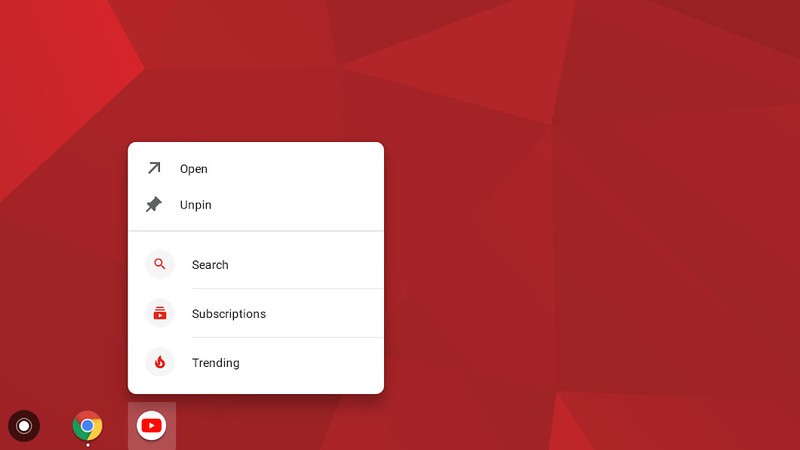
App shorcuts, first introduced with Android Nougat, are finally making their way to Chrome OS.
On July 11, 2018, Chrome OS evangelist François Beaufort announced that they are now live in the Chrome OS Dev Channel.
To start using them, simply enable the flag chrome://flags/#enable-touchable-app-context-menu. Once that’s done, right-click on an Android app that’s pinned to your shelf or in your app drawer and you’ll see the app shortcuts menu pop up.
The flag is still experimental, so don’t be alarmed if things are a bit buggy right now.
June 8, 2018 — The Pixelbook’s power button can act as a physical two-factor authentication key
Two-factor authentication is a great way to secure your online presence, and one way to go about this is by using a USB key. If you’ve got a Pixelbook running the Developer Channel, you can now mimic the functionality of a USB U2F key with its power button.
To enable this, simply open a Chrome Shell and enter u2f_flags g2f. As with everything in the Developer Channel, this feature isn’t the most stable so consider having a USB key anyways just in case something goes wrong.
How to change your software channel on Chrome OS
Chromebooks
- The best Chromebooks
- Chromebooks in education: Everything you need to know
- Should you buy a Chromebook?
- Chromebook Buyers Guide
- Google Pixelbook review
- Join our Chromebook forums
Apple’s Morning Show Drama Starring Reese Witherspoon and Jennifer Aniston Gains Director Mimi Leder
Apple’s upcoming morning show drama, which is set to star Reese Witherspoon and Jennifer Aniston, will be directed by Mimi Leder, reports Variety.
Mimi Leder has directed TV shows that include “The Leftovers,” “Shameless,” and “ER,” along with movies that include “Pay It Forward,” “The Peacemaker,” and “Deep Impact.”
Image via Matt Baron/REX/Shutterstock
The morning show drama doesn’t have a title yet, but it is based on Brian Stelter’s book “Top of the Morning” and is said to provide a look into the cutthroat world of morning TV.
Stelter’s book, for example, “reveals the dark side of morning television” with exclusive details on present and past morning show stars like Matt Lauer, Katie Couric, Ann Curry, Meredith Vieira, and more.
Apple has already ordered two seasons of the show, which was one of the first that it picked up. In addition to starring, Reese Witherspoon and Jennifer Aniston will also executive produce.
Apple has more than a dozen television shows in the works, with details on each available in the original content section of our Apple TV roundup. Apple has not shared details on when its TV shows will launch, but rumors have suggested the first could come in March 2019.
Related Roundups: Apple TV, tvOS 12Tag: Apple’s Hollywood ambitionsBuyer’s Guide: Apple TV (Neutral)
Discuss this article in our forums
When sci-fi meets reality: Adobe re-imagines AR from ‘Terminator 2’
The science-fiction film, Terminator 2: Judgment Day, has been credited for introducing ground-breaking visual effects in cinema. What’s perhaps more intriguing is that the film was released in 1991, when the computers used to make those effects are now less sophisticated than the iPhone in your pocket. So, what if the visual effects designers could re-imagine one of those computer-generated elements, using more powerful hardware and software that’s available today? To find out, Adobe tasked Territory Studio, a motion design and visual effects company, with remaking the augmented reality (AR) system used by the cyborgs in the film. The result is a highly polished, fictional graphical user interface that’s much more appropriate — and believable — for a Terminator from the future.
The assignment seems relatively straightforward: redo the UX system from the scene where the T-800 Terminator, played by Arnold Schwarzenegger, scans a row of motorcycles to find the fastest ride for the chase. Adobe has been making software for creating these kinds of fictional computer systems for years, including After Effects, the program used to animate the computer screens in the original Jurassic Park. But to reimagine the iconic Terminator scene, the software giant asked Territory Studio to complete the task using only Adobe XD, one of the company’s newest programs. XD is designed for prototyping user experiences, from websites to apps, but with the Terminator project, Adobe wanted to test out the software’s capabilities for science-fiction storytelling.
 The AR system from Terminator 2, and the reimagined version by Territory.
Territory Studio set out to keep the original integrity of the James Cameron production, including using the same background footage of the row of Harleys and a Plymouth sedan, while adding a modern take. With experience working on screen effects, from Blade Runner 2049 to Ready Player One, Territory Studio is no stranger to designing fictional computer systems. But Adobe XD was another story, and the design team had no experience with XD prior to the project.
Adobe XD uses tools designed to quickly create prototypes, including options to create repeating elements and style assets that can change a single repeated color or typeface across the design at once. With those shortcuts, Adobe suggests that XD left more space to imagine what an updated Terminator might see.
“A tool like Adobe XD allows a studio to iterate very quickly, to have access to a range of features for a more detailed and rich experience,” Talin Wadsworth, the lead designer for Adobe XD, told Digital Trends. “[Territory Studio] found it helped push this further, faster, using features like repeat grid, global color and style assets, and interactive prototyping, to create a dynamic experience…They were able to imagine more of what the operating system for the Terminator might be like.”
The resulting retake displays more information than the original imaginary system. Using multiple layers, the re-imagined UX helps to further the idea that the Terminator has many more capabilities than the average person, all for assessing information in real time.
Previous
Next
1 of 4


Adobe / Territory Studios


When the visual effects designers created the fictional AR technology for Terminator 2 in 1991 — as well as the original Terminator in 1984 — they relied mostly on their imaginations. Fast-forward to the present, AR has moved from concept to actual technology, from heads-up displays in cars and Google Glass to Pokemon Go on phones and AR headsets. While the imagined AR of the original Terminator movies were cool for the time, it now feels a bit outdated. Adobe says, as the sci-fi of the past pushes toward reality, this Terminator project serves as a reminder to continue imagining future technology.
The remake won’t actually show up in a future re-release of the movie. Instead, it’s more of an exercise to see what creatives could come up with when given new tools. But it’s not common for filmmakers to go back to their old movies and do some reimagining. Most notable is director George Lucas, who reworked select scenes with new special effects when the original Star Wars trilogy were re-released, using more advanced tools.
“It’s not only up to us,” Marti Romances, Territory Studio co-founder and creative director, said in a blog post. “Anyone can have a go at inventing something. We are all inventors. For people to put their ideas out there and to do what they would like to do, even if it sounds crazy. Create new things, go crazy, and have great ideas. You never know if that’s going to become a reality.”
Adobe XD — which is now free in a pared-down Starter Plan — is offering access to the different assets used to re-imagine the Terminator 2 scene. A free Terminator 2-themed UI kit is available to download from Adobe starting today.
Editors’ Recommendations
- New Adobe XD Starter Plan opens user experience design to all
- Adobe’s next big software secret? An augmented reality tool called Project Aero
- Lightroom CC gets synced presets on mobile and batch editing on desktop
- There’s an entire photo studio in your phone with this AR app
- The best Dolby Atmos movies, from ‘Mad Max: Fury Road’ to ‘Gravity’
Want to file a formal complaint with the FCC? That’ll be $225, please
On Thursday, July 12, the U.S. Federal Communications Commission (FCC) will vote on a new rule that may make it more difficult for consumers to file complaints and get their grievances resolved against an offending telephone, internet service, or cable provider. Critics argued that the new rule, if approved by the commissioners, goes contrary to the purpose of the FCC to regulate communications and hear complaints when they arise.
The commissioners will vote on new changes to how informal and formal complaints are handled. Under the new rule, informal complaints filed with the agency will be sent back to the original company to handle. Many argue that consumers often file a complaint with the FCC as a last resort because they couldn’t get a satisfactory resolution with the offending company, and sending the complaint back to the original company without any intervention essentially removes the FCC from the equation.
If a consumer could not get the issue resolved by filing an informal complaint, they could also escalate the issue by filing a formal complaint. Under the new rule, there will be a $225 filing fee for the commissioners to consider the formal complaint. The agency argues that the fee will help it streamline complaints, but the new rule may make it cost prohibitive for some to file a formal complaint in order to get their issue quickly resolved.
The new rule would also free the agency from having to read public comments. While the agency was required to read the more than 20 million comments last December when it rolled back net neutrality rules, under the new rules, the commissioners would not have to read through public comments at all, TechSpot reported.
Ahead of Thursday’s vote, Congressmen Greg Walden, R-Ore., and Frank Pallone, D-N.J., from the House Committee on Energy and Commerce wrote a letter to FCC Chairman Ajit Pai urging him to reconsider the vote. The congressmen noted that the FCC’s role is to ensure that consumers receive fair and honest treatment from their service providers.
“Creating a rule that directs FCC staff to simply pass consumers’ informal complaints on to the company and then to advise consumers that they file a $225 formal complaint if not satisfied ignores the core mission of the FCC — working in the public interest,” the letter stated. “We worry that the proposed change signals that the FCC no longer intends to play this role, and will instead simply tell consumers with limited means and time that they need to start an expensive and complicated legal process. Such an outcome is neither compelled by statue nor a wise public policy decision.”
Editors’ Recommendations
- FCC’s net neutrality rules officially end, but 18 ISPs promise to stay honest
- Robocall case results in record $120 million fine for Florida man
- Microsoft’s Surface Tablet clears final hurdle before launch
- Facebook and Twitter introduce new tools regarding ad transparency
- FCC puts a date on net neutrality’s tombstone ahead of Senate vote
LG Fortune 2 review

Research Center:
LG Fortune 2
Good budget phones are a dime a dozen, but start creeping under $150 and lower, and your choices start to dwindle. Mobile Virtual Network Operators (MVNOs) like Boost Mobile and Cricket Wireless sell affordable data plans and phones you can’t get anywhere else. These phones can sometimes surprise us with their capabilities, but more often than not they offer poor performance and unusable cameras.
The LG Fortune 2 is no exception. Exclusive to Cricket Wireless, the Fortune 2 only costs $100, but it lacks features you can find on other $100 phones such as a fingerprint sensor. Performance isn’t terrible, but it can get frustrating, and you won’t want to share most of the photos that come out of its camera. It’s not all bad, though, as the display is solid, and so is the phone’s battery life. Let’s take a closer look.
Basic, but comfortable and lightweight
The LG Fortune 2 looks like a phone from 2015. It has incredibly chunky bezels on the front, a stark contrast from many of the phones releasing this year with slim edges around the screen. An earpiece and front-facing camera sit up top, and the corners of the front are rounded as well as the edges. It’s comfortable to hold and lightweight, with a 5-inch screen that’s big enough for watching videos and movies.


A volume rocker sits high on the left edge, which can be a little tough to reach, but the power button is on the rear, which is unique to LG. It’s easy to access. On the bottom is a 3.5mm headphone jack next to a MicroUSB charging port. We’d have liked to see the more universal USB Type-C port, but even Motorola hasn’t fully added it into its range of budget 2018 phones.
The 5-inch screen has a 16:9 aspect ratio, and a 1,280 x 720 pixel resolution. The screen is vibrant and colorful, and we didn’t have much trouble seeing content in direct sunlight. Despite the lower resolution, images and text look sharp, and we were satisfied watching videos on this screen.
Despite the lower resolution, images and text look sharp, and we were satisfied watching videos on this screen.
Head over to the back, and the Fortune 2 isn’t terribly unattractive. There’s a lot going on, with a single-lens camera sitting high up top, as well as a flash and power below. There’s also the LG logo, along with a Cricket Wireless logo. On the left bottom corner is the phone’s only speaker. This is as basic as smartphone design gets, but we’re not expecting much for a $100 phone. The gray color is a little dull, but we do like the textured pattern.
When listening to music using the speaker while holding the phone, we sometimes ended up blocking the sound, which is a little frustrating. We wish LG opted for a front-facing speaker instead, especially since there’s plenty of space with those bezels. As for sound quality, the Fortune 2 doesn’t get loud enough to hear outdoors with lots of ambient noise, but it should be plenty loud indoors. The audio sounds surprisingly decent, though it’s still a tad muffled at louder volumes. You’re better off plugging in earbuds or getting a cheap Bluetooth speaker.
It’s unfortunate that the power button doesn’t double as a fingerprint sensor, unlike many other LG smartphones. The Alcatel 1X Android Go smartphone costs $100 and manages to include a fingerprint sensor, so we’d have liked to see one here as well. it’s tough to break the habit of constantly placing our finger on the lock button to gain access to our phone, and who wants to use pins anymore?
Middling performance
The Fortune 2 is powered by Qualcomm’s Snapdragon 425 processor with 2GB of RAM. Scrolling through the user interface isn’t fluid, and apps are slow to open. It’s all manageable, but you may get frustrated when scrolling through apps like Facebook, or when you open apps like Twitter or Instagram and refresh the feed after a long day of not checking in. We didn’t run into any problems that rendered the phone unusable, and we easily lost track of time playing The Sims Mobile without any issues.


Accessing the Settings menu is a little sluggish. When searching through or tapping on a section, we sometimes had to wait for menus to fully load, which could take a few seconds.
Here are few benchmark results:
- AnTuTu 3DBench: 36,514
- Geekbench 4 CPU: 657 single-core, 1,785 multi-core
The AnTuTu score sits right below phones with the slightly-better Snapdragon 430 processor, like the Moto G6 Play. Benchmark scores are good for comparisons, but they don’t reflect real-world performance. In our experience, the LG Fortune 2 is a decent performer for people who use their smartphones lightly — to message others, place calls, and use a few social media apps.
LG Fortune 2 Compared To

Land Rover Explore

Motorola Moto E4

Google Pixel

Lenovo Moto G4 Play

HTC One A9

Huawei P8 lite

Motorola Moto G (2015)

YotaPhone 2

Mlais M9

ZTE Blade S6

Asus PadFone X

HTC One M8 Harman Kardon Edition

Sprint Vital

Sony Xperia ZL

Samsung Galaxy S4
We downloaded our most-used apps on the device, and we noticed the more we tacked on, the slower the phone became. If you’re a power user that cycles through multiple apps, or if you like to use intensive apps, you may want a budget phone that’s a little more powerful like the Nokia 6.1.
One problem we do have with the phone’s specifications is the amount of storage provided. You only get 16GB, and it’s incredibly easy to fill that space up. Thankfully, the Fortune 2 does have a Smart Cleaning feature that optimizes storage, and you can save more space if you use a service like Google Photos. There is a MicroSD card slot that lets you add up to 32GB of additional storage.
Android 7.0 Nougat and bloatware
The LG Fortune 2 runs Android 7.0 Nougat — specifically 7.1.2 which was the last update to come to the 2017 operating system. It’s disappointing to see this phone launch without the latest version of Android, and it’s soon going to be out of date by two versions when Android 9.0 P releases in August. It’s unacceptable, even if the phone costs $100. Don’t expect to get any updates.
It’s disappointing to see this phone launch without the latest version of Android.
The software experience is similar to other LG phones. It’s simple to use, it looks contemporary, and there are a few customization options. LG’s KnockON feature turns the display on when you double tap the screen, which is handy when the phone is resting on a table.
What we don’t like so much is the amount of bloatware that’s pre-installed. You’ll be dealing with apps like Deezer, Final Fantasy XV, TopBuzz Lite, and Yahoo! Finance, which is annoying. Thankfully, it’s easy to uninstall all of them other than Visual Voicemail and the myCricket app.
Poor camera
The camera is always the Achilles’ heel on budget smartphones, especially in low-light environments. The LG Fortune 2 is no different. The 8-megapixel rear-facing camera can take some respectable photos in broad daylight, but it starts to churn out less than ideal results as soon as the sun starts to go down.
Even with decent lighting, images start to get grainy, fuzzy, and blurry. This is exacerbated in low light. Any overhead lighting overpowers the entire scene, ultimately making the photos unrecognizable.
Previous
Next
1 of 14


With a 5-megapixel front-facing camera, selfies look good when you look at them at a distance. Look closer and you’ll see that they too are blurry and grainy. Even with lots of natural light, selfies end up looking a bit washed out.
The camera app itself is surprisingly quick to open, and snapping a photo is swift. It’s a shame many of the results from the camera aren’t good enough to share anywhere.
Day-long battery
With a 2,500mAh battery powering the LG Fortune 2, we were able to get a full day out of the smartphone. That includes emails notifications, using social media, taking photos, and messaging. On average, we found that our device was at about 85 percent by noon (having taken it off the charger at about 8:45 a.m.), and by the end of the workday at 5 p.m., it was around 68 percent.
This phone can probably last a little more on a second day, but otherwise you should be able to comfortably use this phone for a full day.
By 8 p.m., the phone hit 49 percent — this was after using it more on our commute home followed by running errands, as we caught up on Instagram, news, and simultaneously listened to music on Spotify. By the time we got ready for bed at around midnight, the Fortune 2 sat at 28 percent. Not bad. With lighter use, this phone can probably last a little more on a second day, but otherwise you should comfortably be able to use this phone for a full day.
Price, availability, and warranty information
The LG Fortune 2 costs $100, and it’s only available through Cricket Wireless.
LG offers a one-year limited warranty that covers defects in material and workmanship. It doesn’t cover any accidental damage or wear and tear to the device. If you need warranty service, you’ll need to ship your device to LG’s customer service department.
Our Take
The LG Fortune 2 faces stiff competition, and even for its low price tag, it simply doesn’t do enough.
Is there a better alternative?
Yes. We’re currently in the process of testing the Nokia 3.1, which costs $150, as well as the Moto E5 Play (known as the Moto E5 Cruise on Cricket for $100). We can say for certain that both of these phones will offer you better value for the money over the LG Fortune 2.
If you can spend a little more, we recommend taking a look at the $250 Moto G6, the $270 Nokia 6.1, and the $200 Honor 7X. They’re all good performers with decent cameras, and solid battery life.
How long will it last?
The LG Fortune 2 is made of plastic so you won’t have to worry about shattering it easily, though you still may want to nab a case. Since it is unlikely to receive any software updates, and performance will wane the more you use it, we expect the phone to last a year or two before you’ll want to upgrade it.
Should you buy it?
No, there are better phones you can buy for $100.

