


FIFA ’19 for PlayStation 4: Everything you need to know!
Champions League comes to FIFA for the first time ever.

Football. Fútbol. Soccer. Whatever you call it, FIFA has long been one of the best games to play to get your fix if you can’t hit the pitch yourself. FIFA ’19 is on its way out of the door, and it figures to be the biggest, most authentic entry in the series yet. Read ahead to learn everything you need to know.
What is FIFA ’19?
EA decided long ago that they wanted to challenge the kings of soccer video games (mostly Konami’s Pro Evolution Soccer) with a game of their own. That game was FIFA, and while it couldn’t hold a candle to some of the incumbent titles in its earlier years, it has grown into a series that produces some of the best soccer gameplay you’ll find.
It’s 2019, and the wheels keep on turning with FIFA ’19. The game will offer its usual core features, including an Ultimate Team mode that lets you collect stars to build a team and compete against other players, as well as a deep club management mode.
The Champions and Europa leagues are finally here

One of the big deals with FIFA ’19 is that they finally have access to the UEFA license. What this means is that they can now include teams and players from the Champions League, as well as those from the Europa league. Konami has infamously controlled that license for over a decade, but that deal has expired and the UEFA has decided to grace EA with the rights.
For the uninitiated, the Champions League is international soccer’s equivalent of a world championship. Think Super Bowl or the NBA Championship. It’s the most prestigious tournament in the sport, and one of the most prestigious titles in the world, period.
All Champions League teams and their logos, as well as the logo of the league itself, will be fully represented in FIFA ’19. They’re even going as far as including the full broadcast package, which will feature Derek Rae and Lee Dixon on the headset to call the action on the pitch. (Don’t worry, though: regular commentators Martin Tyler and Alan Smith will return for all the other modes.)
FIFA ’19 will include a special mode specifically for Champions League, with the ability to create and run tournaments just like they do in the real world on an annual basis. The Europa League — the lesser, yet still prestigious extension of the Champions League — will also have its full broadcast package represented.
EA is going all out for the occasion with a remixed Champions League anthem composed by music legends Hans Zimmer and Vince Staples. The theme offers familiarity while offering a unique vibe that’s perfect for getting the player hyped. You can already listen to the theme in the video embedded above.
Play like a pro
With a rock solid foundation that has been built over the years, FIFA ’19 is already one of the most authentic soccer games on the market. That doesn’t mean EA isn’t looking to bolster the gameplay with new tricks, though.
One of those tricks is the Sweet Spot mechanic, a new shot timing mechanic that increases your chances of hitting the top corner of the goal when taking your shot. You’ll have to tap the shot button just as your foot strikes the ball in order to get the bonus chance. If you miss, you risk shanking the kick altogether, but if you get it right then you’ll make life difficult for the goalkeeper.
On a more managerial level, you can now setup custom gameplans before a match, as well as choose to execute them on the fly. A gameplan can be set in motion automatically when certain conditions are met, such as if you go up or down by a score. And if you think you need to make adjustments at specific points in the match, you can use the directional pad to direct your players.
Alongside specific gameplans, you can make more generic adjustments such as changing the width and depth of your team. You can also set the tone on defense with new pressure schemes, including “pressure after possession loss,” “constant pressure,” “drop back,” “balanced,” and “pressure on heavy touch.” The minimap has been tweaked to make it easier to spot all the players on the pitch. One team will be circles and the other will be triangles. This is a big help for those who found it difficult to go based on color alone.
Of course, EA has tweaked their animation systems to make player movement and ball handling more realistic. A new active touch system changes the way players receive and strike the ball. It opens the path for advanced moves like feints and cuts. Stepover moves will look more realistic and will be easier to pull off, and 50/50 loose ball situations will have more varied outcomes thanks to the system taking into account more player variables.
Build the Ultimate Team

Ultimate Team mode returns for FIFA ’19. EA has a winning formula with this mode: buy packs, collect players, build your dream team, and compete for prizes. This year, however, we’re sure to see a wealth of new content themed around the Champions League and Europa League.
And for the first time ever, EA will be disclosing pack odds to players. This means the company will tell you not only what you’ll get in each pack, but also the odds that you’ll get specific content such as Elite-level players and items.
This move was made following backlash by gamers and an actual lawsuit in Belgium and The Netherlands that forced EA to disclose odds, as those countries consider opening video game loot boxes as acts of gambling. While it won’t do anything in terms of improving your odds — you’ll still need a world of luck to obtain the best players — at least you’ll have a better idea of what to expect.
Follow a soccer story in The Journey: Champions
The Journey is back. It’s FIFA ’19’s story mode featuring an up and coming soccer savant known as Alex Hunt. His story began in FIFA ’17 where you witnessed his journey to break onto a Premier League team. In FIFA ’18, Hunt moved to America to join Major League Soccer to play for the LA Galaxy as a way to rejuvenate his career, after which he went back to Europe.
Now that he’s back home, Alex Hunt has his eyes set on competing in the Champions League to gain the ultimate prize. The Journey isn’t likely to offer much more than a few hours of intriguing story and short pockets of gameplay, but it should offer a nice change of pace for those who need a break from hard competition, as well as those who are interested in seeing how the young fellow fares in the Champions League.
Where to pre-order FIFA ’19
There are three different versions of FIFA ’19 you can pre-order. The standard $59.99 version will get you up to five Jumbo Premium Gold Packs for FIFA Ultimate Team, as well as a loan of Cristiano Ronaldo item for seven days and Special Edition Ultimate Team kits.
See at Amazon
The $79.99 Champions Edition has 20 of those Jumbo Premium packs, plus you’ll get the game three days early, you’ll get a Neymar Jr item on loan for 7 days, your pick of one of five Champions League players rated from 80 to 83 OVR, as well as the other Ultimate Team rewards available in the standard edition.
See at Amazon
Finally, the $99.99 Ultimate Edition delivers 40 Jumbo Packs, plus all of the stuff available in the Champions and standard editions.
See at Sony
When can you play it?
FIFA ’19 lands September 28th, 2018 for the PlayStation 4, Xbox One, PC. Get the Champions Edition and you’ll be playing it three days early, on September 25th, 2018.
PlayStation 4

- PS4 vs. PS4 Slim vs. PS4 Pro: Which should you buy?
- PlayStation VR Review
- Playing PS4 games through your phone is awesome
Amazon
New to Amazon Prime Day? MrMobile teaches you how to do it (and what to buy!)
When the folks at Thrifter asked me to make a video explaining Amazon Prime Day 2018, I thought “Prime Day? Isn’t that the overhyped garage sale where Amazon tries to move unsold junk?” Well, it turns out that while that has indeed been my experience in the past … it’s just because I haven’t been doing Prime Day right.
From the timing of Lightning Deals to the various methods of scouring Amazon for discounts, there’s a lot to know about Prime Day 2018. I polled the best deal-sniffers at Thrifter to figure out how to make the most out of the “Cyber Monday of the Summer,” and they were nice enough to help me out even after I repeatedly used dumb expressions like that.
Brought to you by Thrifter. Get the latest on great deals, including up-to-the-minute buying advice on Amazon Prime Day, at https://www.androidcentral.com/best-amazon-prime-day-deals Let’s all benefit from their collective wisdom, in the Amazon Prime Day 2018 How-To video above – and be sure to keep it locked to thrifter afterward for up-to-the-minute Amazon deals!
Stay social, my friends
- YouTube
- The Web
- Snapchat
Cheapest Phones for Seniors
- Best overall
- Best for Verizon
- Best value
Best Overall: Nokia 3.1

Nokia makes several great new phones running the new Android One platform, but the best for people who want a phone small enough they’re not concerned about dropping is the Nokia 3.1. This 5.2-inch display is a unique 18:9 aspect ratio, which means the display itself is a little taller and more narrow than most other phones you’d pick up and use. The 1440×720 resolution of the display means text will be nice and crisp even when you zoom in.
The specs sheet doesn’t look like much compared to a Galaxy S9, with its 1.25 GHz Octa-Core Mediatek 6750 processor and 2GB of RAM, but the thing that makes Android One special is the ability to run well on very little hardware so the phone feels fresh and snappy and new. We’ve seen this work well on other phones, and Nokia has done well continuing this experience.
Bottom line: You’re going to struggle to find a better phone than the Nokia 3.1 for less than the $160 asking price.
One more thing: The Nokia 3.1 is available in three colors, Black, Blue, and White.
See at Amazon
Why the Nokia 3.1 is the best
Nokia surprised a lot of people when it announced multiple Android phones, and that surprise continued when they turned out to look and feel really nice and have surprisingly capable internal hardware. The included 2990mAh battery in this model means you’re going to get a full day of use out of it with no problem, and having Android One installed means you get the latest software updates and security patches straight from Google.
Basically, this phone is the best because you don’t have to do anything to make sure it’s offering the best experience. As soon as you take it out of the box, Google’s software is taking this inexpensive hardware and making the most of it.
Best for Verizon: Moto E4

The Moto E4 is a perfect size and has great, easy to use software so you can keep in touch without any of the frills, or install apps from the Google Play Store if you want a bit more. The bright 5-inch HD display is paired with a four-core processor and 2GB of memory to keep up with almost anything. The 8 megapixel camera is paired with a 5 megapixel front-facing camera so you’ll be able to take great photos and videos, and the space for a removable SD card means you’ll never run out of space to keep taking them. And sharing those photos is a breeze with the high-speed LTE network radios the Moto E4 processor delivers.
Android 7.1.1 also offers great accessibility features like a screen magnifier or text-to-speech reader if you need a little help in low light or in general. Other features include a fingerprint reader so you can keep things like your messages and banking information locked away safely where only you have access.
See at Amazon
Best Value: Doro 824

See at Amazon
There are a few companies making phones specifically for senior citizens, but the Doro 824 seems to be the best at actually delivering important features. This phone has physical buttons instead of the all touch screen experience, an alert button on the back to contact emergency services, and a speaker tuned for use with hearing aids. The volume rocker even has physical notches for up and down to avoid confusion in use.
But the real features here are in the software. The entire Android system has been themed to offer big text and bigger buttons so it’s simple to find everything important like calls and contacts.
This $50phone isn’t something you’d buy for a younger person for a bunch of reasons, but it’s custom-built for senior citizens and the price wouldn’t be better.
Bottom line: This phone is crazy cheap, and made specifically for the elderly.
One more thing: This phone has a physical camera button!
Conclusion
The Nokia 3.1 is the best choice for seniors because it’s the best for most people on a budget. It’s small, affordable, and guaranteed to get important security updates to keep everyone safe. This is the phone to get for someone who doesn’t want to spend a bunch of money and just wants something that will work for a long time.
Best Overall: Nokia 3.1
Nokia makes several great new phones running the new Android One platform, but the best for people who want a phone small enough they’re not concerned about dropping is the Nokia 3.1. This 5.2-inch display is a unique 18:9 aspect ratio, which means the display itself is a little taller and more narrow than most other phones you’d pick up and use. The 1440×720 resolution of the display means text will be nice and crisp even when you zoom in.
The specs sheet doesn’t look like much compared to a Galaxy S9, with its 1.25 GHz Octa-Core Mediatek 6750 processor and 2GB of RAM, but the thing that makes Android One special is the ability to run well on very little hardware so the phone feels fresh and snappy and new. We’ve seen this work well on other phones, and Nokia has done well continuing this experience.
Bottom line: You’re going to struggle to find a better phone than the Nokia 3.1 for less than the $160 asking price.
One more thing: The Nokia 3.1 is available in three colors, Black, Blue, and White.
See at Amazon
Update, July 2018: The Nokia 3.1 is our new best overall recommendation!
Uber Updates iOS App With New Features Aimed at Simplifying Pickups
Uber today announced new tools for its iOS app that aim to simplify and streamline stressful pickup situations for both riders and drivers.
To start, there’s a new “Spotlight” feature that will light up the rider’s iPhone display with a bright, color-specific hue. The driver will be notified to which color has been chosen, so when the rider holds their iPhone in the air they’ll know exactly who to pick up.
Uber has been testing such a system since late 2015 with technology that displayed a chosen color inside of the driver’s car using a small mounted light. Those tests eventually became “Uber Beacons,” which drivers can purchase to place in their vehicles so that riders can more easily find them.
The ride-hailing company has also committed to a new guarantee for on-time scheduled pickups, promising riders that they’ll make important appointments when setting a specific time and place for an upcoming Uber ride. If riders are ever late for an appointment, the company will give them Uber credit for their next ride.
Lastly, Uber has added in short “Pickup Messages” that riders can send to their drivers and vice versa. The company says that riders can send helpful visual hints like details of clothing to drivers, and when the message is received the Uber Driver app reads it aloud so drivers aren’t distracted. Uber first began allowing in-app chats between riders and drivers last August.
Next, Uber says that users can expect more features and updates aimed at “taking the stress out of the experience” coming later this year.
Tag: Uber
Discuss this article in our forums
Apple Watch Series 3 Featured in Three New ‘Close Your Rings’ Ads
Apple has shared three new Close Your Rings ads on its YouTube channel in Australia, highlighting the Activity app on Apple Watch.
The fast-paced, 15-second videos each feature a different person — Eric, Atilla, and Yocelin — as they go about their busy days, closing their Move, Exercise, and Stand rings on the Apple Watch Series 3 in the process.
Eric bikes, walks his dog, purchases seafood, cooks, walks the stairs, and dances. Atilla runs, swims, plays table tennis, and shops. Yocelin plays basketball, dances, draws, tries on new clothes, and practises yoga.
Apple has been using the slogan “Close Your Rings” as part of a fitness-oriented marketing campaign for the past few years, including a series of Apple Watch Series 2 ads last year and a dedicated page on its website.
Apple Watch users can close the Move ring by hitting their personalized daily goal for active calories burned, close the Exercise ring by completing at least 30 minutes of daily activity, and close the Stand ring by getting up and moving around for at least one minute during 12 different hours in the day.
Apple Watch users can also complete Monthly Challenges and earn Achievements badges by repeatedly closing the rings in the Activity app, and compete with friends and family, making it a motivating feature for many wearers.
These ads likely represent one of the final marketing campaigns for the Apple Watch Series 3, with new larger-display Series 4 models expected in September. The videos have yet to be uploaded to Apple’s main YouTube channel in the United States, or elsewhere, but they likely will be soon.
Related Roundups: Apple Watch, watchOS 4, watchOS 5Tag: Apple adsBuyer’s Guide: Apple Watch (Caution)
Discuss this article in our forums
Deals: Up to $500 Off 2017 MacBook Pro at Best Buy and $100 iTunes Gift Cards for $85 at PayPal
Best Buy today kicked off its latest discount event, marking down prices on MacBook Pros, Apple TVs, Beats headphones, and more for two days only. For students who don’t mind purchasing last year’s MacBook Pro models, Best Buy’s new sale is particularly noteworthy since you can get as much as $350 off certain configurations and an extra $150 off with Student Deals.
Note: MacRumors is an affiliate partner with these vendors. When you click a link and make a purchase, we may receive a small payment, which helps us keep the site running.
The cheapest model available is the 13-inch/8GB RAM/256GB SSD/3.1 GHz configuration, priced at $1,399.99 for students and parents of students, down from $1,799.99. Check out more of the MacBook Pros and other products on sale in the list below, and head over to Best Buy to place your orders before the offers expire tomorrow, July 17 at 11:59 p.m. PT.
-
MacBook Pro – Students save up to $500 / as low as $1,399.99
-
Apple Watch Series 3 – Save $50 / $279 for 38mm Aluminum and $309 for 42mm Aluminum
-
iPhone 7 and 7 Plus – Save $200 when you buy and activate on a monthly installment plan
-
Apple TV – Fourth generation for $139.99, down from $149.99
-
BeatsX – $94.99 in select colors, down from $149.99
-
DJI – Save up to $300 / Mavic Pro Quadcopter Fly More Combo for $999.99, down from $1,299.99
-
UE Roll 2 – $45.99, down from $99.99
-
Linksys – Velop Tri-Band Mesh Wi-Fi System (3 Pack) for $399.99, down from $479.99
If you’ve been waiting for the next 15 percent discount on App Store and iTunes gift cards, PayPal’s Digital Gifts eBay store today has launched its newest sale. For a limited time, anyone with a PayPal account can get a digital $100 iTunes gift card for $85, and you’ll receive the code for the iTunes credit via email within a few hours after the purchase.

The credit will only be valid on purchases made on the United States App and iTunes stores. PayPal’s iTunes gift card sales are limited and typically tend to last for a day or two, so be sure to visit PayPal’s Digital Gifts eBay store and place your order soon if you want to stock up on some iTunes credit, or send it as a gift to a friend or family member.
Today is also the beginning of Amazon Prime Day, which has a collection of Amazon’s own devices discounted this morning and will see an official kickoff later today at 3 p.m. ET. We’ll be keeping track of many of Amazon’s best tech sales in a live blog that will go up later today, and for more information on the latest discounts and offers be sure to head to our full Deals Roundup.
Related Roundup: Apple Deals
Discuss this article in our forums
Techy and trendy? That’s the new Emporio Armani Connected smartwatch
Emporio Armani is back with a new touchscreen smartwatch, and like the last model, the new model looks stunning. The design isn’t the only thing to change either, as the watch now has the right tech features to accompany the sweet looks. However, before you get too excited, the 2018 Emporio Armani Connected watch still uses the Qualcomm Snapdragon 2100 platform, rather than a new or alternative system.
What does the new Armani Connected watch have that the previous edition didn’t? First, there is a heart rate sensor on the back of the case, ready to help build up a better picture of your fitness during workouts. Then it has GPS inside so you don’t always need your phone to help navigate, and finally it has NFC technology for use with Google Pay. The body is now water resistant enough to swim with the watch too. These features may sound basic for a smartwatch; but until now smartwatches from fashion brands — which means they look good — have not usually included them.
However, all are available on many other smartwatches, up to and including the latest $250 Mobvoi Ticwatch Pro, so why buy the new Emporio Armani Connected? Its simple: Design. The first touchscreen EA Connected watch is still a beauty — understated, stylish, slim, and in the black color scheme, a real stealth machine — and the company has built on this for the 2018 model. The stainless steel case comes in silver, gold, grey, or black, and with either a mono link bracelet, a Milanese loop, or a leather strap.
The horns extend out from the case to grip the strap, rather than forming a solid piece on the first watch, and the buttons are mounted flush to the body for a more cohesive look. The promotional images show a great looking watch face that includes traditional elements with designs only possible with a digital display. It looks great, and the EA logo takes center stage, so your mates will all know how flashy you are.
We’re finding it hard to choose between the silver or black version for attractiveness, but the mono loop metal strap is a surefire winner on either. Emporio Armani has chosen Google’s Wear OS operating system for the watch, but has not released in-depth technical details such as the case size, internal RAM and storage, or battery life. The price is also unknown, but the first model started out at $395, so expect the new version to be around the same. It’ll be available online at Emporio Armani in July.
Editors’ Recommendations
- The best Apple Watch faces
- Mobvoi Ticwatch Pro Review
- The time is right to take advantage of these Apple Watch deals for July 2018
- Fitbit has already shipped a million Versa smartwatches
- Casio G-Shock GBA-800 review
Samsung Galaxy On6 review: Old wine, new bottle
Samsung’s latest budget phone is underwhelming to say the least.
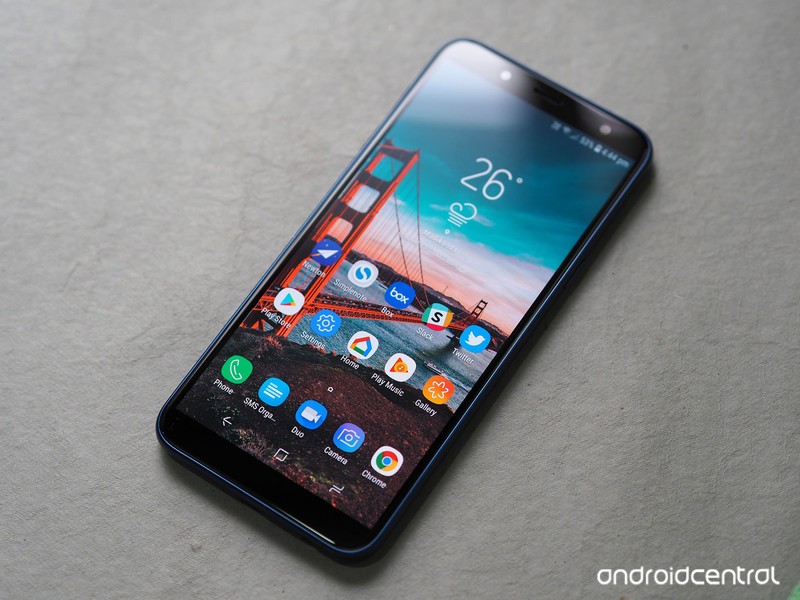
The one constant in the Indian handset segment over the years has been Samsung. The last five years saw local manufacturers like Micromax, Intex, and Lava fade into obscurity as they failed to meet the challenge put forth by their Chinese rivals, but Samsung has weathered the storm unscathed.
Sure, the South Korean manufacturer is no longer India’s top smartphone brand, but its market share is still holding steady at 31% — Xiaomi had to steal market share away from other players to get to 34%. Things haven’t changed much for Samsung either; whereas everyone else is pushing the barrier for value in the budget segment, Samsung is content rolling out underwhelming devices in the Galaxy J series year in, year out.
Take for instance the latest entrant in the series, the Galaxy J6. The device shares a similar design aesthetic as its predecessors, and while there’s a new 18.5:9 panel up front, the rest of the hardware seems derivative. That would automatically make any other device a flop in this highly competitive segment, but it looks like Samsung is the one manufacturer that can get away with launching lackluster devices and still manage to rake in millions of sales.
On the subject of sales, the Galaxy On6 is identical to the Galaxy J6, with the only difference being that the former is sold online while the latter is primarily targeted at the offline segment. It’s baffling that Samsung felt the need to create a new name for an existing product just to list it online, but this isn’t the first time the company has done so. As we’ll see later on, it’s not just the name that’s being recycled here.
Samsung Galaxy On6

Price: ₹14,490 ($215)
Bottom line: The Galaxy On6 gets full marks for effort, but it falls behind its rivals in several key areas, making it a poor recommendation in 2018.
Pros:
- Super AMOLED display
- Dedicated MicroSD slot
- All-day battery life
Cons:
- No ambient light sensor
- Dated chipset
- Mediocre camera
- No fast charging
- No dual-band Wi-Fi
See at Flipkart
Samsung Galaxy On6 What I like
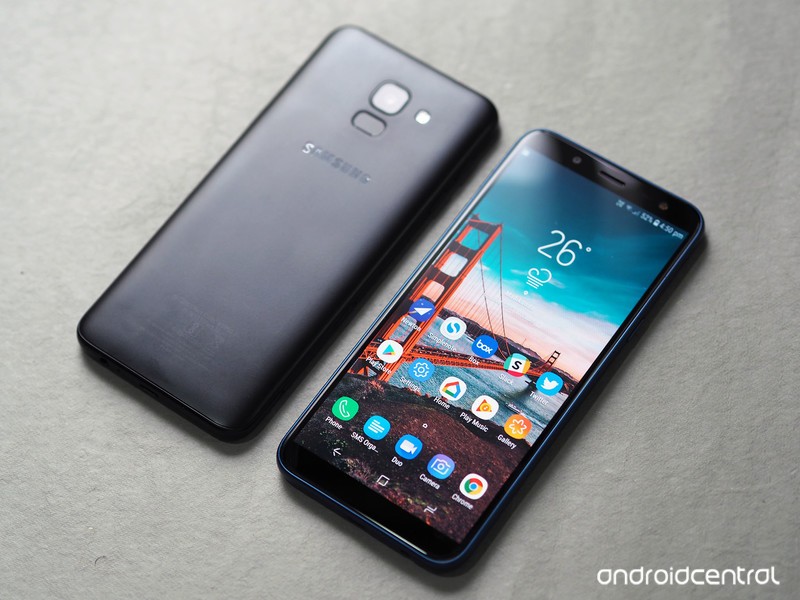
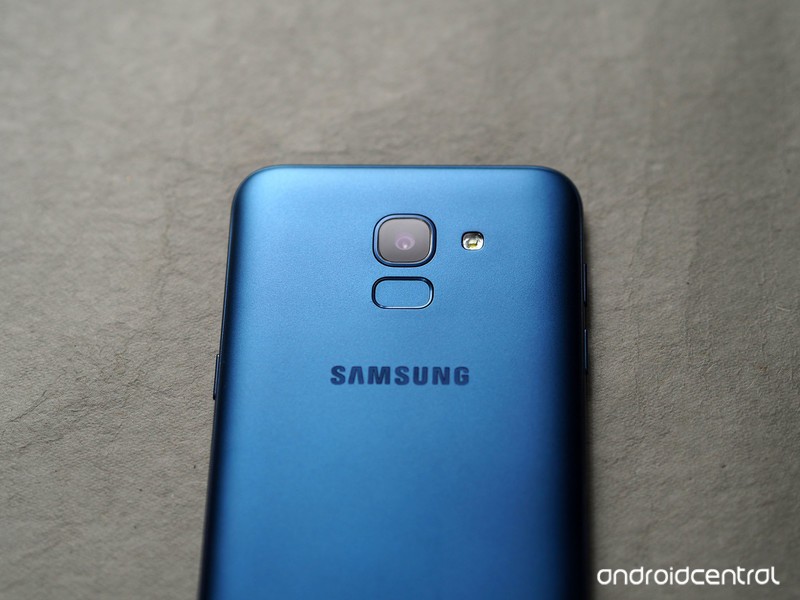
The one redeeming factor on the Galaxy On6 is the display: the device features a 5.45-inch 18.5:9 panel, and the reduced bezels at the front mean there’s no home button anymore. The fingerprint sensor is now located at the back of the device, and you also get a face unlock feature. The feature is dicey as it had issues with authenticating my facial features in anything other than ideal lighting conditions, but it’s a feature that actually made its way onto the device, unlike so many others.
The screen itself is noteworthy, as it is a Super AMOLED panel. But this being Samsung, it is an HD+ display (1440×720) and not a Full HD panel, but it is a step in the right direction. It isn’t a curved panel like the Galaxy S9, and has larger bezels at the top and bottom, but it is better than the 16:9 panels Samsung used in the last generation. Colors are vibrant, and while the panel itself is great, it is let down by the omission of a few key sensors.
The Galaxy On6 brings the Infinity Display to the budget category.
You’ll also get a full day’s worth of usage out of the 3000mAh battery, as it’s driving an HD+ panel and the Exynos 7870 is geared toward efficiency. But the downside on the battery front is that there’s no fast charging.
Another point in favor of the Galaxy On6 is that it has two SIM card slots as well as a dedicated MicroSD card slot. There are two trays located at the bottom left corner of the device, with the first tray facilitating the primary SIM card and the second slotting in the secondary SIM card as well as the MicroSD card.
The phone comes with the latest version of Samsung Experience (9.0) — based on Android 8.0 Oreo — out of the box, along with the June 1, 2018 security patch. The user interface is similar to what you get on the much more premium Galaxy S9, and Bixby Home is also present on the device.
A new software addition to Samsung’s budget phones is Samsung Mall, which is an aggregator that pulls in items from several sources like Amazon, Jabong, Flipkart, and the like. The idea is that instead of searching on each individual platform, you use a service like Samsung Mall to find the product you’re looking for. There’s also an image recognition feature that works astonishingly well — just take a photo of an item of clothing or any physical product, and Samsung will serve up suggestions.
Samsung Galaxy On6 What needs work
The Galaxy On6 is powered by the Exynos 7870 Octa, a chipset that first made its debut back in 2016. That’s not a bad thing in and of itself — the Snapdragon 625 launched in Q2 2016, and it’s still featured in Xiaomi phones today — but the main issue with the Exynos is that it wasn’t great when it launched two years ago, and it hasn’t aged well since. But Samsung is unwilling to change, and as such its 2018 budget series is powered by a chipset that wasn’t good enough even in 2016.
How does a phone in 2018 not have an ambient light sensor or gyroscope?
Samsung continues to omit basic sensors in its Galaxy J series, with the J6 missing out on the ambient light sensor. So when you’re using the phone outdoors, you’ll have to adjust the brightness manually. There’s no gyroscope either, so you won’t be able to see your orientation in navigation apps like Google Maps.
Also, the Galaxy On6 doesn’t have dual-band Wi-Fi, so Wi-Fi connectivity is limited to the 2.4GHz. I’ve used a few $100 phones that don’t offer the feature, but at the On6’s price point it is yet another omission.


Then there’s the camera. Samsung’s budget phones weren’t really known for their camera prowess, but the 13MP primary camera isn’t quite as good as the rest of the devices in this category. Images come out muddy and there’s a lot of noise, and that’s just for the daylight shots.
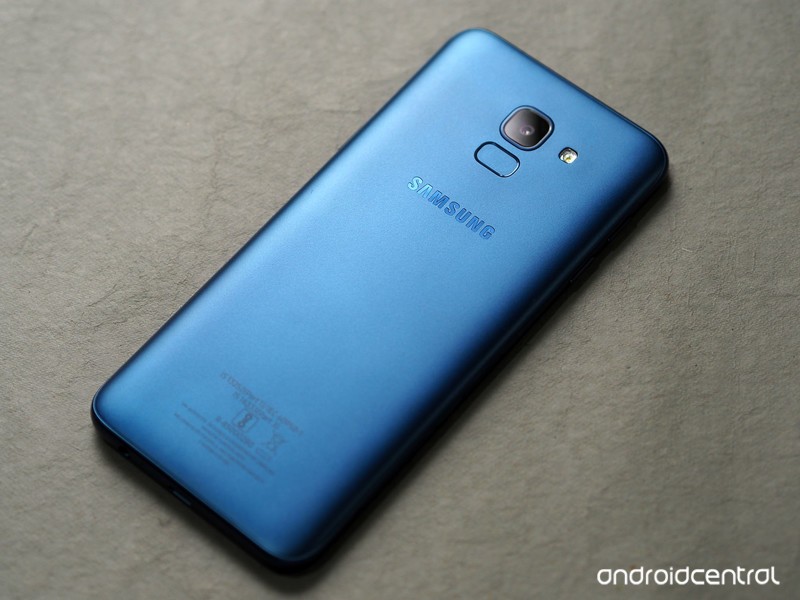
Samsung Galaxy On6 Review
Samsung made the right call to go with the 18.5:9 panel on the Galaxy On6, but the internal hardware itself is overdue a refresh. The camera doesn’t hold up to other devices in this category, and while you’ll get a day’s worth of usage out of the 3000mAh battery, ASUS and Xiaomi are offering phones that consistently deliver two-day battery life in this segment.
There really is no reason to pick up the Galaxy On6 in lieu of the Redmi Note 5 Pro, ASUS ZenFone Max Pro M1, the Nokia 6.1, or the Moto G6. There’s no shortage of great budget phones in India, and you’re better off buying any of the aforementioned phones over the Galaxy On6.
3
out of 5
The Galaxy On6 misses the mark in a lot of categories, and the fact that it’s missing basic features like an ambient light sensor and gyroscope make it a poor recommendation. Thankfully, there are plenty of great alternatives available at the same price point. If you’re unwilling to wait for a flash sale to pick up the Redmi Note 5 Pro or the ZenFone Max Pro M1, the Moto G6 is a great choice.
See at Amazon
How to take screenshots in Android P
Here’s everything you need to know about screenshots in Android P!

Android P brings a lot of new features and changes to our favorite mobile OS, and one of the most basic elements of Android — taking screenshots — hasn’t been left out.
Google’s vastly improved the screenshot-taking and editing experience in Android P compared to past versions, and today, I’m going to walk you through all the changes to keep an eye out for.
Without further ado, let’s get started!
Quick note — the steps shown below are based on a Pixel 2 running Android P. The core elements should remain intact for your device, but depending on the manufacturer, things could look slightly different from phone to phone.
How to take a screenshot
In Android P there are two ways to take a screenshot — the old-fashioned way and a new method.
Starting first with the combo we’ve known for years now, you can take a screenshot by holding the power button and volume-down buttons at the same time. That hasn’t changed at all in Android P, and while it still works just fine, the new way might be even easier for you.
Hold down the power button until you see the pop-up menu on the left.
Tap Screenshot.
Once you do this, a screenshot will be captured.
How to edit a screenshot using the built-in Markup tool
No matter how you take a screenshot in Android P, there’s now a built-in feature called Markup that allows you to quickly edit screenshots right after you take them.
After taking a screenshot, you’ll get a notification. From that notification, tap the Edit button.


From here, you’ve got a full set of tools for making whatever edits you’d like. Here’s a quick overview of what you can do:
- Crop your screenshots by dragging any of the arrows found on all four corners.
- Write on screenshots with a pen and highlighter tool
- Change the color of the pen/highlighter (black, red, yellow, green, blue, purple, white)
- Undo and redo edits


After you’re done editing a screenshot, you can either save it to Google Photos or instantly share it wherever or with whomever you’d like.
That’s it!
With that said, that’s everything you need to know when it comes to taking screenshots on a phone running Android P.
Have more questions? Leave a comment down below and let us know what’s on your mind!
Android P: Everything you need to know about Android 9
Android P
- Android P: Everything you need to know
- Android P Beta hands-on: The best and worst features
- All the big Android announcements from Google I/O 2018
- Will my phone get Android P?
- How to manually update your Pixel to Android P
- Join the Discussion
Treat yourself to Toshiba’s 50-inch 4K Fire TV for just $290 today
You can clearly see this is a deal.

As part of its Prime-exclusive deals of the day, Amazon has Toshiba’s 50-inch 4K Fire TV on sale for $289.99, which is $110 lower than it normally sells for. This TV was only just released at the end of May and has never had a price drop prior to this one. The TV set itself has a beautiful 4K panel, 3 HDMI ports (including 1 with ARC), a USB, composite, optical, antenna, audio output, and an Ethernet port.
The Fire TV software brings smart features to the TV like the ability to stream your favorite media from popular services like Hulu, Netflix, SHOWTIME, STARZ, and more. The included Voice Remote with Alexa lets you find something to watch by simply asking for it, and you can even switch apps, play music, and control smart home devices using it as well.
Amazon also has a bunch of its other hardware on sale for all-time low prices, like the Fire TV Stick, Echo Dot, Cloud Cam and more. Be sure to check them out.
See at Amazon

