


PSA: Gestures aren’t turned on in Android P by default
Google’s not forcing you to swipe quite yet.
Android P is almost here, and one of its biggest features is the new navigation gestures. The new gestures are a welcome touch, but if you can’t live without your Home, Back, and Recents buttons, you’ve got nothing to fear.
When you update your phone to Android P, the gestures are turned off by default. If you want to enable them, you’ve got to go to Settings -> System -> Gestures -> Swipe up on Home button.
We can’t say for certain if Android P’s gestures will still be turned off by default with newer phones like the Pixel 3, but even if they aren’t, you’ll still be able to toggle them off if you really can’t stand them.
The gestures are at least worth checking out so you can get a feel for Google’s vision of Android in 2018, and while they still aren’t perfect, we’re excited to see how they improve down the road.
Do you plan on using Android P’s gestures?
Android P’s gestures are a jagged pill you should learn to swallow
Android P
- Android P: Everything you need to know
- Android P Beta hands-on: The best and worst features
- All the big Android announcements from Google I/O 2018
- Will my phone get Android P?
- How to manually update your Pixel to Android P
- Join the Discussion
Get your next three months of Audible for just $5 each with this early Prime Day deal
You’ll want to hear this.
Amazon is offering Prime members an exclusive discount on their next three months of Audible. New subscribers (as well as those who re-activate) can save 66%, dropping the cost to just $4.95 per month. Normally, this subscription costs $14.95 a month, and that’s what Amazon will bill after the first three months are over, so if you don’t want to continue your subscription you’ll want to be sure to cancel it before that time comes.
In order to take advantage of this promotion, you do need to be a Prime member. If you aren’t currently a member, you can get a free 30-day trial to be able to take advantage of this and other early Prime Day deals right now, and have all the other benefits like free 2-day shipping and more on the big day.
You’ll be billed monthly for the service, so if you decide during the first month that it isn’t for you, you can cancel your subscription immediately after only having paid $5. You’ll get one credit each month, which is each good for any audiobook on Audible regardless of its price. You’ll also get access to podcasts and other audio programs ad-free.
Additional audiobooks beyond the credits you receive are discounted by as much as 30%. If you want, you can swap books out for no extra charge, and if you cancel your subscription, you get to keep any books you’ve already collected forever.
Audible makes listening easy, as you can download the app on a range of devices, from Amazon Kindles to smartphones and more, and even your Sonos speakers.
Other early Prime Day deals are available right now too, like the Echo Show on sale for $130. For more info on the special event, check out our Prime Day hub and sign up for our Prime Day newsletter to stay on top of all the latest news, leaks, and deals.
See at Amazon
How to clear search and location history in Google Maps on the web

It takes some time, but you can completely control the location history Google collects from your devices.
We’ve already covered how to remove individual locations and history items from Google Maps on Android, but when you need to access and manage all of your location history, you need to hop onto the computer. As the old saying goes, “knowledge is power” — and we’re going to give you all of the tools necessary to know what information Google knows about your location, and how to clean it up or stop further reporting.
Accessing and managing your Google location history
First thing’s first, you’ll need to make sure you’re signed into your Google account and go to the Google Location History dashboard on the web. On this page, you’ll see every bit of history Google has logged for where your Google-connected devices have been located, so long as you have opted in to location reporting on the device.
You can go day-by-day through the history using the calendar on the left side of the screen, with the map on the right populating the information collected on that day. Red dots are places that your devices have been, and Google does its best job at coordinating timestamps to show where you moved throughout that day. If you have more than one Android device turned on with location reporting, your map will be far less useful for determining where you went — Maps thinks you constantly bounce back and forth between the location of the two devices.
If you don’t want Google to remember data from a specific day or set of days, use the drop-down menu under the calendar to select a time period — 1, 2, 3, 5, 7, 14 or 30 days — and then click the Delete history from this time period link below it. A pop-up window will ask you to confirm, and explain that it may take up to 24 hours for the data to be deleted completely from the dashboard.
If for some reason you wish to delete all location data Google has from your devices — which may not be a bad idea from time-to-time if you want to keep things fresh — you can simply click the Delete all history link on the left. Again you’ll be asked to confirm, and it may take up to 24 hours for everything to be cleared out. But once you do it, Google will no longer have any of that data.
Double check your phone’s location history settings
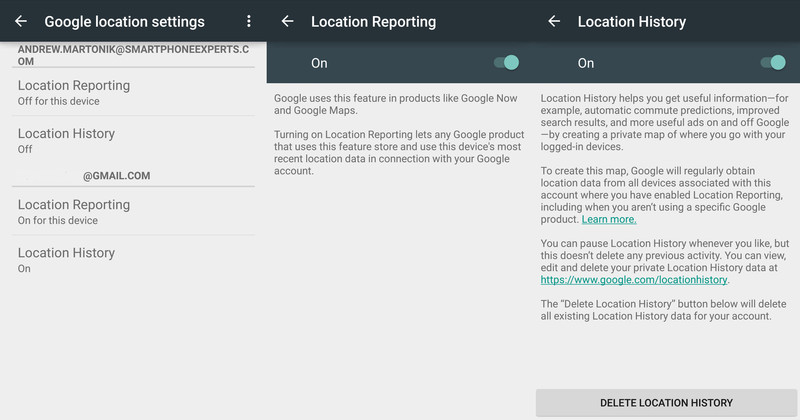
If looking at your location history is a bit of a shocking experience as to how much location data is being stored from your devices, you may want to consider looking at the location history settings on your devices. Though the interface may look slightly different depending on your phone, everyone can access the location history settings by going into their app drawer and opening the Google Settings app (it’s a grey icon shaped like a gear). You can then tap Location, which will launch you into your phone’s location settings screen.
Once there, look for an entry called Google Location Reporting and tap it. You’ll then see all of your active Google Accounts on the device listed, and two entries under each: Location Reporting and Location History. You can turn either one or both off, but it’s important to first understand what each one does.
Location Reporting is the service that lets Google know where your phone is right now, which will let Google apps like Google Now and Google Maps know roughly where your phone is so it can offer up location-based information. This feature is what helps you quickly get located on a map without first locking on GPS, or gives location-based information when you walk by certain stores or areas. If you were to turn off this setting your phone wouldn’t give its current location to Google apps, but it will still keep that location history when you view it from the Google Location History Dashboard.
Location History is the setting that lets Google create a long-term log of places where your phone has been. When you have Location History turned on Google will aggregate location data of your device(s) and use it for things like commute time predictions in Google Now and better search results in Google apps. Location history is kept private and you can access it any time you wish, as we’ve shown above. You can turn off this Location History setting at any time without deleting your history, but if you wish to delete all location history you can do so from this setting or from the web, as we’ve shown.
Take the time, take control of your location history
Now that you have the tools and know-how, we encourage you to spend a little time checking your device’s settings and seeing what location information Google has collected from those devices. It isn’t always approachable or simple, but now that you know the right places to go you have the power to manage it yourself!
A Kindle Paperwhite for $79 is a killer deal

A Paperwhite is the best invention since Gutenberg’s press.
I love to read. I try to read at least two books each week and don’t limit myself to any specific genre — I just like to lose myself in a good book or two. And I’ve found the best way to read if you love reading as much as I do is with a Kindle Paperwhite.
See at Amazon
I’ve been unfaithful to my Paperwhite in the past, thinking I had little desire to keep yet another device charged and up to date and that my phone was a good enough experience that I’d not miss it. And I was wrong. A Paperwhite, with its spectacular e-ink screen, not only feels like a real book but looks even better. E-ink is probably not the right type of display for a phone (sorry Yota) or a smartwatch (sorry Pebble) but when it comes to looking at page after page of words and enjoying it, the contrast and unique screen lighting of a Kindle Paperwhite really is the best thing to happen for book lovers since Gutenberg. You’ll know this is true once you take a Paperwhite outside.

Amazon’s Kindle experience and ecosystem are also pretty good. Once you forget about DRM and how Amazon will do whatever it can to lock you into their store (every online bookstore seems to want this) you’ll realize that any book you would want to read is probably available at the touch of a button. If it’s not, you can also easily import your favorite DRM-free books into your library just by placing them on an SD card. And if you’re a voracious reader, Amazon’s KindleUnlimited service lets you read (or listen to if you’re into Audiobooks)your choice of millions of titles any time you like for $10 per month.
Get the black version if you’ll be reading outside — your eyes will thank me.
As I mentioned, I strayed and thought I no longer wanted to continue my affair with my old Paperwhite. Too many things to keep charged is a real thing, and I foolishly decided to drop a device that only needed charging every week or so and put the Paperwhite on the shelf with the rest of my unloved tech. It didn’t stay there long: kids and spouses tend to make quick work of grabbing something good that never should have been abandoned. I’ve been meaning to grab a new Paperwhite when I caught one on sale and Prime Day made it easy.
You can get a Kindle Paperwhite with Amazon’s “Special Offers” — ads on your lock screen and a banner on the home page — for just $79.99 today. That’s saving you $40. If you like to read, you won’t get something this nice at this price until next year.
See at Amazon
Samsung Expected to Match 2018 iPhone Sizes With Galaxy S10 Lineup
Apple is widely rumored to introduce a trio of new iPhones in September, including a second-generation 5.8-inch iPhone X, a larger 6.46-inch version dubbed iPhone X Plus, and a 6.1-inch model with only some iPhone X features.
Galaxy S9
Perhaps inspired by those plans, respected analyst Ming-Chi Kuo claims that Samsung will follow suit with its Galaxy S10 lineup next year, including 5.8-inch, 6.1-inch, and 6.4-inch models. Kuo outlined his predictions in his latest research note with TF International Securities, seen by Business Insider.
Kuo notes that the 6.1-inch and 6.4-inch models will be equipped with an ultrasonic fingerprint scanner built into the display, a feature that Apple decided against on the iPhone X. The technology will also be built into the Galaxy Note 10 later in 2019, according to his research note.
Kuo’s prediction will surely reignite a long-standing debate about Samsung copying Apple, just weeks after the two companies settled a seven-year-long lawsuit in which Samsung was found guilty of copying the iPhone’s design.
Korean website The Bell previously reported that one of the Galaxy S10 models will be a lower-cost option, in line with the rumored 6.1-inch iPhone, which is expected to have some iPhone X features like Face ID, and an edge-to-edge display with a notch, but lack others, like an OLED display.
The lower-cost Galaxy S10 will also have tradeoffs, such as a fingerprint scanner built into the edge of the device, according to Kuo.
The Bell also said the Galaxy S10+ will feature five camera lenses: three on the back, and two on the front. The rear system is said to include the same 12-megapixel wide-angle lens and 12-megapixel telephoto lens as the Galaxy S9+, plus an all-new 16-megapixel 120º ultra-wide-angle lens.
Apple is also rumored to introduce at least one new iPhone with a triple-lens rear camera in 2019, but likely not until September, which would likely be after the first triple-lens Galaxy S10 is released, so it’s not always Samsung following second. Huawei was first to release a triple-lens smartphone regardless.
Samsung is also said to be considering adding 3D facial recognition to the Galaxy S9 lineup, in line with Face ID on the iPhone X. Galaxy S8 and Galaxy S9 models already feature facial recognition, but it is 2D, and tests proved that the systems could be spoofed with a photo of a face.
One feature that Samsung has yet to copy, unlike several other Android smartphone makers, is the iPhone X’s notch. Galaxy S9 models still have slim, uniform bezels along the top and bottom of the display, although Samsung has patented a notched smartphone design, and could use it eventually.
As usual, Samsung will likely unveil its Galaxy S10 lineup at Mobile World Congress in February 2019, with availability in March.
Related Roundup: 2018 iPhonesTags: Samsung, Ming-Chi Kuo, Galaxy S10, TF International Securities
Discuss this article in our forums
Amazon Prime Day Live Blog: The Best Deals Worth Checking Out
Today kicks off Amazon’s annual Prime Day shopping event, offering customers with an Amazon Prime subscription the chance to save money on nearly countless items across the retailer’s storefront.
Since we routinely share great deals on Apple products and accessories being sold on Amazon, we’ve launched a live blog today that will track notable Prime Day discounts from Apple accessory makers like Anker and EasyAcc, as well as other interesting sales as they go live. Prime Day will officially begin this afternoon at 3 p.m. ET and continue for 36 hours afterwards.
Note: MacRumors is an affiliate partner with Amazon. When you click a link and make a purchase, we may receive a small payment, which helps us keep the site running.
Before that time, Amazon has debuted early access Prime Day discounts on its own range of Alexa and Echo devices, with up to 50 percent off of products like the Echo Look, Fire TV Stick, Fire HD 10 tablet, and more, which are expected to last throughout Prime Day.
In contrast to deals that last for a majority of the event, there will also be limited-time lightning deals that appear at different times throughout the day and night, and only last for an hour or so.
In this live blog, we’ll be tracking lightning deals, longer-lasting discounts, and competitor sales as products get marked down throughout Prime Day, so be sure to bookmark this page and check back for new bargains as Amazon’s mid-year shopping event continues into Wednesday morning.
Live Updates – No need to refresh 
Loading live updates…
Tags: Amazon, Amazon Prime, Prime Day
Discuss this article in our forums
Apple Highlights Upcoming 2018 Emoji in Celebration of World Emoji Day
World Emoji Day kicks off on July 17, and in celebration of the event, Apple today shared details on new emoji that are coming to iOS devices “later this year” as part of the Unicode 11 emoji release.
Apple plans to introduce 70 new emoji characters later this year, with new options for red hair, gray hair, curly hair, and no hair, along with smiley faces that include cold face, party face, pleading face, and face with hearts.

Super heroes, an eye-shaped nazar amulet, and an infinity symbol will be added, along with new animals such as kangaroo, peacock, parrot, and lobster. New food items include mango, lettuce, cupcake, and moon cake.

A full list of the emoji included in Unicode 11 are listed on the Emojipedia site, and Emojipedia was also able to interview Alan Dye, Apple’s VP of User Interface Design to get some insight into how Apple designs new emoji.
According to Dye, when designing new emoji characters, Apple aims for a design that’s “the most iconic” and “the most timeless representation” of the item in question. There’s no specific formula, though, behind the look of each individual emoji.
“Without a doubt, we want it to always feel like an Apple emoji and that’s what we’re going for, but we really make that decision on a case by case basis,” Dye said.
Apple often discusses adding more diverse options, such as emojis for black families, but it’s a challenge to come up with an appropriate interface. “I think that you need a UI that can accommodate the variations,” Dye told Emojipedia.
All of the new emoji Apple shared today will be available across iOS, macOS, and watchOS, joining the hundreds of emoji options that are already available. Apple has not said when the new emoji will be released, but they could come out either alongside the release of iOS 12 this September or in an iOS 12 update later this year.
Related Roundup: iOS 12Tag: emoji
Discuss this article in our forums
Samsung’s Galaxy Watch could be the smartwatch we’ve been waiting for
With Wear OS, Samsung Pay, and more, the Galaxy Watch could be huge.
Smartwatches aren’t quite as popular as they were a couple years back, but in 2018, that may start to change. Google appears to be prepping its own Pixel Watch, Qualcomm’s working on all-new processors for wearable devices, and Samsung’s getting ready to release the Galaxy Watch.
Today, I’d like to take a moment to talk about what Samsung’s doing.
Rumors have been piling up for the Galaxy Watch as of late, and should they turn out to be true, Samsung could have one of 2018’s best smartwatches. Here’s why.
The Wear OS rumors and why this would be huge

First thing’s first, the biggest and most interesting aspect of the Galaxy Watch is that it may use Wear OS instead of Samsung’s own Tizen operating system.
Tizen is what powers gadgets like the Gear S3, Gear Sport, and Gear Fit 2. It’s not a bad OS by any means and has seen a lot of improvements over the years, but the developer support just isn’t there when compared to competing platforms.
With Wear OS, there’s no shortage of apps to choose from — including Spotify, Google Maps, Nest, Lifesum, Uber, Delta, and many more. Along with that, there’s a massive selection of both paid and free watch faces to help you find the look that’s right for you.
Wear OS has superior developer support and Google Assistant — two things lacking from Tizen.
Those are two things Tizen just can’t offer, but that’s not all Wear OS would bring to the table.
S Voice is Tizen’s voice assistant of choice at the moment, and while there’s a report that Samsung will bring along Bixby with the Galaxy Watch, Wear OS is also home to the vastly superior Google Assistant.
Whether you need to send off a quick text, start your workout playlist, or simply check the weather, the Google Assistant is still miles ahead of Samsung’s own efforts in the assistant space.
Along with all that, Wear OS is just easier to use. There are still some kinks here and there that Google needs to work out, but the user experience is still much simpler to understand and navigate compared to the often confusing setup of Tizen.
All of that would only be better with Samsung Pay
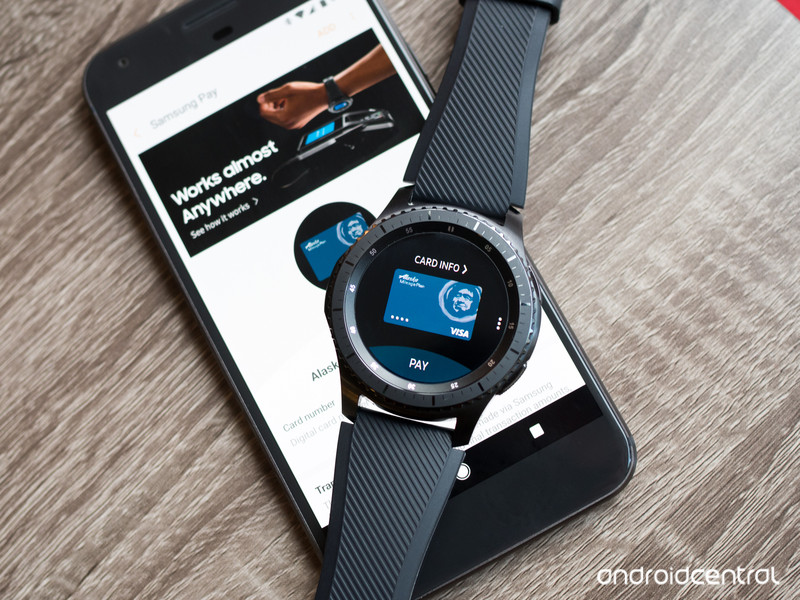
The addition of Wear OS would be a huge plus for the Galaxy Watch, but that does leave one big question unanswered — what would happen to Samsung Pay? We’ve yet to see a smartwatch not running Tizen support the mobile payment system, and while it does work on Android phones, this is only true if they’re made by Samsung.
Samsung Pay is far more convenient and feature-rich than what Google or Apple’s doing.
Google’s trying to push Google Pay as much as it can, but if Samsung’s willing to drop Tizen in favor of Wear OS, maybe that’s a big enough bargaining chip for Google to allow Samsung Pay.
If so, the Galaxy Watch would offer one of the best mobile payment solutions around. Not only does Samsung Pay reward users with points for each transaction they make, but if Samsung can fit an MST chip inside the Galaxy Watch as it did with the Gear S3, that would enable the Galaxy Watch to make payments at virtually any store — no matter if they support NFC or not.
I’m even more skeptical about this happening than I am with the Wear OS rumors, but this wouldn’t necessarily be unheard of. Samsung showed that it was willing to open up Samsung Pay to all Android users with the Gear S3, so if it can make a deal with Google, there’s no reason why we couldn’t see the service brought over to a Samsung-made Wear OS watch.
Samsung’s still experimenting with its hardware

Samsung may not have the best setup on its hands when it comes to Tizen, but in regards to unique hardware design, this is something it’s been consistently great at.
Even though it’s now three years old at this point, the rotating bezel mechanism first introduced on the Gear S2 is still one of the best ways to interact with any smartwatch. It blends seamlessly into the design of a watch and feels much more natural than tapping away on a tiny touchscreen.
One report claims that Samsung’s working on a “new UX interaction” for the Galaxy Watch, and while it’s still unclear what exactly this means, it suggests Samsung’s not done coming up with new and exciting ways for us to use our smartwatches. Will this be a continuation of the rotating bezel? Maybe something else entirely new? Whatever it is, I can’t wait to go hands-on with it.
Also, in addition to the typical heart rate sensor, the Galaxy Watch may pack a built-in blood pressure measurer. This is certainly more of a niche feature, but it’d be a huge plus for people that are big into health-tracking and want to keep tabs on their body at all times.
Are you excited for the Galaxy Watch?
I’m still anxious to see what Google has up its sleeves with the Pixel Watch later this year, but based on the recent talk about the Galaxy Watch, Samsung might have something to steal the thunder away from Google.
Assuming Wear OS, Samsung Pay, and the new hardware features come together like I’m hoping, the Galaxy Watch would easily become the go-to choice for Android users looking for a new wearable.
However, seeing as how all of this is just rumors and speculation at this point, there’s no telling what Samsung will do.
In any case, what are you looking forward to the most with the Galaxy Watch?
Samsung Galaxy Watch rumors: Release date, specs, price, and features!
Should you buy the OnePlus 6 or wait for the 6T?
You can’t go wrong either way.
If you’re in the market for a new Android phone, the OnePlus 6 is a fantastic choice even if you have more than $500 to spend. It’s fast, has an incredible design, and its camera performance is surprisingly great.

However, as much as we like the phone, is it still worth upgrading to it at this point in the year? The OnePlus 6 is already almost two months, and if the past couple years are anything to go by, we’ll see a OnePlus 6T get announced a few months later in November.
With that being the case, should you still pick up the 6 or wait for the inevitable 6T?
When posed with this question, one of our forum users is leaning towards just getting the 6 right now.
jtcannonball
07-14-2018 11:27 AM“
I might do it in the next week or two.
Reply
On the flip side:
chanchan05
07-14-2018 08:12 AM“
I’d suggest waiting because the 6T is right around the corner. You’d have buyers remorse if you bought the 6 in 30 days only for OnePlus to announce the 6T like 2-4 weeks after.
Reply
With that said, we’d now love to hear from you — Do you recommend getting the OnePlus 6 or waiting for the 6T?
Join the conversation in the forums!
OnePlus 6
- OnePlus 6 review
- OnePlus 6 vs. OnePlus 5T: How much changes in six months?
- OnePlus 6 vs. OnePlus 5: Should you upgrade?
- These are the official OnePlus 6 cases
- The OnePlus 6 doesn’t work on Verizon or Sprint
- Join the discussion in the forums
What to play when you get bored with Fortnite on PlayStation 4

Never got into the Fortnite craze? Just got sick of it? Here’s what else you can play if you’re bored
All right, I know. Fortnite is the talk of the town. It’s hard to ignore its popularity when it takes over the media like it has. I got a text from a good friend of mine a few weeks ago who substitutes as a teacher that Fortnite is all her class could talk about. Even my local news channel has done segments on it. But that doesn’t mean you’re a part of the craze. It happens to all of us. We fall into a gaming slump. Maybe there are no new games to play. Maybe you’ve burned yourself out on a multiplayer title recently. Whether you’re just not a battle royale person or happened to grow tired of Fortnite, we hope these suggestions help get your gaming motivation back.
Everyone’s different, and no one’s tastes will be aligned perfectly. Because of this, I’ll list games that range from single-player titles to multiplayer within a variety of genres. If you’re bored with Fortnite, you may need a tight, linear experience to get your groove back, or you could opt for a similar multiplayer experience if Fortnite doesn’t scratch that itch just right.
- The Last of Us
- Borderlands 2
- Assassin’s Creed Origins
- Destiny 2
- Inside
- Fallout 4
The Last of Us

This might seem like an odd title to include, but bear with me. The Last of Us provides a strong focus on narrative and character with linear gameplay levels. It might as well be the antithesis of Fortnite. And that’s why it may be the perfect game for you to play.
The Last of Us, developed by Naughty Dog, is by far one of the most acclaimed games to ever release. Its 3rd-person gunplay isn’t all that impressive by itself, but the atmosphere it exudes along with its character-driven story more than make up for any shortcomings. If you’re bored with Fortnite, you could just be tired of the constant grind to first place. Try picking up The Last of Us and giving it a shot.
See at the PlayStation Store
Borderlands 2

Fortnite stands out from a lot of battle royales, namely PUBG, because of its art style. Its cartoonish look with vibrant colors is the polar opposite of the hyper-realistic gritty shooters we’ve grown accustomed to. If that’s what drew you to Fortnite in the first place, try out Borderlands 2, developed by Gearbox Software. Its art style is attributed to cel shading by most fans, though I’ve spoken with a former Gearbox developer on Twitter, and internally they refer to it as a concept art style, since cel shading is a tad different. Either way, you’re getting bright, popping colors and designs that prioritize style over realism.
Borderlands features chaotic action with millions of different guns. From pistols and rocket launchers to guns that literally talk as you shoot them. It’s known for its wacky and crude humor, if that’s up your alley. Even better, you can buy The Handsome Collection on PS4 to get double the fun with Borderlands 2 and The Pre-Sequel.
See at the PlayStation Store
Assassin’s Creed Origins

The Last of Us may be too linear for some player’s tastes, so that’s where Assassin’s Creed Origins comes in. You’re given a large map to explore at your leisure, and countless side missions to complete whenever you’d like. This is the closest the series has come to a full-blown RPG to date, and since it’s a bit of a soft reboot and takes place earlier than any other Assassin’s Creed game, you can jump into it without feeling lost.
The Assassin’s Creed series never relied too heavily on guns, and that’s especially true in Origins. Taking place in ancient Egypt, Origins swaps pistols for swords. For Fortnite players, this might be the perfect change of pace that you need. Combat is up close and personal, focusing on melee attacks, timing your blows, and swiftly dodging. It’s less precision focused, although Origins did implement a hit box-based combat system. If that’s really more your style and you need to get that satisfaction of a head shot, you can still use your bow and arrow to do so.
See at the PlayStation Store
Destiny 2

Games-as-a-service has become increasingly common these days. Fortnite certainly falls under that category, but so does Destiny 2. Part of what players love is that both games continue to offer up new content to be eagerly devoured. Both provide a longevity that most single-player games are generally incapable of.
Maybe you just want to hop into quick PvP matches. Destiny 2 has got you covered. Is that too competitive for you and you want to take a break to mow down alien NPCs? Destiny 2 has got you covered there, too. It’s the perfect mixture of competitive PvP fights, fantastic 1st-person shooting, exploration, cooperative raids, the list goes on. There’s a little bit of something for everyone in it.
See at the PlayStation Store
Inside

Like The Last of Us — though I’m hardly comparing the two — Inside is a far cry from the experience of Fortnite. This is a platformer that can be played in one sitting. Sometimes you need that instant gratification of beating a game. That feeling may not come from winning first place in a last man standing free-for-all, but instead by completing a challenging puzzle in the nick of time. Believe me, when you’re being chased by unknown threats (or vicious dogs), there’s a thrill when you figure out what to do just in time to escape death.
Inside will challenge your intellect and reflexes while giving you an unforgettable story that’s impressively told without dialogue. Everything is environmental. It’s easily one of the most polished games to come out in years, with every part of it feeling perfectly crafted and necessary. There’s no extra “fluff” to it, so to speak.
See at the PlayStation Store
Fallout 4

Fortnite isn’t just about vying for that coveted No.1 spot. It’s also about building. With Bethesda’s latest entry in its Fallout series, players were able to able to scavenge various materials throughout the world and create their own settlement system, much like building a fortification in Fortnite.
Areas to build these settlements are located all over Fallout 4’s recreation of post-apocalyptic Boston. Though there are some ground rules when building and you don’t have as much freedom to place your objects as you do in something like Halo Forge, nearly the only limits you have are determined by your imagination. You’d be surprised at the elaborate creations that can be made with a bit of ingenuity.
See at the PlayStation Store
Now are any of these games free-to-play? Unfortunately not. I understand that a large part of why Fortnite has been so successful is its accessibility due to it being free. But many of the aforementioned games no longer retail for $60, or never even cost that much to begin with. You won’t be breaking the bank should you decide to purchase any of them.

