


Samsung’s S9 and S9+ Prime Day bundles include an Echo and an Echo Spot
If you’re in the market for a new smartphone and leaning toward a Samsung Galaxy S9 or Galaxy S9+, act fast for this Amazon Prime Day bundle available for one day only with either phone.
In addition to your choice of the latest and best Samsung smartphones, the Prime Day bundle sets up you with a powerful complement of smart home components. The bundle includes the Samsung SmartThings Home Monitoring Kit, an Amazon Echo, and an Echo Spot.
The Samsung SmartThings Home Monitoring Kit includes a hub, a multipurpose sensor, a motion sensor, and one smart outlet. The hub lets you connect a wide range of wireless smart home devices including the other components in the kit. The multipurpose sensor is a two-part unit that triggers alerts when doors or window open or close. The motion sensor acts as a switch when it senses movement and can turn on lights on or off, trigger alarms, and more. With the smart outlet, you can control anything plugged into the smart outlet.
The Amazon Echo and Echo Spot let you control your SmartThings Hub and all the devices connected to it using Alexa. Just ask Alexa to turn on the lights plugged into the smart outlet, show what is going on in the family room on the Echo Spot, or play Rodriquez with the Echo’s speakers.
The S9 and S9+ bundles set you up to control your smart home from any location with your new phone or using voice commands with Alexa.
The S9 Prime Day bundle costs $720, and the S9+ bundle is $840, in both cases a savings of $430 compared to purchasing everything in the bundle separately. Each phone is available in lilac purple, coral blue, or midnight black.
Also, any Galaxy S9, S9+ and Note8 purchases during July can qualify to receive a free microSD card from Samsung through its Double Your Memory promo.
See it
Editors’ Recommendations
- Amazon slashes prices on Echo, Fire TV, and Kindle for Prime Day
- The Amazon Echo vs. the new Echo vs. the Echo Plus: Which should you get?
- Amazon Echo devices get steep discounts for Prime Day
- Best Samsung Galaxy S9 cases
- Google Home vs. Amazon Echo
Look Ma, no hands! The Horizon watch discards tradition for daring simplicity
Who said a watch needs hands, and who said you always have to know the exact time? If you’re nodding your head in agreement here, then the Optik Instruments Horizon watch will make your eyes sparkle with its daring simplicity. The watch does away with hands entirely, and gives clear indication of 15 minute intervals during each hour, but nothing more. There’s no ticking second hand, and no bold digital display giving you hours, minutes, and seconds.
What you get is a new way of reading the time, which is more in tune with how we speak about the time. Optik Instruments argues that we rarely say the precise time down to the minute when relaying it to someone else, or internally in our head. Instead we say things like “about three thirty, or “quarter past five,” even if it’s closer to ten past or twenty past. The Horizon watch has a single red line on its bezel which points to the time presented on the rotating watch face. It’s broken down into obvious intervals, so you can still estimate the almost exact time, just like we do every day.
Horizon watch face
The name comes from the line on the rotating face, which separates day and night, and also gives it a distinctive design reminiscent of the artificial horizon dials used in aircraft. It completes a single rotation over a 24-hour period, and is adjusted using the crown on the side of the body. It’s otherwise completely free of complication.
We had a chance to try on an early version of the watch, which launched on Kickstarter earlier this year. Watches should be, “glanceable,” meaning a quick look provides the information we need, so we were trepidatious in our approach to the Horizon. It will take a while to adjust to the way the it presents the time, and while the concept is easy to understand, it’s a different matter when looking at your watch for a split second and seeing something unfamiliar. Optik Instruments told Digital Trends it’s common to take a morning to get used to it.
This is an electric movement with a 45-month power reserve. No nightly charging needed here.
The simplicity of telling the time extends into the watch’s design. The body and crown are made from stainless steel with a choice of coatings — we loved the Diamond-like Coating (DLC) coating on the Navigator model — and the face is covered by sapphire crystal with an anti-reflective coating. Despite the Horizon being the first to use a single rotating disc to tell the time, it’s still made in Switzerland with a Ronda 515.24 movement inside. This is an electric movement with a 45-month power reserve. No nightly charging needed here.
Wearable on all wrist sizes
Depending on the watches you’re used to wearing, the Horizon is quite small on the wrist. Its 40mm body will suit large and small wrists, and at 10.5mm thick, it won’t interfere with shirt cuffs. It’s very light, adding to its general wearability for everyone. Also, the simple time-telling system means the Horizon can be worn on either wrist, and it’s designed to operate normally with the crown on either side of the face. In addition to the sapphire crystal for scratch resistance, the Horizon is water resistant to 100 meters, so you can happily go swimming with it still on. That said, the Horizon doesn’t have a sporty design.
It’s interesting to see how watch makers are playing with time. Recently we’ve seen and been impressed by the SNGLRTY (that’s Singularity, for those who don’t work in marketing) watch with its single hand for telling the time, along with hugely complex, tech-heavy watches like the Sequent Supercharger. These, along with the Optik Instruments Horizon, all shift away from the established “rules” of watch making to give us something new and exciting. As smartwatches continue to increase in popularity and bring attention to non-smart watches, it’s these designs that potentially appeal to many new mechanical watch wearers. We like the Horizon because it’s different, a little geeky, yet still a proper Swiss watch.
However, we’re not convinced of its appeal outside of watch fans. It may be a little too niche for those who’re about to take their first steps into traditional watch ownership. Watch fans will appreciate the bravery in throwing out everything we expect to see on a watch face, and there’s no denying this has been made by people who appreciate watches, and the build quality proves it.
Get it soon
There are four different models being made, with the Navigator being our personal favorite, due to its DLC body, midnight blue/grey face, and yellow markings. There is also the choice of polished, brushed, or sand-blasted stainless steel. Since its successful Kickstarter campaign in February, Optik Instruments has been busily getting the Horizon ready for backers and general sale. It can still be pre-ordered on the firm’s website for 350 British pounds, or around $460, with the watch shipping in September.
Editors’ Recommendations
- After 70 years, a working Dick Tracy two-way watch radio is finally available
- LG’s rumored hybrid smartwatch may have a touchscreen and analog hands
- Here’s our breakdown of every Apple Watch model, finish, and band available now
- Leica’s chic new product can’t take pictures, but you’ll still want it
- The best Apple Watch faces
Dell’s refresh of the XPS 13 2-in-1 series dips its toes into Intel’s Amber Lake
Intel said in June that its eighth-generation “Amber Lake” Y-series processors would arrive later this year. One month later, the Chilean arm of Dell leaked an upcoming 13-inch XPS 2-in-1 device sporting five processor options, two of which are Amber Lake chips: the Core i5-8200Y and the Core i7-8500Y. The other three options are Intel’s older seventh-generation “Y” chips.
The “Y” used in Intel’s processor naming translates to “extremely low power,” meaning they merely sip from the battery. For instance, the older seventh-generation Core i7-7Y75, despite having two physical cores, only requires 4.5 watts of power. Meanwhile, the Core i7-7660U two-core processor draws 15 watts of power, with the “U” describing “ultra-low” power.
According to previous leaks, the Core i5-8200Y chip will have two physical cores, four threads, and 4MB of L3 cache. Its base speed will be 1.3GHz, while its two-core turbo speed will be 3.2GHz and its one-core turbo speed at 3.9GHz. It will support up to 16GB of system memory and include Intel’s integrated UHD Graphics 615 component with a base speed of 300MHz and a maximum speed of 1,000MHz.
The Core i7-8500Y will be a two-core, four-thread chip as well, but with a base speed of 1.5GHz, a two-core turbo speed of 3.6GHz, and a single-core turbo speed of 4.2GHz. The maximum supported memory and integrated graphics remain the same as the Core i5 chip. Both will have the same 4.5-watt power requirement as well.
As for the upcoming Dell XPS 13 2-in-1 refresh, it will sport up to 16GB of LPDDR3 system memory clocked at 1,866MHz, an SSD with storage up to 1TB, and a 13.3-inch InfinityEdge touchscreen with either a 1,920 x 1,080 or a 3,300 x 1,080 resolution. A pair of two-watt Waves MaxxAudio Pro speakers round out the multimedia aspect.
Port-wise, the listing shows one Thunderbolt 3 port, one USB-C port, one Micro SD card slot, and a headphone jack. Rounding out the feature list is a 720p widescreen webcam with dual digital array microphones, an illuminated chiclet keyboard with 1.5mm of travel distance, a fingerprint reader supported by Windows Hello, Wireless AC, and Bluetooth 4.2 connectivity.
As for other Amber Lake-based chips, there will reportedly be a Core m3-8100Y version as well. It will have a base speed of 1.1GHz, a two-core turbo speed of 2.7GHz, and a one-core turbo speed of 3.4GHz. All three Amber Lake chips are slated to arrive in “more than 140 new laptops and 2-in-1s” from Intel partners starting this fall. The chips are also expected to arrive in Apple’s 12-inch MacBook Pro refresh for 2018.
According to Intel, the Amber Lake Y-series will provide “up to double-digit” performance gains compared to the previous seventh-generation parts. The Core i5-8200Y would be an upgrade to the Core i5-7Y54 and i5-7Y57 chips with a 100MHz increase in the base speed and up to a 600MHz increase in the maximum speed. The Core i7-8500Y would be an upgrade from the Core i7-7Y75 with a 200MHz increase in the base speed and up to a 600MHz increase in the maximum speed.
Editors’ Recommendations
- Intel’s 10nm CPU finally makes it to retail in a refreshed Lenovo IdeaPad laptop
- Intel finally ships an updated Radeon driver for its all-in-one ‘module’ CPUs
- Huawei jumps on AMD’s Ryzen bandwagon via an upcoming 14-inch MateBook D laptop
- Intel’s next mainstream compact PCs won’t have discrete Radeon graphics
- You can stuff a hefty Core i9 six-core CPU in Dell’s new refreshed XPS 15 laptop
Add a microSD card to your phone, camera, or tablet with prices starting at $13
Amazon has a slew of SanDisk storage products on sale today as part of its Prime Day deals, including a bunch of microSD cards. These cards are quite versatile and can be used in a variety of devices, including Fire Tablets, phones, action cameras, dash cameras, and more. There are a bunch of different size options available, starting at 64GB and going to as high as 400GB.
Some of these have never dropped this low before, so you’re going to want to check them out while they are still available.
- 64GB Ultra – $19.49 (Was $25)
- 128GB Ultra – $26.36 (Was $35)
- 200GB Ultra – $45.60 (Was $65)
- 256GB Ultra – $73.56 (Was $150)
- 400GB Ultra – $139.99 (Was $185)
Be sure to grab one now, before they start to sell out.
Amazon Fire 7 vs Fire HD 8: Which should you buy?

In the battle of Amazon’s small tablets, which is the right one for you?
Amazon’s most popular tablets continue to be the 7- and 8-inch offerings, in no small part because they offer a compelling package at exceptional value.
And better still, while the hardware gets a little bit better over time, the price stays the same. So, once again Amazon has two affordable tablets that are actually worth buying. But which should you go for?
See at Amazon
Spec comparison

Here’s what makes up the two newest Fire tablets:
| Display | 7-inch IPS (1024 x 600) | 8-inch IPS (1280 x 800) |
| CPU | Quad-core 1.3 GHz | Quad-core 1.3 GHz |
| Platform | Fire OS | Fire OS |
| Internal Storage | 8GB or 16GB (microSD up to 256GB) | 16GB or 32GB (microSD up to 256GB) |
| RAM | 1GB | 1.5GB |
| Battery | Up to 8 hours | Up to 12 hours |
| Connectivity | Dual-band WiFi | Dual-band WiFi |
| Audio | Mono speaker, built-in microphone | Dolby Atmos, dual stereo speakers, built-in microphone |
| Colors | Black, blue, red, yellow | Black, blue, red, yellow |
| Dimensions | 7.6″ x 4.5″ x 0.4″ (192mm x 115mm x 9.6mm) | 8.4″ x 5.0″ x 0.4″ (214mm x 128mm x 9.7mm) |
| Weight | 295g | 369g |
| Price | From $49.99 | From $79.99 |
Which should you get?

The two Fire tablets are very much alike, but the Fire HD 8 has some important upgrades for that extra $30 asking price. For starters, there’s a higher resolution display, and though not a massive increase in PPI, it looks noticeably better than the 7-inch model. There’s also more RAM and more internal storage, along with a fairly significant boost in battery life over the smaller one.
For media lovers, the Fire HD 8 is also going to deliver better audio, with stereo speakers and Dolby Atmos support for an all-round better experience watching video content or listening to music. The HD 8 like the HD 10 also supports Show Mode which, with the optional dock, turns your tablet into essentially an Echo Show you can then take outside with you.
Here’s the thing, though. The Fire 7 is a better choice for a tablet to give to your young ones. At 50 bucks it’s verging on impulse buy territory, and the new model has a better screen and dual-band WiFi support to boast over its predecessor. For someone looking for the cheapest tablet possible that isn’t garbage, the Fire 7 is still the one we recommend, especially for young ones.
Both of these also come in child-friendly Kids Editions, but if you’re looking for a decent, low-cost tablet to consume media, browse the web, check your email and even play some games on, the Fire HD 8 is the one to get. The $30 difference is small enough that the improvements you get are well worth the extra investment.
Both are still excellent low-cost tablets, though.
See at Amazon
Updated July 2018: We’ve added information on the new Show Mode for the Fire HD 8, new for 2018.
Do it yourself with this $16 Sugru moldable glue 8-pack
Finish up your projects.

Amazon has an 8-pack of Sugru moldable glue on sale for $15.97 thanks to the automatic $4 discount that’s applied at checkout. The deal is exclusive to Amazon Prime members; click here for a free 30-day trial if you need one. This normally sells for $22 and hasn’t sold for cheaper than this since last year.
Sugru is a self-setting rubber which can form to the shape of your choosing to repair, modify or add onto another object. When you first remove Sugru from its package, it has the consistency of Play-Doh allowing you to mold it into whatever you wish. After 30 minutes of being out of the package and up to around 24 hours afterward, the Sugru will harden and stay in the shape you formed permanently.
Many people use Sugru to accomplish simple tasks such as covering up exposed wiring of cables or re-attaching tiny pieces to broken household items, but really there are countless ways to use this product if you put your mind to the task. The restrictions of this product are slim, and Sugru will even stay firm in wet places like your shower and laundry machine making it applicable in every room of your house.
Check out this article about all the things you can do with Sugru.
See at Amazon
ARK: Survival Evolved: Everything you need to know

Become a dino-master in this epic prehistoric survival game!
ARK is an open world survival game that’s best described as Minecraft with better graphics and dinosaurs. Originally released on PC last summer, the full game has been ported to Android and will have you scavenging for food and materials, building weapons and shelters, and hunting and taming dinosaurs — hell yes!
It’s a massive game that’s going to take a ton of time for you to get acclimatized to the game world, the user interface, and how to optimize the game to be easy to play. There’s an online mode where you can play in a big map inhabited by other players, but you’re definitely going to spend your first chunk of time playing offline and building up your skills and abilities — the game itself tells you that you should play until level 20 in the offline mode before going online.
Ultimately, the choice is yours, but hopefully, this guide will help you get started on the right path towards in-game success.
What’s the story? What do you do in the game?


There really isn’t a story in ARK — only survival. And yet, as you play it’s really fun to use your imagination to create your own story as you play. It’s very similar to Minecraft in terms of its open world and crafting system.
You start the game with nothing — just a naked human with a mysterious crystal embedded in your arm who has been dropped onto a tropical island inhabited by prehistoric creatures of all sorts. It’s up to you to forage for food and supplies with your ultimate goal being to not only survive but thrive.


Right off the bat, you’re going to want to familiarize yourself with the inventory menu, specifically navigating the menus for accessing items in your inventory, crafting new supplies, upgrading your character traits, and unlocking new “engrams” which are crucial to build structures and better weapons. The game does not pause itself when you’re using the inventory, so being able to quickly switch between weapons or eat food when you’re in a battle with a dinosaur could mean the difference between life and death.
Tips for getting started


In ARK, you start out naked on the shores of an island brimming with deadly dinosaurs. Knowing that, it should come as little surprise that you are going to die a lot early on, especially if you become prey for a larger predator.
Prepare to die early and often.
The thing is death isn’t permanent in ARK. When you die, you have an opportunity to follow a glowing green beacon to loot your corpse for all the items you had in your inventory when you died. It’s a bit morbid, but it also removes much of the anxiety when you die after crafted a whole bunch of awesome stuff.
Early on, your re-spawn points are entirely random, so depending on where you died you might have a bit of a trek to reach your old body. This changes when you start to build your own shelter and unlock the ability to craft sleeping bags and bed. Beds are re-spawn points in ARK, so the sooner you can collect enough hides to build one for yourself, the sooner managing deaths becomes that much easier.
Collecting 40 dinosaur hides will be a tall task in and of itself, but if you stick to smaller beasts and use your weapons effectively it’s simply a matter of hoarding resources and building out a base camp for yourself. You will spend a ton of time foraging for resources in ARK, crafting supplies, and building up a stockpile of resources so that you can manage your character’s health metrics and eventually become the alpha predator that strikes fear in the fiercest dinosaurs.

You’re also going to want to get familiar with the quick-select menus. By swiping from the left side of the screen, you’ll be able to change the view from first-person to third-person, access your inventory, and control your tamed dinosaurs. The right side is where you’ll access items stored in your hot bar.
If you’re thinking that swiping from the side of the phone held in landscape orientation will pull up the navigation bar you’d be correct, so it’s a bit clumsy at times but still something you’re going to need to master to get good at this game.
How to train your own dinosaur


One of the coolest features of ARK is the ability to tame a dinosaur to become your pet. This is done by knocking a dinosaur unconscious and then feeding it food to get it to warm up to you. The dinos are very subservient once tamed and can be used to help defend your home base or as an extra attacker for hunting bigger game.
You control your dinosaur pet via the pet menu which is reresented by a whistle in the left-side quick menu. You can call your pet to you if they’re in listening range and can set them to attack any targets that you attack, or tell them to hold back.
Some dinosaurs can be set up with a saddle which allows you to ride them around, but you must first unlock the proper engram to craft a saddle for your dinosaur, and not all dinosaurs are able to be mounted.
Stepping online

The offline version of ARK can be challenging enough, but nothing will quite prepare you for when you play online. Online mode places you in an island server inhabited both by the same dinosaurs in the offline mode along with other players. How you interact with other players you come across is up to you, but ideally, you’ll want to make friends and team up with other players to create a tribe and start to build up base camps for yourself.
Working together is the best way to survive in ARK online, as you’re able to share resources and plan out attacks on bigger targets that simply would be too hard to take down all by yourself.
The developers recommend you wait until you’ve reached level 20 before treading online so that you’ve got a firm grasp on the controls and gameplay. There’s nothing stopping you from jumping right into online play, but it won’t be near as fun of an experience if you’re having a hard time keeping up with other players.
Will it run on my phone?
ARK is available for touchscreen Android devices (no Android TV support, sadly) and, as you might expect, is a bit of a resource hog. The developers recommend using a device running with at least 3GB of RAM and running Android 7.0 or later. That means it should run well enough on a phone as old as the Samsung Galaxy S6 running on Nougat, but any flagship phone released in the past two years should be more than capable of running ARK.
What do you think of ARK on Android?
It’s pretty amazing to see a big and expansive title like this come to Android. Have you had a chance to play ARK: Survival Evolved on Android? Let us know what you think in the comments below!
Best Amazon Prime Day Deals 


AeroGarden Sprout LED with Gourmet Herb Seed Pod Kit
$44.99
$70.00
Save $25
Have a green thumb you prefer to keep indoors? AeroGarden is a neat little way to grow your own herbs on your counter.

theBalm Schwing Liquid Eyeliner
$12.92
$16.75
Save $4
This cult-favorite liquid eyeliner has an easy-to-use felt tip so you can master the cat eye look.

Anker PowerLine+ Lightning Cable
$10.00
$15.00
Save $5
The Lightning deal on this Lightning cable is selling out lightning-fast.

Google Wifi
$239.00
$299.99
Save $61
This Google Wifi mesh router system can cover up to 4,500 sq. ft with Wi-Fi coverage.
- Top Deals
- Amazon Devices
- TVs
- Smart Home
- Unlocked Smartphones
- Kitchen
- Audio & Headphones
- Gaming
- Home Improvement / DIY
- Everyday Essentials
- Kids & Toys
- Entertainment
- Fashion
Check out more Amazon Prime Day deals!
Android Gaming

- Best Android games
- Best free Android games
- Best games with no in-app purchases
- Best action games for Android
- Best RPGs for Android
- All the Android gaming news!
Chromecast upgrades its ambient mode

One of the best things to watch when you’re not watching video just got even better.
When it comes to using your TV as a bit of an art piece, Chromecast is right up there — especially when it comes to customization. And now it’s got a new ambient mode that allows for even more options, and more control — and an even better experience. Here’s what’s up:
Within the Google Home app (you’ll need the most recent update on Android or iOS) you’ll find new ambient mode settings for a given Chromecast target. From there you’ll start with three options for background images.
First is “Photo frame,” which uses your own images as the Chromecast background when it’s not otherwise in use showing video or slideshows. You still have full control over which photo albums are used, the better to avoid the obvious embarrassing situations. (Pro tip: Make a dedicated album specifically for this purpose.)
You also can still chose the “Art gallery” function and use images picked by Google. And, yes, they’re still very good.
And finally there’s the option for Facebook or Flickr images. It’s “experimental,” though. So adjust your life accordingly.
We also still have options for weather and time info, and whether to show data on images being used as the background — who shot it and what album it’s in. (Again, title things like a grown-up, folks.)
And, finally, you can chose how often images cycle through — from 10 seconds to 10 minutes.


There’s also a secondary option that lets you see the history of all the images shown in ambient mode, so if you see something cool you can grab your phone and figure out what it was.
And that’s it. A new coat of paint, a new option or two — and still a very useful Chromecast.
Best Amazon Prime Day Deals 


AeroGarden Sprout LED with Gourmet Herb Seed Pod Kit
$44.99
$70.00
Save $25
Have a green thumb you prefer to keep indoors? AeroGarden is a neat little way to grow your own herbs on your counter.

theBalm Schwing Liquid Eyeliner
$12.92
$16.75
Save $4
This cult-favorite liquid eyeliner has an easy-to-use felt tip so you can master the cat eye look.

Anker PowerLine+ Lightning Cable
$10.00
$15.00
Save $5
The Lightning deal on this Lightning cable is selling out lightning-fast.

Google Wifi
$239.00
$299.99
Save $61
This Google Wifi mesh router system can cover up to 4,500 sq. ft with Wi-Fi coverage.
- Top Deals
- Amazon Devices
- TVs
- Smart Home
- Unlocked Smartphones
- Kitchen
- Audio & Headphones
- Gaming
- Home Improvement / DIY
- Everyday Essentials
- Kids & Toys
- Entertainment
- Fashion
Check out more Amazon Prime Day deals!
Introducing CordCutters.com
- The hardware you need
- All about streaming services
- What channels are on which service
- FREE over-the-air TV
- How to watch sports
- Join the discussion
Get the latest deals
Prime Day is a great time to save while restocking essential items you use every day
Don’t miss out on the “boring” deals.
Sure, Prime Day is an awesome opportunity to #TreatYoSelf and buy the fun things you want, but what about the boring things? I’m talking about the shampoos and dish soaps of the deal world. They’re not exactly exciting, but that’s what makes saving money all the more enticing. You’ll have to buy laundry detergent at some point in the future. Why not save some money (and skip the store) in the process?
Let’s start out with the chores. If you need dishwasher detergent, air freshener, laundry soap, or a floor cleaning system, you’ll want to check this offer out. Amazon’s giving Prime members $20 off when they spend $60 or more. As an added bonus, several of the included items are on sale or have coupon offers. You can save on Lysol Disinfecting Wipes, too. Four 80-count containers fall to only $9.11 after the coupon offer is clipped. Boom. Fresh air and fresh clothes, done and dusted.
How about food? Feed the cats with up to 40% off feline favorites, including treats, food, and watering devices. Dog food is on sale, too. Purchase the pooch this 5-pound bag of Wag dog food for just $9.09.
People food is on sale, too. Amazon-branded everyday essentials are discounted by 30%, including snacks and coffee.
We can’t forget the health and beauty must-haves. Lipstick is an everyday essential, right? You’ll want to check out this offer for up to 30% off luxury beauty items. There’s even a coupon for free samples if you spend $50 or more. You can also score this Waterpik Aquarius Water Flosser for only $40 instead of the usual $80 price tag.
As the Prime Day deals keep rolling in, we’ll keep adding to the everyday essentials roundup. Keep checking there for even more great discounts on the things you use every day.
The NVIDIA Shield TV media player is $139 for a limited time
Blends perfectly with all your other Android gear.
The NVIDIA Shield TV streaming media player is down to $139 on Amazon. This is a Prime Day Lightning deal, so you’ll definitely need a Prime membership for this one. The average street price for the Shield is around $179. While it has dropped in price a couple times in the past, we have never seen it go for less than $149. Of course, since it’s a Lightning deal we’re dealing with limited supply and limited time before this deal is done for good.
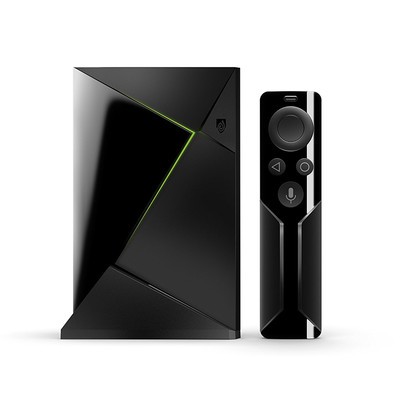
The NVIDIA Shield TV just updated to Oreo 8.0 recently, so it’s got the most up-to-date Android operating system. Read more about it in our review including how it has improved its hardware over older generations and its potential applications with your smart home.
See on Amazon

