


Apple Seeds Third Beta of tvOS 12 to Public Beta Testers
Apple today seeded the third beta of an upcoming tvOS 12 update to its public beta testing group, giving non-developers a chance to try out the new software ahead of its fall public release. Today’s third beta comes two weeks after Apple released the second tvOS 12 public beta, and it corresponds to the fourth developer beta released yesterday.
The tvOS 12 public beta can be obtained by going to the Settings app on the Apple TV and navigating to the Software Updates section under “System.” “Get Public Beta Updates” will need to be toggled on, and once it is, the Apple TV will download the beta software.
tvOS 12 introduces long-awaited support for Dolby Atmos, and when tvOS 12 launches this fall, iTunes will be home to the largest collection of Dolby Atmos-supported movies. As with the launch of 4K HDR, previously purchased content will be upgraded to include Dolby Atmos on all supported titles at no cost.
tvOS 12 features a zero sign-on option that lets cable subscribers watch live channels and on-demand programs they’re entitled to through their cable subscription simply by being logged into their home internet networks. This feature will be limited to Charter Spectrum users to begin with, but Apple plans to expand it to additional providers in the future.
Other tvOS 12 features include the ability to autofill passwords from the iPhone to sign into Apple TV apps more quickly, and support for Home Control systems like Crestron and Savant, which will be able to be used to control the Apple TV.
Apple has also made the Apple TV Remote a default option in Control Center on iOS devices with the iOS 12 beta, there are new aerial screensavers created with help from the International Space Station, and aerial screensavers now offer up location information, a feature that’s activated in this beta.
tvOS 12 will see a public launch this fall, and until that time, will be limited to developers and public beta testers as Apple works out bugs and other issues.
Related Roundups: Apple TV, tvOS 12Buyer’s Guide: Apple TV (Neutral)
Discuss this article in our forums
Apple Releases Third Public Beta of iOS 12
Apple today seeded the third public beta of iOS 12 to public beta testers, giving non-developers a chance to test the software ahead of its upcoming fall release. The third iOS 12 public beta, which comes two weeks after the second public beta, corresponds to the fourth developer beta released yesterday.
Beta testers who have signed up for Apple’s beta testing program will receive the iOS 12 beta update over-the-air after installing the proper certificate on an iOS device.
Those who want to join the beta testing program can sign up on Apple’s beta testing website, which gives users access to iOS, macOS, and tvOS betas. Before installing a beta, make sure to create a full encrypted iTunes backup or an iCloud backup and be sure to install iOS 12 on a secondary device because beta software is not always stable and can include bugs.
The new iOS 12 beta in particular introduces new issues with Screen Time, the App Store, and Siri Shortcuts, according to Apple’s release notes for the developer beta. Apps in the App Store might fail to download properly the first time, Screen Time data might not sync between devices, and Siri Shortcuts might not work properly on CarPlay and HomePod, as well as if a device is locked. The cellular status bar on the iPhone X can also be inaccurate.
iOS 12 brings Group FaceTime, local multiplayer shared AR experiences, new Animoji, and a Memoji feature that’s designed to let you create a personalized Animoji that looks just like you.
Subscribe to the MacRumors YouTube channel for more videos.
Animoji, stickers, text, and more can be used in FaceTime and the Messages app, and there’s a new Screen Time feature to help customers understand and manage the amount of time they’re spending on their iOS devices. There are options to limit app time and Screen Time also includes comprehensive parental control tools.
New Do Not Disturb features make it easier to manage notifications, as do interactive notification options and notification grouping.
Siri has been improved in iOS 12 with Siri Shortcuts for creating time-saving automations, and Siri is also smarter and able to provide info on motorsports, food, and celebrities. Later in the year, Apple will launch a Shortcuts app so you can create your own shortcuts.

Under-the-hood improvements to iOS 12 will make everyday tasks on the iPhone and iPad faster and more responsive, with the camera launching up to 70 percent faster and the keyboard showing up to 50 percent faster.
iOS 12 also includes a rebuilt Maps app with a new Apple-designed Maps engine that’s available in the San Francisco Bay Area at the current time. While limited to the San Francisco area at this time, the features will roll out to Northern California in the fall before expanding to additional locations across the United States in late 2018 and 2019.
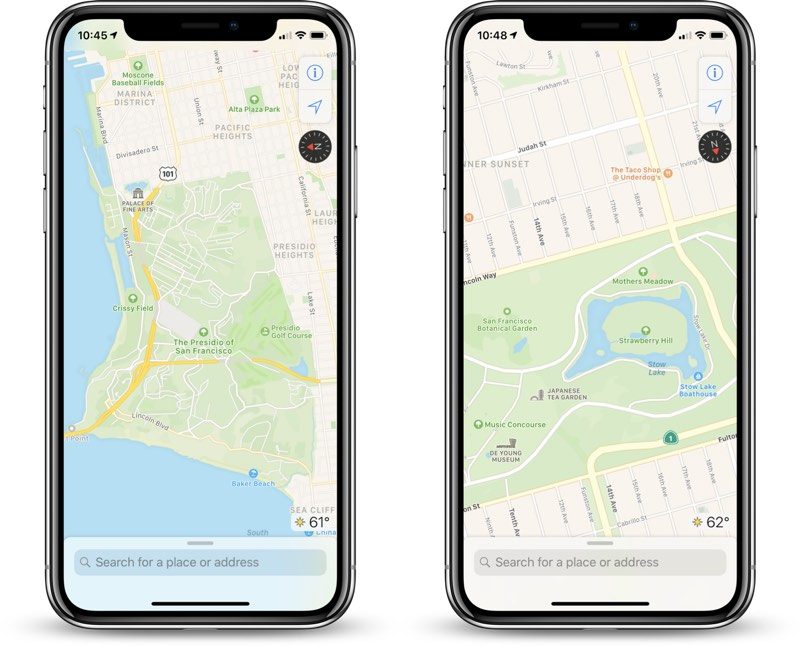
The revamped Maps app displays foliage, pools, buildings, pedestrian pathways, and other map elements more accurately, and it brings improvements to traffic, real-time road conditions, construction, and more.
iOS 12 will be available to developers and public beta testers as a beta for the next two months to allow Apple to work out bugs and other issues ahead of a fall launch alongside new iPhones.
Related Roundup: iOS 12
Discuss this article in our forums
12 new moons were discovered orbiting Jupiter, and one’s an ‘oddball’
Jupiter got 12 new moons on Tuesday, July 17. Well, not exactly. Those dozen moons have, of course, always been in Jupiter’s orbit, but it was only this week that researchers from the Carnegie Institution for Science announced their discovery. The addition of these 12 brings the total number of moons (that we know of) to a whopping 79. As you might imagine, that’s far more than any other planet in our solar system can boast.
While the research team has suspected the existence of these 12 moons for about a year, it takes several observations in order to confirm that an object is, in fact, orbiting Jupiter. As such, the team took their time in confirming the new Jovian moons.
Scientists made their latest discovery when they were actually looking for another extraterrestrial body — Planet X, the planet that is suspected to exist somewhere beyond Pluto.
“Jupiter just happened to be in the sky near the search fields where we were looking for extremely distant solar system objects, so we were serendipitously able to look for new moons around Jupiter while at the same time looking for planets at the fringes of our solar system,” team leader Scott S. Sheppard said in an announcement. Of the 12 new moons discovered, 11 are described as normal moons, while the other is an “oddball.”
What makes it weird? Apparently, it’s just 1 kilometer wide, which means it’s the smallest moon scientists have discovered to date orbiting the planet, and it takes a full year and a half to make a complete trip around Jupiter. Moreover, its orbit crosses that of other moons in retrograde (those that travel in the opposite direction of Jupiter’s rotation), which is to say that at some point, multiple moons could collide. “This is an unstable situation,” Sheppard noted. “Head-on collisions would quickly break apart and grind the objects down to dust.”
This discovery could actually give scientists clues into the formation of moons and planets as a whole. As the team noted in its announcement, “Elucidating the complex influences that shaped a moon’s orbital history can teach scientists about our Solar System’s early years.” In this case, determining that there are still several small moons surrounding Jupiter suggests that they were actually created after the planets were formed.
Editors’ Recommendations
- SpaceX says it won’t send space tourists around the moon just yet
- Prime delivery, straight from the moon? Bezos dreams of heavy industry in space
- NASA abruptly shuts down its planned 2022 moon rover mission
- International relations are tense in orbit. Is creating a ‘Space Force’ a good idea?
- Canon’s new large sensor is too big for you, but not for scientists
Did you buy an Essential Phone for $250 during Prime Day?
At $250, the Essential Phone is a no-brainer.
Amazon Prime Day officially wrapped up early this morning, and while the last day and a half saw a tremendous amount of deals, one of the best ones in the mobile space was easily the Essential Phone for just $250.

That ultra-low price on the Essential Phone didn’t last long, but if you managed to pick one up in time, you got one of the best smartphone values of the year. The Essential Phone may not be perfect, but with the Snapdragon 835, a pure Android experience, and one of the best designs on the market, it was a steal at that price.
As you might expect, most of our forum users were all about a deal as good as that one was.
revtech
07-16-2018 08:04 PM“
just bought one on impulse, seems people are happy with it now, hope I’m not sorry but didn’t want to think too long and hard and lose out . . 🙄
Reply
snowmutt
07-17-2018 03:27 AM“
Ordered a white one. This decision was WAY out of left field as the PH-1 was not on my radar. But that 250$ price added to all the updates and support this has got since it’s much battered launch sold me. Essential is supporting it, and I love the material. The Mate 10 Pro lost a sale.
It is on back order, so no idea when I will actually be getting it. A tad nervous, but willing to give it…
Reply
mlbrowninsc
07-17-2018 09:09 PM“
I jumped on this deal as well. Picked up a white one too. Got it today and am working to set it up. Lots of updates to download. Seems great so far. Love the screen and the materials. Great size as well.
Reply
Scienceguy Labs
07-18-2018 06:49 AM“
I loved my EPs. Really good phones. I was almost tempted to grab another one, but resisted.
I wonder what this sale says about the company’s future?Reply
Now, we want to hear from you — Did you pick up an Essential Phone during Prime Day?
Join the conversation in the forums!
Essential Phone
- Essential Phone review
- Essential Phone specs
- The latest Essential Phone news
- Join our Essential Phone forums!
Amazon
Best Buy
Sprint
Telus
Android P features you’ll love: Restricted apps to save you battery life

Android P will help you make apps that don’t behave stop sucking down your battery by putting them on restriction.
We all have different wants and needs about what our phone can do for us, but we all have one thing in common, too: we want our battery to last longer. Whether you get more than a day from a phone like the ASUS Zenfone Max and its 5,000mAh battery or you barely make it through the day with a phone that has a more, erhm, modest battery, you still want a longer time between charges. So do I. Charging a phone isn’t hard, but not charging it is easier. Google knows this, too, and that’s why Android P has several features designed to extend your battery.
A part of Android’s power management called Background Restrictions is one of the things in Android P that tries to tame unruly apps and ease your battery life woes. As part of Android P, it uses an aggressive approach to do something we’ve needed for a long time — clamp down apps that don’t use any of the newer battery saving features found in the latest versions of Android. Putting the decision in your hands instead of an app developer’s is pretty awesome.
How Background Restrictions work
The beauty of how these Background Restrictions work is in their simplicity.
If an app exhibits some of the bad behaviors described in Android vitals, the system prompts the user to restrict that app’s access to system resources. This is a new feature for Android P.
Android vitals is a Google initiative designed to do one thing — improve performance and stability of every Android phone. That’s a tough task; Google can test the Pixel phones, Samsung can test the Galaxy phones, LG can test their ThinQ phones and so on, but once we get them the first thing we do is add apps. Those apps were not there when the Samsungs and LGs of the smartphone world tested the software for stability and performance. Those apps can do horrible things. Those horrible things all cause the battery inside our phones to drain faster than it should.
Power management in Android P gets a little perturbed when apps exhibit any of the bad behaviors described by the Android vitals initiative. There are also two stand-alone things that will draw Android P’s power management ire: Wake locks when the screen is off and apps built to target versions lower than Oreo and try to have “excessive” background services running.
If the active power management subsystem notices any of this sort of thing happening from an app, it notifies you and gives you the option of restricting the apps services. Think of it as putting that app in detention.
What restrictions are placed on a “bad” app?
That is up to the developers who built the software for your phone. And it should be because Android can run on a lot of different hardware and not all hardware is equal. A Galaxy S9+ can handle a lot more load than an entry-level phone a carrier might include with a service plan. The company that made the phone will know what it can handle and what is just too much to ask.
Google gives us a baseline using a stock AOSP build for phones that can officially run them (Pixel and Pixel 2 models). Restricted apps can’t do any of the following when they aren’t in the foreground (actively being used because you wanted something done):
- Run jobs. A job is a single unit of work that you, an app, or a part of the OS called a scheduler (it runs things on a schedule) assigns to the operating system.
- Fire alarms. An alarm is an alert or event that gets sent from an app to the operating system. These are different from the types of notifications you see.
- Use the network. This means any network — LTE, 3G, Wi-Fi, etc.
For a chart showing Android P’s Power Management Restrictions, Look here.
The developers who designed the operating system for your phone and set all the right parameters and worked all the long hours will decide what an app that does bad things is not allowed to do when you’re restricted its background use. All we need to do is notice the notification and tap away to send that bad app into the corner for a timeout. It’s a beautiful idea that took nine versions to happen.
Android P
- Android P: Everything you need to know
- Android P Beta hands-on: The best and worst features
- All the big Android announcements from Google I/O 2018
- Will my phone get Android P?
- How to manually update your Pixel to Android P
- Join the Discussion
Nest is joining the Google Home team, CEO stepping down
Marwan Fawaz will keep working at Google/Alphabet as an advisor.
Nest, the popular smart thermostat and security camera company, is seeing some big changes on the executive level. According to a new report, Nest’s CEO Marwan Fawaz is stepping down from his role and is transitioning to be an advisor for Google/Alphabet.

With Fawas no longer in charge of the Nest division, 12-year Google employee Rishi Chandra will now be in charge of the team. Furthermore, all Nest team members and operations are being merged under the Google Home hardware division.
Commenting on this decision, Chandra told CNET:
We thought, let’s connect these things and build experiences that we really couldn’t do before.
Nest employees appear to be fully onboard with this decision. As CNET’s report continues:
Fawaz’s exit from Nest comes after employees began pushing for a leadership change amid complaints that he’s more of an operations manager than a leader, according to multiple sources including former Nest employees.
The Nest brand will continue to live on as it does today, but with this internal merger, we shouldn’t be surprised to see deeper connections across Nest and Google Home/Chromecast devices down the road (i.e. more integrations like Google Assistant talking to Nest IQ).
It’s only been about seven months since Nest was reabsorbed back into Google, so it’s interesting to see these changes play out over a relatively small period. What else do you expect or hope to see from these two brands down the road?
Nest Hello vs. Ring Pro: Say hello to the new best connected doorbell
Moto Z3 Play review: Buy it on sale

Specs. I’ve read every Moto Z3 Play review to date and most of them focus on how the phone, at $499, lacks a compelling value proposition against a clearly superior phone like the OnePlus 6.
That’s certainly one way to look at it, but the other, better way to view the Moto Z3 Play is on its own terms. It’s a flexible, extensible, and utterly convincing representation of modular computing in 2018, and one that I continue to turn to, day after day, despite the presence of more powerful, better-looking products — namely the OnePlus 6.
But the Moto Z3 Play isn’t for everyone. Like many other Motorola smartphones today, it’s finding its place on Amazon, not carrier shelves, and for a good reason — Verizon isn’t selling it this time around. If you’re on Sprint or US Cellular, its U.S. carrier partners, you can do better.
But if you’re looking for an unlocked phone under $500, the Moto Z3 Play, despite its flaws, is your best bet right now.
Moto Z3 Play

Price: $449 (Amazon) / $499 (Motorola)
Bottom line: The Moto Z3 Play is a very good mid-range smartphone that works on every U.S. carrier. But a mediocre camera and early software bugs keep it from getting my unreserved recommendation.
Pros:
- Impressive build quality
- Awesome battery life
- Excellent, fluid software
- Moto Display makes any phone better
- Moto Mods support makes up for some hardware limitations
Cons:
- Mediocre camera quality
- Some software bugs
- Power button placement is objectively bad
See at Amazon

Moto Z3 Play What I like
| Operating system | Android 8.1Moto Display, Voice, Actions |
| Processor | Qualcomm Snapdragon 636 processor Octa-core Kryo 260 @ 1.8GHz GHz 14nm process |
| Screen | 6.01-inch Full HD (2160×1080) AMOLED |
| RAM | 4GB |
| Storage | 32GB / 64GB |
| Rear camera | 12MP, Dual Autofocus Pixel phase-detect, laser autofocus 1.4-micron pixels f/1.7 lens dual-LED flash |
| Rear camera 2 | 5MP |
| Front camera | 8MP 1.12-micron pixels f/2.0 wide-angle lens |
| Battery | 3000mAh |
| Colors | Deep Indigo |
| Dimensions | 76.5 x 156.5 x 6.75 mm |
| Weight | 156g |
There’s plenty to like about the Moto Z3 Play: its impeccable build quality, framed with Series 6 aluminum and covered with Gorilla Glass 3 on either side. Its bright 18:9 AMOLED display is quite good, and touch response is second-to-none in this price range. It’s like using a Pixel.
The Snapdragon 636 processor is really quite powerful — certainly enough to crank through everything you’re going to throw at this thing. The reality is that Motorola is at the whim of Qualcomm’s confusing marketing — the S636 is an underclocked but otherwise-identical Snapdragon 660, which in its place would have alleviated much of the derision at the phone’s performance. In reality, I’ve yet to notice a major difference in day-to-day workload between the Moto Z3 Play and something like the Pixel 2. Where the disadvantages crop up is in imaging, which I’ll get to in the next section.
My unit shipped with 4GB of RAM and 32GB of storage, but the one you’ll buy on Amazon comes with 4/64, which should be enough for most people. Of course, when comparing this to the OnePlus 6, which comes with 6/64 for just $30 more, along with a much more powerful Snapdragon 845 processor, the Z3 Play will appear lackluster in comparison, but you’re not getting the whole story when you just compare things on paper.
The Moto Z3 Play isn’t a better phone than the OnePlus 6, but there are still reasons to like it more.
For my money, the Moto Z3 Play has a few distinct advantages not just over the OnePlus 6 but over every other phone on the market. For starters, Moto Display is still the best ambient display you’ll find on any phone, and its value is incalculable when used dozens or hundreds of times a day. It works by surfacing your last three notifications as little bubbles on your lock screen.
You can quickly glance at them without turning on the phone, or action them by swiping up or down depending on what you’re doing. The feature debuted on the 2013 Moto X and has been updated pretty regularly since then, but what hasn’t changed is its simple efficiency.


Couple that with Moto Mods support and you have yourself a well-rounded Android phone. Most Mods, like the battery in the box, are “stick and forget” options. Given that the Z3 Play is a hair under 7mm thick, adding a battery Mod doesn’t add a lot of bulk, and it’s not difficult to use the phone with one attached for most of the day — especially when you get the battery life that such a combination provides. In my testing, the phone’s default 3,000mAh battery and the included 2220mAh battery Mod combined for a whopping nine hours of Screen On Time, and roughly 36 hours of mixed use without recharging the phone at all.
Most of the time, though, I had the wireless charging Mod attached to the back. It’s a single-purpose product, about 1.5mm thick with a textured back. With it attached, the phone feels neither bulky nor slippery; without a Mod, the phone feels a bit vulnerable to scratches and unfortunate drops.

Motorola also managed to increase the size of its screen without compromising Mods support, which is an impressive feat for a nascent ecosystem.
Previous Moto Z phones had 5.5-inch displays with that now-outdated 16:9 aspect ratio, along with fingerprint sensors below the screen. It’s odd how quickly tastes change, but that first-generation Moto Z looks practically ancient to my eyes. But elongating the screen without doing the same with the body meant figuring out what the heck to do with that fingerprint sensor, so Motorola punted it to the right side, below the volume buttons and across from the power button (more on that quizzical decision in a moment).
The fingerprint sensor is best-in-class.
I love this fingerprint sensor: it’s extremely fast to pick up even the edge of my thumb, and its placement feels natural. Like my friend Kellen at Droid-life, I agree that more companies, if they want to continue with capacitive sensors, should move them to the side of the phone. The Z3 Play also employs a version of face unlock that’s surprisingly fast and extremely insecure, negating the need for the fingerprint sensor entirely if you find it cumbersome.

Let’s also talk about the phone’s software experience in general. The Z3 Play ships with Android 8.1, and aside from the single Moto app there’s nothing you wouldn’t find on a Pixel device. It’s that clean.
On the other hand, the Amazon Prime Exclusive version, which I suggest buying for its $50 discount, is full of Amazon apps, none of which can be deleted, though all can be disabled. If that bothers you, spend $50 more and get it directly from Motorola — nice and simple.
The good news is that, like all of Motorola’s phones, the device sounds incredible while making calls, and the single front-facing speaker does an awesome job projecting sound towards the ears. As all phones should.
One of my favorite features about Motorola phones is also its most subtle: it just feels like a complete package.
And better yet, the Z3 Play, even if you can’t buy it at Verizon, works on Verizon — and Sprint, and T-Mobile, and AT&T. It’s one of Motorola’s ever-present virtues, that its phones are certified for nearly every carrier in the world. Better yet, the Z3 Play just works — not just on networks, but in general. Aside from the software bugs (mentioned in the next section), the phone adds up to far more than the sum of its parts.
I really like using Motorola phones because, like Google’s Pixel line, they are holistically well-rounded. They don’t do anything best but do everything well, and when you’re old like me (I’m 33) and no longer chasing the speeds and feeds of furious spec sheets, a phone like the Moto Z3 Play, with support for a vast line of Mods that are helpful but not essential.

Moto Z3 Play What I don’t like
The Moto Z3 Play’s camera isn’t great. Like last year’s Z2 Play it’s not bad, but it’s not a device I’d want to bring with me to a wedding — or even a fancy party. That’s mainly because it uses the same 12 megapixel main sensor as its predecessor, benefiting only slightly by improvements to the image processing through the Snapdragon 636. That results in images slightly more color-accurate and less prone to motion blur, but similarly deficient in low light.


I did get some great shots from the Z3 Play, and the twist-to-capture gesture (another holdover from the original Moto X) is incredibly useful, but the OnePlus 6 takes far better photos. If camera quality is your main priority, and you don’t want to invest in the $200 Hasselblad True Zoom Camera Mod, avoid the Z3 Play. And the less I say about the secondary camera, the better. Motorola’s software is just bad at building portrait photos, and I’d have much preferred the company to focus on improving its primary camera than augmenting it with a crappy sidekick.
Still, there are things to like about the camera experience: the Cinemagraph mode is tons of fun, and I used it liberally. And the camera app itself combines powerful manual controls with a simple, elegant user experience that more phone makers should emulate.

I’d also be remiss not to talk about the terrible power button placement. Did Motorola not get the memo that power buttons shouldn’t be on the left side of the phone? Sure, perhaps it would have been awkward to put it above the fingerprint sensor, but — no, that wouldn’t have been awkward at all. It would have been objectively better. The volume buttons should be on the left and the power button on the right. There’s no excuse for this.
Also troubling is that number of software bugs I came across, mainly pertaining to notifications. Remember how I told you Moto Display is great? Well, it is. But it relies on Android’s notification system, and on this particular device, notifications would either take hours to show up — I missed a few very important emails during my time with the phone — or would show up on time and, when tapped, wouldn’t actually do anything. I’d open the notification shade, tap on the message, and it would disappear but the accompanying app wouldn’t open. This usually happened on Twitter, but it wasn’t limited to that most persnickity of social networks.


Software updates haven’t been a Motorola strongsuit in recent years, so don’t expect regular patches.
I did reach out to Motorola to ask about these issues, and they’re actively working with me to diagnose them — early hardware, early software, etc. — but the issues were pervasive enough to bring up here. Your mileage my vary.
Finally, there’s Motorola’s recent poor history of software updates. The Moto Z2 Play still hasn’t received an update to Oreo on its biggest carrier partner, Verizon, despite its more premium counterpart, the Z2 Force, receiving it in January. Seriously, the phone got Oreo more than seven month ago. It’s not that Motorola doesn’t update its phones — the original Moto Z Play has Oreo, but only in the unlocked stream — but that it’s so haphazard and inconsistent. And to owners of Motorola phones that have been burned by promises, that doesn’t mean much. I’d expect similarly slow updates for the Moto Z3 Play on Sprint and US Cellular, the phone’s only carrier partners.
Oh, and there’s no headphone jack.

Moto Z3 Play The competition
This phone exists in a bit of a smartphone Purgatory: there aren’t many great devices left in the $500 pseudo-category. That’s because in the most lucrative of phone markets, the U.S., there’s no need for such a price tier: you either buy a phone through a carrier, which is leased on a monthly financing plan for $30ish a month; or you buy a cheaper phone outright, for presumably much less. Galaxy S9 or Moto G6. From a volume perspective, there isn’t much in between.
That’s likely why Verizon dropped the Moto Z3 Play this year — it the highest-profile provider of the first two Moto Z Plays, and the sole carrier of the Moto Z Force series — there just isn’t the need for this kind of phone on its network. Instead, most Americans will buy the Moto Z3 Play through Amazon, unlocked and unsubsidized, while the phone will have a very different life cycle in South America and India, where it is considered a flagship.

So in North America, it’s only obvious competitor is the OnePlus 6, which kills it in almost every conceivable way (except haptics, which are terrible on the OP6). Given that the OnePlus 6 starts at $529, it’s still a full $80 more than the Z3 Play model I’m recommending, and it lacks the Mod in the box (and Moto Mods support altogether), but it’s still going to be a better deal for most people.
In other markets, like India and parts of Latin America, there’s a fair amount of competition from Samsung, Nokia, LG, Honor, ASUS, Xiaomi, and more, but Motorola has considerable more brand clout in those regions than it does in North America. It’s no accident that nearly every phone the company launches debuts in Brazil and not the U.S.

Moto Z3 Play Should you buy it?
It’s not interesting or creative to parrot an existing line, but I’m not the first to say, “Yes, but…” when it comes to the Moto Z3 Play. Reviews are meant to be documents to reference, often one of many, when making a purchase decision. So I’ll make it easier for you with a point-form list:
- If you have a bunch of Moto Mods from an earlier Moto Z phone, buy the Moto Z3 Play. You’ll love it and get lots of use from it.
- If you’re a Motorola fan and just need to have that Moto Display (hi!), this is easily the best Motorola phone you can buy right now. You’ll love it and get many years of happy use.
- If you have a $500-ish budget and are deciding between this and the OnePlus 6, think about what your needs are. If you learn more towards flexibility and customization, you’ll like the Z3 Play. If you’d prefer a more self-contained parcel, you’ll get more from the OnePlus 6. A lot more.
- If you’ve never bought a Motorola phone before but are interested in trying one out, don’t buy the Moto Z3 Play. Buy the cheaper-but-nearly-as-good Moto G6 for half the price. It’s outstanding.
3.5
out of 5
I really like most of the Moto Z3 Play, and assuming the software bugs will be patched in a future update, I recommend it. Not to everyone, mind you, but to an educated group of users who understand the potential limitations and advantages of the Moto Mods ecosystem. Because as a phone, the Z3 Play is fine. As a conduit for Moto Mods, it can be outstanding.
See at Amazon
Netflix is revamping its TV interface in a big way

You’ll see the updates starting today, and they’re gorgeous.
Netflix today is rolling out an update that pretty drastically changes the way it looks on your television. This’ll be pretty obvious — you won’t have to go looking for it or anything.
In fact, let’s just let Netflix explain in its own words. From Stephen Garcia, Director of Product Innovation:
The new TV interface was designed to make the Netflix experience simpler and more intuitive in a few different ways. First, it is now easier to search and view new content added to the service. It is also far simpler to start browsing with either a series or movie; our research has shown us that while a member generally isn’t sure what exact title they want to watch, they have a pretty good sense of whether they are in the mood for a quick series episode or a longer movie experience. We’ve also made it easier to access titles you’ve saved for later viewing in My List. In our testing of this new interface, we saw that that this simpler design helped members find something great to watch.
While this may feel like an obvious update to some, validating that this TV experience was better for our members took extensive research, testing and technology improvements. Along those lines, we will continuously learn from our members and evolve the TV experience so that it gets even more simple, fun and easy to find the stories that make Netflix great. Much like how introducing video previews to the TV experience a few years ago helped cut down on how much time members spent browsing, this new design is one of many improvements we will be rolling out over the coming months to make Netflix even better for our members around the world. We hope you enjoy!
Fire up Netflix today on your TV and take a look for yourself.
Introducing CordCutters.com
- The hardware you need
- All about streaming services
- What channels are on which service
- FREE over-the-air TV
- How to watch sports
- Join the discussion
Get the latest deals
Best Action Games for Android

Get your blood pumping with these action-packed games for Android
There are so many awesome action games in the Google Play Store, it can be hard to sort the wheat from the chaff. But we’ve done the heavy lifting for you and after hundreds of hours of playing, we’ve rounded up the best action-packed games for Android that are worth checking out.
Many of the games on this list are paid apps which might give you pause, so you’ll need to trust us when we say these games are well worth the initial investment. Plus, it’s always good to support those teams developing great games for Android!
Looking for an awesome shooter game? Check out our list of best shooting games!
- Battlelands Royale
- Suzy Cube
- ICEY
- Death Road to Canada
- Stranger Things: The Game
- Death Point
- Island Delta
- Downwell
- Penarium
- Injustice 2
- Grand Theft Auto: San Andreas
Battlelands Royale
Battlelands Royale is a made-for-mobile battle royale game that combines cartoony graphics and a top-down perspective with a simplistic last man standing gameplay format that works really well. This game offers a fairly unique take on the battle royale formula that is absolutely for casual gaming sessions as a match takes only a few minutes to complete. Just like PUBG or Fortnite, you parachute down onto a map with a bunch of other players — 29 opponents in this case — and must scavenge for weapons, ammo, and armor while staying in the safety circle and eliminating your enemies.
You’re limited to carrying one gun and ammo is very sparse, leading to some pretty intense moments where you need to decide whether to engage an enemy or try and sneak past them. There’s also a duo mode where you can team up with a friend or a random player. The art style and gameplay are bright and fun and this is a great little game for killing time. It’s free to play with in-app purchases for character skins.
Download: Battlelands Royale (Free w/IAPs)
Suzy Cube
Suzy Cube is a game that’s been in the works for many years. Developed by an indie game developer, this action-packed platformer is a must-play game on mobile with touch controls that have no right being as good as they are. It’s easiest to compare the graphics and gameplay to Super Mario 3D Land for the Nintendo 3DS and is far superior to Mario’s mobile debut, Super Mario Run.
In Suzy Cube, you play the titular character who has set out on an adventure to reclaim her family’s fortune which has been stolen by block-shaped baddies. Most enemies can be defeated by jumping on their heads, while other obstacles require quick reflexes to dodge each attack.
There are a lot of ways a 3D platformer can go wrong — bad controls, shoddy camera, uninspired level design — but Suzy Cube is a rare gem that shows that a proper console-quality platformer can be made for mobile without compromise. You hear that, Nintendo?
Download: Suzy Cube ($3.99)
ICEY
From its name to its app icon, ICEY is a rather unassuming entry in the Google Play Store that would be easy to overlook — but that would be a mistake.
At its core, ICEY is a 2D side-scrolling action game where you play as the titular character, a mysterious cybernetic warrior that kicks serious ass. The game plays flawlessly, with tight controls and new skills to be unlocked and upgraded as you progress through the game.
If that’s all ICEY was — a kick-ass side-scrolling action game — it would still find a spot on this list. But that’s just the beginning, there’s also an entire meta-narrative at play here exploring the relationship between the player and the narrator. The narrator will guide you around the world and tell you where you should go… but what happens if you ignore the narrator?
There are layers to this game and a sizeable list of trophies to unlock. If you love indie games and meta-humor you definitely need to check out ICEY!
Download: ICEY ($2.49)
Death Road to Canada
When you’re going to be dropping money on a game, you’re going to want to be sure it has good replay value. In that regard, Death Road To Canada is an outstanding choice.
Facing a zombie apocalypse, you must lead a scrappy squad of somewhat interesting characters on a deadly mission to the relative safety of Canada. Along the way, you’ll need to explore and loot places for supplies, while also managing your team’s health and morale.
Everything in Death Road to Canada is randomly generated, making every play-through a unique experience in this road trip action-RPG. You can randomly generate your character and buddy or custom design your starting characters with different attributes to help them stay alive.
The controls take some getting used to, and there’s a pretty steep learning curve as you learn which weapons are most effective and when it’s better to fight or run. And you will die, early and often, although that’s part of the fun of a zombie apocalypse, right?
There’s a ridiculous amount of depth in this game, including 10 different game modes to unlock. The price might seem a little steep, but if you’re a fan of rogue-like zombie games, it’s well worth the investment!
Download: Death Road to Canada ($9.99)
Stranger Things: The Game
If you’re a true fan of Stranger Things, you’ve already binge-watched the entirety of Season 2 (possibly in one sitting). But the truest of Stranger Things fans have also beaten Stranger Things: The Game, a surprisingly solid game released by Netflix that has no right being as good as it is.
Set in the town of Hawkins, Indiana you start out playing as Police Chief Jim Hopper as he heads out to search for a missing kid, but discovers much more than he bargained for. The gameplay has a classic Zelda vibe to it, and the mix of puzzles and action sections keep things feeling fresh. As you explore the town, you’ll find other characters from the show who join your party and have special abilities which allow you to reach new areas of the world.
There’s just so much to appreciate here. Not only is it a faithful adaptation of the show, it’s available for free with no in-app purchases or annoying ads…beyond the game itself.
Yes, this game is essentially a playable advertisement for Season 2 of Stranger Things — in fact, one of the rewards for completing the game is an extended trailer for said season. But unlike other mobile games tied into movie or TV show franchises, Stranger Things: The Game can stand on its own as a great game whether you’re a fan of the source material or not.
Download: Stranger Things The Game (Free)
Death Point
Death Point is as polished a game as you’ll find on Android. It’s a top-down stealth shooter in which you play a captured spy in a post-apocalyptic world where you must sneak through enemy compounds taking out guards and sabotaging their systems as you go.
Your goal is to meet up with the only other member of your team who has survived, an operator who is able to communicate with you through technology implanted in your brain. She’s there to give you tips and info on upcoming sections, and provide some lighthearted banter and story as you get down to business getting your revenge.
The graphics are next level, and you’ll probably need a recent flagship to get the most out of this game, with great lighting effects to show you when you’re visible to guards and when you’re hidden in the shadows. You’re free to play through however you please — be extra stealthy, or go in Rambo-style — but you’ll quickly learn that this game is very unforgiving if you make mistakes making a stealthier approach the clear winning strategy.
There are 10 challenging chapters to play through that will test even the most hardcore gamers. It’s a great title that’s worth the premium price.
Download: Death Point ($1.99)

Advertisement
Island Delta
Island Delta was published by the fine folks at Noodlecake Studios, which alone makes it worth checking out. Developed by Mantisbite out of Finland and released for iOS in late 2016, Island Delta brings unique top-down action-adventure-puzzler fun to Android. You’re tasked with exploring a mysterious retro-futuristic island with your heroes, Zoe and Baxter, as you try to take down the evil Doctor Gunderson and his army of henchmen.
Using your anti-gravity gun, you must work your way past mechanical minions, traps, and guards as you solve puzzles to make it through to the end of each level. At times Island Delta feels like a stripped down, third-person version Portal, which is something I wasn’t aware I needed in my life.
The cartoony graphics and outstanding level design will immediately draw you in, but this game can get seriously challenging at times. Fortunately, the game is fairly forgiving with checkpoints.
Check out our full review of Island Delta for a more in-depth look at what this game has to offer.
Download: Island Delta ($0.99)
Downwell
Downwell is a retro-styles rogue-like game where the goal is fairly simple — you jump down the well and see how far you can fall. Easy, right? Well, not quite — the well is filled with enemies. But don’t worry, you’re able to shoot down as you go, which also helps you kind of float.
Story? Who needs a story when all you’re looking for is action, baby! From the cool graphics and simple controls, this is a game that’s easy to jump into but hard to master. Each time you play is unique, with new weapon upgrades popping up randomly. At the end of each stage, you also get to choose an additional power-up to help you along.
But be warned this game is challenging as hell. There’s a steep learning curve as you learn how to best use your weapons and which enemies can be stomped and which need to be blasted. Since this is a rogue-like game, you can pick up and play it a different game each time.
Download: Downwell ($2.99)
Penarium
Penarium is a tough-as-nails platformer created by Team 17, who you probably remember best from the Worms franchise. Whereas Worms was a slow-paced strategy game, Penarium is on the opposite end of the spectrum featuring fast-paced action and requiring quick reflexes to survive.
It tells the tale of a Willy, a portly farm boy who’s always longed for adventure. One day, a circus show rolls into town and Willy decides to run away for a bit of fun and excitement. But unfortunately, this is no ordinary circus — it’s Penarium, the sadistic circus extravaganza!
Willy’s the next contestant in their twisted game, where the goal is to smash the barrels while dodging all sorts of devious traps and weaponry. This game was originally released on Steam, but the gameplay is ideal for mobile devices. The platforming action here is really tight, with a rotating variety of traps and weapons keeping things fresh.
The graphics are beautiful without ever affecting the gameplay performance, and blends with the soundtrack to create a really polished experience. Touch screen controls are often hit or miss, but I think they work really well here as an homage to the simple penny arcades of the era. The platforming action here is really tight, and the graphics are beautiful without ever affecting the gameplay performance.
There are two game modes to play: Campaign mode which lets you unlock additional arenas and is the “story mode” so to speak; and Arcade mode, which challenges you to survive for as long as you can collecting coins which you can spend on upgrades. It’s a great game for quick casual sessions that offers a great challenge. It’s a paid app as well, so there’s no ads or in-app purchases to distract you.
Download: Penarium ($1.99)
Injustice 2
Injustice 2 is the sequel to the award-winning game Injustice: Gods Among Us, which is also one of the best fighting games for Android. If you’ve played and enjoyed the first game, you’re sure to enjoy the sequel which features more fantasy fight match-ups between your favorite heroes and villains from the DC Universe.
Unlock new heroes and build your ultimate team as you battle in 3 vs 3 fights with the ability to swap out fighters as needed. The usual suspects are here — Batman, Superman, Joker, Harley Quinn — as well as a whole slew of new heroes and villains which you’ll discover and unlock as you play.
Controls are optimized for Android and feel even better than they did in the first game. It’s easier than ever to jump, duck and shoot projectiles, with epic Super Moves available to finish off your opponents. Graphically this game really shines, powered by the Unreal engine. You start out with a Campaign mode only, with Arena, Story, Operations, and Challenge modes unlocked later on.
Like the first game, Injustice 2 is free-to-play with a stamina bar to manage and coins and crystals to collect and spend. There are in-app purchases if you’re impatient and want to unlock new characters quickly, but there’s plenty of fun to be had without spending a dime.
Download: Injustice 2 (Free w/IAPs)
Grand Theft Auto: San Andreas
Grand Theft Auto is one of those iconic video game franchises that continues to influence other games. Chances are you’ve played a GTA title before on PC or console, but they play just as nicely on Android, too!
Rockstar Games has released five great GTA titles for you to choose from and you really can’t go wrong with any of them. Play through Liberty City Stories, San Andreas, Vice City, GTA III, and Chinatown Wars and get your shoot-’em-up, blow-’em-up, car-stealing fix on mobile!
They’re all great games to choose from, but I’ve decided to highlight San Andreas because it’s got that massive map and introduced a bunch of awesome features to the series that remain to this day. Reconnect with CJ and the Grove Street Families gang as you spill enemy blood on the streets of Los Santos. On that note, it’s worth stating that these games are NOT for kids. The Mature rating in the Google Play Store isn’t lying.
So, if you want full Grand Theft Auto games right on your phone, hit up the Google Play Store and go to town. Just remember that, since these are the full games you know and love, they will occupy a ton of space on your device.
Download: Grand Theft Auto San Andreas ($9.99)
What did we miss?
What’s your favorite action game for Android? Let us know in the comments!
Updated July 2018: Added Battlelands Royale and Suzy Cube to our list and updated pricing for the other games. These are still our top picks for action-packed Android games!
Android Gaming

- Best Android games
- Best free Android games
- Best games with no in-app purchases
- Best action games for Android
- Best RPGs for Android
- All the Android gaming news!
Google defends Android following $5 billion fine from European Commission
The EC claims Google is too heavy-handed with its services on the OS.
Less than a week ago, a report claimed that the European Commission was in talks to fine Google for heavily pushing its software/services on Android. The EC has since made that news official and is charging Google €4.3 billion (around $5 billion USD).

Margrethe Vestager is one of the people leading this charge against Google, and according to her, Google’s acted illegally by requiring Android OEMs to pre-load Google Search and Chrome onto Android phones, pay manufacturers to exclusively install certain Google apps over competing ones, and prevent them from selling any sort of smart device that runs a “forked” version of Android.
Google’s since said it plans on appealing the fine, and shortly after it was issued, CEO Sundar Pichai published a blog defending his company’s treatment of Android.
As Pichai notes:
The decision ignores the fact that Android phones compete with iOS phones, something that 89 percent of respondents to the Commission’s own market survey confirmed. It also misses just how much choice Android provides to thousands of phone makers and mobile network operators who build and sell Android devices; to millions of app developers around the world who have built their businesses with Android; and billions of consumers who can now afford and use cutting-edge Android smartphones.
It’s still unclear what sort of repercussions the European Commission’s actions will have here, but if Google fails to change its business practices within the next 90 days, it’ll be faced with an additional fine of up to 5% for its global daily turnover.
What’s your take on this? Should Google be fined for pushing its services on Android, or does it have a right to seeing as how it owns the operating system? Leave your thoughts down in the comments below.
Google Duplex will begin testing in the real world this summer

