


Geologists discover a quadrillion tons of diamonds that are impossible to reach
A journey far below Earth’s crust. A global team of intrepid scientists. And a bounty of a quadrillion ton of diamonds, which are darn near impossible to reach. No, it’s not Dwayne Johnson’s next summer blockbuster, but a new discovery from geologists at the Massachusetts Institute of Technology and other universities. Their findings? That, based on sound waves, there is likely an unimaginably large haul of diamonds buried more than 100 miles below our planet’s surface — far deeper than any drilling expedition has been before.
The discovery is the result of an anomaly in seismic activity data kept by agencies like the United States Geological Survey. Scientists are able to use this data to gain an understanding of what the Earth’s interior might look like, since sound waves move at different speeds depending on the temperature, density, and composition of the rocks they travel through. By analyzing this data, the researchers suggest that a fraction of the cratonic roots — the oldest and least movable sections of rock beneath the center of most continental tectonic plates — is probably made up of diamonds.
“This problem was an integrated puzzle that required input from lots of different scientists to work out,” Joshua Garber, from the Earth Science department at the University of California, Santa Barbara, told Digital Trends. “We know that seismic waves generated by earthquakes pass through certain parts of the mantle faster than we expect. We tested numerous combinations of different possible constituents that could explain these wave speeds. We found that one to two percent diamond is compatible with a whole host of constraints including the wave speeds, but also a number of independent datasets. And we know that the amount of diamond required is compatible with the amount of carbon in the bulk Earth and the mantle.”
Garber said that the work is interesting because it gives us a better handle on understanding the distribution of carbon in the deep Earth. Sadly, there is very little chance of anyone managing to retrieve the diamond haul — through human efforts, at any rate.
“The only way these diamonds will get to the surface is through natural excavation by kimberlite pipes,” Garber continued. “Kimberlites are explosive mantle volcanic products that involve the interaction between carbon-hydrogen-oxygen fluids and the mantle, and result in pieces of the cratonic mantle being picked up and carried to the surface. The depths we considered are far too deep for human drilling. The rocks are just too hot and under too much pressure for us to get down there.”
However, he notes that the diamonds we mine at the surface today are also from kimberlites, suggesting that these stones may also one day be naturally brought to the surface. We suggest quietly investing in buckets and storage units.
Editors’ Recommendations
- Get your Sagan on with 60 awe-inspiring photos of the final frontier
- Awesome Tech You Can’t Buy Yet: Laptop screen extenders and self-healing tents
- Mars rover Curiosity finds the building blocks of life on the red planet
- Astronomers make huge exoplanet discovery haul in record time
- MIT can charge implants with external wireless power from 125 feet away
First Marvel Battle Lines trailer shows off the free-to-play mobile game
Get ready to have 200+ characters at your disposal.
If you’re a Marvel fan, there’s no shortage of mobile games to choose from. One of the latest coming out this year, Marvel Battle Lines, recently got shown off with its first official trailer at San Diego Comic-Con.
The trailer’s mostly cinematic and doesn’t show a ton of actual gameplay, but it’s still a great way to get hyped for the title.
Battle Lines is a free-to-play card game and promises over 200 characters across Marvel’s catalog of heroes and villains. Some highlights include Black Panther, Thor, Spider Gwen, and Captain Marvel.
Along with card-based gameplay, developer Nexon says there will also be “an all-new original Marvel story.”
You can pre-register for Marvel Battle Lines on the Play Store now and the game’s on-track for a release later this year. If you do pre-register, you’ll get an exclusive Doctor Strange Super Hero card + 5,000 in-game gold to use when Battle Lines launches.
Pre-register: Marvel Battle Lines
We tried the new Ghostbusters World AR game, and it is spooky good
A brand new take on a classic franchise

At San Diego Comic-Con 2018 Columbia Pictures showed off a new game based in the Ghostbusters franchise. Called Ghostbusters World, the game is an AR game where essentially you walk around the real world catching ghosts. There is a little more to it of course so let’s get into it.
How does it work?

Like other AR games, you walk around in the real world where assorted ghosts will spawn for you to fight and capture. The demo showed off many varieties of ghosts that seemed to appear randomly, of course, the demo probably had a higher spawn rate than the actual game but even in the demo, the variety of ghosts seemed extensive.
After you tap the ghost the AR screen appears and you have to use the PKE meter to scan the area for the ghost. This is really just to use the ARCore and ARKit to scan the floor so the ghost interacts correctly with the ground and surrounding area but it fits so well into the game that it feels seamless. Of course, you scan for the ghost using the PKE meter Egon does it all the time!
Once you have found the ghost you can use your proton to pack to drain the ghost’s energy and then catch it in a trap that you can launch or have launch automatically. Once caught the ghost goes into your bank to be used later.
Do you only have a Proton Pack?

The demo showed off 3 different weapons for me to use but I was assured there are many more in the full game, weapons from all the original Ghostbusters media including cartoons, films, and comics. I got to use the original Proton pack, which felt amazing by the way, a shotgun style weapon that can be used to reduce the ghosts stamina but not catch them, and a power glove that allowed me to counter the ghosts attack.
The weapons will be available as upgrades in the full game but most of them require ammunition which you will need to purchase using the in-game currency. The traps are also not infinite though you do get them when you open the dimensional portals that are scattered around the world as a small amount of in-game currency.
So are there in-app purchases?
Definitely. The two main currencies in the game are gold and gems. Gold seems to happen naturally in the game and can be used to buy certain things but the main upgrade currency is gems and that is going to cost you real money. Now you can play the play the game without ever spending money I have been assured but like most games these days, if you are serious about it you’ll need to drop some real cash.
How was the AR?

The AR in Ghostbusters World was surprisingly good. Unlike Pokemon Go, Ghostbusters uses the ARCore framework on Android and ARKit on iOS to great effect. The ghosts hover above the ground and cast shadows that very realistic. at the moment there is no occlusion or obstacle detection but the lady I was speaking to said they were looking into it but it wasn’t ready just yet.
The map screen that shows you walking around is also very well done. Using the new gaming APIs for Google Maps, Ghostbusters World generates 3D models of the buildings around you making it feel much more immersive than other games that only use a flat map. It also helps orientate you to your surroundings so you actually know where you are while you play.
You mentioned portals earlier?
Dimension Portals are the Pokestops in Ghostbusters world. You travel to them and collect consumables like traps, gems, gold, and ghost runes, that allow you to upgrade your ghosts —yes you can upgrade your ghosts, more on why in a moment — but that seems to be all. The developers tell me there is no distance tracking in this game, you aren’t going to collect anything for just walking around with the app open, but there are missions that require you to travel to the dimension portals to complete.
The whole game feels far more linear than Pokemon Go with missions and specific goals including leveling up and getting ready for the big bads in the game, the Raids.
Is there Multiplayer?

There seem to be 2 types of multiplayer in the game, Raids, and PvP. I didn’t get to see the PvP as it isn’t ready yet but they tell me it is a lot of fun. The premise is simple, one of you unleashes one of your stored ghosts on the other player and they try to catch it. You get to upgrade your ghosts after you catch them with mystic runes and they don’t get destroyed if you lose. You do get rewards if you win however thought hey couldn’t tell me what yet.
I did get to play the raid which was a lot of fun. Designed for 4 players, they are, right now, best played out of AR mode so you can enjoy the staged feeling that comes with a big raid event. I got to fight the Stay Puff marshmallow man with one of the team and it was a lot of fun. The raid was much more like a computer game boss fight than other AR Raids. There were specific points on Stay Puff that I needed to hit to cause the most damage and to stop him from causing huge amounts of damage as well as mini Stay Puffs I needed to kill while trying to find the big guy.
Having a Raid that feels like a full game is worth a lot for games like this. These games can quickly get monotonous but with raids like this I can see Ghostbusters World having a little more longevity.
What can I play it on and when?
Ghostbusters World will be available later this year and will be available on both Android and iOS. Do you have any other questions about it? let us know in the comments and we will try to find the answers.
Instagram Gains Status Dots to Let You Know When Friends Are Online
Instagram today announced the launch of a new feature that’s designed to let you know when your friends are active on the social network. When a friend is online, their profile picture will be accented with a green dot in various places within the app.
You’ll see the green dot in the Direct inbox and in your friends list when you share a post from the feed. Dots will be displayed for friends who follow you or people you have previously spoken to in Direct.
If desired, you can hide your own status and turn off the ability to see when your friends are active in the settings section of the Instagram app.
Instagram says this new update is meant to make it easier to connect with friends over direct messages for more realtime conversations. The dots are rolling out to Instagram users today.
Instagram can be downloaded from the App Store for free. [Direct Link]
Tag: Instagram
Discuss this article in our forums
Gear Up: RAVPower wireless charging solutions for home and on-the-go
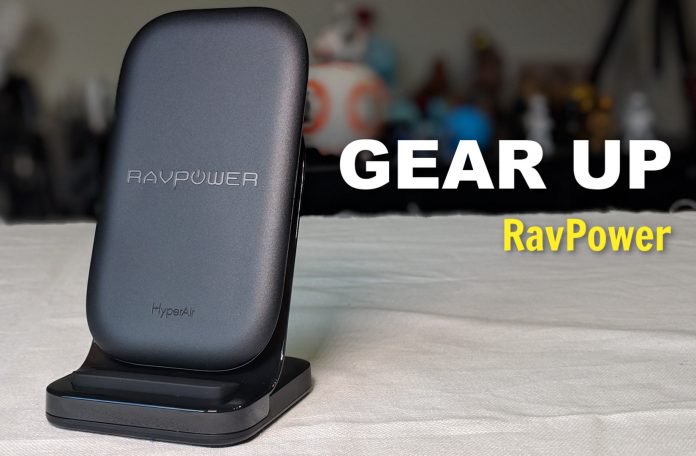

It’s 2018 which means a lot of the new phones you see, and possibly buy, come with a really cool feature: wireless charging. Indeed, what we once thought was a great luxury afforded to a select few devices has now become commonplace. In fact, some of you have been so accustomed to having it that you’ve taken the technology for granted.
Whether you’ve got a brand new phone with wireless charging or are sitting on one that’s a year or so old, you really should check out the feature. It’s not only convenient but it’s better than ever. Charging speeds continue to get faster and selection grows all the time.
SEE ALSO: How to improve call quality on your Android phone
One company who specializes in providing wireless chargers and portable chargers is RAVPower. With a lineup spanning dozens of products, there’s something for everyone. What’s more, it offers affordable devices that rival those from bigger, more prominent names.
We received a number of samples from RAVPower, each of which speaks to a different user need or budget. Here’s a look at some of what you’ll find from them.
HyperAir Fast Wireless Chargers with QC 3.0 Adapter 10W
When downtime is your main concern, you don’t want to mess around with slow trickle charging or spending time plugged in and tethered. This wireless charger delivers the fastest available speeds for your phone, regardless of whether it’s Android or iOS.
For iPhones it offers up 7.5W charging; for devices like the Galaxy S9 it delivers 10W of juice. This might not sound like much on the surface but it’s about twice as fast as what you would expect.
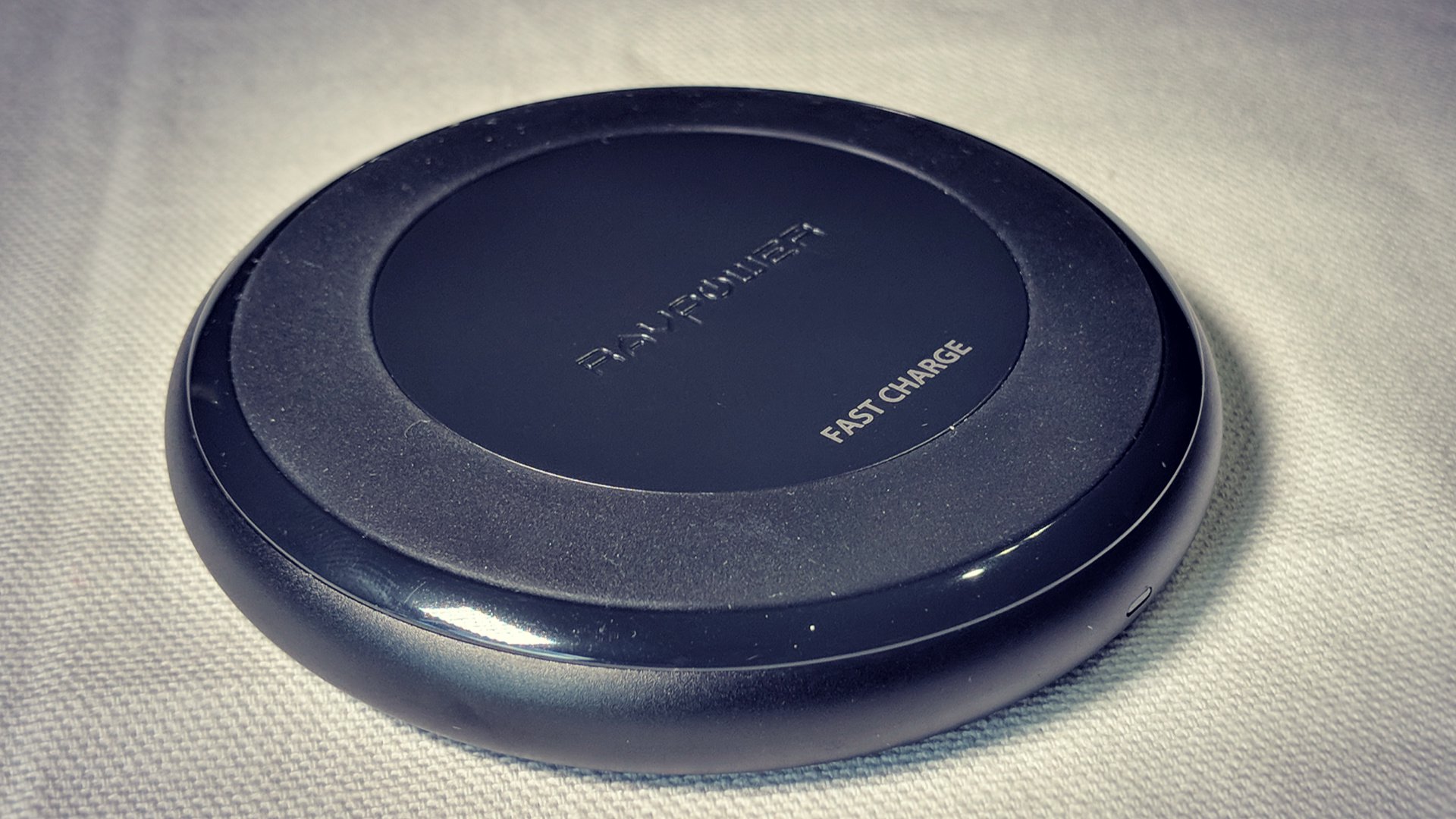
The RAVPower charger automatically detects what type of device is sitting on it and delivers the right speeds. And, to make sure it doesn’t overheat, the triple temp controls disperse heat and watch for over-voltage, short circuits, and other dangerous things.
As portable as it is practical, this circular unit has an anti-skid design and sits still when placing your phone on it. The indicator light on the front glows to let you know the status of your battery.
SEE ALSO: The best phones you can buy at Verizon Wireless right now
Includes a powerful Quick Charge 3. 0 adapter so you can also charge up your other devices incredibly quick, too. Pick one up for about $40 from RAVPower or Amazon.
Qi Fast Wireless Charger 10W
With a slightly different approach to the aforementioned charger, this one comes in a few bucks cheaper. More of a rounded square platter, it largely offers up the same speeds and technology.
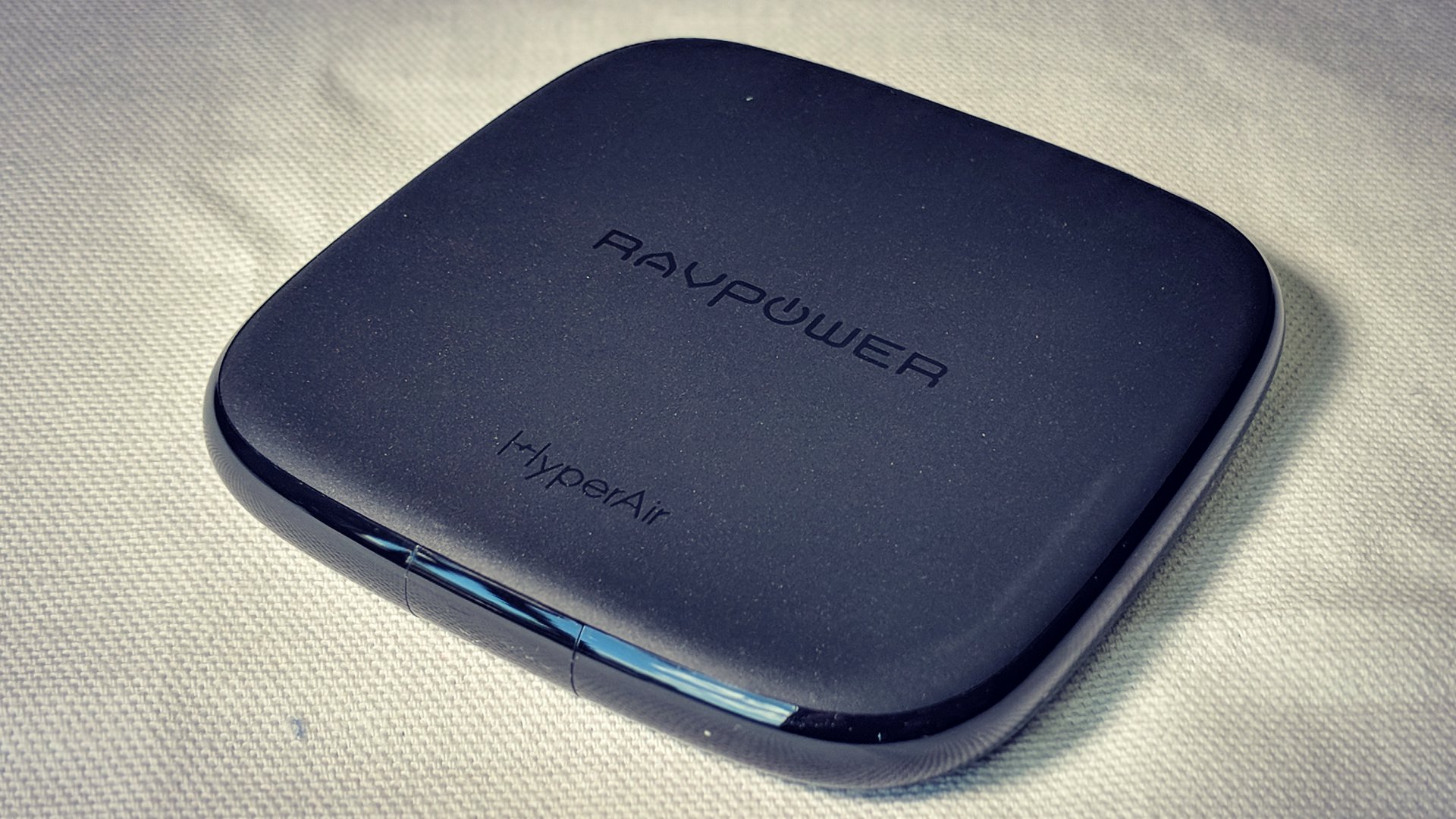
The top has a non-slip rubberized base to keep your phone from sliding around while the bottom has its own anti-skid feet. Also, there are air vents underneath to keep things nice and cool. You’ll find this one for about $38 either direct or through Amazon.
Qi-certified 2 Coils Fast Wireless Charger 7.5W
Instead of a platter design, this charger lets you prop your phone up while the battery is replenished. Perfect to have on your office desk or kitchen counter, it allows you to view your screen at a comfortable angle.
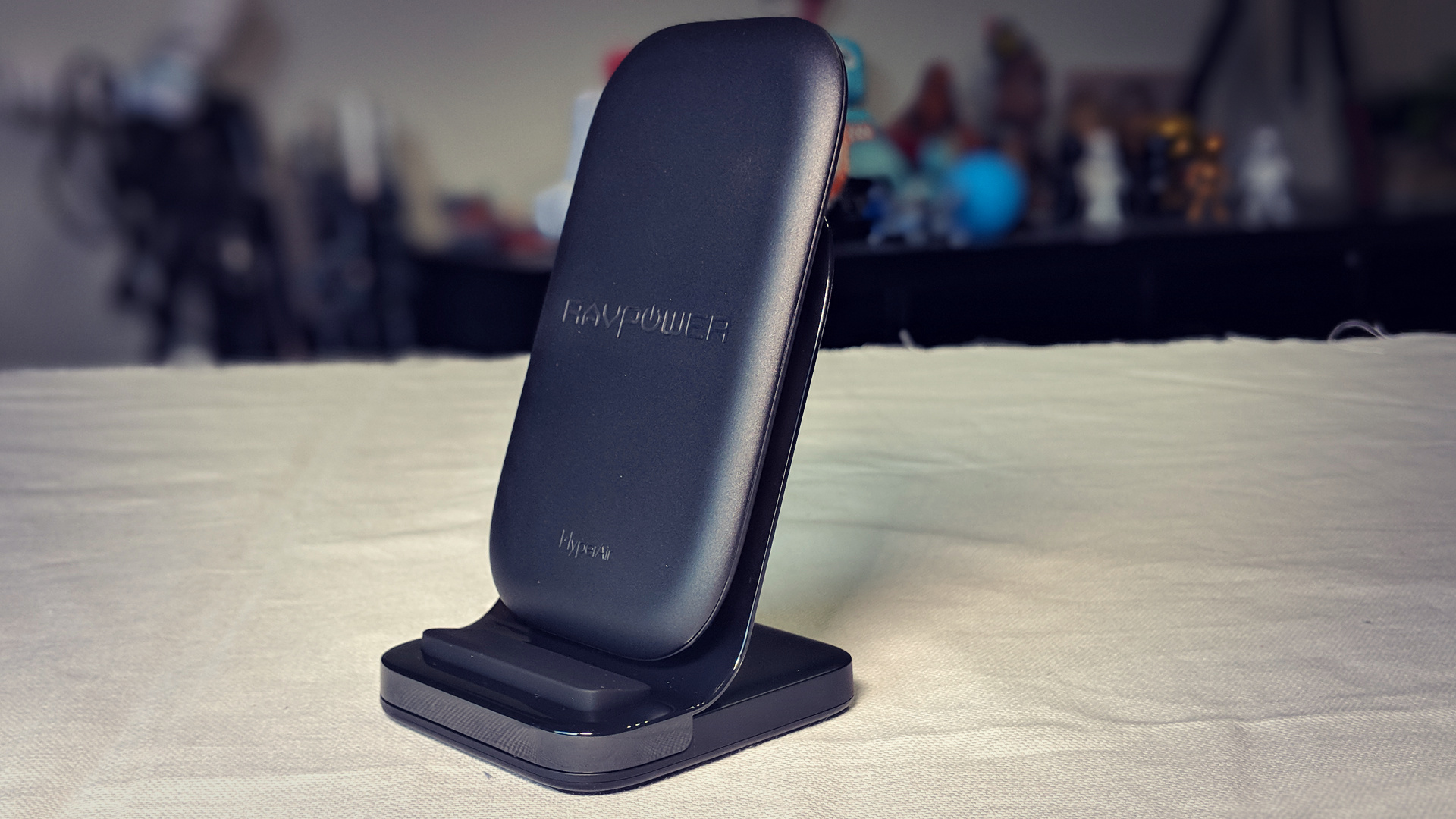
With dual coil charging inside, you’ll get the same super-fast speeds that you get in the other models. Don’t be fooled by the name; it’s got 7.5W for iPhone and the full 10W power behind Android.
Similar to the other models, this RAVpower charger has an LED indicator light and all the protection against overheating and over-charging. Score one for $46 from the OEM or Amazon and enjoy the out-of box 18-month warranty in the process.
10400mAh Wireless Portable Charger
You’re looking at all of these chargers thinking how nice it is for static needs but really want something for on-the-go. That’s where this particular one comes in handy.
It’s a little pricier than a traditional wireless charger, but it’s designed to be taken with you. With 10,400mAh worth of juice inside, it’s a portable charger that works for anyone with a USB cable. That’s enough power to fill your average phone up three times over.
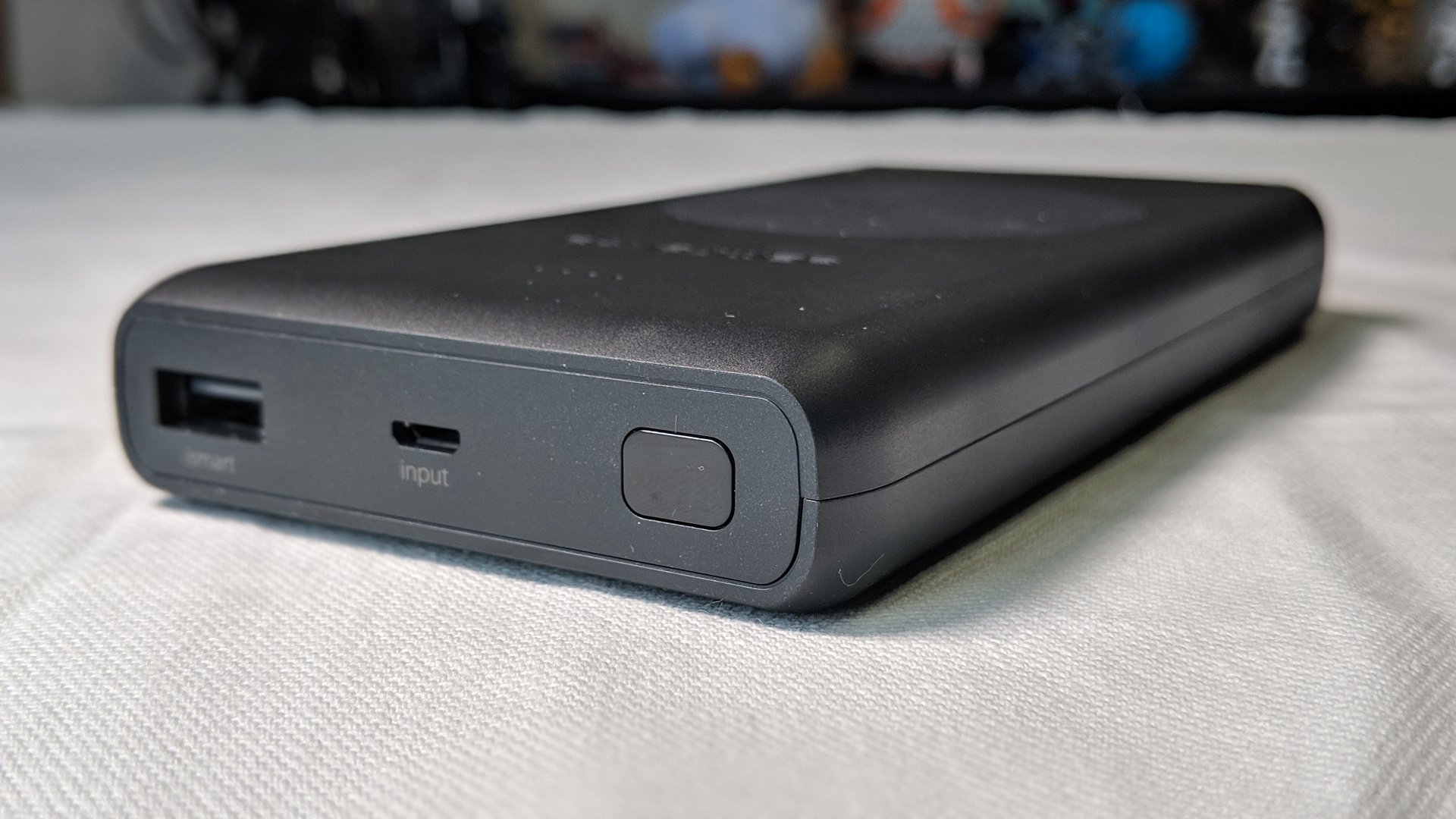
To truly take advantage of this one, though, you can simply place your phone on the top side. Indeed, it charges your phone up as any other wireless unit might. How fast, you ask? A Samsung Galaxy S8 can go from 0-100% in under 4 hours.
Feel free to mix and match the outputs, too. Plug your friend’s phone in at dinner while yours gets to sit there with no cables attached. Find it for around $66 at RAVPower and Amazon.
Moment Pro App review: The camera app for photographers

If you haven’t yet heard, Moment, a smartphone camera accessory company, has just updated their app to a new, more standalone, format. Moment creates lenses for many popular smartphones that can give your phone cameras a different look or purpose. These include fisheye, telephoto, and macro lenses to name a few. Their new 3.0 app update renames the app to Moment Pro Camera, and while allowing you to tie in usage with their lenses, you can use the app by itself and have a unique shooting experience. Moment Pro gives many manual DSLR controls to your phone’s camera.
To download the app, you need to visit the Play Store and install. The setup process is very easy, and no settings are required to be changed to get everything running. Once you have the app downloaded and opened, you can select the format for shots and your grid style. The grid styles range in 4 different styles (not including spiral), and the photo formats allow JPG or RAW. Moment Pro is the app for someone wanting to graduate from a quick point-and-shoot photog to a beginner professional photographer.

In general, the app is straightforward as far as using it. When I first downloaded Moment Pro, I noticed I didn’t have to fiddle around to get it going. Even when you jump into settings, there are only two toggleable actions: Histogram and Location. The rest of the app looks like any other camera app, shutter at the bottom, the gallery at the bottom left, viewfinder in the middle. Speaking of settings, you can’t adjust the viewfinder to a 16:9 aspect ratio, all photos will be at 3:2, and there will be black bars at the top and bottom.
Another thing to notice about the app is, there is (or at least was in the first iteration) no onboarding. You don’t get to learn how to adjust settings really, I just tapped and learned. Now I’ve seen from the app’s description that you adjust settings with a variety of slides, taps, and double-taps to default. The app does give you a chance to adjust Shutter Speed, ISO, EV, Focal Length, and White Balance, which is something I haven’t seen other apps do so effortlessly. You can adjust Grids, flash, timers, and the format in the top bar. Also in the top bar, there’s a setting to adjust whether you’re using a Moment lens or just your original phone camera. I’m guessing this will do any profile correction needed for any lens changes.
I would’ve loved to learn how to use the app more within the app as I’m sure not many people read full descriptions before downloading apps. Seeing as though the app is easy to navigate and the details ARE there, I’m not too upset.


After you take a photo, you’re taken to an after photo section where you can take a look at the setting of the particular photo and the image itself. You can share the photo directly, trash it, or dive deep into its EXIF settings. There’s a button to view all photos too, that will take you to your default gallery app.
This app leaves little to be desired, but there are still a couple of things I want to see in a future update. One is the ability to shoot in landscape. The absence of this fundamental feature boggles my mind. Does anyone that is into becoming more advanced in photography really only shoot in portrait? Another option I miss is autofocus on tap. You can enable autofocus but it is available while shooting not while preparing the shot, or you can use manual focus. One last small thing I’d like to see is additional grid styles – golden ratio anyone?
EDIT: As of version 1.1.1, horizontal shooting is available.
I’d like to take the time out to congratulate the Moment team on quickly squashing bugs as well. In the first few versions of the app, there were bugs such as hanging on the gallery or from moving from the general viewfinder back to the home screen. As of version 1.1.0, I can not identify any bugs in the app, major or minor.
 FLASH=Off;MOMENT_LENS=NO LENS
Compared to other apps that I’ve tried, such as Manuel Camera, Moment Pro beats them out just for its simplicity. As stated above there’s no massive amount of settings to jump through or just additional options. Most options are right there on the viewfinder so you can adjust your camera settings easily and quickly. The app is my go-to camera app that I’ve all but replaced Google Camera.
Moment Pro is a great camera app for photography enthusiast that want to get better (read: manual) controls from their phones. Most people though are probably better with using Google camera. Yet, if you’re trying to learn how to shoot a DSLR and don’t have the money to invest then this is the next best thing. Pair the app with Moment’s smartphone lenses, and you may never need to buy a dedicated camera.
Moment Pro Play Store Link
Gotta catch em all: Harvard’s undersea grabber is a Poké Ball for sea life
There are plenty of people out there who base their research on studying robotics. However, robots can help us carry out study in other fields, too — as a new folding grabber robot developed at Harvard University makes clear. Harvard’s innovative RAD robot (that’s short for “Rotary Actuated Dodecahedron,” although it’s pretty rad as well) is designed to be able to perform delicate feats, such as catching underwater creatures with ease and, crucially, without injuring them in the process.
It does this using what can be described as a Poké Ball on a robot arm, capable of closing over an object without damaging it. It has so far been put through its robotic paces in an aquarium and deep in Monterey Canyon, off the coast of central California, where it was used to catch a jellyfish, a squid, and an octopus.
“We first tested the RAD sampler at Mystic Aquarium to see if could catch jellyfish,” Zhi Ern Teoh, a postdoctoral researcher who worked on the project, told Digital Trends. “We were concerned that as fluid is expelled during the closing phase, the flow would also push the jellyfish away. Turns out, the speed at which we close is slow enough such that jellyfish remain in the grab zone.”
Previous
Next
1 of 5


From a technical perspective, the aspect of the project that’s most interesting is the origami-like folding shape of the Poké Ball part of the robot. The team was able to develop a way to fold 3D shapes from a 2D net using only a single actuator.
“For example, imagine unfolding a cube,” Teoh continued. “The net of the cube would be a cross made of six squares. We then build another layer of linkages on top of the net. This transforms the net from a five degree of freedom system to a one degree of freedom system. This is exciting because now we can potentially construct 3D shapes from its 2D net using only one actuator. Minimizing the number of actuators is key because incorporating actuators is a relatively more complex engineering task; you have to figure out ways of attaching, powering, sensing, and coordinating the folds. Therefore even though the system of linkages look more complex, they consist entirely of revolute joints which are mechanically much simpler.”
Next up, Teoh said the team hopes to develop a version of the grabber that’s constructed with a more rugged material, such as titanium or stainless steel. They also want to make it more autonomous by incorporating cameras and pressure sensors to transform it from nifty proof-of-concept to fully realized tool for marine biologists.
A paper describing the work was recently published in the journal Science Robotics.
Editors’ Recommendations
- Awesome Tech You Can’t Buy Yet: Laptop screen extenders and self-healing tents
- Watch Disney’s Stickman robot show off its amazing acrobatic skills
- Watch this Japanese ‘dragon’ drone slither through the air like a flying snake
- ‘Spider-Man’ hands-on preview
- Meet the Australian ‘techno-artist’ growing a web-connected ear on his arm
The AllTrails app gets even better, adds more details in new map layer
AllTrails (iOS/Android) has been a popular smartphone app among hikers, trail runners, and mountain bikers for some time now and has even earned a spot on our list of the best hiking apps. With its online community consisting of more than 8 million users, the AllTrails app and website offer crowdsourced info on more than 50,000 trails, including reviews, photos, and first-hand reports on current conditions. But a recent update to the app promises to deliver some nice improvements designed to make it even more valuable to outdoor enthusiasts.
The latest version of the AllTrails app includes a new map layer that the company says was rebuilt from the ground up to provide the best possible trail map its users have ever seen. Among the improvements are better labeling of local, state, and national parks, with the borders of those parks clearly visible on the maps themselves. This new design element was implemented to make it easier for hikers to find new places to explore, both at home and while traveling. Using their phone’s built-in GPS capabilities, users simply open the app and see which parks are nearby their current location.
But that isn’t the only improvement that outdoor athletes will find after updating the app. AllTrails says that its cartographers have completely redesigned the maps that it uses in an effort to improve legibility. These subtle, but important, tweaks reportedly make the maps easier to use, conveying a better sense of the space that the user is currently exploring. If that wasn’t enough, the app now includes more points of interests too, with campsites, restrooms, public parking, drinking water, picnic areas, and other important items now being added to the mix.
These improvements have been automatically added to the AllTrails app, which is free to users. The service also offers a premium tier for those willing to pay for some additional features. AllTrails Pro users gain the ability to download maps for offline use while customizing their routes with waypoints and personal notes. For $2.50 per month (or a $100 lifetime subscription), Pro users can also print maps, receive real-time weather alerts, and removes ads from within the app.
Editors’ Recommendations
- Apple Maps vs. Google Maps
- iOS 12’s best new features
- The best fitness trackers for women
- Mac Mini could make a comeback this year with a rumored refresh
- The best fitness trackers of 2018
Here’s how to turn off camera shutter sound on your Android phone
Most Android phones come with a little automatic clicking noise whenever you take a picture with the camera. If this feature drives you crazy — and we don’t blame you — or if you really need a silent photo for another reason, you can turn it off. Learn how to turn off the camera shutter sound on your Android phone as we walk you through a few easy methods.
Note: The camera shutter sound is a legal requirement in some countries, like South Korea, to reduce the risk of people taking photos without consent.
Master volume settings
Julian Chokkattu/Digital Trends
Most Android phones have physical master volume buttons on the side. These buttons control all volume on the phone, not just the volume related to calls or music. If you want a very fast way to disable shutter click sounds, these master buttons are your best option.
Step 1: Tap the volume down button while watching the screen. Once the volume is all the way down, the volume will switch to a vibrate mode, and then — if pressed again –most models will make your phone totally silent. Either vibrate or full silence should mute the shutter noise.
Again, this option should work with almost every Android phone or tablet, including Samsung, LG, and Google Pixel phones. But you still have to remember to restore volume again when you are done taking pictures, so it’s not a permanent solution.
Turning off the shutter sound directly
If you dislike all shutter sounds and want them off forever, but also want to hear all the other sounds on your phone, there is a more direct option in camera settings.
Step 1: Head to your phone’s main menu and select the Camera icon, as if you were going to take a picture.
Step 2: Head to your camera settings. This is typically represented by a gear icon in the upper right corner of the camera app.
Step 3: Scroll down in your camera settings until you find an option that says Shutter sound, Camera sounds, or something similar. Note that the interface may look a little different on your Android, depending on the phone, and OS version you have, but this is another setting that the majority of Android phones have. We used a Samsung Galaxy to provide shots for this guide.
Step 4: Toggle the Shutter sound option to off. This will permanently disable any shutter click sounds until you decide to toggle it on again.
Temporarily turning off shutter sound (Samsung models)
This method works well if you will be taking camera photos for the next hour or two and don’t want the irritation of the shutter sound going off all the time — but after that, you won’t care as much and would prefer that sound to switch back on. This method works with Samsung phones and may not be present on all Android models, though alternative methods exist for phones like the Google Pixel.
Step 1: Head to your phone menu and swipe down from the top to open up the settings and notifications menu. Here, look for the volume icon, a megaphone-like design (this icon will have a slash through it if sounds are currently disabled).
Step 2: Press and hold the volume icon until it opens a menu for sound mode. This is a master volume shortcut window that allows you to switch between sound and vibrate. However, it’s the third option that you’re looking for — the option that says Mute.
Step 3: Select Mute and look for the Temporary Mute option that should be directly below it. Make sure that Temporary Mute is also toggled on.
Step 4: An option will now open that will allow you to select how long you want the mute to last in hours. Select the time frame that works best for you, and all sound will be muted for that duration. Many people like to use this option for important meetings and events, but it’s also a great choice if you’re going to be doing a lot of photography with your phone and don’t want to hear that shutter sound.
Editors’ Recommendations
- How to use BlackBerry’s Privacy Shade
- Galaxy S7 tips and tricks
- How to improve your Android privacy
- How to fix sound problems in Windows 10
- Here’s how to track an Android phone, tablet, or smartwatch
The launch of the new MacBook Pro has been a complete disaster
Updating laptops to the newest generation of Intel processors shouldn’t be this difficult. Every year Dell, HP, and Asus handle it as a simple way to keep computers up-to-date without having to do a complete redesign every year.
Easy, right? Yet Apple has managed to completely fumble it.
No entry level update
We knew there was something fishy about this year’s MacBook Pro when we first saw the listing. While the $1,800+ models have refreshed 8th-gen CPUs, the lower-end models were conveniently left off the update. These cheaper models, ranging from $1,300 to $1,600, are stuck with the same 7th-gen Intel processors introduced over a year and half ago.
With word that Intel is about to drop 9th-gen processors next month, you can see where this is all going. The most affordable models will soon be two generations behind. It’s the MacBook Air’s problem all over again.
The most expensive models have problems
Malarie Gokey/Digital Trends
Despite the lack of updated entry-level options, we were happy to see Apple bring Intel’s Core i9 to the higher-end 15-inch MacBook Pros. We’ve tested these chips on other laptops and witnessed the processing power firsthand.
But even here, Apple took the easy route here and hoped nobody would notice.
Within days of the first fans ordering their new MacBook Pros, reports were posted about the throttling issue with these Core i9 chips. Because the new MacBook Pros use the same chassis as before, these high-powered Core i9 chips are severely throttled, to the point where they perform worse in intensive loads than the cheaper Core i7 model.
If you want, you can manually control the fan speed to gain some of that performance back, but since when does Apple release products that aren’t optimized? The days of “it just works” seem long gone.
The keyboard continues to haunt Apple
iFixIt
The admission that Apple severely messed up on the MacBook Pro keyboard has been slow and painful. It came to a head when the company finally announced it would provide free repairs and replacement for sticky keys in May.
In the 2018, Apple has included what it calls a “third-generation butterfly mechanism.” When first announced, we assumed Apple had fixed the problem plaguing the previous generation of keyboards, but instead, Apple was silent on the issue. The initial response from Apple was that it hadn’t made engineering tweaks to address the sticky key issue, while also not covering it under the new repair program.
It was only until iFixit revealed the silicon pad installed under each key that Apple finally reversed its previous statement and admit its new keyboard had anti-debris protection. Apple played coy to downplay the problem rather than reassure buyers that these new MacBook Pros fixed it.
All of this is strange to see happen at a company like Apple. Clarity in branding is the exact thing that allowed it to rise to such great heights in the glory days. Those days seem to be waning. Apple’s recent missteps in messaging, product differentiation, and reliability appear to be the new normal.
Editors’ Recommendations
- Apple repair program won’t upgrade older MacBook Pros to new keyboard
- Don’t like the Touch Bar? Too bad. Apple’s new Macbooks make it almost mandatory
- Apple’s MacBook Pro problem will make you want to backup your files ASAP
- MacBook Pro 13-inch with Touch Bar review
- MacBook DIY keyboard repairs don’t void your chance of a free replacement

