


Amazon Prime Exclusive Phones: Everything you need to know
Prime Exclusive Phones consist of quality handsets at discounted prices — exclusively for Amazon Prime subscribers.

It’s hard to keep track of all the perks that come with an Amazon Prime membership, but if you’re an Android fan, one of the best ones is easily Amazon’s Prime Exclusive Phones.
Prime Exclusive Phones are sold exclusively to Amazon Prime members, and this program allows you to purchase quality phones from LG, Motorola, and others at discounted rates. Here’s everything you need to know!
The latest Prime Exclusive news
August 1, 2018 — LG Stylo 4 now available for $249.99

For folks that are in the market for a stylus-equipped Android phone but don’t want to shell out $700-$900 for the upcoming Galaxy Note 9, LG’s got a solid alternative with its Stylo 4.
Launching as a rebranded version of the Q Stylus that was announced in early June, the Stylo 4 is equipped with a 6.2-inch 18:9 display with a 2160 x 1080 resolution. There’s a 13MP camera on the back, 5MP wide-angle camera up front, and a 3,300 mAh battery that’s charged via USB Type-C.
Also included is the Snapdragon 450, 3GB RAM, 32GB of expandable storage (up to 2TB), Android 8.1 Oreo, and a stylus that can be housed inside the Stylo 4 when you aren’t using it.
The LG Stylo 4 is available through the Prime Exclusive program right now for just $249.99 ($50 off its MSRP of $299.99)
See at Amazon
June 21, 2018 — Moto Z3 Play and Moto G6 Play are now in the Prime Exclusive lineup

The Moto Z3 Play is a solid upgrade to last year’s Z2 Play, but the $499 retail price doesn’t really make it stand out in this segment. Thankfully, Amazon is now making the Z3 Play available via its Prime Exclusive lineup, knocking $50 off the price of the device. The Prime variant of the Z3 Play retails for $449, and is now up for sale for Prime subscribers.
The Z3 Play offers a 6.0-inch FHD+ Super AMOLED screen, Snapdragon 636, dual 12MP + 5MP cameras at the back, 8MP front shooter, 4GB of RAM, 64GB of internal memory, microSD slot, and a 3000mAh battery. Motorola is bundling a Moto Power Pack with every unit for free, with the Moto Mod offering a 2200mAh battery capacity.
And for a limited time, Amazon will throw in a Moto Smart Speaker with Amazon Alexa for free with every purchase of the Moto Z3 Play. The Moto Mod by itself retails for $149, so combine that with the $50 discount and the Prime variant of the Moto Z3 Play is a pretty great deal.
Prime members can now pick up the Moto Z3 Play from Amazon, with the phone set for an official release on June 29.
See at Amazon
As for the Moto G6 Play, it is the more affordable variant of the Moto G6, and Prime members can get their hands on the device for $189, $10 off its retail price.
As a refresher, the Moto G6 Play features a 5.7-inch HD+ 18:9 panel, and is powered by the Snapdragon 427. You also get 3GB of RAM and 32GB of storage, a microSD slot, 13MP rear camera, 5MP front camera, and a massive 4000mAh battery.
Both phones come with a host of Amazon apps pre-installed, including the Amazon Widget, Amazon Shopping, and Amazon Alexa. You’ll also be able to set Alexa as the default voice assistant on either device should you wish to do so.
See at Amazon
All the big details
What phones are available?
Amazon’s list of Prime Exclusive Phones is always changing, and as it does, we’ll be updating this list to reflect the most current lineup. As it stands right now, these are the phones you can get through the Prime Exclusive program —
- LG G6+ ($519.99)
- LG G6 ($419.99)
- LG Stylo 4 ($249.99)
- LG Q6 ($189.99)
- LG K30 ($139.99)
- LG X Charge ($169.99)
- Moto E4 ($119.99)
- Moto X4 ($279.99)
- Moto G5 Plus ($204.99)
- Moto G6 ($234.99)
- Moto G6 Play ($189)
- Moto Z3 Play ($449)
Can anyone buy the phones?
Nope.
In order to purchase Prime Exclusive Phones, you’ll need to have an active subscription to Amazon Prime.
Amazon Prime costs $119 for 12 months or $39 for 3 months, and along with access to these phones, you also get free two-day shipping, access to shows/movies on Prime Video, free Kindle e-books, and much, much more.
How are they so much cheaper?
Prime Exclusive Phones are considerably cheaper than their non-Prime counterparts, but how can this be?
No matter which one you choose, all Prime Exclusive Phones come with pre-installed Amazon apps, including Amazon Shopping, Prime Video, Amazon Kindle, Amazon Music, etc.
There used to be advertisements on the lock screen of every Prime Exclusive phone, too, but Amazon changed this is February by simply kicking the price up of all its phones by $20 and removed the ads.
Amazon Echo vs. Dot vs. Tap vs. Spot vs. Show: Which should you buy?
Updated August 1, 2018 — Add the LG Stylo 4 to the list!
Give your Chromebook the ventilation it needs with this AmazonBasics stand for $12
Simple but effective.
The AmazonBasics ventilated laptop stand is down to $12.22, which is the lowest price we’ve ever seen. This stand normally sells for around $20 and hasn’t dropped below $16 in more than seven months.

This laptop stand features a metal-mesh platform which draws heat away from your laptop and allows for ventilation, keeping your laptop cooler while in use. Its height is adjustable giving you a lot of viewing options, and it also features a cord organizer on the back which will seriously help tidy up your desk. This product comes with a one-year limited warranty and has 4.5 stars on Amazon with 2,151 user reviews.
See on Amazon
You probably shouldn’t buy the Oppo Find X yet — but not for the reasons you think
The Oppo Find X is the most interesting Android smartphone of the year thus far, thanks entirely to its one-of-a-kind hardware. As you’ve no doubt already heard, though, that hardware makes it a more fragile phone than the competition, with a motorized camera module that seems fated to eventual failure. To quote the great Montgomery Scott, “The more they overtake the plumbing, the easier it is to stop up the drain.”
That’s not the reason you shouldn’t buy it, though. To me, carrying a phone as beautiful and unique as the Oppo Find X is worth the durability tradeoff. After all, not every device is meant to hold up to the rigors of carelessness, and you’ve got to expect some compromises in a device made to stand out in 2018. However well-founded they may be, those durability concerns obscure what I think is the more pressing problem with the Oppo Find X: ColorOS. Oppo’s custom Android interface insists upon itself so aggressively that it actively prevents the user from installing a custom launcher. To be clear, I didn’t expect a cakewalk when trying to adapt an overseas smartphone for North American use – but this is the first Android phone in memory that actively prevents the user from enjoying one of the key benefits of Android: the ability to customize the interface to suit their needs. Oppo tells me a software update is due to fix some of the bugs complained of in the above video, and I’ll look forward to seeing those. But until this launcher lockdown policy is lifted (or at least explained), I won’t be dropping this phone in my pocket.
Agree? Disagree? Just want to watch a cool camera module do some jumping jacks? Click on through to the video above to go hands-on with the Oppo Find X – and stay tuned for more coverage here on AC!
Stay social, my friends
- YouTube
- The Web
- Snapchat
Google is reportedly planning to launch a censored search app in China
This would mark the first time Google Search has been in China since 2010.

While going to Google to search for virtually anything is a common practice for many of us, the same isn’t true for people in China. The Chinese government’s strict censorship rules ban a regular version of Google Search from operating in the country, and while that won’t be changing anytime soon, a new report from The Intercept claims that Google’s working with the government to launch a censored, stripped down version of its search engine.
The project is currently codenamed as “Dragonfly” and would bring Google Search to China in the form of an Android app. While there aren’t any plans for a desktop version quite yet, that shouldn’t pose a real issue as 95% of users in China access the internet through a mobile device with Android holding a market share of 80%.
However, if/when that Android app launches, it won’t be the same version of Google Search you and I are familiar with.
As reported by The Intercept —
Google’s Chinese search app will automatically identify and filter websites blocked by the Great Firewall. When a person carries out a search, banned websites will be removed from the first page of results, and a disclaimer will be displayed stating that “some results may have been removed due to statutory requirements.” Examples cited in the documents of websites that will be subject to the censorship include those of British news broadcaster BBC and the online encyclopedia Wikipedia.
The “Great Firewall” mentioned above is China’s internet censorship program and blocks individuals from seeing online content relating to free speech, certain news topics, sex, and more.
Furthermore, The Intercept also notes that Google’s app won’t show any results for specific words and phrases that have been banned by the government.
The censorship will apply across the platform: Google’s image search, automatic spell check and suggested search features will incorporate the blacklists, meaning that they will not recommend people information or photographs the government has banned.
Assuming the Chinese government approves Google’s app, we could see it launch within the next six to nine months.
Google had a similar version of its search engine available in China between 2006 and 2010, but eventually decided to retreat from the country following harsh criticism from the United States for its compliance with the government’s censorship.
The EU Antitrust case against Android sucks for everyone, especially you
Apple Sold Fewest Macs in Any Quarter Since 2010 as Nearly Entire Lineup Was Outdated
Apple on Tuesday reported that it sold 3.72 million Macs in its third quarter, which spanned April 1 through June 30, the fewest in any single quarter since it sold 3.47 million in the third quarter of 2010.
It’s also the first time Apple has sold fewer than four million Macs in a quarter since the third quarter of 2013, a span of five years.
Apple reported sales of 4.29 million Macs in the same quarter a year ago, so this is a pretty significant 13 percent decline on a year-over-year basis. Mac revenue also dropped five percent over the year-ago quarter.
There are a number of possible explanations for the decline, including consumers increasingly shifting towards the iPhone and iPad. Together, those devices accounted for 65 percent of Apple’s revenue last quarter, compared to just 10 percent for the Mac. Apple even markets the iPad as a computer replacement.

The bigger reason, however, may have been that nearly the entire Mac lineup was outdated last quarter. Beyond the iMac Pro, released four months before the quarter began, no other Mac had been updated since 2017 or earlier.
Apple hasn’t updated its 12-inch MacBook and iMac lines since June 2017, while the MacBook Air has gone unchanged since March 2015, except for a minor increase in clock speed on the base model last year. Worse, the Mac mini hasn’t been refreshed since October 2014, and the Mac Pro has gone unchanged since December 2013 while Apple works on a new modular version for 2019.
While the MacBook Pro was recently updated, the new models didn’t launch until 12 days after the third quarter ended. Last year, new MacBook Pro models launched at WWDC in early June, well within the third quarter.
Apple’s financial chief Luca Maestri highlighted this “difficult launch comparison” in the company’s earnings call on Tuesday:
Our year-over-year sales performance was impacted by the different timing of the MacBook Pro launch, which did not occur until early Q4 this year as opposed to June last year.
The month-later MacBook Pro refresh isn’t enough to justify Apple’s fewest Mac sales in any quarter since 2010, however, as the notebook has been updated at various times over the years. 2016 models were released in October of that year, for example, while 2013 models launched in February of that year.
Mac sales were the lowest in a quarter since 2010 – hard to blame the MacBook Pro coming out in July versus June. https://t.co/E6QDBJ9VYd
— Mark Gurman (@markgurman) August 1, 2018
Apple said it still recorded double-digit year-over-year growth in its active installed base of Macs last quarter, reaching a new all-time high, with nearly 60 percent of purchases coming from customers who are new to the Mac.
Fortunately, updates to the rest of the Mac lineup should be on the horizon. Apple analyst Ming-Chi Kuo expects the 12-inch MacBook, Mac mini, and iMac to be refreshed later this year, while a new entry-level notebook could replace the MacBook Air. And, as mentioned, Apple says a new Mac Pro is coming in 2019.
Related Roundup: MacBook ProBuyer’s Guide: MacBook Pro (Buy Now)
Discuss this article in our forums
Apple’s Stock Price Crosses $200 Mark to Reach New All-Time High
Apple shares crossed the $200 mark in intraday trading today, setting a new all-time high for the company’s stock.
Apple’s stock is up nearly five percent since the market closed on Tuesday, after the company reported a record-breaking $53.3 billion in revenue, meeting the high end of its guidance and topping Wall Street expectations.
All eyes are on the AAPL ticker as Apple hovers ever so close to a trillion dollar valuation, but the company’s precise market cap can’t be determined until Apple files its quarterly 10-Q form today with an updated total of outstanding shares.
Tag: AAPL
Discuss this article in our forums
Facebook and Instagram Reveal Tools for Managing Your Time, Setting Reminders, and Limiting Notifications
Earlier in the summer, Facebook and Instagram each promised that users would soon be able to access a suite of digital health tools to help them manage their time on the social networks and promote healthier habits. Today, the companies revealed these tools in a press release and confirmed they will be rolling out to all mobile app users “soon.”
The tools will be found within the settings page on both iOS apps — on Instagram it’ll be called “Your Activity” and on Facebook it’ll be called “Your Time on Facebook.” At the top of the page, the activity dashboard will highlight your daily average time for each app on the device you have it installed on, and below that will be a bar graph detailing exactly how long you spent per day in each app over the last week.
We developed these tools based on collaboration and inspiration from leading mental health experts and organizations, academics, our own extensive research and feedback from our community. We want the time people spend on Facebook and Instagram to be intentional, positive and inspiring. Our hope is that these tools give people more control over the time they spend on our platforms and also foster conversations between parents and teens about the online habits that are right for them.
Below that is “Manage Your Time” section with a few features that focus on customizing push notifications. One is a “set daily reminder” option, which is an alert that notifies you when you’ve reached the amount of time you want to spend on Facebook or Instagram for that day. The other is for “notification settings,” where you can access a new “mute push notifications” option to limit your Facebook or Instagram notifications for a period of time (15 minutes to 8 hours).

Apple has its own time management settings coming in iOS 12, called “Screen Time,” with many of the same features as Facebook’s new activity dashboards. In the Settings app in iOS 12, Apple presents information gathered from overall iPhone use on any given day so that users can see which apps they open the most, which send the most notifications, how often they pick up their iPhone, set “Downtime” limits and app limits, and more.
For Facebook, the company says that the new dashboard tools for managing screen time are just a “first step,” and it will continue to work to develop features that promote digital health on its platforms.
Tags: Facebook, Instagram
Discuss this article in our forums
Why learn to use gadgets when they can just learn to help us? Exactly, says LG
A smart dishwasher should sense how caked-on the crud is on your plates and rinse them accordingly. Smart air conditioners should map your room like an air-traffic controller and cool different parts to different degrees. A smart oven should know whether you’ve put in brisket or a spoon roast and cook accordingly.
Today, most appliances aren’t smart, never mind all the years of marketing claims. But they will be — and artificial intelligence is the cornerstone to improving all of those devices, said I.P. Park, president and CTO of LG Electronics.
“Currently you need to be smart to use a smartphone.”
“What AI hopefully will do is solve this problem of using complex systems, so that the devices become smart, and smart devices mean they’ll know exactly what you want,” he told Digital Trends, in an exclusive interview.
This solves the conundrum that lies at the heart of modern technology, threading its way from your phone to your dishwasher to your air conditioner: “Currently you need to be smart to use a smartphone,” he joked.
To make that happen, LG is going all in on AI, announcing Wednesday a massive investment in R&D: The company just cut the ribbon on the new LG Electronics AI Research Lab in Canada, a five-year research partnership with the University of Toronto and an extension of the newly expanded LG Silicon Valley AI Lab in Santa Clara, California, which opened in 2013. LG also has research labs working on AI around the globe, including Russia, Japan, China, Korea, Finland, and India, in addition to the North American spaces.
For competitive reasons, LG can’t disclose how many employees currently working in either facility, but it told Digital Trends that it is investing tens of millions of dollars in the new Toronto AI lab.
“At this stage AI is just the tip of the iceberg of what’s going to happen in the future,” Park said. “When we talk about AI many people think of voice assistants, but it’s much more than that. It’s going to be voice plus vision plus gesture recognition, plus context, plus knowledge … You need to understand what the user wants, in a seamless way. We are not there yet, obviously. But it’s a good beginning.”
Do any LG products feature AI today?
“When you’re driving a modern luxury car most people are probably using only 5 percent of the entire feature set of the car, if you’re lucky,” Park said. “Because it’s too complex. A lot of features are there, but you have to be extremely smart and diligent to use them in the correct way.”
“What AI will hopefully do is solve the problem of using complex systems so that the devices become smart. And smart device will know exactly what you want,” Park added.
“At this stage AI is just the tip of the iceberg of what’s going to happen in the future.”
To see what that looks like, take a look to LG’s current lineup of AI-powered products (the company says that virtually all products are connected and will be AI enabled). Last month LG announced AI-powered air conditioners that save you money by adjusting compressor speed to suit the task at hand — a first in the space.
The LG G7 ThinQ is an AI powered smartphone with a button for direct access to the voice assistant — Google’s Assistant, that is. And an AI Cam mode in the camera automatically identifies the scene you’re pointing the phone at. Try to shoot a sunset and the camera will recognize that fact and compare your scene to images of sunsets to try and offer up the best-looking photo.
Look at the latest OLED TV that has an AI feature, Park suggested. “You can talk to it on the remote. It’s got our own AI platform built in. And it connects to external service providers, for example, Google Assistant. So when you talk to it you can say, ‘make the screen brighter’ or ‘find NBC for me,’ it’ll do that, using the AI. But if you say ‘what’s the best restaurant nearby’ it’ll connect to Google Assistant.”
Many technology companies roll out frequent updates to improve their products, leading many consumers weary of “patch Tuesday.” Even automobiles are currently being given new features via updates. That’s certainly handy, and prolongs the life of a product, but Park said LG’s products will improve simply by learning about the user.
“Eventually you won’t even get a user manual with a product. It just comes to you, and by interacting with it, it does work for you.”
What about Alexa, or Cortana, or Google Assistant, or Siri….?
“The world has become just too complex for any single company to insist on using their own proprietary closed solutions, no matter how big the company is, how capable their R&D is,” Park said. He won’t say it, but I will: Bixby.
“It’s a learning process. This is quite new, but it’s one of our key components for success in the future.”
In early 2017 I flew to Korea to discuss Samsung’s ambitious plans for a new voice assistant, with exclusive access to the company’s hardware and the ability to allow all of the devices it makes to talk, collaborate, and simplify your life. In the year and a half since then, the company has struggled to keep pace with the rapid advancements in voice technology, leaving many questioning the wisdom of wading into a crowded market and trying to catch up. LG has a different strategy.
“It’s a combination of competition and collaboration,” Park said. And that extends not just to the biggest companies like Google and Amazon but smaller startups with big ideas.
Julian Chokkattu/Digital Trends
“I like to think of these startups from Silicon Valley or Israel or Korea or other regions in the world to be an extension of our R&D,” Park said. “Sometimes we work with them together in a joint project, sometimes we invest in them, sometimes we acquire them.”
“It’s a learning process for LG. This is quite new, but it’s one of our key components for success in the future,” he added.
Security concerns?
Privacy becomes an even bigger factor when you talk about products that know more than mere facts about us: they know who we are. How long you take to shower in the morning, what time of day do you usually arrive home, how frequently you wash your clothing. Is that information that should be shared? What about your privacy and security?
LG sets many data collection options in its product to “off” by default.
“We take those two things very seriously,” Park said. LG builds security into its products from the design phase, he said. “We call it LGSDL: LG secure software development lifestyle. Hopefully our products will be secure enough when we launch them to fight against any kind of malicious attack from outside.”
LG does not collect user specific data, he noted, though it does aggregate overall behaviors to try to improve its products. If people only wash their clothing on the weekend, perhaps LG laundry appliances could be put into low power mode during the week.
Laudably, LG sets many data collection options in its product to “off” by default — a policy other technology companies would be wise to imitate. Forcing consumers to opt out of data collection policies sets mistrust from the get-go — LG aims to circumvent that.
So the next time you go shopping for technology, be it a toaster oven or television, look to see if AI is in there — and if it is, rest assured. It’s going to help.
Editors’ Recommendations
- A Florida parrot conquers its household by learning Alexa commands
- Warning: The way your neighbors use Alexa will bore the snot out of you
- Just add whitewater: These are the gadgets pro kayakers use to go ‘500 percent’
- August Smart Lock Third Generation Review
- Google Assistant: Everything you need to know
How (and when) to clear app cache or data on Android

Apps sometimes can misbehave. If it happens to you, here’s something to try.
Every Android smartphone has an application manager that you can get to through the settings menu. It’s usually in the top level somewhere, though it can vary a little by phone. But once you get to it, you’re at the heart of the matter. This is where you can see every application that’s installed on your phone or tablet. And it’s a handy place to clean things up a bit should they go wonky. Here’s what’s up:
Clearing the app cache

As you use applications, they start storing files for reference later. These files are stored in an app “cache.” For instance: When you’re using the Android Central app, it’ll save images and other pieces of the stories you’ve read so that they don’t have to be downloaded each and every single time the app needs them. This saves you time and data.
But maybe you want to clear an app’s cached data, either to regain some used space or to try to fix a misbehaving app. This is where you can do it. Just tap into the app, and then tap the “Clear cache” button. You’ll find that right on the app’s page in the application manager if your phone is running Android 7 or earlier, and if your phone runs Android Oreo you’ll find it under Storage on the app manager page. If you’re not sure, check both places and you’ll find it.
The next time you use the app, it will download everything it needs from the internet like it did the first time you used it. Clearing cached data does not clear other data like logins or saved games.
This often fixes things, especially when an app pulls its content from a website that always changing and adding more content. If this doesn’t work, move to the next step.
Clear app data — or resetting an app

Clearing app data is a little more drastic. You’re wiping the cache, but also clearing any and all settings that go along with that app. You’re basically starting that app over, from scratch, and it’ll behave as it did the first time you installed it. This is generally a last resort type of thing. If you clear app data on, say, the Facebook app, you’ll need to log back in. If you clear data on a game you’ve been playing, you’ll be back at the beginning, as if you’d never played it. (And let’s hope that game is properly saving your place to the cloud.)
Next, open the app and sign in or do anything else you need to get started using it. With no “old” data in place — either stored settings or cached — you’re essentially running the app for the first time again. See if your problem is resolved and if so you’re golden.
One nice thing to do if this fixes any weirdness with an app is let the developer know. It’s mighty hard to keep track of versions and data conversion and everything else about making and publishing a great app and they’ll appreciate the heads up if you found a bug that affects everyone.
When to clear cache or data …
So when should you clear an app’s cache manually? Chances are you’ll never need to. But should an app start to “feel” sluggish or otherwise start misbehaving, this is where I’d start. Clear the cache.
And should an app really go haywire — or if you just want to start it from scratch — you can go all out and clear its data and start over from the beginning. Just tap the “clear data” button. You’ll get a warning asking if that’s really what you want to do. Confirm that, and you’ve reset the app to scratch.
Update July 2018: This post has been updated to make sure the info is good with current versions of Android.
How to play PlayStation 4 games on your Android phone
With a little work, it’s possible to play PlayStation 4 games on your Android device
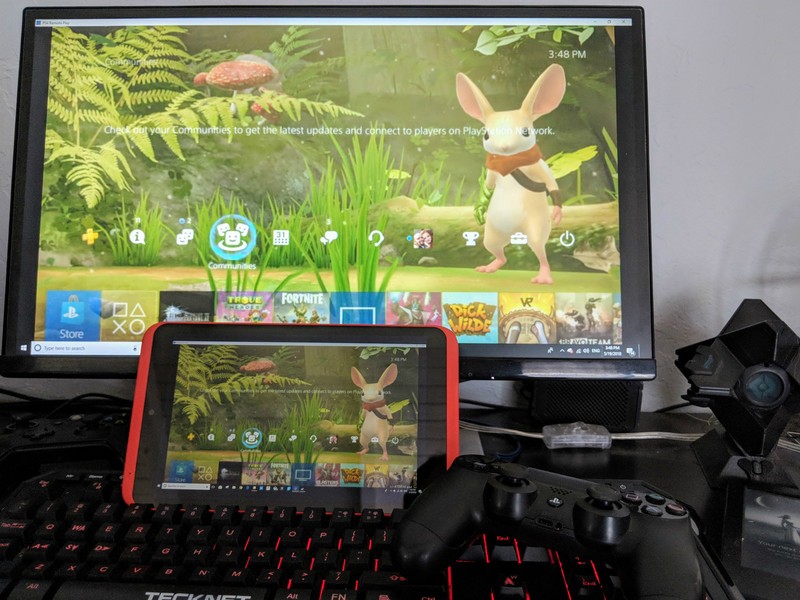
With the Release of the Steam Link beta app from Valve, a whole new world of possibilities has opened up regarding mobile gaming. The Link app allows you to play all of your Steam games on any Android device with Lollipop or above and seems to do it really well from the testing I have done.
The Link app does have another trick up its sleeve though. It is just a sophisticated and smooth running screen mirroring service with wireless input control, which means you can cast anything from your PC to your mobile device including your PlayStation 4! The PS4 allows you to stream your games to your PC, and with the Link, it’s easy to stream those to your mobile device.
Download Steam Link (free)

Step-by-step instructions
First, follow the instructions to set up your Stream Link app.
Follow the Instructions by Sony to set up remote play on your computer.
Start the Remote Play app so you see your PS4 screen on your computer.
Start the Stream Link app.
Tap Start Playing. The computer screen will load into Steam’s Big Picture mode.
Use Alt-Tab to select your Remote Play screen.
Enjoy PS4 on your mobile device!
More details
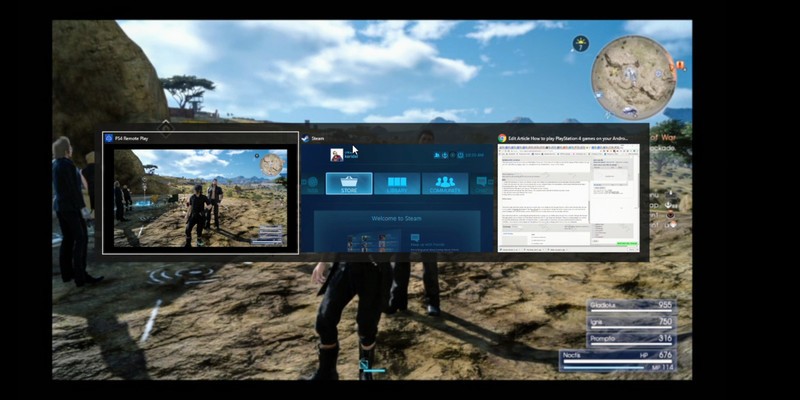
Because of the screen mirroring this will work on any system, not just the PlayStation 4, the Xbox will work too; you just need to Alt-tab over to the correct screen. I’ve even used it to do some 3D design work with my wireless mouse outside in the sun!
One small caveat with this particular mobile PS4 setup is the controller. Because the Remote Play app requires you to connect your PS4 Sixaxis directly into your PC, your range may be limited. There is a wireless adapter you can buy for your PS4 remote, and it does reportedly work with Remote Play, but at the time of writing, I couldn’t confirm that.
One way to get around this is by using two controllers, one to plug into the computer so it recognizes it and one connected to the PlayStation that you can use wirelessly. This seems to work perfectly.
See the adapter at Amazon
So, is it worth doing?
The necessary hoops to get this to work are excessive — Sony is an Android manufacturer and technically could make the Remote Play app work on any Android device — but if you are willing to take the time, playing your PS4 anywhere in your house is excellent fun.
Let us know what you think of this workaround in the comments section.
PlayStation 4

- PS4 vs. PS4 Slim vs. PS4 Pro: Which should you buy?
- PlayStation VR Review
- Playing PS4 games through your phone is awesome
Amazon

