


MoviePass: Everything you need to know
Here’s your one-stop-shop for all the MoviePass news, controversies, and more.

Unless you’ve been living under a rock lately, there’s a good chance you’ve heard a thing or two about MoviePass. Although the company was founded way back in 2011, it’s picked up a lot of steam over the past year or so with its too-good-to-be-true offer of allowing you to see one movie per day for just $9.95/month.
MoviePass has become one of the most disruptive companies of recent memory, and whether you’re looking for the latest controversies or want to learn more about the service before you sign up, you’ve come to the right place.
Without further ado, this is everything you need to know about MoviePass!
The latest MoviePass news
August 6, 2018 — The new MoviePass plan will remain at $9.95/month but limit subscribers to 3 movies per month
Just about a week after MoviePass announced that it was raising its monthly subscription cost to $14.95/month, the company has since issued another press release to outline a tweaked version of its business model that’ll hopefully allow for better sustainability.
Starting on August 15, 2018, MoviePass’s new plan will officially go into effect. It’ll still cost $9.95/month as usual, but instead of subscribers being able to see up to one new movie per day, they’ll be limited to just 3 movies each month. The plan will “include many major studio first-run films”, and after you see your 3 movies, you’ll be able to get up to a $5 discount on additional tickets you purchase through the app.
Additionally, subscribers of the new plan won’t have to deal with the controversial Peak Pricing or the Ticket Verification system that requires you to take a photo of your ticket before you can see another movie.
If you’re currently subscribed to any of the exisitng monthly or yearly plans, you won’t be transitioned to the new model until your plan is up for renewal. In other words, you’ll still be able to see one movie per day but will have to put up with Peak Pricing, Ticket Verification, and being limited from seeing new releases.
July 31, 2018 —MoviePass is raising its price to $14.95/month, First Run Movies will be limited in availability for the first two weeks
In an official press release issued by MoviePass’s parent company Helios & Matheson, a few big changes were announced as an effort for MoviePass to cut its cash burn by 60%
Perhaps the biggest change is with the service’s cost. The iconic $9.95/month plan that allows you to see one new movie per day will be increased to $14.95/month within the next 30 days. Even with the higher monthly rate, Peak Pricing isn’t going anywhere.
It was also confirmed that “First Run Movies opening on 1,000+ Screens” will see limited availability during their first two weeks of release unless the studio makes a promotional deal with MoviePass. From the way the press release reads, that sounds like yet another limitation on top of the restrictions we heard about yesterday for movies like The Meg and Christopher Robin.
All the important details
There are two plans to choose from

Right now, you’ve got two options to choose from if you want to get MoviePass — MoviePass and MoviePass Unlimited.
The former of those two costs $7.95/month and lets you see three movies per month.
While it’s nice that MoviePass has this available if you want to save a couple bucks each month, I’d recommend going all the way with MoviePass Unlimited. For $9.95/month, you can watch one new movie per day in theaters every single day.
Both plans are billed monthly and can be canceled at any time.
See at MoviePass
E-ticketing makes everything easier

MoviePass is regularly partnering with more and more theater chains to support e-ticketing, and if you happen to live near one that offers this, you’re in for a real treat.
For theaters that don’t support e-ticketing, using MoviePass requires you to be within 100 yards of the theater you’re going to, check-in to the showtime on your phone, and then swipe your card to get your ticket. If the showing happens to sell out by the time you get to the theater, you can either choose another movie or call it a night.
However, if there’s a theater near you that does support e-ticketing, the process is way simpler. Once you find the showtime you want to go to, a “Get E-Ticket” button will pop up instead of the “Check In” one.
E-tickets can’t be canceled once you buy them, but they do have the added benefit of allowing you buy them wherever you are. Also, if you’re theater supports e-ticketing and reserved seating, you can even choose your seat right from the MoviePass app! Once you get to the theater, just type in the redemption code for your e-ticket or scan the QR code.
Right now, e-ticketing with MoviePass works at Goodrich Quality Theaters, Studio Movie Grill, and MJR Theaters.
Only 2D movies are supported, at least for now

As it currently stands, you can only use your MoviePass to watch regular 2D movies. In the near future, however, that will soon be changing.
By Labor Day (September 3), MoviePass will allow you to pay an upgrade fee to see RealD 3D, IMAX 2D, 3D, and other Premium Large Format movies.
That fee will range between $2 – $5 depending on what kind of premium show you’re seeing.
You can’t rewatch movies

As good of a deal as MoiePass is, it’s not without a few limits here and there — the first of which is the fact that you can’t rewatch movies.
MoviePass experimented with letting people rewatch the same movie over and over again for a few months but eventually decided to revoke the right to prevent ticket-scalping and other misuses of the service.
It would certainly be nice to have the option of seeing a movie again that you particularly like, but don’t expect this to come back anytime soon.
You can still benefit from your theater’s loyalty program

If your theater has a loyalty program that rewards you with points for buying tickets and concessions, you can link it up to your MoviePass account and still get rewarded for the tickets you “buy” with your MoviePass subscription.
As it currently stands, you can link loyalty programs from Goodrich Quality Theaters, D Place Entertainment, and Starlight Cinemas.
It’s an admittedly small list right now, but it’s one that should only grow more and more as time goes on.
What’s the deal with Peak Pricing?
MoviePass is always trying to find ways of adapting its business model as more and more people join, and one of those latest efforts is seen with Peak Pricing. On June 22, MoviePass said the following:
Under this plan, if the combination of demand for a title, date or part of day is higher, subscribers may be asked to pay a small additional fee depending on the level of demand. You can avoid this peak surcharge by choosing an alternative date or film.


In the MoviePass app, showtimes that are affected by Peak Pricing will be indicated by a red lightning bolt icon next to them. If a showtime isn’t currently in Peak Pricing but might enter it soon, you’ll see a grey icon.
The surcharge you’ll need to pay is entirely dependent on the movie and time, but as a point of reference, the screenshots MoviePass shared show a surcharge of $3.43. Thankfully, MoviePass will launch Peak Passes in the coming weeks that’ll allow you to waive the Peak Pricing fee once per month.
Peak Pricing officially launched on July 5 and is rolling out to users over the coming weeks. If you’re currently subscribed to an annual or quarterly plan, you won’t have to deal with Peak Pricing until your plan ends and renews.
Be mindful of the device authorization limit

If you’re someone that lives the two phone life or frequently goes from device to device, you’ll want to keep MoviePass’s device authorization limit in mind.
To “keep your account secure”, MoviePass only allows you to be signed into the MoviePass app on one phone at a time. However, if you do get a new phone or need to sign into another one for whatever reason, you can log into your account on another phone every 30 days.
Just download the app, enter your credentials, and confirm that you want to use that as your authorized device.
Updated July 12, 2018: Updated the plan information now that the iHeartRadio promo is over and added more details about premium movies.
Galaxy Tab S4 vs. HP Chromebook X2: Which one should you buy?
This is the ultimate battle between Android and Chrome OS.
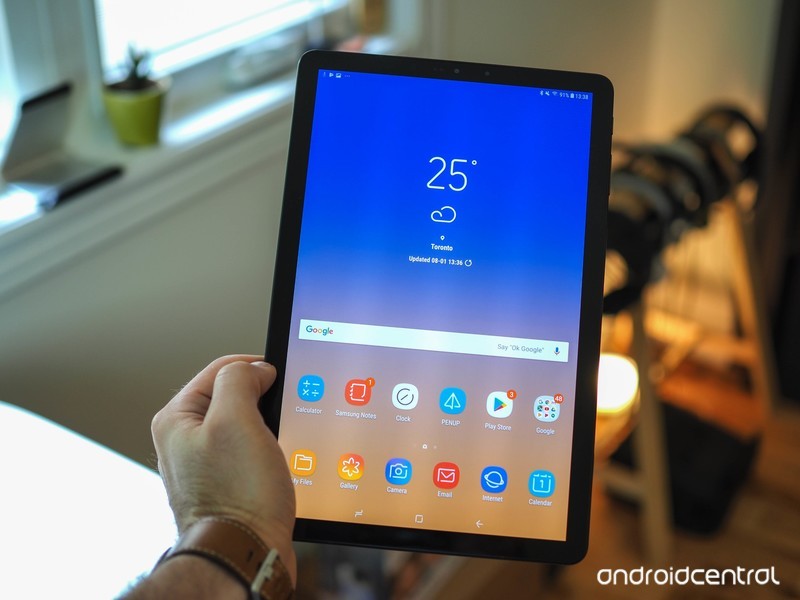
Android tablets have taken a backseat for the past couple years as larger and larger smartphones have diminished the need for them, but even so, that hasn’t stopped Samsung from releasing the large, beautiful, and powerful Galaxy Tab S4.
The Tab S4 is easily one of the best Android tablets you can buy in 2018, offering a stunning Super AMOLED display, snappy Qualcomm processor, and all sorts of accessories that turn it into the ultimate productivity machine. However, during the absence of Android tablets, Chrome OS has quietly risen as the replacement for work and play on the big screen.
One of the most enticing Chrome OS laptops/tablets to come out this year is the HP Chromebook X2, and with similar features and a lower price compared to the Tab S4, looks like the clear winner.
However, how do these gadgets truly stack up to one another? Let’s find out.
Specifications
| Operating System | Android 8.1 Oreo | Chrome OS |
| Display | 10.5-inch 2560 x 1600 Super AMOLED 16:10 aspect ratio | 12.3-inch 2400 x 1600 WLED 3:2 aspect ratio |
| Chipset | Qualcomm Snapdragon 835 Octa-core 2.35GHz + 1.9GHz | 7th gen Intel Core m3-7Y30 Quad-core 1GHz |
| GPU | Adreno 630 | Intel HD Graphics 615 |
| RAM | 4GB | 4GB |
| Storage | 64GB or 256GB | 32GB |
| Expandable | Yes (microSD slot up to 400GB) | Yes (microSD slot) |
| Battery | 7300 mAh | 4-cell 48 Wh |
| Rear Camera | 13MP 1.12µm pixel size f/1.9 aperture | 13MP |
| Front Camera | 8MP 1.12µm pixel size f/1.9 aperture | 5MP HP Wide Vision |
| Connectivity | Bluetooth 5.0 Wi-Fi 802.11 a/b/g/n/ac USB Type-C 3.5mm headphone jack | Bluetooth 4.2 Intel® 802.11b/g/n/ac (2×2) USB Type-C (x2) 3.5mm headphone jack |
| Security | Iris scanning Face unlock | N/A |
| Dimensions | 249.3 x 164.3 x 7.1 mm | 292.1 x 210.82 x 8.4mm |
| Weight | 482g | 725g |
What the Galaxy Tab S4 does better

Samsung’s been the top dog when it comes to screen technology for years, and with the Galaxy Tab S4, the company’s prowess in this field is shown off yet again. While the Chromebook X2’s LED display looks great, the Tab S4’s sharper resolution and Super AMOLED panel result in a superior viewing experiencing whether your playing games, watching a movie, or browsing the web.
On top of that, Samsung pairs its AMOLED screen with four fantastic external speakers. All of them are AKG-tuned and support Dolby Atmos technology. Daniel got a chance to check these out during his hands-on time with the Tab S4 and said they’re “some of the best-sounding speakers you’ll hear on a tablet today.”
When it comes time to get some work done, Samsung has a unique approach for overcoming Android’s poor optimization for large form factors. The company’s DeX interface can be run directly on the Tab S4, allowing you to run multiple apps at once in their own windows, drag and drop content from app-to-app, use keyboard shortcuts, and more. You can hop into DeX at any time and pair it with your own Bluetooth keyboard or spring for the official $150 Book Cover Keyboard that automatically launches DeX when it’s connected.
Lastly, if you enjoy having a fast way to securely unlock your tablet, the Galaxy Tab S4 gives you the choice between iris scanning and face unlock — two things you won’t find on the Chromebook X2.
See at Samsung
What the HP Chromebook X2 does better
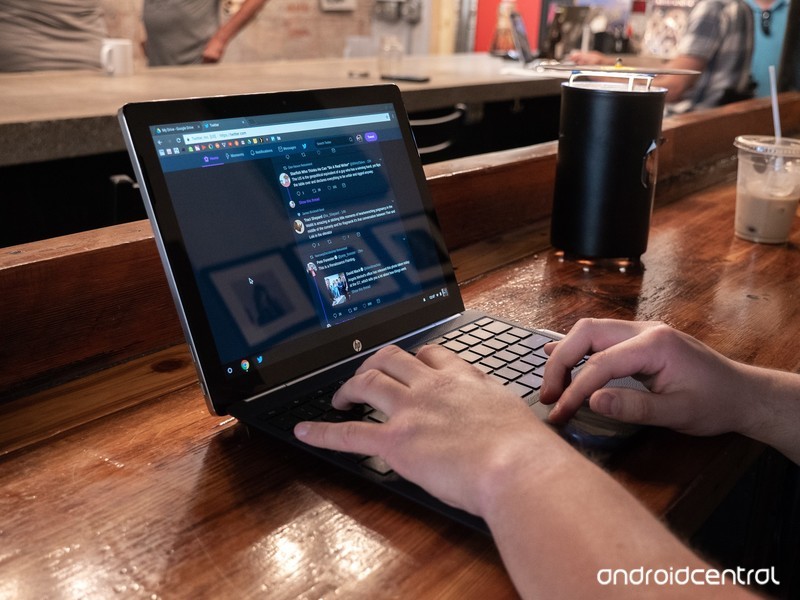
The Galaxy Tab S4 offers a powerful combo of features, but when you add everything together, things get very expensive very quickly.
The base configuration with 64GB of storage costs $650. While you do get the S Pen included for free, you’ll need to hand over another $150 for the official keyboard cover — bringing the final price up to a staggering $800.
While the HP Chromebook X2 does have half the internal storage at 32GB, its $650 price tag includes both a stylus and detachable keyboard. Speaking of which, if you plan on doing a lot of typing with your next tablet/laptop hybrid, the X2’s keyboard takes the lead with a built-in palm rest, adjustable display angles, and is easier use on your lap. While the Tab S4’s keyboard cover feels like a keyboard accessory, the keyboard for the X2 really does transform it into a proper laptop.
Also, while we appreciate Samsung bringing DeX over to the Tab S4, Google’s been making big improvements with Chrome OS over the last few months (with plenty more to come). Chrome OS still has better Android app support, works great with progressive web apps, can run Linux software, and is expected to get deep integration with Android phones in the near future.
See at Best Buy
Which one should you buy?
If money isn’t an object, you live in the Samsung ecosystem, and/or want a machine that can be used well for both productivity and entertainment, the Galaxy Tab S4 really is an impressive piece of tech. Its AMOLED display and speaker setup make it a phenomenal media-consumption device, and while its official keyboard accessory is pricey for what it offers, the ability to run DeX directly on the tablet gives you a lot of flexibility for how you can use it.
With that said, the HP Chromebook X2 is a much better purchase if you value getting your money’s worth. Despite being $200 less than the Tab S4 with the keyboard cover, the X2 still offers solid performance, a really great display, and one of the best 2-in-1 designs you can find.
Samsung Galaxy Tab S4 hands-on preview: The two-faced tablet
HP Chromebook X2 review: Great Chromebook, better Android tablet
Chromebooks
- The best Chromebooks
- Chromebooks in education: Everything you need to know
- Should you buy a Chromebook?
- Chromebook Buyers Guide
- Google Pixelbook review
- Join our Chromebook forums
Canada Deal: Rock out with 30% off B&O Play Bluetooth headphones and speakers
Limited time discounts!
Today only, you can take 30% off selected B&O Play by Bang & Olufsen Bluetooth headphones and speakers at Amazon Canada. 
The promotion includes the Beoplay H5 Wireless Bluetooth Earbuds in Black, Dusty Rose, Moss Green, and Vapour (that’s grey, to me and you). Normally costing $299.99, we’ve never seen these wireless buds drop below $200 so today’s offer represents an all time low price. The headphones are splash and dust resistant, feature 5 hours of battery life and when not in use can magnetically click together around your neck to power down and conserve energy.
You can also grab Beoplay P2 Portable Bluetooth Speaker in Black, Royal Blue, Sand Stone, Umber and Natural colours. It’s also splash and dust resistant and offers 10 hours of play time. Now down to $159, it usually averages around $215!
These deals are available today only, so act fast if you want to make the most of these limited time offers.
See at Amazon Canada
Best Surge Protectors in 2018

You pay a lot for your electronics, so shield them from electrical damage with the best surge protection.
A surge protector, in a nutshell, is a special component installed inside a power extension hub or outlet that soaks up any excess charge passing through the circuit. This aids in preventing your PC, TV or other electronic devices being dealt a blow. Think of it as a shield of sorts in combat. You’d rather that shield takes the hit over part of your body, right?
But there’s actually more to a surge protector than you might think, especially when it comes to picking up new extension leads. Here’s what you need to know, as well as a few recommendations to get you started.
- Why do I need a surge protector?
- Advanced protection
- Backup power
- Basic protection
Why do I need a surge protector?
As well as making sure you have adequate protection at the point of entry in the home (or office) with a fuse box, there’s also the requirement of adding in the middleman in case that fails, which is where the trusty surge protector comes into play. A fuse can be reset or replaced, so can a surge protector, but your device getting fried and data being lost is something you really need to avoid.
These surge protector can also be accompanied by some additional handy features, such as indicators as to when surge protection is no longer active (usually dictated by an LED light) and halting power flow altogether if a fault is detected or the protector is burnt out. Not all extension leads and hubs include additional protection. On more affordable options, it’s down to you to keep checking to see if the protection is still active.
Advanced protection

This P11VT3 model from reputable brand APC (who also do some killer uninterruptible power supply units) has everything you need and more. It’s a big unit that has 11 well-spaced outlets for hooking up all your electronics, and boy can you connect a bunch thanks to the massive 3020 Joule support. Numerous monitors can be wired up, alongside a computer, as well as countless phones and tablets — perfect for the busy household and small office.
Priced at around $25 it’s not cheap by any means, especially if you need a few of them, but it’s well worth the price. Power won’t be halted unless the main line-neutral protection fails, and when things go south after a lightning strike or other phenomenon, your equipment will not be supplied power.
See at Amazon
Backup power

APC also does UPS units, as mentioned above and the BR1500MS is one such offering. Sporting a 1,500VA (900W) built-in battery pack and surge protection, it’s got everything you need to keep your electronics safe and online even during power outage. The automatic voltage regulation instantly corrects fluctuations in power supply, and the LCD panel allows you to quickly check the status of the unit.
Priced at around $193, it’s really not cheap but if you have valuable equipment hooked up to the mains, you need to consider just how much it’s worth. It’s backed by APC’s three-year warranty.
See at Amazon
Basic protection

Amazon has its own line of extension cords and this option isn’t actually that bad. This 790 Joule surge protected extension has a total of six power outlets, an LED light to show if the surge protection is active, and comes rocking a six ft long cable — longer cables are recommended, especially when hooking up larger appliances like computers and TVs (not everyone is lucky with wall outlet positioning).
This really is the no-thrills solution but it gets the job done without frying your equipment. It’s only around $9 and you’ll only get basic functionality. It will continue supplying power even after the protection has worn out. So keep your wits about you.
See at Amazon
Stay protected
Regardless of what surge protection you choose to go with, be sure to keep everything guarded against surges. Even the most basic protection is better than nothing.
Apple Plans Revamped India Strategy With Official Stores, Year-Long iPhone Deals, and Improved Apps
Apple’s ongoing struggles in India have been scrutinized repeatedly over the past few years, and today a new report by Bloomberg has looked into Apple’s plan to stay afloat in what’s considered the world’s “fastest-growing smartphone market.”
In an effort to revamp the company’s presence in India, Apple CEO Tim Cook is believed to be working behind-the-scenes to “remold Apple’s failing India strategy,” according to both current and former Apple employees. This plan was kicked off when Apple executive Michel Coulomb began overseeing the company’s India strategy at the end of 2017.
According to the new report, this strategy includes better and longer-lasting retail deals with higher sales targets, the opening of official Apple retail stores in India, “overhauling” the company’s relationship with independent retailers, and improving apps and services “aimed more closely at Indians.” This last point particularly includes a “revamped” version of Apple Maps that is aimed to launch by 2020.
On the point of services, earlier this year Indian iPhone users discussed Apple’s poor performance in this area and one user specifically called Apple Maps “a joke” in the country. While some services like Apple Music were favorably received, others like Siri were identified as low points for Indian customers, as the assistant “often struggles” with local accents and does not understand “many words of Indian origination.”
For retail, the official Apple stores are said to open in 2019 and eventually include locations in New Delhi, Bengaluru, and Mumbai. While the Indian government’s rules for foreign companies opening shops have previously prevented Apple from launching local stores, the company now builds some of its iPhone SE and iPhone 6s models in India, which is believed to help it meet India’s rule requiring these companies to manufacture 30 percent of their products locally.
Because the government has made it tough for Apple to open its own retail stores in India, iPhone prices are less reliable than the company’s reputation for strict price controls would suggest. Indian wholesalers and online retailers often raise or lower their prices daily without giving a reason, leading shoppers to haggle or wait in hopes of a better deal, says Subhash Chandra, who runs a 510-store chain of gadget shops called Sangeetha Mobiles. Two leading retail chains say iPhone sales have fallen to one-third of their January level.
In the Indian market, Apple ranks 11th and accounts for just one percent of India’s phone sales, selling fewer than one million iPhones during the first half of 2018. Comparatively, rival smartphone maker Xiaomi sold “more than 19 million” during that period, according to data gathered by Counterpoint Research.
As usual, much of the conversation surrounding Apple’s disappointing performance in the country is due to its higher smartphone prices in comparison to the company’s peers in India. Nagaraja B.C., the manager of a local smartphone store named Poorvika Mobile World, said that his average shopper’s budget is “about 10,000 rupees,” or $150.
Apple’s cheapest model in the market, the locally-made iPhone SE, is nearly twice that price, leading many customers to opt for smartphones like the Xiaomi Redmi 5A at $100. As part of the new strategy, Apple is said to be in talks with retailers and banks to “offer holiday deals year round” to convince customers to purchase its smartphones.
Tag: India
Discuss this article in our forums
Apple Supplier TSMC Recovering From ‘Debilitating’ Computer Virus [Updated]
Apple supplier Taiwan Semiconductor Manufacturing Company is in recovery from a “debilitating” computer virus that hit many of its fabrication tools this past Friday evening. The company says that 80 percent of the affected tools have been restored, but it’s now on a path to warn its customers — potentially including Apple — of delayed shipments and reduced revenue due to the virus (via Bloomberg).
TSMC builds chips for Apple’s iPhone, and in late July a report from DigiTimes stated that the supplier had begun commercial production of chips manufactured using its advanced 7-nanometer process, including Apple’s A12 processor for the 2018 iPhones. Now TSMC says many of its customers can expect shipment delays, although it didn’t specify which customers would be affected.
The supplier says that “no confidential information” was compromised during the virus attack and as of Sunday most of its customers had been notified. TSMC believes the virus came from a “misoperation” during the software installation process for a new tool that then spread through its computer network, and one analyst thinks “all of TSMC’s 12-inch wafer fabrication plants” were infected.
Mark Li, an analyst at Sanford C. Bernstein, said he thinks all of TSMC’s 12-inch wafer fabrication plants had been infected and that many customers had been affected, though the impact will be “very limited” because the company can make up for the losses during the busiest holiday quarter. TSMC makes Apple chips in its 12-inch fabrication plants.
“Long-term, TSMC’s trustworthy image is somewhat tainted but it is hard to quantify the effect now,” Li wrote in a research note Monday.
Although it’s unclear how the virus will end up affecting Apple and the trio of iPhones expected to be revealed next month, Apple is TSMC’s largest customer and is said to account for more than 21 percent of TSMC’s revenue. Apple chose TSMC to remain the exclusive supplier of the upcoming A12 processor for the new iPhones, following rumors from last year that suggested Samsung could be returning to iPhone chip production in 2018.
Despite the fear over chip shipment delays, Apple is likely to have plans in place for any potential supply chain delays, as Bloomberg points out:
While TSMC has not indicated which customers could be affected, such a virus could potentially slow Apple’s output of new devices, cutting into the number of units sold.
Apple does prepare for last minute supply-chain hiccups like the one facing TSMC and could work through any potential problems. An Apple spokesperson didn’t immediately respond to a request for comment on Sunday.
“If the most advanced 7nm process products suffer a major impact, then concern could arise over a potential launch delay for next-gen iPhones,” SMBC Nikko analysts wrote on Monday.
Apple is expected to announce three iPhone models at an event in September: two OLED models measuring in at 5.8 and 6.5 inches and a 6.1-inch lower-cost LCD model. All three iPhones released in 2018 will support Face ID and edge-to-edge displays, with designs similar to last year’s tenth-anniversary iPhone X. According to the latest supply chain analysis (which came prior to TSMC’s virus attack), the OLED iPhones were predicted to have a typical September launch window while the LCD model could “possibly” be delayed to October.
Update: TSMC provided more information in a statement Monday morning, placing blame for the virus attack on a variant of the 2017 WannaCry ransomware. The virus hit facilities in Tainan, Hsinchu and Taichung, including locations that produce Apple chips. According to TSMC CEO C.C. Wei, an “unidentified vendor” provided the company with the infected tool, ruling out the possibility of a hacker targeting TSMC.
“We are surprised and shocked,” Wei told reporters. “We have installed tens of thousands of tools before, and this is the first time this happened.”
Related Roundup: 2018 iPhonesTag: TSMC
Discuss this article in our forums
Microsoft Joins Movies Anywhere, Syncing Movies Purchased on Xbox/Windows With iTunes
Microsoft today announced that it is joining Disney’s expanded Movies Anywhere service, allowing customers who purchase films on Xbox and Windows 10 to link their content to Movies Anywhere (via The Verge). Thanks to the new addition, this means that any supported movie you purchase through Microsoft Movies & TV will now also be available on other linked Movies Anywhere accounts, including iTunes.
Digital retailers supporting the service now include iTunes, Amazon Prime Video, VUDU, Google Play, FandangoNOW, and Microsoft Movies & TV. Movies Anywhere supports films from Disney, Sony, Twentieth Century Fox, Universal, and Warner Bros., meaning that most of the latest releases can be found on the service.
If the films you purchase come from these studios, and you have your Microsoft and iTunes accounts connected to Movies Anywhere, you’ll be able to sync purchases between the two platforms.
Microsoft Movies & TV now supports Movies Anywhere! Purchase Movies Anywhere eligible films from Microsoft Movies & TV and watch on supported platforms: Xbox, Windows, iOS, Android, and streaming devices. Sync your accounts to access your entire Movies Anywhere library on Microsoft Movies & TV, no matter where you purchased.
As a bonus for syncing your Microsoft Movies and TV account with Movies Anywhere, the companies are gifting X-Men: Days of Future Past to its customers for a limited time. Head to Microsoft’s FAQ page for more information on how to link the two accounts.
Disney originally expanded Movies Anywhere from “Disney Movies Anywhere” last October, growing the service into an app that accumulates the user’s entire library of films, not just those from Disney, Marvel, Pixar, and Lucasfilm. Movies Anywhere launched only in the United States, and as of Microsoft’s partnership with the platform it is still limited only to U.S. customers.
Tags: Microsoft, Movies Anywhere
Discuss this article in our forums
LG wants to make sure you know it has a phone with a stylus too
It’s stylus week in smartphone world, and although the Galaxy Note 9 is still to come, LG has started us off by announcing the LG Q8, a 2018 refresh of the entirely different Q8 from last year. It’s not a Note 9 challenger, and has a midrange specification sheet — but it may serve those who want a pen to scribble with but cannot justify the massive prices a Samsung Note phone usually commands.
What makes it most notable (sorry) is it provides some more feature and specification information into the recently announced LG Q Stylus range, which will be sold in the U.S. soon. LG wasn’t very forthcoming with the specs or price for the Q Stylus at the time, and the Q8 appears to resemble the Q Stylus Plus. Why has LG announced the phone under a different name? The Q8 is destined for South Korea at the moment.
The stylus hides inside the Q8’s body until its needed, at which time it can be used with the memo feature, for drawing, and to create your own emoji. The memo feature works even when the screen is switched off, making it easy to quickly take notes, and LG has built little sound effects into the pen so it sounds like your writing instrument of choice when it touches the screen.
Specification
This isn’t a small phone. The screen measures 6.2 inches with an 18:9 aspect ratio, and a 2160 x 1080 pixel resolution. There is no notch along the top of the display, and screen bezels similar to the old LG G6. On the back of the phone is a single-lens 16-megapixel camera above a flash unit and a fingerprint sensor. A wide-angle selfie camera is on the front. Despite the sleek appearance, the LG Q8 reaches the MIL-STD 810G standard for toughness, including an IP68 level of water resistance. It weighs 172 grams and is 8.4mm thick, with a 3,300mAh battery inside.
A Snapdragon 450 processor and 4GB of RAM power the phone, and there is both 64GB of internal storage space, and a MicroSD card slot too. The 2017 Q8 resembled the LG V20 and had a far higher specification, but the new version has taken on a style of its own, and become a very different device despite using the same name. The Q8 didn’t have a stylus either.
LG has not given the Q8 a release date yet, but the price converts over to around $480. It will be sold in both Moroccan blue and aurora black color schemes. While the Q Stylus range is the model for buyers in the U.S., the Q8 may also be adapted for use elsewhere in the world. Just don’t get confused over the names for what is essentially the same phone it has announced once this year.
Editors’ Recommendations
- The LG Q Stylus provides a cheaper way to be ultra-productive
- LG V35 ThinQ vs. LG G7 ThinQ: Which phone prevails in stablemate showdown?
- LG V40 ThinQ: Absolutely everything we know
- LG G7 ThinQ vs. Google Pixel 2 XL: A brains-versus-brawn comparison
- Here’s every device available through Amazon Prime Exclusive phones
How to add video news sources to the Lenovo Smart Display

Catch up, don’t play catch-up.
Google Home has long allowed users to set which news sources they hear when they ask Assistant to “play the news,” but with the arrival of Smart Displays from Lenovo and others, many of these briefings now have video, too.
That means when you ask your Lenovo Smart Display to “play the news,” you can watch it, too! Here’s how to get it set up.
How to add video sources to your news briefing
All of the work is done inside the Google Home app, because the Lenovo Smart Display is basically a Google Home with a screen. That means that changes made to the news briefing order will affect all other Google Home speakers associated with your account. Keep that in mind if, for example, you’d prefer to watch your news on one screen and listen to it with a different speaker.
Open the Google Home app.
From the home screen, tap on the three-line hamburger menu.
Select More settings.

Scroll down to News and tap on it.
Select Add news sources.
Check off news sources that say “Video available on Smart Displays”.
Optional Return to previous screen and select Change Order.
Optional Move video briefings up to the top of the list.

What video sources are there?
Right now, it’s early days in the life of video news sources inside of Google Assistant, so the selections are slim.
- CNN
- Reuters TV
- Cheddar
- TODAY Show
- CNBC Tech Check
- CNBC
- Bloomberg First Word
- Mad Money Lightning Round
- CNNMoney
- CBS Local News (various markets)
Anything else?
The great thing about this new feature is that even if you don’t want to mess with your existing news briefing list — say you have a Google Home or other Assistant-based speaker — you can always just ask the Lenovo Smart Display to “play Reuters TV” or “show me CNBC,” making it super easy to catch up on the news really quickly.
Amazon’s Fire HD 8 Kids Edition drops to £95 for today only
Treat your kids without breaking the bank.
For today only, you can pick up Amazon’s Fire HD 8 Kids Edition tablet for just £94.99 — that’s down from its usually asking price of £129.99 and within £5 of its previous low price on Prime Day. 
Available in Blue, Pink or Yellow, the Kids Edition is a fully-featured Fire HD 8 tablet wrapped in a vibrant, child-friendly and rugged case to prevent the tablet from being damaged. In fact, Amazon is so confident in its ability to protect the device inside that they offer a 2-year ‘worry-free guarantee’ that allows you to return a damaged tablet and have it replaced for free.
It features an 8-inch HD display, quad-core processor, 12-hour battery life and 32GB of on-board storage. You’ll probably want to pick up a microSD card to add more space for movies, games and more — with the money you save on this deal, you could pick up this £15 64GB Samsung microSD card and still have money to spare.
For those not needing the ruggedised Kids Edition, there’s also a promotion running on the regular Fire HD 8 tablet which is down to £84.99 from its usual £99.99 price tag.
For more UK deals coverage, be sure to keep an eye on Thrifter UK, sign up for the newsletter and follow the team on Twitter.
See at Amazon UK

