


Nixon Mission Android Wear: One of the best smartwatches to date (review)
Smartwatches never really lived up to analyst’s expectations. Many predicted they would be the next major growth market as devices like laptops and tablets lost ground. When the first generation smartwatches were released a couple of years ago, we were left unimpressed with the offerings. Many tech manufacturers jumped head first into the watch industry thinking they could replicate the look and feel of the timeless accessory. As we can look back at history, we realize that part of the failure of the smartwatch industry was the lack of attention to design. No one really wanted devices that looked like mini personal computers on their wrists. The trade offs for minimal features simply wasn’t worth the aesthetic downgrade or cost.
Luckily for those of us who love watches, we have several true watch makers who are joining the mix. The watch I’ve been wearing for almost a month now is the Nixon Mission Android Wear.
A real watch designed for surf and snow
I’ve lived in San Diego half of my life and know Nixon as a surfer’s watch maker. It’s an ultra popular brand here, especially with its headquarters in Encinitas, which is located in north county San Diego. It has drawn success from making functional and fashion forward watches for almost 20 years.
Its first Android Wear device is nothing short of Nixon designed. You’d never know it was a smartwatch until you turned the display on.

Make no mistake, this is a watch first. It’s also a big watch. The 400×400 AMOLED display measures 48mm across, with a total crown diameter of 50mm. It measures at 16mm thick which might not be suitable for everyone. I usually wear watches with a 44mm crown, but after 30 minutes of wearing the Mission, I stopped noticing the large size of the watch. It’s surprisingly comfortable.
With that size you get true water resistance. Not the measly type of water resistance that you can drop in a toilet, or possibly wear it in the shower. The Mission is capable of maintaining water resistance down to 100m which means it qualifies as a real dive watch.
For residents of San Diego, we would probably use it surfing and that is what Nixon’s purpose of the Mission was designed for. It has an app unique to the Mission, that keeps track of the tide information in the area you choose or based on your location services.

I wore the Nixon Mission on my week long trip to Maui and wear it everyday in San Diego where the water is apart of our lifestyle. It survived several surf mornings in Maui where the waves rolled me over on more incidents that I would have liked. Even in the image above, you can see the salt crystals which are nearly impossible to wipe off.
 My dog and I visit the beach every single weekend in Del Mar. She loves to swim and play fetch in the cold ocean water with me. Not once did I ever fear that the watch would fail to the water as I own several Nixon watches that have kept up with my active lifestyle.

Being a watch first, and one designed for active people, Nixon included its patented interlocking band to keep it secure to your wrist. It might seem like a little feature, but it’s a real necessity for surfers.
Residents of Southern California love to take advantage of the wide range of climate in our region. Just two hours away, at Big Bear Lake, we can go skiing or snowboarding in the mountains. The Nixon app also keeps track of the snow pack and weather conditions for those who love to surf on the snow.
What I love about the Mission is Nixon’s commitment to staying true to its customers. It didn’t try to create a smartwatch to compete with all watches, instead it created a purposeful watch that looks incredible while supporting the active lifestyle.
It’s also a real Android Wear device too
Inside of the surgical grade stainless steel case, is where you will find the standard internals commonly found in Android Wear.
- Qualcomm Snapdragon 2100 processor
- 4GB Memory
- 512MB RAM
- Bluetooth
- Wi-Fi
- 400mAh battery
For those of you who are familiar with Android Wear, the Nixon Mission offers nothing really different in the software other than device specific watch faces and the Mission app which keeps track of surf and ski conditions.

The Nixon watch faces are very much in fashion of its analog watches and looks damn good on the full display AMOLED display.

For those of you who don’t know Android Wear, it can perform functions such as provide notifications, keep track of emails and texts, take phone calls, provide map location, control music or store music for true wireless freedom, check the weather, keep track of your daily activities, and of course give you the time.

Battery life was on par with other smartwatches I’ve used recently. It gets roughly 24-36 hours of usage away from a charger. If you use it for music or maps, expect that life to drop to 12-18 hours.
Charging the Nixon Mission was very easy with the magnetic cable. In true Nixon fashion, it even braided the charging cable in black and orange nylon that helps it stand out. The Snapdragon 2100 processor also charges faster than the previous generation.

Verdict: It’s the first Android Wear device I truly love
We are fortunate on the Google side of the fence where we have dozens of options to choose from when it comes to Android Wear. We aren’t stuck with a rectangular shaped watch like iOS consumers are, and we have real watch makers like Tag Heuer and Nixon in the mix.
The Nixon Mission Android Wear is fairly priced at $399 and comes in three standard colors: Black, Grey, and Orange. It’s a real watch first that includes Android Wear to make it better than traditional offerings. Performance is nothing short of flawless, as I have yet to experience a slow down or glitch in three weeks of daily usage.
The Mission can also be custom designed to your liking at Nixon.com where you can select different bezels, cases, and watch bands. Nixon proved that smartwatches don’t have to look like personal wrist computers. They can withstand the high fashion of Southern California while resisting snow and salt water with the best of them.
Check out the Nixon Mission at Nixon, Amazon, Best Buy and Google.
If you would like to see more photos of the Nixon Mission, check out this Google Photos Gallery.

Origem combo Bluetooth LED light bulb/speaker: A party all on its own (review)
We review quite a few accessories here at AndroidGuys and some of my favorites are the ones that are unexpectedly fun. I’ve been using a Bluetooth combo led light and speaker from a company called Origem and think it’s worth your consideration.
Let’s check out the Origem Magic Lamp.
Design
 The Origem Magic Lamp is a combination LED lightbulb and wireless speaker. It’s a bit larger than regular light bulbs, since it houses a speaker, but uses the same standard E27 threading that almost all of your bulbs use. It’s intended to be used in lamps, light fixtures or anywhere else that has a light socket.

The speaker sits inside of the housing with the LED light ring at the top. You don’t typically see combination products like this in big box stores such as Best Buy or Walmart which is why this review is fun for me.
Features:
- 16M color LED lights
- E27 Base
- Bluetooth speaker/light combo
- 300 Lumens
- 7.4 x 4.9 x 4.6 inches
Usage

For the sake of this review, I installed the Origem Magic Lamp into my photo light fixture in my office. However, I used the Magic Lamp on my patio for the duration of this review, since San Diego pretty much has year around good weather where I can sit outside and enjoy music.
The Magic Lamp connects over Bluetooth once screwed in and powered on. You can download the iLight app at the Google Play Store for Android or the iOS App Store for Apple devices. Once paired to a smartphone or tablet over Bluetooth, you can then open the iLight app and control the light and speaker independently.

The app is very intuitive and easy to use. In the center of the app is where you will find the color wheel that allows you to change the LEDs up to 16M different colors. Or you could simply select the four preset colors at the bottom and the light will change to them. At the top is where you will find different modes for enjoying your light – Normal (solid), Rhythm which flickers to the beat of the music, Rainbow which changes the light to the light spectrum, Pulse which changes at a regular frequency and Candle which makes the light mimic a candle flickering in the wind.

I didn’t think the light features would excite me much, but to be honest the change in light made for a great mood setter. I found myself using the light modes and different colors when I had friends over for drinks. It was quite the conversation starter, but luckily, it was too high for them to unscrew and take home since they all wanted it for themselves.
The internal speaker is surprisingly loud in the Magic Lamp. It’s certainly loud enough to hear in other rooms when played at maximum volume. When sitting under it on the patio, it can be played at 50-75% of maximum for comfortable listening. There isn’t an excess of bass with the speaker, however the mids and highs are detailed enough to make it more than acceptable to listen, to no matter the room.
At 300 lumens you shouldn’t expect it to be the brightest light in the room. While I use the Magic Lamp as a patio light, it might be best suited in a desk or night stand lamp. It provides enough white light to read a book under, or colorful mood lighting when the room is dark.
It’s a great combination of two wireless devices that helps keep things simple.
Summary

The Origem Magic Lamp is a fun Bluetooth speaker/LED light combo that is well worth its price tag of $29.88 at Amazon. If you separated the two you would have a solid LED light and an above average mini speaker, but combining them makes them a fun accessory.
The included app for the iLight makes the experience of using the lamp very easy and simple. It only took me about two minutes to get the light screwed in, connected and flickering all without reading the instructions. You might have difficulty locating the app since it isn’t listed in words, instead it is listed as a 2D barcode on the side. I’ll list the app links below to make things easier for you if you get the Magic Lamp, or you can simply search for iLight in the Google Play Store or iOS App Store.
It’s a fun lamp and speaker that I enjoy regularly on my patio. This will make a great gift at the reasonable price of $29.88.
Check out the Origem Magic Lamp at Amazon today.
- Android iLight App here
- iOS iLight App here

Weatherbug: An oldie but goodie that gets better with time (Review)

With so many apps available these days, it’s easier than ever to stay on top of everything that’s important to you. If it’s sports, entertainment, or the weather, that you are most interested in, mobile apps are there to keep you informed and make your life much more convenient.
 One of the best weather apps out there is WeatherBug. You have likely used these kinds of apps in the past, but they probably just gave you information and a weekly outlook, and not much else. With WeatherBug, however, you can go a step further and see how the weather will impact your day-to-day life. If you’re interested in knowing all things weather, then WeatherBug is for you.
The best part of WeatherBug is that it comes from a trusted source. The app has been downloaded over ten million times, and it’s completely free to download and install. You can get up and running in minutes, and anyone can use this app, as long as they know how to navigate the easy-to-follow menu.
Setting It Up
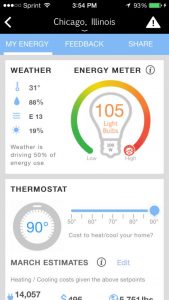 WeatherBug is pretty straightforward. After you download and install it, you open it up, and it will ask you to agree to the terms and conditions. After you accept, you will find yourself on the home page. The app is available for as both a Android weather app and IOS weather app.
At first, the app will search for your general location. However, if you want to save multiple spots or have a more precise reading, you will need to sign up with your contact information. You can do so by signing up with your Facebook login or via email. If you do go through email, you will need to verify it once you’ve entered it. The only information needed is your gender and birthday, and once again you will need to agree to terms and conditions.
App Details
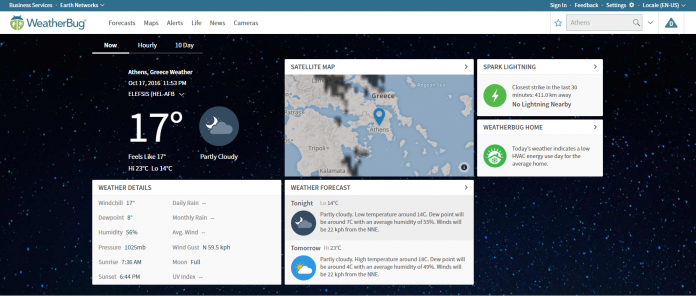
On the main page, the app is set up with a set of widgets that you can arrange to your liking. The top shows your current location, with time, temperature, cloudiness level, real feel temperature, and the high and low for the day. Below that you have a list of widgets, including:
- Wind and rain meter
- Home energy usage meter
- Weather news (for the country and your state)
- Spark widget (checks lightning nearby)
- Photos
- Outlook for the week, including videos
- Live cams nearby
- Lifestyle widget
 The most useful widgets that are available are home energy use, weather news, outlook, and lifestyle. Spark is most useful if you live in an area with a lot of lightning, and the live cams are helpful if you want to check traffic before you head anywhere.
Highlighted Features
Lifestyle
Our favorite widget is the lifestyle because it will tell you how the weather will impact your daily routine. Want to mow the lawn? This app will show you the best time to do it. Want to know when allergies are at their peak? You can find out here. This widget enables you to take the data provided and apply it in a way that affects you.
Home Energy Usage
This is another powerful tool if you want to save money on your utility bills and conserve energy. Based on the weather in your area, you can sync up your home’s thermostat and find out what the ideal temperature range is for you.
Weekly Outlook
This is another valuable tool if you want to get an overview of the week. With this option, you get a comprehensive view of the days to come, rather than just a list of highs and lows. Here you will find what expert meteorologists have to say about the weather on any given week.
Other Notable Features
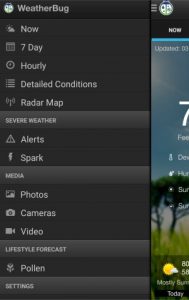 The WeatherBug app gives you the ability to save multiple locations, has customizable settings, includes a temperature readout in your status bar, and hosts interactive maps so you can see what the weather looks like around you visually, rather than numerically.
Conclusion
WeatherBug is a practical app to monitor the weather. We especially like that you can see how the weather impacts your utility bills, your lifestyle, and the traffic. And to top it off, it’s conveniently customizable for your needs.
iBooks StoryTime app narrates children’s stories on your Apple TV
To encourage parents and kids to read together, Apple has debuted a new app for tvOS. The iBooks StoryTime app features “Read-Aloud” tool that narrates books and flips pages automatically. For the times when you’d rather read to your child yourself, you can turn the feature off and turn to the next page by swiping with the Apple TV remote.
Selections include books with Sesame Street characters and stories from other children’s favorites like Teenage Mutant Ninja Turtles. You can purchase iBooks from any Apple device and the Read-Aloud stories will sync automatically in the library on your Apple TV. iBooks StoryTime for tvOS is free and it comes with Dora’s Big Buddy Race Read-Along Storybook at no extra charge so you can test drive the app without having to hand over any funds.

Via: The Verge
Source: App Store
Apple’s iOS support app surfaces in the Netherlands
Reports of an Apple support app began making the rounds a year ago and now it looks like the company may be close to an official launch. The software is now available in the Dutch App Store, but our editors have confirmed the switch hasn’t been flipped for iOS users in the US, UK or Hong Kong. We’ve reached out to Apple for more information on availability and we’ll update this post if we hear back.
The app serves up product information and tips to help with any minor issues. It also helps you schedule a repair appointment at an Apple Store or with an authorized third-party who can assist with a more serious problem. There’s also the ability to chat, email or schedule a call with a support technician. You can view your recent support history to keep track of things as well.
What’s more, the Apple Support app also lists all the devices tied to your account. If you’re not sure of an exact model number and other information someone will need to help you, you have easy access to those details with this new iOS software. The app will also help you find answers and articles that are specific to the products you own, which will hopefully cut down on time spent searching for a fix.
Via: TechCrunch
Source: App Store (Netherlands)
HomeAway & Owners Direct (review)

Overview
HomeAway & Owners Direct app provides you with everything you need to plan, book and manage your perfect holiday rental.
Impressions
The HomeAway & Owners Direct app for Android has only been available for a year or so, but it is now well established and has surpassed many leading accommodation apps on the market, offering better accommodation than many of them. The app is also free to download for iOS so even if you don’t end up booking on it, you’ve wasted no money.
 You are able to search various destinations around the world, with the search bar being the main home screen. Once you’ve typed in your destination, the app comes up with however many results there is, you tap in your preferred dates and narrow the results down with; price per night, number of guests, number of bedrooms and number of bathrooms.
Then you are presented with a list of all of the accommodation fitting your criteria. One of the most pleasing things about the search, is that it the results are complete with price per night and their star rating, so you are able to simple scroll past them if they don’t interest you. Upon clicking on a result, it gives you more information, such as facilities; TV, WiFi, kitchen etc, its location on a map and reviews from previous customers.
The convenience of the app is also pleasing, as your search is remembered for next time, so you don’t need to trawl through all of the results again. You are also able to share your favored results via number of options, including message, mail, WhatsApp, Facebook and Twitter, if your fellow holiday-goers wish to see.
There is also a favorite option, which stores all of your favorite rentals, the practicality of the app again coming up trumps.
The managers of the rentals are also on the app, as well as how long they have been a member, the languages they speak, their response rate and the last time they updated their calendar, so you are able to see their reliability.
You can inquire about a rental without actual booking through the message feature. The app is one of the easiest on the market when it comes to making an account, and in short, is a fast and simple process.
The option to be able to message an owner is a great addition and whilst other features on the app are easy to use, the message between renters and owners is somewhat clumsy and it can be difficult to pick up a conversation, however, that’s the only criticism of the app.
Once your trip is booked, the app stores all of your details, so if you happen to need them for any reason or wish to check something, you can simply open the app and tap My Trips.
Conclusion
HomeAway & Owners Direct is definitely better than its rival apps, with its ease of use, convenient features and plethora of results proving very impressive.
The detail in the search results helps potential renters find exactly what they’re looking for without looking for hours. The only criticism of the app is the gawkiness of the messaging option but with a little patience, it’s easy to put up with.
The OnePlus 3 gets its first taste of Android Nougat this month
Watching Android Nougat make its way to phones Google didn’t have a hand in making has been, well, a little excruciating. Some major players are getting the update out first, but now it looks like the upstarts at OnePlus are next in line. Brian Yoon, the startup’s head of software, confirmed to Engadget that a Nougat beta “community” build would be ready for the OnePlus 3 this month. Even better: once all the kinks have been ironed out, Nougat will be pushed out over-the-air to all OnePlus 3s by the end of the year. Not a bad way to ring in the holidays, right?
Yoon also confirmed that older devices like the OnePlus 2 will be updated to Nougat as well, though there isn’t a firm timeframe set for that yet.
The company’s push to bring Nougat to its phones comes after a pretty dramatic internal restructuring. Earlier this year, OnePlus leadership merged the teams working on HydrogenOS (their software for OnePlus devices in China) and OxygenOS (their software for everywhere else). It was a smart, and ultimately necessary move — OnePlus hasn’t had the best reputation where speedy software updates are concerned, and their users were vocal in their frustration. By combining software teams, the company hoped to marshall its resources more effectively and ultimately just get stuff done faster.
So far, it seems to be working — word of OnePlus’ Nougat update plans come just days after much bigger companies announced their own. LG was first off the line with a Nougat-powered phone, and followed up just a few days ago to push the update to its flagship G5. Then came Samsung, which made the update available to S7/Edge owners through its Galaxy Beta program very shortly after LG made its move. While it’s heartening to see Nougat finally making the rounds, here’s hoping the pace picks up: it’s almost time for the Android 7.1 update to take its turn in the spotlight.
The NIMA Sports Bluetooth Speaker Helmet is the ultimate tech accessory for NCAA football fans
College football is one of the most popular sports in the United States. It is so popular that even the NFL owes much of its success as it laid the foundation for the talent and rules in place today. Students and graduates can develop an almost unhealthy fanaticism for their school’s team and show it in crazy ways.
I’ve come across one of the coolest wireless accessories I have reviewed in a long time, and college football fans will love it. The NIMA Sports Bluetooth Speaker Helmet.
Design

The NIMA Sports Bluetooth Speaker Helmet is a very unique accessory. The unit I am reviewing is a full sized helmet that looks and feels like the real thing I used when I played football. Except this one has a massive woofer built into the bottom of the helmet, with two large speakers built into the earpieces. The speakers in the ears are covered by mesh metal grilles that don’t distract from the look of the helmet.
 Controls are similar to what you would find on other large wireless speakers; there are buttons on the back of the helmet for power, Bluetooth, track and volume control. Where this speaker is more advanced is with the EQ button that changes the sound based on seven different preset settings.
 On the back is where you will also find a 3.5mm audio input jack, a full sized USB A outlet for charging your smartphone, and the power input.
There’s an eye guard behind the face mask which reminds me of former San Diego Charger, Ladanian Tomlinson, and gives the helmet a finished look. It’s a true wireless speaker with a large built-in battery that gives the helmet a good bit of heft at 14 pounds.
The helmet speaker is an officially licensed product of the NCAA and fans of Nebraska, USC, Alabama, Michigan State, UCLA, LSU, University of Florida, Auburn, Florida State, Arkansas and the University of Texas. More schools are in the works for future helmets, but are currently limited. I would guess that would have to do something with the high licensing fees these schools charge.

Specs
- Bluetooth 4.2 EDR
- Microphone for taking calls
- Dimensions: 15.0in x 13.6in x 11.2in
- Weight: 14lbs
- Full stereo sound with dual speakers and a large subwoofer
Sound, App and Looks
First off, the look of this helmet speaker is awesome. It’s the same logo and color of the USC Trojans’ helmet, and I can imagine that other schools look spot on too. The face mask not only looks like the real deal, but it feels like it is made from real steel that is covered in plastic. It makes for a great carrying mechanism.
The sound is where the speaker excels. With a speaker on each side of the helmet and the inclusion of the down-firing subwoofer, the sound is designed to impress those even at tailgate parties. It gets very loud and can play over crowds, or in my case, really anger my neighbors.
 The sound quality is helped that by the ability to change the EQ settings to any preference your ears desire. Changing the EQ is simple to do with the seven presets through the TWS button on the back of the helmet, or you can connect through the free iOS or Android app to access the controls of the Nima helmet speaker.

With the ability to control the EQ, the user is free to adjust the sound for ultra bass using the large subwoofer, or they can dial it back for a more balanced tone. Regardless of the EQ setting, the speaker sound fantastic sitting right up against it or even up to 20 feet away.
Summary

The NIMA Sports Bluetooth Speaker Helmet is one of the coolest products I have reviewed all year. It doesn’t come cheap with a price tag of $399 for the large version, but you can get the medium for $249, and the small for $149. For the ultimate college football fans, there might not be a better accessory to add to your collection of foam fingers and jerseys. It offers eight hour battery life, is extremely loud and offers customizable sound that would impress at a tailgate party, or simply look awesome in your home. This would also make for a fantastic gift for the 2016 holiday season.
Head on over to http://www.nimausa.com to learn more.
Daydream VR review

The Daydream VR is Google’s latest foray into the world of wearable virtual reality devices. Falling somewhere between its $35 Google Cardboard and the more pricey Oculus or Vive, the Daydream’s closest competitor might be the Samsung VR.
Introduced on October 4 alongside the Pixel and Pixel XL, the Daydream VR (now available) promises a more immerse take on virtual reality. There are rather steep hardware requirements for phone makers looking to get their handsets certified for the platform. Google expects high-resolution screens, strong processors, and a host of sensors in phones if they hope to get the Daydream-ready classification. As such, it will likely be limited to flagship phones in the first year or so.
As of today, only the Pixel and Pixel XL are considered certified for the Daydream VR platform. We’ve had a Pixel XL for a few weeks now and spent the better part of the last week with a Daydream VR. Google has provided us with demo units of both devices.
While this is considered a review of the experience, it’s obviously not going to be fully fleshed out just yet. For starters, we can only review what’s currently available; there’s no way to give a reaction to a promise. There’s plenty of potential ahead for the platform, but as of today, not all of the apps and games are ready to roll. We can only speak to what we spent time with.
Design
Taking the Daydream VR out of the box we find a neatly packed headset with little wasted space. The various components are tucked in nicely but are easy to pull out. As someone who is often quick to skip over instructions and jump right in, the Daydream VR was right up my alley. There’s nothing here that signals you need to walk slowly into getting set up.
The unit we received from Google is the Slate color, which comes across as a heather print you might find in a t-shirt. Soft to the touch, the Daydream VR is rather lightweight. The overall aesthetics are inviting.

In putting the Daydream VR on, the strap on the back lets wearers slide to adjust tightness. There’s plenty of space for your nose, perhaps a smidge more than what may be necessary. Along those lines, there’s also enough room inside to wear eyeglasses with the headset. This isn’t necessarily a blanket statement, but you should be able to get it on over top most glasses.
The bungee cord strap for holding your phone in place is strong and secure; it doesn’t feel like it’s going to break or get tired anytime soon. Moreover, there’s a strap tucked inside for where you place the remote control. It’s more forgiving and loose but, it too, feels built for the long haul.

The remote control that comes with the Daydream VR is small and pocketable and runs about the length of your thumb to the base of your palm. It’s comfortable to hold and has a design that makes sense. Even when your vision is obstructed by the headset you can tell which button does what and where it’s located.
Usage
Getting started with the Daydream VR is pretty straightforward. As this was an early look at the experience, we logged into a specific account that ultimately pushed the Daydream VR app to our phone.
Placing the phone into the Daydream VR is about as easy as it gets. Simply put on the foldout plank and line the center of the screen up with the black rubber nubs. Fold it up and secure it with the bungee strap.
Opening the Daydream app for the first time, users are given a walk through that is easy to understand. It’s here where you learn how to center orientation, get the feel for the remote, and see where things are headed.

It’s a fun virtual environment that’s relaxing and moves at your own pace. We appreciate being spoon-fed at times but we also like to jump ahead at others. This allows for both. Should you need a refresher, or wish to hand the Daydream VR off to another user, the tutorial is readily available.
One demo we were particularly fond of in the initial usage was looking around a forest at night time. The remote control operated as a flashlight; we were tasked with searching the area for wildlife. There’s something really cool and immersive about being there and having an instrument in your hand that made sense.
Immediately we pictured cooking apps, golf, and other titles that take advantage of the remote. Whereas we were so-so on the idea of the Harry Potter (Fantastic Beasts) game at the Daydream VR’s unveiling, we now cannot wait to cast spells and use the remote as a magic wand.

The main interface of the Daydream app lets wearers look around in a 360 degree space, with titles floating out in front of them. It’s here where you can launch into other apps and games or download others. The Google Play Store is a vetted selection of titles that only work with the headset. You won’t be able to install something here that doesn’t take advantage of the technology.
General Impressions
Wearing the Daydream VR is as comfortable as we might have hoped, even for more than just a few minutes. Nearly everything we looked at or played was immerse and felt more real than what we’ve experienced in Google Cardboard. Given that we didn’t have to use our hands to hold the unit, we felt like we were actually in the various environments – even the cartoon-like ones, too.
We noticed on multiple occasions that the Pixel XL we were using would get hot to the touch. Not just warm, but actually hot. In fact, there was one instance where the Daydream app prompted us to let it cool down. How long had we been using the Daydream VR? Roughly 20-30 minutes one time and 30-40 the other.

Whenever the phone would get this hot we simply opened it up and took the device out to cool down on its own. We also took the opportunity to charge the remote control up via its USB Type-C plug.
We know that Google expects to do some big things with Daydream VR, some of which could find users wearing it for much longer periods of time. Watching a full-length movie at this stage seems out of the question. We’re not certain whether it’s related to the content we were using, or if it’s a software update waiting in the wings, but it’s hard to imaging going 90 minutes or longer with this on.
With that said, we simply loved playing games for 10-15 minutes at a time. The same for Google Maps Street View and the occasional trip to a museum. Thanks to the high-resolution (2560 x 1400 pixels) of the Pixel XL, the pictures were sharp. We had to manually ask ourselves to look for the tiny dots that make up each pixel and even that was a challenge at times.

Hands and Eyes on Games and Apps
We played with the default apps and games that came with the Daydream VR experience. Moreover, we were provided with credits ($25) to install additional titles. Thus far we have used less than $10 of it to install two apps: StarChart VR and Mekorama VR.

StarChart VR former takes you into space where you can look at all of the planets, major stars, constellations, and more. It’s really breathtaking stuff that is also educational. We learned more in a few minutes with some of the planets than we remembered from school. Also, there’s something really cool about looking at the sky and seeing what the actual constellations are and how they are comprised.

Mekorama VR is a very friendly puzzle game that tasks players with navigating a robot to a particular destination. It’s possible to click and drag the floating environment to all sides and additional angles. If you’ve played Monument Valley, then you know what you’re in for with this one. You’ll get through the first levels in no time at all. And, while it’s somewhat flat and minimal in graphics, the Daydream experience makes for an experience that feels like you’re actually there.

Wonderglade is a fun game that takes players into a virtual world that’s full of mini-games. It reminded us of what you might get out of the Nintendo Wii and using the remote. Graphics were more rich here, though, and things felt more real, thanks to the 360 degree views. Players get to tilt, spray, putt miniature golf, and other things with easy-to-learn mechanics. Is it childish? It certainly appeals to younger ages but that doesn’t mean adults won’t be impressed.
Suffice it to say, we enjoyed the other, non-paid apps, too. Pulling up Google Maps Street View is brand new when you’re to walk down any road and look at neighborhoods. It’s a breeze to put yourself in front of a major landmark and see what it’s like.
YouTube VR was a mixed bag of results but only because it relies on the source for video. Some clips work better than others but, generally speaking, we are excited to see content unfold over time. With that said, some of the stuff that’s trending today was not quite as immerse or clear as we would have liked.
Conclusion
The games and content we’ve played with so far are quality and we’re optimistic that Google takes a tighter, vetted approach to apps. If it has certain expectations on hardware partners, we hope it does for developers, too. The last thing VR needs is a bunch of junk that gets out before the quality stuff and spoils the experience.
We’re concerned about the fact that the phone does get hot after only 30-40 minutes. In looking around, we found we’re not the only one who experienced this. Let’s hope that Google is able to identify the root causes and can fix it. We’d love to watch a full length film on a plane ride, especially if it feels like there’s a massive screen floating in front of us.

The Daydream VR is not all that much more expensive than a Cardboard unit. We’re not saying to skip over a Cardboard and go straight for this, but, should the right circumstances present itself, we recommend doing so. The hands-free aspect is good; the remote control functionality makes it great.
For only $80 we think the Daydream VR is a no-brainer. If you already have a Pixel or Pixel XL, you’ll definitely want to get one of these. The apps and games available at launch are fun; the future is wide open for developers to leverage the tech. And, thanks to affordable cameras capable of capturing 360 degree pictures and video, that content will grow at a rapid pace. Watching someone else’s vacation videos might not suck when viewed through a Daydream VR.
Availability
- United States: Google Store, Verizon, Best Buy; $79 (USD)
- Canada: Google Store, Bell, Rogers, Telus, Best Buy; $99 (CAD)
- United Kingdom: Google Store, EE, Carphone Warehouse; £69 (GBP)
- Germany: Google Store, Deutsche Telekom; €69 (EUR)
- Australia: Google Store, JB Hi-Fi; $119 (AUD); Coming to Telstra on Nov 22nd
Instagram adds Boomerang clips, mentions and links to Stories
Instagram has been making regular tweaks to its Stories feature since it debuted a few months ago. Today, the social network is adding a trio of tools to the collection of photos and videos that disappear after 24 hours. First, you can now choose to use Boomerang to capture clips for Stories. All you have to do is swipe right from your feed to access the Stories camera. Under the record button there will be an option for Boomerang mode. Once selected, simply tap record to shoot the short burst of photos that will play forward and backward in your Story.
In addition to the new Boomerang mode, Instagram also added mentions and links to Stories. Mentions are the same as if you were tagging someone in a comment or caption, just use the @ symbol followed by the username. Inside your Story, anyone you mentioned will be underlined and tapping on the username will display a pop up that links to the person’s profile. If you’re mentioned by someone you follow, you’ll get a notification in Instagram Direct. If someone you don’t follow mentions you, a notification will appear in message requests.

Links debut in Instagram Stories as well, but only for verified accounts. The company says the feature is in testing right now, adding a “See More” option at the bottom of Stories. To access whatever the link is pointing to, all you have to do is swipe up to view it with Instagram’s built-in browser. Unfortunately, there’s no word on when or if all users will be privy to the tool. On the plus side, all of these new items are available now for iOS, Android and Windows 10 via the latest update in each respective app store.
Via: TechCrunch
Source: Instagram
 AIVAnet