


NatulaRays Outdoor Bluetooth Speaker – A fantastic little speaker that can survive serious abuse! (Review)
In this ever burgeoning digital age, we as a society have become almost 100% dependent on technology. Most of us are incapable of leaving our homes without some form of technology on our person. This need and necessity we have for tech and gadgets drives our innovation as a people. As our needs grow, so does our technology.
With the advent of the MP3, portable music has become a mainstay. These days, we just load our music on our phone and go. But what if you want to take the music outdoors? The real outdoors. The elements can pose quite a problem for your pricey phone. On top of that, what if you want others to be able to hear your music? A phone is not going to have the sound capabilities to meet this need for you. Thankfully, a company in China that goes by the name, “NatulaRays,” has developed and offers a solution for you. They call it the “NatulaRays Outdoor Bluetooth Ultra-Portable Speaker.”
Technical Specifications
Product Size: 7.4″ x 2″x 2″
Bluetooth Compliance: Bluetooth V3.0
Playback time: 8-9 hours
Charging time: 3 hours
Battery: 3.7V/400 MAH
Connection range: up to 30 feet
Frequency Response: 80Hz – 20KHz
Voice Distortion: 5%
Output Power: 3W
Net Weight: 2.3 ounces
Water resistance level: IPX5
Design
The NaturalRay’s speaker is one of the more bizarre looking devices I’ve had the opportunity to lay my eyes on. The speaker itself is housed in a spherical, rubber coated shell with a stainless steel speaker grill on the front. Behind this sphere is a rubber tail with a loop on the end, that you can use to hang or attach the speaker to objects with.

The rubber that houses the speaker’s internals has a very smooth, soft feel that is pleasing to the touch. Despite how soft and pleasant it may feel, you also get the sense that this rubber can take a beating without any compromise in its structural integrity.
Under a small rubber cover, you will find a micro USB port used for charging the speaker, as well as a micro SD card slot that allows you to play MP3 files directly from an SD card, eliminating the need for connecting the speaker to a Bluetooth device.

On the top of the speaker (well, what could be considered the top, I guess) are three function keys. The two outside keys are for volume up, volume down, and are also used to skip tracks. The middle key is for play/pause functionality. The play/pause key also acts as the speaker’s on/off switch. Because this speaker has no display of any kind, NatulaRays has placed a blue LED in the base of its tail that will illuminate when you have successfully paired the speaker with a Bluetooth device. NatulaRays has also designed this speaker to automatically detect what mode it should be in, be it SD card mode, Bluetooth, Aux, etc. By default, the speaker is in Bluetooth pairing mode when you power it on.

Function
It’s all well and nice that a product looks good, but the real question is: “Does it work?” The answer is: YES!
On the Bluetooth side of things, the NatulaRays speaker was solid. Other than the occasional stutter (which I’ve found to be normal with most Bluetooth devices), the speaker stayed paired with my devices, even at great distances, with no issues.
Sound wise, the NatulaRays speaker is decent. It’s not anything to write home about, but for a speaker this small and this cheap, it sounds great. You won’t notice a great deal of punch in the sound this speaker produces, but it has the ability to play very loudly without a great deal of distortion. The highs, mids, and lows are pretty balanced with each other. You will find that the Bass this speaker produces is quite weak, but it’s easy to overlook when you consider what this device is designed for and how inexpensive it is. For a speaker that is this small, and this cheap, I have a hard time finding something to complain about with the sound.
Durability

What this speaker lacks in sound, it makes up for in sheer durability. NatulaRays claims that this device is water and shock proof. To be totally honest, I had zero confidence in this speaker surviving a dunk test. Thankfully, I was very, very wrong.
Water Testing
When it came to water, I put this speaker through its paces. My first test involved immersing the speaker in a 16oz cup of water for 60 seconds while the speaker was on and playing music. To my surprise, this didn’t kill it. Even while immersed in water, the speaker continued to play music with very little interference in its Bluetooth connection with my tablet. After removing the speaker from the water, it continued to play without a hitch and with no further hiccups in the Bluetooth connection.
I now had to take things to the next level. Would this speaker survive a shower? Surely not. I had to find out. I hanged the speaker from my shower head, connected it to my tablet, started blasting Queen over Spotify, and then commenced with taking a shower. It survived. This $30 speaker actually survived a 15 minute shower. Not only that, I let it play for 30 more minutes after the shower and it never skipped a beat. I was absolutely blown away.
Drop Testing
While not as exciting as the water tests, I also had resounding success with my drop tests. With the speaker playing music, I raised it above my head and dropped it two times onto my kitchen floor. That’s a drop of over six feet. During and after both drops, the speaker never once skipped or stuttered.
My next test was to literally just throw the speaker at a wall. Same result. It kept playing. Didn’t skip.
Conclusion
I was flabbergasted at how well this little $30 speaker performed. While it may not have the greatest sound quality, it’s not terrible by any stretch, and this speaker is capable of being quite loud. Above all of that, this thing can survive water immersion, a shower, six foot drops, and even being thrown against a wall. Something this durable for $30, with decent sound, is a steal! The NatulaRays Outdoor Bluetooth Speaker is that steal.
NatulaRays Outdoor Bluetooth Speaker – Amazon.com
1 of 5


Poppet – a 2D game for players of all ages (review)

Overview
Poppet, a 2D scrolling game, welcomes you with a colorful purple character wearing goggles into what looks like a scene out of a food-induced slumber in the woods. The colors are bright and the animation is seamless, but simple. The music is generic in an unobtrusive way, which fits the game.
 Different levels offer different ways to navigate the game.
Game options
- Price: Free
- System: Android 4.0+
- Size: 34.2mb
- Market link: Poppet: magic miracle of fairy
Review
Poppet has two modes: simple and normal. Upon selecting the mode, you are instructed to tap on the right-side of your screen to jump up and to tap on the left-side to duck. This is only for the first level.
Upon successful completion, a new level opens. Poppet takes the scrolling game concept from level one and changes it a bit, with some levels scrolling horizontally and others vertically, with the user tapping left and right to avoid obstacles, bounce off clouds, and collect acorns.
The objective is to collect acorns and other valuables while avoiding obstacles. The game begins with six hearts on the upper left-hand screen. Each heart is akin to a life, as one is deducted every time an obstacle is not avoided. Obstacles change from level to level: thorn bushes, snowballs, and other less-than-lethal obstacles appear throughout.
Gameplay
 Swim underwater & jump on clouds.
Gameplay is smooth… but a bit too slow. Playing in simple mode felt like time was moving backwards. Each jump initiated leaves your character lingering in the air waiting on gravity to do its job. You can also press down to hasten your drop, but it’s still sluggish. Normal play is a little faster but still leaves the user anticipating the end of each level instead of enjoying the game.
To ensure that this was not my experience, I let my elementary school aged kids play and they reported the same thing: the game is way too slow and easy, even in normal mode. The difficulty does rise with each level, but your patience will be tested by the first few levels and their anemic play. As such, I think this game will do just fine with toddlers but not with older kids or adults.
 Navigate by jumping, ducking or from side to side, based on the screen’s orientation.
Conclusion
Poppet is a cute and fun game. The gameplay speed is a bit too slow for the average user, but this is perfect for kids or new Android gamers. The different levels and the different ways you interact with Poppet and your environment make it a worthwhile game for all, but especially for younger or inexperienced Android users.
Monoprice’s new USB type-C cables are fun, colorful and safe (review)
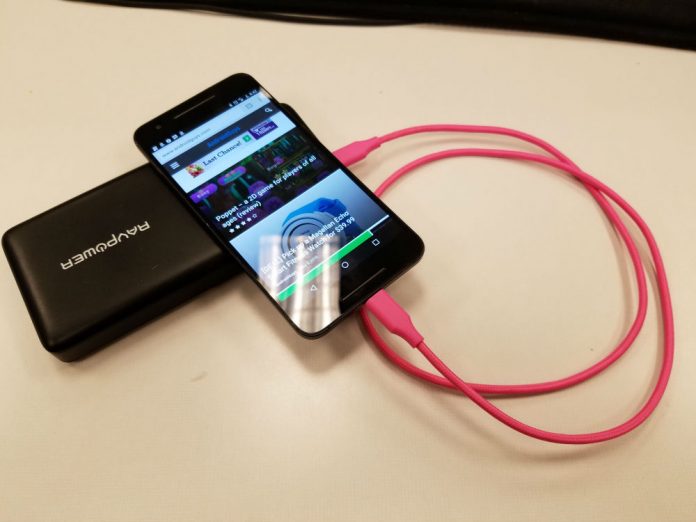
Monoprice recently announced its new Palette series of USB type-C cables. With an increasing number of devices featuring type-C ports, we thought it important to take a look at them to find out if they’re safe for your device and how they stack up against the competition.
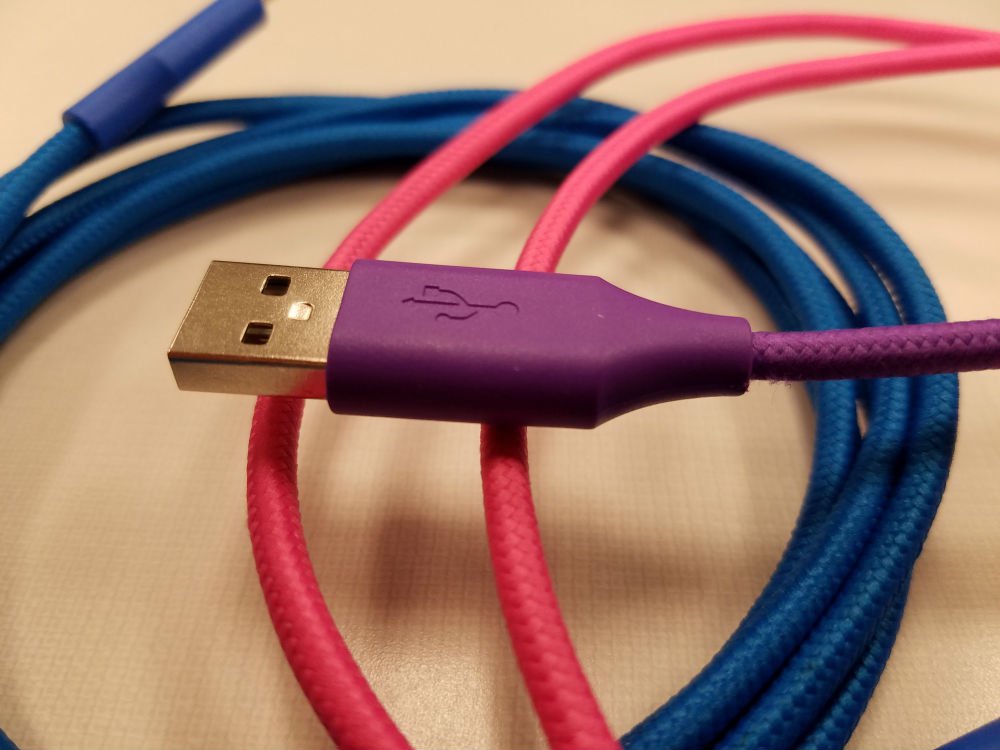
The new line of cables comes in many sizes and flavors. You can pick from black, blue, green, gray, pink, purple, red, and white. They’re bright and colorful which I like to buy because brightly colored cables are easier to identify. The Palette series definitely stands out.

In addition to a number of colors, you also have several options in lengths and connectors. Monoprice sent over a six-inch, three-foot, and two six-foot long cables, but you can also get them in 18-inch and three-foot lengths. The cables come in type-C to type-C, type-C to type-B , type-C to mini type-B and type-C to type-A (male and female) combinations.
The construction of the cables is fantastic. All of the cables in the Palette series are covered in a braided nylon jacket that keeps them safe from nicks and cuts, as well as keeping them tangle free. The connectors are held by a hard plastic head that should last even when being beat-up in your bag. If they don’t, Monoprice offers a limited lifetime warranty.

Charging times are good. The cables can support up to 2.4A of power which puts this in rapid charging territory. Data transmission caps out at 480Mbps. These cables are all USB 2.0 cables so they can’t take advantage of USB 3.0 or 3.1 features, but Monoprice has informed us that they’re working on a design to incorporate USB 3.0 into its next lineup of cables.
Monoprice has ensured that the new Palette series falls under compliance with USB-IF standards. While these cables aren’t currently listed as compliant, they soon should be. Famed Googler Benson Leung, who has taken to reviewing USB type-C cables on Amazon and pointing out non-compliant cables, gave Monoprice’s previous USB type-C series, the Select Series, his stamp of approval. The new Palette series is currently for sale on Amazon, which very publicly stated that they would no longer sell out of spec cables.
When it comes to price, Monoprice is right in the ball game, with everyone else, and most of the time beats its competitors. A search of Amazon finds these results:
Six-inch USB type-C to USB type-A
Amazon: $6.49 vs. Monoprice: $3.99
Three-foot USB type-C to USB type-A
Amazon: $9.99 vs Monoprice: $4.99
Six-foot USB type-C to USB type-C
Amazon: $7.99 vs Monoprice: $6.99
If you’re interested in picking up any of Monoprice’s Palette series of cables, be sure to check out its website or its listings on Amazon.
Apple Music’s social features are reportedly taking a backseat
Earlier this week, reports surfaced that an Apple Music redesign is in the works for WWDC in June. 9to5Mac is now reporting that the massive overhaul also includes less focus on Connect: the service’s social feature that allows artists and fans to interact. When Apple Music was first announced, the app’s tools that would allow musicians to publish updates to listeners was a key part of the reveal. Connect was meant to be a place artists could share exclusive tracks, tour photos and more behind-the-scenes content. However, it doesn’t look like the feature ever became popular among subscribers.
As part of the demotion, 9to5Mac notes that access to Connect will no longer be part of the main menu tab along the bottom of the Apple Music UI. Instead, the feature will reside in the “For You” section along with other recommendations. Artist pages will still display the content as they do now, but no new features are said to be in the works for that socially-focused tool as part of the larger redesign.
This isn’t the first time Apple tried to incorporate social features inside its music apps. Back in 2010, the company announced iTunes Ping, a social network that allowed users to follow friends (and artists), post comments, view custom song/album charts and concert listings. Ping lasted a little over two years before Apple pulled the plug on it.
Source: 9to5Mac
Columns Jungle: It’s a start (Review)

Overview
Match three gems in a row in this puzzle style game by switching the order of the color columns while they fall. But don’t let it catch up with you and fill up the play area.
Developer: Simply Apps
Cost: Free (Ad-free version is available)
Gameplay
There are four controls: left, right, down and rotate. You must use these controls to move the color columns around so you can try to get three of the same color in a row either horizontally, vertically or diagonally. There are also three game modes: arcade, timer, and play with friends – which play about as you’d expect.
Review
 Profile
When I started playing this game, I thought it reminded me of Tetris meets match-three games, but my wife correctly pointed out to me that it was more Dr. Mario meets match-three games, except with three color columns instead of two. The first thing I noticed is the graphics. They aren’t horrible, but they don’t stick out as awesome, just mediocre.
Controls… Are a little wonky. There are four buttons, two on each side of the play area. There are so many games that use swipe to play and I really wanted to swipe. It wouldn’t take much to swipe left and right for moving and tapping the screen to change the colors around.
I never had the chance to play online against someone else, but I suspect that will take time for a user base to build. I must give kudos for not making the ads annoying. They are very unintrusive.
 Gameplay
Conclusion
When it’s all said and done, Columns Jungle is off to a good start. A couple of tweaks to the game could really go a long way in making a very popular title. I would recommend this to puzzle gamers.
Download Columns Jungle in the Play Store
Netflix adds data-saving quality controls to its mobile apps
Back in March, Netflix revealed that it was working on a “data saver” feature for its mobile apps. Keeping its word, the streaming service announced today that the cellular data tool that allows users to adjust video quality to save data is available in its iOS and Android apps. In fact, we’re seeing the new feature in both Netflix apps here at Engadget HQ. By default, the software adjusts video quality to allow for about 3 hours of streaming per gigabyte of data. The company says that tests showed this to be the best balance of data use and quality when streaming over a cellular connection.
In addition to the default setting, there are options for low, medium and high quality streaming that allow for four hours, two hours and one hour of watching with 1GB of data. There’s also a setting for those with unlimited data plans, and if you don’t want to use any of that monthly allotment, you can opt to only stream movies and TV shows on WiFi. Netflix also offered the reminder that even if you choose higher quality in the app, your mobile service provider may place its own limits on bandwidth. Regardless of networks fiddling with quality, these new quality settings should help folks who enjoy an episode of House of Cards on the go, but regularly exceed their data caps.
Best Partition Software To Use
 There are currently hundreds of different hard drive partition software on the market, and it get’s quite confusing which is the best to use.
In this article we hope to clarify it a bit so you can be sure you get the right product for your money.
What is Partitioning Software?
If you are reading this article, you most probably are already interested in partitioning software, and already know what it is and what it does. But just to recap, in it’s basic form, it’s subdividing a hard drive into smaller parts.
Different Ways of Partitioning
Windows already have their own partitioning tool, but it has to be one of the most user unfriendly program out there. Sure you can use it, and the end result is just as good as most others, but the process in getting there is quite difficult and not very clear.
This leaves you with third party options. This is where hard drive partition software comes in. Like we mentioned earlier, there are hundreds and hundreds on the market, some free, some paid, some good, and and some very very bad.
Partitioning Software On The Market
There only two partitioning software companies to consider in this day and age. They dwarf other partitioning software quite considerably.
These to are namely:
- EaseUS Partition Master
- Paragon Partition Manager
These two are the most user friendly and delivers the best results.
But which one is the best partition software?
Best Partitioning Software
Choosing the best is always subjective. What might be the best for us, might not be the best for you. It all depends on your needs.
But if you look solely from which product gives you the most benefits, has the best after sales support and which is the easiest to use, we have to say it’s EaseUS Partition Master.
The free version of EaseUS Partition Master offers a lot more benefits and features than what the free version of Paragon offers, and the paid version of EaseUS allows you to do even more.
Closing Thoughts
In the end, it doesn’t quite matter which Partitioning Software you use. Some are just more user friendly and allows you to do more.
Three Techie Ways to Watch The Sports You Love
Who says geeks and sports don’t mix? Well, whoever it was, they’re wrong! Sports are for everyone. It doesn’t have to involve hitting a ball, catching a pass, or even running. Yes, bowling is also a sport worth playing and watching, as are billiards and car racing. There are more varieties of sports than can fit in one post. And there is something for everyone.
But make no mistake about it: geeks also love full-contact sports just as much as the next person. Just because you know your way around a circuit board doesn’t mean you don’t know your way around a gridiron. The difference between geeks and civilians is mostly how they watch their favorite sport. Here are 3 techie ways to watch the sports you love:

TV
It is easy to forget how high-tech TVs have become these days. They haven’t just become thinner and lighter. They have better screens that display better picture quality. If you like, you can watch 3D movies at home. Better still you can watch it in 4K. And that is just the beginning of why a newer TV is a sports geek’s best friend.
Long ago, we traded in rabbit ears for set-top boxes. And those set-top boxes have dramatically improved. DIRECTV offers a set-top box that can record 6 shows at once. While other boxes can manage this feat, they can’t touch DIRECTV NFL Sunday Max, a sports package that gives you all the out of market NFL games played in a season. Additionally, you get the Red Zone channel, which summarizes all the games at once while they are happening, and the ability to watch up to 8 games on the same screen.
Choosing the right tech for your TV is crucial for sports fans. It’s past time you dump the cable box that came with your service into the same trash bin as you dumped that VCR. If you are going to watch sports on your TV, don’t watch like an animal from the pre-historic period. Watch like a geek.
Smartphone
Being away from home for work or play is no reason to miss the big game. The techie doesn’t have to worry about that because they know about all of the ways to enjoy their sports on the go. All of the major sports leagues have some type of paid service that allows fans to watch all the out of market games on Internet connected devices through apps.
The NFL offers a service that is only available for Verizon customers. However, DIRECTV’s app makes the games available through their Sunday Ticket app. Major League Baseball has one of the best app implementations with their MLB At Bat app for iOS, and just about every other platform you can think of.
It gets a 4.3 out of 5 on both iOS and Google Play. That’s one thing on which both iPhone and Android users agree. The NBA offers basketball fans perhaps the most versatile viewing package. And the NHL is the least expensive by far. They all have something going for them. And they keep the techie in the game when others are trying to check the scores.
At the Sports Bar
Even tech geeks like to get out of the house and be with friends from time to time. During your favorite sports season, those outings might just take you to a sports bar. It is a great way to socially enjoy your favorite sport. The problem is that the TV’s are either silent, or the one playing sound is not the one you are interested in.
Fortunately, there is an app called Tunity. Aim your phone at the TV that is showing the game you want, and the app picks up the sound and sends it directly to your smartphone. There is a little more to it than that, but very little. It works with pretty much any nationally broadcast show. With this app, your sports bar experience just got an upgrade. You’re welcome.
Not only do techies know tech, they also know sports. When it comes to jocks and geeks, there will be peace in our time.
PayPal Sparks Speculation About Online Gaming In U.S.

Last year, an article written up at Slate speculated that online gambling would be legalised across the U.S. by the end of this decade. The article suggested that with online poker already legal in three U.S. states (Nevada, New Jersey, and Delaware), and significant pressure from major gaming companies being put on legislators, a spread is inevitable. Both types of games and regions in which those games are legal will almost undoubtedly expand between now and 2020.
It was a very sound argument from a major publication, but the truth is that Slate’s article was also one of many. It’s not exactly groundbreaking to pose a theory that the U.S. will legalise online gambling, at least in some respects. The industry potential is simply too staggering, and too much of the U.S. population is interested. The issue is just that legislation in America can be a very slow process.
But recently we got a subtle indication that some potentially major players in a hypothetical U.S. online gambling industry may be expecting things to start happening sooner rather than later. According to CNBC, PayPal has worked its way back into some budding online gambling platforms operating in the U.S. This move makes perfect sense, as there’s plenty of business for PayPal even if it’s only operating on sites active in three of the 50 American states. However, the timing has raised some eyebrows. Noise about legalisation efforts in the U.S. is getting louder by the year, and for PayPal to quietly hop on board now suggests that the company is expecting increased activity on the horizon.
As for the actual utility of PayPal for gambling sites and among paying players, the idea is to simultaneously streamline and secure the experience. While U.S. legalisation would bring about the quick emergence of a number of online gambling platforms, many see the most potential in the mobile market that would be attached to these platforms. We’ve already seen in areas of the world in which online gambling is perfectly legal that mobile gaming brings in gigantic amounts of business, and part of that comes down to providing quick gaming and payment methods.
In the UK, the Gala Bingo platform—it incidentally already includes PayPal among its various payment options—has provided a model for making gambling opportunities as accessible as possible to players. Rather than requiring an app download (which is still an option), the site actually offers QR codes that can be read by a smartphone, and which then load the Gala platform onto that phone. Alternatively, players can even send a certain text message to an arranged number and receive the platform as well. This is the sort of speed and accessibility that has made mobile casinos mutually appealing—to the casinos because they bring in business, and to players because everything is so convenient.
The integration of a payment facilitator with online gaming sites and their respective mobile branches is an extension of this convenience, and one from which PayPal stands to benefit enormously. Just as online gamblers grow used to being able to access their favourite sites’ games at the touch of a button or after a quick scan, the ability to pay instantaneously will contribute to the user experience on a broad scale.
This, in addition to the fact that PayPal is generally trusted by the public as a safe way to send and receive funds, is why PayPal and online gambling sites can be so valuable to one another. And the fact that PayPal is already moving on securing these partnerships may just be the latest indication that the U.S. is an online gambling market waiting to explode.
Bittorrenting 101: How Leeches and Seeders Can Work for You
 What if there was a way for you to share files with friends and family that didn’t involve physically sending them a DVD or CD, emailing, text messaging, or using Facebook? What if you could send entire home movies, large image files, or even a folder with hundreds or thousands of the images your holds the rights to in it? Well, you can, with P2P file sharing.
What Is Bittorrenting?
Bittorrenting refers to the transmission of data using a peer-to-peer file sharing protocol instead of centralized servers. Distribution of content is thus decentralized. For example, let’s say that you want to download some music. You buy a song on Amazon or iTunes. Amazon or Apple act as the central server. You get the music from them. (But don’t share what you have bought!)
But, what if you didn’t want music from either of these two companies? What if you wanted to download or share music that is authorized for sharing by the copyright holders, or that is in the public domain – some Baroque music written in the 1600s and performed many years ago? (You should know that new performances or sound recordings of music written many years ago may be protected by copyright, because there are usually at least two copyrights in sound records: the song or composition, and the performance or sound recording of it.) You could buy it from somewhere, but there’s no copyright on it. You could just download it from a friend, but how? Bittorrenting is how. Instead of going to Amazon, you reach out to a friend directly and he transfers the file to you.
But, instead of transferring the entire file, he gives you only a small piece of it. And, there are 10 other people out there with the same song. Each of them gives you a piece and, collectively, you end up with all the pieces of the song. A software program helps you arrange all of the downloading and “assembly” of all of the bits and pieces you’ve collected.
Why collect bits and pieces as opposed to the whole song, all at once? Because it’s faster. Each user only has to commit a small amount of resources to help you out. Are you excited yet?
Some Common Words and Phrases
Before you dive into the world of torrenting and file sharing, you’ll have to get some of the lingo down.
Let’s start with a “peer.” A peer refers to either an instance of a piece of software running on a computer that interacts with other software programs for the transfer of files. A peer can also refer to individual users.
A “client” is the technical term for this software. So, for example, you can download a very good client from www.Vuze.com. Vuze’s client installs on your computer, helps you find and download files, and it also scans those files for viruses or other malicious code.
A “torrent” is what you’re searching for – that’s the file you’re looking for via Vuze or a torrent search engine. Torrents are small files, only several hundred KBs in size. They contain information that allows you to download the target file – a music file, game, book, or video, for example.
A “seed” refers to a user (and individual, like you) or client (the software) that is uploading or sharing target files. A “leech” refers to a user or client that only downloads files, but rarely or never shares them with others. In the world of P2P file sharing, this heavily frowned upon and can get you banned or blacklisted from many different communities.
A “swarm” refers to all peers sharing a torrent. A “tracker” is a server than coordinates the location and downloading of files, but is not directly involved in the data transfer process and does not retain a copy of anything being shared.
The Legality Of P2P File Sharing
Files sharing has gotten a bad rap over the years. But it’s a legitimate way to share files with a large number of people. It’s fast, efficient, and free too (aside from the cost of downloading the client).
Still, you should always verify the copyright status of any file before downloading it. It cannot be overstated: never download or upload anything that is protected by copyright without the authorization of the copyright holder. You could end up getting sued or going to jail.
Irma Campbell has a head for technology. With a passion for helping others understand what tech can do for them, she enjoys blogging about the basics and how-tos of a variety of useful apps, software, and more.
 AIVAnet