


Google Duo: Finally, a FaceTime for the rest of us

Overview
Duo is a simple, yet very well done video calling app from Google that aims to be the FaceTime for Android users.
Developer: Google
Cost: Free
Impressions
Long has the Apple community had access to a intuitive, simple and functional video calling service called FaceTime, and as long as Apple has had it, the Android faithful have been waiting for Google to offer up their own version for us to enjoy. Enter Duo, a simple video calling app that is super easy to use and works great on both iOS and Android.
You may be asking “what about good old Hangouts? Doesn’t it already do that stuff?” Well Duo, unlike Hangouts, is tied to your phone number and only offers two-way video calling. It has no group chat, messaging or cross-platform support for your PC and other devices. Duo is simply a video calling service and even though it only does one thing, it does it very well. Google made Duo with a minimalist interface, and some neat little features that help to set it apart from Hangouts and make it the go-to video calling app for Android users.
1 of 3


The most notable feature of Duo is Knock Knock, which allows whoever you call to see a preview of the person calling them. Its a neat little addition that adds a little something to the experience. It also makes filtering potentially undesirable calls based on what the other side of the call looks like. Knock Knock is only allowed from people in your contacts list, and you can easily turn it off if it’s not something you’re into. The other great feature Duo offers in end-to-end encryption, so all of your conversations are protected.
Video call quality and audio quality are excellent, with clear sound and smooth high definition calls. I initially had a few calls freeze or drop on the first day using Duo, but since then the calls have been consistant in performance and quality, I couldn’t be more satisfied. I’ve used it from Android to Android, and Android to iOS and both worked as expected with no issues due to compatibility. The only thing that iOS can’t do is show Knock Knock when the app is closed, otherwise you’ll just get an incoming call notification.
If there was any negative thing I could say about Duo, it would probably be the lack of any additional features. It only does the one thing, and it does do it well, but maybe an option of “video voicemail” or a group chat option would have been interesting to have at launch. The good thing is that there is always the possibility of new features with future updates so here’s hoping Google sticks by this one.
Conclusion
Duo is a excellent option for frequent video callers, and a worthy competitor to FaceTime that anyone can use. The app is simple, intuitive and functional and call quality is solid. EVen though Duo is fairly light on additional features, Google has done an excellent job of bringing video calling to the masses with Duo and you should definitely check this one out.
Download Duo from the Google Play Store
LimeLens: 2 Wide Angle Lenses For Your Android

The Low Down
- What it is: 2 Wide angle lenses
- Price: $49.99
- Where to buy: Directly From Lime Lens
The Get Down
For most of us, our phone is always with us, always within arm’s reach. We use it for everything from surfing the web, checking our email, looking at our bank accounts and even phone calls. It is also the easiest to get to and sometimes the best camera we have around too.
I have longed for a camera on my phone that could replace a standard bulky digital camera. And the Galaxy S7 Edge is as close to that as I have found. It takes beautiful photos in the right light and pretty good ones in low light too. But what it lacks is a wide angle shot that can catch those big family photos or wide open spaces in nature.
The pictures below were taken standing in the same position at the same height.

Taken with no Lens attached

Taken with The Thinker

Taken with The Captain
Enter Lime Lens. Maybe. The set includes both The Thinker – Dual Macro / Wide Lens and The Captain – Supreme Fisheye Lens. Both lenses dramatically change the standard photos you get with the built-in camera.
Let’s start at the beginning. After opening the package I found that the lenses were packed quite well. It seems professional and everything is protected well in the case. You will get both lenses, 3 “clips” (these are how you mount the lens to your phone) cleaning cloth, #LimeLife stickers, and an instruction manual, plus the faux leather zipper case is all comes in.

Lime Lens Case opened

Lime Lens Case Half opened
The first thing we have to do is determine which clip goes to our phone. There is a great guide in the manual so we won’t go into that here. Once you have the clip installed it’s time to put those lenses on and start shooting.
The Down Low
The lenses are small, as you would expect since they are for your phone. But I found it hard not to touch the glass parts of them and had fingerprints I had to wipe away. Luckily Lime Lens supplied the cleaning cloths.
There is a ridge in the clip and a piece that goes into that on half of each lens, so you put the lens in the clip and twist it half way around to lock it into place. I found this to be tricky and actually dropped the lenses a couple of times when I thought they were secure. It did not break and seemed to take each fall well.
Now let talk about that clip. This is my least favorite part of Lime Lens. The clip is a piece of plastic that sticks to your phone. Once removed from your phone it cannot be used again. It will not work if you have a case on your phone since the lens has to be right on top of the lens on the phone’s camera. There is a list of cases that will work with Lime Lens but most are not very perspective.

Center View

From the Top

At the Bottom
For a product that is not used all the time I am frustrated that I have to have a part of it stuck to my phone all the time, and it stops me from putting the case back on my phone since I can’t take it off when not in use. There are a few other products on the market (none of which I have used so I don’t know if the lenses work as well as the Lime Lens) that have solved this problem by actually being a clip that can be removed when the lens is not in use.
They definitely don’t look as good as Lime Lens when you are actually using the lenses, but for me I would prefer my phone to look funny when I need to use the lens and then take it off when it’s not in use, than to have a piece of plastic stuck to the back of my phone all the time.
The lenses themselves work well and really add something useful to your phone’s camera. You can see in the pictures above how much more you can get in the shot with the Wide angle lens.
So if you don’t use a case or are willing to buy a new one that works with the lime lens clip, and you need to take wide angle shots with your phone this might be the product for you.
Moto G4 Plus review: Moto has to bring its A-game
Motorola has been redefining what a budget phone is capable of for the past few years. The Moto X line provided affordable flagships with great features while the beloved Moto G and E lines set examples for just how well budget phones could perform given proper software.
Although Moto has diverged from its usual affordable flagships with the $600+ Moto Z line, this year’s Moto G4 and G4 Plus are still extremely affordable and come with good features. But the smartphone market has been trending towards power yet affordable flagships for a couple of years. Does the G4 Plus offer enough to make it stand out from the crowd?
Things I Liked
Software
 For the last few years, Motorola has been leading the way in terms of Android skins for its phones. It does this by basically not adding a skin at all. I would wager that most would think this phone ran stock Android at first glance.
The G4 Plus’ version of Marshmallow is almost untouched aside from a few software additions and Moto apps. I love the look and feel of stock Android and usually protest to any changes made to the software by phone manufacturers. However, Moto continually impresses me with the usefulness of its added features.
 Moto display is still one of my favorite OEM additions since its inception on the original Moto X. The ability to quickly view and interact with notifications using Moto Display is something you don’t realize you want until you have it.
Another addition that Moto has spoiled me with are Moto Actions. With this feature, you can control a few aspects of your phone with nothing but movement. The most famous of these are the double twist with your phone to open the camera and the double chop to activate the flashlight. While they take a few moments to master, the convenience they offer is worth it.
I still believe that Moto provides the best Android software experience aside from pure stock Android.
Performance
The G4 Plus comes with a Qualcomm Snapdragon 617 processor and Adreno 405 GPU; however, the amount of RAM is dependent on your version. There are 16, 32, and 64GB variants of the G4 Plus that each come with 2, 3, and 4GB of RAM, respectively (the 32GB/3GB version is not available in the US). I have the 64GB model with 4GB of RAM.
In my couple of weeks using this phone, performance has blown me away. I believe this is definitely due in part to the mostly stock Android software running on the G4 Plus. This phone flies through daily tasks like social media and web browsing, checking emails, texting, and playing light games.
It may struggle on games that are more graphically intensive and demanding, but for the majority of mobile gamers, the G4 Plus will be more than enough. I never experienced any stutters or lag while using this phone during my normal daily activities, which is a continuation of Moto’s commitment to making budget phones that still provide quality user experiences.
Battery life

Powering the G4 Plus is a non-removable, 3000mAh battery. Combine this with power friendly hardware and software, and that’s a phone that, in theory, should have good battery life. In actual use, I found that the G4 Plus has incredible battery life!
 I use my phone heavily and can easily drain most phones’ batteries before the end of the day. With the G4 Plus, I found myself often ending the day with over 10% battery left. I never got less than 5 hours of screen time every day with most days climbing close to or passing 6 hours of screen time.
My normal day includes texting friends and family most of the day, streaming YouTube and Spotify over WiFi and LTE for about 2 hours or more together, sending some pictures through Snapchat, and having four email accounts pulling down continuously. If you are a power user, I believe most will be able to get a full day of use from the G4 Plus and lighter users could stretch that to two days or more.
Fingerprint scanner

One of the advantages of getting the G4 Plus over the basic G4 is the inclusion of a fingerprint scanner. With a base price of $250, I was not expecting much from this phone’s fingerprint scanner, but I have been pleasantly surprised by it.
While its speed will not rival the newest offerings from Samsung and Apple, it proved faster than a friend’s iPhone 6 and should be fast enough for most anyone. You also do not have to power on the display to unlock your phone; simply touching your finger to the scanner will both turn on the display and unlock the phone.
In terms of accuracy, I have had almost no misses with any of the four fingers I added to the phone. The fingerprint scanner is a welcomed addition to the G4 Plus, and its speed and accuracy make it worth the price difference over the regular G4.
Build

From pictures and videos, the G4 Plus does not appear to be anything incredible physically, and honestly, it isn’t. However, I do not think that is a bad thing. While the phone is no fully metal behemoth, the metal band on the side and slightly textured plastic back make the G4 Plus a comfortable phone to hold while also keeping weight down.
I was pleased to see Moto go with a textured plastic back instead of something glossy because it adds a grippiness to it that gives you a better hold. I was never worried about this phone sliding out of my hand or my pocket. The design itself is pretty understated with no logos or writing aside from the Moto logo on the back. The back is also removable to give you access to the SIM card slot and the MicroSD card slot.

There won’t be any awards given to the G4 Plus in terms of style or uniqueness, but its solid build and smart materials make it easy to hold, which is most important.
The following are a couple of the smaller things that I liked about the Moto G4 Plus. While they are not big enough to warrant entire paragraphs, I believe they deserve to be mentioned nonetheless.
- I love front-facing speakers and always commend companies for adding them to their phones. Moto deserves some credit for using a front-facing speaker on the G4 Plus. If you are looking for a full report on the speaker, keep on reading.
- This is a completely personal opinion, but I love the dimple on the back of many Moto phones. It creates a nice place for my finger to rest and just feels nice when you hold the phone. Sometimes it is the small things that really stand out.
Things I Didn’t Like
Display
 The display on the G4 Plus is a nice size at 5.5” and comes with a respectable 1080p resolution. This resolution definitely helps the G4 Plus accomplish its impressive screen on times. Also, the IPS panel gets exceptionally bright for those who struggle viewing their phones in the sunlight.
Unfortunately, this is where the good features of the display end. The color reproduction on the G4 Plus’ display is completely horrible. Colors appear washed out and much lighter than they should be. This is especially noticeable when using the camera. For many people, I do not believe this will be important or even noticeable; however, there are some who appreciate a quality screen on their phone. If that is you, the G4 Plus probably isn’t your phone.
Camera

This category was difficult to place because the camera is fairly average for a phone in this price range. The G4 comes with a 16-megapixel f/2.0 camera on back with a 5-megapixel front camera.
In well lit, outdoor shots, the rear camera actually performs well. Details are fairly crisp, color reproduction is okay, and focusing is quick thanks to phase detection autofocus. However, I found that the camera tends to struggle in photos with uneven lighting by blowing out highlights and losing detail in shadows.

Thankfully, the G4 Plus comes with a good HDR mode that helps level out these types of shots; although, it is not as fast as I would like and requires the phone to be held steady for a few seconds, which might not be possible in some situations. As for low light, the camera struggles noticeably. I do not use my camera much in low light anyway, but the test shots I took showed lots of noise, poor detail, and an overall dull image.
My biggest complaint is actually not the camera’s fault but, rather, the screen’s. Due to the poor color reproduction of the screen, photos often look washed out, but when viewing them on another device, the photos look much better than they did on the G4 Plus. This made it difficult to tell how the photos would actually turn out.
As for the front camera, it continues on the path of average. Good enough for the majority of users, but it will not be blowing you away in terms of quality.
Speaker
Earlier, I commended Moto’s use of a front facing speaker, and some of you might be wondering why speaker is singular. Well, that is because there is only one speaker on the G4 Plus. The earpiece doubles as a speaker, which means no dual speakers on this phone. I like the inclusion of dual speakers, and I was disappointed to see Moto opt for a single one.
Of course, it would probably be okay if the speaker had good quality, but my findings on the sound from the speaker are a strong “meh”. I never expect much from phone speakers since they are rarely good, but the G4 Plus’ speaker is disappointing.
If you mostly use your speakers for watching YouTube videos, listening to podcasts, and talking on speakerphone, the G4 Plus can handle that. But do not expect to play music with any sort of style from this phone. I would recommend using headphones or an external speaker for anything like that.
Just like above, I also found a few small things that I did not like about the Moto G4 Plus that just aren’t big enough to go in their own category.
- While I loved the fingerprint scanner, I prefer fingerprint scanners on the back of phones because I like the front of my phone to be minimal and clean. I also think the dimple in the back would have been a perfect place.
- To my dismay, the G4 Plus lacks NFC. For many of you, that might not be a factor at all, but for me, it was disappointing to see it left off. I use NFC often when checking out at stores as well as connecting to several of my speakers. If you don’t use NFC, you can pretty much ignore this complaint.
- As I said earlier, little things are often what sets a phone apart from its competitors. Most people may not pay attention to their phone’s buttons, but I always love when companies make their buttons tactile and clicky. In the case of the G4 Plus, the buttons are mushy, which makes pressing them difficult.
After a few weeks with the G4 Plus, I have to say that I am pleased with Moto’s fourth iteration of its famous budget phone. Performance, software, battery life, and the fingerprint scanner are all wonderful and make this phone a joy to use. The lackluster display, disappointing speaker, and average camera keep it from being a perfect budget phone.
So the question remains: Did Moto bring its A-game with the G4 Plus? With a heavy heart, I have to say no. I think the company could have done better with the G4 Plus, which is evident when you look at my list of dislikes. That being said, I would not have much hesitation in recommending the G4 Plus to anyone looking for a quality budget smartphone.
If you are willing to overlook its faults, the G4 Plus is a phone I can see being used for multiple years. You can get a G4 Plus starting at $250 from the Motorola website, Amazon, and B&H Photo!
Mevolife is a well-meaning but flawed fitness app (review)
Overview
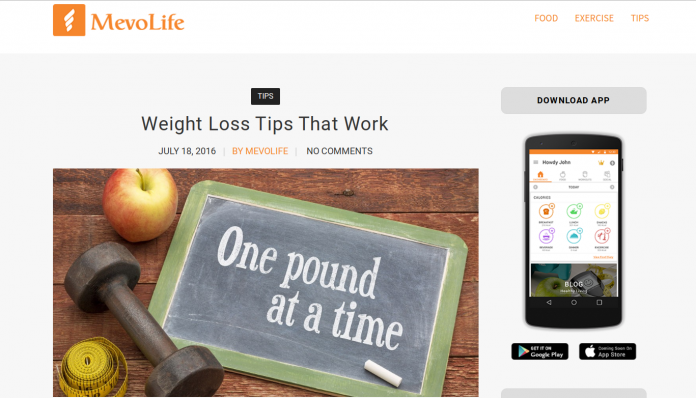
With a lot of press on fitness & healthy lifestyles in current society, the Google Play store is rife with personal options to track and trend your personal health goals. A newer option that come to this market recently is Mevolife from the developer Mevolife Inc. Mevolife (or “Mevo”, as I’ll call it going forward) is an attempt to be your all-in-one fitness diary, planner, and virtual coach. As you’ll see, Mevo does an admirable job at this task, but it is not without it’s flaws throughout.
Setup
The app is free to download from the Google Play Store. The app is free to start, though there is a bit a push from the app to purchase ‘points’ that allow you a deeper experience (more on that later). You do need to sign on with an email and adding a password to go forward, though.
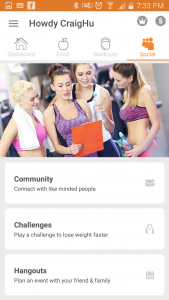
Exploring the app, you will find all sorts of paths to take and available information:
Dashboard: Your personal report on how you’re doing.
Food: Your portal to your food diary, recipes, meal plans, and restaurant options.
Workouts: A comprehensive listing of workout plans, individual workouts, and exercises (including how-to’s and animations of each move).
Social: The app’s attempt to connect you to other app users to find comeraderie and motivation to keep improving.
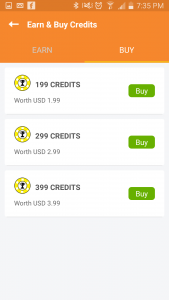
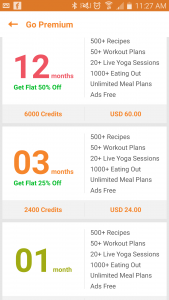
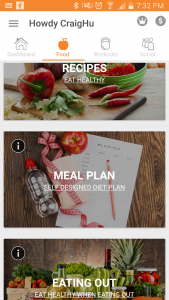
The interface is a clean, modern look, with large text and selection windows. The colors are crisp and bright, with an organic orange permeating throughout to keep it consistent.
I did state that the app is free, but to get a deeper experience out of it, there are paid ‘credits’ available that allow you to have more detailed access to meal & workout plans, recipes, and ad-free experience, and so forth.
Experience
Using the app was both easy and difficult for me. I say this because the app can be both light- and heavy-handed, so to speak.
Let’s start where I found the app to be too light. One area is in 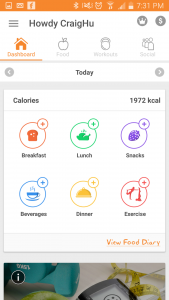 the meal diary, where you can enter what you eat throughout the day, and the app will calculate all the nutrient values based on it’s food library. The problem is in the library; from the start I found searching for foods that I eat to be commonly missing from the library, and the app would instead try to implant it’s substitute. I frequently got frustrated with attempting to accurately fill out my food diary, and often just gave up.
Also on the food side of things, sticking with the free version of the app seems very limited overall in the comprehensiveness of its use; paying for credits would likely improve the experience, but I simply wasn’t willing to go there.
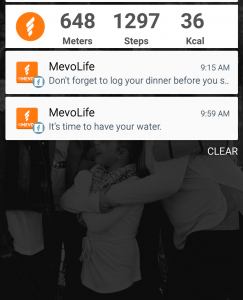 On the heavy-handed side, the app can put a lot of notifications onto your device, including a running pedometer as well as reminders throughout the day. I often checked my phone, only to find three, four, and more Mevo reminders clogging up my screen.
The biggest problem with this is that there is no discernable way in the app to edit/modify/disable notifications. This goes for the the pedometer; if you have the app installed this is omnipresent in your notification panel. Add to it that its icon looks a lot like a Facebook notification, it causes a lot of false phone checks, and quickly grows aggravating.
The pedometer itself is only as accurate as your phone and how you carry it. I often walked ‘hundreds of steps’ and burned ‘hundreds of calories’, just by sitting on my patio typing on my computer. In other words, I came to not trust it very early in my testing.
Also, inputting exercises can be labor intensive. This 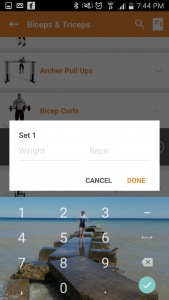 may be more from the fact that I don’t normally track my exercises, but having to add reps and sets for every single exercise got old very fast. Not only is it required to input all reps, but this must be done using a repeating interface (photo left) that you must fill out, close then repeat for every set of every workout. My patience ran thin after completing my first workout recording.
Most exercises are available, but like the food diary portion of the app, there are certain moves I do that just aren’t available in the app, leaving me with a definitive hole in my workout story.
Conclusion
I really wanted to like Mevolife. The clean interface and photo-centric design invites you to come explore and give the app a whirl.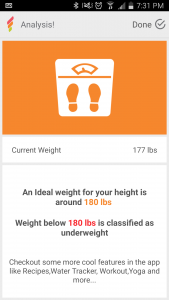 But as I dove deeper, the app’s flaws became apparent. From forcing me to look for foods that apparently aren’t there, to manually inputting every workout’s rep & set through multiple, repeating screens, to a wonky pedometer & notification system that can’t be tweaked, there’s simply too many holes to make it a trustworthy training partner.
This type of app can admittedly be a very difficult thing to get right for the masses, as you have to be 100% complete in order to satisfy different types of users. Pick 50 people, and you’ll get 50 different food and exercise routines; this makes for a very small target to hit where everybody is happy. I do hope the app continues to improve and fill out; time will tell.
Download Mevolife here.
Blu R1 HD review: Is it possible to go wrong with a $50 phone?
Announced in late June, the Blu R1 HD is predominately known for one thing: it’s the so-called $50 smartphone. Indeed, the price starts as low as $50 if you are an Amazon Prime customer. Otherwise, it’s an extra $50 for the experience.
As one of the initial phones under the new Amazon Prime discount promotion, the R1 HD positions itself as a first-time users smartphone. It’s not here to break any benchmarks or perform heavy multi-tasking. It is, rather, here to provide customers with something affordable that’s also free from carrier contracts.
As an unlocked handset, the R1 HD works with either AT&T or T-Mobile’s networks as well as any of their respective MVNO brands. It’s a dual-SIM device which means you can actually pull service from two cariers at once. Additionally, it’s breathing room for when you might travel to another country and need a local SIM card.
General Impressions
Let’s be honest – there are definitely going to be corners that need cut if you plan to offer a phone as low as $50 without a subsidy. Where does Blu trim the excess? It starts with the box itself; it feels like the least amount of cardboard you could put together to qualify as a box. The thickness is about half that of any other phone you’ll find and it’s a one-piece cutout that folds together. Think of how a pizza box might be constructed.

Get into the box and you find there are no headphones and the charger is about as “basic” as you’ll find. There’s nothing extra about what comes with the phone, however we would have never expected anything special here.
Putting this aside, you go straight to the phone and generally leave the other stuff on the shelf. Chances are a seasoned user already has some headphones they love anyhow. And, since we’re not dealing with any Quick Charge or USB Type-C cables, they’ll probably already have those where they need them, too. This no-frills cord is essentially just a spare. First time users, though, won’t be concerned with charging speeds and/or the newer standard for cables.
Hardware
Speaking in the strict terms of hardware specs, the R1 HD has the makings of a mid-to-high-end Android phone from 2014. Does that matter to you? Well, if you’re replacing your current phone from the last couple of years, you’ll find the Blu model to be a side-step or a step backwards. If you’re new to Android and the world of smartphones, you won’t even know the difference.

Those of you who have spent time with a more premium smartphone or a flagship from the last year or two will recognize the build quality differs here. We were immediately reminded of how the early Android phones from LG felt. By comparison, the R1 HD feels cheaply designed; on its own, though, you’d not really get the sense that the phone is “cheap”. There’s a difference between cheap and inexpensive, and, on the surface, Blu opts for the latter.
Key Specifications
- Android v6.0 Marshmallow
- Mediatek 6735 | 1.3GHz Quad Core Processor with Mali-T720
- 16GB/8GB Internal Storage with microSD (up to 64GB)
- 2GB/1GB RAM Memory
- 5.0-inch 720 x 1280 pixel displau
- 8-megapixel rear camera
- 5-megapixel front-facing camera
- 2,500mAh battery
-
Network:
- 2G: 850/900/1800/1900
- 3G: 850/1700/1900/2100
- 4G LTE: 2/4/7/17 (12 will be available over-the-air)
Display
The R1 HD offers up a 5-inch display with a 1280 x 720 pixel resolution. It’s technically HD, but not the same as you’ll find in the 1080p and higher phones. How does this translate to you, the typical user? It matters little in the overall scheme of things and looks totally fine for text and images.
There was a time when displays had lower resolution and nobody batted an eye. It’s only when you compare it to what else is available that you see shortcomings. This is actually a common thread for Blu phones; they are more than adequate for what they set out to be and the price is more than fair. Dig just a little deeper, though, and you uncover some of the spots where corners are cut.

Whether indoors or outdoors, we had no problem using the R1 HD. The screen size is right in line with what we like for one-handed use and it’s easy to see from all angels. The Gorilla Glass 3 protection on top ensures the phone handles scuffs, scratches, and minor drops.
General Impressions
Holding the R1 HD, you don’t get the sense that it costs as little as it does. In fact, it looks and feels like something that could fetch at least another fifty bucks. Look under the hood, though, and you see that it just doesn’t have the same horsepower as something else in the $150 space. But, taken as a whole, Blu does a great job of making sure you don’t end up with a “generic” design.
The phone is housed in a metal frame with a polycarbonate backing and matte finish. This offers up a decent grip and non-slip texture that doesn’t attract oils and fingerprints. We’ve felt much more slippery phones.

As for the configuration of the phone, the volume rocker and power buttons are on the right side of the display. Both buttons have the same metal finish and provide a decent level of feedback and response. The headphone jack is found at the top right of the phone while the microUSB port is at the bottom left.
The rear cover is removable, opening up access to the microSD card slot and dual microSIM card slots. It’s worth noting that the battery is not removable. At 2,500mAh it’s plenty to get users through a full day of use. Give the phone extended usage of LTE, such as video streaming, and you’ll find the battery ends up around 8-9 hours, or more — still respectable.
Camera
The Blu R1 HD features an 8-megapixel rear camera with a f/2.0 aperture and a 5-megapixel front-facing shooter. Both cameras offer up LED flashes to help users capture better shots in lower lighting conditions. On paper they’re right about the middle of the pack, edging toward the low end. In practicalilty, though, it’s better than it sounds.
We were impressed with the camera, especially considering the price tag of the phone. We’re certainly not trying to imply that it should replace your current setup, but you might be surprised by it. And, when you get technical about it, the camera does overexpose some photos, especially as you get into darker environments. Keeping in mind what you’re likely to do with the images, though, they suffice far more often than not.

If the camera is a main priority for you, pass on the R1 HD. That should go without saying, actually. You’re probably looking at something else for your needs anyhow. But, it has not been all that long since we had much more expensive phones that took much worse photos.
Shutter speeds were quicker than expected, even in cases of HDR. A word of caution, though as you might end up with some odd double-exposure or ghosting. Still images and slower moving things captured nicely, but be careful with the quicker subjects.

You can see from the embedded gallery that photos generally come out rather nicely. Factor in some editing and processing via Snapseed or another app and you have photos totally worthy of social media sharing. It won’t take long to figure out what you can and cannot get from the R1 HD’s camera.
As for the camera app itself, there are a number of options for shooting, including panoramic, night, face beauty, sports, and professional (manual). Each works well in their respective intended situations, but the auto is where we suspect you’ll play most often. There’s also a DualView mode which uses both cameras, leaving a selfie on top of your main photo. It’s weird, with the selfie shaped like a ‘W’, and didn’t do much to wow us.
Software
If there’s one thing we’ve come to appreciate in Blu, it’s that it doesn’t spend time messing with a custom version of Android. Essentially a stock build, this doesn’t come across as having any particular agenda. To us, there’s few things worse in smartphones than a bunch of carrier-branded apps that we rarely use.
The same goes for the R1 HD, for the most part. While it doesn’t come loaded with a host of random apps, games, or services, it does come with its share of Amazon titles. This applies to both the standard Blu R1 HD as well as the discounted Prime Exclusive one for Amazon Prime subscribers. Indeed, each has Amazon, Amazon Drive, Amazon Music, Audible, Amazon Kindle, and Amazon Video. There are just a few others between the two, but those are largely the overlapping apps.

Should you opt for the default R1 HD, that’s about the extent of the UI and app changes. Oh, and it’s worth pointing out here, that you can uninstall some of those titles, but not all. Pick up the $50 and/or $60 the R1 HD Prime Exclusive, though, and you’ll have more Amazon presence.
The Prime-exclusive version displays offers and ads, on your lock screen and in your notification shade. Moreover, they are said to be personalized deals and product recommendations so they don’t feel like random advertisements.
If you are a fan or user of the Amazon ecosystem, you probably won’t have an issue with the ads and offers. Heck, if this is your first Android phone, you probably don’t even know what it would be like without. It’s not a simple case of full screen ads every time you unlock or something random in your pull down shade. It changes every time you use it, but doesn’t ever feel so heavy that we’re upset about it. We didn’t find them any more intrusive than what we get on a Fire tablet. Really, they do seem to skew more toward things we’d use or buy.

The R1 HD runs Android 6.0 Marshmallow, which is the the lastest version available today. The 7.0 Nougat stuff comes later this year; it’s unclear whether this phone will even see it. If you absolutely expect your handset maker to support your device with an update or two, this is not going to be the route to take.
To us, if you’re looking to snag a phone for $100-$150, you might want to consider it an almost “as is” device. This doesn’t mean you have a burner, or a disposable phone, but you’ve got what you’ve got for as long as you’ve got it.
The 6.0 means you’ve got some of the latest in protection from Google, plus all of the recent design principles. It also means you can conceivably run many of the apps and games on the market. Many, but not all; the hardware might place limitations on what you plan to do.
We wager that the target audience doesn’t even know what to expect in terms of software updates, version numbers, etc. First-time buyers and casual users aren’t going to concern themselves with the various releases.
Performance
This is one of those areas where you cannot help but compare to other phones. As a site that routinely reviews smartphones, we get our hands on all sorts of devices. Typically, though, we use the more flagship stuff for ourself as we like to stay on the cutting edge. But, that doesn’t mean we necessarily have to keep up with the latest and greatest.
Using the R1 HD as a daily driver was difficult for us, particularly at first. We noticed there would be some lag in hopping around from one app to another. Get more than a few games going in the background and you’d see a little chugging happening. Nothing crazy, but stuff we notice after spending time with more powerful phones.

On its own, the R1 HD handles your typical daily tasks without much griping. Emails, calls, text, Facebook, and other stuff doesn’t present much of a challenge to it, so long as you have the 2GB RAM model.
It’s here where we implore you to consider dropping the extra $10 for the 2GB RAM and 16GB storage. Not doing so would be about the silliest thing you can do as it essentially shuts the door to apps and future capabilities sooner rather than later. Yeah, the ten bucks is all it takes to add at least a few more months of life to it. You never know when you’ll be on the edge of not being able to install a game like Pokemon Go.
Conclusion
It’s really hard to find fault with a phone that costs as low as $50 for Amazon Prime customers. Even at $99, it’s still a good choice. Why? It’s unlocked and ready to work with a variety of carriers; it supports two SIM cards. The stock Android experience and very little preloaded apps ensure you get as much as you can out of the storage.
Blu does a great job of balancing low cost with “cheap” build materials. It’s not a luxury model or anything that pretends to be more than what it has under the hood. The R1 HD is a great utilitarian phone for someone who is just dabbling in Android. Moreover, it’s a hell of a band-aid if you need something to tie you over until the next phone.

Blu is quickly becoming one of our favorite unlocked smartphone makers. The US-based company is constantly putting out new models that span the entire spectrum for consumers. It just so happens that the R1 HD is on the low end. That doesn’t mean it’s a poorly made phone or one that’s not worth considering. The opposite is true, actually.
If you’re in the market for something that’s no-frills and aimed at first-time buyers, you’ll want to start with this phone. For $50-$100, depending on how you buy, there’s nothing else to consider. Heck, you’ll probably have a tough time convincing yourself to spend more on anything else. It’s no wonder that, as of today, this is a #1 best seller on Amazon.
Storm: Another weather app from Weather Underground

The Essentials
Developer:Weather Underground
Category: WeatherLink:
Price: Free with ads and a $1.99 a year in app purchase to remove ads
Link: STORM APP
What you need to know
Storm is a weather app from the folks over at Weather Underground. It’s a deeper dive into  the weather around you. The normal WU weather app gives you some of the same functionality as Storm but this app takes it even further for you weather nerds out there.
We get all sorts of cool (pun intended) features in this app. There are so many options here it is almost overwhelming. So let’s get started!
Opening the app brings us to a “Let’s find you some weather” page. We can search for a location or let the app use GPS to find our current location. Once we pick a location we are dropped onto a Map of that location. Along the bottom, we have Current, Hourly and Daily forecast boxes. Clicking on each gives you a ton of info about each one. For 
instance clicking on the current box brings us to a beautiful looking screen that has the current Temp, feels like temp, wind speed, humidity, gusts,dewpoint,pressure, visibility, and even the look back in the weather history for today showing record HI record LOW and averages for both too. We get just as much or more in the other boxes.
If that was not enough to impress your friends, channel your inner Al Rocker and throw some lightning and tropical storm tracking on that map and WOW everyone with your mad weather skills.
The app is supported by ads, but you can pay $1.99 a year to remove them. The ads did not get in the way when I was using the app and for the most part blended into the backgrou nd then i was using Storm. This is a good thing and more ad-supported apps should take this approach.
There are a ton of weather apps out there. Some are really good and others are very basic and don’t give enough info. Storm is near the top on my list because of all the info that is right at your fingertips. I did notice that the lighting near me was not as accurate as some of the other apps I have used. If you are a weather nerd this app is sure to satisfy your need for weather domination. If you just want to know how far that lightning strike was from your current location, or how hot it is outside Store does that too.
If you are a weather nerd this app is sure to satisfy your need for weather domination. If you just want to know how far that lightning strike was from your current location, or how hot it is outside Storm does that too!
Find it in the Google Play Store Here
Summer Gear: Rock your pool parties with the UE Boom 2 and UE Roll 2

Look, just because some of you have to go back to school soon, doesn’t mean that the summer is over. Based on some of the recent temperatures we suspect it will be quite a while until things have cooled down and we’re all back inside and bundled up. In other words, there’s still plenty of time left to hit the beach or a backyard pool to cool off.
If you’re looking to spend some time at the lake or some other water-based environment, you’ll want to pack a speaker that’s designed to handle the situation. You’ll want to pack something from Ultimate Ears (UE).
We’ve recently spent some time in the pool “conducting research” on the two speakers from UE. We’re happy to report that both of them handled dips and dunks in stride and kept the tunes coming. There are a few differences between the two, of course, but either of them is a perfect solution for customers looking for a waterproof speaker.
UE Boom 2
The larger of the two, the Boom 2 is a cylindrical speaker that doesn’t occupy as much as space a roll of paper towels. It’s designed to stand upright with power and Bluetooth pairing buttons at the very top. On the front face is where you’ll find the volume buttons.

Interestingly enough, the Boom 2 produces sound that seems to come from all sides of the speaker. Place it front and center on the patio, crank the music, and your guests will be dancing in no time.
Rather than go with a standard black or white color, UE designs the Boom 2 with vibrant colors that seem to pop and stand out. Moreover, it looks and feels like a party starter. The model we tested was Brainfreeze; other options include Tropical, Greenmachine, Cherrybomb, and more.
You might not suspect it by looking at it, but this speaker can withstand water up to one meter for thirty minutes. Yeah, that means your crazy friend can accidentally kick it over into the pool. It also means that a summer shower isn’t going to do anything to it, either.

The internal battery is rated to play back music up to 15 hours, but that depends on how loud you like the tunes. We were highly impressed with the life of the battery as it went all day long and had plenty left over. Charging from empty to full takes roughly 2.5 hours.
UE Roll 2
Shaped like a flying saucer, this speaker is right at home floating in the pool. No, literally, it wants to be in the water with you. Included in the box is a blow-up raft-like accessory which keeps the speaker floating in the pool next to you.

Lightweight and rather unobtrusive, the Roll 2 can go anywhere you go, especially if that means under waterfalls and into lakes. The backside of the speaker features a bungee cord and clasp which allows for easy clamping to your backpack, swimsuit, or handrail. Strong and secure, it keeps the speaker snugly connected to just about anything.
The Roll 2 doesn’t put out quite the powerful sound that the Boom 2 does, but we were impressed nonetheless. Really, when you think about it, you don’t want overpowering music right next to you anyhow. Nevertheless, it’s a robust and clear experience that livens up any atmosphere. You won’t have to go above mid-levels for volume. Much higher and it drowns out conversation.

Like its sibling, the Roll 2 comes in pretty flashy colors which beg for attention. We tried out the Habanero model, but you can also pick up color combos such as Volcano, Sugarplum, and Reef.
Battery comes in at nine hours per charge with a longer 5.5-hour charge time. There’s enough juice to get through a typical shindig, but set aside more time for recharging.

In addition to the waterproof aspect of these two speakers, the UE devices also have a few other tricks up their sleeves. For instance, download the UE app and you’ll be able to pair them for a true stereo sound. Heck, pick any two UE models and they can pump out music together from upwards of 100 feet away from the source. Further, you can connect up to two source devices at the same time.
A recent firmware update for the Boom 2 lets you tap into Google Now and Siri capabilities. Yes, just like you would get from your phone. A quick press of the Bluetooth button lets you switch playlists without getting your Android wet. Oh, and we also love being able to tap the speaker to work with tracks. The internal accelerometer lets users pick up the speaker and tap the top to pause and play music. Nifty.
Where to Buy
The UE Boom 2 retails for $199.99 while the UE Roll 2 comes in about half the price, at $99.99. We are more than happy to recommend either one as you can’t go wrong. You’ll just need to figure out when and where you plan to use it. Go it alone and more intimate with the Roll 2 or double down with the extra features and louder sound of the Boom 2.
You can pick up either speaker at retailers such as B&H Photo Video, Amazon, Best Buy, Target, and Walmart.
Machines at War 3 is a quality strategy game for Android (review)

Overview
Machines at War 3 is a recently released strategy game for Android by developer Isotope 244. It’s a game with a futuristic/mechanical feel that features a lot of strategic base/infrastructure building for acquiring enough money and electricity/power, as well as troop deployment and engagement to conquer you enemies. It can be played by gamers from school-age on up, though more mature folks will have an easier time with what can be a more sophisticated interface.
 Setup
Setup
The game can be downloaded from the Google Play Store, but it does cost $6.99. After download you simply open the game and you’re off & running. At the first screen you have several options with which to go with:
- Campaign: 20 levels of objective-based gameplay. More on this mode in a bit.
- Skirmish: Take on the AI in a almost limitless combination of difficulty, landscapes, and climate.
- Multiplayer: Take on up to three other players for map supremacyTutorial: A full-on tutorial that can play almost as long as a standard game.
 Gameplay
If you’ve played any strategy game before, this will feel pretty familiar in terms of play. Your success relies heavily on raising our army’s capital in terms of money, electrical power, and resources.
Money you gain over time and activity.
Electrical power you create through construction of various generators & turbines.
Resources can be found throughout the map you are playing on….these are not just game fodder, but truly important and needed to advance and win. They are key in building mega-units that are particularly effective in battle and tactics.
 And yes, units. Units are the battle vehicles (there’s over 130 ones to access & build) that you create and utilize as you build your capital. Each unit has a set combination of features that can (and should!) be exploited to their maximum effect, such as ‘explore’, ‘fight’, ‘range’, etc.
Once created, you can amass multiple groups of units over your game map to set up offensive, defensive, and exploratory positions. You can only build facilities (factories, storage buildings, fixed weapons, lookout posts) where you already have units, but you can only get units by building from your facilities…..so having a good sense of balance is key.
 And this building takes time; you need to and get rewarded for planning ahead in this game. And this planning and building can take some time in and of itself. It works and is very cohesive as you progress, but for me it can be a bit tedious.
Plot/Story
The plot line to the ‘Campaign’ mode goes like this: You are a military leader tasked with investigating the mysterious disappearance of an elite group of scentists and researchers known as the Omicron Initiative from their top-secret lab. The staff are missing, the lab’s been ransacked, and years of research data is gone. Your investigation mission quickly turns into a rescue mission, and you progress through the game exploring the world attempting to find the parties responsible, with the ultimate goals being 1.) rescue your scientists, 2.) recoup the lost data, and 3.) vanquish your newfound enemies.
Graphics and Sound
it’s evident that this game is originally a PC/Mac creation, ported to a mobile interface. Both the visuals and sound are very PC-esque. The controls are even more so; there are literal “keyboard & mouse” options in the setting menu. Also, while playing, there are areas of the screen where a mouse and click-and-drag & right click-ability is evidently the native option; but with a touchscreen, you end up swiping and pinching-to-zoom like a crazy person to get where you want to go quickly.
All in all it works on a touchscreen, but it’s also clear that the game didn’t start with mobile in mind.
 Conclusion
I did enjoy playing Machines at War 3, but only for a little while at a time. As stated earlier, the game takes a long time to ramp up, as you spend hundreds of clicks building your facilities and units solely in preparation to actual combat. For me the combat was the great fun and easily the most fun, but that admittedly has more to do with my general patience than the actual game.
To each their own, and this game would be a great fit for gamers who enjoy building their empire in addition to defending and growing it.
Download for Android here.
Download for iOS here.
Waze will help you avoid traffic jams around big events
Navigation apps like Apple Maps, Google Maps and Waze are good for letting you know when you’re approaching a traffic jam. Waze is taking that task a bit further with its new Global Event Partner Program. The company is teaming up with organizers of big events like marathons and pro sports to keep you from experiencing unnecessary delays. Those partners will now be able to use the Waze Closure tool to input any scheduled closures ahead of an event. TechCrunch reports that event organizers will be able to add details like turn restrictions, lane reversals, parking locations for more than 65 million users.
What’s more, a Live Map can be embedded on an event’s website to provide updated information on traffic flow and more. Waze says that the new effort will help get attendees to and from events faster which will lead to happier fans and, in theory, more merchandise and concessions sales for the venues. Even if you’re not going to the race or game, the app will let you know the areas to avoid when you’re heading out on the roads close to where an event is being held.
The mapping app is launching the new initiative with 20 partners in North America, Latin America, Eastern Europe and Asia. Here in the US, that list includes the Atlanta Falcons (Georgia Dome), Washington Redskins (FedEx Field), Detroit Lions (Ford Field), Washington Nationals (Nationals Park) Atlanta Hawks (Phillips Arena) and the Rock n’ Roll Marathon Series. Timing couldn’t be better for Waze as a new NFL season is set to kickoff next month.
Via: TechCrunch
Source: Waze
IFTTT’s recipe-based automation is coming to other apps
IFTTT’s recipes are great for getting apps and devices that you use on the regular to interact with each other without being prompted to do so. Before now, you had to download the IFTTT app or visit its website to get everything setup, input your account details and more. That’s about to change. Over the course of the last year, the company has been working with other companies to integrate those formulas inside their own apps rather than relying on IFTTT to handle the coordination elsewhere. The result is easy access to expanded features for companies beyond the standard tools their services provide.

The list of partners that are putting IFTTT recipes in their apps right now include the likes of Ring’s video doorbell, Foobot’s indoor pollution monitor, Automatic’s car adapter, Qapital’s banking app, Garageio’s garage door controller, Roger’s voice messenger and more. What’s more, you can create and save IFTTT rules inside those third-party apps as well. If you want Automatic to send its reports on your vehicle to Google Drive for example, you can opt to do that without having to jump over to another app.
IFTTT’s Partner Platform and the ability to sort recipes with the software you’re likely already using is certainly handy, but we’ll be interested to see if more companies opt in. At launch, the full list of partners includes Ring, Qapital, Foobot, Garageio, Automatic, Awair, Skybell, LIFX, Bloomsky, Roger, Abode and Stack Lighting. The new integration inside those companies’ apps are rolling out now, so if you’re using their connected gadgets and software, you should be able to use the new workflow soon enough.
The expansion for IFTTT comes on the heels of Microsoft announcing its own version of an automated workflow. With Flow, Microsoft connects over 30 services that are mostly focused on streamlining your email, to-do list and other productivity tools. However, a mobile app does some of the same things IFTTT can do, like tweet your Instagram snapshots as actual pictures rather than links. There’s no mention of using those IoT devices with Flow yet, so IFTTT remains your go-to for automating connected gadgets with other tech.
Source: IFTTT
 AIVAnet