


GekoGrip Modular magnetic air vent car mount (review)

One of the most dangerous things you can do is drive a car. According to the Association for Safe International Road Travel, globally almost 1.3m people die each year from automobile accidents. In the US, there are roughly 37,000 fatalities each year, which totals about 10 deaths per 100,000 people.
If you’ve paid attention to the tech sites lately, you’d know there are Samsung Galaxy Note 7s that catch fire due to faulty batteries. So far there have been roughly 35 incidents out of 2.5m devices, which means driving a car is much more dangerous yet we ignore the statistics when we drive distracted.
Distracted driving, or texting, and not using your smartphone or other mobile devices hands-free, is one of the most dangerous things you probably do every single time you get in a car. Using your smartphone while driving is illegal in almost all states in the US as well as many countries around the globe.
I live in San Diego where the fine for using a phone in the car is $161. In other cities the fines are as low as $20 which is asinine. These fines are not enough to distract many drivers from using their phones which not only endangers themselves and their passengers, but also the innocent drivers who are doing their best to make it home to their loved ones.
The government may not be enough of a deterrent for you to prevent you from using your cell phone, but it’s your responsibility to drive as safely as possible. All it takes is one accident and you could ruin someone else’s life forever.
It’s time you got a cell phone mount for your automobile. If you already have one, then kudos to you. Parents, if you’re reading this and have a young driver in the family, a cell phone mount is an absolute must-have for your loved one.
I’ve recently been using Mobei’s GekoGrip xM3 series Magnetic Air Vent Car Mount for smartphones and tablets, and it’s one of the easiest and most reliable mounts I’ve used in a long time.
Let’s check it out.
Design & Usage

The GekoGrip mount is designed to attach onto the air vent in your automobile. There is a magnet housed in the front end triangular shaped top piece, with a ball joint connected the four prongs that push onto the vent. The ball joint has a threaded exterior, so you can screw down the nut over it to keep your cell phone mounted in a position that makes your phone visible in a position that is comfortable for you to see.
In order to attach your phone to the magnetic mount, you will need to stick on one of two included metal pieces either on your phone directly, or in between your case and smartphone.

The round metal piece is has an sticky surface on one side and it’s designed for those who go case free. The other rectangular piece, has a felt side to protect your smartphone from scratching when it sits in between your case and smartphone (metal phones like the iPhone are not drawn to magnets since they are made from aluminum so you will need to use one of the metal pieces).

Once installed, which takes a matter of seconds, the magnet has plenty of power to hold the smartphone in place even when it’s upside down. In the picture above, I’m using a relatively large Note 7 and a somewhat rugged Caseology case.
Once in your vehicle, all you have to do is push the four pronged end into the cross section of your vent and then screw down the ball joint.

Once installed in the air vent, which does take a decent amount of force, it stays firmly in place.
Simply hold your phone up to the magnetic portion and the phone sticks very easily. There’s nothing to tighten down, and it’s one of the easiest ways to mount your phone in your automobile. The only downside is your phone will block the air vent. In San Diego, that’s never an issue for me since the weather is pretty consistent and I almost never use heat or A/C. Most other regions though, do experience a wide range in temperatures, so you can leave the phone off the mount until your car has come to the temperature you’re comfortable with before attaching the phone.

If you’re concerned about the phone falling off on its own, don’t worry. I have an off-road suspension on my truck, which is not a smooth ride, especially in California where our roads are riddled with deep pot holes. Not one time did the mount move, or shown signs of letting go of my Note 7.
From opening the box, installation to putting in use, it took no longer than a matter of minutes to add in a safety feature all cars should come standard with these days.
Summary
The GekoGrip Modular Magnetic Air Vent Car Mount is available for purchase at Amazon for $19.95 with free Prime Shipping. The mount is rated to hold up to 300g, which means it won’t hold your full sized tablet, but it will more than easily keep your smartphone mounted in a safe position while you drive.
The statistics prove driving can be a dangerous activity, but distracted driving is simply asking for trouble. It’s almost inevitable for some to use their smartphones while driving, especially those who stream music to their car or need GPS to get around town, so you might as well make it safer by installing a mount. The GekoGrip air vent mount is a smart choice, especially when you factor in the ease-of-use and quality for $19.95.

Canyons of Mars is a simple but punishing arcade game (review)

This is going to be a rather quick and simple review, as the game being reviewed is also pretty simple and quick-playing. Canyons of Mars is a simple side-to-side arcade game, and is intended for quick pickup-and-play.
It’s a family-friendly (easy and safe for the kiddos) title with a clean design. It comes to us from developer South Pacific Apps (makers of “Fill the Pot”, also reviewed here on our site).
Setup
Simple enough; just download from the Play Store, and enter the game. Upon entry to the title screen you can jump right into gameplay, adjust audio settings, see the game’s record scores, and choose to pay up to the premium (no-ads) version.
 Going into gameplay, your next screen is to choose your “martian” or avatar. You’re forced to start with the weakest martian for your first levels, until you collect enough blue jewels to but your next martian (for example, then next better martian costs 100 jewels). So you grab your martian, hit ‘play’, and you are transferred into gameplay.
Gameplay
The game is extremely easy to play. You have only 2 controls to worry about, tap/hold the left side of the screen to move left, and tap/hold right to move right.
Your objective is to move left and right, simultaneously collecting jewels and assorted power-ups, and avoiding falling Mars rocks. The jewels you want to get a more capable martian for your next level (see above); the power-ups will help you last longer on your current level.
The power-ups are of three varieties:
Boosters to improve your horizontal speed.
Armor and armor repair.
Blasters to shoot apart oncoming falling rocks.
 That’s really all there is to it. With these tools and skills, your goal is to survive each level, upgrade your martian, and conquer the next level.
What We Liked
As stated above, Canyons of Mars is a family-friendly game, and would be of particular interest for younger kiddos like preschoolers and kindergardeners. The options are limited enough so as not confuse a player. Meanwhile, the graphics are clean and bold (attractive to younger eyes) and the sound effects are a pleasant combination of cartoon background music along with Nickelodeon-esque sound effects.
What Could Use Improvement
 As a reviewer my main complaint is with how punishing the game is when it comes to getting hit with a rock you’re trying to avoid. In a lot of games you’re given a lot of chances to continue play (you can take a lot of bullets, or you can get injured otherwise quite a bit before dying and therefore ending your turn).
In Canyons of Mars, there is very little pity given to you as a player. If you happen to have your armor & shield really built up, you may be able to sustain contact with two or maybe three rocks. But the rest of the time (which is a majority of gameplay in my opinion), upon contact with a single rock, you are dead, your turn is over, and you are directed to re-start the level.
This in my opinion is very punitive, and is a deterrent to its replay value. It could get a bit frustrating when you get pretty far on a level (including collecting quite a few power-ups in the process) only to have it all end because a single rock hits you. It was a bit of a turn-off, to be honest.
Conclusion
In all, Canyons of Mars is a pretty decent game, as long as you know what you’re getting into. A MMO simulation is is not, but it’s not trying to pretend to be, either. The game is probably best played by younger device users, or other simpler minds in your house (Like my brothers. Hi guys!).
Download Canyons of Mars from the Play Store here.
Romoss Portable Charger Station: The king of power banks has arrived (review)
We review quite a few portable power banks at AndroidGuys. Generally most portable charging solutions are rather boring, but they’re essential for many of us as our smartphones, tablets and other tech gear need power beyond the typical charge.
Have you ever been at the gym, a restaurant or at a coffee shop doing work/homework when you ran out of power? It’s happened to all of us and the anxiety of losing power is real in the age of the smartphone. LG has named it ‘Low Battery Anxiety’; instead of offering us smartphones with two day battery life, we are still stuck with subpar battery performance on our devices.
The need for power on the go is only growing as we increasingly use our devices, especially in cases like Pokemon Go which is a leach on battery life. Backup power is also becoming more of a necessity due to the power outages caused by weather, natural disasters, and other odd scenarios that are occurring much more frequently.
I’ve been using something for the past month, that I had never even heard of, until Romoss informed me of its charging station that holds and charges eight battery packs. For a single guy like me, this charging station is well beyond my needs.
Those with large families, or small business owners who try to differentiate themselves by providing free power to their customers, like gyms, coffee shops, restaurants, and other public venues, the Romoss Charging Station is an investment that will keep your clients ‘Low Battery Anxiety’ free.
Let’s check it out.
Design
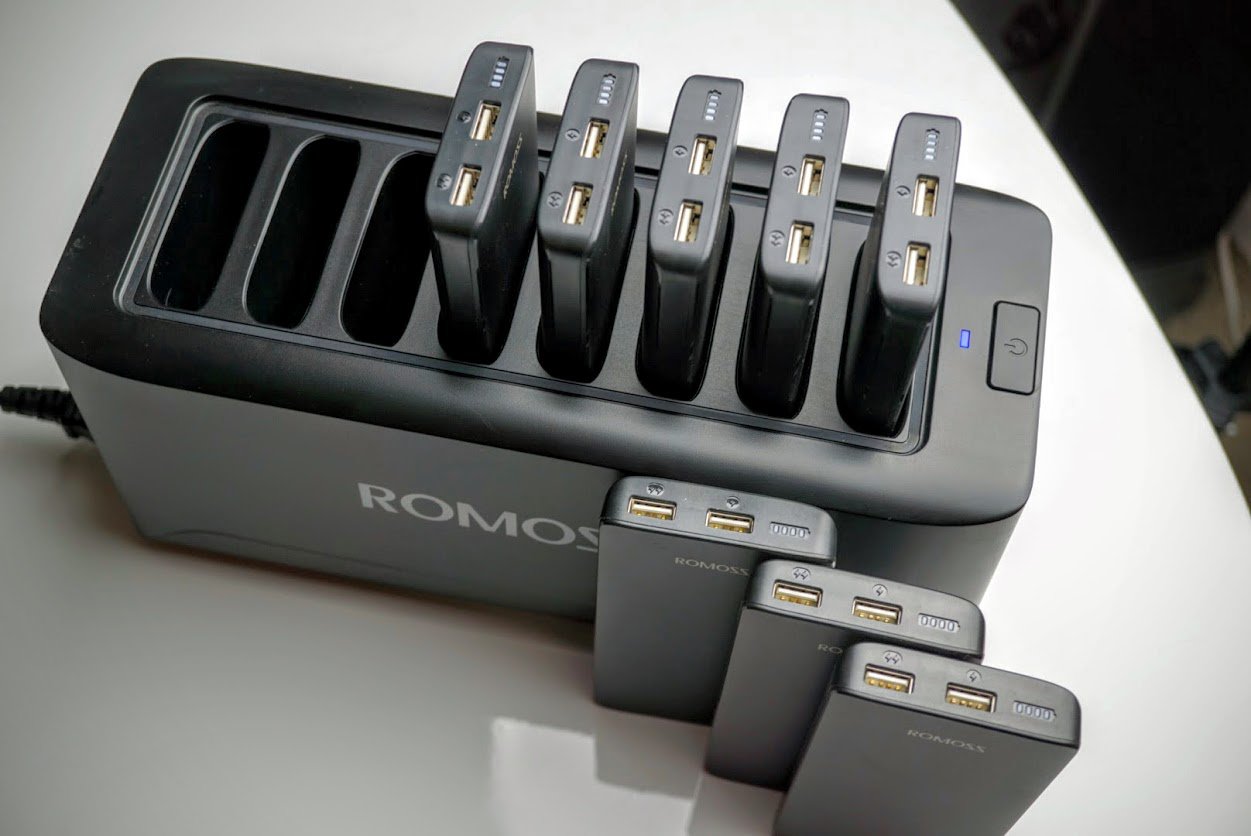
At first glance the Romoss Charging Station reminds me of a toaster oven on steroids. Instead of two slots, it has eight, and instead of dropping bread into those slots, they’re made to accept and charge eight individual portable power banks.
The Charging Station is made of matte black plastic that can be customized to suit individual business needs. If you opt for black, it comes with a matte finish which keeps away scratches and fingerprints. The build quality is top notch; all of the seams line up perfectly with no overlap of plastic on the edges. The station itself has one power input that accepts standard 100-240V, and can be daisy chained to keep wires clean if you need more than one.

Each individual power bank holds a 10000mAh lithium battery with inductive charging as the input. The inductive charging is built into each battery for ease of use (versus plugging in each battery to recharge) as well as to prevent thieves from taking the batteries home with them. There’s no way to recharge this battery other than with the charging station.
There’s a fan to keep the charging station cool while it’s under max load and recharging all eight batteries at the same time.

The fan kicks on for no more than 30s at a time in my experience, and is barely audible unless you are sitting right next to it.
Each individual battery pack has a 10000mAh rating, which is enough to charge most smartphones 3-4 times. There are also dual USB output ports so users can charge two devices at the same time at 2.4A which is the fastest iOS devices can be charged, but not quite fast enough to keep up with Android Quick Charge 2.0 and 3.0 standards.
Romoss kindly includes eight coiled charging cables with combo microUSB/lightning charging tips to suit almost all needs. It did not come with USB Type-C cables but it still can charge those devices safely with intelligent circuitry built into each power pack.

The only downside to the cables is the fact they are not permanently built into each battery pack. While you would hope users wouldn’t take them, it’s simply too easy not to in this case.
Usage
It’s nearly impossible for me to test out every single battery pack on my own. While I do not work in a coffee shop or gym, I do work a M-F 9-5pm job with 200 other employees at a biotech in San Diego. My colleagues provided the perfect testing ground for this review.
I dropped off the Romoss Charging Station in the Research group’s meeting room where we have most of our meetings, and get-togethers as well. At first the group thought the concept of the charging station was a cool novelty, but within a few days I would check on it and it was being used regularly. I frequently saw the station empty as some colleagues would bring the battery packs into the labs, offices and even home.
Since 10000mAh is enough to charge most phones 3-4 times, I had colleagues who gave me feedback that they loved taking them on the weekends on their family excursions. More importantly, it provided power to those who forgot to charge their phones before coming into work. Instead of bumming a charge off of someone else, they would grab an individual power bank and return it when finished. Romoss even provides a large vinyl sticker indicating what the charging station is so people don’t stare at it in confusion.

My coworkers use a variety of smartphones; iPhones, Nexuses, Galaxies, and a variety of budget smartphones I recommend to them as an alternative to higher priced flagships. Not one of them had a single complaint about the battery, and I work with some whiny people. The Romoss Charging Station scores high marks there for ease of use and reliability. We’ve used the station for over six weeks without a single complaint.
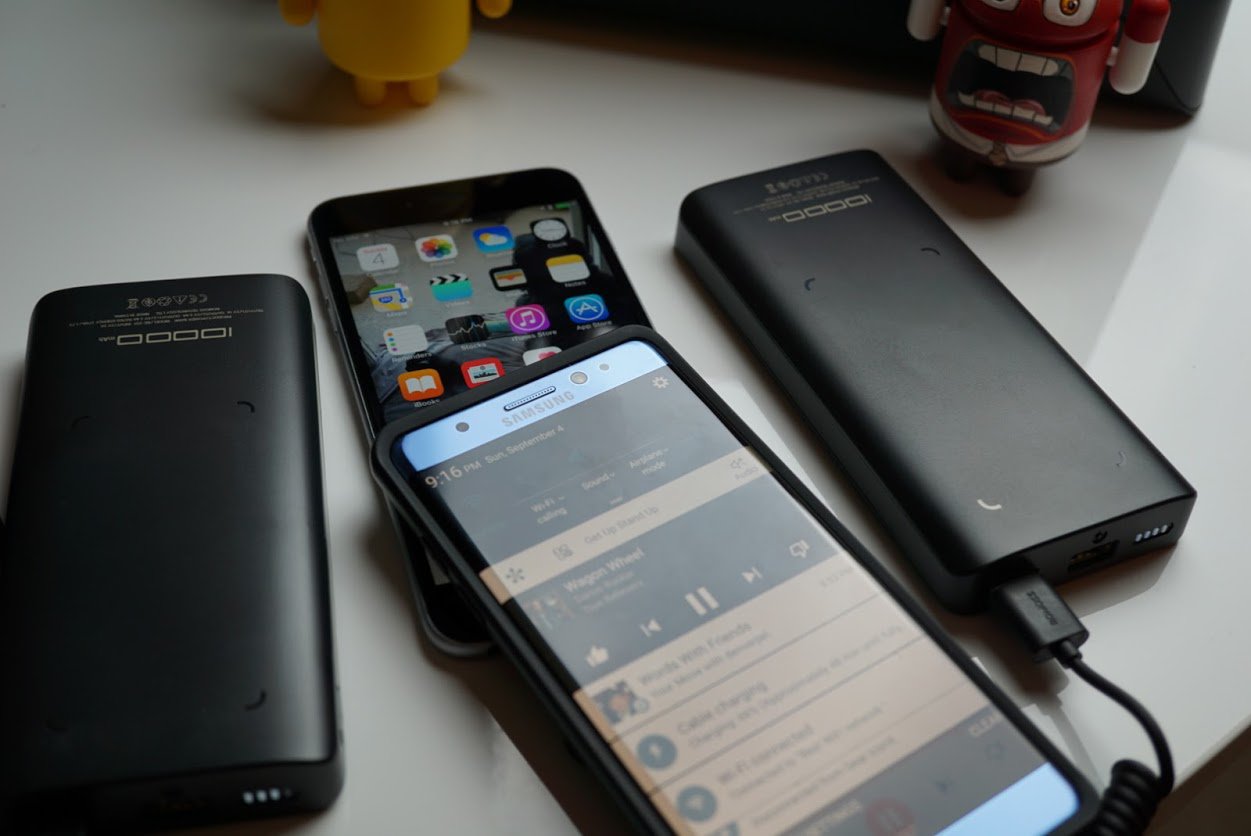
I used the power banks with a variety of smartphones and tablets myself to ensure wide range compatibility. Here is a list of devices I used:
- Nexus 6P
- Xiaomi Mi5
- iPad Pro 12.9″
- Pixel C
- Samsung Galaxy Note 7 (no it didn’t catch fire)
- Samsung Galaxy S6 and S7 edge
- iPhone 6S plus, 6S, 6 and 5SE
- Moto Z Droid
- LG G5
Not one device ran into issues. While the iOS devices charged at the fastest speed, the other Androids didn’t reach Quick Charge 2.0 or 3.0 speeds. That’s not really an issue since the power is free to use. It’s also something you probably wouldn’t want to include in a charging station like this since Quick Charge can be hard on batteries.
Recharging all eight batteries at the same time is no concern with the charging station. If you’re worried about vampire power draining out of this at night, you can turn it off with the power button on top of the station.

Summary
I am sure glad I reviewed the Romoss Charging Station with eight power banks. It’s an ingenious concept that is perfect for large families or small business owners. Portable power is becoming almost essential for every one of us who rely on our smartphones and this power station is sure to keep family members and customers happy. It sure kept my coworkers happy during the review process, and when I had to take it home for review, every single one of the users asked me when I was bringing it back. Luckily for them I will be bringing it back into work on Tuesday after the holiday weekend.
If you’d like to learn more about the Romoss Charging Station, head on over to http://www.romoss.com.

Syllable D700 Wireless earbuds: Amazing quality and sound for just $14 (review)
It’s amazing what kind of wireless headphones you can buy for $13.99.
Mobile accessories are much more accessible to everyone as long as you do your research. At $13.99, it has to make you wonder how much electronics actually cost to make. That’s cheaper than a pound of a quality cut of beef which can be consumed in less than an hour by one hungry person.
We’re bombarded with advertisements from companies like Bose and Beats by Dre, so much so that those two brands are exclusively known as the premium audio providers to people who don’t know audio. You’ve seen NFL athletes forced to wear Bose headphones and you see NBA superstars who wear Beats by Dre like it’s a dress code requirement. While Bose and Beats by Dre arguably make quality headphones, there’s a high premium consumers pay for all of that advertising.
That’s where we come in. We aren’t here to push what’s popular, we are here to help inform you of products that you probably never heard of that can save you money. I’ve been using the Syllable D700 wireless earbuds for the past few weeks and can confirm there is no point in paying for the brand name marketing any longer.
Build

The Syllable D700 earbuds are Bluetooth enabled meaning you do not need to connect them to a 3.5mm audio jack which is now missing in some of the latest flagships like the Moto Z and possibly the next iPhone. There is one wire that connects to two earbuds, with an inline remote that houses the battery and mic.
The earbuds themselves are small and can fit in almost all ears, with swappable silicone ear tips, so you can create the perfect fit for blocking out background noise. The ear hooks are flexible plastic that hook onto your ears to keep them in place no matter which activity you decide to perform while wearing the Syllable D700s.
The quality of the D700s is nothing but impressive especially when you factor in the discounted price I paid for these at $13.99. I’ve used dozens of wireless headphones in the past and there are major improvements budget earbuds with each release. The fit and form factor of wireless headphones continue to get better and better, and the D700s are no exception. The ear hooks, in combination with the adjustable slider on the earbuds make these easy to get the perfect fit. Some wireless earbuds put all of the components into ear earpiece which makes for large canisters that can be uncomfortable for those with smaller ears.

The headphones I am reviewing are all black, but they also come in blue and yellow if you prefer more color.
Usage – Audio

After taking five minutes to get the correct fit and pair to my Android smartphone, the first thing I always test is the loudness capability. Wireless headphones like the D700s are meant to be worn in noisy environments like a gym or outdoors. Loudness and sound isolation are key factors when considering any wireless headphones, and these D700s get loud. So loud that there are three extra clicks I have in reserve to notch up the volume when I need it. But I try to avoid turning it up that loud as it starts to pierce my ears.
I have yet to find a set of wireless earbuds, even those that cost upwards of $300-400 that can perfectly match their wired counterparts in terms of sound quality. If you’re looking to hear every nuance with a HiFi song from your own personal WAV collection or TIDAL subscription, you won’t find that with the D700s.
However when it comes to sound quality for wireless earbuds, these D700s are almost as good as anything I’ve heard without a 3.5mm audio cable. That’s what impresses me the most, these cost a fraction of what I’ve paid for other wireless headphones, like the Gear IconX from Samsung which cost $200, and I get the same audio quality if not better from these D700s. Some of you think, ” you get what you pay for” and that’s absolutely true. With the Gear IconX you pay for true wireless earbuds that can track your heartbeat, and you also pay for one expensive marketing team. The D700s you get pure quality and sound without all of those advertising overhead fees.
The sound of the D700s is bright. The highs are front and center with above average bass, and neutral mids. This type of sound signature is perfect for the gym or working out. These D700s are really quite fun to listen to and help me tune out all of the noise and distractions in the gym.
Microphone
As with most wireless headphones, the D700s have an integrated mic with noise blocking technology. I always test out microphone capabilities by talking to my mom on the phone, because if someone is going to have a hard time hearing me, it is always her. My standard test is an hour phone call while walking my dog outside with background noise coming from cars and people passing by in the background. My mom would occasionally tell me she couldn’t hear me, but nonetheless we still made it through the entire call.
Battery
The advertised battery life of the D700s is 4-5 hours of talk and playback time. Over several weeks of testing, I frequently got 5-6 hours. I attribute the extra time due to not turning these up to the maximum volume. I need wireless headphones to last a minimum of three hours a day, 1.5 hours for my workout and up to 1.5 hours for when I am walking my dog in the morning and evening. There’s also enough battery life to get from one end of the country to the other on a cross country flight without needing to recharge.
The D700s aren’t the longest lasting wireless headphones I’ve used before, but they are definitely above average. To fully recharge from near dead take just over an hour and a half.
Summary
The Syllable Wireless earbuds are on sale now for $13.99 at Amazon with discount code VPDGAWOH. They’re normally priced at $19.99 which I still consider a bargain for these all around solid wireless earbuds.
Wireless, water resistant, excellent build quality, solid battery life and exciting sound reproduction for a bargain price of $13.99 blows my mind. You really should consider these Syllable D700s, especially if you’re tired of paying for big brand names.
Check out the Syllable D700s at Amazon and use discount code VPDGAWOH to purchase them for $13.99.

OpenOffice could shutter due to lack of volunteer developers
OpenOffice, one of the most prominent free alternatives to Microsoft Office, is in big trouble. Dennis E. Hamilton, its volunteer vice president, has recently sent out a message to the project mailing list to inform members that its “retirement… is a serious possibility” due to lack of volunteer developers. According to Ars Technica, many of its contributors moved to LibreOffice after it launched, which you might know as that other free alternative that’s been publishing updates more frequently. This lack of manpower has been affecting the team’s ability to deal with security vulnerabilities. “In the case of Apache OpenOffice,” he wrote, “needing to disclose security vulnerabilities for which there is no mitigation in an update has become a serious issue.”
For instance, OpenOffice informed people about a vulnerability in July, but it never issued an updated version with a fix. Instead, the team suggested switching to either Microsoft Office or LibreOffice and issued a hotfix you have to install manually a month later. Hamilton detailed how a shutdown would go, including the termination of the project’s social media accounts. Not everyone has lost hope, however. One contributor named Phillip Rhodes replied to the email thread that he’d rather the team think of how to attract more contributors instead of planning for the project’s shutdown.
Here’s a longer version of Hamilton’s mail, but you can read the whole thing on the team’s mailing list archives:
“I have regularly observed that the Apache OpenOffice project has limited capacity for sustaining the project in an energetic manner. It is also my considered opinion that there is no ready supply of developers who have the capacity, capability, and will to supplement the roughly half-dozen volunteers holding the project together. It doesn’t matter what the reasons for that might be.
The Apache Project Maturity Model (PMM), identifies the characteristics for which an Apache project is expected to strive.
Recently, some elements have been brought into serious question:
QU20: The project puts a very high priority on producing secure software.
QU50: The project strives to respond to documented bug reports in a timely manner.There is also a litmus test which is kind of a red line. That is for the project to have a Project Management Committee (PMC) capable of producing releases. That means that there are at least three available PMC members capable of building a functioning binary from a release-candidate archive, and who do so in providing binding votes to approve the release of that code.
In the case of Apache OpenOffice, needing to disclose security vulnerabilities for which there is no mitigation in an update has become a serious issue.
In responses to concerns raised in June, the PMC is currently tasked by the ASF Board to account for this inability and to provide a remedy. An indicator of the seriousness of the Board’s concern is the PMC been requested to report to the Board every month, starting in August, rather than quarterly, the normal case. One option for remedy that must be considered is retirement of the project. The request is for the PMC’s consideration among other possible options. The Board has not ordered a solution.
I cannot prediction how this will all work out. It is remiss of me not to point out that retirement of the project is a serious possibility.
There are those who fear that discussing retirement can become a self-fulfilling prophecy. My concern is that the project could end with a bang or a whimper. My interest is in seeing any retirement happen gracefully. That means we need to consider it as a contingency. For contingency plans, no time is a good time, but earlier is always better than later.”
Via: Ars Technica
Source: OpenOffice Mailing List
Glass cracks and that’s why you need to protect your glass Note 7 with a Caseology case
I learned a tough lesson this year with my Samsung Galaxy S7 edge, and it’s one most of you already know; dropping your cell phone sometimes results in cracks on the glass display. In the case of the S7 edge, it can also result in cracks on the back of the phone as well.
I rarely ever used cases on my smartphones in the past. I almost never dropped them, and even if I did, they never cracked as the falls were usually from sitting down when they slip out of my pocket. After almost a decade of owning smartphones, I cracked my first smartphone and it was the S7 edge. It was kind of a freak accident. Sitting outside at a picnic table, the smooth S7 edge slipped out of my atheletic pants and fell. As a result of the fall on the edge, was a spiderweb of cracks that ruined the IP68 rating as well as the look of my beautiful device.

Insurance isn’t an option for me as I never opt to buy it for my devices. Insurance has gotten much more expensive for smartphones over the last five years, and with deductible fees and all of the fine print on what is and isn’t covered, were enough for me to avoid them.
To replace the glass on my cracked S7 edge would cost over $250. Considering I could buy a brand new S7 edge for $600-700 off contract it just wasn’t worth the money. Instead I covered it up with a skin from dbrand so I never have to look at the cracks again.
The take home lesson for me, is I should have bought a case for this phone. Cases range in price from $5-100, they come in all shapes and sizes, and most importantly they protect and prevent cracking the glass.
Caselogy cases
If you are a regular user of smartphone cases there is a good chance you know Caseology. It is a company based just north of me in Cerritos, CA. The company profile says it is made up of ordinary people like you and me who have the desire to do the extraordinary.
They make cell phone cases, how extraordinary does that get?
While cell phone cases are very ordinary, Caseology adds in the “extra” factor. I see the “extra” in the two example cases I was sent to protect my all glass Samsung Galaxy Note 7 which I will not make the mistake of going case free again.
I’ve tested quite a few cases from other reputable brands, and while they checked all of the boxes of protection, I never left them on my phones because I ended up not liking them for a multitude of reasons.
For the first time in a long time, I’ve found cases that I have no problem recommending to everyone.
Caseology Skyfall Galaxy Note 7 case – $12.99 at Amazon, $24.99 at Caseology

Caseology’s Skyfall case is perfect for those who want to show off their beautiful Galaxy Note 7s and protect it at the same time. In the image above you can see it is clear as glass. Even though it is 100% optically clear and free of defects, it is made from plastic. The sides are silver, although it does come in gold, black and rose gold as well.  Those silver sides are soft on the inside which offers drop protection, and the button slots are clear which allows the gold accent to show through from the Note 7.
Every cutout lines up perfectly for each slot – microphone, 3.5mm audio jack, USB C charging port, speaker and of course the stylus.
Caseology managed to design the case so that it doesn’t change the way you eject the stylus from the Note 7, and while it may seem like a small issue, this is where the designers went the “extra” distance. I’ve already tested out other cases that do impede the stylus, and for those of you who use it regularly like I do, you want a case like this. Adding difficultly to ejecting the stylus is enough for me to eject a case from my life.

Above I stated that the case is perfectly clear. This allows you to show off the natural beauty of the Note 7, but my only issue is that it draws fingerprints just like any other clear surface. As long as you don’t touch the inside of the cover when installing the case, you can wipe off the back with a soft cloth to make it clean and clear once again.
Design, attention to detail, high quality look and feel set this Skyfall case apart from the crowd. The best part of the case though is its incredible price at just $12.99 at Amazon. I could buy 20 of these cases for the cost of the broken glass replacement from Samsung, and if you’ve ever had glass replaced, it rarely works like it did when it was new.
Caseology Wavelength Galaxy Note 7 case – $15.99 at Amazon, $24.99 at Caseology

I’m a big fan of the Wavelength series case from Caseology. It’s a two piece case that is made up of a soft rubber covering, with a rigid second piece that holds it in place around the phone. While maintaining a slim profile, it manages to bring in features like a full front lip on the front to protect the screen as well rigidity found in bulkier cases.

The outside and inside are texturized with lines that give this case the ultimate grip factor. The Note 7 is a small form factor with a phone of its display size, but it is still large making it hard to grip with the smooth sides and back. When I used my Note 7 case free for the first day, I never felt safe holding it in one hand. That led me to grip it tighter than I would have liked, which lead to a few aches in my hand.

The Wavelength case feels extremely tough while providing the grip that gives me confidence to hold this phone with less force. Just like with the Skyfall series, all of the cutouts and buttons line up perfectly with the Note 7.

Priced at $15.99 on Amazon, you really can’t go wrong with this case. It’s durable, affordable and very well designed. I prefer the black color for this case, although it does come in black/gold, coral pink, mint green and navy blue to suit your individual taste.
Summary

Caseology is a brand you can trust and might be a brand you already trust. Its products frequently sit atop the ranks at Amazon and these two examples show the “extra” that Caseology adds to ordinary. Design, price, and protection all score perfect marks in this review and I suggest you keep your Note 7 protected to prevent damage like I encountered with my Galaxy S7 edge.
Learn more at Caseology.com.
Facebook Messenger’s ‘Instant Video’ looks awfully Snapchatty
Bots have been all the rage in Facebook Messenger over the last few months, but today the social network is adding a new way to chat with your pals. The company announced a tool called Instant Video that allows you to have those quick conversations face-to-face in addition to text and photos. Yes, video calling was already available in Messenger, so what’s new here? Well, Instant Video is meant to be easily and instantly (get it?) accessible inside a chat conversation rather than having to go through the process of making a call. It’s all about efficiency.
If that sounds familiar, it’s because Snapchat allows you to do something similar. Inside that messaging app, you can tap to share video with the person you’re already having a text conversation with in a flash. Facebook’s version works pretty much the same way with an Instant Video icon situated at the top of the window. As long as you and the person you’re talking to are both running the latest version of Messenger for Android or iOS, you’ll be able to employ the feature. Instant Video only works as long as you keep the chat open and you can continue conversing via text while the window floats over your chat. Audio is turned off for the recipient of the video by default.
This isn’t the first time Facebook or one of its apps has taken cues from Snapchat. Instagram Stories arrived in early August to compile images and videos in a format that’s very similar to Snapchat’s own Story feature. Facebook also nabbed face-swapping app Masquerade back in March to add photo filters to its arsenal of apps. In fact, the social network has already announced that those features would be available in Facebook Live at some point. Zuckerberg & Co. have clearly taken notice of Snapchat’s popularity, so it’ll be interesting to see it Facebook decides to take any more inspiration from that app in the future.
Via: The Verge
Source: Facebook
Lumsing’s dual port charger covers all of your charging needs, including USB Type-C and QC 3.0
Quick Charge, Quick Charge 2.0, Fast Charge, Quick Charge 3.0 and the list goes on and on. Android smartphones are annoyingly confusing when it comes to charging terminology. All we really care about is that our phones and tablets charge as fast as possible. We shouldn’t have to do research on what exactly each charging standard means, and hopefully sometime soon, these companies will standardize the charging types and unify it for our sake.
Until then we have to drudge through the ever expanding home chargers, cables, power banks and car chargers until they finally decide to make a change.
Today I am reviewing the Lumsing 48W dual port Quick Charge 3.0 and Type-C wall charger.
Build and Usage
I’ve been a fan of Lumsing’s for quite sometime. The company makes a wide range of mobile accessories; chargers, cables, portable power banks, headphones and more. Its philosophy is to avoid making technology more complicated and expensive than it needs to be. I’ve used its power banks and given a few away to friends who use them regularly. I still see my friends using the batteries that I gave them over a year ago.
Lumsing’s latest dual port wall charger follows the same concepts of its other products – it’s simple, well built and easy enough for anyone to use. It’s made of matte plastic that has a soft touch and comes with a foldable plug which is nice for travelling. Having a foldable plug prevents the prongs from bending when carrying in a laptop bag or backpack.
 There’s also two USB out ports, one standard USB A and one USB C. While there are more phone manufacturers making the switch to USB C, most accessory companies are far behind. Having a charger that is compatible with both is very nice to have in this USB transition.
The Lumsing USB A port has Quick Charge 2.0 and 3.0 meaning it can charge my Galaxy Note 7 at the fastest speed from the USB A port. It also charges my Note 5 and S7 edge at the fastest speeds and those devices still use microUSB as a charging standard.
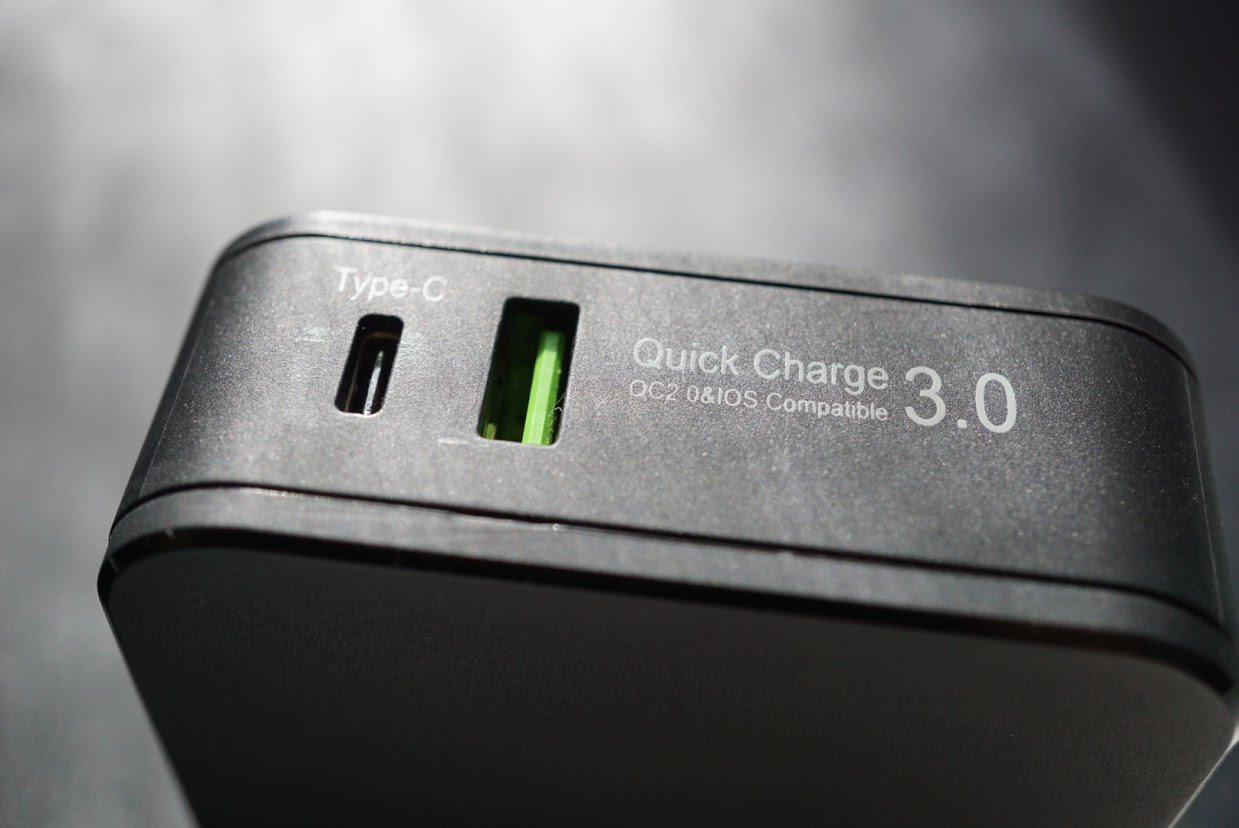
The USB C port is perfect for devices such as the Nexus 6P and 5X which have the Fast Charge standard.
Like I said before, the lack of unification standards amongst manufacturers is extremely annoying but Lumsing did its part by giving you everything with this dual port charger. Yet having the fastest charging speed available is necessary as batteries in smartphones and tablets get bigger. If you don’t have the fastest charge available, it can take extremely long to recharge a smartphone with an older charger since the batteries are much larger now.

It’s well built, reliable and it doesn’t generate excess heat like lesser chargers do.
All around the charger is just what I want in an accessory. Well-built, extremely functional, reliable and portable.
Summary
My only real gripe with the Lumsing dual port charger is the cost at $36.99 at Amazon. There are other capable chargers that have similar specs that cost less. While the Lumsing dual port 48W charger is highly capable and I love using it, I have a hard time recommending at this price. I have no doubts that Lumsing will reevaluate the price when it fills its backorders and fills inventory at Amazon.
If you’re looking for a reliable charger this is a strong contender in a sea of accessories. Just wait for the price to drop by $10 before you make a purchase.
Check out the Lumsing dual port 48W charger at Amazon.com.
Moto Z Play Droid unboxing and first impressions

Motorola today announced its latest smartphone, the Moto Z Play Droid, which figures to be an exclusive smartphone for Verizon. With specifications that fall more in the middle of the pack for today’s handsets, it’s still quite the attractive package.
We received a review unit of the Moto Z Play Droid on Friday and have spent a couple of days getting to know the device. We’re not ready to compile a full-on review of the phone just yet, but we do have some first impressions we’d like to share.

Taking the phone out of the box you realize that this iteration of Motorola is unlike anything else in the company’s history. Like the Moto Z Droid and Moto Z Force Droid this phone is svelte and sexy. On the surface it exudes premium craftsmanship and begs to be looked at from all angles.
It’s almost as if Motorola took the old Cliq XT design from years back and gave it a 2016 reboot. By that we mean it has a modern design with black cues but is also trimmed in a silver finish. It’s familiar to us because we knew something similar from 2010, but it’s oh so fresh with more solid materials. Dare we say it also looks as if Lenovo/Motorola took more time with details.
The Moto Z Play Droid is a heavy device; it’s more dense than we expected it to be. Looking it over, there’s so much here that intimidates us. It has been a very long time since Motorola delivered a phone that we were afraid to leave the house with over fear of ruining it. One drop and we’re afraid it would be scuffed, scraped, or worse, shattered. We want to show it off so badly but, at the same time, we want to protect with some sort of case. As much as we like to insure ourselves with cases, we enjoy looking at the details on the rear.

It didn’t take us long to realize that there’s no Verizon branding on the phone. While it’s certainly prominent on the box and in the apps, it’s not on the surface of the handset. There is a “Droid” branding under the camera, but that’s it. Otherwise, it’s a simple stylized “M” on the rear and a Moto on the front above the display. We’re not sure if this was Motorola’s doing or if Verizon loosened its grip a bit, but we’ll take it.
Holding and using the Moto Z Play Droid with one hand is comfortable, even with our smaller hands. At 5.5-inches, the display does have a little thicker bezel than some of its competitors, but we’ve seen worse. The 1080p resolution is crisp and color is quite accurate in our first few days with the phone.
In addition to the phone itself, the box also comes with a wall charger (USB Type-C), a MotoMod protective shell for the rear, and a tool to remove the microSD and Nano-SIM cards. There’s also a small booklet but there are no headphones. Speaking of which, a quick glance at the bottom shows us that Motorola did leave the 3.5mm port in this model.

The protective rear shell snaps into place via magnets and fits snugly against the phone. In fact, you’d be forgiven if you thought that it was part of the handset itself. The wood grain design has the same realistic appearance that is found in other, previous Motorola phones built in the Moto Maker tool.
Apps
Powering on the phone and checking the app tray we find that there’s no mistaking this for anything but a Verizon model. There are nearly one half dozen apps with Verizon branding pre-loaded including VZ Navigator, VZ Protect, My Verizon, Message+, and Cloud. You’ll also find a couple of others here, too: Android Pay, Caller Name ID, Amazon Kindle, IMDb, NFL Mobile, and Slacker Radio.
Android
After spending time away from Motorola phones, it was refreshing to be return to the software experience. Specifically, we were happy to find a largely untouched version of Android (6.0.1 Marshmallow) with only minor additions. And when we say additions, it’s subtle stuff that really enhances things.

Who doesn’t love picking their phone up and seeing the screen wake up? Moreover, we appreciate being able to twist our wrist to launch the camera, double chop to kick on the flashlight, or simply wave their hand over the display to wake it? To us, it’s just the right amount of OEM customization.
A couple of days into using the phone and we’re totally in love with it. Sure, the Moto Z Play Droid isn’t going to best any benchmarks but that matters little to us. We’re not pushing our phones to their limits and wager to guess that most of you aren’t either. With that said, the Snapdragon 625 processor (2GHz octa-core) and 3GB RAM do the trick so far. We’ll keep adding more apps and games to it to see how it fares with more demanding titles; look for that in the full review.
Fingerprint reader
The fingerprint reader was easy to set up and has responded quickly in every situation we’ve employed it. Whether waking a phone up or authenticating a purchase, we found it to be accurate and fast. We’d love to see Motorola put some sort of reader on the rear where the logo is, but that’s a quibble. To us, if you’re not pulling double duty with the reader acting as a home button, we say move it around back.

Sound
As for speakers, there’s only one on the Moto Z Play Droid; it’s the same one for taking calls. Listening to music is decent as there’s plenty of sound. It could be more rich, but we don’t ever find ourselves breaking out a phone to take in a playlist.
Watching videos on YouTube or Netflix was pleasurable, but not overly robust. Again, we’re not the type to spend extended periods on our phone watching movies and expecting a theater experience. Throw in some headphones or pair to a speaker and now we’re talking.
Camera
The 16-megapixel camera features laser autofocus, phase detection autofocus, and an f/2.0 aperture. There’s also a dual-LED flash on the back to brighten up your shots. We’ve not tested the camera in all lighting conditions yet, but thus far we’re impressed with the shots. The software is no-frills so there’s something to be desired in some aspects. On the other hand, we like that we’re not bogged down with too many choices for scenarios. we’ve yet to kick the tires on the front-facing camera.

Hasselblad MotoMod
As part of our review kit, we also received one of the Hasselblad camera MotoMods to try out. Indeed, you can snap this guy on to the back of the phone as easily as the case and give your Motorola phone a 12-megapixel camera with a 10X optical zoom. Capable of taking RAW images, the camera also boasts a Xenon flash.
As you might expect, the camera can connect with both the Motorola Z Droid and Motorola Z Force Droid, too. Moreover, the other MotoMods launched in the last few weeks can be attached to the Moto Z Play Droid. We’ve already snapped a number of pictures with the Hasselblad MotoMod and will share those in our full review.
Battery
The phone comes with an internal, non-removable 3,510mAh battery. We’ve found that it lasts us well beyond two full days of use but we’re not using it as a daily driver just yet. Additionally, we’ve yet to load all of our apps and accounts to the handset so we do expect to see it drop. Charging is super fast, for what it’s worth, thanks to the TurboPower cable. According to Motorola, spending 15 minutes on the charger will result in 10 hours of power.
We’re really enjoying the Moto Z Play Droid so far and look forward to putting it through its paces. Look for a more thorough review in the coming days and weeks!
Surface Pro 3 battery issues disappear in today’s update
The Surface Pro 3 has been plagued with a software problem that causes some tablets to quickly lose power once unplugged from a charger, but a firmware update released today squashes the battery bug. Microsoft first acknowledged the problem in July and confirmed it was a software issue, rather than a flaw in the tablet’s hardware, earlier in August.
In an update FAQ, Microsoft explains that the battery levels in some Surface Pro 3s were being misreported to the operating system and firmware, meaning the tablets stopped charging well before they hit full capacity.
“Think of this like a fuel gauge in a car, where the car looks to the fuel gauge to determine how much to fill the tank,” Microsoft says. “In this case, if the fuel gauge isn’t working right, the car would also not be able to fill the tank — even though the tank is fine.”
After applying the update, the battery issues will self-correct over “the next several charge and discharge cycles,” Microsoft says, and any tablets that weren’t able to run on battery power will be able to do so.
Source: Microsoft
 AIVAnet