


Opera’s VPN-equipped browser is now available to everyone
You no longer have to grab test software to try Opera’s VPN-toting web browser. The company has released the finished version of Opera 40 for desktops, which revolves around a free virtual private network (provided by SurfEasy) that offers both a more secure connection as well as access to foreign content that would otherwise be blocked. Hi, Hulu and Pandora! It can automatically choose whichever VPN server will provide the fastest connection, but you can specify one of five countries (Canada, Germany, the Netherlands, Singapore and the US) if you’re more concerned about visiting region-specific sites.
The update also brings a reworked battery saver and RSS feeds in personal news, so there’s something to check out after the novelty of the browser’s central feature wears off. One thing’s for sure: it’s worth a shot if you hate paying for VPNs, but want to stick to a mainstream browser that includes plenty of familiar elements.
Source: Opera
Dodocool fast wireless charger: Solid performer for a reasonable price (review)
Smartphones have slowly been adopting wireless charging over the past few years. It’s a great way charge your phone if it is compatible with the Qi wireless charging standard. All you have to do is drop your phone onto the charging pad and it charges wirelessly.
The main downside to wireless charging is that it can’t charge as fast as traditional microUSB and USB type-C plugs which can transfer energy faster. However wireless charging speeds have increased and dodocool’s fast wireless charger is a solid option. I’ve been using it for a couple of weeks now, and consider it a solid option.
Build & Usage

The dodocool fast wireless charger delivers power to smartphones and tablets that are compatible with the Qi wireless charging standard. It delivers power faster than first generation charging pads, at up to 1.5 times the speed. The dodocool charging pad is a circular disk, made from plastic, with two soft rubber disks on the bottom and top to provide the base and attached smartphone grip.
It’s not the fanciest wireless charging pad I’ve used, but at $22.99 on Amazon, it’s a reasonable price. The dodocool wireless charging pad has a roughly 30 degree angle to it so you can place your smartphone on it and still maintain a good view of the display. This is especially nice for the latest Galaxy devices which have the “always on” display feature.
The rubber ring around the top provides enough resistance to give me confidence my smartphone will not slip off. The only issue with the rubber ring is that it is a lint magnet. No matter how many times I wiped it down, I simply could not get it 100% lint free. Over time this could get old as it will look dirty.
As a charger, it works as advertised. Phones that are fast wireless charging capable like my Galaxy S7 edge charged flawlessly. From dead to 100%, my S7 edge took about three hours to charge. That’s just over twice as long as it takes to charge the device using a fast charger. But it’s not an issue since I leave it on my desk and simply place my phone on it when I get home. If I’m ever in need of power, I usually can recharge in my truck or with a power bank when I’m away from home or the office.
There’s a nice indicator light in between the top and bottom half that glows green when it is plugged in and not actively charging a device. It turns blue when it is charging a device, and it’s not so bright that it lights up my room at night. It’s just bright enough to where I can find it in the middle of the night without having to turn on any other lights.

I did notice this charger was a little more picky with phone placement than other wireless chargers I’ve used before. It wasn’t so specific though that I had to fiddle with the placement after I learned where to place my phone.
Summary
The dodocool fast wireless charger is a solid option for $22.99. Samsung’s fast wireless charger costs twice as much, and for my money I would rather buy two of the dodocool chargers so I could keep one at my office and one at home for my nightstand. That way I don’t have to worry about charging my Note 7 with USB type-C while my S7 edge still uses micro USB.
The dodocool fast wireless charger is well built, with thoughtful features added in that make it a pleasurable charger to use on a daily basis.
If you’d like to learn more, head on over to Amazon.com and check out the dodocool fast wireless charger for $22.99. Dodocool has provided an exclusive discount code for our wonderful readers to save 30% off. Use discount code LOQ7TEK7 at checkout and the final price for the dodocool fast wireless charger will be $16.09.

ARCHEER 25W Bamboo Stereo 2.1 Bluetooth Speaker (review)
I received an interesting speaker from a company called ARCHEER to review. It’s ARCHEER’s 25 watt Bamboo stereo 2.1 wireless speaker that got its design cue from House of Marley’s Get Together Bluetooth speaker. I reviewed the House of Marley Get Together recently and found it to be one of my favorite Bluetooth speakers under $200.
The ARCHEER speaker is similar where it is made from similar materials and has quite a bit of sound output with it’s subwoofer and dual tweeters.
Let’s get into the review.
Design
It’s very clear that ARCHEER saw a popular design with House of Marley’s Get Together speaker when it put together its 25W Bamboo Stereo 2.1 wireless speaker. It’s made primarily of bamboo with canvas wrapped around the center portion of the speaker. The bamboo gives the speaker a real solid feel while the canvas gives the ARCHEER speaker a high-quality modern look.

The speaker has dual drivers that deliver the mids and highs which surround the center woofer that provides the bass. The bass is further enhanced with a port on the back allowing for more airflow.

Controls and connections are pretty standard, similar to what you would find on other wireless speakers. On the top of the speaker is where you will find separate buttons for power, play/pause, volume up/fast forward, and volume down/rewind. At the rear you will find a 3.5mm auxiliary port for a direct connection, a reset button, charge indicator light and a microUSB input slot for charging.

It also has a large internal battery rated at 5200mAh which is designed to last up to 11 hours at 50% maximum volume.
ARCHEER did a good job at recreating the House of Marley speaker in a smaller package.
Sound
If you are a bass aficionado, the ARCHEER Bluetooth speaker was made just for you. The lows on this speaker are very powerful which goes great with certain genres of music where bass is emphasized. The center woofer paired with the rear bass port make this speaker one of the loudest speakers I’ve heard priced under $100.
The two drivers manage to deliver crisp highs with mids to match. I’m not joking when I say the lows are the main focus of this speaker. At times, if you are are not directly in front of the speaker, the lows can drown out the mids rather easily. When you are in front of the speaker though, it does sound clear and detailed, there’s just an emphasis on the low end.
The power rating for the ARCHEER wireless speaker is 25W which is enough to get very loud. The size and power make it perfect for entertaining crowds in large rooms where it won’t be overpowered by people talking and laughing.
What is nice about the sound quality, is no matter what volume you have it set to, the sound scales well. At low volumes the bass maintains the same ratio as it does when it’s at the highest setting. Many speakers that focus on bass don’t sound good at lower volumes because all you hear is the bass, but this one sounds great across the entire power spectrum.
When it comes to the bass port, it sure does serve its purpose. The air it displaces is very noticeable when you put your hand behind it.
 The bass port displaces enough air to move tissue paper with ease.
If you find yourself wanting to reduce the bass for other genres of music, you can set the speaker on its back and the sound becomes much more balanced. Quite honestly, when the speaker is on its back is when I actually love the sound output the most.

Battery
The ARCHEER Bluetooth speaker easily meets the 11 hour playback rating with its 5200mAH battery. When played at higher volumes for long periods of time, it drains the battery at a much faster pace. Using it outdoors, I turned mine up to about 80% of maximum volume and frequently pulled down six hours of playback.
If you’re listening to it indoors there almost no need to turn it up beyond 50% due to the incredible power behind each driver.
Summary
ARCHEER did an excellent job of mimicking House of Marley’s Get Together wireless speaker with its 25W Bluetooth 2.1 speaker. It managed to build a high quality speaker, with an emphasis on the low frequency sound range while maintaining clarity and crispiness.
I’m glad ARCHEER didn’t throw in the typical microphone for taking calls, because there is almost no way calls would sound good with this much power output. It’s one of the most powerful speakers I’ve listened to sub $100, and think it’s a great option for using around the house or outdoors. If you like bass, this speaker has loads of it when you want it. And when you don’t, simply place it on its back for a balanced sound output.
I think this speaker would make for a perfect gift for college students who live in dorms or apartments.
Check out the ARCHEER 25W Bamboo Stereo 2.1 Bluetooth Speaker at Amazon to learn more.

Energy Bar review: The coolest way to check your battery

Your battery indicator. Probably the most boring aspect of any smartphone. In fact, I bet the only time you notice it is when you’re phone reaches 15%. For most of us, our battery icons do not do a good job in showing just how much juice is left in our phone.
Sure, you can toggle an actual battery percentage to appear in your notification bar, but that takes up valuable space. And if you have the percentage displayed in the icon itself, the number is no readable at a glance. Haven’t you always wanted a freaking glowing bar at the top of your screen so you could always tell your battery level at a glance? No? Well finish the review, and I bet you’ll want one.
Haven’t you always wanted a freaking glowing bar at the top of your screen so you could always see your battery level at a glance? No? Well, finish this review, and I bet you’ll want one.
Setup
 Before we take a dive into the Energy Bar app, let’s take a second to discuss the super straightforward setup. The app is free to download, and once you have it installed, you just need to enable it in the app. It will also take you to the Accessibility menu of your phone where you will also need to enable Energy Bar.
Experience
So what is Energy Bar all about? Its description calls it a pulsating energy bar, which sounds like the most annoying thing you could ever experience. But let me assure you that it is far from annoying.
Once enabled, it appears as a glowing bar across the top of your screen. As your phone’s battery diminishes, the bar moves to indicate how much charge is remaining. While it does not give any precise numbers, the bar does provide the easiest way to check your battery with a glance.

From my experience using Energy Bar, I found that it was quicker for me to tell how much battery was left using this rather than the stock battery indicator. How many times have you needed to know your exact battery percentage anyway?
When you are charging your device, you will also get a nice animation with segments of the bar being added as long as you have your device plugged in.

In the Energy Bar app, you will find several options for customizing the bar. First, you can choose between Normal Bar and Status Bar. The latter will replace your notification bar with the Energy Bar for a unique look. If you stick with Normal Bar, you can then decide how thick you want it to be.
You can also change the origin of the bar if you would like it to begin in the middle or right of your screen. The one setting I highly recommend selecting it to Auto Hide the bar for fullscreen apps. This way, any time you are using an app that takes up the entire screen of your phone, the Energy Bar will disappear along with the notification bar.
Under Color Configuration, you can let your creativity flow and change the color of your battery bar. You can separate the bar into segments of different colors so that once your battery passes a certain percent, the bar changes colors, too. This option makes seeing your battery percentage with a quick glance even easier.

If you would rather have your bar move as a gradient from one color to the next as your phone loses battery, you can select that option instead.
Here comes my biggest complaint with Energy Bar. While the most important settings like Auto Hide on fullscreen and bar thickness are included with the free version, more advanced settings like Status Bar mode and Gradient bar color are only usable after you pay. Unlocking all the features will cost you a whopping $1.99.
Final Thoughts
For many, I imagine the free version of Energy Bar will be enough. But those of you looking for more creative freedom might have pause when it comes time to pay. I personally stuck with the free version, but $1.99 isn’t a bad price to pay for an app like this. The paid version is ad-free, as well. Energy Bar adds an extra level of convenience to your phone as I believe all customization apps should, and I recommended it with the highest of praise.
Get your glow on!
Top 5 Android apps for privacy and security
Are you a fan of Android, but maybe not Google? Are you tired of using services that track your every move, what you say and use that information against you? Here is a roundup of our favorite apps for privacy and security.
Email: Protonmail
Protonmail is an encrypted email service based in Switzerland. Since your data is stored on Swiss servers, they are protected by strict Swiss privacy laws. You get strong security with end-to-end encryption, so third parties like Google or the NSA (is there a difference?) can’t read them.
Protonmail doesn’t keep any personal information, not even IP logs. It’s compatible with OpenPGP and fully open source. You can protect emails with passwords, send emails that self-destruct and use custom labels and filters.
Protonmail comes in three tiers: Free, Plus and Visionary.

Google Play Link | Source Code
Messaging: Signal
By using Signal, you can send fully private messages to your friends and family. It offers end-to-end encryption on all of your messages. Unlike Facebook Messenger or Google Allo, every message is in incognito mode.

Just like most other messaging apps, you can chat with people one on one or create groups. Signal is free and open source software (FLOSS) so anyone can verify its security. The app uses your existing phone number and address book.
Not only can you send private messages, but you can also use Signal to call people anywhere in the world with no long distance charges.
Google Play Link | Source Code
VPN: LiquidVPN
LiquidVPN is a great tool to protect your web browsing. Many people recommend using a VPN on public Wi-Fi, but we at AndroidGuys recommend using a VPN all the time, on public and private Wi-Fi.
With LiquidVPN you can hide your IP address, encrypt your data, bypass censorship and unblock websites. The Wyoming-based company has servers located in nine different countries.

The service has unique features not found with other VPN providers, like modulating IPs, a custom DNS service, shared IP VPN tunnels and a technology called Liquid Lock. Liquid Lock controls your system’s firewall so only encrypted traffic can stream out.
LiquidVPN has three plans:
- Sidekick: $7/month (two devices)
- Road Warrior: $10/month (four devices)
- Ultimate: $18/month (eight devices)
Google Play Link
Cloud Storage: Mega
Mega offers 50GB of free end-to-end encrypted cloud storage. Dubbed “The Privacy Company” Mega is a New Zealand-based company. With Mega, you can automatically upload your photos and contacts.

You can upload, download and share encrypted files with other people. They have a free plan as well as several paid plans, giving you more storage and better bandwidth. However, you can only buy the pro plans through third-party resellers.
Google Play Link
Web Browsing: Orbot
Orbot is a free tool that lets you browse Tor. Although Tor isn’t without issues, having been notoriously hacked by the FBI, it’s still generally secure enough for the majority of users.
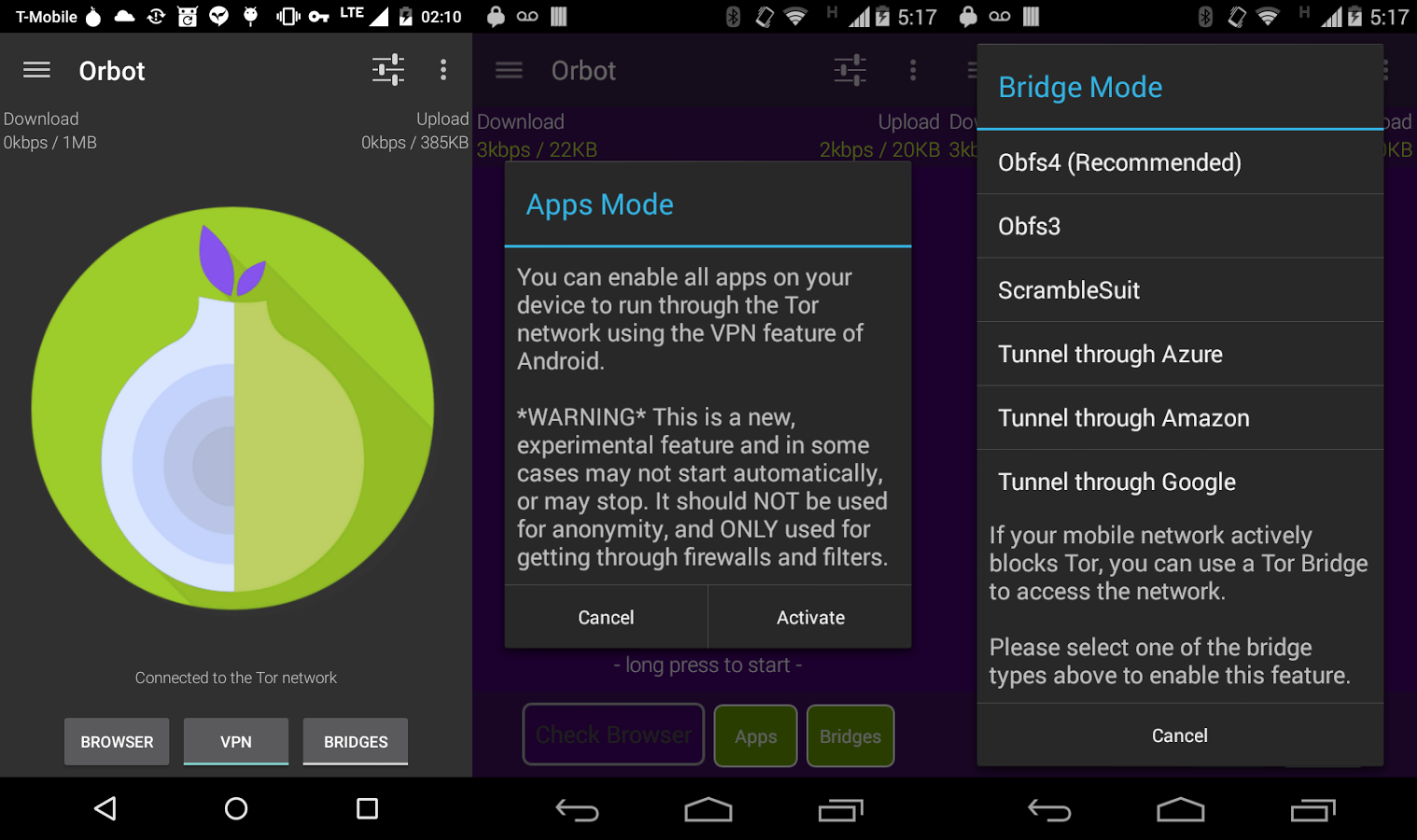
Orbot encrypts your web traffic and routes it through a system of nodes/relays around the world. It’s open source and if your phone is rooted, you can route all app traffic through Tor, not just the internet.
Google Play Link | Source Code
Conclusion
As you can see, being safe and secure while using the internet is easy. As technology becomes more advanced and the Internet of Things becomes further entrenched in our lives, privacy will become more important in the future.
Further Reading: www.privacytools.io – encryption against global mass surveillance 🔒
Vtin 20W Waterproof outdoor Bluetooth speaker (review)
I’ve been on a binge lately of reviewing accessories from brands you probably haven’t heard of outside of Amazon. It’s been a goal of mine to get more information out to you readers on products that are more affordable. Keep in mind, I love the expensive stuff as much as the next person, and if I was worried about reviewing everything I liked, it might not make the most sense for our audience. Sometimes it just doesn’t make sense to spend and extra $100-200 just for a little extra that will be hard to notice over time.
Technology is not timeless. Unlike a Rolex, almost all tech gadgets have a limited lifespan and it’s not always necessary to drop the most money you can afford, especially on accessories. I’ve been using the Vtin 20W waterproof outdoor speaker and am happy to tell you there’s another great option for your wireless music under $40.
Vtin 20W Waterproof outdoor speaker – Build
The Vtin 20W wireless speaker is a rectangular and rugged device that’s built to withstand the elements. It is a metal framed seven inch speaker that’s a great size for portability with its rubberized exterior. There are two front facing drivers with a rear facing subwoofer which is usually found on higher end speakers such as the Bose SoundLink Mini II.

The drivers and subwoofer are protected by metal grilles that are very sturdy and provide excellent protection. Controls are found on the top of the speaker and are protected by the rubberized coating. The controls are the basic + for volume up (hold for 1s) and fast forwarding songs with a click. The – control is for turning the volume down and rewinding to the previous song with a single click as well. There’s also a power button and a call answer/end button on the top as well.
On the side of the speaker is a port for a microUSB charger, as well as a 3.5mm AUX input protected by a rubber flap. On the opposite short end of the speaker is a loop for attaching the included carabiner so you can hook it to a backpack or tent when outdoors.

The exterior protection is rated to withstand splashes and drops with an IPX4 rating. Overall the Vtin wireless speaker is very well built and is definitely built to withstand the elements.
Sound
The Vtin 20W wireless speaker manages to find a great amount of clarity and balance in the mids and highs. It’s actually quite detailed on the highs which is great for outdoor listening, as highs tend to travel better over distance than lows and mids. Rugged speakers that don’t sound good indoors are a no-go for me, but the Vtin sounds just as good sitting next to me on my nightstand as it does when I’m at the park.
Even though the Vtin wireless speaker has a relatively large subwoofer on the back, it doesn’t manage to drive the deeper lows that you’d want with rap or hip hop. The speaker would probably perform better in with the low frequency range if it had a bass port to move more air, but that would probably sacrifice the IPX4 rating. Nonetheless, the lows are present enough to make music enjoyable.
The Vtin 20W speaker also gets loud enough to enjoy outdoors on hikes with its compact size. It’s also loud enough to entertain a group at a standard sized campsite, while not being loud enough to disturb the whole campsite. Also with its lack of emphasis on bass, it definitely won’t be bothering next door neighbors and that’s a good thing.

I love audio products and have ever since I got my first tape deck as a kid. I’ve listened to a wide range of speakers in all price categories, and have massive floor standing towers in my office with a 15″ sub. I’ve also owned and listened to earbuds and headphones in the $1000+ price range, and while it’s fun to be very analytical, what matters most is if I actually enjoy the speaker/headphones I am listening to at the moment.
The Vtin won’t meet many audiophile’s needs, but for someone who has listened to a wide range of audio products, I find myself singing along with the Vtin just like my other high-end products. That’s they key to loving audio products, is enjoying your music and I definitely get that with the Vtin wireless speaker. Once you’ve “been there and done that” you realize that price is most important factor at the end of the day.
With that being said, I’m not a huge fan of the included microphone for taking calls. It picks up a little too much background noise and the person on the other end of the line struggles to hear me at times.
Battery Life
The Vtin wireless speaker’s biggest accomplishment is its outstanding battery life. The manufacturer states 25 hour battery life at 70% volume, and I can attest to it. It has a 4400mAh battery and I got through several cycles of 20+ hours of usage. That’s pretty insane for a portable speaker that manages to not feel heavy.
20+ hour battery life makes sense for being an outdoor speaker since many people might not have access to a charger for a couple of days. It’s also double or triple the battery life of competing speakers in the rugged category.
Overall
I’m impressed with the Vtin 20W waterproof outdoor speaker. The list price for the Vtin wireless speaker is $39.99 at Amazon and is well worth the price.
Let me emphasize, the Vtin holds its own against speakers double and triple the price in the sound department with its clear and detailed sound. It puts out sound thats enjoyable, loud and sing-along worthy.
The battery life is the star of this speaker and there are very few that can compete no matter the price range.
Also at $39.99 you won’t worry about getting it wet or dirty when you bring it along on your outdoor adventures. It’s an all around great speaker for the price that won’t make statements with a fancy exterior, but the substance is all there.
From now until October 31, Vtin has given you AndroidGuys readers an exclusive discount code (88GD8B7V) to save $5 to bring the price down to $34.99 at Amazon with free Prime shipping.

Sasha Weather Free: Simple is the name of the game

Developer: Sasha Lab
Category: Weather
Audience: Anyone who goes outside
The Beginning
I have reviewed a few Weather apps in the past. Storm and Amber Weather to name a couple. These apps were for the more hardcore weather fans out there. They had many options and settings that could be added or changed. Both are designed well and are really robust!
Sasha Weather Free is not robust.. at all actually. But what it is, is a really good, simple way to see the current temperature and the current 7-day forecast for your current location or a manual location that you pick.
The Middle
Let’s start with the permissions that are needed for this app. First, in order to automatically find the weather where you are, the app needs access to your location. It will work without allowing this but it’s nice to not worry about manually putting in your location every time you want to look at the forecast. The second is to allow the app to access photos,media, and files. This one is a little riskier as I am not sure why the app needs to be able to read and delete things from your phone. So use your own discretion before allowing this. (I did not allow it on my phone)

Location

Media
Once we get past the permissions it’s time to dive into the app. Remember this is a really  simple app but it gets the job done. The first thing that CATches your eye is the cat theme. (See what I did there?) The first action I took was to change all the settings to things that made sense to me, Frarenhight, MPH, inches, those types of things. Just click the hamburger button on the top left then click units to change these.
Once you come out of the settings pane you will notice the big weather icon in the middle of the screen. This changes depending on the current weather. So if it’s sunny out you will have a big sun shining, at night you get a nice little moon and stars animation, if it’s partly cloudy there is the sun with some clouds over it, I think you get the picture. Scroll down just a little and you see the current temp and a message from Sasha the Cat.
Moving down the page we see today’s high and low, this box is clickable, clicking it give us the most info that we will see about today’s weather. There are the usual things here, hourly forecast, precipitation and some more details about what’s going on outside right now. And finally scrolling to the bottom give us the rest of the 7-day forecast. There is also an ad at the bottom of the page but does not seem to change and is for Sasha Lab’s other app.


The End
Overall this app provides the needed info to know whether you will need your rain coat or snow boots before going outside. It is not as robust as some others but gets the job done and looks pretty good while doing it. Sasha seemed to get my location before even the best apps, the temps seem just as or more accurate than Weather Bug. (which is my main weather app) They also give us two home screen widgets, the first is the Cat theme with all the currents and the second is a more “normal’ widget that gives the current and the rest of the 7-day forecast. It does not use the material design so that takes it down a notch or two in my book. The cat theme is a little strange to me but I won’t hold that against it. If you just need the basics and don’t want to mess with all the bells and whistles of some of the other weather apps out there then you should give Sasha Weather Free a try.
App Link: Sasha Weather Free
Back to school gear: Belkin will keep you charged all day long

So you’re all settled into your dorm and find yourself getting into a few routines. Things sure are different now that you’re not at home or school like you were last fall, huh?
Now you find yourself running all over the place, getting into new situations. But, we’re also willing to bet you’re finding that your phone isn’t lasting quite as long as it did last year. Why? You’re probably away from outlets and power sources more often. Not to fear, there are plenty of great companies offering excellent accessories to help keep you juiced up. One such brand we’ve come to love is Belkin.
We’ve recently spent some time checking out a number of products from the current Belkin lineup. Among them are USB Type-C cables, a car adapter, and a power bank. We found that each one of them was designed with care and attention to detail. It’s not hard to screw up a cable or go cheap with quality, but it seems Belkin spent plenty of time on materials. Suffice it to say, we don’t see these fraying or falling apart any time soon.
MIXIT↑ Metallic USB-C to USB-C Charge Cable (Also Known as USB Type C)
USB Type-C is one really cool technology standard. Not only does it allow for super fast transfer speeds, but it can be used across multiple devices for charging, too. And, as if that were not enough, it’s full reversible so you can plug in any way you want.

Belkin’s cable is six feet long so it’s more than enough to get out from behind the outlet tucked under your desk. Moreover, it’s designed with a welded shield to strengthen it; the metallic cable won’t tangle either.
MIXIT↑ 2.0 USB-A to USB-C Charge Cable (Also Known as USB Type-C)
With so many new smartphones moving to USB Type-C as a charging standard, it’s time to start replacing your old microUSB cables. Sorry, they’re just not going to work any more with the hot flagships.

Belkin’s USB-A to USB-C cable, which comes in all sorts of great colors, is the exact cable you want for replacing your old stuff. Don’t throw away the old adapter itself, though, as it’s gonna work with these. Moreover, keep one of these in your backpack so you can plug into a laptop for data transfer.
MIXIT↑ Metallic Power Pack 6600
Whether you walk across campus or drive from course to course, you’re going to find yourself away from a wall charger. Don’t let that time spent in class keep you from charging your phone or tablet. Heck, it has two ports so why not use it to make a new friend this fall?

The Power Pack 6600 offers up enough juice to top off your phone a solid two or three times over. If you’re the kind who only needs to keep things up in the higher percentages, you can use this guy all week long. Plug in every couple of hours and you’re good to go.
Thanks to the four-light LED indicator you’ll always know, within range, how much power is left in the charger. Pick this one up in Rose Gold, Gold, Silver, and Gray options.
USB-C Car Charger + USB-C Cable
Do you have a newer smartphone like the Samsung Galaxy Note 7 or OnePlus 3? What are you doing for a car charger? Did you know there are car chargers with USB-C connections? Yep, and the Belkin model comes with a 4-foot cable to make sure your backseat drivers can charge up their handset.

This 27Watt/3 Amp charger connects to any USB-C device, including smartphones, tablets, and even notebooks. With up to 27 Watts of charging, the unit automatically detects the connected device so it can juice up at the proper speeds; you’re looking at potentially 70% faster charging for smartphones.
The Teclast X98 Plus II Android tablet is a nice media viewing device that won’t break the bank (review)

The Android tablet market is terrible. Apple’s iPad dominates the landscape in the shrinking overall tablet space and it seems that no-one really cares about putting out new tablets besides Samsung. But, there are those of us who still believe in tablets. There are those of us who want a bigger device for media viewing than the 5.7″ one we keep in our pocket. So, where are we to turn for a cost effective alternative to Samsung’s heavily skinned options and the iPad? Turns out that China is the answer.
Gearbest.com wanted to team up on a review and I was instantly attracted to its tablet lineup. Not only do they have a nice lineup of Android tablets, but it also has some interesting options that run both Android and Windows. I selected the Teclast X98 Plus II (pure Android version) to review for its good looks, screen size (9.7″) and nice price (~$130 at the time of writing).
My expectations weren’t high before receiving the device. I have always had this expectation when ordering a no-name (in the west) brand for a cheap price that I’m going to get something not worth even the discount price I’m paying. But, I have to say I was pretty surprised once I put the device through its paces.
Hardware
Let’s begin with internals. The X98 Plus II has an Intel Cherry Trail Z8300 quad-core 1.4GHz processor. The processor is designed to be a power efficient chip used specifically in tablets so it won’t put out too much heat or burn through your battery too quickly. The chip in this specific tablet is clocked at the low end of its capabilities and you should expect performance somewhere in the range of a Snapdragon 801 processor.
2GB of RAM and 32GB (25GB usable) of storage come standard in the tablet, which seems to be about the base requirements these days for smooth performance. Luckily there is also a microSD card slot for expandable storage (up to 128GB). Don’t waste your money on a card any higher than 128GB. Sometimes you can get devices to read cards at a higher advertised capacity, but the Teclast X98 Plus II would not read my Samsung 256GB micro SD card, but had no issues with my SanDisk 32GB card.
In addition to the microSD card port, you also get a headphone jack, micro HDMI port, micro USB port, and DV (5V) inputs. No DV charger came in the box so you’ll be charging up the 8000mAh battery via the micro USB port unless you source your own.

Cameras dot the front and rear of the device but they should not be used for any more than a skype conversation. They’re pretty standard low-end cameras that will make you wish you grabbed your phone out of your pocket to snap a picture rather than using the tablet already in your hands.
The display doesn’t have the highest max brightness in the world but it’s more than good enough for watching YouTube or Netflix on the couch. Viewing angles on the 2048×1536 (260 DPI) panel are fine with almost no color shifting, but where the X98 Plus II is let down is the construction of the display.
 Max brightness outside
Due to how its manufactured, the picture looks very far away from the display. Another issue that crops up is that due to the material on top of the screen, you’re going to pick up a ton of marks and scratches. I haven’t tried to be especially gentle or rough with the device in the few weeks that I’ve been using it, but I have a ton of marks and scratches that make viewing the display a real chore if any kind of light is shining on it.

Touch sensitivity is also not up to par with phones and tablets released in the past couple of years. The laggy or missed touches can make for a frustrating time using the tablet.
Software
If you’re into running the newest version of Android, you may want to avoid the Teclast X98 Plus II. But, If you care about just having something to watch media on and browse the web, the included Android 5.1 should do just fine for you. This is a mostly stock build with just a few added applications.
I only count six added applications on top of stock Android here. I’ve disabled Baidu, a Boot Manager, an OTA utility that gives me an error every time I try to use it, and three apps that have Chinese names. Honestly, just ignore or disable them and you basically have a big stock Android 5.1 tablet.
 Common sense software additions in the navigation tray
Teclast made the effort to add a couple common sense software additions like adding software buttons in the navigation tray for volume up and down as well as a quick launch for the camera and a menu button. The navigation tray generally has a lot of wasted space in Android tablets so it’s nice to see an OEM adding in nice features like this.
Performance
What kind of real world performance can you expect out of a $130 (at the time of writing) 9.7″ tablet? If you don’t have out of this world expectations, you’re probably going to be happy. I didn’t have high hopes for the X98 Plus II going in, but I came away pleasantly surprised. What you have to remember is that you’re working with hardware that would have been deemed flagship-worthy in 2014.
I used the tablet as a mainly a media consumption device. I was able to stream YouTube at 720p60fps with ease. When I bumped it up to 1080p30fps is when I saw some issues. After every video, YouTube would reload as if it was knocked out of memory while viewing the video. This can be frustrating if you’re going through your subscription list watching multiple videos, but otherwise, it was a pretty good experience.
I did not see much in the way of home screen redraws (which I did expect to happen) but apps were often knocked out of memory and had to reload fresh. I could get some music streaming while looking at facebook or reading Reddit, but nothing much beyond that would stay in memory. This seems par for the course for 2GB of RAM devices in 2016 with the demands apps are putting on the OS and hardware.
If you’re in the market for something that can run huge games, this is not for you. But, if you’re looking for something to play a bunch of media off a microSD card or streamed from YouTube or Netflix, you should be fine.
Conclusion
A premier tablet this is not. What the Teclast X98 Plus II can offer you is some nice performance for the price if you’re willing to make some compromises. We’ve seen the budget phone market explode with cheap, good options and this tablet reminds me of that. It’s not perfect and you’re definitely going to be missing some features of higher end tablets, but this can do a lot of the basics.

The speakers aren’t amazing, but they do get loud enough to listen to your media in your living room. Everyone else on the train will be thankful that it doesn’t get much louder and forces you to use your headphones. I like the build construction and how clicky the buttons are, but the tablet could use some revisions in other places like the durability of the display.
I really have enjoyed my time with the Teclast X98 Plus II because it filled a gap in my device lineup without breaking the bank. Watching and reading on my phone is great for sitting in the passenger seat or in a waiting room, but I do want something a little more substantial when I’m at home on the couch. If you don’t expect top tier performance while looking for something affordable, you could be quite happy with your purchase.
Product link: Teclast X98 Plus II 2 in 1 Android 5.1 Tablet PC
Disclosure:
Gearbest.com provided this tablet for review on AndroidGuys.com without any promise of a positive review. The tablet was used for a period of three weeks between 8/18/2016 until 9/6/2016.
UNITEK 60W 10-port Charging Station with QC 2.0 (review)
The number of tech gadgets I own is getting embarrassingly high. Smartphone(s), tablet, smartwatch, fitness tracker, wireless headphones, Bluetooth speaker, and portable battery are some of the many portable gadgets I own.
Almost all tablets and smartphones come with single port USB chargers, but many accessories do not. The solution is to use the same wall charger while switching out the charging cable if need be. There’s also multi-port chargers which are nice to have, most of which go up to five output ports. The main issue with these desk style chargers is they don’t provide a good way to keep things organized which can lead to a mess.
Even though I live alone, this mess really bothers me and it has bothered me for a long time.
I like to be organized, and I finally broke down and did a search of charging stations that would clean up my bird’s nest of wires. That’s where the UNITEK 10-port charging station comes in to save the day.
Design and Usage

The UNITEK 10-port charging station is a flat charging station with 10 USB ports with each port able to deliver power at 2.4A. There’s also one USB port (at the end in the image with the green slot), that is Quick Charge 2.0 compatible meaning it can charge certain Android devices (Galaxy S6, S6 edge, Note 5, LG G4, LG V10) at maximum speeds. No matter what your device’s charging needs are, UNITEK’s smart circuitry will auto detect the proper settings and charge your devices safely for every individual port.
The flat charging station is designed with multiple slots to insert fins so you can organize your devices to fit your specific needs. When setting up the dividers, you’ll want to make sure to make them fit as tightly as possible for larger items like my iPad Pro 12.9″. If the dividers are too far apart, the tablet will lean on the plastic divider which will cause it to bend. If it’s set up properly though, it will have no issue with holding it upright. It’s all about physics and torque. The more upright the heavy item is, the less pressure it will put on the fins holding it up.

You can keep the slots narrow to slide in smartphones, batteries or tablets, while leaving wider charging slots for things like wireless headphones and smartwatches. What’s particularly nice about having 10 USB ports to pick from, is the ability to add devices when I make another purchase. The fins are not permanent installations meaning you can reconfigure the setup anytime you want.
There are some of you who are thinking, “Why do I need 10 charging ports when I only have three devices?” The answer is you don’t need 10 charging slots right now, but you may in the future. As technology progresses, more and more products that once required wired connections are now going wireless. In my case, I really need more than five charging ports for my desk.
With a charger of this capacity, if you were to charge 10 devices at a single time, it naturally generates heat during the energy transfer. However, UNITEK planned for that scenario quite well and installed various vents all over the device.

With the adequate ventilation, I never experienced heat concerns, nor is there a need for an active fan to cool the charger. There’s only one input to power this charging station which is nice for keeping my wall outlet free to use for things like a desk lamp, or desktop speakers. The power input is also compatible with 100-240V meaning you can use it worldwide without a converter.
After taking about five minutes to set the charging station up, my desk went from mess to organized and freed up quite a bit of space.
Before

After

The result speaks for itself. Look how much cleaner my desk is with the UNITEK 10-port charging station. This charging station is also good for families and can be set-up in common areas like the kitchen or living room since the footprint is so small. It’s simply a great way to stay organized while only using one wall outlet.
Summary
The UNITEK 10-port Charging Station with QC 2.0 is available to purchase at Amazon for $59.99 with free Prime Shipping. If you have a need to charge multiple devices, as well a need for cleaning up messy wires, the UNITEK charging station is a great charger that I can recommend wholeheartedly.
I feel so much better that my desk is organized, but even better I love not having to unplug and plug devices in, with my limited 5-port charging station I used to deal with before this charger saved the day.
Learn more about the UNITEK 10-port Charging Station with QC 2.0 at Amazon.

 AIVAnet