


The Syllable D900 Mini Earbuds are truly wireless and are easy on the wallet (Review)

The ability of electronics to be wireless has become a staple in our lives. I can’t count the number of times I’ve forgotten that my headphones are connected to my laptop, only to suffer minor whiplash while walking away. Talk about first world problems! The Syllable D900 Mini headphones are truly wireless earbuds that won’t leave you broke.
Build
- Model: D900 Mini
- Color: Black
- Bluetooth Version: V4.1
- Talk/Listening time: Up to 120 minutes listen or talk
- Weight: 5 grams
The package comes with left and right bluetooth earbuds, one extra eartip adapter, a micro-USB charger, a headphone carrying pouch, and a charging station

I was pretty blown away at how small these headphones were given that they are truly wireless headphones. The headphones weigh a minuscule 5g, which is equivalent to a sheet of paper. The diameter is roughly the size of a nickel. I found these headphones to be weightless and pretty comfortable.

The left earpiece is considered the main headset, while the right earpiece is considered the subsidiary headset. This means that the left earpiece must be on for the right earpiece to work. Each earpiece has to be powered on if you want to listen to both headphones, which became a bit tedious. The main left earpiece can be used own its own. It’s a great look if you want to look like a bodyguard.
Syllable keeps it simple with the headphone controls. There is only one button on each headphone to work with, and that button is the outside of the headphone. Due to the small nature of the headphones, having more than one button would complicate the earbuds. Long pressing the left headphone turns it on and makes it discoverable to your phone. The only things you can do are pause and play music and answer phone calls. Double-clicking the left headset will call your most recent contact. Most of your controls will be done through your phone.

Usage
I primarily used these headphones in the gym. I can assure you that these headphones will not fall off your ears. Over several weeks of usage, I did not have them fall out once. I’ve been quite fascinated with Olympic lifting movements and these headphones stayed put during my clean and jerk lifting sessions. They also stayed firmly in place during cardio sessions such as running on the treadmill or using the rower.
These headphones really benefit from being truly wireless. I know from experience that cords get in the way during a squat or bench press session. There have been countless times I’ve pumped myself up for a big lift only to have the wire disconnected from being pulled out. Even bluetooth headphones that connect earbud to earbud still get in the way from time to time.
Hands-free calling works well on this device. The left headphone is the only one that will work with this feature. I called my friends numerous times using the hands-free option and never had a problem with communicating with them. Occasionally the headphones would echo on the other end. There are very few headphones that never go without echoes.
The charging unit is a unique feature of these headphones. The plastic case that comes with the earbuds doubles as a charging unit. Syllable claims that the charging unit can fully charge the headphones four to six times. I personally found that it was closer to four times. The charging unit is charged via micro-USB.

It’s a good thing the charging unit can charge the headphones multiple times because the battery life of these headphones are not great. I got around 90 minutes of use at 75% volume before they died on me. If you hear the indicator go off, you have about five minutes before they completely die on you.
Sound
The most important feature in any headphone is sound quality. With a focus on the mid-range and bass, the Syllable D900 Mini headphones are designed for upbeat music. Genres such as hip-hop and pop will benefit most from these headphones.
Since these headphones are designed for people on the go, it is imperative that they can get loud to drown out background noise. These certainly get quite loud because I never turned them up to 100% and they never got distorted or crackly. I noticed that even with the volume turned high, there is very little sound leaking out of the headphones. This saves me a lot of embarrassment when I have Call Me Maybe on repeat at the gym.
Conclusion

The Syllable D900 Mini headphones are certainly designed for a specific type of user. True wireless headphones are a rarity right now, but are gaining traction with companies like Apple and Samsung joining the mix.
These headphones are designed for those who don’t want to be connected by wires, even if they are connected by earbuds. The Syllable D900 Mini are no larger than a nickel, have a portable charger, and are tuned for upbeat music. They can be found on Amazon for only $49.99 with free shipping. Wireless freedom comes at a cost, and that is battery life. The Syllable D900 Mini headphones only get around 90 minutes per charge, which is on par with Samsung IconX earbuds which cost four times as much.

Roundup: Five essential tech accessories for the holiday travel season

With the holidays on the horizon, many of you will be traveling somewhere across the country. Thanksgiving is the most traveled holiday of the year, with Christmas right behind it. It’s when we get off time from work and school to take time to relax and spend time with loved ones.
Our dependence on smartphones and tablets is higher now than ever. We use our devices to entertain, capture memories, stay in contact with friends, family and work colleagues, get directions, research topics, and even as boarding passes for flights. Being prepared for the holiday season may prevent headaches from traffic, delayed travel, sickness or even lost luggage.
We’ve gathered five incredibly useful accessories for your smartphone that you should consider taking on your trip.
RavPower 22000mAh Ace Series power bank

With three smart USB 2.0 ports available, and 22000mAh of power, this portable power bank is built for power users, families and long trips. It’s sizable at 6.81 x 0.87 x 3.19 inches, and just over a pound in weight. All three ports will work at the same time, providing a max output of 5.8 amps.
Most smartphones have internal batteries that range in size from 2500-3800mAh. Generally those sized batteries equate to almost a full day of average usage no matter which phone you are using. If you are talking on the phone, texting, watching movies, or listening to music while traveling, your battery will consume energy at a much faster rate. Wall outlets are limited at airports, so bring your own power along for the ride.
The RavPower Ace Series 22000mAh can get most single users through a full week without ever needing power from an outlet. Or it can charge three devices at the same time keeping everyone in the family happy and connected.
RavPower has made quality accessories for years and the Ace Series portable power bank is another great buy at $39.99 at Amazon. Once you’re done with your holiday travels, this power bank also serves as a great backup source for power during power outages.
TrackR Bravo
The TrackR Bravo is a Bluetooth and GPS tracker that will help you locate lost items. It’s an invaluable accessory when home, but even more so on the road. We’ve heard of way too many stories of losing wallets, tablets, smartphones and keys. It is a coined sized device that slips into your wallet, clips onto your keyring, and connects to your phone or tablet through the iOS or Android app, to provide distance, GPS and audio functionality for locating your precious items.
It’s made out of aluminum for maximum durability and minimal weight.
A single TrackR is only $29.99, while a pack of three is on sale for $89.99 with free shipping at http://www.thetrackr.com. If the TrackR saves your keys, mobile device or wallet one time, it already paid for itself. Hopefully you won’t ever need to really use it and the investment is for your peace of mind on your travels.
Zhiyun Z1 Gimbal – Say goodbye to bouncy videos

It goes without saying that our smartphones are incredibly important for capturing memories. And we snap and record more memories on vacation than at other times.
Have you ever wondered how people manage to get such steady photos and videos? Chances are they’re using a gimbal. Gimbals were originally designed to keep compasses or chronometers horizontal in moving vessels and so captains could maintain direction when steering. Engineers adapted the technology for average consumers to use with their personal smartphones to end shaky photos and videos.
The Zhiyun Z1 Gimbal isn’t a cheap investment at $199.99, but it’s compatible with a wide range of smartphones from Android and iOS. When you’re watching the videos you made a year or several years from now, you’ll be glad you invested in this gimbal as your memories will be recorded properly.
WHOOSH! – It’s time to take tech hygiene seriously

Hygiene is one of the most important lessons humans learned over the last 200 years and has contributed to longer lifespans. We brush our teeth, wash our hands, and put on clean clothes everyday. Yet most of us almost never clean the devices we use the most; some of you even use those devices in the restrooms which makes for some nasty devices.
It’s peak flu season during the winter months, and viruses and bacteria are ripe for infecting unsuspecting victims. Make tech hygiene a regular habit and it may help prevent you from getting sick. Our resident Editor and Scientist Derrick Miyao reviewed WHOOSH earlier in the year and swears by it.
WHOOSH! starts at $10 for a 1oz bottle and is a worthy investment for the holiday season.
Bluesmart One – The smartest luggage you can buy
The Bluesmart One smart luggage is one of the most well rounded travel accessories on the market. Not only is it a hard suitcase with wheels, but it is also a portable power station with GPS tracking abilities that connects to your smartphone. It also has a built-in scale to ensure you don’t overpack, and can be remote locked to prevent would be thieves from stealing your laptop or other valuables.
Over 10,000 backers made the Bluesmart One possible through Indiegogo almost two years ago, and it is still selling like hot cakes.
Oh yeah, it can also pack your clothing too!

The Bluesmart One measures at 22″ x 14″ x 9″ with a storage capacity of 34L. It’s perfect to use as a carry-on for 2-3 day trips. It can be purchased at Amazon for $449 with free Prime shipping.
Wherever you might be traveling this holiday season, the writers here at AndroidGuys wish you all safe travels and well wishes. Make sure to put down your devices and appreciate the loved ones in your lives.
Cat Torrent: A torrent client in need of some updates (review)

Torrents have been available since around 2001, and the main purpose was to facilitate file transfers among different locations. However, since its inception, it’s been mostly used for shady, illegal purposes. For those of you who use torrents for legal transfer, you might know that there are some pretty good clients in the Play Store. Household names such as uTorrent and BitTorrent have extended their offerings to Android after enjoying much success in desktop environments, while other newcomers such as Flud and tTorrent provide Android-focused solutions.
Developer Pirate Cats has now unleashed Cat Torrent to the masses, promising a straightforward, no-nonsense experience with support for SD cards, speed limits, and a nice interface.
Developer: Pirate Cats
Price: Free
Setup
 Some visual glitches hinder the app’s interface.
Apps that require no setup processes or tedious account creation are always good, and it’s obvious that this developer thinks exactly as I do. Upon launching the app for the first time, you are immediately shown the main screen. No setup needed, no nagging users to create accounts, nothing. Most of the time, if you’re downloading a torrent client, it’s because you know exactly what you’re doing, so Pirate Cats decided to omit a tutorial or other similar introductory views. If you are new to the torrent world, however, then you might want to read something about it first before using this app.
Overview
To start torrenting files, simply press the FAB at the bottom and a file explorer will open. This way, you can navigate to the place you downloaded your .torrent file.
Also, when you download a .torrent file from your browser, Android will detect that Cat Torrent can open this kind of file and will show up a dialog in which you will be able to configure the save path and whether segments should be downloaded in parallel with other segments or sequentially after the current one is over.
 Cat Torrent lets you see useful information about your torrents.
Upon starting your download, the app will show in its main interface the list of all of the torrents you’re downloading. This will show essential information, such as download and upload speed, and the progress of your torrent. More detailed data is a click away. Here you will be able to see the files in your torrent, peers, and comments.
You can also check out torrents in different statuses from the side drawer. Hitting the hamburger button at the top left of your screen will open the options to filter your torrents in different categories such as Seeding, Done, Active, and Inactive. I feel like an easier way of filtering your torrents would have been by adding the option to the top bar instead of hiding them under the navigation drawer, but that’s personal preference. It’s easy to navigate the app, nonetheless.
The Android phone I used for testing was midrange at best, and the app did a poor job of adjusting itself to my low screen resolution. Text overlapped in some views, making for a really poor user experience and something that should’ve been tested further. Other than that, the app performed well under different conditions.
Options
 There are useful options, but some essential ones are missing.
There’s a decent amount of options available to play with. First and foremost, AMOLED screen users will be happy to know that the app not only supports changing the theme to Dark but also to full-on Black color. This should help in keeping those pixels turned off and conserve battery. Another useful option is the “WiFi only mode,” and I welcome the fact that it is turned on by default. This prevents your data from being slaughtered by the constant upload and download of files.
Other settings that users might appreciate are the default downloading location, download files only when charging, and download/upload speed limits. I’ve seen other torrent clients offering the option of moving torrents when finished (so you can save them to your internal storage and then move them to the SD), maximum permitted downloads/uploads, limits (or shutdown) on torrents after a certain battery percentage has been reached, and scheduled start and shutdown times, but, unfortunately, Cat Torrent still doesn’t have that many options available.
Conclusion
Cat Torrent is a fairly new torrent client in the Android ecosystem, but it’s a really solid one, nevertheless. The main functionality of the app is flawless, the interface adheres well to Material Design, and the options it has work just as advertised. However, some more established clients have a wide range of options (which is actually understandable, since they had a head start). Also, some UI flaws make it look unpolished and more like a beta instead of a real app. On the bright side, with some updates to add some useful options, Cat Torrent can easily become a strong contender in the torrent client segment so it’s worth keeping an eye on for future development.
Download Cat Torrent from the Google Play Store.
808 Hex Light: Portable light-show on your hand (review)
The 808 Hex Light Bluetooth speaker is equipped with all the right tools to ensure that you are the life of the party. The combination of six color light modes and an EQ bass booster bring all the elements of a rave-like atmosphere in a compact package.
Build
- Price: $79.99
- Size: 3.55″ wide x 6.3″ tall x 3.55″ deep
- Weight: 1 pound
- Color: Black
The speaker is a conical shape design that starts off narrow at the top and gets wider towards the bottom. The foundation is made of metal that has a hexagonal grill. The top of the speaker is where all of the controls lie. There are buttons to increase and decrease volume, the power button, change light modes, hands-free calling, and the EQ bass booster. Pairing the speaker requires long-pressing the power button.

Sound
The compact speaker packs a pretty mean punch in the volume department. It can get pretty loud before the sound starts to distort. When the volume gets too high, the music starts to sound crackly.
The Hex Light speaker has an EQ mode, which is basically a bass booster. The combination of the EQ mode and the bass radiator provides a significant boost in the bass, while dialing back the mid-range. I could physically feel the table vibrating when the EQ mode was on. This is a good option for those that like bass-heavy genres, such as hip-hop. I personally felt that the bass slightly overpowered the vocals in certain songs and turned the EQ mode off. I noticed that navigating to new songs will chop off the first couple seconds of the song.
Lights
The highlight of this speaker is definitely the lights. The color options include everything in the rainbow spectrum. There are six light modes: Solid, Pulse, Breathe, Chase, Chill and Rave. My favorite option was Breathe and Rave.

The Breathe option slowly lights up in rotating colors, while the Rave option lights up to the beat of the song. You can also turn this option off if the lights start to get annoying.
Usage
I found myself using this a lot around the house. This speaker claims to have an eight hour battery life. I only used it for 4-5 hours before I put in back on the charger. I personally do not like to let my electronics die. I used it at around 60-70% max volume with the light mode turned on. The battery life may decrease if used at a higher volume. However, the speaker will probably not be used at such high volumes anyways due to the distortion of sound. It was the perfect device to listen to music while playing Settlers of Catan. Pairing the speaker to my phone was relatively pain-free. However, the speaker makes a somewhat obnoxious sound when it is turned on and off.
There is a hands-free calling option on the speaker which allows you to take calls. I called my friend using this feature and he said he could hear me clearly without any distortion. It is a convenient feature that doesn’t force you to disconnect.
I really liked the sturdiness of the speaker. The main frame is made of metal with a unique hexagonal grill.

I feel comfortable taking this outside and not worrying about it breaking if it does fall on the ground. The speaker is not waterproof, so use it next to a pool with caution.
Summary
The Hex Light Bluetooth Speaker offers a bass-focused music experience. The single-driver packs a pretty mean punch in the volume department. At $79.99 on Amazon with free shipping, this speaker is a bit pricey compared to the other options available at 808 Audio. However, it offers a unique light-show experience that kids will love. If you are a hardcore music lover this is probably not the speaker for you. This speaker is designed for the younger age group that focuses more on entertainment rather than sound quality.
Jaybird X3 Wireless Sport Headphones: Improved sound, comfort and price make the X3s a winner
Jaybird has been a pioneer in wireless audio for almost a decade, and in a field that seems crowded and stagnant, it continues to push the limits. Almost a year after Jaybird announced the next iteration the ultra popular X2 wireless sport headphones, it has finally released the X3 Wireless Sport Headphones.
Arguably wireless headphones are more important now than ever with Apple doing away with the 3.5 audio jack. Yet Jaybird saw the need for wireless headphones way before Apple ever dreamt of killing off the audio jack, and is now several generations into its products.
Unlike other manufacturers that have vast product lines, Jaybird focuses solely on wireless headphones and the results speak for themselves. The X3 headphones are the latest shining star from Jaybird and are well worth your attention if you love listening to music.
Design

If you know the Jaybird X2 Wireless Sport Headphones, then you’ll be familiar with the X3s. They aren’t true wireless headphones with one wire that connects each earpiece, however there is no cable that connects to your audio device. The X3 headphones are made with metal and ultra durable polymers that are about 40% smaller than their predecessor.
An inline remote house the power button (play/pause, answer/end call), microphone, and +/- buttons for controlling volume and tracks. The inline remote is also where you charge the headphones with the included adapter. The design is very familiar to other wireless headphones, but remember that Jaybird was one of the first to come up with this design.
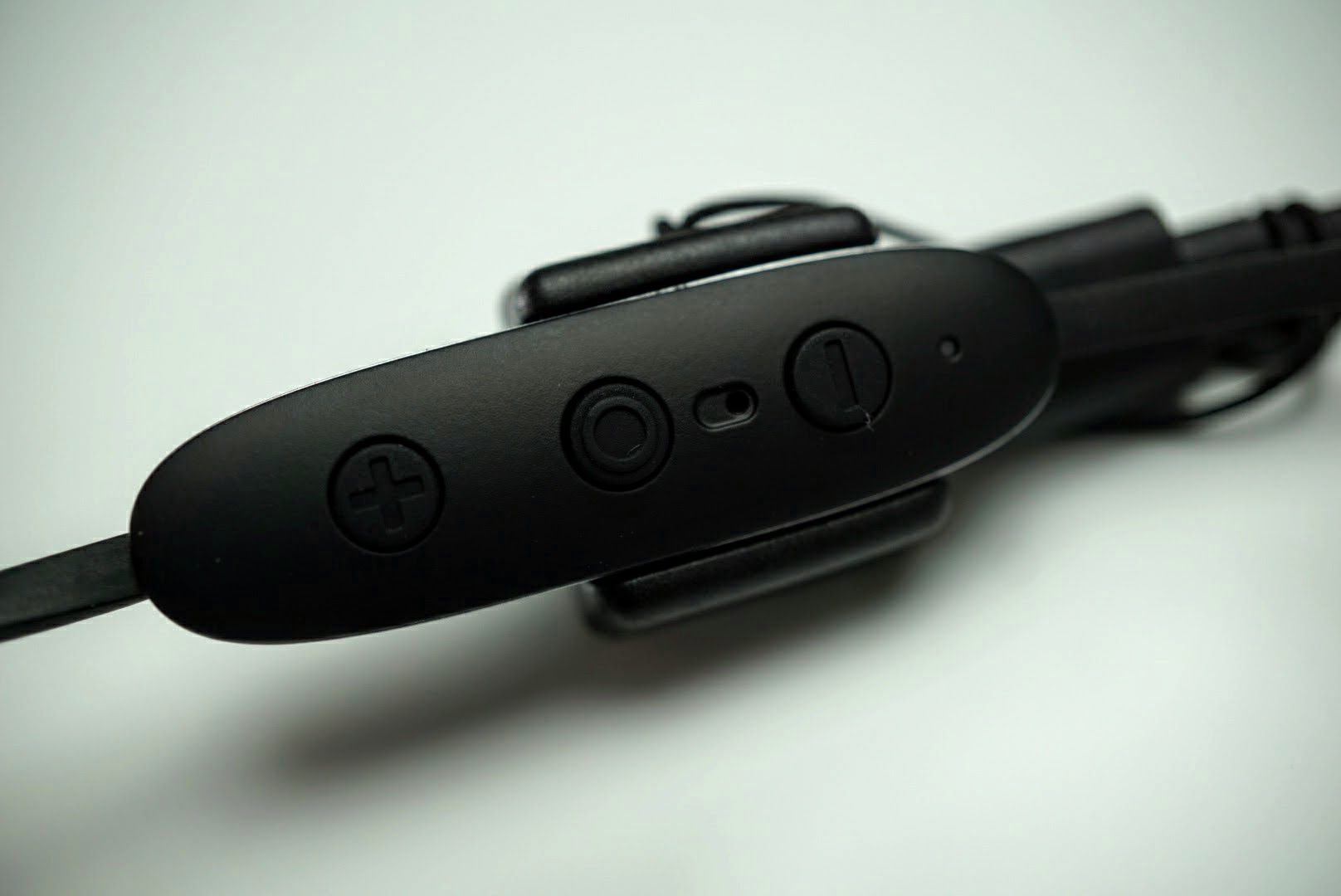
The wire that connects the two earbuds is worn behind the neck with the remote hanging just below your ear.
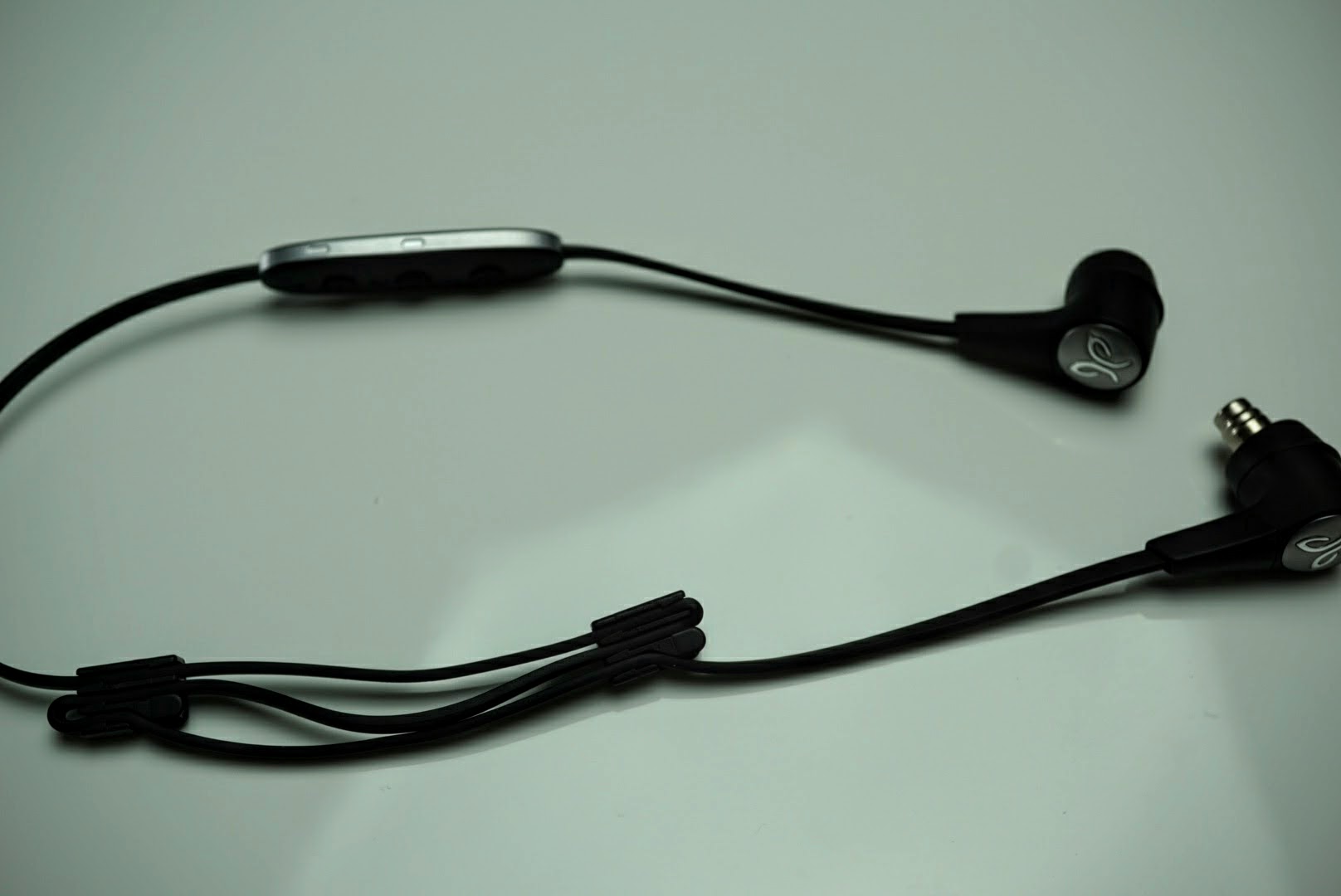
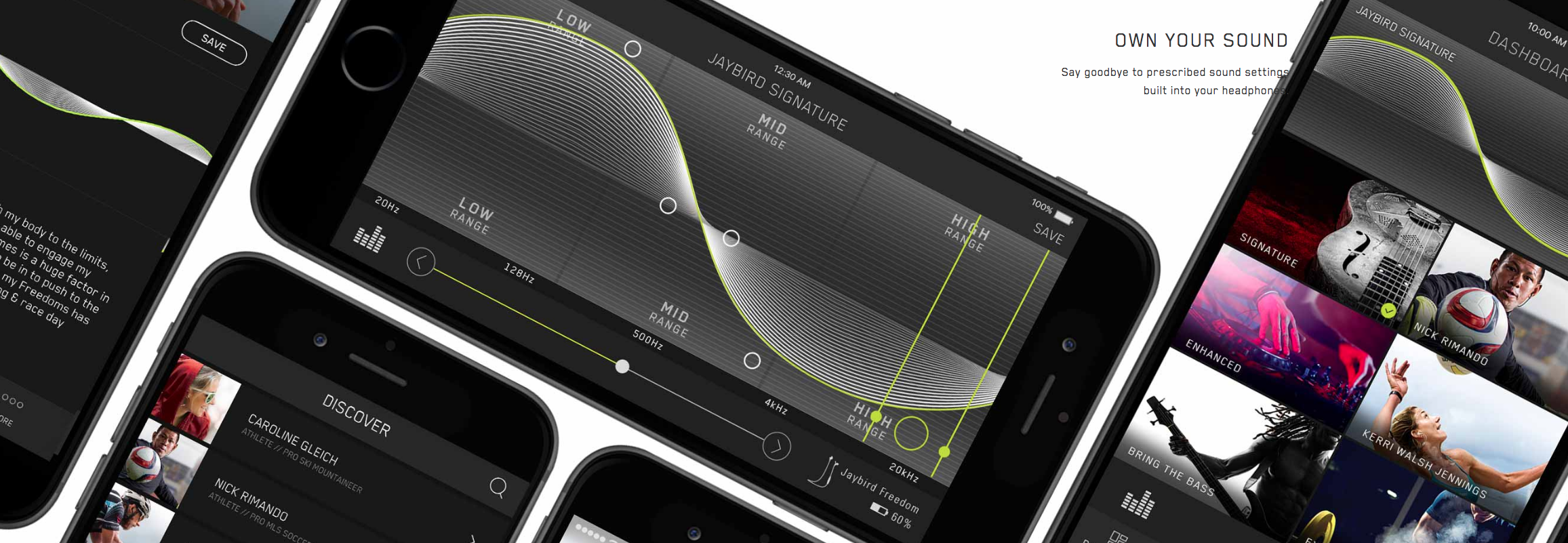
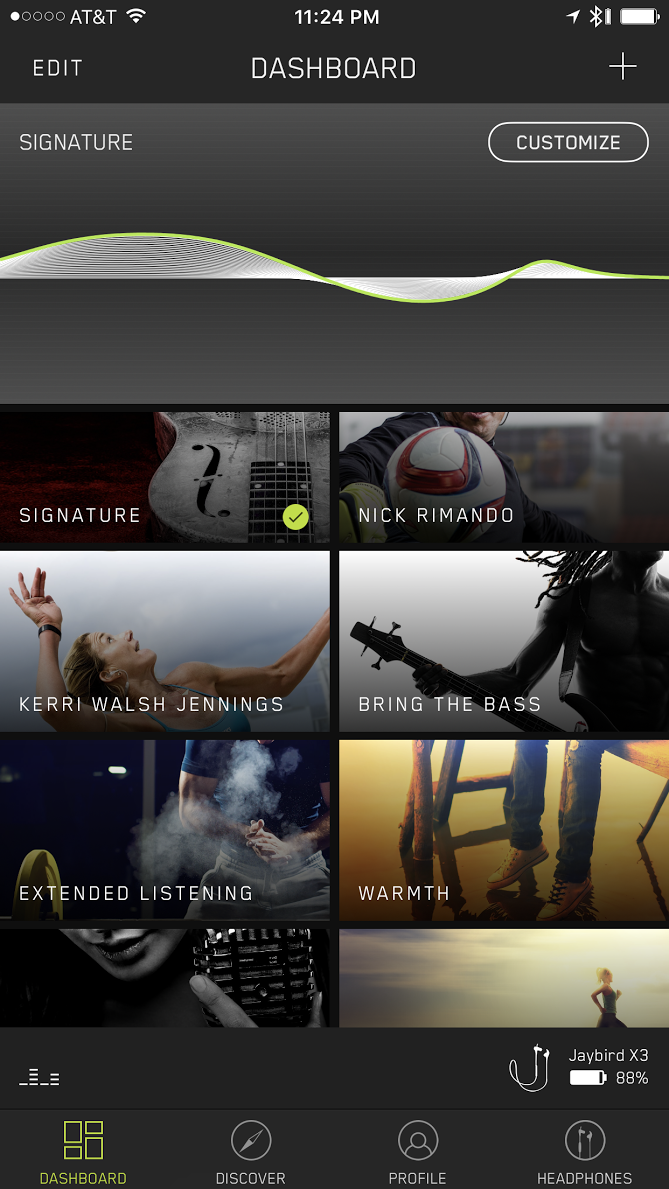
What creates the sound are 6mm drivers in each ear piece that are tunable through Jaybird’s iOS and Android MySound app. Almost all other wireless headphones are tuned to suit a large audience, but with the MySound app, you can adjust the sound settings and firmware within the X3 headphones for complete control and customization.
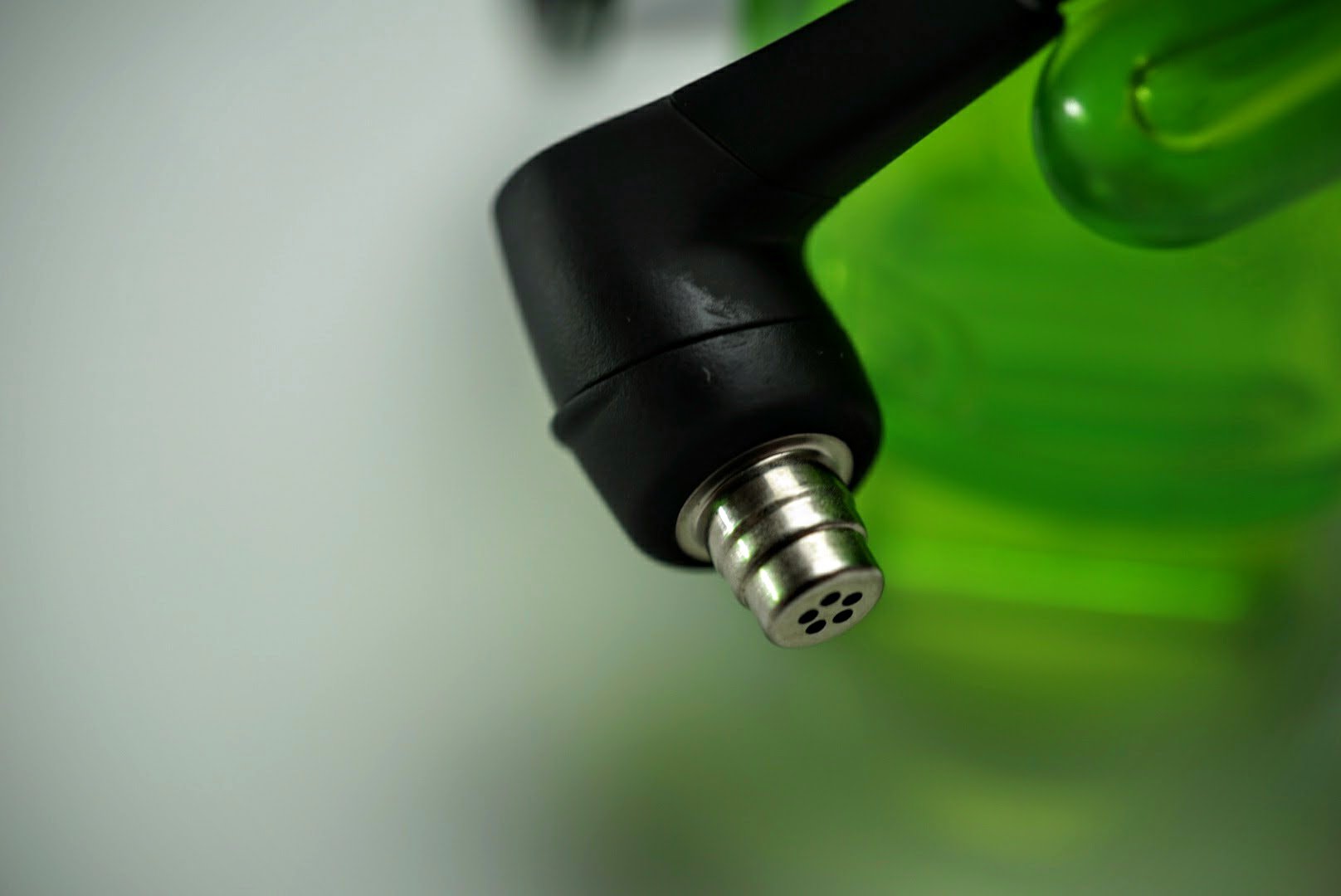
6mm drivers allowed Jaybird to shrink the size of each earbud. Size has been a typical limitation with most users as wireless earbuds are usually large and generally only suitable for men.
Similar to its other headphones, Jaybird designed the X3 headphones to last eight hours on a single charge.
The X3 headphones are also waterproof which is important since they are designed for sport use.
Included in the box are Jaybird’s patented ear fins, comply foam and silicone tips, shirt clip, charging cable, carrying case, cable shorteners, and a carrying case.
Sound and Usage
If you know Jaybird, then you know that it focuses on the entire package. Build, functionality, fit and sound quality are all equally important. It must master each category before it releases a product, and the X3 Sport Wireless Headphones definitely checked each box.
For me, nothing matters more than sound quality. But sound quality won’t really matter if the headphones don’t fit right, and fit won’t matter if the headphones aren’t durable. That’s why Jaybird gives users the ability to customize the sound anyway they want with the MySound app, while offering a plethora of tips and ear fins to get the right fit.

I chose to go ear fin free, and wore my X3s over my ears with cable shorteners to keep the headphones behind my head. This offered the most comfortable fit for me, especially in the gym. I am a gym rat and have been for the past 20 years. I can’t do wireless headphones that rest on my neck. When I am squatting, the bar sits across my traps and neck and can be extremely uncomfortable when a few hundred pounds is pressing a wire into my neck.
While comply memory foam tips are very comfortable and form fitting, I also chose to go with the soft silicone tips since they don’t dampen sound. With a proper fit, the headphones block out almost all of the outside noise and that allows me to truly enjoy my music. I did play with some of the sound presets that Jaybird offers in the app, but was more than satisfied with the balanced sound signature out of the box.
I’ve listened to dozens of different earbuds, wired and wireless, and Jaybird makes the best sounding wireless earbuds you can buy under $200. I’m not sure how the engineers managed to deliver so much sound over Bluetooth and compact 6mm drivers, but they sound detailed, rich and have a large sound stage. Lows are punchy and deep, highs are crisp and clear, and the mids are energetic and balanced that round out the entire sound package. However if you want more bass, less treble, or any combination, you can adjust the firmware settings through the app.
The mid-range sound is probably the most important aspect of sound reproduction. Many sport headphones, and generally many wireless headphones, focus on over emphasizing bass since people love to feel their music. That’s what you get with Beats Audio, but that kind of sound isn’t typically favored by most audiophiles.
Headphones that are too focused on highs can be detailed and analytic, but are tiring to listen to after a short period of time. I can imagine Jaybird sound engineers spending hundreds of hours in a sound lab perfecting the sound signature and they hit a home run with what they produced. If I were one of those engineers, I’d be pretty damn proud of myself for the X3 headphones, because they’re extremely good.
Battery
Jaybird claims eight hours of playback on the X3 headphones, and that amount is on the high end for wireless headphones. I averaged 6-9 hours of playback over two weeks of solid usage. I work out everyday, for a minimum of one hour and went about a week between charges.
Charging the headphones from almost dead to full took less than an hour. Jaybird managed to squeeze the batteries into each earbud while shrinking the size and maintaining the same playback time as its larger predecessor.
Wireless connection and microphone
The Jaybird X3 Sport Wireless Headphones have a newly designed antenna that offers an incredibly strong wireless connection. If you’re using a smartphone, you don’t have to worry about carrying it in front of your face to maintain a strong connection. Or if you’re using a smartwatch that allows music streaming without a smartphone like current Android Wear devices, there will be no signal issues no matter which wrist you wear it on.
I paired my X3 headphones to multiple smartphones, carried them in both pockets, and even left my phone underneath the dumbbell rack while I wandered the gym. I easily walked over 30 feet away and forgot my phone was across the room until the signal cut out at about 50 feet away. Other than that one signal drop from 50 feet, I never once experienced a connection issue with my Nixon Mission Android Wear, iPhone 7 Plus or Pixel XL.
I took several calls on the X3 headphones while I was on vacation in Maui. With a strong wireless signal, and clear microphone, I never once experienced issues with background noise or poor call quality. Keep in mind, Maui gets rather windy in the afternoons, and I dealt with that and background noise while laying out at the beach.
Many manufacturers make call quality a throw in feature, but Jaybird made sure this was an area that met its high standards.
Overall
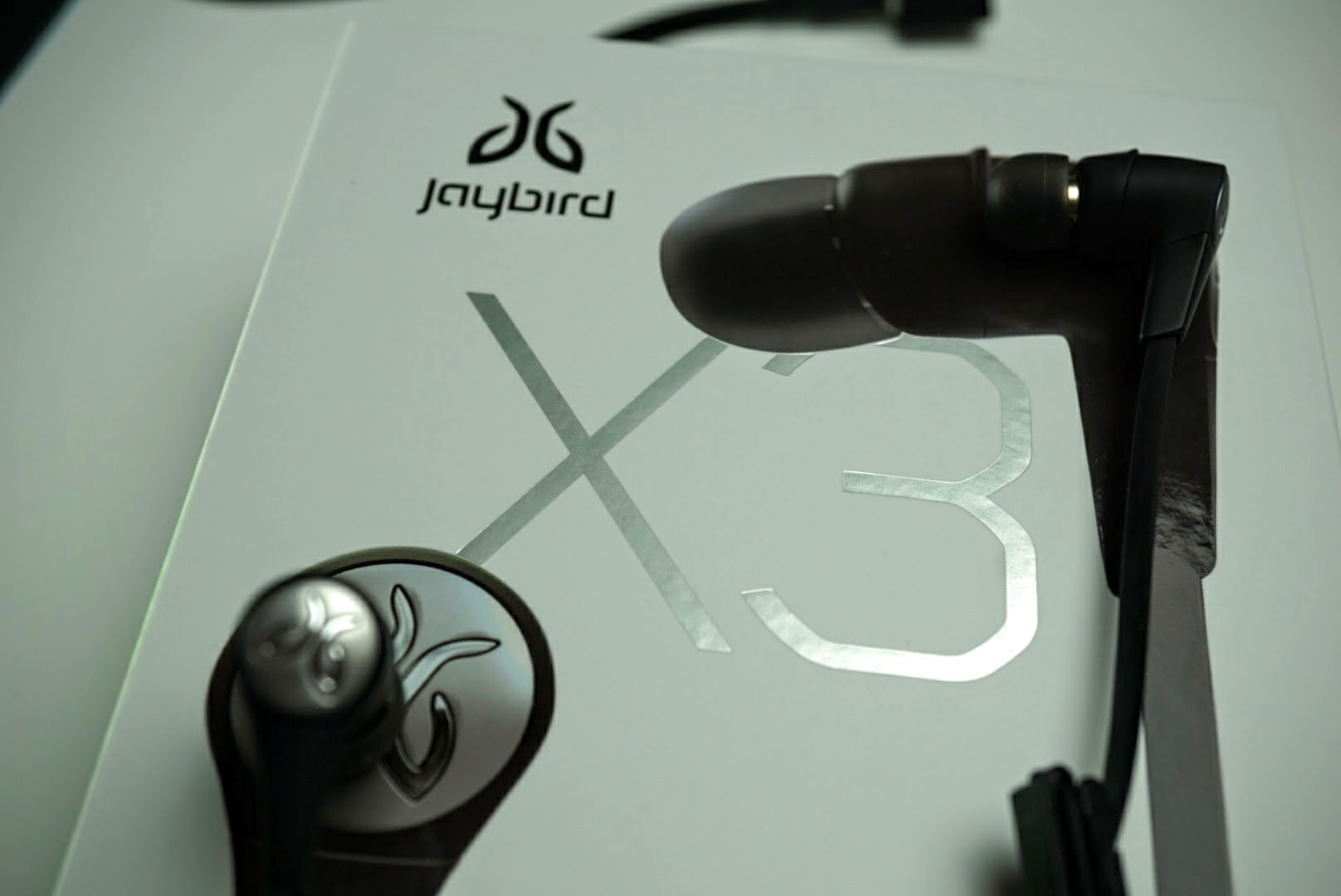
Jaybird managed to build a great set of wireless headphones in the X3s. They’re not cheap at $129.99, but considering the quality of the build, sound output, battery life, MySound app, and call quality, it’s one of the better priced headphones when you factor in the entire package.
The Jaybird X3 Sport Wireless Headphones are designed to fit all ears, from small to large and are good enough to use beyond sport activities. If you’ve never used Jaybird headphones, or if you own the X2s, I highly recommend you try out the X3 Sport Wireless Headphones. You will not be disappointed.
Jaybird X3 Wireless Sport Headphones are expected to be available at jaybirdsport.com on Oct. 27, 2016 and in Best Buy stores and bestbuy.com in the U.S. and Canada in November 2016, for a suggested retail price of $129.99. The wireless headphones areavailable in four colors with metal accents: Blackout (Black and Silver), Sparta (White and Gold), Alpha (Military Green and Dark Chrome) and Road Rash (Red and Dark Chrome).

Kinivo BTH260 Bluetooth Headphones: 20+ hours of battery life at a good price

As companies like Apple and Motorola remove headphone jacks to accelerate our move towards the wireless age, the search for cheap wireless alternatives is at an all time high. Consumers quickly realize that going wireless is about much more than just cutting the cord. While Bluetooth technology has solved many issues like tangled cords, it introduces its challenges like range and battery life. Kinivo has an answer with their BTH260 Bluetooth Sports Headphones. These headphones retail for $79.99 but can be found for $44.99 on Amazon Prime.
Review Usage
I have been using the Kinivo BTH260 headphones exclusively for almost three weeks. I listen to music and podcasts daily while at work and the gym.
Build and Quality
The Kinivo BTH260 Bluetooth headphones are made entirely of plastic and do feel a bit cheap, but do not let that fool you, these headphones can take a beating and are sweat proof with an IPX7 rating. I have subjected these headphone to being stored in my pocket while at work, thrown in my locker, stored in the bottom of my backpack, and I have dropped them on at least two occasions. Despite my rough habits with my headphones, they survived and are still kicking.

More impressive than the BTH260’s ability to stand up to my abuse is how Kinivo was able to make the plastic frame of the headphones comfortable. After an hour or two of listening to music, I was able to adjust to the headphones sitting on the tops of my ears. The padding resting against your ears is also incredibly soft and comfortable, but it is worth noting that the pleather pads did make my ears sweat while wearing them for extended periods of time.

The standout feature on the Kinivo BTH260 Bluetooth headphones has to be the battery life. The box claims 25 hours of battery life on a single charge, and I easily got 22+ hours during the first six days of having the headphones. After my second charge, I got about seven days of use and 23+ hours. I am still working on burning through my third charge since getting the headphones 20 days ago. I have personally never owned headphones with this kind of longevity, and it is a breath of fresh air.

The sound quality of the headphones is where I begin to draw issue with the full retail price of the Kinivo BTH260s. While these headphones do a great job at staying on your head during various activities, the bass is not very punchy, and even spoken word can begin to garble together if the environment around you is mildly loud.
The maximum volume on the BTH260s is not enough to get you through many situations. These headphones may get as loud as many other “premium” headphones, but due to their on ear nature, they block almost no ambient sounds, making it, so any outside noise is a problem. On multiple occasions, I found myself extremely frustrated with the inability to listen to my podcasts and music because the exterior noise was loud enough to drown out the headphones. I find this to be my biggest complaint about the Kinivo BTH260s headphones.

Conclusion
Kinivo has created a set of sports headphones with amazing battery life, and ok sound in quiet environments. In ideal conditions, these headphones are an excellent companion for any athlete or professional who needs long battery life and does not want to worry about headphones falling out all day. Start to mix loud environments into the formula, and the value these headphones represent quickly diminishes. At only $45 on Amazon Prime for wireless freedom, Kinivo’s BTH260s will be a good value for many.
Opera’s latest browser can cope with your mountain of open tabs
Many web browser creators like to boast about performance in ideal conditions, where there’s only one tab and the app is already open. But that’s not how it works in real life — many people launch their browsers with numerous tabs left over from their last session, and that can be glacially slow if you don’t have speedy storage or loads of memory. Opera thinks it can do better. It’s releasing a new version of its desktop browser (41) with a smart startup sequence that prioritizes the tabs you’ve been using recently, dramatically reducing the time it takes to get going.
In the company’s testing (on a modest Lenovo Yoga 300 with a Core i3 and a hybrid hard drive), the browser typically loaded over 50 percent faster with 10 or more tabs open in the last session. The improvements only got larger for intensive multi-taskers, according to Opera. With 42 or more tabs, the speed-up was about 86 percent — whether or not the browser was already in memory. Where the previous version of Opera took almost 64 seconds to load from a cold start, the updated software is ready to go in less than 9 seconds.
Of course, whether or not you’ll notice a difference depends on your system. If you have a powerful system (particularly if you have a solid-state drive), you aren’t going to see the same night-and-day difference. Having said this, Opera 41 could be worth a go if your not-so-beefy PC regularly struggles to keep up with your tab habit.
Source: Opera
Twilight: filter your phone’s blue light for a better night’s sleep

Developer: Urbandroid Team
Price: Free w/$2.99 Pro unlock
Category: Like to sleep better
What you need to know
No, this is not the tween 2010 vampire vs werewolves movies. This is the Twilight app. Do you use your phone at night? That was obviously rhetorical, of course, you do! If you are anything like me, your phone screen is the last thing you see before you close your eyes at night whether you are reading the Bible app, a news article, setting your alarm for the morning, or checking Facebook. But did you know that your phone emits blue light that can cause you to sleep uneasily? “Recent research suggests that exposure to blue light before sleep may distort your natural (circadian) rhythm and cause inability to fall asleep.The cause is the photoreceptor in your eyes, called Melanopsin. This receptor is sensitive to a narrow band of blue light in the 460-480nm range which may suppress Melatonin production – a hormone responsible for your healthy sleep-wake cycles.”
Twilight takes that blue light out of your phone screen by overlaying a red colored screen over the entire display. It is kind of hard to explain so let me show you.


See! It’s red! The first picture is with Twilight on and the second is with it off. Within the settings, you have the ability to turn up and down the intensity at which Twilight will overlay. The picture above is at about 40%. Now I know what are thinking, I’m not going to remember to turn this on every night. Well to that I say, “You are in luck!” Twilight can be set up to turn on at sundown and turn off at sunup. I know, amazing, right?
There are other ways to have the app turn on and off if you so choose. You can have it always on, have it detect your alarms, they suggest you use their alarm app called Sleep As Android for this setting to work the best, and there is also a custom setting that lets you set any time you want it to turn on and off.


As you can see in the tutorial for the app, there is some good info on why this app can actually help you get better sleep. There is also a warning, because of the screen overlay, you may see some issues when installing apps or even opening some apps that don’t allow a screen overlay. I know, for instance, I have to pause Twilight to open my Capital One app. This is no big deal, though. All you have to do is pull down the notification shade and tap the pause button. Just remember to pull down that shade again when you are done to un-pause Twilight.


If you like digging deeper into app settings you can also go to more settings and turn on the exclude apps from filtering option. This will prompt you to allow Twilight access to accessibility settings. Once that is done you can go through and check mark any apps you know will need the overlay turned off. Twilight will then know to turn off automatically and also turn on by itself when the specific app is closed. That’s it, set it and forget it.
This app seems like something you don’t need, but I have used it for the last six months and, when it’s not on, I really miss it. Give it a try and I bet you won’t want to turn it off either.
Download from the Google Play Store
Moto G4 Play review: Under priced

If there’s one thing Motorola has been great at doing since the original Moto G, it’s creating a great phone for a very great price. Even under new Lenovo ownership, the same holds true for the Moto G4 Play. If you’re looking for a great valued, brand new smartphone under $200, you can’t go wrong with this phone.
Build
The Moto G4 Play contains the same materials used on the outside on the regular Moto G4, which I ended up really liking. The back is a textured plastic that feels like rubber and gave me a good grip on the phone. The Motorola “M” dimple is back, and although it’s really subtle, it’s a good reference point for your index finger as you make calls. I’ve grown to prefer all-metal phones such as the HTC 10 and Nexus 6P, but after a couple days I didn’t mind the relatively “cheap” plastic feel of this phone. For the asking price, this phone feels solid.

I tried twisting the phone and bending it a bit, but didn’t feel any creaks or movements with the outer body. Motorola advertises this phone as water resistant too, but don’t go dipping this phone into a full tub of water. It’s meant to withstand rainfall and spills, but not full water submersion.
The body is definitely manageable to hold with one hand, but with wider bezels than most 5 inch phones on the sides and top, it’s not as easy to hold as the Nexus 5 for example (on the right in the image below), a phone that came out in 2013. However, I can’t complain for the price, and I was certainly able to use this phone one-handed without much hand adjustment.

Display
Motorola sure knows how to put a decent display on an affordable device. A good comparison would be with the Nexus 4’s display, as they both look near identical, despite the G4 Play having a slightly larger 5 inch display and newer Gorilla Glass 3.

The colors look quite natural, but slightly more washed out than the regular G4. Color saturation matches just about all lower-end LCD displays, however the darker colors look lighter than they should be. There’s a noticeable light bleed coming from the back lights of the panel, but this is only apparent when the phone is viewed from the sides or bottom. If you’re worried about the lower 720p display, don’t be. Everything looks very crisp on it, and I really enjoyed scrolling through wallpaper apps trying out the sharpest offerings.
Performance
This is the aspect of the G4 Play that shocked me the most. This Snapdragon 410-powered phone actually runs really fast and everyday tasks felt very snappy to me. If I were to compare every day performance of this phone with another, it would be just slightly slower than the Nexus 5 powered by the Snapdragon 800. It sounds crazy, but I am using them side by side and the differences are extremely minimal.
Gaming performance was frustrating with the G4 Play, as games took a very long time to load, with an average of 88 seconds to load my Fallout Shelter game, with similar longer than average loading times with other games. Other than that, frame rates held up well enough and I didn’t notice any crazy slowdowns during intensive games like NOVA 3.
Multitasking on the G4 Play was a pleasant experience, with the 2GB of RAM providing just enough space for you to switch between your most recent 5-6 apps on average with no hesitation or reloading. Anything more than 6 apps though you’ll see some of them close and reload when you open them.
Performance is much better than I expected with this phone, and it shocks me that I can get very similar UI navigation speeds in a phone that costs a fraction of today’s highest end devices. You won’t be sorry with the Snapdragon 410 on-board.
Battery
Like the Moto G4, the Play version offers fantastic battery life. With this 2,800mAh battery, I’ve been consistently getting at least a day and a half of moderate to heavy usage. Using a lot of Snapchat, way more Groupme than I’d like to admit, occasional SMS texting, web browsing, lots of Reddit and an hour or two of YouTube and Netflix a day, I have not felt worried about getting through a day with this phone.

The only downside is this phone has a big battery but no fast-charging capabilities. This means charging this phone to 100% takes quite a bit of time and I recommend you plug it in at night regardless of what’s left after a day. And with Android Marshmallow, standby battery life is just as phenomenal as other phones, only draining 1% on average at night off the charger.
If you’re on the go more than the usual person and aren’t often around a charger or don’t want to wait for the slow charging, you’ll be glad to know the battery is removable so you can buy a new one to swap out whenever (after you power down the phone, of course).
Camera
You might be thinking you’ll be getting the world’s crappiest smartphone camera in a phone at costs $150 unlocked, and at first I was under that impression as well. But as I took more shots throughout my testing, I became more and more impressed with what a camera of this cost can get you.


Photography is not my expertise, but I’d like to talk about these photos I’ve included here. Shots in full daylight lack a bit of detail when zooming in, and blurriness is evident with the lack of OIS. I had to stand and hold the camera very still to get a crisp shot, but when I did I was happy with it.
Shots with HDR, such as the second photo above, don’t seem to capture the correct lighting in dark areas, and detail falls short because of this. HDR processing time took about two seconds as well, which is more than I’d like to wait. The graffiti wall shot pleasantly surprised me by keeping the correct lighting of the shot and the right amount of detail when looking at the wall. I also appreciate the outdoor shot of my campus, as the detail of the back building and the bushes looks pretty good for a camera of this price.
As you see with the night time shot, you might as well not bother taking pictures when the sun goes down. The lights in the field are way blown-out, the shutters on the houses are barely captured, and there is absolutely no detail found on the grass. However, finding a good phone that can take good pictures at night, even at expensive prices, can still be difficult.
Software
With the G4 Play, Motorola clearly did a great job optimizing the software to take full advantage of this Snapdragon 410 chip, as this phone handles everyday tasks with no problem, and barely any hiccups. Navigation is far more fluid than it has a right to be at this price, and that more than likely has to do with Android Marshmallow on-board and Motorola’s dedication to optimizing software correctly.
The software is nearly stock Android, giving the user a clean, and clutter-free experience. The default homescreen launcher is Google Now Launcher, giving the user a clean homescreen with easy access to Google Now and an app drawer that contains all your apps.

Motorola added a few features not found on stock Android, but I’m disappointed they did not include some of the gestures that made other Moto phones great, such as twist for camera and chop for flashlight. Whether this is because of the lower-end CPU or something else, I really wish it had it anyway. Moto display is back, providing convenient pre-lockscreen notifications, but it doesn’t look as good as it does on other Moto phones because of the more noticeable light bleed coming from the display.
Motorola also included a screen shrink option for those wanting full range of the display with one hand. To activate this, simply swipe up from the navigation bar. To deactivate, you just have to touch any part of the black area above the display.

Conclusion
The Moto G4 Play impresses me almost as much as when the original Moto G came out years ago. For $150, you can grab a customizable phone directly from Motorola’s website that offers a crisp 5 inch 720p screen, a front facing speaker that gets fairly loud, speedy performance that almost matches flagship devices, incredible day-and-a-half to two-day battery life, and a solid build. The phone’s cameras are lackluster if you compare pics with other phones, but in daylight it’ll get the job done just fine. There’s also no quick charging, but the large battery makes up for this.
I recommend this phone, hands-down if you’re looking for a new phone under $200.
Amazon’s Fire TV software is getting a new look soon
Amazon’s refreshed Fire TV stick with Alexa-enabled remote started shipping today, and along with the new hardware, we’re getting a look at the new Fire TV software update. The new look is said to be a “cinematic” experience, with video trailers and screenshots aplenty. Another change is how it features content from non-Amazon providers, which may increase support from other services on the Fire TV platform.
As SlashGear points out, the primary navigation elements have shifted from the left side to a bar across the top, with category labels. As far as individual apps, those can be reordered at will, while the FireTV and compatible apps are also accessible to more people with a VoiceView screen reader. This updated software is coming to the new stick and most recent Fire TV box first, later this year.
Amazon:
New Update Makes It Easier To Browse and Discover Content – Coming Soon
Coming later this year, a free software update for Fire TV will give customers a new on-screen experience that makes finding what to watch next even easier and more enjoyable. Fire TV will present a cinematic experience, offering video trailers and content screenshots to help customers access the content they want more quickly – without the need to open and close multiple apps. Finding and enjoying apps and games will be easier too with new support for a customizable apps list on the home screen. Accessibility improvements will also be included, allowing customers to use Fire TV and any compatible apps with the VoiceView screen reader. These features will be available for all Fire TV customers as a free, over-the-air update, starting with the new Fire TV Stick with Alexa Voice Remote and latest generation Fire TV later this year.The all-new Fire TV Stick with Alexa Voice Remote is available for pre-order beginning today for $39.99 at http://www.amazon.com/fire-tv-stick and will start shipping to customers on October 20. Eligible customers who purchase online or from a participating retailer and activate their device by October 31 will also receive a free content bundle. This limited-time offer includes one month of Sling TV and two months of Hulu (Limited Commercials) for new subscribers, and a $10 credit for Amazon Video – a value of up to $65.
Source: Amazon
 AIVAnet