


The Amazon Echo Sub is a subwoofer for your Echo speakers
Pre-orders go live today and it costs $129.

While the main focus for Echo gadgets lies with the power and flexibility of Alexa, products like the Echo and Echo Plus can also act as pretty good speakers for jamming out to your favorite music. Now, your Alexa streaming sessions are going to get even more powerful with the Echo Sub.
The Echo Sub is exactly what you’d expect. It’s a subwoofer that connects to your Echo speakers and gives them a nice bit of punch that they were previously lacking. You can connect an Echo Sub to two Echo speakers for a 2.1 surround sound system or with just a single Echo for richer mono audio.
This combo probably won’t be replacing your Sonos setup anytime soon, but it’s a nice addition to the Echo family for users that want a higher-end audio experience without going broke.
Pre-orders officially go live today and pricing is set at $129.99.
See at Amazon
Use mouse and keyboard with these PS4 games

Most people are pretty well aware of the fact that PC gamers are at an advantage when it comes to detailed control. Using a mouse and keyboard certainly has its benefits. However, not everyone is aware of the fact that the PlayStation 4 actually does support keyboard and Mouse input. Here are some of the games that support keyboard and mouse that you might want to try
RPG Fantasy MMO
Final Fantasy XIV

Like so many MMOs, there is a lot going on when you play Final Fantasy XIV. Fortunately, it has native keyboard and mouse support and that might make your life a little easier.
$58 at Amazon
War Simulation
War Thunder

If you are hot for military combat simulators, you are probably already familiar with War Thunder. However, you may not be aware that you can use mouse and keyboard when playing it. Just think about being able to map your zoom command to your mouse wheel. Life is already a little easier!
Free at PlayStation
Fantasy MMO
Elder Scrolls Online

What do you know! It’s another MMO that supports keyboard. Unfortunately, you cannot really use it in the game per say. However, if you have ever spent time trying to send a message to your guildmates with a PS4 controller, you know that a keyboard might make your life a little easier. Fortunately for you, you can use a keyboard for just that. This goes other MMOs as well, such as Neverwinter and DCU Online.
$34 at Amazon
Third person shooter
Paragon

When controlling at a reticle for targeting is important, it’s hard to deny that the most effective method of doing that is with a mouse. Paragon may have you spinning around and trying to line up the bad guys in your target. Fortunately, Paragon is happy to allow you to do so!
$26 at Amazon
Keyboard and mouse support is still pretty limited on PS4. However, it does help with the games that offer it. You actually can by an adapter which will allow you to use keyboard and mouse on any PS4 game. It is important to keep in mind though that by using an adapter you run the risk of getting banned from your favorite game if you try it.
Amazon’s new Echo Show has slimmer bezels and dual side-firing speakers
Pre-orders open today for $229.

Although there was a lot of hype and fanfare surrounding the Echo Show when it first debuted last year, it ultimately failed to live up to everyone’s wild expectations. Amazon’s aware of that, and with the all-new second-gen Echo Show, the company’s hoping to address all of the issues we had the first go around.
From a design standpoint, the new Echo Show looks considerably better than its predecessor. The 10-inch HD screen has much slimmer bezels and allows for two times the display area compared to last year’s model.
Along with the screen, Amazon’s also promoting a vastly improved audio experience. There are now dual side-firing 2-inch speakers that feature real-time Dolby processing. According to Amazon, this setup is now capable of “filling a room.”
There’s still a camera above the screen for video calls, but rather than being limited to just calls with other Alexa users, there’s now new Skype integration so you can make video and voice calls directly from your Echo or Echo Show. Lastly, both the new Echo Show and the previous model will get web browsing support thanks to the Amazon Silk Browser and Firefox.
Pre-orders for the Echo Show go live today with pricing set at $229.
See at Amazon
The Fire TV Recast sends local television to your Echo Shows and Fire TVs
Pricing starts at $229 for a box with two tuners and a 500GB DVR.

While it’s easy to cut the cord and get national TV networks on your television with apps like Sling, YouTube TV, and more, sending local channels from an antenna to a smart device requires a bit more work. If you live in the Amazon ecosystem, things are about to get a lot more exciting thanks to the Fire TV Recast.
Your local TV antenna plugs into the Recast which can be placed anywhere so that you get the best signal possible. The companion app will help with the setup process so that things run as smoothly as can be, and once you’ve found the perfect spot, the antenna sends its signal through the Recast which then beams your local TV channels to your Amazon Fire TVs and Echo Shows.
The Recast is capable of recording two or four shows at a time and allows you to stream your channels to multiple devices at once.
The base model of the Fire TV Recast comes equipped with two tuners and a 500GB DVR. Pre-orders for it are live today at $229. Amazon’s also got an upgraded variant with four tuners and a 1TB DVR that’ll set you back $279.
See at Amazon
SanDisk SSDs, Philips Hue lights, and more are discounted today
Whether you’re looking for new tech gear or household items, we’ve got you covered.
We found plenty of great deals today that include big discounts on SanDisk’s 1TB SSD, Philips Hue multi-color light bulbs, Acer’s gaming laptop bundled with a mixed reality headset, and more!
View the rest of the deals
If you want to know about the deals as soon as they are happening, you’ll want to follow Thrifter on Twitter, and sign up for the newsletter, because missing out on a great deal stinks!
How to install Linux apps on your Chromebook
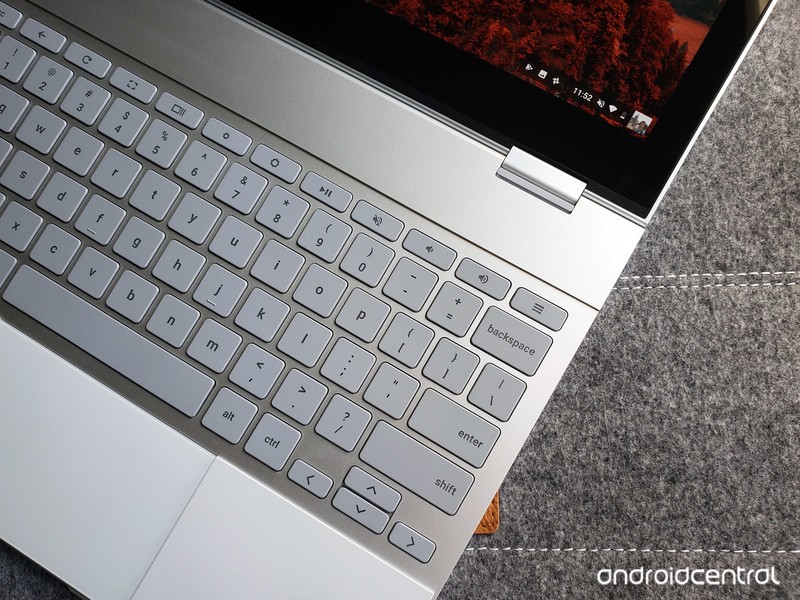
Chromebooks have always been great at the basics like watching Netflix or checking email. Android apps brought a few more productivity tools, but Chromebooks are about to get a lot more useful with the addition of Linux apps.
Products used in this guide
- Amazon: Google Pixelbook – 128GB storage ($999)
Check your Chrome OS version
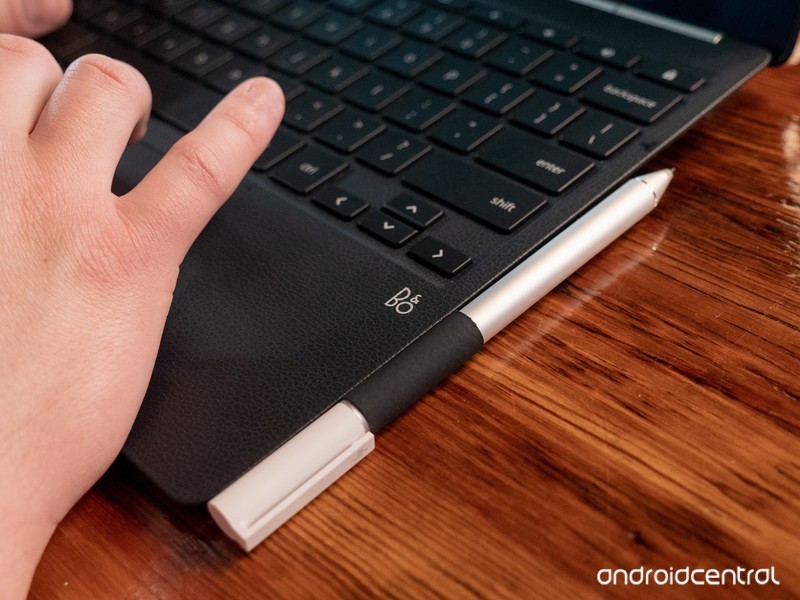
Installing Linux apps requires your Chromebook to be running Chrome OS 69 or later. If you’ve had your Chromebook for a while and want to be sure you’re on the latest software versions, here’s how to check.
Click your profile picture in the lower-right corner.
Click the Settings icon.
Click the Hamburger icon in the upper-left corner.
Click About Chrome OS.
Click Check for updates.
Your Chromebook will make sure it’s on the latest operating system, and download a new one if necessary. When it’s finished downloading, just restart your Chromebook and you’ll be all done!
More: How to change your software channel on Chrome OS
Enable the Crostini flag
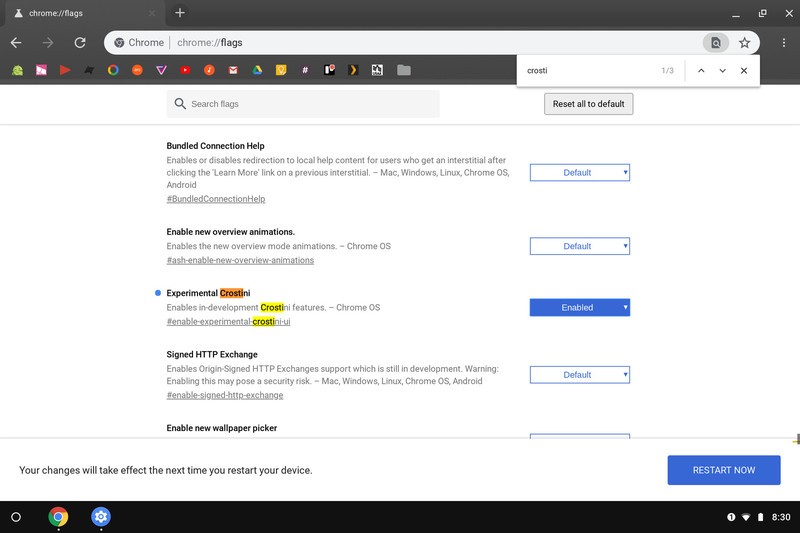
Once your Chromebook is updated to the developer channel software version, you’ll need to change one of the Chrome flags. Flags are semi-hidden settings that let you try experimental features.
Click on the address bar.
Type chrome://flags and press Enter.
Press Ctrl + F on your keyboard.
Type Crostini in the search bar.
You should see the flag titled Experimental Crostini. Click the checkbox, then select Enable.
Click Restart at the bottom of the screen.
Turn on Linux apps
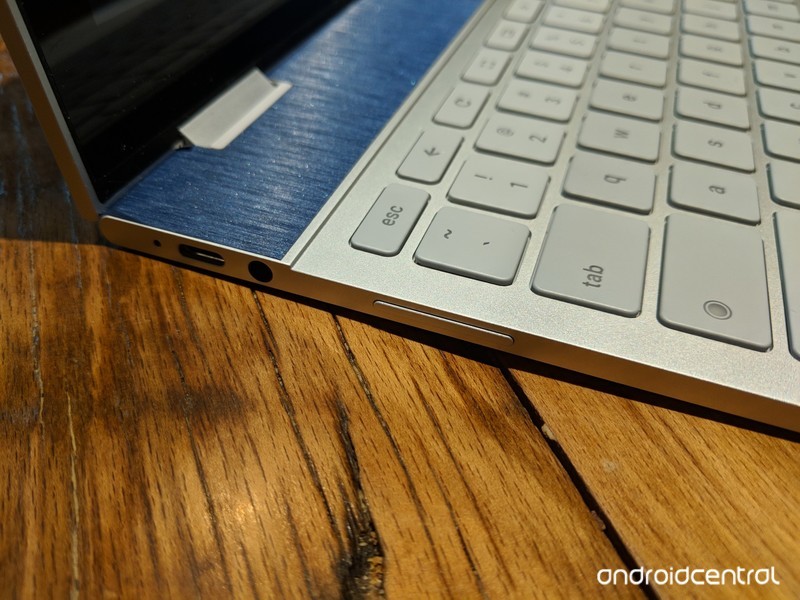
There are just a couple more steps before being able to run Steam and other Linux apps.
Open Settings.
Click the Hamburger icon in the upper-left corner.
Click Linux (Beta) in the menu.
Click Turn on.
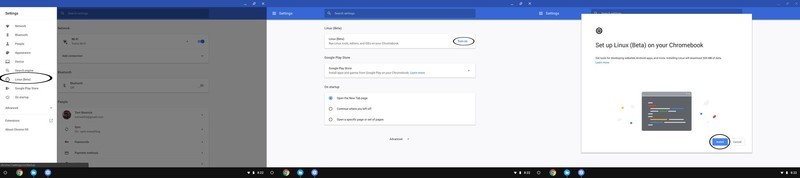
Click Install.
The Chromebook will download the files it needs. When that’s complete, click the white circle in the lower-left corner to open the app drawer.
Click the Terminal icon.
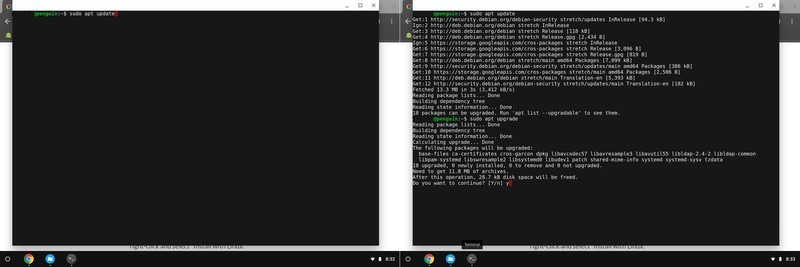
Type sudo apt update in the command window. This will list the Linux components that require an update. Press Enter.
Type sudo apt upgrade in the command window. This will upgrade all the components that were just listed. Press Enter.
When that’s finished, type y to remove excess files. Press Enter.
With that, all the necessary parts of the Linux operating system are installed so you can just install .deb applications from the file browser.
Download and Install an application
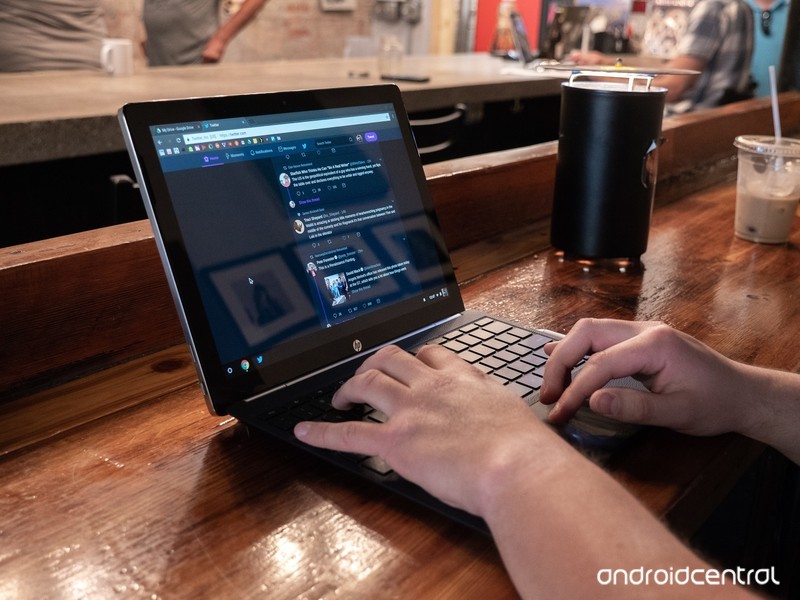
With the prep work done, it’s finally time to install an application. Grab the necessary Linux installation file from your software vendor’s site — we’re using Steam for this guide.
Once the installation file is downloaded, open the File browser.
Click Downloads.
Copy and paste the .deb installation file to the Linux files folder.
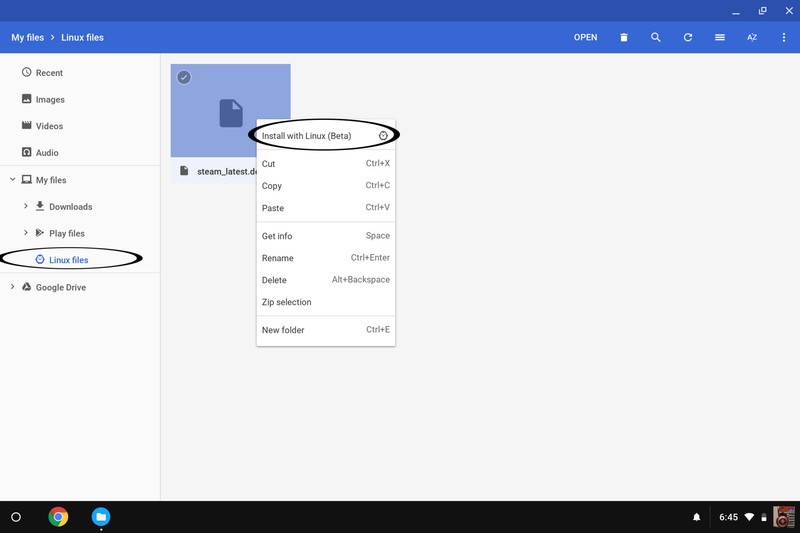
Click Linux files
Right click or two finger tap on the trackpad while your pointer hovers over the file name.
Click Install with Linux (Beta).
The program will install, and when it’s done, you can open it from the app drawer. That’s it!
Our top equipment picks
If you’re going to download a lot of Steam games or Linux programs, you’ll want plenty of local storage. Google”s Pixelbook offers just that, as well as a slick design, awesome keyboard and trackpad and enough guts to keep up with your most demanding tasks.
The Chromebook for you
Google Pixelbook
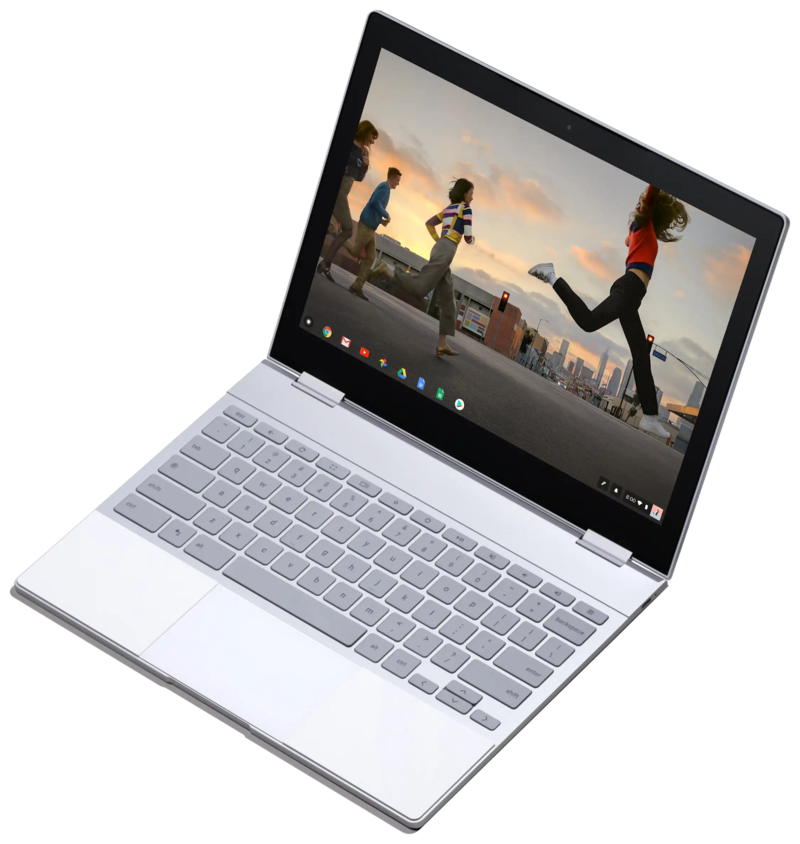
$999 at Amazon
Google’s own Chromebook is the best pick for hardcore Linux users.
If you’re going to get a Chromebook, it should be one with the space and the guts for your favorite applications. The best keyboard, trackpad and screen in the business don’t hurt either.
Any modern Chromebook running the latest software will be able to install Linux apps. But the Pixelbook will provide the best experience for a few reasons: the main one is storage. 128GB of internal storage just means more room for your favorite programs and games. And the other internal specs will be up to the task of running those programs and games smoothly.
Updated September 2018: This article was updated to reflect the fact that Linux apps are now available in the stable channel of Chrome OS.
Amazon offers its latest Echo devices in discounted bundles, pre-order now
Amazon Alexa is now integrated into even more home essentials.
Alexa is getting a makeover! Amazon just announced several new Echo devices which incorporate the Alexa voice assistant. There’s an Echo Wall Clock, an AmazonBasics Microwave, new editions of the Echo Dot and Echo Plus, and even an Echo Input to add Alexa to speakers you already own! Newly announced products rarely receive discounts, but you can already save on these Amazon devices by purchasing them in a bundle of two or more.

One such bundle packages together the new third-generation Echo Dot with Amazon’s Smart Plug for $64.98. While the set doesn’t see a release until October 11, it’d be wise to place your order now and ensure you receive that $10 discount off what they’d cost separately. Another bundle features the Echo Sub with two Echo Plus devices for $329.97. That’s a $100 discount off what they’d cost on their own.
Other bundles you could grab right now include:
- 2-pack Echo Dot (3rd-Gen) for $89.98 (was $100) Must add two to apply discount.
- 2-pack Echo Show (2nd-Gen) for $357.98 (was $458) Must add two to apply discount.
- Echo Plus (2nd-Gen) and free Philips Hue smart bulb for $149.99 (was $165)
- Echo Show (2nd-Gen) and free Philips Hue smart bulb for $229.99 (was $245)
- Echo Show (2nd-Gen) and Ring Video Doorbell Pro for $428.99 (was $479)
You can also save 50% on Echo Auto right now, dropping its price to just $24.99 from $50. However, that deal is by invitation only. You can request an invitation on its product page.
These devices work best if you have a Prime membership at Amazon, considering Prime members can stream over two million songs with Prime Music at no additional charge. Having a Prime membership can also save you monthly on an Amazon Music Unlimited subscription. There are a ton of other Prime-exclusive deals going on right now at Amazon as well, like the Fire Tablet 7’s drop to $35 and the $40 Fire 4K TV.
See at Amazon
Keep a watch on your child at all times with Verizon’s 4G LTE GizmoWatch
Check in at any time.

In today’s era, simply sending your child to school can be worrisome. For parents who’re looking for a bit more peace of mind, Verizon is debuting its GizmoWatch later this year — the first 4G LTE watch for kids powered by Qualcomm.
The GizmoWatch is a successor to LG’s GizmoPal 2, a wearable which allowed for two-way calling with your child and the ability to view the device’s location on your smartphone. The GizmoWatch takes things a step further by implementing Verizon’s 4G LTE network to ensure your child’s calls and texts are sent successfully.
Though the original GizmoPal could only contact two selected phone numbers, the GizmoWatch is capable of calling up to ten numbers which can be set in the GizmoHub app for iOS and Android devices. If your child happens to share their number with someone whose number isn’t on that list, the call won’t go through. The app also allows you to pre-write up to 20 text messages that your child’s watch will be able to send to anyone on the list of contacts.
You’ll be able to track your child’s location using the GizmoHub app too; it can even be set up to send you notifications if your child leaves a predetermined area. The app will show the watch’s battery life and is capable of managing multiple watches too.
For the kids, there’s an integrated fitness and hopscotch tracker where they can keep track of their steps each day. A voice changer has been built-in as well that can make their voice sound like a robot and other fun characters. You’ll have the power to turn off the watch remotely via the app in case you feel like it’s taking attention away from something more important.
The watch is capable of lasting for up to four days depending on usage, and offers seven days of stand-by time. It’ll be released on October 10 to in-store and online at Verizon Wireless for $179.99, though you’ll be able to pre-order beginning on September 20. You’ll also have the option of adding it to your exisiting Verizon plan for only $5 a month (plus taxes and fees).
See at Verizon

Best SD card for the Raspberry Pi 3 B+
We’re a virtual company made up of tech experts from across the globe. We love the Raspberry Pi because it was designed as a learning tool, and it works well for hobbyists due to its low price and extensive support. We also love them for the fact that they’re easy to set up.

SanDisk is the king of flash storage, and its 32GB Ultra card is the best bang for your buck if you’re picking up a Raspberry Pi. You likely won’t need more storage than this, but if you need more, SanDisk and others offer cards with higher capacities.
The SD card for you
SanDisk Ultra 32GB

32GB is plenty for the whatever OS you install on the Raspberry Pi, with some space left over for games, programming environments, and whatever else you want to keep installed. If you intend to install a lot of games though, you may be better served with a higher capacity card.
- $9 from Amazon
A similar card
Samsung EVO Plus 32GB

If for some reason SanDisk’s card isn’t available, this one from Samsung is only a bit more. It’ll be more than fast enough for your Raspberry Pi, and it offers plenty of space for you to tinker.
- $12 from Amazon
More storage
Samsung EVO Plus 64GB

If you’re going to use your Raspberry Pi for gaming or as a desktop computer, more space is always better. This 64GB card is just as fast as the previous one, so it won’t slow your Raspberry Pi down. And it’s only a few dollars more than the 32GB version, but with twice the storage.
$18 at Amazon
Whole lotta space
SanDisk Ultra 64GB

If you’re going to use the Raspberry Pi as a desktop computer or as a game console, you’ll need as much space as you can get for programs and games. This 64GB card is only a little more expensive than the 32GB option but offers twice as much storage.
$25 at Amazon
Less storage, lower price
SanDisk Ultra 16GB

If your Raspberry Pi is being built for one specific application — as a print server, VPN, or another similar task — a 16GB card will be enough space for you. This one from SanDisk is just as fast and reliable as the higher tier models, just with less space.
$8 at Amazon
Bare minimum
Kingston Canvas Select 16GB

16GB is still a lot of space, depending on exactly what you’re using it for. If you need the bare minimum amount of storage for your Raspberry Pi and don’t want to spend any more money than you have to, this is the card for you.
$6 at Amazon
32GB isn’t a lot for our phones, but it’s more than plentiful for the Raspberry Pi 3 B+. You’ll easily have enough space to use the Raspberry Pi as a print server, a VPN, media center or even as a full desktop — so long as you only need basic programs. You CAN get a bigger card — or a smaller one — but the 32GB card is a nice sweet spot. It’s a lot of storage, but you’re not paying for an excessive amount that will just get wasted. And if you find you use your Raspberry Pi for more than the basics, this should be enough space to accommodate you.
Before buying a card, just think about how you’ll use your Raspberry Pi. If it’s only going to be used for something simple, a smaller card will be perfect. If you intend to install a bunch of games or use it as a home movie server, more storage will always be better.
Call of Duty: Black Ops 4’s post-launch content is coming to PS4 first

Everyone’s favorite gaming practice.
Following Call of Duty: Black Ops 4’s release on October 12, Activision and Treyarch are planning to support it with frequent post-launch content activities and events. According to the publisher, these free content drops will be exclusive to PlayStation 4 for the first seven days before making their way onto other platforms.
The following are just a few of the content drops that Activision will be offering after Black Ops 4’s initial release.
- Nuketown: This fan-favorite map returns in November in an all-new take.
- Specialists: The first of several new characters will debut in December.
- Blackout: Launch day is only the start; Blackout will continue to evolve after launch with regular map updates, expansions and new Blackout modes.
- Events: Seasonal, weekly, and time-limited events bringing new game modes and content to players.
Any playable content coming to Black Ops 4 is set to come to PS4 first for one week, including new specialists, maps, and seasonal events.
In addition, PlayStation announced that multiple PS4 bundles will be releasing across Europe after the game’s launch. However, the company did not provide further details. Bundles and prices will vary across regions.
See at PlayStation
See at Amazon
PlayStation 4

- PS4 vs. PS4 Slim vs. PS4 Pro: Which should you buy?
- PlayStation VR Review
- Playing PS4 games through your phone is awesome
Amazon

